Reminder: taki Downtime Weds 9/13
To all taki users:
System Administrators will be taking the taki cluster environment offline Wednesday September 13 from 0800-1700. This is to upgrade the workload management software, SLURM. We expect (and hope) that the downtime will not require the entire nine hour duration. I will send an update toward the end of our downtime window alerting users to normal operation or the unlikely extension of the downtime window.
As always, let us know if you have any questions or concerns by submitting a descriptive help request form found at the following link.
Roy Prouty
UMBC HPCF System Administrator
]]>
To all taki users: System Administrators will be taking the taki cluster environment offline Wednesday September 13 from 0800-1700. This is to upgrade the workload management software, SLURM....
https://dev.my.umbc.edu/api/v0/pixel/news/135357/guest@my.umbc.edu/c7a99d17346eb0fb38b35c7640eba9e2/api/pixel
website
HPCF
https://dev.my.umbc.edu/groups/hpcf
https://assets2-dev.my.umbc.edu/system/shared/avatars/groups/000/001/659/63ae3e64663572042ecdd0ef493c16e1/xsmall.png?1596736674
https://assets3-dev.my.umbc.edu/system/shared/avatars/groups/000/001/659/63ae3e64663572042ecdd0ef493c16e1/original.png?1596736674
https://assets4-dev.my.umbc.edu/system/shared/avatars/groups/000/001/659/63ae3e64663572042ecdd0ef493c16e1/xxlarge.png?1596736674
https://assets3-dev.my.umbc.edu/system/shared/avatars/groups/000/001/659/63ae3e64663572042ecdd0ef493c16e1/xlarge.png?1596736674
https://assets1-dev.my.umbc.edu/system/shared/avatars/groups/000/001/659/63ae3e64663572042ecdd0ef493c16e1/large.png?1596736674
https://assets3-dev.my.umbc.edu/system/shared/avatars/groups/000/001/659/63ae3e64663572042ecdd0ef493c16e1/medium.png?1596736674
https://assets3-dev.my.umbc.edu/system/shared/avatars/groups/000/001/659/63ae3e64663572042ecdd0ef493c16e1/small.png?1596736674
https://assets2-dev.my.umbc.edu/system/shared/avatars/groups/000/001/659/63ae3e64663572042ecdd0ef493c16e1/xsmall.png?1596736674
https://assets1-dev.my.umbc.edu/system/shared/avatars/groups/000/001/659/63ae3e64663572042ecdd0ef493c16e1/xxsmall.png?1596736674
HPCF
0
0
true
Tue, 12 Sep 2023 09:10:01 -0400
Call for Proposals: Blackboard's Digital Teaching Symposium
Submissions due September 18, 2023
Do you have a digital teaching best practice or experience to share with other educators? What strategies help educators excel and thrive in a shifting higher education landscape? Share your experiences with faculty, lecturers, academic technologists, and instructional designers at the Fall 2023 Digital Teaching Symposium, a fully-online, one-day conference, scheduled for Thursday, November 2, 2023.
Examples of topics include:
Innovations in Teaching and Learning
- Low-cost (or free) apps/platforms to enhance teaching
- New teaching tools
- Safeguarding against plagiarism & academic misconduct
- Simple technology for late adopters of technology in the classroom
Digital Teaching Strategies
- Accessibility
- Alternative assignments and assessments
- Competency-based education
- Data & analytics
- Discipline-specific strategies (science, math, psychology, business)
- Diversity, equity, inclusion & belonging
- Evaluation & feedback
- Faculty training & engagement
- Hybrid/blended learning
- Pedagogy Online student engagement
Teaching in Ultra
- Assignments, alternative assessments, course design
- Built-in tools such as journals, quizzes, discussions, etc.
- How to organize information on Learn Ultra
- Transitioning to Learn Ultra
- Using templates in Learn Ultra
Everyone may have noticed a 30 second blip in service as all of the connections automatically failed over.
I wanted to thank the network team for their work having built such a resilient network over the years as well as their work throughout the day yesterday identifying the cause of the issue, pinpointing the exact location of the damage and working with crews to expedite the repairs. Our fiber was repaired around 1am and everything was switched back to our primary links.
If anyone has questions about the outage, the campus internet connections, or anything else related to this, please don't hesitate to contact me.
Damian Doyle
--
Deputy CIO
Division of Information Technology
]]>
Yesterday morning around 11am the campus suffered a cut to its main fiber optic cable feed that provides Internet connectivity to the campus. The cable was damaged by construction crews located a...
https://dev.my.umbc.edu/api/v0/pixel/news/135056/guest@my.umbc.edu/d722fb5121759d0b7c16f8fa5ed9b7d0/api/pixel
Division of Information Technology (DoIT)
https://dev.my.umbc.edu/groups/doit
https://assets2-dev.my.umbc.edu/system/shared/avatars/groups/000/000/021/d27760c5de12c74b73faec8d0e631acf/xsmall.png?1727453227
https://assets2-dev.my.umbc.edu/system/shared/avatars/groups/000/000/021/d27760c5de12c74b73faec8d0e631acf/original.JPG?1727453227
https://assets1-dev.my.umbc.edu/system/shared/avatars/groups/000/000/021/d27760c5de12c74b73faec8d0e631acf/xxlarge.png?1727453227
https://assets3-dev.my.umbc.edu/system/shared/avatars/groups/000/000/021/d27760c5de12c74b73faec8d0e631acf/xlarge.png?1727453227
https://assets2-dev.my.umbc.edu/system/shared/avatars/groups/000/000/021/d27760c5de12c74b73faec8d0e631acf/large.png?1727453227
https://assets2-dev.my.umbc.edu/system/shared/avatars/groups/000/000/021/d27760c5de12c74b73faec8d0e631acf/medium.png?1727453227
https://assets2-dev.my.umbc.edu/system/shared/avatars/groups/000/000/021/d27760c5de12c74b73faec8d0e631acf/small.png?1727453227
https://assets2-dev.my.umbc.edu/system/shared/avatars/groups/000/000/021/d27760c5de12c74b73faec8d0e631acf/xsmall.png?1727453227
https://assets4-dev.my.umbc.edu/system/shared/avatars/groups/000/000/021/d27760c5de12c74b73faec8d0e631acf/xxsmall.png?1727453227
Division of Information Technology (DoIT)
6
0
false
Fri, 01 Sep 2023 16:21:59 -0400
Improved course management tools for Ultra in September
Preview new AI course design assistant tools also coming
As the fall semester starts, the next update for Ultra courses brings improvements to the course management tools and a new stock image resource for course banners. Additionally, faculty will also have access to a new grading interface and we begin exploring an exciting suite of course design assistant tools powered by AI.
Course Management
- Search Unsplash, the largest stock image database for royalty-free images to use for your course banner.
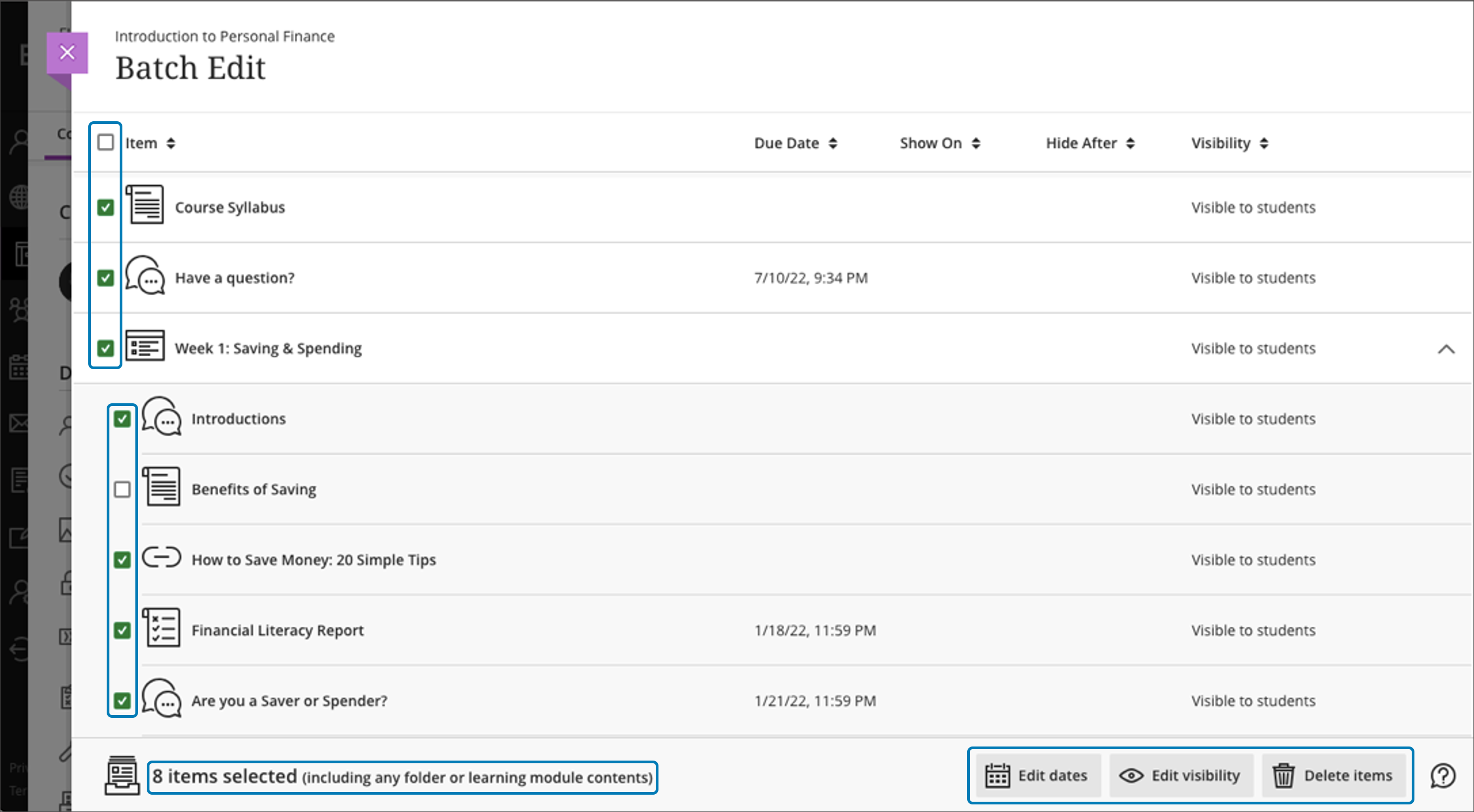
- Batch Edit availability and due dates for content in your course by expanding folders and learning modules on a single page.
Image 1: In the new Batch Edit, all items are now visible on a single page and you can expand and collapse Folders and Learning Modules.
- Copy one, some or all course announcements between Ultra courses, or from Original courses to Ultra.
- Verify student engagement with third-party tools using Progress Tracking. When students complete content in a third-party tool, it will be marked complete.
AI Course Design Assistant Tools
-
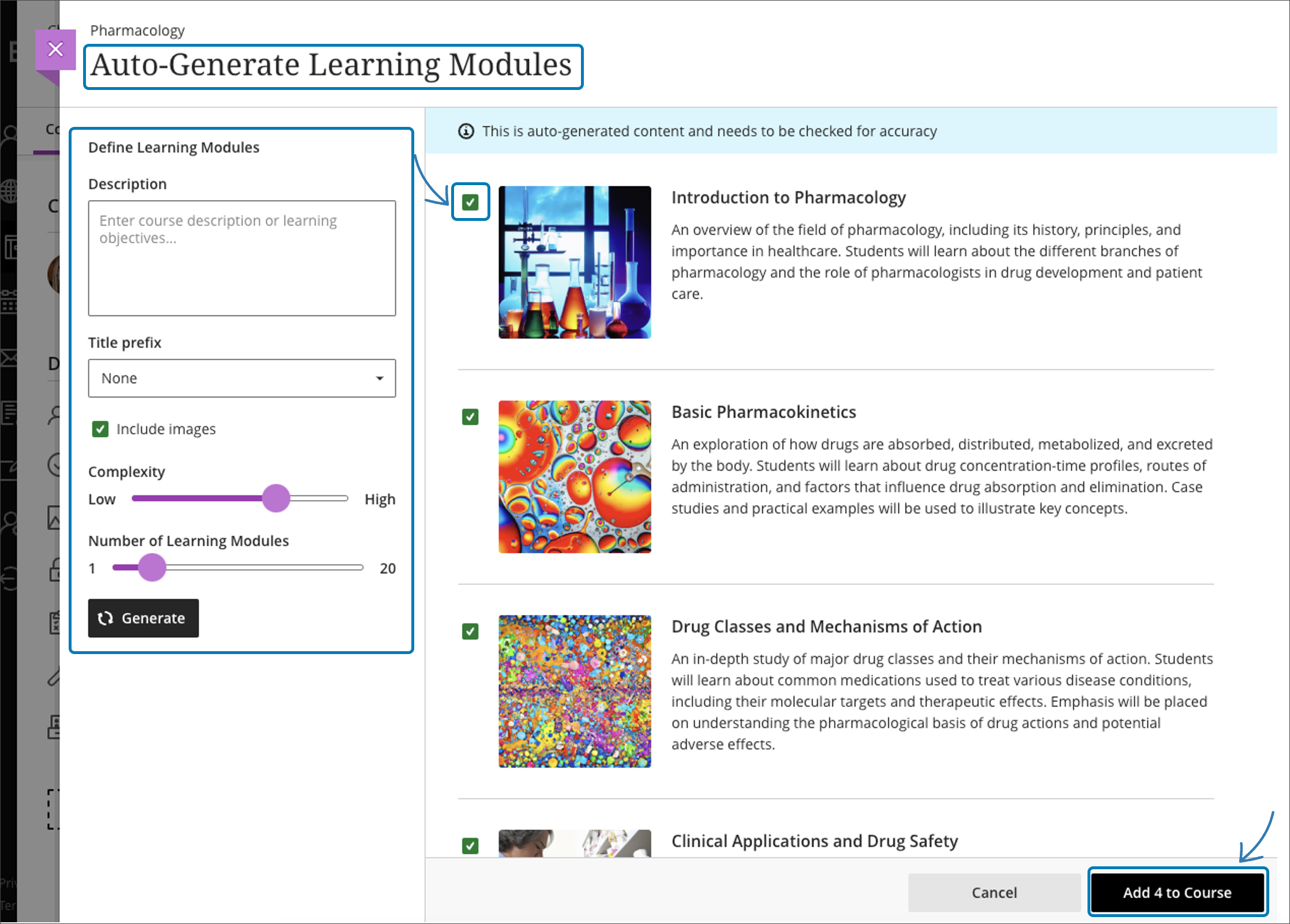
A course-builder assistant. Create sample learning modules, titles, and descriptions.
Image 2: Example of AI-suggested course structure
-
Image suggestion and creation. The assistant can draw from the Unsplash stock image library and suggest thumbnails for illustration in learning modules or identify an image for the course banner. Functionality also includes AI-generated image creation based on course name and keywords.
-
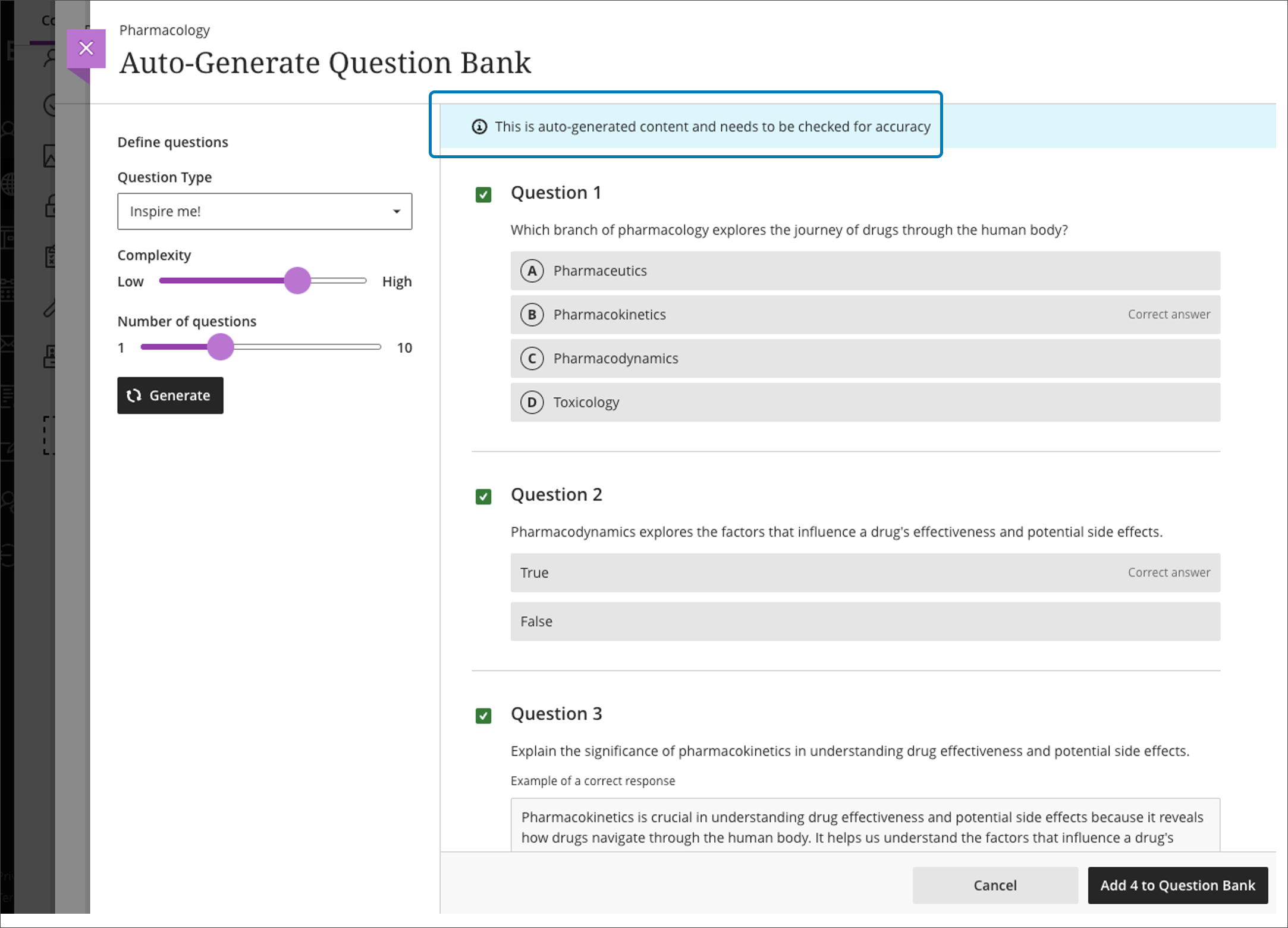
Content-based test generation. AI-powered algorithms analyze an Ultra document's content or inputted learning objectives and quickly generate a diverse set of questions for a test or question bank.
Image 3: Example of AI-generated question bank
-
Rubric creation. Drawing on an assessment or discussion prompt's content, the AI can analyze and streamline the rubric creation process according to specific learning objectives and assessment criteria.
Other updates in September include
-
Flexible Grading, which was activated just before the FA2023 semester started. Flexible Grading features grade by student or question. Instructors can easily move between student attempts and keep track of their grading process. Flexible Grading is supported on desktop, laptop, and tablets. Faculty are invited to join a Flexible Grading preview and training session on September 18, 2023.
-
Auto-captioning of audio and video content used in assessment feedback and announcements. Auto-captioning also supports diverse language preferences, aligning with the user's chosen language in both Original and Ultra courses.
Faculty should see the latest updates in Ultra courses around September 7-8 2023. The next update to our Ultra test environment will take place on September 12, 2023; release notes are posted to the What's New in Ultra that same week. Faculty who are interested in test driving new features before they are released to production should open an RT ticket to request early access. Please
watch the FAQs, including
the What's New with Ultra page,
and myUMBC for additional information about Ultra.
Connect with Instructional Technology
As always, if you have any questions about teaching, learning, and technology at UMBC, please consider the following options:
]]>
As the fall semester starts, the next update for Ultra courses brings improvements to the course management tools and a new stock image resource for course banners. Additionally, faculty will also...
https://my3.my.umbc.edu/groups/instructional-technology/posts/135009
https://dev.my.umbc.edu/api/v0/pixel/news/135009/guest@my.umbc.edu/09a05b190ac396070b0eacadbe29216a/api/pixel
ai
blackboard
flexible-grading
ultra-experience
ultra-update
Instructional Technology
https://dev.my.umbc.edu/groups/instructional-technology
https://assets2-dev.my.umbc.edu/system/shared/avatars/groups/000/001/164/dec3b026b81ee6d890a8f82f75c94a2e/xsmall.png?1446126703
https://assets1-dev.my.umbc.edu/system/shared/avatars/groups/000/001/164/dec3b026b81ee6d890a8f82f75c94a2e/original.png?1446126703
https://assets2-dev.my.umbc.edu/system/shared/avatars/groups/000/001/164/dec3b026b81ee6d890a8f82f75c94a2e/xxlarge.png?1446126703
https://assets1-dev.my.umbc.edu/system/shared/avatars/groups/000/001/164/dec3b026b81ee6d890a8f82f75c94a2e/xlarge.png?1446126703
https://assets1-dev.my.umbc.edu/system/shared/avatars/groups/000/001/164/dec3b026b81ee6d890a8f82f75c94a2e/large.png?1446126703
https://assets4-dev.my.umbc.edu/system/shared/avatars/groups/000/001/164/dec3b026b81ee6d890a8f82f75c94a2e/medium.png?1446126703
https://assets3-dev.my.umbc.edu/system/shared/avatars/groups/000/001/164/dec3b026b81ee6d890a8f82f75c94a2e/small.png?1446126703
https://assets2-dev.my.umbc.edu/system/shared/avatars/groups/000/001/164/dec3b026b81ee6d890a8f82f75c94a2e/xsmall.png?1446126703
https://assets3-dev.my.umbc.edu/system/shared/avatars/groups/000/001/164/dec3b026b81ee6d890a8f82f75c94a2e/xxsmall.png?1446126703
Instructional Technology
https://assets2-dev.my.umbc.edu/system/shared/thumbnails/news/000/135/009/79ef85aca28b5da734f174b439536c44/xxlarge.jpg?1693498242
https://assets1-dev.my.umbc.edu/system/shared/thumbnails/news/000/135/009/79ef85aca28b5da734f174b439536c44/xlarge.jpg?1693498242
https://assets2-dev.my.umbc.edu/system/shared/thumbnails/news/000/135/009/79ef85aca28b5da734f174b439536c44/large.jpg?1693498242
https://assets2-dev.my.umbc.edu/system/shared/thumbnails/news/000/135/009/79ef85aca28b5da734f174b439536c44/medium.jpg?1693498242
https://assets2-dev.my.umbc.edu/system/shared/thumbnails/news/000/135/009/79ef85aca28b5da734f174b439536c44/small.jpg?1693498242
https://assets3-dev.my.umbc.edu/system/shared/thumbnails/news/000/135/009/79ef85aca28b5da734f174b439536c44/xsmall.jpg?1693498242
https://assets2-dev.my.umbc.edu/system/shared/thumbnails/news/000/135/009/79ef85aca28b5da734f174b439536c44/xxsmall.jpg?1693498242
2
0
true
Thu, 31 Aug 2023 13:37:59 -0400
Support student success with Ultra’s progress tracking tools
Discover how and when students engage with course content
The success of students in a Blackboard course is often dependent on their level of engagement and their ability to stay on track with course content and assignments. As an instructor, it's crucial to have the tools and resources to monitor students' progress and ensure they are staying engaged and motivated throughout the course.
An Ultra course provides progress tracking tools to help instructors monitor how much time students are spending in the course, what content they are engaging with, and what their current grades are. This information is invaluable in helping instructors reach out to students who may be struggling or falling behind, and it also helps in retaining students who might otherwise drop out of the course. Progress Tracking is enabled by default in all Ultra courses as of SU2023.
One of the key benefits of tracking students progress is the ability to identify potential issues early on. If a student is not engaging with course content as much as they should be, the instructor can reach out and provide support, resources, or motivation to help the student get back on track. This proactive approach can help students stay engaged and motivated, and it also helps them to understand the importance of their participation and progress in the course.
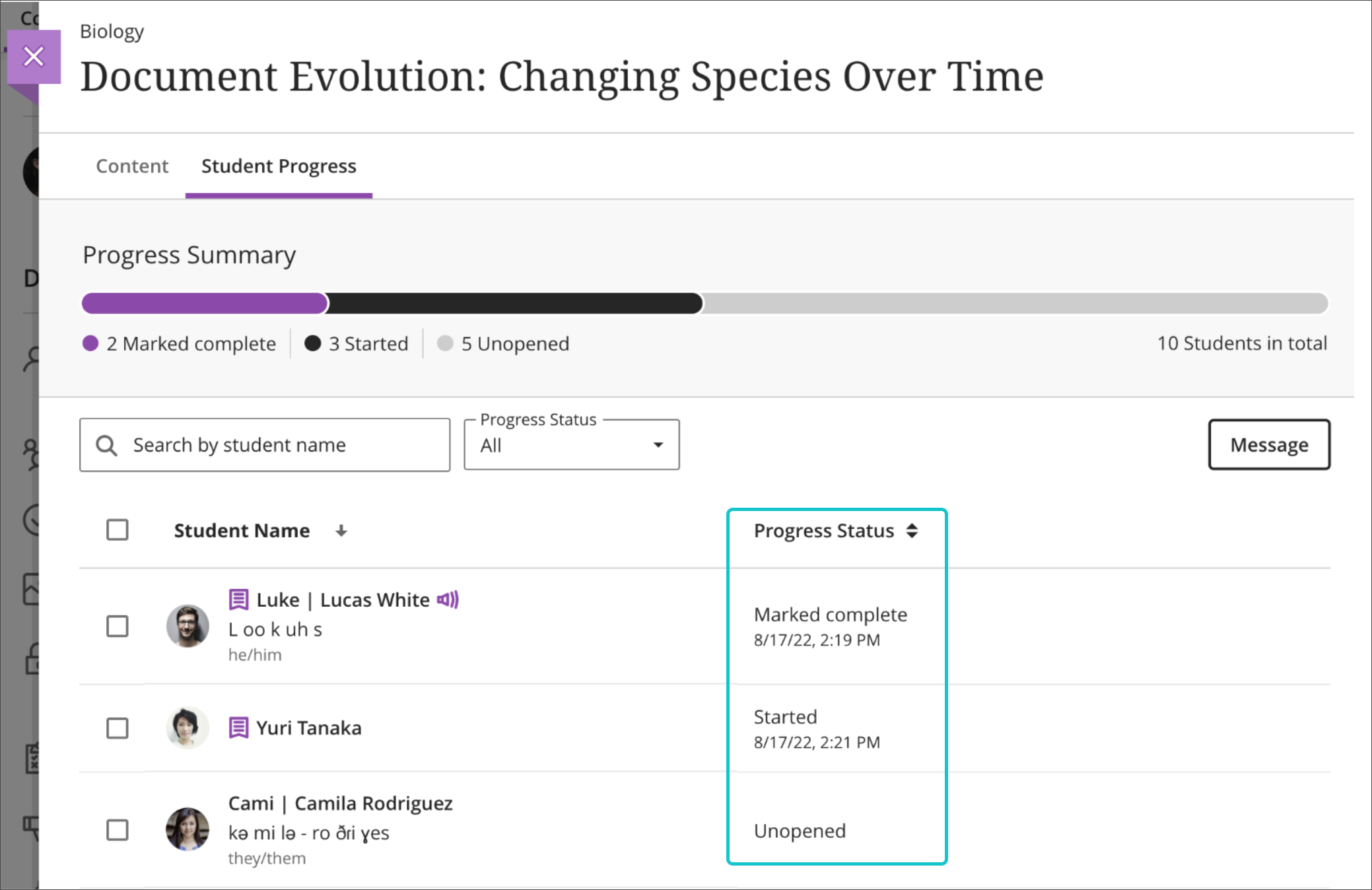
Image 1: Example of Progress Summary report. The Ultra progress tracker allows faculty to view how students are engaging with content in a course. Within the context of each content report, the instructor can easily check boxes for students who are not engaged with course resources and send a message.
Another advantage of progress tracking is the ability to monitor students' time spent in the course and where students are spending that time. Since students have the flexibility to log in and work on course content at any time, some may procrastinate or get sidetracked, leading to a decrease in their engagement and delay in completing assigned tasks. By tracking how much time students are spending in the course and seeing how and where students spend that time, instructors can intervene and provide support to help students stay on track.
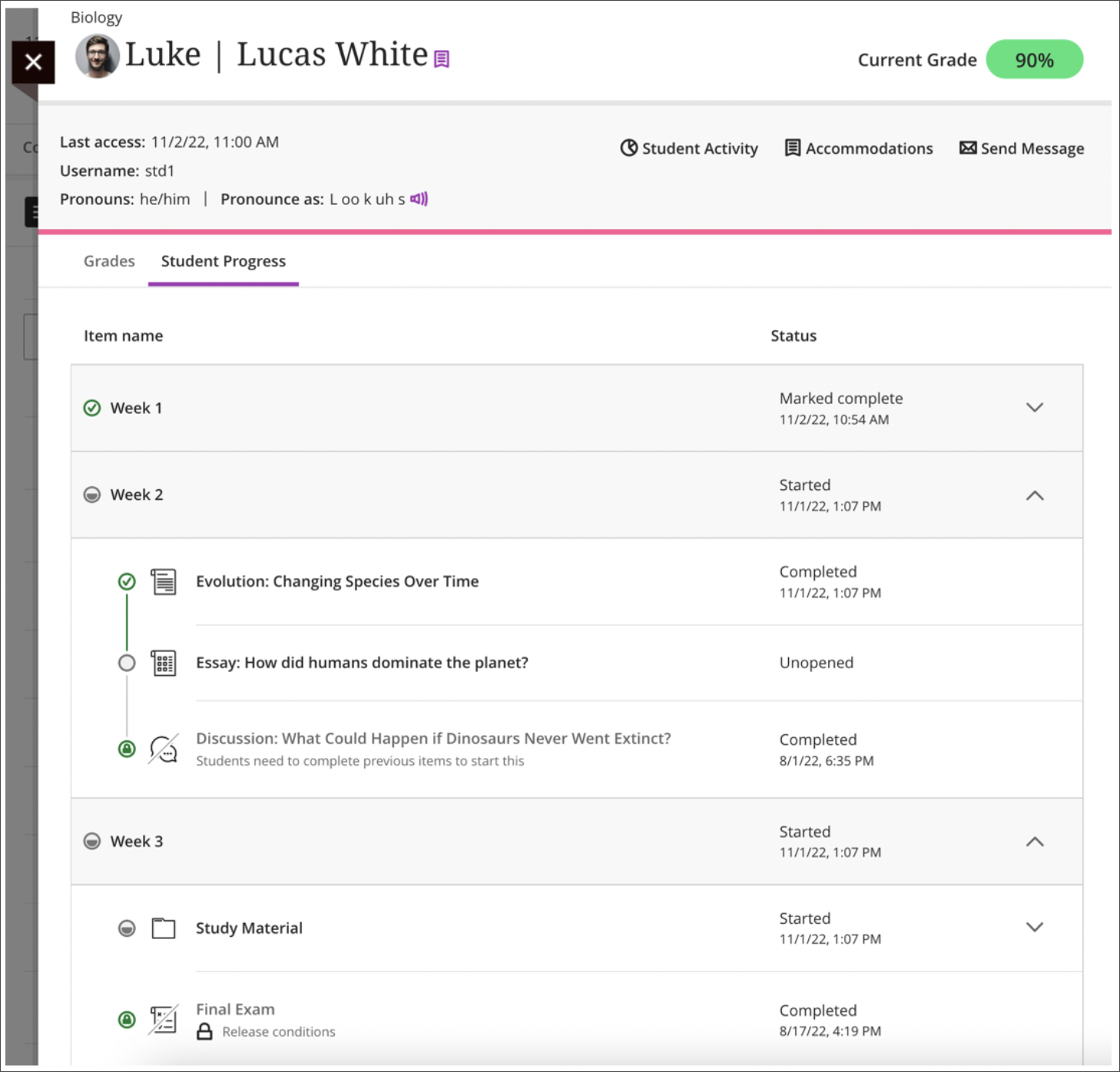
Image 2: Example of Student Progress report, available from the Student Overview. Viewing an individual student's progress in the course will show how s/he has accessed all content to date and the current grade. It's also easy to send that student a message.
Additionally, tracking students' grades helps instructors to monitor their overall performance and provide additional feedback as needed. With progress tracking, instructors can easily see which students are on track for success and which students may need additional support or intervention. From the student's progress report, click on the Student Activity report to view that individual student's time spent in class and its relationship to the overall grade. Instructors can quickly send messages from these various progress tracking tools as well as within the individual submission pages for assessment activities.

Image 3: Example of Course Activity Report. This student spent more time (purple) in his winter course compared to the rest of the class (black).
Here are a few practical tips for instructors to keep in mind when using these tools:
- Leverage learning modules instead of folders. With progress tracking, students can see how much content they've completed and how much content is left to consume or finish. This can be helpful when planning their schedules or motivating to know they have just one or two items left to wrap up.
-
Stay proactive. Regularly check the Student Progress report, available from the Student Overview, and reach out to those who may be struggling. Provide feedback, resources, and encouragement to help students stay on track.
-
Use data to inform decisions. The data you collect from the Progress Summary report can inform your teaching and help you to make data-driven decisions about how to support your students.
-
Personalize your outreach. When reaching out to students, take the time to personalize your message from assessment submissions based on their individual needs and progress. This shows that you care about their success and helps build a positive relationship with your students.
-
Encourage self-reflection. Encourage students to reflect on their progress and engagement, and provide opportunities for them to share their thoughts and experiences with you and their peers.
-
Celebrate successes. Celebrate and acknowledge students' successes and milestones along the way. This helps to keep students motivated and engaged in the course.
Using Ultra's progress tracking tools can be an essential part of your teaching toolkit. By tracking students' engagement, time spent, and overall grades, instructors can intervene and provide support when needed, increase engagement and motivation, and help students succeed in their coursework.
~ Mariann Hawken
GL (gl.umbc.edu) is UMBC's student general access Unix system which is often used for classes.
Now that all faculty, staff and students are enrolled in Duo, beginning today, logging in to GL will require the user to complete a Duo multi-factor authentication (MFA) check, similar to logging in to any UMBC web resource.
Duo addresses several critical security issues for our community. Each year we see a growing trend of accounts being compromised, which often results in losing access to accounts through identity theft, or losing money through various scams. Often compromised accounts are used for phishing and spam emails. The use of Duo goes a long way in preventing these problems.
Please let us know if you have any questions or concerns,
Todd Haddaway
Division of Information Technology
]]>
GL (gl.umbc.edu) is UMBC's student general access Unix system which is often used for classes. Now that all faculty, staff and students are enrolled in Duo, beginning today, logging in to GL...
https://dev.my.umbc.edu/api/v0/pixel/news/134943/guest@my.umbc.edu/a5b2c77f84062fc6c43d619bbda07c45/api/pixel
Division of Information Technology (DoIT)
https://dev.my.umbc.edu/groups/doit
https://assets2-dev.my.umbc.edu/system/shared/avatars/groups/000/000/021/d27760c5de12c74b73faec8d0e631acf/xsmall.png?1727453227
https://assets2-dev.my.umbc.edu/system/shared/avatars/groups/000/000/021/d27760c5de12c74b73faec8d0e631acf/original.JPG?1727453227
https://assets1-dev.my.umbc.edu/system/shared/avatars/groups/000/000/021/d27760c5de12c74b73faec8d0e631acf/xxlarge.png?1727453227
https://assets3-dev.my.umbc.edu/system/shared/avatars/groups/000/000/021/d27760c5de12c74b73faec8d0e631acf/xlarge.png?1727453227
https://assets2-dev.my.umbc.edu/system/shared/avatars/groups/000/000/021/d27760c5de12c74b73faec8d0e631acf/large.png?1727453227
https://assets2-dev.my.umbc.edu/system/shared/avatars/groups/000/000/021/d27760c5de12c74b73faec8d0e631acf/medium.png?1727453227
https://assets2-dev.my.umbc.edu/system/shared/avatars/groups/000/000/021/d27760c5de12c74b73faec8d0e631acf/small.png?1727453227
https://assets2-dev.my.umbc.edu/system/shared/avatars/groups/000/000/021/d27760c5de12c74b73faec8d0e631acf/xsmall.png?1727453227
https://assets4-dev.my.umbc.edu/system/shared/avatars/groups/000/000/021/d27760c5de12c74b73faec8d0e631acf/xxsmall.png?1727453227
Division of Information Technology (DoIT)
1
3
true
Tue, 29 Aug 2023 16:28:22 -0400
Mastering Blackboard Ultra Gradebook & New Flexible Grading
Best Practices to Prep Your Ultra Gradebook for the Semester
Allocating time to configure the Ultra gradebook before the semester starts can support efficient grading throughout the semester. In the recent Gradebook Hacks: 5 Tips to Prep for the Semester session, we explored best practices for instructors to optimize their online gradebook setup. A recap of the best practices and related Blackboard Ultra features to support your assessment and grading practices is shared below.
Define Overall Grade Calculation
Select an overall grade calculation that aligns with the course objectives and stated grading policy. Instructors may select from points-based, weighted, or advanced overall grade calculations.
- Points-based calculations display students' grades based on points earned out of points possible. This calculation can be represented as a running total throughout the semester.
- Weighted grading assigns different percentages to various categories such as assignments and tests, to individual items, or a combination of the two.
- Advanced calculations allow instructors to create custom formulas and calculations.
Overall grade calculations also support rules such as dropping the lowest or highest grades from a particular category.
Customize Grading Schemas
Grading schemas provide transparency and help students understand how their performance will be evaluated. The gradebook supports up to 100 unique schemas, which can be customized in the Gradebook settings. Instructors may select from existing schemas such as Letter, Percent, Complete/Incomplete, or use custom schemas as they configure the settings for each assessment.
Organize the Gradebook with Categories
Organizing the gradebook into categories streamlines the assessment process. Utilize default or custom assessment categories to classify assignments, quizzes, projects, and other assessments. This categorization makes it easier to manage and track student progress while offering a comprehensive overview of their performance in different areas. Additionally, consider distinguishing between formative (ongoing) and summative (final) assessments with the new "formative" assessment label to give students a better understanding of their progress.
Apply Exceptions and Exemptions
Assignment exceptions offer the flexibility to make changes that are specific to one assignment, such as extending a due date or allowing additional attempts. Exemptions exclude an assessment from the student's overall grade calculation, which prevents the assessment from appearing late or applying automatic zero.
Use Filters and Search Options
Filters can help instructors locate specific assignments, students, or assessment categories quickly. This feature enhances efficiency when managing a large number of assessments.
- Course Groups: Create course groups to support filtering in the gradebook, as well as for releasing content to specific users or groups. This can be especially useful when multiple course sections are merged in a single Blackboard course shell.
- Formative Labels: Use the "formative" label on assessments to differentiate between formative and summative assessments. Use gradebook filters to identify formative assessments quickly.
Download Critical Information
Instructors may download assignment submissions, assessment results, analytics, the full gradebook, as well as a complete gradebook history. Downloading submissions can support offline grading throughout the semester. Need to track a change in the gradebook? The gradebook history provides a comprehensive record of all gradebook changes.
New Flexible Grading
Image 1: Example of flexible grading in an assignment.
Connect with Instructional Technology
As always, if you have any questions about teaching, learning, and technology at UMBC, please consider the following options:
]]>
Allocating time to configure the Ultra gradebook before the semester starts can support efficient grading throughout the semester. In the recent Gradebook Hacks: 5 Tips to Prep for the Semester...
https://my3.my.umbc.edu/groups/instructional-technology/posts/134842/
Image
https://assets1-dev.my.umbc.edu/system/shared/attachments/61a0d870ee3b0400ddedb42dccd2dd97/6a04fff3/news/000/134/842/86a2ebc1d9ebc0d693437b61502e03ce/Image 1.png?1693311294
https://dev.my.umbc.edu/api/v0/pixel/news/134842/guest@my.umbc.edu/ea2bad8d7d753e0988302b5f8a38be59/api/pixel
Instructional Technology
https://dev.my.umbc.edu/groups/instructional-technology
https://assets2-dev.my.umbc.edu/system/shared/avatars/groups/000/001/164/dec3b026b81ee6d890a8f82f75c94a2e/xsmall.png?1446126703
https://assets1-dev.my.umbc.edu/system/shared/avatars/groups/000/001/164/dec3b026b81ee6d890a8f82f75c94a2e/original.png?1446126703
https://assets2-dev.my.umbc.edu/system/shared/avatars/groups/000/001/164/dec3b026b81ee6d890a8f82f75c94a2e/xxlarge.png?1446126703
https://assets1-dev.my.umbc.edu/system/shared/avatars/groups/000/001/164/dec3b026b81ee6d890a8f82f75c94a2e/xlarge.png?1446126703
https://assets1-dev.my.umbc.edu/system/shared/avatars/groups/000/001/164/dec3b026b81ee6d890a8f82f75c94a2e/large.png?1446126703
https://assets4-dev.my.umbc.edu/system/shared/avatars/groups/000/001/164/dec3b026b81ee6d890a8f82f75c94a2e/medium.png?1446126703
https://assets3-dev.my.umbc.edu/system/shared/avatars/groups/000/001/164/dec3b026b81ee6d890a8f82f75c94a2e/small.png?1446126703
https://assets2-dev.my.umbc.edu/system/shared/avatars/groups/000/001/164/dec3b026b81ee6d890a8f82f75c94a2e/xsmall.png?1446126703
https://assets3-dev.my.umbc.edu/system/shared/avatars/groups/000/001/164/dec3b026b81ee6d890a8f82f75c94a2e/xxsmall.png?1446126703
Instructional Technology
https://assets4-dev.my.umbc.edu/system/shared/thumbnails/news/000/134/842/a20f3971f5fffe31e2f5fa7c6d13b6b2/xxlarge.jpg?1693312686
https://assets2-dev.my.umbc.edu/system/shared/thumbnails/news/000/134/842/a20f3971f5fffe31e2f5fa7c6d13b6b2/xlarge.jpg?1693312686
https://assets3-dev.my.umbc.edu/system/shared/thumbnails/news/000/134/842/a20f3971f5fffe31e2f5fa7c6d13b6b2/large.jpg?1693312686
https://assets2-dev.my.umbc.edu/system/shared/thumbnails/news/000/134/842/a20f3971f5fffe31e2f5fa7c6d13b6b2/medium.jpg?1693312686
https://assets3-dev.my.umbc.edu/system/shared/thumbnails/news/000/134/842/a20f3971f5fffe31e2f5fa7c6d13b6b2/small.jpg?1693312686
https://assets4-dev.my.umbc.edu/system/shared/thumbnails/news/000/134/842/a20f3971f5fffe31e2f5fa7c6d13b6b2/xsmall.jpg?1693312686
https://assets1-dev.my.umbc.edu/system/shared/thumbnails/news/000/134/842/a20f3971f5fffe31e2f5fa7c6d13b6b2/xxsmall.jpg?1693312686
3
0
true
Tue, 29 Aug 2023 08:47:42 -0400
Baltimore County Public Schools Joins the Cyber Range
MIIC announces that BCPS has joined the Cyber Range
The Maryland Institute for Innovative Computing (MIIC) is pleased to announce that Baltimore County Public Schools (BCPS) is now the newest member of the Maryland Education Cyber Range initiative, joining twelve other Maryland counties on Virginia Tech's US Cyber Range. BCPS offers two Career and Technical Education pathways in Information Technology, one in Computer Science, and one in Network Engineering, as well as Pathways in Technology Early College High School (P-TECH). The US Cyber Range provides the opportunity for hands-on exercises and virtual environments to supplement the courses required for these pathways. Increasing access to cybersecurity education for K-12 is an integral component of the state's efforts to improve computing education and reduce the cybersecurity workforce gap. The Maryland Center for Computing Education has helped to spearhead and shepherd efforts to shrink this gap of over 15,000 open computing positions in the state by providing professional development to teachers, and ensuring that nearly every high school in the state provides computer science courses.
]]>
The Maryland Institute for Innovative Computing (MIIC) is pleased to announce that Baltimore County Public Schools (BCPS) is now the newest member of the Maryland Education Cyber Range initiative,...
https://dev.my.umbc.edu/api/v0/pixel/news/134849/guest@my.umbc.edu/28e4e9f1385083eecb1a6ce9f8e931ac/api/pixel
Maryland Institute for Innovative Computing
https://dev.my.umbc.edu/groups/miic
https://assets3-dev.my.umbc.edu/images/avatars/group/10/xsmall.png?1778631627
https://assets1-dev.my.umbc.edu/images/avatars/group/10/original.png?1778631627
https://assets1-dev.my.umbc.edu/images/avatars/group/10/xxlarge.png?1778631627
https://assets3-dev.my.umbc.edu/images/avatars/group/10/xlarge.png?1778631627
https://assets2-dev.my.umbc.edu/images/avatars/group/10/large.png?1778631627
https://assets2-dev.my.umbc.edu/images/avatars/group/10/medium.png?1778631627
https://assets4-dev.my.umbc.edu/images/avatars/group/10/small.png?1778631627
https://assets3-dev.my.umbc.edu/images/avatars/group/10/xsmall.png?1778631627
https://assets2-dev.my.umbc.edu/images/avatars/group/10/xxsmall.png?1778631627
Maryland Institute for Innovative Computing
https://assets1-dev.my.umbc.edu/system/shared/thumbnails/news/000/134/849/09bf20726431fc5cb53a6b630f14bd22/xxlarge.jpg?1692820912
https://assets3-dev.my.umbc.edu/system/shared/thumbnails/news/000/134/849/09bf20726431fc5cb53a6b630f14bd22/xlarge.jpg?1692820912
https://assets3-dev.my.umbc.edu/system/shared/thumbnails/news/000/134/849/09bf20726431fc5cb53a6b630f14bd22/large.jpg?1692820912
https://assets1-dev.my.umbc.edu/system/shared/thumbnails/news/000/134/849/09bf20726431fc5cb53a6b630f14bd22/medium.jpg?1692820912
https://assets2-dev.my.umbc.edu/system/shared/thumbnails/news/000/134/849/09bf20726431fc5cb53a6b630f14bd22/small.jpg?1692820912
https://assets3-dev.my.umbc.edu/system/shared/thumbnails/news/000/134/849/09bf20726431fc5cb53a6b630f14bd22/xsmall.jpg?1692820912
https://assets2-dev.my.umbc.edu/system/shared/thumbnails/news/000/134/849/09bf20726431fc5cb53a6b630f14bd22/xxsmall.jpg?1692820912
0
0
true
Wed, 23 Aug 2023 16:04:14 -0400
Scheduled Downtime of taki Cluster Completed
To all taki users,
The taki downtime scheduled for today from 0800-1700 has completed. We have updated the operating system and cluster management software stack. We have run some small jobs to confirm normal operating conditions, but will otherwise rely on user reports of unforeseen issues potentially related to the downtime.
Therefore, please let us know if you notice any issues or if you have any questions or concerns by submitting a descriptive help request form found at the following link.
The next few scheduled downtimes for the HPCF are listed below:
Tuesday August 29, 0800-1700 for upgrade ada OS and management software stack
*Wednesday September 13, 0800-1700 for upgrading taki SLURM
Tuesday September 19, 0800-1700 for upgrading ada SLURM
* In order to support classes currently running on the taki cluster, we’ve moved this downtime from Tuesday to Wednesday
Roy Prouty
HPCF System Administrator, UMBC DoIT
Director, UMBC Observatory
PhD Candidate, CSEE
]]>
To all taki users, The taki downtime scheduled for today from 0800-1700 has completed. We have updated the operating system and cluster management software stack. We have run some small jobs...
https://dev.my.umbc.edu/api/v0/pixel/news/134830/guest@my.umbc.edu/e7a5108fd9fe930fbff46115788cc119/api/pixel
website
HPCF
https://dev.my.umbc.edu/groups/hpcf
https://assets2-dev.my.umbc.edu/system/shared/avatars/groups/000/001/659/63ae3e64663572042ecdd0ef493c16e1/xsmall.png?1596736674
https://assets3-dev.my.umbc.edu/system/shared/avatars/groups/000/001/659/63ae3e64663572042ecdd0ef493c16e1/original.png?1596736674
https://assets4-dev.my.umbc.edu/system/shared/avatars/groups/000/001/659/63ae3e64663572042ecdd0ef493c16e1/xxlarge.png?1596736674
https://assets3-dev.my.umbc.edu/system/shared/avatars/groups/000/001/659/63ae3e64663572042ecdd0ef493c16e1/xlarge.png?1596736674
https://assets1-dev.my.umbc.edu/system/shared/avatars/groups/000/001/659/63ae3e64663572042ecdd0ef493c16e1/large.png?1596736674
https://assets3-dev.my.umbc.edu/system/shared/avatars/groups/000/001/659/63ae3e64663572042ecdd0ef493c16e1/medium.png?1596736674
https://assets3-dev.my.umbc.edu/system/shared/avatars/groups/000/001/659/63ae3e64663572042ecdd0ef493c16e1/small.png?1596736674
https://assets2-dev.my.umbc.edu/system/shared/avatars/groups/000/001/659/63ae3e64663572042ecdd0ef493c16e1/xsmall.png?1596736674
https://assets1-dev.my.umbc.edu/system/shared/avatars/groups/000/001/659/63ae3e64663572042ecdd0ef493c16e1/xxsmall.png?1596736674
HPCF
0
0
false
Tue, 22 Aug 2023 17:57:31 -0400
REX Now Available - Maintenance Complete
The REX maintenance has been completed and REX is now available.
As a reminder, as part of this upgrade we renamed the servers.
While we tried to verify that all functionality is working, if you do run into any issues, please submit an RT ticket to the REX queue. You can do so by going to
https://rex.umbc.edu/ and selecting "Request help with Data, Reports, or Analytics" under the "Getting Help" menu item.
Thank you for your patience and understanding while we performed this maintenance.
]]>
The REX maintenance has been completed and REX is now available. As a reminder, as part of this upgrade we renamed the servers. What this means to you. If you have bookmarked links to...
https://dev.my.umbc.edu/api/v0/pixel/news/134784/guest@my.umbc.edu/16c1350999e4de9b59260264debd4221/api/pixel
Report Exchange (REX)
https://dev.my.umbc.edu/groups/rex
https://assets1-dev.my.umbc.edu/system/shared/avatars/groups/000/000/027/84d2a013f34a449185e0a8b510929235/xsmall.png?1349113538
https://assets2-dev.my.umbc.edu/system/shared/avatars/groups/000/000/027/84d2a013f34a449185e0a8b510929235/original.png?1349113538
https://assets1-dev.my.umbc.edu/system/shared/avatars/groups/000/000/027/84d2a013f34a449185e0a8b510929235/xxlarge.png?1349113538
https://assets1-dev.my.umbc.edu/system/shared/avatars/groups/000/000/027/84d2a013f34a449185e0a8b510929235/xlarge.png?1349113538
https://assets1-dev.my.umbc.edu/system/shared/avatars/groups/000/000/027/84d2a013f34a449185e0a8b510929235/large.png?1349113538
https://assets2-dev.my.umbc.edu/system/shared/avatars/groups/000/000/027/84d2a013f34a449185e0a8b510929235/medium.png?1349113538
https://assets1-dev.my.umbc.edu/system/shared/avatars/groups/000/000/027/84d2a013f34a449185e0a8b510929235/small.png?1349113538
https://assets1-dev.my.umbc.edu/system/shared/avatars/groups/000/000/027/84d2a013f34a449185e0a8b510929235/xsmall.png?1349113538
https://assets4-dev.my.umbc.edu/system/shared/avatars/groups/000/000/027/84d2a013f34a449185e0a8b510929235/xxsmall.png?1349113538
Report Exchange (REX)
0
0
false
Sat, 19 Aug 2023 20:45:02 -0400