<?xml version="1.0"?>
<News hasArchived="false" page="12" pageCount="50" pageSize="10" timestamp="Mon, 27 Apr 2026 05:36:15 -0400" url="https://dev.my.umbc.edu/groups/doit/posts.xml?page=12&amp;tag=blackboard">
  <NewsItem contentIssues="true" id="126594" important="false" status="posted" url="https://dev.my.umbc.edu/groups/doit/posts/126594">
  <Title>FA2022 Courses Created in Blackboard on July 28, 2022</Title>
  <Body>
    <![CDATA[
    <div class="html-content"><p>Blackboard course shells for FA2022 <a href="https://wiki.umbc.edu/x/eYHGAw" rel="nofollow external" class="bo">were created</a> on July 28, 2022.</p><p><span>The </span><a href="https://wiki.umbc.edu/x/VIdnB" rel="nofollow external" class="bo"><span>Ultra Course Preview</span></a><span> setting is again enabled in FA2022 courses, which allows faculty</span><span> to convert a new Original course to see what it </span><span><a href="https://wiki.umbc.edu/x/VIdnB" rel="nofollow external" class="bo">looks like in Ultra</a></span><span>. </span></p><ul><li><span>Please review the </span><a href="https://wiki.umbc.edu/x/LohnB" rel="nofollow external" class="bo">release notes</a><span> for the latest updates as well as</span><span> <a href="https://docs.google.com/spreadsheets/d/1kkG0toIfhmykbbwCeSDd8NopHp19CH7D5rPd95mxji8/edit?usp=sharing" rel="nofollow external" class="bo">feature parity charts</a> --</span><span> <a href="https://doit.umbc.edu/news/?tag=ultra-experience" rel="nofollow external" class="bo">more than 30 new updates</a> were added over the last few months including points-based gradebook and rubrics, question banks, and more!</span><span> </span></li><li><span>Learn more about <a href="https://my3.my.umbc.edu/groups/instructional-technology/events?mode=upcoming&amp;tag=whats-new" rel="nofollow external" class="bo">What's New in Ultra for </a></span><span><a href="https://my3.my.umbc.edu/groups/instructional-technology/events?mode=upcoming&amp;tag=whats-new" rel="nofollow external" class="bo">Teaching &amp; Learning</a> on August 1 or 11.</span></li><li><span>Attend <a href="https://my3.my.umbc.edu/groups/instructional-technology/events?mode=upcoming&amp;tag=essentials" rel="nofollow external" class="bo">an Ultra Essentials training</a> on August 16 and 17.</span></li><li><span>Have a question about Ultra? Ask </span><a href="https://wiki.umbc.edu/x/kAU9BQ" rel="nofollow external" class="bo">an Ultra Ambassador</a><span>!</span></li></ul><p><span>Ally, an </span><a href="https://doit.umbc.edu/news/?id=82487" rel="nofollow external" class="bo"><span>accessibility tool</span></a><span>, is also enabled in all course shells. Ally automatically scans uploaded and created course content, then performs a series of steps to make that content more accessible. Please review the </span><a href="https://wiki.umbc.edu/x/2IGdB" rel="nofollow external" class="bo"><span>Ally FAQs</span></a><span> for more information about the </span><a href="https://wiki.umbc.edu/x/_YGdB" rel="nofollow external" class="bo"><span>accessibility indicators</span></a><span> on course content and </span><a href="https://wiki.umbc.edu/x/3IGdB" rel="nofollow external" class="bo"><span>alternative formats</span></a><span>.</span></p><p><span>For faculty who will be teaching hybrid or online, the instructional technology team would like to share several resources to support online course development and instruction.</span></p><ol><li><span>Choose from our </span><a href="https://pivot.umbc.edu/pivot-solo/" rel="nofollow external" class="bo">PIVOT Solo</a><span> lessons to refresh or enhance your online teaching preparation. Five key topics cover course organization, active learning, community building, assessment, and supporting students. </span></li><li><span>Explore </span><a href="https://umbc.hosted.panopto.com/Panopto/Pages/Sessions/List.aspx#folderID=%2274ac9d58-1779-44c1-92b7-ab6900dfe6e9%22" rel="nofollow external" class="bo">our Panopto folder</a><span> for a wide variety of recorded webinars on various instructional technologies available at UMBC.</span></li><li><span>Learn about <a href="https://pivot.umbc.edu/course-design/quality-matters/quality-matters-impact/" rel="nofollow external" class="bo">the Quality Matters Impact program</a>, a new initiative to formally recognize courses that meet <a href="https://www.qualitymatters.org/" rel="nofollow external" class="bo">Quality Matters standards</a> and demonstrate exemplary online/hybrid course design.</span></li></ol><div><strong>About Course Creation</strong></div><div><span><br></span></div><div><span>Bb shells for FA2022 are available for all courses (designated as lecture, lab, field or discussion) listed in the </span><a href="http://my.umbc.edu/go/schedule" rel="nofollow external" class="bo">UMBC Schedule of Classes (SOC)</a><span>, provided that there is an </span><a href="http://www.umbc.edu/blogs/oit-news/archives/2010/08/how_new_employe_1.html" rel="nofollow external" class="bo">instructor of record</a><span> listed. As new course sections and/or instructors are added to the SOC by </span><a href="https://docs.google.com/a/umbc.edu/document/d/1rwm_adJUvAP3cxL-QCrb56n9ql4xrR8FHd9_1Cw0vJI/edit?usp%3Dsharing" rel="nofollow external" class="bo">Department Scheduling Coordinators</a><span>, corresponding Bb shells are automatically generated overnight. </span></div><ul><li>If you are an instructor, and your name is not associated with the course you are teaching in the <a href="http://my.umbc.edu/go/schedule" rel="nofollow external" class="bo">SOC</a>, please see your <a href="https://docs.google.com/a/umbc.edu/document/d/1rwm_adJUvAP3cxL-QCrb56n9ql4xrR8FHd9_1Cw0vJI/edit?usp%3Dsharing" rel="nofollow external" class="bo">Departmental Scheduling Coordinator</a> to resolve the issue. Once you are listed in the <a href="https://my.umbc.edu/go/schedule" rel="nofollow external" class="bo">SOC</a>, your Bb course shell will be created automatically. </li><li>If you and your <a href="https://docs.google.com/a/umbc.edu/document/d/1rwm_adJUvAP3cxL-QCrb56n9ql4xrR8FHd9_1Cw0vJI/edit?usp%3Dsharing" rel="nofollow external" class="bo">Department Scheduling Coordinator</a> believe you are correctly assigned as the instructor of record in the SOC and you do not see your course shell in Blackboard, please submit a Request Tracker (RT) ticket via <a href="https://my.umbc.edu/help" rel="nofollow external" class="bo">my.umbc.edu/help</a>.</li><li>If you need a Bb shell for a research or independent study course, please submit a <a href="http://www.umbc.edu/doit/blackboard/requestbbshell.html" rel="nofollow external" class="bo">new course request</a>.</li></ul><p>Instructors who teach multiple sections of the same course will find those enrollments merged into one Bb course shell. These sections may be split upon <a href="https://my.umbc.edu/go/request-help" rel="nofollow external" class="bo">request by an RT ticket</a>, which we recommend <a href="https://wiki.umbc.edu/x/d4HGAw" rel="nofollow external" class="bo">submitting at least one week</a> before the semester starts, if not as soon as courses are created in Blackboard.</p><p>Student enrollment in Bb mirrors the official registration in SA and updates hourly. However, courses are not accessible to students by default until the instructor of record <a href="https://wiki.umbc.edu/pages/viewpage.action?pageId%3D1867862" rel="nofollow external" class="bo">makes them available</a>.</p><div><span>As always, if you have any questions about teaching, learning, and technology at UMBC, please consider the following options:</span></div><div><ul><li><span><a href="http://pivot.umbc.edu" rel="nofollow external" class="bo">PIVOT</a> | <a href="https://doit.umbc.edu/itnm/academic-continuity/" rel="nofollow external" class="bo">Academic Continuity</a></span><span> </span><span>|</span><span> </span><span><a href="https://fdc.umbc.edu/teaching/keep-on-teaching/" rel="nofollow external" class="bo">Keep On Teaching</a></span><span> </span><span>|</span><span> </span><span><a href="https://doit.umbc.edu/students" rel="nofollow external" class="bo">Student Technology Resources</a></span></li><li><a href="http://www.umbc.edu/faq" rel="nofollow external" class="bo">Check our extensive FAQ collection</a><span> </span></li><ul><li><span><a href="https://wiki.umbc.edu/x/LohnB" rel="nofollow external" class="bo"><span>What's new in Ultra?</span></a><span> </span><span>|</span><span> </span><a href="https://wiki.umbc.edu/x/bwrSAQ" rel="nofollow external" class="bo"><span>Known Issues</span></a><span> </span></span></li></ul><li><span><a href="http://my.umbc.edu/go/request-help" rel="nofollow external" class="bo">Open a ticket via RT</a></span></li><li><span>Follow the </span><a href="http://my.umbc.edu/groups/instructional-technology" rel="nofollow external" class="bo">Instructional Technology</a><span> &amp; </span><a href="http://my.umbc.edu/groups/doit" rel="nofollow external" class="bo">DoIT</a><span> myUMBC groups</span></li><li><a href="http://doit.umbc.edu/itnm/staff/" rel="nofollow external" class="bo">Request a consult</a><span> with <a href="http://doit.umbc.edu/itnm/staff" rel="nofollow external" class="bo">instructional technology staff</a></span></li></ul></div></div>
]]>
  </Body>
  <Summary>Blackboard course shells for FA2022 were created on July 28, 2022.  The Ultra Course Preview setting is again enabled in FA2022 courses, which allows faculty to convert a new Original course to...</Summary>
  <Website>https://my3.my.umbc.edu/groups/instructional-technology/posts/126594</Website>
  <TrackingUrl>https://dev.my.umbc.edu/api/v0/pixel/news/126594/guest@my.umbc.edu/1f684ba14f50549bdd8c2d5e3eaa53f5/api/pixel</TrackingUrl>
  <Tag>blackboard</Tag>
  <Tag>course-creation</Tag>
  <Tag>fa2022</Tag>
  <Tag>fall</Tag>
  <Tag>ultra-course-preview</Tag>
  <Group token="instructional-technology">Instructional Technology</Group>
  <GroupUrl>https://dev.my.umbc.edu/groups/instructional-technology</GroupUrl>
  <AvatarUrl>https://assets2-dev.my.umbc.edu/system/shared/avatars/groups/000/001/164/dec3b026b81ee6d890a8f82f75c94a2e/xsmall.png?1446126703</AvatarUrl>
  <AvatarUrl size="original">https://assets1-dev.my.umbc.edu/system/shared/avatars/groups/000/001/164/dec3b026b81ee6d890a8f82f75c94a2e/original.png?1446126703</AvatarUrl>
  <AvatarUrl size="xxlarge">https://assets2-dev.my.umbc.edu/system/shared/avatars/groups/000/001/164/dec3b026b81ee6d890a8f82f75c94a2e/xxlarge.png?1446126703</AvatarUrl>
  <AvatarUrl size="xlarge">https://assets1-dev.my.umbc.edu/system/shared/avatars/groups/000/001/164/dec3b026b81ee6d890a8f82f75c94a2e/xlarge.png?1446126703</AvatarUrl>
  <AvatarUrl size="large">https://assets1-dev.my.umbc.edu/system/shared/avatars/groups/000/001/164/dec3b026b81ee6d890a8f82f75c94a2e/large.png?1446126703</AvatarUrl>
  <AvatarUrl size="medium">https://assets4-dev.my.umbc.edu/system/shared/avatars/groups/000/001/164/dec3b026b81ee6d890a8f82f75c94a2e/medium.png?1446126703</AvatarUrl>
  <AvatarUrl size="small">https://assets3-dev.my.umbc.edu/system/shared/avatars/groups/000/001/164/dec3b026b81ee6d890a8f82f75c94a2e/small.png?1446126703</AvatarUrl>
  <AvatarUrl size="xsmall">https://assets2-dev.my.umbc.edu/system/shared/avatars/groups/000/001/164/dec3b026b81ee6d890a8f82f75c94a2e/xsmall.png?1446126703</AvatarUrl>
  <AvatarUrl size="xxsmall">https://assets3-dev.my.umbc.edu/system/shared/avatars/groups/000/001/164/dec3b026b81ee6d890a8f82f75c94a2e/xxsmall.png?1446126703</AvatarUrl>
  <Sponsor>Instructional Technology</Sponsor>
  <ThumbnailUrl size="xxlarge">https://assets3-dev.my.umbc.edu/system/shared/thumbnails/news/000/126/594/1f36f6c9e457612b465c9df70c540995/xxlarge.jpg?1659094407</ThumbnailUrl>
  <ThumbnailUrl size="xlarge">https://assets1-dev.my.umbc.edu/system/shared/thumbnails/news/000/126/594/1f36f6c9e457612b465c9df70c540995/xlarge.jpg?1659094407</ThumbnailUrl>
  <ThumbnailUrl size="large">https://assets4-dev.my.umbc.edu/system/shared/thumbnails/news/000/126/594/1f36f6c9e457612b465c9df70c540995/large.jpg?1659094407</ThumbnailUrl>
  <ThumbnailUrl size="medium">https://assets3-dev.my.umbc.edu/system/shared/thumbnails/news/000/126/594/1f36f6c9e457612b465c9df70c540995/medium.jpg?1659094407</ThumbnailUrl>
  <ThumbnailUrl size="small">https://assets4-dev.my.umbc.edu/system/shared/thumbnails/news/000/126/594/1f36f6c9e457612b465c9df70c540995/small.jpg?1659094407</ThumbnailUrl>
  <ThumbnailUrl size="xsmall">https://assets3-dev.my.umbc.edu/system/shared/thumbnails/news/000/126/594/1f36f6c9e457612b465c9df70c540995/xsmall.jpg?1659094407</ThumbnailUrl>
  <ThumbnailUrl size="xxsmall">https://assets3-dev.my.umbc.edu/system/shared/thumbnails/news/000/126/594/1f36f6c9e457612b465c9df70c540995/xxsmall.jpg?1659094407</ThumbnailUrl>
  <PawCount>3</PawCount>
  <CommentCount>0</CommentCount>
  <CommentsAllowed>true</CommentsAllowed>
  <PostedAt>Fri, 29 Jul 2022 08:13:09 -0400</PostedAt>
  <EditAt>Tue, 02 Aug 2022 10:26:56 -0400</EditAt>
</NewsItem>
  <NewsItem contentIssues="true" id="126375" important="false" status="posted" url="https://dev.my.umbc.edu/groups/doit/posts/126375">
  <Title>August Release Brings Major Question Banks Update to Ultra</Title>
  <Tagline>New mobile app, more assessment and grading improvements</Tagline>
  <Body>
    <![CDATA[
    <div class="html-content"><div><div>It's another massive update for Ultra in August, bringing a significant improvement to question banks, a unified mobile app experience for faculty and students, and overall enhancements to assessment, grading, content, and engagement. </div><div><br></div><div>ASSESSMENT &amp; GRADING</div><div><ul><li><strong>Question banks: Create, edit, and manage </strong>- <a href="https://my3.my.umbc.edu/groups/instructional-technology/posts/126067" rel="nofollow external" class="bo">Last month</a>, Ultra added the option to copy question banks between courses. With <span>this</span> update, faculty can create new question banks in a course, search for questions in a bank, as well as add, edit, and delete questions within a bank.<span><br><br><img src="https://blackboard.umbc.edu/bbcswebdav/institution/doitnews/ultra-updates/learn_ultra_instructor_QuestionBanks.png" alt="Example of groups management interface" width="500" style="max-width: 100%; height: auto;"><br><em>Image 1: Example of new question banks interface</em><br></span></li><li><strong>Set due date exceptions</strong><span> - Instructors can add due date exceptions for a student per assessment as well as existing exceptions for additional attempts or item visibility.</span></li><li><strong>Submission filter improvements</strong><span> - Quickly sort the list of submissions on an assessment's grading page to view which students have opened or completed an activity and which submissions need to be graded.</span></li><li><strong>Advanced calculation for Overall Grade</strong> - In <span>addition</span> to points (<a href="https://my3.my.umbc.edu/groups/instructional-technology/posts/126067" rel="nofollow external" class="bo">added in July</a>) and weighted options for calculating the Overall Grade in your Ultra gradebook, you can also create a bespoke formula in a customized column for greater flexibility and evaluation needs.</li><li><strong>Auto-save for student written responses</strong><span> - Student responses entered in the content editor will be auto-saved every 2 seconds after the student stops/pauses typing. Ultra will post a last saved date/time in the lower right corner of the page. <em>[Update: This feature is delayed.]</em></span></li></ul></div><div>CONTENT &amp; ENGAGEMENT</div><div><ul><li><strong>Create, import/export groups and membership with CSV file</strong> - Instructors can create group sets and add members with a CSV file. You can also export your groups and memberships to reuse in another course. The update to the Ultra groups tool will replace the custom tool licensed by UMBC. <br><br><img src="https://blackboard.umbc.edu/bbcswebdav/institution/doitnews/ultra-updates/learn_ultra_instructor_GroupSetsAndMembers_ImportGroupSet.png" alt="Example of new question banks interface" width="500" style="max-width: 100%; height: auto;"><br><em>Image 2: Example of updated groups management interface</em><br></li><li><strong>LaTex equation support</strong><span> - Create and edit LaTex equations using the Ultra content editor. </span></li><li><strong>Send messages in private/unavailable courses</strong><span> - Instructors can send messages (email) to students in courses that are not yet available. </span></li><li><strong>Messages automatically go out as emails </strong>- Messages will automatically go out as emails (except Announcements) to align to the Send Email tool in Original. Messages will still be retained as part of your course archive.</li></ul></div><div><span>As with </span><a href="https://my3.my.umbc.edu/groups/instructional-technology/news?tag=ultra-update" rel="nofollow external" class="bo">previous updates</a><span> this year, the </span><a href="https://my3.my.umbc.edu/groups/instructional-technology/posts/118028" rel="nofollow external" class="bo">continued focus</a><span> aligns with </span><a href="https://doit.umbc.edu/news/post/101457/" rel="nofollow external" class="bo">faculty feedback and requests</a><span> to strengthen essentials features and settings in core Ultra tools, bringing <a href="https://docs.google.com/spreadsheets/d/1kkG0toIfhmykbbwCeSDd8NopHp19CH7D5rPd95mxji8/edit?usp=sharing" rel="nofollow external" class="bo">feature parity closer to 95%</a> by SP2022.</span></div><div><span><br></span></div><div><span>Finally, </span><span>Blackboard consolidated the mobile app for both instructors and students rather than have separate apps. Instructors can use the updated Blackboard app for both Original and Ultra courses since the </span><span>user experience will change based on the assigned role within a course</span>. <span>This new Blackboard mobile app will be available August 8, 2022, from the <a href="https://apps.apple.com/us/app/blackboard/id950424861" rel="nofollow external" class="bo">iOS</a> and <a href="https://play.google.com/store/apps/details?id=com.blackboard.android.bbstudent&amp;hl=en_US&amp;gl=US" rel="nofollow external" class="bo">Android</a> app stores. Students using the current Blackboard app should simply update. Instructors, assistants, and graders should remove the Blackboard Instructor app as s</span><span>upport ends in September 2022.</span></div><div><span><br></span></div><div>Faculty should see the latest updates in Ultra courses around August 4-5, 2022. <a href="http://umbc.edu/go/ultra" rel="nofollow external" class="bo">UMBC FAQs</a> will be updated over the next few weeks before fall classes start and <a href="https://help.blackboard.com/Learn/Instructor/Ultra" rel="nofollow external" class="bo">Blackboard help documentation</a> is also available. Please sign up for one of our <a href="https://my3.my.umbc.edu/groups/instructional-technology/events?mode=upcoming&amp;tag=whats-new" rel="nofollow external" class="bo">What's New in Ultra for Teaching &amp; Learning webinars</a> or <a href="https://my3.my.umbc.edu/groups/instructional-technology/events?mode=upcoming&amp;tag=essentials" rel="nofollow external" class="bo">Ultra Essentials trainings</a> in August to learn more about these exciting new features!</div></div><div><br></div><div><span>The <a href="https://wiki.umbc.edu/x/LohnB" rel="nofollow external" class="bo">next update</a> to our Ultra test environment will take place on August 9, 2022. Faculty who are interested in test driving new features before they are released to production should </span><a href="http://my.umbc.edu/go/request-help" rel="nofollow external" class="bo">open an RT ticket</a><span> to request early access. </span><span>Additionally, </span><span>our <a href="https://docs.google.com/spreadsheets/d/1kkG0toIfhmykbbwCeSDd8NopHp19CH7D5rPd95mxji8/edit?usp=sharing" rel="nofollow external" class="bo">Ultra feature tracker is updated</a> and now includes a filter for functional category (e.g., assessment, course management, grading) so you can sort only those items you might be interested in tracking the status. </span><span>Please </span><a href="http://umbc.edu/go/ultra" rel="nofollow external" class="bo">watch the FAQs</a><span>, including </span><a href="https://wiki.umbc.edu/x/LohnB" rel="nofollow external" class="bo">the What's New with Ultra page</a><span>, </span><span>and myUMBC for additional information about Ultra. </span></div><div><span><br></span></div><div><span>As always, if you have any questions about teaching, learning, and technology at UMBC, please consider the following options:</span></div><div><div><div><ul><li><span><a href="http://pivot.umbc.edu" rel="nofollow external" class="bo">PIVOT</a> | <a href="https://doit.umbc.edu/itnm/academic-continuity/" rel="nofollow external" class="bo">Academic Continuity</a></span><span> </span><span>|</span><span> </span><span><a href="https://fdc.umbc.edu/teaching/keep-on-teaching/" rel="nofollow external" class="bo">Keep On Teaching</a></span><span> </span><span>|</span><span> </span><span><a href="https://doit.umbc.edu/students" rel="nofollow external" class="bo">Student Technology Resources</a></span></li><li><a href="http://www.umbc.edu/faq" rel="nofollow external" class="bo">Check our extensive FAQ collection</a><span> </span></li><ul><li><span><a href="https://wiki.umbc.edu/x/LohnB" rel="nofollow external" class="bo"><span>What's new in Ultra?</span></a><span> </span><span>|</span><span> </span><a href="https://wiki.umbc.edu/x/bwrSAQ" rel="nofollow external" class="bo"><span>Known Issues</span></a><span> </span></span></li></ul><li><span><a href="http://my.umbc.edu/go/request-help" rel="nofollow external" class="bo">Open a ticket via RT</a></span></li><li><span>Follow the </span><a href="http://my.umbc.edu/groups/instructional-technology" rel="nofollow external" class="bo">Instructional Technology</a><span> &amp; </span><a href="http://my.umbc.edu/groups/doit" rel="nofollow external" class="bo">DoIT</a><span> myUMBC groups</span></li><li><a href="http://doit.umbc.edu/itnm/staff/" rel="nofollow external" class="bo">Request a consult</a><span> with <a href="http://doit.umbc.edu/itnm/staff" rel="nofollow external" class="bo">instructional technology staff</a></span></li></ul></div></div></div></div>
]]>
  </Body>
  <Summary>It's another massive update for Ultra in August, bringing a significant improvement to question banks, a unified mobile app experience for faculty and students, and overall enhancements to...</Summary>
  <Website>https://my3.my.umbc.edu/groups/instructional-technology/posts/126375</Website>
  <TrackingUrl>https://dev.my.umbc.edu/api/v0/pixel/news/126375/guest@my.umbc.edu/03af4ed3e9adcbc3e0bf47e58999f4b7/api/pixel</TrackingUrl>
  <Tag>blackboard</Tag>
  <Tag>ultra-experience</Tag>
  <Tag>ultra-update</Tag>
  <Group token="instructional-technology">Instructional Technology</Group>
  <GroupUrl>https://dev.my.umbc.edu/groups/instructional-technology</GroupUrl>
  <AvatarUrl>https://assets2-dev.my.umbc.edu/system/shared/avatars/groups/000/001/164/dec3b026b81ee6d890a8f82f75c94a2e/xsmall.png?1446126703</AvatarUrl>
  <AvatarUrl size="original">https://assets1-dev.my.umbc.edu/system/shared/avatars/groups/000/001/164/dec3b026b81ee6d890a8f82f75c94a2e/original.png?1446126703</AvatarUrl>
  <AvatarUrl size="xxlarge">https://assets2-dev.my.umbc.edu/system/shared/avatars/groups/000/001/164/dec3b026b81ee6d890a8f82f75c94a2e/xxlarge.png?1446126703</AvatarUrl>
  <AvatarUrl size="xlarge">https://assets1-dev.my.umbc.edu/system/shared/avatars/groups/000/001/164/dec3b026b81ee6d890a8f82f75c94a2e/xlarge.png?1446126703</AvatarUrl>
  <AvatarUrl size="large">https://assets1-dev.my.umbc.edu/system/shared/avatars/groups/000/001/164/dec3b026b81ee6d890a8f82f75c94a2e/large.png?1446126703</AvatarUrl>
  <AvatarUrl size="medium">https://assets4-dev.my.umbc.edu/system/shared/avatars/groups/000/001/164/dec3b026b81ee6d890a8f82f75c94a2e/medium.png?1446126703</AvatarUrl>
  <AvatarUrl size="small">https://assets3-dev.my.umbc.edu/system/shared/avatars/groups/000/001/164/dec3b026b81ee6d890a8f82f75c94a2e/small.png?1446126703</AvatarUrl>
  <AvatarUrl size="xsmall">https://assets2-dev.my.umbc.edu/system/shared/avatars/groups/000/001/164/dec3b026b81ee6d890a8f82f75c94a2e/xsmall.png?1446126703</AvatarUrl>
  <AvatarUrl size="xxsmall">https://assets3-dev.my.umbc.edu/system/shared/avatars/groups/000/001/164/dec3b026b81ee6d890a8f82f75c94a2e/xxsmall.png?1446126703</AvatarUrl>
  <Sponsor>Instructional Technology</Sponsor>
  <ThumbnailUrl size="xxlarge">https://assets3-dev.my.umbc.edu/system/shared/thumbnails/news/000/126/375/04a29e068842a1cac137bf1bcf7e6da7/xxlarge.jpg?1658496695</ThumbnailUrl>
  <ThumbnailUrl size="xlarge">https://assets4-dev.my.umbc.edu/system/shared/thumbnails/news/000/126/375/04a29e068842a1cac137bf1bcf7e6da7/xlarge.jpg?1658496695</ThumbnailUrl>
  <ThumbnailUrl size="large">https://assets3-dev.my.umbc.edu/system/shared/thumbnails/news/000/126/375/04a29e068842a1cac137bf1bcf7e6da7/large.jpg?1658496695</ThumbnailUrl>
  <ThumbnailUrl size="medium">https://assets2-dev.my.umbc.edu/system/shared/thumbnails/news/000/126/375/04a29e068842a1cac137bf1bcf7e6da7/medium.jpg?1658496695</ThumbnailUrl>
  <ThumbnailUrl size="small">https://assets4-dev.my.umbc.edu/system/shared/thumbnails/news/000/126/375/04a29e068842a1cac137bf1bcf7e6da7/small.jpg?1658496695</ThumbnailUrl>
  <ThumbnailUrl size="xsmall">https://assets3-dev.my.umbc.edu/system/shared/thumbnails/news/000/126/375/04a29e068842a1cac137bf1bcf7e6da7/xsmall.jpg?1658496695</ThumbnailUrl>
  <ThumbnailUrl size="xxsmall">https://assets1-dev.my.umbc.edu/system/shared/thumbnails/news/000/126/375/04a29e068842a1cac137bf1bcf7e6da7/xxsmall.jpg?1658496695</ThumbnailUrl>
  <PawCount>2</PawCount>
  <CommentCount>0</CommentCount>
  <CommentsAllowed>true</CommentsAllowed>
  <PostedAt>Tue, 26 Jul 2022 16:10:43 -0400</PostedAt>
  <EditAt>Thu, 11 Aug 2022 10:29:04 -0400</EditAt>
</NewsItem>
  <NewsItem contentIssues="true" id="126067" important="false" status="posted" url="https://dev.my.umbc.edu/groups/doit/posts/126067">
  <Title>Points Calculation &amp; Display Arrive to Ultra Gradebook</Title>
  <Tagline>Prevent question backtracking, copy question banks &amp; more</Tagline>
  <Body>
    <![CDATA[
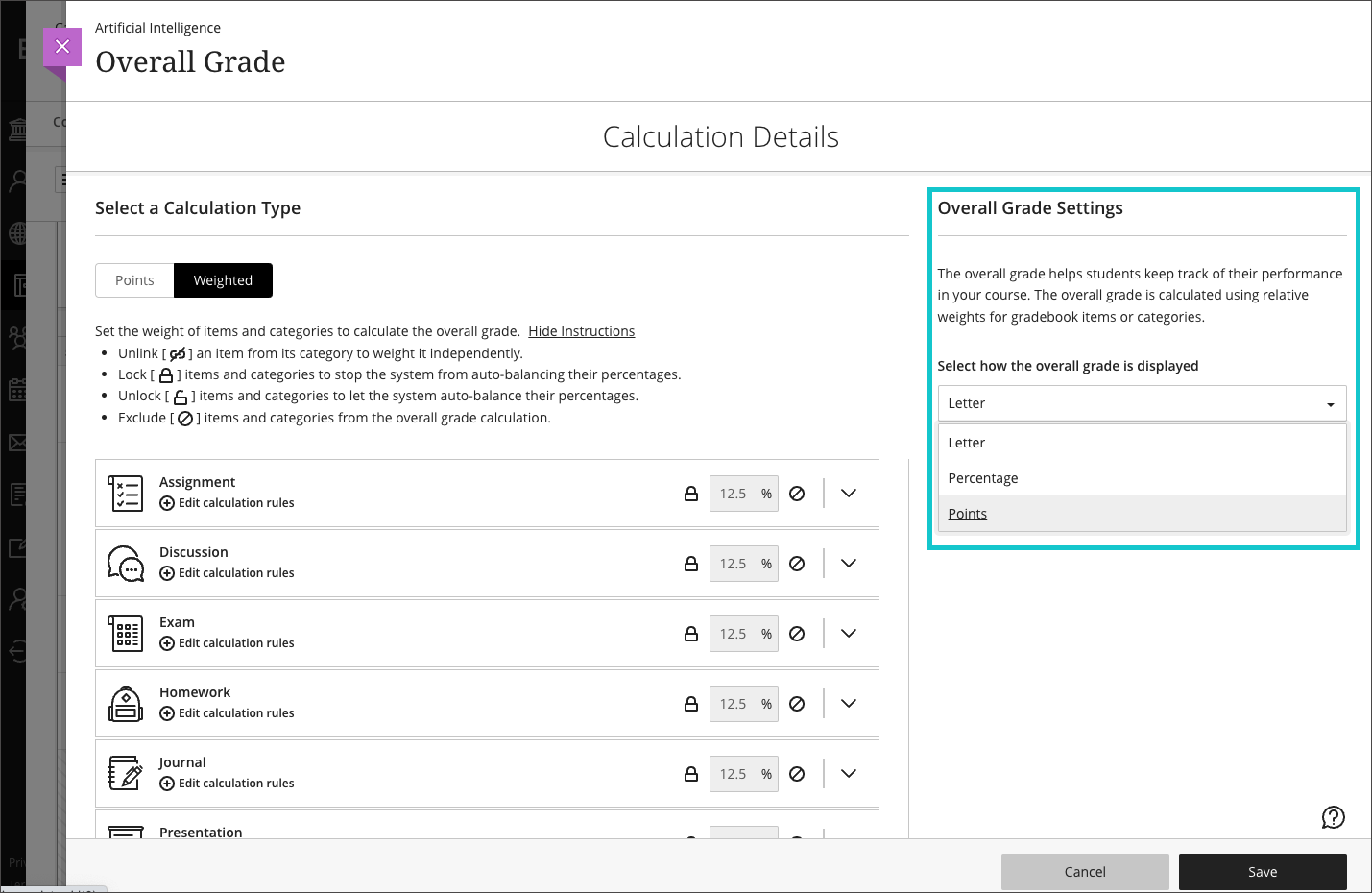
    <div class="html-content"><div><div>The July update to Ultra courses brings ten new features and improvements, focusing on assessment, grading, and content creation. As with <a href="https://my3.my.umbc.edu/groups/instructional-technology/news?tag=ultra-update" rel="nofollow external" class="bo">previous updates</a> this year, the <a href="https://my3.my.umbc.edu/groups/instructional-technology/posts/118028" rel="nofollow external" class="bo">continued focus</a> aligns with <a href="https://doit.umbc.edu/news/post/101457/" rel="nofollow external" class="bo">faculty feedback and requests</a> to strengthen essentials features and settings in core Ultra tools.</div><div><br></div><div>ASSESSMENT &amp; GRADING</div><div><ul><li><strong>Calculating &amp; Displaying Points in Gradebook Overall Grade </strong><span>- The Overall Grade will support and display a points-based calculation (e.g., 745/800). </span><span>The setup wizard guides the instructor to select points or weighted calculation, and includes examples of each calculation type. <br><br><img src="https://help.blackboard.com/sites/default/files/images/2022-06/learn_ultra_instructor_PointsBasedOverallGradeDisplay_OverallGradeSettings.png" width="450" alt="example of points-based gradebook set-up" style="max-width: 100%; height: auto;"></span></li><li><strong>Prohibit backtracking of test questions</strong><span> - This option allows instructors to force a sequence through questions in an assessment. If students skip a question, an alert informs them that they cannot go back to the question.</span></li><li><strong>Edit points earned on an assessment question</strong><span> - Instructors can now change the points a student earns on an assessment question. The points field supports negative and positive values with up to two decimal points.</span></li><li><strong>Download grade center history</strong><span> - The first phase of this feature, provides a download (.xls or .csv) of changes to grades in the gradebook.</span></li><li><strong>Copy question banks between courses</strong><span> - The first phase of question banks improvements allows you to copy question banks from Original to Ultra courses and Ultra to Ultra courses.</span></li><li><strong>Recategorize discussions &amp; journals</strong> - There is now a "Grade category" selector in the settings panel for graded discussions and journals to allow reassigning of the category to another default or a <span>custom</span> category.</li></ul></div><div>CONTENT &amp; ENGAGEMENT</div><div><ul><li><strong>Inline file rendering of files in Course Content, Folders, and Learning Modules</strong><span> - Various files will now render inline in Course Content, folders, and learning modules. As with files uploaded to Ultra Documents and Assessments, instructors can <a href="https://wiki.umbc.edu/x/5YDoC" rel="nofollow external" class="bo">set the behavior of these files</a> for users to view and download (default), view only, or download only. </span></li><li><strong>Original Blank Pages converted to Ultra Documents</strong><span> - When Original courses are converted to Ultra courses, Blank Pages will be converted to Ultra Documents. </span></li><li><strong>Accessibility improvements of math formulas</strong><span> - Ultra will render math formulas as images in Scalable Vector Graphics (SVG) format, allowing users to zoom in or enlarge formula images without losing quality. This change improves accessibility for users with low vision.</span></li><li><strong>Messages Improvement: Larger Panel for Reading &amp; Writing </strong><span>- Messages will use a larger panel for viewing and composing messages rather than the smaller panel.</span></li></ul></div><div>Faculty should see these updates in courses around July 7-8, 2022. <a href="http://umbc.edu/go/ultra" rel="nofollow external" class="bo">UMBC FAQs</a> will be updated over the next few weeks before fall classes start and <a href="https://help.blackboard.com/Learn/Instructor/Ultra" rel="nofollow external" class="bo">Blackboard help documentation</a> is also available. Please sign up for one of our <a href="https://my3.my.umbc.edu/groups/instructional-technology/events?mode=upcoming&amp;tag=whats-new" rel="nofollow external" class="bo">What's New in Ultra for Teaching &amp; Learning webinars</a> in August to learn more about these exciting new features!</div><div><br></div><div>We'll have 1-2 more updates to share after the Blackboard conference in mid-July and the August release announcement -- with those notes, we'll update <a href="https://docs.google.com/spreadsheets/d/1kkG0toIfhmykbbwCeSDd8NopHp19CH7D5rPd95mxji8/edit?usp=sharing" rel="nofollow external" class="bo">our parity tracker</a> to confirm the increased compatibility with Original courses by the end of 2022. </div></div><div><br></div><div><span>The <a href="https://wiki.umbc.edu/x/LohnB" rel="nofollow external" class="bo">next update</a> to our test environment will take place on July 19, 2022. Faculty who are interested in test driving new features before they are released to production should </span><a href="http://my.umbc.edu/go/request-help" rel="nofollow external" class="bo">open an RT ticket</a><span> to request early access. </span><span>Additionally, </span><span>our <a href="https://docs.google.com/spreadsheets/d/1kkG0toIfhmykbbwCeSDd8NopHp19CH7D5rPd95mxji8/edit?usp=sharing" rel="nofollow external" class="bo">Ultra feature tracker is updated</a> and now includes a filter for functional category (e.g., assessment, course management, grading) so you can sort only those items you might be interested in tracking the status. </span><span>Please </span><a href="http://umbc.edu/go/ultra" rel="nofollow external" class="bo">watch the FAQs</a><span>, including </span><a href="https://wiki.umbc.edu/x/LohnB" rel="nofollow external" class="bo">the What's New with Ultra page</a><span>, </span><span>and myUMBC for additional information about Ultra. </span></div><div><span><br></span></div><div><span>As always, if you have any questions about teaching, learning, and technology at UMBC, please consider the following options:</span></div><div><div><div><ul><li><span><a href="http://pivot.umbc.edu" rel="nofollow external" class="bo">PIVOT</a> | <a href="https://doit.umbc.edu/itnm/academic-continuity/" rel="nofollow external" class="bo">Academic Continuity</a></span><span> </span><span>|</span><span> </span><span><a href="https://fdc.umbc.edu/teaching/keep-on-teaching/" rel="nofollow external" class="bo">Keep On Teaching</a></span><span> </span><span>|</span><span> </span><span><a href="https://doit.umbc.edu/students" rel="nofollow external" class="bo">Student Technology Resources</a></span></li><li><a href="http://www.umbc.edu/faq" rel="nofollow external" class="bo">Check our extensive FAQ collection</a><span> </span></li><ul><li><span><a href="https://wiki.umbc.edu/x/LohnB" rel="nofollow external" class="bo"><span>What's new in Ultra?</span></a><span> </span><span>|</span><span> </span><a href="https://wiki.umbc.edu/x/bwrSAQ" rel="nofollow external" class="bo"><span>Known Issues</span></a><span> </span></span></li></ul><li><span><a href="http://my.umbc.edu/go/request-help" rel="nofollow external" class="bo">Open a ticket via RT</a></span></li><li><span>Follow the </span><a href="http://my.umbc.edu/groups/instructional-technology" rel="nofollow external" class="bo">Instructional Technology</a><span> &amp; </span><a href="http://my.umbc.edu/groups/doit" rel="nofollow external" class="bo">DoIT</a><span> myUMBC groups</span></li><li><a href="http://doit.umbc.edu/itnm/staff/" rel="nofollow external" class="bo">Request a consult</a><span> with <a href="http://doit.umbc.edu/itnm/staff" rel="nofollow external" class="bo">instructional technology staff</a></span></li></ul></div></div></div></div>
]]>
  </Body>
  <Summary>The July update to Ultra courses brings ten new features and improvements, focusing on assessment, grading, and content creation. As with previous updates this year, the continued focus aligns...</Summary>
  <Website>https://my3.my.umbc.edu/groups/instructional-technology/posts/126067</Website>
  <TrackingUrl>https://dev.my.umbc.edu/api/v0/pixel/news/126067/guest@my.umbc.edu/309cb88e98a2e1b4aa8f92f85723e258/api/pixel</TrackingUrl>
  <Tag>blackboard</Tag>
  <Tag>ultra-experience</Tag>
  <Tag>ultra-update</Tag>
  <Group token="instructional-technology">Instructional Technology</Group>
  <GroupUrl>https://dev.my.umbc.edu/groups/instructional-technology</GroupUrl>
  <AvatarUrl>https://assets2-dev.my.umbc.edu/system/shared/avatars/groups/000/001/164/dec3b026b81ee6d890a8f82f75c94a2e/xsmall.png?1446126703</AvatarUrl>
  <AvatarUrl size="original">https://assets1-dev.my.umbc.edu/system/shared/avatars/groups/000/001/164/dec3b026b81ee6d890a8f82f75c94a2e/original.png?1446126703</AvatarUrl>
  <AvatarUrl size="xxlarge">https://assets2-dev.my.umbc.edu/system/shared/avatars/groups/000/001/164/dec3b026b81ee6d890a8f82f75c94a2e/xxlarge.png?1446126703</AvatarUrl>
  <AvatarUrl size="xlarge">https://assets1-dev.my.umbc.edu/system/shared/avatars/groups/000/001/164/dec3b026b81ee6d890a8f82f75c94a2e/xlarge.png?1446126703</AvatarUrl>
  <AvatarUrl size="large">https://assets1-dev.my.umbc.edu/system/shared/avatars/groups/000/001/164/dec3b026b81ee6d890a8f82f75c94a2e/large.png?1446126703</AvatarUrl>
  <AvatarUrl size="medium">https://assets4-dev.my.umbc.edu/system/shared/avatars/groups/000/001/164/dec3b026b81ee6d890a8f82f75c94a2e/medium.png?1446126703</AvatarUrl>
  <AvatarUrl size="small">https://assets3-dev.my.umbc.edu/system/shared/avatars/groups/000/001/164/dec3b026b81ee6d890a8f82f75c94a2e/small.png?1446126703</AvatarUrl>
  <AvatarUrl size="xsmall">https://assets2-dev.my.umbc.edu/system/shared/avatars/groups/000/001/164/dec3b026b81ee6d890a8f82f75c94a2e/xsmall.png?1446126703</AvatarUrl>
  <AvatarUrl size="xxsmall">https://assets3-dev.my.umbc.edu/system/shared/avatars/groups/000/001/164/dec3b026b81ee6d890a8f82f75c94a2e/xxsmall.png?1446126703</AvatarUrl>
  <Sponsor>Instructional Technology</Sponsor>
  <ThumbnailUrl size="xxlarge">https://assets2-dev.my.umbc.edu/system/shared/thumbnails/news/000/126/067/5be7fcc006e3a93016747a3e9806a7a3/xxlarge.jpg?1656435874</ThumbnailUrl>
  <ThumbnailUrl size="xlarge">https://assets4-dev.my.umbc.edu/system/shared/thumbnails/news/000/126/067/5be7fcc006e3a93016747a3e9806a7a3/xlarge.jpg?1656435874</ThumbnailUrl>
  <ThumbnailUrl size="large">https://assets3-dev.my.umbc.edu/system/shared/thumbnails/news/000/126/067/5be7fcc006e3a93016747a3e9806a7a3/large.jpg?1656435874</ThumbnailUrl>
  <ThumbnailUrl size="medium">https://assets2-dev.my.umbc.edu/system/shared/thumbnails/news/000/126/067/5be7fcc006e3a93016747a3e9806a7a3/medium.jpg?1656435874</ThumbnailUrl>
  <ThumbnailUrl size="small">https://assets1-dev.my.umbc.edu/system/shared/thumbnails/news/000/126/067/5be7fcc006e3a93016747a3e9806a7a3/small.jpg?1656435874</ThumbnailUrl>
  <ThumbnailUrl size="xsmall">https://assets1-dev.my.umbc.edu/system/shared/thumbnails/news/000/126/067/5be7fcc006e3a93016747a3e9806a7a3/xsmall.jpg?1656435874</ThumbnailUrl>
  <ThumbnailUrl size="xxsmall">https://assets4-dev.my.umbc.edu/system/shared/thumbnails/news/000/126/067/5be7fcc006e3a93016747a3e9806a7a3/xxsmall.jpg?1656435874</ThumbnailUrl>
  <PawCount>2</PawCount>
  <CommentCount>0</CommentCount>
  <CommentsAllowed>true</CommentsAllowed>
  <PostedAt>Wed, 29 Jun 2022 12:44:36 -0400</PostedAt>
  <EditAt>Wed, 29 Jun 2022 12:45:24 -0400</EditAt>
</NewsItem>
  <NewsItem contentIssues="true" id="125795" important="true" status="posted" url="https://dev.my.umbc.edu/groups/doit/posts/125795">
  <Title>Reminder: Blackboard Courses Scheduled for Server Retirement</Title>
  <Tagline>Courses before Summer 2019 to be retired beginning 7/1</Tagline>
  <Body>
    <![CDATA[
    <div class="html-content"><div><span>During Summer 2022, DoIT staff and Blackboard will archive our entire instance of Blackboard, which will save individually backed-up copies of every course and organization through SP2022. Courses offered before and including AY18-19 will be retired by the end of FA2022. </span></div><div><br></div><div><strong>Beginning July 1</strong>, courses offered from the following terms will be scheduled for retirement:</div><div><br></div><div><ul><li>Any courses older than five years</li><li>Fall 2018</li><li>Winter 2019</li><li>Spring 2019</li><li>Summer 2019</li></ul></div><div><br></div><div>The Blackboard system's overall performance and efficiency will improve by removing files and database transactions from the content server and database. AY19-20, AY20-21, and AY21-22 will remain on the server. Fall 2022 will begin a new academic year of data retention (AY22-23).</div><div><br></div><div><strong><u>FAQs about Course Retirement</u></strong></div><div><br></div><div><strong>Is my content gone forever?</strong></div><div><br></div><div>No, Blackboard archived courses captured all course data, files, student submissions, discussions, grades, etc. through SP2022. These archives will reside on a secure cloud storage location.</div><div><br></div><div><strong>When will I lose access to courses that are being retired?</strong></div><div><br></div><div>The archiving process will begin on <strong>July 1st</strong>. <a href="http://my.umbc.edu/go/request-help" rel="nofollow external" class="bo">Faculty can place an RT ticket</a> to have their course content restored through November 2022. </div><div><br></div><div><strong>Can I save a copy of my own courses?</strong></div><div><br></div><div>Yes -- and it is strongly encouraged! Instructors can <a href="https://wiki.umbc.edu/x/FIBaAQ" rel="nofollow external" class="bo">export</a> (course content) and/or archive (course content &amp; student data) their courses. You should also <a href="https://wiki.umbc.edu/x/b4B1AQ" rel="nofollow external" class="bo">download a copy of your gradebook</a>. We recommend saving these files to UMBC’s cloud storage  to ensure long-term access in the event you change computer systems.</div><div><br></div><div><strong>Can I restore (regain access to) only course content?</strong></div><div><br></div><div>Yes. Course content consists of files and course structure (menu, folders, etc.). Faculty can only <a href="https://wiki.umbc.edu/x/HYBaAQ" rel="nofollow external" class="bo">import</a> course content to an existing Blackboard course shell.</div><div><br></div><div><strong>Can I restore course data?</strong></div><div><br></div><div>Course data consists of student submissions, discussions, and grades. We generally prefer not to restore full courses to avoid reinstating user accounts and confusing students with old content. If you must restore archived course data, please open an RT ticket with justification included.</div><div><br></div><div><strong>How long will you keep the retired courses?</strong></div><div><br></div><div>We will keep the retired courses for approximately 2 years after Blackboard archives the courses. Faculty who may need content beyond 2 years should plan to save copies of their exported courses to UMBC Box or other cloud storage.</div><div><br></div><div><p><span>As always, if you have any questions about teaching, learning, and technology, please consider the following options:</span></p><ul><li><p><a href="https://pivot.umbc.edu/" rel="nofollow external" class="bo"><span>PIVOT</span></a><span> | </span><a href="https://doit.umbc.edu/itnm/academic-continuity/" rel="nofollow external" class="bo"><span>Academic Continuity</span></a><span> | </span><a href="https://fdc.umbc.edu/resources/keep-on-teaching/" rel="nofollow external" class="bo"><span>Keep On Teaching</span></a><span> | </span><a href="https://doit.umbc.edu/students" rel="nofollow external" class="bo"><span>Student Technology Resources</span></a><span> </span></p></li><li><p><a href="http://www.umbc.edu/faq" rel="nofollow external" class="bo"><span>Check our extensive FAQ collection</span></a><span> </span></p></li><ul><li><p><a href="https://wiki.umbc.edu/x/MpWEC" rel="nofollow external" class="bo"><u>Course Retirement Information</u></a></p></li><li><p><a href="https://wiki.umbc.edu/x/LohnB" rel="nofollow external" class="bo"><span>What's new in Ultra?</span></a><span> | </span><a href="https://wiki.umbc.edu/x/bwrSAQ" rel="nofollow external" class="bo"><span>Known Issues</span></a><span> </span></p></li></ul><li><p><a href="http://my.umbc.edu/go/request-help" rel="nofollow external" class="bo"><span>Open a ticket via RT</span></a></p></li><li><p><span>Follow the </span><a href="http://my.umbc.edu/groups/instructional-technology" rel="nofollow external" class="bo"><span>Instructional Technology</span></a><span> &amp; </span><a href="http://my.umbc.edu/groups/doit" rel="nofollow external" class="bo"><span>DoIT</span></a><span> myUMBC groups</span></p></li><li><p><a href="http://doit.umbc.edu/itnm/staff/" rel="nofollow external" class="bo"><span>Request a consult</span></a><span> with instructional technology staff</span></p></li></ul></div></div>
]]>
  </Body>
  <Summary>During Summer 2022, DoIT staff and Blackboard will archive our entire instance of Blackboard, which will save individually backed-up copies of every course and organization through SP2022. Courses...</Summary>
  <TrackingUrl>https://dev.my.umbc.edu/api/v0/pixel/news/125795/guest@my.umbc.edu/165961db6c4c97885059e3b4a920d523/api/pixel</TrackingUrl>
  <Tag>archive</Tag>
  <Tag>blackboard</Tag>
  <Tag>course-retirement</Tag>
  <Group token="instructional-technology">Instructional Technology</Group>
  <GroupUrl>https://dev.my.umbc.edu/groups/instructional-technology</GroupUrl>
  <AvatarUrl>https://assets2-dev.my.umbc.edu/system/shared/avatars/groups/000/001/164/dec3b026b81ee6d890a8f82f75c94a2e/xsmall.png?1446126703</AvatarUrl>
  <AvatarUrl size="original">https://assets1-dev.my.umbc.edu/system/shared/avatars/groups/000/001/164/dec3b026b81ee6d890a8f82f75c94a2e/original.png?1446126703</AvatarUrl>
  <AvatarUrl size="xxlarge">https://assets2-dev.my.umbc.edu/system/shared/avatars/groups/000/001/164/dec3b026b81ee6d890a8f82f75c94a2e/xxlarge.png?1446126703</AvatarUrl>
  <AvatarUrl size="xlarge">https://assets1-dev.my.umbc.edu/system/shared/avatars/groups/000/001/164/dec3b026b81ee6d890a8f82f75c94a2e/xlarge.png?1446126703</AvatarUrl>
  <AvatarUrl size="large">https://assets1-dev.my.umbc.edu/system/shared/avatars/groups/000/001/164/dec3b026b81ee6d890a8f82f75c94a2e/large.png?1446126703</AvatarUrl>
  <AvatarUrl size="medium">https://assets4-dev.my.umbc.edu/system/shared/avatars/groups/000/001/164/dec3b026b81ee6d890a8f82f75c94a2e/medium.png?1446126703</AvatarUrl>
  <AvatarUrl size="small">https://assets3-dev.my.umbc.edu/system/shared/avatars/groups/000/001/164/dec3b026b81ee6d890a8f82f75c94a2e/small.png?1446126703</AvatarUrl>
  <AvatarUrl size="xsmall">https://assets2-dev.my.umbc.edu/system/shared/avatars/groups/000/001/164/dec3b026b81ee6d890a8f82f75c94a2e/xsmall.png?1446126703</AvatarUrl>
  <AvatarUrl size="xxsmall">https://assets3-dev.my.umbc.edu/system/shared/avatars/groups/000/001/164/dec3b026b81ee6d890a8f82f75c94a2e/xxsmall.png?1446126703</AvatarUrl>
  <Sponsor>Instructional Technology</Sponsor>
  <ThumbnailUrl size="xxlarge">https://assets3-dev.my.umbc.edu/system/shared/thumbnails/news/000/125/795/e2e1469bd2624d46d860ea993ef2102c/xxlarge.jpg?1654622849</ThumbnailUrl>
  <ThumbnailUrl size="xlarge">https://assets2-dev.my.umbc.edu/system/shared/thumbnails/news/000/125/795/e2e1469bd2624d46d860ea993ef2102c/xlarge.jpg?1654622849</ThumbnailUrl>
  <ThumbnailUrl size="large">https://assets1-dev.my.umbc.edu/system/shared/thumbnails/news/000/125/795/e2e1469bd2624d46d860ea993ef2102c/large.jpg?1654622849</ThumbnailUrl>
  <ThumbnailUrl size="medium">https://assets2-dev.my.umbc.edu/system/shared/thumbnails/news/000/125/795/e2e1469bd2624d46d860ea993ef2102c/medium.jpg?1654622849</ThumbnailUrl>
  <ThumbnailUrl size="small">https://assets2-dev.my.umbc.edu/system/shared/thumbnails/news/000/125/795/e2e1469bd2624d46d860ea993ef2102c/small.jpg?1654622849</ThumbnailUrl>
  <ThumbnailUrl size="xsmall">https://assets3-dev.my.umbc.edu/system/shared/thumbnails/news/000/125/795/e2e1469bd2624d46d860ea993ef2102c/xsmall.jpg?1654622849</ThumbnailUrl>
  <ThumbnailUrl size="xxsmall">https://assets1-dev.my.umbc.edu/system/shared/thumbnails/news/000/125/795/e2e1469bd2624d46d860ea993ef2102c/xxsmall.jpg?1654622849</ThumbnailUrl>
  <PawCount>4</PawCount>
  <CommentCount>0</CommentCount>
  <CommentsAllowed>true</CommentsAllowed>
  <PostedAt>Tue, 07 Jun 2022 13:29:04 -0400</PostedAt>
</NewsItem>
  <NewsItem contentIssues="true" id="125661" important="false" status="posted" url="https://dev.my.umbc.edu/groups/doit/posts/125661">
  <Title>Display files in Ultra Docs, Improve Weighted Grades in June</Title>
  <Tagline>Feedback matters: Continued focus on assessment &amp; grading</Tagline>
  <Body>
    <![CDATA[
    <div class="html-content"><div>Summer brings four enhancements to Ultra course including three focused on assessment and grading.</div><div><ul><li><a href="https://wiki.umbc.edu/x/t4DoC" rel="nofollow external" class="bo"><strong>Enhancement to Overall Grade Weighting</strong></a>: Instructors can wei<span>gh individual items (e.g., tests, assignments) separately from their categories. This includes discussions, which previously remained locked into their categories.</span></li><li><span><strong><a href="https://wiki.umbc.edu/x/n5_EC" rel="nofollow external" class="bo">Set Running Total</a></strong>: Toggle a new setting in the Overall Grade column to let students know if the final grade displayed is a running total. </span></li><li><span><strong>Create Multiple Attempts for Group Assessments</strong>: Allow more than one attempt for group assignments. Previously, you could only set multiple attempts for individual assignments, not for groups.</span></li></ul><div>Robust content creation is important for effective course design, including how that content is displayed to students. Currently, when file attachments are added to Ultra Documents and Assessments, students must download the files to view the content. With the June update, instructors can <a href="https://wiki.umbc.edu/x/5YDoC" rel="nofollow external" class="bo">set the behavior for file attachment</a>:</div></div><div><ul><li>view and download: Students can view the file within Ultra AND download it to their own devices</li><li>view only: Students can ONLY view the file on screen </li><li>download only: Students can ONLY download the file </li></ul></div><div><img src="https://blackboard.umbc.edu/bbcswebdav/institution/doitnews/ultra-updates/ux_inline_file.png" width="500" alt="Example of inline file rendering in Ultra document" style="max-width: 100%; height: auto;"></div><div><span><em>Image 1: Example of inline file rendering in Ultra document</em></span></div><div><span><br></span></div><div><span>For courses that are in progress this summer, this feature will be automatically enabled to "view/download" when it goes into production (scheduled for June 2-3). </span>Settings chooses when uploading new content will only copy over to another course. Please <a href="https://wiki.umbc.edu/x/5YDoC" rel="nofollow external" class="bo">review the related FAQ</a> for additional information.</div><div><br></div><div>Additionally, the Ultra developers listened to your feedback about the "Choose at least one correct answer" clause when creating multiple choice questions -- this text was visible to instructors during question creation, question editing, and grading, but it was not not visible to students. They've taken that text out to avoid confusion. </div><div><br></div><div>Finally, as with Original courses, the maximum file upload is limited to <a href="https://wiki.umbc.edu/x/7wMSC" rel="nofollow external" class="bo">75 MB per individual file</a>, which is generally sufficient for most individual PowerPoint and PDF files. Also, since media tends to be quite large and Blackboard is not a streaming service, <a href="https://wiki.umbc.edu/x/sIOEB" rel="nofollow external" class="bo">audio and videos should always be uploaded to Panopto</a> for encoding and distribution to students. </div><div><span><br></span></div><div><span>The <a href="https://wiki.umbc.edu/x/LohnB" rel="nofollow external" class="bo">next update</a> to our test environment will take place on June 21, 2022. Faculty who are interested in test driving new features before they are released to production should </span><a href="http://my.umbc.edu/go/request-help" rel="nofollow external" class="bo">open an RT ticket</a><span> to request early access. </span><span>Additionally, </span><span>our <a href="https://docs.google.com/spreadsheets/d/1kkG0toIfhmykbbwCeSDd8NopHp19CH7D5rPd95mxji8/edit?usp=sharing" rel="nofollow external" class="bo">Ultra feature tracker is updated</a> and now includes a filter for functional category (e.g., assessment, course management, grading) so you can sort only those items you might be interested in tracking the status. </span><span>Please </span><a href="http://umbc.edu/go/ultra" rel="nofollow external" class="bo">watch the FAQs</a><span>, including </span><a href="https://wiki.umbc.edu/x/LohnB" rel="nofollow external" class="bo">the What's New with Ultra page</a><span>, </span><span>and myUMBC for additional information about Ultra. </span></div><div><span><br></span></div><div><span>As always, if you have any questions about teaching, learning, and technology at UMBC, please consider the following options:</span></div><div><div><div><ul><li><span><a href="http://pivot.umbc.edu" rel="nofollow external" class="bo">PIVOT</a> | <a href="https://doit.umbc.edu/itnm/academic-continuity/" rel="nofollow external" class="bo">Academic Continuity</a></span><span> </span><span>|</span><span> </span><span><a href="https://fdc.umbc.edu/teaching/keep-on-teaching/" rel="nofollow external" class="bo">Keep On Teaching</a></span><span> </span><span>|</span><span> </span><span><a href="https://doit.umbc.edu/students" rel="nofollow external" class="bo">Student Technology Resources</a></span></li><li><a href="http://www.umbc.edu/faq" rel="nofollow external" class="bo">Check our extensive FAQ collection</a><span> </span></li><ul><li><span><a href="https://wiki.umbc.edu/x/LohnB" rel="nofollow external" class="bo"><span>What's new in Ultra?</span></a><span> </span><span>|</span><span> </span><a href="https://wiki.umbc.edu/x/bwrSAQ" rel="nofollow external" class="bo"><span>Known Issues</span></a><span> </span></span></li></ul><li><span><a href="http://my.umbc.edu/go/request-help" rel="nofollow external" class="bo">Open a ticket via RT</a></span></li><li><span>Follow the </span><a href="http://my.umbc.edu/groups/instructional-technology" rel="nofollow external" class="bo">Instructional Technology</a><span> &amp; </span><a href="http://my.umbc.edu/groups/doit" rel="nofollow external" class="bo">DoIT</a><span> myUMBC groups</span></li><li><a href="http://doit.umbc.edu/itnm/staff/" rel="nofollow external" class="bo">Request a consult</a><span> with <a href="http://doit.umbc.edu/itnm/staff" rel="nofollow external" class="bo">instructional technology staff</a></span></li></ul></div></div></div></div>
]]>
  </Body>
  <Summary>Summer brings four enhancements to Ultra course including three focused on assessment and grading.    Enhancement to Overall Grade Weighting: Instructors can weigh individual items (e.g., tests,...</Summary>
  <Website>https://my3.my.umbc.edu/groups/instructional-technology/posts/125661</Website>
  <TrackingUrl>https://dev.my.umbc.edu/api/v0/pixel/news/125661/guest@my.umbc.edu/41320af7fcc45a7280d8f1a6113e463f/api/pixel</TrackingUrl>
  <Tag>blackboard</Tag>
  <Tag>ultra-experience</Tag>
  <Tag>ultra-update</Tag>
  <Group token="instructional-technology">Instructional Technology</Group>
  <GroupUrl>https://dev.my.umbc.edu/groups/instructional-technology</GroupUrl>
  <AvatarUrl>https://assets2-dev.my.umbc.edu/system/shared/avatars/groups/000/001/164/dec3b026b81ee6d890a8f82f75c94a2e/xsmall.png?1446126703</AvatarUrl>
  <AvatarUrl size="original">https://assets1-dev.my.umbc.edu/system/shared/avatars/groups/000/001/164/dec3b026b81ee6d890a8f82f75c94a2e/original.png?1446126703</AvatarUrl>
  <AvatarUrl size="xxlarge">https://assets2-dev.my.umbc.edu/system/shared/avatars/groups/000/001/164/dec3b026b81ee6d890a8f82f75c94a2e/xxlarge.png?1446126703</AvatarUrl>
  <AvatarUrl size="xlarge">https://assets1-dev.my.umbc.edu/system/shared/avatars/groups/000/001/164/dec3b026b81ee6d890a8f82f75c94a2e/xlarge.png?1446126703</AvatarUrl>
  <AvatarUrl size="large">https://assets1-dev.my.umbc.edu/system/shared/avatars/groups/000/001/164/dec3b026b81ee6d890a8f82f75c94a2e/large.png?1446126703</AvatarUrl>
  <AvatarUrl size="medium">https://assets4-dev.my.umbc.edu/system/shared/avatars/groups/000/001/164/dec3b026b81ee6d890a8f82f75c94a2e/medium.png?1446126703</AvatarUrl>
  <AvatarUrl size="small">https://assets3-dev.my.umbc.edu/system/shared/avatars/groups/000/001/164/dec3b026b81ee6d890a8f82f75c94a2e/small.png?1446126703</AvatarUrl>
  <AvatarUrl size="xsmall">https://assets2-dev.my.umbc.edu/system/shared/avatars/groups/000/001/164/dec3b026b81ee6d890a8f82f75c94a2e/xsmall.png?1446126703</AvatarUrl>
  <AvatarUrl size="xxsmall">https://assets3-dev.my.umbc.edu/system/shared/avatars/groups/000/001/164/dec3b026b81ee6d890a8f82f75c94a2e/xxsmall.png?1446126703</AvatarUrl>
  <Sponsor>Instructional Technology</Sponsor>
  <ThumbnailUrl size="xxlarge">https://assets1-dev.my.umbc.edu/system/shared/thumbnails/news/000/125/661/6c61a3c92ed8fc6117b055b0260da06e/xxlarge.jpg?1654002462</ThumbnailUrl>
  <ThumbnailUrl size="xlarge">https://assets1-dev.my.umbc.edu/system/shared/thumbnails/news/000/125/661/6c61a3c92ed8fc6117b055b0260da06e/xlarge.jpg?1654002462</ThumbnailUrl>
  <ThumbnailUrl size="large">https://assets4-dev.my.umbc.edu/system/shared/thumbnails/news/000/125/661/6c61a3c92ed8fc6117b055b0260da06e/large.jpg?1654002462</ThumbnailUrl>
  <ThumbnailUrl size="medium">https://assets2-dev.my.umbc.edu/system/shared/thumbnails/news/000/125/661/6c61a3c92ed8fc6117b055b0260da06e/medium.jpg?1654002462</ThumbnailUrl>
  <ThumbnailUrl size="small">https://assets2-dev.my.umbc.edu/system/shared/thumbnails/news/000/125/661/6c61a3c92ed8fc6117b055b0260da06e/small.jpg?1654002462</ThumbnailUrl>
  <ThumbnailUrl size="xsmall">https://assets3-dev.my.umbc.edu/system/shared/thumbnails/news/000/125/661/6c61a3c92ed8fc6117b055b0260da06e/xsmall.jpg?1654002462</ThumbnailUrl>
  <ThumbnailUrl size="xxsmall">https://assets3-dev.my.umbc.edu/system/shared/thumbnails/news/000/125/661/6c61a3c92ed8fc6117b055b0260da06e/xxsmall.jpg?1654002462</ThumbnailUrl>
  <PawCount>3</PawCount>
  <CommentCount>0</CommentCount>
  <CommentsAllowed>true</CommentsAllowed>
  <PostedAt>Tue, 31 May 2022 11:21:11 -0400</PostedAt>
  <EditAt>Tue, 31 May 2022 11:21:58 -0400</EditAt>
</NewsItem>
  <NewsItem contentIssues="true" id="119360" important="false" status="posted" url="https://dev.my.umbc.edu/groups/doit/posts/119360">
    <Title>Akindi Importer Tool Available on 7/1</Title>
    <Tagline>Write Questions in MS Word and Quickly Add to Blackboard</Tagline>
    <Body>
      <![CDATA[
          <div class="html-content">In the spirit of promoting academic integrity in testing, faculty in both <a href="https://doit.umbc.edu/news/post/117418/" rel="nofollow external" class="bo">Biology</a> and <a href="https://doit.umbc.edu/itnm/post/97023/" rel="nofollow external" class="bo">Chemistry</a> have been leveraging <a href="https://wiki.umbc.edu/x/CoI6B" rel="nofollow external" class="bo">large question pools</a> in their courses. Beginning July 1, the Akindi Importer tool will be live and supported by DoIT as the newest addition to our assessment tool suite that also includes Akindi bubble sheet. This web-based platform helps faculty create large question pools for Blackboard courses.<div><br></div><div>A <a href="https://wiki.umbc.edu/x/6KuEC" rel="nofollow external" class="bo">new series of FAQs on the Akindi Importer</a> is now available. Supported question types include multiple choice, multiple answer, open ended question, fill in the blank, and matching. </div><div><br></div><div>The Akindi Importer is particularly useful for faculty who wish to create large Blackboard question pools efficiently and quickly.  Instead of manually creating one question at a time, faculty can create  assessment questions in Microsoft Word and use the Akindi Importer (via web browser) to upload the resulting QTI file to the course. Once imported, the Akindi QTI file may be used with other assessment features such as  randomization of questions or answers, and random blocks that limit the number of questions displayed from a pool. Unlike Respondus 4.0, Akindi Importer is available to all faculty regardless of their desktop's operating system. 
          </div><div><br></div><div><div>As always, if you have any questions about teaching, learning, and technology at UMBC, please consider the following options:</div><div><br></div><div><ul><li><a href="http://pivot.umbc.edu/" rel="nofollow external" class="bo">PIVOT</a> | <a href="https://doit.umbc.edu/itnm/academic-continuity/" rel="nofollow external" class="bo">Academic Continuity</a> | <a href="https://fdc.umbc.edu/teaching/keep-on-teaching/" rel="nofollow external" class="bo">Keep On Teaching</a> | <a href="https://doit.umbc.edu/students" rel="nofollow external" class="bo">Student Technology Resources</a></li><li><a href="http://www.umbc.edu/faq" rel="nofollow external" class="bo">Check our extensive FAQ collection</a> </li><ul><li><a href="https://wiki.umbc.edu/x/LohnB" rel="nofollow external" class="bo">What's new in Ultra?</a> | <a href="https://wiki.umbc.edu/x/bwrSAQ" rel="nofollow external" class="bo">Known Issues</a> </li></ul><li><a href="http://my.umbc.edu/go/request-help" rel="nofollow external" class="bo">Open a ticket via RT</a></li><li>Follow the <a href="http://my.umbc.edu/groups/instructional-technology" rel="nofollow external" class="bo">Instructional Technology</a> &amp; <a href="http://my.umbc.edu/groups/doit" rel="nofollow external" class="bo">DoIT</a> myUMBC groups</li><li><a href="http://doit.umbc.edu/itnm/staff/" rel="nofollow external" class="bo">Request a consult</a> with <a href="http://doit.umbc.edu/itnm/staff" rel="nofollow external" class="bo">instructional technology staff</a></li></ul></div></div></div>
      ]]>
    </Body>
    <Summary>In the spirit of promoting academic integrity in testing, faculty in both Biology and Chemistry have been leveraging large question pools in their courses. Beginning July 1, the Akindi Importer...</Summary>
    <Website>https://doit.umbc.edu/post/119246/</Website>
    <TrackingUrl>https://dev.my.umbc.edu/api/v0/pixel/news/119360/guest@my.umbc.edu/876b0a31677c2a57d2efc3dd209f6d54/api/pixel</TrackingUrl>
    <Tag>akindi</Tag>
    <Tag>assessment</Tag>
    <Tag>blackboard</Tag>
    <Tag>qti</Tag>
    <Tag>question-bank</Tag>
    <Tag>question-pool</Tag>
    <Tag>sullivan</Tag>
    <Tag>testing</Tag>
    <Group token="instructional-technology">Instructional Technology</Group>
    <GroupUrl>https://dev.my.umbc.edu/groups/instructional-technology</GroupUrl>
    <AvatarUrl>https://assets2-dev.my.umbc.edu/system/shared/avatars/groups/000/001/164/dec3b026b81ee6d890a8f82f75c94a2e/xsmall.png?1446126703</AvatarUrl>
    <AvatarUrl size="original">https://assets1-dev.my.umbc.edu/system/shared/avatars/groups/000/001/164/dec3b026b81ee6d890a8f82f75c94a2e/original.png?1446126703</AvatarUrl>
    <AvatarUrl size="xxlarge">https://assets2-dev.my.umbc.edu/system/shared/avatars/groups/000/001/164/dec3b026b81ee6d890a8f82f75c94a2e/xxlarge.png?1446126703</AvatarUrl>
    <AvatarUrl size="xlarge">https://assets1-dev.my.umbc.edu/system/shared/avatars/groups/000/001/164/dec3b026b81ee6d890a8f82f75c94a2e/xlarge.png?1446126703</AvatarUrl>
    <AvatarUrl size="large">https://assets1-dev.my.umbc.edu/system/shared/avatars/groups/000/001/164/dec3b026b81ee6d890a8f82f75c94a2e/large.png?1446126703</AvatarUrl>
    <AvatarUrl size="medium">https://assets4-dev.my.umbc.edu/system/shared/avatars/groups/000/001/164/dec3b026b81ee6d890a8f82f75c94a2e/medium.png?1446126703</AvatarUrl>
    <AvatarUrl size="small">https://assets3-dev.my.umbc.edu/system/shared/avatars/groups/000/001/164/dec3b026b81ee6d890a8f82f75c94a2e/small.png?1446126703</AvatarUrl>
    <AvatarUrl size="xsmall">https://assets2-dev.my.umbc.edu/system/shared/avatars/groups/000/001/164/dec3b026b81ee6d890a8f82f75c94a2e/xsmall.png?1446126703</AvatarUrl>
    <AvatarUrl size="xxsmall">https://assets3-dev.my.umbc.edu/system/shared/avatars/groups/000/001/164/dec3b026b81ee6d890a8f82f75c94a2e/xxsmall.png?1446126703</AvatarUrl>
    <Sponsor>Instructional Technology</Sponsor>
    <ThumbnailUrl size="xxlarge">https://assets4-dev.my.umbc.edu/system/shared/thumbnails/news/000/119/360/e15894f5df1034cf1b7486418ac3dadd/xxlarge.jpg?1652278738</ThumbnailUrl>
    <ThumbnailUrl size="xlarge">https://assets3-dev.my.umbc.edu/system/shared/thumbnails/news/000/119/360/e15894f5df1034cf1b7486418ac3dadd/xlarge.jpg?1652278738</ThumbnailUrl>
    <ThumbnailUrl size="large">https://assets2-dev.my.umbc.edu/system/shared/thumbnails/news/000/119/360/e15894f5df1034cf1b7486418ac3dadd/large.jpg?1652278738</ThumbnailUrl>
    <ThumbnailUrl size="medium">https://assets3-dev.my.umbc.edu/system/shared/thumbnails/news/000/119/360/e15894f5df1034cf1b7486418ac3dadd/medium.jpg?1652278738</ThumbnailUrl>
    <ThumbnailUrl size="small">https://assets3-dev.my.umbc.edu/system/shared/thumbnails/news/000/119/360/e15894f5df1034cf1b7486418ac3dadd/small.jpg?1652278738</ThumbnailUrl>
    <ThumbnailUrl size="xsmall">https://assets3-dev.my.umbc.edu/system/shared/thumbnails/news/000/119/360/e15894f5df1034cf1b7486418ac3dadd/xsmall.jpg?1652278738</ThumbnailUrl>
    <ThumbnailUrl size="xxsmall">https://assets4-dev.my.umbc.edu/system/shared/thumbnails/news/000/119/360/e15894f5df1034cf1b7486418ac3dadd/xxsmall.jpg?1652278738</ThumbnailUrl>
    <PawCount>3</PawCount>
    <CommentCount>0</CommentCount>
    <CommentsAllowed>true</CommentsAllowed>
    <PostedAt>Wed, 11 May 2022 10:25:00 -0400</PostedAt>
  </NewsItem>
  <NewsItem contentIssues="true" id="119215" important="false" status="posted" url="https://dev.my.umbc.edu/groups/doit/posts/119215">
    <Title>Postponed: Equitable &amp; Inclusive Course for Faculty</Title>
    <Tagline>An immersive cohort on equity and inclusive course design</Tagline>
    <Body>
      <![CDATA[
          <div class="html-content"><div><span><strong><em>After much consideration of the workshop facilitators and subject matter experts, we have decided not to offer a session during Fall 2022. We hope to offer a session during Spring 2023. Thank you for understanding.</em></strong></span></div><div><span><br></span></div><div><span>In Fall 2022, an immersive, 10-week workshop launches for faculty and staff, designed to create and improve intentionally inclusive and equitable courses. Using conversation and reflection, the program leverages a variety of course design and instructional strategies to support faculty in creating and supporting their own responsive and inclusive classrooms.</span></div><div><br></div><div>This program is a collaborative effort, created and facilitated by Instructional Technology, the Faculty Development Center, the Office of Equity and Inclusion, Initiatives for Identity, Inclusion &amp; Belonging, Student Conduct and Community Standards, and the Office of Student Disability Services with faculty partners leading sessions.</div><div><br></div><div>The course learning outcomes include: </div><div><ol><li>Create a personal philosophy of equitable and inclusive pedagogy.</li><li>Evaluate strategies to address challenges of equity and inclusion.</li><li>Identify key elements of course design that can promote equity and inclusion to benefit all students.</li><li>Reflect on teaching and learning experiences as part of an inclusive community of inquiry.</li></ol></div><div><span>Participants will be expected to complete an asynchronous module per week (approximately a 30-minute weekly time commitment) and attend 5 synchronous sessions to explore a variety of topics. Upon completion of the course, participants will earn a micro-credential to demonstrate mastery of knowledge and skills acquired throughout the course.  </span></div><div><br></div><div>The course is scheduled to begin in mid-September 2022. More information about registration will be shared on the <a href="https://my3.my.umbc.edu/groups/instructional-technology" rel="nofollow external" class="bo">Instructional Technology myUMBC group</a> in early August. </div><div><br></div><div>For any questions or additional information, please contact <a href="mailto:joshabrams@umbc.edu" rel="nofollow external" class="bo">Josh Abrams</a> or <a href="mailto:collinsullivan@umbc.edu" rel="nofollow external" class="bo">Collin Sullivan</a>. </div><div><br></div></div>
      ]]>
    </Body>
    <Summary>After much consideration of the workshop facilitators and subject matter experts, we have decided not to offer a session during Fall 2022. We hope to offer a session during Spring 2023. Thank you...</Summary>
    <TrackingUrl>https://dev.my.umbc.edu/api/v0/pixel/news/119215/guest@my.umbc.edu/db395729f4aa10103c25b2a35d87def0/api/pixel</TrackingUrl>
    <Tag>ally</Tag>
    <Tag>blackboard</Tag>
    <Tag>calt</Tag>
    <Tag>disability-services</Tag>
    <Tag>faculty-development</Tag>
    <Tag>fdc</Tag>
    <Tag>i3b</Tag>
    <Tag>itnm</Tag>
    <Tag>oei</Tag>
    <Tag>online</Tag>
    <Tag>training</Tag>
    <Group token="instructional-technology">Instructional Technology</Group>
    <GroupUrl>https://dev.my.umbc.edu/groups/instructional-technology</GroupUrl>
    <AvatarUrl>https://assets2-dev.my.umbc.edu/system/shared/avatars/groups/000/001/164/dec3b026b81ee6d890a8f82f75c94a2e/xsmall.png?1446126703</AvatarUrl>
    <AvatarUrl size="original">https://assets1-dev.my.umbc.edu/system/shared/avatars/groups/000/001/164/dec3b026b81ee6d890a8f82f75c94a2e/original.png?1446126703</AvatarUrl>
    <AvatarUrl size="xxlarge">https://assets2-dev.my.umbc.edu/system/shared/avatars/groups/000/001/164/dec3b026b81ee6d890a8f82f75c94a2e/xxlarge.png?1446126703</AvatarUrl>
    <AvatarUrl size="xlarge">https://assets1-dev.my.umbc.edu/system/shared/avatars/groups/000/001/164/dec3b026b81ee6d890a8f82f75c94a2e/xlarge.png?1446126703</AvatarUrl>
    <AvatarUrl size="large">https://assets1-dev.my.umbc.edu/system/shared/avatars/groups/000/001/164/dec3b026b81ee6d890a8f82f75c94a2e/large.png?1446126703</AvatarUrl>
    <AvatarUrl size="medium">https://assets4-dev.my.umbc.edu/system/shared/avatars/groups/000/001/164/dec3b026b81ee6d890a8f82f75c94a2e/medium.png?1446126703</AvatarUrl>
    <AvatarUrl size="small">https://assets3-dev.my.umbc.edu/system/shared/avatars/groups/000/001/164/dec3b026b81ee6d890a8f82f75c94a2e/small.png?1446126703</AvatarUrl>
    <AvatarUrl size="xsmall">https://assets2-dev.my.umbc.edu/system/shared/avatars/groups/000/001/164/dec3b026b81ee6d890a8f82f75c94a2e/xsmall.png?1446126703</AvatarUrl>
    <AvatarUrl size="xxsmall">https://assets3-dev.my.umbc.edu/system/shared/avatars/groups/000/001/164/dec3b026b81ee6d890a8f82f75c94a2e/xxsmall.png?1446126703</AvatarUrl>
    <Sponsor>Instructional Technology</Sponsor>
    <ThumbnailUrl size="xxlarge">https://assets2-dev.my.umbc.edu/system/shared/thumbnails/news/000/119/215/2515dc3d592c45d2ac38bc3d52e30d9d/xxlarge.jpg?1651765991</ThumbnailUrl>
    <ThumbnailUrl size="xlarge">https://assets4-dev.my.umbc.edu/system/shared/thumbnails/news/000/119/215/2515dc3d592c45d2ac38bc3d52e30d9d/xlarge.jpg?1651765991</ThumbnailUrl>
    <ThumbnailUrl size="large">https://assets3-dev.my.umbc.edu/system/shared/thumbnails/news/000/119/215/2515dc3d592c45d2ac38bc3d52e30d9d/large.jpg?1651765991</ThumbnailUrl>
    <ThumbnailUrl size="medium">https://assets3-dev.my.umbc.edu/system/shared/thumbnails/news/000/119/215/2515dc3d592c45d2ac38bc3d52e30d9d/medium.jpg?1651765991</ThumbnailUrl>
    <ThumbnailUrl size="small">https://assets1-dev.my.umbc.edu/system/shared/thumbnails/news/000/119/215/2515dc3d592c45d2ac38bc3d52e30d9d/small.jpg?1651765991</ThumbnailUrl>
    <ThumbnailUrl size="xsmall">https://assets4-dev.my.umbc.edu/system/shared/thumbnails/news/000/119/215/2515dc3d592c45d2ac38bc3d52e30d9d/xsmall.jpg?1651765991</ThumbnailUrl>
    <ThumbnailUrl size="xxsmall">https://assets4-dev.my.umbc.edu/system/shared/thumbnails/news/000/119/215/2515dc3d592c45d2ac38bc3d52e30d9d/xxsmall.jpg?1651765991</ThumbnailUrl>
    <PawCount>6</PawCount>
    <CommentCount>1</CommentCount>
    <CommentsAllowed>true</CommentsAllowed>
    <PostedAt>Thu, 05 May 2022 11:55:41 -0400</PostedAt>
    <EditAt>Thu, 11 Aug 2022 08:50:35 -0400</EditAt>
  </NewsItem>
  <NewsItem contentIssues="true" id="119139" important="false" status="posted" url="https://dev.my.umbc.edu/groups/doit/posts/119139">
  <Title>Workflow improvements for Ultra grading &amp; assessments in May</Title>
  <Tagline>New test question filter for student assessment experience</Tagline>
  <Body>
    <![CDATA[
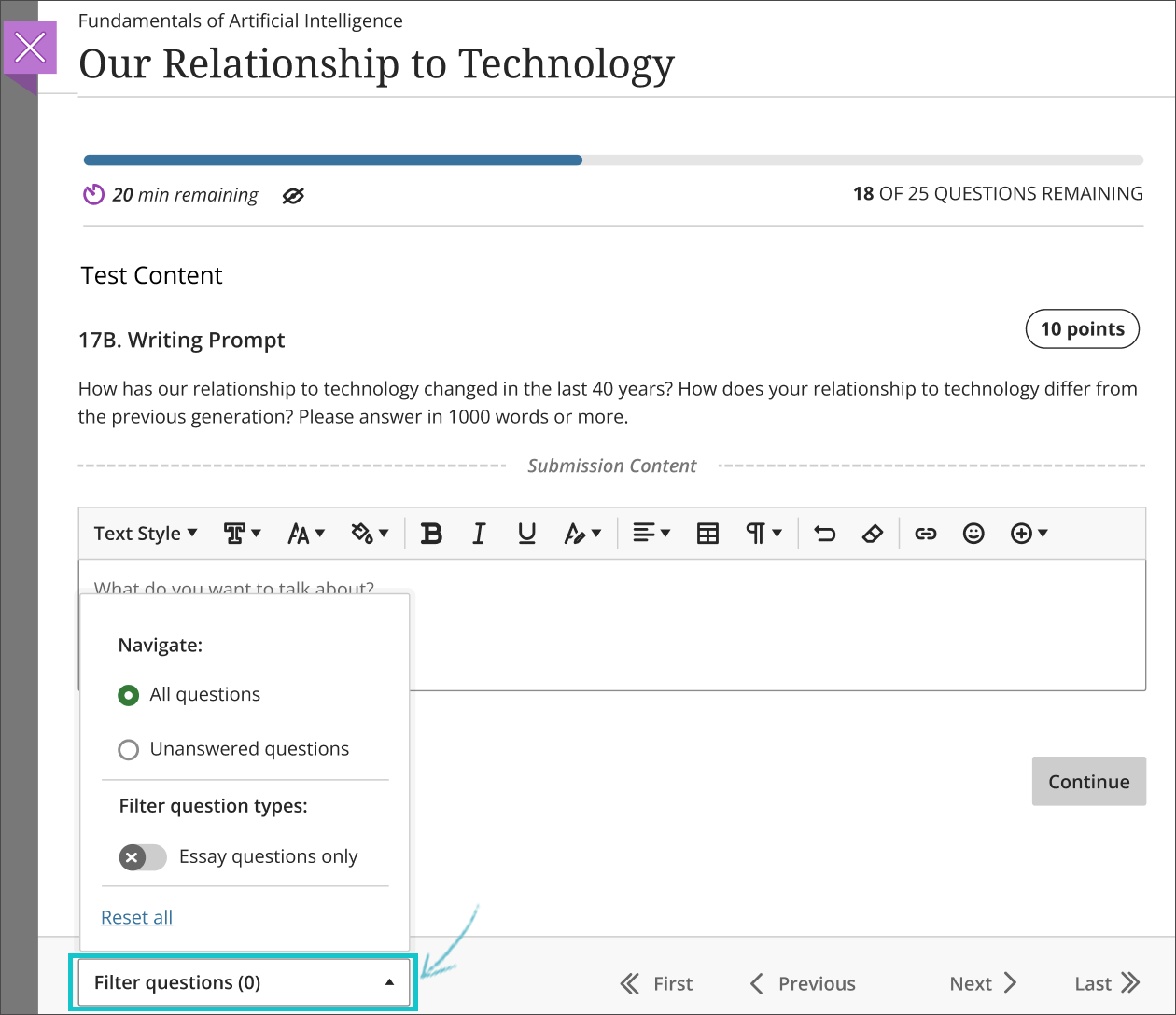
    <div class="html-content"><div>As the semester concludes, the May update to Ultra brings some improvements centered on assessment and grading workflows and usability improvements.</div><div><ul><li>Weighted Calculations: With this upgrade, instructors can configure the weighted overall grade using an empty grade category. You will no longer need to have an empty assessment or any assessment in the category to assign a weight.</li><li>Prohibit Late Submissions: To prevent instructors from inadvertently triggering submission of in-progress and saved assignment attempts, instructors cannot change the due dates to a date in the past when students have submitted attempts. Moreover, if a due date has passed, the instructor cannot select the prohibit late submission setting. </li><li>Journal enhancements: Choose how many entries display on the page with improvement navigation and pagination. Students may make unlimited entries now and instructors will see a count of graded journals.</li><li>Undo and redo setting in Bb Annotate: This enhancement allows instructors and graders to easily undo or redo an annotation to a student's file submission when grading. It is not applicable to comments.</li></ul></div><div>A major improvement to the student test taking experience is a new question filter with unanswered question warning. The question filter allows students to complete questions they know first and skip harder ones, using the filter to quickly return to skipped questions or to find specific formats of questions such as essay responses. If a student submits a test with unanswered questions, Ultra with alert students with a warning, showing the number of unanswered questions. If a student continues to work on the test, the filter will automatically display only the unanswered questions. </div><div><br></div><div><img src="https://help.blackboard.com/sites/default/files/images/2022-04/learn_ultra_instructor_TestQuestionFiltering_Question%20filter.png" width="500" alt="Example of question filtering option for student" style="max-width: 100%; height: auto;"></div><div><em>Image: Example of question filtering option for students</em></div><div><br></div><div>Additionally, based on feedback from students in Ultra courses, students may now choose to hide the timer on a timed test, which may reduce pressure and anxiety during assessments. While the timer may be hidden, the timer icon will remain visible to alert students that the test is timed and allow them to easily view the remaining time on the test as needed.</div><div><span><br></span></div><div><span>A session time-out warning is available to both Original and Ultra courses. When a user is idle for over three hours the session ends, but there are times when a user may be working, but the system considers them idle -- for example, authoring a discussion post. In this update, users will receive a warning at least six minutes before the session ends. If you close the warning before the session ends, your session will extend for another three hours. However, if you are away from the session when the warning appears, even if you close the message, you will be logged out because you were away too long.</span></div><div><span><br></span></div><div><span>The <a href="https://wiki.umbc.edu/x/LohnB" rel="nofollow external" class="bo">next update</a> to our test environment will take place on May 10, 2022. Faculty who are interested in test driving new features before they are released to production should </span><a href="http://my.umbc.edu/go/request-help" rel="nofollow external" class="bo">open an RT ticket</a><span> to request early access. </span><span>Please </span><a href="http://umbc.edu/go/ultra" rel="nofollow external" class="bo">watch the FAQs</a><span>, including </span><a href="https://wiki.umbc.edu/x/LohnB" rel="nofollow external" class="bo">the What's New with Ultra page</a><span>, </span><span>and myUMBC for additional information about Ultra.</span></div><div><span><br></span></div><div><span>As always, if you have any questions about teaching, learning, and technology at UMBC, please consider the following options:</span></div><div><div><div><ul><li><span><a href="http://pivot.umbc.edu" rel="nofollow external" class="bo">PIVOT</a> | <a href="https://doit.umbc.edu/itnm/academic-continuity/" rel="nofollow external" class="bo">Academic Continuity</a></span><span> </span><span>|</span><span> </span><span><a href="https://fdc.umbc.edu/teaching/keep-on-teaching/" rel="nofollow external" class="bo">Keep On Teaching</a></span><span> </span><span>|</span><span> </span><span><a href="https://doit.umbc.edu/students" rel="nofollow external" class="bo">Student Technology Resources</a></span></li><li><a href="http://www.umbc.edu/faq" rel="nofollow external" class="bo">Check our extensive FAQ collection</a><span> </span></li><ul><li><span><a href="https://wiki.umbc.edu/x/LohnB" rel="nofollow external" class="bo"><span>What's new in Ultra?</span></a><span> </span><span>|</span><span> </span><a href="https://wiki.umbc.edu/x/bwrSAQ" rel="nofollow external" class="bo"><span>Known Issues</span></a><span> </span></span></li></ul><li><span><a href="http://my.umbc.edu/go/request-help" rel="nofollow external" class="bo">Open a ticket via RT</a></span></li><li><span>Follow the </span><a href="http://my.umbc.edu/groups/instructional-technology" rel="nofollow external" class="bo">Instructional Technology</a><span> &amp; </span><a href="http://my.umbc.edu/groups/doit" rel="nofollow external" class="bo">DoIT</a><span> myUMBC groups</span></li><li><a href="http://doit.umbc.edu/itnm/staff/" rel="nofollow external" class="bo">Request a consult</a><span> with <a href="http://doit.umbc.edu/itnm/staff" rel="nofollow external" class="bo">instructional technology staff</a></span></li></ul></div></div></div></div>
]]>
  </Body>
  <Summary>As the semester concludes, the May update to Ultra brings some improvements centered on assessment and grading workflows and usability improvements.    Weighted Calculations: With this upgrade,...</Summary>
  <Website>https://my3.my.umbc.edu/groups/instructional-technology/posts/119139</Website>
  <TrackingUrl>https://dev.my.umbc.edu/api/v0/pixel/news/119139/guest@my.umbc.edu/1a183898e78e39830bcad1cc45eb830c/api/pixel</TrackingUrl>
  <Tag>blackboard</Tag>
  <Tag>ultra-experience</Tag>
  <Tag>ultra-update</Tag>
  <Group token="instructional-technology">Instructional Technology</Group>
  <GroupUrl>https://dev.my.umbc.edu/groups/instructional-technology</GroupUrl>
  <AvatarUrl>https://assets2-dev.my.umbc.edu/system/shared/avatars/groups/000/001/164/dec3b026b81ee6d890a8f82f75c94a2e/xsmall.png?1446126703</AvatarUrl>
  <AvatarUrl size="original">https://assets1-dev.my.umbc.edu/system/shared/avatars/groups/000/001/164/dec3b026b81ee6d890a8f82f75c94a2e/original.png?1446126703</AvatarUrl>
  <AvatarUrl size="xxlarge">https://assets2-dev.my.umbc.edu/system/shared/avatars/groups/000/001/164/dec3b026b81ee6d890a8f82f75c94a2e/xxlarge.png?1446126703</AvatarUrl>
  <AvatarUrl size="xlarge">https://assets1-dev.my.umbc.edu/system/shared/avatars/groups/000/001/164/dec3b026b81ee6d890a8f82f75c94a2e/xlarge.png?1446126703</AvatarUrl>
  <AvatarUrl size="large">https://assets1-dev.my.umbc.edu/system/shared/avatars/groups/000/001/164/dec3b026b81ee6d890a8f82f75c94a2e/large.png?1446126703</AvatarUrl>
  <AvatarUrl size="medium">https://assets4-dev.my.umbc.edu/system/shared/avatars/groups/000/001/164/dec3b026b81ee6d890a8f82f75c94a2e/medium.png?1446126703</AvatarUrl>
  <AvatarUrl size="small">https://assets3-dev.my.umbc.edu/system/shared/avatars/groups/000/001/164/dec3b026b81ee6d890a8f82f75c94a2e/small.png?1446126703</AvatarUrl>
  <AvatarUrl size="xsmall">https://assets2-dev.my.umbc.edu/system/shared/avatars/groups/000/001/164/dec3b026b81ee6d890a8f82f75c94a2e/xsmall.png?1446126703</AvatarUrl>
  <AvatarUrl size="xxsmall">https://assets3-dev.my.umbc.edu/system/shared/avatars/groups/000/001/164/dec3b026b81ee6d890a8f82f75c94a2e/xxsmall.png?1446126703</AvatarUrl>
  <Sponsor>Instructional Technology</Sponsor>
  <ThumbnailUrl size="xxlarge">https://assets1-dev.my.umbc.edu/system/shared/thumbnails/news/000/119/139/9545cbb262f7c6c977efb8a862708a1a/xxlarge.jpg?1651583777</ThumbnailUrl>
  <ThumbnailUrl size="xlarge">https://assets2-dev.my.umbc.edu/system/shared/thumbnails/news/000/119/139/9545cbb262f7c6c977efb8a862708a1a/xlarge.jpg?1651583777</ThumbnailUrl>
  <ThumbnailUrl size="large">https://assets3-dev.my.umbc.edu/system/shared/thumbnails/news/000/119/139/9545cbb262f7c6c977efb8a862708a1a/large.jpg?1651583777</ThumbnailUrl>
  <ThumbnailUrl size="medium">https://assets2-dev.my.umbc.edu/system/shared/thumbnails/news/000/119/139/9545cbb262f7c6c977efb8a862708a1a/medium.jpg?1651583777</ThumbnailUrl>
  <ThumbnailUrl size="small">https://assets4-dev.my.umbc.edu/system/shared/thumbnails/news/000/119/139/9545cbb262f7c6c977efb8a862708a1a/small.jpg?1651583777</ThumbnailUrl>
  <ThumbnailUrl size="xsmall">https://assets4-dev.my.umbc.edu/system/shared/thumbnails/news/000/119/139/9545cbb262f7c6c977efb8a862708a1a/xsmall.jpg?1651583777</ThumbnailUrl>
  <ThumbnailUrl size="xxsmall">https://assets4-dev.my.umbc.edu/system/shared/thumbnails/news/000/119/139/9545cbb262f7c6c977efb8a862708a1a/xxsmall.jpg?1651583777</ThumbnailUrl>
  <PawCount>1</PawCount>
  <CommentCount>0</CommentCount>
  <CommentsAllowed>true</CommentsAllowed>
  <PostedAt>Tue, 03 May 2022 09:40:55 -0400</PostedAt>
</NewsItem>
  <NewsItem contentIssues="true" id="119137" important="false" status="posted" url="https://dev.my.umbc.edu/groups/doit/posts/119137">
  <Title>SU2022 Courses Created in Blackboard on April 29, 2022</Title>
  <Body>
    <![CDATA[
    <div class="html-content"><p>Blackboard course shells for SU2022 <a href="https://wiki.umbc.edu/x/eYHGAw" rel="nofollow external" class="bo">were created</a> on April 29, 2022.</p><p><span>The </span><a href="https://wiki.umbc.edu/x/VIdnB" rel="nofollow external" class="bo"><span>Ultra Course Preview</span></a><span> setting is again enabled in SU2022 courses, which allows faculty</span><span> to convert a new Original course to see what it </span><span><a href="https://wiki.umbc.edu/x/VIdnB" rel="nofollow external" class="bo">looks like in Ultra</a></span><span> and <a href="https://wiki.umbc.edu/x/_AQ9BQ" rel="nofollow external" class="bo">adopt Ultra</a>. </span><span>Please review the </span><a href="https://wiki.umbc.edu/x/LohnB" rel="nofollow external" class="bo">release notes</a><span> for </span><a href="https://my3.my.umbc.edu/groups/instructional-technology/posts?tag=ultra-update" rel="nofollow external" class="bo">the latest updates</a><span> to </span><a href="https://wiki.umbc.edu/x/04ZnB" rel="nofollow external" class="bo">compare Original and Ultra tools</a> since m<span>any new features and tools are available to <a href="https://docs.google.com/spreadsheets/d/1kkG0toIfhmykbbwCeSDd8NopHp19CH7D5rPd95mxji8/edit?usp=sharing" rel="nofollow external" class="bo">increase Ultra's parity</a> with Original. Have a question about Ultra? Ask <a href="https://wiki.umbc.edu/x/kAU9BQ" rel="nofollow external" class="bo">an Ultra Ambassador</a>!</span></p><p><span>Ally, an </span><a href="https://doit.umbc.edu/news/?id=82487" rel="nofollow external" class="bo"><span>accessibility tool</span></a><span>, is also enabled in all course shells. Ally automatically scans uploaded and created course content, then performs a series of steps to make that content more accessible. Please review the </span><a href="https://wiki.umbc.edu/x/2IGdB" rel="nofollow external" class="bo"><span>Ally FAQs</span></a><span> for more information about the </span><a href="https://wiki.umbc.edu/x/_YGdB" rel="nofollow external" class="bo"><span>accessibility indicators</span></a><span> on course content and </span><a href="https://wiki.umbc.edu/x/3IGdB" rel="nofollow external" class="bo"><span>alternative formats</span></a><span>.</span></p><p><span>For faculty who will be teaching hybrid or online, the instructional technology team would like to share several resources to support online course development and instruction.</span></p><ol><li><span>Choose from our </span><a href="https://pivot.umbc.edu/pivot-solo/" rel="nofollow external" class="bo">PIVOT Solo</a><span> lessons to refresh or enhance your online teaching preparation. Five key topics cover course organization, active learning, community building, assessment, and supporting students. </span></li><li><span>Explore </span><a href="https://umbc.hosted.panopto.com/Panopto/Pages/Sessions/List.aspx#folderID=%2274ac9d58-1779-44c1-92b7-ab6900dfe6e9%22" rel="nofollow external" class="bo">our Panopto folder</a><span> for a wide variety of recorded webinars on various instructional technologies available at UMBC.</span></li></ol><div><strong>About Course Creation</strong></div><div><span><br></span></div><div><span>Bb shells for </span><span>SU2022</span><span> are available for all courses (designated as lecture, lab, field or discussion) listed in the </span><a href="http://my.umbc.edu/go/schedule" rel="nofollow external" class="bo">UMBC Schedule of Classes (SOC)</a><span>, provided that there is an </span><a href="http://www.umbc.edu/blogs/oit-news/archives/2010/08/how_new_employe_1.html" rel="nofollow external" class="bo">instructor of record</a><span> listed. As new course sections and/or instructors are added to the SOC by </span><a href="https://registrar.umbc.edu/services/classroom-scheduling/" rel="nofollow external" class="bo">Department Scheduling Coordinators</a><span>, corresponding Bb shells are automatically generated overnight. </span></div><ul><li>If you are an instructor, and your name is not associated with the course you are teaching in the <a href="http://my.umbc.edu/go/schedule" rel="nofollow external" class="bo">SOC</a>, please see your <a href="https://registrar.umbc.edu/services/classroom-scheduling/" rel="nofollow external" class="bo">Departmental Scheduling Coordinator</a> to resolve the issue. Once you are listed in the <a href="https://my.umbc.edu/go/schedule" rel="nofollow external" class="bo">SOC</a>, your Bb course shell will be created automatically. </li><li>If you and your <a href="https://registrar.umbc.edu/services/classroom-scheduling/" rel="nofollow external" class="bo">Department Scheduling Coordinator</a> believe you are correctly assigned as the instructor of record in the SOC and you do not see your course shell in Blackboard, please submit a Request Tracker (RT) ticket via <a href="https://my.umbc.edu/help" rel="nofollow external" class="bo">my.umbc.edu/help</a>.</li><li>If you need a Bb shell for a research or independent study course, please submit a <a href="http://www.umbc.edu/doit/blackboard/requestbbshell.html" rel="nofollow external" class="bo">new course request</a>.</li></ul><p>Instructors who teach multiple sections of the same course will find those enrollments merged into one Bb course shell. These sections may be split upon <a href="https://my.umbc.edu/go/request-help" rel="nofollow external" class="bo">request by an RT ticket</a>, which we recommend <a href="https://wiki.umbc.edu/x/d4HGAw" rel="nofollow external" class="bo">submitting at least one week</a> before the semester starts, if not as soon as courses are created in Blackboard. NOTE: Courses should not be split after student grade data and engagement activity is recorded since it will be purged as part of the separation process.</p><p>Student enrollment in Bb mirrors the official registration in SA and updates hourly. However, courses are not accessible to students by default until the instructor of record <a href="https://wiki.umbc.edu/pages/viewpage.action?pageId%3D1867862" rel="nofollow external" class="bo">makes them available</a>.</p><p>As always, if you have any questions, please consider the following options:</p><ul><li><span><a href="https://doit.umbc.edu/itnm/academic-continuity/" rel="nofollow external" class="bo"><span>Academic Continuity</span></a><span> | </span><a href="https://fdc.umbc.edu/resources/keep-on-teaching/" rel="nofollow external" class="bo"><span>Keep On Teaching</span></a><span> | </span><a href="https://doit.umbc.edu/students" rel="nofollow external" class="bo"><span>Student Technology Resources</span></a></span></li><li><a href="http://www.umbc.edu/faq" rel="nofollow external" class="bo">Check our extensive FAQ collection</a> </li><li><a href="http://my.umbc.edu/go/request-help" rel="nofollow external" class="bo">Open a ticket via RT</a></li><li>Follow the <a href="http://my.umbc.edu/groups/instructional-technology" rel="nofollow external" class="bo">Instructional Technology</a> &amp; <a href="http://my.umbc.edu/groups/doit" rel="nofollow external" class="bo">DoIT</a> myUMBC groups</li><ul><li>Sign up for <a href="https://my3.my.umbc.edu/groups/instructional-technology/events" rel="nofollow external" class="bo">a webinar &amp; other training</a> </li></ul><li><a href="http://doit.umbc.edu/itnm/staff/" rel="nofollow external" class="bo">Request a consult</a> with instructional technology staff</li></ul></div>
]]>
  </Body>
  <Summary>Blackboard course shells for SU2022 were created on April 29, 2022.  The Ultra Course Preview setting is again enabled in SU2022 courses, which allows faculty to convert a new Original course to...</Summary>
  <Website>https://my3.my.umbc.edu/groups/instructional-technology/posts/119137</Website>
  <TrackingUrl>https://dev.my.umbc.edu/api/v0/pixel/news/119137/guest@my.umbc.edu/009e4c7d8a5612cc9219dd497f63bb03/api/pixel</TrackingUrl>
  <Tag>blackboard</Tag>
  <Tag>course-creation</Tag>
  <Tag>su2022</Tag>
  <Tag>summer</Tag>
  <Tag>ultra-course-preview</Tag>
  <Group token="instructional-technology">Instructional Technology</Group>
  <GroupUrl>https://dev.my.umbc.edu/groups/instructional-technology</GroupUrl>
  <AvatarUrl>https://assets2-dev.my.umbc.edu/system/shared/avatars/groups/000/001/164/dec3b026b81ee6d890a8f82f75c94a2e/xsmall.png?1446126703</AvatarUrl>
  <AvatarUrl size="original">https://assets1-dev.my.umbc.edu/system/shared/avatars/groups/000/001/164/dec3b026b81ee6d890a8f82f75c94a2e/original.png?1446126703</AvatarUrl>
  <AvatarUrl size="xxlarge">https://assets2-dev.my.umbc.edu/system/shared/avatars/groups/000/001/164/dec3b026b81ee6d890a8f82f75c94a2e/xxlarge.png?1446126703</AvatarUrl>
  <AvatarUrl size="xlarge">https://assets1-dev.my.umbc.edu/system/shared/avatars/groups/000/001/164/dec3b026b81ee6d890a8f82f75c94a2e/xlarge.png?1446126703</AvatarUrl>
  <AvatarUrl size="large">https://assets1-dev.my.umbc.edu/system/shared/avatars/groups/000/001/164/dec3b026b81ee6d890a8f82f75c94a2e/large.png?1446126703</AvatarUrl>
  <AvatarUrl size="medium">https://assets4-dev.my.umbc.edu/system/shared/avatars/groups/000/001/164/dec3b026b81ee6d890a8f82f75c94a2e/medium.png?1446126703</AvatarUrl>
  <AvatarUrl size="small">https://assets3-dev.my.umbc.edu/system/shared/avatars/groups/000/001/164/dec3b026b81ee6d890a8f82f75c94a2e/small.png?1446126703</AvatarUrl>
  <AvatarUrl size="xsmall">https://assets2-dev.my.umbc.edu/system/shared/avatars/groups/000/001/164/dec3b026b81ee6d890a8f82f75c94a2e/xsmall.png?1446126703</AvatarUrl>
  <AvatarUrl size="xxsmall">https://assets3-dev.my.umbc.edu/system/shared/avatars/groups/000/001/164/dec3b026b81ee6d890a8f82f75c94a2e/xxsmall.png?1446126703</AvatarUrl>
  <Sponsor>Instructional Technology</Sponsor>
  <ThumbnailUrl size="xxlarge">https://assets1-dev.my.umbc.edu/system/shared/thumbnails/news/000/119/137/6fda8de0bf2f1afc22ab51904abf4309/xxlarge.jpg?1651580218</ThumbnailUrl>
  <ThumbnailUrl size="xlarge">https://assets4-dev.my.umbc.edu/system/shared/thumbnails/news/000/119/137/6fda8de0bf2f1afc22ab51904abf4309/xlarge.jpg?1651580218</ThumbnailUrl>
  <ThumbnailUrl size="large">https://assets2-dev.my.umbc.edu/system/shared/thumbnails/news/000/119/137/6fda8de0bf2f1afc22ab51904abf4309/large.jpg?1651580218</ThumbnailUrl>
  <ThumbnailUrl size="medium">https://assets4-dev.my.umbc.edu/system/shared/thumbnails/news/000/119/137/6fda8de0bf2f1afc22ab51904abf4309/medium.jpg?1651580218</ThumbnailUrl>
  <ThumbnailUrl size="small">https://assets3-dev.my.umbc.edu/system/shared/thumbnails/news/000/119/137/6fda8de0bf2f1afc22ab51904abf4309/small.jpg?1651580218</ThumbnailUrl>
  <ThumbnailUrl size="xsmall">https://assets2-dev.my.umbc.edu/system/shared/thumbnails/news/000/119/137/6fda8de0bf2f1afc22ab51904abf4309/xsmall.jpg?1651580218</ThumbnailUrl>
  <ThumbnailUrl size="xxsmall">https://assets2-dev.my.umbc.edu/system/shared/thumbnails/news/000/119/137/6fda8de0bf2f1afc22ab51904abf4309/xxsmall.jpg?1651580218</ThumbnailUrl>
  <PawCount>1</PawCount>
  <CommentCount>0</CommentCount>
  <CommentsAllowed>true</CommentsAllowed>
  <PostedAt>Tue, 03 May 2022 09:14:48 -0400</PostedAt>
</NewsItem>
  <NewsItem contentIssues="true" id="118815" important="false" status="posted" url="https://dev.my.umbc.edu/groups/doit/posts/118815">
  <Title>Instructional Technology Essentials for June 2022</Title>
  <Tagline>Select from a menu of trainings</Tagline>
  <Body>
    <![CDATA[
    <div class="html-content"><div><span>Interested in attending an Instructional Technology Essentials session but unsure when it will be? Sign up for one of our sessions by <strong>May 20, 2022.</strong> Interested participants will be sent a Doodle poll on May 23rd to determine a time when all participants can attend. </span></div><div><br></div><div>The Essential tools that will be offered in <strong>June</strong> include: </div><div><br></div><hr><div><strong><br></strong></div><div><strong>Ultra Essentials I - Content &amp; Engagement</strong> | 60 minutes | <strong><a href="https://forms.gle/Bg3S2jWG3SdKX3PA9" rel="nofollow external" class="bo">Sign up here</a></strong></div><div><span>New to Ultra or need a refresher? This hands-on overview focuses on the essentials of using the Ultra Experience Blackboard course interface for communication and content creation. Topics include:</span></div><div><ul><li>Create and organize folders</li><li>Upload files &amp; link to Google Drive</li><li>Post announcements &amp; send messages</li><li>Create discussions forums</li><li>Access Collaborate for virtual web conferencing</li></ul></div><div><br></div><hr><div><strong><br></strong></div><div><strong>Ultra Essentials II - Assessment &amp; Grading</strong> | 60 minutes | <a href="https://forms.gle/kMLoYEoFa41gsmdP6" rel="nofollow external" class="bo"><strong>Sign up here</strong></a></div><div><span>New to Ultra or need a refresher? This hands-on overview focuses on the essentials of using the Ultra Experience Blackboard course interface for tests, assignments, and grading. Topics include:</span></div><div><ul><li>Creating assignments and tests</li><li>Using the new inline grading tools</li><li>Entering grades in the Ultra grade center</li></ul></div><div><br></div><hr><div><strong><br></strong></div><div><strong>Collaborate Essentials</strong> | 60 minutes | <strong><a href="https://forms.gle/LkDpdPaa1RgPMd2Z7" rel="nofollow external" class="bo">Sign up here</a></strong></div><div><span>New to Blackboard Collaborate or need a refresher? This overview focuses on the essentials of using Blackboard Collaborate in your courses. Topics include:</span></div><div><ul><li>Using the Sharing Content Tools </li><li>Examine active learning strategies to get participants involved in the sessions</li><li>Create breakout rooms and polls</li><li>Identify Collaborate features that support the needs of users with disabilities</li><li>Describe how gallery view can be used for live remote proctoring</li></ul></div><div><strong><br></strong></div><hr><div><strong><br></strong></div><div><strong>VoiceThread Essentials</strong> | 60 minutes | <strong><a href="https://forms.gle/kDnzvb2FiSuhbFB99" rel="nofollow external" class="bo">Sign up here</a></strong></div><div><span>VoiceThread is a learning tool for enhancing student engagement and online presence. Instructors and/or students can create, share, and comment on images, Microsoft PowerPoint presentations, videos, audio files, documents, and PDFs, using microphone, webcam, text, phone, and audio-file upload. Session topics include: </span></div><div><ul><li>Upload media, comment and annotate on that media, and share it with others</li><li>Create graded VoiceThread assignments in Blackboard</li><li>Use comment moderation to formatively assess student work, give private feedback, and use threaded commenting</li><li>Use VoiceThread as a catalyst for class discussions</li></ul></div><div><strong><br></strong></div><hr><div><strong><br></strong></div><div><strong>Panopto Essentials</strong> | 60 minutes | <strong><a href="https://forms.gle/rUABY3UiJ6e2m8AM9" rel="nofollow external" class="bo">Sign up here</a></strong> </div><div>Are you interested in learning how to create video screencasts? Using Panopto, faculty can capture and narrate anything they see on their computers, and then publish an online screencast video tutorial or mini-lecture for students to watch and replay on their own time. Panopto provides multiple recording and editing options for video and audio output and a cloud-based video storage platform for new and pre-existing media content. It is available for both Blackboard Original and Ultra courses. Session topics include: </div><div><ul><li>Getting started with Panopto </li><li>Launching Panopto from your Blackboard course</li><li>Recording videos using the Panopto application or browser-based capture tool</li><li>Creating videos by uploading your own media content</li><li>Creating automatic captions. </li></ul></div><div><br></div><hr><div><strong><br></strong></div><div><strong>Something else? | <a href="https://forms.gle/U9f8P1GEZUFFJbQK7" rel="nofollow external" class="bo">Suggest a new topic for July!</a> </strong></div><div><br></div><hr><div><strong><br></strong></div><div>A Doodle Poll will be sent to interested participants by May 23 to determine when the session will be offered. Webinars will take place in a Blackboard Collaborate virtual conference room. </div><div><strong><br></strong></div><div><strong>Prior to the event</strong></div><div><br></div><div>For the best viewing experience, we recommend using Chrome or Firefox, preferably the most recent updates to those browsers. Closing any unnecessary browser tabs will help conserve your bandwidth.   </div><div><br></div><div>If this is your first time joining one of our webinars, please review the <a href="https://help.blackboard.com/Collaborate/Ultra/Participant/Get_Started" rel="nofollow external" class="bo">Bb Getting Started Guide</a> or our <a href="https://wiki.umbc.edu/display/faq/Quick+Start+Guide+for+All+Users" rel="nofollow external" class="bo">Quick Start Guide for All Users</a>. You will also find additional helpful information for using Blackboard Collaborate at <a href="https://wiki.umbc.edu/display/faq/Blackboard+Collaborate" rel="nofollow external" class="bo">our extensive FAQs.</a></div><div><br></div><div>After joining the session, <a href="https://help.blackboard.com/Collaborate/Ultra/Participant/Participate_in_Sessions/Audio_and_Video" rel="nofollow external" class="bo">please configure your audio</a>. Having trouble accessing Collaborate? Please see our Troubleshooting <a href="https://wiki.umbc.edu/display/faq/Troubleshooting+Audio+Problems+in+Collaborate" rel="nofollow external" class="bo">Audio Problems</a> or <a href="https://wiki.umbc.edu/display/faq/Troubleshooting+Networking+Issues+for+Collaborate" rel="nofollow external" class="bo">Networking Issues</a> for Collaborate guides.</div><div><br></div><div>At least 5 registrations are needed for sessions to proceed. Sessions will be recorded if two or more people attend and the link will be distributed to everyone who completed the sign up form.</div><div><br></div><div><div>As always, if you have any questions about teaching, learning, and technology at UMBC, please consider the following options:</div><div><br></div><div><ul><li><a href="http://pivot.umbc.edu/" rel="nofollow external" class="bo">PIVOT</a> | <a href="https://doit.umbc.edu/itnm/academic-continuity/" rel="nofollow external" class="bo">Academic Continuity</a> | <a href="https://fdc.umbc.edu/teaching/keep-on-teaching/" rel="nofollow external" class="bo">Keep On Teaching</a> | <a href="https://doit.umbc.edu/students" rel="nofollow external" class="bo">Student Technology Resources</a></li><li><a href="http://www.umbc.edu/faq" rel="nofollow external" class="bo">Check our extensive FAQ collection</a> </li><ul><li><a href="https://wiki.umbc.edu/x/LohnB" rel="nofollow external" class="bo">What's new in Ultra?</a> | <a href="https://wiki.umbc.edu/x/bwrSAQ" rel="nofollow external" class="bo">Known Issues</a> </li></ul><li><a href="http://my.umbc.edu/go/request-help" rel="nofollow external" class="bo">Open a ticket via RT</a></li><li>Follow the <a href="http://my.umbc.edu/groups/instructional-technology" rel="nofollow external" class="bo">Instructional Technology</a> &amp; <a href="http://my.umbc.edu/groups/doit" rel="nofollow external" class="bo">DoIT</a> myUMBC groups</li><li><a href="http://doit.umbc.edu/itnm/staff/" rel="nofollow external" class="bo">Request a consult</a> with <a href="http://doit.umbc.edu/itnm/staff" rel="nofollow external" class="bo">instructional technology staff</a></li></ul></div></div></div>
]]>
  </Body>
  <Summary>Interested in attending an Instructional Technology Essentials session but unsure when it will be? Sign up for one of our sessions by May 20, 2022. Interested participants will be sent a Doodle...</Summary>
  <TrackingUrl>https://dev.my.umbc.edu/api/v0/pixel/news/118815/guest@my.umbc.edu/b1a10ecbb24d0a281fb0702dca41ff38/api/pixel</TrackingUrl>
  <Tag>blackboard</Tag>
  <Tag>collaborate</Tag>
  <Tag>elearning</Tag>
  <Tag>instructional-technology</Tag>
  <Tag>online-learning</Tag>
  <Tag>panopto</Tag>
  <Tag>voicethread</Tag>
  <Tag>webinar</Tag>
  <Group token="instructional-technology">Instructional Technology</Group>
  <GroupUrl>https://dev.my.umbc.edu/groups/instructional-technology</GroupUrl>
  <AvatarUrl>https://assets2-dev.my.umbc.edu/system/shared/avatars/groups/000/001/164/dec3b026b81ee6d890a8f82f75c94a2e/xsmall.png?1446126703</AvatarUrl>
  <AvatarUrl size="original">https://assets1-dev.my.umbc.edu/system/shared/avatars/groups/000/001/164/dec3b026b81ee6d890a8f82f75c94a2e/original.png?1446126703</AvatarUrl>
  <AvatarUrl size="xxlarge">https://assets2-dev.my.umbc.edu/system/shared/avatars/groups/000/001/164/dec3b026b81ee6d890a8f82f75c94a2e/xxlarge.png?1446126703</AvatarUrl>
  <AvatarUrl size="xlarge">https://assets1-dev.my.umbc.edu/system/shared/avatars/groups/000/001/164/dec3b026b81ee6d890a8f82f75c94a2e/xlarge.png?1446126703</AvatarUrl>
  <AvatarUrl size="large">https://assets1-dev.my.umbc.edu/system/shared/avatars/groups/000/001/164/dec3b026b81ee6d890a8f82f75c94a2e/large.png?1446126703</AvatarUrl>
  <AvatarUrl size="medium">https://assets4-dev.my.umbc.edu/system/shared/avatars/groups/000/001/164/dec3b026b81ee6d890a8f82f75c94a2e/medium.png?1446126703</AvatarUrl>
  <AvatarUrl size="small">https://assets3-dev.my.umbc.edu/system/shared/avatars/groups/000/001/164/dec3b026b81ee6d890a8f82f75c94a2e/small.png?1446126703</AvatarUrl>
  <AvatarUrl size="xsmall">https://assets2-dev.my.umbc.edu/system/shared/avatars/groups/000/001/164/dec3b026b81ee6d890a8f82f75c94a2e/xsmall.png?1446126703</AvatarUrl>
  <AvatarUrl size="xxsmall">https://assets3-dev.my.umbc.edu/system/shared/avatars/groups/000/001/164/dec3b026b81ee6d890a8f82f75c94a2e/xxsmall.png?1446126703</AvatarUrl>
  <Sponsor>Instructional Technology</Sponsor>
  <ThumbnailUrl size="xxlarge">https://assets2-dev.my.umbc.edu/system/shared/thumbnails/news/000/118/815/e1bb9607c4c629f2efeed7cb98418fa1/xxlarge.jpg?1650559821</ThumbnailUrl>
  <ThumbnailUrl size="xlarge">https://assets4-dev.my.umbc.edu/system/shared/thumbnails/news/000/118/815/e1bb9607c4c629f2efeed7cb98418fa1/xlarge.jpg?1650559821</ThumbnailUrl>
  <ThumbnailUrl size="large">https://assets3-dev.my.umbc.edu/system/shared/thumbnails/news/000/118/815/e1bb9607c4c629f2efeed7cb98418fa1/large.jpg?1650559821</ThumbnailUrl>
  <ThumbnailUrl size="medium">https://assets3-dev.my.umbc.edu/system/shared/thumbnails/news/000/118/815/e1bb9607c4c629f2efeed7cb98418fa1/medium.jpg?1650559821</ThumbnailUrl>
  <ThumbnailUrl size="small">https://assets2-dev.my.umbc.edu/system/shared/thumbnails/news/000/118/815/e1bb9607c4c629f2efeed7cb98418fa1/small.jpg?1650559821</ThumbnailUrl>
  <ThumbnailUrl size="xsmall">https://assets2-dev.my.umbc.edu/system/shared/thumbnails/news/000/118/815/e1bb9607c4c629f2efeed7cb98418fa1/xsmall.jpg?1650559821</ThumbnailUrl>
  <ThumbnailUrl size="xxsmall">https://assets4-dev.my.umbc.edu/system/shared/thumbnails/news/000/118/815/e1bb9607c4c629f2efeed7cb98418fa1/xxsmall.jpg?1650559821</ThumbnailUrl>
  <PawCount>3</PawCount>
  <CommentCount>0</CommentCount>
  <CommentsAllowed>true</CommentsAllowed>
  <PostedAt>Thu, 21 Apr 2022 12:54:20 -0400</PostedAt>
</NewsItem>
</News>