<?xml version="1.0"?>
<News hasArchived="false" page="2" pageCount="4" pageSize="10" timestamp="Mon, 20 Apr 2026 07:58:26 -0400" url="https://dev.my.umbc.edu/groups/doit/posts.xml?page=2&amp;tag=accessibility">
  <NewsItem contentIssues="false" id="150597" important="false" status="posted" url="https://dev.my.umbc.edu/groups/doit/posts/150597">
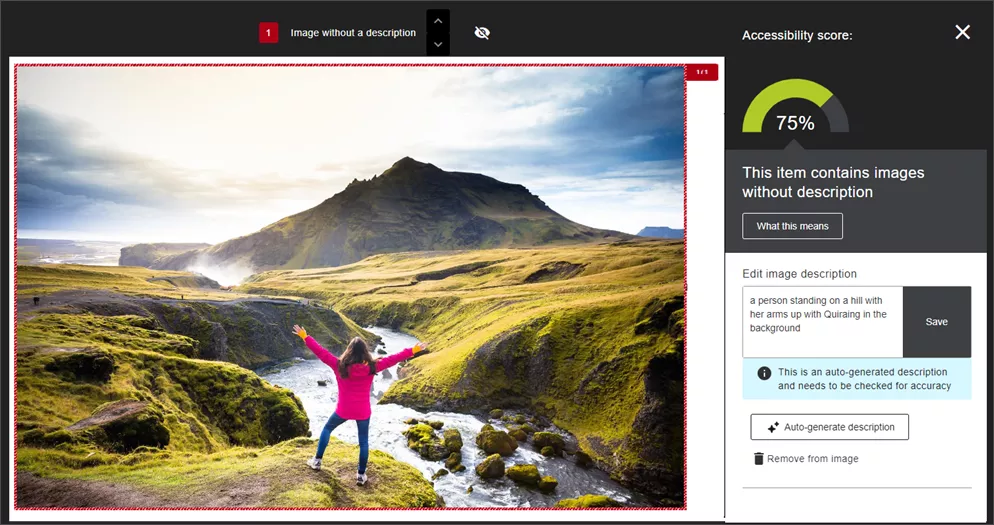
    <Title>CourseArc offers new AI-supported features including image descriptions</Title>
    <Tagline>Improve accessibility in your CourseArc content</Tagline>
    <Body>
      <![CDATA[
          <div class="html-content"><div>CourseArc offers <a href="https://www.coursearc.com/making-smarter-design-easier/" rel="nofollow external" class="bo">new AI-powered features</a> to make content creation smarter and faster. From generating alt text and long descriptions to transforming outlines into full lessons and creating quizzes in seconds, these tools are ready to support your workflow -- right where you work.</div><div><br></div><div><strong>Alt Text &amp; Long Description Generator</strong></div><div>Writing high-quality alt text and long descriptions is essential for accessibility, but it can be a time-consuming task. CourseArc's new <a href="https://vimeo.com/1081956352" rel="nofollow external" class="bo">Alt text &amp; Long Description Generator tool</a>, built directly into the Image block, generates clear, meaningful descriptions in seconds. Whether you’re working with simple icons or complex visuals, this feature helps you meet accessibility standards more quickly and consistently.</div><div><img src="https://my3.my.umbc.edu/groups/instructional-technology/posts/150597/attachments/57467" alt="Example of CourseArc image insertion with AI text and long description generator tool" style="max-width: 100%; height: auto;"></div><div><em>Image: Example of CourseArc image insertion with AI text and long description generator tool</em></div><div><br></div><div><div><strong>Magic Import</strong></div><div>Getting started on a new course? Magic Import makes it easy. Paste in a syllabus, lesson plan, storyboard, or even unstructured content, and CourseArc’s <a href="https://vimeo.com/1081978327" rel="nofollow external" class="bo">Magic Import tool</a> will convert it into editable lessons and pages -- complete with a suggested structure. It’s a powerful way to jumpstart content creation while maintaining full control over your design.</div></div><div><br></div><div><div><strong>Magic Quiz Questions</strong></div><div>Building assessments just got easier. Magic Quiz Questions auto-generates questions from your CourseArc content or any pasted text, supporting formats like multiple-choice, true/false, matching, ordering, and short answer. Use it to draft formative or summative assessments that align with your content. Fast, flexible, and ready to refine.</div></div><div><br></div><div>CourseArc is available in all Blackboard courses via the Content Market. For more information, please <a href="https://umbc.atlassian.net/wiki/spaces/faq/pages/30752316/CourseArc" rel="nofollow external" class="bo">review the FAQ collection</a> or <a href="https://doit.umbc.edu/request-tracker-rt/doit-myumbc-blackboard/" rel="nofollow external" class="bo">open an RT ticket</a> for a consult. </div><div><br></div><div><div><span><strong>Connect with Instructional Technology</strong></span></div><div><span>As always, if you have any questions about teaching, learning, and technology at UMBC, please consider the following options:</span></div><ul><li><a href="https://my3.my.umbc.edu/groups/instructional-technology/posts/149574/15848/f59d29e5c17e589f885b2536a667a41a/web/link?link=http%3A%2F%2Fwww.umbc.edu%2Ffaq" rel="nofollow external" class="bo">Check our extensive FAQ collection</a><span> </span></li><ul><li><span><a href="https://my3.my.umbc.edu/groups/instructional-technology/posts/149574/15848/782c435b983b9add1c5ec4e5d955e60f/web/link?link=https%3A%2F%2Fwiki.umbc.edu%2Fx%2FLohnB" rel="nofollow external" class="bo"><span>What's new in Ultra?</span></a><span> </span><span>|</span><span> </span><a href="https://my3.my.umbc.edu/groups/instructional-technology/posts/149574/15848/63a0e48a64b548180394031ac6f89272/web/link?link=https%3A%2F%2Fwiki.umbc.edu%2Fx%2FbwrSAQ" rel="nofollow external" class="bo"><span>Known Issues</span></a><span> </span></span></li></ul><li><span><a href="https://my3.my.umbc.edu/groups/instructional-technology/posts/149574/15848/727292cce6c6665b1fcf69032b12e0d6/web/link?link=http%3A%2F%2Fmy.umbc.edu%2Fgo%2Frequest-help" rel="nofollow external" class="bo">Open a ticket via RT</a></span></li><li><span>Follow the </span><a href="https://my3.my.umbc.edu/groups/instructional-technology/posts/149574/15848/208c31480fd10e3805fdafe318269623/web/link?link=http%3A%2F%2Fmy.umbc.edu%2Fgroups%2Finstructional-technology" rel="nofollow external" class="bo">Instructional Technology</a><span> &amp; </span><a href="https://my3.my.umbc.edu/groups/instructional-technology/posts/149574/15848/dccb8bbf9409460e32d26e4518464b78/web/link?link=http%3A%2F%2Fmy.umbc.edu%2Fgroups%2Fdoit" rel="nofollow external" class="bo">DoIT</a><span> myUMBC groups</span></li><li><a href="https://my3.my.umbc.edu/groups/instructional-technology/posts/149574/15848/7e9d8e8701228d0f57bcfcd17db50e50/web/link?link=http%3A%2F%2Fdoit.umbc.edu%2Fitnm%2Fstaff%2F" rel="nofollow external" class="bo">Request a consult</a><span> with <a href="https://my3.my.umbc.edu/groups/instructional-technology/posts/149574/15848/1935cd506ec09b50c61f334661d75174/web/link?link=http%3A%2F%2Fdoit.umbc.edu%2Fitnm%2Fstaff" rel="nofollow external" class="bo">instructional technology staff</a></span></li></ul></div></div>
      ]]>
    </Body>
    <Summary>CourseArc offers new AI-powered features to make content creation smarter and faster. From generating alt text and long descriptions to transforming outlines into full lessons and creating quizzes...</Summary>
    <Website>https://my3.my.umbc.edu/groups/instructional-technology/posts/150597</Website>
    <AttachmentKind>Image</AttachmentKind>
    <AttachmentUrl>https://assets4-dev.my.umbc.edu/system/shared/attachments/233fea91e88dd2cff84006b18e382f26/69e614e3/news/000/150/597/f75298b2725d639f7222e5158e1f53c2/CourseArc_AI_ImageGen.png?1749559002</AttachmentUrl>
    <Attachments>
      <Attachment kind="Image" url="https://dev.my.umbc.edu/groups/doit/posts/150597/attachments/57467"></Attachment>
    </Attachments>
    <TrackingUrl>https://dev.my.umbc.edu/api/v0/pixel/news/150597/guest@my.umbc.edu/0f9a2ed20da50df686e36d66464fc9d8/api/pixel</TrackingUrl>
    <Tag>accessibility</Tag>
    <Tag>assessment</Tag>
    <Tag>content-creation</Tag>
    <Tag>coursearc</Tag>
    <Tag>genai</Tag>
    <Tag>image-description</Tag>
    <Tag>quiz-generation</Tag>
    <Group token="instructional-technology">Instructional Technology</Group>
    <GroupUrl>https://dev.my.umbc.edu/groups/instructional-technology</GroupUrl>
    <AvatarUrl>https://assets2-dev.my.umbc.edu/system/shared/avatars/groups/000/001/164/dec3b026b81ee6d890a8f82f75c94a2e/xsmall.png?1446126703</AvatarUrl>
    <AvatarUrl size="original">https://assets1-dev.my.umbc.edu/system/shared/avatars/groups/000/001/164/dec3b026b81ee6d890a8f82f75c94a2e/original.png?1446126703</AvatarUrl>
    <AvatarUrl size="xxlarge">https://assets2-dev.my.umbc.edu/system/shared/avatars/groups/000/001/164/dec3b026b81ee6d890a8f82f75c94a2e/xxlarge.png?1446126703</AvatarUrl>
    <AvatarUrl size="xlarge">https://assets1-dev.my.umbc.edu/system/shared/avatars/groups/000/001/164/dec3b026b81ee6d890a8f82f75c94a2e/xlarge.png?1446126703</AvatarUrl>
    <AvatarUrl size="large">https://assets1-dev.my.umbc.edu/system/shared/avatars/groups/000/001/164/dec3b026b81ee6d890a8f82f75c94a2e/large.png?1446126703</AvatarUrl>
    <AvatarUrl size="medium">https://assets4-dev.my.umbc.edu/system/shared/avatars/groups/000/001/164/dec3b026b81ee6d890a8f82f75c94a2e/medium.png?1446126703</AvatarUrl>
    <AvatarUrl size="small">https://assets3-dev.my.umbc.edu/system/shared/avatars/groups/000/001/164/dec3b026b81ee6d890a8f82f75c94a2e/small.png?1446126703</AvatarUrl>
    <AvatarUrl size="xsmall">https://assets2-dev.my.umbc.edu/system/shared/avatars/groups/000/001/164/dec3b026b81ee6d890a8f82f75c94a2e/xsmall.png?1446126703</AvatarUrl>
    <AvatarUrl size="xxsmall">https://assets3-dev.my.umbc.edu/system/shared/avatars/groups/000/001/164/dec3b026b81ee6d890a8f82f75c94a2e/xxsmall.png?1446126703</AvatarUrl>
    <Sponsor>Instructional Technology</Sponsor>
    <ThumbnailUrl size="xxlarge">https://assets1-dev.my.umbc.edu/system/shared/thumbnails/news/000/150/597/2a66609cc2c9b34716c98db055950d50/xxlarge.jpg?1749558787</ThumbnailUrl>
    <ThumbnailUrl size="xlarge">https://assets1-dev.my.umbc.edu/system/shared/thumbnails/news/000/150/597/2a66609cc2c9b34716c98db055950d50/xlarge.jpg?1749558787</ThumbnailUrl>
    <ThumbnailUrl size="large">https://assets4-dev.my.umbc.edu/system/shared/thumbnails/news/000/150/597/2a66609cc2c9b34716c98db055950d50/large.jpg?1749558787</ThumbnailUrl>
    <ThumbnailUrl size="medium">https://assets3-dev.my.umbc.edu/system/shared/thumbnails/news/000/150/597/2a66609cc2c9b34716c98db055950d50/medium.jpg?1749558787</ThumbnailUrl>
    <ThumbnailUrl size="small">https://assets4-dev.my.umbc.edu/system/shared/thumbnails/news/000/150/597/2a66609cc2c9b34716c98db055950d50/small.jpg?1749558787</ThumbnailUrl>
    <ThumbnailUrl size="xsmall">https://assets2-dev.my.umbc.edu/system/shared/thumbnails/news/000/150/597/2a66609cc2c9b34716c98db055950d50/xsmall.jpg?1749558787</ThumbnailUrl>
    <ThumbnailUrl size="xxsmall">https://assets2-dev.my.umbc.edu/system/shared/thumbnails/news/000/150/597/2a66609cc2c9b34716c98db055950d50/xxsmall.jpg?1749558787</ThumbnailUrl>
    <ThumbnailAltText>A hammer and wrench with text that reads "CourseArc"</ThumbnailAltText>
    <PawCount>2</PawCount>
    <CommentCount>0</CommentCount>
    <CommentsAllowed>true</CommentsAllowed>
    <PostedAt>Tue, 10 Jun 2025 08:41:12 -0400</PostedAt>
  </NewsItem>
  <NewsItem contentIssues="true" id="144396" important="false" status="posted" url="https://dev.my.umbc.edu/groups/doit/posts/144396">
  <Title>October Disability Awareness Month Fosters Inclusion in Higher Education</Title>
  <Tagline>Focus on digital accessibility ensures access, equity to all</Tagline>
  <Body>
    <![CDATA[
    <div class="html-content"><span><p><span>In 2019-20, approximately 21 percent of undergraduate students and 11 percent of post baccalaureate students reported having a disability (National Center for Education Statistics, </span><a href="https://nces.ed.gov/fastfacts/display.asp?id=60" rel="nofollow external" class="bo"><span>Fast Facts</span></a><span>, 2023). Disability Awareness Month offers an opportunity to increase awareness about the variety of disabilities students may experience and help break down misconceptions. </span></p><p><span><strong>Inclusive Experiences for All</strong></span></p><p><span>Disability awareness includes addressing physical environments and improving accessibility in buildings, classrooms, and public spaces to ensure all individuals can navigate and participate fully. This might involve installing ramps, widening doorways, adding signage, or improving lighting. The </span><a href="https://my3.my.umbc.edu/groups/accessibility/posts/143256" rel="nofollow external" class="bo"><span>Office of Accessibility &amp; Disability</span></a><span> raises awareness about the lived experiences of people with disabilities and highlights services for faculty, staff, and students at UMBC. </span></p><p><span>Instructors play an important role in recognizing the diverse needs of students with disabilities while striving to promote equity and access for all. This includes creating inclusive learning experiences for students with disabilities and might involve providing assistive technologies, flexible teaching methods, or individualized support plans. </span></p><p><span>Creating more accessible courses also requires consideration of diverse learning styles and approaches that result in engaging learning for all students. Strategies grounded in Universal Design for Learning principles can leverage technology in ways that help all students succeed. Key practices that support accessible course design include the following. </span></p><p><strong><span>Universal Design for Learning</span><span> </span></strong></p><p><span>One of the most impactful ways instructors can support students is by using Universal Design for Learning (UDL) guidelines, a framework that aims to provide multiple means of engagement, representation, and expression for learners. UDL benefits all students, not just those with disabilities, because it offers flexible ways learners can access content and demonstrate knowledge. </span></p><p><span>UDL is a key practice that supports accessible course design. Instructors can get started in any of the following ways:</span></p><p></p><ul><li><span><span>Review </span><a href="https://udlguidelines.cast.org/" rel="nofollow external" class="bo"><span>UDL guidelines</span></a><span> that support offering multiple means of representation to learners by employing various formats such as text, audio, and visual materials to accommodate diverse learning preferences. </span></span></li><li><span><span>Foster engagement by incorporating interactive elements, discussions, or hands-on activities that cater to visual, auditory, and kinesthetic learners. </span></span></li><li><span><span>Ask </span><a href="https://udlguidelines.cast.org/binaries/content/assets/common/publications/articles/cast-udl-planningq-a11y.pdf" rel="nofollow external" class="bo"><span>key questions</span></a><span> about learner engagement, representation, action and expression when designing a module or unit in your course. </span></span></li><li><span><span>Implement UDL incrementally and intentionally. Refer to scholarly works like Behling &amp; Tobin (2018) for guidance. They encourage faculty to think of UDL as “plus-one thinking about the interactions in your course” (p. 134). Is there just one more way you can help students stay on task, give them information, or demonstrate skills? </span></span></li></ul><div><span><p><span><strong>QM’s Accessibility and Usability Resource Site </strong></span></p><ul><li><span><span>Register for free access to Quality Matters’ </span><a href="https://www.qualitymatters.org/node/1532" rel="nofollow external" class="bo"><span>Accessibility and Usability Resource Site</span></a><span> (AURS), the go-to resource for educators to address key accessibility and usability concerns in course design. Log into </span><a href="https://www.qmprogram.org/myqm/" rel="nofollow external" class="bo"><span>MyQM</span></a><span>, or </span><a href="https://wiki.umbc.edu/x/a4-LBg" rel="nofollow external" class="bo"><span>create your QM account</span></a><span>. After successfully logging in, use the side navigation menu to select “Workshop-Register” and self-enroll into AURS (last item on the workshop list).</span></span></li><li><span><span>Explore AURS resources, videos, and best practices on topics like UDL, alternative text, captions, hyperlinks, accessible MS Office products, readability, accessible PDFs, accessible course design, and inclusive teaching practices.</span></span></li></ul><p><span><strong>Anthology Ally for Remediation, Alt Text</strong></span></p><ul><li><span><span>Explore accessibility tools and built-in features that allow you to cater to students with different abilities and meet </span><a href="https://www.federalregister.gov/documents/2024/04/24/2024-07758/nondiscrimination-on-the-basis-of-disability-accessibility-of-web-information-and-services-of-state" rel="nofollow external" class="bo"><span>recently updated federal requirements</span></a><span> for digital accessibility compliance. For example, </span><a href="https://wiki.umbc.edu/display/faq/Ally" rel="nofollow external" class="bo"><span>Ally</span></a><span> is a tool available in Blackboard Ultra that improves the accessibility of courses by scanning course content, generating an </span><a href="https://wiki.umbc.edu/pages/viewpage.action?pageId=87884573" rel="nofollow external" class="bo"><span>Accessibility Report</span></a><span>, and providing tools to fix accessibility issues.</span></span></li><li><span><span>Use Ally's </span><a href="https://wiki.umbc.edu/display/faq/Ally+for+Instructors" rel="nofollow external" class="bo"><span>Instructor Feedback Panel</span></a><span> to preview content and prioritize remediation.</span></span></li><li><span><span>Consider </span><a href="https://wiki.umbc.edu/pages/viewpage.action?pageId=77431280" rel="nofollow external" class="bo"><span>Ally's powerful alternative format</span></a><span> options and let students know they can download content in multiple formats that give them choices in how they watch, read, or listen. </span></span></li></ul><p><span>Attending disability awareness workshops or collaborating with the </span><a href="https://sds.umbc.edu/" rel="nofollow external" class="bo"><span>Office of Student Disability Services</span></a><span> (SDS) can provide instructors with the tools to accommodate the needs of students with disabilities in the classroom. </span></p><p><span><strong>Save the dates!</strong></span></p><p><span>Join Instructional Technology for upcoming digital accessibility events:</span></p><ul><li><span><span>October 3 - </span><a href="https://my3.my.umbc.edu/groups/instructional-technology/events/134503" rel="nofollow external" class="bo"><span>October 3rd is Fix Your Blackboard Content Day:</span></a><span> Create Inclusive Digital Materials Using Ally - </span><span><strong>Session #1</strong></span><span>, 10 a.m.</span></span></li><li><span><span>October 3 - </span><a href="https://my3.my.umbc.edu/groups/instructional-technology/events/134504" rel="nofollow external" class="bo"><span>October 3rd is Fix Your Blackboard Content Day:</span></a><span> Create Inclusive Digital Materials Using Ally - </span><span><strong>Session #2</strong></span><span>, 2 p.m.</span></span></li><li><span><span>October 15 - </span><a href="https://my3.my.umbc.edu/groups/instructional-technology/events/134914" rel="nofollow external" class="bo"><span>VoiceThread Accessibility and Universal Design for Learning</span></a><span> (Hosted by VoiceThread), 1 p.m.</span></span></li><li><span><span>October 16 - </span><a href="https://my3.my.umbc.edu/groups/instructional-technology/events/133831" rel="nofollow external" class="bo"><span>UDL Guidelines 3.0: What’s New and Why it Matters</span></a><span> (Hosted by CourseArc), 2 p.m.</span></span></li><li><span><span>October 17 - </span><a href="https://my3.my.umbc.edu/groups/instructional-technology/events/134553" rel="nofollow external" class="bo"><span>Create Accessible Documents</span></a><span>, 12 p.m.</span></span></li><li><span><span>October 25 - </span><a href="https://my3.my.umbc.edu/groups/instructional-technology/events/132541" rel="nofollow external" class="bo"><span>Inclusion by Design Virtual Conference: Building Bridges to Accessibility to All</span></a><span> (Virtual event sponsored by Montgomery College)</span></span></li><li><span><span>October 29 - </span><a href="https://my3.my.umbc.edu/groups/instructional-technology/events/134556" rel="nofollow external" class="bo"><span>Create Accessible Presentations</span></a><span>, 12 p.m.</span></span></li><li><span><span>November 12 - </span><a href="https://my3.my.umbc.edu/groups/instructional-technology/events/134557" rel="nofollow external" class="bo"><span>Create Accessible Instructional Videos</span></a><span>, 12 p.m.</span></span></li></ul><p><span>References</span></p><ul><li><span>Behling, K. &amp; Tobin, T. J. (2018). </span><span>Reach everyone, teach everyone: Universal Design for Learning in higher education</span><span>. Morgantown: West Virginia University Press. </span><a href="https://wvupressonline.com/node/757" rel="nofollow external" class="bo"><span>https://wvupressonline.com/node/757</span></a><span>. </span></li><li><span>CAST (2018). </span><a href="https://udlguidelines.cast.org/" rel="nofollow external" class="bo"><span>Universal Design for Learning Guidelines</span></a><span> version 2.2. Retrieved from </span><a href="http://udlguidelines.cast.org" rel="nofollow external" class="bo"><span>http://udlguidelines.cast.org</span></a></li><li><span>National Center for Education Statistics. (2023, TBA). Table 311.10. Number and percentage distribution of students enrolled in postsecondary institutions, by level, disability status, and selected student characteristics: Academic year 2019–20 [Data table]. In </span><span>Digest of education statistics</span><span>. U.S. Department of Education, Institute of Education Sciences. Retrieved December 5, 2023, from </span><a href="https://nces.ed.gov/programs/digest/d22/tables/dt22_311.10.asp" rel="nofollow external" class="bo"><span>https://nces.ed.gov/programs/digest/d22/tables/dt22_311.10.asp</span></a><span>.</span></li></ul><p><span>(</span><span>Image designed by </span><a href="https://www.freepik.com/author/vectorjuice" rel="nofollow external" class="bo"><span>vectorjuice on Freepik</span></a><span>)</span></p></span></div><div><span><span><span><span><span><span><span><span><span><span><span></span></span></span></span></span></span></span></span></span></span></span></div></span></div>
]]>
  </Body>
  <Summary>In 2019-20, approximately 21 percent of undergraduate students and 11 percent of post baccalaureate students reported having a disability (National Center for Education Statistics, Fast Facts,...</Summary>
  <Website>https://my3.my.umbc.edu/groups/instructional-technology/posts/144396</Website>
  <TrackingUrl>https://dev.my.umbc.edu/api/v0/pixel/news/144396/guest@my.umbc.edu/15133f302e7411f0c689267dede1867d/api/pixel</TrackingUrl>
  <Tag>access</Tag>
  <Tag>accessibility</Tag>
  <Tag>biro</Tag>
  <Tag>da</Tag>
  <Tag>digital-accessibility</Tag>
  <Tag>disability-awareness-month</Tag>
  <Tag>equity</Tag>
  <Tag>fa24</Tag>
  <Group token="instructional-technology">Instructional Technology</Group>
  <GroupUrl>https://dev.my.umbc.edu/groups/instructional-technology</GroupUrl>
  <AvatarUrl>https://assets2-dev.my.umbc.edu/system/shared/avatars/groups/000/001/164/dec3b026b81ee6d890a8f82f75c94a2e/xsmall.png?1446126703</AvatarUrl>
  <AvatarUrl size="original">https://assets1-dev.my.umbc.edu/system/shared/avatars/groups/000/001/164/dec3b026b81ee6d890a8f82f75c94a2e/original.png?1446126703</AvatarUrl>
  <AvatarUrl size="xxlarge">https://assets2-dev.my.umbc.edu/system/shared/avatars/groups/000/001/164/dec3b026b81ee6d890a8f82f75c94a2e/xxlarge.png?1446126703</AvatarUrl>
  <AvatarUrl size="xlarge">https://assets1-dev.my.umbc.edu/system/shared/avatars/groups/000/001/164/dec3b026b81ee6d890a8f82f75c94a2e/xlarge.png?1446126703</AvatarUrl>
  <AvatarUrl size="large">https://assets1-dev.my.umbc.edu/system/shared/avatars/groups/000/001/164/dec3b026b81ee6d890a8f82f75c94a2e/large.png?1446126703</AvatarUrl>
  <AvatarUrl size="medium">https://assets4-dev.my.umbc.edu/system/shared/avatars/groups/000/001/164/dec3b026b81ee6d890a8f82f75c94a2e/medium.png?1446126703</AvatarUrl>
  <AvatarUrl size="small">https://assets3-dev.my.umbc.edu/system/shared/avatars/groups/000/001/164/dec3b026b81ee6d890a8f82f75c94a2e/small.png?1446126703</AvatarUrl>
  <AvatarUrl size="xsmall">https://assets2-dev.my.umbc.edu/system/shared/avatars/groups/000/001/164/dec3b026b81ee6d890a8f82f75c94a2e/xsmall.png?1446126703</AvatarUrl>
  <AvatarUrl size="xxsmall">https://assets3-dev.my.umbc.edu/system/shared/avatars/groups/000/001/164/dec3b026b81ee6d890a8f82f75c94a2e/xxsmall.png?1446126703</AvatarUrl>
  <Sponsor>Instructional Technology</Sponsor>
  <ThumbnailUrl size="xxlarge">https://assets4-dev.my.umbc.edu/system/shared/thumbnails/news/000/144/396/efda742ca564aeb03f2e829e7e9f8d91/xxlarge.jpg?1727875037</ThumbnailUrl>
  <ThumbnailUrl size="xlarge">https://assets1-dev.my.umbc.edu/system/shared/thumbnails/news/000/144/396/efda742ca564aeb03f2e829e7e9f8d91/xlarge.jpg?1727875037</ThumbnailUrl>
  <ThumbnailUrl size="large">https://assets1-dev.my.umbc.edu/system/shared/thumbnails/news/000/144/396/efda742ca564aeb03f2e829e7e9f8d91/large.jpg?1727875037</ThumbnailUrl>
  <ThumbnailUrl size="medium">https://assets4-dev.my.umbc.edu/system/shared/thumbnails/news/000/144/396/efda742ca564aeb03f2e829e7e9f8d91/medium.jpg?1727875037</ThumbnailUrl>
  <ThumbnailUrl size="small">https://assets1-dev.my.umbc.edu/system/shared/thumbnails/news/000/144/396/efda742ca564aeb03f2e829e7e9f8d91/small.jpg?1727875037</ThumbnailUrl>
  <ThumbnailUrl size="xsmall">https://assets3-dev.my.umbc.edu/system/shared/thumbnails/news/000/144/396/efda742ca564aeb03f2e829e7e9f8d91/xsmall.jpg?1727875037</ThumbnailUrl>
  <ThumbnailUrl size="xxsmall">https://assets3-dev.my.umbc.edu/system/shared/thumbnails/news/000/144/396/efda742ca564aeb03f2e829e7e9f8d91/xxsmall.jpg?1727875037</ThumbnailUrl>
  <PawCount>5</PawCount>
  <CommentCount>2</CommentCount>
  <CommentsAllowed>true</CommentsAllowed>
  <PostedAt>Wed, 02 Oct 2024 09:47:19 -0400</PostedAt>
</NewsItem>
  <NewsItem contentIssues="true" id="143089" important="false" status="posted" url="https://dev.my.umbc.edu/groups/doit/posts/143089">
  <Title>Ally Now Supports AI-Generated Descriptions for Images</Title>
  <Tagline>Leverage AI to provide inclusive resources for students</Tagline>
  <Body>
    <![CDATA[
    <div class="html-content"><span><p><span>Recent updates to </span><a href="https://www.ada.gov/resources/2024-03-08-web-rule/#:~:text=Title%20II%20of%20the%20ADA,adoption%20services%20to%20zoning%20regulation." rel="nofollow external" class="bo"><span>federal guidelines for digital accessibility</span></a><span> underscore the critical need for educators to ensure that all course materials are accessible to every student. </span></p><p><span>One of the most prevalent accessibility issues in digital course materials is the lack of proper descriptions for images. </span><a href="https://community.anthology.com/blogs/167/1453" rel="nofollow external" class="bo"><span>According to Anthology</span></a><span>, nearly one-third of all images flagged by Ally are simply marked as decorative without any descriptive text, which creates a barrier for students who rely on descriptions for their studies.</span></p><p><span>Properly tagging images not only meets federal guidelines, but also plays a crucial role in creating an inclusive learning environment. Alternative descriptions serve as vital information for students who use screen readers, providing them with textual explanations for images that otherwise visually conveyed. This practice not only supports students with visual impairments, but also benefits those with cognitive disabilities who might struggle to understand the context of images with additional context. </span></p><p><span>Ally will </span><a href="https://help.blackboard.com/Ally/Ally_for_LMS/Instructor/Improve_Accessibility/Add_Image_Descriptions" rel="nofollow external" class="bo"><span>flag images that lack a description</span></a><span> in a Blackboard course. Instructors can enter a description themselves, mark the image as decorative, or leverage AI tools, powered by Microsoft Azure AI Vision, to scan the image and generate a suggested description. Instructors retain full control over the image and can edit the content to make corrections or clarify the information before saving it.</span></p><p><span><span><span><span><img src="https://lh7-rt.googleusercontent.com/docsz/AD_4nXc2d7E654Or-UrlpB-5Zk-KVMfF8QlilHoOwT5guRbGpX_I_PRPLRzhDgM-mEjkRbMjLsBdAAJ-qTW4mw8NsfdBnzL-j8rFH3M2pm0KqH6M6hi_gFuWnBRXCo1Nll5zMWzLFf7LWNpa4M3uUS8yA0H_Tg2n?key=mLUgjMdWFHAnJhaqvezuSw" width="720" height="380" alt="Image 1: Example of Ally's AI generated image description." style="max-width: 100%; height: auto;"></span></span></span></span></p><p><span><em>Image 1: Example of Ally's AI generated image description. </em></span></p><p><span><strong>Note</strong></span><span>: Alternative descriptions are not applied automatically. Each suggestion requires the instructor’s review and approval to ensure that the final output aligns with the instructor’s original purpose for that image.</span></p><p><span>If the alt text does not meet the instructor’s needs, such as a complex image or diagram, ChatGPT and Microsoft Copilot provide excellent tools to create detailed alternative text and long descriptions. </span></p><p><span>For example, this prompt was shared by the International Ally Users Group. It can be customized for the uploaded image according to context, function and prospective audience (e.g., students). </span></p></span><blockquote><span>“You are a university-level instructor working to ensure images in your online course materials conform to Web Content Accessibility Guidelines at Level Double A. You need to accommodate for disabilities and impairments such as blindness, low vision and color vision deficiency to ensure equitable access to module content for all students. </span></blockquote><blockquote><span><br></span><span>"You will be provided with an image. Please return a succinct title, alternative text (alt text), and a long description. You will also separately list verbatim all words that appear in the image.</span></blockquote><blockquote><span><br></span><span>"The alt text should be no more than two sentences and should briefly describe the meaning conveyed by the image.</span></blockquote><blockquote><span><br></span></blockquote><blockquote><span>"The detailed description may be one or more paragraphs and must describe the image in great detail so that anyone who does not see it can gain a full understanding of everything in the image. Please format the detailed description such that it will be easily scannable. Use headings, paragraph breaks, and lists as appropriate. Use active voice.”</span></blockquote><blockquote><span><br></span></blockquote><blockquote><a href="https://www.purdue.edu/innovativelearning/tools-resources/accessibility/ai-prompt-example/" rel="nofollow external" class="bo"><span>Prompt created by Purdue University</span></a><span> and adapted by Matthew Deeprose (Southampton University)</span></blockquote><span><p><span><br></span></p><p><span>When we integrate comprehensive and accurate alt text for all images, we adhere to accessibility standards and legal requirements. We also foster an inclusive and supporting learning environment where every student has the opportunity to succeed.</span></p><p><span><br></span></p></span></div>
]]>
  </Body>
  <Summary>Recent updates to federal guidelines for digital accessibility underscore the critical need for educators to ensure that all course materials are accessible to every student.   One of the most...</Summary>
  <Website>https://my3.my.umbc.edu/groups/instructional-technology/posts/143089</Website>
  <TrackingUrl>https://dev.my.umbc.edu/api/v0/pixel/news/143089/guest@my.umbc.edu/be605c4b901cd19b9c708dfa4d75c784/api/pixel</TrackingUrl>
  <Tag>accessibility</Tag>
  <Tag>ai</Tag>
  <Tag>ally</Tag>
  <Tag>biro</Tag>
  <Tag>blackboard</Tag>
  <Group token="instructional-technology">Instructional Technology</Group>
  <GroupUrl>https://dev.my.umbc.edu/groups/instructional-technology</GroupUrl>
  <AvatarUrl>https://assets2-dev.my.umbc.edu/system/shared/avatars/groups/000/001/164/dec3b026b81ee6d890a8f82f75c94a2e/xsmall.png?1446126703</AvatarUrl>
  <AvatarUrl size="original">https://assets1-dev.my.umbc.edu/system/shared/avatars/groups/000/001/164/dec3b026b81ee6d890a8f82f75c94a2e/original.png?1446126703</AvatarUrl>
  <AvatarUrl size="xxlarge">https://assets2-dev.my.umbc.edu/system/shared/avatars/groups/000/001/164/dec3b026b81ee6d890a8f82f75c94a2e/xxlarge.png?1446126703</AvatarUrl>
  <AvatarUrl size="xlarge">https://assets1-dev.my.umbc.edu/system/shared/avatars/groups/000/001/164/dec3b026b81ee6d890a8f82f75c94a2e/xlarge.png?1446126703</AvatarUrl>
  <AvatarUrl size="large">https://assets1-dev.my.umbc.edu/system/shared/avatars/groups/000/001/164/dec3b026b81ee6d890a8f82f75c94a2e/large.png?1446126703</AvatarUrl>
  <AvatarUrl size="medium">https://assets4-dev.my.umbc.edu/system/shared/avatars/groups/000/001/164/dec3b026b81ee6d890a8f82f75c94a2e/medium.png?1446126703</AvatarUrl>
  <AvatarUrl size="small">https://assets3-dev.my.umbc.edu/system/shared/avatars/groups/000/001/164/dec3b026b81ee6d890a8f82f75c94a2e/small.png?1446126703</AvatarUrl>
  <AvatarUrl size="xsmall">https://assets2-dev.my.umbc.edu/system/shared/avatars/groups/000/001/164/dec3b026b81ee6d890a8f82f75c94a2e/xsmall.png?1446126703</AvatarUrl>
  <AvatarUrl size="xxsmall">https://assets3-dev.my.umbc.edu/system/shared/avatars/groups/000/001/164/dec3b026b81ee6d890a8f82f75c94a2e/xxsmall.png?1446126703</AvatarUrl>
  <Sponsor>Instructional Technology</Sponsor>
  <ThumbnailUrl size="xxlarge">https://assets2-dev.my.umbc.edu/system/shared/thumbnails/news/000/143/089/b229f46db2d2982555055c67d21eb954/xxlarge.jpg?1723053847</ThumbnailUrl>
  <ThumbnailUrl size="xlarge">https://assets3-dev.my.umbc.edu/system/shared/thumbnails/news/000/143/089/b229f46db2d2982555055c67d21eb954/xlarge.jpg?1723053847</ThumbnailUrl>
  <ThumbnailUrl size="large">https://assets3-dev.my.umbc.edu/system/shared/thumbnails/news/000/143/089/b229f46db2d2982555055c67d21eb954/large.jpg?1723053847</ThumbnailUrl>
  <ThumbnailUrl size="medium">https://assets3-dev.my.umbc.edu/system/shared/thumbnails/news/000/143/089/b229f46db2d2982555055c67d21eb954/medium.jpg?1723053847</ThumbnailUrl>
  <ThumbnailUrl size="small">https://assets4-dev.my.umbc.edu/system/shared/thumbnails/news/000/143/089/b229f46db2d2982555055c67d21eb954/small.jpg?1723053847</ThumbnailUrl>
  <ThumbnailUrl size="xsmall">https://assets2-dev.my.umbc.edu/system/shared/thumbnails/news/000/143/089/b229f46db2d2982555055c67d21eb954/xsmall.jpg?1723053847</ThumbnailUrl>
  <ThumbnailUrl size="xxsmall">https://assets1-dev.my.umbc.edu/system/shared/thumbnails/news/000/143/089/b229f46db2d2982555055c67d21eb954/xxsmall.jpg?1723053847</ThumbnailUrl>
  <PawCount>6</PawCount>
  <CommentCount>0</CommentCount>
  <CommentsAllowed>true</CommentsAllowed>
  <PostedAt>Tue, 13 Aug 2024 09:26:13 -0400</PostedAt>
  <EditAt>Tue, 13 Aug 2024 09:34:12 -0400</EditAt>
</NewsItem>
  <NewsItem contentIssues="true" id="141460" important="false" status="posted" url="https://dev.my.umbc.edu/groups/doit/posts/141460">
  <Title>Advanced release conditions customize Ultra content in May</Title>
  <Tagline>Improvements to gradebook calculations, reduce animations</Tagline>
  <Body>
    <![CDATA[
    <div class="html-content">With the latest update to Ultra in May, instructors can design a learning pathway where students must demonstrate proficiency in multiple content areas (e.g., at least 80% mastery on separate assessments) before they can move on to new subject matter. This ensures that students have a solid foundation in critical topics, enhancing preparedness as they progress to more challenging topics. By setting multiple performance criteria, instructors can tailor the learning experience for a diverse student population. The first phase of this update will <a href="https://help.blackboard.com/node/48006" rel="nofollow external" class="bo">support AND criteria</a> (e.g., test 1 AND test 2 are required criteria). Later in the summer, the second phase is expected to support OR criteria.<div><br></div><div><img src="https://help.blackboard.com/sites/default/files/styles/rich_text_large/public/images/2024-04/Learn_91_RC_PerfCriteria1.png.webp?itok=APxDuTKj" alt="Image 1: Example of setting AND criteria in advanced release conditions panel" width="400" style="max-width: 100%; height: auto;"></div><div><em>Image 1: Example of setting AND criteria in advanced release conditions panel</em><br><div><div><br></div><div><strong>Assessment &amp; Grading Enhancements</strong></div><div><ul><li>Instructors now have the ability to <a href="https://help.blackboard.com/node/48031" rel="nofollow external" class="bo">provide specific feedback for each question</a> when grading an assessment. Last month, instructors were given the option to provide feedback for questions <a href="https://help.blackboard.com/node/47866" rel="nofollow external" class="bo">on a per student basis</a>.</li></ul><div><img src="https://help.blackboard.com/sites/default/files/styles/rich_text_large/public/images/2024-04/Learn_91_Question_Feedback-1.png.webp?itok=lNbvqA0v" alt="Image 2: Example of adding per-question feedback when grading by question." width="500" style="max-width: 100%; height: auto;"></div><div><em>Image 2: Example of adding per-question feedback when grading by question.</em></div><ul><li>Instructors can <a href="https://help.blackboard.com/node/48041" rel="nofollow external" class="bo">assign equal weights to items in the same categories</a>. The chosen calculation method, whether proportional or equal, applies to all categories. Ultra will display the instructor's chosen weighting option in the calculation rules panel.</li><li>Instructors can <a href="https://help.blackboard.com/es-es/node/48001" rel="nofollow external" class="bo">align goals to questions within a question pool</a> to ensure that assessment items measure the desired learning outcomes. Goals are set up by Bb admins.</li><li>The <a href="https://help.blackboard.com/node/48036" rel="nofollow external" class="bo">gradebook navigation eliminates icons</a> for navigation and adds tabs for Gradable Items, Grades (grid view), and Students.</li></ul><div><strong>Accessibility</strong></div></div><div><div><ul><li>Recognizing the diverse needs of our user community, Ultra has improved its accessibility by supporting the “prefers-reduced-motion” setting. Users who opt for reduced motion settings will experience less animation, with panels snapping into place rather than sliding, creating a more comfortable and distraction-free learning environment.</li><ul><li><span>Mobile:</span></li><ul><li><span>iOS: Accessibility &gt; Motion &gt; Reduce motion (on)</span></li><li><span>Android: Settings &gt; Accessibility &gt; Remove Animations (on)</span></li></ul><li><span>Laptop/Desktop:</span></li><ul><li><span>Windows: Settings &gt; Accessibility &gt; Visual effects &gt; Animation effects (off)</span></li><li><span>Mac OS: System Settings &gt; Accessibility &gt; Display &gt; Reduce motion (on)</span></li></ul></ul></ul></div><div><div><strong>Content Improvements &amp; Engagement</strong></div><div><ul><li>A new safeguard <a href="https://help.blackboard.com/node/48076" rel="nofollow external" class="bo">prevents the push of content from Original</a> to Ultra courses, reducing the risk of data corruption. Instructors must initiate content copying from an Ultra course. </li><li>Enhancing the utility of Forms, instructors can now <a href="https://help.blackboard.com/node/48016" rel="nofollow external" class="bo">reuse questions when creating or editing a form</a>.</li><li>Instructors can assign a Form to a Group and allow multiple attempts. This feature supports collaborative learning and continuous improvement, enabling students to refine their understanding and responses based on previous attempts and feedback.</li></ul></div></div><div><span>Faculty should see the latest updates in Ultra courses around May 2-3, 2024. </span><span>The next update to our Ultra test environment will take place on May 7, 2024; release notes are posted to the <a href="https://wiki.umbc.edu/x/LohnB" rel="nofollow external" class="bo">What's New in Ultra</a> that same week. Faculty who are interested in test driving new features before they are released to production should </span><a href="http://my.umbc.edu/go/request-help" rel="nofollow external" class="bo">open an RT ticket</a><span> to request early access. Please </span><a href="http://umbc.edu/go/ultra" rel="nofollow external" class="bo">watch the FAQs</a><span>, including </span><a href="https://wiki.umbc.edu/x/LohnB" rel="nofollow external" class="bo">the What's New with Ultra page</a><span>, </span><span>and myUMBC for additional information about Ultra. </span></div><div><div><span><br></span></div></div><div><span><strong>Connect with Instructional Technology</strong></span></div><div><span>As always, if you have any questions about teaching, learning, and technology at UMBC, please consider the following options:</span></div><ul><li><a href="http://www.umbc.edu/faq" rel="nofollow external" class="bo">Check our extensive FAQ collection</a><span> </span></li><ul><li><span><a href="https://wiki.umbc.edu/x/LohnB" rel="nofollow external" class="bo"><span>What's new in Ultra?</span></a><span> </span><span>|</span><span> </span><a href="https://wiki.umbc.edu/x/bwrSAQ" rel="nofollow external" class="bo"><span>Known Issues</span></a><span> </span></span></li></ul><li><span><a href="http://my.umbc.edu/go/request-help" rel="nofollow external" class="bo">Open a ticket via RT</a></span></li><li><span>Follow the </span><a href="http://my.umbc.edu/groups/instructional-technology" rel="nofollow external" class="bo">Instructional Technology</a><span> &amp; </span><a href="http://my.umbc.edu/groups/doit" rel="nofollow external" class="bo">DoIT</a><span> myUMBC groups</span></li><li><a href="http://doit.umbc.edu/itnm/staff/" rel="nofollow external" class="bo">Request a consult</a><span> with <a href="http://doit.umbc.edu/itnm/staff" rel="nofollow external" class="bo">instructional technology staff</a></span></li><li><span><a href="http://pivot.umbc.edu" rel="nofollow external" class="bo">PIVOT</a> | <a href="https://doit.umbc.edu/itnm/academic-continuity/" rel="nofollow external" class="bo">Academic Continuity</a></span><span> </span><span>|</span><span> </span><span><a href="https://fdc.umbc.edu/teaching/keep-on-teaching/" rel="nofollow external" class="bo">Keep On Teaching</a></span><span> </span><span>|</span><span> </span><span><a href="https://doit.umbc.edu/students" rel="nofollow external" class="bo">Student Technology Resources</a></span></li></ul><div><em>Thumbnail-image: New to Ultra</em></div><div><div></div></div></div></div></div></div>
]]>
  </Body>
  <Summary>With the latest update to Ultra in May, instructors can design a learning pathway where students must demonstrate proficiency in multiple content areas (e.g., at least 80% mastery on separate...</Summary>
  <Website>https://my3.my.umbc.edu/groups/instructional-technology/posts/141460</Website>
  <TrackingUrl>https://dev.my.umbc.edu/api/v0/pixel/news/141460/guest@my.umbc.edu/71d67e3eb87f0475fd53298f158463e4/api/pixel</TrackingUrl>
  <Tag>accessibility</Tag>
  <Tag>blackboard</Tag>
  <Tag>gradebook</Tag>
  <Tag>release-conditions</Tag>
  <Tag>ultra-experience</Tag>
  <Tag>ultra-update</Tag>
  <Group token="instructional-technology">Instructional Technology</Group>
  <GroupUrl>https://dev.my.umbc.edu/groups/instructional-technology</GroupUrl>
  <AvatarUrl>https://assets2-dev.my.umbc.edu/system/shared/avatars/groups/000/001/164/dec3b026b81ee6d890a8f82f75c94a2e/xsmall.png?1446126703</AvatarUrl>
  <AvatarUrl size="original">https://assets1-dev.my.umbc.edu/system/shared/avatars/groups/000/001/164/dec3b026b81ee6d890a8f82f75c94a2e/original.png?1446126703</AvatarUrl>
  <AvatarUrl size="xxlarge">https://assets2-dev.my.umbc.edu/system/shared/avatars/groups/000/001/164/dec3b026b81ee6d890a8f82f75c94a2e/xxlarge.png?1446126703</AvatarUrl>
  <AvatarUrl size="xlarge">https://assets1-dev.my.umbc.edu/system/shared/avatars/groups/000/001/164/dec3b026b81ee6d890a8f82f75c94a2e/xlarge.png?1446126703</AvatarUrl>
  <AvatarUrl size="large">https://assets1-dev.my.umbc.edu/system/shared/avatars/groups/000/001/164/dec3b026b81ee6d890a8f82f75c94a2e/large.png?1446126703</AvatarUrl>
  <AvatarUrl size="medium">https://assets4-dev.my.umbc.edu/system/shared/avatars/groups/000/001/164/dec3b026b81ee6d890a8f82f75c94a2e/medium.png?1446126703</AvatarUrl>
  <AvatarUrl size="small">https://assets3-dev.my.umbc.edu/system/shared/avatars/groups/000/001/164/dec3b026b81ee6d890a8f82f75c94a2e/small.png?1446126703</AvatarUrl>
  <AvatarUrl size="xsmall">https://assets2-dev.my.umbc.edu/system/shared/avatars/groups/000/001/164/dec3b026b81ee6d890a8f82f75c94a2e/xsmall.png?1446126703</AvatarUrl>
  <AvatarUrl size="xxsmall">https://assets3-dev.my.umbc.edu/system/shared/avatars/groups/000/001/164/dec3b026b81ee6d890a8f82f75c94a2e/xxsmall.png?1446126703</AvatarUrl>
  <Sponsor>Instructional Technology</Sponsor>
  <ThumbnailUrl size="xxlarge">https://assets3-dev.my.umbc.edu/system/shared/thumbnails/news/000/141/460/f5e1239b01815537530297d341a971cb/xxlarge.jpg?1714407496</ThumbnailUrl>
  <ThumbnailUrl size="xlarge">https://assets3-dev.my.umbc.edu/system/shared/thumbnails/news/000/141/460/f5e1239b01815537530297d341a971cb/xlarge.jpg?1714407496</ThumbnailUrl>
  <ThumbnailUrl size="large">https://assets4-dev.my.umbc.edu/system/shared/thumbnails/news/000/141/460/f5e1239b01815537530297d341a971cb/large.jpg?1714407496</ThumbnailUrl>
  <ThumbnailUrl size="medium">https://assets3-dev.my.umbc.edu/system/shared/thumbnails/news/000/141/460/f5e1239b01815537530297d341a971cb/medium.jpg?1714407496</ThumbnailUrl>
  <ThumbnailUrl size="small">https://assets1-dev.my.umbc.edu/system/shared/thumbnails/news/000/141/460/f5e1239b01815537530297d341a971cb/small.jpg?1714407496</ThumbnailUrl>
  <ThumbnailUrl size="xsmall">https://assets4-dev.my.umbc.edu/system/shared/thumbnails/news/000/141/460/f5e1239b01815537530297d341a971cb/xsmall.jpg?1714407496</ThumbnailUrl>
  <ThumbnailUrl size="xxsmall">https://assets2-dev.my.umbc.edu/system/shared/thumbnails/news/000/141/460/f5e1239b01815537530297d341a971cb/xxsmall.jpg?1714407496</ThumbnailUrl>
  <PawCount>1</PawCount>
  <CommentCount>0</CommentCount>
  <CommentsAllowed>true</CommentsAllowed>
  <PostedAt>Mon, 29 Apr 2024 14:38:05 -0400</PostedAt>
  <EditAt>Mon, 29 Apr 2024 16:06:24 -0400</EditAt>
</NewsItem>
  <NewsItem contentIssues="true" id="137987" important="false" status="posted" url="https://dev.my.umbc.edu/groups/doit/posts/137987">
    <Title>Apply for 2024 Accessibility Inclusion Fellowship</Title>
    <Tagline>Program &amp; award provided by National Federation of the Blind</Tagline>
    <Body>
      <![CDATA[
          <div class="html-content"><span>The Accessibility Inclusion Fellowship is a one-year fellowship awarded by the <a href="https://nfb.org" rel="nofollow external" class="bo">National Federation of the Blind</a> to three Maryland professors to assist them integrate accessibility into their curriculum and incorporate non-visual teaching methods in at least one course. </span><div><span><br></span></div><div><span>In addition to providing a $2,000 financial award to each professor, the NFB works individually with the professors/instructors to brainstorm solutions to their accessibility challenges, help them develop and implement an accessibility action plan, and provide meaningful educational resources and tools.</span><br><br><span>The <a href="https://nfb.org" rel="nofollow external" class="bo">National Federation of the Blind</a> administers the Accessibility Inclusion Fellowship program under a non-visual accessibility initiative grant from the State of Maryland. Your existing course does not need to have an accessibility component. If chosen, the NFB will work with you through their Center of Excellence in Non-visual Access to enhance your course curriculum to include accessibility concepts by providing consultation and assistance with course instruction.</span><br><br><span>Apply today by submitting the application for the </span><a href="https://nfb.org/programs-services/center-excellence-nonvisual-access/accessibility-inclusion-fellowship-program/application" rel="nofollow external" class="bo">2024 Accessibility Inclusion Fellowship</a><span>. </span><span>Applications must be received by January 27, 2024.</span></div><div><br></div><div><span><strong>All institutional grants and faculty grants awarded to UMBC must be routed to the Office of Sponsored Programs prior to submission. Contact your unit's business manager or proposal development staff to discuss your application.</strong></span><br><br><span>For more information, please visit: </span><a href="https://nfb.org/programs-services/center-excellence-nonvisual-access/accessibility-inclusion-fellowship-program" rel="nofollow external" class="bo">https://nfb.org/programs-services/center-excellence-nonvisual-access/accessibility-inclusion-fellowship-program</a><span> </span><br><br><span>Please send any questions about this opportunity to </span><a href="mailto:nfb@nfb.org" rel="nofollow external" class="bo">nfb@nfb.org</a><span> </span></div></div>
      ]]>
    </Body>
    <Summary>The Accessibility Inclusion Fellowship is a one-year fellowship awarded by the National Federation of the Blind to three Maryland professors to assist them integrate accessibility into their...</Summary>
    <TrackingUrl>https://dev.my.umbc.edu/api/v0/pixel/news/137987/guest@my.umbc.edu/ff85492ee072b3b47d7a7eda4db3a6ec/api/pixel</TrackingUrl>
    <Tag>accessibility</Tag>
    <Tag>fellowship</Tag>
    <Tag>grant</Tag>
    <Tag>inclusion</Tag>
    <Tag>non-visual</Tag>
    <Group token="instructional-technology">Instructional Technology</Group>
    <GroupUrl>https://dev.my.umbc.edu/groups/instructional-technology</GroupUrl>
    <AvatarUrl>https://assets2-dev.my.umbc.edu/system/shared/avatars/groups/000/001/164/dec3b026b81ee6d890a8f82f75c94a2e/xsmall.png?1446126703</AvatarUrl>
    <AvatarUrl size="original">https://assets1-dev.my.umbc.edu/system/shared/avatars/groups/000/001/164/dec3b026b81ee6d890a8f82f75c94a2e/original.png?1446126703</AvatarUrl>
    <AvatarUrl size="xxlarge">https://assets2-dev.my.umbc.edu/system/shared/avatars/groups/000/001/164/dec3b026b81ee6d890a8f82f75c94a2e/xxlarge.png?1446126703</AvatarUrl>
    <AvatarUrl size="xlarge">https://assets1-dev.my.umbc.edu/system/shared/avatars/groups/000/001/164/dec3b026b81ee6d890a8f82f75c94a2e/xlarge.png?1446126703</AvatarUrl>
    <AvatarUrl size="large">https://assets1-dev.my.umbc.edu/system/shared/avatars/groups/000/001/164/dec3b026b81ee6d890a8f82f75c94a2e/large.png?1446126703</AvatarUrl>
    <AvatarUrl size="medium">https://assets4-dev.my.umbc.edu/system/shared/avatars/groups/000/001/164/dec3b026b81ee6d890a8f82f75c94a2e/medium.png?1446126703</AvatarUrl>
    <AvatarUrl size="small">https://assets3-dev.my.umbc.edu/system/shared/avatars/groups/000/001/164/dec3b026b81ee6d890a8f82f75c94a2e/small.png?1446126703</AvatarUrl>
    <AvatarUrl size="xsmall">https://assets2-dev.my.umbc.edu/system/shared/avatars/groups/000/001/164/dec3b026b81ee6d890a8f82f75c94a2e/xsmall.png?1446126703</AvatarUrl>
    <AvatarUrl size="xxsmall">https://assets3-dev.my.umbc.edu/system/shared/avatars/groups/000/001/164/dec3b026b81ee6d890a8f82f75c94a2e/xxsmall.png?1446126703</AvatarUrl>
    <Sponsor>Instructional Technology</Sponsor>
    <ThumbnailUrl size="xxlarge">https://assets2-dev.my.umbc.edu/system/shared/thumbnails/news/000/137/987/6ac96085dcf42182665a958bab7476cd/xxlarge.jpg?1704301623</ThumbnailUrl>
    <ThumbnailUrl size="xlarge">https://assets3-dev.my.umbc.edu/system/shared/thumbnails/news/000/137/987/6ac96085dcf42182665a958bab7476cd/xlarge.jpg?1704301623</ThumbnailUrl>
    <ThumbnailUrl size="large">https://assets3-dev.my.umbc.edu/system/shared/thumbnails/news/000/137/987/6ac96085dcf42182665a958bab7476cd/large.jpg?1704301623</ThumbnailUrl>
    <ThumbnailUrl size="medium">https://assets1-dev.my.umbc.edu/system/shared/thumbnails/news/000/137/987/6ac96085dcf42182665a958bab7476cd/medium.jpg?1704301623</ThumbnailUrl>
    <ThumbnailUrl size="small">https://assets1-dev.my.umbc.edu/system/shared/thumbnails/news/000/137/987/6ac96085dcf42182665a958bab7476cd/small.jpg?1704301623</ThumbnailUrl>
    <ThumbnailUrl size="xsmall">https://assets2-dev.my.umbc.edu/system/shared/thumbnails/news/000/137/987/6ac96085dcf42182665a958bab7476cd/xsmall.jpg?1704301623</ThumbnailUrl>
    <ThumbnailUrl size="xxsmall">https://assets4-dev.my.umbc.edu/system/shared/thumbnails/news/000/137/987/6ac96085dcf42182665a958bab7476cd/xxsmall.jpg?1704301623</ThumbnailUrl>
    <PawCount>1</PawCount>
    <CommentCount>0</CommentCount>
    <CommentsAllowed>true</CommentsAllowed>
    <PostedAt>Wed, 03 Jan 2024 12:10:42 -0500</PostedAt>
  </NewsItem>
  <NewsItem contentIssues="false" id="137662" important="false" status="posted" url="https://dev.my.umbc.edu/groups/doit/posts/137662">
  <Title>Accessible Course Design Supports Diverse Learning Styles</Title>
  <Tagline>Save the dates! Accessibility Workshop and Bb Ally Webinar</Tagline>
  <Body>
    <![CDATA[
    <div class="html-content"><span><p><span>Creating accessible courses requires thoughtful consideration of diverse learning styles and strategies that result in fostering engaging learning experiences for all students. These strategies include leveraging Universal Design for Learning principles to guide course design that offers variety to all learners. </span></p><p><span>Faculty can utilize Blackboard Ally to provide multiple content formats and empower students to use Ally's alternative formats to meet their learning styles. Additional resources about course usability and accessibility, including the chance to connect with peers, can be accessed by using your QM login to enroll in the Accessibility and Usability Resource Site (AURS). </span></p><p><span>Highlights of these approaches include the following:  </span></p><div><span><span><p><span><strong>Universal Design for Learning Guidelines</strong></span></p><ul><li><span><span><span>Review </span><a href="https://udlguidelines.cast.org/" rel="nofollow external" class="bo"><span>UDL guidelines</span></a><span> that support offering multiple means of representation to learners by employing various formats such as text, audio, and visual materials to accommodate diverse learning preferences. </span></span></span></li><li><span><span><span>Foster engagement by incorporating interactive elements, discussions, or hands-on activities that cater to visual, auditory, and kinesthetic learners. </span></span></span></li><li><span><span><span>Ask yourself these </span><a href="https://udlguidelines.cast.org/binaries/content/assets/common/publications/articles/cast-udl-planningq-a11y.pdf" rel="nofollow external" class="bo"><span>key questions</span></a><span> about learner engagement, representation, action and expression when designing a module or unit in your course. </span></span></span></li><li><span><span><span>Implement UDL incrementally and intentionally. Refer to scholarly works like Behling &amp; Tobin (2018) for guidance. They encourage faculty to think of UDL as "plus-one thinking about the interactions in your course" (p. 134). For example, is there just one more way you can help students stay on task, give them information, or demonstrate skills? The answers can help unlock a UDL strategy for your course. </span></span></span></li></ul><div><span><p><span><strong>Bb Ally for Remediation, Alt Text</strong></span></p><ul><li><span><span>Explore accessibility tools and built-in features that allow you to cater to students with different  abilities. For example, </span><a href="https://wiki.umbc.edu/display/faq/Ally" rel="nofollow external" class="bo"><span>Ally</span></a><span> is a tool available in Blackboard Ultra that improves the accessibility of courses by scanning course content, generating an </span><a href="https://wiki.umbc.edu/pages/viewpage.action?pageId=87884573" rel="nofollow external" class="bo"><span>Accessibility Report</span></a><span>, and providing tools to fix accessibility issues.</span></span></li><li><span><span>Use Ally's </span><a href="https://wiki.umbc.edu/display/faq/Ally+for+Instructors" rel="nofollow external" class="bo"><span>Instructor Feedback Panel</span></a><span> to preview content and prioritize remediation.</span></span></li><li><span><span>Consider </span><a href="https://wiki.umbc.edu/pages/viewpage.action?pageId=77431280" rel="nofollow external" class="bo"><span>Ally's powerful alternative format</span></a><span> options and let students know they can download content in multiple formats that give them choices in how they watch, read, or listen. </span></span></li></ul><div><span><p><span><strong>QM's Accessibility and Usability Resource Site </strong></span></p><ul><li><span><span>Register for free access to Quality Matters </span><a href="https://www.qualitymatters.org/node/1532" rel="nofollow external" class="bo"><span>Accessibility and Usability Resource Site</span></a><span> (AURS), the go-to resource for educators to address key accessibility and usability concerns. Log into </span><a href="https://www.qmprogram.org/myqm/" rel="nofollow external" class="bo"><span>MyQM</span></a><span>, or </span><a href="https://wiki.umbc.edu/x/a4-LBg" rel="nofollow external" class="bo"><span>create your QM account</span></a><span>. After successfully logging in, use the side navigation menu to select "Workshop-Register" and self-enroll in AURS (last item on the workshop list).</span></span></li><li><span><span>Explore resources, videos, and best practices on topics like UDL, alternative text, captions, hyperlinks, accessible MS Office products, readability, accessible PDFs, accessible course design, and inclusive teaching practices.</span></span></li><li><span><span>Connect with colleagues through AURS discussion forums to seek and incorporate feedback to refine course design that supports an inclusive learning experience. </span></span></li></ul><div><span><p><span><strong>Save the dates!</strong></span></p><p><span>Instructional Technology will offer an accessibility workshop in January and a Bb Ally webinar in February to share best practices in course accessibility and usability. To learn more and register for an event, follow us on </span><a href="https://my3.my.umbc.edu/groups/instructional-technology" rel="nofollow external" class="bo"><span>myUMBC</span></a><span>.  </span></p><ul><li><span><span><strong>January 23:</strong> <a href="https://my3.my.umbc.edu/groups/instructional-technology/events/124608/" rel="nofollow external" class="bo">Accessibility workshop,</a> </span><span>from 1 - 2:15 p.m. (hands-on workshop)</span></span></li><li><span><span><strong>February 15:</strong> <a href="https://my3.my.umbc.edu/groups/instructional-technology/events/124592/" rel="nofollow external" class="bo">30 Minutes or Less - 3 Things You can Do With Bb Ally,</a> </span><span>from 12 - 12:30 p.m.</span></span></li></ul><div><span><p><span><strong>References</strong></span></p><ul><li><span>Behling, K. &amp; Tobin, T. J. (2018). </span><span>Reach everyone, teach everyone: Universal Design for Learning in higher education</span><span>. Morgantown: West Virginia University Press. </span><a href="https://wvupressonline.com/node/757" rel="nofollow external" class="bo"><span>https://wvupressonline.com/node/757</span></a><span>. </span></li><li><span>CAST (2018). </span><a href="https://udlguidelines.cast.org/" rel="nofollow external" class="bo"><span>Universal Design for Learning Guidelines</span></a><span> version 2.2. Retrieved from <a href="http://udlguidelines.cast.org">http://udlguidelines.cast.org</a></span></li><li><span>UDL on campus: Universal Design for Learning in higher education</span><span>. </span><span>UDL On Campus by </span><a href="http://www.cast.org/" rel="nofollow external" class="bo"><span>CAST</span></a><span> is licensed under a Creative Commons Attribution-ShareAlike 4.0 International License. Retrieved from </span><a href="http://udloncampus.cast.org/home" rel="nofollow external" class="bo"><span>http://udloncampus.cast.org/home</span></a></li></ul><p><span>UMBC is committed to providing a consistent learning experience for everyone. The </span><a href="https://doit.umbc.edu/news/post/130227/" rel="nofollow external" class="bo"><span>last day we will support Blackboard Original</span></a><span> is December 31, 2024. Please check out our training and support:</span><a href="http://umbc.edu/go/ultra" rel="nofollow external" class="bo"><span>umbc.edu/go/ultra</span></a></p><div><br></div></span></div></span></div></span></div></span></div></span></span></div></span></div>
]]>
  </Body>
  <Summary>Creating accessible courses requires thoughtful consideration of diverse learning styles and strategies that result in fostering engaging learning experiences for all students. These strategies...</Summary>
  <Website>https://my3.my.umbc.edu/groups/instructional-technology/posts/137662</Website>
  <AttachmentKind>Image</AttachmentKind>
  <AttachmentUrl>https://assets4-dev.my.umbc.edu/system/shared/attachments/2ecf08bc7d4f5795941c2e27476857e3/69e614e3/news/000/137/662/798014564d89b66bdea039ebf5c56664/enroll.png?1702302484</AttachmentUrl>
  <Attachments>
    <Attachment kind="Image" url="https://dev.my.umbc.edu/groups/doit/posts/137662/attachments/49873"></Attachment>
  </Attachments>
  <TrackingUrl>https://dev.my.umbc.edu/api/v0/pixel/news/137662/guest@my.umbc.edu/be9b39ee1c1c1f88f2562e3882de51de/api/pixel</TrackingUrl>
  <Tag>accessibility</Tag>
  <Tag>ally</Tag>
  <Tag>aurs</Tag>
  <Tag>fa23</Tag>
  <Tag>qm</Tag>
  <Tag>quality-matters</Tag>
  <Tag>udl</Tag>
  <Tag>usability</Tag>
  <Group token="instructional-technology">Instructional Technology</Group>
  <GroupUrl>https://dev.my.umbc.edu/groups/instructional-technology</GroupUrl>
  <AvatarUrl>https://assets2-dev.my.umbc.edu/system/shared/avatars/groups/000/001/164/dec3b026b81ee6d890a8f82f75c94a2e/xsmall.png?1446126703</AvatarUrl>
  <AvatarUrl size="original">https://assets1-dev.my.umbc.edu/system/shared/avatars/groups/000/001/164/dec3b026b81ee6d890a8f82f75c94a2e/original.png?1446126703</AvatarUrl>
  <AvatarUrl size="xxlarge">https://assets2-dev.my.umbc.edu/system/shared/avatars/groups/000/001/164/dec3b026b81ee6d890a8f82f75c94a2e/xxlarge.png?1446126703</AvatarUrl>
  <AvatarUrl size="xlarge">https://assets1-dev.my.umbc.edu/system/shared/avatars/groups/000/001/164/dec3b026b81ee6d890a8f82f75c94a2e/xlarge.png?1446126703</AvatarUrl>
  <AvatarUrl size="large">https://assets1-dev.my.umbc.edu/system/shared/avatars/groups/000/001/164/dec3b026b81ee6d890a8f82f75c94a2e/large.png?1446126703</AvatarUrl>
  <AvatarUrl size="medium">https://assets4-dev.my.umbc.edu/system/shared/avatars/groups/000/001/164/dec3b026b81ee6d890a8f82f75c94a2e/medium.png?1446126703</AvatarUrl>
  <AvatarUrl size="small">https://assets3-dev.my.umbc.edu/system/shared/avatars/groups/000/001/164/dec3b026b81ee6d890a8f82f75c94a2e/small.png?1446126703</AvatarUrl>
  <AvatarUrl size="xsmall">https://assets2-dev.my.umbc.edu/system/shared/avatars/groups/000/001/164/dec3b026b81ee6d890a8f82f75c94a2e/xsmall.png?1446126703</AvatarUrl>
  <AvatarUrl size="xxsmall">https://assets3-dev.my.umbc.edu/system/shared/avatars/groups/000/001/164/dec3b026b81ee6d890a8f82f75c94a2e/xxsmall.png?1446126703</AvatarUrl>
  <Sponsor>Instructional Technology</Sponsor>
  <ThumbnailUrl size="xxlarge">https://assets2-dev.my.umbc.edu/system/shared/thumbnails/news/000/137/662/48682790ddaa917b811b72b6bbecd8e5/xxlarge.jpg?1702302484</ThumbnailUrl>
  <ThumbnailUrl size="xlarge">https://assets4-dev.my.umbc.edu/system/shared/thumbnails/news/000/137/662/48682790ddaa917b811b72b6bbecd8e5/xlarge.jpg?1702302484</ThumbnailUrl>
  <ThumbnailUrl size="large">https://assets2-dev.my.umbc.edu/system/shared/thumbnails/news/000/137/662/48682790ddaa917b811b72b6bbecd8e5/large.jpg?1702302484</ThumbnailUrl>
  <ThumbnailUrl size="medium">https://assets2-dev.my.umbc.edu/system/shared/thumbnails/news/000/137/662/48682790ddaa917b811b72b6bbecd8e5/medium.jpg?1702302484</ThumbnailUrl>
  <ThumbnailUrl size="small">https://assets4-dev.my.umbc.edu/system/shared/thumbnails/news/000/137/662/48682790ddaa917b811b72b6bbecd8e5/small.jpg?1702302484</ThumbnailUrl>
  <ThumbnailUrl size="xsmall">https://assets3-dev.my.umbc.edu/system/shared/thumbnails/news/000/137/662/48682790ddaa917b811b72b6bbecd8e5/xsmall.jpg?1702302484</ThumbnailUrl>
  <ThumbnailUrl size="xxsmall">https://assets3-dev.my.umbc.edu/system/shared/thumbnails/news/000/137/662/48682790ddaa917b811b72b6bbecd8e5/xxsmall.jpg?1702302484</ThumbnailUrl>
  <ThumbnailAltText>Image is decorative.</ThumbnailAltText>
  <PawCount>7</PawCount>
  <CommentCount>0</CommentCount>
  <CommentsAllowed>false</CommentsAllowed>
  <PostedAt>Tue, 12 Dec 2023 10:04:02 -0500</PostedAt>
  <EditAt>Fri, 17 Oct 2025 11:48:13 -0400</EditAt>
</NewsItem>
  <NewsItem contentIssues="true" id="136790" important="false" status="posted" url="https://dev.my.umbc.edu/groups/doit/posts/136790">
  <Title>AI and Accessible Images for Inclusive Courses</Title>
  <Tagline>National Distance Learning Week 2023</Tagline>
  <Body>
    <![CDATA[
    <div class="html-content"><span><p><span>Providing accessible images is a crucial step to ensure inclusivity and equal access to learning. When images are properly described, students using screen readers are able to access an equitable educational environment. We use the alternative text field when placing images in documents, presentations, and in our Blackboard courses.</span></p><p><span>There are several tools available to help faculty with accessible images. </span></p><ol><li><span><strong>Ally Course Accessibility Report </strong></span><a href="https://help.blackboard.com/Ally/Ally_for_LMS/Instructor/Course_Accessibility_Report" rel="nofollow external" class="bo"><span>provides a big picture overview</span></a><span> of your course's accessibility score, growing content by type and identifying issues in your course that is easiest to fix. Clicking the Start button will open a panel that helps you find the images and enter alternative text for those images in your course.</span></li><li><span>When using images in </span><span><strong>Google Slides or Documents</strong></span><span>, you can click on the image to </span><a href="https://support.google.com/docs/answer/6199477?hl=en" rel="nofollow external" class="bo"><span>activate a new menu</span></a><span>, Format Options. Select Alt Text to enter a description. Repeat this process for every image.</span></li><li><span>When embedding images into </span><span><strong>Microsoft Word/PowerPoint</strong></span><span> files, you can </span><a href="https://support.microsoft.com/en-us/office/add-alternative-text-to-a-shape-picture-chart-smartart-graphic-or-other-object-44989b2a-903c-4d9a-b742-6a75b451c669#PickTab=Windows" rel="nofollow external" class="bo"><span>improve accessibility</span></a><span> with a simple right-click on the image. This action will activate a menu where you can find Edit Alt Text. If the image does not contain information, such as a stylistic border, you can mark it as decorative.</span></li></ol><p><span>What if your course uses complex images, bursting with intricate details? How can you ensure that every student, regardless of visual ability, fully grasps their significance? </span></p><p><span>ChatGPT 4* offers </span><a href="https://help.openai.com/en/articles/8400551-image-inputs-for-chatgpt-faq" rel="nofollow external" class="bo"><span>powerful image input functionality</span></a><span>, allowing you to upload an image and generate complex descriptions. With its advanced language capabilities, ChatGPT can analyze an image, identify key elements, and produce informative alternative text that conveys the essence of the image. For example, we uploaded three complex images to generate extended descriptions of 100 words or less.</span></p></span><div><br></div><div><img src="https://my3.my.umbc.edu/groups/instructional-technology/posts/136790/attachments/49515" style="max-width: 100%; height: auto;"></div><br><div><div>Alt-text-left: An image of Italy with no landmarks indicated. The AI identified specific geographical features based on the prompt and follow-up refinement.</div><div><br></div><div><span>Alt-text-c</span>enter: An image of a desolate road in a dense autumn forest. The AI was not provided with specific instructions, yet produced a richly detailed description of the image.</div><div><br></div><div><span>Alt-text-r</span>ight: An infographic about online learning modes. The AI identified three sections supporting online, hybrid, and in-person learning and the various delivery models within each scope.</div></div><div><br></div><div><span><p><span>It's important to note that ChatGPT might not always perfectly interpret every image, especially if it's highly abstract or intricate, and it might take a more cautious approach to its interpretation if it doesn't have sufficient context or guidance from the prompt provided with the image upload. As such, it's always a good practice to review the generated description to ensure its accuracy and appropriateness for your students. Follow-up questions can refine the output produced by ChatGPT, or instructors can revise the description.</span></p><p><span>For more information about accessibility or using AI tools, please contact Instructional Technology. To discover more about the impact of AI on distance education and training, t</span><span>he </span><span>U.S. Distance Learning Association (USDLA) is hosting virtual webinars during the</span><span> sixteenth annual</span><span> </span><a href="https://usdla.org/2023-ndlw/" rel="nofollow external" class="bo">National Distance Learning Week</a> (Nov 6-10, 2023).<span> </span><span>All sessions are free to attend, but require </span><a href="https://members.usdla.org/members/evr/reg_event.php?orgcode=USDL&amp;evid=39575371" rel="nofollow external" class="bo">registration via USDLA</a><span>.</span></p><p><span><br></span></p><p><span>~ <a href="https://doit.umbc.edu/itnm/staff/hawken/" rel="nofollow external" class="bo">Mariann Hawken</a> </span></p><p><span><br></span></p><p><span><strong>Connect with Instructional Technology</strong></span></p><p><span>As always, if you have any questions about teaching, learning, and technology, please consider the following options:</span></p><ul><li><a href="http://www.umbc.edu/faq" rel="nofollow external" class="bo"><span>Check our extensive FAQ collection</span></a><span> &amp; Supported Technologies</span></li><ul><li><p><a href="https://wiki.umbc.edu/x/LohnB" rel="nofollow external" class="bo"><span>What's new in Ultra?</span></a><span> | </span><a href="https://umbc.edu/go/blackboardfaqs" rel="nofollow external" class="bo"><span>Blackboard</span></a><span> | </span><a href="https://wiki.umbc.edu/x/bwrSAQ" rel="nofollow external" class="bo"><span>Known Issues</span></a><span> </span></p></li></ul><li><p><a href="http://my.umbc.edu/go/request-help" rel="nofollow external" class="bo"><span>Open a ticket via RT</span></a></p></li><li><p><span>Follow the </span><a href="http://my.umbc.edu/groups/instructional-technology" rel="nofollow external" class="bo"><span>Instructional Technology</span></a><span> &amp; </span><a href="http://my.umbc.edu/groups/doit" rel="nofollow external" class="bo"><span>DoIT</span></a><span> myUMBC groups</span></p></li><li><p><a href="http://doit.umbc.edu/itnm/staff/" rel="nofollow external" class="bo"><span>Request a consult</span></a><span> with </span><a href="http://doit.umbc.edu/itnm/staff" rel="nofollow external" class="bo"><span>instructional technology staff</span></a></p></li><li><p><a href="https://pivot.umbc.edu/" rel="nofollow external" class="bo"><span>PIVOT</span></a><span> | </span><a href="https://doit.umbc.edu/itnm/academic-continuity/" rel="nofollow external" class="bo"><span>Academic Continuity</span></a><span> | </span><a href="https://fdc.umbc.edu/resources/keep-on-teaching/" rel="nofollow external" class="bo"><span>Keep On Teaching</span></a><span> | </span><a href="https://doit.umbc.edu/students" rel="nofollow external" class="bo"><span>Student Technology Resources</span></a><span> </span></p></li></ul><br><p><span>UMBC is committed to providing a consistent learning experience for everyone. The last day we will support Blackboard Original is December 31, 2024. </span><span>Keep up with Ultra: </span><a href="https://my.umbc.edu/go/ultra" rel="nofollow external" class="bo"><span>umbc.edu/go/ultra</span></a><span> </span></p><br><br><br><br><br><p><span><em>* ChatGPT 4 requires a subscription to use the image input functionality.</em></span></p></span></div></div>
]]>
  </Body>
  <Summary>Providing accessible images is a crucial step to ensure inclusivity and equal access to learning. When images are properly described, students using screen readers are able to access an equitable...</Summary>
  <AttachmentKind>Image</AttachmentKind>
  <AttachmentUrl>https://assets3-dev.my.umbc.edu/system/shared/attachments/c44864135efb6723606c4c1082cd23ff/69e614e3/news/000/136/790/a461b2d6e2dcd85ebbce05ccf6e8b4ff/three-examples.png?1699032656</AttachmentUrl>
  <Attachments>
    <Attachment kind="Image" url="https://dev.my.umbc.edu/groups/doit/posts/136790/attachments/49515"></Attachment>
  </Attachments>
  <TrackingUrl>https://dev.my.umbc.edu/api/v0/pixel/news/136790/guest@my.umbc.edu/a460ca92032ccf2a8c8550d16988af4a/api/pixel</TrackingUrl>
  <Tag>accessibility</Tag>
  <Tag>ai</Tag>
  <Tag>artificial-intelligence</Tag>
  <Tag>chatgpt</Tag>
  <Tag>hawken</Tag>
  <Tag>ndlw</Tag>
  <Group token="instructional-technology">Instructional Technology</Group>
  <GroupUrl>https://dev.my.umbc.edu/groups/instructional-technology</GroupUrl>
  <AvatarUrl>https://assets2-dev.my.umbc.edu/system/shared/avatars/groups/000/001/164/dec3b026b81ee6d890a8f82f75c94a2e/xsmall.png?1446126703</AvatarUrl>
  <AvatarUrl size="original">https://assets1-dev.my.umbc.edu/system/shared/avatars/groups/000/001/164/dec3b026b81ee6d890a8f82f75c94a2e/original.png?1446126703</AvatarUrl>
  <AvatarUrl size="xxlarge">https://assets2-dev.my.umbc.edu/system/shared/avatars/groups/000/001/164/dec3b026b81ee6d890a8f82f75c94a2e/xxlarge.png?1446126703</AvatarUrl>
  <AvatarUrl size="xlarge">https://assets1-dev.my.umbc.edu/system/shared/avatars/groups/000/001/164/dec3b026b81ee6d890a8f82f75c94a2e/xlarge.png?1446126703</AvatarUrl>
  <AvatarUrl size="large">https://assets1-dev.my.umbc.edu/system/shared/avatars/groups/000/001/164/dec3b026b81ee6d890a8f82f75c94a2e/large.png?1446126703</AvatarUrl>
  <AvatarUrl size="medium">https://assets4-dev.my.umbc.edu/system/shared/avatars/groups/000/001/164/dec3b026b81ee6d890a8f82f75c94a2e/medium.png?1446126703</AvatarUrl>
  <AvatarUrl size="small">https://assets3-dev.my.umbc.edu/system/shared/avatars/groups/000/001/164/dec3b026b81ee6d890a8f82f75c94a2e/small.png?1446126703</AvatarUrl>
  <AvatarUrl size="xsmall">https://assets2-dev.my.umbc.edu/system/shared/avatars/groups/000/001/164/dec3b026b81ee6d890a8f82f75c94a2e/xsmall.png?1446126703</AvatarUrl>
  <AvatarUrl size="xxsmall">https://assets3-dev.my.umbc.edu/system/shared/avatars/groups/000/001/164/dec3b026b81ee6d890a8f82f75c94a2e/xxsmall.png?1446126703</AvatarUrl>
  <Sponsor>Instructional Technology</Sponsor>
  <ThumbnailUrl size="xxlarge">https://assets1-dev.my.umbc.edu/system/shared/thumbnails/news/000/136/790/b2c854f53961a9269a2e8ec29a3e50ea/xxlarge.jpg?1699443622</ThumbnailUrl>
  <ThumbnailUrl size="xlarge">https://assets1-dev.my.umbc.edu/system/shared/thumbnails/news/000/136/790/b2c854f53961a9269a2e8ec29a3e50ea/xlarge.jpg?1699443622</ThumbnailUrl>
  <ThumbnailUrl size="large">https://assets1-dev.my.umbc.edu/system/shared/thumbnails/news/000/136/790/b2c854f53961a9269a2e8ec29a3e50ea/large.jpg?1699443622</ThumbnailUrl>
  <ThumbnailUrl size="medium">https://assets4-dev.my.umbc.edu/system/shared/thumbnails/news/000/136/790/b2c854f53961a9269a2e8ec29a3e50ea/medium.jpg?1699443622</ThumbnailUrl>
  <ThumbnailUrl size="small">https://assets2-dev.my.umbc.edu/system/shared/thumbnails/news/000/136/790/b2c854f53961a9269a2e8ec29a3e50ea/small.jpg?1699443622</ThumbnailUrl>
  <ThumbnailUrl size="xsmall">https://assets4-dev.my.umbc.edu/system/shared/thumbnails/news/000/136/790/b2c854f53961a9269a2e8ec29a3e50ea/xsmall.jpg?1699443622</ThumbnailUrl>
  <ThumbnailUrl size="xxsmall">https://assets3-dev.my.umbc.edu/system/shared/thumbnails/news/000/136/790/b2c854f53961a9269a2e8ec29a3e50ea/xxsmall.jpg?1699443622</ThumbnailUrl>
  <PawCount>11</PawCount>
  <CommentCount>2</CommentCount>
  <CommentsAllowed>true</CommentsAllowed>
  <PostedAt>Wed, 08 Nov 2023 06:46:15 -0500</PostedAt>
  <EditAt>Wed, 08 Nov 2023 10:41:45 -0500</EditAt>
</NewsItem>
  <NewsItem contentIssues="true" id="134515" important="false" status="posted" url="https://dev.my.umbc.edu/groups/doit/posts/134515">
    <Title>QM offers free Accessibility &amp; Usability Resource Site</Title>
    <Tagline>Built by the peer community for the peer community</Tagline>
    <Body>
      <![CDATA[
          <div class="html-content"><span><p>In response to institutional and educator priorities for making education accessible for all learners, the Quality Matters peer community created the Accessibility and Usability Resource Site (AURS). </p><p><span>Free and open to everyone, AURS provides the online community with important information on addressing key accessibility and usability concerns, including:</span></p><div><ul><li><strong>Universal Design for Learning</strong> - Discover what you need to know about UDL and how it can assist you in creating accessible and usable content to meet the needs of diverse learners.</li><li><strong>Alternative Text</strong> - Find out why alternative text is an important principle in accessible web design and how you can use it to help all learners understand the meaning of the image used in your content.</li><li><strong>Video Captions and Audio Descriptions</strong> - Uncover the specific steps that must be taken to make video content accessible.</li><li><strong>Hyperlinks</strong> - Gain an understanding of how to set up links in the most accessible way possible in order to create accessible content.</li><li><strong>Accessible MS Office products</strong> - Explore the basics of Microsoft product accessibility, including alternative text, document best practices and utilizing built-in accessibility checkers.</li><li><strong>Readability: Color Choice and Contrast</strong> - Dive into the topics of readability and discover why color choice and contrast play a major role in creating accessible digital resources.</li><li><strong>Accessible PDFs</strong> - Take your readability skills to the next level and learn more about how you can make PDFs accessible for your learners.</li><li><strong>Cognitive Accessibility</strong> - Increase your understanding of cognitive accessibility and uncover strategies to combat this common barrier to student success.</li><li><strong>Inclusive Teaching Practices</strong> - Discover design and pedagogical practices to help you foster an inclusive and diverse online learning community.</li></ul><p>Each topic features different resources to assist you with your accessibility challenges. Videos show you step-by-step changes you can make to increase the accessibility of your course. Examples highlight best practices. Articles provide you with additional information and resources. And forums allow you to connect directly with accessibility experts --peers who have expertise in designing accessible courses. There is also a General Accessibility and Usability Questions' Forum where you can ask any question that is unrelated to the listed topics.</p><p><strong>Accessing AURS</strong></p><p>Anyone can register for the site for free by logging into <a href="https://www.qmprogram.org/myqm/" rel="nofollow external" class="bo">MyQM</a> and selecting "Workshop - Register" in the side navigation and choosing "Register for Accessibility &amp; Usability Resource Site." <a href="https://wiki.umbc.edu/x/a4-LBg" rel="nofollow external" class="bo">Need a QM account?</a><span> </span></p><p>If you've already registered, the AURS link can be found on your Dashboard in the <a href="https://qualitymatters.instructure.com/" rel="nofollow external" class="bo">QM Classroom</a> after you log in.</p></div></span></div>
      ]]>
    </Body>
    <Summary>In response to institutional and educator priorities for making education accessible for all learners, the Quality Matters peer community created the Accessibility and Usability Resource Site...</Summary>
    <Website>https://my3.my.umbc.edu/groups/instructional-technology/posts/134515</Website>
    <TrackingUrl>https://dev.my.umbc.edu/api/v0/pixel/news/134515/guest@my.umbc.edu/fef53ba5b45bdd26f9be0d8413858c5c/api/pixel</TrackingUrl>
    <Tag>accessibility</Tag>
    <Tag>aurs</Tag>
    <Tag>online-learning</Tag>
    <Tag>quality-matters</Tag>
    <Tag>udl</Tag>
    <Tag>universal-design-for-learning</Tag>
    <Group token="instructional-technology">Instructional Technology</Group>
    <GroupUrl>https://dev.my.umbc.edu/groups/instructional-technology</GroupUrl>
    <AvatarUrl>https://assets2-dev.my.umbc.edu/system/shared/avatars/groups/000/001/164/dec3b026b81ee6d890a8f82f75c94a2e/xsmall.png?1446126703</AvatarUrl>
    <AvatarUrl size="original">https://assets1-dev.my.umbc.edu/system/shared/avatars/groups/000/001/164/dec3b026b81ee6d890a8f82f75c94a2e/original.png?1446126703</AvatarUrl>
    <AvatarUrl size="xxlarge">https://assets2-dev.my.umbc.edu/system/shared/avatars/groups/000/001/164/dec3b026b81ee6d890a8f82f75c94a2e/xxlarge.png?1446126703</AvatarUrl>
    <AvatarUrl size="xlarge">https://assets1-dev.my.umbc.edu/system/shared/avatars/groups/000/001/164/dec3b026b81ee6d890a8f82f75c94a2e/xlarge.png?1446126703</AvatarUrl>
    <AvatarUrl size="large">https://assets1-dev.my.umbc.edu/system/shared/avatars/groups/000/001/164/dec3b026b81ee6d890a8f82f75c94a2e/large.png?1446126703</AvatarUrl>
    <AvatarUrl size="medium">https://assets4-dev.my.umbc.edu/system/shared/avatars/groups/000/001/164/dec3b026b81ee6d890a8f82f75c94a2e/medium.png?1446126703</AvatarUrl>
    <AvatarUrl size="small">https://assets3-dev.my.umbc.edu/system/shared/avatars/groups/000/001/164/dec3b026b81ee6d890a8f82f75c94a2e/small.png?1446126703</AvatarUrl>
    <AvatarUrl size="xsmall">https://assets2-dev.my.umbc.edu/system/shared/avatars/groups/000/001/164/dec3b026b81ee6d890a8f82f75c94a2e/xsmall.png?1446126703</AvatarUrl>
    <AvatarUrl size="xxsmall">https://assets3-dev.my.umbc.edu/system/shared/avatars/groups/000/001/164/dec3b026b81ee6d890a8f82f75c94a2e/xxsmall.png?1446126703</AvatarUrl>
    <Sponsor>Instructional Technology</Sponsor>
    <ThumbnailUrl size="xxlarge">https://assets3-dev.my.umbc.edu/system/shared/thumbnails/news/000/134/515/36d0180fd04cd7fa6bbdc620e5d6138c/xxlarge.jpg?1691072074</ThumbnailUrl>
    <ThumbnailUrl size="xlarge">https://assets1-dev.my.umbc.edu/system/shared/thumbnails/news/000/134/515/36d0180fd04cd7fa6bbdc620e5d6138c/xlarge.jpg?1691072074</ThumbnailUrl>
    <ThumbnailUrl size="large">https://assets4-dev.my.umbc.edu/system/shared/thumbnails/news/000/134/515/36d0180fd04cd7fa6bbdc620e5d6138c/large.jpg?1691072074</ThumbnailUrl>
    <ThumbnailUrl size="medium">https://assets1-dev.my.umbc.edu/system/shared/thumbnails/news/000/134/515/36d0180fd04cd7fa6bbdc620e5d6138c/medium.jpg?1691072074</ThumbnailUrl>
    <ThumbnailUrl size="small">https://assets2-dev.my.umbc.edu/system/shared/thumbnails/news/000/134/515/36d0180fd04cd7fa6bbdc620e5d6138c/small.jpg?1691072074</ThumbnailUrl>
    <ThumbnailUrl size="xsmall">https://assets2-dev.my.umbc.edu/system/shared/thumbnails/news/000/134/515/36d0180fd04cd7fa6bbdc620e5d6138c/xsmall.jpg?1691072074</ThumbnailUrl>
    <ThumbnailUrl size="xxsmall">https://assets4-dev.my.umbc.edu/system/shared/thumbnails/news/000/134/515/36d0180fd04cd7fa6bbdc620e5d6138c/xxsmall.jpg?1691072074</ThumbnailUrl>
    <PawCount>3</PawCount>
    <CommentCount>0</CommentCount>
    <CommentsAllowed>true</CommentsAllowed>
    <PostedAt>Thu, 03 Aug 2023 10:18:22 -0400</PostedAt>
    <EditAt>Thu, 03 Aug 2023 10:18:42 -0400</EditAt>
  </NewsItem>
  <NewsItem contentIssues="true" id="131929" important="false" status="posted" url="https://dev.my.umbc.edu/groups/doit/posts/131929">
  <Title>Course Accessibility to Support All Learners</Title>
  <Tagline>Technologies to support equitable access to course content</Tagline>
  <Body>
    <![CDATA[
    <div class="html-content"><p><span>DoIT and Student Disability Services hosted a "</span><a href="https://my3.my.umbc.edu/groups/instructional-technology/events/115783" rel="nofollow external" class="bo"><span>Candid Conversation on Enhancing Accessibility</span></a><span>" on March 15th. The session highlighted ways that course accessibility benefits all students and results in inclusive learning and working environments. Student Disability Services and DoIT's Instructional Technology team collaborate to provide resources and support to enhance course accessibility. Proactively designing and teaching a course with accessibility in mind not only supports students with documented accommodations, but also supports </span><a href="https://udlguidelines.cast.org/" rel="nofollow external" class="bo"><span>Universal Design for Learning (UDL)</span></a><span> principles and best practices in course design. In the session panelists shared several key recommendations and resources that are available:</span></p><p><strong><span>Key recommendations for course design and delivery</span></strong></p><ul><li><span>Use </span><a href="https://wiki.umbc.edu/display/faq/Ally" rel="nofollow external" class="bo"><span>Blackboard Ally</span></a><span> to check the accessibility of course content, get guidance on remediating content, and to access alternative formats of course materials.</span></li></ul><ul><li><p><a href="https://help.blackboard.com/Ally/Ally_for_LMS/Instructor/Watch_Videos" rel="nofollow external" class="bo"><span>Videos about Ally</span></a></p></li><li><p><a href="https://wiki.umbc.edu/pages/viewpage.action?pageId=77431280" rel="nofollow external" class="bo"><span>Alternative Formats in Bb Ally</span></a><span> </span></p></li><li><p><a href="https://wiki.umbc.edu/pages/viewpage.action?pageId=77431345" rel="nofollow external" class="bo"><span>Which Alternative Format is Best to Use?</span></a><span> </span></p></li><li><p><span>Student FAQ - </span><a href="https://wiki.umbc.edu/pages/viewpage.action?pageId=77431260" rel="nofollow external" class="bo"><span>How do I download an alt format file generated by Ally? </span></a></p></li></ul><ul><li><span>Use live captioning in online course meetings, either with </span><a href="https://help.webex.com/en-us/article/lzi8h2/Show-or-hide-automated-closed-captions-during-a-Webex-meeting-or-webinar" rel="nofollow external" class="bo"><span>Webex</span></a><span> or </span><a href="https://support.google.com/chrome/answer/10538231?hl=en" rel="nofollow external" class="bo"><span>Google Chrome</span></a><span> browser live captioning enabled.</span></li><li><span>Caption video recordings with automatic captions in </span><a href="https://wiki.umbc.edu/x/pQjBBQ" rel="nofollow external" class="bo"><span>Panopto</span></a><span> or </span><a href="https://wiki.umbc.edu/x/yQ3BBQ" rel="nofollow external" class="bo"><span>VoiceThread</span></a><span>.</span></li><li><a href="https://support.panopto.com/s/article/Batch-Upload-Video-Files" rel="nofollow external" class="bo"><span>Upload a Video</span></a><span> to Panopto</span></li><li><span>Add time limit and due date </span><a href="https://wiki.umbc.edu/x/a4dnB" rel="nofollow external" class="bo"><span>accommodations in Blackboard</span></a><span>.</span></li></ul><p><strong><span><br></span></strong></p><p><strong><span>Accessibility Resources</span></strong></p><p><span>In addition to the tools noted above, the following resources also support accessibility:</span></p><ul><li><span>Create </span><a href="https://wiki.umbc.edu/x/VQjBBQ" rel="nofollow external" class="bo"><span>accessible documents</span></a><span> with Office 365.</span></li><li><span>Review the </span><a href="https://support.google.com/a/answer/1631886?hl=en" rel="nofollow external" class="bo"><span>Google Workspace guide to accessibility</span></a><span>.</span></li><li><span>Explore SDS </span><a href="https://sds.umbc.edu/assistive-technology/" rel="nofollow external" class="bo"><span>assistive technology resources</span></a><span>.</span></li><li><span>Review assistive technology resources available at the</span><a href="http://library.umbc.edu/computers.php#asst" rel="nofollow external" class="bo"><span> AOK Library</span></a><span>.</span></li><li><span>Review </span><a href="https://sds.umbc.edu/resources/information-for-faculty/" rel="nofollow external" class="bo"><span>SDS Information for Faculty</span></a><span>.</span></li></ul><p><strong><span><br></span></strong></p><p><strong><span>Technology Highlight: Class</span></strong></p><p><span>UMBC will be piloting </span><a href="https://www.class.com/higher-ed" rel="nofollow external" class="bo"><span>Class</span></a><span>, a synchronous web conferencing platform built on Zoom's infrastructure. Class provides support for the following:</span></p><ul><li><a href="https://www.class.com/instructor-guide/live-transcription/" rel="nofollow external" class="bo"><span>Live transcription</span></a><span>. All students in a Class session can view captions.</span></li><li><span>Multiple video displays while sharing content, including support for </span><a href="https://www.class.com/support/class/instructor-guide/inviting-a-sign-language-interpreter" rel="nofollow external" class="bo"><span>sign language interpreters</span></a><span> with a dedicated Sign Language Camera.</span></li><li><span>Notes, an upcoming Class feature, will allow students to highlight text from the meeting transcript and add notes.</span></li><li><span>Screen reader compatibility and keyboard navigation.</span></li></ul><div><p><span><br></span></p><p><strong><span>Office of Student Disability Services (SDS)</span><span> </span></strong></p><ul><li><a href="https://sds.umbc.edu/resources/information-for-faculty/" rel="nofollow external" class="bo"><span>Faculty Resources</span></a><span>  </span></li><li><span>Enroll in the SDS Accommodations Support for Faculty Blackboard organization. </span></li></ul><em><span>SDS's </span><span>Accommodations Support for Faculty </span><span>Blackboard organization provides faculty guidance on accessibility in Blackboard, captioning, testing accommodations, and remediating course content.</span></em><blockquote><blockquote><strong><span><br>How to Enroll </span></strong><blockquote><blockquote><blockquote><ol><li><span>Open Blackboard:</span><a href="https://blackboard.umbc.edu" rel="nofollow external" class="bo"><span>https://blackboard.umbc.edu</span></a><span>.</span></li><li><span>Next,</span><a href="https://blackboard.umbc.edu/webapps/blackboard/execute/enrollCourse?context=INMENU&amp;course_id=_68848_1" rel="nofollow external" class="bo"><span> use this link</span></a><span> to self-enroll in the course. </span><span>Note: You must have Blackboard open FIRST before using this self-enroll link or you will encounter an error.</span></li><li><span>Once the self-enroll page loads, click submit to proceed. <img src="https://my3.my.umbc.edu/groups/instructional-technology/posts/131929/attachments/46588" style="max-width: 100%; height: auto;"></span><span>Image 1: Click submit to self-enroll in this training course.</span></li><li><span>On the next page, click OK to confirm enrollment. </span></li><li><span>The course will be immediately available.</span></li></ol></blockquote></blockquote></blockquote></blockquote></blockquote><p><strong><span><br></span></strong></p><p><strong><span>Connect with Student Disability Services</span></strong></p><p><span>Michael Canale</span></p><p><span>Assistant Director, Office of Student Disability Services (SDS)</span></p><p><span><a href="mailto:canale@umbc.edu">canale@umbc.edu</a></span></p><p><a href="https://sds.umbc.edu/" rel="nofollow external" class="bo"><span>Student Disability Services</span></a></p><p><span>Email: </span><a href="mailto:disability@umbc.edu" rel="nofollow external" class="bo"><span>disability@umbc.edu</span></a></p><p><br></p><p><strong><span>Connect with Instructional Technology</span></strong></p><p><span>As always, if you have any questions about teaching, learning, and technology at UMBC, please consider the following options:</span></p><blockquote><ul><li><a href="http://pivot.umbc.edu" rel="nofollow external" class="bo"><span>PIVOT</span></a><span> | </span><a href="https://doit.umbc.edu/itnm/academic-continuity/" rel="nofollow external" class="bo"><span>Academic Continuity</span></a><span> | </span><a href="https://fdc.umbc.edu/teaching/keep-on-teaching/" rel="nofollow external" class="bo"><span>Keep On Teaching</span></a><span> | </span><a href="https://doit.umbc.edu/students" rel="nofollow external" class="bo"><span>Student Technology Resources</span></a></li><li><a href="http://www.umbc.edu/faq" rel="nofollow external" class="bo"><span>Check our extensive FAQ collection</span></a><span> </span></li><li><a href="https://wiki.umbc.edu/x/LohnB" rel="nofollow external" class="bo"><span>What's new in Ultra?</span></a><span> | </span><a href="https://wiki.umbc.edu/x/bwrSAQ" rel="nofollow external" class="bo"><span>Known Issues</span></a><span> </span></li><li><a href="http://my.umbc.edu/go/request-help" rel="nofollow external" class="bo"><span>Open a ticket via RT</span></a></li><li><span>Follow the </span><a href="http://my.umbc.edu/groups/instructional-technology" rel="nofollow external" class="bo"><span>Instructional Technology</span></a><span> &amp; </span><a href="http://my.umbc.edu/groups/doit" rel="nofollow external" class="bo"><span>DoIT</span></a><span> myUMBC groups</span></li><li><a href="http://doit.umbc.edu/itnm/staff/" rel="nofollow external" class="bo"><span>Request a consult</span></a><span> with </span><a href="http://doit.umbc.edu/itnm/staff" rel="nofollow external" class="bo"><span>instructional technology staff</span></a></li></ul></blockquote><p>Image description: virtual meeting showing participants, chat bubble, closed captions icon, and text with a transcript.<br></p><p><span>~ by </span><a href="https://doit.umbc.edu/itnm/staff/abrams/" rel="nofollow external" class="bo"><span>Josh Abrams</span></a><span>, </span><a href="https://doit.umbc.edu/itnm/staff/ariev/" rel="nofollow external" class="bo"><span>Peter Ariev</span></a><span>, and </span><a href="https://sds.umbc.edu/about-us/meet-our-staff/" rel="nofollow external" class="bo"><span>Michael Canale</span></a></p></div></div>
]]>
  </Body>
  <Summary>DoIT and Student Disability Services hosted a "Candid Conversation on Enhancing Accessibility" on March 15th. The session highlighted ways that course accessibility benefits all students and...</Summary>
  <AttachmentKind>Image</AttachmentKind>
  <AttachmentUrl>https://assets4-dev.my.umbc.edu/system/shared/attachments/5106607d148f9c33ebbb08aa5f6282eb/69e614e3/news/000/131/929/ba6be4a2b398df63f57ae0f7e5f330d8/enroll.png?1679575434</AttachmentUrl>
  <Attachments>
    <Attachment kind="Image" url="https://dev.my.umbc.edu/groups/doit/posts/131929/attachments/46588"></Attachment>
  </Attachments>
  <TrackingUrl>https://dev.my.umbc.edu/api/v0/pixel/news/131929/guest@my.umbc.edu/51341d42c2334666a32062d123bdbfa8/api/pixel</TrackingUrl>
  <Tag>abrams</Tag>
  <Tag>accessibility</Tag>
  <Tag>ally</Tag>
  <Tag>alternative-formats</Tag>
  <Tag>ariev</Tag>
  <Tag>canale</Tag>
  <Tag>captions</Tag>
  <Tag>class</Tag>
  <Tag>live-captioning</Tag>
  <Tag>live-captions</Tag>
  <Tag>sds</Tag>
  <Tag>sp23</Tag>
  <Tag>udl</Tag>
  <Group token="instructional-technology">Instructional Technology</Group>
  <GroupUrl>https://dev.my.umbc.edu/groups/instructional-technology</GroupUrl>
  <AvatarUrl>https://assets2-dev.my.umbc.edu/system/shared/avatars/groups/000/001/164/dec3b026b81ee6d890a8f82f75c94a2e/xsmall.png?1446126703</AvatarUrl>
  <AvatarUrl size="original">https://assets1-dev.my.umbc.edu/system/shared/avatars/groups/000/001/164/dec3b026b81ee6d890a8f82f75c94a2e/original.png?1446126703</AvatarUrl>
  <AvatarUrl size="xxlarge">https://assets2-dev.my.umbc.edu/system/shared/avatars/groups/000/001/164/dec3b026b81ee6d890a8f82f75c94a2e/xxlarge.png?1446126703</AvatarUrl>
  <AvatarUrl size="xlarge">https://assets1-dev.my.umbc.edu/system/shared/avatars/groups/000/001/164/dec3b026b81ee6d890a8f82f75c94a2e/xlarge.png?1446126703</AvatarUrl>
  <AvatarUrl size="large">https://assets1-dev.my.umbc.edu/system/shared/avatars/groups/000/001/164/dec3b026b81ee6d890a8f82f75c94a2e/large.png?1446126703</AvatarUrl>
  <AvatarUrl size="medium">https://assets4-dev.my.umbc.edu/system/shared/avatars/groups/000/001/164/dec3b026b81ee6d890a8f82f75c94a2e/medium.png?1446126703</AvatarUrl>
  <AvatarUrl size="small">https://assets3-dev.my.umbc.edu/system/shared/avatars/groups/000/001/164/dec3b026b81ee6d890a8f82f75c94a2e/small.png?1446126703</AvatarUrl>
  <AvatarUrl size="xsmall">https://assets2-dev.my.umbc.edu/system/shared/avatars/groups/000/001/164/dec3b026b81ee6d890a8f82f75c94a2e/xsmall.png?1446126703</AvatarUrl>
  <AvatarUrl size="xxsmall">https://assets3-dev.my.umbc.edu/system/shared/avatars/groups/000/001/164/dec3b026b81ee6d890a8f82f75c94a2e/xxsmall.png?1446126703</AvatarUrl>
  <Sponsor>Instructional Technology</Sponsor>
  <ThumbnailUrl size="xxlarge">https://assets1-dev.my.umbc.edu/system/shared/thumbnails/news/000/131/929/192b4d0b5d09e74e886db795fadd5b81/xxlarge.jpg?1679577443</ThumbnailUrl>
  <ThumbnailUrl size="xlarge">https://assets3-dev.my.umbc.edu/system/shared/thumbnails/news/000/131/929/192b4d0b5d09e74e886db795fadd5b81/xlarge.jpg?1679577443</ThumbnailUrl>
  <ThumbnailUrl size="large">https://assets4-dev.my.umbc.edu/system/shared/thumbnails/news/000/131/929/192b4d0b5d09e74e886db795fadd5b81/large.jpg?1679577443</ThumbnailUrl>
  <ThumbnailUrl size="medium">https://assets3-dev.my.umbc.edu/system/shared/thumbnails/news/000/131/929/192b4d0b5d09e74e886db795fadd5b81/medium.jpg?1679577443</ThumbnailUrl>
  <ThumbnailUrl size="small">https://assets4-dev.my.umbc.edu/system/shared/thumbnails/news/000/131/929/192b4d0b5d09e74e886db795fadd5b81/small.jpg?1679577443</ThumbnailUrl>
  <ThumbnailUrl size="xsmall">https://assets1-dev.my.umbc.edu/system/shared/thumbnails/news/000/131/929/192b4d0b5d09e74e886db795fadd5b81/xsmall.jpg?1679577443</ThumbnailUrl>
  <ThumbnailUrl size="xxsmall">https://assets3-dev.my.umbc.edu/system/shared/thumbnails/news/000/131/929/192b4d0b5d09e74e886db795fadd5b81/xxsmall.jpg?1679577443</ThumbnailUrl>
  <PawCount>9</PawCount>
  <CommentCount>1</CommentCount>
  <CommentsAllowed>true</CommentsAllowed>
  <PostedAt>Mon, 27 Mar 2023 09:17:49 -0400</PostedAt>
</NewsItem>
  <NewsItem contentIssues="true" id="129092" important="false" status="posted" url="https://dev.my.umbc.edu/groups/doit/posts/129092">
  <Title>Accessibility Essentials: Make Online Courses Accessible</Title>
  <Tagline>Design Your Course Content for All Learners</Tagline>
  <Body>
    <![CDATA[
    <div class="html-content"><p><span>UMBC's </span><a href="https://my3.my.umbc.edu/groups/instructional-technology/posts/128323" rel="nofollow external" class="bo"><span>National Distance Learning Week 2022 Lunchtime Series</span></a><span> created space for candid conversations about online learning. The </span><a href="https://my3.my.umbc.edu/groups/instructional-technology/events/111050" rel="nofollow external" class="bo"><span>candid conversation</span></a><span> on Monday, November 7th focused on course design and </span><a href="https://www.qualitymatters.org/" rel="nofollow external" class="bo"><span>Quality Matters</span></a><span>.   </span></p><br><p><span>The </span><a href="http://umbc.box.com/v/QMHEDRubric-6thEd" rel="nofollow external" class="bo"><span>Quality Matters Higher Education Rubric (6th edition)</span></a><span> is a set of 8 General Standards and 42 Specific Review Standards used to evaluate the design of online and blended courses. QM Standards are research-supported and based on published best practices. The rubric's General Standard 8 focuses on course accessibility and usability, and is designed to assess whether "the course design reflects a commitment to accessibility and usability for all learners."</span></p><p><span>Creating and adding content to an online course offers students the opportunity to engage with customized course materials, but may not provide equal access if the content is not accessible. The following content creation best practices promote accessibility so that all learners can access course content.</span></p><p><span><br></span></p><h5><span>Content Accessibility Best Practices</span></h5><br><h6><span>Media</span></h6><ul><li><p><span>Add captions to videos. </span></p></li><li><p><span>Visual information that is critical to meaning should include an audio description.</span></p></li><li><p><a href="https://wiki.umbc.edu/display/faq/Panopto" rel="nofollow external" class="bo"><span>Panopto</span></a><span> and </span><a href="https://wiki.umbc.edu/display/faq/VoiceThread" rel="nofollow external" class="bo"><span>VoiceThread</span></a><span> offer automated captions. Edit and correct automated captions for accuracy.</span></p></li><li><p><span>Add slide presentations in video lectures to Blackboard for student view.</span></p></li></ul><ul><li><p><span>Provide transcripts for audio files.</span></p></li><li><p><span>Audio files can be uploaded to </span><a href="https://wiki.umbc.edu/x/sIOEB" rel="nofollow external" class="bo"><span>Panopto</span></a><span> for automated captioning.</span></p></li></ul><br><h6><span>Images</span></h6><ul><li><p><span>Provide alternative (Alt) text for all images that are not decorative.</span></p></li><li><p><span>Long descriptions may be appropriate for complex illustrations or graphs.</span></p></li><li><p><span>Add alternative text for images embedded in slide presentations, documents, or individual image files.</span></p></li><li><p><span>When adding an image to Blackboard, use the Alt text field to provide a meaningful description of the image. </span></p></li><li><p><span>Add labels to charts, graphs, and illustrations.</span></p></li></ul><br><h6><span>Text</span></h6><ul><li><p><span>Use text heading levels to format text, instead of editing text size or style.</span></p></li><li><p><span>Use heading levels in order (h1, h2, h3, etc).</span></p></li><li><p><span>Avoid using underlined text unless the text is a hyperlink.</span></p></li><li><p><span>Avoid using text color alone to convey meaning.</span></p></li><li><p><span>Color combinations provide sufficient color contrast.</span></p></li></ul><br><h6><span>Links</span></h6><ul><li><p><span>Hyperlinks in text should describe the link destination.</span></p></li><li><p><span>Use "</span><a href="https://my3.my.umbc.edu/groups/instructional-technology/posts/128323" rel="nofollow external" class="bo"><span>National Distance Learning Week Lunchtime Series</span></a><span>" instead of "</span><a href="https://my3.my.umbc.edu/groups/instructional-technology/posts/128323" rel="nofollow external" class="bo"><span>click here</span></a><span>."</span></p></li></ul><br><h6><span>Tables</span></h6><ul><li><p><span>Create tables with column and/or row headers.</span></p></li><li><p><span>Avoid using tables to format a document. Use text heading styles instead.</span></p></li><li><p><span>Create tables using text. Avoid using tables as embedded images. </span></p></li></ul><br><h5><span>What UMBC Resources Support Course Content Accessibility? </span></h5><br><h6><a href="https://wiki.umbc.edu/display/faq/Ally" rel="nofollow external" class="bo"><span>Blackboard Ally</span></a></h6><p><span>Instructors can use Ally to gauge the accessibility of course content.</span></p><ul><li><p><span>Receive feedback on the accessibility of course content through an Ally accessibility report.</span></p></li><li><p><span>Improve content accessibility with Ally's step-by-step instructions.</span></p></li><li><p><span>Create alternative formats for course content.</span></p></li></ul><p><span>Students and instructors can use Ally to</span><a href="https://ally.ac/covid19/" rel="nofollow external" class="bo"> <span>create alternative formats</span></a><span> for course materials. This feature allows students to choose the type of file they want that best suits their needs.</span></p><br><h6><a href="https://sds.umbc.edu/resources/information-for-faculty/" rel="nofollow external" class="bo"><span>SDS Information for Faculty</span></a></h6><p><span>This SDS faculty resource include</span></p><ul><li><p><span>Accessible online/remote teaching resources</span></p></li><li><p><span>UMBC SDS information and tools</span></p></li><li><p><span>Disability Resources for instructors</span></p></li></ul><h6><a href="https://pivot.umbc.edu/course-design/quality-matters/quality-matters-impact/" rel="nofollow external" class="bo"><span>Quality Matters Impact</span></a></h6><p><span>As an extension of the</span><a href="https://doit.umbc.edu/news/post/111756/" rel="nofollow external" class="bo"> <span>award-winning</span></a><a href="https://pivot.umbc.edu/" rel="nofollow external" class="bo"><span>PIVOT program</span></a><span>, the Quality Matters Impact program is a new initiative to formally recognize courses that meet</span><a href="https://www.qualitymatters.org/" rel="nofollow external" class="bo"> <span>Quality Matters</span></a><span> standards and demonstrate exemplary online/hybrid course design.</span></p><br><h6><a href="https://doit.umbc.edu/itnm/staff/" rel="nofollow external" class="bo"><span>UMBC Instructional Technology</span></a></h6><p><span>As always, if you have any questions about teaching, learning, and technology at UMBC, please consider the following options:</span></p><ul><li><p><a href="http://pivot.umbc.edu/" rel="nofollow external" class="bo"><span>PIVOT</span></a><span> |</span><a href="https://doit.umbc.edu/itnm/academic-continuity/" rel="nofollow external" class="bo"><span>Academic Continuity</span></a><span> |</span><a href="https://fdc.umbc.edu/teaching/keep-on-teaching/" rel="nofollow external" class="bo"><span>Keep On Teaching</span></a><span> |</span><a href="https://doit.umbc.edu/students" rel="nofollow external" class="bo"><span>Student Technology Resources</span></a></p></li><li><p><a href="http://www.umbc.edu/faq" rel="nofollow external" class="bo"><span>Check our extensive FAQ collection</span></a><span> </span></p></li><ul><li><p><a href="https://wiki.umbc.edu/x/LohnB" rel="nofollow external" class="bo"><span>What's new in Ultra?</span></a><span> |</span><a href="https://wiki.umbc.edu/x/bwrSAQ" rel="nofollow external" class="bo"><span>Known Issues</span></a><span> </span></p></li></ul><li><p><a href="http://my.umbc.edu/go/request-help" rel="nofollow external" class="bo"><span>Open a ticket via RT</span></a></p></li><li><p><span>Follow the</span><a href="http://my.umbc.edu/groups/instructional-technology" rel="nofollow external" class="bo"><span>Instructional Technology</span></a><span> &amp;</span><a href="http://my.umbc.edu/groups/doit" rel="nofollow external" class="bo"><span>DoIT</span></a><span> myUMBC groups</span></p></li><li><p><a href="http://doit.umbc.edu/itnm/staff/" rel="nofollow external" class="bo"><span>Request a consult</span></a><span> with</span><a href="http://doit.umbc.edu/itnm/staff" rel="nofollow external" class="bo"><span>instructional technology staff</span></a></p></li></ul><br><div><span>Content accessibility best practices adapted with permission from University of Maryland IT Accessibility's </span><a href="https://docs.google.com/document/d/1iCpxa6ZhjHVFUKOK9a8hUUzV_qgJ4HYs/edit?usp=sharing&amp;ouid=110018288385796905935&amp;rtpof=true&amp;sd=true" rel="nofollow external" class="bo"><span>DIY Six Essential Steps</span></a><span>.</span></div><div><span><br></span></div><div><span>myUMBC post image: 2022 National Distance Learning Week Logo<br></span></div></div>
]]>
  </Body>
  <Summary>UMBC's National Distance Learning Week 2022 Lunchtime Series created space for candid conversations about online learning. The candid conversation on Monday, November 7th focused on course design...</Summary>
  <Website>https://my3.my.umbc.edu/groups/instructional-technology/posts/129092/</Website>
  <TrackingUrl>https://dev.my.umbc.edu/api/v0/pixel/news/129092/guest@my.umbc.edu/b1550d314452d9a420425dbe7a6d82a0/api/pixel</TrackingUrl>
  <Tag>accessibility</Tag>
  <Tag>ndlw</Tag>
  <Tag>online-learning</Tag>
  <Group token="instructional-technology">Instructional Technology</Group>
  <GroupUrl>https://dev.my.umbc.edu/groups/instructional-technology</GroupUrl>
  <AvatarUrl>https://assets2-dev.my.umbc.edu/system/shared/avatars/groups/000/001/164/dec3b026b81ee6d890a8f82f75c94a2e/xsmall.png?1446126703</AvatarUrl>
  <AvatarUrl size="original">https://assets1-dev.my.umbc.edu/system/shared/avatars/groups/000/001/164/dec3b026b81ee6d890a8f82f75c94a2e/original.png?1446126703</AvatarUrl>
  <AvatarUrl size="xxlarge">https://assets2-dev.my.umbc.edu/system/shared/avatars/groups/000/001/164/dec3b026b81ee6d890a8f82f75c94a2e/xxlarge.png?1446126703</AvatarUrl>
  <AvatarUrl size="xlarge">https://assets1-dev.my.umbc.edu/system/shared/avatars/groups/000/001/164/dec3b026b81ee6d890a8f82f75c94a2e/xlarge.png?1446126703</AvatarUrl>
  <AvatarUrl size="large">https://assets1-dev.my.umbc.edu/system/shared/avatars/groups/000/001/164/dec3b026b81ee6d890a8f82f75c94a2e/large.png?1446126703</AvatarUrl>
  <AvatarUrl size="medium">https://assets4-dev.my.umbc.edu/system/shared/avatars/groups/000/001/164/dec3b026b81ee6d890a8f82f75c94a2e/medium.png?1446126703</AvatarUrl>
  <AvatarUrl size="small">https://assets3-dev.my.umbc.edu/system/shared/avatars/groups/000/001/164/dec3b026b81ee6d890a8f82f75c94a2e/small.png?1446126703</AvatarUrl>
  <AvatarUrl size="xsmall">https://assets2-dev.my.umbc.edu/system/shared/avatars/groups/000/001/164/dec3b026b81ee6d890a8f82f75c94a2e/xsmall.png?1446126703</AvatarUrl>
  <AvatarUrl size="xxsmall">https://assets3-dev.my.umbc.edu/system/shared/avatars/groups/000/001/164/dec3b026b81ee6d890a8f82f75c94a2e/xxsmall.png?1446126703</AvatarUrl>
  <Sponsor>Instructional Technology</Sponsor>
  <ThumbnailUrl size="xxlarge">https://assets3-dev.my.umbc.edu/system/shared/thumbnails/news/000/129/092/ca2751165d7683a412e740bae34a3d6a/xxlarge.jpg?1668110929</ThumbnailUrl>
  <ThumbnailUrl size="xlarge">https://assets3-dev.my.umbc.edu/system/shared/thumbnails/news/000/129/092/ca2751165d7683a412e740bae34a3d6a/xlarge.jpg?1668110929</ThumbnailUrl>
  <ThumbnailUrl size="large">https://assets1-dev.my.umbc.edu/system/shared/thumbnails/news/000/129/092/ca2751165d7683a412e740bae34a3d6a/large.jpg?1668110929</ThumbnailUrl>
  <ThumbnailUrl size="medium">https://assets3-dev.my.umbc.edu/system/shared/thumbnails/news/000/129/092/ca2751165d7683a412e740bae34a3d6a/medium.jpg?1668110929</ThumbnailUrl>
  <ThumbnailUrl size="small">https://assets2-dev.my.umbc.edu/system/shared/thumbnails/news/000/129/092/ca2751165d7683a412e740bae34a3d6a/small.jpg?1668110929</ThumbnailUrl>
  <ThumbnailUrl size="xsmall">https://assets4-dev.my.umbc.edu/system/shared/thumbnails/news/000/129/092/ca2751165d7683a412e740bae34a3d6a/xsmall.jpg?1668110929</ThumbnailUrl>
  <ThumbnailUrl size="xxsmall">https://assets2-dev.my.umbc.edu/system/shared/thumbnails/news/000/129/092/ca2751165d7683a412e740bae34a3d6a/xxsmall.jpg?1668110929</ThumbnailUrl>
  <PawCount>4</PawCount>
  <CommentCount>0</CommentCount>
  <CommentsAllowed>true</CommentsAllowed>
  <PostedAt>Thu, 10 Nov 2022 15:16:25 -0500</PostedAt>
  <EditAt>Mon, 14 Nov 2022 14:26:17 -0500</EditAt>
</NewsItem>
</News>