<?xml version="1.0"?>
<News hasArchived="false" page="2" pageCount="3" pageSize="10" timestamp="Sun, 26 Apr 2026 22:19:00 -0400" url="https://dev.my.umbc.edu/groups/doit/posts.xml?page=2&amp;tag=ai">
  <NewsItem contentIssues="true" id="142248" important="false" status="posted" url="https://dev.my.umbc.edu/groups/doit/posts/142248">
  <Title>June features printer-friendly tests &amp; new Courses page</Title>
  <Tagline>Language support for AI course tools, grading enhancements</Tagline>
  <Body>
    <![CDATA[
    <div class="html-content">This June, Ultra users can look forward to updates that enhance user experience and functionality including a new language selector when generating content with the AI Course Design Assistant, printing capabilities for assessments, and an updated Courses landing page. Let's explore these updates and more.<div><br></div><div>Instructors can now select desired languages for generating course content using the new language selector in the AI Design Assistant. This new setting is available across all AI tools, allowing faculty who teach languages to generate test questions and rubrics (and more) in French, Spanish, Korean, Japanese, Chinese, German, Arabic, and a wide range of other languages. All AI tools are optional and the instructor is in full control of the settings with editing available to modify the output.</div><div><br><div><img src="https://blackboard.umbc.edu/bbcswebdav/institution/doitnews/ultra-updates/learn_ultra_AI_language.png" alt="Image 1: Example of learning modules generated with Spanish set as the language" style="max-width: 100%; height: auto;"></div><div><em>Image 1: Example of learning modules generated with Spanish set as the language</em><br><div><div><br></div><div>The Courses landing page is updated to remove the "carousel" approach for presenting courses by individual term. Instead, all users will find a term selector to use on its own or with other filters. Add text searches to further refine how the courses display on the page, but upcoming courses will only appear if you actually have courses scheduled in the future. You can even select "All terms" to see everything. Selections and filters are remembered automatically even after logging out or switching devices.</div><div><br></div><div><img src="https://help.blackboard.com/sites/default/files/styles/rich_text_large/public/images/2024-05/learn_ultra_BaseNav_CoursePageImprovements.png.webp" alt="Image 2: Example of updated Courses landing page with new filter and search tools." style="max-width: 100%; height: auto;"></div><div><em>Image 2: Example of updated Courses landing page with new filter and search tools.</em></div><div><span><br></span></div><div><span>An exciting update to assessments allows instructors to print, supporting a variety of use cases including providing a paper test for accommodations or in-class testing if wifi fails. At this time, printing does not yet support question banks, answer keys, or mobile devices, but this is in development.</span></div><div><img src="https://blackboard.umbc.edu/bbcswebdav/institution/doitnews/ultra-updates/print_tests.png" alt="Image 3: Example of test in printer ready format." style="max-width: 100%; height: auto;"></div><div><div><em>Image 3: Example of test in printer ready format.</em></div><div><br></div><strong>Assessment &amp; Grading Enhancements</strong><br><ul><li>Instructors can add private grading notes after scores are entered. Grader notes are not visible to students, and will be archived with the course.</li><li>A new filter helps instructors focus on ungraded submissions by default, streamlining the grading process.</li><li>When editing a question, instructors can now access and edit the point value field with just two clicks. </li></ul><div><strong>Student Assessment &amp; Grading Improvements</strong></div><ul><li>A clear visual indicator for new grades helps students quickly see updates, while an adjustment in color for late submissions reduces anxiety.</li><li>Students can now return a true/false question to an unanswered state after choosing an answer. Students clear their choice by selecting the same option again. </li></ul><div><strong>Announcements &amp; Groups Improvements</strong></div></div><div><div><span><ul><li><p>Instructors can now post announcements as part of the drafting and editing processes. This one-click improvement makes the process of creating and posting announcements faster. </p></li><li><p>Currently, at the end of the self-enrollment period, unassigned students are always distributed into groups. Instructors can now opt out of this behavior and manually add students to groups.</p></li><li><p>The list of students in groups is moved to a tab on the groups page rather than a peek panel. This tab includes tools for searching and sorting alphabetically. </p></li></ul></span></div><div><span>Faculty should see the latest updates in Ultra courses around June 6-7, 2024. </span><span>The next update to our Ultra test environment will take place on June 11, 2024; release notes are posted to the <a href="https://wiki.umbc.edu/x/LohnB" rel="nofollow external" class="bo">What's New in Ultra</a> that same week. Faculty who are interested in test driving new features before they are released to production should </span><a href="http://my.umbc.edu/go/request-help" rel="nofollow external" class="bo">open an RT ticket</a><span> to request early access. Please </span><a href="http://umbc.edu/go/ultra" rel="nofollow external" class="bo">watch the FAQs</a><span>, including </span><a href="https://wiki.umbc.edu/x/LohnB" rel="nofollow external" class="bo">the What's New with Ultra page</a><span>, </span><span>and myUMBC for additional information about Ultra. </span></div><div><div><span><br></span></div></div><div><span><strong>Connect with Instructional Technology</strong></span></div><div><span>As always, if you have any questions about teaching, learning, and technology at UMBC, please consider the following options:</span></div><ul><li><a href="http://www.umbc.edu/faq" rel="nofollow external" class="bo">Check our extensive FAQ collection</a><span> </span></li><ul><li><span><a href="https://wiki.umbc.edu/x/LohnB" rel="nofollow external" class="bo"><span>What's new in Ultra?</span></a><span> </span><span>|</span><span> </span><a href="https://wiki.umbc.edu/x/bwrSAQ" rel="nofollow external" class="bo"><span>Known Issues</span></a><span> </span></span></li></ul><li><span><a href="http://my.umbc.edu/go/request-help" rel="nofollow external" class="bo">Open a ticket via RT</a></span></li><li><span>Follow the </span><a href="http://my.umbc.edu/groups/instructional-technology" rel="nofollow external" class="bo">Instructional Technology</a><span> &amp; </span><a href="http://my.umbc.edu/groups/doit" rel="nofollow external" class="bo">DoIT</a><span> myUMBC groups</span></li><li><a href="http://doit.umbc.edu/itnm/staff/" rel="nofollow external" class="bo">Request a consult</a><span> with <a href="http://doit.umbc.edu/itnm/staff" rel="nofollow external" class="bo">instructional technology staff</a></span></li><li><span><a href="http://pivot.umbc.edu" rel="nofollow external" class="bo">PIVOT</a> | <a href="https://doit.umbc.edu/itnm/academic-continuity/" rel="nofollow external" class="bo">Academic Continuity</a></span><span> </span><span>|</span><span> </span><span><a href="https://fdc.umbc.edu/teaching/keep-on-teaching/" rel="nofollow external" class="bo">Keep On Teaching</a></span><span> </span><span>|</span><span> </span><span><a href="https://doit.umbc.edu/students" rel="nofollow external" class="bo">Student Technology Resources</a></span></li></ul><div><em>Thumbnail-image: New to Ultra [decorative]</em></div><div><div></div></div></div></div></div></div></div>
]]>
  </Body>
  <Summary>This June, Ultra users can look forward to updates that enhance user experience and functionality including a new language selector when generating content with the AI Course Design Assistant,...</Summary>
  <Website>https://my3.my.umbc.edu/groups/instructional-technology/posts/142248</Website>
  <TrackingUrl>https://dev.my.umbc.edu/api/v0/pixel/news/142248/guest@my.umbc.edu/427e5490e15b1765891f31bfd75011fd/api/pixel</TrackingUrl>
  <Tag>ai</Tag>
  <Tag>blackboard</Tag>
  <Tag>course-management</Tag>
  <Tag>gradebook</Tag>
  <Tag>printer-friendly-assessments</Tag>
  <Tag>release-conditions</Tag>
  <Tag>ultra-experience</Tag>
  <Tag>ultra-update</Tag>
  <Group token="instructional-technology">Instructional Technology</Group>
  <GroupUrl>https://dev.my.umbc.edu/groups/instructional-technology</GroupUrl>
  <AvatarUrl>https://assets2-dev.my.umbc.edu/system/shared/avatars/groups/000/001/164/dec3b026b81ee6d890a8f82f75c94a2e/xsmall.png?1446126703</AvatarUrl>
  <AvatarUrl size="original">https://assets1-dev.my.umbc.edu/system/shared/avatars/groups/000/001/164/dec3b026b81ee6d890a8f82f75c94a2e/original.png?1446126703</AvatarUrl>
  <AvatarUrl size="xxlarge">https://assets2-dev.my.umbc.edu/system/shared/avatars/groups/000/001/164/dec3b026b81ee6d890a8f82f75c94a2e/xxlarge.png?1446126703</AvatarUrl>
  <AvatarUrl size="xlarge">https://assets1-dev.my.umbc.edu/system/shared/avatars/groups/000/001/164/dec3b026b81ee6d890a8f82f75c94a2e/xlarge.png?1446126703</AvatarUrl>
  <AvatarUrl size="large">https://assets1-dev.my.umbc.edu/system/shared/avatars/groups/000/001/164/dec3b026b81ee6d890a8f82f75c94a2e/large.png?1446126703</AvatarUrl>
  <AvatarUrl size="medium">https://assets4-dev.my.umbc.edu/system/shared/avatars/groups/000/001/164/dec3b026b81ee6d890a8f82f75c94a2e/medium.png?1446126703</AvatarUrl>
  <AvatarUrl size="small">https://assets3-dev.my.umbc.edu/system/shared/avatars/groups/000/001/164/dec3b026b81ee6d890a8f82f75c94a2e/small.png?1446126703</AvatarUrl>
  <AvatarUrl size="xsmall">https://assets2-dev.my.umbc.edu/system/shared/avatars/groups/000/001/164/dec3b026b81ee6d890a8f82f75c94a2e/xsmall.png?1446126703</AvatarUrl>
  <AvatarUrl size="xxsmall">https://assets3-dev.my.umbc.edu/system/shared/avatars/groups/000/001/164/dec3b026b81ee6d890a8f82f75c94a2e/xxsmall.png?1446126703</AvatarUrl>
  <Sponsor>Instructional Technology</Sponsor>
  <ThumbnailUrl size="xxlarge">https://assets2-dev.my.umbc.edu/system/shared/thumbnails/news/000/142/248/5b98265cee8d7f3716740f11e89c2195/xxlarge.jpg?1717077799</ThumbnailUrl>
  <ThumbnailUrl size="xlarge">https://assets2-dev.my.umbc.edu/system/shared/thumbnails/news/000/142/248/5b98265cee8d7f3716740f11e89c2195/xlarge.jpg?1717077799</ThumbnailUrl>
  <ThumbnailUrl size="large">https://assets1-dev.my.umbc.edu/system/shared/thumbnails/news/000/142/248/5b98265cee8d7f3716740f11e89c2195/large.jpg?1717077799</ThumbnailUrl>
  <ThumbnailUrl size="medium">https://assets3-dev.my.umbc.edu/system/shared/thumbnails/news/000/142/248/5b98265cee8d7f3716740f11e89c2195/medium.jpg?1717077799</ThumbnailUrl>
  <ThumbnailUrl size="small">https://assets3-dev.my.umbc.edu/system/shared/thumbnails/news/000/142/248/5b98265cee8d7f3716740f11e89c2195/small.jpg?1717077799</ThumbnailUrl>
  <ThumbnailUrl size="xsmall">https://assets1-dev.my.umbc.edu/system/shared/thumbnails/news/000/142/248/5b98265cee8d7f3716740f11e89c2195/xsmall.jpg?1717077799</ThumbnailUrl>
  <ThumbnailUrl size="xxsmall">https://assets3-dev.my.umbc.edu/system/shared/thumbnails/news/000/142/248/5b98265cee8d7f3716740f11e89c2195/xxsmall.jpg?1717077799</ThumbnailUrl>
  <PawCount>5</PawCount>
  <CommentCount>0</CommentCount>
  <CommentsAllowed>true</CommentsAllowed>
  <PostedAt>Thu, 30 May 2024 14:26:38 -0400</PostedAt>
  <EditAt>Thu, 30 May 2024 14:27:02 -0400</EditAt>
</NewsItem>
  <NewsItem contentIssues="true" id="137839" important="false" status="posted" url="https://dev.my.umbc.edu/groups/doit/posts/137839">
  <Title>More gradebook updates, test access logs coming in January</Title>
  <Tagline>Grade visibility, batch edit, authentic assessment prompts</Tagline>
  <Body>
    <![CDATA[
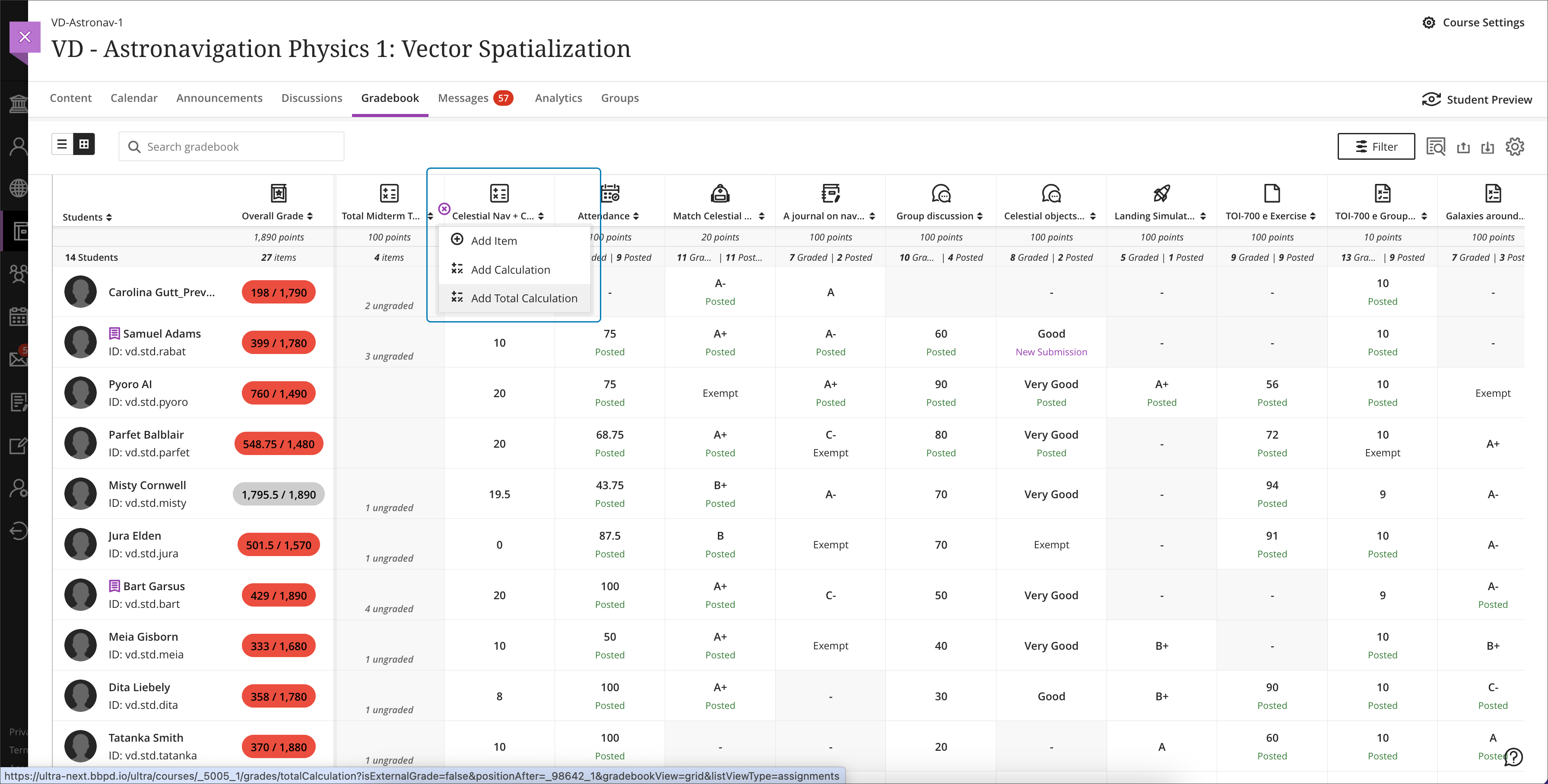
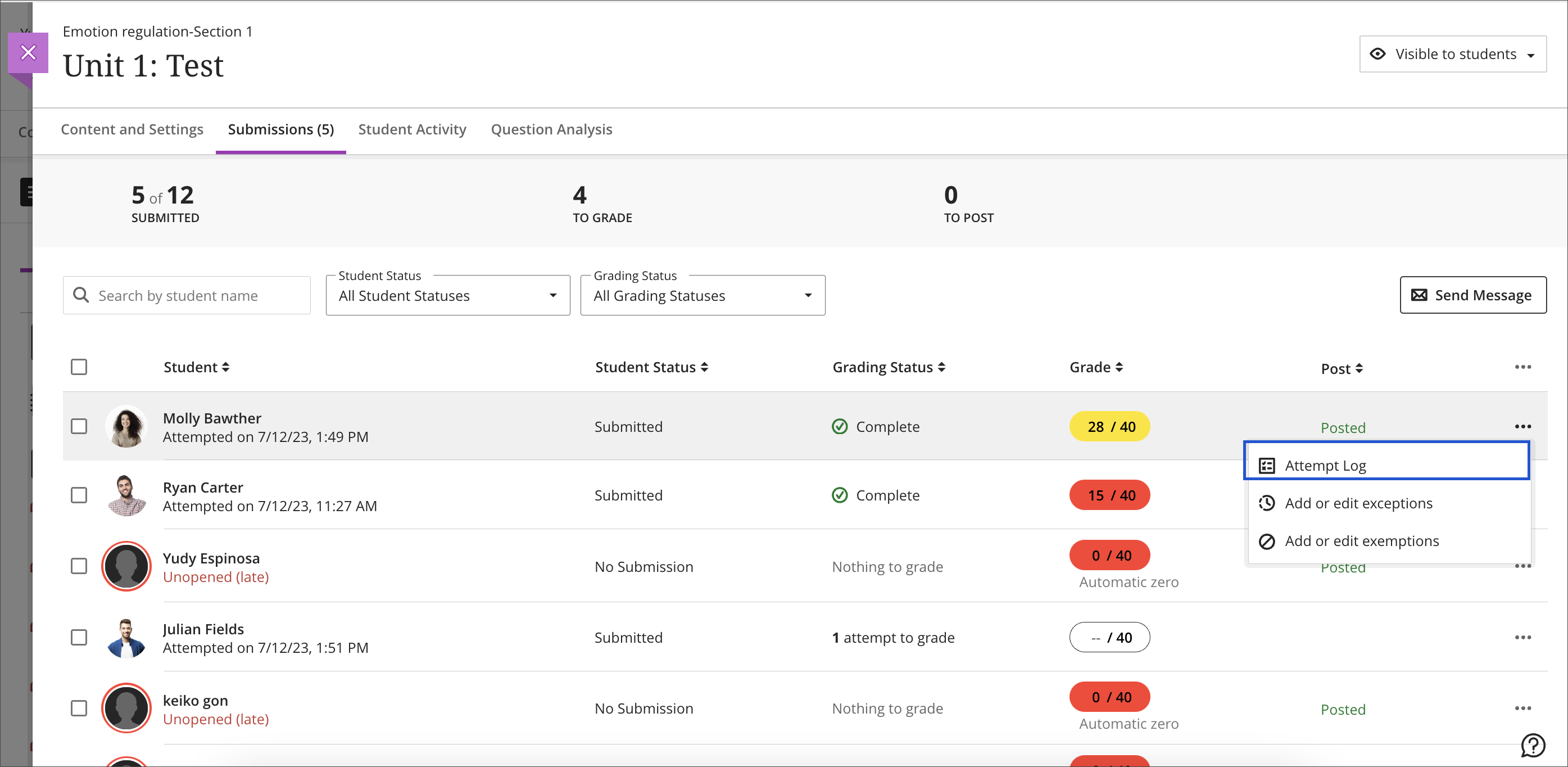
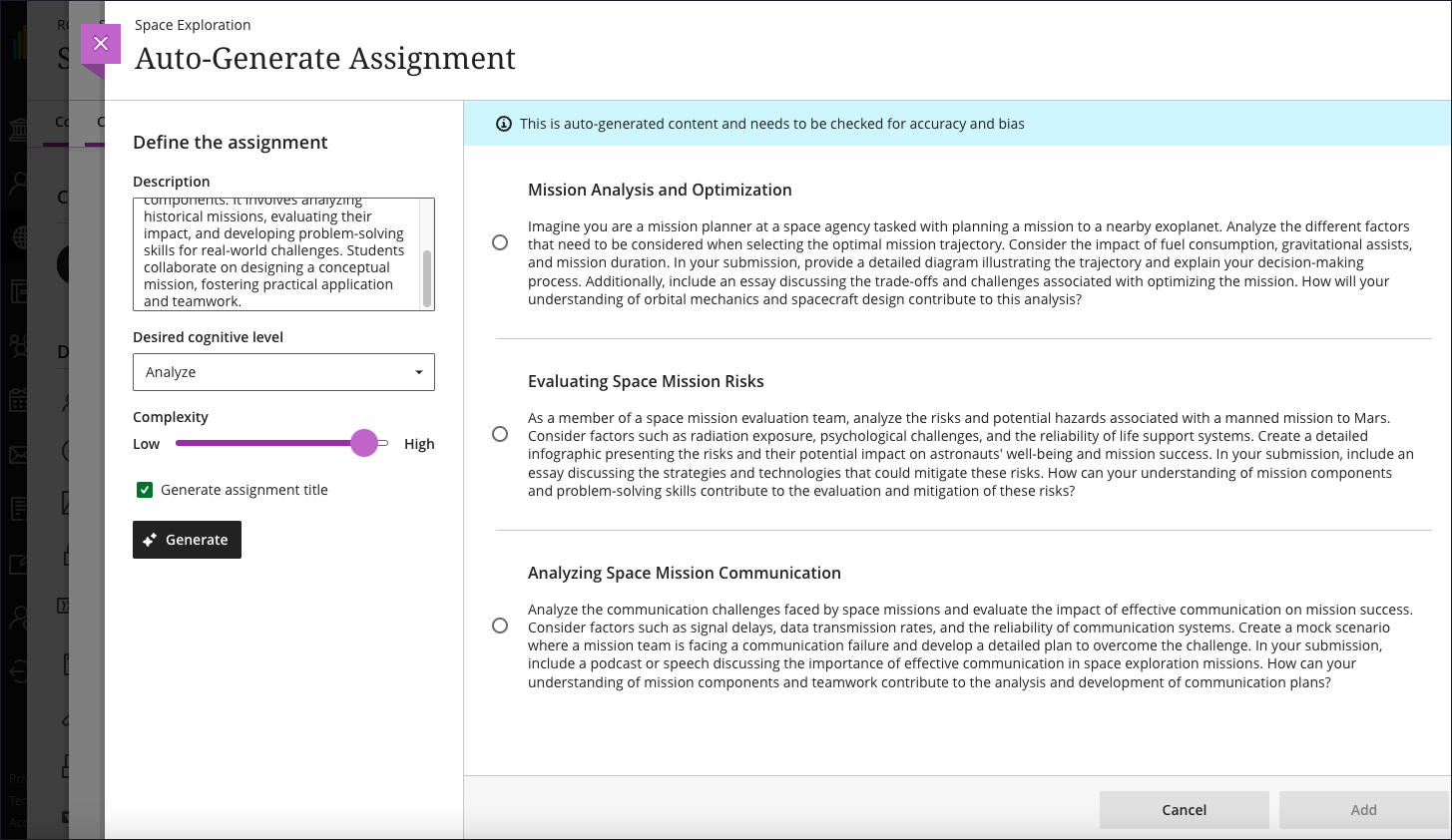
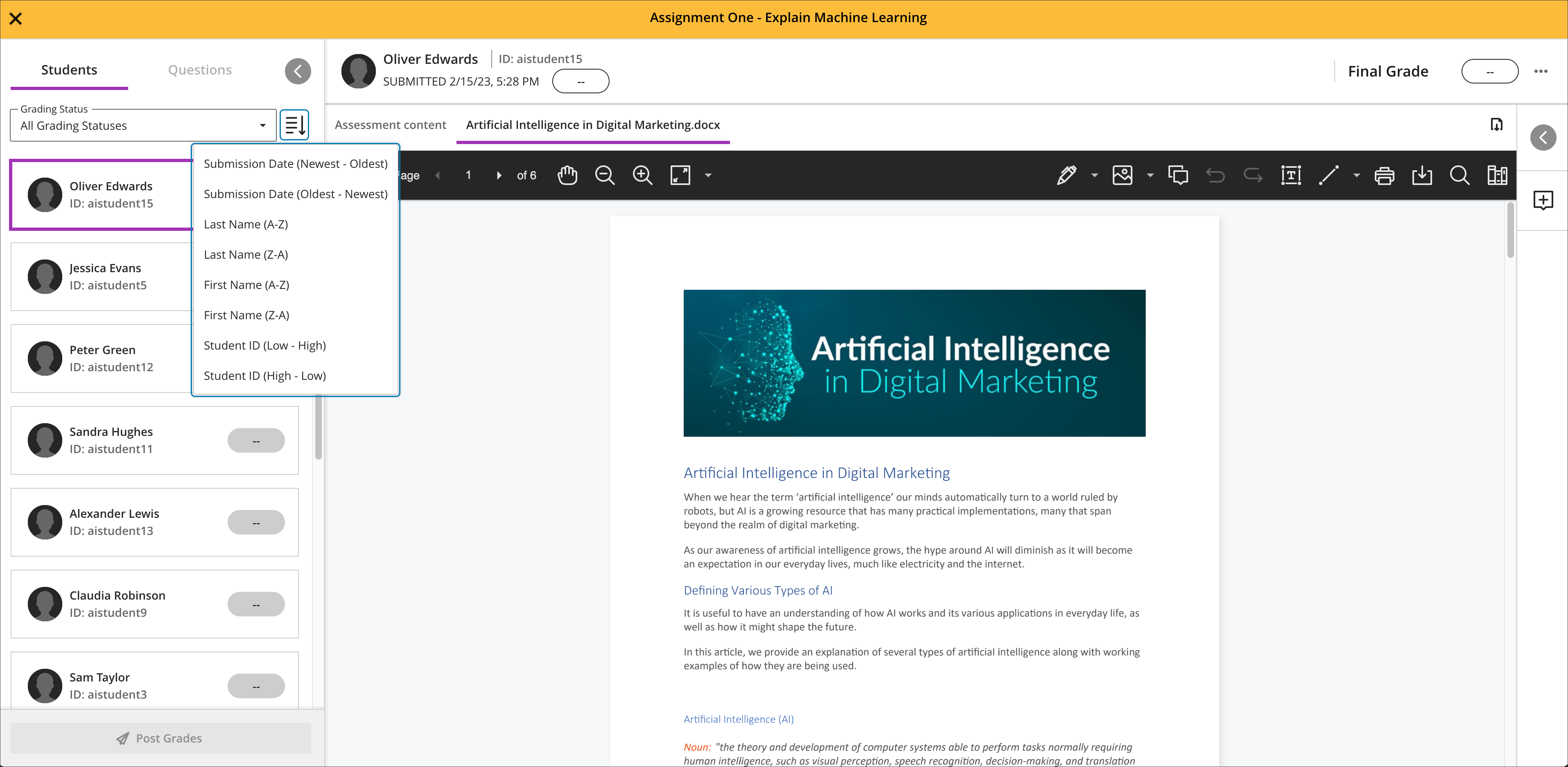
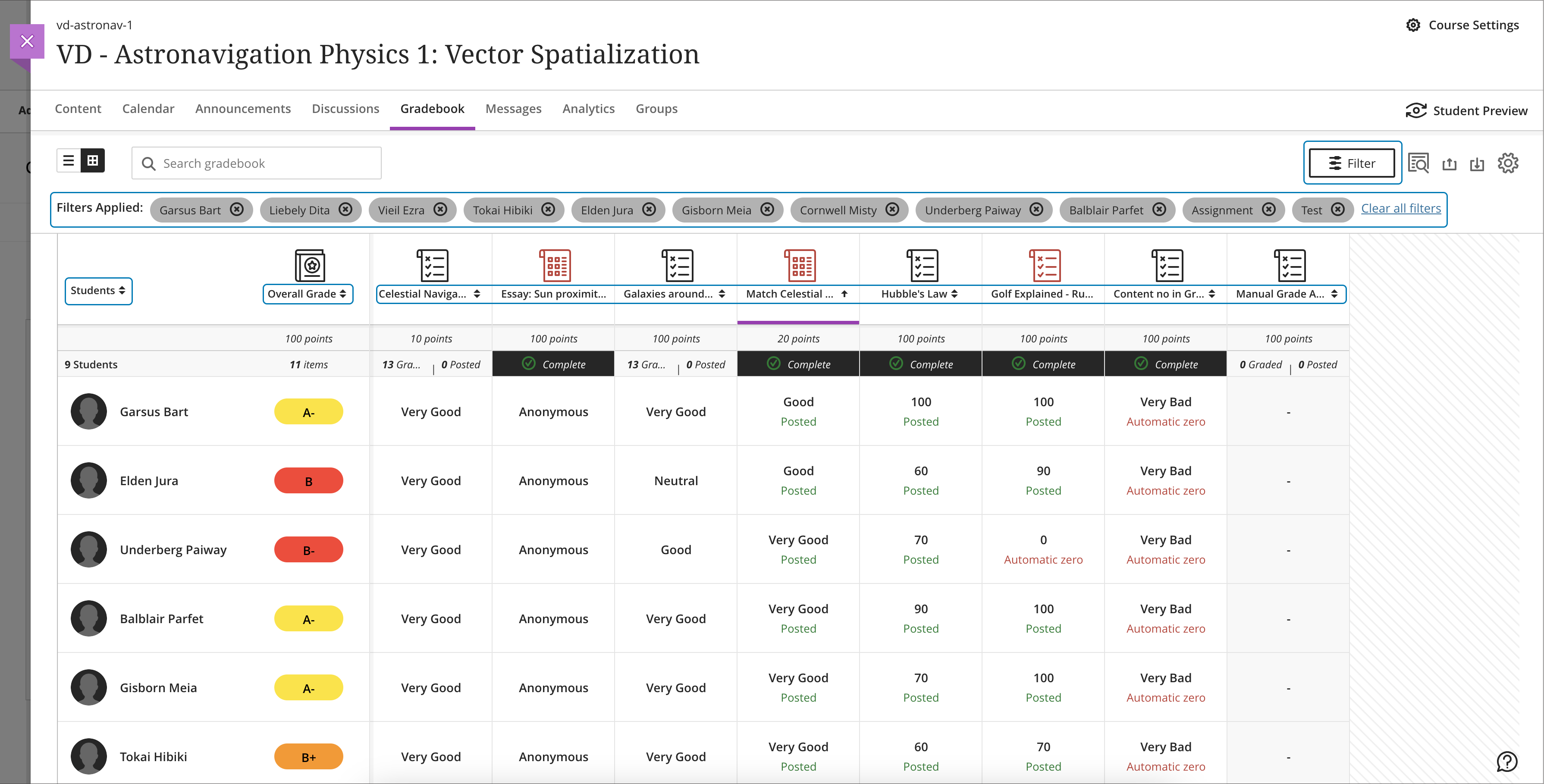
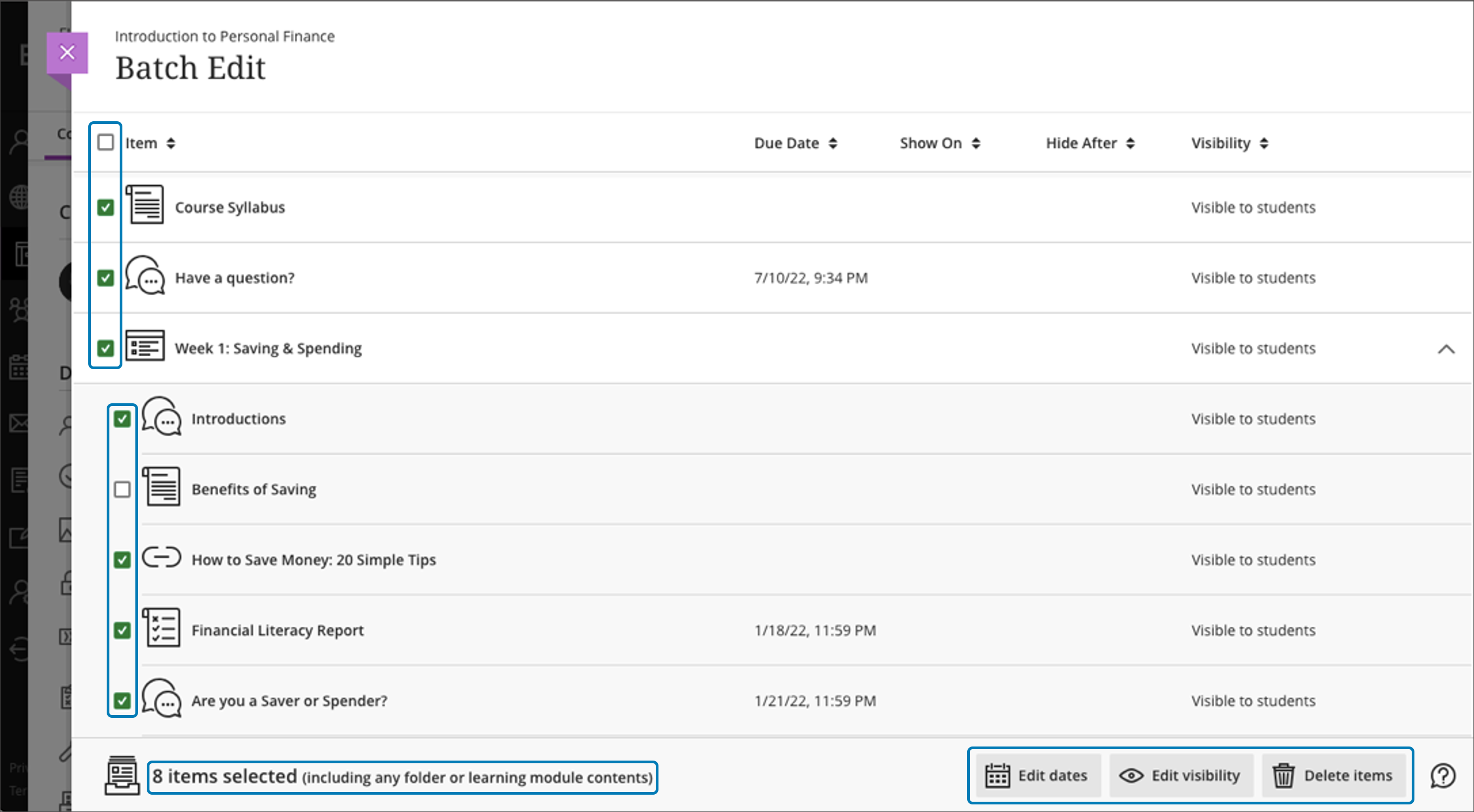
    <div class="html-content"><div><div><div><div><div><div><div>Expanding the functionality for the gradebook and assessments has been a central theme for the past year of Ultra development. When the winter term starts in 2024, Ultra courses will feature additional enhancements for the gradebook, grading interface, and test logs for learner attempts as developers continue to refine features based on institutional and instructor feedback.</div><div><br></div><div>The gradebook is a key tool for instructors in an Ultra course. With this update, instructors will be able to create total and weighted calculated columns that are point or percentage based with options to include or exclude categories and dropping scores. Moreover, these new total calculated columns can be used toward the overall grade calculation, allowing greater flexibility.</div></div><div><span><br></span></div><div><img src="https://help.blackboard.com/sites/default/files/images/2023-12/learn_ultra_instructor_Grading_TotalAndWeightedCalculatons_TotalCalculationColumn_AddingColumnFromGridView.png" width="500" alt="Image 1: Example of the improved gradebook with option to add a new Total Calculation" style="max-width: 100%; height: auto;"></div><div><div><em>Image 1: Example of the improved gradebook with option to add a new Total Calculation</em></div></div><div><div><br></div><div><strong>Grading &amp; Gradebook Improvements</strong></div><div><ul><li><span>The grid view of the Ultra gradebook features usability improvements that reduces spacing around icons and improves row visibility. </span></li><li><span>The gradebook will now provide the student ID next to each learner's name to improve identification. </span><span>When hovering over a truncated name in the gradebook, a tooltip will reveal the full name.</span></li><li><span>A sortable category column is added to the gradebook list view to provide clarity for those items to be graded.</span></li><li>Students will be able to see their grades for an assessment even if it is hidden. In a future update, feedback will be also visible.</li><li><span>Instructors can use delegated grading for anonymous assessments. Sorting controls are available for submission date.</span></li></ul><div>The test assessment log has been a frequent request for Ultra courses. Unlike Original courses, the Ultra version of this functionality provides information for tests and assignments. The test log will provide detailed information including date and time for starting the test, answers to each question, a preview of the question itself, and the estimated time spent on each question. The assignment log provides the start and submission date and time as well as the submission receipt number.</div></div><div><br></div><div><img src="https://help.blackboard.com/sites/default/files/images/2023-12/learn_ultra_instructor_AssessmentIntegrity_SubmissionListViewEntryPoint.png" width="500" alt="Image 2: Instructors can access the Assessment Submission Log from the individual assessment log" style="max-width: 100%; height: auto;"></div><div><span>Image 2: </span><em>Instructors can access the Assessment Submission Log from the individual assessment</em></div><div><br></div><div><strong>Content Creation &amp; Management</strong></div></div><div><div><br></div><div><div>The latest update to the AI Course Design Assistant Tools in Ultra courses allows instructors to generate assignment prompts aligned to a selected Bloom's cognitive process. As with all AI functionality, instructors are in complete control and can choose when and how to they want to use the tools.</div><div><br></div><div><img src="https://help.blackboard.com/sites/default/files/images/2023-12/Learn_Ultra_Instructors_AI%20Design%20Assistant%20Authentic%20Assignment%20Prompt%20Generation_Prompts%20with%20Content.png" width="500" alt="Image 3: Instructors can add additional context through a description, select the desired cognitive level and complexity, and then generate prompts" style="max-width: 100%; height: auto;"></div><div><span>Image 3: </span><em>Instructors can add additional context through a description, select the desired cognitive level and complexity, and then generate prompts</em></div><div><br></div><div>Additional updates to Content Management include:</div><div><ul><li><span>The Batch Edit tool now allows instructors to manage the date and/or time for selected items that have a pre-existing date/time -- for example, assessment due dates or visibility.</span></li><li><span>Instructors can use the unused files tool to find and remove course files that are not in use in a course. Instructors can download a file before deleting it.</span></li></ul></div></div></div></div></div></div></div><div><div><div><div><div><span><div><span>Faculty should see the latest updates in Ultra courses around January 4-5, 2024. </span><span>The next update to our Ultra test environment will take place on January 9, 2024; release notes are posted to the <a href="https://wiki.umbc.edu/x/LohnB" rel="nofollow external" class="bo">What's New in Ultra</a> that same week. Faculty who are interested in test driving new features before they are released to production should </span><a href="http://my.umbc.edu/go/request-help" rel="nofollow external" class="bo">open an RT ticket</a> to request early access. Please <a href="http://umbc.edu/go/ultra" rel="nofollow external" class="bo">watch the FAQs</a>, including <a href="https://wiki.umbc.edu/x/LohnB" rel="nofollow external" class="bo">the What's New with Ultra page</a>, <span>and myUMBC for additional information about Ultra. </span></div></span></div></div></div></div><div><span><br></span></div></div><div><span><strong>Connect with Instructional Technology</strong></span></div><div><span>As always, if you have any questions about teaching, learning, and technology at UMBC, please consider the following options:</span></div><ul><li><a href="http://www.umbc.edu/faq" rel="nofollow external" class="bo">Check our extensive FAQ collection</a><span> </span></li><ul><li><span><a href="https://wiki.umbc.edu/x/LohnB" rel="nofollow external" class="bo"><span>What's new in Ultra?</span></a><span> </span><span>|</span><span> </span><a href="https://wiki.umbc.edu/x/bwrSAQ" rel="nofollow external" class="bo"><span>Known Issues</span></a><span> </span></span></li></ul><li><span><a href="http://my.umbc.edu/go/request-help" rel="nofollow external" class="bo">Open a ticket via RT</a></span></li><li><span>Follow the </span><a href="http://my.umbc.edu/groups/instructional-technology" rel="nofollow external" class="bo">Instructional Technology</a><span> &amp; </span><a href="http://my.umbc.edu/groups/doit" rel="nofollow external" class="bo">DoIT</a><span> myUMBC groups</span></li><li><a href="http://doit.umbc.edu/itnm/staff/" rel="nofollow external" class="bo">Request a consult</a><span> with <a href="http://doit.umbc.edu/itnm/staff" rel="nofollow external" class="bo">instructional technology staff</a></span></li><li><span><a href="http://pivot.umbc.edu" rel="nofollow external" class="bo">PIVOT</a> | <a href="https://doit.umbc.edu/itnm/academic-continuity/" rel="nofollow external" class="bo">Academic Continuity</a></span><span> </span><span>|</span><span> </span><span><a href="https://fdc.umbc.edu/teaching/keep-on-teaching/" rel="nofollow external" class="bo">Keep On Teaching</a></span><span> </span><span>|</span><span> </span><span><a href="https://doit.umbc.edu/students" rel="nofollow external" class="bo">Student Technology Resources</a></span></li></ul></div><div><div></div></div></div>
]]>
  </Body>
  <Summary>Expanding the functionality for the gradebook and assessments has been a central theme for the past year of Ultra development. When the winter term starts in 2024, Ultra courses will feature...</Summary>
  <Website>https://my3.my.umbc.edu/groups/instructional-technology/posts/137839</Website>
  <TrackingUrl>https://dev.my.umbc.edu/api/v0/pixel/news/137839/guest@my.umbc.edu/325b5785e5d87ae1f21f6d288a9d1d92/api/pixel</TrackingUrl>
  <Tag>ai</Tag>
  <Tag>assessments</Tag>
  <Tag>blackboard</Tag>
  <Tag>gradebook</Tag>
  <Tag>grading</Tag>
  <Tag>ultra-experience</Tag>
  <Tag>ultra-update</Tag>
  <Group token="instructional-technology">Instructional Technology</Group>
  <GroupUrl>https://dev.my.umbc.edu/groups/instructional-technology</GroupUrl>
  <AvatarUrl>https://assets2-dev.my.umbc.edu/system/shared/avatars/groups/000/001/164/dec3b026b81ee6d890a8f82f75c94a2e/xsmall.png?1446126703</AvatarUrl>
  <AvatarUrl size="original">https://assets1-dev.my.umbc.edu/system/shared/avatars/groups/000/001/164/dec3b026b81ee6d890a8f82f75c94a2e/original.png?1446126703</AvatarUrl>
  <AvatarUrl size="xxlarge">https://assets2-dev.my.umbc.edu/system/shared/avatars/groups/000/001/164/dec3b026b81ee6d890a8f82f75c94a2e/xxlarge.png?1446126703</AvatarUrl>
  <AvatarUrl size="xlarge">https://assets1-dev.my.umbc.edu/system/shared/avatars/groups/000/001/164/dec3b026b81ee6d890a8f82f75c94a2e/xlarge.png?1446126703</AvatarUrl>
  <AvatarUrl size="large">https://assets1-dev.my.umbc.edu/system/shared/avatars/groups/000/001/164/dec3b026b81ee6d890a8f82f75c94a2e/large.png?1446126703</AvatarUrl>
  <AvatarUrl size="medium">https://assets4-dev.my.umbc.edu/system/shared/avatars/groups/000/001/164/dec3b026b81ee6d890a8f82f75c94a2e/medium.png?1446126703</AvatarUrl>
  <AvatarUrl size="small">https://assets3-dev.my.umbc.edu/system/shared/avatars/groups/000/001/164/dec3b026b81ee6d890a8f82f75c94a2e/small.png?1446126703</AvatarUrl>
  <AvatarUrl size="xsmall">https://assets2-dev.my.umbc.edu/system/shared/avatars/groups/000/001/164/dec3b026b81ee6d890a8f82f75c94a2e/xsmall.png?1446126703</AvatarUrl>
  <AvatarUrl size="xxsmall">https://assets3-dev.my.umbc.edu/system/shared/avatars/groups/000/001/164/dec3b026b81ee6d890a8f82f75c94a2e/xxsmall.png?1446126703</AvatarUrl>
  <Sponsor>Instructional Technology</Sponsor>
  <ThumbnailUrl size="xxlarge">https://assets4-dev.my.umbc.edu/system/shared/thumbnails/news/000/137/839/6fe5ac4ee868c2fabd33f0aebdee5885/xxlarge.jpg?1702915093</ThumbnailUrl>
  <ThumbnailUrl size="xlarge">https://assets1-dev.my.umbc.edu/system/shared/thumbnails/news/000/137/839/6fe5ac4ee868c2fabd33f0aebdee5885/xlarge.jpg?1702915093</ThumbnailUrl>
  <ThumbnailUrl size="large">https://assets1-dev.my.umbc.edu/system/shared/thumbnails/news/000/137/839/6fe5ac4ee868c2fabd33f0aebdee5885/large.jpg?1702915093</ThumbnailUrl>
  <ThumbnailUrl size="medium">https://assets4-dev.my.umbc.edu/system/shared/thumbnails/news/000/137/839/6fe5ac4ee868c2fabd33f0aebdee5885/medium.jpg?1702915093</ThumbnailUrl>
  <ThumbnailUrl size="small">https://assets2-dev.my.umbc.edu/system/shared/thumbnails/news/000/137/839/6fe5ac4ee868c2fabd33f0aebdee5885/small.jpg?1702915093</ThumbnailUrl>
  <ThumbnailUrl size="xsmall">https://assets4-dev.my.umbc.edu/system/shared/thumbnails/news/000/137/839/6fe5ac4ee868c2fabd33f0aebdee5885/xsmall.jpg?1702915093</ThumbnailUrl>
  <ThumbnailUrl size="xxsmall">https://assets4-dev.my.umbc.edu/system/shared/thumbnails/news/000/137/839/6fe5ac4ee868c2fabd33f0aebdee5885/xxsmall.jpg?1702915093</ThumbnailUrl>
  <PawCount>2</PawCount>
  <CommentCount>0</CommentCount>
  <CommentsAllowed>true</CommentsAllowed>
  <PostedAt>Thu, 21 Dec 2023 08:01:31 -0500</PostedAt>
</NewsItem>
  <NewsItem contentIssues="true" id="137728" important="false" status="posted" url="https://dev.my.umbc.edu/groups/doit/posts/137728">
  <Title>CFP - Incorporating Generative AI into Learning Experiences</Title>
  <Tagline>Share your assessment experience with USM peers</Tagline>
  <Body>
    <![CDATA[
    <div class="html-content"><div><span>Faculty, staff, and faculty/staff/student teams who have engaged in the use of Generative AI as part of assignments and learning activities are invited to propose sessions for the <strong><a href="https://www.usmd.edu/cai/incorporating-generative-ai-learning-experiences-virtual-showcase" rel="nofollow external" class="bo">Incorporating Generative AI into Learning Experiences Virtual Showcase</a></strong>, taking place via Zoom on Friday, April 26, 2024, from 10:00 am to 1:00 pm ET. </span></div><div><br></div><div>We welcome proposals for brief showcase presentations from faculty, staff, and faculty/staff/student teams from accredited Maryland institutions of higher education related to their development and use of assignments and learning activities that incorporate Generative AI. Learning experiences may reside inside or outside of the classroom and across different modalities.</div><div><br></div><div>Presenters will have 10-15 minutes of presentation time followed by moderated Q&amp;A, for a total of 20 minutes. We ask you to limit the number of presenters to no more than 3 people, though additional collaborators are welcome to be in the session and be available for the Q&amp;A portion of the presentation. </div><div><br></div><div>Showcase presentation topics can include: </div><div><ul><li><span>the use of Generative AI in the development of assignments and learning activities, </span></li><li><span>engaging students in the use of Generative AI as part of the assignment/learning activity, </span></li><li><span>student learning outcomes related to Generative AI and assignments/learning activities,</span></li><li><span>assignments and learning activities that invite students to critically examine the use of Generative AI in society, in education, and in their own learning, </span></li><li><span>the ways in which faculty, staff, and students are navigating appropriate and responsible use of Generative AI, </span></li><li><span>approaches to the use of Generative AI aimed at increasing relevance in learning, mitigating bias in learning materials/generated output, and other dimensions of diversity, equity, and inclusion,</span></li><li><span>the use of Generative AI to enhance course materials, including open educational resources.</span></li></ul></div><div><span>Works in progress should be sufficiently far along to be able to address the proposal session outline. </span></div><div><br></div><div>Final selection of proposals for the showcase will be based on ensuring a diversity of presentations from different institution types across Maryland (2-year, 4-year, public, independent) and from a variety of disciplines. </div><div><br></div><div>Please carefully review <a href="https://www.usmd.edu/cai/sites/default/files/Call%20for%20Proposals%20-%20Generative%20AI%20into%20Learning%20Experiences.pdf" rel="nofollow external" class="bo">the Call for Proposals (pdf)</a> before submitting a proposal. </div><div><br></div><div><a href="https://docs.google.com/forms/d/1nm8uIh4rzz6vn8sX8B_BqRjopaW4vBZa5PMbwkZCs1I/viewform?edit_requested=true" rel="nofollow external" class="bo">Submit Your Proposal</a> by February 12, 2024, 11:59 p.m. ET.</div><div><br></div><div>This event is sponsored by MarylandOnline, Montgomery College, the University System of Maryland William E. Kirwan Center for Academic Innovation, and the USM Council of University System Faculty. Please pardon any cross-posting by the event sponsors. </div><div><br></div><div>Please contact <a href="mailto:cai@usmd.edu">cai@usmd.edu</a> if you have any questions.</div></div>
]]>
  </Body>
  <Summary>Faculty, staff, and faculty/staff/student teams who have engaged in the use of Generative AI as part of assignments and learning activities are invited to propose sessions for the Incorporating...</Summary>
  <Website>https://my3.my.umbc.edu/groups/oer/posts/125789</Website>
  <TrackingUrl>https://dev.my.umbc.edu/api/v0/pixel/news/137728/guest@my.umbc.edu/d1b42387339dafdac7ad5b712ac244c1/api/pixel</TrackingUrl>
  <Tag>ai</Tag>
  <Tag>artificial-intelligence</Tag>
  <Tag>assessment</Tag>
  <Tag>classroom-experiences</Tag>
  <Tag>educational</Tag>
  <Tag>genai</Tag>
  <Tag>most</Tag>
  <Tag>open-educational-resources</Tag>
  <Tag>virtual-showcase</Tag>
  <Group token="oer">Open Educational Resources at UMBC</Group>
  <GroupUrl>https://dev.my.umbc.edu/groups/oer</GroupUrl>
  <AvatarUrl>https://assets1-dev.my.umbc.edu/system/shared/avatars/groups/000/001/664/0e7fb0a3d658c358b4e5e9561f35099e/xsmall.png?1562590436</AvatarUrl>
  <AvatarUrl size="original">https://assets2-dev.my.umbc.edu/system/shared/avatars/groups/000/001/664/0e7fb0a3d658c358b4e5e9561f35099e/original.png?1562590436</AvatarUrl>
  <AvatarUrl size="xxlarge">https://assets1-dev.my.umbc.edu/system/shared/avatars/groups/000/001/664/0e7fb0a3d658c358b4e5e9561f35099e/xxlarge.png?1562590436</AvatarUrl>
  <AvatarUrl size="xlarge">https://assets1-dev.my.umbc.edu/system/shared/avatars/groups/000/001/664/0e7fb0a3d658c358b4e5e9561f35099e/xlarge.png?1562590436</AvatarUrl>
  <AvatarUrl size="large">https://assets4-dev.my.umbc.edu/system/shared/avatars/groups/000/001/664/0e7fb0a3d658c358b4e5e9561f35099e/large.png?1562590436</AvatarUrl>
  <AvatarUrl size="medium">https://assets1-dev.my.umbc.edu/system/shared/avatars/groups/000/001/664/0e7fb0a3d658c358b4e5e9561f35099e/medium.png?1562590436</AvatarUrl>
  <AvatarUrl size="small">https://assets2-dev.my.umbc.edu/system/shared/avatars/groups/000/001/664/0e7fb0a3d658c358b4e5e9561f35099e/small.png?1562590436</AvatarUrl>
  <AvatarUrl size="xsmall">https://assets1-dev.my.umbc.edu/system/shared/avatars/groups/000/001/664/0e7fb0a3d658c358b4e5e9561f35099e/xsmall.png?1562590436</AvatarUrl>
  <AvatarUrl size="xxsmall">https://assets1-dev.my.umbc.edu/system/shared/avatars/groups/000/001/664/0e7fb0a3d658c358b4e5e9561f35099e/xxsmall.png?1562590436</AvatarUrl>
  <Sponsor>Open Educational Resources at UMBC</Sponsor>
  <ThumbnailUrl size="xxlarge">https://assets4-dev.my.umbc.edu/system/shared/thumbnails/news/000/137/728/5350b8033be069df01073f7452e2e09b/xxlarge.jpg?1702409872</ThumbnailUrl>
  <ThumbnailUrl size="xlarge">https://assets2-dev.my.umbc.edu/system/shared/thumbnails/news/000/137/728/5350b8033be069df01073f7452e2e09b/xlarge.jpg?1702409872</ThumbnailUrl>
  <ThumbnailUrl size="large">https://assets3-dev.my.umbc.edu/system/shared/thumbnails/news/000/137/728/5350b8033be069df01073f7452e2e09b/large.jpg?1702409872</ThumbnailUrl>
  <ThumbnailUrl size="medium">https://assets4-dev.my.umbc.edu/system/shared/thumbnails/news/000/137/728/5350b8033be069df01073f7452e2e09b/medium.jpg?1702409872</ThumbnailUrl>
  <ThumbnailUrl size="small">https://assets1-dev.my.umbc.edu/system/shared/thumbnails/news/000/137/728/5350b8033be069df01073f7452e2e09b/small.jpg?1702409872</ThumbnailUrl>
  <ThumbnailUrl size="xsmall">https://assets2-dev.my.umbc.edu/system/shared/thumbnails/news/000/137/728/5350b8033be069df01073f7452e2e09b/xsmall.jpg?1702409872</ThumbnailUrl>
  <ThumbnailUrl size="xxsmall">https://assets3-dev.my.umbc.edu/system/shared/thumbnails/news/000/137/728/5350b8033be069df01073f7452e2e09b/xxsmall.jpg?1702409872</ThumbnailUrl>
  <PawCount>1</PawCount>
  <CommentCount>0</CommentCount>
  <CommentsAllowed>true</CommentsAllowed>
  <PostedAt>Tue, 12 Dec 2023 14:39:37 -0500</PostedAt>
</NewsItem>
  <NewsItem contentIssues="true" id="137337" important="false" status="posted" url="https://dev.my.umbc.edu/groups/doit/posts/137337">
    <Title>Dec adds unique group due dates, more sort controls in Ultra</Title>
    <Tagline>Features authentic discussion opportunities using AI tools</Tagline>
    <Body>
      <![CDATA[
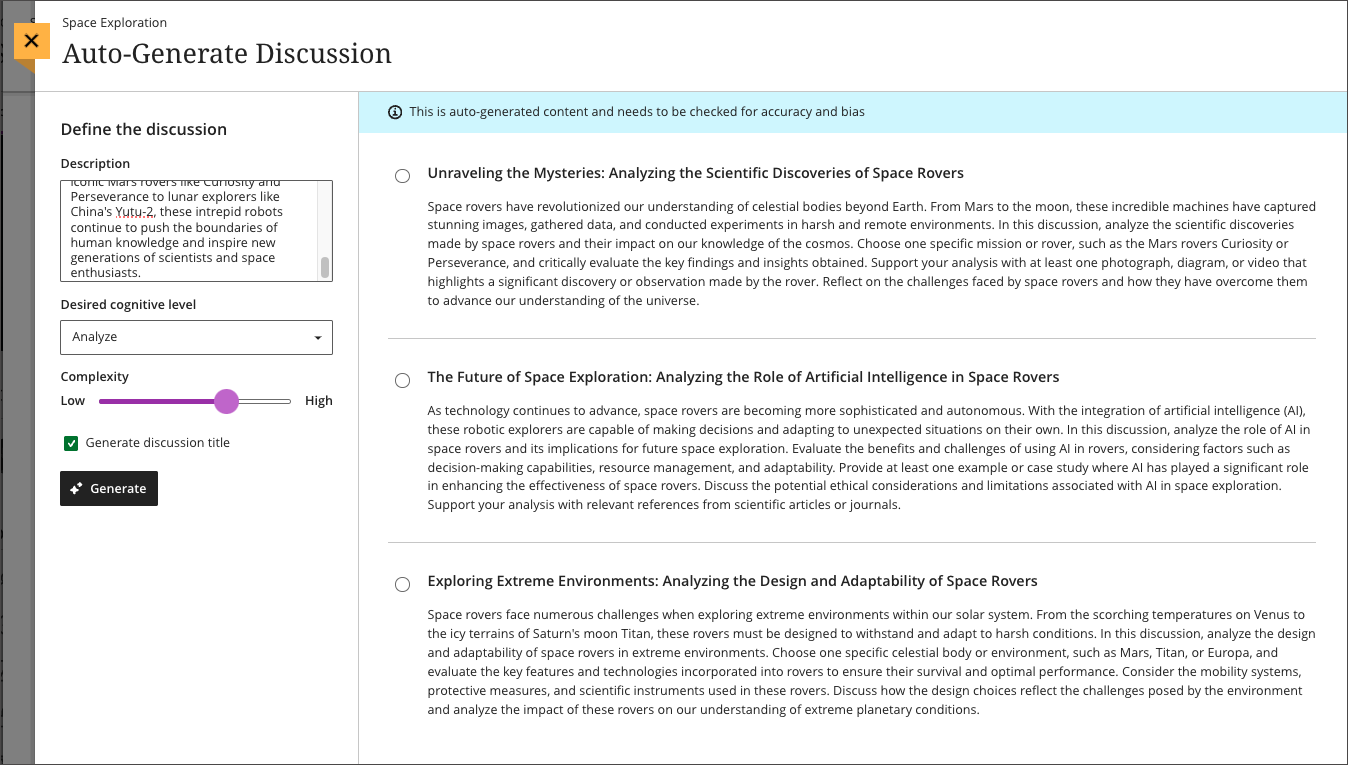
          <div class="html-content"><div><div><div><div><div><div>As 2023 comes to a close, the December Ultra update brings several features to enhance group functionality and gradebook management. With this update, instructors can <span>assign a unique due date to each group using the exceptions workflow.</span><span> If necessary, instructors can reset the group due date to the default.</span></div><div><span><br></span></div><div><span>Gradebook sorting controls provide easier ways to interact with grade information in an Ultra course. T</span><span>he <a href="https://my3.my.umbc.edu/groups/instructional-technology/posts/134272" rel="nofollow external" class="bo">new Flexible Grading interface</a> also features updated sorting controls for column types, allowing instructors and graders to sort data in ascending and descending order.</span></div><div><span><br></span></div><div><img src="https://help.blackboard.com/sites/default/files/images/2023-11/learn_ultra_instructor_SortingControlsInStudentsAndQuestionsTab_SortingOptionsInFlexibleGrading.png" width="500" alt="Image 1: Sorting assessments in Flexible Grading using the Students tab" style="max-width: 100%; height: auto;"></div><div><div><em>Image 1: Sorting assessments in Flexible Grading using the Students tab</em></div><div><em><br></em></div></div><div><span>Further updates to assessments and grading allow instructors to align goals to questions within a question bank and create expanded rubrics without any limit to the row or column sizes. Question-level goal alignment ensures that assessment items measure the desired learning outcomes. Moreover, larger rubrics allow for </span><span>greater criteria to support assessment and accreditation.</span></div><div><div><span><br></span></div><div><span>Additionally, <a href="https://my3.my.umbc.edu/groups/instructional-technology/posts/134605" rel="nofollow external" class="bo">Ultra's exclusive AI course design assistant tools</a> can generate discussion prompts to incorporate authentic assessment and increase learner engagement. </span>The generation process allows instructors to enter a discussion or journal description, select a desired cognitive process based on Bloom's Taxonomy, set the complexity, and generate a discussion or journal title. <span>The instructor can review the generated prompts and select one to add to the discussion or journal. After adding the prompt, the instructor can edit or further refine the prompt as appropriate. </span><span>The goal of this tool is to encourage students to engage in higher-order thinking, apply their knowledge, justify or challenge their beliefs and ideas, and emulate real-world situations.</span></div><div><br></div><div><img src="https://help.blackboard.com/sites/default/files/images/2023-11/learn_ultra_instructor_AuthenticDiscussionAndJournal%20prompts_InstructorOptions.png" width="500" alt="Image 2: Instructors can describe the discussion, select the desired cognitive process and complexity, and then generate prompts" style="max-width: 100%; height: auto;"></div><div><span>Image 2: </span><em>Instructors can describe the discussion, select the desired cognitive process and complexity, and then generate prompts</em></div><div><br></div></div></div></div></div></div><div><div><div><div><div><span><div><span>Faculty should see the latest updates in Ultra courses around December 7-8 2023. </span><span>The next update to our Ultra test environment will take place on December 12, 2023; release notes are posted to the <a href="https://wiki.umbc.edu/x/LohnB" rel="nofollow external" class="bo">What's New in Ultra</a> that same week. Faculty who are interested in test driving new features before they are released to production should </span><a href="http://my.umbc.edu/go/request-help" rel="nofollow external" class="bo">open an RT ticket</a> to request early access. Please <a href="http://umbc.edu/go/ultra" rel="nofollow external" class="bo">watch the FAQs</a>, including <a href="https://wiki.umbc.edu/x/LohnB" rel="nofollow external" class="bo">the What's New with Ultra page</a>, <span>and myUMBC for additional information about Ultra. </span></div></span></div></div></div></div><div><span><br></span></div></div><div><span><strong>Connect with Instructional Technology</strong></span></div><div><span>As always, if you have any questions about teaching, learning, and technology at UMBC, please consider the following options:</span></div><ul><li><a href="http://www.umbc.edu/faq" rel="nofollow external" class="bo">Check our extensive FAQ collection</a><span> </span></li><ul><li><span><a href="https://wiki.umbc.edu/x/LohnB" rel="nofollow external" class="bo"><span>What's new in Ultra?</span></a><span> </span><span>|</span><span> </span><a href="https://wiki.umbc.edu/x/bwrSAQ" rel="nofollow external" class="bo"><span>Known Issues</span></a><span> </span></span></li></ul><li><span><a href="http://my.umbc.edu/go/request-help" rel="nofollow external" class="bo">Open a ticket via RT</a></span></li><li><span>Follow the </span><a href="http://my.umbc.edu/groups/instructional-technology" rel="nofollow external" class="bo">Instructional Technology</a><span> &amp; </span><a href="http://my.umbc.edu/groups/doit" rel="nofollow external" class="bo">DoIT</a><span> myUMBC groups</span></li><li><a href="http://doit.umbc.edu/itnm/staff/" rel="nofollow external" class="bo">Request a consult</a><span> with <a href="http://doit.umbc.edu/itnm/staff" rel="nofollow external" class="bo">instructional technology staff</a></span></li><li><span><a href="http://pivot.umbc.edu" rel="nofollow external" class="bo">PIVOT</a> | <a href="https://doit.umbc.edu/itnm/academic-continuity/" rel="nofollow external" class="bo">Academic Continuity</a></span><span> </span><span>|</span><span> </span><span><a href="https://fdc.umbc.edu/teaching/keep-on-teaching/" rel="nofollow external" class="bo">Keep On Teaching</a></span><span> </span><span>|</span><span> </span><span><a href="https://doit.umbc.edu/students" rel="nofollow external" class="bo">Student Technology Resources</a></span></li></ul></div><div><div></div></div></div>
      ]]>
    </Body>
    <Summary>As 2023 comes to a close, the December Ultra update brings several features to enhance group functionality and gradebook management. With this update, instructors can assign a unique due date to...</Summary>
    <Website>https://my3.my.umbc.edu/groups/instructional-technology/posts/137337</Website>
    <TrackingUrl>https://dev.my.umbc.edu/api/v0/pixel/news/137337/guest@my.umbc.edu/399185d8da49d9564e0ff4f946e356e2/api/pixel</TrackingUrl>
    <Tag>ai</Tag>
    <Tag>blackboard</Tag>
    <Tag>gradebook</Tag>
    <Tag>grading</Tag>
    <Tag>ultra-experience</Tag>
    <Tag>ultra-update</Tag>
    <Tag>unsplash</Tag>
    <Group token="instructional-technology">Instructional Technology</Group>
    <GroupUrl>https://dev.my.umbc.edu/groups/instructional-technology</GroupUrl>
    <AvatarUrl>https://assets2-dev.my.umbc.edu/system/shared/avatars/groups/000/001/164/dec3b026b81ee6d890a8f82f75c94a2e/xsmall.png?1446126703</AvatarUrl>
    <AvatarUrl size="original">https://assets1-dev.my.umbc.edu/system/shared/avatars/groups/000/001/164/dec3b026b81ee6d890a8f82f75c94a2e/original.png?1446126703</AvatarUrl>
    <AvatarUrl size="xxlarge">https://assets2-dev.my.umbc.edu/system/shared/avatars/groups/000/001/164/dec3b026b81ee6d890a8f82f75c94a2e/xxlarge.png?1446126703</AvatarUrl>
    <AvatarUrl size="xlarge">https://assets1-dev.my.umbc.edu/system/shared/avatars/groups/000/001/164/dec3b026b81ee6d890a8f82f75c94a2e/xlarge.png?1446126703</AvatarUrl>
    <AvatarUrl size="large">https://assets1-dev.my.umbc.edu/system/shared/avatars/groups/000/001/164/dec3b026b81ee6d890a8f82f75c94a2e/large.png?1446126703</AvatarUrl>
    <AvatarUrl size="medium">https://assets4-dev.my.umbc.edu/system/shared/avatars/groups/000/001/164/dec3b026b81ee6d890a8f82f75c94a2e/medium.png?1446126703</AvatarUrl>
    <AvatarUrl size="small">https://assets3-dev.my.umbc.edu/system/shared/avatars/groups/000/001/164/dec3b026b81ee6d890a8f82f75c94a2e/small.png?1446126703</AvatarUrl>
    <AvatarUrl size="xsmall">https://assets2-dev.my.umbc.edu/system/shared/avatars/groups/000/001/164/dec3b026b81ee6d890a8f82f75c94a2e/xsmall.png?1446126703</AvatarUrl>
    <AvatarUrl size="xxsmall">https://assets3-dev.my.umbc.edu/system/shared/avatars/groups/000/001/164/dec3b026b81ee6d890a8f82f75c94a2e/xxsmall.png?1446126703</AvatarUrl>
    <Sponsor>Instructional Technology</Sponsor>
    <ThumbnailUrl size="xxlarge">https://assets3-dev.my.umbc.edu/system/shared/thumbnails/news/000/137/337/ac70c80d8dfe1625932cf54cba55766e/xxlarge.jpg?1701192788</ThumbnailUrl>
    <ThumbnailUrl size="xlarge">https://assets2-dev.my.umbc.edu/system/shared/thumbnails/news/000/137/337/ac70c80d8dfe1625932cf54cba55766e/xlarge.jpg?1701192788</ThumbnailUrl>
    <ThumbnailUrl size="large">https://assets2-dev.my.umbc.edu/system/shared/thumbnails/news/000/137/337/ac70c80d8dfe1625932cf54cba55766e/large.jpg?1701192788</ThumbnailUrl>
    <ThumbnailUrl size="medium">https://assets4-dev.my.umbc.edu/system/shared/thumbnails/news/000/137/337/ac70c80d8dfe1625932cf54cba55766e/medium.jpg?1701192788</ThumbnailUrl>
    <ThumbnailUrl size="small">https://assets1-dev.my.umbc.edu/system/shared/thumbnails/news/000/137/337/ac70c80d8dfe1625932cf54cba55766e/small.jpg?1701192788</ThumbnailUrl>
    <ThumbnailUrl size="xsmall">https://assets2-dev.my.umbc.edu/system/shared/thumbnails/news/000/137/337/ac70c80d8dfe1625932cf54cba55766e/xsmall.jpg?1701192788</ThumbnailUrl>
    <ThumbnailUrl size="xxsmall">https://assets4-dev.my.umbc.edu/system/shared/thumbnails/news/000/137/337/ac70c80d8dfe1625932cf54cba55766e/xxsmall.jpg?1701192788</ThumbnailUrl>
    <PawCount>2</PawCount>
    <CommentCount>0</CommentCount>
    <CommentsAllowed>true</CommentsAllowed>
    <PostedAt>Thu, 30 Nov 2023 14:58:57 -0500</PostedAt>
    <EditAt>Thu, 30 Nov 2023 15:00:04 -0500</EditAt>
  </NewsItem>
  <NewsItem contentIssues="true" id="136797" important="false" status="posted" url="https://dev.my.umbc.edu/groups/doit/posts/136797">
  <Title>Test Drive New Blackboard Faculty AI Course Design Tools</Title>
  <Tagline>Discover how AI can support your course design process</Tagline>
  <Body>
    <![CDATA[
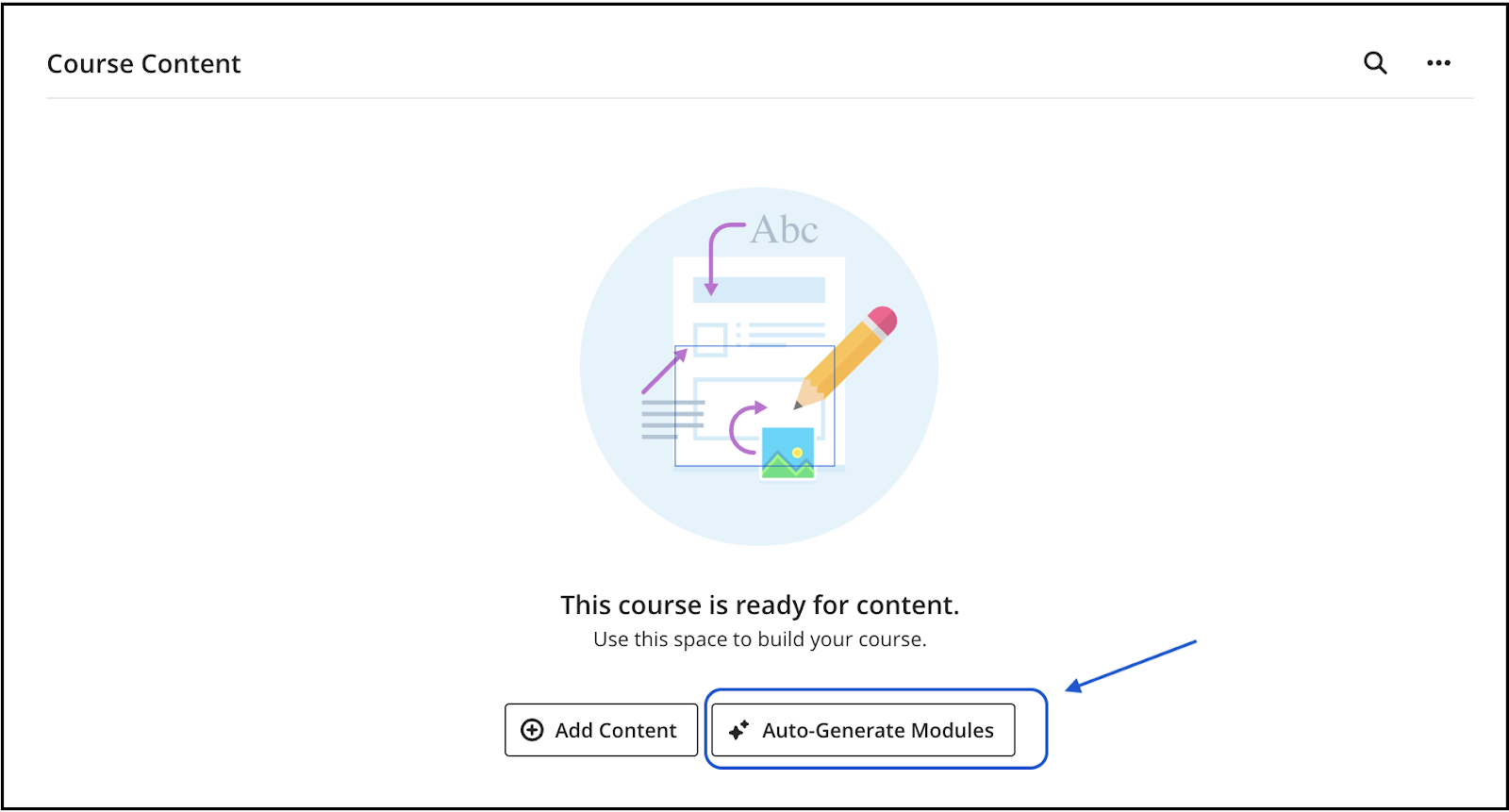
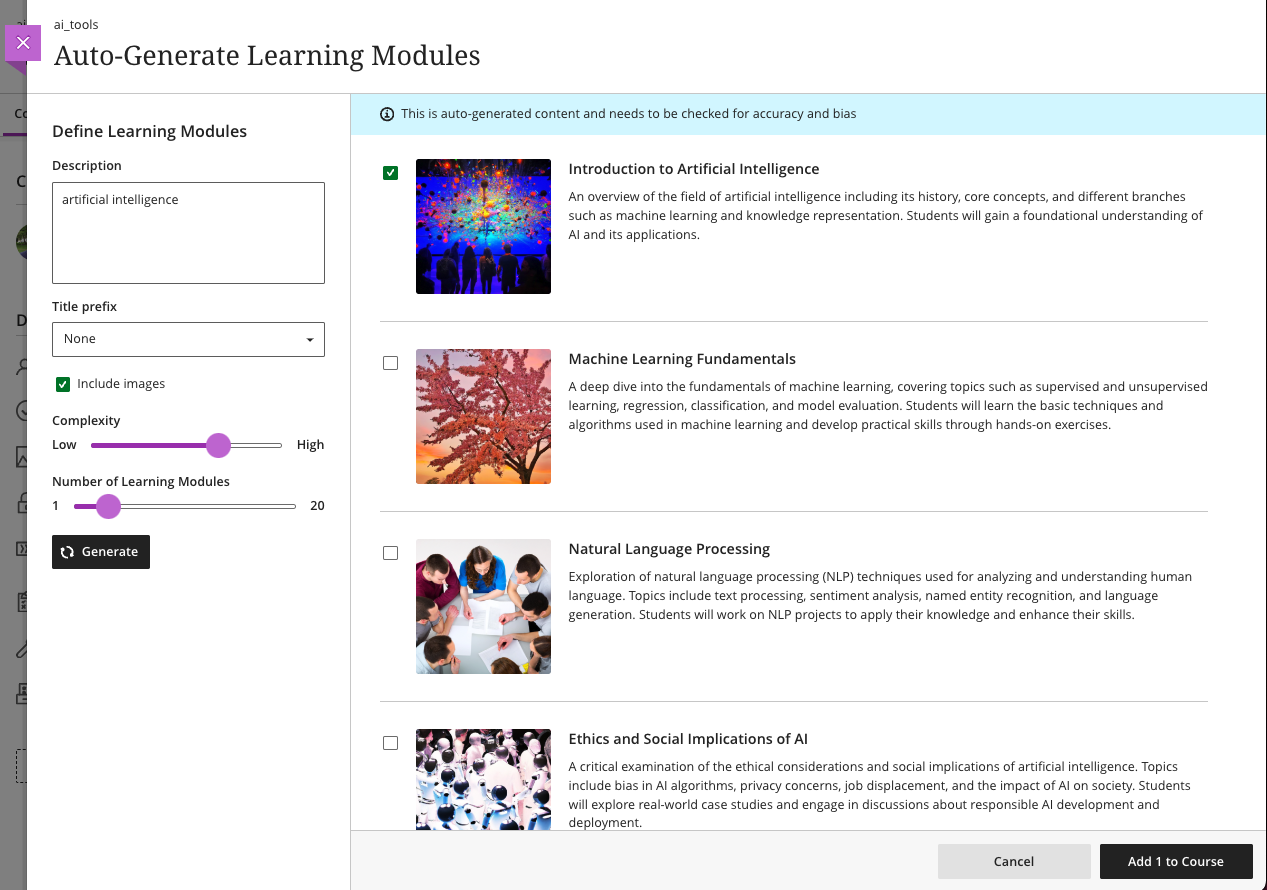
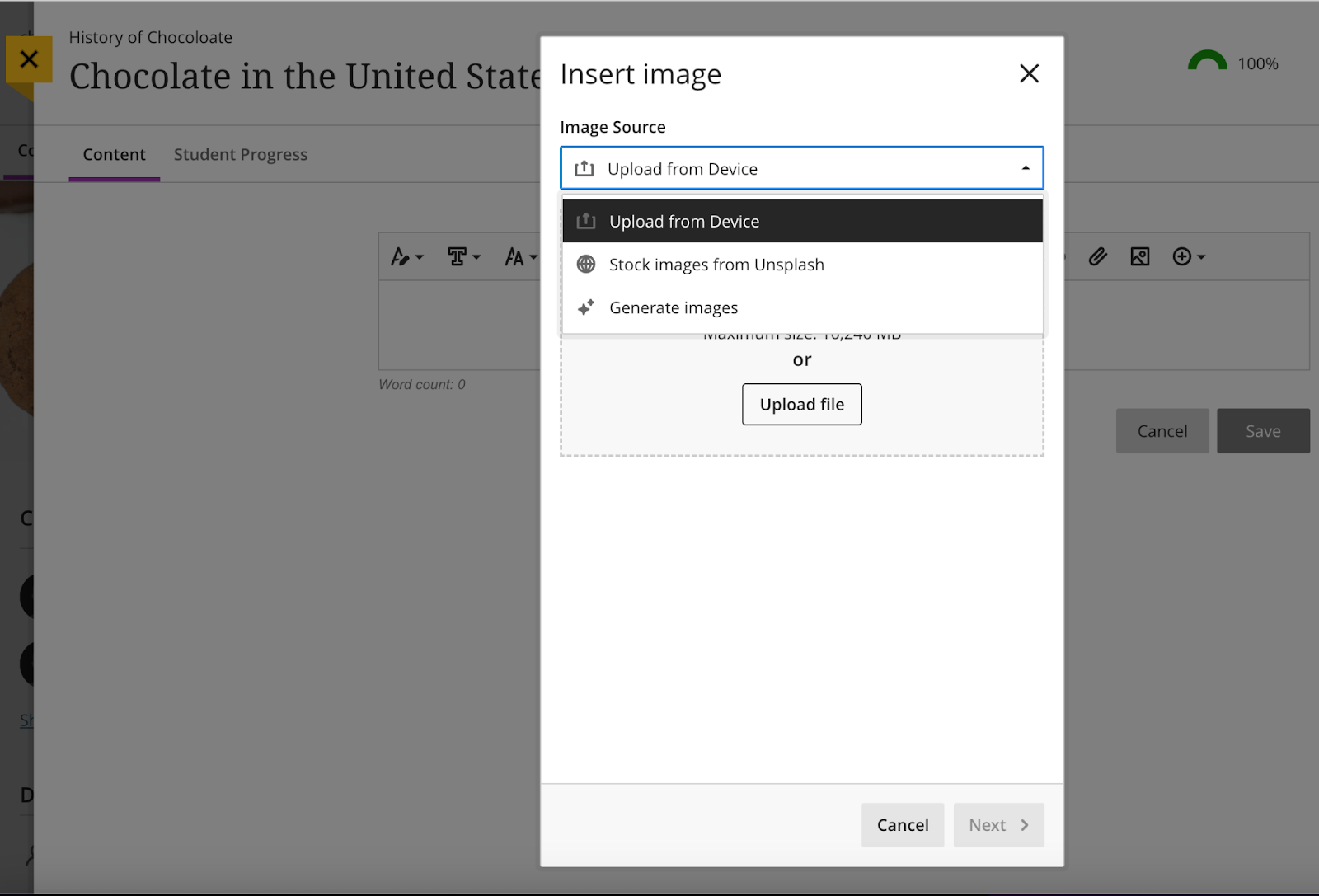
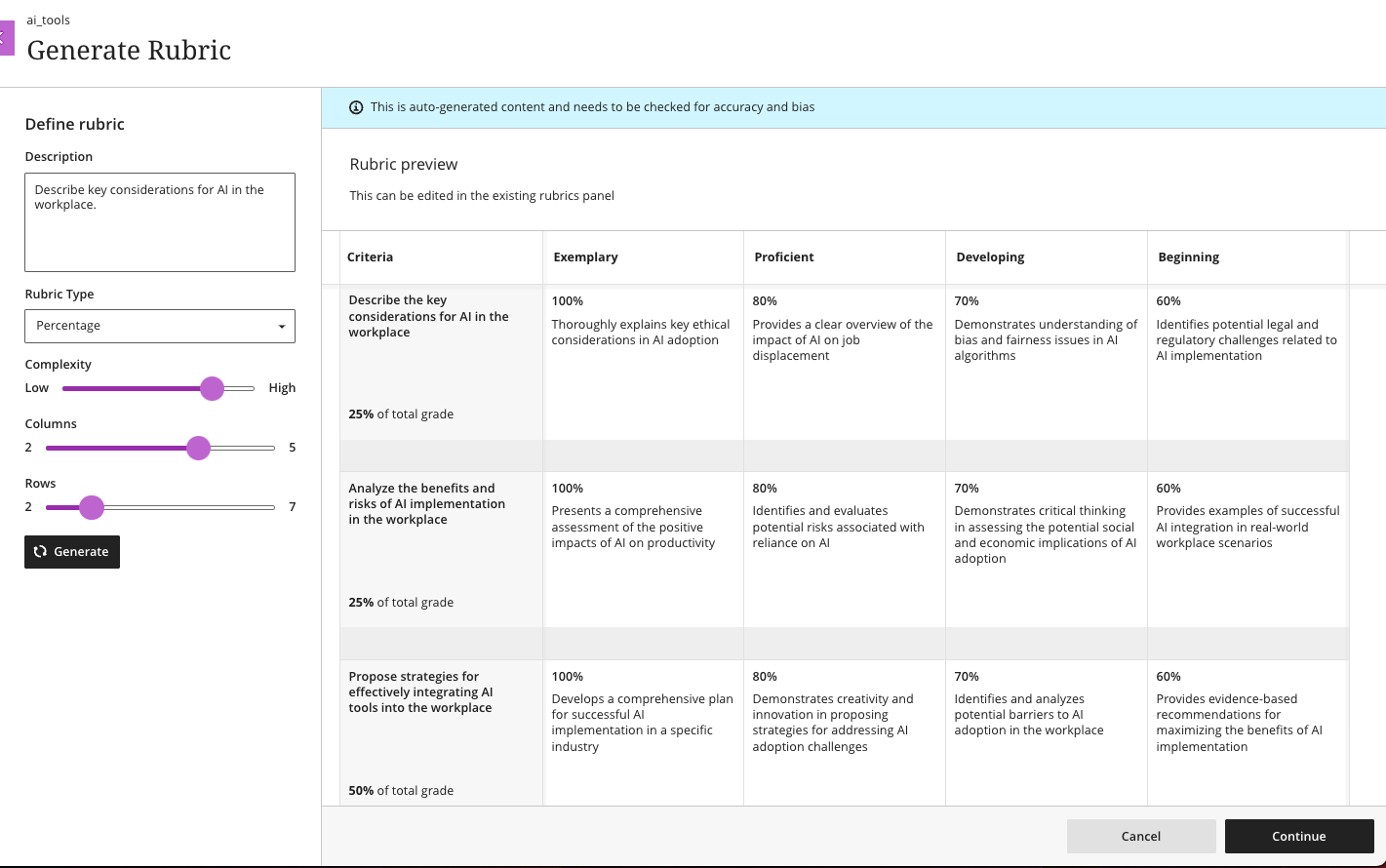
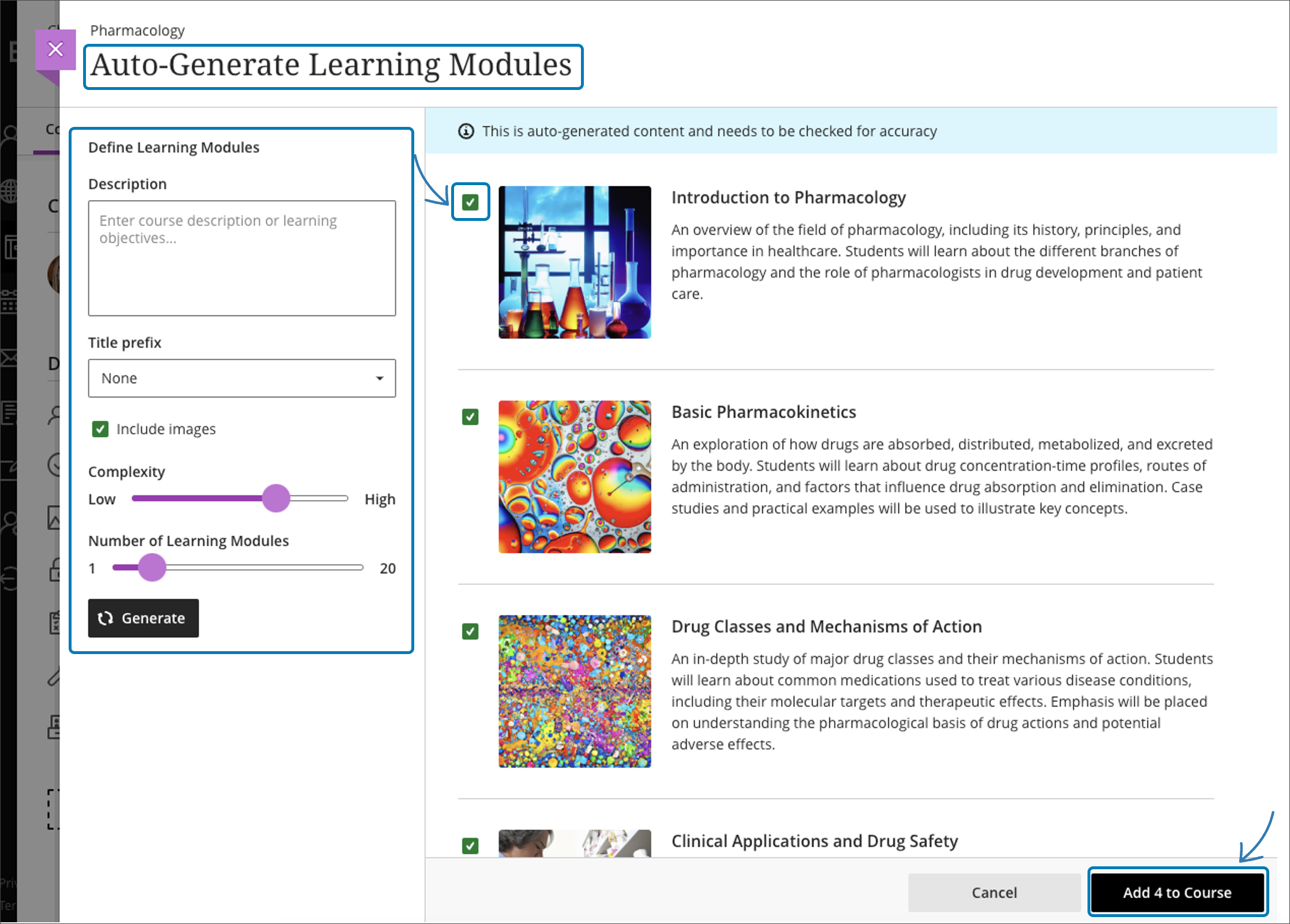
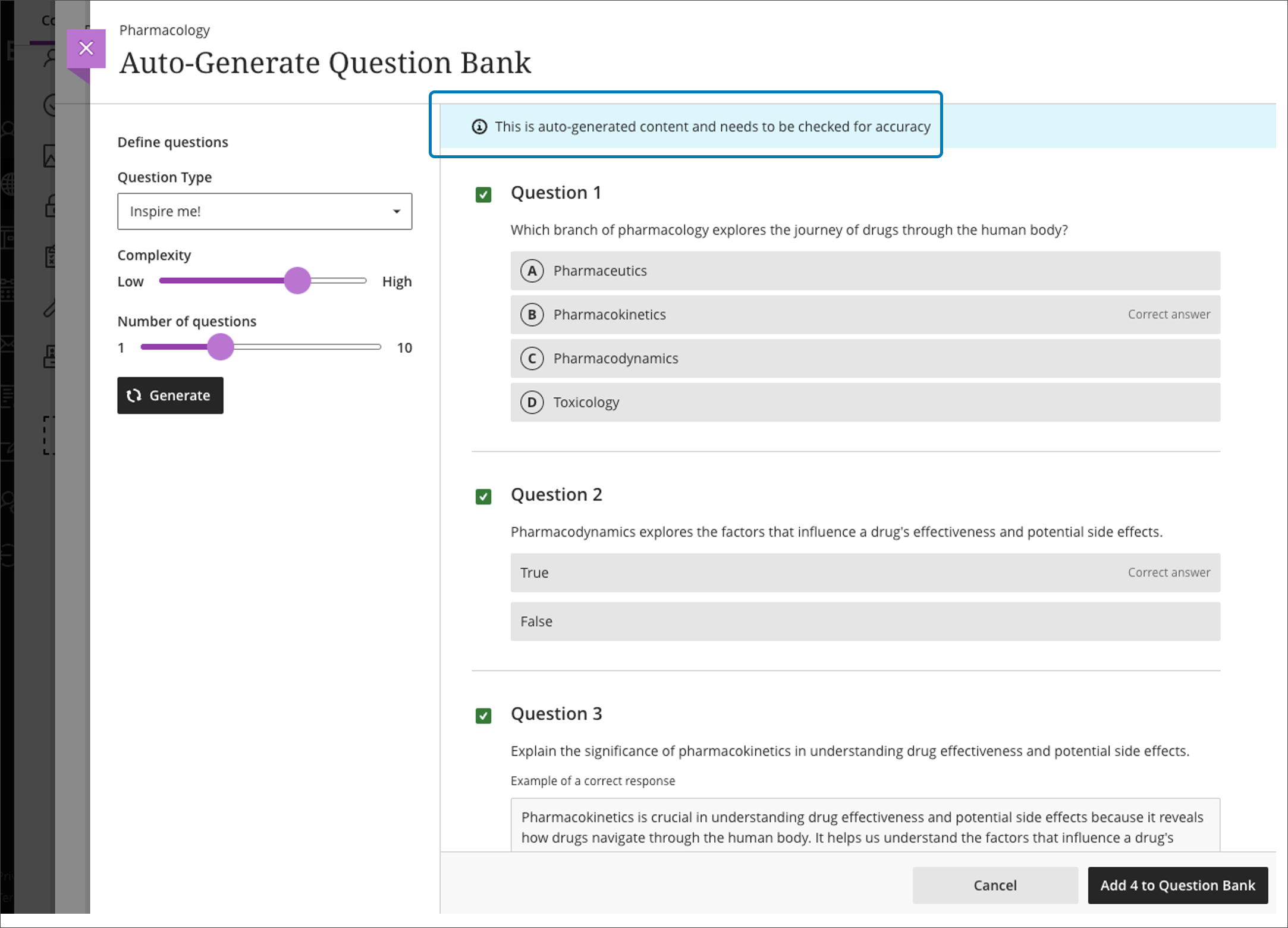
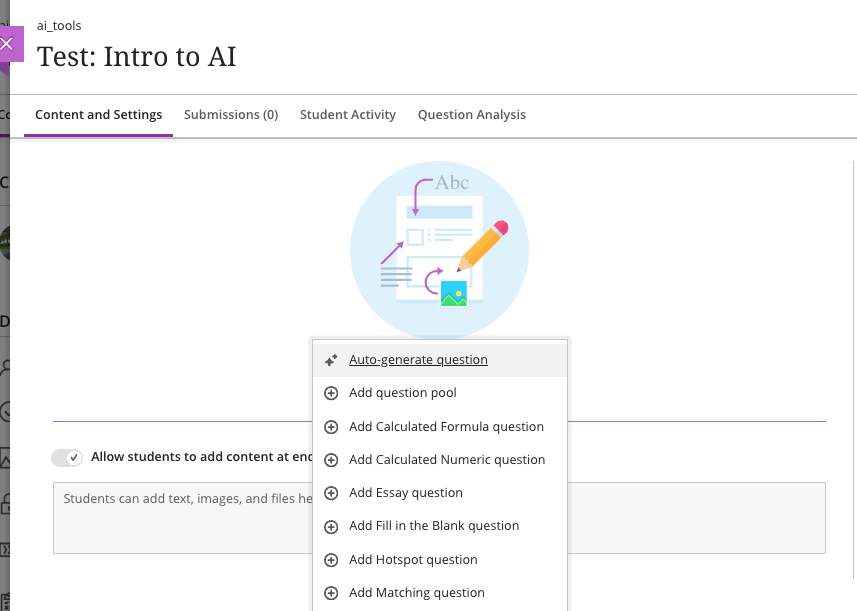
    <div class="html-content"><p><span>The </span><span>U.S. Distance Learning Association (USDLA)'s</span><span> </span><a href="https://usdla.org/2023-ndlw/" rel="nofollow external" class="bo">National Distance Learning Week</a><span> focuses on how artificial intelligence (AI) impacts education and training. </span></p><p><span>Instructional Technology invites faculty to test drive the suite of new Blackboard AI Course Design Assistant tools, which are now available for instructors who would like early access to preview the tool. Informed by </span><a href="https://www.anthology.com/trust-center/trustworthy-ai-approach" rel="nofollow external" class="bo"><span>Anthology's Trustworthy AI Approach</span></a><span> and seamlessly embedded into Ultra's workflows, the AI Course Design Assistant tools are opt-in and the instructor is always in control of the content generated. Faculty can choose when, where, and how to leverage the tools in their Ultra courses. Anthology has not created any AI tools for students. </span></p><p><span>Faculty interested in early access to the tool may </span><a href="http://umbc.edu/go/bbsupport" rel="nofollow external" class="bo"><span>submit an RT ticket</span></a><span> to request access. </span></p><p><span>Developed to assist faculty in streamlining course preparation, the AI Course Design Assistant tools include the features detailed below. </span></p><h5><span><strong>Course-Builder Assistant</strong></span></h5><p><span>Create sample learning modules, titles, and descriptions. The generated modules include the module title, description, and images. Content within the module is not generated by the design tool.</span></p><p><span><span><span><img src="https://lh7-us.googleusercontent.com/7ARcZ0M69ouN0rC7l9pCP87opKWZReNUOEdEyMRF2F6Ey1o4cVSh6ok2a__4GI1VeonnHr047hMOTvZ-oSh735GuOVi9mGNO2OsSBI12vtx0zukhVZLKGw88Qbr8rIWbpU4PvZPNJfvMOz0oKk3JHrk" width="519.2362312243968" height="279" style="max-width: 100%; height: auto;"></span></span></span></p><p><span><em>Image 1: Option to auto-generate modules in an empty course.</em></span></p><p><span><span><img src="https://lh7-us.googleusercontent.com/28Qqdl8hhCNqxif5JnUEupmPVRznEbP2a9tMZJpIevU1ikhabphUaP0DlO2K-4CVP_isEPKVWQR0VH_reC8qMmxl5KdlRPRAgJnsz4O7b20etotcSj3lKn5Rd6KuSmh9n9HG3WYegqHZ8cY0TiuiyU0" width="506" height="356" style="max-width: 100%; height: auto;"></span></span></p><p><span><em>Image 2: Auto-generated modules with an option to select and add to the course.</em></span></p><p><span><em><br></em></span></p><h5><span><strong>Image Suggestion and Creation </strong></span></h5><p><span>The assistant can draw from the Unsplash stock image library and suggest thumbnails for illustration in learning modules or identify an image for the course banner. Functionality also includes AI-generated image creation based on course name and keywords. As of early November, the AI Design Assistant also includes the option to generate images and access Unsplash stock images in Ultra Documents, Discussions, Tests, Assignments, Journal prompts, and Course Messages.</span></p><p><span><span><img src="https://lh7-us.googleusercontent.com/vM69LdYmAxQB7p79VYZpVUZ-lPMMlCJrZc08BG6SEuy4M5wIpWu5_VaLP--wxJcQpCUNr0DFtUhRtFIbV6hBJztGMs3QF7stTGunR2SehsuWPWMnYye1xXE0I64m-K_sDkrZMuBvEbWBpHE_Lphi60c" width="651" height="442" style="max-width: 100%; height: auto;"></span></span></p><p><span><em>Image 3: Select "Generate images" or "Stock images from Unsplash" to add images to Ultra Documents, Discussions, Assessments, Journal prompts, and Course Messages.</em></span></p><p><span><em><br></em></span></p><h5><span><strong>Content-Based Test Generation </strong></span></h5><p><span>Using the content included in an Ultra Document, Assignment Description, or additional information provided directly in the AI tool panel, the Design Assistant can generate a diverse set of questions for a test or question bank. </span></p><p><span><span><img src="https://lh7-us.googleusercontent.com/w9W-Y9c0YPo5X86siTCNGRjWFNLGOukbgWHivQv6-W35lj9fTciE_f83FfBwVMrgzYUOmRzmDlLzuiPHbIpvaLjqiGGw_XZCnrBizTS4kDHJO9sDv3vS-ai8IPcCJt7F9Mt51_8oS7lw2pcRKoAT2I8" width="624" height="445" style="max-width: 100%; height: auto;"></span></span></p><p><span><em>Image 4: Select "auto-generate question" in a test or assignment to see AI-tool generated questions. Test questions can be generated from a test or assignment or at the bottom of an Ultra document.</em></span></p><p><span><br></span></p><h5><strong><span>Rubric Creation</span><span> </span></strong></h5><p><span>Drawing on content in an assessment or discussion prompt, the AI tool can analyze and streamline the rubric creation process according to specific learning objectives and assessment criteria.</span></p><p><span><span><img src="https://lh7-us.googleusercontent.com/zAcitbAZalsG-kleaLU6MxSISZjFgDgrJiG-200_zG1P1LW7_WypVue0luMiEAkLvb4Lp6JA3zSNOhLdNPvO7dMfiY07Ga-1LDYSmYIM7TZzlrPQPUlKuuczy7sAT62RHNf9L9y_6lmgPfFhFnWvoEw" width="624" height="391" style="max-width: 100%; height: auto;"></span></span></p><p><span><em>Image 5: Generated rubric, with options to customize rubric type, complexity, and number of rows and columns.</em></span></p><p><span><span>To discover more about the impact of AI on distance education and training, t</span><span>he </span><span>U.S. Distance Learning Association (USDLA) is hosting virtual webinars during the</span><span> sixteenth annual</span><span> </span><a href="https://usdla.org/2023-ndlw/" rel="nofollow external" class="bo">National Distance Learning Week</a><span> (Nov 6-10, 2023).</span><span> </span><span>All sessions are free to attend, but require </span><a href="https://members.usdla.org/members/evr/reg_event.php?orgcode=USDL&amp;evid=39575371" rel="nofollow external" class="bo">registration via USDLA</a><span>.</span></span></p><div><strong><br></strong></div><h5><strong>Connect with Instructional Technology</strong></h5><div>As always, if you have any questions about teaching, learning, and technology at UMBC, please consider the following options:</div><ul><li><a href="http://www.umbc.edu/faq" rel="nofollow external" class="bo">Check our extensive FAQ collection</a> </li><ul><li><a href="https://wiki.umbc.edu/x/LohnB" rel="nofollow external" class="bo">What's new in Ultra?</a> | <a href="https://wiki.umbc.edu/x/bwrSAQ" rel="nofollow external" class="bo">Known Issues</a> </li></ul><li><a href="http://umbc.edu/go/bbsupport" rel="nofollow external" class="bo">Open a ticket via RT</a></li><li>Follow the <a href="http://my.umbc.edu/groups/instructional-technology" rel="nofollow external" class="bo">Instructional Technology</a> &amp; <a href="http://my.umbc.edu/groups/doit" rel="nofollow external" class="bo">DoIT</a> myUMBC groups</li><li><a href="http://umbc.edu/go/bbsupport" rel="nofollow external" class="bo">Request a consult</a> with <a href="http://doit.umbc.edu/itnm/staff" rel="nofollow external" class="bo">instructional technology staff</a></li><li><a href="http://pivot.umbc.edu/" rel="nofollow external" class="bo">PIVOT</a> | <a href="https://doit.umbc.edu/itnm/academic-continuity/" rel="nofollow external" class="bo">Academic Continuity</a> | <a href="https://fdc.umbc.edu/teaching/keep-on-teaching/" rel="nofollow external" class="bo">Keep On Teaching</a> | <a href="https://doit.umbc.edu/students" rel="nofollow external" class="bo">Student Technology Resources</a></li></ul><p><em>UMBC is committed to providing a consistent learning experience for everyone. The last day we will support Blackboard Original is December 31, 2024. Please check out our training and support: <a href="https://umbc.edu/go/ultra" rel="nofollow external" class="bo">https://umbc.edu/go/ultra</a>.</em></p></div>
]]>
  </Body>
  <Summary>The U.S. Distance Learning Association (USDLA)'s National Distance Learning Week focuses on how artificial intelligence (AI) impacts education and training.   Instructional Technology invites...</Summary>
  <Website>https://my3.my.umbc.edu/groups/instructional-technology/posts/136797</Website>
  <TrackingUrl>https://dev.my.umbc.edu/api/v0/pixel/news/136797/guest@my.umbc.edu/cce9fa7d60e0f9d649e04b3e3cfb703f/api/pixel</TrackingUrl>
  <Tag>ai</Tag>
  <Tag>ai-course-design-assistant</Tag>
  <Tag>artificial-intelligence</Tag>
  <Tag>blackboard</Tag>
  <Tag>blackboard-ultra</Tag>
  <Tag>ndlw</Tag>
  <Tag>online-learning</Tag>
  <Tag>ultra</Tag>
  <Group token="instructional-technology">Instructional Technology</Group>
  <GroupUrl>https://dev.my.umbc.edu/groups/instructional-technology</GroupUrl>
  <AvatarUrl>https://assets2-dev.my.umbc.edu/system/shared/avatars/groups/000/001/164/dec3b026b81ee6d890a8f82f75c94a2e/xsmall.png?1446126703</AvatarUrl>
  <AvatarUrl size="original">https://assets1-dev.my.umbc.edu/system/shared/avatars/groups/000/001/164/dec3b026b81ee6d890a8f82f75c94a2e/original.png?1446126703</AvatarUrl>
  <AvatarUrl size="xxlarge">https://assets2-dev.my.umbc.edu/system/shared/avatars/groups/000/001/164/dec3b026b81ee6d890a8f82f75c94a2e/xxlarge.png?1446126703</AvatarUrl>
  <AvatarUrl size="xlarge">https://assets1-dev.my.umbc.edu/system/shared/avatars/groups/000/001/164/dec3b026b81ee6d890a8f82f75c94a2e/xlarge.png?1446126703</AvatarUrl>
  <AvatarUrl size="large">https://assets1-dev.my.umbc.edu/system/shared/avatars/groups/000/001/164/dec3b026b81ee6d890a8f82f75c94a2e/large.png?1446126703</AvatarUrl>
  <AvatarUrl size="medium">https://assets4-dev.my.umbc.edu/system/shared/avatars/groups/000/001/164/dec3b026b81ee6d890a8f82f75c94a2e/medium.png?1446126703</AvatarUrl>
  <AvatarUrl size="small">https://assets3-dev.my.umbc.edu/system/shared/avatars/groups/000/001/164/dec3b026b81ee6d890a8f82f75c94a2e/small.png?1446126703</AvatarUrl>
  <AvatarUrl size="xsmall">https://assets2-dev.my.umbc.edu/system/shared/avatars/groups/000/001/164/dec3b026b81ee6d890a8f82f75c94a2e/xsmall.png?1446126703</AvatarUrl>
  <AvatarUrl size="xxsmall">https://assets3-dev.my.umbc.edu/system/shared/avatars/groups/000/001/164/dec3b026b81ee6d890a8f82f75c94a2e/xxsmall.png?1446126703</AvatarUrl>
  <Sponsor>Instructional Technology</Sponsor>
  <ThumbnailUrl size="xxlarge">https://assets1-dev.my.umbc.edu/system/shared/thumbnails/news/000/136/797/bf1e6376eb09a574b84cb0b0050da68a/xxlarge.jpg?1699622583</ThumbnailUrl>
  <ThumbnailUrl size="xlarge">https://assets3-dev.my.umbc.edu/system/shared/thumbnails/news/000/136/797/bf1e6376eb09a574b84cb0b0050da68a/xlarge.jpg?1699622583</ThumbnailUrl>
  <ThumbnailUrl size="large">https://assets2-dev.my.umbc.edu/system/shared/thumbnails/news/000/136/797/bf1e6376eb09a574b84cb0b0050da68a/large.jpg?1699622583</ThumbnailUrl>
  <ThumbnailUrl size="medium">https://assets1-dev.my.umbc.edu/system/shared/thumbnails/news/000/136/797/bf1e6376eb09a574b84cb0b0050da68a/medium.jpg?1699622583</ThumbnailUrl>
  <ThumbnailUrl size="small">https://assets4-dev.my.umbc.edu/system/shared/thumbnails/news/000/136/797/bf1e6376eb09a574b84cb0b0050da68a/small.jpg?1699622583</ThumbnailUrl>
  <ThumbnailUrl size="xsmall">https://assets2-dev.my.umbc.edu/system/shared/thumbnails/news/000/136/797/bf1e6376eb09a574b84cb0b0050da68a/xsmall.jpg?1699622583</ThumbnailUrl>
  <ThumbnailUrl size="xxsmall">https://assets2-dev.my.umbc.edu/system/shared/thumbnails/news/000/136/797/bf1e6376eb09a574b84cb0b0050da68a/xxsmall.jpg?1699622583</ThumbnailUrl>
  <PawCount>3</PawCount>
  <CommentCount>0</CommentCount>
  <CommentsAllowed>true</CommentsAllowed>
  <PostedAt>Fri, 10 Nov 2023 08:24:58 -0500</PostedAt>
  <EditAt>Mon, 18 Dec 2023 13:51:25 -0500</EditAt>
</NewsItem>
  <NewsItem contentIssues="true" id="136790" important="false" status="posted" url="https://dev.my.umbc.edu/groups/doit/posts/136790">
  <Title>AI and Accessible Images for Inclusive Courses</Title>
  <Tagline>National Distance Learning Week 2023</Tagline>
  <Body>
    <![CDATA[
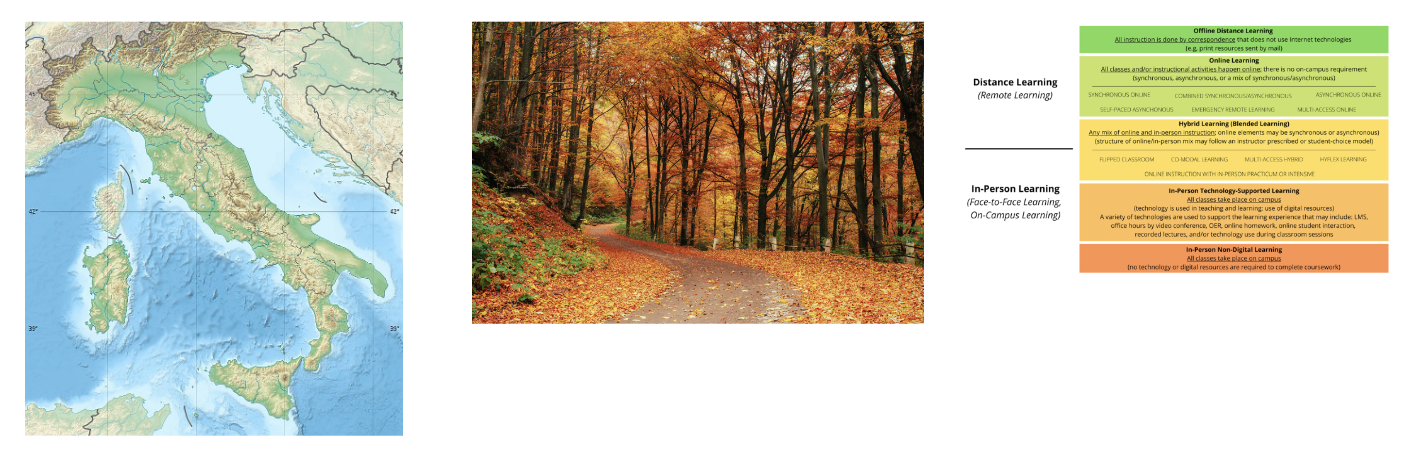
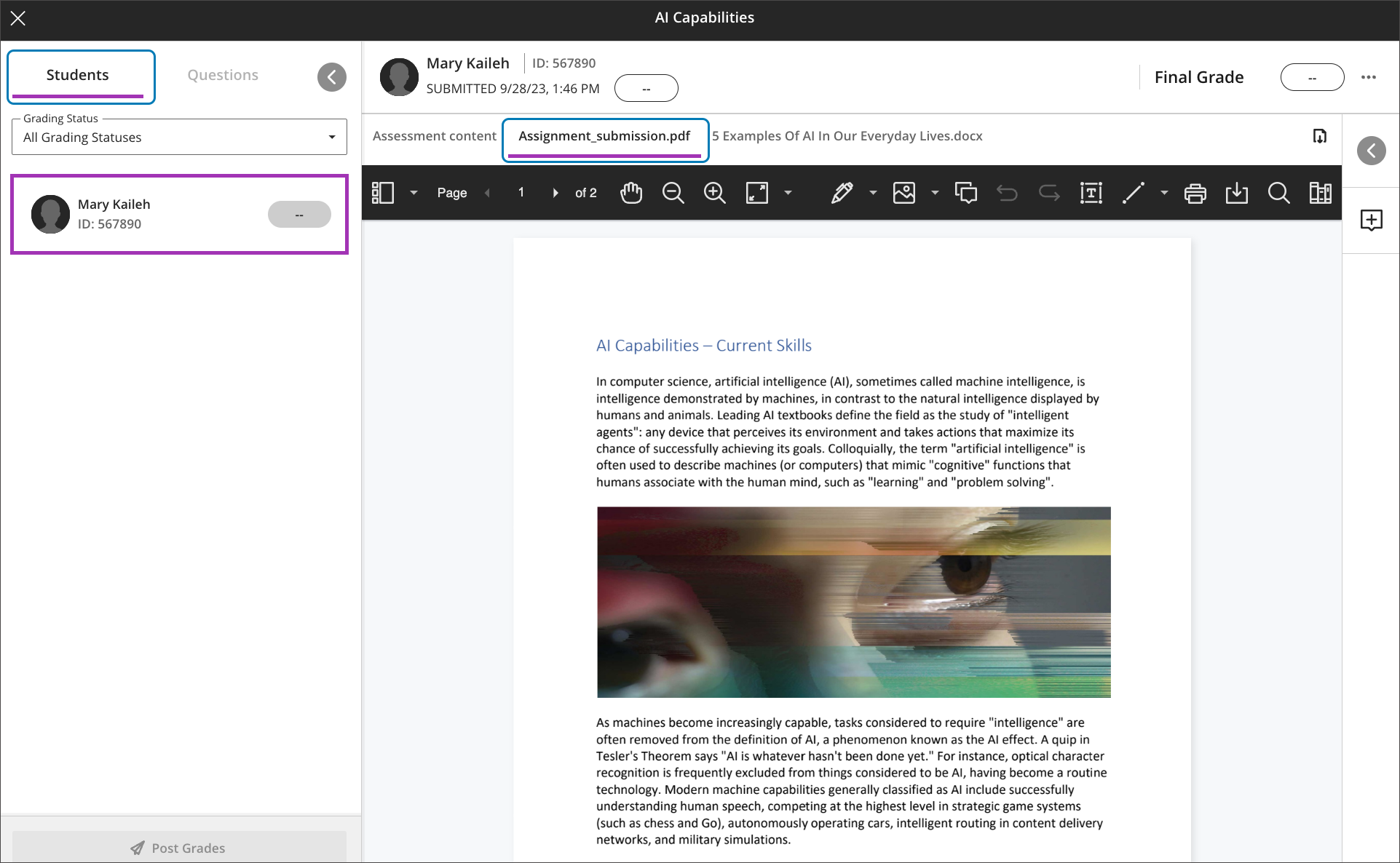
    <div class="html-content"><span><p><span>Providing accessible images is a crucial step to ensure inclusivity and equal access to learning. When images are properly described, students using screen readers are able to access an equitable educational environment. We use the alternative text field when placing images in documents, presentations, and in our Blackboard courses.</span></p><p><span>There are several tools available to help faculty with accessible images. </span></p><ol><li><span><strong>Ally Course Accessibility Report </strong></span><a href="https://help.blackboard.com/Ally/Ally_for_LMS/Instructor/Course_Accessibility_Report" rel="nofollow external" class="bo"><span>provides a big picture overview</span></a><span> of your course's accessibility score, growing content by type and identifying issues in your course that is easiest to fix. Clicking the Start button will open a panel that helps you find the images and enter alternative text for those images in your course.</span></li><li><span>When using images in </span><span><strong>Google Slides or Documents</strong></span><span>, you can click on the image to </span><a href="https://support.google.com/docs/answer/6199477?hl=en" rel="nofollow external" class="bo"><span>activate a new menu</span></a><span>, Format Options. Select Alt Text to enter a description. Repeat this process for every image.</span></li><li><span>When embedding images into </span><span><strong>Microsoft Word/PowerPoint</strong></span><span> files, you can </span><a href="https://support.microsoft.com/en-us/office/add-alternative-text-to-a-shape-picture-chart-smartart-graphic-or-other-object-44989b2a-903c-4d9a-b742-6a75b451c669#PickTab=Windows" rel="nofollow external" class="bo"><span>improve accessibility</span></a><span> with a simple right-click on the image. This action will activate a menu where you can find Edit Alt Text. If the image does not contain information, such as a stylistic border, you can mark it as decorative.</span></li></ol><p><span>What if your course uses complex images, bursting with intricate details? How can you ensure that every student, regardless of visual ability, fully grasps their significance? </span></p><p><span>ChatGPT 4* offers </span><a href="https://help.openai.com/en/articles/8400551-image-inputs-for-chatgpt-faq" rel="nofollow external" class="bo"><span>powerful image input functionality</span></a><span>, allowing you to upload an image and generate complex descriptions. With its advanced language capabilities, ChatGPT can analyze an image, identify key elements, and produce informative alternative text that conveys the essence of the image. For example, we uploaded three complex images to generate extended descriptions of 100 words or less.</span></p></span><div><br></div><div><img src="https://my3.my.umbc.edu/groups/instructional-technology/posts/136790/attachments/49515" style="max-width: 100%; height: auto;"></div><br><div><div>Alt-text-left: An image of Italy with no landmarks indicated. The AI identified specific geographical features based on the prompt and follow-up refinement.</div><div><br></div><div><span>Alt-text-c</span>enter: An image of a desolate road in a dense autumn forest. The AI was not provided with specific instructions, yet produced a richly detailed description of the image.</div><div><br></div><div><span>Alt-text-r</span>ight: An infographic about online learning modes. The AI identified three sections supporting online, hybrid, and in-person learning and the various delivery models within each scope.</div></div><div><br></div><div><span><p><span>It's important to note that ChatGPT might not always perfectly interpret every image, especially if it's highly abstract or intricate, and it might take a more cautious approach to its interpretation if it doesn't have sufficient context or guidance from the prompt provided with the image upload. As such, it's always a good practice to review the generated description to ensure its accuracy and appropriateness for your students. Follow-up questions can refine the output produced by ChatGPT, or instructors can revise the description.</span></p><p><span>For more information about accessibility or using AI tools, please contact Instructional Technology. To discover more about the impact of AI on distance education and training, t</span><span>he </span><span>U.S. Distance Learning Association (USDLA) is hosting virtual webinars during the</span><span> sixteenth annual</span><span> </span><a href="https://usdla.org/2023-ndlw/" rel="nofollow external" class="bo">National Distance Learning Week</a> (Nov 6-10, 2023).<span> </span><span>All sessions are free to attend, but require </span><a href="https://members.usdla.org/members/evr/reg_event.php?orgcode=USDL&amp;evid=39575371" rel="nofollow external" class="bo">registration via USDLA</a><span>.</span></p><p><span><br></span></p><p><span>~ <a href="https://doit.umbc.edu/itnm/staff/hawken/" rel="nofollow external" class="bo">Mariann Hawken</a> </span></p><p><span><br></span></p><p><span><strong>Connect with Instructional Technology</strong></span></p><p><span>As always, if you have any questions about teaching, learning, and technology, please consider the following options:</span></p><ul><li><a href="http://www.umbc.edu/faq" rel="nofollow external" class="bo"><span>Check our extensive FAQ collection</span></a><span> &amp; Supported Technologies</span></li><ul><li><p><a href="https://wiki.umbc.edu/x/LohnB" rel="nofollow external" class="bo"><span>What's new in Ultra?</span></a><span> | </span><a href="https://umbc.edu/go/blackboardfaqs" rel="nofollow external" class="bo"><span>Blackboard</span></a><span> | </span><a href="https://wiki.umbc.edu/x/bwrSAQ" rel="nofollow external" class="bo"><span>Known Issues</span></a><span> </span></p></li></ul><li><p><a href="http://my.umbc.edu/go/request-help" rel="nofollow external" class="bo"><span>Open a ticket via RT</span></a></p></li><li><p><span>Follow the </span><a href="http://my.umbc.edu/groups/instructional-technology" rel="nofollow external" class="bo"><span>Instructional Technology</span></a><span> &amp; </span><a href="http://my.umbc.edu/groups/doit" rel="nofollow external" class="bo"><span>DoIT</span></a><span> myUMBC groups</span></p></li><li><p><a href="http://doit.umbc.edu/itnm/staff/" rel="nofollow external" class="bo"><span>Request a consult</span></a><span> with </span><a href="http://doit.umbc.edu/itnm/staff" rel="nofollow external" class="bo"><span>instructional technology staff</span></a></p></li><li><p><a href="https://pivot.umbc.edu/" rel="nofollow external" class="bo"><span>PIVOT</span></a><span> | </span><a href="https://doit.umbc.edu/itnm/academic-continuity/" rel="nofollow external" class="bo"><span>Academic Continuity</span></a><span> | </span><a href="https://fdc.umbc.edu/resources/keep-on-teaching/" rel="nofollow external" class="bo"><span>Keep On Teaching</span></a><span> | </span><a href="https://doit.umbc.edu/students" rel="nofollow external" class="bo"><span>Student Technology Resources</span></a><span> </span></p></li></ul><br><p><span>UMBC is committed to providing a consistent learning experience for everyone. The last day we will support Blackboard Original is December 31, 2024. </span><span>Keep up with Ultra: </span><a href="https://my.umbc.edu/go/ultra" rel="nofollow external" class="bo"><span>umbc.edu/go/ultra</span></a><span> </span></p><br><br><br><br><br><p><span><em>* ChatGPT 4 requires a subscription to use the image input functionality.</em></span></p></span></div></div>
]]>
  </Body>
  <Summary>Providing accessible images is a crucial step to ensure inclusivity and equal access to learning. When images are properly described, students using screen readers are able to access an equitable...</Summary>
  <AttachmentKind>Image</AttachmentKind>
  <AttachmentUrl>https://assets1-dev.my.umbc.edu/system/shared/attachments/2b79c36c8decc520c34bcb4f05294b75/69eec795/news/000/136/790/a461b2d6e2dcd85ebbce05ccf6e8b4ff/three-examples.png?1699032656</AttachmentUrl>
  <Attachments>
    <Attachment kind="Image" url="https://dev.my.umbc.edu/groups/doit/posts/136790/attachments/49515"></Attachment>
  </Attachments>
  <TrackingUrl>https://dev.my.umbc.edu/api/v0/pixel/news/136790/guest@my.umbc.edu/a460ca92032ccf2a8c8550d16988af4a/api/pixel</TrackingUrl>
  <Tag>accessibility</Tag>
  <Tag>ai</Tag>
  <Tag>artificial-intelligence</Tag>
  <Tag>chatgpt</Tag>
  <Tag>hawken</Tag>
  <Tag>ndlw</Tag>
  <Group token="instructional-technology">Instructional Technology</Group>
  <GroupUrl>https://dev.my.umbc.edu/groups/instructional-technology</GroupUrl>
  <AvatarUrl>https://assets2-dev.my.umbc.edu/system/shared/avatars/groups/000/001/164/dec3b026b81ee6d890a8f82f75c94a2e/xsmall.png?1446126703</AvatarUrl>
  <AvatarUrl size="original">https://assets1-dev.my.umbc.edu/system/shared/avatars/groups/000/001/164/dec3b026b81ee6d890a8f82f75c94a2e/original.png?1446126703</AvatarUrl>
  <AvatarUrl size="xxlarge">https://assets2-dev.my.umbc.edu/system/shared/avatars/groups/000/001/164/dec3b026b81ee6d890a8f82f75c94a2e/xxlarge.png?1446126703</AvatarUrl>
  <AvatarUrl size="xlarge">https://assets1-dev.my.umbc.edu/system/shared/avatars/groups/000/001/164/dec3b026b81ee6d890a8f82f75c94a2e/xlarge.png?1446126703</AvatarUrl>
  <AvatarUrl size="large">https://assets1-dev.my.umbc.edu/system/shared/avatars/groups/000/001/164/dec3b026b81ee6d890a8f82f75c94a2e/large.png?1446126703</AvatarUrl>
  <AvatarUrl size="medium">https://assets4-dev.my.umbc.edu/system/shared/avatars/groups/000/001/164/dec3b026b81ee6d890a8f82f75c94a2e/medium.png?1446126703</AvatarUrl>
  <AvatarUrl size="small">https://assets3-dev.my.umbc.edu/system/shared/avatars/groups/000/001/164/dec3b026b81ee6d890a8f82f75c94a2e/small.png?1446126703</AvatarUrl>
  <AvatarUrl size="xsmall">https://assets2-dev.my.umbc.edu/system/shared/avatars/groups/000/001/164/dec3b026b81ee6d890a8f82f75c94a2e/xsmall.png?1446126703</AvatarUrl>
  <AvatarUrl size="xxsmall">https://assets3-dev.my.umbc.edu/system/shared/avatars/groups/000/001/164/dec3b026b81ee6d890a8f82f75c94a2e/xxsmall.png?1446126703</AvatarUrl>
  <Sponsor>Instructional Technology</Sponsor>
  <ThumbnailUrl size="xxlarge">https://assets1-dev.my.umbc.edu/system/shared/thumbnails/news/000/136/790/b2c854f53961a9269a2e8ec29a3e50ea/xxlarge.jpg?1699443622</ThumbnailUrl>
  <ThumbnailUrl size="xlarge">https://assets1-dev.my.umbc.edu/system/shared/thumbnails/news/000/136/790/b2c854f53961a9269a2e8ec29a3e50ea/xlarge.jpg?1699443622</ThumbnailUrl>
  <ThumbnailUrl size="large">https://assets1-dev.my.umbc.edu/system/shared/thumbnails/news/000/136/790/b2c854f53961a9269a2e8ec29a3e50ea/large.jpg?1699443622</ThumbnailUrl>
  <ThumbnailUrl size="medium">https://assets4-dev.my.umbc.edu/system/shared/thumbnails/news/000/136/790/b2c854f53961a9269a2e8ec29a3e50ea/medium.jpg?1699443622</ThumbnailUrl>
  <ThumbnailUrl size="small">https://assets2-dev.my.umbc.edu/system/shared/thumbnails/news/000/136/790/b2c854f53961a9269a2e8ec29a3e50ea/small.jpg?1699443622</ThumbnailUrl>
  <ThumbnailUrl size="xsmall">https://assets4-dev.my.umbc.edu/system/shared/thumbnails/news/000/136/790/b2c854f53961a9269a2e8ec29a3e50ea/xsmall.jpg?1699443622</ThumbnailUrl>
  <ThumbnailUrl size="xxsmall">https://assets3-dev.my.umbc.edu/system/shared/thumbnails/news/000/136/790/b2c854f53961a9269a2e8ec29a3e50ea/xxsmall.jpg?1699443622</ThumbnailUrl>
  <PawCount>11</PawCount>
  <CommentCount>2</CommentCount>
  <CommentsAllowed>true</CommentsAllowed>
  <PostedAt>Wed, 08 Nov 2023 06:46:15 -0500</PostedAt>
  <EditAt>Wed, 08 Nov 2023 10:41:45 -0500</EditAt>
</NewsItem>
  <NewsItem contentIssues="true" id="136475" important="false" status="posted" url="https://dev.my.umbc.edu/groups/doit/posts/136475">
  <Title>Sorting &amp; submission enhancements for Ultra gradebook in Nov</Title>
  <Tagline>Search &amp; use stock images in Ultra docs, discussions, etc.</Tagline>
  <Body>
    <![CDATA[
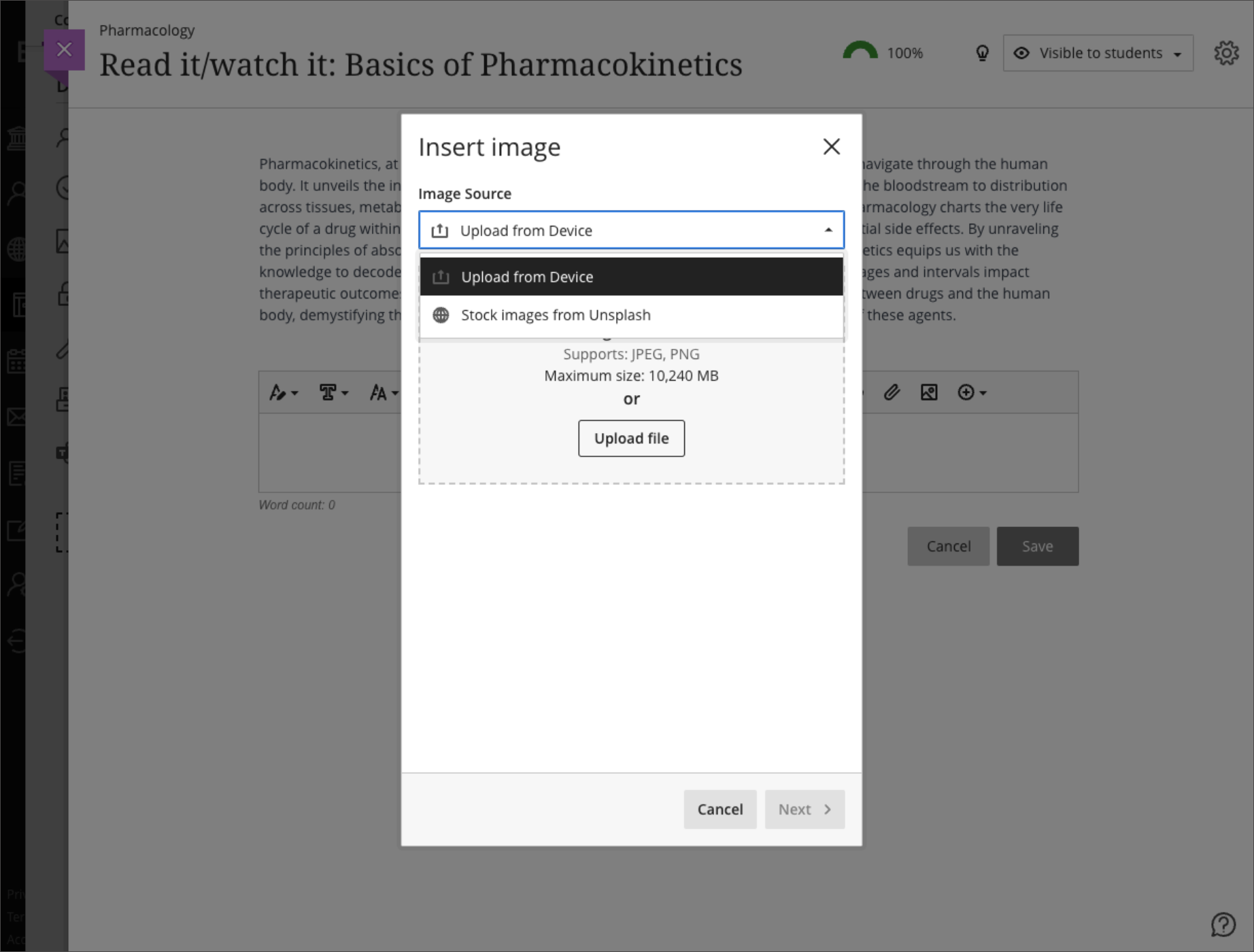
    <div class="html-content"><div><div><div><div><div><div>Continued enhancements to the Ultra gradebook provide greater flexibility and usability. In the November update to Ultra courses, additional sorting controls allow instructors to sort grade records in ascending or descending order including student name, overall grade, tests and assignment grade columns, and manually created grade columns. Future updates will provide sorting controls to other grading categories including discussions and journals.</div><div><br></div><div><img src="https://help.blackboard.com/sites/default/files/images/2023-10/learn_ultra_instruction_Gradebook_GridViewAssessmentSortingWithFilter.png" width="500" alt="Sorting assessments in gradebook grid view with filters applied" style="max-width: 100%; height: auto;"></div><div><em>Image 1: Sorting assessments in gradebook grid view with filters applied. A purple line in the header shows which column is sorted.</em></div><div><br></div><div>Instructors will also find it easier to navigate through student file attachments. A new tabbed interface displays when multiple files are uploaded. This updated display allows instructors to quickly navigate between file uploads when grading attachments.</div><div><br></div><div><img src="https://help.blackboard.com/sites/default/files/images/2023-10/learn_ultra_instructor_FlexibleGrading_GradingOptimizationFile-basedAssignmentSubmissions_TabsPerFile_DefaultView.png" width="500" alt="Example of a student submission open for grading with two files attached. The first file attachment is open in Bb Annotate. A new tab appears for the second file attachment." style="max-width: 100%; height: auto;"></div><div><em>Image 2: Example of a student </em><span><em>submission open for grading with two files attached. The first file attachment is open in Bb Annotate. A new tab appears for the second file attachment.</em></span></div><div><br></div><div>Additional updates to grading include:</div><div><ul><li>A new late indicator added to the submission receipt if a student submits after the due date.</li><li>Instructors can access the Edit/Regrade workflow when grading by question or by student.</li><li>Anonymous grading is now supported in <a href="https://my3.my.umbc.edu/groups/instructional-technology/posts/134272" rel="nofollow external" class="bo">the new flexible grading interface</a>.</li><li>Partial and negative credit is available for matching questions and auto-distributed across pairs. </li><li>Tabbed navigation for reading and grading journals was added to be consistent with discussions and assessments.</li></ul></div><div>Load times for the Ultra gradebook for large courses were also improved for the November update. For example, the gradebook for a course with 2000 students and 400 graded items will load in 8 seconds while a course, representing a 57% improvement.</div><div><br></div><div>Finally, the content editor will feature a new image button, making it easier and clearer when and how to upload an image to an Ultra course. When leveraging the <a href="https://my3.my.umbc.edu/groups/instructional-technology/posts/134605" rel="nofollow external" class="bo">AI Course Design Assistant tools</a>, the image function also allows instructors to search Unsplash collection to add<span> </span><span>images to Ultra Documents, discussions, course messages, and journal prompts. All users can use the image button to upload an image, but only faculty with access to the AI tools can search the royalty free image database.</span></div><div><br></div><div><img src="https://help.blackboard.com/sites/default/files/images/2023-10/learn_ultra_instructor_UltraDocs_ImageInsertion_ImageSourceOptions_0.png" width="500" alt="Example of instructor view to select an image upload or image search" style="max-width: 100%; height: auto;"></div><div><em>Image 3: Example of instructor view to select an image upload or image search</em></div><div><br></div></div></div></div></div><div><div><div><div><div><span><div><span>Faculty should see the latest updates in Ultra courses around November 2-3 2023. </span><span>The next update to our Ultra test environment will take place on November 7, 2023; release notes are posted to the <a href="https://wiki.umbc.edu/x/LohnB" rel="nofollow external" class="bo">What's New in Ultra</a> that same week. Faculty who are interested in test driving new features before they are released to production should </span><a href="http://my.umbc.edu/go/request-help" rel="nofollow external" class="bo">open an RT ticket</a> to request early access. Please <a href="http://umbc.edu/go/ultra" rel="nofollow external" class="bo">watch the FAQs</a>, including <a href="https://wiki.umbc.edu/x/LohnB" rel="nofollow external" class="bo">the What's New with Ultra page</a>, <span>and myUMBC for additional information about Ultra. </span></div></span></div></div></div></div><div><span><br></span></div></div><div><span><strong>Connect with Instructional Technology</strong></span></div><div><span>As always, if you have any questions about teaching, learning, and technology at UMBC, please consider the following options:</span></div><ul><li><a href="http://www.umbc.edu/faq" rel="nofollow external" class="bo">Check our extensive FAQ collection</a><span> </span></li><ul><li><span><a href="https://wiki.umbc.edu/x/LohnB" rel="nofollow external" class="bo"><span>What's new in Ultra?</span></a><span> </span><span>|</span><span> </span><a href="https://wiki.umbc.edu/x/bwrSAQ" rel="nofollow external" class="bo"><span>Known Issues</span></a><span> </span></span></li></ul><li><span><a href="http://my.umbc.edu/go/request-help" rel="nofollow external" class="bo">Open a ticket via RT</a></span></li><li><span>Follow the </span><a href="http://my.umbc.edu/groups/instructional-technology" rel="nofollow external" class="bo">Instructional Technology</a><span> &amp; </span><a href="http://my.umbc.edu/groups/doit" rel="nofollow external" class="bo">DoIT</a><span> myUMBC groups</span></li><li><a href="http://doit.umbc.edu/itnm/staff/" rel="nofollow external" class="bo">Request a consult</a><span> with <a href="http://doit.umbc.edu/itnm/staff" rel="nofollow external" class="bo">instructional technology staff</a></span></li><li><span><a href="http://pivot.umbc.edu" rel="nofollow external" class="bo">PIVOT</a> | <a href="https://doit.umbc.edu/itnm/academic-continuity/" rel="nofollow external" class="bo">Academic Continuity</a></span><span> </span><span>|</span><span> </span><span><a href="https://fdc.umbc.edu/teaching/keep-on-teaching/" rel="nofollow external" class="bo">Keep On Teaching</a></span><span> </span><span>|</span><span> </span><span><a href="https://doit.umbc.edu/students" rel="nofollow external" class="bo">Student Technology Resources</a></span></li></ul></div><div><div></div></div></div>
]]>
  </Body>
  <Summary>Continued enhancements to the Ultra gradebook provide greater flexibility and usability. In the November update to Ultra courses, additional sorting controls allow instructors to sort grade...</Summary>
  <Website>https://my3.my.umbc.edu/groups/instructional-technology/posts/136475</Website>
  <TrackingUrl>https://dev.my.umbc.edu/api/v0/pixel/news/136475/guest@my.umbc.edu/21ea7db3e03c2605d06bb7489049a8cf/api/pixel</TrackingUrl>
  <Tag>ai</Tag>
  <Tag>blackboard</Tag>
  <Tag>gradebook</Tag>
  <Tag>grading</Tag>
  <Tag>ultra-experience</Tag>
  <Tag>ultra-update</Tag>
  <Tag>unsplash</Tag>
  <Group token="instructional-technology">Instructional Technology</Group>
  <GroupUrl>https://dev.my.umbc.edu/groups/instructional-technology</GroupUrl>
  <AvatarUrl>https://assets2-dev.my.umbc.edu/system/shared/avatars/groups/000/001/164/dec3b026b81ee6d890a8f82f75c94a2e/xsmall.png?1446126703</AvatarUrl>
  <AvatarUrl size="original">https://assets1-dev.my.umbc.edu/system/shared/avatars/groups/000/001/164/dec3b026b81ee6d890a8f82f75c94a2e/original.png?1446126703</AvatarUrl>
  <AvatarUrl size="xxlarge">https://assets2-dev.my.umbc.edu/system/shared/avatars/groups/000/001/164/dec3b026b81ee6d890a8f82f75c94a2e/xxlarge.png?1446126703</AvatarUrl>
  <AvatarUrl size="xlarge">https://assets1-dev.my.umbc.edu/system/shared/avatars/groups/000/001/164/dec3b026b81ee6d890a8f82f75c94a2e/xlarge.png?1446126703</AvatarUrl>
  <AvatarUrl size="large">https://assets1-dev.my.umbc.edu/system/shared/avatars/groups/000/001/164/dec3b026b81ee6d890a8f82f75c94a2e/large.png?1446126703</AvatarUrl>
  <AvatarUrl size="medium">https://assets4-dev.my.umbc.edu/system/shared/avatars/groups/000/001/164/dec3b026b81ee6d890a8f82f75c94a2e/medium.png?1446126703</AvatarUrl>
  <AvatarUrl size="small">https://assets3-dev.my.umbc.edu/system/shared/avatars/groups/000/001/164/dec3b026b81ee6d890a8f82f75c94a2e/small.png?1446126703</AvatarUrl>
  <AvatarUrl size="xsmall">https://assets2-dev.my.umbc.edu/system/shared/avatars/groups/000/001/164/dec3b026b81ee6d890a8f82f75c94a2e/xsmall.png?1446126703</AvatarUrl>
  <AvatarUrl size="xxsmall">https://assets3-dev.my.umbc.edu/system/shared/avatars/groups/000/001/164/dec3b026b81ee6d890a8f82f75c94a2e/xxsmall.png?1446126703</AvatarUrl>
  <Sponsor>Instructional Technology</Sponsor>
  <ThumbnailUrl size="xxlarge">https://assets1-dev.my.umbc.edu/system/shared/thumbnails/news/000/136/475/7508f0861586250acfa2fae832e76a19/xxlarge.jpg?1698074839</ThumbnailUrl>
  <ThumbnailUrl size="xlarge">https://assets3-dev.my.umbc.edu/system/shared/thumbnails/news/000/136/475/7508f0861586250acfa2fae832e76a19/xlarge.jpg?1698074839</ThumbnailUrl>
  <ThumbnailUrl size="large">https://assets3-dev.my.umbc.edu/system/shared/thumbnails/news/000/136/475/7508f0861586250acfa2fae832e76a19/large.jpg?1698074839</ThumbnailUrl>
  <ThumbnailUrl size="medium">https://assets4-dev.my.umbc.edu/system/shared/thumbnails/news/000/136/475/7508f0861586250acfa2fae832e76a19/medium.jpg?1698074839</ThumbnailUrl>
  <ThumbnailUrl size="small">https://assets2-dev.my.umbc.edu/system/shared/thumbnails/news/000/136/475/7508f0861586250acfa2fae832e76a19/small.jpg?1698074839</ThumbnailUrl>
  <ThumbnailUrl size="xsmall">https://assets1-dev.my.umbc.edu/system/shared/thumbnails/news/000/136/475/7508f0861586250acfa2fae832e76a19/xsmall.jpg?1698074839</ThumbnailUrl>
  <ThumbnailUrl size="xxsmall">https://assets1-dev.my.umbc.edu/system/shared/thumbnails/news/000/136/475/7508f0861586250acfa2fae832e76a19/xxsmall.jpg?1698074839</ThumbnailUrl>
  <PawCount>3</PawCount>
  <CommentCount>0</CommentCount>
  <CommentsAllowed>true</CommentsAllowed>
  <PostedAt>Mon, 23 Oct 2023 12:56:13 -0400</PostedAt>
  <EditAt>Mon, 23 Oct 2023 13:01:37 -0400</EditAt>
</NewsItem>
  <NewsItem contentIssues="true" id="135474" important="false" status="posted" url="https://dev.my.umbc.edu/groups/doit/posts/135474">
  <Title>DoIT's Tom Penniston Presents Paper at Copenhagen Conference</Title>
  <Tagline>Sharing UMBC's Story Globally</Tagline>
  <Body>
    <![CDATA[
    <div class="html-content"><span><p><span>DoIT's Coordinator of Learning Analytics, </span><a href="https://doit.umbc.edu/itnm/staff/penniston/" rel="nofollow external" class="bo"><span><strong>Tom Penniston</strong></span></a><span>, recently presented </span><a href="https://umbc.box.com/s/7bvlu0fstologuti5nz23ss38esaq0e3" rel="nofollow external" class="bo"><span>his paper</span></a><span> (UMBC login req'd), </span><span>Toward a New Paradigm: Learning Analytics 2.0</span><span>, at the 25th International Conference on Human-Computer Interaction, </span><a href="https://2023.hci.international/" rel="nofollow external" class="bo"><span>HCI International 2023</span></a><span>, in Copenhagen, Denmark. The conference focused on adapting design to meet the needs of our evolving world, from the rise of deep fakes and battling the spread of extremist propaganda, to the legal and social implications of large language model AI, to supporting the needs of the neuro- and ability-  diverse populations we serve. </span></p><p><span>Penniston's paper analyzed ongoing UMBC efforts to leverage predictive machine learning models to inform empathetic behavioral nudges to support student success. He argues that through intentional, rigorous course design we can align intervention strategies with direct measures of learning at scale and thereby best support our students' individualized needs, while simultaneously improving institutional measures of success, such as reduced DFW and 6-year graduation rates.</span></p><p><span>Attending the conference was a great professional opportunity for Penniston, who was able to represent his department and the university, learn more from experts within the community, and network with peers. "It's really amazing and humbling to be surrounded at work by folks who encourage and support me to pursue these kinds of opportunities!" said Penniston.</span></p><div><span><br></span></div></span></div>
]]>
  </Body>
  <Summary>DoIT's Coordinator of Learning Analytics, Tom Penniston, recently presented his paper (UMBC login req'd), Toward a New Paradigm: Learning Analytics 2.0, at the 25th International Conference on...</Summary>
  <TrackingUrl>https://dev.my.umbc.edu/api/v0/pixel/news/135474/guest@my.umbc.edu/cf99af6cfd2371ef79442f0996e0b334/api/pixel</TrackingUrl>
  <Tag>ai</Tag>
  <Tag>analytics</Tag>
  <Tag>penniston</Tag>
  <Group token="instructional-technology">Instructional Technology</Group>
  <GroupUrl>https://dev.my.umbc.edu/groups/instructional-technology</GroupUrl>
  <AvatarUrl>https://assets2-dev.my.umbc.edu/system/shared/avatars/groups/000/001/164/dec3b026b81ee6d890a8f82f75c94a2e/xsmall.png?1446126703</AvatarUrl>
  <AvatarUrl size="original">https://assets1-dev.my.umbc.edu/system/shared/avatars/groups/000/001/164/dec3b026b81ee6d890a8f82f75c94a2e/original.png?1446126703</AvatarUrl>
  <AvatarUrl size="xxlarge">https://assets2-dev.my.umbc.edu/system/shared/avatars/groups/000/001/164/dec3b026b81ee6d890a8f82f75c94a2e/xxlarge.png?1446126703</AvatarUrl>
  <AvatarUrl size="xlarge">https://assets1-dev.my.umbc.edu/system/shared/avatars/groups/000/001/164/dec3b026b81ee6d890a8f82f75c94a2e/xlarge.png?1446126703</AvatarUrl>
  <AvatarUrl size="large">https://assets1-dev.my.umbc.edu/system/shared/avatars/groups/000/001/164/dec3b026b81ee6d890a8f82f75c94a2e/large.png?1446126703</AvatarUrl>
  <AvatarUrl size="medium">https://assets4-dev.my.umbc.edu/system/shared/avatars/groups/000/001/164/dec3b026b81ee6d890a8f82f75c94a2e/medium.png?1446126703</AvatarUrl>
  <AvatarUrl size="small">https://assets3-dev.my.umbc.edu/system/shared/avatars/groups/000/001/164/dec3b026b81ee6d890a8f82f75c94a2e/small.png?1446126703</AvatarUrl>
  <AvatarUrl size="xsmall">https://assets2-dev.my.umbc.edu/system/shared/avatars/groups/000/001/164/dec3b026b81ee6d890a8f82f75c94a2e/xsmall.png?1446126703</AvatarUrl>
  <AvatarUrl size="xxsmall">https://assets3-dev.my.umbc.edu/system/shared/avatars/groups/000/001/164/dec3b026b81ee6d890a8f82f75c94a2e/xxsmall.png?1446126703</AvatarUrl>
  <Sponsor>Instructional Technology</Sponsor>
  <ThumbnailUrl size="xxlarge">https://assets1-dev.my.umbc.edu/system/shared/thumbnails/news/000/135/474/33d0329f8ef81889ec0f0bc6c3f6d4e9/xxlarge.jpg?1694780681</ThumbnailUrl>
  <ThumbnailUrl size="xlarge">https://assets4-dev.my.umbc.edu/system/shared/thumbnails/news/000/135/474/33d0329f8ef81889ec0f0bc6c3f6d4e9/xlarge.jpg?1694780681</ThumbnailUrl>
  <ThumbnailUrl size="large">https://assets1-dev.my.umbc.edu/system/shared/thumbnails/news/000/135/474/33d0329f8ef81889ec0f0bc6c3f6d4e9/large.jpg?1694780681</ThumbnailUrl>
  <ThumbnailUrl size="medium">https://assets2-dev.my.umbc.edu/system/shared/thumbnails/news/000/135/474/33d0329f8ef81889ec0f0bc6c3f6d4e9/medium.jpg?1694780681</ThumbnailUrl>
  <ThumbnailUrl size="small">https://assets2-dev.my.umbc.edu/system/shared/thumbnails/news/000/135/474/33d0329f8ef81889ec0f0bc6c3f6d4e9/small.jpg?1694780681</ThumbnailUrl>
  <ThumbnailUrl size="xsmall">https://assets3-dev.my.umbc.edu/system/shared/thumbnails/news/000/135/474/33d0329f8ef81889ec0f0bc6c3f6d4e9/xsmall.jpg?1694780681</ThumbnailUrl>
  <ThumbnailUrl size="xxsmall">https://assets2-dev.my.umbc.edu/system/shared/thumbnails/news/000/135/474/33d0329f8ef81889ec0f0bc6c3f6d4e9/xxsmall.jpg?1694780681</ThumbnailUrl>
  <PawCount>19</PawCount>
  <CommentCount>0</CommentCount>
  <CommentsAllowed>true</CommentsAllowed>
  <PostedAt>Fri, 15 Sep 2023 08:27:31 -0400</PostedAt>
</NewsItem>
  <NewsItem contentIssues="true" id="135009" important="false" status="posted" url="https://dev.my.umbc.edu/groups/doit/posts/135009">
  <Title>Improved course management tools for Ultra in September</Title>
  <Tagline>Preview new AI course design assistant tools also coming</Tagline>
  <Body>
    <![CDATA[
    <div class="html-content"><div><div><div><div><div><div><span>As the fall semester starts, the next update for Ultra courses brings improvements to the course management tools and a new stock image resource for course banners. Additionally, faculty will also have access to a new grading interface and w</span><span>e begin exploring an exciting suite of <a href="https://my3.my.umbc.edu/groups/instructional-technology/posts/134605" rel="nofollow external" class="bo">course design assistant tools powered by AI</a>.</span><span> </span></div><div><br></div><div><strong>Course Management</strong></div></div></div></div></div><div><ul><li><span>Search Unsplash, the largest stock image database for royalty-free images to <a href="https://help.blackboard.com/Learn/Instructor/Ultra/Courses/Course_Banner" rel="nofollow external" class="bo">use for your course banner.</a> </span></li><li><span><a href="https://help.blackboard.com/Learn/Instructor/Ultra/Course_Content/Ultra_Batch_Edit" rel="nofollow external" class="bo">Batch Edit</a> availability and due dates for content in your course by expanding folders and learning modules on a single page.</span></li></ul><div><img src="https://help.blackboard.com/sites/default/files/images/2023-08/learn_ultra_instructor_Batch%20EditSupportForRecursiveActions.png" width="450" alt="In the new Batch Edit, all items are now visible on a single page and you can expand and collapse Folders and Learning Modules" style="max-width: 100%; height: auto;"></div><div><em>Image 1: In the new Batch Edit, all items are now visible on a single page and you can expand and collapse Folders and Learning Modules.</em></div><ul><li><span>Copy one, some or all course announcements between Ultra courses, or from Original courses to Ultra.</span></li><li><span>Verify student engagement with third-party tools using Progress Tracking. When students complete content in a third-party tool, it will be marked complete.</span></li></ul></div><div><div><div><div><div><span><div><div><div><div><div><strong>AI Course Design Assistant Tools</strong></div></div></div></div></div><div><ul><li><strong>A course-builder assistant</strong>. Create sample learning modules, titles, and descriptions. </li></ul><div><img src="https://help.blackboard.com/sites/default/files/images/2023-08/learn_ultra_instructor_AIDesignAssitant_CourseContentSuggestions_AutoGenerateModules_SelectAndAdd.png" alt="Example of AI-suggested course structure" width="450" style="max-width: 100%; height: auto;"></div><div><em>Image 2: Example of AI-suggested course structure</em></div><ul><li><strong>Image suggestion and creation.</strong> The assistant can draw from the Unsplash stock image library and suggest thumbnails for illustration in learning modules or identify an image for the course banner. Functionality also includes AI-generated image creation based on course name and keywords.</li><li><strong>Content-based test generation</strong>. AI-powered algorithms analyze an Ultra document's content or inputted learning objectives and quickly generate a diverse set of questions for a test or question bank. </li></ul><div><img src="https://help.blackboard.com/sites/default/files/images/2023-08/learn_ultra_instructor_AIDesignAssitant_QuestionBankGeneration_AddAndRefineQuestionBank.png" alt="Example of AI-generated question bank" width="450" style="max-width: 100%; height: auto;"></div><div><em>Image 3: Example of AI-generated question bank</em></div><ul><li><strong>Rubric creation.</strong> Drawing on an assessment or discussion prompt's content, the AI can analyze and streamline the rubric creation process according to specific learning objectives and assessment criteria.</li></ul></div></span></div><div><span><div>Other updates in September include </div><div><ul><li><a href="https://help.blackboard.com/Learn/Instructor/Ultra/Assignments/FlexGradingAssignments" rel="nofollow external" class="bo">Flexible Grading</a>, which was activated just before the FA2023 semester started. <span>Flexible Grading features grade by student or question. Instructors can e</span><span>asily move between student attempts and keep track of their grading process. Flexible Grading is supported on desktop, laptop, and tablets. Faculty are invited to join a <a href="https://my3.my.umbc.edu/groups/instructional-technology/events/120029" rel="nofollow external" class="bo">Flexible Grading preview and training session</a> on September 18, 2023.</span></li><li><a href="https://help.blackboard.com/es-es/node/46381" rel="nofollow external" class="bo"><span>Auto-captioning of </span>audio and video content</a> used in assessment feedback and announcements. Auto-captioning also supports diverse language preferences, aligning with the user's chosen language in both Original and Ultra courses.</li></ul></div><div><span>Faculty should see the latest updates in Ultra courses around September 7-8 2023. </span><span>The next update to our Ultra test environment will take place on September 12, 2023; release notes are posted to the <a href="https://wiki.umbc.edu/x/LohnB" rel="nofollow external" class="bo">What's New in Ultra</a> that same week. Faculty who are interested in test driving new features before they are released to production should </span><a href="http://my.umbc.edu/go/request-help" rel="nofollow external" class="bo">open an RT ticket</a> to request early access. Please <a href="http://umbc.edu/go/ultra" rel="nofollow external" class="bo">watch the FAQs</a>, including <a href="https://wiki.umbc.edu/x/LohnB" rel="nofollow external" class="bo">the What's New with Ultra page</a>, <span>and myUMBC for additional information about Ultra. </span></div></span></div></div></div></div><div><span><br></span></div></div><div><span><strong>Connect with Instructional Technology</strong></span></div><div><span>As always, if you have any questions about teaching, learning, and technology at UMBC, please consider the following options:</span></div><ul><li><a href="http://www.umbc.edu/faq" rel="nofollow external" class="bo">Check our extensive FAQ collection</a><span> </span></li><ul><li><span><a href="https://wiki.umbc.edu/x/LohnB" rel="nofollow external" class="bo"><span>What's new in Ultra?</span></a><span> </span><span>|</span><span> </span><a href="https://wiki.umbc.edu/x/bwrSAQ" rel="nofollow external" class="bo"><span>Known Issues</span></a><span> </span></span></li></ul><li><span><a href="http://my.umbc.edu/go/request-help" rel="nofollow external" class="bo">Open a ticket via RT</a></span></li><li><span>Follow the </span><a href="http://my.umbc.edu/groups/instructional-technology" rel="nofollow external" class="bo">Instructional Technology</a><span> &amp; </span><a href="http://my.umbc.edu/groups/doit" rel="nofollow external" class="bo">DoIT</a><span> myUMBC groups</span></li><li><a href="http://doit.umbc.edu/itnm/staff/" rel="nofollow external" class="bo">Request a consult</a><span> with <a href="http://doit.umbc.edu/itnm/staff" rel="nofollow external" class="bo">instructional technology staff</a></span></li><li><span><a href="http://pivot.umbc.edu" rel="nofollow external" class="bo">PIVOT</a> | <a href="https://doit.umbc.edu/itnm/academic-continuity/" rel="nofollow external" class="bo">Academic Continuity</a></span><span> </span><span>|</span><span> </span><span><a href="https://fdc.umbc.edu/teaching/keep-on-teaching/" rel="nofollow external" class="bo">Keep On Teaching</a></span><span> </span><span>|</span><span> </span><span><a href="https://doit.umbc.edu/students" rel="nofollow external" class="bo">Student Technology Resources</a></span></li></ul></div><div><div></div></div></div>
]]>
  </Body>
  <Summary>As the fall semester starts, the next update for Ultra courses brings improvements to the course management tools and a new stock image resource for course banners. Additionally, faculty will also...</Summary>
  <Website>https://my3.my.umbc.edu/groups/instructional-technology/posts/135009</Website>
  <TrackingUrl>https://dev.my.umbc.edu/api/v0/pixel/news/135009/guest@my.umbc.edu/09a05b190ac396070b0eacadbe29216a/api/pixel</TrackingUrl>
  <Tag>ai</Tag>
  <Tag>blackboard</Tag>
  <Tag>flexible-grading</Tag>
  <Tag>ultra-experience</Tag>
  <Tag>ultra-update</Tag>
  <Group token="instructional-technology">Instructional Technology</Group>
  <GroupUrl>https://dev.my.umbc.edu/groups/instructional-technology</GroupUrl>
  <AvatarUrl>https://assets2-dev.my.umbc.edu/system/shared/avatars/groups/000/001/164/dec3b026b81ee6d890a8f82f75c94a2e/xsmall.png?1446126703</AvatarUrl>
  <AvatarUrl size="original">https://assets1-dev.my.umbc.edu/system/shared/avatars/groups/000/001/164/dec3b026b81ee6d890a8f82f75c94a2e/original.png?1446126703</AvatarUrl>
  <AvatarUrl size="xxlarge">https://assets2-dev.my.umbc.edu/system/shared/avatars/groups/000/001/164/dec3b026b81ee6d890a8f82f75c94a2e/xxlarge.png?1446126703</AvatarUrl>
  <AvatarUrl size="xlarge">https://assets1-dev.my.umbc.edu/system/shared/avatars/groups/000/001/164/dec3b026b81ee6d890a8f82f75c94a2e/xlarge.png?1446126703</AvatarUrl>
  <AvatarUrl size="large">https://assets1-dev.my.umbc.edu/system/shared/avatars/groups/000/001/164/dec3b026b81ee6d890a8f82f75c94a2e/large.png?1446126703</AvatarUrl>
  <AvatarUrl size="medium">https://assets4-dev.my.umbc.edu/system/shared/avatars/groups/000/001/164/dec3b026b81ee6d890a8f82f75c94a2e/medium.png?1446126703</AvatarUrl>
  <AvatarUrl size="small">https://assets3-dev.my.umbc.edu/system/shared/avatars/groups/000/001/164/dec3b026b81ee6d890a8f82f75c94a2e/small.png?1446126703</AvatarUrl>
  <AvatarUrl size="xsmall">https://assets2-dev.my.umbc.edu/system/shared/avatars/groups/000/001/164/dec3b026b81ee6d890a8f82f75c94a2e/xsmall.png?1446126703</AvatarUrl>
  <AvatarUrl size="xxsmall">https://assets3-dev.my.umbc.edu/system/shared/avatars/groups/000/001/164/dec3b026b81ee6d890a8f82f75c94a2e/xxsmall.png?1446126703</AvatarUrl>
  <Sponsor>Instructional Technology</Sponsor>
  <ThumbnailUrl size="xxlarge">https://assets2-dev.my.umbc.edu/system/shared/thumbnails/news/000/135/009/79ef85aca28b5da734f174b439536c44/xxlarge.jpg?1693498242</ThumbnailUrl>
  <ThumbnailUrl size="xlarge">https://assets1-dev.my.umbc.edu/system/shared/thumbnails/news/000/135/009/79ef85aca28b5da734f174b439536c44/xlarge.jpg?1693498242</ThumbnailUrl>
  <ThumbnailUrl size="large">https://assets2-dev.my.umbc.edu/system/shared/thumbnails/news/000/135/009/79ef85aca28b5da734f174b439536c44/large.jpg?1693498242</ThumbnailUrl>
  <ThumbnailUrl size="medium">https://assets2-dev.my.umbc.edu/system/shared/thumbnails/news/000/135/009/79ef85aca28b5da734f174b439536c44/medium.jpg?1693498242</ThumbnailUrl>
  <ThumbnailUrl size="small">https://assets2-dev.my.umbc.edu/system/shared/thumbnails/news/000/135/009/79ef85aca28b5da734f174b439536c44/small.jpg?1693498242</ThumbnailUrl>
  <ThumbnailUrl size="xsmall">https://assets3-dev.my.umbc.edu/system/shared/thumbnails/news/000/135/009/79ef85aca28b5da734f174b439536c44/xsmall.jpg?1693498242</ThumbnailUrl>
  <ThumbnailUrl size="xxsmall">https://assets2-dev.my.umbc.edu/system/shared/thumbnails/news/000/135/009/79ef85aca28b5da734f174b439536c44/xxsmall.jpg?1693498242</ThumbnailUrl>
  <PawCount>2</PawCount>
  <CommentCount>0</CommentCount>
  <CommentsAllowed>true</CommentsAllowed>
  <PostedAt>Thu, 31 Aug 2023 13:37:59 -0400</PostedAt>
</NewsItem>
  <NewsItem contentIssues="true" id="134605" important="false" status="posted" url="https://dev.my.umbc.edu/groups/doit/posts/134605">
  <Title>Ultra Courses to Offer New AI Course Design Assistant Tools</Title>
  <Tagline>Generate images, structure, test questions, and rubrics</Tagline>
  <Body>
    <![CDATA[
    <div class="html-content"><p>As the landscape of education continues to evolve, the integration of cutting-edge technology into the classroom has become more vital than ever. The advent of generative AI tools is poised to revolutionize the field of higher education, transforming the virtual classroom into a dynamic and responsive environment. The potential for positive impact on productivity and efficiency for faculty is significant, opening new doors for innovation in teaching and learning as well as course development. </p>
    <p>Instructional Technology invites faculty to preview the suite of new AI Course Design Assistant features <a href="https://my3.my.umbc.edu/groups/instructional-technology/events?mode=upcoming&amp;tag=ai-course-design-assistant" rel="nofollow external" class="bo">during two webinars on Wednesday, August 23</a>. Developed to assist faculty in streamlining course preparation, the AI Course Design Assistant tools include:</p>
    <ul>
    <li><strong>A course-builder assistant</strong>. Create sample learning modules, titles, and descriptions. </li>
    <li><strong>Image suggestion and creation.</strong> The assistant can draw from the Unsplash stock image library and suggest thumbnails for illustration in learning modules or identify an image for the course banner. Functionality also includes AI-generated image creation based on course name and keywords.</li>
    <li><strong>Content-based test generation</strong>. AI-powered algorithms analyze an Ultra document's content or inputted learning objectives and quickly generate a diverse set of questions for a test or question bank. </li>
    <li><strong>Rubric creation.</strong> Drawing on an assessment or discussion prompt’s content, the AI can analyze and streamline the rubric creation process according to specific learning objectives and assessment criteria.</li>
    </ul>
    <p>Informed by <a href="https://www.anthology.com/trust-center/trustworthy-ai-approach" rel="nofollow external" class="bo">Anthology’s Trustworthy AI Approach</a> and seamlessly embedded into Ultra’s workflows, the AI Course Design Assistant tools are opt-in and the instructor is always in control of the content generated. Faculty can choose when, where, and how to leverage the tools in their Ultra courses.</p>
    <p>Instructional Technology expects to launch the tools to the campus during <a href="https://usdla.org/2023-ndlw/" rel="nofollow external" class="bo">National Distance Learning Week</a> (Nov. 6-10) with a lunchtime series. Limited early access will be available to interested faculty upon request. Please <a href="https://my3.my.umbc.edu/groups/instructional-technology/events?mode=upcoming&amp;tag=ai-course-design-assistant" rel="nofollow external" class="bo">attend a preview session</a> for more information.</p>
    <div><strong>Connect with Instructional Technology</strong></div>
    <div>As always, if you have any questions about teaching, learning, and technology at UMBC, please consider the following options:</div>
    <ul>
    <li><a href="http://www.umbc.edu/faq" rel="nofollow external" class="bo">Check our extensive FAQ collection</a> </li>
    <ul>
    <li><a href="https://wiki.umbc.edu/x/LohnB" rel="nofollow external" class="bo">What's new in Ultra?</a> | <a href="https://wiki.umbc.edu/x/bwrSAQ" rel="nofollow external" class="bo">Known Issues</a> </li>
    </ul>
    <li><a href="http://my.umbc.edu/go/request-help" rel="nofollow external" class="bo">Open a ticket via RT</a></li>
    <li>Follow the <a href="http://my.umbc.edu/groups/instructional-technology" rel="nofollow external" class="bo">Instructional Technology</a> &amp; <a href="http://my.umbc.edu/groups/doit" rel="nofollow external" class="bo">DoIT</a> myUMBC groups</li>
    <li><a href="http://doit.umbc.edu/itnm/staff/" rel="nofollow external" class="bo">Request a consult</a> with <a href="http://doit.umbc.edu/itnm/staff" rel="nofollow external" class="bo">instructional technology staff</a></li>
    <li><a href="http://pivot.umbc.edu/" rel="nofollow external" class="bo">PIVOT</a> | <a href="https://doit.umbc.edu/itnm/academic-continuity/" rel="nofollow external" class="bo">Academic Continuity</a> | <a href="https://fdc.umbc.edu/teaching/keep-on-teaching/" rel="nofollow external" class="bo">Keep On Teaching</a> | <a href="https://doit.umbc.edu/students" rel="nofollow external" class="bo">Student Technology Resources</a></li>
    </ul>
    <p><em>UMBC is committed to providing a consistent learning experience for everyone. The last day we will support Blackboard Original is December 31, 2024. Please check out our training and support: <a href="https://umbc.edu/go/ultra" rel="nofollow external" class="bo">https://umbc.edu/go/ultra</a>.</em></p></div>
]]>
  </Body>
  <Summary>As the landscape of education continues to evolve, the integration of cutting-edge technology into the classroom has become more vital than ever. The advent of generative AI tools is poised to...</Summary>
  <Website>https://my3.my.umbc.edu/groups/instructional-technology/posts/134605</Website>
  <TrackingUrl>https://dev.my.umbc.edu/api/v0/pixel/news/134605/guest@my.umbc.edu/d5bafa793745ce800919e038c8e7d5de/api/pixel</TrackingUrl>
  <Tag>ai</Tag>
  <Tag>ai-course-design-assistant</Tag>
  <Tag>blackboard</Tag>
  <Tag>online-learning</Tag>
  <Tag>ultra</Tag>
  <Group token="instructional-technology">Instructional Technology</Group>
  <GroupUrl>https://dev.my.umbc.edu/groups/instructional-technology</GroupUrl>
  <AvatarUrl>https://assets2-dev.my.umbc.edu/system/shared/avatars/groups/000/001/164/dec3b026b81ee6d890a8f82f75c94a2e/xsmall.png?1446126703</AvatarUrl>
  <AvatarUrl size="original">https://assets1-dev.my.umbc.edu/system/shared/avatars/groups/000/001/164/dec3b026b81ee6d890a8f82f75c94a2e/original.png?1446126703</AvatarUrl>
  <AvatarUrl size="xxlarge">https://assets2-dev.my.umbc.edu/system/shared/avatars/groups/000/001/164/dec3b026b81ee6d890a8f82f75c94a2e/xxlarge.png?1446126703</AvatarUrl>
  <AvatarUrl size="xlarge">https://assets1-dev.my.umbc.edu/system/shared/avatars/groups/000/001/164/dec3b026b81ee6d890a8f82f75c94a2e/xlarge.png?1446126703</AvatarUrl>
  <AvatarUrl size="large">https://assets1-dev.my.umbc.edu/system/shared/avatars/groups/000/001/164/dec3b026b81ee6d890a8f82f75c94a2e/large.png?1446126703</AvatarUrl>
  <AvatarUrl size="medium">https://assets4-dev.my.umbc.edu/system/shared/avatars/groups/000/001/164/dec3b026b81ee6d890a8f82f75c94a2e/medium.png?1446126703</AvatarUrl>
  <AvatarUrl size="small">https://assets3-dev.my.umbc.edu/system/shared/avatars/groups/000/001/164/dec3b026b81ee6d890a8f82f75c94a2e/small.png?1446126703</AvatarUrl>
  <AvatarUrl size="xsmall">https://assets2-dev.my.umbc.edu/system/shared/avatars/groups/000/001/164/dec3b026b81ee6d890a8f82f75c94a2e/xsmall.png?1446126703</AvatarUrl>
  <AvatarUrl size="xxsmall">https://assets3-dev.my.umbc.edu/system/shared/avatars/groups/000/001/164/dec3b026b81ee6d890a8f82f75c94a2e/xxsmall.png?1446126703</AvatarUrl>
  <Sponsor>Instructional Technology</Sponsor>
  <ThumbnailUrl size="xxlarge">https://assets4-dev.my.umbc.edu/system/shared/thumbnails/news/000/134/605/45504cc5faf27fb98ed81919fdb263a8/xxlarge.jpg?1691674335</ThumbnailUrl>
  <ThumbnailUrl size="xlarge">https://assets1-dev.my.umbc.edu/system/shared/thumbnails/news/000/134/605/45504cc5faf27fb98ed81919fdb263a8/xlarge.jpg?1691674335</ThumbnailUrl>
  <ThumbnailUrl size="large">https://assets4-dev.my.umbc.edu/system/shared/thumbnails/news/000/134/605/45504cc5faf27fb98ed81919fdb263a8/large.jpg?1691674335</ThumbnailUrl>
  <ThumbnailUrl size="medium">https://assets2-dev.my.umbc.edu/system/shared/thumbnails/news/000/134/605/45504cc5faf27fb98ed81919fdb263a8/medium.jpg?1691674335</ThumbnailUrl>
  <ThumbnailUrl size="small">https://assets3-dev.my.umbc.edu/system/shared/thumbnails/news/000/134/605/45504cc5faf27fb98ed81919fdb263a8/small.jpg?1691674335</ThumbnailUrl>
  <ThumbnailUrl size="xsmall">https://assets4-dev.my.umbc.edu/system/shared/thumbnails/news/000/134/605/45504cc5faf27fb98ed81919fdb263a8/xsmall.jpg?1691674335</ThumbnailUrl>
  <ThumbnailUrl size="xxsmall">https://assets4-dev.my.umbc.edu/system/shared/thumbnails/news/000/134/605/45504cc5faf27fb98ed81919fdb263a8/xxsmall.jpg?1691674335</ThumbnailUrl>
  <PawCount>5</PawCount>
  <CommentCount>2</CommentCount>
  <CommentsAllowed>true</CommentsAllowed>
  <PostedAt>Thu, 10 Aug 2023 09:35:19 -0400</PostedAt>
</NewsItem>
</News>