<?xml version="1.0"?>
<News hasArchived="false" page="2" pageCount="50" pageSize="10" timestamp="Mon, 27 Apr 2026 01:21:29 -0400" url="https://dev.my.umbc.edu/groups/doit/posts.xml?page=2&amp;tag=blackboard">
  <NewsItem contentIssues="false" id="155151" important="false" status="posted" url="https://dev.my.umbc.edu/groups/doit/posts/155151">
  <Title>Blackboard to Launch New FAQs in mid-December</Title>
  <Tagline>DoIT to review UMBC-related Bb FAQs as a result</Tagline>
  <Body>
    <![CDATA[
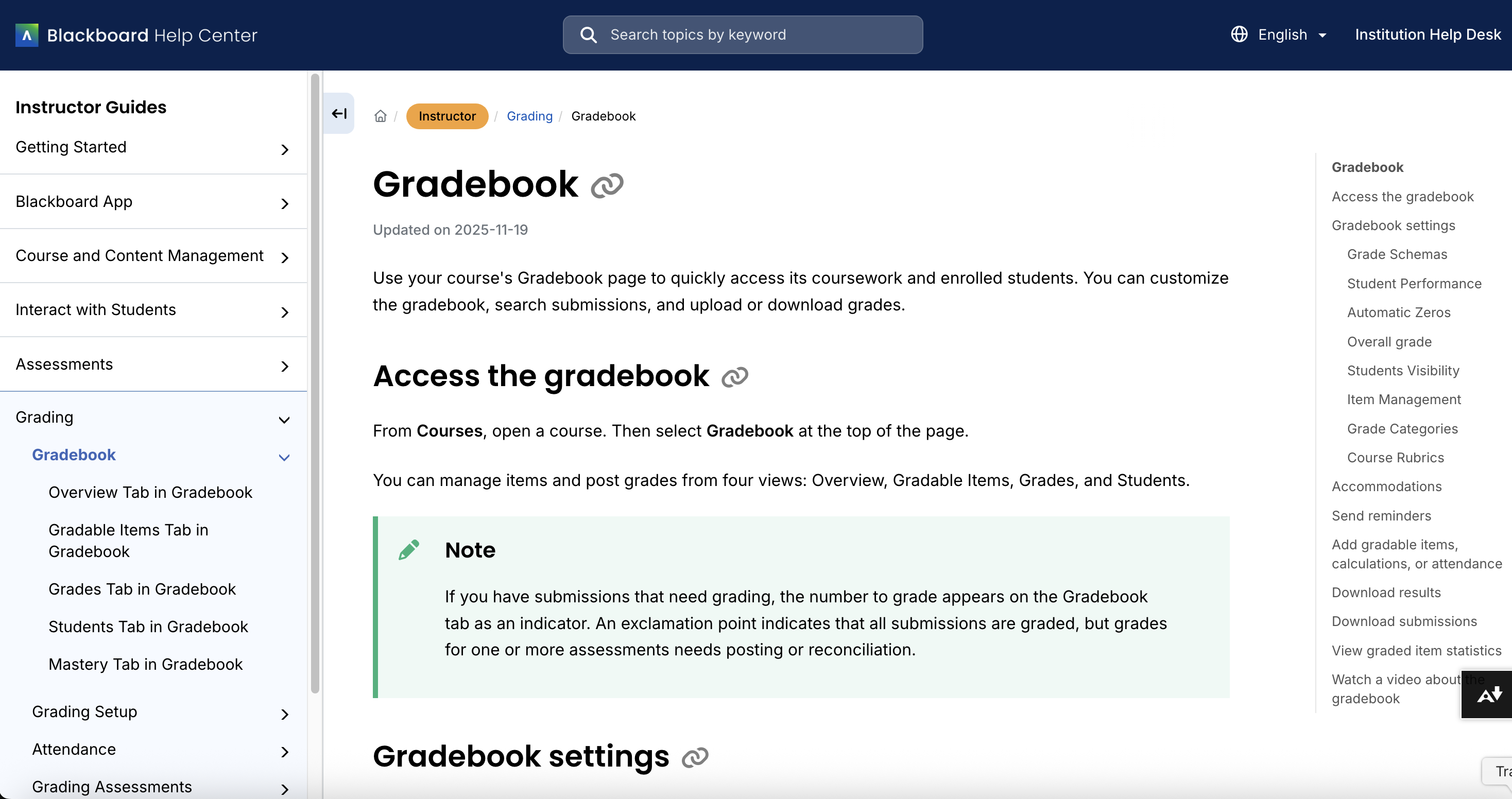
    <div class="html-content"><span><p>Blackboard is rolling out a significant upgrade to its documentation experience this month, and UMBC users will begin seeing the first changes on December 10. Blackboard's new help site features a more modern interface, clearer navigation, and role-based pathways designed to make it easier for instructors, students, and system administrators to find the information they need. </p><p>According to Blackboard, all existing help links will automatically redirect to equivalent content on the new site, reducing the likelihood of broken links or missing pages.</p><p><img src="https://my3.my.umbc.edu/groups/instructional-technology/posts/155151/attachments/60751" alt="Image: Example of new help documentation for Blackboard gradebook using the Instructor role." style="max-width: 100%; height: auto;"></p><p><em>Image: Example of new help documentation for Blackboard gradebook using the Instructor role.</em></p><p>Throughout December, Blackboard will continue refining its documentation based on preview feedback from institutions across the globe. Because this transition represents a substantial shift in the structure and organization of Blackboard's support resources, UMBC's Instructional Technology team will begin reviewing and updating our Blackboard FAQs in January. This effort will ensure that all references to vendor documentation are accurate and that our campus-specific Blackboard documentation aligns with Blackboard's own new help environment.</p><br></span><div><div><span><strong>Connect with Instructional Technology</strong></span></div><div><span>As always, if you have any questions about teaching, learning, and technology at UMBC, please consider the following options:</span></div><ul><li><a href="https://my3.my.umbc.edu/groups/instructional-technology/posts/151344/15848/ff79e4f050851175beed45127581a791/web/link?link=https%3A%2F%2Fmy3.my.umbc.edu%2Fgroups%2Finstructional-technology%2Fposts%2F149574%2F15848%2Ff59d29e5c17e589f885b2536a667a41a%2Fweb%2Flink%3Flink%3Dhttp%253A%252F%252Fwww.umbc.edu%252Ffaq" rel="nofollow external" class="bo">Check our extensive FAQ collection</a><span> </span></li><ul><li><span><a href="https://my3.my.umbc.edu/groups/instructional-technology/posts/151344/15848/68af078772154bde6d05795a2f0e09e0/web/link?link=https%3A%2F%2Fmy3.my.umbc.edu%2Fgroups%2Finstructional-technology%2Fposts%2F149574%2F15848%2F782c435b983b9add1c5ec4e5d955e60f%2Fweb%2Flink%3Flink%3Dhttps%253A%252F%252Fwiki.umbc.edu%252Fx%252FLohnB" rel="nofollow external" class="bo"><span>What's new in Ultra?</span></a> | <a href="https://my3.my.umbc.edu/groups/instructional-technology/posts/151344/15848/aebb558d635bacb947354b4167f7dd1b/web/link?link=https%3A%2F%2Fmy3.my.umbc.edu%2Fgroups%2Finstructional-technology%2Fposts%2F149574%2F15848%2F63a0e48a64b548180394031ac6f89272%2Fweb%2Flink%3Flink%3Dhttps%253A%252F%252Fwiki.umbc.edu%252Fx%252FbwrSAQ" rel="nofollow external" class="bo"><span>Known Issues</span></a><span> </span></span></li></ul><li><span><a href="https://my3.my.umbc.edu/groups/instructional-technology/posts/151344/15848/4e002b87fe47650c320845a523b399b0/web/link?link=https%3A%2F%2Fmy3.my.umbc.edu%2Fgroups%2Finstructional-technology%2Fposts%2F149574%2F15848%2F727292cce6c6665b1fcf69032b12e0d6%2Fweb%2Flink%3Flink%3Dhttp%253A%252F%252Fmy.umbc.edu%252Fgo%252Frequest-help" rel="nofollow external" class="bo">Open a ticket via RT</a></span></li><li><span>Follow the </span><a href="https://my3.my.umbc.edu/groups/instructional-technology/posts/151344/15848/3a8fde8834b85eedcecdbadfca29de6b/web/link?link=https%3A%2F%2Fmy3.my.umbc.edu%2Fgroups%2Finstructional-technology%2Fposts%2F149574%2F15848%2F208c31480fd10e3805fdafe318269623%2Fweb%2Flink%3Flink%3Dhttp%253A%252F%252Fmy.umbc.edu%252Fgroups%252Finstructional-technology" rel="nofollow external" class="bo">Instructional Technology</a> &amp; <a href="https://my3.my.umbc.edu/groups/instructional-technology/posts/151344/15848/7ed1d6a00ec3b7621fabbec538c0f817/web/link?link=https%3A%2F%2Fmy3.my.umbc.edu%2Fgroups%2Finstructional-technology%2Fposts%2F149574%2F15848%2Fdccb8bbf9409460e32d26e4518464b78%2Fweb%2Flink%3Flink%3Dhttp%253A%252F%252Fmy.umbc.edu%252Fgroups%252Fdoit" rel="nofollow external" class="bo">DoIT</a><span> myUMBC groups</span></li><li><a href="https://my3.my.umbc.edu/groups/instructional-technology/posts/151344/15848/f0618da070c69c899b97e5277f00c6e0/web/link?link=https%3A%2F%2Fmy3.my.umbc.edu%2Fgroups%2Finstructional-technology%2Fposts%2F149574%2F15848%2F7e9d8e8701228d0f57bcfcd17db50e50%2Fweb%2Flink%3Flink%3Dhttp%253A%252F%252Fdoit.umbc.edu%252Fitnm%252Fstaff%252F" rel="nofollow external" class="bo">Request a consult</a><span> with <a href="https://my3.my.umbc.edu/groups/instructional-technology/posts/151344/15848/1b0819ec6ea6c4050f352a762108c4ab/web/link?link=https%3A%2F%2Fmy3.my.umbc.edu%2Fgroups%2Finstructional-technology%2Fposts%2F149574%2F15848%2F1935cd506ec09b50c61f334661d75174%2Fweb%2Flink%3Flink%3Dhttp%253A%252F%252Fdoit.umbc.edu%252Fitnm%252Fstaff" rel="nofollow external" class="bo">instructional technology staff</a></span></li></ul></div></div>
]]>
  </Body>
  <Summary>Blackboard is rolling out a significant upgrade to its documentation experience this month, and UMBC users will begin seeing the first changes on December 10. Blackboard's new help site features a...</Summary>
  <Website>https://my3.my.umbc.edu/groups/instructional-technology/posts/155151</Website>
  <AttachmentKind>Image</AttachmentKind>
  <AttachmentUrl>https://assets4-dev.my.umbc.edu/system/shared/attachments/6d06e5bd5fcf680c6e43a4c1ff7f458d/69eef25a/news/000/155/151/c7159a557369b66632c4b54bf746b69e/NewHelp_Gradebook_Instructor.png?1765289385</AttachmentUrl>
  <Attachments>
    <Attachment kind="Image" url="https://dev.my.umbc.edu/groups/doit/posts/155151/attachments/60751"></Attachment>
  </Attachments>
  <TrackingUrl>https://dev.my.umbc.edu/api/v0/pixel/news/155151/guest@my.umbc.edu/9b87902b5e1eba380b35ee2aa080a7b5/api/pixel</TrackingUrl>
  <Tag>blackboard</Tag>
  <Tag>documentation</Tag>
  <Tag>faqs</Tag>
  <Tag>help</Tag>
  <Group token="instructional-technology">Instructional Technology</Group>
  <GroupUrl>https://dev.my.umbc.edu/groups/instructional-technology</GroupUrl>
  <AvatarUrl>https://assets2-dev.my.umbc.edu/system/shared/avatars/groups/000/001/164/dec3b026b81ee6d890a8f82f75c94a2e/xsmall.png?1446126703</AvatarUrl>
  <AvatarUrl size="original">https://assets1-dev.my.umbc.edu/system/shared/avatars/groups/000/001/164/dec3b026b81ee6d890a8f82f75c94a2e/original.png?1446126703</AvatarUrl>
  <AvatarUrl size="xxlarge">https://assets2-dev.my.umbc.edu/system/shared/avatars/groups/000/001/164/dec3b026b81ee6d890a8f82f75c94a2e/xxlarge.png?1446126703</AvatarUrl>
  <AvatarUrl size="xlarge">https://assets1-dev.my.umbc.edu/system/shared/avatars/groups/000/001/164/dec3b026b81ee6d890a8f82f75c94a2e/xlarge.png?1446126703</AvatarUrl>
  <AvatarUrl size="large">https://assets1-dev.my.umbc.edu/system/shared/avatars/groups/000/001/164/dec3b026b81ee6d890a8f82f75c94a2e/large.png?1446126703</AvatarUrl>
  <AvatarUrl size="medium">https://assets4-dev.my.umbc.edu/system/shared/avatars/groups/000/001/164/dec3b026b81ee6d890a8f82f75c94a2e/medium.png?1446126703</AvatarUrl>
  <AvatarUrl size="small">https://assets3-dev.my.umbc.edu/system/shared/avatars/groups/000/001/164/dec3b026b81ee6d890a8f82f75c94a2e/small.png?1446126703</AvatarUrl>
  <AvatarUrl size="xsmall">https://assets2-dev.my.umbc.edu/system/shared/avatars/groups/000/001/164/dec3b026b81ee6d890a8f82f75c94a2e/xsmall.png?1446126703</AvatarUrl>
  <AvatarUrl size="xxsmall">https://assets3-dev.my.umbc.edu/system/shared/avatars/groups/000/001/164/dec3b026b81ee6d890a8f82f75c94a2e/xxsmall.png?1446126703</AvatarUrl>
  <Sponsor>Instructional Technology</Sponsor>
  <ThumbnailUrl size="xxlarge">https://assets2-dev.my.umbc.edu/system/shared/thumbnails/news/000/155/151/db8606cb659aae793b001ee371602ced/xxlarge.jpg?1765288922</ThumbnailUrl>
  <ThumbnailUrl size="xlarge">https://assets2-dev.my.umbc.edu/system/shared/thumbnails/news/000/155/151/db8606cb659aae793b001ee371602ced/xlarge.jpg?1765288922</ThumbnailUrl>
  <ThumbnailUrl size="large">https://assets1-dev.my.umbc.edu/system/shared/thumbnails/news/000/155/151/db8606cb659aae793b001ee371602ced/large.jpg?1765288922</ThumbnailUrl>
  <ThumbnailUrl size="medium">https://assets3-dev.my.umbc.edu/system/shared/thumbnails/news/000/155/151/db8606cb659aae793b001ee371602ced/medium.jpg?1765288922</ThumbnailUrl>
  <ThumbnailUrl size="small">https://assets3-dev.my.umbc.edu/system/shared/thumbnails/news/000/155/151/db8606cb659aae793b001ee371602ced/small.jpg?1765288922</ThumbnailUrl>
  <ThumbnailUrl size="xsmall">https://assets4-dev.my.umbc.edu/system/shared/thumbnails/news/000/155/151/db8606cb659aae793b001ee371602ced/xsmall.jpg?1765288922</ThumbnailUrl>
  <ThumbnailUrl size="xxsmall">https://assets3-dev.my.umbc.edu/system/shared/thumbnails/news/000/155/151/db8606cb659aae793b001ee371602ced/xxsmall.jpg?1765288922</ThumbnailUrl>
  <ThumbnailAltText>Blackboard logo</ThumbnailAltText>
  <PawCount>2</PawCount>
  <CommentCount>0</CommentCount>
  <CommentsAllowed>true</CommentsAllowed>
  <PostedAt>Tue, 09 Dec 2025 13:55:00 -0500</PostedAt>
</NewsItem>
  <NewsItem contentIssues="false" id="154971" important="false" status="posted" url="https://dev.my.umbc.edu/groups/doit/posts/154971">
  <Title>Set Clear Expectations for Discussions in the December Ultra Update</Title>
  <Tagline>New options for releasing content</Tagline>
  <Body>
    <![CDATA[
    <div class="html-content"><div><p>What if your discussion assignments could set clear expectations up front? Could your students benefit if your course could respond to their questions before you checked your inbox?</p><p>The December Ultra update closes out the year with enhancements that bring clarity, efficiency, and a touch of automation to your teaching. From AI-powered responses to customizable release conditions and upgraded discussion tools, these features help faculty support learners more effectively without adding to their workload.</p><p>To help set clearer expectations for student interaction, instructors can now <strong>add participation requirements to discussions</strong>. You can specify the number of posts and/or replies required, in addition to setting due dates. These requirements are visible to students and encourage more intentional and timely engagement. This is especially helpful in courses where discussions are graded or tied to reflection, collaboration, or community-building goals, and it allows students to better understand what “participation” looks like in your course.</p><img src="https://help.blackboard.com/sites/default/files/styles/rich_text_large/public/images/2025-11/blackboard_instructor_discussion-set-participation-reqs.png.webp?itok=qxFCbTuJ" alt="Image 1: Instructors set participation requirements in discussion settings." style="max-width: 100%; height: auto;"></div><div><p><em>Image 1: Instructors set participation requirements in discussion settings.</em></p></div><div><span>The Anthology Virtual Assistant (AVA) can now assist instructors by <strong>generating AI-powered responses to individual student messages</strong>. When this feature is activated by the instructor in a course, AVA scans the course to generate answers about due dates, visible content, learner progress, accommodations, and exceptions. Instructors can see the exchange between AVA and the student, and clarify responses. AVA responses are limited to course-visible data and do not include external files, third-party tools, or group messages. <strong>This feature is opt-in</strong>, requiring the instructor to enable it in each course where it will be used. The feature will not be automatically turned on by default. AVA will be available through June 30, 2026.</span><br><p><img src="https://help.blackboard.com/sites/default/files/styles/rich_text_large/public/images/2025-11/blackboard_instructor_AVA_respond-to-student-mgs.png.webp?itok=kWUB_HGT" alt="Image 3: AVA responding to a student’s message." style="max-width: 100%; height: auto;"></p></div><div><p><em>Image 2: AVA responding to a student’s message.</em></p><p>Ultra’s <strong>Learning Module Table of Contents is now available to instructors</strong>, providing a collapsible navigation panel that mirrors the student experience. You can quickly jump between content items and preview materials that are not yet released -- without switching to Student Preview or changing availability settings. This consistent view across roles improves usability during course design and review, making it easier to check flow, spot gaps, or make edits while keeping future content hidden from students.</p><p><img src="https://help.blackboard.com/sites/default/files/styles/rich_text_large/public/images/2025-11/blackboard_instructor_Learning-Module-TOC_1.png.webp?itok=yMDIu5wj" alt="Image 4: Instructor view of a Learning Module with the Table of Contents panel open." style="max-width: 100%; height: auto;"></p><p><em>Image 3: <span>Instructor view of a Learning Module with the Table of Contents panel open.</span></em></p><p>Ultra now supports<strong> improved audio and video feedback</strong> directly within the feedback editor. Whether you’re working in Flexible Grading or providing overall feedback on an assignment, you can record your audio, video, and desktop, generate captions and transcripts, and use simple editing tools to polish your message. This upgrade makes it easier to deliver accessible, personalized feedback in multimedia format, enhancing your teaching presence and giving students a richer understanding of your comments. Note: Feedback videos are associated to the student's assessment and stay archived with the course.</p><p><img src="https://help.blackboard.com/sites/default/files/styles/rich_text_large/public/images/2025-11/blackboard_instructor_Video-Studio-recording-embedded-in-feedback.png.webp?itok=Gi1xJyf6" alt="Image 4: Video Studio recording embedded in the instructor feedback panel." style="max-width: 100%; height: auto;"><em>Image 4: Video Studio recording embedded in the instructor feedback panel.</em></p><p>Finally, Instructors can now <strong>set release conditions based on whether a student has simply opened</strong> a previous item. This lightweight prerequisite option -- "Unopened" or "Opened or Started" -- lets you guide students through your course in a structured sequence without requiring them to complete a graded task. It's especially useful in module-based courses where students need to engage with foundational materials before progressing to more advanced topics, activities, or discussions.</p><p>Additional updates for December include:</p><ul><li><p>Originality Reporting option has been removed from the settings panel for AI Conversations because the activity involves interaction with an AI persona and does not generate a meaningful report. </p></li><li><p>Blackboard updated the grade pill display for the Complete/Incomplete grade schema to improve clarity for instructors and students. Grade pills for incomplete items now appear in gray, making them visually distinct from graded submissions.</p></li><li><p>MathJax support in the Content Editor now includes additional LaTeX delimiters (e.g., \(...\) for inline and display equations) for rendering mathematical formulas to improve compatibility with standard STEM workflows and simplify uploading exam content without changing source files. <span>These options are in addition to the existing $ delimiters.</span></p></li></ul><p><strong>When you can expect the update</strong></p><p>Faculty should see the latest updates in their Ultra courses around December 4-5, 2025. The next update to our Ultra test environment will take place on <span>December 9, 2025</span>; release notes are posted to the <a href="https://my3.my.umbc.edu/groups/instructional-technology/posts/149574/15848/782c435b983b9add1c5ec4e5d955e60f/web/link?link=https%3A%2F%2Fwiki.umbc.edu%2Fx%2FLohnB" rel="nofollow external" class="bo">What's New in Ultra</a><span> that same week. Faculty who are interested in test driving new features before they are released to production should </span><a href="https://my3.my.umbc.edu/groups/instructional-technology/posts/149574/15848/727292cce6c6665b1fcf69032b12e0d6/web/link?link=http%3A%2F%2Fmy.umbc.edu%2Fgo%2Frequest-help" rel="nofollow external" class="bo">open an RT ticket</a><span> to request early access. Please </span><a href="https://my3.my.umbc.edu/groups/instructional-technology/posts/149574/15848/1a55d761c534b5d9d77045fac42ec979/web/link?link=http%3A%2F%2Fumbc.edu%2Fgo%2Fultra" rel="nofollow external" class="bo">watch the FAQs</a><span>, including </span><a href="https://my3.my.umbc.edu/groups/instructional-technology/posts/149574/15848/782c435b983b9add1c5ec4e5d955e60f/web/link?link=https%3A%2F%2Fwiki.umbc.edu%2Fx%2FLohnB" rel="nofollow external" class="bo">the What's New with Ultra page</a><span>, and myUMBC for additional information about Ultra.</span></p><div><div><span><strong>Connect with Instructional Technology</strong></span></div><div><span>As always, if you have any questions about teaching, learning, and technology at UMBC, please consider the following options:</span></div><ul><li><a href="https://my3.my.umbc.edu/groups/instructional-technology/posts/149574/15848/f59d29e5c17e589f885b2536a667a41a/web/link?link=http%3A%2F%2Fwww.umbc.edu%2Ffaq" rel="nofollow external" class="bo">Check our extensive FAQ collection</a><span> </span></li><ul><li><span><a href="https://my3.my.umbc.edu/groups/instructional-technology/posts/149574/15848/782c435b983b9add1c5ec4e5d955e60f/web/link?link=https%3A%2F%2Fwiki.umbc.edu%2Fx%2FLohnB" rel="nofollow external" class="bo"><span>What's new in Ultra?</span></a><span> </span><span>|</span><span> </span><a href="https://my3.my.umbc.edu/groups/instructional-technology/posts/149574/15848/63a0e48a64b548180394031ac6f89272/web/link?link=https%3A%2F%2Fwiki.umbc.edu%2Fx%2FbwrSAQ" rel="nofollow external" class="bo"><span>Known Issues</span></a><span> </span></span></li></ul><li><span><a href="https://my3.my.umbc.edu/groups/instructional-technology/posts/149574/15848/727292cce6c6665b1fcf69032b12e0d6/web/link?link=http%3A%2F%2Fmy.umbc.edu%2Fgo%2Frequest-help" rel="nofollow external" class="bo">Open a ticket via RT</a></span></li><li><span>Follow the </span><a href="https://my3.my.umbc.edu/groups/instructional-technology/posts/149574/15848/208c31480fd10e3805fdafe318269623/web/link?link=http%3A%2F%2Fmy.umbc.edu%2Fgroups%2Finstructional-technology" rel="nofollow external" class="bo">Instructional Technology</a><span> &amp; </span><a href="https://my3.my.umbc.edu/groups/instructional-technology/posts/149574/15848/dccb8bbf9409460e32d26e4518464b78/web/link?link=http%3A%2F%2Fmy.umbc.edu%2Fgroups%2Fdoit" rel="nofollow external" class="bo">DoIT</a><span> myUMBC groups</span></li><li><a href="https://my3.my.umbc.edu/groups/instructional-technology/posts/149574/15848/7e9d8e8701228d0f57bcfcd17db50e50/web/link?link=http%3A%2F%2Fdoit.umbc.edu%2Fitnm%2Fstaff%2F" rel="nofollow external" class="bo">Request a consult</a><span> with <a href="https://my3.my.umbc.edu/groups/instructional-technology/posts/149574/15848/1935cd506ec09b50c61f334661d75174/web/link?link=http%3A%2F%2Fdoit.umbc.edu%2Fitnm%2Fstaff" rel="nofollow external" class="bo">instructional technology staff</a></span></li></ul><div><em>Thumbnail-image: New to Ultra [decorative]</em></div></div></div></div>
]]>
  </Body>
  <Summary>What if your discussion assignments could set clear expectations up front? Could your students benefit if your course could respond to their questions before you checked your inbox?  The December...</Summary>
  <Website>https://my3.my.umbc.edu/groups/instructional-technology/posts/154971</Website>
  <TrackingUrl>https://dev.my.umbc.edu/api/v0/pixel/news/154971/guest@my.umbc.edu/30db0935177e7d2b4132cba6817c90ca/api/pixel</TrackingUrl>
  <Tag>ava</Tag>
  <Tag>blackboard</Tag>
  <Tag>discussions</Tag>
  <Tag>learning-module</Tag>
  <Tag>release-conditions</Tag>
  <Tag>ultra-experience</Tag>
  <Tag>ultra-update</Tag>
  <Tag>video-feedback</Tag>
  <Group token="instructional-technology">Instructional Technology</Group>
  <GroupUrl>https://dev.my.umbc.edu/groups/instructional-technology</GroupUrl>
  <AvatarUrl>https://assets2-dev.my.umbc.edu/system/shared/avatars/groups/000/001/164/dec3b026b81ee6d890a8f82f75c94a2e/xsmall.png?1446126703</AvatarUrl>
  <AvatarUrl size="original">https://assets1-dev.my.umbc.edu/system/shared/avatars/groups/000/001/164/dec3b026b81ee6d890a8f82f75c94a2e/original.png?1446126703</AvatarUrl>
  <AvatarUrl size="xxlarge">https://assets2-dev.my.umbc.edu/system/shared/avatars/groups/000/001/164/dec3b026b81ee6d890a8f82f75c94a2e/xxlarge.png?1446126703</AvatarUrl>
  <AvatarUrl size="xlarge">https://assets1-dev.my.umbc.edu/system/shared/avatars/groups/000/001/164/dec3b026b81ee6d890a8f82f75c94a2e/xlarge.png?1446126703</AvatarUrl>
  <AvatarUrl size="large">https://assets1-dev.my.umbc.edu/system/shared/avatars/groups/000/001/164/dec3b026b81ee6d890a8f82f75c94a2e/large.png?1446126703</AvatarUrl>
  <AvatarUrl size="medium">https://assets4-dev.my.umbc.edu/system/shared/avatars/groups/000/001/164/dec3b026b81ee6d890a8f82f75c94a2e/medium.png?1446126703</AvatarUrl>
  <AvatarUrl size="small">https://assets3-dev.my.umbc.edu/system/shared/avatars/groups/000/001/164/dec3b026b81ee6d890a8f82f75c94a2e/small.png?1446126703</AvatarUrl>
  <AvatarUrl size="xsmall">https://assets2-dev.my.umbc.edu/system/shared/avatars/groups/000/001/164/dec3b026b81ee6d890a8f82f75c94a2e/xsmall.png?1446126703</AvatarUrl>
  <AvatarUrl size="xxsmall">https://assets3-dev.my.umbc.edu/system/shared/avatars/groups/000/001/164/dec3b026b81ee6d890a8f82f75c94a2e/xxsmall.png?1446126703</AvatarUrl>
  <Sponsor>Instructional Technology</Sponsor>
  <ThumbnailUrl size="xxlarge">https://assets2-dev.my.umbc.edu/system/shared/thumbnails/news/000/154/971/051cdb5f5fca1e556ad82033d360d7d4/xxlarge.jpg?1764703931</ThumbnailUrl>
  <ThumbnailUrl size="xlarge">https://assets3-dev.my.umbc.edu/system/shared/thumbnails/news/000/154/971/051cdb5f5fca1e556ad82033d360d7d4/xlarge.jpg?1764703931</ThumbnailUrl>
  <ThumbnailUrl size="large">https://assets2-dev.my.umbc.edu/system/shared/thumbnails/news/000/154/971/051cdb5f5fca1e556ad82033d360d7d4/large.jpg?1764703931</ThumbnailUrl>
  <ThumbnailUrl size="medium">https://assets3-dev.my.umbc.edu/system/shared/thumbnails/news/000/154/971/051cdb5f5fca1e556ad82033d360d7d4/medium.jpg?1764703931</ThumbnailUrl>
  <ThumbnailUrl size="small">https://assets2-dev.my.umbc.edu/system/shared/thumbnails/news/000/154/971/051cdb5f5fca1e556ad82033d360d7d4/small.jpg?1764703931</ThumbnailUrl>
  <ThumbnailUrl size="xsmall">https://assets2-dev.my.umbc.edu/system/shared/thumbnails/news/000/154/971/051cdb5f5fca1e556ad82033d360d7d4/xsmall.jpg?1764703931</ThumbnailUrl>
  <ThumbnailUrl size="xxsmall">https://assets2-dev.my.umbc.edu/system/shared/thumbnails/news/000/154/971/051cdb5f5fca1e556ad82033d360d7d4/xxsmall.jpg?1764703931</ThumbnailUrl>
  <ThumbnailAltText>Black and white robot dog running with the words "New to Ultra" written on  light turquoise background</ThumbnailAltText>
  <PawCount>5</PawCount>
  <CommentCount>0</CommentCount>
  <CommentsAllowed>true</CommentsAllowed>
  <PostedAt>Tue, 02 Dec 2025 14:57:30 -0500</PostedAt>
</NewsItem>
  <NewsItem contentIssues="false" id="154814" important="false" status="posted" url="https://dev.my.umbc.edu/groups/doit/posts/154814">
  <Title>WT/SP2026 Courses Created on November 21, 2025</Title>
  <Tagline>Prepare your Ultra courses for the upcoming term</Tagline>
  <Body>
    <![CDATA[
    <div class="html-content"><p>Blackboard course shells for Winter and Spring 2026 were created on November 21, 2025.</p><p>All Winter and Spring 2026 courses listed in the UMBC Schedule of Classes (SOC), regardless of designation as lecture, lab, etc, or instructor assignment, now have a Blackboard presence. RT requests are no longer needed for research, independent study, or practicum courses. As new course sections are added to the SOC by Department Scheduling Coordinators, corresponding Bb shells are automatically generated overnight. </p><ul><li><p>If you are an instructor and your name is not associated with the course you are teaching in the SOC, please contact your Departmental Scheduling Coordinator to resolve the issue. Once you are listed in the SOC, your access to the Bb course shell will be updated automatically.</p></li><li><p>If you and your Department Scheduling Coordinator believe you are correctly assigned as the instructor of record in the SOC and you do not have access to your course shell in Blackboard, please submit a Request Tracker (RT) ticket via my.umbc.edu/help.</p></li></ul><h6>Course Merge Request Process</h6><p><a href="https://my3.my.umbc.edu/groups/instructional-technology/posts/148553" rel="nofollow external" class="bo">As announced by DoIT in April 2025</a>, instructors teaching multiple sections of the same course will find a separate Blackboard course shell for each section or course component. Courses will not be merged by default. Instructors planning to use separate shells will no longer need to submit an RT request. <strong>New for WT/SP2026: </strong>Cross-listed and combined courses will be merged automatically. Courses with multiple components will not be merged by default.</p><p>Course shells may be merged or removed upon request using the new <a href="https://my.umbc.edu/tools/blackboard-course-merge" rel="nofollow external" class="bo"><strong>Blackboard Course Merge or Removal form</strong></a><strong>  </strong>(UMBC login required), which we recommend submitting at least one week before the semester starts, if not as soon as courses are created in Blackboard. NOTE: Courses should not be merged or split after student grade data and engagement activity is recorded, since it will be purged as part of the separation process.</p><h6>Create an Inclusive &amp; Accessible Course Environment</h6><p></p><p>Plan your accessibility and Universal Design for Learning strategy before students begin working with course materials. <a href="https://umbc.atlassian.net/wiki/spaces/faq/pages/30750347/Ally+and+Accessibility+Support" rel="nofollow external" class="bo">Ally</a>, an accessibility tool, is enabled in all course shells. Ally automatically scans uploaded and created course content, then performs a series of steps to make that content more accessible. Please review the <a href="https://umbc.atlassian.net/wiki/spaces/faq/pages/30750347/Ally+and+Accessibility+Support" rel="nofollow external" class="bo">Ally FAQs</a> for more information about the accessibility indicators on course content andalternative formats, or attend an <a href="https://my3.my.umbc.edu/groups/instructional-technology/events?mode=upcoming&amp;tag=digital-accessibility" rel="nofollow external" class="bo">upcoming training session</a>.</p><p><span><strong>Connect with Instructional Technology</strong></span></p><p><span>As always, if you have any questions about teaching, learning, and technology at UMBC, please consider the following options:</span></p><ul><li><a href="http://www.umbc.edu/faq" rel="nofollow external" class="bo"><span>Check our extensive FAQ collection</span></a><span> </span></li><ul><li><a href="https://wiki.umbc.edu/x/LohnB" rel="nofollow external" class="bo"><span>What's new in Ultra?</span></a><span> | </span><a href="https://wiki.umbc.edu/x/bwrSAQ" rel="nofollow external" class="bo"><span>Known Issues</span></a><span> </span></li></ul><li><a href="http://my.umbc.edu/go/request-help" rel="nofollow external" class="bo"><span>Open a ticket via RT</span></a></li><li><span>Follow the </span><a href="http://my.umbc.edu/groups/instructional-technology" rel="nofollow external" class="bo"><span>Instructional Technology</span></a><span> &amp; </span><a href="http://my.umbc.edu/groups/doit" rel="nofollow external" class="bo"><span>DoIT</span></a><span> myUMBC groups</span></li><li><a href="http://doit.umbc.edu/itnm/staff/" rel="nofollow external" class="bo"><span>Request a consult</span></a><span> with </span><a href="http://doit.umbc.edu/itnm/staff" rel="nofollow external" class="bo"><span>instructional technology staff</span></a></li><li><a href="http://pivot.umbc.edu/" rel="nofollow external" class="bo"><span>PIVOT</span></a><span> | </span><a href="https://doit.umbc.edu/itnm/academic-continuity/" rel="nofollow external" class="bo"><span>Academic Continuity</span></a><span> | </span><a href="https://fdc.umbc.edu/teaching/keep-on-teaching/" rel="nofollow external" class="bo"><span>Keep On Teaching</span></a><span> | </span><a href="https://doit.umbc.edu/students" rel="nofollow external" class="bo"><span>Student Technology Resources</span></a></li></ul><div><br></div><div><em>Thumbnail-image: decorative</em></div></div>
]]>
  </Body>
  <Summary>Blackboard course shells for Winter and Spring 2026 were created on November 21, 2025.  All Winter and Spring 2026 courses listed in the UMBC Schedule of Classes (SOC), regardless of designation...</Summary>
  <Website>https://my3.my.umbc.edu/groups/instructional-technology/posts/154814</Website>
  <TrackingUrl>https://dev.my.umbc.edu/api/v0/pixel/news/154814/guest@my.umbc.edu/be06d72db97624dfd81907a9e83c2d26/api/pixel</TrackingUrl>
  <Tag>blackboard</Tag>
  <Tag>course-creation</Tag>
  <Tag>sp2026</Tag>
  <Tag>spring</Tag>
  <Tag>ultra</Tag>
  <Tag>winter</Tag>
  <Tag>wt2026</Tag>
  <Group token="instructional-technology">Instructional Technology</Group>
  <GroupUrl>https://dev.my.umbc.edu/groups/instructional-technology</GroupUrl>
  <AvatarUrl>https://assets2-dev.my.umbc.edu/system/shared/avatars/groups/000/001/164/dec3b026b81ee6d890a8f82f75c94a2e/xsmall.png?1446126703</AvatarUrl>
  <AvatarUrl size="original">https://assets1-dev.my.umbc.edu/system/shared/avatars/groups/000/001/164/dec3b026b81ee6d890a8f82f75c94a2e/original.png?1446126703</AvatarUrl>
  <AvatarUrl size="xxlarge">https://assets2-dev.my.umbc.edu/system/shared/avatars/groups/000/001/164/dec3b026b81ee6d890a8f82f75c94a2e/xxlarge.png?1446126703</AvatarUrl>
  <AvatarUrl size="xlarge">https://assets1-dev.my.umbc.edu/system/shared/avatars/groups/000/001/164/dec3b026b81ee6d890a8f82f75c94a2e/xlarge.png?1446126703</AvatarUrl>
  <AvatarUrl size="large">https://assets1-dev.my.umbc.edu/system/shared/avatars/groups/000/001/164/dec3b026b81ee6d890a8f82f75c94a2e/large.png?1446126703</AvatarUrl>
  <AvatarUrl size="medium">https://assets4-dev.my.umbc.edu/system/shared/avatars/groups/000/001/164/dec3b026b81ee6d890a8f82f75c94a2e/medium.png?1446126703</AvatarUrl>
  <AvatarUrl size="small">https://assets3-dev.my.umbc.edu/system/shared/avatars/groups/000/001/164/dec3b026b81ee6d890a8f82f75c94a2e/small.png?1446126703</AvatarUrl>
  <AvatarUrl size="xsmall">https://assets2-dev.my.umbc.edu/system/shared/avatars/groups/000/001/164/dec3b026b81ee6d890a8f82f75c94a2e/xsmall.png?1446126703</AvatarUrl>
  <AvatarUrl size="xxsmall">https://assets3-dev.my.umbc.edu/system/shared/avatars/groups/000/001/164/dec3b026b81ee6d890a8f82f75c94a2e/xxsmall.png?1446126703</AvatarUrl>
  <Sponsor>Instructional Technology</Sponsor>
  <ThumbnailUrl size="xxlarge">https://assets2-dev.my.umbc.edu/system/shared/thumbnails/news/000/154/814/ceb08337cd773dccc222da912f05c11a/xxlarge.jpg?1763990883</ThumbnailUrl>
  <ThumbnailUrl size="xlarge">https://assets1-dev.my.umbc.edu/system/shared/thumbnails/news/000/154/814/ceb08337cd773dccc222da912f05c11a/xlarge.jpg?1763990883</ThumbnailUrl>
  <ThumbnailUrl size="large">https://assets4-dev.my.umbc.edu/system/shared/thumbnails/news/000/154/814/ceb08337cd773dccc222da912f05c11a/large.jpg?1763990883</ThumbnailUrl>
  <ThumbnailUrl size="medium">https://assets2-dev.my.umbc.edu/system/shared/thumbnails/news/000/154/814/ceb08337cd773dccc222da912f05c11a/medium.jpg?1763990883</ThumbnailUrl>
  <ThumbnailUrl size="small">https://assets3-dev.my.umbc.edu/system/shared/thumbnails/news/000/154/814/ceb08337cd773dccc222da912f05c11a/small.jpg?1763990883</ThumbnailUrl>
  <ThumbnailUrl size="xsmall">https://assets2-dev.my.umbc.edu/system/shared/thumbnails/news/000/154/814/ceb08337cd773dccc222da912f05c11a/xsmall.jpg?1763990883</ThumbnailUrl>
  <ThumbnailUrl size="xxsmall">https://assets2-dev.my.umbc.edu/system/shared/thumbnails/news/000/154/814/ceb08337cd773dccc222da912f05c11a/xxsmall.jpg?1763990883</ThumbnailUrl>
  <ThumbnailAltText>Blackboard "Bb" letters over a light blue snowflake</ThumbnailAltText>
  <PawCount>3</PawCount>
  <CommentCount>0</CommentCount>
  <CommentsAllowed>true</CommentsAllowed>
  <PostedAt>Mon, 24 Nov 2025 08:36:11 -0500</PostedAt>
</NewsItem>
  <NewsItem contentIssues="false" id="154279" important="false" status="posted" url="https://dev.my.umbc.edu/groups/doit/posts/154279">
  <Title>Fix Point Values on Tests, Automate Encouragement, and Customize Achievements in November Ultra Update</Title>
  <Tagline>Speed up grading and celebrate student success</Tagline>
  <Body>
    <![CDATA[
    <div class="html-content"><div><p>Imagine if you could adjust test points in seconds without regrading everything manually? What if your course could automatically cheer students on when they succeed -- or nudge them when they need support? The November Ultra update introduces new tools to help you work smarter, not harder -- streamlining assessment edits, automating encouragement, and personalizing recognition. Whether you’re wrapping up the semester or refining your course for spring, these features are built to support both your grading workflow and your students’ motivation.</p><p>Instructors can <strong>now bulk edit question point values within tests</strong>, saving time during test setup or revisions. You can select all questions, filter by question type (e.g., all True/False), or select a combination of types and individual questions. This makes it easy to apply consistent scoring rules or adjust point values quickly across an entire assessment. Even after students have opened or submitted a test, you can still change point values, edit question text, give full credit, or revise correct answers -- and all grades will be recalculated automatically. However, certain structural edits (like adding or deleting questions, modifying matching options, or changing fill-in-the-blank structures) remain locked after student access to preserve assessment integrity. These changes offer instructors more flexibility in real-time without compromising fairness or accuracy.</p><p><img src="https://help.blackboard.com/sites/default/files/styles/rich_text_large/public/images/2025-10/ultra_instructor_bulkeditoption.png.webp?itok=XdB14chC" alt="Image 1: Instructors select Bulk edit points." style="max-width: 100%; height: auto;"></p></div><div><p><em>Image 1: Instructors select Bulk edit points.</em></p><p>A new <strong>automation feature</strong> allows instructors to <a href="https://help.blackboard.com/Learn/Instructor/Ultra/Interact/Automations" rel="nofollow external" class="bo">set up rule-based messages that send automatically</a> when students reach defined performance thresholds. Whether offering encouragement to students who meet a goal or providing gentle support to those who fall short, these messages can be written in advance and delivered at just the right moment. This personalized automation helps instructors build student motivation and maintain a presence in the course without having to manually monitor and respond to every outcome -- especially helpful in large-enrollment or asynchronous courses. Subsequent releases of this feature will offer more customizations.</p><p><img src="https://help.blackboard.com/sites/default/files/styles/rich_text_large/public/images/2025-10/blackboard_instructor_automationtrigger.png.webp?itok=CWg4Vdxf" alt="Image 2: In the Automation trigger section, instructors set the conditions that will trigger the message to be sent." style="max-width: 100%; height: auto;"></p><p><em>Image 2: In the Automation trigger, instructors set the conditions that will trigger the message to be sent.</em></p><p>Finally, <span>Instructors can now </span><strong>customize Achievement badges</strong><span> using one of three new image options: upload a custom image, choose from a library of stock visuals via Unsplash, or generate an image using AI. These options give faculty more creative control and allow for more meaningful recognition of student progress. When badges are visually aligned with course themes, goals, or student interests, they can help foster a stronger sense of accomplishment and connection, turning a basic course mechanic into a personalized experience that resonates.</span></p><p><img src="https://help.blackboard.com/sites/default/files/styles/rich_text_large/public/images/2025-10/ultra_instructors_custombadges.png.webp?itok=IInwmd1v" alt="Image 3: Instructors can select or generate an image for the custom achievement." style="max-width: 100%; height: auto;"></p><p><em>Image 3: Instructors can select or generate an image for the custom achievement.</em></p><p>Additional updates for November include:</p><ul><li>Gradebook Navigation: The column header menu in the Grid View has been streamlined, giving instructors quicker access to submission pages for each item. This improves consistency across item types and simplifies navigation during grading.</li><li>Gradebook Downloads: Instructors now have the option to include or exclude hidden columns when exporting the Gradebook, offering more flexibility when working offline or sharing data with TAs or co-instructors.</li></ul><p><strong>When you can expect the update</strong></p><p>Faculty should see the latest updates in their Ultra courses around November 6-7, 2025. The next update to our Ultra test environment will take place on <span>November 11, 2025</span>; release notes are posted to the <a href="https://my3.my.umbc.edu/groups/instructional-technology/posts/149574/15848/782c435b983b9add1c5ec4e5d955e60f/web/link?link=https%3A%2F%2Fwiki.umbc.edu%2Fx%2FLohnB" rel="nofollow external" class="bo">What's New in Ultra</a><span> that same week. Faculty who are interested in test driving new features before they are released to production should </span><a href="https://my3.my.umbc.edu/groups/instructional-technology/posts/149574/15848/727292cce6c6665b1fcf69032b12e0d6/web/link?link=http%3A%2F%2Fmy.umbc.edu%2Fgo%2Frequest-help" rel="nofollow external" class="bo">open an RT ticket</a><span> to request early access. Please </span><a href="https://my3.my.umbc.edu/groups/instructional-technology/posts/149574/15848/1a55d761c534b5d9d77045fac42ec979/web/link?link=http%3A%2F%2Fumbc.edu%2Fgo%2Fultra" rel="nofollow external" class="bo">watch the FAQs</a><span>, including </span><a href="https://my3.my.umbc.edu/groups/instructional-technology/posts/149574/15848/782c435b983b9add1c5ec4e5d955e60f/web/link?link=https%3A%2F%2Fwiki.umbc.edu%2Fx%2FLohnB" rel="nofollow external" class="bo">the What's New with Ultra page</a><span>, and myUMBC for additional information about Ultra.</span></p><div><div><span><strong>Connect with Instructional Technology</strong></span></div><div><span>As always, if you have any questions about teaching, learning, and technology at UMBC, please consider the following options:</span></div><ul><li><a href="https://my3.my.umbc.edu/groups/instructional-technology/posts/149574/15848/f59d29e5c17e589f885b2536a667a41a/web/link?link=http%3A%2F%2Fwww.umbc.edu%2Ffaq" rel="nofollow external" class="bo">Check our extensive FAQ collection</a><span> </span></li><ul><li><span><a href="https://my3.my.umbc.edu/groups/instructional-technology/posts/149574/15848/782c435b983b9add1c5ec4e5d955e60f/web/link?link=https%3A%2F%2Fwiki.umbc.edu%2Fx%2FLohnB" rel="nofollow external" class="bo"><span>What's new in Ultra?</span></a><span> </span><span>|</span><span> </span><a href="https://my3.my.umbc.edu/groups/instructional-technology/posts/149574/15848/63a0e48a64b548180394031ac6f89272/web/link?link=https%3A%2F%2Fwiki.umbc.edu%2Fx%2FbwrSAQ" rel="nofollow external" class="bo"><span>Known Issues</span></a><span> </span></span></li></ul><li><span><a href="https://my3.my.umbc.edu/groups/instructional-technology/posts/149574/15848/727292cce6c6665b1fcf69032b12e0d6/web/link?link=http%3A%2F%2Fmy.umbc.edu%2Fgo%2Frequest-help" rel="nofollow external" class="bo">Open a ticket via RT</a></span></li><li><span>Follow the </span><a href="https://my3.my.umbc.edu/groups/instructional-technology/posts/149574/15848/208c31480fd10e3805fdafe318269623/web/link?link=http%3A%2F%2Fmy.umbc.edu%2Fgroups%2Finstructional-technology" rel="nofollow external" class="bo">Instructional Technology</a><span> &amp; </span><a href="https://my3.my.umbc.edu/groups/instructional-technology/posts/149574/15848/dccb8bbf9409460e32d26e4518464b78/web/link?link=http%3A%2F%2Fmy.umbc.edu%2Fgroups%2Fdoit" rel="nofollow external" class="bo">DoIT</a><span> myUMBC groups</span></li><li><a href="https://my3.my.umbc.edu/groups/instructional-technology/posts/149574/15848/7e9d8e8701228d0f57bcfcd17db50e50/web/link?link=http%3A%2F%2Fdoit.umbc.edu%2Fitnm%2Fstaff%2F" rel="nofollow external" class="bo">Request a consult</a><span> with <a href="https://my3.my.umbc.edu/groups/instructional-technology/posts/149574/15848/1935cd506ec09b50c61f334661d75174/web/link?link=http%3A%2F%2Fdoit.umbc.edu%2Fitnm%2Fstaff" rel="nofollow external" class="bo">instructional technology staff</a></span></li></ul><div><em>Thumbnail-image: New to Ultra [decorative]</em></div></div></div></div>
]]>
  </Body>
  <Summary>Imagine if you could adjust test points in seconds without regrading everything manually? What if your course could automatically cheer students on when they succeed -- or nudge them when they...</Summary>
  <Website>https://my3.my.umbc.edu/groups/instructional-technology/posts/154279</Website>
  <TrackingUrl>https://dev.my.umbc.edu/api/v0/pixel/news/154279/guest@my.umbc.edu/85cfe8dee206920dd7dfd4ba1a93046a/api/pixel</TrackingUrl>
  <Tag>achievements</Tag>
  <Tag>assessments</Tag>
  <Tag>automations</Tag>
  <Tag>blackboard</Tag>
  <Tag>ultra-experience</Tag>
  <Tag>ultra-update</Tag>
  <Group token="instructional-technology">Instructional Technology</Group>
  <GroupUrl>https://dev.my.umbc.edu/groups/instructional-technology</GroupUrl>
  <AvatarUrl>https://assets2-dev.my.umbc.edu/system/shared/avatars/groups/000/001/164/dec3b026b81ee6d890a8f82f75c94a2e/xsmall.png?1446126703</AvatarUrl>
  <AvatarUrl size="original">https://assets1-dev.my.umbc.edu/system/shared/avatars/groups/000/001/164/dec3b026b81ee6d890a8f82f75c94a2e/original.png?1446126703</AvatarUrl>
  <AvatarUrl size="xxlarge">https://assets2-dev.my.umbc.edu/system/shared/avatars/groups/000/001/164/dec3b026b81ee6d890a8f82f75c94a2e/xxlarge.png?1446126703</AvatarUrl>
  <AvatarUrl size="xlarge">https://assets1-dev.my.umbc.edu/system/shared/avatars/groups/000/001/164/dec3b026b81ee6d890a8f82f75c94a2e/xlarge.png?1446126703</AvatarUrl>
  <AvatarUrl size="large">https://assets1-dev.my.umbc.edu/system/shared/avatars/groups/000/001/164/dec3b026b81ee6d890a8f82f75c94a2e/large.png?1446126703</AvatarUrl>
  <AvatarUrl size="medium">https://assets4-dev.my.umbc.edu/system/shared/avatars/groups/000/001/164/dec3b026b81ee6d890a8f82f75c94a2e/medium.png?1446126703</AvatarUrl>
  <AvatarUrl size="small">https://assets3-dev.my.umbc.edu/system/shared/avatars/groups/000/001/164/dec3b026b81ee6d890a8f82f75c94a2e/small.png?1446126703</AvatarUrl>
  <AvatarUrl size="xsmall">https://assets2-dev.my.umbc.edu/system/shared/avatars/groups/000/001/164/dec3b026b81ee6d890a8f82f75c94a2e/xsmall.png?1446126703</AvatarUrl>
  <AvatarUrl size="xxsmall">https://assets3-dev.my.umbc.edu/system/shared/avatars/groups/000/001/164/dec3b026b81ee6d890a8f82f75c94a2e/xxsmall.png?1446126703</AvatarUrl>
  <Sponsor>Instructional Technology</Sponsor>
  <ThumbnailUrl size="xxlarge">https://assets2-dev.my.umbc.edu/system/shared/thumbnails/news/000/154/279/24918f6cd178d7f8ddf9c34f9be19711/xxlarge.jpg?1762439360</ThumbnailUrl>
  <ThumbnailUrl size="xlarge">https://assets4-dev.my.umbc.edu/system/shared/thumbnails/news/000/154/279/24918f6cd178d7f8ddf9c34f9be19711/xlarge.jpg?1762439360</ThumbnailUrl>
  <ThumbnailUrl size="large">https://assets4-dev.my.umbc.edu/system/shared/thumbnails/news/000/154/279/24918f6cd178d7f8ddf9c34f9be19711/large.jpg?1762439360</ThumbnailUrl>
  <ThumbnailUrl size="medium">https://assets1-dev.my.umbc.edu/system/shared/thumbnails/news/000/154/279/24918f6cd178d7f8ddf9c34f9be19711/medium.jpg?1762439360</ThumbnailUrl>
  <ThumbnailUrl size="small">https://assets3-dev.my.umbc.edu/system/shared/thumbnails/news/000/154/279/24918f6cd178d7f8ddf9c34f9be19711/small.jpg?1762439360</ThumbnailUrl>
  <ThumbnailUrl size="xsmall">https://assets1-dev.my.umbc.edu/system/shared/thumbnails/news/000/154/279/24918f6cd178d7f8ddf9c34f9be19711/xsmall.jpg?1762439360</ThumbnailUrl>
  <ThumbnailUrl size="xxsmall">https://assets1-dev.my.umbc.edu/system/shared/thumbnails/news/000/154/279/24918f6cd178d7f8ddf9c34f9be19711/xxsmall.jpg?1762439360</ThumbnailUrl>
  <ThumbnailAltText>Black and white robot dog running with the words "New to Ultra" written on  light turquoise background</ThumbnailAltText>
  <PawCount>1</PawCount>
  <CommentCount>0</CommentCount>
  <CommentsAllowed>true</CommentsAllowed>
  <PostedAt>Thu, 06 Nov 2025 11:28:26 -0500</PostedAt>
  <EditAt>Thu, 06 Nov 2025 11:29:09 -0500</EditAt>
</NewsItem>
  <NewsItem contentIssues="false" id="154160" important="false" status="posted" url="https://dev.my.umbc.edu/groups/doit/posts/154160">
  <Title>Free Digital Accessibility Workshops from Blackboard</Title>
  <Tagline>Self-paced solutions for faculty &amp; staff flexibility</Tagline>
  <Body>
    <![CDATA[
    <div class="html-content"><p>Instructional Technology is pleased to offer four workshops on digital accessibility and <a href="https://umbc.atlassian.net/wiki/spaces/faq/pages/30750347/Ally+and+Accessibility+Support" rel="nofollow external" class="bo">Ally</a>, available at no cost to UMBC faculty and staff, through July 31, 2026 using a special registration link and code. Created by Blackboard, the available workshops are designed to give you practical skills and a deep understanding of creating accessible and inclusive course content.</p><p><strong>Workshop #1: Accessibility Fundamentals</strong></p><p>This foundational training is designed to provide participants with a broad understanding of accessibility issues in educational environments. Participants will learn how disabilities can limit access to electronic instructional materials and what they can do to make their course content as accessible as possible to the greatest number of learners.</p><p><strong>Workshop #2: </strong><strong>Writing Effective Alt Text</strong></p><p>Alternative text is a key component of digital accessibility, ensuring that all learners can engage with visual content. Participants will begin with the fundamentals of alternative text, exploring its definition, significance, and how context shapes what makes it meaningful and effective. In addition to learning how to write high-quality alt text, participants will receive practical instruction on how to add alt text in commonly used tools such as Microsoft Word, PowerPoint, and Adobe Acrobat. </p><p><strong>Workshop #3: </strong><strong>Introducing Ally to Learners</strong></p><p>Creating an inclusive and accessible learning environment goes beyond just providing accessible content -- it requires clear, intentional communication with students. Introducing Ally to Learners is designed to help instructors effectively engage with students about accessibility and empower them in their use of Ally's Alternative Formats.</p><p><strong>Workshop #4: Empowering Learners with Ally's Alternative Formats</strong></p><p>This training introduces the alternative formats available through Ally and explores how they support a more inclusive and flexible learning experience for all students. Participants will gain an understanding of each format -- including audio, electronic Braille, BeeLine Reader, HTML, ePub, etc. -- along with practical use cases that highlight when and how learners might benefit from each option. </p><p><strong>How to Get Started</strong></p><p>There is a special process for UMBC faculty and staff to access this subscription for free, and to enroll in these workshops. Please <a href="https://doit.umbc.edu/request-tracker-rt/doit-myumbc-blackboard/" rel="nofollow external" class="bo">open an RT ticket</a> to receive the special instructions, registration code, and workshop links.</p><p>We encourage UMBC faculty and staff to take advantage of this valuable resource to further your digital accessibility training and professional development! Faculty who complete all four workshops and submit certificates to Instructional Technology can earn the new Accessibility A11y meta microcredential. Certificates must be <a href="https://forms.gle/TbJMwbjU7ztrJ1mS9" rel="nofollow external" class="bo">submitted using this Google Form</a> by the end of SP2026.</p><p><span><strong>Ready to take the first step? </strong>Visit </span><a href="https://my3.my.umbc.edu/groups/instructional-technology/posts/153520/15848/69b05e6eb46390994297d24257cf20e2/web/link?link=https%3A%2F%2Fmy3.my.umbc.edu%2Fgroups%2Finstructional-technology%2Fposts%2F151599%2F15848%2F6bfad67db4d5345e00ae70d34e496f90%2Fweb%2Flink%3Flink%3Dhttps%253A%252F%252Faccessibility.umbc.edu%252Fdigital-accessibility%252F" rel="nofollow external" class="bo">UMBC's Digital Accessibility site</a><span> or </span><a href="https://my3.my.umbc.edu/groups/instructional-technology/posts/153520/15848/5c2619887650538c098729d722043229/web/link?link=https%3A%2F%2Fmy3.my.umbc.edu%2Fgroups%2Finstructional-technology%2Fposts%2F151599%2F15848%2Fb8f0b5511267e520d5fd4a98813dc002%2Fweb%2Flink%3Flink%3Dhttps%253A%252F%252Fhelp.blackboard.com%252FAlly%252FAlly_for_LMS%252FInstructor%252FCourse_Accessibility_Report" rel="nofollow external" class="bo">run an Ally course report</a><span> today. Support is also available from Student Disability Services and Instructional Technology.</span></p><p><strong>Don't forget: Tuesday, November 18 is <a href="https://my3.my.umbc.edu/groups/instructional-technology/posts/153520/15848/a73a35896dbd9197d9d96d5f30d42fa4/web/link?link=https%3A%2F%2Fmy3.my.umbc.edu%2Fgroups%2Finstructional-technology%2Fevents%2F147364" rel="nofollow external" class="bo">Fix Your Course Content Day</a>!</strong> This one-day push is a chance for faculty, staff, and instructional designers to review Ally accessibility reports, make fixes, and strengthen our commitment to inclusive teaching.</p><div><span><p><strong>Connect with Instructional Technology</strong></p><p>As always, if you have any questions about teaching, learning, and technology, please consider the following options:</p><ul><li><p><a href="http://www.umbc.edu/faq" rel="nofollow external" class="bo">Check our extensive FAQ collection</a> </p></li><li><p><a href="http://my.umbc.edu/go/request-help" rel="nofollow external" class="bo">Open a ticket via RT</a></p></li><li><p>Follow the <a href="http://my.umbc.edu/groups/instructional-technology" rel="nofollow external" class="bo">Instructional Technology</a> &amp; <a href="http://my.umbc.edu/groups/doit" rel="nofollow external" class="bo">DoIT</a> myUMBC groups</p></li><li><p><a href="http://doit.umbc.edu/itnm/staff/" rel="nofollow external" class="bo">Request a consult</a> with <a href="http://doit.umbc.edu/itnm/staff" rel="nofollow external" class="bo">instructional technology staff</a></p></li></ul></span></div></div>
]]>
  </Body>
  <Summary>Instructional Technology is pleased to offer four workshops on digital accessibility and Ally, available at no cost to UMBC faculty and staff, through July 31, 2026 using a special registration...</Summary>
  <Website>https://my3.my.umbc.edu/groups/instructional-technology/posts/154160</Website>
  <TrackingUrl>https://dev.my.umbc.edu/api/v0/pixel/news/154160/guest@my.umbc.edu/3d9a9282f5c613c77d9a96c5d746ab84/api/pixel</TrackingUrl>
  <Tag>ally</Tag>
  <Tag>blackboard</Tag>
  <Tag>digital-accessibility</Tag>
  <Tag>fa25</Tag>
  <Tag>self-paced</Tag>
  <Tag>training</Tag>
  <Group token="instructional-technology">Instructional Technology</Group>
  <GroupUrl>https://dev.my.umbc.edu/groups/instructional-technology</GroupUrl>
  <AvatarUrl>https://assets2-dev.my.umbc.edu/system/shared/avatars/groups/000/001/164/dec3b026b81ee6d890a8f82f75c94a2e/xsmall.png?1446126703</AvatarUrl>
  <AvatarUrl size="original">https://assets1-dev.my.umbc.edu/system/shared/avatars/groups/000/001/164/dec3b026b81ee6d890a8f82f75c94a2e/original.png?1446126703</AvatarUrl>
  <AvatarUrl size="xxlarge">https://assets2-dev.my.umbc.edu/system/shared/avatars/groups/000/001/164/dec3b026b81ee6d890a8f82f75c94a2e/xxlarge.png?1446126703</AvatarUrl>
  <AvatarUrl size="xlarge">https://assets1-dev.my.umbc.edu/system/shared/avatars/groups/000/001/164/dec3b026b81ee6d890a8f82f75c94a2e/xlarge.png?1446126703</AvatarUrl>
  <AvatarUrl size="large">https://assets1-dev.my.umbc.edu/system/shared/avatars/groups/000/001/164/dec3b026b81ee6d890a8f82f75c94a2e/large.png?1446126703</AvatarUrl>
  <AvatarUrl size="medium">https://assets4-dev.my.umbc.edu/system/shared/avatars/groups/000/001/164/dec3b026b81ee6d890a8f82f75c94a2e/medium.png?1446126703</AvatarUrl>
  <AvatarUrl size="small">https://assets3-dev.my.umbc.edu/system/shared/avatars/groups/000/001/164/dec3b026b81ee6d890a8f82f75c94a2e/small.png?1446126703</AvatarUrl>
  <AvatarUrl size="xsmall">https://assets2-dev.my.umbc.edu/system/shared/avatars/groups/000/001/164/dec3b026b81ee6d890a8f82f75c94a2e/xsmall.png?1446126703</AvatarUrl>
  <AvatarUrl size="xxsmall">https://assets3-dev.my.umbc.edu/system/shared/avatars/groups/000/001/164/dec3b026b81ee6d890a8f82f75c94a2e/xxsmall.png?1446126703</AvatarUrl>
  <Sponsor>Instructional Technology</Sponsor>
  <ThumbnailUrl size="xxlarge">https://assets1-dev.my.umbc.edu/system/shared/thumbnails/news/000/154/160/c2e1e830ba54fd98eb936a61bb3699c5/xxlarge.jpg?1762194128</ThumbnailUrl>
  <ThumbnailUrl size="xlarge">https://assets2-dev.my.umbc.edu/system/shared/thumbnails/news/000/154/160/c2e1e830ba54fd98eb936a61bb3699c5/xlarge.jpg?1762194128</ThumbnailUrl>
  <ThumbnailUrl size="large">https://assets1-dev.my.umbc.edu/system/shared/thumbnails/news/000/154/160/c2e1e830ba54fd98eb936a61bb3699c5/large.jpg?1762194128</ThumbnailUrl>
  <ThumbnailUrl size="medium">https://assets2-dev.my.umbc.edu/system/shared/thumbnails/news/000/154/160/c2e1e830ba54fd98eb936a61bb3699c5/medium.jpg?1762194128</ThumbnailUrl>
  <ThumbnailUrl size="small">https://assets4-dev.my.umbc.edu/system/shared/thumbnails/news/000/154/160/c2e1e830ba54fd98eb936a61bb3699c5/small.jpg?1762194128</ThumbnailUrl>
  <ThumbnailUrl size="xsmall">https://assets2-dev.my.umbc.edu/system/shared/thumbnails/news/000/154/160/c2e1e830ba54fd98eb936a61bb3699c5/xsmall.jpg?1762194128</ThumbnailUrl>
  <ThumbnailUrl size="xxsmall">https://assets3-dev.my.umbc.edu/system/shared/thumbnails/news/000/154/160/c2e1e830ba54fd98eb936a61bb3699c5/xxsmall.jpg?1762194128</ThumbnailUrl>
  <ThumbnailAltText>A human figure with outstretched arms inside a circle of two curved arrows, suggesting movement. Below the figure are two words: digital accessibility.</ThumbnailAltText>
  <PawCount>5</PawCount>
  <CommentCount>0</CommentCount>
  <CommentsAllowed>true</CommentsAllowed>
  <PostedAt>Tue, 04 Nov 2025 09:49:34 -0500</PostedAt>
</NewsItem>
  <NewsItem contentIssues="false" id="153520" important="false" status="posted" url="https://dev.my.umbc.edu/groups/doit/posts/153520">
  <Title>Fix Your Content Day: Let&#8217;s Make Course Materials More Accessible</Title>
  <Tagline>One day of small steps to improve course accessibility</Tagline>
  <Body>
    <![CDATA[
    <div class="html-content"><div><p>On <strong>Tuesday, November 18</strong>, UMBC will host its own <strong><a href="https://my3.my.umbc.edu/groups/instructional-technology/events/147364" rel="nofollow external" class="bo">Fix Your Course Content Day</a></strong>, dedicated to improving the accessibility of digital course materials in Blackboard. This one-day push is a chance for faculty, staff, and instructional designers to review Ally accessibility reports, make fixes, and strengthen our commitment to inclusive teaching.</p><p><strong>Why Fix Content?</strong></p><ul><li><strong>Every fix, big or small, helps.</strong> Whether it's adding alt text to an image, adding meaningful link text, correcting heading structure, or improving document formatting, each step makes content more usable for a student using a screen reader, assistive device, or alternate format.</li><li><strong>You already have insights.</strong> The <strong>Ally tool in Blackboard</strong> surfaces course-level accessibility reports and flags problematic files (scanned documents, missing image description, contrast issues, etc.). Use this as your guide.</li><li><strong>It's about more than one day.</strong> Fix Your Content Day is not just a one-off event. It's a focused moment for action -- and a reminder that digital accessibility is an ongoing responsibility in course design.</li></ul><p><strong>What to Do on November 18</strong></p><p>Here's a simple roadmap you can follow:</p><p><strong>1. Review your Ally report.</strong><strong><br></strong>Log into your course and go to Books &amp; Tools from the right navigation menu to <a href="https://umbc.atlassian.net/wiki/x/CEPVAQ" rel="nofollow external" class="bo">access your Ally accessibility report</a>. Note your starting score. Prioritize files you use most (syllabus, major readings, assignment sheets, etc.) or where you have inaccessible images that impact meaningful content.</p><p><strong>2. Make at least 3 targeted fixes.</strong><strong><br></strong>Use <a href="https://umbc.atlassian.net/wiki/x/nDbVAQ" rel="nofollow external" class="bo">the Ally "repair" workflow</a> (built into Blackboard) to take action:</p><ul><li>Add or improve <a href="https://help.blackboard.com/Ally/Ally_for_LMS/Instructor/Improve_Accessibility/Add_Image_Descriptions" rel="nofollow external" class="bo">alt text for images</a></li><li>Fix <a href="https://help.blackboard.com/Ally/Ally_for_LMS/Instructor/Improve_Accessibility/Add_Headings_To_A_Document" rel="nofollow external" class="bo">heading structure</a> (use proper heading levels rather than visual formatting)</li><li>Add descriptive link text (avoid "click here")</li><li>Ensure <a href="https://help.blackboard.com/Ally/Ally_for_LMS/Instructor/Improve_Accessibility/Fix_Text_Contrast" rel="nofollow external" class="bo">sufficient color contrast</a> in slides or documents</li><li>Replace <a href="https://help.blackboard.com/Ally/Ally_for_LMS/Instructor/Improve_Accessibility/Scanned_PDFs" rel="nofollow external" class="bo">scanned PDFs</a> (if possible) with accessible ones or OCR them<br></li></ul><p><strong>3. Strive for 85.</strong><br>As you make your fixes, <strong>aim for an Ally score of 85 percent or higher</strong> in your courses. This benchmark represents solid progress toward accessible, student-ready materials. Each improvement -- adding alt text, correcting headings, or replacing scanned PDFs -- moves your score closer to 85, or exceeds it, and helps ensure your course is usable for every learner.</p><p><strong>4. Document or share progress.</strong><strong><br></strong>Record which courses and files you've improved. If you'd like to be recognized with a microcredential for your portfolio or LinkedIn profile, <a href="https://forms.gle/dNSio1H7rm1pyEeJ6" rel="nofollow external" class="bo">submit your results using this Google Form</a>. Instructional Technology will also share the top five departmental improvements.</p><p><strong>5. Reflect and plan next steps.</strong><strong><br></strong>Think about recurring patterns in your courses (e.g. many scanned articles, many images lacking alt text). Use that insight to inform future course redesign or content creation. Consider sharing your top three fixes with your departmental to help normalize accessible practices across campus.</p><p><strong>A Few Tips to Make It Easier</strong></p><ul><li><strong>Start small.</strong> Pick a single course or module to focus on first, or focus on a single type of issue like image descriptions. You also don't need to "fix everything" in one day.</li><li><strong>Schedule your time.</strong> Block a 30-60 minute slot on November 18 in your calendar just for accessibility fixes -- or drop by our open lab in ENGR 102 from 1 to 3 PM to work alongside colleagues, share progress, and get help from the Instructional technology team in a relaxed, social space to celebrate the day’s improvements.</li><li><strong>Work together.</strong> Team up with a colleague -- it can be in your department or another for cross-disciplinary support. Two sets of eyes often catch more than one.</li><li><strong>Drop in for virtual support.</strong> Instructional Technology is standing by with quick guides or quick consultations. </li></ul><p></p><p>On <strong>November 18</strong>, join us in making a measurable impact on our course content. Whether you fix three items or thirty, your work matters. Let's make UMBC's digital learning environment more inclusive together.</p><p><strong>Ready to take the first step?</strong><span> </span><span>Visit </span><a href="https://my3.my.umbc.edu/groups/instructional-technology/posts/151599/15848/6bfad67db4d5345e00ae70d34e496f90/web/link?link=https%3A%2F%2Faccessibility.umbc.edu%2Fdigital-accessibility%2F" rel="nofollow external" class="bo">UMBC’s Digital Accessibility site</a><span> or </span><a href="https://my3.my.umbc.edu/groups/instructional-technology/posts/151599/15848/b8f0b5511267e520d5fd4a98813dc002/web/link?link=https%3A%2F%2Fhelp.blackboard.com%2FAlly%2FAlly_for_LMS%2FInstructor%2FCourse_Accessibility_Report" rel="nofollow external" class="bo">run an Ally course report</a><span> today. </span><span>Support is also available from Student Disability Services and Instructional Technology.</span></p></div></div>
]]>
  </Body>
  <Summary>On Tuesday, November 18, UMBC will host its own Fix Your Course Content Day, dedicated to improving the accessibility of digital course materials in Blackboard. This one-day push is a chance for...</Summary>
  <Website>https://my3.my.umbc.edu/groups/instructional-technology/posts/153520</Website>
  <TrackingUrl>https://dev.my.umbc.edu/api/v0/pixel/news/153520/guest@my.umbc.edu/853e98cbed6afcd9170da0792d652de1/api/pixel</TrackingUrl>
  <Tag>ally</Tag>
  <Tag>blackboard</Tag>
  <Tag>digital-accessibility</Tag>
  <Tag>fix-your-content-day</Tag>
  <Tag>fycd</Tag>
  <Group token="instructional-technology">Instructional Technology</Group>
  <GroupUrl>https://dev.my.umbc.edu/groups/instructional-technology</GroupUrl>
  <AvatarUrl>https://assets2-dev.my.umbc.edu/system/shared/avatars/groups/000/001/164/dec3b026b81ee6d890a8f82f75c94a2e/xsmall.png?1446126703</AvatarUrl>
  <AvatarUrl size="original">https://assets1-dev.my.umbc.edu/system/shared/avatars/groups/000/001/164/dec3b026b81ee6d890a8f82f75c94a2e/original.png?1446126703</AvatarUrl>
  <AvatarUrl size="xxlarge">https://assets2-dev.my.umbc.edu/system/shared/avatars/groups/000/001/164/dec3b026b81ee6d890a8f82f75c94a2e/xxlarge.png?1446126703</AvatarUrl>
  <AvatarUrl size="xlarge">https://assets1-dev.my.umbc.edu/system/shared/avatars/groups/000/001/164/dec3b026b81ee6d890a8f82f75c94a2e/xlarge.png?1446126703</AvatarUrl>
  <AvatarUrl size="large">https://assets1-dev.my.umbc.edu/system/shared/avatars/groups/000/001/164/dec3b026b81ee6d890a8f82f75c94a2e/large.png?1446126703</AvatarUrl>
  <AvatarUrl size="medium">https://assets4-dev.my.umbc.edu/system/shared/avatars/groups/000/001/164/dec3b026b81ee6d890a8f82f75c94a2e/medium.png?1446126703</AvatarUrl>
  <AvatarUrl size="small">https://assets3-dev.my.umbc.edu/system/shared/avatars/groups/000/001/164/dec3b026b81ee6d890a8f82f75c94a2e/small.png?1446126703</AvatarUrl>
  <AvatarUrl size="xsmall">https://assets2-dev.my.umbc.edu/system/shared/avatars/groups/000/001/164/dec3b026b81ee6d890a8f82f75c94a2e/xsmall.png?1446126703</AvatarUrl>
  <AvatarUrl size="xxsmall">https://assets3-dev.my.umbc.edu/system/shared/avatars/groups/000/001/164/dec3b026b81ee6d890a8f82f75c94a2e/xxsmall.png?1446126703</AvatarUrl>
  <Sponsor>Instructional Technology</Sponsor>
  <ThumbnailUrl size="xxlarge">https://assets2-dev.my.umbc.edu/system/shared/thumbnails/news/000/153/520/9725748842fc9a35b0d0650e9b7a95bb/xxlarge.jpg?1760382709</ThumbnailUrl>
  <ThumbnailUrl size="xlarge">https://assets2-dev.my.umbc.edu/system/shared/thumbnails/news/000/153/520/9725748842fc9a35b0d0650e9b7a95bb/xlarge.jpg?1760382709</ThumbnailUrl>
  <ThumbnailUrl size="large">https://assets3-dev.my.umbc.edu/system/shared/thumbnails/news/000/153/520/9725748842fc9a35b0d0650e9b7a95bb/large.jpg?1760382709</ThumbnailUrl>
  <ThumbnailUrl size="medium">https://assets3-dev.my.umbc.edu/system/shared/thumbnails/news/000/153/520/9725748842fc9a35b0d0650e9b7a95bb/medium.jpg?1760382709</ThumbnailUrl>
  <ThumbnailUrl size="small">https://assets1-dev.my.umbc.edu/system/shared/thumbnails/news/000/153/520/9725748842fc9a35b0d0650e9b7a95bb/small.jpg?1760382709</ThumbnailUrl>
  <ThumbnailUrl size="xsmall">https://assets2-dev.my.umbc.edu/system/shared/thumbnails/news/000/153/520/9725748842fc9a35b0d0650e9b7a95bb/xsmall.jpg?1760382709</ThumbnailUrl>
  <ThumbnailUrl size="xxsmall">https://assets4-dev.my.umbc.edu/system/shared/thumbnails/news/000/153/520/9725748842fc9a35b0d0650e9b7a95bb/xxsmall.jpg?1760382709</ThumbnailUrl>
  <ThumbnailAltText>A human figure with outstretched arms inside a circle of two curved arrows, suggesting movement. Below the figure are two words: digital accessibility.</ThumbnailAltText>
  <PawCount>11</PawCount>
  <CommentCount>0</CommentCount>
  <CommentsAllowed>true</CommentsAllowed>
  <PostedAt>Tue, 21 Oct 2025 09:09:12 -0400</PostedAt>
</NewsItem>
  <NewsItem contentIssues="false" id="153153" important="false" status="posted" url="https://dev.my.umbc.edu/groups/doit/posts/153153">
  <Title>Add metadata to tests &amp; question banks in the October Ultra Release</Title>
  <Tagline>Improved student experience for fill-in-the-blank tests</Tagline>
  <Body>
    <![CDATA[
    <div class="html-content"><div><p>The October Ultra release is a lightweight update featuring a valuable feature for faculty assessment management, allowing easier reuse of test questions and question banks. </p><p><span>Instructors can now </span><strong>tag test questions with metadata</strong><span> to organize and manage questions more effectively across tests, forms, and question banks. When creating or editing a question, you can enable metadata and assign one or more tags -- either by selecting from existing tags or creating your own. These tags make it easier to filter questions when reusing them or building pools, and metadata is preserved when content is copied from Original to Ultra. While tags are hidden from students, they offer a powerful way for instructors to label concepts, learning outcomes, or skills, supporting faster content alignment and more purposeful assessment building over time.</span></p><p><img src="https://help.blackboard.com/sites/default/files/styles/rich_text_large/public/images/2025-09/ultra_instructor_applytagtoquestion.png.webp?itok=ns1mauQu" alt="Image 1: Instructors can create and apply a tag to questions." style="max-width: 100%; height: auto;"></p></div><div><p><em>Image 1: Instructors can create and apply a tag to questions.</em></p><p>Students now have a <strong>more intuitive experience with fill-in-the-blank questions</strong>, which are displayed inline with surrounding text, whether presented as a sentence, paragraph, or table. This update ensures better readability and contextual clarity for students as they complete these question types, especially in assessments that test reading comprehension, vocabulary, or technical knowledge through embedded blanks.</p><p><img src="https://help.blackboard.com/sites/default/files/styles/rich_text_large/public/images/2025-09/ultra_student_inlinefillintheblank.png.webp?itok=V9_1puMg" alt="Image 2: After this update, the blanks appear in line with the question." style="max-width: 100%; height: auto;"></p><p><em>Image 2: After this update, fill-in-the-blanks appear in line with the question.</em></p><p>Additional updates for October include:</p><ul><li>Instructors must first add at least one question to a form before they can make it visible to students. Release conditions cannot be set until the form includes questions. This ensures that students only access complete and purposeful assessments.</li><li>The Save and Cancel actions are now standardized across several assessment settings pages.</li></ul><p><strong>When you can expect the update</strong></p><p>Faculty should see the latest updates in their Ultra courses around October 2-3 2025. The next update to our Ultra test environment will take place on <span>October 7, 2025</span>; release notes are posted to the <a href="https://my3.my.umbc.edu/groups/instructional-technology/posts/149574/15848/782c435b983b9add1c5ec4e5d955e60f/web/link?link=https%3A%2F%2Fwiki.umbc.edu%2Fx%2FLohnB" rel="nofollow external" class="bo">What's New in Ultra</a><span> that same week. Faculty who are interested in test driving new features before they are released to production should </span><a href="https://my3.my.umbc.edu/groups/instructional-technology/posts/149574/15848/727292cce6c6665b1fcf69032b12e0d6/web/link?link=http%3A%2F%2Fmy.umbc.edu%2Fgo%2Frequest-help" rel="nofollow external" class="bo">open an RT ticket</a><span> to request early access. Please </span><a href="https://my3.my.umbc.edu/groups/instructional-technology/posts/149574/15848/1a55d761c534b5d9d77045fac42ec979/web/link?link=http%3A%2F%2Fumbc.edu%2Fgo%2Fultra" rel="nofollow external" class="bo">watch the FAQs</a><span>, including </span><a href="https://my3.my.umbc.edu/groups/instructional-technology/posts/149574/15848/782c435b983b9add1c5ec4e5d955e60f/web/link?link=https%3A%2F%2Fwiki.umbc.edu%2Fx%2FLohnB" rel="nofollow external" class="bo">the What's New with Ultra page</a><span>, and myUMBC for additional information about Ultra.</span></p><div><div><span><strong>Connect with Instructional Technology</strong></span></div><div><span>As always, if you have any questions about teaching, learning, and technology at UMBC, please consider the following options:</span></div><ul><li><a href="https://my3.my.umbc.edu/groups/instructional-technology/posts/149574/15848/f59d29e5c17e589f885b2536a667a41a/web/link?link=http%3A%2F%2Fwww.umbc.edu%2Ffaq" rel="nofollow external" class="bo">Check our extensive FAQ collection</a><span> </span></li><ul><li><span><a href="https://my3.my.umbc.edu/groups/instructional-technology/posts/149574/15848/782c435b983b9add1c5ec4e5d955e60f/web/link?link=https%3A%2F%2Fwiki.umbc.edu%2Fx%2FLohnB" rel="nofollow external" class="bo"><span>What's new in Ultra?</span></a><span> </span><span>|</span><span> </span><a href="https://my3.my.umbc.edu/groups/instructional-technology/posts/149574/15848/63a0e48a64b548180394031ac6f89272/web/link?link=https%3A%2F%2Fwiki.umbc.edu%2Fx%2FbwrSAQ" rel="nofollow external" class="bo"><span>Known Issues</span></a><span> </span></span></li></ul><li><span><a href="https://my3.my.umbc.edu/groups/instructional-technology/posts/149574/15848/727292cce6c6665b1fcf69032b12e0d6/web/link?link=http%3A%2F%2Fmy.umbc.edu%2Fgo%2Frequest-help" rel="nofollow external" class="bo">Open a ticket via RT</a></span></li><li><span>Follow the </span><a href="https://my3.my.umbc.edu/groups/instructional-technology/posts/149574/15848/208c31480fd10e3805fdafe318269623/web/link?link=http%3A%2F%2Fmy.umbc.edu%2Fgroups%2Finstructional-technology" rel="nofollow external" class="bo">Instructional Technology</a><span> &amp; </span><a href="https://my3.my.umbc.edu/groups/instructional-technology/posts/149574/15848/dccb8bbf9409460e32d26e4518464b78/web/link?link=http%3A%2F%2Fmy.umbc.edu%2Fgroups%2Fdoit" rel="nofollow external" class="bo">DoIT</a><span> myUMBC groups</span></li><li><a href="https://my3.my.umbc.edu/groups/instructional-technology/posts/149574/15848/7e9d8e8701228d0f57bcfcd17db50e50/web/link?link=http%3A%2F%2Fdoit.umbc.edu%2Fitnm%2Fstaff%2F" rel="nofollow external" class="bo">Request a consult</a><span> with <a href="https://my3.my.umbc.edu/groups/instructional-technology/posts/149574/15848/1935cd506ec09b50c61f334661d75174/web/link?link=http%3A%2F%2Fdoit.umbc.edu%2Fitnm%2Fstaff" rel="nofollow external" class="bo">instructional technology staff</a></span></li></ul><div><em>Thumbnail-image: New to Ultra [decorative]</em></div></div></div></div>
]]>
  </Body>
  <Summary>The October Ultra release is a lightweight update featuring a valuable feature for faculty assessment management, allowing easier reuse of test questions and question banks.   Instructors can...</Summary>
  <Website>https://my3.my.umbc.edu/groups/instructional-technology/posts/153153</Website>
  <TrackingUrl>https://dev.my.umbc.edu/api/v0/pixel/news/153153/guest@my.umbc.edu/478aa37dbcdfd7458991d9d4cb932006/api/pixel</TrackingUrl>
  <Tag>assessments</Tag>
  <Tag>blackboard</Tag>
  <Tag>question-banks</Tag>
  <Tag>ultra-experience</Tag>
  <Tag>ultra-update</Tag>
  <Group token="instructional-technology">Instructional Technology</Group>
  <GroupUrl>https://dev.my.umbc.edu/groups/instructional-technology</GroupUrl>
  <AvatarUrl>https://assets2-dev.my.umbc.edu/system/shared/avatars/groups/000/001/164/dec3b026b81ee6d890a8f82f75c94a2e/xsmall.png?1446126703</AvatarUrl>
  <AvatarUrl size="original">https://assets1-dev.my.umbc.edu/system/shared/avatars/groups/000/001/164/dec3b026b81ee6d890a8f82f75c94a2e/original.png?1446126703</AvatarUrl>
  <AvatarUrl size="xxlarge">https://assets2-dev.my.umbc.edu/system/shared/avatars/groups/000/001/164/dec3b026b81ee6d890a8f82f75c94a2e/xxlarge.png?1446126703</AvatarUrl>
  <AvatarUrl size="xlarge">https://assets1-dev.my.umbc.edu/system/shared/avatars/groups/000/001/164/dec3b026b81ee6d890a8f82f75c94a2e/xlarge.png?1446126703</AvatarUrl>
  <AvatarUrl size="large">https://assets1-dev.my.umbc.edu/system/shared/avatars/groups/000/001/164/dec3b026b81ee6d890a8f82f75c94a2e/large.png?1446126703</AvatarUrl>
  <AvatarUrl size="medium">https://assets4-dev.my.umbc.edu/system/shared/avatars/groups/000/001/164/dec3b026b81ee6d890a8f82f75c94a2e/medium.png?1446126703</AvatarUrl>
  <AvatarUrl size="small">https://assets3-dev.my.umbc.edu/system/shared/avatars/groups/000/001/164/dec3b026b81ee6d890a8f82f75c94a2e/small.png?1446126703</AvatarUrl>
  <AvatarUrl size="xsmall">https://assets2-dev.my.umbc.edu/system/shared/avatars/groups/000/001/164/dec3b026b81ee6d890a8f82f75c94a2e/xsmall.png?1446126703</AvatarUrl>
  <AvatarUrl size="xxsmall">https://assets3-dev.my.umbc.edu/system/shared/avatars/groups/000/001/164/dec3b026b81ee6d890a8f82f75c94a2e/xxsmall.png?1446126703</AvatarUrl>
  <Sponsor>Instructional Technology</Sponsor>
  <ThumbnailUrl size="xxlarge">https://assets4-dev.my.umbc.edu/system/shared/thumbnails/news/000/153/153/6c25ab72d3501d7532e42d958a514114/xxlarge.jpg?1759416064</ThumbnailUrl>
  <ThumbnailUrl size="xlarge">https://assets4-dev.my.umbc.edu/system/shared/thumbnails/news/000/153/153/6c25ab72d3501d7532e42d958a514114/xlarge.jpg?1759416064</ThumbnailUrl>
  <ThumbnailUrl size="large">https://assets3-dev.my.umbc.edu/system/shared/thumbnails/news/000/153/153/6c25ab72d3501d7532e42d958a514114/large.jpg?1759416064</ThumbnailUrl>
  <ThumbnailUrl size="medium">https://assets3-dev.my.umbc.edu/system/shared/thumbnails/news/000/153/153/6c25ab72d3501d7532e42d958a514114/medium.jpg?1759416064</ThumbnailUrl>
  <ThumbnailUrl size="small">https://assets4-dev.my.umbc.edu/system/shared/thumbnails/news/000/153/153/6c25ab72d3501d7532e42d958a514114/small.jpg?1759416064</ThumbnailUrl>
  <ThumbnailUrl size="xsmall">https://assets3-dev.my.umbc.edu/system/shared/thumbnails/news/000/153/153/6c25ab72d3501d7532e42d958a514114/xsmall.jpg?1759416064</ThumbnailUrl>
  <ThumbnailUrl size="xxsmall">https://assets4-dev.my.umbc.edu/system/shared/thumbnails/news/000/153/153/6c25ab72d3501d7532e42d958a514114/xxsmall.jpg?1759416064</ThumbnailUrl>
  <ThumbnailAltText>Black and white robot dog running with the words "New to Ultra" written on  light turquoise background</ThumbnailAltText>
  <PawCount>1</PawCount>
  <CommentCount>0</CommentCount>
  <CommentsAllowed>true</CommentsAllowed>
  <PostedAt>Thu, 02 Oct 2025 10:51:49 -0400</PostedAt>
  <EditAt>Thu, 02 Oct 2025 10:52:52 -0400</EditAt>
</NewsItem>
  <NewsItem contentIssues="false" id="152639" important="false" status="posted" url="https://dev.my.umbc.edu/groups/doit/posts/152639">
  <Title>Alternative Formats: Empower Student Choice with Anthology Ally and Connect Formats to Learning Needs</Title>
  <Tagline>Three ways to leverage Ally&#8217;s alt formats for all learners</Tagline>
  <Body>
    <![CDATA[
    <div class="html-content"><span><p>In today's diverse college classrooms, providing students with options for how they engage with course materials is not just a convenience - it's a critical component of effective teaching. By proactively incorporating alternative formats that support diverse learning needs, we can create a more inclusive environment that fosters success for all students.</p><p><strong>Leverage Ally's Alternative Formats</strong></p><p>An effective tool for utilizing alternative formats is <a href="https://youtu.be/qc83xTXruHM" rel="nofollow external" class="bo">Anthology Ally</a>, available in Blackboard, which automatically transforms course content into a variety of accessible formats. By using Ally, instructors can provide students with the power to choose the format that best suits their learning style, device, or situation. </p><p>Ally can generate alternative versions of PDFs, Microsoft Word and PowerPoint files, and even content created within the learning management system's editor. These alternative formats include:</p><ul><li>Audio (MP3): Great for students who learn best by listening, or those who want to review content while commuting or performing other tasks.</li><li>Mobile-Friendly HTML and ePub: Perfect for students accessing content on a smartphone or tablet, as the text adapts to the screen size, eliminating the need to zoom in and out.</li><li><a href="https://youtu.be/7WU4BRZzlsw?si=uhN5bWNLiBO4Wfw-" rel="nofollow external" class="bo">Immersive Reader</a> and <a href="https://youtu.be/tM9otx-XOQU?si=5HW5t0fVLCbj0m3f" rel="nofollow external" class="bo">BeeLine Reader</a>: These formats use features like color gradients and improved spacing to enhance focus and readability, which can be a game-changer for students with dyslexia, have other reading-related challenges, or want to reduce eye fatigue.</li></ul><p><strong>Three Ways to Integrate Ally into Your Course</strong></p><p><strong>1. Let Students Know This Option Exists</strong></p><p>Many students are unaware of the alternative formats available to them. Make it a point to highlight this feature early and often.</p><ul><li>Syllabus Statement: Include a brief section in your syllabus explaining what Ally is and how to access its features. Include a <a href="https://youtu.be/HVF9egDmk7E?si=5gZDpfYsasJb71dk" rel="nofollow external" class="bo">tutorial video</a> or <a href="https://umbc.atlassian.net/wiki/x/qjbVAQ" rel="nofollow external" class="bo">student guide</a>.</li><li>Course Announcement: Post an announcement at the beginning of the term and periodically remind students about the options, especially before heavy reading weeks.</li><li>Point it Out: When uploading files, make a note in the description to draw attention to the Ally "A" icon, helping students make a visual connection to the tool.<br></li></ul><img src="https://my3.my.umbc.edu/groups/instructional-technology/posts/152639/attachments/58794" alt="Access alternative formats in a course by selecting the Anthology Ally icon and choosing what format meets your needs." style="max-width: 100%; height: auto;"></span><p><strong>2. Connect Formats to Learning Needs</strong></p><p>In addition to pointing out Ally to your students, explain how different formats can <a href="https://umbc.atlassian.net/wiki/x/qjbVAQ" rel="nofollow external" class="bo">support different learning styles</a>. For example, suggest the audio format for auditory learners or highlight the HTML version for students who prefer to read on their phone. This helps students recognize how these options can benefit their preferred learning styles.</p><p><strong>3. Encourage Students to Choose for Their Situation </strong></p><p>Frame alternative formats as a flexible tool for everyone, not just for those with official accommodations. A student might choose to listen to an audio file while preparing dinner, or they might prefer a mobile-friendly version for reading on the bus. This approach helps destigmatize the use of accessibility features and reinforces the idea that learning is not a one-size-fits-all process.</p><span></span></div>
]]>
  </Body>
  <Summary>In today's diverse college classrooms, providing students with options for how they engage with course materials is not just a convenience - it's a critical component of effective teaching. By...</Summary>
  <Website>https://my3.my.umbc.edu/groups/instructional-technology/posts/152639</Website>
  <AttachmentKind>Image</AttachmentKind>
  <AttachmentUrl>https://assets3-dev.my.umbc.edu/system/shared/attachments/8ebea3e7588b937209c7ad6783b7f80d/69eef25a/news/000/152/639/0a1cf196f96b84bee97e93520f0db72d/Ally icon_Bb UX view.png?1758211455</AttachmentUrl>
  <Attachments>
    <Attachment kind="Image" url="https://dev.my.umbc.edu/groups/doit/posts/152639/attachments/58793"></Attachment>
    <Attachment kind="Image" url="https://dev.my.umbc.edu/groups/doit/posts/152639/attachments/58794"></Attachment>
  </Attachments>
  <TrackingUrl>https://dev.my.umbc.edu/api/v0/pixel/news/152639/guest@my.umbc.edu/8861ed99cd8096cea29246adae3446ff/api/pixel</TrackingUrl>
  <Tag>accessibility</Tag>
  <Tag>ally</Tag>
  <Tag>alt-formats</Tag>
  <Tag>alternative-formats</Tag>
  <Tag>anthology-ally</Tag>
  <Tag>biro</Tag>
  <Tag>blackboard</Tag>
  <Group token="instructional-technology">Instructional Technology</Group>
  <GroupUrl>https://dev.my.umbc.edu/groups/instructional-technology</GroupUrl>
  <AvatarUrl>https://assets2-dev.my.umbc.edu/system/shared/avatars/groups/000/001/164/dec3b026b81ee6d890a8f82f75c94a2e/xsmall.png?1446126703</AvatarUrl>
  <AvatarUrl size="original">https://assets1-dev.my.umbc.edu/system/shared/avatars/groups/000/001/164/dec3b026b81ee6d890a8f82f75c94a2e/original.png?1446126703</AvatarUrl>
  <AvatarUrl size="xxlarge">https://assets2-dev.my.umbc.edu/system/shared/avatars/groups/000/001/164/dec3b026b81ee6d890a8f82f75c94a2e/xxlarge.png?1446126703</AvatarUrl>
  <AvatarUrl size="xlarge">https://assets1-dev.my.umbc.edu/system/shared/avatars/groups/000/001/164/dec3b026b81ee6d890a8f82f75c94a2e/xlarge.png?1446126703</AvatarUrl>
  <AvatarUrl size="large">https://assets1-dev.my.umbc.edu/system/shared/avatars/groups/000/001/164/dec3b026b81ee6d890a8f82f75c94a2e/large.png?1446126703</AvatarUrl>
  <AvatarUrl size="medium">https://assets4-dev.my.umbc.edu/system/shared/avatars/groups/000/001/164/dec3b026b81ee6d890a8f82f75c94a2e/medium.png?1446126703</AvatarUrl>
  <AvatarUrl size="small">https://assets3-dev.my.umbc.edu/system/shared/avatars/groups/000/001/164/dec3b026b81ee6d890a8f82f75c94a2e/small.png?1446126703</AvatarUrl>
  <AvatarUrl size="xsmall">https://assets2-dev.my.umbc.edu/system/shared/avatars/groups/000/001/164/dec3b026b81ee6d890a8f82f75c94a2e/xsmall.png?1446126703</AvatarUrl>
  <AvatarUrl size="xxsmall">https://assets3-dev.my.umbc.edu/system/shared/avatars/groups/000/001/164/dec3b026b81ee6d890a8f82f75c94a2e/xxsmall.png?1446126703</AvatarUrl>
  <Sponsor>Instructional Technology</Sponsor>
  <ThumbnailUrl size="xxlarge">https://assets2-dev.my.umbc.edu/system/shared/thumbnails/news/000/152/639/7133721ac131b8e0e0a2de2c1e031692/xxlarge.jpg?1758210940</ThumbnailUrl>
  <ThumbnailUrl size="xlarge">https://assets3-dev.my.umbc.edu/system/shared/thumbnails/news/000/152/639/7133721ac131b8e0e0a2de2c1e031692/xlarge.jpg?1758210940</ThumbnailUrl>
  <ThumbnailUrl size="large">https://assets4-dev.my.umbc.edu/system/shared/thumbnails/news/000/152/639/7133721ac131b8e0e0a2de2c1e031692/large.jpg?1758210940</ThumbnailUrl>
  <ThumbnailUrl size="medium">https://assets2-dev.my.umbc.edu/system/shared/thumbnails/news/000/152/639/7133721ac131b8e0e0a2de2c1e031692/medium.jpg?1758210940</ThumbnailUrl>
  <ThumbnailUrl size="small">https://assets3-dev.my.umbc.edu/system/shared/thumbnails/news/000/152/639/7133721ac131b8e0e0a2de2c1e031692/small.jpg?1758210940</ThumbnailUrl>
  <ThumbnailUrl size="xsmall">https://assets2-dev.my.umbc.edu/system/shared/thumbnails/news/000/152/639/7133721ac131b8e0e0a2de2c1e031692/xsmall.jpg?1758210940</ThumbnailUrl>
  <ThumbnailUrl size="xxsmall">https://assets4-dev.my.umbc.edu/system/shared/thumbnails/news/000/152/639/7133721ac131b8e0e0a2de2c1e031692/xxsmall.jpg?1758210940</ThumbnailUrl>
  <ThumbnailAltText>Image: Decorative (Anthology Ally logo)</ThumbnailAltText>
  <PawCount>2</PawCount>
  <CommentCount>0</CommentCount>
  <CommentsAllowed>true</CommentsAllowed>
  <PostedAt>Thu, 18 Sep 2025 14:00:53 -0400</PostedAt>
</NewsItem>
  <NewsItem contentIssues="false" id="151927" important="false" status="posted" url="https://dev.my.umbc.edu/groups/doit/posts/151927">
  <Title>Organize Assessments and Speed Up Feedback with September's Ultra Update</Title>
  <Tagline>Discover new AI tools, question titles, block styling</Tagline>
  <Body>
    <![CDATA[
    <div class="html-content"><div><p>The September Ultra release introduces improvements to assessment creation, content formatting and an optional AI-powered virtual assistant. These enhancements are designed to help instructors save time on repetitive tasks, organize course materials more clearly, and provide students with a better learning experience. Whether you’re building out fall assessments or fine-tuning existing content, this month’s features offer small but meaningful ways to streamline your teaching and enhance course design.</p><p>This fall, UMBC faculty will have <a href="https://my3.my.umbc.edu/groups/instructional-technology/posts/151438" rel="nofollow external" class="bo">early access to <strong>Anthology Virtual Assistant (AVA)</strong></a>, a new suite of optional AI-powered tools designed to support common teaching tasks. The first AVA feature, <strong>Feedback Assistant</strong>, launches in September with two helpful options for instructors using rubrics in Flexible Grading. </p><ul><li><span>The</span><span> </span><strong>AI Feedback Summary</strong><span> </span><span>can generate an overall comment based on rubric selections and performance level descriptions, giving instructors a solid starting point for crafting meaningful, criteria-based feedback. Instructors can edit, reject, or regenerate the suggestion as needed. </span></li><li><span>The</span><span> </span><strong>Feedback Revision</strong><span> </span><span>feature allows instructors to rewrite their own comments with AI assistance once they’ve entered at least 30 characters, providing a fast way to turn quick notes into polished, student-friendly feedback. </span></li></ul><span><em>As with all of Blackboard's AI tools, these are optional to use and faculty have complete control over the content generated. AVA's Feedback Assistant will be available to faculty through June 30, 2026.</em></span></div><div><p><img src="https://help.blackboard.com/sites/default/files/styles/rich_text_large/public/images/2025-08/ultra_instructor_generatefeedback.png.webp?itok=rmaJbqqa" alt="Image 1: Instructors can generate feedback using the rubric criteria." style="max-width: 100%; height: auto;"></p><p><em>Image 1: Instructors can generate feedback using the rubric criteria.</em></p><p>The <span><strong>content styling feature</strong></span> in Ultra Documents allows instructors to add visual structure and emphasis to course materials using block styles like “question,” “tip,” “key points,” and “next steps.” These styles include color and icon cues, and can be applied from a simple dropdown in Edit mode. Used purposefully, styling helps students scan and interpret content more effectively -- whether you’re prompting reflection, offering guidance, reinforcing essential facts, or outlining next steps. To maximize clarity and accessibility, use styles consistently, explain their purpose to students, and keep each block focused and concise. This small design enhancement can reduce cognitive load, support learner autonomy, and make content feel more interactive and well-organized.</p><p><img src="https://help.blackboard.com/sites/default/files/styles/rich_text_large/public/images/2025-08/documents_instructor_blockstyling.png.webp?itok=haEtxRjz" alt="Image 2. Instructors can select styling options from a dropdown menu that appears in Edit mode on all block types." style="max-width: 100%; height: auto;"></p><p><em>Image 2. Instructors can select styling options from a dropdown menu that appears in Edit mode on all block types<span>.</span></em></p><p>A new enhancement to <strong>assessment workflows</strong> allows instructors to <strong>add, edit, and manage question titles</strong> in tests, forms, and question banks. These titles are visible only to instructors and are not shown to students during test-taking or review. This feature supports better organization within complex assessments by allowing instructors to label and track individual questions, which can be especially helpful when reusing or editing items across multiple courses or semesters.</p><p><img src="https://help.blackboard.com/sites/default/files/styles/rich_text_large/public/images/2025-08/ultra_instructor_editquestiontitle_0.png.webp?itok=PmhhgkUf" alt="Image 3: Instructors can enter or edit the question title in tests, forms, and question banks." style="max-width: 100%; height: auto;"></p><p><span><em>Image 3: Instructors can enter or edit the question title in tests, forms, and question banks.</em></span></p><p>Additional updates for September include:</p><ul><li>Instructors can export question banks in QTI v2.1 format, which is widely used by publishers and learning tools. </li><li>Instructors can use the pop-out rubric when grading group submissions in Flexible Grading. </li><li>Students can view per-question feedback on group test submissions.</li><li>Blackboard improved how time limits and extra time are communicated in Assessments to ensure that all users understand exactly how much time is available, including any accommodations or overrides. </li><li>Blackboard streamlined the New Announcement page by removing the unnecessary Recipients dropdown. </li></ul><p><strong>When you can expect the update</strong></p><p>Faculty should see the latest updates in their Ultra courses around September 4-5 2025. The next update to our Ultra test environment will take place on <span>September 9, 2025</span>; release notes are posted to the <a href="https://my3.my.umbc.edu/groups/instructional-technology/posts/149574/15848/782c435b983b9add1c5ec4e5d955e60f/web/link?link=https%3A%2F%2Fwiki.umbc.edu%2Fx%2FLohnB" rel="nofollow external" class="bo">What's New in Ultra</a><span> that same week. Faculty who are interested in test driving new features before they are released to production should </span><a href="https://my3.my.umbc.edu/groups/instructional-technology/posts/149574/15848/727292cce6c6665b1fcf69032b12e0d6/web/link?link=http%3A%2F%2Fmy.umbc.edu%2Fgo%2Frequest-help" rel="nofollow external" class="bo">open an RT ticket</a><span> to request early access. Please </span><a href="https://my3.my.umbc.edu/groups/instructional-technology/posts/149574/15848/1a55d761c534b5d9d77045fac42ec979/web/link?link=http%3A%2F%2Fumbc.edu%2Fgo%2Fultra" rel="nofollow external" class="bo">watch the FAQs</a><span>, including </span><a href="https://my3.my.umbc.edu/groups/instructional-technology/posts/149574/15848/782c435b983b9add1c5ec4e5d955e60f/web/link?link=https%3A%2F%2Fwiki.umbc.edu%2Fx%2FLohnB" rel="nofollow external" class="bo">the What's New with Ultra page</a><span>, and myUMBC for additional information about Ultra.</span></p><div><div><span><strong>Connect with Instructional Technology</strong></span></div><div><span>As always, if you have any questions about teaching, learning, and technology at UMBC, please consider the following options:</span></div><ul><li><a href="https://my3.my.umbc.edu/groups/instructional-technology/posts/149574/15848/f59d29e5c17e589f885b2536a667a41a/web/link?link=http%3A%2F%2Fwww.umbc.edu%2Ffaq" rel="nofollow external" class="bo">Check our extensive FAQ collection</a><span> </span></li><ul><li><span><a href="https://my3.my.umbc.edu/groups/instructional-technology/posts/149574/15848/782c435b983b9add1c5ec4e5d955e60f/web/link?link=https%3A%2F%2Fwiki.umbc.edu%2Fx%2FLohnB" rel="nofollow external" class="bo"><span>What's new in Ultra?</span></a><span> </span><span>|</span><span> </span><a href="https://my3.my.umbc.edu/groups/instructional-technology/posts/149574/15848/63a0e48a64b548180394031ac6f89272/web/link?link=https%3A%2F%2Fwiki.umbc.edu%2Fx%2FbwrSAQ" rel="nofollow external" class="bo"><span>Known Issues</span></a><span> </span></span></li></ul><li><span><a href="https://my3.my.umbc.edu/groups/instructional-technology/posts/149574/15848/727292cce6c6665b1fcf69032b12e0d6/web/link?link=http%3A%2F%2Fmy.umbc.edu%2Fgo%2Frequest-help" rel="nofollow external" class="bo">Open a ticket via RT</a></span></li><li><span>Follow the </span><a href="https://my3.my.umbc.edu/groups/instructional-technology/posts/149574/15848/208c31480fd10e3805fdafe318269623/web/link?link=http%3A%2F%2Fmy.umbc.edu%2Fgroups%2Finstructional-technology" rel="nofollow external" class="bo">Instructional Technology</a><span> &amp; </span><a href="https://my3.my.umbc.edu/groups/instructional-technology/posts/149574/15848/dccb8bbf9409460e32d26e4518464b78/web/link?link=http%3A%2F%2Fmy.umbc.edu%2Fgroups%2Fdoit" rel="nofollow external" class="bo">DoIT</a><span> myUMBC groups</span></li><li><a href="https://my3.my.umbc.edu/groups/instructional-technology/posts/149574/15848/7e9d8e8701228d0f57bcfcd17db50e50/web/link?link=http%3A%2F%2Fdoit.umbc.edu%2Fitnm%2Fstaff%2F" rel="nofollow external" class="bo">Request a consult</a><span> with <a href="https://my3.my.umbc.edu/groups/instructional-technology/posts/149574/15848/1935cd506ec09b50c61f334661d75174/web/link?link=http%3A%2F%2Fdoit.umbc.edu%2Fitnm%2Fstaff" rel="nofollow external" class="bo">instructional technology staff</a></span></li></ul><div><em>Thumbnail-image: New to Ultra [decorative]</em></div></div></div></div>
]]>
  </Body>
  <Summary>The September Ultra release introduces improvements to assessment creation, content formatting and an optional AI-powered virtual assistant. These enhancements are designed to help instructors...</Summary>
  <Website>https://my3.my.umbc.edu/groups/instructional-technology/posts/151927</Website>
  <AttachmentKind>Image</AttachmentKind>
  <AttachmentUrl>https://assets4-dev.my.umbc.edu/system/shared/attachments/2cd44805329b61b34c6b7553b34ce508/69eef25a/news/000/151/927/2b93226186a26399f98c5370a523b91b/Ally_AI_Alt_Text_Photosynthesis.png?1756818479</AttachmentUrl>
  <Attachments>
    <Attachment kind="Image" url="https://dev.my.umbc.edu/groups/doit/posts/151927/attachments/58301"></Attachment>
  </Attachments>
  <TrackingUrl>https://dev.my.umbc.edu/api/v0/pixel/news/151927/guest@my.umbc.edu/bcf01f57275ceb83a8855eb5547f1407/api/pixel</TrackingUrl>
  <Tag>ava</Tag>
  <Tag>blackboard</Tag>
  <Tag>content-creation</Tag>
  <Tag>feedback-assistant</Tag>
  <Tag>question-banks</Tag>
  <Tag>ultra-experience</Tag>
  <Tag>ultra-update</Tag>
  <Group token="instructional-technology">Instructional Technology</Group>
  <GroupUrl>https://dev.my.umbc.edu/groups/instructional-technology</GroupUrl>
  <AvatarUrl>https://assets2-dev.my.umbc.edu/system/shared/avatars/groups/000/001/164/dec3b026b81ee6d890a8f82f75c94a2e/xsmall.png?1446126703</AvatarUrl>
  <AvatarUrl size="original">https://assets1-dev.my.umbc.edu/system/shared/avatars/groups/000/001/164/dec3b026b81ee6d890a8f82f75c94a2e/original.png?1446126703</AvatarUrl>
  <AvatarUrl size="xxlarge">https://assets2-dev.my.umbc.edu/system/shared/avatars/groups/000/001/164/dec3b026b81ee6d890a8f82f75c94a2e/xxlarge.png?1446126703</AvatarUrl>
  <AvatarUrl size="xlarge">https://assets1-dev.my.umbc.edu/system/shared/avatars/groups/000/001/164/dec3b026b81ee6d890a8f82f75c94a2e/xlarge.png?1446126703</AvatarUrl>
  <AvatarUrl size="large">https://assets1-dev.my.umbc.edu/system/shared/avatars/groups/000/001/164/dec3b026b81ee6d890a8f82f75c94a2e/large.png?1446126703</AvatarUrl>
  <AvatarUrl size="medium">https://assets4-dev.my.umbc.edu/system/shared/avatars/groups/000/001/164/dec3b026b81ee6d890a8f82f75c94a2e/medium.png?1446126703</AvatarUrl>
  <AvatarUrl size="small">https://assets3-dev.my.umbc.edu/system/shared/avatars/groups/000/001/164/dec3b026b81ee6d890a8f82f75c94a2e/small.png?1446126703</AvatarUrl>
  <AvatarUrl size="xsmall">https://assets2-dev.my.umbc.edu/system/shared/avatars/groups/000/001/164/dec3b026b81ee6d890a8f82f75c94a2e/xsmall.png?1446126703</AvatarUrl>
  <AvatarUrl size="xxsmall">https://assets3-dev.my.umbc.edu/system/shared/avatars/groups/000/001/164/dec3b026b81ee6d890a8f82f75c94a2e/xxsmall.png?1446126703</AvatarUrl>
  <Sponsor>Instructional Technology</Sponsor>
  <ThumbnailUrl size="xxlarge">https://assets1-dev.my.umbc.edu/system/shared/thumbnails/news/000/151/927/a4e87edce5e21c1d7e743b85494aea16/xxlarge.jpg?1756818479</ThumbnailUrl>
  <ThumbnailUrl size="xlarge">https://assets2-dev.my.umbc.edu/system/shared/thumbnails/news/000/151/927/a4e87edce5e21c1d7e743b85494aea16/xlarge.jpg?1756818479</ThumbnailUrl>
  <ThumbnailUrl size="large">https://assets3-dev.my.umbc.edu/system/shared/thumbnails/news/000/151/927/a4e87edce5e21c1d7e743b85494aea16/large.jpg?1756818479</ThumbnailUrl>
  <ThumbnailUrl size="medium">https://assets4-dev.my.umbc.edu/system/shared/thumbnails/news/000/151/927/a4e87edce5e21c1d7e743b85494aea16/medium.jpg?1756818479</ThumbnailUrl>
  <ThumbnailUrl size="small">https://assets4-dev.my.umbc.edu/system/shared/thumbnails/news/000/151/927/a4e87edce5e21c1d7e743b85494aea16/small.jpg?1756818479</ThumbnailUrl>
  <ThumbnailUrl size="xsmall">https://assets1-dev.my.umbc.edu/system/shared/thumbnails/news/000/151/927/a4e87edce5e21c1d7e743b85494aea16/xsmall.jpg?1756818479</ThumbnailUrl>
  <ThumbnailUrl size="xxsmall">https://assets4-dev.my.umbc.edu/system/shared/thumbnails/news/000/151/927/a4e87edce5e21c1d7e743b85494aea16/xxsmall.jpg?1756818479</ThumbnailUrl>
  <ThumbnailAltText>Black and white robot dog running with the words "New to Ultra" written on  light turquoise background</ThumbnailAltText>
  <PawCount>1</PawCount>
  <CommentCount>0</CommentCount>
  <CommentsAllowed>true</CommentsAllowed>
  <PostedAt>Wed, 03 Sep 2025 15:34:16 -0400</PostedAt>
  <EditAt>Wed, 03 Sep 2025 15:35:13 -0400</EditAt>
</NewsItem>
  <NewsItem contentIssues="false" id="151438" important="false" status="posted" url="https://dev.my.umbc.edu/groups/doit/posts/151438">
    <Title>Meet AVA: Blackboard&#8217;s AI-Powered Virtual Assistant for Faculty</Title>
    <Tagline>AVA supports feedback and frequently asked student questions</Tagline>
    <Body>
      <![CDATA[
          <div class="html-content"><p>This fall, UMBC faculty will have the opportunity to test <strong>Blackboard’s new AI Virtual Assistant (AVA)</strong>, a suite of tools designed to support common teaching tasks. </p>
          <p><span><strong>AVA Feedback Assistant</strong></span><span> will launch in early fall. This tool offers two functions to help instructors save time while maintaining high-quality, student-centered communication:</span></p>
          <ul>
          <li><span><strong>Summarize Feedback</strong></span><span> generates a clear summary of rubric-based grading. </span><span>AVA does not read student submissions and cannot evaluate student work. </span></li>
          <li><span><strong>Rewrite Feedback</strong></span><span> transforms short grading notes into polished, constructive responses.</span></li>
          </ul>
          <p><span>Instructors must choose to activate AVA each time they want to use the functions.</span></p>
          <p>Coming later this year, <strong>AVA Responses</strong> will help address frequently asked student questions send via Messages by generating real-time answers based on your course content. Whether it’s a question about deadlines or grading criteria, responses are linked to the original source in the course and shared with the instructor, who can review, confirm or correct as needed.</p>
          <p><span>AVA will be available for faculty use through June 30, 2026, and ongoing feedback about these tools will be essential in evaluating the effectiveness of AVA and its long-term potential at UMBC. </span></p>
          <p><span>An information session will be scheduled in September when AVA is available. As with all of Blackboard’s AI tools, instructors must choose to activate AVA each time they want to use the functions.</span></p>
          <p><strong>About Blackboard’s AI Tools</strong></p>
          <p><span>UMBC currently uses </span><a href="https://help.blackboard.com/Learn/Instructor/Ultra/Course_Content/Create_Content/AI_Design_Assistant" rel="nofollow external" class="bo"><span>Blackboard’s Course Design Assistant tools</span></a><span>, which include AI support to:</span></p>
          <ul>
          <li>
          <p><span>Define a course structure including learning modules, titles, descriptions.</span></p>
          </li>
          <li>
          <p><span>Generate images based on keywords for learning module thumbnails or course content, or search the Unsplash stock image gallery.</span></p>
          </li>
          <li>
          <p><span>Generate test questions and question banks, authentic assessments, journal and discussion prompts based on selected content in the course or other inputted keywords.</span></p>
          </li>
          <li>
          <p><span>Create rubrics drawing on an assessment, discussion, learning objectives, or selected course content.</span></p>
          </li>
          <li>
          <p><span>Create Socratic or roleplaying AI conversations around a topic or scenario to engage your students.</span></p>
          </li>
          <li>
          <p><span>Design attractive layouts for Ultra Documents that include images, knowledge checks, and helpful headings.</span></p>
          </li>
          </ul>
          <p><span>All AI tools and features are optional and available under </span><a href="https://www.anthology.com/trust-center/trustworthy-ai-approach" rel="nofollow external" class="bo"><span>Anthology’s AI Trustworthy Framework</span></a><span>, giving instructor full control over how and when they use them. </span></p>
          <p><span>For more information about Blackboard’s AI tools, please contact Instructional Technology <a href="https://doit.umbc.edu/request-tracker-rt/doit-myumbc-blackboard/" rel="nofollow external" class="bo">via RT ticket</a>.</span></p></div>
      ]]>
    </Body>
    <Summary>This fall, UMBC faculty will have the opportunity to test Blackboard’s new AI Virtual Assistant (AVA), a suite of tools designed to support common teaching tasks.    AVA Feedback Assistant will...</Summary>
    <Website>https://my3.my.umbc.edu/groups/instructional-technology/posts/151438</Website>
    <TrackingUrl>https://dev.my.umbc.edu/api/v0/pixel/news/151438/guest@my.umbc.edu/0bc54e32f3f299c2338d99c96b0ab744/api/pixel</TrackingUrl>
    <Tag>ai</Tag>
    <Tag>anthology</Tag>
    <Tag>ava</Tag>
    <Tag>ava-feedback-assistant</Tag>
    <Tag>ava-responses</Tag>
    <Tag>blackboard</Tag>
    <Tag>virtual-assistant</Tag>
    <Group token="instructional-technology">Instructional Technology</Group>
    <GroupUrl>https://dev.my.umbc.edu/groups/instructional-technology</GroupUrl>
    <AvatarUrl>https://assets2-dev.my.umbc.edu/system/shared/avatars/groups/000/001/164/dec3b026b81ee6d890a8f82f75c94a2e/xsmall.png?1446126703</AvatarUrl>
    <AvatarUrl size="original">https://assets1-dev.my.umbc.edu/system/shared/avatars/groups/000/001/164/dec3b026b81ee6d890a8f82f75c94a2e/original.png?1446126703</AvatarUrl>
    <AvatarUrl size="xxlarge">https://assets2-dev.my.umbc.edu/system/shared/avatars/groups/000/001/164/dec3b026b81ee6d890a8f82f75c94a2e/xxlarge.png?1446126703</AvatarUrl>
    <AvatarUrl size="xlarge">https://assets1-dev.my.umbc.edu/system/shared/avatars/groups/000/001/164/dec3b026b81ee6d890a8f82f75c94a2e/xlarge.png?1446126703</AvatarUrl>
    <AvatarUrl size="large">https://assets1-dev.my.umbc.edu/system/shared/avatars/groups/000/001/164/dec3b026b81ee6d890a8f82f75c94a2e/large.png?1446126703</AvatarUrl>
    <AvatarUrl size="medium">https://assets4-dev.my.umbc.edu/system/shared/avatars/groups/000/001/164/dec3b026b81ee6d890a8f82f75c94a2e/medium.png?1446126703</AvatarUrl>
    <AvatarUrl size="small">https://assets3-dev.my.umbc.edu/system/shared/avatars/groups/000/001/164/dec3b026b81ee6d890a8f82f75c94a2e/small.png?1446126703</AvatarUrl>
    <AvatarUrl size="xsmall">https://assets2-dev.my.umbc.edu/system/shared/avatars/groups/000/001/164/dec3b026b81ee6d890a8f82f75c94a2e/xsmall.png?1446126703</AvatarUrl>
    <AvatarUrl size="xxsmall">https://assets3-dev.my.umbc.edu/system/shared/avatars/groups/000/001/164/dec3b026b81ee6d890a8f82f75c94a2e/xxsmall.png?1446126703</AvatarUrl>
    <Sponsor>Instructional Technology</Sponsor>
    <ThumbnailUrl size="xxlarge">https://assets1-dev.my.umbc.edu/system/shared/thumbnails/news/000/151/438/4202174d5e3b34e2b7b4ffb230604938/xxlarge.jpg?1754949643</ThumbnailUrl>
    <ThumbnailUrl size="xlarge">https://assets2-dev.my.umbc.edu/system/shared/thumbnails/news/000/151/438/4202174d5e3b34e2b7b4ffb230604938/xlarge.jpg?1754949643</ThumbnailUrl>
    <ThumbnailUrl size="large">https://assets4-dev.my.umbc.edu/system/shared/thumbnails/news/000/151/438/4202174d5e3b34e2b7b4ffb230604938/large.jpg?1754949643</ThumbnailUrl>
    <ThumbnailUrl size="medium">https://assets1-dev.my.umbc.edu/system/shared/thumbnails/news/000/151/438/4202174d5e3b34e2b7b4ffb230604938/medium.jpg?1754949643</ThumbnailUrl>
    <ThumbnailUrl size="small">https://assets3-dev.my.umbc.edu/system/shared/thumbnails/news/000/151/438/4202174d5e3b34e2b7b4ffb230604938/small.jpg?1754949643</ThumbnailUrl>
    <ThumbnailUrl size="xsmall">https://assets2-dev.my.umbc.edu/system/shared/thumbnails/news/000/151/438/4202174d5e3b34e2b7b4ffb230604938/xsmall.jpg?1754949643</ThumbnailUrl>
    <ThumbnailUrl size="xxsmall">https://assets3-dev.my.umbc.edu/system/shared/thumbnails/news/000/151/438/4202174d5e3b34e2b7b4ffb230604938/xxsmall.jpg?1754949643</ThumbnailUrl>
    <ThumbnailAltText>Blackboard logo with stylized A icon above.</ThumbnailAltText>
    <PawCount>3</PawCount>
    <CommentCount>0</CommentCount>
    <CommentsAllowed>true</CommentsAllowed>
    <PostedAt>Tue, 12 Aug 2025 12:29:11 -0400</PostedAt>
  </NewsItem>
</News>