<?xml version="1.0"?>
<News hasArchived="false" page="2" pageCount="3" pageSize="10" timestamp="Mon, 20 Apr 2026 23:43:11 -0400" url="https://dev.my.umbc.edu/groups/doit/posts.xml?page=2&amp;tag=google">
  <NewsItem contentIssues="false" id="147474" important="false" status="posted" url="https://dev.my.umbc.edu/groups/doit/posts/147474">
    <Title>Google Career Certificates Available to Help You Gain In-Demand Skills</Title>
    <Tagline>Access Google Career Certs in AI, Data Analytics, and More!</Tagline>
    <Body>
      <![CDATA[
          <div class="html-content"><div><div>In partnership with Google, The National Association of Higher Education Systems (NASH), The University System of Maryland (USM), and the University of Texas System (UT), UMBC is offering a limited number of free licenses to help learners build high-demand skills in fields such as cybersecurity, data analytics, IT support, digital marketing, project management, UX design, and artificial intelligence (AI).</div><div><br></div><div>These certificates are 100% online, self-paced, and designed for learners with no prior experience. </div><div><br></div><div>Whether you’re a student looking to gain a competitive edge in the job market, an alumnus reskilling for a career transition, or a faculty member wanting to integrate industry certifications into your course, this program provides an accessible, flexible, and career-ready learning experience.</div><div><br></div><h5>Why Earn a Google Career Certificate?</h5><div><ul><li>Gain Job-Ready Skills – Develop expertise in cybersecurity, AI, data analytics, project management, and more.</li><li>Boost Your Resume – Earn an industry-recognized credential that is valued by top employers.</li><li>Flexible &amp; Self-Paced – Learn at your own speed with high-quality courses developed by Google experts.</li><li>Free for UMBC Learners – This initiative provides access to Google Career Certificates at no cost during the Spring 2025 pilot.</li></ul></div><div><br></div><h5>How It Works</h5><div><ol><li>Visit the UMBC Google Career Certificates website to explore available certificates.</li><li>Complete the enrollment form to request access to the program. (Limited licenses available! First-come, first-serve)</li><li>If approved, you’ll receive an email invitation from Coursera with instructions on how to get started.</li><li>Start learning at your own pace and earn your credential to advance your career!</li></ol></div><div>Important: We ask that learners enroll and complete one certificate at a time to ensure as many learners as possible can benefit from this program. Licenses are assigned for a set duration based on your expected completion time. </div><div><br></div><h5>Who Can Participate?</h5><div><ul><li>Current UMBC Undergraduate &amp; Graduate Students</li><li>Recent UMBC Alumni</li><li>UMBC Faculty &amp; Staff</li></ul></div><div>No prior experience is needed—just a desire to learn and grow!</div><div><br></div><h5>Get Started Today!</h5><div>Don’t miss this opportunity to earn a Google Career Certificate for free and develop the skills needed for your future career.</div><div><br></div><div>Visit <a href="https://googlecerts.umbc.edu/" rel="nofollow external" class="bo">UMBC’s Google Career Certificates</a> website to explore certificates and enroll today!</div><div><br></div><div>Questions? <a href="https://googlecerts.umbc.edu/contact/" rel="nofollow external" class="bo">Visit this Contact &amp; Support page</a> for more information.</div></div></div>
      ]]>
    </Body>
    <Summary>In partnership with Google, The National Association of Higher Education Systems (NASH), The University System of Maryland (USM), and the University of Texas System (UT), UMBC is offering a...</Summary>
    <Website>https://googlecerts.umbc.edu</Website>
    <TrackingUrl>https://dev.my.umbc.edu/api/v0/pixel/news/147474/guest@my.umbc.edu/9ec30b0940953f0db9e8f3a4b5780cc9/api/pixel</TrackingUrl>
    <Tag>badges</Tag>
    <Tag>google</Tag>
    <Tag>google-career</Tag>
    <Tag>google-career-certificates</Tag>
    <Tag>microcredentials</Tag>
    <Tag>mooc</Tag>
    <Tag>online-learning</Tag>
    <Group token="nash-google">Google Career Certificates</Group>
    <GroupUrl>https://dev.my.umbc.edu/groups/nash-google</GroupUrl>
    <AvatarUrl>https://assets4-dev.my.umbc.edu/system/shared/avatars/groups/000/002/178/300740fb0162c44955417d0e685dfb57/xsmall.png?1734025542</AvatarUrl>
    <AvatarUrl size="original">https://assets2-dev.my.umbc.edu/system/shared/avatars/groups/000/002/178/300740fb0162c44955417d0e685dfb57/original.png?1734025542</AvatarUrl>
    <AvatarUrl size="xxlarge">https://assets1-dev.my.umbc.edu/system/shared/avatars/groups/000/002/178/300740fb0162c44955417d0e685dfb57/xxlarge.png?1734025542</AvatarUrl>
    <AvatarUrl size="xlarge">https://assets2-dev.my.umbc.edu/system/shared/avatars/groups/000/002/178/300740fb0162c44955417d0e685dfb57/xlarge.png?1734025542</AvatarUrl>
    <AvatarUrl size="large">https://assets4-dev.my.umbc.edu/system/shared/avatars/groups/000/002/178/300740fb0162c44955417d0e685dfb57/large.png?1734025542</AvatarUrl>
    <AvatarUrl size="medium">https://assets2-dev.my.umbc.edu/system/shared/avatars/groups/000/002/178/300740fb0162c44955417d0e685dfb57/medium.png?1734025542</AvatarUrl>
    <AvatarUrl size="small">https://assets1-dev.my.umbc.edu/system/shared/avatars/groups/000/002/178/300740fb0162c44955417d0e685dfb57/small.png?1734025542</AvatarUrl>
    <AvatarUrl size="xsmall">https://assets4-dev.my.umbc.edu/system/shared/avatars/groups/000/002/178/300740fb0162c44955417d0e685dfb57/xsmall.png?1734025542</AvatarUrl>
    <AvatarUrl size="xxsmall">https://assets3-dev.my.umbc.edu/system/shared/avatars/groups/000/002/178/300740fb0162c44955417d0e685dfb57/xxsmall.png?1734025542</AvatarUrl>
    <Sponsor>Google Career Certificates</Sponsor>
    <ThumbnailUrl size="xxlarge">https://assets4-dev.my.umbc.edu/system/shared/thumbnails/news/000/147/474/5546b9e736fa8c8de8c71b97cb6d3bd1/xxlarge.jpg?1739979791</ThumbnailUrl>
    <ThumbnailUrl size="xlarge">https://assets3-dev.my.umbc.edu/system/shared/thumbnails/news/000/147/474/5546b9e736fa8c8de8c71b97cb6d3bd1/xlarge.jpg?1739979791</ThumbnailUrl>
    <ThumbnailUrl size="large">https://assets4-dev.my.umbc.edu/system/shared/thumbnails/news/000/147/474/5546b9e736fa8c8de8c71b97cb6d3bd1/large.jpg?1739979791</ThumbnailUrl>
    <ThumbnailUrl size="medium">https://assets4-dev.my.umbc.edu/system/shared/thumbnails/news/000/147/474/5546b9e736fa8c8de8c71b97cb6d3bd1/medium.jpg?1739979791</ThumbnailUrl>
    <ThumbnailUrl size="small">https://assets2-dev.my.umbc.edu/system/shared/thumbnails/news/000/147/474/5546b9e736fa8c8de8c71b97cb6d3bd1/small.jpg?1739979791</ThumbnailUrl>
    <ThumbnailUrl size="xsmall">https://assets2-dev.my.umbc.edu/system/shared/thumbnails/news/000/147/474/5546b9e736fa8c8de8c71b97cb6d3bd1/xsmall.jpg?1739979791</ThumbnailUrl>
    <ThumbnailUrl size="xxsmall">https://assets2-dev.my.umbc.edu/system/shared/thumbnails/news/000/147/474/5546b9e736fa8c8de8c71b97cb6d3bd1/xxsmall.jpg?1739979791</ThumbnailUrl>
    <ThumbnailAltText>Google Career Certificates logo with decorative iconography</ThumbnailAltText>
    <PawCount>32</PawCount>
    <CommentCount>0</CommentCount>
    <CommentsAllowed>true</CommentsAllowed>
    <PostedAt>Wed, 19 Feb 2025 10:48:21 -0500</PostedAt>
    <EditAt>Thu, 01 May 2025 10:12:43 -0400</EditAt>
  </NewsItem>
  <NewsItem contentIssues="true" id="144007" important="true" status="posted" url="https://dev.my.umbc.edu/groups/doit/posts/144007">
    <Title>Important Notice: Google Quotas Established</Title>
    <Tagline>Unlimited Storage is Going Away</Tagline>
    <Body>
      <![CDATA[
          <div class="html-content"><div>The UMBC Division of Information Technology team is taking key steps to continue providing secure accounts and workspaces and ensure your information is protected. Several cloud service providers are phasing out unlimited cloud storage, including Google, Box, and Microsoft.</div><div><br></div><div>Google storage has been unlimited for all UMBC accounts for many years, and the amount of data some users have in their accounts has increased drastically. Google no longer provides unlimited cloud storage for higher education users. We must take action to reduce the amount of data we are storing as an institution in Google, and to this end, quotas have been established in Google for all UMBC accounts.</div><div><br></div><div><strong>Please note that every effort is being made to ensure existing users in our campus community are not adversely affected by the storage quotas. Your data is important. Existing users have been provided additional space based on their current Google storage use. </strong>New UMBC accounts will be given the default quotas below to ensure we remain under our storage limits. To assess your stored data and check your storage usage, <a href="https://drive.google.com/settings/storage" rel="nofollow external" class="bo">visit your Drive storage page</a>.</div><div><br></div><h6>Key Takeaways</h6><div><strong>Storage Quotas for Existing Users:</strong></div><div><ul><li><strong>Existing users have a cap that allows them 5GB+ headroom.</strong></li><li>If you are a student with less than 3GB, you are in the 5GB quota group. Faculty and staff are provided a minimum of 25GB.</li><li>If you currently have 3 - 15 GB, you are in a 25GB quota group.</li><li>If you have 15 - 90 GB = 100GB quota.</li><li>If you have 90 - 900GB = 1TB quota.</li><li>If you have over 900GB = 100TB quota.</li><li>If you are a member of the 100TB group, you may be contacted by DoIT to determine if Google is the best place to store your data.</li><li>To assess your stored data and check your storage usage, visit <a href="https://drive.google.com/settings/storage" rel="nofollow external" class="bo">your Drive storage page</a>.</li></ul></div><div><strong>Storage Quotas for New Users:</strong></div><div><ul><li>New faculty and staff members will receive a default of 25GB.</li><li>New students will receive a default of 5GB.</li></ul></div><div><strong>Where does my storage number come from? </strong></div><div><ul><li>Storage is comprised of data in Google Drive, Gmail, and Google Photos.</li></ul></div><div>If you have questions or concerns, please reach out to the Technology Support Center at 410-455-3838 or <a href="https://rtforms.umbc.edu/rt_myumbcHelpPage/computingTechnology/computingTechnology-requestHelp.php?r=SSdtIG5vdCBzdXJlIC8gT3RoZXI=" rel="nofollow external" class="bo">submit a ticket</a>.</div></div>
      ]]>
    </Body>
    <Summary>The UMBC Division of Information Technology team is taking key steps to continue providing secure accounts and workspaces and ensure your information is protected. Several cloud service providers...</Summary>
    <TrackingUrl>https://dev.my.umbc.edu/api/v0/pixel/news/144007/guest@my.umbc.edu/78c8305e291613fa5c2969d925fc14a9/api/pixel</TrackingUrl>
    <Tag>cloud</Tag>
    <Tag>drive</Tag>
    <Tag>google</Tag>
    <Tag>project</Tag>
    <Tag>storage</Tag>
    <Group token="doit">Division of Information Technology (DoIT)</Group>
    <GroupUrl>https://dev.my.umbc.edu/groups/doit</GroupUrl>
    <AvatarUrl>https://assets2-dev.my.umbc.edu/system/shared/avatars/groups/000/000/021/d27760c5de12c74b73faec8d0e631acf/xsmall.png?1727453227</AvatarUrl>
    <AvatarUrl size="original">https://assets2-dev.my.umbc.edu/system/shared/avatars/groups/000/000/021/d27760c5de12c74b73faec8d0e631acf/original.JPG?1727453227</AvatarUrl>
    <AvatarUrl size="xxlarge">https://assets1-dev.my.umbc.edu/system/shared/avatars/groups/000/000/021/d27760c5de12c74b73faec8d0e631acf/xxlarge.png?1727453227</AvatarUrl>
    <AvatarUrl size="xlarge">https://assets3-dev.my.umbc.edu/system/shared/avatars/groups/000/000/021/d27760c5de12c74b73faec8d0e631acf/xlarge.png?1727453227</AvatarUrl>
    <AvatarUrl size="large">https://assets2-dev.my.umbc.edu/system/shared/avatars/groups/000/000/021/d27760c5de12c74b73faec8d0e631acf/large.png?1727453227</AvatarUrl>
    <AvatarUrl size="medium">https://assets2-dev.my.umbc.edu/system/shared/avatars/groups/000/000/021/d27760c5de12c74b73faec8d0e631acf/medium.png?1727453227</AvatarUrl>
    <AvatarUrl size="small">https://assets2-dev.my.umbc.edu/system/shared/avatars/groups/000/000/021/d27760c5de12c74b73faec8d0e631acf/small.png?1727453227</AvatarUrl>
    <AvatarUrl size="xsmall">https://assets2-dev.my.umbc.edu/system/shared/avatars/groups/000/000/021/d27760c5de12c74b73faec8d0e631acf/xsmall.png?1727453227</AvatarUrl>
    <AvatarUrl size="xxsmall">https://assets4-dev.my.umbc.edu/system/shared/avatars/groups/000/000/021/d27760c5de12c74b73faec8d0e631acf/xxsmall.png?1727453227</AvatarUrl>
    <Sponsor>Division of Information Technology (DoIT)</Sponsor>
    <ThumbnailUrl size="xxlarge">https://assets3-dev.my.umbc.edu/system/shared/thumbnails/news/000/144/007/0a1495097f6963b2b55e52f72585078c/xxlarge.jpg?1726666229</ThumbnailUrl>
    <ThumbnailUrl size="xlarge">https://assets4-dev.my.umbc.edu/system/shared/thumbnails/news/000/144/007/0a1495097f6963b2b55e52f72585078c/xlarge.jpg?1726666229</ThumbnailUrl>
    <ThumbnailUrl size="large">https://assets2-dev.my.umbc.edu/system/shared/thumbnails/news/000/144/007/0a1495097f6963b2b55e52f72585078c/large.jpg?1726666229</ThumbnailUrl>
    <ThumbnailUrl size="medium">https://assets1-dev.my.umbc.edu/system/shared/thumbnails/news/000/144/007/0a1495097f6963b2b55e52f72585078c/medium.jpg?1726666229</ThumbnailUrl>
    <ThumbnailUrl size="small">https://assets4-dev.my.umbc.edu/system/shared/thumbnails/news/000/144/007/0a1495097f6963b2b55e52f72585078c/small.jpg?1726666229</ThumbnailUrl>
    <ThumbnailUrl size="xsmall">https://assets1-dev.my.umbc.edu/system/shared/thumbnails/news/000/144/007/0a1495097f6963b2b55e52f72585078c/xsmall.jpg?1726666229</ThumbnailUrl>
    <ThumbnailUrl size="xxsmall">https://assets2-dev.my.umbc.edu/system/shared/thumbnails/news/000/144/007/0a1495097f6963b2b55e52f72585078c/xxsmall.jpg?1726666229</ThumbnailUrl>
    <PawCount>17</PawCount>
    <CommentCount>2</CommentCount>
    <CommentsAllowed>true</CommentsAllowed>
    <PostedAt>Wed, 18 Sep 2024 09:34:21 -0400</PostedAt>
    <EditAt>Wed, 18 Sep 2024 14:52:11 -0400</EditAt>
  </NewsItem>
  <NewsItem contentIssues="true" id="136980" important="false" status="posted" url="https://dev.my.umbc.edu/groups/doit/posts/136980">
  <Title>Unlock collaborative learning with cloud tools in Blackboard</Title>
  <Tagline>Discover Google Workspace and Microsoft OneDrive</Tagline>
  <Body>
    <![CDATA[
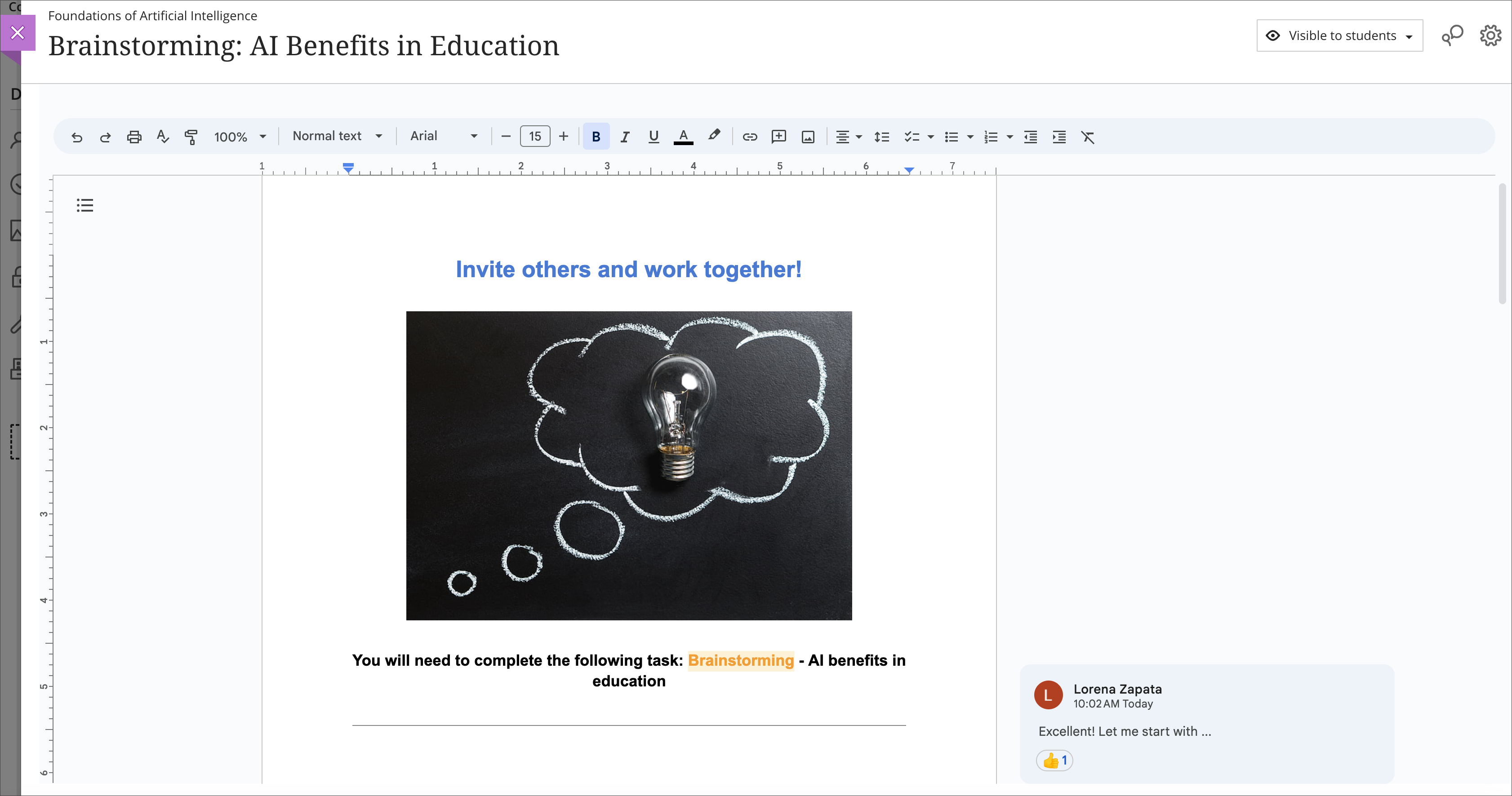
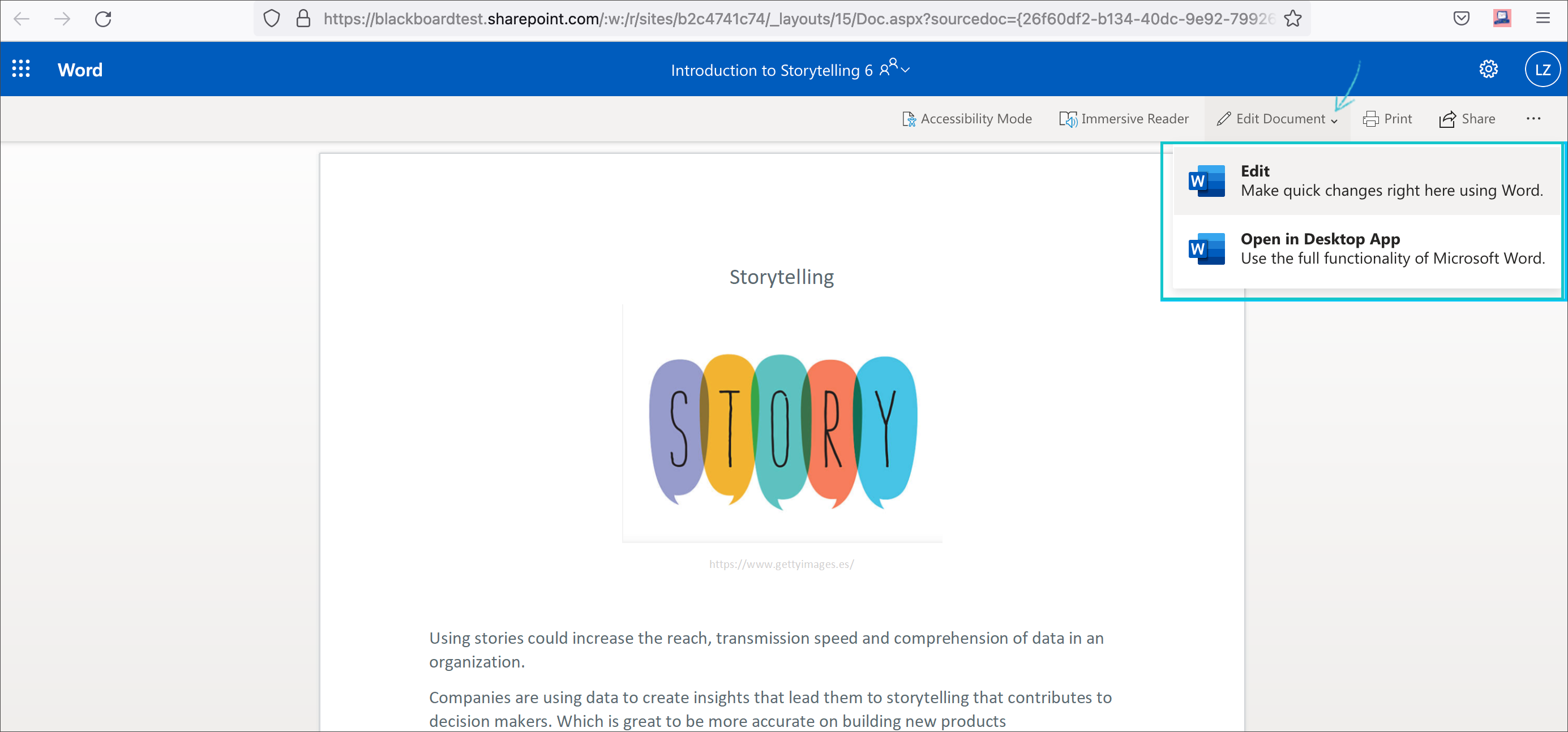
    <div class="html-content"><span><p><span>Cloud resources can transform a course design with streamlined document display and reduce storage footprint. Two new integrations from Google Workspace and Microsoft OneDrive offer cloud-based file management for Ultra courses. These tools allow faculty to select existing files, such as a syllabus or course schedule, and embed them seamlessly into a course for students to view. Customized privileges ensure only the document owner can modify the file within the framework of the course or the cloud drive while keeping the learner's access restricted to read-only.</span></p><p><span>Additionally, these tools support student collaboration, allowing for dynamic exchange of ideas, peer learning, co-authorship, and presentation planning. Creating a collaborative document in Google or Microsoft provides an exciting opportunity for faculty to support student teamwork in a shared environment directly embedded in the Ultra course space. Leverage these tools with students for real-time writing and editing, brainstorming, project planning, and other collaborative experiences.</span></p><p><span><strong>Learn more about using Google Workspace</strong> (Docs, Slides, Sheets)</span></p><ul><li><p><a href="https://help.blackboard.com/Learn/Instructor/Ultra/Course_Content/Create_Content/Cloud_Document/Google_Workspace#link_Google_document" rel="nofollow external" class="bo"><span>Embed a read-only Google document</span></a></p></li><li><p><a href="https://help.blackboard.com/Learn/Instructor/Ultra/Course_Content/Create_Content/Cloud_Document/Google_Workspace#create_Google_collaborative_document" rel="nofollow external" class="bo"><span>Create a Google collaborative document</span></a></p></li></ul><p><span><img src="https://help.blackboard.com/sites/default/files/images/2023-08/learn_ultra_instructor_GoogleWorkspace_EmbeddedCollabDoc.png" width="500" alt="Image 1: Example of an embedded Google collaborative document for students" style="max-width: 100%; height: auto;"></span></p><p><span><em>Image 1: Example of an embedded Google collaborative document for students</em></span></p><p><span><strong>Learn more about using Microsoft OneDrive</strong> (Word, PowerPoint, Excel)</span></p><ul><li><p><a href="https://help.blackboard.com/Learn/Instructor/Ultra/Course_Content/Create_Content/Create_Course_Materials/Open_Files_From_OneDrive#open_file" rel="nofollow external" class="bo"><span>Create embedded Microsoft cloud document</span></a></p></li><li><p><span><a href="https://help.blackboard.com/Learn/Instructor/Ultra/Course_Content/Create_Content/Create_Course_Materials/Open_Files_From_OneDrive#create_file" rel="nofollow external" class="bo">Create a Microsoft cloud collaboration</a></span></p></li></ul><p><span><img src="https://help.blackboard.com/sites/default/files/images/2022-02/learn_ultra_instructor_AddFile_OpenFromOneDrive_5.png" width="500" alt="Image 2: Example of an embedded Microsoft Word document for students to read only" style="max-width: 100%; height: auto;"></span></p><p><span><em>Image 2: Example of an embedded Microsoft Word document for students to read only</em></span></p><p><span>Both Google Workspace and Microsoft OneDrive are available now. Faculty can learn more about these tools at <a href="https://my3.my.umbc.edu/groups/instructional-technology/events/123991" rel="nofollow external" class="bo">an upcoming webinar on January 9, 2024</a>.</span></p><h5><strong>Connect with Instructional Technology</strong></h5><div>As always, if you have any questions about teaching, learning, and technology at UMBC, please consider the following options:</div><ul><li><a href="http://www.umbc.edu/faq" rel="nofollow external" class="bo">Check our extensive FAQ collection</a> </li><ul><li><a href="https://wiki.umbc.edu/x/LohnB" rel="nofollow external" class="bo">What's new in Ultra?</a> | <a href="https://wiki.umbc.edu/x/bwrSAQ" rel="nofollow external" class="bo">Known Issues</a> </li></ul><li><a href="http://umbc.edu/go/bbsupport" rel="nofollow external" class="bo">Open a ticket via RT</a></li><li>Follow the <a href="http://my.umbc.edu/groups/instructional-technology" rel="nofollow external" class="bo">Instructional Technology</a> &amp; <a href="http://my.umbc.edu/groups/doit" rel="nofollow external" class="bo">DoIT</a> myUMBC groups</li><li><a href="http://umbc.edu/go/bbsupport" rel="nofollow external" class="bo">Request a consult</a> with <a href="http://doit.umbc.edu/itnm/staff" rel="nofollow external" class="bo">instructional technology staff</a></li><li><a href="http://pivot.umbc.edu/" rel="nofollow external" class="bo">PIVOT</a> | <a href="https://doit.umbc.edu/itnm/academic-continuity/" rel="nofollow external" class="bo">Academic Continuity</a> | <a href="https://fdc.umbc.edu/teaching/keep-on-teaching/" rel="nofollow external" class="bo">Keep On Teaching</a> | <a href="https://doit.umbc.edu/students" rel="nofollow external" class="bo">Student Technology Resources</a></li></ul><p></p><p><span><em>UMBC is committed to providing a consistent learning experience for everyone. The last day we will support Blackboard Original is December 31, 2024. Please check out our training and support: <a href="https://umbc.edu/go/ultra" rel="nofollow external" class="bo">https://umbc.edu/go/ultra</a>.</em></span></p></span></div>
]]>
  </Body>
  <Summary>Cloud resources can transform a course design with streamlined document display and reduce storage footprint. Two new integrations from Google Workspace and Microsoft OneDrive offer cloud-based...</Summary>
  <Website>https://my3.my.umbc.edu/groups/instructional-technology/posts/136980</Website>
  <TrackingUrl>https://dev.my.umbc.edu/api/v0/pixel/news/136980/guest@my.umbc.edu/974acebe5a361d0883d8400183637bac/api/pixel</TrackingUrl>
  <Tag>blackboard</Tag>
  <Tag>cloud-collaboration</Tag>
  <Tag>cloud-storage</Tag>
  <Tag>engagement</Tag>
  <Tag>google</Tag>
  <Tag>groups</Tag>
  <Tag>microsoft</Tag>
  <Tag>one-drive</Tag>
  <Tag>online-learning</Tag>
  <Tag>ultra</Tag>
  <Group token="instructional-technology">Instructional Technology</Group>
  <GroupUrl>https://dev.my.umbc.edu/groups/instructional-technology</GroupUrl>
  <AvatarUrl>https://assets2-dev.my.umbc.edu/system/shared/avatars/groups/000/001/164/dec3b026b81ee6d890a8f82f75c94a2e/xsmall.png?1446126703</AvatarUrl>
  <AvatarUrl size="original">https://assets1-dev.my.umbc.edu/system/shared/avatars/groups/000/001/164/dec3b026b81ee6d890a8f82f75c94a2e/original.png?1446126703</AvatarUrl>
  <AvatarUrl size="xxlarge">https://assets2-dev.my.umbc.edu/system/shared/avatars/groups/000/001/164/dec3b026b81ee6d890a8f82f75c94a2e/xxlarge.png?1446126703</AvatarUrl>
  <AvatarUrl size="xlarge">https://assets1-dev.my.umbc.edu/system/shared/avatars/groups/000/001/164/dec3b026b81ee6d890a8f82f75c94a2e/xlarge.png?1446126703</AvatarUrl>
  <AvatarUrl size="large">https://assets1-dev.my.umbc.edu/system/shared/avatars/groups/000/001/164/dec3b026b81ee6d890a8f82f75c94a2e/large.png?1446126703</AvatarUrl>
  <AvatarUrl size="medium">https://assets4-dev.my.umbc.edu/system/shared/avatars/groups/000/001/164/dec3b026b81ee6d890a8f82f75c94a2e/medium.png?1446126703</AvatarUrl>
  <AvatarUrl size="small">https://assets3-dev.my.umbc.edu/system/shared/avatars/groups/000/001/164/dec3b026b81ee6d890a8f82f75c94a2e/small.png?1446126703</AvatarUrl>
  <AvatarUrl size="xsmall">https://assets2-dev.my.umbc.edu/system/shared/avatars/groups/000/001/164/dec3b026b81ee6d890a8f82f75c94a2e/xsmall.png?1446126703</AvatarUrl>
  <AvatarUrl size="xxsmall">https://assets3-dev.my.umbc.edu/system/shared/avatars/groups/000/001/164/dec3b026b81ee6d890a8f82f75c94a2e/xxsmall.png?1446126703</AvatarUrl>
  <Sponsor>Instructional Technology</Sponsor>
  <ThumbnailUrl size="xxlarge">https://assets2-dev.my.umbc.edu/system/shared/thumbnails/news/000/136/980/61c10de9e6bdc7965c908b02b14ada96/xxlarge.jpg?1699624920</ThumbnailUrl>
  <ThumbnailUrl size="xlarge">https://assets3-dev.my.umbc.edu/system/shared/thumbnails/news/000/136/980/61c10de9e6bdc7965c908b02b14ada96/xlarge.jpg?1699624920</ThumbnailUrl>
  <ThumbnailUrl size="large">https://assets2-dev.my.umbc.edu/system/shared/thumbnails/news/000/136/980/61c10de9e6bdc7965c908b02b14ada96/large.jpg?1699624920</ThumbnailUrl>
  <ThumbnailUrl size="medium">https://assets3-dev.my.umbc.edu/system/shared/thumbnails/news/000/136/980/61c10de9e6bdc7965c908b02b14ada96/medium.jpg?1699624920</ThumbnailUrl>
  <ThumbnailUrl size="small">https://assets1-dev.my.umbc.edu/system/shared/thumbnails/news/000/136/980/61c10de9e6bdc7965c908b02b14ada96/small.jpg?1699624920</ThumbnailUrl>
  <ThumbnailUrl size="xsmall">https://assets4-dev.my.umbc.edu/system/shared/thumbnails/news/000/136/980/61c10de9e6bdc7965c908b02b14ada96/xsmall.jpg?1699624920</ThumbnailUrl>
  <ThumbnailUrl size="xxsmall">https://assets2-dev.my.umbc.edu/system/shared/thumbnails/news/000/136/980/61c10de9e6bdc7965c908b02b14ada96/xxsmall.jpg?1699624920</ThumbnailUrl>
  <PawCount>6</PawCount>
  <CommentCount>0</CommentCount>
  <CommentsAllowed>true</CommentsAllowed>
  <PostedAt>Tue, 28 Nov 2023 12:10:44 -0500</PostedAt>
</NewsItem>
  <NewsItem contentIssues="false" id="98059" important="true" status="posted" url="https://dev.my.umbc.edu/groups/doit/posts/98059">
  <Title>Google Widespread Outage early Monday Morning</Title>
  <Tagline>Email, Calendar and Docs are unavailable until 8:00am</Tagline>
  <Body>
    <![CDATA[
    <div class="html-content">This morning Google had a widespread outage that affected all of their services, including Gmail, Calendar, Google Docs, Google Meet and Youtube. Service was quickly restored by approximately 8:00am but users may have noticed connection issues getting into their Email or accessing other Google services this morning. <div><br></div><div>This wasn't specific to UMBC, it was a larger outage within Google itself. Other UMBC services like Blackboard and Peoplesoft were unaffected. </div><div><br></div><div>At this point we don't have any additional information on the cause of the outage. </div><div><br></div><div>Feel free to contact me if you have any questions. </div><div><br></div><div>Damian Doyle</div><div>Associate Vice President of Enterprise Infrastructure</div><div>DoIT - <span>UMBC</span></div></div>
]]>
  </Body>
  <Summary>This morning Google had a widespread outage that affected all of their services, including Gmail, Calendar, Google Docs, Google Meet and Youtube. Service was quickly restored by approximately...</Summary>
  <TrackingUrl>https://dev.my.umbc.edu/api/v0/pixel/news/98059/guest@my.umbc.edu/6af3f741e33be5eb266bd271dc0372be/api/pixel</TrackingUrl>
  <Tag>google</Tag>
  <Tag>outage</Tag>
  <Group token="doit">Division of Information Technology (DoIT)</Group>
  <GroupUrl>https://dev.my.umbc.edu/groups/doit</GroupUrl>
  <AvatarUrl>https://assets2-dev.my.umbc.edu/system/shared/avatars/groups/000/000/021/d27760c5de12c74b73faec8d0e631acf/xsmall.png?1727453227</AvatarUrl>
  <AvatarUrl size="original">https://assets2-dev.my.umbc.edu/system/shared/avatars/groups/000/000/021/d27760c5de12c74b73faec8d0e631acf/original.JPG?1727453227</AvatarUrl>
  <AvatarUrl size="xxlarge">https://assets1-dev.my.umbc.edu/system/shared/avatars/groups/000/000/021/d27760c5de12c74b73faec8d0e631acf/xxlarge.png?1727453227</AvatarUrl>
  <AvatarUrl size="xlarge">https://assets3-dev.my.umbc.edu/system/shared/avatars/groups/000/000/021/d27760c5de12c74b73faec8d0e631acf/xlarge.png?1727453227</AvatarUrl>
  <AvatarUrl size="large">https://assets2-dev.my.umbc.edu/system/shared/avatars/groups/000/000/021/d27760c5de12c74b73faec8d0e631acf/large.png?1727453227</AvatarUrl>
  <AvatarUrl size="medium">https://assets2-dev.my.umbc.edu/system/shared/avatars/groups/000/000/021/d27760c5de12c74b73faec8d0e631acf/medium.png?1727453227</AvatarUrl>
  <AvatarUrl size="small">https://assets2-dev.my.umbc.edu/system/shared/avatars/groups/000/000/021/d27760c5de12c74b73faec8d0e631acf/small.png?1727453227</AvatarUrl>
  <AvatarUrl size="xsmall">https://assets2-dev.my.umbc.edu/system/shared/avatars/groups/000/000/021/d27760c5de12c74b73faec8d0e631acf/xsmall.png?1727453227</AvatarUrl>
  <AvatarUrl size="xxsmall">https://assets4-dev.my.umbc.edu/system/shared/avatars/groups/000/000/021/d27760c5de12c74b73faec8d0e631acf/xxsmall.png?1727453227</AvatarUrl>
  <Sponsor>Division of Information Technology (DoIT)</Sponsor>
  <PawCount>0</PawCount>
  <CommentCount>0</CommentCount>
  <CommentsAllowed>false</CommentsAllowed>
  <PostedAt>Mon, 14 Dec 2020 08:23:22 -0500</PostedAt>
</NewsItem>
  <NewsItem contentIssues="true" id="89495" important="false" status="posted" url="https://dev.my.umbc.edu/groups/doit/posts/89495">
    <Title>Google Assignments and File Embed Available for Bb Courses</Title>
    <Tagline>Use Google's Rich Editor to Provide Student Feedback</Tagline>
    <Body>
      <![CDATA[
          <div class="html-content"><div>In January 2018, <a href="https://my3.my.umbc.edu/groups/bbannouncements/posts/71945" rel="nofollow external" class="bo">Box discontinued Crocodoc in favor of the Box inline grading tool</a>. The goal of this transition was to provide a similar and simpler experience users know from the traditional Box interface. For instructors, the new Box inline grading tool reflects a simpler design, but the tools are often not robust enough to provide feedback. </div><div><br></div><div>Earlier in 2019, <a href="https://edu.google.com/assignments/" rel="nofollow external" class="bo">Google announced Google Assignments</a>, a new tool that would allow faculty to create and share Google Suite files (Google Docs, Google Slides, and Google Sheets), as assignment templates for individual students and student groups. Google Assignments can be edited by students and faculty, changes tracked by all contributors, and submitted for a grade. When faculty review the submitted Google file, it is locked from further edits. Faculty can embed comments, grade with rubrics, check for plagiarism, or provide feedback from a reusable comment bank. After you post grades through Google Assignments, scores will automatically transfer to Blackboard. </div><div><br></div><div>Since <a href="https://help.blackboard.com/Learn/Student/Assignments/Cloud_Storage#access-cloud-storage-in-your-course_OTP-3" rel="nofollow external" class="bo">current student submissions via cloud</a> storage will not render and display Google Suite file types, often resulting in students having to download and resubmit their assignment, this new tool addresses a challenge with Blackboard’s current cloud storage support.</div><div><br></div><div>Additionally, instructors will be able to leverage <a href="https://my3.my.umbc.edu/groups/doit/posts/48703" rel="nofollow external" class="bo">unlimited Google Drive storage</a>, and use the Google Drive File Embed tool into their Blackboard Original and Blackboard Ultra courses. The Google Drive File Embed tool places a link to a native Google Suite file from the instructor's drive directly into a Blackboard course, and provides students with view-only access to the file. </div><div><br></div><div>Google Assignments and Google Drive File embed are available for both Blackboard Original and Blackboard Ultra courses! Check out the <a href="https://wiki.umbc.edu/display/faq/Google+Assignments+and+Google+Drive+File+Embed" rel="nofollow external" class="bo">Google Assignments and Google Drive File Embed FAQs</a> and some of our <a href="https://my3.my.umbc.edu/groups/instructional-technology/events?mode=upcoming&amp;tag=google-assignments" rel="nofollow external" class="bo">upcoming trainings</a> on these tools.</div><div><br></div><div>DoIT offers all active members of the UMBC community with three cloud storage options:</div><div><ul><li>Box, with unlimited storage, is strongly recommended for institutional data</li><li>Google Drive from Google Suite, with unlimited storage</li><li>OneDrive from Office 365, with 1TB storage </li></ul></div><div><br></div><div>As always, if you have any questions, please consider the following options:</div><div><ul><li><a href="http://www.umbc.edu/faq" rel="nofollow external" class="bo">Check our extensive FAQ collection</a></li><li><a href="http://my.umbc.edu/go/request-help" rel="nofollow external" class="bo">Open a ticket via RT</a></li><li>Follow the <a href="http://my.umbc.edu/groups/instructional-technology" rel="nofollow external" class="bo">Instructional Technology</a> &amp; <a href="http://my.umbc.edu/groups/doit" rel="nofollow external" class="bo">DoIT</a> myUMBC groups</li><li><a href="http://doit.umbc.edu/itnm/staff/" rel="nofollow external" class="bo">Request a consult with instructional technology staff</a></li></ul></div></div>
      ]]>
    </Body>
    <Summary>In January 2018, Box discontinued Crocodoc in favor of the Box inline grading tool. The goal of this transition was to provide a similar and simpler experience users know from the traditional Box...</Summary>
    <TrackingUrl>https://dev.my.umbc.edu/api/v0/pixel/news/89495/guest@my.umbc.edu/6b4e2b79f380f7a7e67405885b716222/api/pixel</TrackingUrl>
    <Tag>blackboard</Tag>
    <Tag>google</Tag>
    <Tag>google-assignments</Tag>
    <Tag>lti</Tag>
    <Tag>ultra-experience</Tag>
    <Group token="instructional-technology">Instructional Technology</Group>
    <GroupUrl>https://dev.my.umbc.edu/groups/instructional-technology</GroupUrl>
    <AvatarUrl>https://assets2-dev.my.umbc.edu/system/shared/avatars/groups/000/001/164/dec3b026b81ee6d890a8f82f75c94a2e/xsmall.png?1446126703</AvatarUrl>
    <AvatarUrl size="original">https://assets1-dev.my.umbc.edu/system/shared/avatars/groups/000/001/164/dec3b026b81ee6d890a8f82f75c94a2e/original.png?1446126703</AvatarUrl>
    <AvatarUrl size="xxlarge">https://assets2-dev.my.umbc.edu/system/shared/avatars/groups/000/001/164/dec3b026b81ee6d890a8f82f75c94a2e/xxlarge.png?1446126703</AvatarUrl>
    <AvatarUrl size="xlarge">https://assets1-dev.my.umbc.edu/system/shared/avatars/groups/000/001/164/dec3b026b81ee6d890a8f82f75c94a2e/xlarge.png?1446126703</AvatarUrl>
    <AvatarUrl size="large">https://assets1-dev.my.umbc.edu/system/shared/avatars/groups/000/001/164/dec3b026b81ee6d890a8f82f75c94a2e/large.png?1446126703</AvatarUrl>
    <AvatarUrl size="medium">https://assets4-dev.my.umbc.edu/system/shared/avatars/groups/000/001/164/dec3b026b81ee6d890a8f82f75c94a2e/medium.png?1446126703</AvatarUrl>
    <AvatarUrl size="small">https://assets3-dev.my.umbc.edu/system/shared/avatars/groups/000/001/164/dec3b026b81ee6d890a8f82f75c94a2e/small.png?1446126703</AvatarUrl>
    <AvatarUrl size="xsmall">https://assets2-dev.my.umbc.edu/system/shared/avatars/groups/000/001/164/dec3b026b81ee6d890a8f82f75c94a2e/xsmall.png?1446126703</AvatarUrl>
    <AvatarUrl size="xxsmall">https://assets3-dev.my.umbc.edu/system/shared/avatars/groups/000/001/164/dec3b026b81ee6d890a8f82f75c94a2e/xxsmall.png?1446126703</AvatarUrl>
    <Sponsor>Instructional Technology</Sponsor>
    <ThumbnailUrl size="xxlarge">https://assets4-dev.my.umbc.edu/system/shared/thumbnails/news/000/089/495/134d250453ab702890e092fa58f90778/xxlarge.jpg?1578500809</ThumbnailUrl>
    <ThumbnailUrl size="xlarge">https://assets3-dev.my.umbc.edu/system/shared/thumbnails/news/000/089/495/134d250453ab702890e092fa58f90778/xlarge.jpg?1578500809</ThumbnailUrl>
    <ThumbnailUrl size="large">https://assets3-dev.my.umbc.edu/system/shared/thumbnails/news/000/089/495/134d250453ab702890e092fa58f90778/large.jpg?1578500809</ThumbnailUrl>
    <ThumbnailUrl size="medium">https://assets3-dev.my.umbc.edu/system/shared/thumbnails/news/000/089/495/134d250453ab702890e092fa58f90778/medium.jpg?1578500809</ThumbnailUrl>
    <ThumbnailUrl size="small">https://assets2-dev.my.umbc.edu/system/shared/thumbnails/news/000/089/495/134d250453ab702890e092fa58f90778/small.jpg?1578500809</ThumbnailUrl>
    <ThumbnailUrl size="xsmall">https://assets4-dev.my.umbc.edu/system/shared/thumbnails/news/000/089/495/134d250453ab702890e092fa58f90778/xsmall.jpg?1578500809</ThumbnailUrl>
    <ThumbnailUrl size="xxsmall">https://assets1-dev.my.umbc.edu/system/shared/thumbnails/news/000/089/495/134d250453ab702890e092fa58f90778/xxsmall.jpg?1578500809</ThumbnailUrl>
    <PawCount>1</PawCount>
    <CommentCount>0</CommentCount>
    <CommentsAllowed>true</CommentsAllowed>
    <PostedAt>Wed, 08 Jan 2020 11:32:54 -0500</PostedAt>
    <EditAt>Wed, 08 Jan 2020 11:36:48 -0500</EditAt>
  </NewsItem>
  <NewsItem contentIssues="true" id="67871" important="true" status="posted" url="https://dev.my.umbc.edu/groups/doit/posts/67871">
    <Title>Notice: DoIT Is Changing Mailing List Vendor</Title>
    <Tagline>Google Groups &amp; myUMBC will be used for communications</Tagline>
    <Body>
      <![CDATA[
          <div class="html-content"><div>DoIT has begun transitioning users off mailing lists to Google Groups and myUMBC. We expect this transition to be completed by the end of June 2017. Sympa, the campus software used for handling email lists, is being discontinued, triggering this migration. Mailing list will not be going away. Instead, the software used to access and administer them is changing. DoIT is working with list owners to talk about migration strategies, and how Google Groups &amp; myUMBC can be used to make sure that the transition is as painless as possible for list owners and administrators.</div><div><br></div><div>Google Groups functions like the traditional Sympa mailing list. You can <a href="https://groups.google.com/forum/#!overview" rel="nofollow external" class="bo">read more about Google Groups here</a>. </div><div><br></div><div>If you are mainly using your group for announcements and events, we recommend using myUMBC Groups. myUMBC is a robust platform for managing your group for both internal and external communications. </div><div><br></div><div>With myUMBC Groups, you’ll have more control over who joins your group, what their positions are, and the ability to make the group either public or private. Through subscriptions, you can also pull content into your group from other myUMBC groups and from outside of myUMBC. There are additional features in myUMBC, such as events where you can track attendees and participants. If you have an important post, you can pin it to the top of your group for members to see. Groups can have customized avatars and banner images to give a more unique feel. </div><div><br></div><div>For any questions about this transition, please contact Damian Doyle: <a href="mailto:damian@umbc.edu">damian@umbc.edu</a></div><div><br></div><div><em><a href="http://my.umbc.edu/groups/doit" rel="nofollow external" class="bo">Follow the DoIT myUMBC group</a> for more news and updates.</em></div></div>
      ]]>
    </Body>
    <Summary>DoIT has begun transitioning users off mailing lists to Google Groups and myUMBC. We expect this transition to be completed by the end of June 2017. Sympa, the campus software used for handling...</Summary>
    <Website>http://my.umbc.edu/groups/doit</Website>
    <TrackingUrl>https://dev.my.umbc.edu/api/v0/pixel/news/67871/guest@my.umbc.edu/4383226ce786d6f9508f7e73c96a282b/api/pixel</TrackingUrl>
    <Tag>administrators</Tag>
    <Tag>google</Tag>
    <Tag>groups</Tag>
    <Tag>list</Tag>
    <Tag>mailing</Tag>
    <Tag>myumbc</Tag>
    <Tag>sympa</Tag>
    <Group token="doit">Division of Information Technology (DoIT)</Group>
    <GroupUrl>https://dev.my.umbc.edu/groups/doit</GroupUrl>
    <AvatarUrl>https://assets2-dev.my.umbc.edu/system/shared/avatars/groups/000/000/021/d27760c5de12c74b73faec8d0e631acf/xsmall.png?1727453227</AvatarUrl>
    <AvatarUrl size="original">https://assets2-dev.my.umbc.edu/system/shared/avatars/groups/000/000/021/d27760c5de12c74b73faec8d0e631acf/original.JPG?1727453227</AvatarUrl>
    <AvatarUrl size="xxlarge">https://assets1-dev.my.umbc.edu/system/shared/avatars/groups/000/000/021/d27760c5de12c74b73faec8d0e631acf/xxlarge.png?1727453227</AvatarUrl>
    <AvatarUrl size="xlarge">https://assets3-dev.my.umbc.edu/system/shared/avatars/groups/000/000/021/d27760c5de12c74b73faec8d0e631acf/xlarge.png?1727453227</AvatarUrl>
    <AvatarUrl size="large">https://assets2-dev.my.umbc.edu/system/shared/avatars/groups/000/000/021/d27760c5de12c74b73faec8d0e631acf/large.png?1727453227</AvatarUrl>
    <AvatarUrl size="medium">https://assets2-dev.my.umbc.edu/system/shared/avatars/groups/000/000/021/d27760c5de12c74b73faec8d0e631acf/medium.png?1727453227</AvatarUrl>
    <AvatarUrl size="small">https://assets2-dev.my.umbc.edu/system/shared/avatars/groups/000/000/021/d27760c5de12c74b73faec8d0e631acf/small.png?1727453227</AvatarUrl>
    <AvatarUrl size="xsmall">https://assets2-dev.my.umbc.edu/system/shared/avatars/groups/000/000/021/d27760c5de12c74b73faec8d0e631acf/xsmall.png?1727453227</AvatarUrl>
    <AvatarUrl size="xxsmall">https://assets4-dev.my.umbc.edu/system/shared/avatars/groups/000/000/021/d27760c5de12c74b73faec8d0e631acf/xxsmall.png?1727453227</AvatarUrl>
    <Sponsor>Division of Information Technology (DoIT)</Sponsor>
    <ThumbnailUrl size="xxlarge">https://assets2-dev.my.umbc.edu/system/shared/thumbnails/news/000/067/871/247299ce1acd905563275d15e82fa7d4/xxlarge.jpg?1494258240</ThumbnailUrl>
    <ThumbnailUrl size="xlarge">https://assets3-dev.my.umbc.edu/system/shared/thumbnails/news/000/067/871/247299ce1acd905563275d15e82fa7d4/xlarge.jpg?1494258240</ThumbnailUrl>
    <ThumbnailUrl size="large">https://assets2-dev.my.umbc.edu/system/shared/thumbnails/news/000/067/871/247299ce1acd905563275d15e82fa7d4/large.jpg?1494258240</ThumbnailUrl>
    <ThumbnailUrl size="medium">https://assets2-dev.my.umbc.edu/system/shared/thumbnails/news/000/067/871/247299ce1acd905563275d15e82fa7d4/medium.jpg?1494258240</ThumbnailUrl>
    <ThumbnailUrl size="small">https://assets4-dev.my.umbc.edu/system/shared/thumbnails/news/000/067/871/247299ce1acd905563275d15e82fa7d4/small.jpg?1494258240</ThumbnailUrl>
    <ThumbnailUrl size="xsmall">https://assets4-dev.my.umbc.edu/system/shared/thumbnails/news/000/067/871/247299ce1acd905563275d15e82fa7d4/xsmall.jpg?1494258240</ThumbnailUrl>
    <ThumbnailUrl size="xxsmall">https://assets1-dev.my.umbc.edu/system/shared/thumbnails/news/000/067/871/247299ce1acd905563275d15e82fa7d4/xxsmall.jpg?1494258240</ThumbnailUrl>
    <PawCount>3</PawCount>
    <CommentCount>3</CommentCount>
    <CommentsAllowed>true</CommentsAllowed>
    <PostedAt>Mon, 08 May 2017 11:48:06 -0400</PostedAt>
  </NewsItem>
  <NewsItem contentIssues="true" id="64474" important="false" status="posted" url="https://dev.my.umbc.edu/groups/doit/posts/64474">
  <Title>DEADLINE EXTENDED TechFest 2017: Submit Your Proposal Today!</Title>
  <Tagline>Share your favorite technologies with the UMBC Community</Tagline>
  <Body>
    <![CDATA[
    <div class="html-content"><span><p><span>Last year, the Instructional Technology team held UMBC’s first <a href="http://my.umbc.edu/groups/instructional-technology/posts/58552" rel="nofollow external" class="bo">TechFest</a>. TechFest is  designed to bring together UMBC students, faculty, and staff to share their favorite technologies with the campus community through workshops and presentations. </span></p><div><span>The <a href="http://my.umbc.edu/groups/instructional-technology" rel="nofollow external" class="bo">Instructional Technology Team</a> cordially invites any interested groups and/or individuals to propose sessions for TechFest 2017 to demonstrate a favorite instructional technology tool, and share best practices. Last year, </span><a href="http://my.umbc.edu/groups/instructional-technology/posts/57904" rel="nofollow external" class="bo">session topics</a><span> included such as Google Calendar, Box, LinkedIn, Microsoft OneNote, and Blackboard.  </span></div><p><span>There are two types of sessions that will be offered at TechFest 2017:</span></p><ul><li><p><span><span>Workshop Session (35 minutes)-</span><em><span>Presenter(s) provide a brief overview of the instructional technology and offer information based on best practices and use. Participants are provided with at least three take aways implementing use of the technology. </span></em></span></p></li><li><p><span>Power Session (70 minutes)-</span><span><em><span>Presenter(s) provide a more in-depth  overview of the instructional technology and offer information based on best practices and use. In Power Sessions, participants are </span><span>given the opportunity to explore the technology through "hands-on" activities. </span></em></span></p></li></ul><div><br></div><p><span><strong>Deadlines and Notifications</strong></span></p><p><span>Proposals must be submitted no later than 5pm on<strong> FRIDAY, FEBRUARY 10</strong></span><span> by completing</span><span> this </span><a href="https://docs.google.com/a/umbc.edu/forms/d/e/1FAIpQLSdyIQM2fd7UyQFnNb7ENn0EDhCwB8MBtTss1tHN_TjiQ6DBlQ/viewform" rel="nofollow external" class="bo"><span>Google Form</span></a><span>.  Applicants will be notified about acceptances approximately two weeks after the submission deadline. Selection will be based on how well the proposal connects to the themes, goals, and overall contribution to TechFest. </span></p><p><span>Mark your calendars: TechFest 2017 will be held on </span><span><strong>Monday, April 10, 2017</strong></span><span>. More details are forthcoming. <a href="https://goo.gl/ZEFS13" rel="nofollow external" class="bo">Sign up here</a> to be notified when registration opens for this event. </span></p><p><span>For more information, please contact Holly Owens at </span><a href="mailto:holly3@umbc.edu" rel="nofollow external" class="bo"><span>holly3@umbc.edu</span></a><span> or Collin Sullivan at </span><a href="mailto:csulli1@umbc.edu" rel="nofollow external" class="bo"><span>csulli1@umbc.edu</span></a><span>. </span></p><div><span><br></span></div></span></div>
]]>
  </Body>
  <Summary>Last year, the Instructional Technology team held UMBC’s first TechFest. TechFest is  designed to bring together UMBC students, faculty, and staff to share their favorite technologies with the...</Summary>
  <Website>http://my.umbc.edu/groups/instructional-technology/posts/64474</Website>
  <TrackingUrl>https://dev.my.umbc.edu/api/v0/pixel/news/64474/guest@my.umbc.edu/42f04fc7786516a48d1e9e058fba8607/api/pixel</TrackingUrl>
  <Tag>blackboard</Tag>
  <Tag>clickers</Tag>
  <Tag>google</Tag>
  <Tag>techfest</Tag>
  <Tag>training</Tag>
  <Tag>workshops</Tag>
  <Group token="instructional-technology">Instructional Technology</Group>
  <GroupUrl>https://dev.my.umbc.edu/groups/instructional-technology</GroupUrl>
  <AvatarUrl>https://assets2-dev.my.umbc.edu/system/shared/avatars/groups/000/001/164/dec3b026b81ee6d890a8f82f75c94a2e/xsmall.png?1446126703</AvatarUrl>
  <AvatarUrl size="original">https://assets1-dev.my.umbc.edu/system/shared/avatars/groups/000/001/164/dec3b026b81ee6d890a8f82f75c94a2e/original.png?1446126703</AvatarUrl>
  <AvatarUrl size="xxlarge">https://assets2-dev.my.umbc.edu/system/shared/avatars/groups/000/001/164/dec3b026b81ee6d890a8f82f75c94a2e/xxlarge.png?1446126703</AvatarUrl>
  <AvatarUrl size="xlarge">https://assets1-dev.my.umbc.edu/system/shared/avatars/groups/000/001/164/dec3b026b81ee6d890a8f82f75c94a2e/xlarge.png?1446126703</AvatarUrl>
  <AvatarUrl size="large">https://assets1-dev.my.umbc.edu/system/shared/avatars/groups/000/001/164/dec3b026b81ee6d890a8f82f75c94a2e/large.png?1446126703</AvatarUrl>
  <AvatarUrl size="medium">https://assets4-dev.my.umbc.edu/system/shared/avatars/groups/000/001/164/dec3b026b81ee6d890a8f82f75c94a2e/medium.png?1446126703</AvatarUrl>
  <AvatarUrl size="small">https://assets3-dev.my.umbc.edu/system/shared/avatars/groups/000/001/164/dec3b026b81ee6d890a8f82f75c94a2e/small.png?1446126703</AvatarUrl>
  <AvatarUrl size="xsmall">https://assets2-dev.my.umbc.edu/system/shared/avatars/groups/000/001/164/dec3b026b81ee6d890a8f82f75c94a2e/xsmall.png?1446126703</AvatarUrl>
  <AvatarUrl size="xxsmall">https://assets3-dev.my.umbc.edu/system/shared/avatars/groups/000/001/164/dec3b026b81ee6d890a8f82f75c94a2e/xxsmall.png?1446126703</AvatarUrl>
  <Sponsor>Instructional Technology</Sponsor>
  <ThumbnailUrl size="xxlarge">https://assets2-dev.my.umbc.edu/system/shared/thumbnails/news/000/064/474/b5ea9736b6a0b6f8a54f9f27c6e08c3e/xxlarge.jpg?1481128394</ThumbnailUrl>
  <ThumbnailUrl size="xlarge">https://assets2-dev.my.umbc.edu/system/shared/thumbnails/news/000/064/474/b5ea9736b6a0b6f8a54f9f27c6e08c3e/xlarge.jpg?1481128394</ThumbnailUrl>
  <ThumbnailUrl size="large">https://assets1-dev.my.umbc.edu/system/shared/thumbnails/news/000/064/474/b5ea9736b6a0b6f8a54f9f27c6e08c3e/large.jpg?1481128394</ThumbnailUrl>
  <ThumbnailUrl size="medium">https://assets2-dev.my.umbc.edu/system/shared/thumbnails/news/000/064/474/b5ea9736b6a0b6f8a54f9f27c6e08c3e/medium.jpg?1481128394</ThumbnailUrl>
  <ThumbnailUrl size="small">https://assets3-dev.my.umbc.edu/system/shared/thumbnails/news/000/064/474/b5ea9736b6a0b6f8a54f9f27c6e08c3e/small.jpg?1481128394</ThumbnailUrl>
  <ThumbnailUrl size="xsmall">https://assets3-dev.my.umbc.edu/system/shared/thumbnails/news/000/064/474/b5ea9736b6a0b6f8a54f9f27c6e08c3e/xsmall.jpg?1481128394</ThumbnailUrl>
  <ThumbnailUrl size="xxsmall">https://assets2-dev.my.umbc.edu/system/shared/thumbnails/news/000/064/474/b5ea9736b6a0b6f8a54f9f27c6e08c3e/xxsmall.jpg?1481128394</ThumbnailUrl>
  <PawCount>18</PawCount>
  <CommentCount>0</CommentCount>
  <CommentsAllowed>true</CommentsAllowed>
  <PostedAt>Wed, 07 Dec 2016 12:34:02 -0500</PostedAt>
  <EditAt>Wed, 01 Feb 2017 10:04:02 -0500</EditAt>
</NewsItem>
  <NewsItem contentIssues="true" id="62366" important="false" status="posted" url="https://dev.my.umbc.edu/groups/doit/posts/62366">
    <Title>UMBC Gmail Now Accessible Through Google Inbox App</Title>
    <Tagline>See highlights, add reminders, and bundle messages</Tagline>
    <Body>
      <![CDATA[
          <div class="html-content"><div>DoIT would like to announce that you can now use your UMBC gmail address with <a href="https://www.google.com/inbox/" rel="nofollow external" class="bo">Google Inbox by Gmail</a>. Inbox is available on the <a href="https://play.google.com/store/apps/details?id=com.google.android.apps.inbox&amp;hl=en" rel="nofollow external" class="bo">Google Play Store</a>, <a href="https://itunes.apple.com/us/app/inbox-by-gmail-new-email-app/id905060486?mt=8" rel="nofollow external" class="bo">Apple App Store</a> and can be accessed on the web by going to <a href="http://inbox.google.com/" rel="nofollow external" class="bo">inbox.google.com</a></div><div><br></div><div>Google Inbox offers several features not found in regular Gmail. Highlights lets you see things like attachments and pictures without having to open your message. </div><div><br></div><div>When you add a reminder, it will help you accomplish it by including relevant info like phone numbers and links. In addition, Inbox bundles your messages in groups like finances and purchases by default, but can be disabled if needed. </div><div><br></div><div><em><br></em></div><div><em>You can check out this article on DoIT's own Chief Information Officer Jack Suess and <a href="http://my.umbc.edu/groups/doit/posts/58665" rel="nofollow external" class="bo">his tips and tricks on getting your inbox to zero.</a></em></div><div><em><br></em></div><div><em>For tips on using Inbox by Gmail, <a href="https://www.youtube.com/watch?v=UlahqFNwC-g" rel="nofollow external" class="bo">you can check out their promotional video</a> </em></div><div><em><br></em></div><div><em>If you need additional help on Inbox, you can <a href="https://support.google.com/inbox#topic=6067565" rel="nofollow external" class="bo">get support for Inbox here</a>. Also be sure to check out DoIT's extensive <a href="https://wiki.umbc.edu/display/faq/Gmail" rel="nofollow external" class="bo">FAQs on Gmail here</a> </em></div><div><br></div><div><br></div></div>
      ]]>
    </Body>
    <Summary>DoIT would like to announce that you can now use your UMBC gmail address with Google Inbox by Gmail. Inbox is available on the Google Play Store, Apple App Store and can be accessed on the web by...</Summary>
    <Website>https://www.google.com/inbox/</Website>
    <TrackingUrl>https://dev.my.umbc.edu/api/v0/pixel/news/62366/guest@my.umbc.edu/09360cf9e1c29da061149a3fe0765dfa/api/pixel</TrackingUrl>
    <Tag>gmail</Tag>
    <Tag>google</Tag>
    <Tag>inbox</Tag>
    <Tag>umbc</Tag>
    <Group token="doit">Division of Information Technology (DoIT)</Group>
    <GroupUrl>https://dev.my.umbc.edu/groups/doit</GroupUrl>
    <AvatarUrl>https://assets2-dev.my.umbc.edu/system/shared/avatars/groups/000/000/021/d27760c5de12c74b73faec8d0e631acf/xsmall.png?1727453227</AvatarUrl>
    <AvatarUrl size="original">https://assets2-dev.my.umbc.edu/system/shared/avatars/groups/000/000/021/d27760c5de12c74b73faec8d0e631acf/original.JPG?1727453227</AvatarUrl>
    <AvatarUrl size="xxlarge">https://assets1-dev.my.umbc.edu/system/shared/avatars/groups/000/000/021/d27760c5de12c74b73faec8d0e631acf/xxlarge.png?1727453227</AvatarUrl>
    <AvatarUrl size="xlarge">https://assets3-dev.my.umbc.edu/system/shared/avatars/groups/000/000/021/d27760c5de12c74b73faec8d0e631acf/xlarge.png?1727453227</AvatarUrl>
    <AvatarUrl size="large">https://assets2-dev.my.umbc.edu/system/shared/avatars/groups/000/000/021/d27760c5de12c74b73faec8d0e631acf/large.png?1727453227</AvatarUrl>
    <AvatarUrl size="medium">https://assets2-dev.my.umbc.edu/system/shared/avatars/groups/000/000/021/d27760c5de12c74b73faec8d0e631acf/medium.png?1727453227</AvatarUrl>
    <AvatarUrl size="small">https://assets2-dev.my.umbc.edu/system/shared/avatars/groups/000/000/021/d27760c5de12c74b73faec8d0e631acf/small.png?1727453227</AvatarUrl>
    <AvatarUrl size="xsmall">https://assets2-dev.my.umbc.edu/system/shared/avatars/groups/000/000/021/d27760c5de12c74b73faec8d0e631acf/xsmall.png?1727453227</AvatarUrl>
    <AvatarUrl size="xxsmall">https://assets4-dev.my.umbc.edu/system/shared/avatars/groups/000/000/021/d27760c5de12c74b73faec8d0e631acf/xxsmall.png?1727453227</AvatarUrl>
    <Sponsor>Division of Information Technology (DoIT)</Sponsor>
    <ThumbnailUrl size="xxlarge">https://assets4-dev.my.umbc.edu/system/shared/thumbnails/news/000/062/366/0bd83cdb48dcc5a5cb50da8912186ce9/xxlarge.jpg?1474294250</ThumbnailUrl>
    <ThumbnailUrl size="xlarge">https://assets2-dev.my.umbc.edu/system/shared/thumbnails/news/000/062/366/0bd83cdb48dcc5a5cb50da8912186ce9/xlarge.jpg?1474294250</ThumbnailUrl>
    <ThumbnailUrl size="large">https://assets4-dev.my.umbc.edu/system/shared/thumbnails/news/000/062/366/0bd83cdb48dcc5a5cb50da8912186ce9/large.jpg?1474294250</ThumbnailUrl>
    <ThumbnailUrl size="medium">https://assets1-dev.my.umbc.edu/system/shared/thumbnails/news/000/062/366/0bd83cdb48dcc5a5cb50da8912186ce9/medium.jpg?1474294250</ThumbnailUrl>
    <ThumbnailUrl size="small">https://assets4-dev.my.umbc.edu/system/shared/thumbnails/news/000/062/366/0bd83cdb48dcc5a5cb50da8912186ce9/small.jpg?1474294250</ThumbnailUrl>
    <ThumbnailUrl size="xsmall">https://assets1-dev.my.umbc.edu/system/shared/thumbnails/news/000/062/366/0bd83cdb48dcc5a5cb50da8912186ce9/xsmall.jpg?1474294250</ThumbnailUrl>
    <ThumbnailUrl size="xxsmall">https://assets4-dev.my.umbc.edu/system/shared/thumbnails/news/000/062/366/0bd83cdb48dcc5a5cb50da8912186ce9/xxsmall.jpg?1474294250</ThumbnailUrl>
    <PawCount>9</PawCount>
    <CommentCount>3</CommentCount>
    <CommentsAllowed>true</CommentsAllowed>
    <PostedAt>Mon, 19 Sep 2016 10:11:55 -0400</PostedAt>
  </NewsItem>
  <NewsItem contentIssues="true" id="58311" important="false" status="posted" url="https://dev.my.umbc.edu/groups/doit/posts/58311">
  <Title>Last Call to Register for Techfest!</Title>
  <Tagline>Learn new skills!  Win prizes!  Sign up today!</Tagline>
  <Body>
    <![CDATA[
    <div class="html-content"><p><span>On Wednesday, March 9, from 11:30am - 1:30pm, DoIT's </span><a href="http://my.umbc.edu/groups/instructional-technology" rel="nofollow external" class="bo"><span>Instructional Technology </span></a><span>team is sponsoring </span><a href="http://my.umbc.edu/groups/instructional-technology/posts/57649" rel="nofollow external" class="bo"><span>Techfest</span></a><span> in the University Center (rooms UC 310, UC 312, and the UC Lounge) to bring the campus community together and present ways that technology can both support and improve the efficiency of day-to-day activities. <strong><br></strong></span></p><p><span><strong><br></strong></span></p><p><span><strong>STUDENTS, </strong></span><span><strong><span><strong>FACULTY, </strong></span>and STAFF are all welcome and encouraged to attend.<br></strong></span></p><br><p><span>Registration is required for this event. </span><a href="https://docs.google.com/a/umbc.edu/forms/d/1mewA3LuDWVCEf9xYHDM6csdGyCD6hTEOc1D_no1E_5k/viewform?usp=send_form" rel="nofollow external" class="bo"><span>Please register here</span></a><span>. </span></p><br><p><span>After attending your workshop, be sure to complete a feedback form to be entered to win Starbucks gift cards, Webcams, iPad cases, and more!  </span></p><br><p><span>Registration will close on Friday, March 4, 2016 at 5pm. </span><a href="https://docs.google.com/a/umbc.edu/forms/d/1mewA3LuDWVCEf9xYHDM6csdGyCD6hTEOc1D_no1E_5k/viewform?usp=send_form" rel="nofollow external" class="bo"><span>Register now!</span></a></p><br><p><span>Registration is closed for workshops already filled to capacity. If you have any questions about the registration process, contact </span><a href="mailto:csulli1@UMBC.edu" rel="nofollow external" class="bo"><span>Collin Sullivan</span></a><span>.</span></p><br><p><span>Workshop descriptions have been provided below: </span></p><br><p><span>Session 1 Workshops (11:35 - 12:00):</span></p><br><p><span>LIMITED AVAILABILITY - </span><a href="https://wiki.umbc.edu/display/faq/Blackboard" rel="nofollow external" class="bo"><span>Blackboard</span></a><span> Tips &amp; Tricks (UC 310): </span><span>Blackboard is the current learning management system used at UMBC. Your professors may use it to supplement or replace the traditional classroom experience. Come learn a few tips &amp; tricks for getting access, taking tests, receiving notifications about content &amp; communication updates, and using the new Bb Student mobile app.</span></p><br><p><span>CLOSED - Where’s my </span><a href="http://www.apple.com/icloud/" rel="nofollow external" class="bo"><span>iCloud</span></a><span>? (UC 312): </span><span>iCloud keeps popping up on my phone! What is this? Where is it? Why do I need it? Discover the essential basics of iCloud, like Find my iPhone, and how to use other features like Shared Photos, iWork for iCloud, and more.</span></p><br><br><p><span>Session 2 Workshops (12:05 - 12:30):</span></p><br><p><span>CLOSED - Collaborating with </span><a href="https://wiki.umbc.edu/display/faq/Google+Drive" rel="nofollow external" class="bo"><span>Google Docs</span></a><span> (UC 310): </span><span>Are you working on a team project or presentation? With everyone’s busy schedules, how can we all meet up together to get this assignment done? Learn how to use Google Docs to work with your group without physically meeting!</span></p><br><p><span>LIMITED AVAILABILITY - </span><a href="https://www.linkedin.com/" rel="nofollow external" class="bo"><span>LinkedIn</span></a><span> 101 (UC Lounge) (from the Career Center):</span><span> What is LinkedIn? Why should you use this tool to make connections and build your brand? Come to this session to learn the basics of LinkedIn including how to create an “All-Star” profile and the do’s and don’ts of LinkedIn connection etiquette.</span></p><br><p><span>LIMITED AVAILABILITY - Upgrade Your Notes with </span><a href="https://www.onenote.com/" rel="nofollow external" class="bo"><span>OneNote</span></a><span> (UC 312): </span><span>Taking notes with paper and pen? There has to be a better way in the 21st century! Learn how to improve your journals with OneNote and how to stay on top of your class notes.</span></p><br><br><p><span>Session 3 Workshops (12:35 - 1:00):</span></p><br><p><span>Collaborating with </span><a href="https://wiki.umbc.edu/display/faq/Google+Drive" rel="nofollow external" class="bo"><span>Google Docs</span></a><span>(UC 310) </span><span>*Same as Session 2, see description above*</span></p><br><p><span>LIMITED AVAILABILITY - Making the Most of Your </span><a href="https://www.linkedin.com/" rel="nofollow external" class="bo"><span>LinkedIn</span></a><span> (UC Lounge) (from the Career Center)</span><span>: Go beyond the basics of LinkedIn. Learn how to take full advantage of this tool to network like a pro, increase your visibility, and make LinkedIn a part of your job search strategy!</span></p><br><p><span>CLOSED - Managing Your </span><a href="https://wiki.umbc.edu/display/faq/Gmail" rel="nofollow external" class="bo"><span>Gmail</span></a><span> Tips &amp; Tricks (UC 312): </span><span>Are too many emails flooding your inbox? Want to change its layout? And what are these Google Gadgets? Learn how to make the most of your email and become a Gmail Guru from the Chief Information Officer here at UMBC, Jack Suess!</span></p><br><br><p><span>Session 4 Workshops (1:05 - 1:30):</span></p><br><p><span>CLOSED - 7 Secrets of Effective </span><a href="https://wiki.umbc.edu/display/faq/Google+Calendar" rel="nofollow external" class="bo"><span>Calendaring</span></a><span> (UC 310):</span><span> Google Calendar is such a simple, yet critical app for managing our day to day activities. Is there more below the surface than just your list of meetings? Come learn about hidden or unknown benefits of this simple and powerful tool. The intended outcome from this presentation is that participants are able to gain more insight and effective skill in their use of Google Calendar.</span></p><br><p><span>LIMITED AVAILABILITY - Maximizing Your Storage with </span><a href="https://wiki.umbc.edu/display/faq/Box" rel="nofollow external" class="bo"><span>Box</span></a><span> (UC 312): </span><span>Want unlimited computer storage? Want to be able to access it anywhere, any time?  Box Cloud Storage is your answer for storing files and collaborating on projects with your peers quickly and effectively.</span></p><br><p><span>Updates Coming to </span><a href="http://my.umbc.edu/groups/instructional-technology/posts/56524" rel="nofollow external" class="bo"><span>Clickers</span></a><span> (UC Lounge): </span><span>Learn about the changes coming to Clickers here at UMBC from our UMBC Turning Technologies Intern. Registration is not required to attend this information session.</span></p><br><p><span>We hope to see you there - </span><a href="https://docs.google.com/a/umbc.edu/forms/d/1mewA3LuDWVCEf9xYHDM6csdGyCD6hTEOc1D_no1E_5k/viewform?usp=send_form" rel="nofollow external" class="bo"><span>don’t forget to register!</span></a></p></div>
]]>
  </Body>
  <Summary>On Wednesday, March 9, from 11:30am - 1:30pm, DoIT's Instructional Technology team is sponsoring Techfest in the University Center (rooms UC 310, UC 312, and the UC Lounge) to bring the campus...</Summary>
  <TrackingUrl>https://dev.my.umbc.edu/api/v0/pixel/news/58311/guest@my.umbc.edu/c674e222aca560c6aa4aacc02d8b7820/api/pixel</TrackingUrl>
  <Tag>blackboard</Tag>
  <Tag>clickers</Tag>
  <Tag>google</Tag>
  <Tag>techfest</Tag>
  <Group token="instructional-technology">Instructional Technology</Group>
  <GroupUrl>https://dev.my.umbc.edu/groups/instructional-technology</GroupUrl>
  <AvatarUrl>https://assets2-dev.my.umbc.edu/system/shared/avatars/groups/000/001/164/dec3b026b81ee6d890a8f82f75c94a2e/xsmall.png?1446126703</AvatarUrl>
  <AvatarUrl size="original">https://assets1-dev.my.umbc.edu/system/shared/avatars/groups/000/001/164/dec3b026b81ee6d890a8f82f75c94a2e/original.png?1446126703</AvatarUrl>
  <AvatarUrl size="xxlarge">https://assets2-dev.my.umbc.edu/system/shared/avatars/groups/000/001/164/dec3b026b81ee6d890a8f82f75c94a2e/xxlarge.png?1446126703</AvatarUrl>
  <AvatarUrl size="xlarge">https://assets1-dev.my.umbc.edu/system/shared/avatars/groups/000/001/164/dec3b026b81ee6d890a8f82f75c94a2e/xlarge.png?1446126703</AvatarUrl>
  <AvatarUrl size="large">https://assets1-dev.my.umbc.edu/system/shared/avatars/groups/000/001/164/dec3b026b81ee6d890a8f82f75c94a2e/large.png?1446126703</AvatarUrl>
  <AvatarUrl size="medium">https://assets4-dev.my.umbc.edu/system/shared/avatars/groups/000/001/164/dec3b026b81ee6d890a8f82f75c94a2e/medium.png?1446126703</AvatarUrl>
  <AvatarUrl size="small">https://assets3-dev.my.umbc.edu/system/shared/avatars/groups/000/001/164/dec3b026b81ee6d890a8f82f75c94a2e/small.png?1446126703</AvatarUrl>
  <AvatarUrl size="xsmall">https://assets2-dev.my.umbc.edu/system/shared/avatars/groups/000/001/164/dec3b026b81ee6d890a8f82f75c94a2e/xsmall.png?1446126703</AvatarUrl>
  <AvatarUrl size="xxsmall">https://assets3-dev.my.umbc.edu/system/shared/avatars/groups/000/001/164/dec3b026b81ee6d890a8f82f75c94a2e/xxsmall.png?1446126703</AvatarUrl>
  <Sponsor>Instructional Technology</Sponsor>
  <ThumbnailUrl size="xxlarge">https://assets3-dev.my.umbc.edu/system/shared/thumbnails/news/000/058/311/ab98c9054393ac4c9c85f89ce380767e/xxlarge.jpg?1457015699</ThumbnailUrl>
  <ThumbnailUrl size="xlarge">https://assets1-dev.my.umbc.edu/system/shared/thumbnails/news/000/058/311/ab98c9054393ac4c9c85f89ce380767e/xlarge.jpg?1457015699</ThumbnailUrl>
  <ThumbnailUrl size="large">https://assets3-dev.my.umbc.edu/system/shared/thumbnails/news/000/058/311/ab98c9054393ac4c9c85f89ce380767e/large.jpg?1457015699</ThumbnailUrl>
  <ThumbnailUrl size="medium">https://assets4-dev.my.umbc.edu/system/shared/thumbnails/news/000/058/311/ab98c9054393ac4c9c85f89ce380767e/medium.jpg?1457015699</ThumbnailUrl>
  <ThumbnailUrl size="small">https://assets1-dev.my.umbc.edu/system/shared/thumbnails/news/000/058/311/ab98c9054393ac4c9c85f89ce380767e/small.jpg?1457015699</ThumbnailUrl>
  <ThumbnailUrl size="xsmall">https://assets2-dev.my.umbc.edu/system/shared/thumbnails/news/000/058/311/ab98c9054393ac4c9c85f89ce380767e/xsmall.jpg?1457015699</ThumbnailUrl>
  <ThumbnailUrl size="xxsmall">https://assets2-dev.my.umbc.edu/system/shared/thumbnails/news/000/058/311/ab98c9054393ac4c9c85f89ce380767e/xxsmall.jpg?1457015699</ThumbnailUrl>
  <PawCount>4</PawCount>
  <CommentCount>0</CommentCount>
  <CommentsAllowed>true</CommentsAllowed>
  <PostedAt>Thu, 03 Mar 2016 09:35:19 -0500</PostedAt>
  <EditAt>Thu, 03 Mar 2016 09:36:43 -0500</EditAt>
</NewsItem>
  <NewsItem contentIssues="true" id="57649" important="false" status="posted" url="https://dev.my.umbc.edu/groups/doit/posts/57649">
  <Title>Techfest Registration Now Open!</Title>
  <Tagline>Register today to learn more about your favorite tech tools</Tagline>
  <Body>
    <![CDATA[
    <div class="html-content"><span><h6><a href="https://docs.google.com/a/umbc.edu/forms/d/1mewA3LuDWVCEf9xYHDM6csdGyCD6hTEOc1D_no1E_5k/viewform?usp=send_form" rel="nofollow external" class="bo"><span>Register Here!</span></a></h6><br><p><span>The Instructional Technology Team is pleased to announce that registration for Techfest is now open. To register, </span><a href="https://docs.google.com/a/umbc.edu/forms/d/1mewA3LuDWVCEf9xYHDM6csdGyCD6hTEOc1D_no1E_5k/viewform?usp=send_form" rel="nofollow external" class="bo"><span>please complete this Google Form</span></a><span>. Registration will close on </span><span>Friday, March 4, 2016 at 5pm.</span></p><p><span>Register soon! </span><span>Seats are limited in each workshop - and when the workshop is full, you will not be able to register for that session.</span></p><div><span><br></span></div></span><h6><span><span><strong>TechFest will be held on Wednesday, March 9th from 11:30pm-1:30pm in the University Center on the 3rd floor. </strong></span></span></h6><div><span><span><strong><br></strong></span></span></div><div><span><p><span>Each session is 25 minutes long followed by a short 5 minute break. Attend 1, 2, 3, or all 4 sessions at Techfest. At the end of each workshop, complete a feedback form to be entered in a drawing to win tech prizes. </span></p><p><span>Session times and descriptions are provided below. </span><a href="https://docs.google.com/a/umbc.edu/forms/d/1mewA3LuDWVCEf9xYHDM6csdGyCD6hTEOc1D_no1E_5k/viewform?usp=send_form" rel="nofollow external" class="bo"><span>Don’t forget to register!</span></a></p><br><p><span><strong>Session 1 Workshops (11:35 - 12:00):</strong></span></p><p><a href="https://wiki.umbc.edu/display/faq/Blackboard" rel="nofollow external" class="bo"><span>Blackboard</span></a><span> Tips &amp; Tricks: </span><span>Blackboard is the current learning management system used at UMBC. Your professors may use it to supplement or replace the traditional classroom experience. Come learn a few tips &amp; tricks for getting access, taking tests, receiving notifications about content &amp; communication updates, and using the new Bb Student mobile app.</span></p><br><p><span><strong>LIMITED AVAILABILITY</strong></span><span>-Where’s my </span><a href="http://www.apple.com/icloud/" rel="nofollow external" class="bo"><span>iCloud</span></a><span>?: </span><span>iCloud keeps popping up on my phone! What is this? Where is it? Why do I need it? Discover the essential basics of iCloud, like Find my iPhone, and how to use other features like Shared Photos, iWork for iCloud, and more. </span></p><br><p><span><strong>Session 2 Workshops (12:05 - 12:30):</strong></span></p><p><span><strong>LIMITED AVAILABILITY</strong></span><span>-Collaborating with </span><a href="https://wiki.umbc.edu/display/faq/Google+Drive" rel="nofollow external" class="bo"><span>Google Docs</span></a><span>: </span><span>Are you working on a team project or presentation? With everyone’s busy schedules, how can we all meet up together to get this assignment done? Learn how to use Google Docs to work with your group without physically meeting!</span></p><br></span><span><p><span><span><strong>LIMITED AVAILABILITY</strong></span><span>-</span><a href="https://www.linkedin.com/" rel="nofollow external" class="bo">LinkedIn</a></span><span> 101 (from the Career Center): </span><span>What is LinkedIn? Why should you use this tool to make connections and build your brand? Come to this session to learn the basics of LinkedIn including how to create an “All-Star” profile and the do’s and don’ts of LinkedIn connection etiquette.</span></p><br><p><span>Upgrade Your Notes with </span><a href="https://www.onenote.com/" rel="nofollow external" class="bo"><span>OneNote</span></a><span>:</span><span> Taking notes with paper and pen? There has to be a better way in the 21st century! Learn how to improve your journals with OneNote and how to stay on top of your class notes. </span></p><br><p><span><strong>Session 3 Workshops (12:35 - 1:00):</strong></span></p><p><span>Collaborating with </span><a href="https://wiki.umbc.edu/display/faq/Google+Drive" rel="nofollow external" class="bo"><span>Google Docs </span></a><span>*Same as Session 2, see description above*</span></p><br><p><span><strong>LIMITED AVAILABILITY</strong></span><span>-Making the Most of Your </span><a href="https://www.linkedin.com/" rel="nofollow external" class="bo"><span>LinkedIn</span></a><span> (from the Career Center):</span><span> Go beyond the basics of LinkedIn. Learn how to take full advantage of this tool to network like a pro, increase your visibility, and make LinkedIn a part of your job search strategy!</span></p><br><p><span><strong>CLOSED-</strong></span><span>Managing Your </span><a href="https://wiki.umbc.edu/display/faq/Gmail" rel="nofollow external" class="bo"><span>Gmail</span></a><span> Tips &amp; Tricks: </span><span>Are too many emails flooding your inbox? Want to change its layout? And what are these Google Gadgets? Learn how to make the most of your email and become a Gmail Guru from the Chief Information Officer here at UMBC, Jack Suess!</span></p><br><p><span><strong>Session 4 Workshops (1:05 - 1:30):</strong></span></p><p><span><strong>CLOSED</strong></span><span>-7 Secrets of Effective </span><a href="https://wiki.umbc.edu/display/faq/Google+Calendar" rel="nofollow external" class="bo"><span>Calendaring</span></a><span>:</span><span> Google Calendar is such a simple, yet critical app for managing our day to day activities. Is there more below the surface than just your list of meetings? Come learn about hidden or unknown benefits of this simple and powerful tool. The intended outcome from this presentation is that participants are able to gain more insight and effective skill in their use of Google Calendar.</span></p><br><p><span><strong>LIMITED AVAILABILITY</strong></span><span>-Maximizing Your Storage with </span><a href="https://wiki.umbc.edu/display/faq/Box" rel="nofollow external" class="bo"><span>Box</span></a><span>: </span><span>Want unlimited computer storage? Want to be able to access it anywhere, any time?  Box Cloud Storage is your answer for storing files and collaborating on projects with your peers quickly and effectively.</span></p><br><p><span>Updates Coming to </span><a href="http://my.umbc.edu/groups/instructional-technology/posts/56524" rel="nofollow external" class="bo"><span>Clickers</span></a><span>:</span><span> Learn about the changes coming to Clickers here at UMBC from our UMBC Turning Technologies Intern. Registration is not required to attend this information session. </span></p><p><span><br></span></p><p><span><a href="https://docs.google.com/a/umbc.edu/forms/d/1mewA3LuDWVCEf9xYHDM6csdGyCD6hTEOc1D_no1E_5k/viewform?usp=send_form" rel="nofollow external" class="bo"><span>Register Here!</span></a></span></p><br></span></div></div>
]]>
  </Body>
  <Summary>Register Here!   The Instructional Technology Team is pleased to announce that registration for Techfest is now open. To register, please complete this Google Form. Registration will close on...</Summary>
  <TrackingUrl>https://dev.my.umbc.edu/api/v0/pixel/news/57649/guest@my.umbc.edu/2641bb23c0706c8305e5ad0c4b22332f/api/pixel</TrackingUrl>
  <Tag>blackboard</Tag>
  <Tag>clickers</Tag>
  <Tag>google</Tag>
  <Tag>techfest</Tag>
  <Group token="instructional-technology">Instructional Technology</Group>
  <GroupUrl>https://dev.my.umbc.edu/groups/instructional-technology</GroupUrl>
  <AvatarUrl>https://assets2-dev.my.umbc.edu/system/shared/avatars/groups/000/001/164/dec3b026b81ee6d890a8f82f75c94a2e/xsmall.png?1446126703</AvatarUrl>
  <AvatarUrl size="original">https://assets1-dev.my.umbc.edu/system/shared/avatars/groups/000/001/164/dec3b026b81ee6d890a8f82f75c94a2e/original.png?1446126703</AvatarUrl>
  <AvatarUrl size="xxlarge">https://assets2-dev.my.umbc.edu/system/shared/avatars/groups/000/001/164/dec3b026b81ee6d890a8f82f75c94a2e/xxlarge.png?1446126703</AvatarUrl>
  <AvatarUrl size="xlarge">https://assets1-dev.my.umbc.edu/system/shared/avatars/groups/000/001/164/dec3b026b81ee6d890a8f82f75c94a2e/xlarge.png?1446126703</AvatarUrl>
  <AvatarUrl size="large">https://assets1-dev.my.umbc.edu/system/shared/avatars/groups/000/001/164/dec3b026b81ee6d890a8f82f75c94a2e/large.png?1446126703</AvatarUrl>
  <AvatarUrl size="medium">https://assets4-dev.my.umbc.edu/system/shared/avatars/groups/000/001/164/dec3b026b81ee6d890a8f82f75c94a2e/medium.png?1446126703</AvatarUrl>
  <AvatarUrl size="small">https://assets3-dev.my.umbc.edu/system/shared/avatars/groups/000/001/164/dec3b026b81ee6d890a8f82f75c94a2e/small.png?1446126703</AvatarUrl>
  <AvatarUrl size="xsmall">https://assets2-dev.my.umbc.edu/system/shared/avatars/groups/000/001/164/dec3b026b81ee6d890a8f82f75c94a2e/xsmall.png?1446126703</AvatarUrl>
  <AvatarUrl size="xxsmall">https://assets3-dev.my.umbc.edu/system/shared/avatars/groups/000/001/164/dec3b026b81ee6d890a8f82f75c94a2e/xxsmall.png?1446126703</AvatarUrl>
  <Sponsor>Instructional Technology</Sponsor>
  <ThumbnailUrl size="xxlarge">https://assets2-dev.my.umbc.edu/system/shared/thumbnails/news/000/057/649/d7a3803a2a6969551b7ff7b193c045e0/xxlarge.jpg?1455119138</ThumbnailUrl>
  <ThumbnailUrl size="xlarge">https://assets4-dev.my.umbc.edu/system/shared/thumbnails/news/000/057/649/d7a3803a2a6969551b7ff7b193c045e0/xlarge.jpg?1455119138</ThumbnailUrl>
  <ThumbnailUrl size="large">https://assets4-dev.my.umbc.edu/system/shared/thumbnails/news/000/057/649/d7a3803a2a6969551b7ff7b193c045e0/large.jpg?1455119138</ThumbnailUrl>
  <ThumbnailUrl size="medium">https://assets2-dev.my.umbc.edu/system/shared/thumbnails/news/000/057/649/d7a3803a2a6969551b7ff7b193c045e0/medium.jpg?1455119138</ThumbnailUrl>
  <ThumbnailUrl size="small">https://assets2-dev.my.umbc.edu/system/shared/thumbnails/news/000/057/649/d7a3803a2a6969551b7ff7b193c045e0/small.jpg?1455119138</ThumbnailUrl>
  <ThumbnailUrl size="xsmall">https://assets2-dev.my.umbc.edu/system/shared/thumbnails/news/000/057/649/d7a3803a2a6969551b7ff7b193c045e0/xsmall.jpg?1455119138</ThumbnailUrl>
  <ThumbnailUrl size="xxsmall">https://assets4-dev.my.umbc.edu/system/shared/thumbnails/news/000/057/649/d7a3803a2a6969551b7ff7b193c045e0/xxsmall.jpg?1455119138</ThumbnailUrl>
  <PawCount>18</PawCount>
  <CommentCount>2</CommentCount>
  <CommentsAllowed>true</CommentsAllowed>
  <PostedAt>Wed, 10 Feb 2016 10:46:31 -0500</PostedAt>
  <EditAt>Thu, 25 Feb 2016 09:07:59 -0500</EditAt>
</NewsItem>
</News>