<?xml version="1.0"?>
<News hasArchived="false" page="3" pageCount="4" pageSize="10" timestamp="Tue, 21 Apr 2026 21:39:04 -0400" url="https://dev.my.umbc.edu/groups/doit/posts.xml?page=3&amp;tag=accessibility">
  <NewsItem contentIssues="true" id="134515" important="false" status="posted" url="https://dev.my.umbc.edu/groups/doit/posts/134515">
    <Title>QM offers free Accessibility &amp; Usability Resource Site</Title>
    <Tagline>Built by the peer community for the peer community</Tagline>
    <Body>
      <![CDATA[
          <div class="html-content"><span><p>In response to institutional and educator priorities for making education accessible for all learners, the Quality Matters peer community created the Accessibility and Usability Resource Site (AURS). </p><p><span>Free and open to everyone, AURS provides the online community with important information on addressing key accessibility and usability concerns, including:</span></p><div><ul><li><strong>Universal Design for Learning</strong> - Discover what you need to know about UDL and how it can assist you in creating accessible and usable content to meet the needs of diverse learners.</li><li><strong>Alternative Text</strong> - Find out why alternative text is an important principle in accessible web design and how you can use it to help all learners understand the meaning of the image used in your content.</li><li><strong>Video Captions and Audio Descriptions</strong> - Uncover the specific steps that must be taken to make video content accessible.</li><li><strong>Hyperlinks</strong> - Gain an understanding of how to set up links in the most accessible way possible in order to create accessible content.</li><li><strong>Accessible MS Office products</strong> - Explore the basics of Microsoft product accessibility, including alternative text, document best practices and utilizing built-in accessibility checkers.</li><li><strong>Readability: Color Choice and Contrast</strong> - Dive into the topics of readability and discover why color choice and contrast play a major role in creating accessible digital resources.</li><li><strong>Accessible PDFs</strong> - Take your readability skills to the next level and learn more about how you can make PDFs accessible for your learners.</li><li><strong>Cognitive Accessibility</strong> - Increase your understanding of cognitive accessibility and uncover strategies to combat this common barrier to student success.</li><li><strong>Inclusive Teaching Practices</strong> - Discover design and pedagogical practices to help you foster an inclusive and diverse online learning community.</li></ul><p>Each topic features different resources to assist you with your accessibility challenges. Videos show you step-by-step changes you can make to increase the accessibility of your course. Examples highlight best practices. Articles provide you with additional information and resources. And forums allow you to connect directly with accessibility experts --peers who have expertise in designing accessible courses. There is also a General Accessibility and Usability Questions' Forum where you can ask any question that is unrelated to the listed topics.</p><p><strong>Accessing AURS</strong></p><p>Anyone can register for the site for free by logging into <a href="https://www.qmprogram.org/myqm/" rel="nofollow external" class="bo">MyQM</a> and selecting "Workshop - Register" in the side navigation and choosing "Register for Accessibility &amp; Usability Resource Site." <a href="https://wiki.umbc.edu/x/a4-LBg" rel="nofollow external" class="bo">Need a QM account?</a><span> </span></p><p>If you've already registered, the AURS link can be found on your Dashboard in the <a href="https://qualitymatters.instructure.com/" rel="nofollow external" class="bo">QM Classroom</a> after you log in.</p></div></span></div>
      ]]>
    </Body>
    <Summary>In response to institutional and educator priorities for making education accessible for all learners, the Quality Matters peer community created the Accessibility and Usability Resource Site...</Summary>
    <Website>https://my3.my.umbc.edu/groups/instructional-technology/posts/134515</Website>
    <TrackingUrl>https://dev.my.umbc.edu/api/v0/pixel/news/134515/guest@my.umbc.edu/fef53ba5b45bdd26f9be0d8413858c5c/api/pixel</TrackingUrl>
    <Tag>accessibility</Tag>
    <Tag>aurs</Tag>
    <Tag>online-learning</Tag>
    <Tag>quality-matters</Tag>
    <Tag>udl</Tag>
    <Tag>universal-design-for-learning</Tag>
    <Group token="instructional-technology">Instructional Technology</Group>
    <GroupUrl>https://dev.my.umbc.edu/groups/instructional-technology</GroupUrl>
    <AvatarUrl>https://assets2-dev.my.umbc.edu/system/shared/avatars/groups/000/001/164/dec3b026b81ee6d890a8f82f75c94a2e/xsmall.png?1446126703</AvatarUrl>
    <AvatarUrl size="original">https://assets1-dev.my.umbc.edu/system/shared/avatars/groups/000/001/164/dec3b026b81ee6d890a8f82f75c94a2e/original.png?1446126703</AvatarUrl>
    <AvatarUrl size="xxlarge">https://assets2-dev.my.umbc.edu/system/shared/avatars/groups/000/001/164/dec3b026b81ee6d890a8f82f75c94a2e/xxlarge.png?1446126703</AvatarUrl>
    <AvatarUrl size="xlarge">https://assets1-dev.my.umbc.edu/system/shared/avatars/groups/000/001/164/dec3b026b81ee6d890a8f82f75c94a2e/xlarge.png?1446126703</AvatarUrl>
    <AvatarUrl size="large">https://assets1-dev.my.umbc.edu/system/shared/avatars/groups/000/001/164/dec3b026b81ee6d890a8f82f75c94a2e/large.png?1446126703</AvatarUrl>
    <AvatarUrl size="medium">https://assets4-dev.my.umbc.edu/system/shared/avatars/groups/000/001/164/dec3b026b81ee6d890a8f82f75c94a2e/medium.png?1446126703</AvatarUrl>
    <AvatarUrl size="small">https://assets3-dev.my.umbc.edu/system/shared/avatars/groups/000/001/164/dec3b026b81ee6d890a8f82f75c94a2e/small.png?1446126703</AvatarUrl>
    <AvatarUrl size="xsmall">https://assets2-dev.my.umbc.edu/system/shared/avatars/groups/000/001/164/dec3b026b81ee6d890a8f82f75c94a2e/xsmall.png?1446126703</AvatarUrl>
    <AvatarUrl size="xxsmall">https://assets3-dev.my.umbc.edu/system/shared/avatars/groups/000/001/164/dec3b026b81ee6d890a8f82f75c94a2e/xxsmall.png?1446126703</AvatarUrl>
    <Sponsor>Instructional Technology</Sponsor>
    <ThumbnailUrl size="xxlarge">https://assets3-dev.my.umbc.edu/system/shared/thumbnails/news/000/134/515/36d0180fd04cd7fa6bbdc620e5d6138c/xxlarge.jpg?1691072074</ThumbnailUrl>
    <ThumbnailUrl size="xlarge">https://assets1-dev.my.umbc.edu/system/shared/thumbnails/news/000/134/515/36d0180fd04cd7fa6bbdc620e5d6138c/xlarge.jpg?1691072074</ThumbnailUrl>
    <ThumbnailUrl size="large">https://assets4-dev.my.umbc.edu/system/shared/thumbnails/news/000/134/515/36d0180fd04cd7fa6bbdc620e5d6138c/large.jpg?1691072074</ThumbnailUrl>
    <ThumbnailUrl size="medium">https://assets1-dev.my.umbc.edu/system/shared/thumbnails/news/000/134/515/36d0180fd04cd7fa6bbdc620e5d6138c/medium.jpg?1691072074</ThumbnailUrl>
    <ThumbnailUrl size="small">https://assets2-dev.my.umbc.edu/system/shared/thumbnails/news/000/134/515/36d0180fd04cd7fa6bbdc620e5d6138c/small.jpg?1691072074</ThumbnailUrl>
    <ThumbnailUrl size="xsmall">https://assets2-dev.my.umbc.edu/system/shared/thumbnails/news/000/134/515/36d0180fd04cd7fa6bbdc620e5d6138c/xsmall.jpg?1691072074</ThumbnailUrl>
    <ThumbnailUrl size="xxsmall">https://assets4-dev.my.umbc.edu/system/shared/thumbnails/news/000/134/515/36d0180fd04cd7fa6bbdc620e5d6138c/xxsmall.jpg?1691072074</ThumbnailUrl>
    <PawCount>3</PawCount>
    <CommentCount>0</CommentCount>
    <CommentsAllowed>true</CommentsAllowed>
    <PostedAt>Thu, 03 Aug 2023 10:18:22 -0400</PostedAt>
    <EditAt>Thu, 03 Aug 2023 10:18:42 -0400</EditAt>
  </NewsItem>
  <NewsItem contentIssues="true" id="131929" important="false" status="posted" url="https://dev.my.umbc.edu/groups/doit/posts/131929">
  <Title>Course Accessibility to Support All Learners</Title>
  <Tagline>Technologies to support equitable access to course content</Tagline>
  <Body>
    <![CDATA[
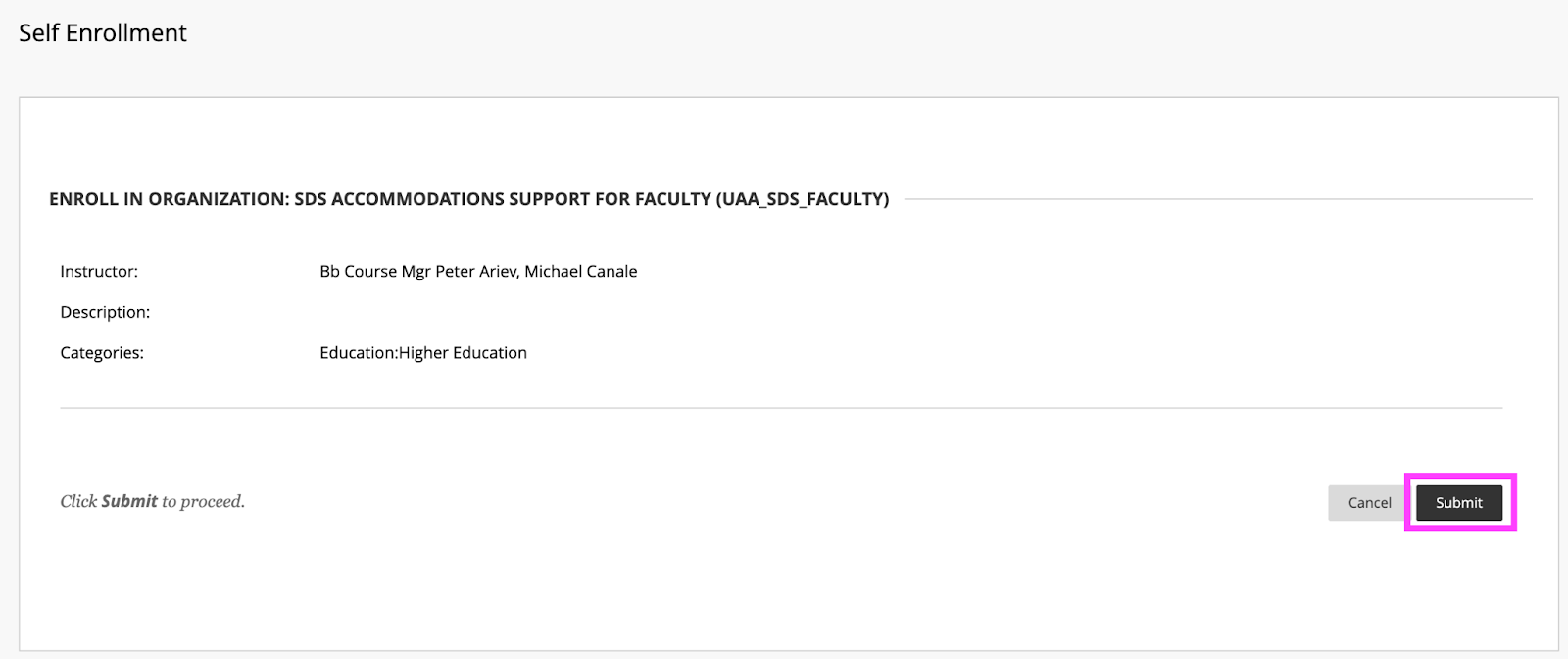
    <div class="html-content"><p><span>DoIT and Student Disability Services hosted a "</span><a href="https://my3.my.umbc.edu/groups/instructional-technology/events/115783" rel="nofollow external" class="bo"><span>Candid Conversation on Enhancing Accessibility</span></a><span>" on March 15th. The session highlighted ways that course accessibility benefits all students and results in inclusive learning and working environments. Student Disability Services and DoIT's Instructional Technology team collaborate to provide resources and support to enhance course accessibility. Proactively designing and teaching a course with accessibility in mind not only supports students with documented accommodations, but also supports </span><a href="https://udlguidelines.cast.org/" rel="nofollow external" class="bo"><span>Universal Design for Learning (UDL)</span></a><span> principles and best practices in course design. In the session panelists shared several key recommendations and resources that are available:</span></p><p><strong><span>Key recommendations for course design and delivery</span></strong></p><ul><li><span>Use </span><a href="https://wiki.umbc.edu/display/faq/Ally" rel="nofollow external" class="bo"><span>Blackboard Ally</span></a><span> to check the accessibility of course content, get guidance on remediating content, and to access alternative formats of course materials.</span></li></ul><ul><li><p><a href="https://help.blackboard.com/Ally/Ally_for_LMS/Instructor/Watch_Videos" rel="nofollow external" class="bo"><span>Videos about Ally</span></a></p></li><li><p><a href="https://wiki.umbc.edu/pages/viewpage.action?pageId=77431280" rel="nofollow external" class="bo"><span>Alternative Formats in Bb Ally</span></a><span> </span></p></li><li><p><a href="https://wiki.umbc.edu/pages/viewpage.action?pageId=77431345" rel="nofollow external" class="bo"><span>Which Alternative Format is Best to Use?</span></a><span> </span></p></li><li><p><span>Student FAQ - </span><a href="https://wiki.umbc.edu/pages/viewpage.action?pageId=77431260" rel="nofollow external" class="bo"><span>How do I download an alt format file generated by Ally? </span></a></p></li></ul><ul><li><span>Use live captioning in online course meetings, either with </span><a href="https://help.webex.com/en-us/article/lzi8h2/Show-or-hide-automated-closed-captions-during-a-Webex-meeting-or-webinar" rel="nofollow external" class="bo"><span>Webex</span></a><span> or </span><a href="https://support.google.com/chrome/answer/10538231?hl=en" rel="nofollow external" class="bo"><span>Google Chrome</span></a><span> browser live captioning enabled.</span></li><li><span>Caption video recordings with automatic captions in </span><a href="https://wiki.umbc.edu/x/pQjBBQ" rel="nofollow external" class="bo"><span>Panopto</span></a><span> or </span><a href="https://wiki.umbc.edu/x/yQ3BBQ" rel="nofollow external" class="bo"><span>VoiceThread</span></a><span>.</span></li><li><a href="https://support.panopto.com/s/article/Batch-Upload-Video-Files" rel="nofollow external" class="bo"><span>Upload a Video</span></a><span> to Panopto</span></li><li><span>Add time limit and due date </span><a href="https://wiki.umbc.edu/x/a4dnB" rel="nofollow external" class="bo"><span>accommodations in Blackboard</span></a><span>.</span></li></ul><p><strong><span><br></span></strong></p><p><strong><span>Accessibility Resources</span></strong></p><p><span>In addition to the tools noted above, the following resources also support accessibility:</span></p><ul><li><span>Create </span><a href="https://wiki.umbc.edu/x/VQjBBQ" rel="nofollow external" class="bo"><span>accessible documents</span></a><span> with Office 365.</span></li><li><span>Review the </span><a href="https://support.google.com/a/answer/1631886?hl=en" rel="nofollow external" class="bo"><span>Google Workspace guide to accessibility</span></a><span>.</span></li><li><span>Explore SDS </span><a href="https://sds.umbc.edu/assistive-technology/" rel="nofollow external" class="bo"><span>assistive technology resources</span></a><span>.</span></li><li><span>Review assistive technology resources available at the</span><a href="http://library.umbc.edu/computers.php#asst" rel="nofollow external" class="bo"><span> AOK Library</span></a><span>.</span></li><li><span>Review </span><a href="https://sds.umbc.edu/resources/information-for-faculty/" rel="nofollow external" class="bo"><span>SDS Information for Faculty</span></a><span>.</span></li></ul><p><strong><span><br></span></strong></p><p><strong><span>Technology Highlight: Class</span></strong></p><p><span>UMBC will be piloting </span><a href="https://www.class.com/higher-ed" rel="nofollow external" class="bo"><span>Class</span></a><span>, a synchronous web conferencing platform built on Zoom's infrastructure. Class provides support for the following:</span></p><ul><li><a href="https://www.class.com/instructor-guide/live-transcription/" rel="nofollow external" class="bo"><span>Live transcription</span></a><span>. All students in a Class session can view captions.</span></li><li><span>Multiple video displays while sharing content, including support for </span><a href="https://www.class.com/support/class/instructor-guide/inviting-a-sign-language-interpreter" rel="nofollow external" class="bo"><span>sign language interpreters</span></a><span> with a dedicated Sign Language Camera.</span></li><li><span>Notes, an upcoming Class feature, will allow students to highlight text from the meeting transcript and add notes.</span></li><li><span>Screen reader compatibility and keyboard navigation.</span></li></ul><div><p><span><br></span></p><p><strong><span>Office of Student Disability Services (SDS)</span><span> </span></strong></p><ul><li><a href="https://sds.umbc.edu/resources/information-for-faculty/" rel="nofollow external" class="bo"><span>Faculty Resources</span></a><span>  </span></li><li><span>Enroll in the SDS Accommodations Support for Faculty Blackboard organization. </span></li></ul><em><span>SDS's </span><span>Accommodations Support for Faculty </span><span>Blackboard organization provides faculty guidance on accessibility in Blackboard, captioning, testing accommodations, and remediating course content.</span></em><blockquote><blockquote><strong><span><br>How to Enroll </span></strong><blockquote><blockquote><blockquote><ol><li><span>Open Blackboard:</span><a href="https://blackboard.umbc.edu" rel="nofollow external" class="bo"><span>https://blackboard.umbc.edu</span></a><span>.</span></li><li><span>Next,</span><a href="https://blackboard.umbc.edu/webapps/blackboard/execute/enrollCourse?context=INMENU&amp;course_id=_68848_1" rel="nofollow external" class="bo"><span> use this link</span></a><span> to self-enroll in the course. </span><span>Note: You must have Blackboard open FIRST before using this self-enroll link or you will encounter an error.</span></li><li><span>Once the self-enroll page loads, click submit to proceed. <img src="https://my3.my.umbc.edu/groups/instructional-technology/posts/131929/attachments/46588" style="max-width: 100%; height: auto;"></span><span>Image 1: Click submit to self-enroll in this training course.</span></li><li><span>On the next page, click OK to confirm enrollment. </span></li><li><span>The course will be immediately available.</span></li></ol></blockquote></blockquote></blockquote></blockquote></blockquote><p><strong><span><br></span></strong></p><p><strong><span>Connect with Student Disability Services</span></strong></p><p><span>Michael Canale</span></p><p><span>Assistant Director, Office of Student Disability Services (SDS)</span></p><p><span><a href="mailto:canale@umbc.edu">canale@umbc.edu</a></span></p><p><a href="https://sds.umbc.edu/" rel="nofollow external" class="bo"><span>Student Disability Services</span></a></p><p><span>Email: </span><a href="mailto:disability@umbc.edu" rel="nofollow external" class="bo"><span>disability@umbc.edu</span></a></p><p><br></p><p><strong><span>Connect with Instructional Technology</span></strong></p><p><span>As always, if you have any questions about teaching, learning, and technology at UMBC, please consider the following options:</span></p><blockquote><ul><li><a href="http://pivot.umbc.edu" rel="nofollow external" class="bo"><span>PIVOT</span></a><span> | </span><a href="https://doit.umbc.edu/itnm/academic-continuity/" rel="nofollow external" class="bo"><span>Academic Continuity</span></a><span> | </span><a href="https://fdc.umbc.edu/teaching/keep-on-teaching/" rel="nofollow external" class="bo"><span>Keep On Teaching</span></a><span> | </span><a href="https://doit.umbc.edu/students" rel="nofollow external" class="bo"><span>Student Technology Resources</span></a></li><li><a href="http://www.umbc.edu/faq" rel="nofollow external" class="bo"><span>Check our extensive FAQ collection</span></a><span> </span></li><li><a href="https://wiki.umbc.edu/x/LohnB" rel="nofollow external" class="bo"><span>What's new in Ultra?</span></a><span> | </span><a href="https://wiki.umbc.edu/x/bwrSAQ" rel="nofollow external" class="bo"><span>Known Issues</span></a><span> </span></li><li><a href="http://my.umbc.edu/go/request-help" rel="nofollow external" class="bo"><span>Open a ticket via RT</span></a></li><li><span>Follow the </span><a href="http://my.umbc.edu/groups/instructional-technology" rel="nofollow external" class="bo"><span>Instructional Technology</span></a><span> &amp; </span><a href="http://my.umbc.edu/groups/doit" rel="nofollow external" class="bo"><span>DoIT</span></a><span> myUMBC groups</span></li><li><a href="http://doit.umbc.edu/itnm/staff/" rel="nofollow external" class="bo"><span>Request a consult</span></a><span> with </span><a href="http://doit.umbc.edu/itnm/staff" rel="nofollow external" class="bo"><span>instructional technology staff</span></a></li></ul></blockquote><p>Image description: virtual meeting showing participants, chat bubble, closed captions icon, and text with a transcript.<br></p><p><span>~ by </span><a href="https://doit.umbc.edu/itnm/staff/abrams/" rel="nofollow external" class="bo"><span>Josh Abrams</span></a><span>, </span><a href="https://doit.umbc.edu/itnm/staff/ariev/" rel="nofollow external" class="bo"><span>Peter Ariev</span></a><span>, and </span><a href="https://sds.umbc.edu/about-us/meet-our-staff/" rel="nofollow external" class="bo"><span>Michael Canale</span></a></p></div></div>
]]>
  </Body>
  <Summary>DoIT and Student Disability Services hosted a "Candid Conversation on Enhancing Accessibility" on March 15th. The session highlighted ways that course accessibility benefits all students and...</Summary>
  <AttachmentKind>Image</AttachmentKind>
  <AttachmentUrl>https://assets1-dev.my.umbc.edu/system/shared/attachments/341bdf845fcbdba96bc542b2eaa001b9/69e826b9/news/000/131/929/ba6be4a2b398df63f57ae0f7e5f330d8/enroll.png?1679575434</AttachmentUrl>
  <Attachments>
    <Attachment kind="Image" url="https://dev.my.umbc.edu/groups/doit/posts/131929/attachments/46588"></Attachment>
  </Attachments>
  <TrackingUrl>https://dev.my.umbc.edu/api/v0/pixel/news/131929/guest@my.umbc.edu/51341d42c2334666a32062d123bdbfa8/api/pixel</TrackingUrl>
  <Tag>abrams</Tag>
  <Tag>accessibility</Tag>
  <Tag>ally</Tag>
  <Tag>alternative-formats</Tag>
  <Tag>ariev</Tag>
  <Tag>canale</Tag>
  <Tag>captions</Tag>
  <Tag>class</Tag>
  <Tag>live-captioning</Tag>
  <Tag>live-captions</Tag>
  <Tag>sds</Tag>
  <Tag>sp23</Tag>
  <Tag>udl</Tag>
  <Group token="instructional-technology">Instructional Technology</Group>
  <GroupUrl>https://dev.my.umbc.edu/groups/instructional-technology</GroupUrl>
  <AvatarUrl>https://assets2-dev.my.umbc.edu/system/shared/avatars/groups/000/001/164/dec3b026b81ee6d890a8f82f75c94a2e/xsmall.png?1446126703</AvatarUrl>
  <AvatarUrl size="original">https://assets1-dev.my.umbc.edu/system/shared/avatars/groups/000/001/164/dec3b026b81ee6d890a8f82f75c94a2e/original.png?1446126703</AvatarUrl>
  <AvatarUrl size="xxlarge">https://assets2-dev.my.umbc.edu/system/shared/avatars/groups/000/001/164/dec3b026b81ee6d890a8f82f75c94a2e/xxlarge.png?1446126703</AvatarUrl>
  <AvatarUrl size="xlarge">https://assets1-dev.my.umbc.edu/system/shared/avatars/groups/000/001/164/dec3b026b81ee6d890a8f82f75c94a2e/xlarge.png?1446126703</AvatarUrl>
  <AvatarUrl size="large">https://assets1-dev.my.umbc.edu/system/shared/avatars/groups/000/001/164/dec3b026b81ee6d890a8f82f75c94a2e/large.png?1446126703</AvatarUrl>
  <AvatarUrl size="medium">https://assets4-dev.my.umbc.edu/system/shared/avatars/groups/000/001/164/dec3b026b81ee6d890a8f82f75c94a2e/medium.png?1446126703</AvatarUrl>
  <AvatarUrl size="small">https://assets3-dev.my.umbc.edu/system/shared/avatars/groups/000/001/164/dec3b026b81ee6d890a8f82f75c94a2e/small.png?1446126703</AvatarUrl>
  <AvatarUrl size="xsmall">https://assets2-dev.my.umbc.edu/system/shared/avatars/groups/000/001/164/dec3b026b81ee6d890a8f82f75c94a2e/xsmall.png?1446126703</AvatarUrl>
  <AvatarUrl size="xxsmall">https://assets3-dev.my.umbc.edu/system/shared/avatars/groups/000/001/164/dec3b026b81ee6d890a8f82f75c94a2e/xxsmall.png?1446126703</AvatarUrl>
  <Sponsor>Instructional Technology</Sponsor>
  <ThumbnailUrl size="xxlarge">https://assets1-dev.my.umbc.edu/system/shared/thumbnails/news/000/131/929/192b4d0b5d09e74e886db795fadd5b81/xxlarge.jpg?1679577443</ThumbnailUrl>
  <ThumbnailUrl size="xlarge">https://assets3-dev.my.umbc.edu/system/shared/thumbnails/news/000/131/929/192b4d0b5d09e74e886db795fadd5b81/xlarge.jpg?1679577443</ThumbnailUrl>
  <ThumbnailUrl size="large">https://assets4-dev.my.umbc.edu/system/shared/thumbnails/news/000/131/929/192b4d0b5d09e74e886db795fadd5b81/large.jpg?1679577443</ThumbnailUrl>
  <ThumbnailUrl size="medium">https://assets3-dev.my.umbc.edu/system/shared/thumbnails/news/000/131/929/192b4d0b5d09e74e886db795fadd5b81/medium.jpg?1679577443</ThumbnailUrl>
  <ThumbnailUrl size="small">https://assets4-dev.my.umbc.edu/system/shared/thumbnails/news/000/131/929/192b4d0b5d09e74e886db795fadd5b81/small.jpg?1679577443</ThumbnailUrl>
  <ThumbnailUrl size="xsmall">https://assets1-dev.my.umbc.edu/system/shared/thumbnails/news/000/131/929/192b4d0b5d09e74e886db795fadd5b81/xsmall.jpg?1679577443</ThumbnailUrl>
  <ThumbnailUrl size="xxsmall">https://assets3-dev.my.umbc.edu/system/shared/thumbnails/news/000/131/929/192b4d0b5d09e74e886db795fadd5b81/xxsmall.jpg?1679577443</ThumbnailUrl>
  <PawCount>9</PawCount>
  <CommentCount>1</CommentCount>
  <CommentsAllowed>true</CommentsAllowed>
  <PostedAt>Mon, 27 Mar 2023 09:17:49 -0400</PostedAt>
</NewsItem>
  <NewsItem contentIssues="true" id="129092" important="false" status="posted" url="https://dev.my.umbc.edu/groups/doit/posts/129092">
  <Title>Accessibility Essentials: Make Online Courses Accessible</Title>
  <Tagline>Design Your Course Content for All Learners</Tagline>
  <Body>
    <![CDATA[
    <div class="html-content"><p><span>UMBC's </span><a href="https://my3.my.umbc.edu/groups/instructional-technology/posts/128323" rel="nofollow external" class="bo"><span>National Distance Learning Week 2022 Lunchtime Series</span></a><span> created space for candid conversations about online learning. The </span><a href="https://my3.my.umbc.edu/groups/instructional-technology/events/111050" rel="nofollow external" class="bo"><span>candid conversation</span></a><span> on Monday, November 7th focused on course design and </span><a href="https://www.qualitymatters.org/" rel="nofollow external" class="bo"><span>Quality Matters</span></a><span>.   </span></p><br><p><span>The </span><a href="http://umbc.box.com/v/QMHEDRubric-6thEd" rel="nofollow external" class="bo"><span>Quality Matters Higher Education Rubric (6th edition)</span></a><span> is a set of 8 General Standards and 42 Specific Review Standards used to evaluate the design of online and blended courses. QM Standards are research-supported and based on published best practices. The rubric's General Standard 8 focuses on course accessibility and usability, and is designed to assess whether "the course design reflects a commitment to accessibility and usability for all learners."</span></p><p><span>Creating and adding content to an online course offers students the opportunity to engage with customized course materials, but may not provide equal access if the content is not accessible. The following content creation best practices promote accessibility so that all learners can access course content.</span></p><p><span><br></span></p><h5><span>Content Accessibility Best Practices</span></h5><br><h6><span>Media</span></h6><ul><li><p><span>Add captions to videos. </span></p></li><li><p><span>Visual information that is critical to meaning should include an audio description.</span></p></li><li><p><a href="https://wiki.umbc.edu/display/faq/Panopto" rel="nofollow external" class="bo"><span>Panopto</span></a><span> and </span><a href="https://wiki.umbc.edu/display/faq/VoiceThread" rel="nofollow external" class="bo"><span>VoiceThread</span></a><span> offer automated captions. Edit and correct automated captions for accuracy.</span></p></li><li><p><span>Add slide presentations in video lectures to Blackboard for student view.</span></p></li></ul><ul><li><p><span>Provide transcripts for audio files.</span></p></li><li><p><span>Audio files can be uploaded to </span><a href="https://wiki.umbc.edu/x/sIOEB" rel="nofollow external" class="bo"><span>Panopto</span></a><span> for automated captioning.</span></p></li></ul><br><h6><span>Images</span></h6><ul><li><p><span>Provide alternative (Alt) text for all images that are not decorative.</span></p></li><li><p><span>Long descriptions may be appropriate for complex illustrations or graphs.</span></p></li><li><p><span>Add alternative text for images embedded in slide presentations, documents, or individual image files.</span></p></li><li><p><span>When adding an image to Blackboard, use the Alt text field to provide a meaningful description of the image. </span></p></li><li><p><span>Add labels to charts, graphs, and illustrations.</span></p></li></ul><br><h6><span>Text</span></h6><ul><li><p><span>Use text heading levels to format text, instead of editing text size or style.</span></p></li><li><p><span>Use heading levels in order (h1, h2, h3, etc).</span></p></li><li><p><span>Avoid using underlined text unless the text is a hyperlink.</span></p></li><li><p><span>Avoid using text color alone to convey meaning.</span></p></li><li><p><span>Color combinations provide sufficient color contrast.</span></p></li></ul><br><h6><span>Links</span></h6><ul><li><p><span>Hyperlinks in text should describe the link destination.</span></p></li><li><p><span>Use "</span><a href="https://my3.my.umbc.edu/groups/instructional-technology/posts/128323" rel="nofollow external" class="bo"><span>National Distance Learning Week Lunchtime Series</span></a><span>" instead of "</span><a href="https://my3.my.umbc.edu/groups/instructional-technology/posts/128323" rel="nofollow external" class="bo"><span>click here</span></a><span>."</span></p></li></ul><br><h6><span>Tables</span></h6><ul><li><p><span>Create tables with column and/or row headers.</span></p></li><li><p><span>Avoid using tables to format a document. Use text heading styles instead.</span></p></li><li><p><span>Create tables using text. Avoid using tables as embedded images. </span></p></li></ul><br><h5><span>What UMBC Resources Support Course Content Accessibility? </span></h5><br><h6><a href="https://wiki.umbc.edu/display/faq/Ally" rel="nofollow external" class="bo"><span>Blackboard Ally</span></a></h6><p><span>Instructors can use Ally to gauge the accessibility of course content.</span></p><ul><li><p><span>Receive feedback on the accessibility of course content through an Ally accessibility report.</span></p></li><li><p><span>Improve content accessibility with Ally's step-by-step instructions.</span></p></li><li><p><span>Create alternative formats for course content.</span></p></li></ul><p><span>Students and instructors can use Ally to</span><a href="https://ally.ac/covid19/" rel="nofollow external" class="bo"> <span>create alternative formats</span></a><span> for course materials. This feature allows students to choose the type of file they want that best suits their needs.</span></p><br><h6><a href="https://sds.umbc.edu/resources/information-for-faculty/" rel="nofollow external" class="bo"><span>SDS Information for Faculty</span></a></h6><p><span>This SDS faculty resource include</span></p><ul><li><p><span>Accessible online/remote teaching resources</span></p></li><li><p><span>UMBC SDS information and tools</span></p></li><li><p><span>Disability Resources for instructors</span></p></li></ul><h6><a href="https://pivot.umbc.edu/course-design/quality-matters/quality-matters-impact/" rel="nofollow external" class="bo"><span>Quality Matters Impact</span></a></h6><p><span>As an extension of the</span><a href="https://doit.umbc.edu/news/post/111756/" rel="nofollow external" class="bo"> <span>award-winning</span></a><a href="https://pivot.umbc.edu/" rel="nofollow external" class="bo"><span>PIVOT program</span></a><span>, the Quality Matters Impact program is a new initiative to formally recognize courses that meet</span><a href="https://www.qualitymatters.org/" rel="nofollow external" class="bo"> <span>Quality Matters</span></a><span> standards and demonstrate exemplary online/hybrid course design.</span></p><br><h6><a href="https://doit.umbc.edu/itnm/staff/" rel="nofollow external" class="bo"><span>UMBC Instructional Technology</span></a></h6><p><span>As always, if you have any questions about teaching, learning, and technology at UMBC, please consider the following options:</span></p><ul><li><p><a href="http://pivot.umbc.edu/" rel="nofollow external" class="bo"><span>PIVOT</span></a><span> |</span><a href="https://doit.umbc.edu/itnm/academic-continuity/" rel="nofollow external" class="bo"><span>Academic Continuity</span></a><span> |</span><a href="https://fdc.umbc.edu/teaching/keep-on-teaching/" rel="nofollow external" class="bo"><span>Keep On Teaching</span></a><span> |</span><a href="https://doit.umbc.edu/students" rel="nofollow external" class="bo"><span>Student Technology Resources</span></a></p></li><li><p><a href="http://www.umbc.edu/faq" rel="nofollow external" class="bo"><span>Check our extensive FAQ collection</span></a><span> </span></p></li><ul><li><p><a href="https://wiki.umbc.edu/x/LohnB" rel="nofollow external" class="bo"><span>What's new in Ultra?</span></a><span> |</span><a href="https://wiki.umbc.edu/x/bwrSAQ" rel="nofollow external" class="bo"><span>Known Issues</span></a><span> </span></p></li></ul><li><p><a href="http://my.umbc.edu/go/request-help" rel="nofollow external" class="bo"><span>Open a ticket via RT</span></a></p></li><li><p><span>Follow the</span><a href="http://my.umbc.edu/groups/instructional-technology" rel="nofollow external" class="bo"><span>Instructional Technology</span></a><span> &amp;</span><a href="http://my.umbc.edu/groups/doit" rel="nofollow external" class="bo"><span>DoIT</span></a><span> myUMBC groups</span></p></li><li><p><a href="http://doit.umbc.edu/itnm/staff/" rel="nofollow external" class="bo"><span>Request a consult</span></a><span> with</span><a href="http://doit.umbc.edu/itnm/staff" rel="nofollow external" class="bo"><span>instructional technology staff</span></a></p></li></ul><br><div><span>Content accessibility best practices adapted with permission from University of Maryland IT Accessibility's </span><a href="https://docs.google.com/document/d/1iCpxa6ZhjHVFUKOK9a8hUUzV_qgJ4HYs/edit?usp=sharing&amp;ouid=110018288385796905935&amp;rtpof=true&amp;sd=true" rel="nofollow external" class="bo"><span>DIY Six Essential Steps</span></a><span>.</span></div><div><span><br></span></div><div><span>myUMBC post image: 2022 National Distance Learning Week Logo<br></span></div></div>
]]>
  </Body>
  <Summary>UMBC's National Distance Learning Week 2022 Lunchtime Series created space for candid conversations about online learning. The candid conversation on Monday, November 7th focused on course design...</Summary>
  <Website>https://my3.my.umbc.edu/groups/instructional-technology/posts/129092/</Website>
  <TrackingUrl>https://dev.my.umbc.edu/api/v0/pixel/news/129092/guest@my.umbc.edu/b1550d314452d9a420425dbe7a6d82a0/api/pixel</TrackingUrl>
  <Tag>accessibility</Tag>
  <Tag>ndlw</Tag>
  <Tag>online-learning</Tag>
  <Group token="instructional-technology">Instructional Technology</Group>
  <GroupUrl>https://dev.my.umbc.edu/groups/instructional-technology</GroupUrl>
  <AvatarUrl>https://assets2-dev.my.umbc.edu/system/shared/avatars/groups/000/001/164/dec3b026b81ee6d890a8f82f75c94a2e/xsmall.png?1446126703</AvatarUrl>
  <AvatarUrl size="original">https://assets1-dev.my.umbc.edu/system/shared/avatars/groups/000/001/164/dec3b026b81ee6d890a8f82f75c94a2e/original.png?1446126703</AvatarUrl>
  <AvatarUrl size="xxlarge">https://assets2-dev.my.umbc.edu/system/shared/avatars/groups/000/001/164/dec3b026b81ee6d890a8f82f75c94a2e/xxlarge.png?1446126703</AvatarUrl>
  <AvatarUrl size="xlarge">https://assets1-dev.my.umbc.edu/system/shared/avatars/groups/000/001/164/dec3b026b81ee6d890a8f82f75c94a2e/xlarge.png?1446126703</AvatarUrl>
  <AvatarUrl size="large">https://assets1-dev.my.umbc.edu/system/shared/avatars/groups/000/001/164/dec3b026b81ee6d890a8f82f75c94a2e/large.png?1446126703</AvatarUrl>
  <AvatarUrl size="medium">https://assets4-dev.my.umbc.edu/system/shared/avatars/groups/000/001/164/dec3b026b81ee6d890a8f82f75c94a2e/medium.png?1446126703</AvatarUrl>
  <AvatarUrl size="small">https://assets3-dev.my.umbc.edu/system/shared/avatars/groups/000/001/164/dec3b026b81ee6d890a8f82f75c94a2e/small.png?1446126703</AvatarUrl>
  <AvatarUrl size="xsmall">https://assets2-dev.my.umbc.edu/system/shared/avatars/groups/000/001/164/dec3b026b81ee6d890a8f82f75c94a2e/xsmall.png?1446126703</AvatarUrl>
  <AvatarUrl size="xxsmall">https://assets3-dev.my.umbc.edu/system/shared/avatars/groups/000/001/164/dec3b026b81ee6d890a8f82f75c94a2e/xxsmall.png?1446126703</AvatarUrl>
  <Sponsor>Instructional Technology</Sponsor>
  <ThumbnailUrl size="xxlarge">https://assets3-dev.my.umbc.edu/system/shared/thumbnails/news/000/129/092/ca2751165d7683a412e740bae34a3d6a/xxlarge.jpg?1668110929</ThumbnailUrl>
  <ThumbnailUrl size="xlarge">https://assets3-dev.my.umbc.edu/system/shared/thumbnails/news/000/129/092/ca2751165d7683a412e740bae34a3d6a/xlarge.jpg?1668110929</ThumbnailUrl>
  <ThumbnailUrl size="large">https://assets1-dev.my.umbc.edu/system/shared/thumbnails/news/000/129/092/ca2751165d7683a412e740bae34a3d6a/large.jpg?1668110929</ThumbnailUrl>
  <ThumbnailUrl size="medium">https://assets3-dev.my.umbc.edu/system/shared/thumbnails/news/000/129/092/ca2751165d7683a412e740bae34a3d6a/medium.jpg?1668110929</ThumbnailUrl>
  <ThumbnailUrl size="small">https://assets2-dev.my.umbc.edu/system/shared/thumbnails/news/000/129/092/ca2751165d7683a412e740bae34a3d6a/small.jpg?1668110929</ThumbnailUrl>
  <ThumbnailUrl size="xsmall">https://assets4-dev.my.umbc.edu/system/shared/thumbnails/news/000/129/092/ca2751165d7683a412e740bae34a3d6a/xsmall.jpg?1668110929</ThumbnailUrl>
  <ThumbnailUrl size="xxsmall">https://assets2-dev.my.umbc.edu/system/shared/thumbnails/news/000/129/092/ca2751165d7683a412e740bae34a3d6a/xxsmall.jpg?1668110929</ThumbnailUrl>
  <PawCount>4</PawCount>
  <CommentCount>0</CommentCount>
  <CommentsAllowed>true</CommentsAllowed>
  <PostedAt>Thu, 10 Nov 2022 15:16:25 -0500</PostedAt>
  <EditAt>Mon, 14 Nov 2022 14:26:17 -0500</EditAt>
</NewsItem>
  <NewsItem contentIssues="true" id="118750" important="false" status="posted" url="https://dev.my.umbc.edu/groups/doit/posts/118750">
    <Title>Generate &amp; embed captions for Collaborate recordings in May</Title>
    <Tagline>Support accessibility for recorded sessions in your classes</Tagline>
    <Body>
      <![CDATA[
          <div class="html-content"><div><div><span>Creating captioning for recordings from scratch can be very time consuming for instructors or accessibility staff.</span><span> Beginning in May 2022, i</span>nstructors can leverage the help of artificial intelligence to improve the accessibility of their Collaborate recordings <a href="https://wiki.umbc.edu/x/ywFjBw" rel="nofollow external" class="bo">with captioning</a>.  </div><div><br></div><div>With this feature, <a href="https://my3.my.umbc.edu/groups/instructional-technology/posts/102527" rel="nofollow external" class="bo">piloted last summer</a> by UMBC, Collaborate <a href="https://wiki.umbc.edu/x/ywFjBw" rel="nofollow external" class="bo">creates recording captions</a> based on speech to text recognition technology. After a live session concludes, an instructor can <a href="https://wiki.umbc.edu/x/ywFjBw" rel="nofollow external" class="bo">generate the captions for a recording</a>, which can be reviewed, <a href="https://wiki.umbc.edu/pages/viewpage.action?pageId=74973427#HowdoIaddcaptionstoaCollaboraterecording?-upload" rel="nofollow external" class="bo">downloaded, and edited</a> if necessary. Captions immediately appear in the Collaborate player for anyone <a href="https://wiki.umbc.edu/x/ZwAxAg" rel="nofollow external" class="bo">who has access to the recording</a>.</div><div><br></div><div><div>Captions are a valuable instructional resource, improving the accessibility of content for individuals who are deaf or hearing impaired. Moreover, students gain new opportunities to access information in ways they need or want it, thanks to captions. For example:</div><div><ul><li><span>Anyone working in a noisy environment can read captions.</span></li><li><span>Non-native speakers can read captions to reinforce their understanding.</span></li><li><span>Students learning to read can follow along with the speaker.</span></li><li><span>Students can see the spelling of terms that will be on a test.</span></li></ul></div><div>In Collaborate, the <a href="https://wiki.umbc.edu/x/ywFjBw" rel="nofollow external" class="bo">recording transcription feature is enabled</a> by the instructor through the recording settings page for the session. Please <a href="https://wiki.umbc.edu/x/ywFjBw" rel="nofollow external" class="bo">review this FAQ</a> for step by step instructions.</div><div><div><br></div></div></div><div><span>As always, if you have any questions about teaching, learning, and technology at UMBC, please consider the following options:</span></div></div><div><ul><li><span><a href="http://pivot.umbc.edu" rel="nofollow external" class="bo">PIVOT</a> | <a href="https://doit.umbc.edu/itnm/academic-continuity/" rel="nofollow external" class="bo">Academic Continuity</a></span><span> </span><span>|</span><span> </span><span><a href="https://fdc.umbc.edu/teaching/keep-on-teaching/" rel="nofollow external" class="bo">Keep On Teaching</a></span><span> </span><span>|</span><span> </span><span><a href="https://doit.umbc.edu/students" rel="nofollow external" class="bo">Student Technology Resources</a></span></li><li><a href="http://www.umbc.edu/faq" rel="nofollow external" class="bo">Check our extensive FAQ collection</a><span> </span></li><ul><li><span><a href="https://wiki.umbc.edu/x/LohnB" rel="nofollow external" class="bo"><span>What's new in Ultra?</span></a><span> </span><span>|</span><span> </span><a href="https://wiki.umbc.edu/x/bwrSAQ" rel="nofollow external" class="bo"><span>Known Issues</span></a><span> </span></span></li></ul><li><span><a href="http://my.umbc.edu/go/request-help" rel="nofollow external" class="bo">Open a ticket via RT</a></span></li><li><span>Follow the </span><a href="http://my.umbc.edu/groups/instructional-technology" rel="nofollow external" class="bo">Instructional Technology</a><span> &amp; </span><a href="http://my.umbc.edu/groups/doit" rel="nofollow external" class="bo">DoIT</a><span> myUMBC groups</span></li><li><a href="http://doit.umbc.edu/itnm/staff/" rel="nofollow external" class="bo">Request a consult</a><span> with instructional technology staff</span></li></ul></div></div>
      ]]>
    </Body>
    <Summary>Creating captioning for recordings from scratch can be very time consuming for instructors or accessibility staff. Beginning in May 2022, instructors can leverage the help of artificial...</Summary>
    <Website>https://my3.my.umbc.edu/groups/instructional-technology/posts/118750</Website>
    <TrackingUrl>https://dev.my.umbc.edu/api/v0/pixel/news/118750/guest@my.umbc.edu/2b5bbd3b54a474f0b682c4d7905b4551/api/pixel</TrackingUrl>
    <Tag>accessibility</Tag>
    <Tag>captioning</Tag>
    <Tag>collaborate</Tag>
    <Tag>online-learning</Tag>
    <Tag>sp2022</Tag>
    <Tag>ultra-update</Tag>
    <Group token="instructional-technology">Instructional Technology</Group>
    <GroupUrl>https://dev.my.umbc.edu/groups/instructional-technology</GroupUrl>
    <AvatarUrl>https://assets2-dev.my.umbc.edu/system/shared/avatars/groups/000/001/164/dec3b026b81ee6d890a8f82f75c94a2e/xsmall.png?1446126703</AvatarUrl>
    <AvatarUrl size="original">https://assets1-dev.my.umbc.edu/system/shared/avatars/groups/000/001/164/dec3b026b81ee6d890a8f82f75c94a2e/original.png?1446126703</AvatarUrl>
    <AvatarUrl size="xxlarge">https://assets2-dev.my.umbc.edu/system/shared/avatars/groups/000/001/164/dec3b026b81ee6d890a8f82f75c94a2e/xxlarge.png?1446126703</AvatarUrl>
    <AvatarUrl size="xlarge">https://assets1-dev.my.umbc.edu/system/shared/avatars/groups/000/001/164/dec3b026b81ee6d890a8f82f75c94a2e/xlarge.png?1446126703</AvatarUrl>
    <AvatarUrl size="large">https://assets1-dev.my.umbc.edu/system/shared/avatars/groups/000/001/164/dec3b026b81ee6d890a8f82f75c94a2e/large.png?1446126703</AvatarUrl>
    <AvatarUrl size="medium">https://assets4-dev.my.umbc.edu/system/shared/avatars/groups/000/001/164/dec3b026b81ee6d890a8f82f75c94a2e/medium.png?1446126703</AvatarUrl>
    <AvatarUrl size="small">https://assets3-dev.my.umbc.edu/system/shared/avatars/groups/000/001/164/dec3b026b81ee6d890a8f82f75c94a2e/small.png?1446126703</AvatarUrl>
    <AvatarUrl size="xsmall">https://assets2-dev.my.umbc.edu/system/shared/avatars/groups/000/001/164/dec3b026b81ee6d890a8f82f75c94a2e/xsmall.png?1446126703</AvatarUrl>
    <AvatarUrl size="xxsmall">https://assets3-dev.my.umbc.edu/system/shared/avatars/groups/000/001/164/dec3b026b81ee6d890a8f82f75c94a2e/xxsmall.png?1446126703</AvatarUrl>
    <Sponsor>Instructional Technology</Sponsor>
    <ThumbnailUrl size="xxlarge">https://assets2-dev.my.umbc.edu/system/shared/thumbnails/news/000/118/750/790b53eee2d338872de855d18e755c98/xxlarge.jpg?1650458829</ThumbnailUrl>
    <ThumbnailUrl size="xlarge">https://assets3-dev.my.umbc.edu/system/shared/thumbnails/news/000/118/750/790b53eee2d338872de855d18e755c98/xlarge.jpg?1650458829</ThumbnailUrl>
    <ThumbnailUrl size="large">https://assets1-dev.my.umbc.edu/system/shared/thumbnails/news/000/118/750/790b53eee2d338872de855d18e755c98/large.jpg?1650458829</ThumbnailUrl>
    <ThumbnailUrl size="medium">https://assets3-dev.my.umbc.edu/system/shared/thumbnails/news/000/118/750/790b53eee2d338872de855d18e755c98/medium.jpg?1650458829</ThumbnailUrl>
    <ThumbnailUrl size="small">https://assets3-dev.my.umbc.edu/system/shared/thumbnails/news/000/118/750/790b53eee2d338872de855d18e755c98/small.jpg?1650458829</ThumbnailUrl>
    <ThumbnailUrl size="xsmall">https://assets4-dev.my.umbc.edu/system/shared/thumbnails/news/000/118/750/790b53eee2d338872de855d18e755c98/xsmall.jpg?1650458829</ThumbnailUrl>
    <ThumbnailUrl size="xxsmall">https://assets1-dev.my.umbc.edu/system/shared/thumbnails/news/000/118/750/790b53eee2d338872de855d18e755c98/xxsmall.jpg?1650458829</ThumbnailUrl>
    <PawCount>3</PawCount>
    <CommentCount>0</CommentCount>
    <CommentsAllowed>true</CommentsAllowed>
    <PostedAt>Mon, 02 May 2022 08:22:22 -0400</PostedAt>
  </NewsItem>
  <NewsItem contentIssues="true" id="102527" important="false" status="posted" url="https://dev.my.umbc.edu/groups/doit/posts/102527">
    <Title>UMBC to pilot Collaborate automated transcription recording</Title>
    <Tagline>Pilot will take place during summer session through 9/15</Tagline>
    <Body>
      <![CDATA[
          <div class="html-content"><div><strong>Update @ 10/1</strong>: The pilot has concluded.</div><div><br></div><div>In partnership with Blackboard, UMBC will pilot a recording transcription feature in the Collaborate web conferencing platform this summer. This feature will be available from July 15 - September 15, 2021. </div><div><br></div><div>Captions improve the accessibility of content for individuals who are deaf or hearing impaired. However, captions with videos offer opportunities for students to access the information in ways they need or want it. </div><div><ul><li><span>Anyone working in a noisy environment can read captions.</span></li><li><span>Non-native speakers can read captions to reinforce their understanding.</span></li><li><span>Students learning to read can follow along with the speaker.</span></li><li><span>Students can see the spelling of terms that will be on a test.</span></li></ul></div><div>In Collaborate, the recording transcription feature is triggered by the instructor through the recording settings page for the session. Please <a href="https://wiki.umbc.edu/x/ywFjBw" rel="nofollow external" class="bo">review this FAQ</a> for step by step instructions.</div><div><div><br></div><div><span>Collaborate leverages AI powered speech to text recognition to generate a transcription of what is said during the session.</span><span> </span>After the captions are created, captions are available from the recording list. The captions also immediately appear in the recording player for anybody having access to the recording. <span>As with Panopto, if you want to improve or correct anything in the captions, you can </span><a href="https://wiki.umbc.edu/pages/viewpage.action?pageId=74973427#HowdoIaddcaptionstoaCollaboraterecording?-upload" rel="nofollow external" class="bo">download the caption file</a><span> to edit and replace it.</span></div><div><br></div><div>During the pilot, Blackboard would like to gather feedback from faculty who use the feature. Surveys will be distributed to faculty who use Collaborate recordings during the pilot. Please share your thoughts as this feedback is important to improving the feature for all future users. </div></div><div><br></div><div><div><span>As always, if you have any questions about teaching, learning, and technology at UMBC, please consider the following options:</span></div></div><div><ul><li><span><a href="http://pivot.umbc.edu" rel="nofollow external" class="bo">PIVOT</a> | <a href="https://doit.umbc.edu/itnm/academic-continuity/" rel="nofollow external" class="bo">Academic Continuity</a></span><span> </span><span>|</span><span> </span><span><a href="https://fdc.umbc.edu/teaching/keep-on-teaching/" rel="nofollow external" class="bo">Keep On Teaching</a></span><span> </span><span>|</span><span> </span><span><a href="https://doit.umbc.edu/students" rel="nofollow external" class="bo">Student Technology Resources</a></span></li><li><a href="http://www.umbc.edu/faq" rel="nofollow external" class="bo">Check our extensive FAQ collection</a><span> </span></li><ul><li><span><a href="https://wiki.umbc.edu/x/LohnB" rel="nofollow external" class="bo"><span>What’s new in Ultra?</span></a><span> </span><span>|</span><span> </span><a href="https://wiki.umbc.edu/x/bwrSAQ" rel="nofollow external" class="bo"><span>Known Issues</span></a><span> </span></span></li></ul><li><span><a href="http://my.umbc.edu/go/request-help" rel="nofollow external" class="bo">Open a ticket via RT</a></span></li><li><span>Follow the </span><a href="http://my.umbc.edu/groups/instructional-technology" rel="nofollow external" class="bo">Instructional Technology</a><span> &amp; </span><a href="http://my.umbc.edu/groups/doit" rel="nofollow external" class="bo">DoIT</a><span> myUMBC groups</span></li><li><a href="http://doit.umbc.edu/itnm/staff/" rel="nofollow external" class="bo">Request a consult</a><span> with instructional technology staff</span></li></ul></div></div>
      ]]>
    </Body>
    <Summary>Update @ 10/1: The pilot has concluded.     In partnership with Blackboard, UMBC will pilot a recording transcription feature in the Collaborate web conferencing platform this summer. This feature...</Summary>
    <Website>https://my3.my.umbc.edu/groups/instructional-technology/posts/102527</Website>
    <TrackingUrl>https://dev.my.umbc.edu/api/v0/pixel/news/102527/guest@my.umbc.edu/8f00f1023526969e98ed82864317e0f6/api/pixel</TrackingUrl>
    <Tag>accessibility</Tag>
    <Tag>collaborate</Tag>
    <Tag>gallery-view</Tag>
    <Tag>online-learning</Tag>
    <Tag>pilot</Tag>
    <Group token="instructional-technology">Instructional Technology</Group>
    <GroupUrl>https://dev.my.umbc.edu/groups/instructional-technology</GroupUrl>
    <AvatarUrl>https://assets2-dev.my.umbc.edu/system/shared/avatars/groups/000/001/164/dec3b026b81ee6d890a8f82f75c94a2e/xsmall.png?1446126703</AvatarUrl>
    <AvatarUrl size="original">https://assets1-dev.my.umbc.edu/system/shared/avatars/groups/000/001/164/dec3b026b81ee6d890a8f82f75c94a2e/original.png?1446126703</AvatarUrl>
    <AvatarUrl size="xxlarge">https://assets2-dev.my.umbc.edu/system/shared/avatars/groups/000/001/164/dec3b026b81ee6d890a8f82f75c94a2e/xxlarge.png?1446126703</AvatarUrl>
    <AvatarUrl size="xlarge">https://assets1-dev.my.umbc.edu/system/shared/avatars/groups/000/001/164/dec3b026b81ee6d890a8f82f75c94a2e/xlarge.png?1446126703</AvatarUrl>
    <AvatarUrl size="large">https://assets1-dev.my.umbc.edu/system/shared/avatars/groups/000/001/164/dec3b026b81ee6d890a8f82f75c94a2e/large.png?1446126703</AvatarUrl>
    <AvatarUrl size="medium">https://assets4-dev.my.umbc.edu/system/shared/avatars/groups/000/001/164/dec3b026b81ee6d890a8f82f75c94a2e/medium.png?1446126703</AvatarUrl>
    <AvatarUrl size="small">https://assets3-dev.my.umbc.edu/system/shared/avatars/groups/000/001/164/dec3b026b81ee6d890a8f82f75c94a2e/small.png?1446126703</AvatarUrl>
    <AvatarUrl size="xsmall">https://assets2-dev.my.umbc.edu/system/shared/avatars/groups/000/001/164/dec3b026b81ee6d890a8f82f75c94a2e/xsmall.png?1446126703</AvatarUrl>
    <AvatarUrl size="xxsmall">https://assets3-dev.my.umbc.edu/system/shared/avatars/groups/000/001/164/dec3b026b81ee6d890a8f82f75c94a2e/xxsmall.png?1446126703</AvatarUrl>
    <Sponsor>Instructional Technology</Sponsor>
    <ThumbnailUrl size="xxlarge">https://assets3-dev.my.umbc.edu/system/shared/thumbnails/news/000/102/527/d335be4d76a99de9aee977ab108794ea/xxlarge.jpg?1625862626</ThumbnailUrl>
    <ThumbnailUrl size="xlarge">https://assets2-dev.my.umbc.edu/system/shared/thumbnails/news/000/102/527/d335be4d76a99de9aee977ab108794ea/xlarge.jpg?1625862626</ThumbnailUrl>
    <ThumbnailUrl size="large">https://assets1-dev.my.umbc.edu/system/shared/thumbnails/news/000/102/527/d335be4d76a99de9aee977ab108794ea/large.jpg?1625862626</ThumbnailUrl>
    <ThumbnailUrl size="medium">https://assets1-dev.my.umbc.edu/system/shared/thumbnails/news/000/102/527/d335be4d76a99de9aee977ab108794ea/medium.jpg?1625862626</ThumbnailUrl>
    <ThumbnailUrl size="small">https://assets1-dev.my.umbc.edu/system/shared/thumbnails/news/000/102/527/d335be4d76a99de9aee977ab108794ea/small.jpg?1625862626</ThumbnailUrl>
    <ThumbnailUrl size="xsmall">https://assets3-dev.my.umbc.edu/system/shared/thumbnails/news/000/102/527/d335be4d76a99de9aee977ab108794ea/xsmall.jpg?1625862626</ThumbnailUrl>
    <ThumbnailUrl size="xxsmall">https://assets1-dev.my.umbc.edu/system/shared/thumbnails/news/000/102/527/d335be4d76a99de9aee977ab108794ea/xxsmall.jpg?1625862626</ThumbnailUrl>
    <PawCount>3</PawCount>
    <CommentCount>0</CommentCount>
    <CommentsAllowed>true</CommentsAllowed>
    <PostedAt>Mon, 12 Jul 2021 08:09:26 -0400</PostedAt>
    <EditAt>Tue, 12 Oct 2021 16:51:05 -0400</EditAt>
  </NewsItem>
  <NewsItem contentIssues="true" id="101287" important="false" status="posted" url="https://dev.my.umbc.edu/groups/doit/posts/101287">
  <Title>End of Semester Sprint Offers Customized Consults to Faculty</Title>
  <Tagline>Two Sprints. One Day. Choose your time &amp; topic.</Tagline>
  <Body>
    <![CDATA[
    <div class="html-content">The end of semester is a busy time of year for everyone, especially faculty. Instructional Technology will host two 2-hour sprint sessions on Thursday, May 13, 2021 for faculty to virtually drop-in and receive a shared consult on key topics including: <div><ul><li>Recording &amp; sharing videos with Panopto: Flip your classroom &amp; prepare lectures. </li><li>Building online community: Schedule, deliver &amp; record virtual classes with Collaborate. </li><li>Delivering &amp; configuring virtual tests: Create online tests and promote academic integrity in online testing using Bb and Respondus Lockdown Browser. </li><li>Tuning up your Blackboard gradebook: Create columns, drop scores, check calculations, verify weighted totals, etc. </li></ul></div><div>The May 13th sprint will occur in two time slots to accommodate varied schedules. </div><div><br></div><div><a href="https://my3.my.umbc.edu/groups/instructional-technology/events/93539" rel="nofollow external" class="bo">Morning Sprint - 9 AM - 11 AM</a> </div><div><span><a href="https://my3.my.umbc.edu/groups/instructional-technology/events/93540" rel="nofollow external" class="bo">Afternoon Sprint - 1 PM - 3 PM </a></span></div><div><span><br></span></div><div><span>The virtual drop-in will take place in a Blackboard Collaborate virtual conference room. Please view either the <a href="https://my3.my.umbc.edu/groups/instructional-technology/events/93539" rel="nofollow external" class="bo">Morning Sprint</a> or <a href="https://my3.my.umbc.edu/groups/instructional-technology/events/93540" rel="nofollow external" class="bo">Afternoon Sprint</a> myUMBC events and join the session by clicking the "Join Online Event" button at the top of the event page. </span></div><div><span><br></span></div><div><p><span><strong>Prior to the sprint</strong></span></p><div><ol><li>For the best viewing experience, we recommend using Chrome or Firefox, preferably the most recent updates to those browsers. Closing any unnecessary browser tabs will help conserve your bandwidth.<br> </li><li>If this is your first time joining one of our webinars, please review <a href="https://help.blackboard.com/Collaborate/Ultra/Participant/Get_Started" rel="nofollow external" class="bo">the Bb Getting Started Guide</a> or our <a href="https://wiki.umbc.edu/display/faq/Quick+Start+Guide+for+All+Users" rel="nofollow external" class="bo">Quick Start Guide for All Users</a>. You will also find additional helpful information for using Blackboard Collaborate at <a href="https://wiki.umbc.edu/display/faq/Blackboard+Collaborate" rel="nofollow external" class="bo">our extensive FAQs</a>.<br> </li><li>After joining the session, please <a href="https://help.blackboard.com/Collaborate/Ultra/Participant/Participate_in_Sessions/Audio_and_Video" rel="nofollow external" class="bo">configure your audio</a>. Having trouble accessing Collaborate? Please see our Troubleshooting <a href="https://wiki.umbc.edu/display/faq/Troubleshooting+Audio+Problems+in+Collaborate" rel="nofollow external" class="bo">Audio Problems</a> or <a href="https://wiki.umbc.edu/display/faq/Troubleshooting+Networking+Issues+for+Collaborate" rel="nofollow external" class="bo">Networking Issues</a> for Collaborate guides.</li></ol></div><p><span><span><em>Please note that this is not formal training.</em></span></span></p></div></div>
]]>
  </Body>
  <Summary>The end of semester is a busy time of year for everyone, especially faculty. Instructional Technology will host two 2-hour sprint sessions on Thursday, May 13, 2021 for faculty to virtually...</Summary>
  <Website>https://my3.my.umbc.edu/groups/instructional-technology/posts/101287</Website>
  <TrackingUrl>https://dev.my.umbc.edu/api/v0/pixel/news/101287/guest@my.umbc.edu/86fb4989de945f7e0abaada80cccc5a2/api/pixel</TrackingUrl>
  <Tag>accessibility</Tag>
  <Tag>assessment</Tag>
  <Tag>collaborate</Tag>
  <Tag>consult</Tag>
  <Tag>end-of-semester-sprint</Tag>
  <Tag>gradebook</Tag>
  <Tag>online-learning</Tag>
  <Tag>panopto</Tag>
  <Tag>sp2021</Tag>
  <Tag>sprint</Tag>
  <Tag>ultra</Tag>
  <Tag>walk-in</Tag>
  <Group token="instructional-technology">Instructional Technology</Group>
  <GroupUrl>https://dev.my.umbc.edu/groups/instructional-technology</GroupUrl>
  <AvatarUrl>https://assets2-dev.my.umbc.edu/system/shared/avatars/groups/000/001/164/dec3b026b81ee6d890a8f82f75c94a2e/xsmall.png?1446126703</AvatarUrl>
  <AvatarUrl size="original">https://assets1-dev.my.umbc.edu/system/shared/avatars/groups/000/001/164/dec3b026b81ee6d890a8f82f75c94a2e/original.png?1446126703</AvatarUrl>
  <AvatarUrl size="xxlarge">https://assets2-dev.my.umbc.edu/system/shared/avatars/groups/000/001/164/dec3b026b81ee6d890a8f82f75c94a2e/xxlarge.png?1446126703</AvatarUrl>
  <AvatarUrl size="xlarge">https://assets1-dev.my.umbc.edu/system/shared/avatars/groups/000/001/164/dec3b026b81ee6d890a8f82f75c94a2e/xlarge.png?1446126703</AvatarUrl>
  <AvatarUrl size="large">https://assets1-dev.my.umbc.edu/system/shared/avatars/groups/000/001/164/dec3b026b81ee6d890a8f82f75c94a2e/large.png?1446126703</AvatarUrl>
  <AvatarUrl size="medium">https://assets4-dev.my.umbc.edu/system/shared/avatars/groups/000/001/164/dec3b026b81ee6d890a8f82f75c94a2e/medium.png?1446126703</AvatarUrl>
  <AvatarUrl size="small">https://assets3-dev.my.umbc.edu/system/shared/avatars/groups/000/001/164/dec3b026b81ee6d890a8f82f75c94a2e/small.png?1446126703</AvatarUrl>
  <AvatarUrl size="xsmall">https://assets2-dev.my.umbc.edu/system/shared/avatars/groups/000/001/164/dec3b026b81ee6d890a8f82f75c94a2e/xsmall.png?1446126703</AvatarUrl>
  <AvatarUrl size="xxsmall">https://assets3-dev.my.umbc.edu/system/shared/avatars/groups/000/001/164/dec3b026b81ee6d890a8f82f75c94a2e/xxsmall.png?1446126703</AvatarUrl>
  <Sponsor>Instructional Technology</Sponsor>
  <ThumbnailUrl size="xxlarge">https://assets1-dev.my.umbc.edu/system/shared/thumbnails/news/000/101/287/8cfca10be511e5580fe05201d0efa06d/xxlarge.jpg?1619536973</ThumbnailUrl>
  <ThumbnailUrl size="xlarge">https://assets4-dev.my.umbc.edu/system/shared/thumbnails/news/000/101/287/8cfca10be511e5580fe05201d0efa06d/xlarge.jpg?1619536973</ThumbnailUrl>
  <ThumbnailUrl size="large">https://assets4-dev.my.umbc.edu/system/shared/thumbnails/news/000/101/287/8cfca10be511e5580fe05201d0efa06d/large.jpg?1619536973</ThumbnailUrl>
  <ThumbnailUrl size="medium">https://assets4-dev.my.umbc.edu/system/shared/thumbnails/news/000/101/287/8cfca10be511e5580fe05201d0efa06d/medium.jpg?1619536973</ThumbnailUrl>
  <ThumbnailUrl size="small">https://assets3-dev.my.umbc.edu/system/shared/thumbnails/news/000/101/287/8cfca10be511e5580fe05201d0efa06d/small.jpg?1619536973</ThumbnailUrl>
  <ThumbnailUrl size="xsmall">https://assets3-dev.my.umbc.edu/system/shared/thumbnails/news/000/101/287/8cfca10be511e5580fe05201d0efa06d/xsmall.jpg?1619536973</ThumbnailUrl>
  <ThumbnailUrl size="xxsmall">https://assets2-dev.my.umbc.edu/system/shared/thumbnails/news/000/101/287/8cfca10be511e5580fe05201d0efa06d/xxsmall.jpg?1619536973</ThumbnailUrl>
  <PawCount>1</PawCount>
  <CommentCount>0</CommentCount>
  <CommentsAllowed>true</CommentsAllowed>
  <PostedAt>Tue, 27 Apr 2021 11:37:29 -0400</PostedAt>
  <EditAt>Tue, 27 Apr 2021 16:37:18 -0400</EditAt>
</NewsItem>
  <NewsItem contentIssues="true" id="99603" important="false" status="posted" url="https://dev.my.umbc.edu/groups/doit/posts/99603">
  <Title>Free Virtual Conference: UMD Disability Summit, April 12-14</Title>
  <Tagline>Access and Crisis: Disability and the Collapse of Everything</Tagline>
  <Body>
    <![CDATA[
    <div class="html-content"><p><span>In the wake of the 30th Anniversary of the Americans with Disabilities Act many are questioning how to continue to carry this energy forward. How can we foreground access in crisis? There are many skills that we need to carry into the "new normal" which must center intersectional applications of racial and disability justice. <br></span></p><p><span>The <a href="https://pcdi.umd.edu/summit-home" rel="nofollow external" class="bo">4th University of Maryland (UMD) Disability Summit</a> will be held </span><span>April 12th-14th, 2021</span><span> via Twitch, YouTube Livestream, and Zoom. </span><span>The goal of the summit is to bring focus to and promote discussion of key current events and research impacting disability in society.</span></p><div><span>The </span><a href="https://pcdi.umd.edu/summit-history" rel="nofollow external" class="bo">University of Maryland Disability Summit</a><span> was established in 2016 as a forum for professionals, educators, academics, service providers, allies, and advocates focusing on disability issues to dialogue and collaborate across types of disability and institutions. </span><span>All submissions</span><span> are peer-reviewed</span><span> by a committee of students, faculty, and staff who represent a range of areas of expertise and experience with disability issues. </span></div><div><em><span><br></span></em></div><div><em><span><span>Please </span><span>register</span><span> for the conference at </span><a href="http://go.umd.edu/2021registration" rel="nofollow external" class="bo">go.umd.edu/2021registration</a><span> and share</span></span><span> your vision of inclusive and accessible resources, skills and actions.</span></em></div><p><br></p></div>
]]>
  </Body>
  <Summary>In the wake of the 30th Anniversary of the Americans with Disabilities Act many are questioning how to continue to carry this energy forward. How can we foreground access in crisis? There are many...</Summary>
  <Website>https://my3.my.umbc.edu/groups/instructional-technology/posts/99603</Website>
  <TrackingUrl>https://dev.my.umbc.edu/api/v0/pixel/news/99603/guest@my.umbc.edu/7d06f83c24c4225ee90c6a4b4e06303b/api/pixel</TrackingUrl>
  <Tag>accessibility</Tag>
  <Tag>conference</Tag>
  <Tag>disabilities</Tag>
  <Tag>summit</Tag>
  <Group token="instructional-technology">Instructional Technology</Group>
  <GroupUrl>https://dev.my.umbc.edu/groups/instructional-technology</GroupUrl>
  <AvatarUrl>https://assets2-dev.my.umbc.edu/system/shared/avatars/groups/000/001/164/dec3b026b81ee6d890a8f82f75c94a2e/xsmall.png?1446126703</AvatarUrl>
  <AvatarUrl size="original">https://assets1-dev.my.umbc.edu/system/shared/avatars/groups/000/001/164/dec3b026b81ee6d890a8f82f75c94a2e/original.png?1446126703</AvatarUrl>
  <AvatarUrl size="xxlarge">https://assets2-dev.my.umbc.edu/system/shared/avatars/groups/000/001/164/dec3b026b81ee6d890a8f82f75c94a2e/xxlarge.png?1446126703</AvatarUrl>
  <AvatarUrl size="xlarge">https://assets1-dev.my.umbc.edu/system/shared/avatars/groups/000/001/164/dec3b026b81ee6d890a8f82f75c94a2e/xlarge.png?1446126703</AvatarUrl>
  <AvatarUrl size="large">https://assets1-dev.my.umbc.edu/system/shared/avatars/groups/000/001/164/dec3b026b81ee6d890a8f82f75c94a2e/large.png?1446126703</AvatarUrl>
  <AvatarUrl size="medium">https://assets4-dev.my.umbc.edu/system/shared/avatars/groups/000/001/164/dec3b026b81ee6d890a8f82f75c94a2e/medium.png?1446126703</AvatarUrl>
  <AvatarUrl size="small">https://assets3-dev.my.umbc.edu/system/shared/avatars/groups/000/001/164/dec3b026b81ee6d890a8f82f75c94a2e/small.png?1446126703</AvatarUrl>
  <AvatarUrl size="xsmall">https://assets2-dev.my.umbc.edu/system/shared/avatars/groups/000/001/164/dec3b026b81ee6d890a8f82f75c94a2e/xsmall.png?1446126703</AvatarUrl>
  <AvatarUrl size="xxsmall">https://assets3-dev.my.umbc.edu/system/shared/avatars/groups/000/001/164/dec3b026b81ee6d890a8f82f75c94a2e/xxsmall.png?1446126703</AvatarUrl>
  <Sponsor>Instructional Technology</Sponsor>
  <ThumbnailUrl size="xxlarge">https://assets2-dev.my.umbc.edu/system/shared/thumbnails/news/000/099/603/0a246675a88f57b58d60245a3fbca9e3/xxlarge.jpg?1614277063</ThumbnailUrl>
  <ThumbnailUrl size="xlarge">https://assets4-dev.my.umbc.edu/system/shared/thumbnails/news/000/099/603/0a246675a88f57b58d60245a3fbca9e3/xlarge.jpg?1614277063</ThumbnailUrl>
  <ThumbnailUrl size="large">https://assets3-dev.my.umbc.edu/system/shared/thumbnails/news/000/099/603/0a246675a88f57b58d60245a3fbca9e3/large.jpg?1614277063</ThumbnailUrl>
  <ThumbnailUrl size="medium">https://assets1-dev.my.umbc.edu/system/shared/thumbnails/news/000/099/603/0a246675a88f57b58d60245a3fbca9e3/medium.jpg?1614277063</ThumbnailUrl>
  <ThumbnailUrl size="small">https://assets1-dev.my.umbc.edu/system/shared/thumbnails/news/000/099/603/0a246675a88f57b58d60245a3fbca9e3/small.jpg?1614277063</ThumbnailUrl>
  <ThumbnailUrl size="xsmall">https://assets4-dev.my.umbc.edu/system/shared/thumbnails/news/000/099/603/0a246675a88f57b58d60245a3fbca9e3/xsmall.jpg?1614277063</ThumbnailUrl>
  <ThumbnailUrl size="xxsmall">https://assets3-dev.my.umbc.edu/system/shared/thumbnails/news/000/099/603/0a246675a88f57b58d60245a3fbca9e3/xxsmall.jpg?1614277063</ThumbnailUrl>
  <PawCount>5</PawCount>
  <CommentCount>0</CommentCount>
  <CommentsAllowed>true</CommentsAllowed>
  <PostedAt>Thu, 25 Feb 2021 13:28:57 -0500</PostedAt>
  <EditAt>Thu, 25 Feb 2021 13:29:16 -0500</EditAt>
</NewsItem>
  <NewsItem contentIssues="true" id="96607" important="false" status="posted" url="https://dev.my.umbc.edu/groups/doit/posts/96607">
  <Title>New Content Editor Coming for Original Courses on November 6</Title>
  <Tagline>Improved support for accessibility, file sharing, and coding</Tagline>
  <Body>
    <![CDATA[
    <div class="html-content">An updated, easier-to-use, more powerful Content Editor is coming to Original courses on November 6.<div><br></div><div>There are lots of great reasons to like the updated Content Editor. Adding content has been simplified, and it works better on both hand-held devices and larger screens. There are new tool icons and some changes to tool behavior. Expanded libraries of special characters and emoticons are searchable and organized by category. The spellchecker is smarter and editing HTML is faster with line numbering and tag colors. <span>Review </span><a href="https://wiki.umbc.edu/x/P4dGBg" rel="nofollow external" class="bo"><span>the comparison chart FAQ</span></a><span> for more information or <a href="https://www.youtube.com/watch?v=n8te71FYdTo" rel="nofollow external" class="bo">watch this video</a>:</span></div><div><br></div><div><div class="embed-container"><iframe src="https://www.youtube.com/embed/n8te71FYdTo" frameborder="0" webkitAllowFullScreen="webkitAllowFullScreen" mozallowfullscreen="mozallowfullscreen" allowFullScreen="allowFullScreen">[Video]</iframe></div></div><div><br></div><div>There are several improvements for accessibility and some new features, too. Here are six enhancements you can look forward to:<div><ul><li><strong>The Power of Plus.</strong> One easy menu for adding content from your computer, cloud storage, Content Collection, or integrated tool. The Content Editor will automatically recognize the kinds of files you add.
    </li><li><strong>Better for All Devices.</strong> The editor is better suited for all devices -- small screen or big. It’s easier to author on mobile devices because pop-ups are gone.
    </li><li><strong>Improved Accessibility.</strong> The editor is more accessible due to higher contrast icons and menus, and the removal of pop-ups improves the experience for screen reader users. The new content editor compliments Ally capabilities because it helps you make content more accessible at the time you are creating content. </li><li><strong>Better Copy and Paste.</strong> Pasting content from Word, Excel, and websites is even better. Easily remove extra HTML but retain basic formatting.
    </li><li><strong>Simple Embed.</strong> When pasting links to websites such as YouTube, and Vimeo, the videos are automatically embedded for inline playback -- there’s no need to fuss with HTML. Other sites including The New York Times, WordPress, SlideShare and Facebook will embed summary previews.
    </li><li><strong>Display Computer Code.</strong> Faculty and students can now share formatted computer code snippets, which is super handy for computer science classes.</li></ul><div>The new tool editor will be deployed via an overnight update to our system, which will be visible in Original courses on November 6th. <span>Users should familiarize themselves with the changes to the content editor by referencing </span><a href="https://wiki.umbc.edu/x/P4dGBg" rel="nofollow external" class="bo"><span>the comparison chart FAQ</span></a><span>.</span></div></div></div><div><br></div><div><p><span>As always, if you have any questions about teaching, learning and technology at UMBC, please consider the following options:</span></p><ul><li><p><a href="https://pivot.umbc.edu/" rel="nofollow external" class="bo">PIVOT</a> | <a href="https://doit.umbc.edu/itnm/academic-continuity/" rel="nofollow external" class="bo">Academic Continuity</a> | <a href="https://fdc.umbc.edu/resources/keep-on-teaching/" rel="nofollow external" class="bo"><span>Keep On Teaching</span></a> | <a href="https://doit.umbc.edu/students" rel="nofollow external" class="bo">Student Technology Resources</a><span> </span></p></li><li><p><a href="http://www.umbc.edu/faq" rel="nofollow external" class="bo">Check our extensive FAQ collection</a><span> </span></p></li><ul><li><p><a href="https://wiki.umbc.edu/x/LohnB" rel="nofollow external" class="bo">What’s new in Ultra?</a> | <a href="https://wiki.umbc.edu/x/bwrSAQ" rel="nofollow external" class="bo">Known Issues</a><span> </span></p></li></ul><li><p><a href="http://my.umbc.edu/go/request-help" rel="nofollow external" class="bo">Open a ticket via RT</a></p></li><li><p><span>Follow the </span><a href="http://my.umbc.edu/groups/instructional-technology" rel="nofollow external" class="bo">Instructional Technology</a> &amp; <a href="http://my.umbc.edu/groups/doit" rel="nofollow external" class="bo">DoIT</a><span> myUMBC groups</span></p></li><li><p><a href="http://doit.umbc.edu/itnm/staff/" rel="nofollow external" class="bo">Request a consult</a><span> with instructional technology staff</span></p></li></ul></div></div>
]]>
  </Body>
  <Summary>An updated, easier-to-use, more powerful Content Editor is coming to Original courses on November 6.    There are lots of great reasons to like the updated Content Editor. Adding content has been...</Summary>
  <Website>https://my3.my.umbc.edu/groups/instructional-technology/posts/96607</Website>
  <TrackingUrl>https://dev.my.umbc.edu/api/v0/pixel/news/96607/guest@my.umbc.edu/979cbf2f5b4d8e3a171d9607a036eecd/api/pixel</TrackingUrl>
  <Tag>accessibility</Tag>
  <Tag>blackboard</Tag>
  <Tag>content-editor</Tag>
  <Tag>original-courses</Tag>
  <Group token="instructional-technology">Instructional Technology</Group>
  <GroupUrl>https://dev.my.umbc.edu/groups/instructional-technology</GroupUrl>
  <AvatarUrl>https://assets2-dev.my.umbc.edu/system/shared/avatars/groups/000/001/164/dec3b026b81ee6d890a8f82f75c94a2e/xsmall.png?1446126703</AvatarUrl>
  <AvatarUrl size="original">https://assets1-dev.my.umbc.edu/system/shared/avatars/groups/000/001/164/dec3b026b81ee6d890a8f82f75c94a2e/original.png?1446126703</AvatarUrl>
  <AvatarUrl size="xxlarge">https://assets2-dev.my.umbc.edu/system/shared/avatars/groups/000/001/164/dec3b026b81ee6d890a8f82f75c94a2e/xxlarge.png?1446126703</AvatarUrl>
  <AvatarUrl size="xlarge">https://assets1-dev.my.umbc.edu/system/shared/avatars/groups/000/001/164/dec3b026b81ee6d890a8f82f75c94a2e/xlarge.png?1446126703</AvatarUrl>
  <AvatarUrl size="large">https://assets1-dev.my.umbc.edu/system/shared/avatars/groups/000/001/164/dec3b026b81ee6d890a8f82f75c94a2e/large.png?1446126703</AvatarUrl>
  <AvatarUrl size="medium">https://assets4-dev.my.umbc.edu/system/shared/avatars/groups/000/001/164/dec3b026b81ee6d890a8f82f75c94a2e/medium.png?1446126703</AvatarUrl>
  <AvatarUrl size="small">https://assets3-dev.my.umbc.edu/system/shared/avatars/groups/000/001/164/dec3b026b81ee6d890a8f82f75c94a2e/small.png?1446126703</AvatarUrl>
  <AvatarUrl size="xsmall">https://assets2-dev.my.umbc.edu/system/shared/avatars/groups/000/001/164/dec3b026b81ee6d890a8f82f75c94a2e/xsmall.png?1446126703</AvatarUrl>
  <AvatarUrl size="xxsmall">https://assets3-dev.my.umbc.edu/system/shared/avatars/groups/000/001/164/dec3b026b81ee6d890a8f82f75c94a2e/xxsmall.png?1446126703</AvatarUrl>
  <Sponsor>Instructional Technology</Sponsor>
  <ThumbnailUrl size="xxlarge">https://assets3-dev.my.umbc.edu/system/shared/thumbnails/news/000/096/607/6a1d0d0697d3b6059dfcc8da7520bb4f/xxlarge.jpg?1602629658</ThumbnailUrl>
  <ThumbnailUrl size="xlarge">https://assets2-dev.my.umbc.edu/system/shared/thumbnails/news/000/096/607/6a1d0d0697d3b6059dfcc8da7520bb4f/xlarge.jpg?1602629658</ThumbnailUrl>
  <ThumbnailUrl size="large">https://assets3-dev.my.umbc.edu/system/shared/thumbnails/news/000/096/607/6a1d0d0697d3b6059dfcc8da7520bb4f/large.jpg?1602629658</ThumbnailUrl>
  <ThumbnailUrl size="medium">https://assets4-dev.my.umbc.edu/system/shared/thumbnails/news/000/096/607/6a1d0d0697d3b6059dfcc8da7520bb4f/medium.jpg?1602629658</ThumbnailUrl>
  <ThumbnailUrl size="small">https://assets2-dev.my.umbc.edu/system/shared/thumbnails/news/000/096/607/6a1d0d0697d3b6059dfcc8da7520bb4f/small.jpg?1602629658</ThumbnailUrl>
  <ThumbnailUrl size="xsmall">https://assets1-dev.my.umbc.edu/system/shared/thumbnails/news/000/096/607/6a1d0d0697d3b6059dfcc8da7520bb4f/xsmall.jpg?1602629658</ThumbnailUrl>
  <ThumbnailUrl size="xxsmall">https://assets4-dev.my.umbc.edu/system/shared/thumbnails/news/000/096/607/6a1d0d0697d3b6059dfcc8da7520bb4f/xxsmall.jpg?1602629658</ThumbnailUrl>
  <PawCount>4</PawCount>
  <CommentCount>0</CommentCount>
  <CommentsAllowed>true</CommentsAllowed>
  <PostedAt>Fri, 16 Oct 2020 08:47:11 -0400</PostedAt>
  <EditAt>Fri, 16 Oct 2020 09:07:33 -0400</EditAt>
</NewsItem>
  <NewsItem contentIssues="true" id="95768" important="false" status="posted" url="https://dev.my.umbc.edu/groups/doit/posts/95768">
  <Title>Use Blackboard's Ally Tool to Provide Accessible Content</Title>
  <Tagline>Attend a product overview and demo on 9/30 from 2 - 3 p.m.</Tagline>
  <Body>
    <![CDATA[
    <div class="html-content"><div><strong>Overview and Demo: Using Ally to Provide Accessible Content</strong><br></div><div><strong><strong>Wednesday, September 30 from 2:00 p.m.  - 3:00 p.m</strong><span>.</span></strong></div><div><br></div><div><strong><span><br></span></strong></div><div>Please attend an overview of Ally, Blackboard’s accessibility software solution that provides full, out of the box integration with Blackboard Learn, Instructure Canvas, D2L Brightspace, and Moodle. </div><div><br></div><div><strong>Register</strong>: <a href="https://forms.gle/skgWx9excPdx8LzW9" rel="nofollow external" class="bo">https://forms.gle/skgWx9excPdx8LzW9</a><strong><span> </span></strong></div><div><strong><span><br></span></strong></div><div>Providing accessible content is critical to support the needs of learners requiring accommodations for various disabilities, to promote better learning outcomes for all students as they adjust to remote teaching and hybrid learning models during the COVID-19 response, and to proactively address the University System of Maryland’s ongoing efforts to create a more inclusive and accessible learning and working environment for all.</div><div><br></div><div>The webinar will include an overview and demo of Ally’s features as well as a presentation by Dr. Mariann Hawken detailing the steps the UMBC Division of Information Technology took to implement and promote adoption of Ally and accessibility awareness on their campus and the benefits derived from their efforts over the last 18 months. This session will be recorded for anyone who is unable to attend. </div><div><br></div><div>Presenters:</div><div><ul><li>Joshua Maltby, Account Executive (MD/DC)</li><li>Tim Henningsen, Senior Solutions Engineer</li><li>John Michael Scott, PhD., Product Manager for Blackboard Ally</li><li>Dr. Mariann Hawken, eLearning Manager, UMBC Division of Information Technology</li></ul></div><div><strong>Register</strong>: <a href="https://forms.gle/skgWx9excPdx8LzW9" rel="nofollow external" class="bo">https://forms.gle/skgWx9excPdx8LzW9</a></div></div>
]]>
  </Body>
  <Summary>Overview and Demo: Using Ally to Provide Accessible Content   Wednesday, September 30 from 2:00 p.m.  - 3:00 p.m.        Please attend an overview of Ally, Blackboard’s accessibility software...</Summary>
  <Website>https://forms.gle/skgWx9excPdx8LzW9</Website>
  <TrackingUrl>https://dev.my.umbc.edu/api/v0/pixel/news/95768/guest@my.umbc.edu/f28a08f636caeaefde546e0aaca258fd/api/pixel</TrackingUrl>
  <Tag>accessibility</Tag>
  <Tag>accommodations</Tag>
  <Tag>ally</Tag>
  <Tag>blackboard</Tag>
  <Tag>inclusivity</Tag>
  <Tag>online-learning</Tag>
  <Tag>remote-instruction</Tag>
  <Tag>udl</Tag>
  <Tag>universal-design</Tag>
  <Group token="instructional-technology">Instructional Technology</Group>
  <GroupUrl>https://dev.my.umbc.edu/groups/instructional-technology</GroupUrl>
  <AvatarUrl>https://assets2-dev.my.umbc.edu/system/shared/avatars/groups/000/001/164/dec3b026b81ee6d890a8f82f75c94a2e/xsmall.png?1446126703</AvatarUrl>
  <AvatarUrl size="original">https://assets1-dev.my.umbc.edu/system/shared/avatars/groups/000/001/164/dec3b026b81ee6d890a8f82f75c94a2e/original.png?1446126703</AvatarUrl>
  <AvatarUrl size="xxlarge">https://assets2-dev.my.umbc.edu/system/shared/avatars/groups/000/001/164/dec3b026b81ee6d890a8f82f75c94a2e/xxlarge.png?1446126703</AvatarUrl>
  <AvatarUrl size="xlarge">https://assets1-dev.my.umbc.edu/system/shared/avatars/groups/000/001/164/dec3b026b81ee6d890a8f82f75c94a2e/xlarge.png?1446126703</AvatarUrl>
  <AvatarUrl size="large">https://assets1-dev.my.umbc.edu/system/shared/avatars/groups/000/001/164/dec3b026b81ee6d890a8f82f75c94a2e/large.png?1446126703</AvatarUrl>
  <AvatarUrl size="medium">https://assets4-dev.my.umbc.edu/system/shared/avatars/groups/000/001/164/dec3b026b81ee6d890a8f82f75c94a2e/medium.png?1446126703</AvatarUrl>
  <AvatarUrl size="small">https://assets3-dev.my.umbc.edu/system/shared/avatars/groups/000/001/164/dec3b026b81ee6d890a8f82f75c94a2e/small.png?1446126703</AvatarUrl>
  <AvatarUrl size="xsmall">https://assets2-dev.my.umbc.edu/system/shared/avatars/groups/000/001/164/dec3b026b81ee6d890a8f82f75c94a2e/xsmall.png?1446126703</AvatarUrl>
  <AvatarUrl size="xxsmall">https://assets3-dev.my.umbc.edu/system/shared/avatars/groups/000/001/164/dec3b026b81ee6d890a8f82f75c94a2e/xxsmall.png?1446126703</AvatarUrl>
  <Sponsor>Instructional Technology</Sponsor>
  <ThumbnailUrl size="xxlarge">https://assets2-dev.my.umbc.edu/system/shared/thumbnails/news/000/095/768/645d288043f17afc684ca8819f167182/xxlarge.jpg?1600113799</ThumbnailUrl>
  <ThumbnailUrl size="xlarge">https://assets1-dev.my.umbc.edu/system/shared/thumbnails/news/000/095/768/645d288043f17afc684ca8819f167182/xlarge.jpg?1600113799</ThumbnailUrl>
  <ThumbnailUrl size="large">https://assets3-dev.my.umbc.edu/system/shared/thumbnails/news/000/095/768/645d288043f17afc684ca8819f167182/large.jpg?1600113799</ThumbnailUrl>
  <ThumbnailUrl size="medium">https://assets1-dev.my.umbc.edu/system/shared/thumbnails/news/000/095/768/645d288043f17afc684ca8819f167182/medium.jpg?1600113799</ThumbnailUrl>
  <ThumbnailUrl size="small">https://assets4-dev.my.umbc.edu/system/shared/thumbnails/news/000/095/768/645d288043f17afc684ca8819f167182/small.jpg?1600113799</ThumbnailUrl>
  <ThumbnailUrl size="xsmall">https://assets4-dev.my.umbc.edu/system/shared/thumbnails/news/000/095/768/645d288043f17afc684ca8819f167182/xsmall.jpg?1600113799</ThumbnailUrl>
  <ThumbnailUrl size="xxsmall">https://assets3-dev.my.umbc.edu/system/shared/thumbnails/news/000/095/768/645d288043f17afc684ca8819f167182/xxsmall.jpg?1600113799</ThumbnailUrl>
  <PawCount>3</PawCount>
  <CommentCount>0</CommentCount>
  <CommentsAllowed>false</CommentsAllowed>
  <PostedAt>Mon, 14 Sep 2020 16:07:43 -0400</PostedAt>
  <EditAt>Mon, 14 Sep 2020 16:11:16 -0400</EditAt>
</NewsItem>
  <NewsItem contentIssues="true" id="94934" important="false" status="posted" url="https://dev.my.umbc.edu/groups/doit/posts/94934">
  <Title>Create a +1 strategy and support diverse learning styles</Title>
  <Tagline>Find, fix, or create accessible content for all learners</Tagline>
  <Body>
    <![CDATA[
    <div class="html-content"><span><p><span>Does your course offer students multiple ways to consume content, complete activities, and demonstrate learning? Accessible course content is good content, as the saying goes, but how can you offer multiple modalities that meet the needs of diverse learners?</span></p><p><span>The framework to support this practice is </span><a href="http://udlguidelines.cast.org/?utm_medium=web&amp;utm_campaign=none&amp;utm_source=cast-about-udl" rel="nofollow external" class="bo"><span>Universal Design for Learning</span></a><span> (UDL). At its core, UDL is about providing all learners with experiences that include multiple ways to engage, represent, and express. It is about intentional and proactive steps faculty take to create an accessible course for everyone. </span></p><p><span>These steps often begin with identifying one more option for students, what </span><a href="https://wvupressonline.com/node/757" rel="nofollow external" class="bo"><span>Tobin and Behling</span></a><span> (2018) call a +1 strategy. Ultimately, what is one more way students can engage with content, complete an activity, or show what they know?</span></p><p><span>You can develop a +1 strategy by considering these questions: </span></p><ul><li><p><span>Where do students tend to ask lots of questions? </span></p></li><li><p><span>Where do students often get things wrong on quizzes or tests? </span></p></li><li><p><span>Where do you almost always need to re-teach or explain things in a different way? </span></p></li></ul><p><span>The answers can help you develop the framework for meaningful enhancements each semester. You can develop a +1 strategy by starting where you are. You may focus on enhancing course content options first, then expand learning activities or assessments. </span></p><p><span>Some +1 ideas for expanding content choices beyond reading text include: </span></p><ul><li><p><span>Chunk content into smaller videos, with captions (and transcripts if possible)</span></p></li><li><p><span>Offer podcasts for those who are auditory learners</span></p></li><li><p><span>Create evergreen content; that is, it can be repurposed from one semester to another</span></p></li></ul><p><span>Some +1 ideas for offering students multiple ways to demonstrate knowledge or proficiency include: </span></p><ul><li><p><span>Journaling or blogging</span></p></li><li><p><span>Creating a video</span></p></li><li><p><span>Creating a multimedia presentation</span></p></li><li><p><span>Writing a paper </span></p></li></ul><p><span>As you create a +1 strategy, consider </span><a href="https://wiki.umbc.edu/display/faq/Ally" rel="nofollow external" class="bo"><span>Blackboard Ally</span></a><span> -- a tool that provides alternative formats students can download in order to access course information in a format they need or want. </span><span>Students who are prone to eye strain might prefer to download an HTML or ePub format of text for easier reading on a mobile device, or because they want options to copy, paste, search, or highlight passages of text. </span><span>Students who are auditory learners find listening more helpful than reading and can download an audio format of text. Other alternative formats include electronic braille and </span><a href="https://www.beelinereader.com/" rel="nofollow external" class="bo"><span>BeeLine Reader.</span></a><span> </span></p><p><span>Alternative formats aren't just for a select group of students: They benefit everyone in your quest to design accessible course content. </span></p><p><span>As always, if you have any questions, please consider the following options:</span></p><ul><li><p><a href="https://doit.umbc.edu/itnm/academic-continuity/" rel="nofollow external" class="bo"><span>Academic Continuity</span></a><span> | </span><a href="https://fdc.umbc.edu/resources/keep-on-teaching/" rel="nofollow external" class="bo"><span>Keep On Teaching</span></a><span> | </span><a href="https://doit.umbc.edu/students" rel="nofollow external" class="bo"><span>Student Technology Resources</span></a></p></li><li><p><a href="http://www.umbc.edu/faq" rel="nofollow external" class="bo"><span>Check our extensive FAQ collection</span></a><span> </span></p></li><ul><li><p><a href="https://wiki.umbc.edu/x/LohnB" rel="nofollow external" class="bo"><span>What’s new in Ultra?</span></a><span> | </span><a href="https://wiki.umbc.edu/x/bwrSAQ" rel="nofollow external" class="bo"><span>Known Issues</span></a><span> </span></p></li></ul><li><p><a href="http://my.umbc.edu/go/request-help" rel="nofollow external" class="bo"><span>Open a ticket via RT</span></a></p></li><li><p><span>Follow the </span><a href="http://my.umbc.edu/groups/instructional-technology" rel="nofollow external" class="bo"><span>Instructional Technology</span></a><span> &amp; </span><a href="http://my.umbc.edu/groups/doit" rel="nofollow external" class="bo"><span>DoIT</span></a><span> myUMBC groups</span></p></li><li><p><a href="http://doit.umbc.edu/itnm/staff/" rel="nofollow external" class="bo"><span>Request a consult</span></a><span> with instructional technology sta</span><span>ff</span></p></li></ul></span></div>
]]>
  </Body>
  <Summary>Does your course offer students multiple ways to consume content, complete activities, and demonstrate learning? Accessible course content is good content, as the saying goes, but how can you...</Summary>
  <Website>https://my3.my.umbc.edu/groups/instructional-technology/posts/94934</Website>
  <TrackingUrl>https://dev.my.umbc.edu/api/v0/pixel/news/94934/guest@my.umbc.edu/898da8103b29fe745ff562b06e95ceba/api/pixel</TrackingUrl>
  <Tag>accessibility</Tag>
  <Tag>accessible-content</Tag>
  <Tag>online-learning</Tag>
  <Tag>universal-design</Tag>
  <Group token="instructional-technology">Instructional Technology</Group>
  <GroupUrl>https://dev.my.umbc.edu/groups/instructional-technology</GroupUrl>
  <AvatarUrl>https://assets2-dev.my.umbc.edu/system/shared/avatars/groups/000/001/164/dec3b026b81ee6d890a8f82f75c94a2e/xsmall.png?1446126703</AvatarUrl>
  <AvatarUrl size="original">https://assets1-dev.my.umbc.edu/system/shared/avatars/groups/000/001/164/dec3b026b81ee6d890a8f82f75c94a2e/original.png?1446126703</AvatarUrl>
  <AvatarUrl size="xxlarge">https://assets2-dev.my.umbc.edu/system/shared/avatars/groups/000/001/164/dec3b026b81ee6d890a8f82f75c94a2e/xxlarge.png?1446126703</AvatarUrl>
  <AvatarUrl size="xlarge">https://assets1-dev.my.umbc.edu/system/shared/avatars/groups/000/001/164/dec3b026b81ee6d890a8f82f75c94a2e/xlarge.png?1446126703</AvatarUrl>
  <AvatarUrl size="large">https://assets1-dev.my.umbc.edu/system/shared/avatars/groups/000/001/164/dec3b026b81ee6d890a8f82f75c94a2e/large.png?1446126703</AvatarUrl>
  <AvatarUrl size="medium">https://assets4-dev.my.umbc.edu/system/shared/avatars/groups/000/001/164/dec3b026b81ee6d890a8f82f75c94a2e/medium.png?1446126703</AvatarUrl>
  <AvatarUrl size="small">https://assets3-dev.my.umbc.edu/system/shared/avatars/groups/000/001/164/dec3b026b81ee6d890a8f82f75c94a2e/small.png?1446126703</AvatarUrl>
  <AvatarUrl size="xsmall">https://assets2-dev.my.umbc.edu/system/shared/avatars/groups/000/001/164/dec3b026b81ee6d890a8f82f75c94a2e/xsmall.png?1446126703</AvatarUrl>
  <AvatarUrl size="xxsmall">https://assets3-dev.my.umbc.edu/system/shared/avatars/groups/000/001/164/dec3b026b81ee6d890a8f82f75c94a2e/xxsmall.png?1446126703</AvatarUrl>
  <Sponsor>Instructional Technology</Sponsor>
  <ThumbnailUrl size="xxlarge">https://assets4-dev.my.umbc.edu/system/shared/thumbnails/news/000/094/934/0d30ac741c522999433f251d5a5887ac/xxlarge.jpg?1597766376</ThumbnailUrl>
  <ThumbnailUrl size="xlarge">https://assets3-dev.my.umbc.edu/system/shared/thumbnails/news/000/094/934/0d30ac741c522999433f251d5a5887ac/xlarge.jpg?1597766376</ThumbnailUrl>
  <ThumbnailUrl size="large">https://assets1-dev.my.umbc.edu/system/shared/thumbnails/news/000/094/934/0d30ac741c522999433f251d5a5887ac/large.jpg?1597766376</ThumbnailUrl>
  <ThumbnailUrl size="medium">https://assets4-dev.my.umbc.edu/system/shared/thumbnails/news/000/094/934/0d30ac741c522999433f251d5a5887ac/medium.jpg?1597766376</ThumbnailUrl>
  <ThumbnailUrl size="small">https://assets4-dev.my.umbc.edu/system/shared/thumbnails/news/000/094/934/0d30ac741c522999433f251d5a5887ac/small.jpg?1597766376</ThumbnailUrl>
  <ThumbnailUrl size="xsmall">https://assets2-dev.my.umbc.edu/system/shared/thumbnails/news/000/094/934/0d30ac741c522999433f251d5a5887ac/xsmall.jpg?1597766376</ThumbnailUrl>
  <ThumbnailUrl size="xxsmall">https://assets1-dev.my.umbc.edu/system/shared/thumbnails/news/000/094/934/0d30ac741c522999433f251d5a5887ac/xxsmall.jpg?1597766376</ThumbnailUrl>
  <PawCount>2</PawCount>
  <CommentCount>0</CommentCount>
  <CommentsAllowed>true</CommentsAllowed>
  <PostedAt>Tue, 18 Aug 2020 12:01:17 -0400</PostedAt>
  <EditAt>Tue, 18 Aug 2020 12:38:14 -0400</EditAt>
</NewsItem>
</News>
