<?xml version="1.0"?>
<News hasArchived="false" page="3" pageCount="50" pageSize="10" timestamp="Sun, 26 Apr 2026 13:55:06 -0400" url="https://dev.my.umbc.edu/groups/doit/posts.xml?page=3&amp;tag=blackboard">
  <NewsItem contentIssues="false" id="151435" important="false" status="posted" url="https://dev.my.umbc.edu/groups/doit/posts/151435">
    <Title>New Online Form Available to Request Merge of Blackboard Course Shells</Title>
    <Tagline>Improved Process Supports Instructor Course Management</Tagline>
    <Body>
      <![CDATA[
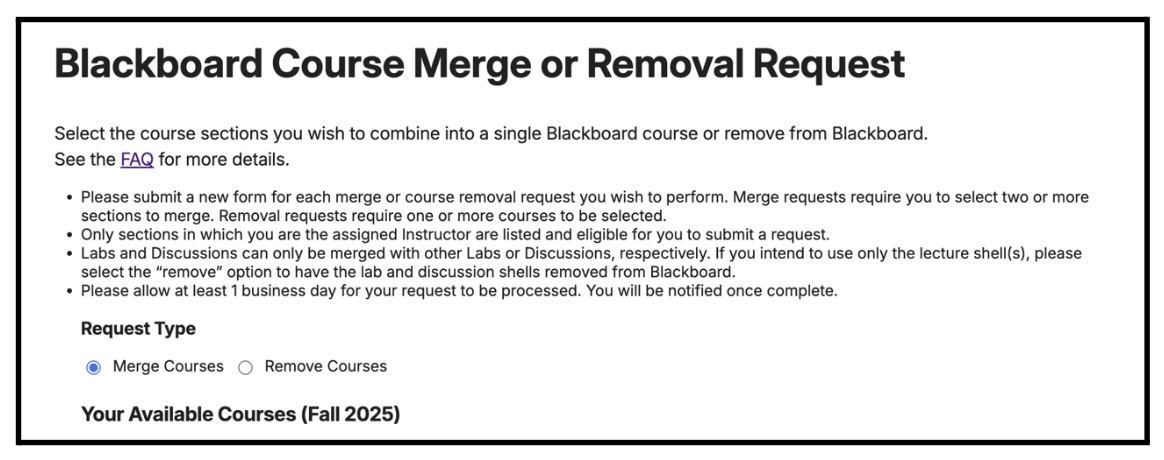
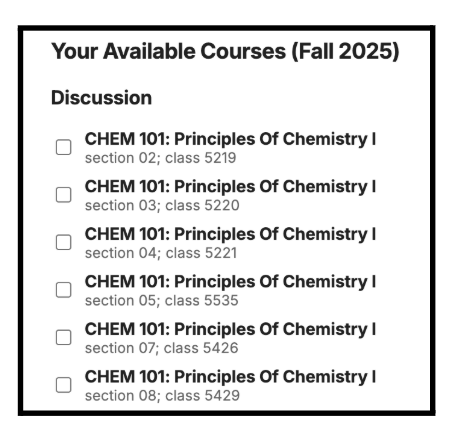
          <div class="html-content"><span><p><span>DoIT is pleased to announce a new form to help faculty manage their Blackboard course shells with greater efficiency. As part of our ongoing updates to the course creation and enrollment process, </span><a href="https://my3.my.umbc.edu/groups/instructional-technology/posts/148553" rel="nofollow external" class="bo"><span>announced earlier this year for Summer 2025</span></a><span>, this new form simplifies requests to merge or remove Blackboard course shells from the instructor’s Blackboard dashboard.</span></p><p><span>The new </span><a href="https://my.umbc.edu/tools/blackboard-course-merge" rel="nofollow external" class="bo"><span>Blackboard Course Merge or Removal form</span></a><span> (UMBC login required) allows instructors to:</span></p><ul><li><span><span>Combine multiple courses into one shell for the current term</span></span></li><li><span><span>Request the removal of unused course shells that you do not plan to use</span></span></li></ul><p><span>Faculty who want to merge their courses must submit a request using this form</span><span> at least one week before the semester starts</span><span> to ensure timely processing and reduce impact on student learning.</span></p><h4><span>How the form and updated process works</span></h4><div><img src="https://my3.my.umbc.edu/groups/instructional-technology/posts/151435/attachments/57931" alt="Instructors may request a merge of course shells or may request to have course shells removed from Blackboard." style="max-width: 100%; height: auto;"><em>Image 1: The new request form prompts users to indicate whether they would like to merge or remove courses.</em></div><span><p><span><br></span></p><p><span>By automatically displaying an instructor’s list of courses for the upcoming term, the new form is designed to simplify instructor workflows and is the next step towards automating instructors’ course merge requests.</span></p><p><span><img src="https://my3.my.umbc.edu/groups/instructional-technology/posts/151435/attachments/57932" alt="The courses listed will be based on the Schedule of Classes." style="max-width: 100%; height: auto;"><em>Image 2: The form displays a list of courses based on an instructor’s course assignments in the Schedule of Classes</em></span></p></span><p><span><span>The form will automatically open a ticket with the Instructional Technology team to process the request. Most requests are processed fairly quickly, but instructors should allow one business day if tickets are submitted overnight or on weekends. </span></span></p><h4><span>Getting more information</span></h4><p><span>To support a smooth transition, Instructional Technology will host an </span><a href="https://my3.my.umbc.edu/groups/instructional-technology/events?mode=upcoming&amp;tag=course-creation" rel="nofollow external" class="bo"><span>information session</span></a> <span>about updates to the course creation and enrollment process at the start of the fall semester. We encourage faculty to attend this session to learn more about the new course creation process or share feedback online.</span></p><p><span>The latest update to our course creation and enrollment process marks another step toward greater self-service for faculty. Additionally, the functional changes lay the necessary groundwork for future integrations required for grade export from Blackboard to PeopleSoft. Continued refinements are expected based on faculty feedback and ongoing development planned by DoIT to provide improved automation. </span></p><br></span><div><div><span><strong>Connect with Instructional Technology</strong></span></div><div><span>As always, if you have any questions about teaching, learning, and technology at UMBC, please consider the following options:</span></div><ul><li><a href="https://my3.my.umbc.edu/groups/instructional-technology/posts/151344/15848/ff79e4f050851175beed45127581a791/web/link?link=https%3A%2F%2Fmy3.my.umbc.edu%2Fgroups%2Finstructional-technology%2Fposts%2F149574%2F15848%2Ff59d29e5c17e589f885b2536a667a41a%2Fweb%2Flink%3Flink%3Dhttp%253A%252F%252Fwww.umbc.edu%252Ffaq" rel="nofollow external" class="bo">Check our extensive FAQ collection</a><span> </span></li><ul><li><span><a href="https://my3.my.umbc.edu/groups/instructional-technology/posts/151344/15848/68af078772154bde6d05795a2f0e09e0/web/link?link=https%3A%2F%2Fmy3.my.umbc.edu%2Fgroups%2Finstructional-technology%2Fposts%2F149574%2F15848%2F782c435b983b9add1c5ec4e5d955e60f%2Fweb%2Flink%3Flink%3Dhttps%253A%252F%252Fwiki.umbc.edu%252Fx%252FLohnB" rel="nofollow external" class="bo"><span>What's new in Ultra?</span></a> | <a href="https://my3.my.umbc.edu/groups/instructional-technology/posts/151344/15848/aebb558d635bacb947354b4167f7dd1b/web/link?link=https%3A%2F%2Fmy3.my.umbc.edu%2Fgroups%2Finstructional-technology%2Fposts%2F149574%2F15848%2F63a0e48a64b548180394031ac6f89272%2Fweb%2Flink%3Flink%3Dhttps%253A%252F%252Fwiki.umbc.edu%252Fx%252FbwrSAQ" rel="nofollow external" class="bo"><span>Known Issues</span></a><span> </span></span></li></ul><li><span><a href="https://my3.my.umbc.edu/groups/instructional-technology/posts/151344/15848/4e002b87fe47650c320845a523b399b0/web/link?link=https%3A%2F%2Fmy3.my.umbc.edu%2Fgroups%2Finstructional-technology%2Fposts%2F149574%2F15848%2F727292cce6c6665b1fcf69032b12e0d6%2Fweb%2Flink%3Flink%3Dhttp%253A%252F%252Fmy.umbc.edu%252Fgo%252Frequest-help" rel="nofollow external" class="bo">Open a ticket via RT</a></span></li><li><span>Follow the </span><a href="https://my3.my.umbc.edu/groups/instructional-technology/posts/151344/15848/3a8fde8834b85eedcecdbadfca29de6b/web/link?link=https%3A%2F%2Fmy3.my.umbc.edu%2Fgroups%2Finstructional-technology%2Fposts%2F149574%2F15848%2F208c31480fd10e3805fdafe318269623%2Fweb%2Flink%3Flink%3Dhttp%253A%252F%252Fmy.umbc.edu%252Fgroups%252Finstructional-technology" rel="nofollow external" class="bo">Instructional Technology</a> &amp; <a href="https://my3.my.umbc.edu/groups/instructional-technology/posts/151344/15848/7ed1d6a00ec3b7621fabbec538c0f817/web/link?link=https%3A%2F%2Fmy3.my.umbc.edu%2Fgroups%2Finstructional-technology%2Fposts%2F149574%2F15848%2Fdccb8bbf9409460e32d26e4518464b78%2Fweb%2Flink%3Flink%3Dhttp%253A%252F%252Fmy.umbc.edu%252Fgroups%252Fdoit" rel="nofollow external" class="bo">DoIT</a><span> myUMBC groups</span></li><li><a href="https://my3.my.umbc.edu/groups/instructional-technology/posts/151344/15848/f0618da070c69c899b97e5277f00c6e0/web/link?link=https%3A%2F%2Fmy3.my.umbc.edu%2Fgroups%2Finstructional-technology%2Fposts%2F149574%2F15848%2F7e9d8e8701228d0f57bcfcd17db50e50%2Fweb%2Flink%3Flink%3Dhttp%253A%252F%252Fdoit.umbc.edu%252Fitnm%252Fstaff%252F" rel="nofollow external" class="bo">Request a consult</a><span> with <a href="https://my3.my.umbc.edu/groups/instructional-technology/posts/151344/15848/1b0819ec6ea6c4050f352a762108c4ab/web/link?link=https%3A%2F%2Fmy3.my.umbc.edu%2Fgroups%2Finstructional-technology%2Fposts%2F149574%2F15848%2F1935cd506ec09b50c61f334661d75174%2Fweb%2Flink%3Flink%3Dhttp%253A%252F%252Fdoit.umbc.edu%252Fitnm%252Fstaff" rel="nofollow external" class="bo">instructional technology staff</a></span></li></ul></div></div>
      ]]>
    </Body>
    <Summary>DoIT is pleased to announce a new form to help faculty manage their Blackboard course shells with greater efficiency. As part of our ongoing updates to the course creation and enrollment process,...</Summary>
    <Website>https://my3.my.umbc.edu/groups/instructional-technology/posts/151435/</Website>
    <AttachmentKind>Image</AttachmentKind>
    <AttachmentUrl>https://assets4-dev.my.umbc.edu/system/shared/attachments/8352dd8a89a5498a8abf430d6a3ccf0d/69ee517b/news/000/151/435/4ad9a4890b4b0de1764d7e131e439d3a/mergrereq1.png?1754941341</AttachmentUrl>
    <Attachments>
      <Attachment kind="Image" url="https://dev.my.umbc.edu/groups/doit/posts/151435/attachments/57931"></Attachment>
      <Attachment kind="Image" url="https://dev.my.umbc.edu/groups/doit/posts/151435/attachments/57932"></Attachment>
    </Attachments>
    <TrackingUrl>https://dev.my.umbc.edu/api/v0/pixel/news/151435/guest@my.umbc.edu/22410acb273cfeda198e3fc7510a416e/api/pixel</TrackingUrl>
    <Tag>blackboard</Tag>
    <Tag>course-creation</Tag>
    <Tag>course-shells</Tag>
    <Tag>fa2025</Tag>
    <Tag>form</Tag>
    <Tag>merge</Tag>
    <Tag>split</Tag>
    <Tag>split-merge</Tag>
    <Group token="instructional-technology">Instructional Technology</Group>
    <GroupUrl>https://dev.my.umbc.edu/groups/instructional-technology</GroupUrl>
    <AvatarUrl>https://assets2-dev.my.umbc.edu/system/shared/avatars/groups/000/001/164/dec3b026b81ee6d890a8f82f75c94a2e/xsmall.png?1446126703</AvatarUrl>
    <AvatarUrl size="original">https://assets1-dev.my.umbc.edu/system/shared/avatars/groups/000/001/164/dec3b026b81ee6d890a8f82f75c94a2e/original.png?1446126703</AvatarUrl>
    <AvatarUrl size="xxlarge">https://assets2-dev.my.umbc.edu/system/shared/avatars/groups/000/001/164/dec3b026b81ee6d890a8f82f75c94a2e/xxlarge.png?1446126703</AvatarUrl>
    <AvatarUrl size="xlarge">https://assets1-dev.my.umbc.edu/system/shared/avatars/groups/000/001/164/dec3b026b81ee6d890a8f82f75c94a2e/xlarge.png?1446126703</AvatarUrl>
    <AvatarUrl size="large">https://assets1-dev.my.umbc.edu/system/shared/avatars/groups/000/001/164/dec3b026b81ee6d890a8f82f75c94a2e/large.png?1446126703</AvatarUrl>
    <AvatarUrl size="medium">https://assets4-dev.my.umbc.edu/system/shared/avatars/groups/000/001/164/dec3b026b81ee6d890a8f82f75c94a2e/medium.png?1446126703</AvatarUrl>
    <AvatarUrl size="small">https://assets3-dev.my.umbc.edu/system/shared/avatars/groups/000/001/164/dec3b026b81ee6d890a8f82f75c94a2e/small.png?1446126703</AvatarUrl>
    <AvatarUrl size="xsmall">https://assets2-dev.my.umbc.edu/system/shared/avatars/groups/000/001/164/dec3b026b81ee6d890a8f82f75c94a2e/xsmall.png?1446126703</AvatarUrl>
    <AvatarUrl size="xxsmall">https://assets3-dev.my.umbc.edu/system/shared/avatars/groups/000/001/164/dec3b026b81ee6d890a8f82f75c94a2e/xxsmall.png?1446126703</AvatarUrl>
    <Sponsor>Instructional Technology</Sponsor>
    <ThumbnailUrl size="xxlarge">https://assets3-dev.my.umbc.edu/system/shared/thumbnails/news/000/151/435/8e2d8074bfb500cfc2cff8dd4a8dfc0b/xxlarge.jpg?1754941849</ThumbnailUrl>
    <ThumbnailUrl size="xlarge">https://assets3-dev.my.umbc.edu/system/shared/thumbnails/news/000/151/435/8e2d8074bfb500cfc2cff8dd4a8dfc0b/xlarge.jpg?1754941849</ThumbnailUrl>
    <ThumbnailUrl size="large">https://assets1-dev.my.umbc.edu/system/shared/thumbnails/news/000/151/435/8e2d8074bfb500cfc2cff8dd4a8dfc0b/large.jpg?1754941849</ThumbnailUrl>
    <ThumbnailUrl size="medium">https://assets4-dev.my.umbc.edu/system/shared/thumbnails/news/000/151/435/8e2d8074bfb500cfc2cff8dd4a8dfc0b/medium.jpg?1754941849</ThumbnailUrl>
    <ThumbnailUrl size="small">https://assets3-dev.my.umbc.edu/system/shared/thumbnails/news/000/151/435/8e2d8074bfb500cfc2cff8dd4a8dfc0b/small.jpg?1754941849</ThumbnailUrl>
    <ThumbnailUrl size="xsmall">https://assets1-dev.my.umbc.edu/system/shared/thumbnails/news/000/151/435/8e2d8074bfb500cfc2cff8dd4a8dfc0b/xsmall.jpg?1754941849</ThumbnailUrl>
    <ThumbnailUrl size="xxsmall">https://assets3-dev.my.umbc.edu/system/shared/thumbnails/news/000/151/435/8e2d8074bfb500cfc2cff8dd4a8dfc0b/xxsmall.jpg?1754941849</ThumbnailUrl>
    <ThumbnailAltText>Blackboard logo</ThumbnailAltText>
    <PawCount>3</PawCount>
    <CommentCount>0</CommentCount>
    <CommentsAllowed>true</CommentsAllowed>
    <PostedAt>Mon, 11 Aug 2025 16:47:45 -0400</PostedAt>
  </NewsItem>
  <NewsItem contentIssues="false" id="151344" important="false" status="posted" url="https://dev.my.umbc.edu/groups/doit/posts/151344">
  <Title>August Ultra update delivers smarter image descriptions, captioned video announcements, and table of contents for learning modules</Title>
  <Tagline>Get back-to-school ready with new Ultra design features</Tagline>
  <Body>
    <![CDATA[
    <div class="html-content"><p>This month’s Ultra update makes it easier than to generate meaningful descriptions for complex images. August also brings new tools for recording video announcements, styling course materials, and helping students stay organized with improved module navigation.</p><p>The newest enhancement to<strong> Ally’s AI-powered Alt Text Assistant</strong> brings advanced support for describing <strong>complex images</strong> -- including charts, diagrams, graphs, and even handwritten notes. Instructors can continue using the same one-click workflow to generate alt text for images embedded in Blackboard-created content. This upgrade is especially valuable for STEM, social science, or data-rich courses where traditional alt text tools fall short, helping faculty meet accessibility standards while saving time and improving the learning experience for all students.</p><div><div><img src="https://my3.my.umbc.edu/groups/instructional-technology/posts/151344/attachments/57848" alt="Image 1. Instructors can generate descriptions for complex images using Ally's AI Alt Text Assistant." style="max-width: 100%; height: auto;"></div><div><em>Image 1. Instructors can generate descriptions for complex images using Ally's AI Alt Text Assistant.</em></div><div><br></div><div><p>With the new <strong>video announcement</strong> feature, instructors can record short videos (up to 5 minutes) directly into course announcements. Each video includes automatic captions and transcripts, ensuring compliance with accessibility standards while offering a more personal and engaging way to communicate with students. Whether you’re introducing a new unit, clarifying expectations, or just adding a human touch, video announcements help strengthen instructor presence and build rapport, especially in fully online or asynchronous courses.</p></div><div><img src="https://help.blackboard.com/sites/default/files/styles/rich_text_large/public/images/2025-07/learn_instructor_video-studio-in-announcements.png.webp?itok=qkfnzjLk" alt="Image 2. The announcement screen where instructors can record or upload video and audio." style="max-width: 100%; height: auto;"></div><div><em>Image 2: <span>The announcement screen where instructors can record or upload video and audio.</span></em></div><div><br></div><p>The redesigned <strong>Learning Module Table of Contents</strong> introduces a collapsible sidebar that helps students orient themselves, track their progress, and move through content more efficiently. Students can check off items as they complete them and choose to navigate via the sidebar or previous/next buttons. Assessments now open in a full panel, creating a more consistent and less fragmented experience. This streamlined structure helps reduce cognitive load, supports self-regulated learning, and improves the overall usability of content-heavy modules.</p><div><div><img src="https://help.blackboard.com/sites/default/files/styles/rich_text_large/public/images/2025-07/learn_student_LearningModules_nav-buttons.png.webp?itok=M4cPU1QY" alt="Image 3. Learning Modules now contain a Table of Contents panel to orient students within Learning Modules for their courses." style="max-width: 100%; height: auto;"></div><div><em>Image 3. <span>Learning Modules now contain a Table of Contents panel to orient students within Learning Modules for their courses.</span></em></div></div><div><br></div><div><span>Instructors can now apply </span><strong>content styling</strong><span> to blocks within Ultra Documents, adding visual structure and emphasis to text with just a few clicks. Style options like “question,” “tip,” “key points,” “next steps,” and “highlight” feature icons and color coding to distinguish them from standard content. These simple formatting tools help draw attention to important information, scaffold learning more clearly, and make your content more engaging for students. <strong>Update Aug 8: This feature is postponed to September.</strong></span></div><div><img src="https://help.blackboard.com/sites/default/files/styles/rich_text_large/public/images/2025-08/Documents_instructor_blockstyling.png.webp?itok=3g9HlhE0" alt="Image 4. Instructors can select styling options from a dropdown menu that appears in Edit mode on all block types." style="max-width: 100%; height: auto;"></div><div><em><span>Image 4. </span><span>Instructors can select styling options from a dropdown menu that appears in Edit mode on all block types.</span></em></div><div><span><br></span></div><div><span>Finally, i</span><span>nstructors can select and copy individual LTI tool links. Some tools may function immediately after copying, while others might require manual relinking or configuration to work properly in the new course.</span></div><div><span><br></span></div><div><p><span><strong>To learn more about these updates</strong>, and more, <a href="https://my3.my.umbc.edu/groups/instructional-technology/events/143631" rel="nofollow external" class="bo">please join our What's New in Ultra for Teaching &amp; Learning session on August 14</a>.</span></p><p><strong>When you can expect the update</strong></p><p>Faculty should see the latest updates in their Ultra courses around August 7-8 2025. <em><strong>UPDATE: The release will be installed around August 19-20.</strong></em> The next update to our Ultra test environment will take place on <span>August 12, 2025</span>; release notes are posted to the <a href="https://my3.my.umbc.edu/groups/instructional-technology/posts/149574/15848/782c435b983b9add1c5ec4e5d955e60f/web/link?link=https%3A%2F%2Fwiki.umbc.edu%2Fx%2FLohnB" rel="nofollow external" class="bo">What's New in Ultra</a><span> that same week. Faculty who are interested in test driving new features before they are released to production should </span><a href="https://my3.my.umbc.edu/groups/instructional-technology/posts/149574/15848/727292cce6c6665b1fcf69032b12e0d6/web/link?link=http%3A%2F%2Fmy.umbc.edu%2Fgo%2Frequest-help" rel="nofollow external" class="bo">open an RT ticket</a><span> to request early access. Please </span><a href="https://my3.my.umbc.edu/groups/instructional-technology/posts/149574/15848/1a55d761c534b5d9d77045fac42ec979/web/link?link=http%3A%2F%2Fumbc.edu%2Fgo%2Fultra" rel="nofollow external" class="bo">watch the FAQs</a><span>, including </span><a href="https://my3.my.umbc.edu/groups/instructional-technology/posts/149574/15848/782c435b983b9add1c5ec4e5d955e60f/web/link?link=https%3A%2F%2Fwiki.umbc.edu%2Fx%2FLohnB" rel="nofollow external" class="bo">the What's New with Ultra page</a><span>, and myUMBC for additional information about Ultra.</span></p><div><div><span><strong>Connect with Instructional Technology</strong></span></div><div><span>As always, if you have any questions about teaching, learning, and technology at UMBC, please consider the following options:</span></div><ul><li><a href="https://my3.my.umbc.edu/groups/instructional-technology/posts/149574/15848/f59d29e5c17e589f885b2536a667a41a/web/link?link=http%3A%2F%2Fwww.umbc.edu%2Ffaq" rel="nofollow external" class="bo">Check our extensive FAQ collection</a><span> </span></li><ul><li><span><a href="https://my3.my.umbc.edu/groups/instructional-technology/posts/149574/15848/782c435b983b9add1c5ec4e5d955e60f/web/link?link=https%3A%2F%2Fwiki.umbc.edu%2Fx%2FLohnB" rel="nofollow external" class="bo"><span>What's new in Ultra?</span></a><span> </span><span>|</span><span> </span><a href="https://my3.my.umbc.edu/groups/instructional-technology/posts/149574/15848/63a0e48a64b548180394031ac6f89272/web/link?link=https%3A%2F%2Fwiki.umbc.edu%2Fx%2FbwrSAQ" rel="nofollow external" class="bo"><span>Known Issues</span></a><span> </span></span></li></ul><li><span><a href="https://my3.my.umbc.edu/groups/instructional-technology/posts/149574/15848/727292cce6c6665b1fcf69032b12e0d6/web/link?link=http%3A%2F%2Fmy.umbc.edu%2Fgo%2Frequest-help" rel="nofollow external" class="bo">Open a ticket via RT</a></span></li><li><span>Follow the </span><a href="https://my3.my.umbc.edu/groups/instructional-technology/posts/149574/15848/208c31480fd10e3805fdafe318269623/web/link?link=http%3A%2F%2Fmy.umbc.edu%2Fgroups%2Finstructional-technology" rel="nofollow external" class="bo">Instructional Technology</a><span> &amp; </span><a href="https://my3.my.umbc.edu/groups/instructional-technology/posts/149574/15848/dccb8bbf9409460e32d26e4518464b78/web/link?link=http%3A%2F%2Fmy.umbc.edu%2Fgroups%2Fdoit" rel="nofollow external" class="bo">DoIT</a><span> myUMBC groups</span></li><li><a href="https://my3.my.umbc.edu/groups/instructional-technology/posts/149574/15848/7e9d8e8701228d0f57bcfcd17db50e50/web/link?link=http%3A%2F%2Fdoit.umbc.edu%2Fitnm%2Fstaff%2F" rel="nofollow external" class="bo">Request a consult</a><span> with <a href="https://my3.my.umbc.edu/groups/instructional-technology/posts/149574/15848/1935cd506ec09b50c61f334661d75174/web/link?link=http%3A%2F%2Fdoit.umbc.edu%2Fitnm%2Fstaff" rel="nofollow external" class="bo">instructional technology staff</a></span></li></ul><div><em>Thumbnail-image: New to Ultra [decorative]</em></div></div></div></div></div>
]]>
  </Body>
  <Summary>This month’s Ultra update makes it easier than to generate meaningful descriptions for complex images. August also brings new tools for recording video announcements, styling course materials, and...</Summary>
  <Website>https://my3.my.umbc.edu/groups/instructional-technology/posts/151344</Website>
  <AttachmentKind>Image</AttachmentKind>
  <AttachmentUrl>https://assets1-dev.my.umbc.edu/system/shared/attachments/0a08383906cff0afc5765506f09fb29c/69ee517b/news/000/151/344/fe9de778667eb0445f5052e9fc3863dc/Ally_AI_Alt_Text_Photosynthesis.png?1754490264</AttachmentUrl>
  <Attachments>
    <Attachment kind="Image" url="https://dev.my.umbc.edu/groups/doit/posts/151344/attachments/57848"></Attachment>
  </Attachments>
  <TrackingUrl>https://dev.my.umbc.edu/api/v0/pixel/news/151344/guest@my.umbc.edu/4757a5e04041e2db4c9975ae0cd762b8/api/pixel</TrackingUrl>
  <Tag>accessibility</Tag>
  <Tag>announcements</Tag>
  <Tag>blackboard</Tag>
  <Tag>learner-engagement</Tag>
  <Tag>ultra-experience</Tag>
  <Tag>ultra-update</Tag>
  <Group token="instructional-technology">Instructional Technology</Group>
  <GroupUrl>https://dev.my.umbc.edu/groups/instructional-technology</GroupUrl>
  <AvatarUrl>https://assets2-dev.my.umbc.edu/system/shared/avatars/groups/000/001/164/dec3b026b81ee6d890a8f82f75c94a2e/xsmall.png?1446126703</AvatarUrl>
  <AvatarUrl size="original">https://assets1-dev.my.umbc.edu/system/shared/avatars/groups/000/001/164/dec3b026b81ee6d890a8f82f75c94a2e/original.png?1446126703</AvatarUrl>
  <AvatarUrl size="xxlarge">https://assets2-dev.my.umbc.edu/system/shared/avatars/groups/000/001/164/dec3b026b81ee6d890a8f82f75c94a2e/xxlarge.png?1446126703</AvatarUrl>
  <AvatarUrl size="xlarge">https://assets1-dev.my.umbc.edu/system/shared/avatars/groups/000/001/164/dec3b026b81ee6d890a8f82f75c94a2e/xlarge.png?1446126703</AvatarUrl>
  <AvatarUrl size="large">https://assets1-dev.my.umbc.edu/system/shared/avatars/groups/000/001/164/dec3b026b81ee6d890a8f82f75c94a2e/large.png?1446126703</AvatarUrl>
  <AvatarUrl size="medium">https://assets4-dev.my.umbc.edu/system/shared/avatars/groups/000/001/164/dec3b026b81ee6d890a8f82f75c94a2e/medium.png?1446126703</AvatarUrl>
  <AvatarUrl size="small">https://assets3-dev.my.umbc.edu/system/shared/avatars/groups/000/001/164/dec3b026b81ee6d890a8f82f75c94a2e/small.png?1446126703</AvatarUrl>
  <AvatarUrl size="xsmall">https://assets2-dev.my.umbc.edu/system/shared/avatars/groups/000/001/164/dec3b026b81ee6d890a8f82f75c94a2e/xsmall.png?1446126703</AvatarUrl>
  <AvatarUrl size="xxsmall">https://assets3-dev.my.umbc.edu/system/shared/avatars/groups/000/001/164/dec3b026b81ee6d890a8f82f75c94a2e/xxsmall.png?1446126703</AvatarUrl>
  <Sponsor>Instructional Technology</Sponsor>
  <ThumbnailUrl size="xxlarge">https://assets4-dev.my.umbc.edu/system/shared/thumbnails/news/000/151/344/e8c0f57099f969cb61b8592a0dc3e701/xxlarge.jpg?1754487692</ThumbnailUrl>
  <ThumbnailUrl size="xlarge">https://assets4-dev.my.umbc.edu/system/shared/thumbnails/news/000/151/344/e8c0f57099f969cb61b8592a0dc3e701/xlarge.jpg?1754487692</ThumbnailUrl>
  <ThumbnailUrl size="large">https://assets3-dev.my.umbc.edu/system/shared/thumbnails/news/000/151/344/e8c0f57099f969cb61b8592a0dc3e701/large.jpg?1754487692</ThumbnailUrl>
  <ThumbnailUrl size="medium">https://assets4-dev.my.umbc.edu/system/shared/thumbnails/news/000/151/344/e8c0f57099f969cb61b8592a0dc3e701/medium.jpg?1754487692</ThumbnailUrl>
  <ThumbnailUrl size="small">https://assets3-dev.my.umbc.edu/system/shared/thumbnails/news/000/151/344/e8c0f57099f969cb61b8592a0dc3e701/small.jpg?1754487692</ThumbnailUrl>
  <ThumbnailUrl size="xsmall">https://assets1-dev.my.umbc.edu/system/shared/thumbnails/news/000/151/344/e8c0f57099f969cb61b8592a0dc3e701/xsmall.jpg?1754487692</ThumbnailUrl>
  <ThumbnailUrl size="xxsmall">https://assets1-dev.my.umbc.edu/system/shared/thumbnails/news/000/151/344/e8c0f57099f969cb61b8592a0dc3e701/xxsmall.jpg?1754487692</ThumbnailUrl>
  <ThumbnailAltText>Black and white robot dog running with the words "New to Ultra" written on  light turquoise background</ThumbnailAltText>
  <PawCount>6</PawCount>
  <CommentCount>0</CommentCount>
  <CommentsAllowed>true</CommentsAllowed>
  <PostedAt>Wed, 06 Aug 2025 11:10:23 -0400</PostedAt>
  <EditAt>Tue, 12 Aug 2025 13:24:06 -0400</EditAt>
</NewsItem>
  <NewsItem contentIssues="false" id="150958" important="false" status="posted" url="https://dev.my.umbc.edu/groups/doit/posts/150958">
  <Title>FA2025 Courses Created in Blackboard on July 16, 2025</Title>
  <Tagline>Reminder: New Course Creation &amp; Student Enrollment Process</Tagline>
  <Body>
    <![CDATA[
    <div class="html-content"><p><span>Blackboard course shells for Fall 2025 were created on July 16, 2025.</span></p><p><span>All Fall 2025 courses listed in the UMBC Schedule of Classes (SOC), regardless of designation as lecture, lab, etc, or instructor assignment, now have a Blackboard presence. RT requests are no longer needed for research, independent study, or practicum courses. As new course sections are added to the SOC by Department Scheduling Coordinators, corresponding Bb shells are automatically generated overnight. </span></p><ul><li><span><span>If you are an instructor and your name is not associated with the course you are teaching in the SOC, please see your Departmental Scheduling Coordinator to resolve the issue. Once you are listed in the SOC, your access to the Bb course shell will be updated automatically.</span></span></li><li><span><span>If you and your Department Scheduling Coordinator believe you are correctly assigned as the instructor of record in the SOC and you do not see your course shell in Blackboard, please submit a Request Tracker (RT) ticket via my.umbc.edu/help.</span></span></li></ul><h5><span>New Course Merge Request Process</span></h5><p><a href="https://my3.my.umbc.edu/groups/instructional-technology/posts/148553" rel="nofollow external" class="bo"><span>As announced by DoIT in early April</span></a><span>, instructors who teach multiple sections of the same course will see a separate Blackboard course shell for each section or course component. Courses will not be merged by default. Instructors planning to use separate shells will no longer need to submit an RT request.</span></p><p><span>Course shells may be merged or removed upon request using the new</span><span><strong> <a href="https://my.umbc.edu/tools/blackboard-course-merge" rel="nofollow external" class="bo"><strong>Blackboard Course Merge or Removal form</strong></a> </strong>(UMBC login required), </span><span>which we recommend submitting at least one week before the semester starts, if not as soon as courses are created in Blackboard. NOTE: Courses should not be merged or split after student grade data and engagement activity is recorded, since it will be purged as part of the separation process.</span></p><p><span>For more information about these improvements, please see the following:</span></p><ul><li><p><a href="https://docs.google.com/document/d/1Dh_bJ2IzpbxCxZoc2InBf_WeUW1maKI30DV6qbjPHZM/edit?tab=t.0#bookmark=id.h4r6ycusmhh9" rel="nofollow external" class="bo"><span>Presentation</span></a><span> to Faculty Senate Computer Policy Committee (CPC) on March 4, 2025. </span></p></li><li><p><span><a href="https://umbc.atlassian.net/wiki/x/uR3VAQ" rel="nofollow external" class="bo">Updated FAQs</a></span><span>- </span><span>How to request a merged course</span></p></li><li><p><span>Common questions about the revised Blackboard course creation &amp; user enrollment process (</span><a href="https://docs.google.com/document/d/1xivB1wGe53r7F5VY79TVxMplN_DXMg4QqobewifnNfY/edit?usp=sharing" rel="nofollow external" class="bo"><span>Google Doc version</span></a><span>)</span></p></li></ul><p><span>In addition, faculty are invited to attend an <a href="https://my3.my.umbc.edu/groups/instructional-technology/events?mode=upcoming&amp;tag=course-creation" rel="nofollow external" class="bo">information session on August 7th or 19th</a> </span><span>about the new course creation and merge process. </span></p><h5><span>Create an Inclusive &amp; Accessible Course Environment</span></h5><p><span>Plan your accessibility and Universal Design for Learning strategy before students begin working with course materials. Ally, an </span><a href="https://my3.my.umbc.edu/groups/instructional-technology/posts/142005/15848/25c0274c105b860668a5b741c199e75c/web/link?link=https%3A%2F%2Fdoit.umbc.edu%2Fnews%2F%3Fid%3D82487" rel="nofollow external" class="bo"><span>accessibility tool</span></a><span>, is enabled in all course shells. Ally automatically scans uploaded and created course content, then performs a series of steps to make that content more accessible. Please review the </span><a href="https://my3.my.umbc.edu/groups/instructional-technology/posts/142005/15848/7c0cc5852f0d3c6dba209c1e8bd02849/web/link?link=https%3A%2F%2Fwiki.umbc.edu%2Fx%2F2IGdB" rel="nofollow external" class="bo"><span>Ally FAQs</span></a><span> for more information about the </span><a href="https://my3.my.umbc.edu/groups/instructional-technology/posts/142005/15848/736619ff9b31c3d78b54afbd5a6b1046/web/link?link=https%3A%2F%2Fwiki.umbc.edu%2Fx%2F_YGdB" rel="nofollow external" class="bo"><span>accessibility indicators</span></a><span> on course content and </span><a href="https://my3.my.umbc.edu/groups/instructional-technology/posts/142005/15848/07b86fc3a84557c5c91c556ee350b2cb/web/link?link=https%3A%2F%2Fwiki.umbc.edu%2Fx%2F3IGdB" rel="nofollow external" class="bo"><span>alternative formats</span></a><span>, or attend <a href="https://my3.my.umbc.edu/groups/instructional-technology/events?mode=upcoming&amp;tag=accessibility" rel="nofollow external" class="bo">an upcoming training session</a>.</span></p><h5><span>Connect with Instructional Technology</span></h5><p></p><p><span>As always, if you have any questions about teaching, learning, and technology at UMBC, please consider the following options:<br></span></p><ul><li><span><a href="https://my3.my.umbc.edu/groups/instructional-technology/posts/148527/15848/6df12cc6d1a4ea32339a4878cfacdf18/web/link?link=http%3A%2F%2Fwww.umbc.edu%2Ffaq" rel="nofollow external" class="bo"><span>Check our extensive FAQ collection</span></a></span></li><ul><li><a href="https://my3.my.umbc.edu/groups/instructional-technology/posts/148527/15848/5847ea3ec2583dcc793b5b800f6deae2/web/link?link=https%3A%2F%2Fwiki.umbc.edu%2Fx%2FLohnB" rel="nofollow external" class="bo"><span>What's new in Ultra?</span></a> <span>| </span><a href="https://my3.my.umbc.edu/groups/instructional-technology/posts/148527/15848/7c1f605fe8486e4126f7242ff19d66c2/web/link?link=https%3A%2F%2Fwiki.umbc.edu%2Fx%2FbwrSAQ" rel="nofollow external" class="bo"><span>Known Issues</span></a></li></ul><li><span><a href="https://my3.my.umbc.edu/groups/instructional-technology/posts/148527/15848/ac44f1edd9b8bf80b87d265384253852/web/link?link=http%3A%2F%2Fmy.umbc.edu%2Fgo%2Frequest-help" rel="nofollow external" class="bo"><span>Open a ticket via RT</span></a></span></li><li><span><span>Follow the </span><a href="https://my3.my.umbc.edu/groups/instructional-technology/posts/148527/15848/803da7db2cac268f4a1398025779fcf2/web/link?link=http%3A%2F%2Fmy.umbc.edu%2Fgroups%2Finstructional-technology" rel="nofollow external" class="bo"><span>Instructional Technology</span></a><span> &amp; </span><a href="https://my3.my.umbc.edu/groups/instructional-technology/posts/148527/15848/c17a6e240f4a54e2d1f3034bccc66304/web/link?link=http%3A%2F%2Fmy.umbc.edu%2Fgroups%2Fdoit" rel="nofollow external" class="bo"><span>DoIT</span></a><span> myUMBC groups</span></span></li><li><span><a href="https://my3.my.umbc.edu/groups/instructional-technology/posts/148527/15848/05e90bdf5ca92b883b37984dd2777034/web/link?link=http%3A%2F%2Fdoit.umbc.edu%2Fitnm%2Fstaff%2F" rel="nofollow external" class="bo"><span>Request a consult</span></a><span> with </span><a href="https://my3.my.umbc.edu/groups/instructional-technology/posts/148527/15848/d404e5c3862eec03d7a7baeca2c1840d/web/link?link=http%3A%2F%2Fdoit.umbc.edu%2Fitnm%2Fstaff" rel="nofollow external" class="bo"><span>instructional technology staff</span></a></span></li></ul><p><strong>Connect with Instructional Technology</strong></p><div><span>As always, if you have any questions about teaching, learning, and technology at UMBC, please consider the following options:</span></div><div><ul><li><a href="http://www.umbc.edu/faq" rel="nofollow external" class="bo">Check our extensive FAQ collection</a><span> </span></li><ul><li><span><a href="https://wiki.umbc.edu/x/LohnB" rel="nofollow external" class="bo"><span>What's new in Ultra?</span></a><span> </span><span>|</span><span> </span><a href="https://wiki.umbc.edu/x/bwrSAQ" rel="nofollow external" class="bo"><span>Known Issues</span></a><span> </span></span></li></ul><li><span><a href="http://my.umbc.edu/go/request-help" rel="nofollow external" class="bo">Open a ticket via RT</a></span></li><li><span>Follow the </span><a href="http://my.umbc.edu/groups/instructional-technology" rel="nofollow external" class="bo">Instructional Technology</a><span> &amp; </span><a href="http://my.umbc.edu/groups/doit" rel="nofollow external" class="bo">DoIT</a><span> myUMBC groups</span></li><li><a href="http://doit.umbc.edu/itnm/staff/" rel="nofollow external" class="bo">Request a consult</a><span> with <a href="http://doit.umbc.edu/itnm/staff" rel="nofollow external" class="bo">instructional technology staff</a></span></li><li><span><a href="http://pivot.umbc.edu" rel="nofollow external" class="bo">PIVOT</a> | <a href="https://doit.umbc.edu/itnm/academic-continuity/" rel="nofollow external" class="bo">Academic Continuity</a></span><span> </span><span>|</span><span> </span><span><a href="https://fdc.umbc.edu/teaching/keep-on-teaching/" rel="nofollow external" class="bo">Keep On Teaching</a></span><span> </span><span>|</span><span> </span><span><a href="https://doit.umbc.edu/students" rel="nofollow external" class="bo">Student Technology Resources</a></span></li></ul></div></div>
]]>
  </Body>
  <Summary>Blackboard course shells for Fall 2025 were created on July 16, 2025.  All Fall 2025 courses listed in the UMBC Schedule of Classes (SOC), regardless of designation as lecture, lab, etc, or...</Summary>
  <Website>https://my3.my.umbc.edu/groups/instructional-technology/posts/150958</Website>
  <TrackingUrl>https://dev.my.umbc.edu/api/v0/pixel/news/150958/guest@my.umbc.edu/0f3291b6e916430056a3cc574c3eb768/api/pixel</TrackingUrl>
  <Tag>blackboard</Tag>
  <Tag>course-creation</Tag>
  <Tag>fa2025</Tag>
  <Tag>fall</Tag>
  <Tag>ultra-course-preview</Tag>
  <Group token="instructional-technology">Instructional Technology</Group>
  <GroupUrl>https://dev.my.umbc.edu/groups/instructional-technology</GroupUrl>
  <AvatarUrl>https://assets2-dev.my.umbc.edu/system/shared/avatars/groups/000/001/164/dec3b026b81ee6d890a8f82f75c94a2e/xsmall.png?1446126703</AvatarUrl>
  <AvatarUrl size="original">https://assets1-dev.my.umbc.edu/system/shared/avatars/groups/000/001/164/dec3b026b81ee6d890a8f82f75c94a2e/original.png?1446126703</AvatarUrl>
  <AvatarUrl size="xxlarge">https://assets2-dev.my.umbc.edu/system/shared/avatars/groups/000/001/164/dec3b026b81ee6d890a8f82f75c94a2e/xxlarge.png?1446126703</AvatarUrl>
  <AvatarUrl size="xlarge">https://assets1-dev.my.umbc.edu/system/shared/avatars/groups/000/001/164/dec3b026b81ee6d890a8f82f75c94a2e/xlarge.png?1446126703</AvatarUrl>
  <AvatarUrl size="large">https://assets1-dev.my.umbc.edu/system/shared/avatars/groups/000/001/164/dec3b026b81ee6d890a8f82f75c94a2e/large.png?1446126703</AvatarUrl>
  <AvatarUrl size="medium">https://assets4-dev.my.umbc.edu/system/shared/avatars/groups/000/001/164/dec3b026b81ee6d890a8f82f75c94a2e/medium.png?1446126703</AvatarUrl>
  <AvatarUrl size="small">https://assets3-dev.my.umbc.edu/system/shared/avatars/groups/000/001/164/dec3b026b81ee6d890a8f82f75c94a2e/small.png?1446126703</AvatarUrl>
  <AvatarUrl size="xsmall">https://assets2-dev.my.umbc.edu/system/shared/avatars/groups/000/001/164/dec3b026b81ee6d890a8f82f75c94a2e/xsmall.png?1446126703</AvatarUrl>
  <AvatarUrl size="xxsmall">https://assets3-dev.my.umbc.edu/system/shared/avatars/groups/000/001/164/dec3b026b81ee6d890a8f82f75c94a2e/xxsmall.png?1446126703</AvatarUrl>
  <Sponsor>Instructional Technology</Sponsor>
  <ThumbnailUrl size="xxlarge">https://assets2-dev.my.umbc.edu/system/shared/thumbnails/news/000/150/958/cbb1482d1b0572b18853b3948570fad7/xxlarge.jpg?1752065337</ThumbnailUrl>
  <ThumbnailUrl size="xlarge">https://assets4-dev.my.umbc.edu/system/shared/thumbnails/news/000/150/958/cbb1482d1b0572b18853b3948570fad7/xlarge.jpg?1752065337</ThumbnailUrl>
  <ThumbnailUrl size="large">https://assets4-dev.my.umbc.edu/system/shared/thumbnails/news/000/150/958/cbb1482d1b0572b18853b3948570fad7/large.jpg?1752065337</ThumbnailUrl>
  <ThumbnailUrl size="medium">https://assets2-dev.my.umbc.edu/system/shared/thumbnails/news/000/150/958/cbb1482d1b0572b18853b3948570fad7/medium.jpg?1752065337</ThumbnailUrl>
  <ThumbnailUrl size="small">https://assets3-dev.my.umbc.edu/system/shared/thumbnails/news/000/150/958/cbb1482d1b0572b18853b3948570fad7/small.jpg?1752065337</ThumbnailUrl>
  <ThumbnailUrl size="xsmall">https://assets3-dev.my.umbc.edu/system/shared/thumbnails/news/000/150/958/cbb1482d1b0572b18853b3948570fad7/xsmall.jpg?1752065337</ThumbnailUrl>
  <ThumbnailUrl size="xxsmall">https://assets1-dev.my.umbc.edu/system/shared/thumbnails/news/000/150/958/cbb1482d1b0572b18853b3948570fad7/xxsmall.jpg?1752065337</ThumbnailUrl>
  <ThumbnailAltText>Fall leaves</ThumbnailAltText>
  <PawCount>7</PawCount>
  <CommentCount>0</CommentCount>
  <CommentsAllowed>true</CommentsAllowed>
  <PostedAt>Thu, 17 Jul 2025 07:37:36 -0400</PostedAt>
</NewsItem>
  <NewsItem contentIssues="false" id="150637" important="true" status="posted" url="https://dev.my.umbc.edu/groups/doit/posts/150637">
    <Title>Anthology announces retirement date for Blackboard Original Courses &amp; Organizations</Title>
    <Tagline>Original content will become read-only after Dec 31, 2026</Tagline>
    <Body>
      <![CDATA[
          <div class="html-content"><p>Anthology, the parent company of Blackboard, <a href="https://community.anthology.com/blogs/8/1552" rel="nofollow external" class="bo">has announced</a> that they will retire Original courses and organizations on December 31, 2026. At this point, all Original content in courses and organizations will be placed in a read-only state, which can be viewed by those respective enrolled users, but not edited by instructors or leaders. This change reflects the broader shift to Ultra, <a href="https://vimeo.com/1088294746/fa60532573#t=18m39s?share=copy" rel="nofollow external" class="bo">now adopted by nearly 80%</a> of school and universities worldwide (Bb Office Hours, May 28, 2025).</p><p><strong>What this means for UMBC</strong></p><p>While UMBC finalized its migration to Ultra courses at the end of 2024, the retirement of Original content means that any active organizations running on Original will be impacted. <strong>All Blackboard Original organizations must migrate to Ultra or be archived by our internal deadline of October 31, 2026</strong>, to ensure that org leaders have ample time for:</p><ul><li>Migration and content transfer</li><li>Training and support on Ultra</li><li>Any necessary redesign of organization content</li></ul><p>Content that is not migrated to Ultra will be locked in the Original “read only” state by the end of 2026, and automatically converted to Ultra by the end of 2027 by Anthology. This includes both Original organizations and any remaining Original courses, whether term-based or development shells. (Original content may be copied until it is archived or converted.)</p><p><strong>Next steps for organization leaders</strong></p><p>Instuctional Technology staff will proactively reach out to leaders of active Original organizations in the coming weeks to provide details information about your options:</p><ul><li><strong>Convert</strong> the organization to Ultra</li><li><strong>Redesign</strong> the organization to leverage Ultra’s new tools</li><li><strong>Archive</strong> content, especially for legacy organizations over 7 years old, in a Blackboard export package or exported file attachments</li><li><strong>Auto-archive</strong> if orphaned, unused, or not updated in 7+ years in a Blackboard format</li></ul><p>Instructional Technology is here to support Original organization leaders with training, resources, and personalized assistance.</p><p><span><strong>Connect with Instructional Technology</strong></span></p><p><span>As always, if you have any questions about teaching, learning, and technology at UMBC, please consider the following options:</span></p><ul><li><a href="http://www.umbc.edu/faq" rel="nofollow external" class="bo"><span>Check our extensive FAQ collection</span></a><span> </span></li><ul><li><a href="https://wiki.umbc.edu/x/LohnB" rel="nofollow external" class="bo"><span>What's new in Ultra?</span></a><span> | </span><a href="https://wiki.umbc.edu/x/bwrSAQ" rel="nofollow external" class="bo"><span>Known Issues</span></a><span> </span></li></ul><li><a href="http://my.umbc.edu/go/request-help" rel="nofollow external" class="bo"><span>Open a ticket via RT</span></a></li><li><span>Follow the </span><a href="http://my.umbc.edu/groups/instructional-technology" rel="nofollow external" class="bo"><span>Instructional Technology</span></a><span> &amp; </span><a href="http://my.umbc.edu/groups/doit" rel="nofollow external" class="bo"><span>DoIT</span></a><span> myUMBC groups</span></li><li><a href="http://doit.umbc.edu/itnm/staff/" rel="nofollow external" class="bo"><span>Request a consult</span></a><span> with </span><a href="http://doit.umbc.edu/itnm/staff" rel="nofollow external" class="bo"><span>instructional technology staff</span></a></li><li><a href="http://pivot.umbc.edu/" rel="nofollow external" class="bo"><span>PIVOT</span></a><span> | </span><a href="https://doit.umbc.edu/itnm/academic-continuity/" rel="nofollow external" class="bo"><span>Academic Continuity</span></a><span> | </span><a href="https://fdc.umbc.edu/teaching/keep-on-teaching/" rel="nofollow external" class="bo"><span>Keep On Teaching</span></a><span> | </span><a href="https://doit.umbc.edu/students" rel="nofollow external" class="bo"><span>Student Technology Resources</span></a></li></ul><p><span><br></span></p><p><span><em>Thumbnail-image: Ultra news update</em></span></p></div>
      ]]>
    </Body>
    <Summary>Anthology, the parent company of Blackboard, has announced that they will retire Original courses and organizations on December 31, 2026. At this point, all Original content in courses and...</Summary>
    <Website>https://my3.my.umbc.edu/groups/instructional-technology/posts/150637</Website>
    <TrackingUrl>https://dev.my.umbc.edu/api/v0/pixel/news/150637/guest@my.umbc.edu/5b06032d7da42fef62abcd485281d99a/api/pixel</TrackingUrl>
    <Tag>blackboard</Tag>
    <Tag>hawken</Tag>
    <Tag>organizations</Tag>
    <Tag>original</Tag>
    <Tag>ultra-experience</Tag>
    <Tag>ultra-migration</Tag>
    <Group token="instructional-technology">Instructional Technology</Group>
    <GroupUrl>https://dev.my.umbc.edu/groups/instructional-technology</GroupUrl>
    <AvatarUrl>https://assets2-dev.my.umbc.edu/system/shared/avatars/groups/000/001/164/dec3b026b81ee6d890a8f82f75c94a2e/xsmall.png?1446126703</AvatarUrl>
    <AvatarUrl size="original">https://assets1-dev.my.umbc.edu/system/shared/avatars/groups/000/001/164/dec3b026b81ee6d890a8f82f75c94a2e/original.png?1446126703</AvatarUrl>
    <AvatarUrl size="xxlarge">https://assets2-dev.my.umbc.edu/system/shared/avatars/groups/000/001/164/dec3b026b81ee6d890a8f82f75c94a2e/xxlarge.png?1446126703</AvatarUrl>
    <AvatarUrl size="xlarge">https://assets1-dev.my.umbc.edu/system/shared/avatars/groups/000/001/164/dec3b026b81ee6d890a8f82f75c94a2e/xlarge.png?1446126703</AvatarUrl>
    <AvatarUrl size="large">https://assets1-dev.my.umbc.edu/system/shared/avatars/groups/000/001/164/dec3b026b81ee6d890a8f82f75c94a2e/large.png?1446126703</AvatarUrl>
    <AvatarUrl size="medium">https://assets4-dev.my.umbc.edu/system/shared/avatars/groups/000/001/164/dec3b026b81ee6d890a8f82f75c94a2e/medium.png?1446126703</AvatarUrl>
    <AvatarUrl size="small">https://assets3-dev.my.umbc.edu/system/shared/avatars/groups/000/001/164/dec3b026b81ee6d890a8f82f75c94a2e/small.png?1446126703</AvatarUrl>
    <AvatarUrl size="xsmall">https://assets2-dev.my.umbc.edu/system/shared/avatars/groups/000/001/164/dec3b026b81ee6d890a8f82f75c94a2e/xsmall.png?1446126703</AvatarUrl>
    <AvatarUrl size="xxsmall">https://assets3-dev.my.umbc.edu/system/shared/avatars/groups/000/001/164/dec3b026b81ee6d890a8f82f75c94a2e/xxsmall.png?1446126703</AvatarUrl>
    <Sponsor>Instructional Technology</Sponsor>
    <ThumbnailUrl size="xxlarge">https://assets3-dev.my.umbc.edu/system/shared/thumbnails/news/000/150/637/c1ff745204b101e99247864c3690c09a/xxlarge.jpg?1749740655</ThumbnailUrl>
    <ThumbnailUrl size="xlarge">https://assets1-dev.my.umbc.edu/system/shared/thumbnails/news/000/150/637/c1ff745204b101e99247864c3690c09a/xlarge.jpg?1749740655</ThumbnailUrl>
    <ThumbnailUrl size="large">https://assets4-dev.my.umbc.edu/system/shared/thumbnails/news/000/150/637/c1ff745204b101e99247864c3690c09a/large.jpg?1749740655</ThumbnailUrl>
    <ThumbnailUrl size="medium">https://assets2-dev.my.umbc.edu/system/shared/thumbnails/news/000/150/637/c1ff745204b101e99247864c3690c09a/medium.jpg?1749740655</ThumbnailUrl>
    <ThumbnailUrl size="small">https://assets2-dev.my.umbc.edu/system/shared/thumbnails/news/000/150/637/c1ff745204b101e99247864c3690c09a/small.jpg?1749740655</ThumbnailUrl>
    <ThumbnailUrl size="xsmall">https://assets4-dev.my.umbc.edu/system/shared/thumbnails/news/000/150/637/c1ff745204b101e99247864c3690c09a/xsmall.jpg?1749740655</ThumbnailUrl>
    <ThumbnailUrl size="xxsmall">https://assets3-dev.my.umbc.edu/system/shared/thumbnails/news/000/150/637/c1ff745204b101e99247864c3690c09a/xxsmall.jpg?1749740655</ThumbnailUrl>
    <ThumbnailAltText>A black and white robot dog looks up at text reading Ultra News Update</ThumbnailAltText>
    <PawCount>13</PawCount>
    <CommentCount>0</CommentCount>
    <CommentsAllowed>true</CommentsAllowed>
    <PostedAt>Mon, 30 Jun 2025 08:26:38 -0400</PostedAt>
    <EditAt>Mon, 30 Jun 2025 12:19:11 -0400</EditAt>
  </NewsItem>
  <NewsItem contentIssues="false" id="150790" important="false" status="posted" url="https://dev.my.umbc.edu/groups/doit/posts/150790">
  <Title>Improve Course Accessibility with Image Captions &amp; MathJax Formulas in July's Ultra Update</Title>
  <Tagline>Track who's reading your announcements and more</Tagline>
  <Body>
    <![CDATA[
    <div class="html-content">How do you know if students actually read that important course announcement? What if you could make your content more accessible by adding image captions or rendering complex math more clearly for your STEM students? <div><br></div><div>The July 2025 release brings features designed to improve visibility into student engagement, better accessibility for images and equations, and tools that streamline how you monitor activity and manage grading. Whether you’re preparing for fall or refining your summer courses, these enhancements make it easier to connect with students and deliver content that works for everyone.<div><br></div><div><div><strong>Add Captions to Images for Context and Accessibility</strong></div><div>Instructors can now add captions above or below image blocks in Ultra Documents, providing valuable context to visual content embedded in course materials. This simple but impactful change helps students interpret images more effectively, improves comprehension for visual learners, and enhances digital accessibility by supporting screen reader users and reinforcing meaning beyond alternative text.</div></div><div><img src="https://help.blackboard.com/sites/default/files/styles/rich_text_medium/public/images/2025-06/Documents_imagecaption.png.webp?itok=HbOfnq4z" alt="Image 1. Instructors can go to Edit File Options to add image captions and set positions." style="max-width: 100%; height: auto;"></div><div><em>Image 1. Instructors can go to Edit File Options to add image captions and set positions.</em></div><div><br></div><div><div><strong>Render Math with Clarity Using MathJax</strong></div><div>MathJax will automatically render LaTeX equations when used in the Content Editor, offering a more precise and visually clean presentation of mathematical expressions across supported areas of Ultra. Especially helpful for STEM faculty, this update gives instructors more control over how complex formulas appear and improves the accessibility and readability of math-based content for students.</div></div><div><img src="https://help.blackboard.com/sites/default/files/styles/rich_text_medium/public/images/2023-06/learn_ultra_instructor_MathFormulas_AdjustedFormulaLaTeX_2.png.webp?itok=Adt8a_M-" alt="Image 2: Example of a formula formatted in LaTeX" style="max-width: 100%; height: auto;"></div><div><em>Image 2: Example of a formula formatted in LaTeX</em></div><div><br></div><div><strong>Track Student Engagement with Announcements</strong></div><div>The Announcements page now includes a viewer count, allowing instructors to quickly see which students have opened an announcement and which have not. Clicking the count reveals a list of viewers and non-viewers, with the ability to message students who haven’t read the post. This feature supports more effective communication by helping faculty ensure that important updates, reminders, and instructions are actually reaching students.</div><div><img src="https://help.blackboard.com/sites/default/files/styles/rich_text_medium/public/images/2025-06/announcements_read.png.webp?itok=MSc4-3Dk" alt="Image 3. The list of viewers for an announcement shows that two students have read the announcement and one hasn’t." style="max-width: 100%; height: auto;"></div><div><em>Image 3. The list of viewers for an announcement shows that two students have read the announcement and one hasn’t.</em></div><div><br></div><div>Additional updates include:</div><div><ul><li>Instructors can now import QTI v2.1 formatted questions directly into question banks.</li><li>A new “No Category” option is now available in the Gradebook, allowing instructors to remove items from a grading category without needing to assign them to another one.</li><li>The instructor Activity Page has been redesigned to show new course activity at a glance, including recent updates, grading needs, new messages, and alerts tied to student performance.</li><li>Improvements to the pop-out rubric in the Gradebook include a save warning prompt when closing unsaved work and enhanced keyboard navigation using arrow keys and tab controls. </li><li>Instructors grading group assignments can navigate through submissions with new Previous and Next buttons in the group header bar.</li></ul></div><div><p><strong>When you can expect the update</strong></p><p>Faculty should see the latest updates in their Ultra courses around July 3-4 2025. The next update to our Ultra test environment will take place on <span>July 8, 2025</span>; release notes are posted to the <a href="https://my3.my.umbc.edu/groups/instructional-technology/posts/149574/15848/782c435b983b9add1c5ec4e5d955e60f/web/link?link=https%3A%2F%2Fwiki.umbc.edu%2Fx%2FLohnB" rel="nofollow external" class="bo">What's New in Ultra</a><span> that same week. Faculty who are interested in test driving new features before they are released to production should </span><a href="https://my3.my.umbc.edu/groups/instructional-technology/posts/149574/15848/727292cce6c6665b1fcf69032b12e0d6/web/link?link=http%3A%2F%2Fmy.umbc.edu%2Fgo%2Frequest-help" rel="nofollow external" class="bo">open an RT ticket</a><span> to request early access. Please </span><a href="https://my3.my.umbc.edu/groups/instructional-technology/posts/149574/15848/1a55d761c534b5d9d77045fac42ec979/web/link?link=http%3A%2F%2Fumbc.edu%2Fgo%2Fultra" rel="nofollow external" class="bo">watch the FAQs</a><span>, including </span><a href="https://my3.my.umbc.edu/groups/instructional-technology/posts/149574/15848/782c435b983b9add1c5ec4e5d955e60f/web/link?link=https%3A%2F%2Fwiki.umbc.edu%2Fx%2FLohnB" rel="nofollow external" class="bo">the What's New with Ultra page</a><span>, and myUMBC for additional information about Ultra.</span></p><div><div><span><strong>Connect with Instructional Technology</strong></span></div><div><span>As always, if you have any questions about teaching, learning, and technology at UMBC, please consider the following options:</span></div><ul><li><a href="https://my3.my.umbc.edu/groups/instructional-technology/posts/149574/15848/f59d29e5c17e589f885b2536a667a41a/web/link?link=http%3A%2F%2Fwww.umbc.edu%2Ffaq" rel="nofollow external" class="bo">Check our extensive FAQ collection</a><span> </span></li><ul><li><span><a href="https://my3.my.umbc.edu/groups/instructional-technology/posts/149574/15848/782c435b983b9add1c5ec4e5d955e60f/web/link?link=https%3A%2F%2Fwiki.umbc.edu%2Fx%2FLohnB" rel="nofollow external" class="bo"><span>What's new in Ultra?</span></a><span> </span><span>|</span><span> </span><a href="https://my3.my.umbc.edu/groups/instructional-technology/posts/149574/15848/63a0e48a64b548180394031ac6f89272/web/link?link=https%3A%2F%2Fwiki.umbc.edu%2Fx%2FbwrSAQ" rel="nofollow external" class="bo"><span>Known Issues</span></a><span> </span></span></li></ul><li><span><a href="https://my3.my.umbc.edu/groups/instructional-technology/posts/149574/15848/727292cce6c6665b1fcf69032b12e0d6/web/link?link=http%3A%2F%2Fmy.umbc.edu%2Fgo%2Frequest-help" rel="nofollow external" class="bo">Open a ticket via RT</a></span></li><li><span>Follow the </span><a href="https://my3.my.umbc.edu/groups/instructional-technology/posts/149574/15848/208c31480fd10e3805fdafe318269623/web/link?link=http%3A%2F%2Fmy.umbc.edu%2Fgroups%2Finstructional-technology" rel="nofollow external" class="bo">Instructional Technology</a><span> &amp; </span><a href="https://my3.my.umbc.edu/groups/instructional-technology/posts/149574/15848/dccb8bbf9409460e32d26e4518464b78/web/link?link=http%3A%2F%2Fmy.umbc.edu%2Fgroups%2Fdoit" rel="nofollow external" class="bo">DoIT</a><span> myUMBC groups</span></li><li><a href="https://my3.my.umbc.edu/groups/instructional-technology/posts/149574/15848/7e9d8e8701228d0f57bcfcd17db50e50/web/link?link=http%3A%2F%2Fdoit.umbc.edu%2Fitnm%2Fstaff%2F" rel="nofollow external" class="bo">Request a consult</a><span> with <a href="https://my3.my.umbc.edu/groups/instructional-technology/posts/149574/15848/1935cd506ec09b50c61f334661d75174/web/link?link=http%3A%2F%2Fdoit.umbc.edu%2Fitnm%2Fstaff" rel="nofollow external" class="bo">instructional technology staff</a></span></li></ul><div><em>Thumbnail-image: New to Ultra [decorative]</em></div></div></div></div></div>
]]>
  </Body>
  <Summary>How do you know if students actually read that important course announcement? What if you could make your content more accessible by adding image captions or rendering complex math more clearly...</Summary>
  <Website>https://my3.my.umbc.edu/groups/instructional-technology/posts/150790</Website>
  <TrackingUrl>https://dev.my.umbc.edu/api/v0/pixel/news/150790/guest@my.umbc.edu/ca4bebf5fc27c7bf4afdb872f5a7a1cf/api/pixel</TrackingUrl>
  <Tag>accessibility</Tag>
  <Tag>announcements</Tag>
  <Tag>blackboard</Tag>
  <Tag>gradebook</Tag>
  <Tag>grading</Tag>
  <Tag>learner-engagement</Tag>
  <Tag>question-banks</Tag>
  <Tag>ultra-experience</Tag>
  <Tag>ultra-update</Tag>
  <Group token="instructional-technology">Instructional Technology</Group>
  <GroupUrl>https://dev.my.umbc.edu/groups/instructional-technology</GroupUrl>
  <AvatarUrl>https://assets2-dev.my.umbc.edu/system/shared/avatars/groups/000/001/164/dec3b026b81ee6d890a8f82f75c94a2e/xsmall.png?1446126703</AvatarUrl>
  <AvatarUrl size="original">https://assets1-dev.my.umbc.edu/system/shared/avatars/groups/000/001/164/dec3b026b81ee6d890a8f82f75c94a2e/original.png?1446126703</AvatarUrl>
  <AvatarUrl size="xxlarge">https://assets2-dev.my.umbc.edu/system/shared/avatars/groups/000/001/164/dec3b026b81ee6d890a8f82f75c94a2e/xxlarge.png?1446126703</AvatarUrl>
  <AvatarUrl size="xlarge">https://assets1-dev.my.umbc.edu/system/shared/avatars/groups/000/001/164/dec3b026b81ee6d890a8f82f75c94a2e/xlarge.png?1446126703</AvatarUrl>
  <AvatarUrl size="large">https://assets1-dev.my.umbc.edu/system/shared/avatars/groups/000/001/164/dec3b026b81ee6d890a8f82f75c94a2e/large.png?1446126703</AvatarUrl>
  <AvatarUrl size="medium">https://assets4-dev.my.umbc.edu/system/shared/avatars/groups/000/001/164/dec3b026b81ee6d890a8f82f75c94a2e/medium.png?1446126703</AvatarUrl>
  <AvatarUrl size="small">https://assets3-dev.my.umbc.edu/system/shared/avatars/groups/000/001/164/dec3b026b81ee6d890a8f82f75c94a2e/small.png?1446126703</AvatarUrl>
  <AvatarUrl size="xsmall">https://assets2-dev.my.umbc.edu/system/shared/avatars/groups/000/001/164/dec3b026b81ee6d890a8f82f75c94a2e/xsmall.png?1446126703</AvatarUrl>
  <AvatarUrl size="xxsmall">https://assets3-dev.my.umbc.edu/system/shared/avatars/groups/000/001/164/dec3b026b81ee6d890a8f82f75c94a2e/xxsmall.png?1446126703</AvatarUrl>
  <Sponsor>Instructional Technology</Sponsor>
  <ThumbnailUrl size="xxlarge">https://assets3-dev.my.umbc.edu/system/shared/thumbnails/news/000/150/790/c97090ec18bff34640ff391d8115c281/xxlarge.jpg?1750780929</ThumbnailUrl>
  <ThumbnailUrl size="xlarge">https://assets1-dev.my.umbc.edu/system/shared/thumbnails/news/000/150/790/c97090ec18bff34640ff391d8115c281/xlarge.jpg?1750780929</ThumbnailUrl>
  <ThumbnailUrl size="large">https://assets4-dev.my.umbc.edu/system/shared/thumbnails/news/000/150/790/c97090ec18bff34640ff391d8115c281/large.jpg?1750780929</ThumbnailUrl>
  <ThumbnailUrl size="medium">https://assets3-dev.my.umbc.edu/system/shared/thumbnails/news/000/150/790/c97090ec18bff34640ff391d8115c281/medium.jpg?1750780929</ThumbnailUrl>
  <ThumbnailUrl size="small">https://assets3-dev.my.umbc.edu/system/shared/thumbnails/news/000/150/790/c97090ec18bff34640ff391d8115c281/small.jpg?1750780929</ThumbnailUrl>
  <ThumbnailUrl size="xsmall">https://assets3-dev.my.umbc.edu/system/shared/thumbnails/news/000/150/790/c97090ec18bff34640ff391d8115c281/xsmall.jpg?1750780929</ThumbnailUrl>
  <ThumbnailUrl size="xxsmall">https://assets4-dev.my.umbc.edu/system/shared/thumbnails/news/000/150/790/c97090ec18bff34640ff391d8115c281/xxsmall.jpg?1750780929</ThumbnailUrl>
  <ThumbnailAltText>Black and white robot dog running with the words "New to Ultra" written on  light turquoise background</ThumbnailAltText>
  <PawCount>2</PawCount>
  <CommentCount>0</CommentCount>
  <CommentsAllowed>true</CommentsAllowed>
  <PostedAt>Tue, 24 Jun 2025 13:11:30 -0400</PostedAt>
</NewsItem>
  <NewsItem contentIssues="false" id="150396" important="false" status="posted" url="https://dev.my.umbc.edu/groups/doit/posts/150396">
  <Title>Explore Jumbled Sentences and Gradebook Tools in Ultra&#8217;s June Release</Title>
  <Tagline>Track unread discussions &amp; student activity</Tagline>
  <Body>
    <![CDATA[
    <div class="html-content">The June 2025 update to Blackboard Ultra brings a fresh set of enhancements designed to support instructional efficiency, student engagement, and accessible course design. From new question types and grading tools to better visibility into student activity, these updates reflect Ultra’s continued commitment to teaching and learning. <div><br></div><div><div><strong>Jumbled Sentence Question Type</strong></div><div>Ultra now supports jumbled sentence questions for tests and quizzes, allowing instructors to assess syntax, sequencing, and conceptual structure in a dynamic, interactive way. Distractors can be added to increase challenge, and variables can include letters, numbers, and special characters. Answer options are randomized to ensure fairness, and instructors can optionally use AI assistance to generate question formats.</div></div><div><img src="https://help.blackboard.com/sites/default/files/styles/rich_text_large/public/images/2025-05/ultra_instructor_jumbledsentencequestiontype.png.webp?itok=n8EErY1X" alt="Image 1: Instructor creates a jumbled sentence question type." style="max-width: 100%; height: auto;"></div><div><em>Image 1: Instructor creates a jumbled sentence question type.</em></div><div><br></div><div><div><strong>Bulk Category Changes in the Gradebook</strong></div><div>Instructors can now bulk update the category associations for gradebook columns via the Item Management page. This streamlines gradebook setup and maintenance, especially in large courses.</div></div><div><img src="https://help.blackboard.com/sites/default/files/styles/rich_text_large/public/images/2025-05/ultra_instructor_bulkcategorychange.png.webp?itok=P2ZUYDg5" alt="Image 2: Instructor is bulk changing the category for multiple selected gradebook items." style="max-width: 100%; height: auto;"></div><div><em>Image 2: Instructor is bulk changing the category for multiple selected gradebook items. </em></div><div><br></div><div>Additional updates include:</div><div><ul><li><span>A new unread post indicator appears at the top of the Ultra course on the Discussions tab to show how many posts are unread.</span></li><li><span>The Student Activity Log now features a Content Access Filter, making it easier to identify whether and when students accessed specific materials, third-party tools, and LTIs that were previously difficult to track.</span></li><li>Ultra Documents now support resizable divider blocks, which can span up to four columns. These visual elements improve the structure of course content and help chunk information into digestible sections.</li><li>Blackboard improved the appearance and responsiveness of Knowledge Checks, making them more visually engaging and easier to interact with across different screen sizes.</li><li>The Gradebook supports smoother navigation using arrow keys and enhanced compatibility with screen readers.</li></ul></div><div><p><strong>When you can expect the update</strong></p><p>Faculty should see the latest updates in their Ultra courses around June 5-6 2025. The next update to our Ultra test environment will take place on <span>June 10, 2025</span>; release notes are posted to the <a href="https://my3.my.umbc.edu/groups/instructional-technology/posts/149574/15848/782c435b983b9add1c5ec4e5d955e60f/web/link?link=https%3A%2F%2Fwiki.umbc.edu%2Fx%2FLohnB" rel="nofollow external" class="bo">What's New in Ultra</a><span> that same week. Faculty who are interested in test driving new features before they are released to production should </span><a href="https://my3.my.umbc.edu/groups/instructional-technology/posts/149574/15848/727292cce6c6665b1fcf69032b12e0d6/web/link?link=http%3A%2F%2Fmy.umbc.edu%2Fgo%2Frequest-help" rel="nofollow external" class="bo">open an RT ticket</a><span> to request early access. Please </span><a href="https://my3.my.umbc.edu/groups/instructional-technology/posts/149574/15848/1a55d761c534b5d9d77045fac42ec979/web/link?link=http%3A%2F%2Fumbc.edu%2Fgo%2Fultra" rel="nofollow external" class="bo">watch the FAQs</a><span>, including </span><a href="https://my3.my.umbc.edu/groups/instructional-technology/posts/149574/15848/782c435b983b9add1c5ec4e5d955e60f/web/link?link=https%3A%2F%2Fwiki.umbc.edu%2Fx%2FLohnB" rel="nofollow external" class="bo">the What's New with Ultra page</a><span>, and myUMBC for additional information about Ultra.</span></p><div><div><span><strong>Connect with Instructional Technology</strong></span></div><div><span>As always, if you have any questions about teaching, learning, and technology at UMBC, please consider the following options:</span></div><ul><li><a href="https://my3.my.umbc.edu/groups/instructional-technology/posts/149574/15848/f59d29e5c17e589f885b2536a667a41a/web/link?link=http%3A%2F%2Fwww.umbc.edu%2Ffaq" rel="nofollow external" class="bo">Check our extensive FAQ collection</a><span> </span></li><ul><li><span><a href="https://my3.my.umbc.edu/groups/instructional-technology/posts/149574/15848/782c435b983b9add1c5ec4e5d955e60f/web/link?link=https%3A%2F%2Fwiki.umbc.edu%2Fx%2FLohnB" rel="nofollow external" class="bo"><span>What's new in Ultra?</span></a><span> </span><span>|</span><span> </span><a href="https://my3.my.umbc.edu/groups/instructional-technology/posts/149574/15848/63a0e48a64b548180394031ac6f89272/web/link?link=https%3A%2F%2Fwiki.umbc.edu%2Fx%2FbwrSAQ" rel="nofollow external" class="bo"><span>Known Issues</span></a><span> </span></span></li></ul><li><span><a href="https://my3.my.umbc.edu/groups/instructional-technology/posts/149574/15848/727292cce6c6665b1fcf69032b12e0d6/web/link?link=http%3A%2F%2Fmy.umbc.edu%2Fgo%2Frequest-help" rel="nofollow external" class="bo">Open a ticket via RT</a></span></li><li><span>Follow the </span><a href="https://my3.my.umbc.edu/groups/instructional-technology/posts/149574/15848/208c31480fd10e3805fdafe318269623/web/link?link=http%3A%2F%2Fmy.umbc.edu%2Fgroups%2Finstructional-technology" rel="nofollow external" class="bo">Instructional Technology</a><span> &amp; </span><a href="https://my3.my.umbc.edu/groups/instructional-technology/posts/149574/15848/dccb8bbf9409460e32d26e4518464b78/web/link?link=http%3A%2F%2Fmy.umbc.edu%2Fgroups%2Fdoit" rel="nofollow external" class="bo">DoIT</a><span> myUMBC groups</span></li><li><a href="https://my3.my.umbc.edu/groups/instructional-technology/posts/149574/15848/7e9d8e8701228d0f57bcfcd17db50e50/web/link?link=http%3A%2F%2Fdoit.umbc.edu%2Fitnm%2Fstaff%2F" rel="nofollow external" class="bo">Request a consult</a><span> with <a href="https://my3.my.umbc.edu/groups/instructional-technology/posts/149574/15848/1935cd506ec09b50c61f334661d75174/web/link?link=http%3A%2F%2Fdoit.umbc.edu%2Fitnm%2Fstaff" rel="nofollow external" class="bo">instructional technology staff</a></span></li></ul><div><em>Thumbnail-image: New to Ultra [decorative]</em></div></div></div></div>
]]>
  </Body>
  <Summary>The June 2025 update to Blackboard Ultra brings a fresh set of enhancements designed to support instructional efficiency, student engagement, and accessible course design. From new question types...</Summary>
  <Website>https://my3.my.umbc.edu/groups/instructional-technology/posts/150396</Website>
  <TrackingUrl>https://dev.my.umbc.edu/api/v0/pixel/news/150396/guest@my.umbc.edu/a63ab494d609337f7cc45fdb2291ed98/api/pixel</TrackingUrl>
  <Tag>activity-log</Tag>
  <Tag>assessments</Tag>
  <Tag>blackboard</Tag>
  <Tag>gradebook</Tag>
  <Tag>grading</Tag>
  <Tag>knowledge-check</Tag>
  <Tag>ultra-experience</Tag>
  <Tag>ultra-update</Tag>
  <Group token="instructional-technology">Instructional Technology</Group>
  <GroupUrl>https://dev.my.umbc.edu/groups/instructional-technology</GroupUrl>
  <AvatarUrl>https://assets2-dev.my.umbc.edu/system/shared/avatars/groups/000/001/164/dec3b026b81ee6d890a8f82f75c94a2e/xsmall.png?1446126703</AvatarUrl>
  <AvatarUrl size="original">https://assets1-dev.my.umbc.edu/system/shared/avatars/groups/000/001/164/dec3b026b81ee6d890a8f82f75c94a2e/original.png?1446126703</AvatarUrl>
  <AvatarUrl size="xxlarge">https://assets2-dev.my.umbc.edu/system/shared/avatars/groups/000/001/164/dec3b026b81ee6d890a8f82f75c94a2e/xxlarge.png?1446126703</AvatarUrl>
  <AvatarUrl size="xlarge">https://assets1-dev.my.umbc.edu/system/shared/avatars/groups/000/001/164/dec3b026b81ee6d890a8f82f75c94a2e/xlarge.png?1446126703</AvatarUrl>
  <AvatarUrl size="large">https://assets1-dev.my.umbc.edu/system/shared/avatars/groups/000/001/164/dec3b026b81ee6d890a8f82f75c94a2e/large.png?1446126703</AvatarUrl>
  <AvatarUrl size="medium">https://assets4-dev.my.umbc.edu/system/shared/avatars/groups/000/001/164/dec3b026b81ee6d890a8f82f75c94a2e/medium.png?1446126703</AvatarUrl>
  <AvatarUrl size="small">https://assets3-dev.my.umbc.edu/system/shared/avatars/groups/000/001/164/dec3b026b81ee6d890a8f82f75c94a2e/small.png?1446126703</AvatarUrl>
  <AvatarUrl size="xsmall">https://assets2-dev.my.umbc.edu/system/shared/avatars/groups/000/001/164/dec3b026b81ee6d890a8f82f75c94a2e/xsmall.png?1446126703</AvatarUrl>
  <AvatarUrl size="xxsmall">https://assets3-dev.my.umbc.edu/system/shared/avatars/groups/000/001/164/dec3b026b81ee6d890a8f82f75c94a2e/xxsmall.png?1446126703</AvatarUrl>
  <Sponsor>Instructional Technology</Sponsor>
  <ThumbnailUrl size="xxlarge">https://assets4-dev.my.umbc.edu/system/shared/thumbnails/news/000/150/396/0807bd8409c370176c25800db34c9234/xxlarge.jpg?1748016657</ThumbnailUrl>
  <ThumbnailUrl size="xlarge">https://assets1-dev.my.umbc.edu/system/shared/thumbnails/news/000/150/396/0807bd8409c370176c25800db34c9234/xlarge.jpg?1748016657</ThumbnailUrl>
  <ThumbnailUrl size="large">https://assets4-dev.my.umbc.edu/system/shared/thumbnails/news/000/150/396/0807bd8409c370176c25800db34c9234/large.jpg?1748016657</ThumbnailUrl>
  <ThumbnailUrl size="medium">https://assets3-dev.my.umbc.edu/system/shared/thumbnails/news/000/150/396/0807bd8409c370176c25800db34c9234/medium.jpg?1748016657</ThumbnailUrl>
  <ThumbnailUrl size="small">https://assets1-dev.my.umbc.edu/system/shared/thumbnails/news/000/150/396/0807bd8409c370176c25800db34c9234/small.jpg?1748016657</ThumbnailUrl>
  <ThumbnailUrl size="xsmall">https://assets3-dev.my.umbc.edu/system/shared/thumbnails/news/000/150/396/0807bd8409c370176c25800db34c9234/xsmall.jpg?1748016657</ThumbnailUrl>
  <ThumbnailUrl size="xxsmall">https://assets4-dev.my.umbc.edu/system/shared/thumbnails/news/000/150/396/0807bd8409c370176c25800db34c9234/xxsmall.jpg?1748016657</ThumbnailUrl>
  <ThumbnailAltText>Black and white robot dog running with the words "New to Ultra" written on  light turquoise background</ThumbnailAltText>
  <PawCount>0</PawCount>
  <CommentCount>0</CommentCount>
  <CommentsAllowed>true</CommentsAllowed>
  <PostedAt>Tue, 03 Jun 2025 12:56:40 -0400</PostedAt>
</NewsItem>
  <NewsItem contentIssues="false" id="149574" important="false" status="posted" url="https://dev.my.umbc.edu/groups/doit/posts/149574">
    <Title>New grading features include no points rubric &amp; text-based column for Ultra courses in May update</Title>
    <Tagline>Updated assessment setting &amp; discussion enhancements</Tagline>
    <Body>
      <![CDATA[
          <div class="html-content"><p>The May 2025 Ultra release delivers several meaningful updates that improve how faculty assess student work, support engagement, and manage course tools. From expanded rubric options to accessible grading workflows, these changes are designed to align with effective teaching practices and support a more inclusive, student-centered experience.</p><p><strong>Qualitative, No-Points Rubrics</strong></p><p>Instructors can now create and use no-points rubrics in Ultra, a powerful option for qualitative evaluation. These rubrics allow instructors to provide rich, criterion-based feedback without assigning numerical values -- perfect for assignments focused on reflection, creativity, process, or formative assessment. In addition, faculty can leverage the AI assistant to generate descriptive evaluation criteria for no-points rubrics.</p><p><img src="https://help.blackboard.com/sites/default/files/styles/rich_text_large/public/images/2025-04/ultra_instructor_nopointsrubric.png.webp?itok=qInIvXkm" alt="Image 1: Example of no-points rubric creation screen" style="max-width: 100%; height: auto;"></p><p><em>Image 1: Example of no-points rubric creation screen</em></p><p><strong>Text-Based Columns in the Gradebook</strong></p><p>A new Gradebook feature allows instructors to create text-based columns (up to 32 characters). These flexible columns are not restricted to text-only input and can include a description for context. Instructors can control student visibility, sort values in Grid view, and download the data. This update is especially useful for organizing students, tracking informal feedback, or adding flexibility to the Gradebook without tying everything to a numeric score.</p><p><img src="https://help.blackboard.com/sites/default/files/styles/rich_text_large/public/images/2025-04/ultra_instructor_gradebooktextcolumn.png.webp?itok=JBjQJ659" alt="Image 2: Inserting a text-based column in the gradable items tab" style="max-width: 100%; height: auto;"></p><p><em>Image 2: Inserting a text-based column in the gradable items tab</em></p><p><strong>Test Submission Review – View Once</strong></p><p>A new test setting, “View submission one time,” allows students to review their test responses and feedback just once after submission. Instructors must first enable the “Allow students to view their submission” setting, after which this option becomes available. This strikes a balance between transparency and academic integrity, offering students a chance to learn from their errors while reducing the risk of content sharing.</p><p><img src="https://help.blackboard.com/sites/default/files/styles/rich_text_large/public/images/2025-04/ultra_instructor_viewsubmissiononetime.png.webp?itok=4TViMnU-" width="400" alt="Image 3: Selecting the one-time view submission assessment setting" style="max-width: 100%; height: auto;"></p><p><em>Image 3: Selecting the one-time view submission assessment setting</em></p><p><strong>Enhanced AI Conversation Tool</strong></p><p>The AI Conversation tool has been upgraded to optionally generate three key elements: a conversation title, a persona, and a reflection question. Instructors can further refine the suggestions by adjusting complexity, providing additional context, or pulling from course materials. This makes it easier to create rich dialogue prompts that encourage critical thinking and metacognition.</p><p><strong>Gradebook Accessibility Enhancements</strong></p><p>The Gradable Items view in the Gradebook has been redesigned to improve accessibility and navigation for users relying on screen readers or keyboard-only navigation. The new table-based layout provides more intuitive movement across cells using arrow keys and includes proper header and row announcements. These enhancements help ensure all instructors and teaching assistants, regardless of ability, can manage course grading with greater ease.</p><p><strong>Discussion Board Improvements</strong></p><p>Several updates make Ultra Discussions more intuitive and user-friendly. Terminology has been streamlined, replacing “responses” with “posts” for clarity, and the input field now prompts users to “Post a response to the discussion.” Instructor posts are clearly labeled, reply boxes are directly below the topic for better flow, and unnecessary interface elements, such as avatars and large banners, have been removed or simplified. These changes reduce cognitive load, improve mobile usability, and create a smoother, more accessible discussion experience for both students and faculty.</p><p><strong>When you can expect the update</strong></p><p>Faculty should see the latest updates in their Ultra courses around May 1-2 2025. The next update to our Ultra test environment will take place on <span>May 6, 2025</span>; release notes are posted to the <a href="https://wiki.umbc.edu/x/LohnB" rel="nofollow external" class="bo">What's New in Ultra</a><span> that same week. Faculty who are interested in test driving new features before they are released to production should </span><a href="http://my.umbc.edu/go/request-help" rel="nofollow external" class="bo">open an RT ticket</a><span> to request early access. Please </span><a href="http://umbc.edu/go/ultra" rel="nofollow external" class="bo">watch the FAQs</a><span>, including </span><a href="https://wiki.umbc.edu/x/LohnB" rel="nofollow external" class="bo">the What's New with Ultra page</a><span>, and myUMBC for additional information about Ultra.</span></p><p><span>Curious about the all latest features in Ultra? Join our </span><a href="https://my3.my.umbc.edu/groups/instructional-technology/events/141687" rel="nofollow external" class="bo">What's New in Ultra Courses for Teaching &amp; Learning SU2025</a><span> webinar on May 12, 2025.</span></p><div><div><span><strong>Connect with Instructional Technology</strong></span></div><div><span>As always, if you have any questions about teaching, learning, and technology at UMBC, please consider the following options:</span></div><ul><li><a href="http://www.umbc.edu/faq" rel="nofollow external" class="bo">Check our extensive FAQ collection</a><span> </span></li><ul><li><span><a href="https://wiki.umbc.edu/x/LohnB" rel="nofollow external" class="bo"><span>What's new in Ultra?</span></a><span> </span><span>|</span><span> </span><a href="https://wiki.umbc.edu/x/bwrSAQ" rel="nofollow external" class="bo"><span>Known Issues</span></a><span> </span></span></li></ul><li><span><a href="http://my.umbc.edu/go/request-help" rel="nofollow external" class="bo">Open a ticket via RT</a></span></li><li><span>Follow the </span><a href="http://my.umbc.edu/groups/instructional-technology" rel="nofollow external" class="bo">Instructional Technology</a><span> &amp; </span><a href="http://my.umbc.edu/groups/doit" rel="nofollow external" class="bo">DoIT</a><span> myUMBC groups</span></li><li><a href="http://doit.umbc.edu/itnm/staff/" rel="nofollow external" class="bo">Request a consult</a><span> with <a href="http://doit.umbc.edu/itnm/staff" rel="nofollow external" class="bo">instructional technology staff</a></span></li></ul><div><em>Thumbnail-image: New to Ultra [decorative]</em></div><div><div></div></div></div></div>
      ]]>
    </Body>
    <Summary>The May 2025 Ultra release delivers several meaningful updates that improve how faculty assess student work, support engagement, and manage course tools. From expanded rubric options to accessible...</Summary>
    <Website>https://my3.my.umbc.edu/groups/instructional-technology/posts/149574</Website>
    <TrackingUrl>https://dev.my.umbc.edu/api/v0/pixel/news/149574/guest@my.umbc.edu/30f337fd201edf6ac6af17a5ecdb5df1/api/pixel</TrackingUrl>
    <Tag>ai-conversations</Tag>
    <Tag>blackboard</Tag>
    <Tag>gradebook</Tag>
    <Tag>grading</Tag>
    <Tag>rubrics</Tag>
    <Tag>ultra-experience</Tag>
    <Tag>ultra-update</Tag>
    <Group token="instructional-technology">Instructional Technology</Group>
    <GroupUrl>https://dev.my.umbc.edu/groups/instructional-technology</GroupUrl>
    <AvatarUrl>https://assets2-dev.my.umbc.edu/system/shared/avatars/groups/000/001/164/dec3b026b81ee6d890a8f82f75c94a2e/xsmall.png?1446126703</AvatarUrl>
    <AvatarUrl size="original">https://assets1-dev.my.umbc.edu/system/shared/avatars/groups/000/001/164/dec3b026b81ee6d890a8f82f75c94a2e/original.png?1446126703</AvatarUrl>
    <AvatarUrl size="xxlarge">https://assets2-dev.my.umbc.edu/system/shared/avatars/groups/000/001/164/dec3b026b81ee6d890a8f82f75c94a2e/xxlarge.png?1446126703</AvatarUrl>
    <AvatarUrl size="xlarge">https://assets1-dev.my.umbc.edu/system/shared/avatars/groups/000/001/164/dec3b026b81ee6d890a8f82f75c94a2e/xlarge.png?1446126703</AvatarUrl>
    <AvatarUrl size="large">https://assets1-dev.my.umbc.edu/system/shared/avatars/groups/000/001/164/dec3b026b81ee6d890a8f82f75c94a2e/large.png?1446126703</AvatarUrl>
    <AvatarUrl size="medium">https://assets4-dev.my.umbc.edu/system/shared/avatars/groups/000/001/164/dec3b026b81ee6d890a8f82f75c94a2e/medium.png?1446126703</AvatarUrl>
    <AvatarUrl size="small">https://assets3-dev.my.umbc.edu/system/shared/avatars/groups/000/001/164/dec3b026b81ee6d890a8f82f75c94a2e/small.png?1446126703</AvatarUrl>
    <AvatarUrl size="xsmall">https://assets2-dev.my.umbc.edu/system/shared/avatars/groups/000/001/164/dec3b026b81ee6d890a8f82f75c94a2e/xsmall.png?1446126703</AvatarUrl>
    <AvatarUrl size="xxsmall">https://assets3-dev.my.umbc.edu/system/shared/avatars/groups/000/001/164/dec3b026b81ee6d890a8f82f75c94a2e/xxsmall.png?1446126703</AvatarUrl>
    <Sponsor>Instructional Technology</Sponsor>
    <ThumbnailUrl size="xxlarge">https://assets3-dev.my.umbc.edu/system/shared/thumbnails/news/000/149/574/62a5ed14ccc0dc07a93d275cc71ae511/xxlarge.jpg?1745928158</ThumbnailUrl>
    <ThumbnailUrl size="xlarge">https://assets3-dev.my.umbc.edu/system/shared/thumbnails/news/000/149/574/62a5ed14ccc0dc07a93d275cc71ae511/xlarge.jpg?1745928158</ThumbnailUrl>
    <ThumbnailUrl size="large">https://assets2-dev.my.umbc.edu/system/shared/thumbnails/news/000/149/574/62a5ed14ccc0dc07a93d275cc71ae511/large.jpg?1745928158</ThumbnailUrl>
    <ThumbnailUrl size="medium">https://assets2-dev.my.umbc.edu/system/shared/thumbnails/news/000/149/574/62a5ed14ccc0dc07a93d275cc71ae511/medium.jpg?1745928158</ThumbnailUrl>
    <ThumbnailUrl size="small">https://assets3-dev.my.umbc.edu/system/shared/thumbnails/news/000/149/574/62a5ed14ccc0dc07a93d275cc71ae511/small.jpg?1745928158</ThumbnailUrl>
    <ThumbnailUrl size="xsmall">https://assets1-dev.my.umbc.edu/system/shared/thumbnails/news/000/149/574/62a5ed14ccc0dc07a93d275cc71ae511/xsmall.jpg?1745928158</ThumbnailUrl>
    <ThumbnailUrl size="xxsmall">https://assets3-dev.my.umbc.edu/system/shared/thumbnails/news/000/149/574/62a5ed14ccc0dc07a93d275cc71ae511/xxsmall.jpg?1745928158</ThumbnailUrl>
    <ThumbnailAltText>Black and white robot dog running with the words "New to Ultra" written on  light turquoise background</ThumbnailAltText>
    <PawCount>2</PawCount>
    <CommentCount>0</CommentCount>
    <CommentsAllowed>true</CommentsAllowed>
    <PostedAt>Tue, 29 Apr 2025 08:44:48 -0400</PostedAt>
    <EditAt>Fri, 23 May 2025 12:10:53 -0400</EditAt>
  </NewsItem>
  <NewsItem contentIssues="false" id="149437" important="false" status="posted" url="https://dev.my.umbc.edu/groups/doit/posts/149437">
  <Title>SU2025 Courses Created in Blackboard on April 24, 2025</Title>
  <Tagline>New Process To Request Merged Course Shells</Tagline>
  <Body>
    <![CDATA[
    <div class="html-content"><span><p><span>Blackboard course shells for Summer 2025 were created on April 24, 2025.</span></p></span><span><p><span>All Summer 2025 courses listed in the UMBC Schedule of Classes (SOC), regardless of designation as lecture, lab, etc, or instructor assignment, now have a Blackboard presence. RT requests are no longer needed for research, independent study, or practicum courses. As new course sections are added to the SOC by Department Scheduling Coordinators, corresponding Bb shells are automatically generated overnight. </span></p><ul><li><span><span>If you are an instructor and your name is not associated with the course you are teaching in the SOC, please see your Departmental Scheduling Coordinator to resolve the issue. Once you are listed in the SOC, your access to the Bb course shell will be updated automatically.</span></span></li><li><span><span>If you and your Department Scheduling Coordinator believe you are correctly assigned as the instructor of record in the SOC and you do not see your course shell in Blackboard, please submit a Request Tracker (RT) ticket via my.umbc.edu/help.</span></span></li></ul><h5><span>New Course Merge Request Process</span></h5><p><a href="https://my3.my.umbc.edu/groups/instructional-technology/posts/148553" rel="nofollow external" class="bo"><span>As announced by DoIT in early April</span></a><span>, instructors who teach multiple sections of the same course will see a separate Blackboard course shell for each section or course component. Courses will not be merged by default. Instructors planning to use separate shells will no longer need to submit an RT request.</span></p><p><span>Course shells may be merged upon </span><a href="http://doit.umbc.edu/request-tracker-rt/doit-myumbc-blackboard/" rel="nofollow external" class="bo"><span>request via RT ticket</span></a><span>, which we recommend submitting at least one week before the semester starts, if not as soon as courses are created in Blackboard. NOTE: Courses should not be merged or split after student grade data and engagement activity is recorded, since it will be purged as part of the separation process.</span></p><p><span>For more information about these improvements, please see the following:</span></p><ul><li><p><a href="https://docs.google.com/document/d/1Dh_bJ2IzpbxCxZoc2InBf_WeUW1maKI30DV6qbjPHZM/edit?tab=t.0#bookmark=id.h4r6ycusmhh9" rel="nofollow external" class="bo"><span>Presentation</span></a><span> to Faculty Senate Computer Policy Committee (CPC) on March 4, 2025. </span></p></li><li><p><a href="https://umbc.atlassian.net/wiki/label/faq/course-creation" rel="nofollow external" class="bo"><span>Updated FAQs</span></a><span> &amp; </span><a href="https://umbc.hosted.panopto.com/Panopto/Pages/Viewer.aspx?id=c05da845-f335-4249-a817-b2ac00dc5148&amp;start=2.647717377249107" rel="nofollow external" class="bo"><span>demo video</span></a><span>: How to request a merged course</span></p></li><li><p><span>Common questions about the revised Blackboard course creation &amp; user enrollment process (</span><a href="https://docs.google.com/document/d/1xivB1wGe53r7F5VY79TVxMplN_DXMg4QqobewifnNfY/edit?usp=sharing" rel="nofollow external" class="bo"><span>Google Doc version</span></a><span>)</span></p></li></ul><p><span>In addition, faculty are invited to </span><a href="https://my3.my.umbc.edu/groups/instructional-technology/events/141840" rel="nofollow external" class="bo"><span>attend an information session on May 1, 2025</span></a><span> about the new course creation process and why it matters. It will be a hybrid meeting in ENGR 102 and recorded. </span></p><h5><span>Create an Inclusive &amp; Accessible Course Environment</span></h5><p><span>Plan your accessibility and Universal Design for Learning strategy before students begin working with course materials. Ally, an </span><a href="https://my3.my.umbc.edu/groups/instructional-technology/posts/142005/15848/25c0274c105b860668a5b741c199e75c/web/link?link=https%3A%2F%2Fdoit.umbc.edu%2Fnews%2F%3Fid%3D82487" rel="nofollow external" class="bo"><span>accessibility tool</span></a><span>, is enabled in all course shells. Ally automatically scans uploaded and created course content, then performs a series of steps to make that content more accessible. Please review the </span><a href="https://my3.my.umbc.edu/groups/instructional-technology/posts/142005/15848/7c0cc5852f0d3c6dba209c1e8bd02849/web/link?link=https%3A%2F%2Fwiki.umbc.edu%2Fx%2F2IGdB" rel="nofollow external" class="bo"><span>Ally FAQs</span></a><span> for more information about the </span><a href="https://my3.my.umbc.edu/groups/instructional-technology/posts/142005/15848/736619ff9b31c3d78b54afbd5a6b1046/web/link?link=https%3A%2F%2Fwiki.umbc.edu%2Fx%2F_YGdB" rel="nofollow external" class="bo"><span>accessibility indicators</span></a><span> on course content and </span><a href="https://my3.my.umbc.edu/groups/instructional-technology/posts/142005/15848/07b86fc3a84557c5c91c556ee350b2cb/web/link?link=https%3A%2F%2Fwiki.umbc.edu%2Fx%2F3IGdB" rel="nofollow external" class="bo"><span>alternative formats</span></a><span>, or attend a training session.</span></p><h5><span>Connect with Instructional Technology</span></h5><p></p>As always, if you have any questions about teaching, learning, and technology at UMBC, please consider the following options:<br><ul><li><span><a href="https://my3.my.umbc.edu/groups/instructional-technology/posts/148527/15848/6df12cc6d1a4ea32339a4878cfacdf18/web/link?link=http%3A%2F%2Fwww.umbc.edu%2Ffaq" rel="nofollow external" class="bo"><span>Check our extensive FAQ collection</span></a></span></li><ul><li><a href="https://my3.my.umbc.edu/groups/instructional-technology/posts/148527/15848/5847ea3ec2583dcc793b5b800f6deae2/web/link?link=https%3A%2F%2Fwiki.umbc.edu%2Fx%2FLohnB" rel="nofollow external" class="bo"><span>What's new in Ultra?</span></a> <span>| </span><a href="https://my3.my.umbc.edu/groups/instructional-technology/posts/148527/15848/7c1f605fe8486e4126f7242ff19d66c2/web/link?link=https%3A%2F%2Fwiki.umbc.edu%2Fx%2FbwrSAQ" rel="nofollow external" class="bo"><span>Known Issues</span></a></li></ul><li><span><a href="https://my3.my.umbc.edu/groups/instructional-technology/posts/148527/15848/ac44f1edd9b8bf80b87d265384253852/web/link?link=http%3A%2F%2Fmy.umbc.edu%2Fgo%2Frequest-help" rel="nofollow external" class="bo"><span>Open a ticket via RT</span></a></span></li><li><span><span>Follow the </span><a href="https://my3.my.umbc.edu/groups/instructional-technology/posts/148527/15848/803da7db2cac268f4a1398025779fcf2/web/link?link=http%3A%2F%2Fmy.umbc.edu%2Fgroups%2Finstructional-technology" rel="nofollow external" class="bo"><span>Instructional Technology</span></a><span> &amp; </span><a href="https://my3.my.umbc.edu/groups/instructional-technology/posts/148527/15848/c17a6e240f4a54e2d1f3034bccc66304/web/link?link=http%3A%2F%2Fmy.umbc.edu%2Fgroups%2Fdoit" rel="nofollow external" class="bo"><span>DoIT</span></a><span> myUMBC groups</span></span></li><li><span><a href="https://my3.my.umbc.edu/groups/instructional-technology/posts/148527/15848/05e90bdf5ca92b883b37984dd2777034/web/link?link=http%3A%2F%2Fdoit.umbc.edu%2Fitnm%2Fstaff%2F" rel="nofollow external" class="bo"><span>Request a consult</span></a><span> with </span><a href="https://my3.my.umbc.edu/groups/instructional-technology/posts/148527/15848/d404e5c3862eec03d7a7baeca2c1840d/web/link?link=http%3A%2F%2Fdoit.umbc.edu%2Fitnm%2Fstaff" rel="nofollow external" class="bo"><span>instructional technology staff</span></a></span></li></ul></span></div>
]]>
  </Body>
  <Summary>Blackboard course shells for Summer 2025 were created on April 24, 2025.  All Summer 2025 courses listed in the UMBC Schedule of Classes (SOC), regardless of designation as lecture, lab, etc, or...</Summary>
  <Website>https://my3.my.umbc.edu/groups/instructional-technology/posts/149437</Website>
  <TrackingUrl>https://dev.my.umbc.edu/api/v0/pixel/news/149437/guest@my.umbc.edu/aebac0d56515c5f80e0408aecf2925b9/api/pixel</TrackingUrl>
  <Tag>blackboard</Tag>
  <Tag>course-creation</Tag>
  <Tag>su2025</Tag>
  <Tag>summer</Tag>
  <Group token="instructional-technology">Instructional Technology</Group>
  <GroupUrl>https://dev.my.umbc.edu/groups/instructional-technology</GroupUrl>
  <AvatarUrl>https://assets2-dev.my.umbc.edu/system/shared/avatars/groups/000/001/164/dec3b026b81ee6d890a8f82f75c94a2e/xsmall.png?1446126703</AvatarUrl>
  <AvatarUrl size="original">https://assets1-dev.my.umbc.edu/system/shared/avatars/groups/000/001/164/dec3b026b81ee6d890a8f82f75c94a2e/original.png?1446126703</AvatarUrl>
  <AvatarUrl size="xxlarge">https://assets2-dev.my.umbc.edu/system/shared/avatars/groups/000/001/164/dec3b026b81ee6d890a8f82f75c94a2e/xxlarge.png?1446126703</AvatarUrl>
  <AvatarUrl size="xlarge">https://assets1-dev.my.umbc.edu/system/shared/avatars/groups/000/001/164/dec3b026b81ee6d890a8f82f75c94a2e/xlarge.png?1446126703</AvatarUrl>
  <AvatarUrl size="large">https://assets1-dev.my.umbc.edu/system/shared/avatars/groups/000/001/164/dec3b026b81ee6d890a8f82f75c94a2e/large.png?1446126703</AvatarUrl>
  <AvatarUrl size="medium">https://assets4-dev.my.umbc.edu/system/shared/avatars/groups/000/001/164/dec3b026b81ee6d890a8f82f75c94a2e/medium.png?1446126703</AvatarUrl>
  <AvatarUrl size="small">https://assets3-dev.my.umbc.edu/system/shared/avatars/groups/000/001/164/dec3b026b81ee6d890a8f82f75c94a2e/small.png?1446126703</AvatarUrl>
  <AvatarUrl size="xsmall">https://assets2-dev.my.umbc.edu/system/shared/avatars/groups/000/001/164/dec3b026b81ee6d890a8f82f75c94a2e/xsmall.png?1446126703</AvatarUrl>
  <AvatarUrl size="xxsmall">https://assets3-dev.my.umbc.edu/system/shared/avatars/groups/000/001/164/dec3b026b81ee6d890a8f82f75c94a2e/xxsmall.png?1446126703</AvatarUrl>
  <Sponsor>Instructional Technology</Sponsor>
  <ThumbnailUrl size="xxlarge">https://assets4-dev.my.umbc.edu/system/shared/thumbnails/news/000/149/437/f0ac7bfbd398770a71003c2aced6a951/xxlarge.jpg?1745517086</ThumbnailUrl>
  <ThumbnailUrl size="xlarge">https://assets1-dev.my.umbc.edu/system/shared/thumbnails/news/000/149/437/f0ac7bfbd398770a71003c2aced6a951/xlarge.jpg?1745517086</ThumbnailUrl>
  <ThumbnailUrl size="large">https://assets1-dev.my.umbc.edu/system/shared/thumbnails/news/000/149/437/f0ac7bfbd398770a71003c2aced6a951/large.jpg?1745517086</ThumbnailUrl>
  <ThumbnailUrl size="medium">https://assets2-dev.my.umbc.edu/system/shared/thumbnails/news/000/149/437/f0ac7bfbd398770a71003c2aced6a951/medium.jpg?1745517086</ThumbnailUrl>
  <ThumbnailUrl size="small">https://assets3-dev.my.umbc.edu/system/shared/thumbnails/news/000/149/437/f0ac7bfbd398770a71003c2aced6a951/small.jpg?1745517086</ThumbnailUrl>
  <ThumbnailUrl size="xsmall">https://assets2-dev.my.umbc.edu/system/shared/thumbnails/news/000/149/437/f0ac7bfbd398770a71003c2aced6a951/xsmall.jpg?1745517086</ThumbnailUrl>
  <ThumbnailUrl size="xxsmall">https://assets1-dev.my.umbc.edu/system/shared/thumbnails/news/000/149/437/f0ac7bfbd398770a71003c2aced6a951/xxsmall.jpg?1745517086</ThumbnailUrl>
  <ThumbnailAltText>Sun with "Bb" initials for Blackboard</ThumbnailAltText>
  <PawCount>4</PawCount>
  <CommentCount>0</CommentCount>
  <CommentsAllowed>true</CommentsAllowed>
  <PostedAt>Fri, 25 Apr 2025 09:30:41 -0400</PostedAt>
</NewsItem>
  <NewsItem contentIssues="true" id="148771" important="false" status="posted" url="https://dev.my.umbc.edu/groups/doit/posts/148771">
  <Title>Blackboard Reminder: Update Browsers to Latest Version</Title>
  <Tagline>Older browser versions may not be supported in Blackboard</Tagline>
  <Body>
    <![CDATA[
    <div class="html-content"><p><span>Following the April 2025 Blackboard release, some Blackboard users reported issues (e.g., blank screen, spinning wheel) with Blackboard access. Unsupported browser versions were identified <a href="https://status.blackboard.com/incidents/25wklsy1841w" rel="nofollow external" class="bo">as the cause of the access issue</a>. As a reminder, please ensure that your browser is up to date.</span></p><p><span><strong>Update April 14:</strong></span><span> The code updates addressing rendering issues for Safari version 16.3 and earlier have been successfully deployed to production and validated. All functionality is now working as expected. While this fix addresses the recent compatibility issues, Blackboard strongly recommends keeping browsers up to date to ensure access to the latest security patches and performance enhancements.</span></p><p><strong>Supported Browsers for Blackboard</strong></p><p><span>As of April 4, 2025, Blackboard supports the following browsers:</span></p><ul><li><span>Safari MacOS and iOS: The two most recent major versions (versions 17 and 18)</span></li><li><span>Chrome: The most recent stable version and two preceding versions (versions 133, 134, and 135)</span></li><li><span>Firefox: The most stable version and the two preceding versions</span></li><li><span>Edge: The most recent stable version and the two preceding versions</span></li></ul><div><span><div><strong>Why Update Your Browser</strong></div><div>If you're using older versions of these browsers, you may encounter difficulties accessing Blackboard or features within the application. Updating your browser ensures compatibility with the latest features on Blackboard, enhances security, and provides a smoother user experience. If your browser does not update automatically, please take time to check your browser for available updates.</div><div><br></div><div><strong>How to Check Your Browser Version</strong></div><div>Wondering if you're using the right version? Use Blackboard’s <span><span><a href="https://help.blackboard.com/Learn/Student/Ultra/Getting_Started/Browser_Support/Browser_Checker" rel="nofollow external" class="bo">Browser Checker</a></span><span> </span></span>to check your browser and browser settings. </div></span></div><br><div><p><span><strong>Important Browser Settings
    </strong>In addition to using the most current browser version, your browser settings should be updated to allow pop-ups and third-party cookies from Blackboard.</span></p></div><blockquote><div><em><strong>Allow Pop-Ups</strong></em></div><div><span>Pop-Up blockers should not be enabled in your browser when running Blackboard. For an optimal experience on Blackboard, make sure to disable any pop-up blocker software on your browser or allow your browser to open pop-ups from Blackboard.</span></div><div><span><em><br></em></span></div><div><span><em><strong>Allow Third-Party Cookies</strong></em></span></div><div><p><span>Blackboard relies on some third-party cookies. Please allow </span><span>third-party cookies for Blackboard and related technologies. </span><span>See our </span><a href="https://umbc.atlassian.net/wiki/spaces/faq/pages/30750286/How+do+I+enable+third-party+cookies+for+Blackboard+and+related+integrations" rel="nofollow external" class="bo"><span>FAQ about third-party cookies</span></a><span> for additional </span><span>information.</span></p></div></blockquote><div><div><strong>Connect with Instructional Technology</strong></div><div>As always, if you have any questions about teaching, learning, and technology at UMBC, please consider the following options:</div><ul><li><a href="https://my3.my.umbc.edu/groups/instructional-technology/posts/148527/15848/6df12cc6d1a4ea32339a4878cfacdf18/web/link?link=http%3A%2F%2Fwww.umbc.edu%2Ffaq" rel="nofollow external" class="bo">Check our extensive FAQ collection</a></li><ul><li><a href="https://my3.my.umbc.edu/groups/instructional-technology/posts/148527/15848/5847ea3ec2583dcc793b5b800f6deae2/web/link?link=https%3A%2F%2Fwiki.umbc.edu%2Fx%2FLohnB" rel="nofollow external" class="bo">What's new in Ultra?</a>|<a href="https://my3.my.umbc.edu/groups/instructional-technology/posts/148527/15848/7c1f605fe8486e4126f7242ff19d66c2/web/link?link=https%3A%2F%2Fwiki.umbc.edu%2Fx%2FbwrSAQ" rel="nofollow external" class="bo">Known Issues</a></li></ul><li><a href="https://my3.my.umbc.edu/groups/instructional-technology/posts/148527/15848/ac44f1edd9b8bf80b87d265384253852/web/link?link=http%3A%2F%2Fmy.umbc.edu%2Fgo%2Frequest-help" rel="nofollow external" class="bo">Open a ticket via RT</a></li><li>Follow the <a href="https://my3.my.umbc.edu/groups/instructional-technology/posts/148527/15848/803da7db2cac268f4a1398025779fcf2/web/link?link=http%3A%2F%2Fmy.umbc.edu%2Fgroups%2Finstructional-technology" rel="nofollow external" class="bo">Instructional Technology</a> &amp; <a href="https://my3.my.umbc.edu/groups/instructional-technology/posts/148527/15848/c17a6e240f4a54e2d1f3034bccc66304/web/link?link=http%3A%2F%2Fmy.umbc.edu%2Fgroups%2Fdoit" rel="nofollow external" class="bo">DoIT</a> myUMBC groups</li><li><a href="https://my3.my.umbc.edu/groups/instructional-technology/posts/148527/15848/05e90bdf5ca92b883b37984dd2777034/web/link?link=http%3A%2F%2Fdoit.umbc.edu%2Fitnm%2Fstaff%2F" rel="nofollow external" class="bo">Request a consult</a> with <a href="https://my3.my.umbc.edu/groups/instructional-technology/posts/148527/15848/d404e5c3862eec03d7a7baeca2c1840d/web/link?link=http%3A%2F%2Fdoit.umbc.edu%2Fitnm%2Fstaff" rel="nofollow external" class="bo">instructional technology staff</a></li></ul><div><br></div><div>thumbnail: Blackboard logo</div></div></div>
]]>
  </Body>
  <Summary>Following the April 2025 Blackboard release, some Blackboard users reported issues (e.g., blank screen, spinning wheel) with Blackboard access. Unsupported browser versions were identified as the...</Summary>
  <Website>https://my3.my.umbc.edu/groups/instructional-technology/posts/148771</Website>
  <TrackingUrl>https://dev.my.umbc.edu/api/v0/pixel/news/148771/guest@my.umbc.edu/5941e961936aebde1175e5fb68ef3f7d/api/pixel</TrackingUrl>
  <Tag>blackboard</Tag>
  <Tag>browser</Tag>
  <Tag>known-issue</Tag>
  <Group token="instructional-technology">Instructional Technology</Group>
  <GroupUrl>https://dev.my.umbc.edu/groups/instructional-technology</GroupUrl>
  <AvatarUrl>https://assets2-dev.my.umbc.edu/system/shared/avatars/groups/000/001/164/dec3b026b81ee6d890a8f82f75c94a2e/xsmall.png?1446126703</AvatarUrl>
  <AvatarUrl size="original">https://assets1-dev.my.umbc.edu/system/shared/avatars/groups/000/001/164/dec3b026b81ee6d890a8f82f75c94a2e/original.png?1446126703</AvatarUrl>
  <AvatarUrl size="xxlarge">https://assets2-dev.my.umbc.edu/system/shared/avatars/groups/000/001/164/dec3b026b81ee6d890a8f82f75c94a2e/xxlarge.png?1446126703</AvatarUrl>
  <AvatarUrl size="xlarge">https://assets1-dev.my.umbc.edu/system/shared/avatars/groups/000/001/164/dec3b026b81ee6d890a8f82f75c94a2e/xlarge.png?1446126703</AvatarUrl>
  <AvatarUrl size="large">https://assets1-dev.my.umbc.edu/system/shared/avatars/groups/000/001/164/dec3b026b81ee6d890a8f82f75c94a2e/large.png?1446126703</AvatarUrl>
  <AvatarUrl size="medium">https://assets4-dev.my.umbc.edu/system/shared/avatars/groups/000/001/164/dec3b026b81ee6d890a8f82f75c94a2e/medium.png?1446126703</AvatarUrl>
  <AvatarUrl size="small">https://assets3-dev.my.umbc.edu/system/shared/avatars/groups/000/001/164/dec3b026b81ee6d890a8f82f75c94a2e/small.png?1446126703</AvatarUrl>
  <AvatarUrl size="xsmall">https://assets2-dev.my.umbc.edu/system/shared/avatars/groups/000/001/164/dec3b026b81ee6d890a8f82f75c94a2e/xsmall.png?1446126703</AvatarUrl>
  <AvatarUrl size="xxsmall">https://assets3-dev.my.umbc.edu/system/shared/avatars/groups/000/001/164/dec3b026b81ee6d890a8f82f75c94a2e/xxsmall.png?1446126703</AvatarUrl>
  <Sponsor>Instructional Technology</Sponsor>
  <ThumbnailUrl size="xxlarge">https://assets3-dev.my.umbc.edu/system/shared/thumbnails/news/000/148/771/2e2a57a0bf5f77c2332a4270ec222b56/xxlarge.jpg?1744048268</ThumbnailUrl>
  <ThumbnailUrl size="xlarge">https://assets4-dev.my.umbc.edu/system/shared/thumbnails/news/000/148/771/2e2a57a0bf5f77c2332a4270ec222b56/xlarge.jpg?1744048268</ThumbnailUrl>
  <ThumbnailUrl size="large">https://assets4-dev.my.umbc.edu/system/shared/thumbnails/news/000/148/771/2e2a57a0bf5f77c2332a4270ec222b56/large.jpg?1744048268</ThumbnailUrl>
  <ThumbnailUrl size="medium">https://assets4-dev.my.umbc.edu/system/shared/thumbnails/news/000/148/771/2e2a57a0bf5f77c2332a4270ec222b56/medium.jpg?1744048268</ThumbnailUrl>
  <ThumbnailUrl size="small">https://assets4-dev.my.umbc.edu/system/shared/thumbnails/news/000/148/771/2e2a57a0bf5f77c2332a4270ec222b56/small.jpg?1744048268</ThumbnailUrl>
  <ThumbnailUrl size="xsmall">https://assets4-dev.my.umbc.edu/system/shared/thumbnails/news/000/148/771/2e2a57a0bf5f77c2332a4270ec222b56/xsmall.jpg?1744048268</ThumbnailUrl>
  <ThumbnailUrl size="xxsmall">https://assets4-dev.my.umbc.edu/system/shared/thumbnails/news/000/148/771/2e2a57a0bf5f77c2332a4270ec222b56/xxsmall.jpg?1744048268</ThumbnailUrl>
  <PawCount>3</PawCount>
  <CommentCount>0</CommentCount>
  <CommentsAllowed>true</CommentsAllowed>
  <PostedAt>Mon, 07 Apr 2025 14:01:38 -0400</PostedAt>
  <EditAt>Mon, 14 Apr 2025 12:34:51 -0400</EditAt>
</NewsItem>
  <NewsItem contentIssues="false" id="148553" important="true" status="posted" url="https://dev.my.umbc.edu/groups/doit/posts/148553">
  <Title>DoIT to Change Blackboard Auto Course Creation &amp; User Enrollment</Title>
  <Tagline>New Process To Be Piloted SU25</Tagline>
  <Body>
    <![CDATA[
    <div class="html-content"><p>To address current and future Blackboard (Bb) system administration issues and opportunities, DoIT will be changing how all Bb courses are automatically created and enrolled. Specifically, the new process – auto-creating exact one-to-one (1:1) matches of all PeopleSoft (PS) section enrollments and Bb course shells – will be piloted in Summer 25 and (pending results) implemented in Fall 25.</p><p>When completed, the new process will improve Bb course roster accuracy, lay a foundation for faculty bulk final grade submission, and free up DoIT staff to help all users make the most of the tool at the hectic start of semesters. Short-term, multi-section Bb course shells will be merged "upon request" vs "by default" as they are now, but long-term, faculty will be able to merge or split any sections they teach within Bb itself.</p><p>"We recognize instructors of large courses will need to request merges of their multiple sections, rather than having them combined by default," says <strong>John Fritz</strong>, Associate Vice President of Instructional Technology. "However, mapping Bb and PS sections as part of the course creation process is an important part of our ongoing effort to streamline and enhance course management in Blackboard. It is an <a href="https://docs.google.com/spreadsheets/d/1wGg4hfGnxlID6OlxQGsfA4Mo6XrHB3kfquOVh0LOatA/edit?usp=sharing" rel="nofollow external" class="bo">effective practice</a> used at other Bb schools, even regardless of LMS including <a href="https://itsupport.umd.edu/itsupport?id=kb_article_view&amp;sysparm_article=KB0010481" rel="nofollow external" class="bo">College Park</a>, and will free up DoIT staff who have been <a href="https://docs.google.com/spreadsheets/d/1kEsL4N4q3sfT6WDV7tlrll_UnvxizbSelKtfDM2HBnU/edit?gid=547801168#gid=547801168" rel="nofollow external" class="bo">averaging nearly 100 hours</a> at the start of semester processing faculty requests to split sections we have merged by default. Long-term, re-engineering Bb’s integration with PS will benefit students and faculty, and DoIT staff who support them."</p><p>Summer courses will be created at the end of April.</p><p>For more information about these improvements, please see the following:</p><ol><li><a href="https://docs.google.com/document/d/1Dh_bJ2IzpbxCxZoc2InBf_WeUW1maKI30DV6qbjPHZM/edit?tab=t.0#bookmark=id.h4r6ycusmhh9" rel="nofollow external" class="bo">Presentation</a> to Faculty Senate Computer Policy Committee (CPC) on March 4, 2025. </li><li><a href="https://umbc.atlassian.net/wiki/label/faq/course-creation" rel="nofollow external" class="bo">Updated FAQs</a> &amp; <a href="https://umbc.hosted.panopto.com/Panopto/Pages/Viewer.aspx?id=c05da845-f335-4249-a817-b2ac00dc5148&amp;start=2.647717377249107" rel="nofollow external" class="bo">demo video</a>: How to request a merged course</li><li><a href="https://my3.my.umbc.edu/groups/instructional-technology/posts/148553#questions" rel="nofollow external" class="bo">C</a>ommon question about the process (below, or <a href="https://docs.google.com/document/d/1xivB1wGe53r7F5VY79TVxMplN_DXMg4QqobewifnNfY/edit?usp=sharing" rel="nofollow external" class="bo">use this Google Doc</a>)</li></ol><p>In addition, faculty are invited to <a href="https://my3.my.umbc.edu/groups/instructional-technology/events/141840" rel="nofollow external" class="bo">attend an information session on May 1, 2025</a> about the new course creation process and why it matters. It will be a hybrid meeting ENGR 102 and recorded. </p><div><strong>Connect with Instructional Technology</strong></div><div>As always, if you have any questions about teaching, learning, and technology at UMBC, please consider the following options:</div><ul><li><a href="https://my3.my.umbc.edu/groups/instructional-technology/posts/148527/15848/6df12cc6d1a4ea32339a4878cfacdf18/web/link?link=http%3A%2F%2Fwww.umbc.edu%2Ffaq" rel="nofollow external" class="bo">Check our extensive FAQ collection</a></li><ul><li><a href="https://my3.my.umbc.edu/groups/instructional-technology/posts/148527/15848/5847ea3ec2583dcc793b5b800f6deae2/web/link?link=https%3A%2F%2Fwiki.umbc.edu%2Fx%2FLohnB" rel="nofollow external" class="bo">What's new in Ultra?</a>|<a href="https://my3.my.umbc.edu/groups/instructional-technology/posts/148527/15848/7c1f605fe8486e4126f7242ff19d66c2/web/link?link=https%3A%2F%2Fwiki.umbc.edu%2Fx%2FbwrSAQ" rel="nofollow external" class="bo">Known Issues</a></li></ul><li><a href="https://my3.my.umbc.edu/groups/instructional-technology/posts/148527/15848/ac44f1edd9b8bf80b87d265384253852/web/link?link=http%3A%2F%2Fmy.umbc.edu%2Fgo%2Frequest-help" rel="nofollow external" class="bo">Open a ticket via RT</a></li><li>Follow the <a href="https://my3.my.umbc.edu/groups/instructional-technology/posts/148527/15848/803da7db2cac268f4a1398025779fcf2/web/link?link=http%3A%2F%2Fmy.umbc.edu%2Fgroups%2Finstructional-technology" rel="nofollow external" class="bo">Instructional Technology</a> &amp; <a href="https://my3.my.umbc.edu/groups/instructional-technology/posts/148527/15848/c17a6e240f4a54e2d1f3034bccc66304/web/link?link=http%3A%2F%2Fmy.umbc.edu%2Fgroups%2Fdoit" rel="nofollow external" class="bo">DoIT</a> myUMBC groups</li><li><a href="https://my3.my.umbc.edu/groups/instructional-technology/posts/148527/15848/05e90bdf5ca92b883b37984dd2777034/web/link?link=http%3A%2F%2Fdoit.umbc.edu%2Fitnm%2Fstaff%2F" rel="nofollow external" class="bo">Request a consult</a> with <a href="https://my3.my.umbc.edu/groups/instructional-technology/posts/148527/15848/d404e5c3862eec03d7a7baeca2c1840d/web/link?link=http%3A%2F%2Fdoit.umbc.edu%2Fitnm%2Fstaff" rel="nofollow external" class="bo">instructional technology staff</a></li></ul><h5><strong>Common Questions About the Revised Blackboard Course Creation &amp; User Enrollment Process </strong></h5><div><strong><br></strong></div><p><strong>Why is the course creation process changing?</strong></p><p>The course creation process is changing to ensure more accurate rosters in Blackboard that match what is in PeopleSoft. More importantly, the revised course creation and enrollment process lays a foundation for additional development by DoIT staff to support workflows for final grade extraction between Blackboard and Peoplesoft. </p><p><strong>How does the new course creation process work?</strong></p><p>The course creation process will include all course types including Research, Independent Study, and Practicum. Additionally, courses without an instructor assigned in the Schedule of Classes will also be created in Blackboard, allowing departments more flexibility to request access when waiting for new hire paperwork to be processed.</p><p><strong>What is the benefit of the new course creation process for faculty and students?</strong></p><p>The improvements benefit faculty and students alike by ensuring that course rosters are accurate. Since rosters will be processed one at a time per section in Blackboard, students are connected more precisely to the official course record, including adds and drops. </p><p>Since courses start in a separated state, students will not lose access to the course. Merging a course also ensures students will retain access without delay. All data is retained in a course if students drop, albeit in a disabled state that only system admins can see. The course information seen by students when they log into Blackboard will be more accurate, matching the registration information in PeopleSoft.</p><p>Faculty will also have new gradebook filters that easily identify which course section they are viewing. If they prefer to download the gradebook, a new column provides the course section information for easier sorting.</p><p><img src="https://my3.my.umbc.edu/groups/instructional-technology/posts/148553/attachments/56380" width="500" alt="Image 1: Example of the new gradebook filter in an Ultra course." style="max-width: 100%; height: auto;"></p><p><em>Image 1: Example of the new gradebook filter in an Ultra course.</em></p><p><strong>How will my Blackboard course differ with the new process?</strong></p><p>Your Blackboard course will function the same way except you will have separate course shells for each class you teach. If you prefer to combine your courses, please open a ticket to request a merge.</p><p>Merged courses will function exactly as before -- one course shell with all of your students enrolled. You’ll have those new gradebook filters available as an added perk. You can continue to use Copy Items, release conditions, and groups to manage your content and students.</p><p><strong>How do I request a merged course shell in Blackboard?</strong></p><p>Instructors who teach multiple sections of the same course will see a separate Blackboard course shell for each section or course component. Courses will no longer be merged by default. Instructors planning to use split shells will no longer need to submit an RT request.</p><p>Course shells may be <a href="https://doit.umbc.edu/request-tracker-rt/doit-myumbc-blackboard/" rel="nofollow external" class="bo">merged upon request via RT ticket</a>, which we recommend submitting at least one week before the semester starts, if not as soon as courses are created in Blackboard. NOTE: Courses should not be merged or split after student grade data and engagement activity is recorded since it will be purged as part of the separation process.</p><p><strong>How do students access my course?</strong></p><p>Student enrollment in Bb mirrors the official registration in SA and updates hourly. However, courses are not accessible to students by default until the instructor of record makes them available.</p><p><strong>How do I add a non-enrolled student to my individual or merged course?</strong></p><p>Only officially enrolled students can access your course. Faculty can add TAs, graders, course builders, and other support roles (e.g., SI-PASS, interpreter, etc.) to their courses. </p><p><img src="https://my3.my.umbc.edu/groups/instructional-technology/posts/148553/attachments/56381" width="500" alt="Image 2: Example of the enrollment screen in a Blackboard course." style="max-width: 100%; height: auto;"></p><p><em>Image 2: Example of the enrollment screen in a Blackboard course.</em></p><p><strong>How do I add a student to my course to fulfill an incomplete?</strong></p><p>Please <a href="https://doit.umbc.edu/request-tracker-rt/doit-myumbc-blackboard/" rel="nofollow external" class="bo">open a ticket</a> and <a href="https://umbc.atlassian.net/wiki/spaces/faq/pages/30749486/How+do+I+allow+a+student+access+to+a+completed+course+Course+availability+override" rel="nofollow external" class="bo">request a Course Availiability Override</a>. This will extend that student’s access to the Blackboard course shell matching their official enrollment.</p></div>
]]>
  </Body>
  <Summary>To address current and future Blackboard (Bb) system administration issues and opportunities, DoIT will be changing how all Bb courses are automatically created and enrolled. Specifically, the new...</Summary>
  <Website>https://my3.my.umbc.edu/groups/instructional-technology/posts/148553</Website>
  <AttachmentKind>Image</AttachmentKind>
  <AttachmentUrl>https://assets1-dev.my.umbc.edu/system/shared/attachments/7fbdd453786f1d4341b1519f7869cde0/69ee517c/news/000/148/553/9d2b7131e7cbc7fa10b2a9775b19b3c1/NewCourseCreation_GradebookFilter.png?1743606408</AttachmentUrl>
  <Attachments>
    <Attachment kind="Image" url="https://dev.my.umbc.edu/groups/doit/posts/148553/attachments/56380"></Attachment>
    <Attachment kind="Image" url="https://dev.my.umbc.edu/groups/doit/posts/148553/attachments/56381"></Attachment>
  </Attachments>
  <TrackingUrl>https://dev.my.umbc.edu/api/v0/pixel/news/148553/guest@my.umbc.edu/837523f3b8d0a56f6bc486963f02f77a/api/pixel</TrackingUrl>
  <Tag>blackboard</Tag>
  <Tag>course-creation</Tag>
  <Tag>system-improvements</Tag>
  <Group token="instructional-technology">Instructional Technology</Group>
  <GroupUrl>https://dev.my.umbc.edu/groups/instructional-technology</GroupUrl>
  <AvatarUrl>https://assets2-dev.my.umbc.edu/system/shared/avatars/groups/000/001/164/dec3b026b81ee6d890a8f82f75c94a2e/xsmall.png?1446126703</AvatarUrl>
  <AvatarUrl size="original">https://assets1-dev.my.umbc.edu/system/shared/avatars/groups/000/001/164/dec3b026b81ee6d890a8f82f75c94a2e/original.png?1446126703</AvatarUrl>
  <AvatarUrl size="xxlarge">https://assets2-dev.my.umbc.edu/system/shared/avatars/groups/000/001/164/dec3b026b81ee6d890a8f82f75c94a2e/xxlarge.png?1446126703</AvatarUrl>
  <AvatarUrl size="xlarge">https://assets1-dev.my.umbc.edu/system/shared/avatars/groups/000/001/164/dec3b026b81ee6d890a8f82f75c94a2e/xlarge.png?1446126703</AvatarUrl>
  <AvatarUrl size="large">https://assets1-dev.my.umbc.edu/system/shared/avatars/groups/000/001/164/dec3b026b81ee6d890a8f82f75c94a2e/large.png?1446126703</AvatarUrl>
  <AvatarUrl size="medium">https://assets4-dev.my.umbc.edu/system/shared/avatars/groups/000/001/164/dec3b026b81ee6d890a8f82f75c94a2e/medium.png?1446126703</AvatarUrl>
  <AvatarUrl size="small">https://assets3-dev.my.umbc.edu/system/shared/avatars/groups/000/001/164/dec3b026b81ee6d890a8f82f75c94a2e/small.png?1446126703</AvatarUrl>
  <AvatarUrl size="xsmall">https://assets2-dev.my.umbc.edu/system/shared/avatars/groups/000/001/164/dec3b026b81ee6d890a8f82f75c94a2e/xsmall.png?1446126703</AvatarUrl>
  <AvatarUrl size="xxsmall">https://assets3-dev.my.umbc.edu/system/shared/avatars/groups/000/001/164/dec3b026b81ee6d890a8f82f75c94a2e/xxsmall.png?1446126703</AvatarUrl>
  <Sponsor>Instructional Technology</Sponsor>
  <ThumbnailUrl size="xxlarge">https://assets2-dev.my.umbc.edu/system/shared/thumbnails/news/000/148/553/3ee28386b05d2be5bf99a707a4df172c/xxlarge.jpg?1743538562</ThumbnailUrl>
  <ThumbnailUrl size="xlarge">https://assets1-dev.my.umbc.edu/system/shared/thumbnails/news/000/148/553/3ee28386b05d2be5bf99a707a4df172c/xlarge.jpg?1743538562</ThumbnailUrl>
  <ThumbnailUrl size="large">https://assets4-dev.my.umbc.edu/system/shared/thumbnails/news/000/148/553/3ee28386b05d2be5bf99a707a4df172c/large.jpg?1743538562</ThumbnailUrl>
  <ThumbnailUrl size="medium">https://assets4-dev.my.umbc.edu/system/shared/thumbnails/news/000/148/553/3ee28386b05d2be5bf99a707a4df172c/medium.jpg?1743538562</ThumbnailUrl>
  <ThumbnailUrl size="small">https://assets1-dev.my.umbc.edu/system/shared/thumbnails/news/000/148/553/3ee28386b05d2be5bf99a707a4df172c/small.jpg?1743538562</ThumbnailUrl>
  <ThumbnailUrl size="xsmall">https://assets3-dev.my.umbc.edu/system/shared/thumbnails/news/000/148/553/3ee28386b05d2be5bf99a707a4df172c/xsmall.jpg?1743538562</ThumbnailUrl>
  <ThumbnailUrl size="xxsmall">https://assets2-dev.my.umbc.edu/system/shared/thumbnails/news/000/148/553/3ee28386b05d2be5bf99a707a4df172c/xxsmall.jpg?1743538562</ThumbnailUrl>
  <ThumbnailAltText>Blackboard logo, decorative element</ThumbnailAltText>
  <PawCount>7</PawCount>
  <CommentCount>0</CommentCount>
  <CommentsAllowed>true</CommentsAllowed>
  <PostedAt>Thu, 03 Apr 2025 13:34:40 -0400</PostedAt>
  <EditAt>Fri, 18 Jul 2025 09:59:04 -0400</EditAt>
</NewsItem>
</News>