<?xml version="1.0"?>
<News hasArchived="false" page="3" pageCount="3" pageSize="10" timestamp="Sun, 26 Apr 2026 21:47:45 -0400" url="https://dev.my.umbc.edu/groups/doit/posts.xml?page=3&amp;tag=ultra">
  <NewsItem contentIssues="true" id="84378" important="false" status="posted" url="https://dev.my.umbc.edu/groups/doit/posts/84378">
  <Title>10 Things Faculty Should Do in Blackboard &amp; Why</Title>
  <Tagline>Lessons learned from DoIT's "bird's eye view"</Tagline>
  <Body>
    <![CDATA[
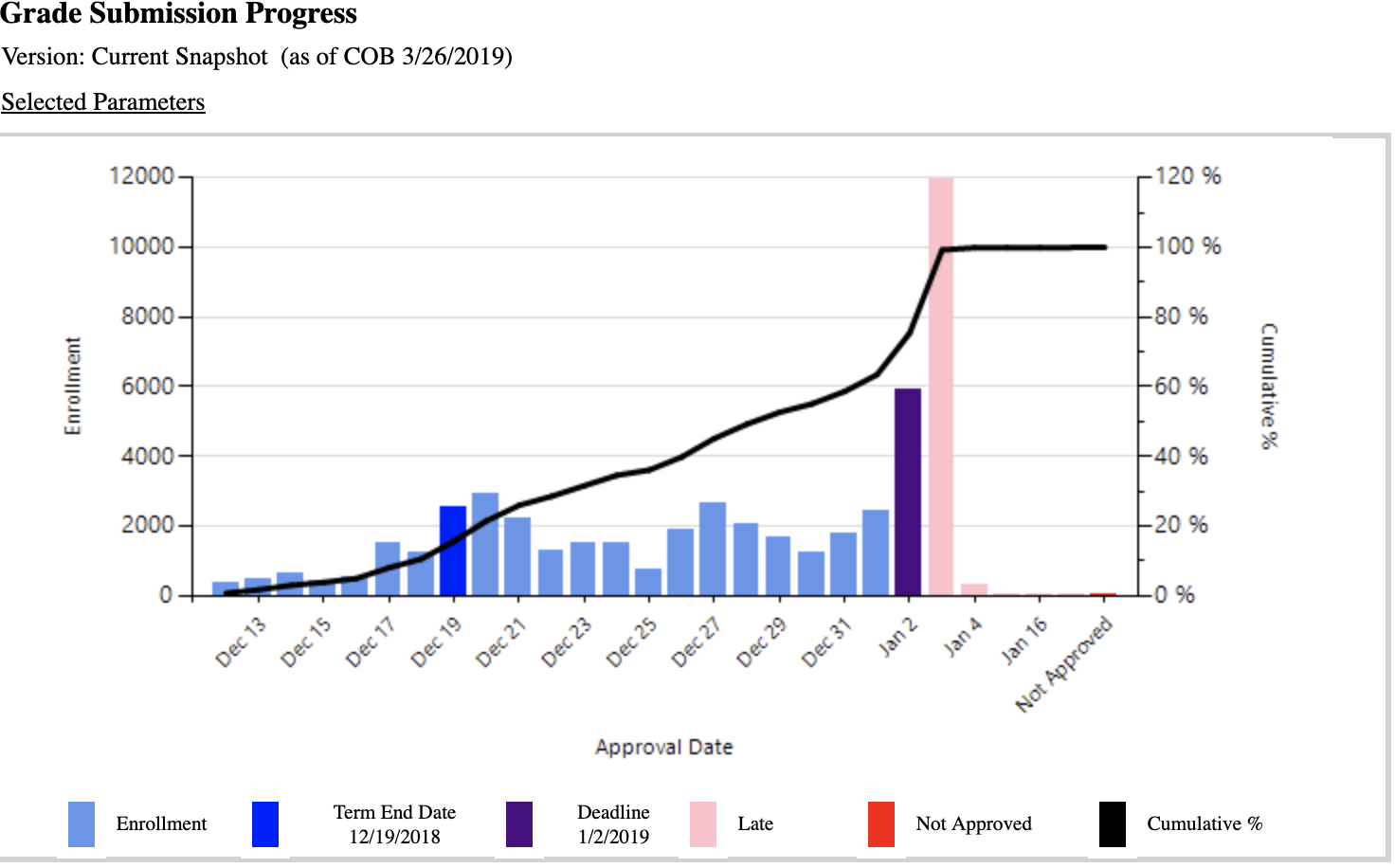
    <div class="html-content"><span><p><span>Dear UMBC Faculty,</span></p><p><span>This year, we learned UMBC’s Blackboard usage is </span><a href="https://doit.umbc.edu/itnm/?id=80996" rel="nofollow external" class="bo"><span>much different</span></a><span> and (I think) better than most colleges and universities, but one of the things I still like to do with DoIT's “birds eye view” is to help identify, support and promote effective practices. Towards this end, here are some basic, but powerful things I think all faculty might want to do in Blackboard -- beyond </span><a href="https://wiki.umbc.edu/x/VoAc" rel="nofollow external" class="bo"><span>making the course shell available</span></a><span> -- and why. Your mileage may vary if using the 9.1 “current” version of Blackboard vs. the new </span><a href="http://umbc.edu/go/ultra" rel="nofollow external" class="bo"><span>Ultra version</span></a><span>, but hopefully the key ideas will translate:</span></p><p><span><strong>1. Post a Syllabus</strong></span></p><p><span>Even if faculty have no intention of using Bb beyond this task, it’s an easy way for enrolled students to know where to go. Typically, we see that 95% of all students, 87% of all instructors and 82% of all course sections use Blackboard each semester, so students are accustomed to looking here first. Save yourself some time (and handouts) and just put it here. Better yet, use the “Syllabus” content area we provide in all course shells by default.</span></p><p><span><strong>2. Enable Guests</strong></span></p><p><span>By default, DoIT doesn’t do this in the course shells we create, but if you just want curious (or waitlisted) students to know about (and keep pace with) your course, this is a good way to do so. True, it means anyone in the world can also see your guest-enabled content (if they login as “guest” at </span><a href="https://blackboard.umbc.edu/" rel="nofollow external" class="bo"><span>blackboard.umbc.edu</span></a><span>), but since the “guest” role has no identity, they can’t receive email, see into a discussion board or interact with instructors or the class in any way. Basically, it’s a passive role that can only view content you want visible -- if you </span><a href="https://wiki.umbc.edu/x/BANfB" rel="nofollow external" class="bo"><span>enable guests</span></a><span>.</span></p><p><span><strong>3. Post a welcome announcement and/or send an email</strong></span></p><p><span>Even if all you do is announce “I’m not using Blackboard this term” or “I use this site instead [insert external link],” most students in most courses will know what you want right away. Also, DoIT </span><span><em>could</em></span><span> enable all Bb course sites (by default) which would eliminate our most often requested help ticket by far: </span><a href="https://wiki.umbc.edu/x/LIEr" rel="nofollow external" class="bo"><span>“Why can’t I see my Blackboard course?”</span></a><span> More importantly, if your external site goes down -- or you don’t want to invent an authentication scheme so only your students can view it -- Bb can be an easy backup, and most faculty know at least one colleague who is using it.</span></p><p><span><strong>4. Assign a “Syllabus Quiz” before the 10th day add/drop deadline</strong></span></p><p><span>Many faculty are doing this already as a quick way to facilitate and identify engaged students. In fact, we recently studied final grades in a high-enrollment, 100-level course over the past two years and found students who did not take the syllabus quiz were four times more likely to earn a D,F or W final grade (p&lt;.001, n=1,455). Better yet, require students to at least take (if not pass) the syllabus quiz before turning in the first assignment for credit. To do so, you’ll want to learn how to use </span><a href="https://doit.umbc.edu/itnm/practices/adaptive/" rel="nofollow external" class="bo"><span>adaptive release</span></a><span> -- or </span><a href="https://wiki.umbc.edu/x/iIvcB" rel="nofollow external" class="bo"><span>conditional availability</span></a><span> in Bb Ultra --  based on a grade in a prior assignment. This is a powerful, but infrequently used tool by faculty. Typically, we’ve found students view more than 85% of the content in a course enabled with at least one adaptive release rule vs. only about 45% without it. </span></p><p><span><strong>5. Create a “Questions About Class” discussion forum</strong></span></p><p><span>And require all students use this </span><span>before</span><span> emailing the instructor about anything (except, of course, personal issues). You can moderate or even just monitor the </span><a href="https://wiki.umbc.edu/x/IIN0Ag" rel="nofollow external" class="bo"><span>discussion</span></a><span> if you want, but this can be a place for students to help each other. If you award </span><a href="https://doit.umbc.edu/itnm/managing-discussions/" rel="nofollow external" class="bo"><span>credit for participation</span></a><span>, this can also be another way of seeing who’s engaged and who could be a good TA or </span><a href="https://si.lrc.umbc.edu/" rel="nofollow external" class="bo"><span>SI/PASS</span></a><span> candidate in the future. Who are your ambassadors and allies in the class? </span></p><p><span><strong>6. Use Ally to Test if Your Course Content is Accessible</strong></span></p><p><span>This year </span><a href="https://doit.umbc.edu/news/?id=82487" rel="nofollow external" class="bo"><span>DoIT purchased Ally</span></a><span> to help faculty identify any of their own content that is not accessible to students with disabilities; </span><a href="https://wiki.umbc.edu/x/1wX9Aw" rel="nofollow external" class="bo"><span>Blackboard is accessible</span></a><span> as a learning management system (LMS), but Ally goes a step further to check your own uploaded and created content. Currently, Ally can only be used in Blackboard, but even if you don’t use Bb as an LMS, ask us how you could leverage it as an accessibility engine for your own content you put elsewhere. </span></p><p><span><strong>7. Host at least one virtual class meeting or “office hour”</strong></span></p><p><span>A course doesn’t need to be </span><span><em>entirely</em></span><span> online to use online tools, and increasingly online learning doesn’t have to be just reading text-based content. </span><a href="https://wiki.umbc.edu/x/CxPSAQ" rel="nofollow external" class="bo"><span>Blackboard Collaborate</span></a><span> offers a simple, easy to use live, video-conferencing tool inside every Bb course with no downloads or plug-ins. Use it for a class meeting, maybe on a snow day, </span><a href="https://doit.umbc.edu/events/?id=24769" rel="nofollow external" class="bo"><span>virtual office hours</span></a><span> or even a guest lecture or student group or team project meeting. You can also record the session or use </span><a href="https://wiki.umbc.edu/x/kQd4B" rel="nofollow external" class="bo"><span>Panopto</span></a><span> for more advanced lecture capture and screencasting options.</span></p><p><span><strong>8. Use student analytics to inform Bb course design</strong></span></p><p><span>If you accept that student use of Blackboard can be a plausible proxy for their engagement in a course generally, then you may want to check out several </span><a href="https://wiki.umbc.edu/x/doEpB" rel="nofollow external" class="bo"><span>analytics reports inside every Bb course shell</span></a><span>. Or take a look at the </span><a href="https://doit.umbc.edu/analytics/most-active-bb-courses/" rel="nofollow external" class="bo"><span>most active Bb courses</span></a><span>, Report Exchange (REX) <a href="https://doit.umbc.edu/news/?id=66749" rel="nofollow external" class="bo">tools for teaching</a>, and even a curated <a href="http://doit.umbc.edu/analytics" rel="nofollow external" class="bo">list</a> of articles and presentations by and about UMBC’s learning analytics and student success research (</span><a href="https://doit.umbc.edu/analytics/" rel="nofollow external" class="bo"><span>doit.umbc.edu/analytics</span></a><span>). Yes, student Blackboard use varies by courses, but analytics can help give everyone a “bird’s eye view” of where students are using it more -- and perhaps find out why or if it’s effective.</span></p><p><span><strong>9. Encourage students to complete course evaluations</strong></span></p><p><span>Like the syllabus, just make the </span><a href="https://wiki.umbc.edu/x/eYENB" rel="nofollow external" class="bo"><span>course evaluaton</span></a><span> as easy as possible for students to find on the Bb dashboard itself, </span><span>my</span><span>UMBC or check their email. Enough said.</span></p><p><span><strong>10. Post an “unofficial” final grade sooner than later</strong></span></p><p><a href="https://www.educause.edu/ecar/technology-research-academic-community" rel="nofollow external" class="bo"><span>Research by Educause</span></a><span> has shown that students value checking grades more than any other  function in an LMS like Blackboard. The same is even more true for final grades, which are submitted in PeopleSoft Student Administration about three weeks after the last day of classes (see below for Fall 18). But this can be challenging for students who might want to take a winter or summer course, if they need to know they passed a pre-req. As long as the grade is “unofficial,” help them know where they stand sooner.</span></p><p><strong><br><img src="https://lh6.googleusercontent.com/GrnVf7peL48b8zaFZkROlIXj8OFJQIVe4pDZXXIHDkjpmJ1lrPbZfxJc3SXAj1GhqzOW7mexPJWhDBhwQk0l_evwQNaz6LLGx81Shdx1RDg70rs7aUQdM_CC1MB_xjbPfNDCUa1G" width="624" height="388" style="max-width: 100%; height: auto;"></strong></p><p><span>As always, if you have questions or need help, please consult the </span><a href="https://wiki.umbc.edu/display/faq/Blackboard" rel="nofollow external" class="bo"><span>Blackboard Help FAQs</span></a><span> or directly at </span><a href="http://www.umbc.edu/blackboard/help" rel="nofollow external" class="bo"><span>www.umbc.edu/blackboard/help</span></a><span>. You can also contact the </span><a href="http://doit.umbc.edu/tsc" rel="nofollow external" class="bo"><span>Technology Support Center</span></a><span> at 410.455.3838 or </span><a href="https://wiki.umbc.edu/pages/viewpage.action?pageId=1867859" rel="nofollow external" class="bo"><span>submit an RT (Request Tracker) ticket</span></a><span> via the </span><a href="https://rt.umbc.edu/UMBC/RequestHelp.html" rel="nofollow external" class="bo"><span>myUMBC Help Menu</span></a><span> or directly at </span><a href="http://my.umbc.edu/help" rel="nofollow external" class="bo"><span>my.umbc.edu/help</span></a><span>. You can also consult with anyone in DoIT’s </span><a href="https://doit.umbc.edu/itnm/staff/" rel="nofollow external" class="bo"><span>Instructional Technology</span></a><span> support team.</span></p><p><span>John Fritz</span></p><p><span>Assoc. Vice President, Instructional Technology</span></p><p><span>UMBC Division of Information Technology (DoIT)</span></p><p><span>410.455.6596 or <a href="mailto:fritz@umbc.edu">fritz@umbc.edu</a></span></p></span></div>
]]>
  </Body>
  <Summary>Dear UMBC Faculty,  This year, we learned UMBC’s Blackboard usage is much different and (I think) better than most colleges and universities, but one of the things I still like to do with DoIT's...</Summary>
  <Website>http://www.umbc.edu/blackboard/help</Website>
  <TrackingUrl>https://dev.my.umbc.edu/api/v0/pixel/news/84378/guest@my.umbc.edu/8a7d0a54dd64209ee8657f83e018a46d/api/pixel</TrackingUrl>
  <Tag>blackboard</Tag>
  <Tag>ultra</Tag>
  <Group token="instructional-technology">Instructional Technology</Group>
  <GroupUrl>https://dev.my.umbc.edu/groups/instructional-technology</GroupUrl>
  <AvatarUrl>https://assets2-dev.my.umbc.edu/system/shared/avatars/groups/000/001/164/dec3b026b81ee6d890a8f82f75c94a2e/xsmall.png?1446126703</AvatarUrl>
  <AvatarUrl size="original">https://assets1-dev.my.umbc.edu/system/shared/avatars/groups/000/001/164/dec3b026b81ee6d890a8f82f75c94a2e/original.png?1446126703</AvatarUrl>
  <AvatarUrl size="xxlarge">https://assets2-dev.my.umbc.edu/system/shared/avatars/groups/000/001/164/dec3b026b81ee6d890a8f82f75c94a2e/xxlarge.png?1446126703</AvatarUrl>
  <AvatarUrl size="xlarge">https://assets1-dev.my.umbc.edu/system/shared/avatars/groups/000/001/164/dec3b026b81ee6d890a8f82f75c94a2e/xlarge.png?1446126703</AvatarUrl>
  <AvatarUrl size="large">https://assets1-dev.my.umbc.edu/system/shared/avatars/groups/000/001/164/dec3b026b81ee6d890a8f82f75c94a2e/large.png?1446126703</AvatarUrl>
  <AvatarUrl size="medium">https://assets4-dev.my.umbc.edu/system/shared/avatars/groups/000/001/164/dec3b026b81ee6d890a8f82f75c94a2e/medium.png?1446126703</AvatarUrl>
  <AvatarUrl size="small">https://assets3-dev.my.umbc.edu/system/shared/avatars/groups/000/001/164/dec3b026b81ee6d890a8f82f75c94a2e/small.png?1446126703</AvatarUrl>
  <AvatarUrl size="xsmall">https://assets2-dev.my.umbc.edu/system/shared/avatars/groups/000/001/164/dec3b026b81ee6d890a8f82f75c94a2e/xsmall.png?1446126703</AvatarUrl>
  <AvatarUrl size="xxsmall">https://assets3-dev.my.umbc.edu/system/shared/avatars/groups/000/001/164/dec3b026b81ee6d890a8f82f75c94a2e/xxsmall.png?1446126703</AvatarUrl>
  <Sponsor>Instructional Technology</Sponsor>
  <ThumbnailUrl size="xxlarge">https://assets1-dev.my.umbc.edu/system/shared/thumbnails/news/000/084/378/c5956af75b21f64e2d2bc6d7534ceacf/xxlarge.jpg?1557346279</ThumbnailUrl>
  <ThumbnailUrl size="xlarge">https://assets4-dev.my.umbc.edu/system/shared/thumbnails/news/000/084/378/c5956af75b21f64e2d2bc6d7534ceacf/xlarge.jpg?1557346279</ThumbnailUrl>
  <ThumbnailUrl size="large">https://assets4-dev.my.umbc.edu/system/shared/thumbnails/news/000/084/378/c5956af75b21f64e2d2bc6d7534ceacf/large.jpg?1557346279</ThumbnailUrl>
  <ThumbnailUrl size="medium">https://assets1-dev.my.umbc.edu/system/shared/thumbnails/news/000/084/378/c5956af75b21f64e2d2bc6d7534ceacf/medium.jpg?1557346279</ThumbnailUrl>
  <ThumbnailUrl size="small">https://assets1-dev.my.umbc.edu/system/shared/thumbnails/news/000/084/378/c5956af75b21f64e2d2bc6d7534ceacf/small.jpg?1557346279</ThumbnailUrl>
  <ThumbnailUrl size="xsmall">https://assets1-dev.my.umbc.edu/system/shared/thumbnails/news/000/084/378/c5956af75b21f64e2d2bc6d7534ceacf/xsmall.jpg?1557346279</ThumbnailUrl>
  <ThumbnailUrl size="xxsmall">https://assets4-dev.my.umbc.edu/system/shared/thumbnails/news/000/084/378/c5956af75b21f64e2d2bc6d7534ceacf/xxsmall.jpg?1557346279</ThumbnailUrl>
  <PawCount>1</PawCount>
  <CommentCount>0</CommentCount>
  <CommentsAllowed>true</CommentsAllowed>
  <PostedAt>Wed, 08 May 2019 16:21:41 -0400</PostedAt>
  <EditAt>Thu, 09 May 2019 09:12:55 -0400</EditAt>
</NewsItem>
  <NewsItem contentIssues="true" id="53576" important="false" status="posted" url="https://dev.my.umbc.edu/groups/doit/posts/53576">
    <Title>New Bb Upgrade Planned for WT2016</Title>
    <Tagline>Benefits include improved Java-free Collaborate</Tagline>
    <Body>
      <![CDATA[
          <div class="html-content"><span><p>To continue our <a href="http://doit.umbc.edu/news/?id=46984" rel="nofollow external" class="bo">managed hosting</a> from Blackboard and access new functionality, <strong>UMBC’s Blackboard server will need to be upgraded in late December</strong> after the fall semester ends. Apart from ensuring UMBC is using the most recent and supported version of Blackboard, the upgrade will allow us to implement the new Collaborate.</p><p>The new version of Collaborate uses the Chrome web browser rather than Java to deliver a superior audio and video experience. Faculty can <a href="http://my.umbc.edu/groups/doit/posts/52797" rel="nofollow external" class="bo">test drive the new Collaborate</a> now by opening an RT ticket. </p><p>DoIT will provide more updates about during the Fall semester, but we wanted to let the campus know now. If you have any questions, contact Mariann Hawken at <a href="mailto:mariannhawken@umbc.edu">mariannhawken@umbc.edu</a> or 410.455.2920.</p></span></div>
      ]]>
    </Body>
    <Summary>To continue our managed hosting from Blackboard and access new functionality, UMBC’s Blackboard server will need to be upgraded in late December after the fall semester ends. Apart from ensuring...</Summary>
    <Website>http://my.umbc.edu/groups/doit/posts/53576</Website>
    <TrackingUrl>https://dev.my.umbc.edu/api/v0/pixel/news/53576/guest@my.umbc.edu/5ff9c84efdc6b25fe4f3440abdd8fd6c/api/pixel</TrackingUrl>
    <Tag>blackboard</Tag>
    <Tag>blackboard-collaborate</Tag>
    <Tag>collaborate</Tag>
    <Tag>maintenance</Tag>
    <Tag>ultra</Tag>
    <Tag>ultra-experience</Tag>
    <Tag>upgrade</Tag>
    <Group token="doit">Division of Information Technology (DoIT)</Group>
    <GroupUrl>https://dev.my.umbc.edu/groups/doit</GroupUrl>
    <AvatarUrl>https://assets2-dev.my.umbc.edu/system/shared/avatars/groups/000/000/021/d27760c5de12c74b73faec8d0e631acf/xsmall.png?1727453227</AvatarUrl>
    <AvatarUrl size="original">https://assets2-dev.my.umbc.edu/system/shared/avatars/groups/000/000/021/d27760c5de12c74b73faec8d0e631acf/original.JPG?1727453227</AvatarUrl>
    <AvatarUrl size="xxlarge">https://assets1-dev.my.umbc.edu/system/shared/avatars/groups/000/000/021/d27760c5de12c74b73faec8d0e631acf/xxlarge.png?1727453227</AvatarUrl>
    <AvatarUrl size="xlarge">https://assets3-dev.my.umbc.edu/system/shared/avatars/groups/000/000/021/d27760c5de12c74b73faec8d0e631acf/xlarge.png?1727453227</AvatarUrl>
    <AvatarUrl size="large">https://assets2-dev.my.umbc.edu/system/shared/avatars/groups/000/000/021/d27760c5de12c74b73faec8d0e631acf/large.png?1727453227</AvatarUrl>
    <AvatarUrl size="medium">https://assets2-dev.my.umbc.edu/system/shared/avatars/groups/000/000/021/d27760c5de12c74b73faec8d0e631acf/medium.png?1727453227</AvatarUrl>
    <AvatarUrl size="small">https://assets2-dev.my.umbc.edu/system/shared/avatars/groups/000/000/021/d27760c5de12c74b73faec8d0e631acf/small.png?1727453227</AvatarUrl>
    <AvatarUrl size="xsmall">https://assets2-dev.my.umbc.edu/system/shared/avatars/groups/000/000/021/d27760c5de12c74b73faec8d0e631acf/xsmall.png?1727453227</AvatarUrl>
    <AvatarUrl size="xxsmall">https://assets4-dev.my.umbc.edu/system/shared/avatars/groups/000/000/021/d27760c5de12c74b73faec8d0e631acf/xxsmall.png?1727453227</AvatarUrl>
    <Sponsor>Division of Information Technology (DoIT)</Sponsor>
    <ThumbnailUrl size="xxlarge">https://assets3-dev.my.umbc.edu/system/shared/thumbnails/news/000/053/576/b90395f9877506ce8481ad30bf5975fb/xxlarge.jpg?1440516012</ThumbnailUrl>
    <ThumbnailUrl size="xlarge">https://assets3-dev.my.umbc.edu/system/shared/thumbnails/news/000/053/576/b90395f9877506ce8481ad30bf5975fb/xlarge.jpg?1440516012</ThumbnailUrl>
    <ThumbnailUrl size="large">https://assets3-dev.my.umbc.edu/system/shared/thumbnails/news/000/053/576/b90395f9877506ce8481ad30bf5975fb/large.jpg?1440516012</ThumbnailUrl>
    <ThumbnailUrl size="medium">https://assets1-dev.my.umbc.edu/system/shared/thumbnails/news/000/053/576/b90395f9877506ce8481ad30bf5975fb/medium.jpg?1440516012</ThumbnailUrl>
    <ThumbnailUrl size="small">https://assets3-dev.my.umbc.edu/system/shared/thumbnails/news/000/053/576/b90395f9877506ce8481ad30bf5975fb/small.jpg?1440516012</ThumbnailUrl>
    <ThumbnailUrl size="xsmall">https://assets4-dev.my.umbc.edu/system/shared/thumbnails/news/000/053/576/b90395f9877506ce8481ad30bf5975fb/xsmall.jpg?1440516012</ThumbnailUrl>
    <ThumbnailUrl size="xxsmall">https://assets4-dev.my.umbc.edu/system/shared/thumbnails/news/000/053/576/b90395f9877506ce8481ad30bf5975fb/xxsmall.jpg?1440516012</ThumbnailUrl>
    <PawCount>5</PawCount>
    <CommentCount>4</CommentCount>
    <CommentsAllowed>true</CommentsAllowed>
    <PostedAt>Tue, 25 Aug 2015 12:29:12 -0400</PostedAt>
    <EditAt>Tue, 25 Aug 2015 13:04:38 -0400</EditAt>
  </NewsItem>
</News>