<?xml version="1.0"?>
<News hasArchived="false" page="5" pageCount="50" pageSize="10" timestamp="Mon, 27 Apr 2026 15:48:53 -0400" url="https://dev.my.umbc.edu/groups/doit/posts.xml?page=5&amp;tag=blackboard">
  <NewsItem contentIssues="true" id="144132" important="false" status="posted" url="https://dev.my.umbc.edu/groups/doit/posts/144132">
  <Title>Resolved - Blackboard Service Disruption - System Performance</Title>
  <Tagline>Access to Blackboard &amp; course content may be impacted</Tagline>
  <Body>
    <![CDATA[
    <div class="html-content"><p>At 6:40 PM on September 22nd, <a href="https://status.blackboard.com/incidents/4380xv4nfhg9" rel="nofollow external" class="bo">Blackboard reported a system performance issue</a> affecting clients in the US East region. This disruption may prevent users from accessing the Blackboard platform. Users who are able to log in may experience degraded performance and difficulty accessing course content and assessments. </p><p>As of 11:00 PM, system performance issues remain unresolved.</p><p>Blackboard engineers are working to address the issue as quickly as possible. Instructional Technology staff opened a ticket with Blackboard Support and are continuing to monitor the service disruption.</p><p><strong>Update: </strong></p><p>As of 3:15 am on September 23, Blackboard reports that this incident has been resolved. Please open an RT request for any continuing concerns related to system performance.</p><p><em>This post will be updated with additional information as we receive it.</em></p><div><span><strong><br></strong></span></div><div><span><strong><br></strong></span></div><div><span><strong>Connect with Instructional Technology</strong></span></div><div><span>As always, if you have any questions about teaching, learning, and technology at UMBC, please consider the following options:</span></div><ul><li><a href="http://www.umbc.edu/faq" rel="nofollow external" class="bo">Check our extensive FAQ collection</a><span> </span></li><li><span><a href="http://my.umbc.edu/go/request-help" rel="nofollow external" class="bo">Open a ticket via RT</a></span></li><li><span>Follow the </span><a href="http://my.umbc.edu/groups/instructional-technology" rel="nofollow external" class="bo">Instructional Technology</a> &amp; <a href="http://my.umbc.edu/groups/doit" rel="nofollow external" class="bo">DoIT</a><span> myUMBC groups</span></li><li><a href="http://doit.umbc.edu/itnm/staff/" rel="nofollow external" class="bo">Request a consult</a><span> with <a href="http://doit.umbc.edu/itnm/staff" rel="nofollow external" class="bo">instructional technology staff</a></span></li><li><span><a href="http://pivot.umbc.edu/" rel="nofollow external" class="bo">PIVOT</a> | <a href="https://doit.umbc.edu/itnm/academic-continuity/" rel="nofollow external" class="bo">Academic Continuity</a></span> | <span><a href="https://fdc.umbc.edu/teaching/keep-on-teaching/" rel="nofollow external" class="bo">Keep On Teaching</a></span> | <span><a href="https://doit.umbc.edu/students" rel="nofollow external" class="bo">Student Technology Resources</a></span></li></ul><div><em>Thumbnail-image: Blackboard logo [decorative]</em></div><p><br></p></div>
]]>
  </Body>
  <Summary>At 6:40 PM on September 22nd, Blackboard reported a system performance issue affecting clients in the US East region. This disruption may prevent users from accessing the Blackboard platform....</Summary>
  <Website>https://my3.my.umbc.edu/groups/instructional-technology/posts/144132</Website>
  <TrackingUrl>https://dev.my.umbc.edu/api/v0/pixel/news/144132/guest@my.umbc.edu/61bae9c56fe299d24494666cc9a1250c/api/pixel</TrackingUrl>
  <Tag>blackboard</Tag>
  <Tag>outage</Tag>
  <Group token="instructional-technology">Instructional Technology</Group>
  <GroupUrl>https://dev.my.umbc.edu/groups/instructional-technology</GroupUrl>
  <AvatarUrl>https://assets2-dev.my.umbc.edu/system/shared/avatars/groups/000/001/164/dec3b026b81ee6d890a8f82f75c94a2e/xsmall.png?1446126703</AvatarUrl>
  <AvatarUrl size="original">https://assets1-dev.my.umbc.edu/system/shared/avatars/groups/000/001/164/dec3b026b81ee6d890a8f82f75c94a2e/original.png?1446126703</AvatarUrl>
  <AvatarUrl size="xxlarge">https://assets2-dev.my.umbc.edu/system/shared/avatars/groups/000/001/164/dec3b026b81ee6d890a8f82f75c94a2e/xxlarge.png?1446126703</AvatarUrl>
  <AvatarUrl size="xlarge">https://assets1-dev.my.umbc.edu/system/shared/avatars/groups/000/001/164/dec3b026b81ee6d890a8f82f75c94a2e/xlarge.png?1446126703</AvatarUrl>
  <AvatarUrl size="large">https://assets1-dev.my.umbc.edu/system/shared/avatars/groups/000/001/164/dec3b026b81ee6d890a8f82f75c94a2e/large.png?1446126703</AvatarUrl>
  <AvatarUrl size="medium">https://assets4-dev.my.umbc.edu/system/shared/avatars/groups/000/001/164/dec3b026b81ee6d890a8f82f75c94a2e/medium.png?1446126703</AvatarUrl>
  <AvatarUrl size="small">https://assets3-dev.my.umbc.edu/system/shared/avatars/groups/000/001/164/dec3b026b81ee6d890a8f82f75c94a2e/small.png?1446126703</AvatarUrl>
  <AvatarUrl size="xsmall">https://assets2-dev.my.umbc.edu/system/shared/avatars/groups/000/001/164/dec3b026b81ee6d890a8f82f75c94a2e/xsmall.png?1446126703</AvatarUrl>
  <AvatarUrl size="xxsmall">https://assets3-dev.my.umbc.edu/system/shared/avatars/groups/000/001/164/dec3b026b81ee6d890a8f82f75c94a2e/xxsmall.png?1446126703</AvatarUrl>
  <Sponsor>Instructional Technology</Sponsor>
  <ThumbnailUrl size="xxlarge">https://assets2-dev.my.umbc.edu/system/shared/thumbnails/news/000/144/132/171974d2b4c87c275a9f91ae12938a88/xxlarge.jpg?1727059322</ThumbnailUrl>
  <ThumbnailUrl size="xlarge">https://assets4-dev.my.umbc.edu/system/shared/thumbnails/news/000/144/132/171974d2b4c87c275a9f91ae12938a88/xlarge.jpg?1727059322</ThumbnailUrl>
  <ThumbnailUrl size="large">https://assets3-dev.my.umbc.edu/system/shared/thumbnails/news/000/144/132/171974d2b4c87c275a9f91ae12938a88/large.jpg?1727059322</ThumbnailUrl>
  <ThumbnailUrl size="medium">https://assets4-dev.my.umbc.edu/system/shared/thumbnails/news/000/144/132/171974d2b4c87c275a9f91ae12938a88/medium.jpg?1727059322</ThumbnailUrl>
  <ThumbnailUrl size="small">https://assets2-dev.my.umbc.edu/system/shared/thumbnails/news/000/144/132/171974d2b4c87c275a9f91ae12938a88/small.jpg?1727059322</ThumbnailUrl>
  <ThumbnailUrl size="xsmall">https://assets1-dev.my.umbc.edu/system/shared/thumbnails/news/000/144/132/171974d2b4c87c275a9f91ae12938a88/xsmall.jpg?1727059322</ThumbnailUrl>
  <ThumbnailUrl size="xxsmall">https://assets4-dev.my.umbc.edu/system/shared/thumbnails/news/000/144/132/171974d2b4c87c275a9f91ae12938a88/xxsmall.jpg?1727059322</ThumbnailUrl>
  <PawCount>2</PawCount>
  <CommentCount>0</CommentCount>
  <CommentsAllowed>false</CommentsAllowed>
  <PostedAt>Sun, 22 Sep 2024 23:19:41 -0400</PostedAt>
  <EditAt>Mon, 23 Sep 2024 06:27:21 -0400</EditAt>
</NewsItem>
  <NewsItem contentIssues="false" id="143384" important="false" status="posted" url="https://dev.my.umbc.edu/groups/doit/posts/143384">
  <Title>September brings knowledge checks, updated course landing page, AI conversations to Ultra</Title>
  <Tagline>Grading overview, activity log, new feedback for students</Tagline>
  <Body>
    <![CDATA[
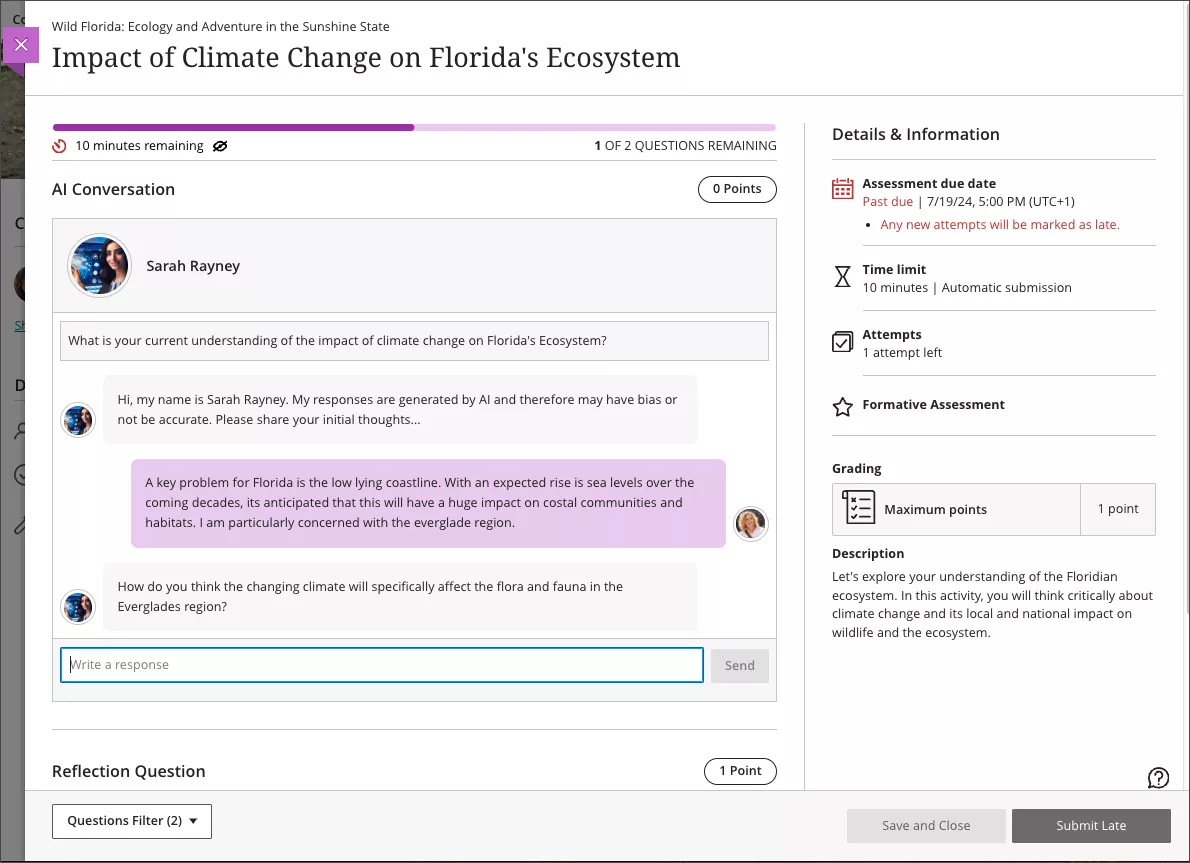
    <div class="html-content"><p>The latest release of Ultra enhancements comes two weeks into the fall 24 semester, bringing formative knowledge checks to Ultra Documents, a redesigned course landing page, and a new learner engagement tool called AI Conversations. </p><p>In <a href="https://my3.my.umbc.edu/groups/instructional-technology/posts/143022" rel="nofollow external" class="bo">the August release</a>, the Ultra Document saw significant improvements to <a href="https://help.blackboard.com/Learn/Instructor/Ultra/Course_Content/Create_Content/Create_Course_Materials/Create_Content_Items_or_Documents" rel="nofollow external" class="bo">support robust flexible layouts</a> that are mobile friendly and responsible. With this update, instructors can now <a href="https://help.blackboard.com/node/48706" rel="nofollow external" class="bo">create formative knowledge checks</a> to enhance the learning experience, allowing students to engage with content and receive immediate feedback. Instructors can provide correct/incorrect feedback and access simple metrics about attempts. Knowledge checks are formative and do not pass to the gradebook at this time.</p><p><img src="https://help.blackboard.com/sites/default/files/inline-images/learn_ultra_instructor_Documents_KCAnimation_0.gif" alt="Image 1: Example of knowledge check question animated" style="max-width: 100%; height: auto;"></p><p><span><em>Image 1: Example of knowledge check question (animated)</em></span></p><p><span>As <a href="https://my3.my.umbc.edu/groups/instructional-technology/posts/143242" rel="nofollow external" class="bo">previously announced</a>, </span>Anthology will <a href="https://help.blackboard.com/node/48721" rel="nofollow external" class="bo">update the Ultra course landing page</a> to focus content on the left and course actions on the right. Additionally, it will be easier to distinguish between content containers (e.g., folders, learning modules, other content types) to help improve course navigation for all users. Moreover, functional improvements with this redesign provide clearer options to create content throughout the course. </p><p><img src="https://my3.my.umbc.edu/groups/instructional-technology/posts/143242/attachments/52853" alt="Image 2: Comparison of old Ultra course page (left) and new Ultra course page (right)" style="max-width: 100%; height: auto;"></p><p><em><span>Image 2: </span><span>Comparison of old Ultra course page (left) and new Ultra course page (right)</span></em></p><p>The <a href="https://help.blackboard.com/Learn/Instructor/Ultra/Interact/AI_Conversation" rel="nofollow external" class="bo">AI Conversation</a> is a new engagement tool guided by AI, encouraging students explore their thoughts on an assigned topic. Currently available as a <span>Socratic questioning exercise, t</span><span>he AI Conversation's persona is configured by the instructor (name, avatar, and personality trait) with options to test and preview for reliability. Additionally, a customizable reflection question allows students to share their thoughts on the activity and, if prompted by the reflection and instructor, lets them flag any bias or errors from the AI as part of </span><a href="https://www.anthology.com/trust-center/trustworthy-ai-approach" rel="nofollow external" class="bo">Anthology’s Trustworthy AI Approach</a><span>. </span>On submission, the instructor can review the AI conversation transcript and the student's reflection. Future <span>updates</span> to this engagement activity in late FA2024 will include roleplaying and debate options.</p><p><img src="https://my3.my.umbc.edu/groups/instructional-technology/posts/143384/attachments/52964" alt="Image 3: Example of student participating in an AI Conversation" style="max-width: 100%; height: auto;"></p><p><em>Image 3: Example of student participating in an AI Conversation</em></p><p>Finally, <a href="https://help.blackboard.com/Learn/Instructor/Ultra/Performance/Student_Activity_Log" rel="nofollow external" class="bo">a new activity log</a> is available to instructors in the Ultra course, helping with decisions in academic disputes and aiding in troubleshooting. <span>Events include course access, assessment start/save/submitted, discussion access/save/edit/reply, document access, LTI (tool) access, and journal access. </span><span>The Activity log can be filtered by event type and can look to the past 140 days.</span></p><p>Additional updates for September include:<span>  </span></p><ul><li><span>Instructors will find <a href="https://help.blackboard.com/node/48746" rel="nofollow external" class="bo">a new gradebook Overview tab</a> to improve task orientation and grading efficiency.  This tab contains two sections: Needs Grading and Needs Posting.</span></li><li><span>To help instructors stay on top of their grading workload, there will be <a href="https://help.blackboard.com/node/48751" rel="nofollow external" class="bo">a number in the Gradebook tab</a> to indicate when there are new submissions to grade. </span></li><li><span>Ultra introduces <a href="https://help.blackboard.com/node/48726" rel="nofollow external" class="bo">a new student-facing submission review page</a> for assignments that makes all instructor feedback on a submission more visible</span><span>, even if the assignment is <a href="https://help.blackboard.com/node/48731" rel="nofollow external" class="bo">hidden by a release condition</a>.</span></li><li>The <a href="https://help.blackboard.com/node/48761" rel="nofollow external" class="bo">Wiris engine and equation editor</a> is updated to improve the rendering of subscript and superscript formulas, providing a better experience for STEM courses.</li><li>Ultra added a new option to help instructors remove submissions from the grading workflow without having to delete them. When grading a student, you can now <a href="https://help.blackboard.com/node/48741" rel="nofollow external" class="bo">select Exclude Attempt to remove it</a> from the Needs Grading workflow.</li><li>When enabled, the Automatic Zeros gradebook setting gives a zero score to students who haven’t made a submission by the due date. To help instructors <a href="https://help.blackboard.com/node/48751" rel="nofollow external" class="bo">find and grade late assessment submissions</a>, they are now indicated as Needs Grading on the Grades and Gradable Items gradebook pages.  </li></ul><p>Faculty should see the latest updates in their Ultra courses around September 5-6, 2024. The next update to our Ultra test environment will take place on September 10, 2024; release notes are posted to the <a href="https://wiki.umbc.edu/x/LohnB" rel="nofollow external" class="bo">What's New in Ultra</a> that same week. Faculty who are interested in test driving new features before they are released to production should <a href="http://my.umbc.edu/go/request-help" rel="nofollow external" class="bo">open an RT ticket</a> to request early access. Please <a href="http://umbc.edu/go/ultra" rel="nofollow external" class="bo">watch the FAQs</a>, including <a href="https://wiki.umbc.edu/x/LohnB" rel="nofollow external" class="bo">the What's New with Ultra page</a>, and myUMBC for additional information about Ultra.</p><div><div><span><strong>Connect with Instructional Technology</strong></span></div><div><span>As always, if you have any questions about teaching, learning, and technology at UMBC, please consider the following options:</span></div><ul><li><a href="http://www.umbc.edu/faq" rel="nofollow external" class="bo">Check our extensive FAQ collection</a><span> </span></li><ul><li><span><a href="https://wiki.umbc.edu/x/LohnB" rel="nofollow external" class="bo"><span>What's new in Ultra?</span></a><span> </span><span>|</span><span> </span><a href="https://wiki.umbc.edu/x/bwrSAQ" rel="nofollow external" class="bo"><span>Known Issues</span></a><span> </span></span></li></ul><li><span><a href="http://my.umbc.edu/go/request-help" rel="nofollow external" class="bo">Open a ticket via RT</a></span></li><li><span>Follow the </span><a href="http://my.umbc.edu/groups/instructional-technology" rel="nofollow external" class="bo">Instructional Technology</a><span> &amp; </span><a href="http://my.umbc.edu/groups/doit" rel="nofollow external" class="bo">DoIT</a><span> myUMBC groups</span></li><li><a href="http://doit.umbc.edu/itnm/staff/" rel="nofollow external" class="bo">Request a consult</a><span> with <a href="http://doit.umbc.edu/itnm/staff" rel="nofollow external" class="bo">instructional technology staff</a></span></li><li><span><a href="http://pivot.umbc.edu" rel="nofollow external" class="bo">PIVOT</a> | <a href="https://doit.umbc.edu/itnm/academic-continuity/" rel="nofollow external" class="bo">Academic Continuity</a></span><span> </span><span>|</span><span> </span><span><a href="https://fdc.umbc.edu/teaching/keep-on-teaching/" rel="nofollow external" class="bo">Keep On Teaching</a></span><span> </span><span>|</span><span> </span><span><a href="https://doit.umbc.edu/students" rel="nofollow external" class="bo">Student Technology Resources</a></span></li></ul><div><em>Thumbnail-image: New to Ultra [decorative]</em></div><div><div></div></div></div></div>
]]>
  </Body>
  <Summary>The latest release of Ultra enhancements comes two weeks into the fall 24 semester, bringing formative knowledge checks to Ultra Documents, a redesigned course landing page, and a new learner...</Summary>
  <Website>https://my3.my.umbc.edu/groups/instructional-technology/posts/143384</Website>
  <AttachmentKind>Image</AttachmentKind>
  <AttachmentUrl>https://assets3-dev.my.umbc.edu/system/shared/attachments/26381a748deb3ff55709bb6b659af260/69efbda6/news/000/143/384/d6da9193daf6eecb2259258ec79b43fb/learn_ultra_instructor_AIConversation_StudentView.png?1724782774</AttachmentUrl>
  <Attachments>
    <Attachment kind="Image" url="https://dev.my.umbc.edu/groups/doit/posts/143384/attachments/52964"></Attachment>
  </Attachments>
  <TrackingUrl>https://dev.my.umbc.edu/api/v0/pixel/news/143384/guest@my.umbc.edu/18c96a6a11e7380b126a951cd5cbc731/api/pixel</TrackingUrl>
  <Tag>blackboard</Tag>
  <Tag>course-ai-conversations</Tag>
  <Tag>design</Tag>
  <Tag>ultra-experience</Tag>
  <Tag>ultra-update</Tag>
  <Group token="instructional-technology">Instructional Technology</Group>
  <GroupUrl>https://dev.my.umbc.edu/groups/instructional-technology</GroupUrl>
  <AvatarUrl>https://assets2-dev.my.umbc.edu/system/shared/avatars/groups/000/001/164/dec3b026b81ee6d890a8f82f75c94a2e/xsmall.png?1446126703</AvatarUrl>
  <AvatarUrl size="original">https://assets1-dev.my.umbc.edu/system/shared/avatars/groups/000/001/164/dec3b026b81ee6d890a8f82f75c94a2e/original.png?1446126703</AvatarUrl>
  <AvatarUrl size="xxlarge">https://assets2-dev.my.umbc.edu/system/shared/avatars/groups/000/001/164/dec3b026b81ee6d890a8f82f75c94a2e/xxlarge.png?1446126703</AvatarUrl>
  <AvatarUrl size="xlarge">https://assets1-dev.my.umbc.edu/system/shared/avatars/groups/000/001/164/dec3b026b81ee6d890a8f82f75c94a2e/xlarge.png?1446126703</AvatarUrl>
  <AvatarUrl size="large">https://assets1-dev.my.umbc.edu/system/shared/avatars/groups/000/001/164/dec3b026b81ee6d890a8f82f75c94a2e/large.png?1446126703</AvatarUrl>
  <AvatarUrl size="medium">https://assets4-dev.my.umbc.edu/system/shared/avatars/groups/000/001/164/dec3b026b81ee6d890a8f82f75c94a2e/medium.png?1446126703</AvatarUrl>
  <AvatarUrl size="small">https://assets3-dev.my.umbc.edu/system/shared/avatars/groups/000/001/164/dec3b026b81ee6d890a8f82f75c94a2e/small.png?1446126703</AvatarUrl>
  <AvatarUrl size="xsmall">https://assets2-dev.my.umbc.edu/system/shared/avatars/groups/000/001/164/dec3b026b81ee6d890a8f82f75c94a2e/xsmall.png?1446126703</AvatarUrl>
  <AvatarUrl size="xxsmall">https://assets3-dev.my.umbc.edu/system/shared/avatars/groups/000/001/164/dec3b026b81ee6d890a8f82f75c94a2e/xxsmall.png?1446126703</AvatarUrl>
  <Sponsor>Instructional Technology</Sponsor>
  <ThumbnailUrl size="xxlarge">https://assets3-dev.my.umbc.edu/system/shared/thumbnails/news/000/143/384/c8d41db1f13878006f4a327708831488/xxlarge.jpg?1724780465</ThumbnailUrl>
  <ThumbnailUrl size="xlarge">https://assets3-dev.my.umbc.edu/system/shared/thumbnails/news/000/143/384/c8d41db1f13878006f4a327708831488/xlarge.jpg?1724780465</ThumbnailUrl>
  <ThumbnailUrl size="large">https://assets3-dev.my.umbc.edu/system/shared/thumbnails/news/000/143/384/c8d41db1f13878006f4a327708831488/large.jpg?1724780465</ThumbnailUrl>
  <ThumbnailUrl size="medium">https://assets2-dev.my.umbc.edu/system/shared/thumbnails/news/000/143/384/c8d41db1f13878006f4a327708831488/medium.jpg?1724780465</ThumbnailUrl>
  <ThumbnailUrl size="small">https://assets2-dev.my.umbc.edu/system/shared/thumbnails/news/000/143/384/c8d41db1f13878006f4a327708831488/small.jpg?1724780465</ThumbnailUrl>
  <ThumbnailUrl size="xsmall">https://assets1-dev.my.umbc.edu/system/shared/thumbnails/news/000/143/384/c8d41db1f13878006f4a327708831488/xsmall.jpg?1724780465</ThumbnailUrl>
  <ThumbnailUrl size="xxsmall">https://assets2-dev.my.umbc.edu/system/shared/thumbnails/news/000/143/384/c8d41db1f13878006f4a327708831488/xxsmall.jpg?1724780465</ThumbnailUrl>
  <ThumbnailAltText>Black and white robot dog running with the words "New to Ultra" written on  light turquoise background</ThumbnailAltText>
  <PawCount>7</PawCount>
  <CommentCount>0</CommentCount>
  <CommentsAllowed>true</CommentsAllowed>
  <PostedAt>Thu, 29 Aug 2024 09:33:28 -0400</PostedAt>
  <EditAt>Tue, 29 Apr 2025 11:48:58 -0400</EditAt>
</NewsItem>
  <NewsItem contentIssues="false" id="143242" important="false" status="posted" url="https://dev.my.umbc.edu/groups/doit/posts/143242">
  <Title>Anthology to Change Layout of Ultra Courses on September 6</Title>
  <Tagline>Design change aims to increase support for creating content</Tagline>
  <Body>
    <![CDATA[
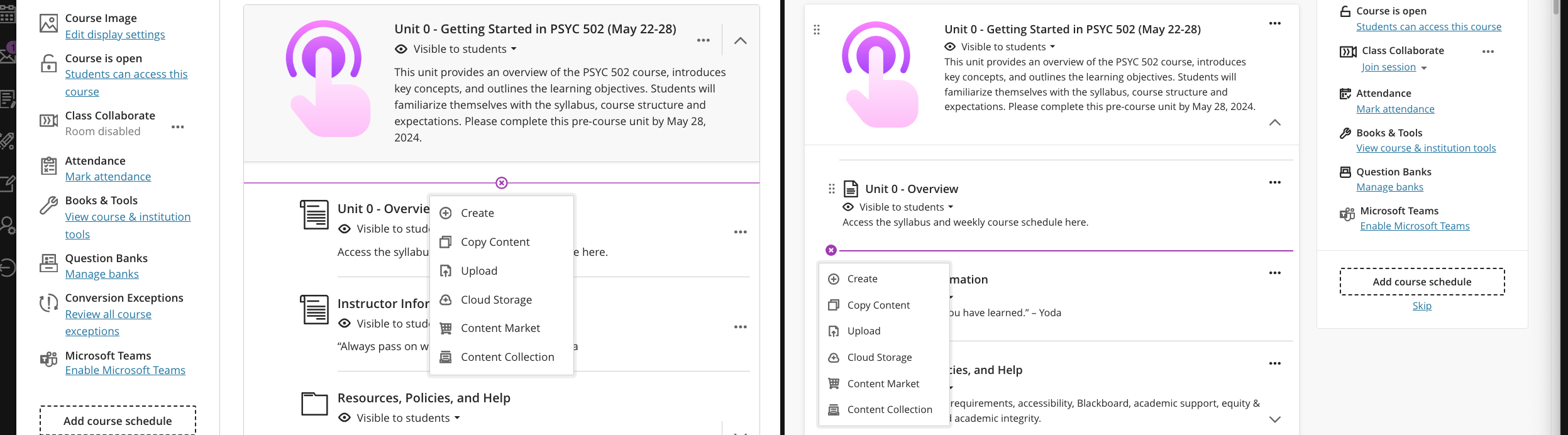
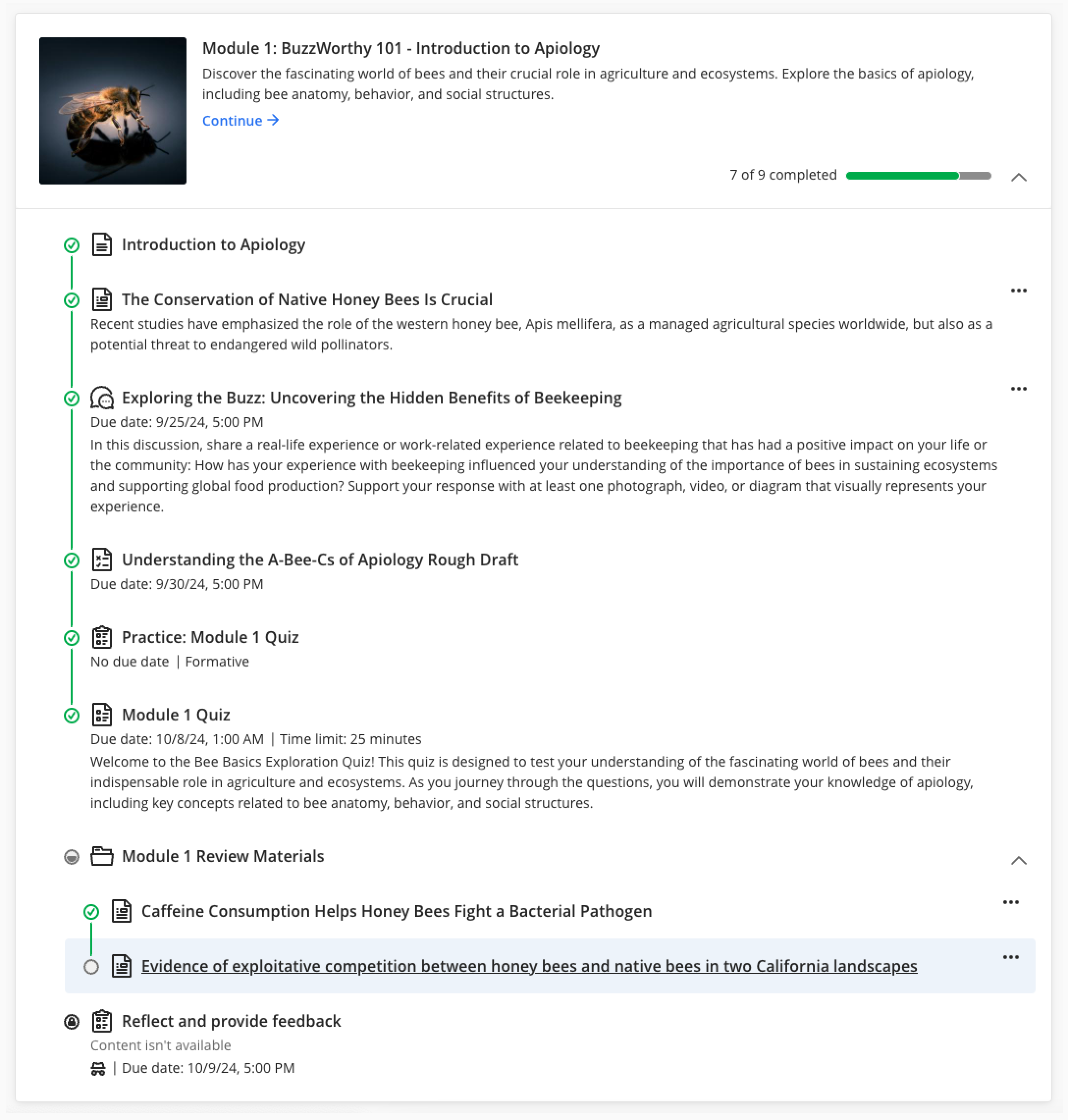
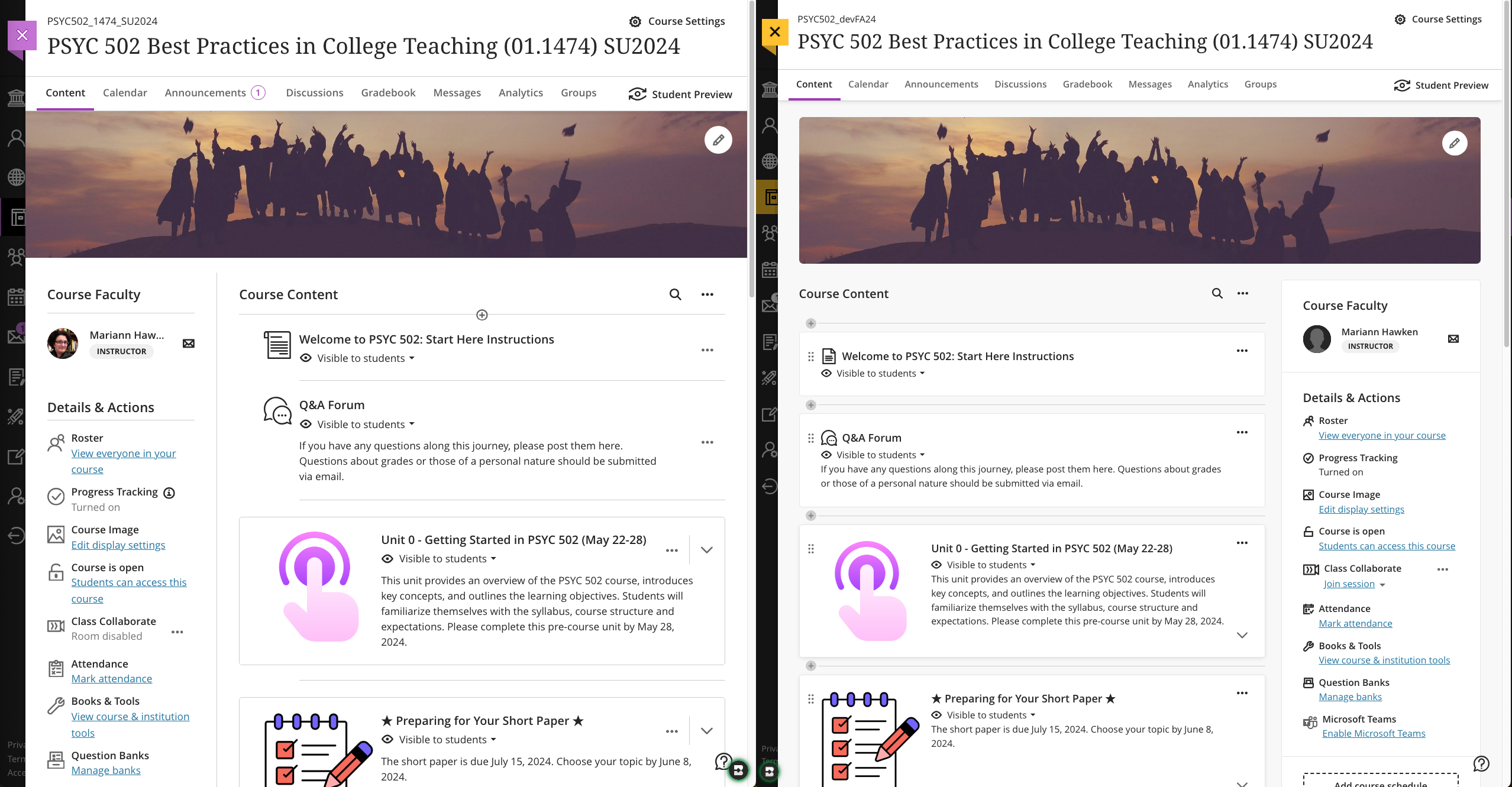
    <div class="html-content"><p>Anthology has <a href="https://help.blackboard.com/node/48721" rel="nofollow external" class="bo">announced</a> that in early September, the Ultra course landing page will be redesigned to focus content on the left and course actions on the right. This change emphasizes Anthology’s continued investment in a learner-centered design for Ultra courses, ensuring that students easily find and engage with course content while deemphasizing the menu associated with instructor-specific activities. Further enhancements to the page include clearer differentiation between content containers -- folders, learning modules, etc. -- to help improve course navigation for all users.</p><p><strong>What does this mean for faculty and students?</strong> Per the examples below, when classes start on August 28, the Course Content page will display the menu on the left with your course materials, folders, etc. on the right. However, on September 6, the update to Ultra will flip the layout so the course materials, folders, etc. appear on the left while the menu shifts to the right. </p><p>Here is a side-by-side view of old (left) and new (right) course layouts.</p><p><img src="https://my3.my.umbc.edu/groups/instructional-technology/posts/143242/attachments/52853" alt="Image 1: Comparison of old Ultra course page (left) and new Ultra course page (right)" style="max-width: 100%; height: auto;"></p><p><em>Image 1: Comparison of old Ultra course page (left) and new Ultra course page (right)</em></p><p>We realize this redesign may be a bit of a shift in the second week of the semester, but we believe the updated layout will not be too disruptive as the content itself does not change, only the focus of its placement (right instead of left). In preparation for this update, Instructional Technology will display this post as part of an internal outreach in Blackboard to remind faculty and students. </p><p>For faculty, functional improvements with this redesign are the clear indications that distinguish between containers (folders or learning modules) and more contextual creation indicators so it's easier to place new content throughout your course. In the second screenshot, you can see the contextual Create (+) and its placement in each version of the course. In the updated course, the (+) will appear on the left) wherever you want to place content while in the current Ultra course, you have to hover to find the (+) and its placement is not as easy to identify within the container.</p><p><img src="https://my3.my.umbc.edu/groups/instructional-technology/posts/143242/attachments/52854" alt="Image 2: Comparison of creating new content on old Ultra course page (left) and new Ultra course page (right)" style="max-width: 100%; height: auto;"></p><p><em>Image 2: Comparison of creating new content on old Ultra course page (left) and new Ultra course page (right)</em></p><p>From the student perspective, functionality changes are minimal with new visual indicators (e.g., lines) to connect content in learning modules. Additionally, for all users, when you hover over content, Ultra will highlight that content a light blue so you know exactly what you are accessing.</p><p><img src="https://my3.my.umbc.edu/groups/instructional-technology/posts/143242/attachments/52852" alt="Image 3: Example of student view of forced learning module sequence with highlighted content selected" style="max-width: 100%; height: auto;"></p><p><em>Image 3: Example of student view of forced learning module sequence with highlighted content selected</em></p><p>Throughout the spring and summer, Ultra courses were <a href="https://my3.my.umbc.edu/groups/instructional-technology/posts?tag=ultra-update" rel="nofollow external" class="bo">updated with new features and enhancements</a> to improve assessment, grading, content creation, and learner engagement. Many of these features are welcome changes that strengthen the platform, providing opportunities for faculty to customize courses and leverage Ultra in new ways. Although the redesigned course landing page comes at an unexpected time, the additional improvements provide increased focus for student learning and improve faculty course preparation with easier navigation.</p><div><div><span><strong>Connect with Instructional Technology</strong></span></div><div><span>As always, if you have any questions about teaching, learning, and technology at UMBC, please consider the following options:</span></div><ul><li><a href="http://www.umbc.edu/faq" rel="nofollow external" class="bo">Check our extensive FAQ collection</a><span> </span></li><ul><li><span><a href="https://wiki.umbc.edu/x/LohnB" rel="nofollow external" class="bo"><span>What's new in Ultra?</span></a><span> </span><span>|</span><span> </span><a href="https://wiki.umbc.edu/x/bwrSAQ" rel="nofollow external" class="bo"><span>Known Issues</span></a><span> </span></span></li></ul><li><span><a href="http://my.umbc.edu/go/request-help" rel="nofollow external" class="bo">Open a ticket via RT</a></span></li><li><span>Follow the </span><a href="http://my.umbc.edu/groups/instructional-technology" rel="nofollow external" class="bo">Instructional Technology</a><span> &amp; </span><a href="http://my.umbc.edu/groups/doit" rel="nofollow external" class="bo">DoIT</a><span> myUMBC groups</span></li><li><a href="http://doit.umbc.edu/itnm/staff/" rel="nofollow external" class="bo">Request a consult</a><span> with <a href="http://doit.umbc.edu/itnm/staff" rel="nofollow external" class="bo">instructional technology staff</a></span></li><li><span><a href="http://pivot.umbc.edu" rel="nofollow external" class="bo">PIVOT</a> | <a href="https://doit.umbc.edu/itnm/academic-continuity/" rel="nofollow external" class="bo">Academic Continuity</a></span><span> </span><span>|</span><span> </span><span><a href="https://fdc.umbc.edu/teaching/keep-on-teaching/" rel="nofollow external" class="bo">Keep On Teaching</a></span><span> </span><span>|</span><span> </span><span><a href="https://doit.umbc.edu/students" rel="nofollow external" class="bo">Student Technology Resources</a></span></li></ul><div><em>Thumbnail-image: New to Ultra [decorative]</em></div><div><div></div></div></div></div>
]]>
  </Body>
  <Summary>Anthology has announced that in early September, the Ultra course landing page will be redesigned to focus content on the left and course actions on the right. This change emphasizes Anthology’s...</Summary>
  <Website>https://my3.my.umbc.edu/groups/instructional-technology/posts/143242</Website>
  <AttachmentKind>Image</AttachmentKind>
  <AttachmentUrl>https://assets1-dev.my.umbc.edu/system/shared/attachments/84c014cf7b88e05bfc717ad6038cdc64/69efbda6/news/000/143/242/49ecdefc6bc4a0afbe59cbf51212146c/Student - Learning Module - forced sequence - continue.png?1724172885</AttachmentUrl>
  <Attachments>
    <Attachment kind="Image" url="https://dev.my.umbc.edu/groups/doit/posts/143242/attachments/52852"></Attachment>
    <Attachment kind="Image" url="https://dev.my.umbc.edu/groups/doit/posts/143242/attachments/52853"></Attachment>
    <Attachment kind="Image" url="https://dev.my.umbc.edu/groups/doit/posts/143242/attachments/52854"></Attachment>
  </Attachments>
  <TrackingUrl>https://dev.my.umbc.edu/api/v0/pixel/news/143242/guest@my.umbc.edu/aeeedf493e6e6feaaedd2d41f9cdea6c/api/pixel</TrackingUrl>
  <Tag>blackboard</Tag>
  <Tag>course-layout</Tag>
  <Tag>course-organization</Tag>
  <Tag>ultra-experience</Tag>
  <Tag>ultra-update</Tag>
  <Group token="instructional-technology">Instructional Technology</Group>
  <GroupUrl>https://dev.my.umbc.edu/groups/instructional-technology</GroupUrl>
  <AvatarUrl>https://assets2-dev.my.umbc.edu/system/shared/avatars/groups/000/001/164/dec3b026b81ee6d890a8f82f75c94a2e/xsmall.png?1446126703</AvatarUrl>
  <AvatarUrl size="original">https://assets1-dev.my.umbc.edu/system/shared/avatars/groups/000/001/164/dec3b026b81ee6d890a8f82f75c94a2e/original.png?1446126703</AvatarUrl>
  <AvatarUrl size="xxlarge">https://assets2-dev.my.umbc.edu/system/shared/avatars/groups/000/001/164/dec3b026b81ee6d890a8f82f75c94a2e/xxlarge.png?1446126703</AvatarUrl>
  <AvatarUrl size="xlarge">https://assets1-dev.my.umbc.edu/system/shared/avatars/groups/000/001/164/dec3b026b81ee6d890a8f82f75c94a2e/xlarge.png?1446126703</AvatarUrl>
  <AvatarUrl size="large">https://assets1-dev.my.umbc.edu/system/shared/avatars/groups/000/001/164/dec3b026b81ee6d890a8f82f75c94a2e/large.png?1446126703</AvatarUrl>
  <AvatarUrl size="medium">https://assets4-dev.my.umbc.edu/system/shared/avatars/groups/000/001/164/dec3b026b81ee6d890a8f82f75c94a2e/medium.png?1446126703</AvatarUrl>
  <AvatarUrl size="small">https://assets3-dev.my.umbc.edu/system/shared/avatars/groups/000/001/164/dec3b026b81ee6d890a8f82f75c94a2e/small.png?1446126703</AvatarUrl>
  <AvatarUrl size="xsmall">https://assets2-dev.my.umbc.edu/system/shared/avatars/groups/000/001/164/dec3b026b81ee6d890a8f82f75c94a2e/xsmall.png?1446126703</AvatarUrl>
  <AvatarUrl size="xxsmall">https://assets3-dev.my.umbc.edu/system/shared/avatars/groups/000/001/164/dec3b026b81ee6d890a8f82f75c94a2e/xxsmall.png?1446126703</AvatarUrl>
  <Sponsor>Instructional Technology</Sponsor>
  <ThumbnailUrl size="xxlarge">https://assets1-dev.my.umbc.edu/system/shared/thumbnails/news/000/143/242/fddb872d10232900a3448c8fbfea5efb/xxlarge.jpg?1724089495</ThumbnailUrl>
  <ThumbnailUrl size="xlarge">https://assets2-dev.my.umbc.edu/system/shared/thumbnails/news/000/143/242/fddb872d10232900a3448c8fbfea5efb/xlarge.jpg?1724089495</ThumbnailUrl>
  <ThumbnailUrl size="large">https://assets3-dev.my.umbc.edu/system/shared/thumbnails/news/000/143/242/fddb872d10232900a3448c8fbfea5efb/large.jpg?1724089495</ThumbnailUrl>
  <ThumbnailUrl size="medium">https://assets2-dev.my.umbc.edu/system/shared/thumbnails/news/000/143/242/fddb872d10232900a3448c8fbfea5efb/medium.jpg?1724089495</ThumbnailUrl>
  <ThumbnailUrl size="small">https://assets3-dev.my.umbc.edu/system/shared/thumbnails/news/000/143/242/fddb872d10232900a3448c8fbfea5efb/small.jpg?1724089495</ThumbnailUrl>
  <ThumbnailUrl size="xsmall">https://assets4-dev.my.umbc.edu/system/shared/thumbnails/news/000/143/242/fddb872d10232900a3448c8fbfea5efb/xsmall.jpg?1724089495</ThumbnailUrl>
  <ThumbnailUrl size="xxsmall">https://assets2-dev.my.umbc.edu/system/shared/thumbnails/news/000/143/242/fddb872d10232900a3448c8fbfea5efb/xxsmall.jpg?1724089495</ThumbnailUrl>
  <ThumbnailAltText>Black and white robot dog running with the words "New to Ultra" written on  light turquoise background</ThumbnailAltText>
  <PawCount>7</PawCount>
  <CommentCount>0</CommentCount>
  <CommentsAllowed>true</CommentsAllowed>
  <PostedAt>Tue, 20 Aug 2024 13:05:22 -0400</PostedAt>
  <EditAt>Tue, 29 Apr 2025 11:48:48 -0400</EditAt>
</NewsItem>
  <NewsItem contentIssues="true" id="143089" important="false" status="posted" url="https://dev.my.umbc.edu/groups/doit/posts/143089">
  <Title>Ally Now Supports AI-Generated Descriptions for Images</Title>
  <Tagline>Leverage AI to provide inclusive resources for students</Tagline>
  <Body>
    <![CDATA[
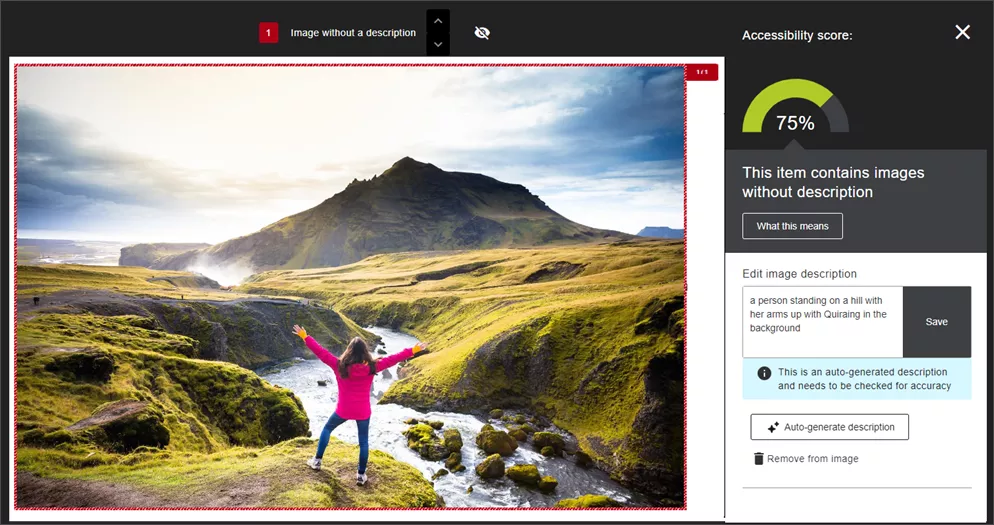
    <div class="html-content"><span><p><span>Recent updates to </span><a href="https://www.ada.gov/resources/2024-03-08-web-rule/#:~:text=Title%20II%20of%20the%20ADA,adoption%20services%20to%20zoning%20regulation." rel="nofollow external" class="bo"><span>federal guidelines for digital accessibility</span></a><span> underscore the critical need for educators to ensure that all course materials are accessible to every student. </span></p><p><span>One of the most prevalent accessibility issues in digital course materials is the lack of proper descriptions for images. </span><a href="https://community.anthology.com/blogs/167/1453" rel="nofollow external" class="bo"><span>According to Anthology</span></a><span>, nearly one-third of all images flagged by Ally are simply marked as decorative without any descriptive text, which creates a barrier for students who rely on descriptions for their studies.</span></p><p><span>Properly tagging images not only meets federal guidelines, but also plays a crucial role in creating an inclusive learning environment. Alternative descriptions serve as vital information for students who use screen readers, providing them with textual explanations for images that otherwise visually conveyed. This practice not only supports students with visual impairments, but also benefits those with cognitive disabilities who might struggle to understand the context of images with additional context. </span></p><p><span>Ally will </span><a href="https://help.blackboard.com/Ally/Ally_for_LMS/Instructor/Improve_Accessibility/Add_Image_Descriptions" rel="nofollow external" class="bo"><span>flag images that lack a description</span></a><span> in a Blackboard course. Instructors can enter a description themselves, mark the image as decorative, or leverage AI tools, powered by Microsoft Azure AI Vision, to scan the image and generate a suggested description. Instructors retain full control over the image and can edit the content to make corrections or clarify the information before saving it.</span></p><p><span><span><span><span><img src="https://lh7-rt.googleusercontent.com/docsz/AD_4nXc2d7E654Or-UrlpB-5Zk-KVMfF8QlilHoOwT5guRbGpX_I_PRPLRzhDgM-mEjkRbMjLsBdAAJ-qTW4mw8NsfdBnzL-j8rFH3M2pm0KqH6M6hi_gFuWnBRXCo1Nll5zMWzLFf7LWNpa4M3uUS8yA0H_Tg2n?key=mLUgjMdWFHAnJhaqvezuSw" width="720" height="380" alt="Image 1: Example of Ally's AI generated image description." style="max-width: 100%; height: auto;"></span></span></span></span></p><p><span><em>Image 1: Example of Ally's AI generated image description. </em></span></p><p><span><strong>Note</strong></span><span>: Alternative descriptions are not applied automatically. Each suggestion requires the instructor’s review and approval to ensure that the final output aligns with the instructor’s original purpose for that image.</span></p><p><span>If the alt text does not meet the instructor’s needs, such as a complex image or diagram, ChatGPT and Microsoft Copilot provide excellent tools to create detailed alternative text and long descriptions. </span></p><p><span>For example, this prompt was shared by the International Ally Users Group. It can be customized for the uploaded image according to context, function and prospective audience (e.g., students). </span></p></span><blockquote><span>“You are a university-level instructor working to ensure images in your online course materials conform to Web Content Accessibility Guidelines at Level Double A. You need to accommodate for disabilities and impairments such as blindness, low vision and color vision deficiency to ensure equitable access to module content for all students. </span></blockquote><blockquote><span><br></span><span>"You will be provided with an image. Please return a succinct title, alternative text (alt text), and a long description. You will also separately list verbatim all words that appear in the image.</span></blockquote><blockquote><span><br></span><span>"The alt text should be no more than two sentences and should briefly describe the meaning conveyed by the image.</span></blockquote><blockquote><span><br></span></blockquote><blockquote><span>"The detailed description may be one or more paragraphs and must describe the image in great detail so that anyone who does not see it can gain a full understanding of everything in the image. Please format the detailed description such that it will be easily scannable. Use headings, paragraph breaks, and lists as appropriate. Use active voice.”</span></blockquote><blockquote><span><br></span></blockquote><blockquote><a href="https://www.purdue.edu/innovativelearning/tools-resources/accessibility/ai-prompt-example/" rel="nofollow external" class="bo"><span>Prompt created by Purdue University</span></a><span> and adapted by Matthew Deeprose (Southampton University)</span></blockquote><span><p><span><br></span></p><p><span>When we integrate comprehensive and accurate alt text for all images, we adhere to accessibility standards and legal requirements. We also foster an inclusive and supporting learning environment where every student has the opportunity to succeed.</span></p><p><span><br></span></p></span></div>
]]>
  </Body>
  <Summary>Recent updates to federal guidelines for digital accessibility underscore the critical need for educators to ensure that all course materials are accessible to every student.   One of the most...</Summary>
  <Website>https://my3.my.umbc.edu/groups/instructional-technology/posts/143089</Website>
  <TrackingUrl>https://dev.my.umbc.edu/api/v0/pixel/news/143089/guest@my.umbc.edu/be605c4b901cd19b9c708dfa4d75c784/api/pixel</TrackingUrl>
  <Tag>accessibility</Tag>
  <Tag>ai</Tag>
  <Tag>ally</Tag>
  <Tag>biro</Tag>
  <Tag>blackboard</Tag>
  <Group token="instructional-technology">Instructional Technology</Group>
  <GroupUrl>https://dev.my.umbc.edu/groups/instructional-technology</GroupUrl>
  <AvatarUrl>https://assets2-dev.my.umbc.edu/system/shared/avatars/groups/000/001/164/dec3b026b81ee6d890a8f82f75c94a2e/xsmall.png?1446126703</AvatarUrl>
  <AvatarUrl size="original">https://assets1-dev.my.umbc.edu/system/shared/avatars/groups/000/001/164/dec3b026b81ee6d890a8f82f75c94a2e/original.png?1446126703</AvatarUrl>
  <AvatarUrl size="xxlarge">https://assets2-dev.my.umbc.edu/system/shared/avatars/groups/000/001/164/dec3b026b81ee6d890a8f82f75c94a2e/xxlarge.png?1446126703</AvatarUrl>
  <AvatarUrl size="xlarge">https://assets1-dev.my.umbc.edu/system/shared/avatars/groups/000/001/164/dec3b026b81ee6d890a8f82f75c94a2e/xlarge.png?1446126703</AvatarUrl>
  <AvatarUrl size="large">https://assets1-dev.my.umbc.edu/system/shared/avatars/groups/000/001/164/dec3b026b81ee6d890a8f82f75c94a2e/large.png?1446126703</AvatarUrl>
  <AvatarUrl size="medium">https://assets4-dev.my.umbc.edu/system/shared/avatars/groups/000/001/164/dec3b026b81ee6d890a8f82f75c94a2e/medium.png?1446126703</AvatarUrl>
  <AvatarUrl size="small">https://assets3-dev.my.umbc.edu/system/shared/avatars/groups/000/001/164/dec3b026b81ee6d890a8f82f75c94a2e/small.png?1446126703</AvatarUrl>
  <AvatarUrl size="xsmall">https://assets2-dev.my.umbc.edu/system/shared/avatars/groups/000/001/164/dec3b026b81ee6d890a8f82f75c94a2e/xsmall.png?1446126703</AvatarUrl>
  <AvatarUrl size="xxsmall">https://assets3-dev.my.umbc.edu/system/shared/avatars/groups/000/001/164/dec3b026b81ee6d890a8f82f75c94a2e/xxsmall.png?1446126703</AvatarUrl>
  <Sponsor>Instructional Technology</Sponsor>
  <ThumbnailUrl size="xxlarge">https://assets2-dev.my.umbc.edu/system/shared/thumbnails/news/000/143/089/b229f46db2d2982555055c67d21eb954/xxlarge.jpg?1723053847</ThumbnailUrl>
  <ThumbnailUrl size="xlarge">https://assets3-dev.my.umbc.edu/system/shared/thumbnails/news/000/143/089/b229f46db2d2982555055c67d21eb954/xlarge.jpg?1723053847</ThumbnailUrl>
  <ThumbnailUrl size="large">https://assets3-dev.my.umbc.edu/system/shared/thumbnails/news/000/143/089/b229f46db2d2982555055c67d21eb954/large.jpg?1723053847</ThumbnailUrl>
  <ThumbnailUrl size="medium">https://assets3-dev.my.umbc.edu/system/shared/thumbnails/news/000/143/089/b229f46db2d2982555055c67d21eb954/medium.jpg?1723053847</ThumbnailUrl>
  <ThumbnailUrl size="small">https://assets4-dev.my.umbc.edu/system/shared/thumbnails/news/000/143/089/b229f46db2d2982555055c67d21eb954/small.jpg?1723053847</ThumbnailUrl>
  <ThumbnailUrl size="xsmall">https://assets2-dev.my.umbc.edu/system/shared/thumbnails/news/000/143/089/b229f46db2d2982555055c67d21eb954/xsmall.jpg?1723053847</ThumbnailUrl>
  <ThumbnailUrl size="xxsmall">https://assets1-dev.my.umbc.edu/system/shared/thumbnails/news/000/143/089/b229f46db2d2982555055c67d21eb954/xxsmall.jpg?1723053847</ThumbnailUrl>
  <PawCount>6</PawCount>
  <CommentCount>0</CommentCount>
  <CommentsAllowed>true</CommentsAllowed>
  <PostedAt>Tue, 13 Aug 2024 09:26:13 -0400</PostedAt>
  <EditAt>Tue, 13 Aug 2024 09:34:12 -0400</EditAt>
</NewsItem>
  <NewsItem contentIssues="false" id="143072" important="false" status="posted" url="https://dev.my.umbc.edu/groups/doit/posts/143072">
  <Title>Blackboard Course Copy: Easy Prep for a New Term</Title>
  <Tagline>Join a virtual or drop-in session</Tagline>
  <Body>
    <![CDATA[
    <div class="html-content"><div><p>It’s a new academic year and time to prepare your Blackboard course. The Ultra course copy tool <a href="https://doit.umbc.edu/news/post/141397/" rel="nofollow external" class="bo">simplifies the transfer of course materials</a>, whether from Original or Ultra, into a new course site. Instructional Technology is offering several support sessions to help faculty seamlessly <a href="https://umbc.atlassian.net/wiki/x/IRzVAQ" rel="nofollow external" class="bo">copy content into your Blackboard Ultra courses</a>. These sessions are designed to cater to all levels of experience with Blackboard Ultra, ensuring that everyone can start the semester smoothly. Choose the session that best fits your schedule!</p><p><strong>Virtual Sessions:</strong> Join us online for a focused session where you can learn how to efficiently transfer your course materials from previous semesters into your new Ultra course shells. These virtual workshops are perfect for those who prefer to prepare from the comfort of their office or home.</p><p><strong>Ultra Quick Start: Copy Content into Blackboard Ultra</strong></p><ul><li><a href="https://my3.my.umbc.edu/groups/instructional-technology/events/130688" rel="nofollow external" class="bo">Monday, August 12 - 1 PM - 2 PM</a></li><li><a href="https://my3.my.umbc.edu/groups/instructional-technology/events/130759" rel="nofollow external" class="bo">Tuesday, August 20 - 10 AM - 11 AM</a></li></ul><p><strong>Drop-In Sessions:</strong> For hands-on assistance, drop by one of our in-person sessions. Bring your laptop, and our Instructional Technology team will be there to provide step-by-step guidance as you copy your course content. These sessions are ideal for those who appreciate direct support and immediate answers.</p><p><strong>Blackboard Ultra Course Copy Drop-In</strong></p><ul><li><a href="https://my3.my.umbc.edu/groups/instructional-technology/events/130763" rel="nofollow external" class="bo">Wednesday, August 14 - 10 AM to 12 PM</a></li><li><a href="https://my3.my.umbc.edu/groups/instructional-technology/events/130799" rel="nofollow external" class="bo">Thursday, August 22 - 1 PM - 3 PM</a></li><li><span>Location: Engineering 102</span></li></ul><p>Whether you prefer a guided virtual session or a hands-on drop-in, we have options to fit your schedule and preferences.</p></div><div><strong>Connect with Instructional Technology</strong></div><div><div><span>As always, if you have any questions about teaching, learning, and technology at UMBC, please consider the following options:</span></div><ul><li><a href="http://www.umbc.edu/faq" rel="nofollow external" class="bo">Check our extensive FAQ collection</a><span> </span></li><ul><li><span><a href="https://wiki.umbc.edu/x/LohnB" rel="nofollow external" class="bo"><span>What's new in Ultra?</span></a><span> </span><span>|</span><span> </span><a href="https://wiki.umbc.edu/x/bwrSAQ" rel="nofollow external" class="bo"><span>Known Issues</span></a><span> </span></span></li></ul><li><span><a href="http://my.umbc.edu/go/request-help" rel="nofollow external" class="bo">Open a ticket via RT</a></span></li><li><span>Follow the </span><a href="http://my.umbc.edu/groups/instructional-technology" rel="nofollow external" class="bo">Instructional Technology</a><span> &amp; </span><a href="http://my.umbc.edu/groups/doit" rel="nofollow external" class="bo">DoIT</a><span> myUMBC groups</span></li><li><a href="http://doit.umbc.edu/itnm/staff/" rel="nofollow external" class="bo">Request a consult</a><span> with <a href="http://doit.umbc.edu/itnm/staff" rel="nofollow external" class="bo">instructional technology staff</a></span></li><li><span><a href="http://pivot.umbc.edu" rel="nofollow external" class="bo">PIVOT</a> | <a href="https://doit.umbc.edu/itnm/academic-continuity/" rel="nofollow external" class="bo">Academic Continuity</a></span><span> </span><span>|</span><span> </span><span><a href="https://fdc.umbc.edu/teaching/keep-on-teaching/" rel="nofollow external" class="bo">Keep On Teaching</a></span><span> </span><span>|</span><span> </span><span><a href="https://doit.umbc.edu/students" rel="nofollow external" class="bo">Student Technology Resources</a></span></li></ul><div><em>Thumbnail-image: Ultra Quick Tips</em></div></div></div>
]]>
  </Body>
  <Summary>It’s a new academic year and time to prepare your Blackboard course. The Ultra course copy tool simplifies the transfer of course materials, whether from Original or Ultra, into a new course site....</Summary>
  <Website>https://my3.my.umbc.edu/groups/instructional-technology/posts/143072</Website>
  <TrackingUrl>https://dev.my.umbc.edu/api/v0/pixel/news/143072/guest@my.umbc.edu/95f7e055d8232611bd999163f51c4db8/api/pixel</TrackingUrl>
  <Tag>blackboard</Tag>
  <Tag>course-copy</Tag>
  <Tag>course-migration</Tag>
  <Tag>quick-tips</Tag>
  <Tag>ultra-experience</Tag>
  <Group token="instructional-technology">Instructional Technology</Group>
  <GroupUrl>https://dev.my.umbc.edu/groups/instructional-technology</GroupUrl>
  <AvatarUrl>https://assets2-dev.my.umbc.edu/system/shared/avatars/groups/000/001/164/dec3b026b81ee6d890a8f82f75c94a2e/xsmall.png?1446126703</AvatarUrl>
  <AvatarUrl size="original">https://assets1-dev.my.umbc.edu/system/shared/avatars/groups/000/001/164/dec3b026b81ee6d890a8f82f75c94a2e/original.png?1446126703</AvatarUrl>
  <AvatarUrl size="xxlarge">https://assets2-dev.my.umbc.edu/system/shared/avatars/groups/000/001/164/dec3b026b81ee6d890a8f82f75c94a2e/xxlarge.png?1446126703</AvatarUrl>
  <AvatarUrl size="xlarge">https://assets1-dev.my.umbc.edu/system/shared/avatars/groups/000/001/164/dec3b026b81ee6d890a8f82f75c94a2e/xlarge.png?1446126703</AvatarUrl>
  <AvatarUrl size="large">https://assets1-dev.my.umbc.edu/system/shared/avatars/groups/000/001/164/dec3b026b81ee6d890a8f82f75c94a2e/large.png?1446126703</AvatarUrl>
  <AvatarUrl size="medium">https://assets4-dev.my.umbc.edu/system/shared/avatars/groups/000/001/164/dec3b026b81ee6d890a8f82f75c94a2e/medium.png?1446126703</AvatarUrl>
  <AvatarUrl size="small">https://assets3-dev.my.umbc.edu/system/shared/avatars/groups/000/001/164/dec3b026b81ee6d890a8f82f75c94a2e/small.png?1446126703</AvatarUrl>
  <AvatarUrl size="xsmall">https://assets2-dev.my.umbc.edu/system/shared/avatars/groups/000/001/164/dec3b026b81ee6d890a8f82f75c94a2e/xsmall.png?1446126703</AvatarUrl>
  <AvatarUrl size="xxsmall">https://assets3-dev.my.umbc.edu/system/shared/avatars/groups/000/001/164/dec3b026b81ee6d890a8f82f75c94a2e/xxsmall.png?1446126703</AvatarUrl>
  <Sponsor>Instructional Technology</Sponsor>
  <ThumbnailUrl size="xxlarge">https://assets4-dev.my.umbc.edu/system/shared/thumbnails/news/000/143/072/28697b9d338e758abadda5817240dfca/xxlarge.jpg?1723036357</ThumbnailUrl>
  <ThumbnailUrl size="xlarge">https://assets1-dev.my.umbc.edu/system/shared/thumbnails/news/000/143/072/28697b9d338e758abadda5817240dfca/xlarge.jpg?1723036357</ThumbnailUrl>
  <ThumbnailUrl size="large">https://assets4-dev.my.umbc.edu/system/shared/thumbnails/news/000/143/072/28697b9d338e758abadda5817240dfca/large.jpg?1723036357</ThumbnailUrl>
  <ThumbnailUrl size="medium">https://assets4-dev.my.umbc.edu/system/shared/thumbnails/news/000/143/072/28697b9d338e758abadda5817240dfca/medium.jpg?1723036357</ThumbnailUrl>
  <ThumbnailUrl size="small">https://assets1-dev.my.umbc.edu/system/shared/thumbnails/news/000/143/072/28697b9d338e758abadda5817240dfca/small.jpg?1723036357</ThumbnailUrl>
  <ThumbnailUrl size="xsmall">https://assets4-dev.my.umbc.edu/system/shared/thumbnails/news/000/143/072/28697b9d338e758abadda5817240dfca/xsmall.jpg?1723036357</ThumbnailUrl>
  <ThumbnailUrl size="xxsmall">https://assets2-dev.my.umbc.edu/system/shared/thumbnails/news/000/143/072/28697b9d338e758abadda5817240dfca/xxsmall.jpg?1723036357</ThumbnailUrl>
  <ThumbnailAltText>A yellow light bulb icon beside bold text reading "Ultra Quick Tips" on a dark background</ThumbnailAltText>
  <PawCount>4</PawCount>
  <CommentCount>0</CommentCount>
  <CommentsAllowed>true</CommentsAllowed>
  <PostedAt>Wed, 07 Aug 2024 09:14:39 -0400</PostedAt>
  <EditAt>Wed, 11 Feb 2026 08:09:06 -0500</EditAt>
</NewsItem>
  <NewsItem contentIssues="true" id="143022" important="false" status="posted" url="https://dev.my.umbc.edu/groups/doit/posts/143022">
  <Title>Enhanced Ultra Docs, Advanced Release Rules Coming in August</Title>
  <Tagline>Follow discussions, anonymous forms &amp; converted tests</Tagline>
  <Body>
    <![CDATA[
    <div class="html-content"><p>Whether you're preparing your first Ultra course or updating existing content, the latest features released in August are designed to streamline your teaching experience. </p><p>The Ultra Document is the centerpiece of the Ultra course, providing a place for <a href="https://help.blackboard.com/Learn/Instructor/Ultra/Course_Content/Create_Content/Create_Course_Materials/Create_Content_Items_or_Documents" rel="nofollow external" class="bo">preparing and delivering engaging content</a> including text, lists, tables, links, images and media, or third-party tools. The Content Designer is a significant enhancement to the Ultra Document, providing new and robust options that support mobile friendly and responsive columns. Instructors can still embed files, images, and HTML content. To resize a block or move it on the Ultra Document page, simply drag and drop the block. All content is moveable with a mouse, keyboard or tab.</p><p><img src="https://help.blackboard.com/sites/default/files/styles/rich_text_large/public/images/2024-07/learn_ultra_instructor_Documents_FullView.png.webp?itok=lMkN4_cK" alt="Image 1: Example of redesigned Ultra Document with new column display" width="500" style="max-width: 100%; height: auto;"></p><p><em>Image 1: Example of redesigned Ultra Document with new column display</em></p><p>Releasing content for different needs in a course is a critical part of an instructor’s toolkit -- whether that content is distributed by date, performance, or group using different criteria. The latest update to Ultra features advanced release conditions allow faculty to <a href="https://help.blackboard.com/Learn/Instructor/Ultra/Course_Content/Release_Content" rel="nofollow external" class="bo">create multiple rules for release conditions</a> using AND and OR criteria. For example, if a course consists of undergraduate and graduate students, each group may have different requirements to access certain content in the course. Rules and criteria will copy from Original adaptive release conditions with the exception for attempts and marked reviewed, which are not yet supported in Ultra.</p><p><img src="https://help.blackboard.com/sites/default/files/styles/rich_text_large/public/images/2024-07/learn_ultra_instructor_ReleaseConditions_MultipleRules.png.webp?itok=hh3DB8Ax" alt="Image 2: Example of Release Conditions page" width="500" style="max-width: 100%; height: auto;"></p><p><em>Image 2: Example of Release Conditions page</em></p><p>The Ultra Assignment is <a href="https://help.blackboard.com/Learn/Instructor/Ultra/Assignments/Create_and_Edit_Assignments#NewAssignmentPage" rel="nofollow external" class="bo">also redesigned for August</a>, removing the underlying engine that powered Tests. Now a separate instructions box is available for instructors to specify expectations for completing a graded activity. There are no options to add questions; if this is essential for an assessment, a Test must be used instead. The settings panel is updated to provide options that are only relevant to Assignments. Most importantly, when students access the Assignment, a blank attempt is no longer created, which helps reduce confusion and frustration for both learners and instructors alike. Students can access the Assignment as often as they need to before submitting their actual attempt. </p><p><img src="https://help.blackboard.com/sites/default/files/styles/rich_text_large/public/images/2024-07/learn_ultra_instructor_Assignments_AddInstructions.png.webp?itok=Dvf6abbf" width="500" alt="Image 3: Example of new Assignment page" style="max-width: 100%; height: auto;"></p><p><em>Image 3: Example of new Assignment page</em></p><p>Instructors have long desired for the ability to subscribe to discussions in Ultra. In August, this is now possible with <a href="https://help.blackboard.com/node/48571" rel="nofollow external" class="bo">the new Follow Discussions setting</a>, which allows any user in a course to re-engage with a discussion as updates occur. The first version of this feature will distribute notifications through the Activity Stream, which users can customize according to personal preference. In October, the follow notifications can be received via email.</p><p><img src="https://help.blackboard.com/sites/default/files/styles/rich_text_large/public/images/2024-07/learn_ultra_instructor_Discussions_Follow.png.webp?itok=z67tMIp3" alt="Image 4: Example of Discussion with Follow notification enabled" style="max-width: 100%; height: auto;"></p><p><em>Image 4: Example of Discussion with Follow notification enabled</em></p><p>Finally, when an Original course is converted, <a href="https://help.blackboard.com/node/48601" rel="nofollow external" class="bo">undeployed tests from the Tests, Surveys, and Question Pools area will now be converted to question banks</a>. This will help to declutter both the course content page and the gradebook, making it easier for instructors to manage their course materials. NOTE: During the conversion process, any random blocks, question sets, and linked questions included in undeployed tests will be removed as Question Banks do not support those features. However, the resulting question banks will preserve original questions without duplication.</p><p>Additional updates for August include:</p><ul><li>Instructors can now <a href="https://help.blackboard.com/node/48566" rel="nofollow external" class="bo">collect anonymous submissions in Forms</a>.</li><li>Instructors can <a href="https://help.blackboard.com/node/48581" rel="nofollow external" class="bo">quickly navigate between submissions</a> using the Next Student and Previous Student buttons in Flexible Grading. </li><li>Image generation process will <a href="https://help.blackboard.com/node/48551" rel="nofollow external" class="bo">leverage DALL-E to produce higher resolution images</a> for learning modules, Documents, announcements, assessment questions, and journal prompts.</li><li>The response time when creating a math formula in the text editor is reduced to help instructors can process formula requests more efficiently.</li><li>Students <a href="https://help.blackboard.com/node/48576" rel="nofollow external" class="bo">can send a group message</a> from the members page of a group space, which encourages collaboration on content that they have been assigned.</li></ul><p>To learn more about these updates, and other features from the last six months, please join our <a href="https://my3.my.umbc.edu/groups/instructional-technology/events/130321" rel="nofollow external" class="bo">What's New in Ultra for Teaching &amp; Learning webinar</a> on August 16.</p><p>Faculty should see the latest updates in their Ultra courses around August 8-9, 2024. The next update to our Ultra test environment will take place on August 13, 2024; release notes are posted to the <a href="https://wiki.umbc.edu/x/LohnB" rel="nofollow external" class="bo">What's New in Ultra</a> that same week. Faculty who are interested in test driving new features before they are released to production should <a href="http://my.umbc.edu/go/request-help" rel="nofollow external" class="bo">open an RT ticket</a> to request early access. Please <a href="http://umbc.edu/go/ultra" rel="nofollow external" class="bo">watch the FAQs</a>, including <a href="https://wiki.umbc.edu/x/LohnB" rel="nofollow external" class="bo">the What's New with Ultra page</a>, and myUMBC for additional information about Ultra.</p><div><div><span><strong>Connect with Instructional Technology</strong></span></div><div><span>As always, if you have any questions about teaching, learning, and technology at UMBC, please consider the following options:</span></div><ul><li><a href="http://www.umbc.edu/faq" rel="nofollow external" class="bo">Check our extensive FAQ collection</a><span> </span></li><ul><li><span><a href="https://wiki.umbc.edu/x/LohnB" rel="nofollow external" class="bo"><span>What's new in Ultra?</span></a><span> </span><span>|</span><span> </span><a href="https://wiki.umbc.edu/x/bwrSAQ" rel="nofollow external" class="bo"><span>Known Issues</span></a><span> </span></span></li></ul><li><span><a href="http://my.umbc.edu/go/request-help" rel="nofollow external" class="bo">Open a ticket via RT</a></span></li><li><span>Follow the </span><a href="http://my.umbc.edu/groups/instructional-technology" rel="nofollow external" class="bo">Instructional Technology</a><span> &amp; </span><a href="http://my.umbc.edu/groups/doit" rel="nofollow external" class="bo">DoIT</a><span> myUMBC groups</span></li><li><a href="http://doit.umbc.edu/itnm/staff/" rel="nofollow external" class="bo">Request a consult</a><span> with <a href="http://doit.umbc.edu/itnm/staff" rel="nofollow external" class="bo">instructional technology staff</a></span></li><li><span><a href="http://pivot.umbc.edu" rel="nofollow external" class="bo">PIVOT</a> | <a href="https://doit.umbc.edu/itnm/academic-continuity/" rel="nofollow external" class="bo">Academic Continuity</a></span><span> </span><span>|</span><span> </span><span><a href="https://fdc.umbc.edu/teaching/keep-on-teaching/" rel="nofollow external" class="bo">Keep On Teaching</a></span><span> </span><span>|</span><span> </span><span><a href="https://doit.umbc.edu/students" rel="nofollow external" class="bo">Student Technology Resources</a></span></li></ul><div><em>Thumbnail-image: New to Ultra [decorative]</em></div><div><div></div></div></div></div>
]]>
  </Body>
  <Summary>Whether you're preparing your first Ultra course or updating existing content, the latest features released in August are designed to streamline your teaching experience.   The Ultra Document is...</Summary>
  <Website>https://my3.my.umbc.edu/groups/instructional-technology/posts/143022</Website>
  <TrackingUrl>https://dev.my.umbc.edu/api/v0/pixel/news/143022/guest@my.umbc.edu/f6b2b2c94aa2e7af482909078691d6c7/api/pixel</TrackingUrl>
  <Tag>assignments</Tag>
  <Tag>blackboard</Tag>
  <Tag>course-design</Tag>
  <Tag>discussions</Tag>
  <Tag>release-conditions</Tag>
  <Tag>ultra-experience</Tag>
  <Tag>ultra-update</Tag>
  <Group token="instructional-technology">Instructional Technology</Group>
  <GroupUrl>https://dev.my.umbc.edu/groups/instructional-technology</GroupUrl>
  <AvatarUrl>https://assets2-dev.my.umbc.edu/system/shared/avatars/groups/000/001/164/dec3b026b81ee6d890a8f82f75c94a2e/xsmall.png?1446126703</AvatarUrl>
  <AvatarUrl size="original">https://assets1-dev.my.umbc.edu/system/shared/avatars/groups/000/001/164/dec3b026b81ee6d890a8f82f75c94a2e/original.png?1446126703</AvatarUrl>
  <AvatarUrl size="xxlarge">https://assets2-dev.my.umbc.edu/system/shared/avatars/groups/000/001/164/dec3b026b81ee6d890a8f82f75c94a2e/xxlarge.png?1446126703</AvatarUrl>
  <AvatarUrl size="xlarge">https://assets1-dev.my.umbc.edu/system/shared/avatars/groups/000/001/164/dec3b026b81ee6d890a8f82f75c94a2e/xlarge.png?1446126703</AvatarUrl>
  <AvatarUrl size="large">https://assets1-dev.my.umbc.edu/system/shared/avatars/groups/000/001/164/dec3b026b81ee6d890a8f82f75c94a2e/large.png?1446126703</AvatarUrl>
  <AvatarUrl size="medium">https://assets4-dev.my.umbc.edu/system/shared/avatars/groups/000/001/164/dec3b026b81ee6d890a8f82f75c94a2e/medium.png?1446126703</AvatarUrl>
  <AvatarUrl size="small">https://assets3-dev.my.umbc.edu/system/shared/avatars/groups/000/001/164/dec3b026b81ee6d890a8f82f75c94a2e/small.png?1446126703</AvatarUrl>
  <AvatarUrl size="xsmall">https://assets2-dev.my.umbc.edu/system/shared/avatars/groups/000/001/164/dec3b026b81ee6d890a8f82f75c94a2e/xsmall.png?1446126703</AvatarUrl>
  <AvatarUrl size="xxsmall">https://assets3-dev.my.umbc.edu/system/shared/avatars/groups/000/001/164/dec3b026b81ee6d890a8f82f75c94a2e/xxsmall.png?1446126703</AvatarUrl>
  <Sponsor>Instructional Technology</Sponsor>
  <ThumbnailUrl size="xxlarge">https://assets1-dev.my.umbc.edu/system/shared/thumbnails/news/000/143/022/61fb5f06bff882737ea5ef126dfcb719/xxlarge.jpg?1722528391</ThumbnailUrl>
  <ThumbnailUrl size="xlarge">https://assets2-dev.my.umbc.edu/system/shared/thumbnails/news/000/143/022/61fb5f06bff882737ea5ef126dfcb719/xlarge.jpg?1722528391</ThumbnailUrl>
  <ThumbnailUrl size="large">https://assets2-dev.my.umbc.edu/system/shared/thumbnails/news/000/143/022/61fb5f06bff882737ea5ef126dfcb719/large.jpg?1722528391</ThumbnailUrl>
  <ThumbnailUrl size="medium">https://assets1-dev.my.umbc.edu/system/shared/thumbnails/news/000/143/022/61fb5f06bff882737ea5ef126dfcb719/medium.jpg?1722528391</ThumbnailUrl>
  <ThumbnailUrl size="small">https://assets3-dev.my.umbc.edu/system/shared/thumbnails/news/000/143/022/61fb5f06bff882737ea5ef126dfcb719/small.jpg?1722528391</ThumbnailUrl>
  <ThumbnailUrl size="xsmall">https://assets3-dev.my.umbc.edu/system/shared/thumbnails/news/000/143/022/61fb5f06bff882737ea5ef126dfcb719/xsmall.jpg?1722528391</ThumbnailUrl>
  <ThumbnailUrl size="xxsmall">https://assets1-dev.my.umbc.edu/system/shared/thumbnails/news/000/143/022/61fb5f06bff882737ea5ef126dfcb719/xxsmall.jpg?1722528391</ThumbnailUrl>
  <PawCount>3</PawCount>
  <CommentCount>0</CommentCount>
  <CommentsAllowed>true</CommentsAllowed>
  <PostedAt>Mon, 05 Aug 2024 10:58:45 -0400</PostedAt>
  <EditAt>Mon, 19 Aug 2024 13:07:50 -0400</EditAt>
</NewsItem>
  <NewsItem contentIssues="true" id="143028" important="false" status="posted" url="https://dev.my.umbc.edu/groups/doit/posts/143028">
  <Title>Reminder: FA2024 Courses Created in Blackboard</Title>
  <Tagline>Student Enrollments Processed on July 31, 2024</Tagline>
  <Body>
    <![CDATA[
    <div class="html-content"><p><span>Blackboard course shells for FA2024 </span><a href="https://wiki.umbc.edu/x/eYHGAw" rel="nofollow external" class="bo"><span>were created</span></a><span> on May 13, 2024 per our previous announcement to support faculty preparation for Ultra in advance of the fall semester. Student enrollments, as well as course shells that were not created in May, were processed on July 31, 2024. </span></p><p><a href="https://my3.my.umbc.edu/groups/instructional-technology/posts/141745" rel="nofollow external" class="bo"><span>Ultra will be the default</span></a><span> in Blackboard </span><span>with </span><a href="https://doit.umbc.edu/news/post/139602/" rel="nofollow external" class="bo"><span>nearly 70 percent of all UMBC courses using Ultra</span></a><span> since spring 2024. </span><span>If COEIT or CNMS faculty wish to “roll back” their Fall 2024 Ultra shells to Original, they can do so</span><a href="https://doit.umbc.edu/request-tracker-rt/doit-myumbc-blackboard/" rel="nofollow external" class="bo"><span>by RT ticket</span></a><span> for this semester only; the </span><strong><a href="https://doit.umbc.edu/news/post/130227/" rel="nofollow external" class="bo"><span>last day we will support Blackboard Original</span></a><span> is December 31, 2024</span></strong><span>. </span><span>DoIT strongly recommends faculty request a roll back before the first day of classes to ensure sufficient time for course preparation. Please </span><a href="https://my3.my.umbc.edu/groups/instructional-technology/posts/141745" rel="nofollow external" class="bo"><span>review the conditions</span></a><span> for requesting a roll back.</span></p><p><span><strong>Training &amp; Support for Ultra</strong></span></p><ul><li><span>Attend an </span><a href="https://my3.my.umbc.edu/groups/instructional-technology/events?mode=upcoming&amp;tag=boot-camp" rel="nofollow external" class="bo"></a><a href="https://my3.my.umbc.edu/groups/instructional-technology/events?mode=upcoming" rel="nofollow external" class="bo"><span>upcoming August training</span></a><span> to prepare for the fall semester.</span></li><li><span>Request a consult </span><span>from our staff </span><a href="https://calendar.app.google/g1NUBauLXnQzavZP8" rel="nofollow external" class="bo"><span>Ultra “office hours” </span></a><span>or download our </span><a href="https://docs.google.com/document/d/1moTh6n0xTLW64IHYoXN8lZ8t1j1rI_L6r_NCiObX6aA/preview?usp=sharing" rel="nofollow external" class="bo"><span>8-step migration guide</span></a><span>.</span></li><li><span>Explore </span><a href="https://umbc.hosted.panopto.com/Panopto/Pages/Sessions/List.aspx#folderID=%2274ac9d58-1779-44c1-92b7-ab6900dfe6e9%22" rel="nofollow external" class="bo"><span>our Panopto folder</span></a><span> for a wide variety of recorded webinars on various instructional technologies available at UMBC.</span></li><li><span>Have a question about Ultra? Ask</span><a href="https://wiki.umbc.edu/x/kAU9BQ" rel="nofollow external" class="bo"><span>an Ultra Ambassador</span></a><span>!</span></li></ul><p><span>Plan your accessibility and Universal Design for Learning strategy before students begin working with course materials. Ally, an </span><a href="https://doit.umbc.edu/news/?id=82487" rel="nofollow external" class="bo"><span>accessibility tool</span></a><span>, is enabled in all course shells. Ally automatically scans uploaded and created course content, then performs a series of steps to make that content more accessible. Please review the </span><a href="https://wiki.umbc.edu/x/2IGdB" rel="nofollow external" class="bo"><span>Ally FAQs</span></a><span> for more information about the</span><a href="https://wiki.umbc.edu/x/_YGdB" rel="nofollow external" class="bo"><span>accessibility indicators</span></a><span> on course content and </span><a href="https://wiki.umbc.edu/x/3IGdB" rel="nofollow external" class="bo"><span>alternative formats</span></a><span>, or attend a training session. Use Ally’s new AI alt-text generator to add alt text to course images. </span></p><p><span><strong>About Course Creation</strong></span></p><p><span>Bb shells for FA2024 are available for all courses (designated as lecture, lab, field or discussion) listed in the </span><a href="http://my.umbc.edu/go/schedule" rel="nofollow external" class="bo"><span>UMBC Schedule of Classes (SOC)</span></a><span>, provided that there is an </span><a href="http://www.umbc.edu/blogs/oit-news/archives/2010/08/how_new_employe_1.html" rel="nofollow external" class="bo"><span>instructor of record</span></a><span> listed. As new course sections and/or instructors are added to the SOC by </span><a href="https://registrar.umbc.edu/services/classroom-scheduling/" rel="nofollow external" class="bo"><span>Department Scheduling Coordinators</span></a><span>, corresponding Bb shells are automatically generated overnight. </span></p><ul><li><span>If you are an instructor, and your name is not associated with the course you are teaching in the </span><a href="http://my.umbc.edu/go/schedule" rel="nofollow external" class="bo"><span>SOC</span></a><span>, please see your </span><a href="https://swsupport.umbc.edu/scheduling-coordinators/" rel="nofollow external" class="bo"><span>Departmental Scheduling Coordinator</span></a><span> to resolve the issue. Once you are listed in the </span><a href="https://my.umbc.edu/go/schedule" rel="nofollow external" class="bo"><span>SOC</span></a><span>, your Bb course shell will be created automatically. </span></li><li><span>If you and your </span><a href="https://swsupport.umbc.edu/scheduling-coordinators/" rel="nofollow external" class="bo"><span>Department Scheduling Coordinator</span></a><span> believe you are correctly assigned as the instructor of record in the SOC and you do not see your course shell in Blackboard, please submit a Request Tracker (RT) ticket via </span><a href="https://my.umbc.edu/help" rel="nofollow external" class="bo"><span>my.umbc.edu/help</span></a><span>.</span></li><li><span>If you need a Bb shell for a research or independent study course, please submit a </span><a href="http://www.umbc.edu/doit/blackboard/requestbbshell.html" rel="nofollow external" class="bo"><span>new course request</span></a><span>.</span></li></ul><p><span>Instructors who teach multiple sections of the same course will find those enrollments merged into one Bb course shell. These sections may be split upon </span><a href="https://my.umbc.edu/go/request-help" rel="nofollow external" class="bo"><span>request by an RT ticket</span></a><span>, which we recommend </span><a href="https://wiki.umbc.edu/x/d4HGAw" rel="nofollow external" class="bo"><span>submitting at least one week</span></a><span> before the semester starts, if not as soon as courses are created in Blackboard. </span><span><strong>NOTE:</strong></span><span> Courses should not be split after student grade data and engagement activity is recorded since it will be purged as part of the separation process.</span></p><p><span>Student enrollment in Bb mirrors the official registration in SA and updates hourly. However, courses are not accessible to students by default until the instructor of record </span><a href="https://wiki.umbc.edu/x/VoAc" rel="nofollow external" class="bo"><span>makes them available</span></a><span>.</span></p><p><strong>Connect with Instructional Technology</strong></p><div><span>As always, if you have any questions about teaching, learning, and technology at UMBC, please consider the following options:</span></div><div><ul><li><a href="http://www.umbc.edu/faq" rel="nofollow external" class="bo">Check our extensive FAQ collection</a><span> </span></li><ul><li><span><a href="https://wiki.umbc.edu/x/LohnB" rel="nofollow external" class="bo"><span>What's new in Ultra?</span></a><span> </span><span>|</span><span> </span><a href="https://wiki.umbc.edu/x/bwrSAQ" rel="nofollow external" class="bo"><span>Known Issues</span></a><span> </span></span></li></ul><li><span><a href="http://my.umbc.edu/go/request-help" rel="nofollow external" class="bo">Open a ticket via RT</a></span></li><li><span>Follow the </span><a href="http://my.umbc.edu/groups/instructional-technology" rel="nofollow external" class="bo">Instructional Technology</a><span> &amp; </span><a href="http://my.umbc.edu/groups/doit" rel="nofollow external" class="bo">DoIT</a><span> myUMBC groups</span></li><li><a href="http://doit.umbc.edu/itnm/staff/" rel="nofollow external" class="bo">Request a consult</a><span> with <a href="http://doit.umbc.edu/itnm/staff" rel="nofollow external" class="bo">instructional technology staff</a></span></li><li><span><a href="http://pivot.umbc.edu" rel="nofollow external" class="bo">PIVOT</a> | <a href="https://doit.umbc.edu/itnm/academic-continuity/" rel="nofollow external" class="bo">Academic Continuity</a></span><span> </span><span>|</span><span> </span><span><a href="https://fdc.umbc.edu/teaching/keep-on-teaching/" rel="nofollow external" class="bo">Keep On Teaching</a></span><span> </span><span>|</span><span> </span><span><a href="https://doit.umbc.edu/students" rel="nofollow external" class="bo">Student Technology Resources</a></span></li></ul></div></div>
]]>
  </Body>
  <Summary>Blackboard course shells for FA2024 were created on May 13, 2024 per our previous announcement to support faculty preparation for Ultra in advance of the fall semester. Student enrollments, as...</Summary>
  <Website>https://my3.my.umbc.edu/groups/instructional-technology/posts/143028</Website>
  <TrackingUrl>https://dev.my.umbc.edu/api/v0/pixel/news/143028/guest@my.umbc.edu/7f24ed5c54cfa2d537de6a8dc1b9eee0/api/pixel</TrackingUrl>
  <Tag>blackboard</Tag>
  <Tag>course-creation</Tag>
  <Tag>fa2024</Tag>
  <Tag>fall</Tag>
  <Tag>ultra-course-preview</Tag>
  <Group token="instructional-technology">Instructional Technology</Group>
  <GroupUrl>https://dev.my.umbc.edu/groups/instructional-technology</GroupUrl>
  <AvatarUrl>https://assets2-dev.my.umbc.edu/system/shared/avatars/groups/000/001/164/dec3b026b81ee6d890a8f82f75c94a2e/xsmall.png?1446126703</AvatarUrl>
  <AvatarUrl size="original">https://assets1-dev.my.umbc.edu/system/shared/avatars/groups/000/001/164/dec3b026b81ee6d890a8f82f75c94a2e/original.png?1446126703</AvatarUrl>
  <AvatarUrl size="xxlarge">https://assets2-dev.my.umbc.edu/system/shared/avatars/groups/000/001/164/dec3b026b81ee6d890a8f82f75c94a2e/xxlarge.png?1446126703</AvatarUrl>
  <AvatarUrl size="xlarge">https://assets1-dev.my.umbc.edu/system/shared/avatars/groups/000/001/164/dec3b026b81ee6d890a8f82f75c94a2e/xlarge.png?1446126703</AvatarUrl>
  <AvatarUrl size="large">https://assets1-dev.my.umbc.edu/system/shared/avatars/groups/000/001/164/dec3b026b81ee6d890a8f82f75c94a2e/large.png?1446126703</AvatarUrl>
  <AvatarUrl size="medium">https://assets4-dev.my.umbc.edu/system/shared/avatars/groups/000/001/164/dec3b026b81ee6d890a8f82f75c94a2e/medium.png?1446126703</AvatarUrl>
  <AvatarUrl size="small">https://assets3-dev.my.umbc.edu/system/shared/avatars/groups/000/001/164/dec3b026b81ee6d890a8f82f75c94a2e/small.png?1446126703</AvatarUrl>
  <AvatarUrl size="xsmall">https://assets2-dev.my.umbc.edu/system/shared/avatars/groups/000/001/164/dec3b026b81ee6d890a8f82f75c94a2e/xsmall.png?1446126703</AvatarUrl>
  <AvatarUrl size="xxsmall">https://assets3-dev.my.umbc.edu/system/shared/avatars/groups/000/001/164/dec3b026b81ee6d890a8f82f75c94a2e/xxsmall.png?1446126703</AvatarUrl>
  <Sponsor>Instructional Technology</Sponsor>
  <ThumbnailUrl size="xxlarge">https://assets1-dev.my.umbc.edu/system/shared/thumbnails/news/000/143/028/6ad6a3deb5397e12b1b77ce8948565d5/xxlarge.jpg?1722613875</ThumbnailUrl>
  <ThumbnailUrl size="xlarge">https://assets3-dev.my.umbc.edu/system/shared/thumbnails/news/000/143/028/6ad6a3deb5397e12b1b77ce8948565d5/xlarge.jpg?1722613875</ThumbnailUrl>
  <ThumbnailUrl size="large">https://assets3-dev.my.umbc.edu/system/shared/thumbnails/news/000/143/028/6ad6a3deb5397e12b1b77ce8948565d5/large.jpg?1722613875</ThumbnailUrl>
  <ThumbnailUrl size="medium">https://assets4-dev.my.umbc.edu/system/shared/thumbnails/news/000/143/028/6ad6a3deb5397e12b1b77ce8948565d5/medium.jpg?1722613875</ThumbnailUrl>
  <ThumbnailUrl size="small">https://assets3-dev.my.umbc.edu/system/shared/thumbnails/news/000/143/028/6ad6a3deb5397e12b1b77ce8948565d5/small.jpg?1722613875</ThumbnailUrl>
  <ThumbnailUrl size="xsmall">https://assets3-dev.my.umbc.edu/system/shared/thumbnails/news/000/143/028/6ad6a3deb5397e12b1b77ce8948565d5/xsmall.jpg?1722613875</ThumbnailUrl>
  <ThumbnailUrl size="xxsmall">https://assets4-dev.my.umbc.edu/system/shared/thumbnails/news/000/143/028/6ad6a3deb5397e12b1b77ce8948565d5/xxsmall.jpg?1722613875</ThumbnailUrl>
  <PawCount>3</PawCount>
  <CommentCount>0</CommentCount>
  <CommentsAllowed>true</CommentsAllowed>
  <PostedAt>Fri, 02 Aug 2024 12:11:56 -0400</PostedAt>
  <EditAt>Fri, 02 Aug 2024 12:36:19 -0400</EditAt>
</NewsItem>
  <NewsItem contentIssues="true" id="142645" important="false" status="posted" url="https://dev.my.umbc.edu/groups/doit/posts/142645">
  <Title>Email scheduled announcements in July's Ultra update</Title>
  <Tagline>Also available: Printer friendly answer key for assessments</Tagline>
  <Body>
    <![CDATA[
    <div class="html-content">Instructors often plan certain communications in advance to ensure students receive timely updates and critical information. This proactive approach helps maintain a structured learning environment and supports student success. For the July update, instructors will be able to ensure scheduled announcements in Ultra courses will also be sent as emails, if enabled. Previously, instructors could only email an announcement at the exact time when it was posted to the course. Now faculty can plan certain communications in advance for their courses and ensure those messages are received by students as soon as announcements are posted throughout the course schedule.<div><br></div><div>Last month, Ultra featured printer friendly assessments, allowing faculty to accommodate a wide range of solutions for testing. This feature has been well-received, providing instructors with greater flexibility in how they administer and review assessments. In July, the printer friendly format supports an answer key, which can be used for grading or study guides. Printing is not yet available for question pools or mobile.</div><div><br></div><div><img src="https://help.blackboard.com/sites/default/files/styles/rich_text_large/public/images/2024-06/Learn-95-Image%201.%20print%20answer%20key%20option.png.webp" alt="Image 1: Example of printer friendly test with option to select answer key" width="500" style="max-width: 100%; height: auto;"></div><div><em>Image 1: Example of printer friendly test with option to select answer key</em></div><div><br></div><div>Additional updates for July include:</div><div><div><span><ul><li><span>When grading by student or question, instructors can now provide contextual feedback as recorded audio and video. Instructors can add recorded feedback to all question types.</span></li><li><span>The Needs Grading filter on the Student or Questions tab will now only display students or questions with ungraded attempts or responses that count towards Needs Grading.</span><span> </span></li></ul><ul><li><p>Students can view overall and attempt-level feedback from the gradebook.</p></li><li><p>Anthology made several improvements to Group Submissions page to address overall performance and reduce the load time. For example, loading the Groups Submission page from the Gradebook saw an improved performance of 88% to 95% depending on the Gradable Items or Gradebook Grades view.</p></li></ul></span></div><div><span>Faculty should see the latest updates in Ultra courses around July 4-5, 2024. </span><span>The next update to our Ultra test environment will take place on July 16, 2024; release notes are posted to the <a href="https://wiki.umbc.edu/x/LohnB" rel="nofollow external" class="bo">What's New in Ultra</a> that same week. Faculty who are interested in test driving new features before they are released to production should </span><a href="http://my.umbc.edu/go/request-help" rel="nofollow external" class="bo">open an RT ticket</a><span> to request early access. Please </span><a href="http://umbc.edu/go/ultra" rel="nofollow external" class="bo">watch the FAQs</a><span>, including </span><a href="https://wiki.umbc.edu/x/LohnB" rel="nofollow external" class="bo">the What's New with Ultra page</a><span>, </span><span>and myUMBC for additional information about Ultra. </span></div><div><div><span><br></span></div></div><div><span><strong>Connect with Instructional Technology</strong></span></div><div><span>As always, if you have any questions about teaching, learning, and technology at UMBC, please consider the following options:</span></div><ul><li><a href="http://www.umbc.edu/faq" rel="nofollow external" class="bo">Check our extensive FAQ collection</a><span> </span></li><ul><li><span><a href="https://wiki.umbc.edu/x/LohnB" rel="nofollow external" class="bo"><span>What's new in Ultra?</span></a><span> </span><span>|</span><span> </span><a href="https://wiki.umbc.edu/x/bwrSAQ" rel="nofollow external" class="bo"><span>Known Issues</span></a><span> </span></span></li></ul><li><span><a href="http://my.umbc.edu/go/request-help" rel="nofollow external" class="bo">Open a ticket via RT</a></span></li><li><span>Follow the </span><a href="http://my.umbc.edu/groups/instructional-technology" rel="nofollow external" class="bo">Instructional Technology</a><span> &amp; </span><a href="http://my.umbc.edu/groups/doit" rel="nofollow external" class="bo">DoIT</a><span> myUMBC groups</span></li><li><a href="http://doit.umbc.edu/itnm/staff/" rel="nofollow external" class="bo">Request a consult</a><span> with <a href="http://doit.umbc.edu/itnm/staff" rel="nofollow external" class="bo">instructional technology staff</a></span></li><li><span><a href="http://pivot.umbc.edu" rel="nofollow external" class="bo">PIVOT</a> | <a href="https://doit.umbc.edu/itnm/academic-continuity/" rel="nofollow external" class="bo">Academic Continuity</a></span><span> </span><span>|</span><span> </span><span><a href="https://fdc.umbc.edu/teaching/keep-on-teaching/" rel="nofollow external" class="bo">Keep On Teaching</a></span><span> </span><span>|</span><span> </span><span><a href="https://doit.umbc.edu/students" rel="nofollow external" class="bo">Student Technology Resources</a></span></li></ul><div><em>Thumbnail-image: New to Ultra [decorative]</em></div><div><div></div></div></div></div>
]]>
  </Body>
  <Summary>Instructors often plan certain communications in advance to ensure students receive timely updates and critical information. This proactive approach helps maintain a structured learning...</Summary>
  <Website>https://my3.my.umbc.edu/groups/instructional-technology/posts/142645</Website>
  <TrackingUrl>https://dev.my.umbc.edu/api/v0/pixel/news/142645/guest@my.umbc.edu/9d87d9cff68dc9261832915e4108f47d/api/pixel</TrackingUrl>
  <Tag>announcements</Tag>
  <Tag>blackboard</Tag>
  <Tag>printer-friendly-assessments</Tag>
  <Tag>ultra-experience</Tag>
  <Tag>ultra-update</Tag>
  <Group token="instructional-technology">Instructional Technology</Group>
  <GroupUrl>https://dev.my.umbc.edu/groups/instructional-technology</GroupUrl>
  <AvatarUrl>https://assets2-dev.my.umbc.edu/system/shared/avatars/groups/000/001/164/dec3b026b81ee6d890a8f82f75c94a2e/xsmall.png?1446126703</AvatarUrl>
  <AvatarUrl size="original">https://assets1-dev.my.umbc.edu/system/shared/avatars/groups/000/001/164/dec3b026b81ee6d890a8f82f75c94a2e/original.png?1446126703</AvatarUrl>
  <AvatarUrl size="xxlarge">https://assets2-dev.my.umbc.edu/system/shared/avatars/groups/000/001/164/dec3b026b81ee6d890a8f82f75c94a2e/xxlarge.png?1446126703</AvatarUrl>
  <AvatarUrl size="xlarge">https://assets1-dev.my.umbc.edu/system/shared/avatars/groups/000/001/164/dec3b026b81ee6d890a8f82f75c94a2e/xlarge.png?1446126703</AvatarUrl>
  <AvatarUrl size="large">https://assets1-dev.my.umbc.edu/system/shared/avatars/groups/000/001/164/dec3b026b81ee6d890a8f82f75c94a2e/large.png?1446126703</AvatarUrl>
  <AvatarUrl size="medium">https://assets4-dev.my.umbc.edu/system/shared/avatars/groups/000/001/164/dec3b026b81ee6d890a8f82f75c94a2e/medium.png?1446126703</AvatarUrl>
  <AvatarUrl size="small">https://assets3-dev.my.umbc.edu/system/shared/avatars/groups/000/001/164/dec3b026b81ee6d890a8f82f75c94a2e/small.png?1446126703</AvatarUrl>
  <AvatarUrl size="xsmall">https://assets2-dev.my.umbc.edu/system/shared/avatars/groups/000/001/164/dec3b026b81ee6d890a8f82f75c94a2e/xsmall.png?1446126703</AvatarUrl>
  <AvatarUrl size="xxsmall">https://assets3-dev.my.umbc.edu/system/shared/avatars/groups/000/001/164/dec3b026b81ee6d890a8f82f75c94a2e/xxsmall.png?1446126703</AvatarUrl>
  <Sponsor>Instructional Technology</Sponsor>
  <ThumbnailUrl size="xxlarge">https://assets3-dev.my.umbc.edu/system/shared/thumbnails/news/000/142/645/6f3ed130be3eb5c1ef6f898a49cd72b7/xxlarge.jpg?1719949407</ThumbnailUrl>
  <ThumbnailUrl size="xlarge">https://assets3-dev.my.umbc.edu/system/shared/thumbnails/news/000/142/645/6f3ed130be3eb5c1ef6f898a49cd72b7/xlarge.jpg?1719949407</ThumbnailUrl>
  <ThumbnailUrl size="large">https://assets3-dev.my.umbc.edu/system/shared/thumbnails/news/000/142/645/6f3ed130be3eb5c1ef6f898a49cd72b7/large.jpg?1719949407</ThumbnailUrl>
  <ThumbnailUrl size="medium">https://assets4-dev.my.umbc.edu/system/shared/thumbnails/news/000/142/645/6f3ed130be3eb5c1ef6f898a49cd72b7/medium.jpg?1719949407</ThumbnailUrl>
  <ThumbnailUrl size="small">https://assets2-dev.my.umbc.edu/system/shared/thumbnails/news/000/142/645/6f3ed130be3eb5c1ef6f898a49cd72b7/small.jpg?1719949407</ThumbnailUrl>
  <ThumbnailUrl size="xsmall">https://assets3-dev.my.umbc.edu/system/shared/thumbnails/news/000/142/645/6f3ed130be3eb5c1ef6f898a49cd72b7/xsmall.jpg?1719949407</ThumbnailUrl>
  <ThumbnailUrl size="xxsmall">https://assets1-dev.my.umbc.edu/system/shared/thumbnails/news/000/142/645/6f3ed130be3eb5c1ef6f898a49cd72b7/xxsmall.jpg?1719949407</ThumbnailUrl>
  <PawCount>2</PawCount>
  <CommentCount>0</CommentCount>
  <CommentsAllowed>true</CommentsAllowed>
  <PostedAt>Tue, 02 Jul 2024 16:13:58 -0400</PostedAt>
</NewsItem>
  <NewsItem contentIssues="true" id="142248" important="false" status="posted" url="https://dev.my.umbc.edu/groups/doit/posts/142248">
  <Title>June features printer-friendly tests &amp; new Courses page</Title>
  <Tagline>Language support for AI course tools, grading enhancements</Tagline>
  <Body>
    <![CDATA[
    <div class="html-content">This June, Ultra users can look forward to updates that enhance user experience and functionality including a new language selector when generating content with the AI Course Design Assistant, printing capabilities for assessments, and an updated Courses landing page. Let's explore these updates and more.<div><br></div><div>Instructors can now select desired languages for generating course content using the new language selector in the AI Design Assistant. This new setting is available across all AI tools, allowing faculty who teach languages to generate test questions and rubrics (and more) in French, Spanish, Korean, Japanese, Chinese, German, Arabic, and a wide range of other languages. All AI tools are optional and the instructor is in full control of the settings with editing available to modify the output.</div><div><br><div><img src="https://blackboard.umbc.edu/bbcswebdav/institution/doitnews/ultra-updates/learn_ultra_AI_language.png" alt="Image 1: Example of learning modules generated with Spanish set as the language" style="max-width: 100%; height: auto;"></div><div><em>Image 1: Example of learning modules generated with Spanish set as the language</em><br><div><div><br></div><div>The Courses landing page is updated to remove the "carousel" approach for presenting courses by individual term. Instead, all users will find a term selector to use on its own or with other filters. Add text searches to further refine how the courses display on the page, but upcoming courses will only appear if you actually have courses scheduled in the future. You can even select "All terms" to see everything. Selections and filters are remembered automatically even after logging out or switching devices.</div><div><br></div><div><img src="https://help.blackboard.com/sites/default/files/styles/rich_text_large/public/images/2024-05/learn_ultra_BaseNav_CoursePageImprovements.png.webp" alt="Image 2: Example of updated Courses landing page with new filter and search tools." style="max-width: 100%; height: auto;"></div><div><em>Image 2: Example of updated Courses landing page with new filter and search tools.</em></div><div><span><br></span></div><div><span>An exciting update to assessments allows instructors to print, supporting a variety of use cases including providing a paper test for accommodations or in-class testing if wifi fails. At this time, printing does not yet support question banks, answer keys, or mobile devices, but this is in development.</span></div><div><img src="https://blackboard.umbc.edu/bbcswebdav/institution/doitnews/ultra-updates/print_tests.png" alt="Image 3: Example of test in printer ready format." style="max-width: 100%; height: auto;"></div><div><div><em>Image 3: Example of test in printer ready format.</em></div><div><br></div><strong>Assessment &amp; Grading Enhancements</strong><br><ul><li>Instructors can add private grading notes after scores are entered. Grader notes are not visible to students, and will be archived with the course.</li><li>A new filter helps instructors focus on ungraded submissions by default, streamlining the grading process.</li><li>When editing a question, instructors can now access and edit the point value field with just two clicks. </li></ul><div><strong>Student Assessment &amp; Grading Improvements</strong></div><ul><li>A clear visual indicator for new grades helps students quickly see updates, while an adjustment in color for late submissions reduces anxiety.</li><li>Students can now return a true/false question to an unanswered state after choosing an answer. Students clear their choice by selecting the same option again. </li></ul><div><strong>Announcements &amp; Groups Improvements</strong></div></div><div><div><span><ul><li><p>Instructors can now post announcements as part of the drafting and editing processes. This one-click improvement makes the process of creating and posting announcements faster. </p></li><li><p>Currently, at the end of the self-enrollment period, unassigned students are always distributed into groups. Instructors can now opt out of this behavior and manually add students to groups.</p></li><li><p>The list of students in groups is moved to a tab on the groups page rather than a peek panel. This tab includes tools for searching and sorting alphabetically. </p></li></ul></span></div><div><span>Faculty should see the latest updates in Ultra courses around June 6-7, 2024. </span><span>The next update to our Ultra test environment will take place on June 11, 2024; release notes are posted to the <a href="https://wiki.umbc.edu/x/LohnB" rel="nofollow external" class="bo">What's New in Ultra</a> that same week. Faculty who are interested in test driving new features before they are released to production should </span><a href="http://my.umbc.edu/go/request-help" rel="nofollow external" class="bo">open an RT ticket</a><span> to request early access. Please </span><a href="http://umbc.edu/go/ultra" rel="nofollow external" class="bo">watch the FAQs</a><span>, including </span><a href="https://wiki.umbc.edu/x/LohnB" rel="nofollow external" class="bo">the What's New with Ultra page</a><span>, </span><span>and myUMBC for additional information about Ultra. </span></div><div><div><span><br></span></div></div><div><span><strong>Connect with Instructional Technology</strong></span></div><div><span>As always, if you have any questions about teaching, learning, and technology at UMBC, please consider the following options:</span></div><ul><li><a href="http://www.umbc.edu/faq" rel="nofollow external" class="bo">Check our extensive FAQ collection</a><span> </span></li><ul><li><span><a href="https://wiki.umbc.edu/x/LohnB" rel="nofollow external" class="bo"><span>What's new in Ultra?</span></a><span> </span><span>|</span><span> </span><a href="https://wiki.umbc.edu/x/bwrSAQ" rel="nofollow external" class="bo"><span>Known Issues</span></a><span> </span></span></li></ul><li><span><a href="http://my.umbc.edu/go/request-help" rel="nofollow external" class="bo">Open a ticket via RT</a></span></li><li><span>Follow the </span><a href="http://my.umbc.edu/groups/instructional-technology" rel="nofollow external" class="bo">Instructional Technology</a><span> &amp; </span><a href="http://my.umbc.edu/groups/doit" rel="nofollow external" class="bo">DoIT</a><span> myUMBC groups</span></li><li><a href="http://doit.umbc.edu/itnm/staff/" rel="nofollow external" class="bo">Request a consult</a><span> with <a href="http://doit.umbc.edu/itnm/staff" rel="nofollow external" class="bo">instructional technology staff</a></span></li><li><span><a href="http://pivot.umbc.edu" rel="nofollow external" class="bo">PIVOT</a> | <a href="https://doit.umbc.edu/itnm/academic-continuity/" rel="nofollow external" class="bo">Academic Continuity</a></span><span> </span><span>|</span><span> </span><span><a href="https://fdc.umbc.edu/teaching/keep-on-teaching/" rel="nofollow external" class="bo">Keep On Teaching</a></span><span> </span><span>|</span><span> </span><span><a href="https://doit.umbc.edu/students" rel="nofollow external" class="bo">Student Technology Resources</a></span></li></ul><div><em>Thumbnail-image: New to Ultra [decorative]</em></div><div><div></div></div></div></div></div></div></div>
]]>
  </Body>
  <Summary>This June, Ultra users can look forward to updates that enhance user experience and functionality including a new language selector when generating content with the AI Course Design Assistant,...</Summary>
  <Website>https://my3.my.umbc.edu/groups/instructional-technology/posts/142248</Website>
  <TrackingUrl>https://dev.my.umbc.edu/api/v0/pixel/news/142248/guest@my.umbc.edu/427e5490e15b1765891f31bfd75011fd/api/pixel</TrackingUrl>
  <Tag>ai</Tag>
  <Tag>blackboard</Tag>
  <Tag>course-management</Tag>
  <Tag>gradebook</Tag>
  <Tag>printer-friendly-assessments</Tag>
  <Tag>release-conditions</Tag>
  <Tag>ultra-experience</Tag>
  <Tag>ultra-update</Tag>
  <Group token="instructional-technology">Instructional Technology</Group>
  <GroupUrl>https://dev.my.umbc.edu/groups/instructional-technology</GroupUrl>
  <AvatarUrl>https://assets2-dev.my.umbc.edu/system/shared/avatars/groups/000/001/164/dec3b026b81ee6d890a8f82f75c94a2e/xsmall.png?1446126703</AvatarUrl>
  <AvatarUrl size="original">https://assets1-dev.my.umbc.edu/system/shared/avatars/groups/000/001/164/dec3b026b81ee6d890a8f82f75c94a2e/original.png?1446126703</AvatarUrl>
  <AvatarUrl size="xxlarge">https://assets2-dev.my.umbc.edu/system/shared/avatars/groups/000/001/164/dec3b026b81ee6d890a8f82f75c94a2e/xxlarge.png?1446126703</AvatarUrl>
  <AvatarUrl size="xlarge">https://assets1-dev.my.umbc.edu/system/shared/avatars/groups/000/001/164/dec3b026b81ee6d890a8f82f75c94a2e/xlarge.png?1446126703</AvatarUrl>
  <AvatarUrl size="large">https://assets1-dev.my.umbc.edu/system/shared/avatars/groups/000/001/164/dec3b026b81ee6d890a8f82f75c94a2e/large.png?1446126703</AvatarUrl>
  <AvatarUrl size="medium">https://assets4-dev.my.umbc.edu/system/shared/avatars/groups/000/001/164/dec3b026b81ee6d890a8f82f75c94a2e/medium.png?1446126703</AvatarUrl>
  <AvatarUrl size="small">https://assets3-dev.my.umbc.edu/system/shared/avatars/groups/000/001/164/dec3b026b81ee6d890a8f82f75c94a2e/small.png?1446126703</AvatarUrl>
  <AvatarUrl size="xsmall">https://assets2-dev.my.umbc.edu/system/shared/avatars/groups/000/001/164/dec3b026b81ee6d890a8f82f75c94a2e/xsmall.png?1446126703</AvatarUrl>
  <AvatarUrl size="xxsmall">https://assets3-dev.my.umbc.edu/system/shared/avatars/groups/000/001/164/dec3b026b81ee6d890a8f82f75c94a2e/xxsmall.png?1446126703</AvatarUrl>
  <Sponsor>Instructional Technology</Sponsor>
  <ThumbnailUrl size="xxlarge">https://assets2-dev.my.umbc.edu/system/shared/thumbnails/news/000/142/248/5b98265cee8d7f3716740f11e89c2195/xxlarge.jpg?1717077799</ThumbnailUrl>
  <ThumbnailUrl size="xlarge">https://assets2-dev.my.umbc.edu/system/shared/thumbnails/news/000/142/248/5b98265cee8d7f3716740f11e89c2195/xlarge.jpg?1717077799</ThumbnailUrl>
  <ThumbnailUrl size="large">https://assets1-dev.my.umbc.edu/system/shared/thumbnails/news/000/142/248/5b98265cee8d7f3716740f11e89c2195/large.jpg?1717077799</ThumbnailUrl>
  <ThumbnailUrl size="medium">https://assets3-dev.my.umbc.edu/system/shared/thumbnails/news/000/142/248/5b98265cee8d7f3716740f11e89c2195/medium.jpg?1717077799</ThumbnailUrl>
  <ThumbnailUrl size="small">https://assets3-dev.my.umbc.edu/system/shared/thumbnails/news/000/142/248/5b98265cee8d7f3716740f11e89c2195/small.jpg?1717077799</ThumbnailUrl>
  <ThumbnailUrl size="xsmall">https://assets1-dev.my.umbc.edu/system/shared/thumbnails/news/000/142/248/5b98265cee8d7f3716740f11e89c2195/xsmall.jpg?1717077799</ThumbnailUrl>
  <ThumbnailUrl size="xxsmall">https://assets3-dev.my.umbc.edu/system/shared/thumbnails/news/000/142/248/5b98265cee8d7f3716740f11e89c2195/xxsmall.jpg?1717077799</ThumbnailUrl>
  <PawCount>5</PawCount>
  <CommentCount>0</CommentCount>
  <CommentsAllowed>true</CommentsAllowed>
  <PostedAt>Thu, 30 May 2024 14:26:38 -0400</PostedAt>
  <EditAt>Thu, 30 May 2024 14:27:02 -0400</EditAt>
</NewsItem>
  <NewsItem contentIssues="true" id="142005" important="false" status="posted" url="https://dev.my.umbc.edu/groups/doit/posts/142005">
  <Title>FA2024 Courses Created in Blackboard on May 13, 2024</Title>
  <Body>
    <![CDATA[
    <div class="html-content"><p>Blackboard course shells for FA2024 <a href="https://wiki.umbc.edu/x/eYHGAw" rel="nofollow external" class="bo">were created</a> on May 13, 2024 per our previous announcement to support faculty preparation for Ultra in advance of the fall semester. <a href="https://my3.my.umbc.edu/groups/instructional-technology/posts/141745" rel="nofollow external" class="bo">Ultra will be the default</a> in Blackboard <span>with </span><a href="https://doit.umbc.edu/news/post/139602/" rel="nofollow external" class="bo">nearly 70 percent of all UMBC courses using Ultra</a><span> since spring 2024.</span></p><p><span>If faculty wish to “roll back” their Fall 2024 Ultra shells to Original, they can do so <a href="https://doit.umbc.edu/request-tracker-rt/doit-myumbc-blackboard/" rel="nofollow external" class="bo">by RT ticket</a> for this semester only; the</span><span><strong> <a href="https://doit.umbc.edu/news/post/130227/" rel="nofollow external" class="bo">last day we will support Blackboard Original</a> is December 31, 2024. </strong></span><span>DoIT strongly recommends faculty request a roll back before the first day of classes to ensure sufficient time for course preparation. Please <a href="https://my3.my.umbc.edu/groups/instructional-technology/posts/141745" rel="nofollow external" class="bo">review the conditions</a> for requesting a roll back. </span></p><p><span><strong>Training &amp; Support for Ultra</strong></span></p><ul><li><span>Attend an <span><a href="https://my3.my.umbc.edu/groups/instructional-technology/events?mode=upcoming&amp;tag=boot-camp" rel="nofollow external" class="bo"><span>Ultra Boot Camp</span></a></span> or 30-minute <span><span><a href="https://my3.my.umbc.edu/groups/instructional-technology/events?mode=upcoming&amp;tag=quick-start" rel="nofollow external" class="bo">Ultra Quick Start</a></span></span></span><span> session. Additional training will be posted throughout the summer and into early fall.</span></li><li><span>Request a consult </span><span>from our staff </span><a href="https://calendar.app.google/g1NUBauLXnQzavZP8" rel="nofollow external" class="bo">Ultra “office hours” </a>or download<span> our </span><span> </span><a href="https://docs.google.com/document/d/1moTh6n0xTLW64IHYoXN8lZ8t1j1rI_L6r_NCiObX6aA/preview?usp=sharing" rel="nofollow external" class="bo">8-step migration guide</a><span>.</span></li><li><span>Explore </span><a href="https://umbc.hosted.panopto.com/Panopto/Pages/Sessions/List.aspx#folderID=%2274ac9d58-1779-44c1-92b7-ab6900dfe6e9%22" rel="nofollow external" class="bo">our Panopto folder</a><span> for a wide variety of recorded webinars on various instructional technologies available at UMBC.</span></li><li><span>Have a question about Ultra? Ask </span><a href="https://wiki.umbc.edu/x/kAU9BQ" rel="nofollow external" class="bo">an Ultra Ambassador</a><span>!</span></li></ul><p><span>Plan your accessibility and Universal Design for Learning strategy before students begin working with course materials. Ally, an </span><a href="https://doit.umbc.edu/news/?id=82487" rel="nofollow external" class="bo"><span>accessibility tool</span></a><span>, is enabled in all course shells. Ally automatically scans uploaded and created course content, then performs a series of steps to make that content more accessible. Please review the </span><a href="https://wiki.umbc.edu/x/2IGdB" rel="nofollow external" class="bo"><span>Ally FAQs</span></a><span> for more information about the </span><a href="https://wiki.umbc.edu/x/_YGdB" rel="nofollow external" class="bo"><span>accessibility indicators</span></a><span> on course content and </span><span><a href="https://wiki.umbc.edu/x/3IGdB" rel="nofollow external" class="bo">alternative formats</a>, or attend a training session.</span></p><div><strong>About Course Creation</strong></div><div><span><br></span></div><div><span>Bb shells for FA2024 </span><span>are available for all courses (designated as lecture, lab, field or discussion) listed in the </span><a href="http://my.umbc.edu/go/schedule" rel="nofollow external" class="bo">UMBC Schedule of Classes (SOC)</a><span>, provided that there is an </span><a href="http://www.umbc.edu/blogs/oit-news/archives/2010/08/how_new_employe_1.html" rel="nofollow external" class="bo">instructor of record</a><span> listed. As new course sections and/or instructors are added to the SOC by </span><a href="https://registrar.umbc.edu/services/classroom-scheduling/" rel="nofollow external" class="bo">Department Scheduling Coordinators</a><span>, corresponding Bb shells are automatically generated overnight. </span></div><ul><li>If you are an instructor, and your name is not associated with the course you are teaching in the <a href="http://my.umbc.edu/go/schedule" rel="nofollow external" class="bo">SOC</a>, please see your <a href="https://swsupport.umbc.edu/scheduling-coordinators/" rel="nofollow external" class="bo">Departmental Scheduling Coordinator</a> to resolve the issue. Once you are listed in the <a href="https://my.umbc.edu/go/schedule" rel="nofollow external" class="bo">SOC</a>, your Bb course shell will be created automatically. </li><li>If you and your <a href="https://swsupport.umbc.edu/scheduling-coordinators/" rel="nofollow external" class="bo">Department Scheduling Coordinator</a> believe you are correctly assigned as the instructor of record in the SOC and you do not see your course shell in Blackboard, please submit a Request Tracker (RT) ticket via <a href="https://my.umbc.edu/help" rel="nofollow external" class="bo">my.umbc.edu/help</a>.</li><li>If you need a Bb shell for a research or independent study course, please submit a <a href="http://www.umbc.edu/doit/blackboard/requestbbshell.html" rel="nofollow external" class="bo">new course request</a>.</li></ul><p>Instructors who teach multiple sections of the same course will find those enrollments merged into one Bb course shell. These sections may be split upon <a href="https://my.umbc.edu/go/request-help" rel="nofollow external" class="bo">request by an RT ticket</a>, which we recommend <a href="https://wiki.umbc.edu/x/d4HGAw" rel="nofollow external" class="bo">submitting at least one week</a> before the semester starts, if not as soon as courses are created in Blackboard. <strong>NOTE:</strong> Courses should not be split after student grade data and engagement activity is recorded since it will be purged as part of the separation process.</p><p>Student enrollment in Bb mirrors the official registration in SA and updates hourly. However, courses are not accessible to students by default until the instructor of record <a href="https://wiki.umbc.edu/x/VoAc" rel="nofollow external" class="bo">makes them available</a>.</p><p><strong>Connect with Instructional Technology</strong></p><div><span>As always, if you have any questions about teaching, learning, and technology at UMBC, please consider the following options:</span></div><div><ul><li><a href="http://www.umbc.edu/faq" rel="nofollow external" class="bo">Check our extensive FAQ collection</a><span> </span></li><ul><li><span><a href="https://wiki.umbc.edu/x/LohnB" rel="nofollow external" class="bo"><span>What's new in Ultra?</span></a><span> </span><span>|</span><span> </span><a href="https://wiki.umbc.edu/x/bwrSAQ" rel="nofollow external" class="bo"><span>Known Issues</span></a><span> </span></span></li></ul><li><span><a href="http://my.umbc.edu/go/request-help" rel="nofollow external" class="bo">Open a ticket via RT</a></span></li><li><span>Follow the </span><a href="http://my.umbc.edu/groups/instructional-technology" rel="nofollow external" class="bo">Instructional Technology</a><span> &amp; </span><a href="http://my.umbc.edu/groups/doit" rel="nofollow external" class="bo">DoIT</a><span> myUMBC groups</span></li><li><a href="http://doit.umbc.edu/itnm/staff/" rel="nofollow external" class="bo">Request a consult</a><span> with <a href="http://doit.umbc.edu/itnm/staff" rel="nofollow external" class="bo">instructional technology staff</a></span></li><li><span><a href="http://pivot.umbc.edu" rel="nofollow external" class="bo">PIVOT</a> | <a href="https://doit.umbc.edu/itnm/academic-continuity/" rel="nofollow external" class="bo">Academic Continuity</a></span><span> </span><span>|</span><span> </span><span><a href="https://fdc.umbc.edu/teaching/keep-on-teaching/" rel="nofollow external" class="bo">Keep On Teaching</a></span><span> </span><span>|</span><span> </span><span><a href="https://doit.umbc.edu/students" rel="nofollow external" class="bo">Student Technology Resources</a></span></li></ul></div></div>
]]>
  </Body>
  <Summary>Blackboard course shells for FA2024 were created on May 13, 2024 per our previous announcement to support faculty preparation for Ultra in advance of the fall semester. Ultra will be the...</Summary>
  <Website>https://my3.my.umbc.edu/groups/instructional-technology/posts/142005</Website>
  <TrackingUrl>https://dev.my.umbc.edu/api/v0/pixel/news/142005/guest@my.umbc.edu/b43cda3dffda257b90352b8d24d3d46f/api/pixel</TrackingUrl>
  <Tag>blackboard</Tag>
  <Tag>course-creation</Tag>
  <Tag>fa2024</Tag>
  <Tag>fall</Tag>
  <Tag>ultra-course-preview</Tag>
  <Group token="instructional-technology">Instructional Technology</Group>
  <GroupUrl>https://dev.my.umbc.edu/groups/instructional-technology</GroupUrl>
  <AvatarUrl>https://assets2-dev.my.umbc.edu/system/shared/avatars/groups/000/001/164/dec3b026b81ee6d890a8f82f75c94a2e/xsmall.png?1446126703</AvatarUrl>
  <AvatarUrl size="original">https://assets1-dev.my.umbc.edu/system/shared/avatars/groups/000/001/164/dec3b026b81ee6d890a8f82f75c94a2e/original.png?1446126703</AvatarUrl>
  <AvatarUrl size="xxlarge">https://assets2-dev.my.umbc.edu/system/shared/avatars/groups/000/001/164/dec3b026b81ee6d890a8f82f75c94a2e/xxlarge.png?1446126703</AvatarUrl>
  <AvatarUrl size="xlarge">https://assets1-dev.my.umbc.edu/system/shared/avatars/groups/000/001/164/dec3b026b81ee6d890a8f82f75c94a2e/xlarge.png?1446126703</AvatarUrl>
  <AvatarUrl size="large">https://assets1-dev.my.umbc.edu/system/shared/avatars/groups/000/001/164/dec3b026b81ee6d890a8f82f75c94a2e/large.png?1446126703</AvatarUrl>
  <AvatarUrl size="medium">https://assets4-dev.my.umbc.edu/system/shared/avatars/groups/000/001/164/dec3b026b81ee6d890a8f82f75c94a2e/medium.png?1446126703</AvatarUrl>
  <AvatarUrl size="small">https://assets3-dev.my.umbc.edu/system/shared/avatars/groups/000/001/164/dec3b026b81ee6d890a8f82f75c94a2e/small.png?1446126703</AvatarUrl>
  <AvatarUrl size="xsmall">https://assets2-dev.my.umbc.edu/system/shared/avatars/groups/000/001/164/dec3b026b81ee6d890a8f82f75c94a2e/xsmall.png?1446126703</AvatarUrl>
  <AvatarUrl size="xxsmall">https://assets3-dev.my.umbc.edu/system/shared/avatars/groups/000/001/164/dec3b026b81ee6d890a8f82f75c94a2e/xxsmall.png?1446126703</AvatarUrl>
  <Sponsor>Instructional Technology</Sponsor>
  <ThumbnailUrl size="xxlarge">https://assets4-dev.my.umbc.edu/system/shared/thumbnails/news/000/142/005/6db7afd41ea3c904988953bbaecd1a22/xxlarge.jpg?1715792577</ThumbnailUrl>
  <ThumbnailUrl size="xlarge">https://assets3-dev.my.umbc.edu/system/shared/thumbnails/news/000/142/005/6db7afd41ea3c904988953bbaecd1a22/xlarge.jpg?1715792577</ThumbnailUrl>
  <ThumbnailUrl size="large">https://assets2-dev.my.umbc.edu/system/shared/thumbnails/news/000/142/005/6db7afd41ea3c904988953bbaecd1a22/large.jpg?1715792577</ThumbnailUrl>
  <ThumbnailUrl size="medium">https://assets2-dev.my.umbc.edu/system/shared/thumbnails/news/000/142/005/6db7afd41ea3c904988953bbaecd1a22/medium.jpg?1715792577</ThumbnailUrl>
  <ThumbnailUrl size="small">https://assets4-dev.my.umbc.edu/system/shared/thumbnails/news/000/142/005/6db7afd41ea3c904988953bbaecd1a22/small.jpg?1715792577</ThumbnailUrl>
  <ThumbnailUrl size="xsmall">https://assets3-dev.my.umbc.edu/system/shared/thumbnails/news/000/142/005/6db7afd41ea3c904988953bbaecd1a22/xsmall.jpg?1715792577</ThumbnailUrl>
  <ThumbnailUrl size="xxsmall">https://assets1-dev.my.umbc.edu/system/shared/thumbnails/news/000/142/005/6db7afd41ea3c904988953bbaecd1a22/xxsmall.jpg?1715792577</ThumbnailUrl>
  <PawCount>3</PawCount>
  <CommentCount>0</CommentCount>
  <CommentsAllowed>true</CommentsAllowed>
  <PostedAt>Wed, 15 May 2024 13:20:43 -0400</PostedAt>
</NewsItem>
</News>