<?xml version="1.0"?>
<News hasArchived="false" page="7" pageCount="50" pageSize="10" timestamp="Sun, 26 Apr 2026 11:10:57 -0400" url="https://dev.my.umbc.edu/groups/doit/posts.xml?page=7&amp;tag=blackboard">
  <NewsItem contentIssues="true" id="139340" important="false" status="posted" url="https://dev.my.umbc.edu/groups/doit/posts/139340">
  <Title>Gradebook statistics coming to Ultra courses in March</Title>
  <Tagline>Additional features include AI enhancements, new settings</Tagline>
  <Body>
    <![CDATA[
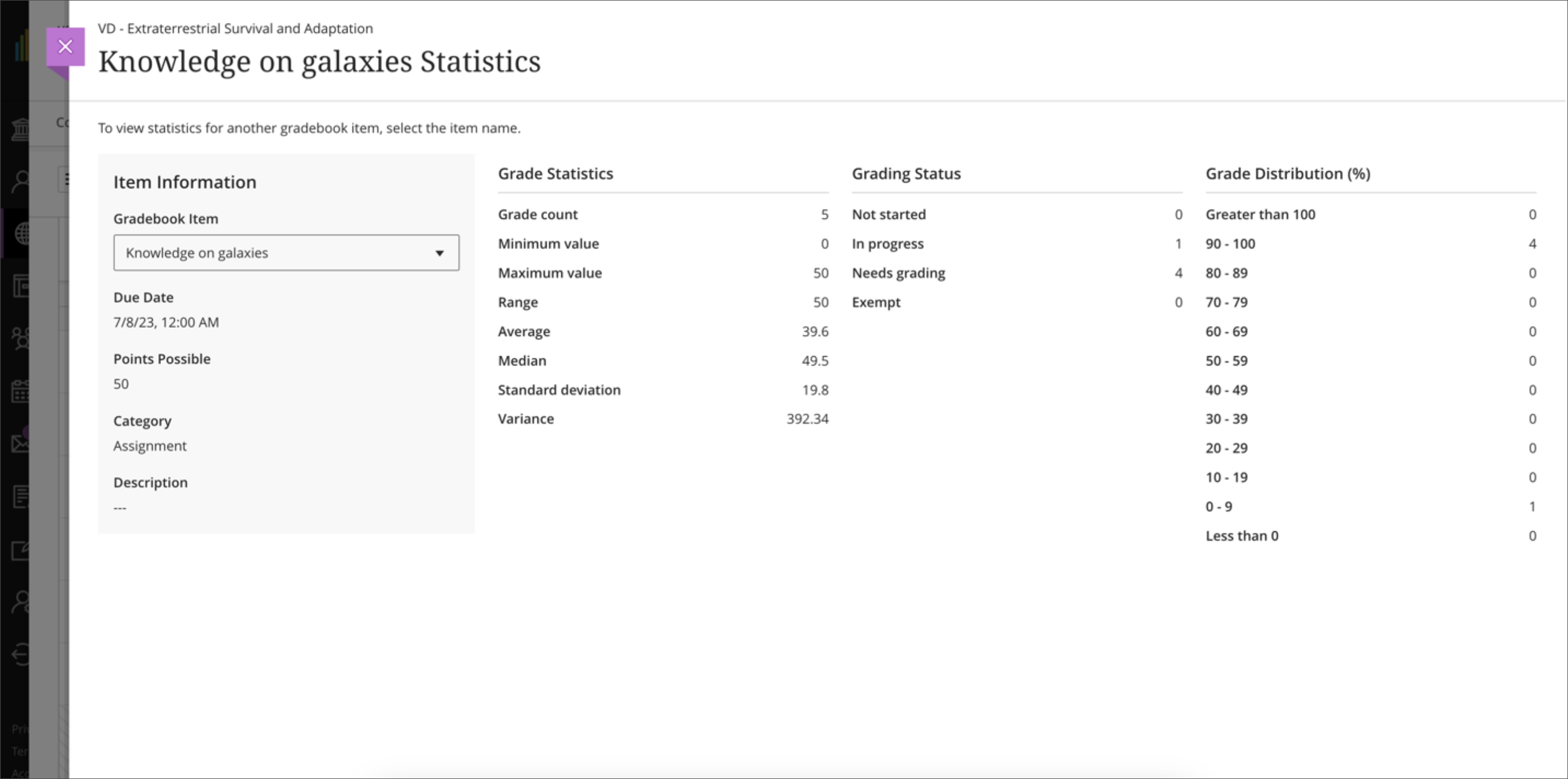
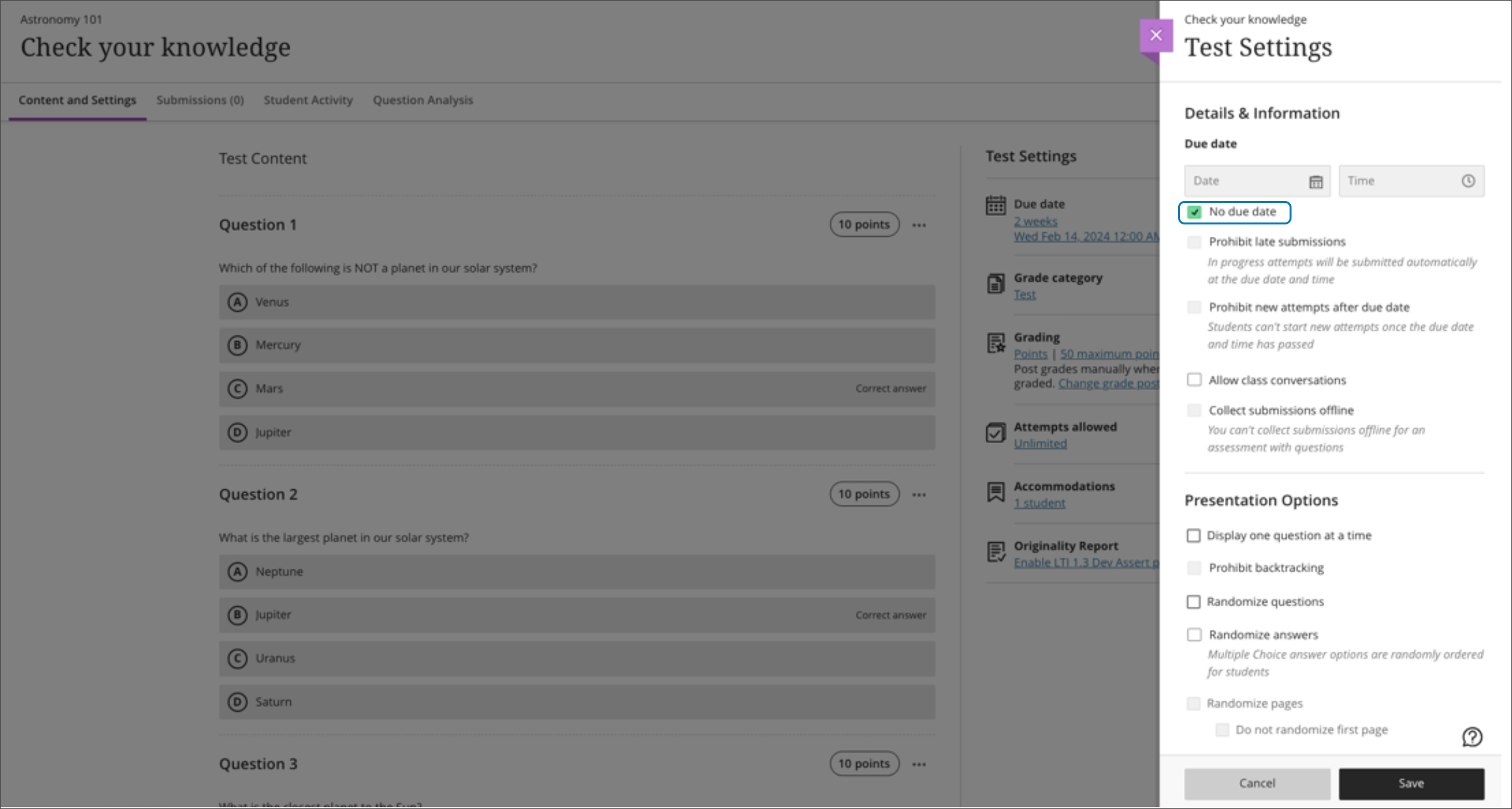
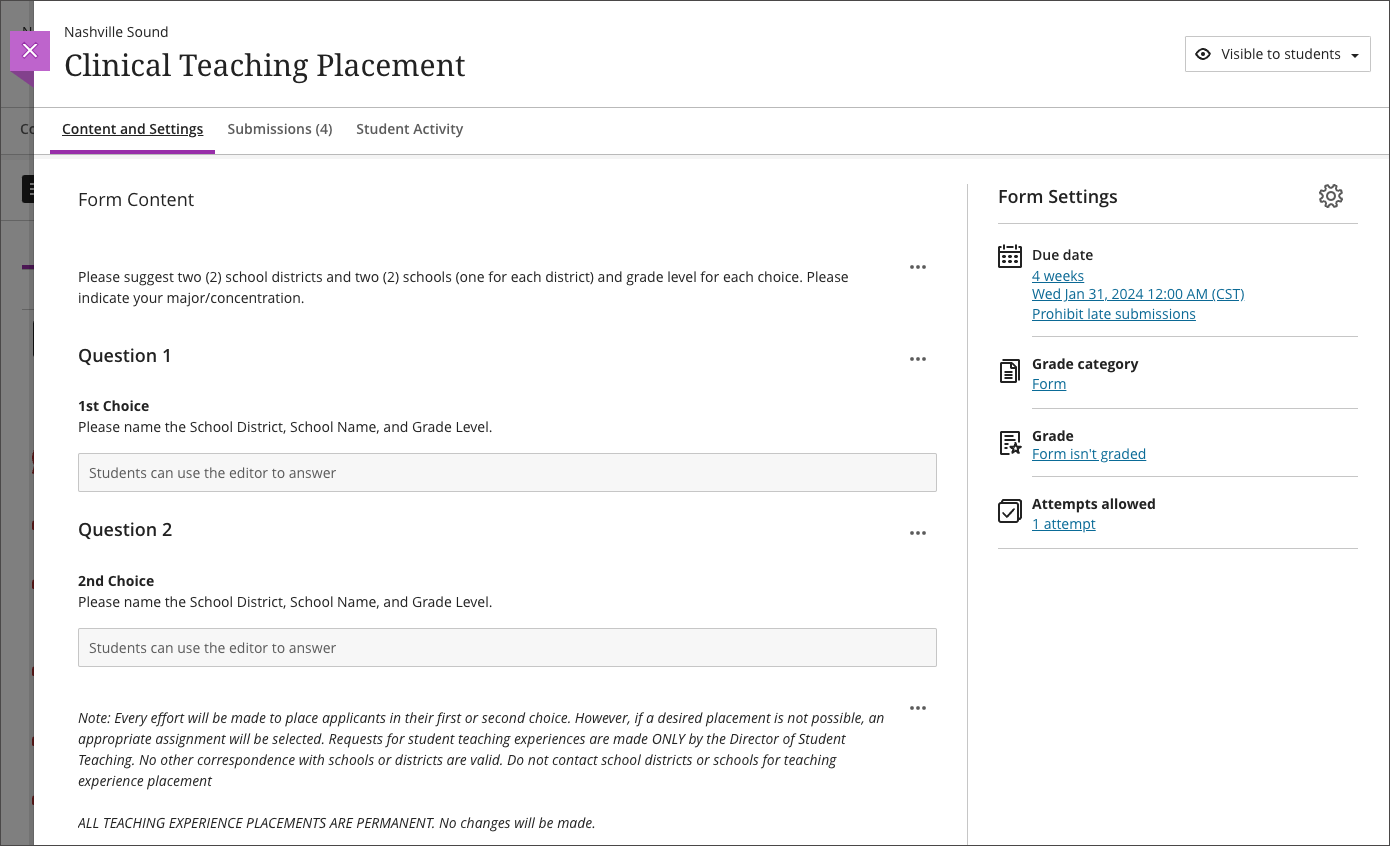
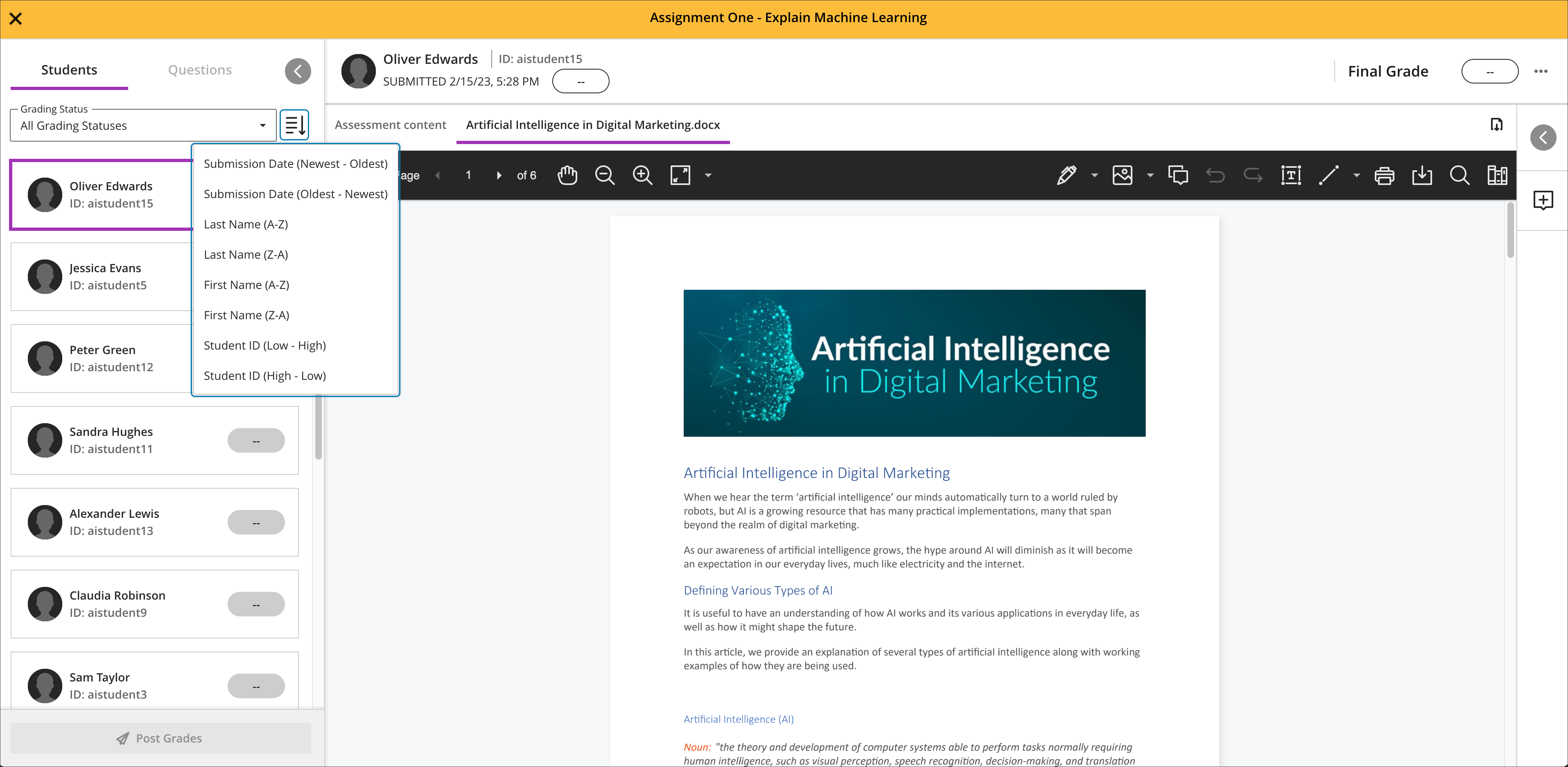
    <div class="html-content"><div><div><div><div><div><div>In continuous effort to improve the digital learning environment for both faculty and students, the March update to Ultra features several improvements designed to streamline course management, enrich assessment capabilities, and foster a more personalized learning experience. </div><div><br></div><div>Reviewing course performance on graded content is now easier than ever with the introduction of <a href="https://help.blackboard.com/node/47661" rel="nofollow external" class="bo">Gradebook Item Statistics</a>.<span> Instructors can select a column in the gradebook to access summary statistics for any graded item. The statistics page displays key metrics such as m</span><span>inimum and maximum value; range, a</span><span>verage, me</span><span>dian, s</span><span>tandard deviation, and v</span><span>ariance. </span><span>The number of submissions requiring grading and the distribution of grades also displays.</span></div><div><span><br></span></div><div><img src="https://help.blackboard.com/sites/default/files/images/2024-02/learn_ultra_instructors_GradebookItemStatistics_ItemStatisticsPage.png" alt="Example of the gradebook item statistics. These are accessed from the gradebook column in grid or list view" width="500" style="max-width: 100%; height: auto;"></div><div><em>Image 1:</em><em> Example of the gradebook item statistics. These are accessed from the gradebook item in grid or list view.</em></div><div><br></div><div><a href="https://my3.my.umbc.edu/groups/instructional-technology/posts/134605" rel="nofollow external" class="bo">Introduced last year</a>, the AI Course Design Assistant provides instructors with helpful tools to create organizational structures, rubrics, and test questions. In the March update, the AI Design Assistant incorporates <a href="https://help.blackboard.com/node/47636" rel="nofollow external" class="bo">a context picker for test question generation</a>. Instructors can now select specific course content items to help the AI create questions. This option improves the alignment of generated questions to course content.</div><div><br></div><div>Flexibility in Ultra course management is further enhanced with <a href="https://help.blackboard.com/node/47646" rel="nofollow external" class="bo">the No Due Date assessment setting</a>. In some scenarios, such as self-paced learning, an instructor may not want to apply a due date. Recognizing the diverse needs and schedules of students, this feature allows instructors to create assessments without strict deadlines. </div><div><br></div><div><img src="https://help.blackboard.com/sites/default/files/images/2024-02/learn_ultra_instructor_Assessments_NoDueDateOption.png" alt="Example of the No Due Date option for Ultra assessments." width="500" style="max-width: 100%; height: auto;"></div><div><em>Image 2:</em><em> Example of the No Due Date option for Ultra assessments.</em></div></div><div><div><span><br></span></div><div><span>Additional Updates</span></div><div><ul><li><span>A number indicator will appear next to the announcement tab in the course to <a href="https://help.blackboard.com/node/47651" rel="nofollow external" class="bo">indicate the number of unread announcements available</a>. </span><span>Users can also mark announcements as read or unread when announcements pop-up or from the Announcements page.</span></li><li><span>Instructors can <a href="https://help.blackboard.com/node/47641" rel="nofollow external" class="bo">align goals to journals</a> to ensure that the activity measures the desired learning outcomes. </span><span>Instructors can also align goals to assignments, tests (including individual questions and </span><span>questions</span><span> in banks), discussions, rubric criterion, files, web links, and documents.</span></li><li><span>In flexible grading, instructors can <a href="https://help.blackboard.com/node/47656" rel="nofollow external" class="bo">collapse or expand</a> the left panel (student cards) and right panel (feedback and rubrics). To provide a better user experience, the last used state is now preserved in the browser.</span></li><li><span>In Original courses, instructors can create text schemas that are currently unsupported in the Ultra course view. When converting courses, text schemas convert to a points schema. After conversion to Ultra, instructors can create and apply an alternate schema if desired.</span></li></ul></div></div></div></div></div><div><div><div><div><div><span><div><span>Faculty should see the latest updates in Ultra courses around March 7-8, 2024. </span><span>The next update to our Ultra test environment will take place on March 12, 2024; release notes are posted to the <a href="https://wiki.umbc.edu/x/LohnB" rel="nofollow external" class="bo">What's New in Ultra</a> that same week. Faculty who are interested in test driving new features before they are released to production should </span><a href="http://my.umbc.edu/go/request-help" rel="nofollow external" class="bo">open an RT ticket</a> to request early access. Please <a href="http://umbc.edu/go/ultra" rel="nofollow external" class="bo">watch the FAQs</a>, including <a href="https://wiki.umbc.edu/x/LohnB" rel="nofollow external" class="bo">the What's New with Ultra page</a>, <span>and myUMBC for additional information about Ultra. </span></div></span></div></div></div></div><div><span><br></span></div></div><div><span><strong>Connect with Instructional Technology</strong></span></div><div><span>As always, if you have any questions about teaching, learning, and technology at UMBC, please consider the following options:</span></div><ul><li><a href="http://www.umbc.edu/faq" rel="nofollow external" class="bo">Check our extensive FAQ collection</a><span> </span></li><ul><li><span><a href="https://wiki.umbc.edu/x/LohnB" rel="nofollow external" class="bo"><span>What's new in Ultra?</span></a><span> </span><span>|</span><span> </span><a href="https://wiki.umbc.edu/x/bwrSAQ" rel="nofollow external" class="bo"><span>Known Issues</span></a><span> </span></span></li></ul><li><span><a href="http://my.umbc.edu/go/request-help" rel="nofollow external" class="bo">Open a ticket via RT</a></span></li><li><span>Follow the </span><a href="http://my.umbc.edu/groups/instructional-technology" rel="nofollow external" class="bo">Instructional Technology</a><span> &amp; </span><a href="http://my.umbc.edu/groups/doit" rel="nofollow external" class="bo">DoIT</a><span> myUMBC groups</span></li><li><a href="http://doit.umbc.edu/itnm/staff/" rel="nofollow external" class="bo">Request a consult</a><span> with <a href="http://doit.umbc.edu/itnm/staff" rel="nofollow external" class="bo">instructional technology staff</a></span></li><li><span><a href="http://pivot.umbc.edu" rel="nofollow external" class="bo">PIVOT</a> | <a href="https://doit.umbc.edu/itnm/academic-continuity/" rel="nofollow external" class="bo">Academic Continuity</a></span><span> </span><span>|</span><span> </span><span><a href="https://fdc.umbc.edu/teaching/keep-on-teaching/" rel="nofollow external" class="bo">Keep On Teaching</a></span><span> </span><span>|</span><span> </span><span><a href="https://doit.umbc.edu/students" rel="nofollow external" class="bo">Student Technology Resources</a></span></li></ul><div><em>Thumbnail-image: New to Ultra</em></div></div><div><div></div></div></div>
]]>
  </Body>
  <Summary>In continuous effort to improve the digital learning environment for both faculty and students, the March update to Ultra features several improvements designed to streamline course management,...</Summary>
  <Website>https://my3.my.umbc.edu/groups/instructional-technology/posts/139340</Website>
  <TrackingUrl>https://dev.my.umbc.edu/api/v0/pixel/news/139340/guest@my.umbc.edu/ce12d5c11c480772978a8cda891ee5ea/api/pixel</TrackingUrl>
  <Tag>blackboard</Tag>
  <Tag>gradebook</Tag>
  <Tag>ultra-experience</Tag>
  <Tag>ultra-update</Tag>
  <Group token="instructional-technology">Instructional Technology</Group>
  <GroupUrl>https://dev.my.umbc.edu/groups/instructional-technology</GroupUrl>
  <AvatarUrl>https://assets2-dev.my.umbc.edu/system/shared/avatars/groups/000/001/164/dec3b026b81ee6d890a8f82f75c94a2e/xsmall.png?1446126703</AvatarUrl>
  <AvatarUrl size="original">https://assets1-dev.my.umbc.edu/system/shared/avatars/groups/000/001/164/dec3b026b81ee6d890a8f82f75c94a2e/original.png?1446126703</AvatarUrl>
  <AvatarUrl size="xxlarge">https://assets2-dev.my.umbc.edu/system/shared/avatars/groups/000/001/164/dec3b026b81ee6d890a8f82f75c94a2e/xxlarge.png?1446126703</AvatarUrl>
  <AvatarUrl size="xlarge">https://assets1-dev.my.umbc.edu/system/shared/avatars/groups/000/001/164/dec3b026b81ee6d890a8f82f75c94a2e/xlarge.png?1446126703</AvatarUrl>
  <AvatarUrl size="large">https://assets1-dev.my.umbc.edu/system/shared/avatars/groups/000/001/164/dec3b026b81ee6d890a8f82f75c94a2e/large.png?1446126703</AvatarUrl>
  <AvatarUrl size="medium">https://assets4-dev.my.umbc.edu/system/shared/avatars/groups/000/001/164/dec3b026b81ee6d890a8f82f75c94a2e/medium.png?1446126703</AvatarUrl>
  <AvatarUrl size="small">https://assets3-dev.my.umbc.edu/system/shared/avatars/groups/000/001/164/dec3b026b81ee6d890a8f82f75c94a2e/small.png?1446126703</AvatarUrl>
  <AvatarUrl size="xsmall">https://assets2-dev.my.umbc.edu/system/shared/avatars/groups/000/001/164/dec3b026b81ee6d890a8f82f75c94a2e/xsmall.png?1446126703</AvatarUrl>
  <AvatarUrl size="xxsmall">https://assets3-dev.my.umbc.edu/system/shared/avatars/groups/000/001/164/dec3b026b81ee6d890a8f82f75c94a2e/xxsmall.png?1446126703</AvatarUrl>
  <Sponsor>Instructional Technology</Sponsor>
  <ThumbnailUrl size="xxlarge">https://assets2-dev.my.umbc.edu/system/shared/thumbnails/news/000/139/340/f93fdba5a08a425d852ea8b9d6c3921e/xxlarge.jpg?1709053871</ThumbnailUrl>
  <ThumbnailUrl size="xlarge">https://assets3-dev.my.umbc.edu/system/shared/thumbnails/news/000/139/340/f93fdba5a08a425d852ea8b9d6c3921e/xlarge.jpg?1709053871</ThumbnailUrl>
  <ThumbnailUrl size="large">https://assets4-dev.my.umbc.edu/system/shared/thumbnails/news/000/139/340/f93fdba5a08a425d852ea8b9d6c3921e/large.jpg?1709053871</ThumbnailUrl>
  <ThumbnailUrl size="medium">https://assets1-dev.my.umbc.edu/system/shared/thumbnails/news/000/139/340/f93fdba5a08a425d852ea8b9d6c3921e/medium.jpg?1709053871</ThumbnailUrl>
  <ThumbnailUrl size="small">https://assets1-dev.my.umbc.edu/system/shared/thumbnails/news/000/139/340/f93fdba5a08a425d852ea8b9d6c3921e/small.jpg?1709053871</ThumbnailUrl>
  <ThumbnailUrl size="xsmall">https://assets3-dev.my.umbc.edu/system/shared/thumbnails/news/000/139/340/f93fdba5a08a425d852ea8b9d6c3921e/xsmall.jpg?1709053871</ThumbnailUrl>
  <ThumbnailUrl size="xxsmall">https://assets1-dev.my.umbc.edu/system/shared/thumbnails/news/000/139/340/f93fdba5a08a425d852ea8b9d6c3921e/xxsmall.jpg?1709053871</ThumbnailUrl>
  <PawCount>0</PawCount>
  <CommentCount>0</CommentCount>
  <CommentsAllowed>true</CommentsAllowed>
  <PostedAt>Tue, 27 Feb 2024 15:02:45 -0500</PostedAt>
  <EditAt>Tue, 27 Feb 2024 15:03:18 -0500</EditAt>
</NewsItem>
  <NewsItem contentIssues="true" id="138801" important="false" status="posted" url="https://dev.my.umbc.edu/groups/doit/posts/138801">
  <Title>Blackboard to Present Exclusive Ultra Roadmap on Feb 21</Title>
  <Tagline>Discover Ultra&#8217;s future: Join in person or virtually</Tagline>
  <Body>
    <![CDATA[
    <div class="html-content">Instructional Technology is pleased to partner with Blackboard <a href="https://my3.my.umbc.edu/groups/instructional-technology/events/125333" rel="nofollow external" class="bo">on February 21 for the Ultra Lunch &amp; Learn Roadmap</a>. During this exclusive event, faculty can explore upcoming features in Blackboard Ultra, discovering what's coming next for Ultra's gradebook, learner engagement and content creation tools, AI course design assistant, and more. <div><br><p><strong>Why Attend?</strong></p><p>This roadmap presentation offers a deep dive into new development in Ultra over the next 3-6 months, impacting the way we teach, learn, and interact with our students using Blackboard. <span>In addition to Instructional Technology staff support, the Blackboard team, representing client experience, product management, and Ultra migration, will be available to answer your questions. </span><span>Continued feedback has helped </span><a href="https://doit.umbc.edu/news/?tag=ultra-update" rel="nofollow external" class="bo">shape Ultra's evolution</a> <span>since UMBC began its journey and contributes to our final milestone to </span><a href="https://doit.umbc.edu/news/post/130227/" rel="nofollow external" class="bo">migrate all courses to Ultra by the end of 2024</a><span>.</span></p><p>We're offering exclusive perks for those who can join us in-person:</p><ul><li><strong>Complimentary Lunch: </strong>Enjoy a simple lunch as you network with Blackboard, Instructional Technology, and UMBC colleagues.</li><li><strong>Free T-shirts, Notebooks, and Pens:</strong> Grab a small token of appreciation for your engagement and feedback.</li></ul><p>Space for in-person attendance is limited. However, understanding the demands of academic schedules, we're also offering a virtual attendance option. This ensures that everyone interested can benefit from the valuable insights shared, regardless of physical location.</p><p><strong>How to RSVP</strong></p><p>Visit <a href="https://my3.my.umbc.edu/groups/instructional-technology/events/125333" rel="nofollow external" class="bo">our event page</a> to reserve your spot, whether you plan to attend in-person or virtually. Please take a few minutes to <a href="https://forms.gle/kcBYsVhJn4zj9fbQ9" rel="nofollow external" class="bo">complete this pre-event survey</a> by February 14, 2024 to help us tailor the upcoming Lunch &amp; Learn Roadmap session to your needs and interests. Your responses will guide the focus of the roadmap presentation and discussion.</p><p><strong>Connect with Instructional Technology</strong></p><p>As always, if you have any questions about teaching, learning, and technology at UMBC, please consider the following options:</p>
    <ul>
    <li><a href="http://www.umbc.edu/faq" rel="nofollow external" class="bo">Check our extensive FAQ collection</a></li>
    <li><a href="https://wiki.umbc.edu/x/LohnB" rel="nofollow external" class="bo">What's new in Ultra?</a> | <a href="https://wiki.umbc.edu/x/bwrSAQ" rel="nofollow external" class="bo">Known Issues</a> </li>
    <li><a href="http://my.umbc.edu/go/request-help" rel="nofollow external" class="bo">Open a ticket via RT</a></li>
    <li>Follow the <a href="http://my.umbc.edu/groups/instructional-technology" rel="nofollow external" class="bo">Instructional Technology</a> &amp; <a href="http://my.umbc.edu/groups/doit" rel="nofollow external" class="bo">DoIT</a> myUMBC groups</li>
    <li><a href="http://doit.umbc.edu/itnm/staff/" rel="nofollow external" class="bo">Request a consult</a> with <a href="http://doit.umbc.edu/itnm/staff" rel="nofollow external" class="bo">instructional technology staff</a></li>
    <li><a href="http://pivot.umbc.edu/" rel="nofollow external" class="bo">PIVOT</a> | <a href="https://doit.umbc.edu/itnm/academic-continuity/" rel="nofollow external" class="bo">Academic Continuity</a> | <a href="https://fdc.umbc.edu/teaching/keep-on-teaching/" rel="nofollow external" class="bo">Keep On Teaching</a> | <a href="https://doit.umbc.edu/students" rel="nofollow external" class="bo">Student Technology Resources</a></li>
    </ul><p><em>UMBC is committed to providing a consistent learning experience for everyone. The <a href="https://doit.umbc.edu/news/post/130227/" rel="nofollow external" class="bo">last day we will support Blackboard Original</a> is December 31, 2024. Please check out our training and support: <a href="http://umbc.edu/go/ultra" rel="nofollow external" class="bo">umbc.edu/go/ultra</a></em></p><p><em>Thumbnail Image:</em> word cloud spelling "ULTRA"</p></div></div>
]]>
  </Body>
  <Summary>Instructional Technology is pleased to partner with Blackboard on February 21 for the Ultra Lunch &amp; Learn Roadmap. During this exclusive event, faculty can explore upcoming features in...</Summary>
  <Website>https://my3.my.umbc.edu/groups/instructional-technology/posts/138801</Website>
  <TrackingUrl>https://dev.my.umbc.edu/api/v0/pixel/news/138801/guest@my.umbc.edu/3fc4a91b2560af0e32881d59c2e3560e/api/pixel</TrackingUrl>
  <Tag>blackboard</Tag>
  <Tag>roadmap</Tag>
  <Tag>ultra</Tag>
  <Group token="instructional-technology">Instructional Technology</Group>
  <GroupUrl>https://dev.my.umbc.edu/groups/instructional-technology</GroupUrl>
  <AvatarUrl>https://assets2-dev.my.umbc.edu/system/shared/avatars/groups/000/001/164/dec3b026b81ee6d890a8f82f75c94a2e/xsmall.png?1446126703</AvatarUrl>
  <AvatarUrl size="original">https://assets1-dev.my.umbc.edu/system/shared/avatars/groups/000/001/164/dec3b026b81ee6d890a8f82f75c94a2e/original.png?1446126703</AvatarUrl>
  <AvatarUrl size="xxlarge">https://assets2-dev.my.umbc.edu/system/shared/avatars/groups/000/001/164/dec3b026b81ee6d890a8f82f75c94a2e/xxlarge.png?1446126703</AvatarUrl>
  <AvatarUrl size="xlarge">https://assets1-dev.my.umbc.edu/system/shared/avatars/groups/000/001/164/dec3b026b81ee6d890a8f82f75c94a2e/xlarge.png?1446126703</AvatarUrl>
  <AvatarUrl size="large">https://assets1-dev.my.umbc.edu/system/shared/avatars/groups/000/001/164/dec3b026b81ee6d890a8f82f75c94a2e/large.png?1446126703</AvatarUrl>
  <AvatarUrl size="medium">https://assets4-dev.my.umbc.edu/system/shared/avatars/groups/000/001/164/dec3b026b81ee6d890a8f82f75c94a2e/medium.png?1446126703</AvatarUrl>
  <AvatarUrl size="small">https://assets3-dev.my.umbc.edu/system/shared/avatars/groups/000/001/164/dec3b026b81ee6d890a8f82f75c94a2e/small.png?1446126703</AvatarUrl>
  <AvatarUrl size="xsmall">https://assets2-dev.my.umbc.edu/system/shared/avatars/groups/000/001/164/dec3b026b81ee6d890a8f82f75c94a2e/xsmall.png?1446126703</AvatarUrl>
  <AvatarUrl size="xxsmall">https://assets3-dev.my.umbc.edu/system/shared/avatars/groups/000/001/164/dec3b026b81ee6d890a8f82f75c94a2e/xxsmall.png?1446126703</AvatarUrl>
  <Sponsor>Instructional Technology</Sponsor>
  <ThumbnailUrl size="xxlarge">https://assets1-dev.my.umbc.edu/system/shared/thumbnails/news/000/138/801/4e6ac602544037f4234396b42bc16603/xxlarge.jpg?1707404581</ThumbnailUrl>
  <ThumbnailUrl size="xlarge">https://assets4-dev.my.umbc.edu/system/shared/thumbnails/news/000/138/801/4e6ac602544037f4234396b42bc16603/xlarge.jpg?1707404581</ThumbnailUrl>
  <ThumbnailUrl size="large">https://assets1-dev.my.umbc.edu/system/shared/thumbnails/news/000/138/801/4e6ac602544037f4234396b42bc16603/large.jpg?1707404581</ThumbnailUrl>
  <ThumbnailUrl size="medium">https://assets2-dev.my.umbc.edu/system/shared/thumbnails/news/000/138/801/4e6ac602544037f4234396b42bc16603/medium.jpg?1707404581</ThumbnailUrl>
  <ThumbnailUrl size="small">https://assets4-dev.my.umbc.edu/system/shared/thumbnails/news/000/138/801/4e6ac602544037f4234396b42bc16603/small.jpg?1707404581</ThumbnailUrl>
  <ThumbnailUrl size="xsmall">https://assets3-dev.my.umbc.edu/system/shared/thumbnails/news/000/138/801/4e6ac602544037f4234396b42bc16603/xsmall.jpg?1707404581</ThumbnailUrl>
  <ThumbnailUrl size="xxsmall">https://assets1-dev.my.umbc.edu/system/shared/thumbnails/news/000/138/801/4e6ac602544037f4234396b42bc16603/xxsmall.jpg?1707404581</ThumbnailUrl>
  <PawCount>3</PawCount>
  <CommentCount>0</CommentCount>
  <CommentsAllowed>true</CommentsAllowed>
  <PostedAt>Thu, 08 Feb 2024 14:56:21 -0500</PostedAt>
</NewsItem>
  <NewsItem contentIssues="true" id="138348" important="false" status="posted" url="https://dev.my.umbc.edu/groups/doit/posts/138348">
    <Title>Collect surveys using new Forms tool in Ultra courses</Title>
    <Tagline>Updates to grading workflows &amp; settings for February update</Tagline>
    <Body>
      <![CDATA[
          <div class="html-content"><div><div><div><div><div><div><div>In February, a new tool will be available in Ultra courses, designed to make information gathering simple and efficient for instructors: <a href="https://help.blackboard.com/node/47511" rel="nofollow external" class="bo">Forms</a>. Whether assigning students to clinical experiences or seeking to understand their interests and opinions through surveys, Forms will streamline these processes. The <span>Forms tool supports several question types including essay, multiple choice, true/false, and Likert. Instructors can view student responses or question responses. Instructors can mark a Form as complete/incomplete or optionally award points.</span></div><div><span><br></span></div><div><img src="https://help.blackboard.com/sites/default/files/images/2024-01/learn-ultra-84-instructors-forms1_0.png" style="max-width: 100%; height: auto;"></div><div><em>Image 1:</em><em><span> Example of the Form creation page. </span><span>The first phase of Forms will not be anonymous. Export Form data to CSV or Excel.</span></em></div><div><br></div><div>Sending reminders about missed work can encourage students to stay on track. Faculty can <a href="https://help.blackboard.com/node/46696" rel="nofollow external" class="bo">send reminders</a> to students through the assessment submission page or the Ultra gradebook, including third-party tools. Updates to the workflow ensures all students will be included as long as they have not received an automatic zero or a manual override grade.</div><div><br></div><div>Grading workflows are improved in the February release including <a href="https://help.blackboard.com/node/47536" rel="nofollow external" class="bo">the ability to provide feedback</a> for automatic zeroes and override grades. Additionally, instructors can upload feedback for manually created grade columns using a CSV file.</div></div><div><div><span><br></span></div><div><span>Additional Updates</span></div><div><ul><li><span>Feedback for all attempts on a test or assignment is visible to learners in a peek panel. Students can view override feedback after grades are posted. </span></li><li><span>Rubrics grading interface will store the most recently used display option. This means that instructors who rely on performance level descriptions when grading don't have to turn them on each time they navigate to grade another submission. </span></li><li><span>To <a href="https://help.blackboard.com/node/47531" rel="nofollow external" class="bo">ensure easy and clear access</a> to the Audio/Video Recording Feedback tool, the recording window appears on the right side of the screen so that the instructor can view the student submission. </span></li><li><span>Instructors can <a href="https://help.blackboard.com/node/47541" rel="nofollow external" class="bo">view the number of missed due dates</a> for students in the Course Activity Report. Instructors can customize the missed due date alert in the Alert Settings via the Gradebook. </span></li><li><span><span>Instructors can now <a href="https://help.blackboard.com/Learn/Administrator/SaaS/Courses/Import_Courses_from_Moodle" rel="nofollow external" class="bo">import Moodle packages</a> into Ultra and Original view courses. </span><span>Blackboard has a guide to explain the differences in </span><a href="https://help.blackboard.com/Learn/Instructor/Ultra/Moodle_to_Ultra_Terminology" title="https://help.blackboard.com/Learn/Instructor/Ultra/Moodle_to_Ultra_Terminology" rel="nofollow external" class="bo">terminology</a><span>.</span></span></li></ul></div></div></div></div></div></div><div><div><div><div><div><span><div><span>Faculty should see the latest updates in Ultra courses around February 1-2, 2024. </span><span>The next update to our Ultra test environment will take place on February 6, 2024; release notes are posted to the <a href="https://wiki.umbc.edu/x/LohnB" rel="nofollow external" class="bo">What's New in Ultra</a> that same week. Faculty who are interested in test driving new features before they are released to production should </span><a href="http://my.umbc.edu/go/request-help" rel="nofollow external" class="bo">open an RT ticket</a> to request early access. Please <a href="http://umbc.edu/go/ultra" rel="nofollow external" class="bo">watch the FAQs</a>, including <a href="https://wiki.umbc.edu/x/LohnB" rel="nofollow external" class="bo">the What's New with Ultra page</a>, <span>and myUMBC for additional information about Ultra. </span></div></span></div></div></div></div><div><span><br></span></div></div><div><span><strong>Connect with Instructional Technology</strong></span></div><div><span>As always, if you have any questions about teaching, learning, and technology at UMBC, please consider the following options:</span></div><ul><li><a href="http://www.umbc.edu/faq" rel="nofollow external" class="bo">Check our extensive FAQ collection</a><span> </span></li><ul><li><span><a href="https://wiki.umbc.edu/x/LohnB" rel="nofollow external" class="bo"><span>What's new in Ultra?</span></a><span> </span><span>|</span><span> </span><a href="https://wiki.umbc.edu/x/bwrSAQ" rel="nofollow external" class="bo"><span>Known Issues</span></a><span> </span></span></li></ul><li><span><a href="http://my.umbc.edu/go/request-help" rel="nofollow external" class="bo">Open a ticket via RT</a></span></li><li><span>Follow the </span><a href="http://my.umbc.edu/groups/instructional-technology" rel="nofollow external" class="bo">Instructional Technology</a><span> &amp; </span><a href="http://my.umbc.edu/groups/doit" rel="nofollow external" class="bo">DoIT</a><span> myUMBC groups</span></li><li><a href="http://doit.umbc.edu/itnm/staff/" rel="nofollow external" class="bo">Request a consult</a><span> with <a href="http://doit.umbc.edu/itnm/staff" rel="nofollow external" class="bo">instructional technology staff</a></span></li><li><span><a href="http://pivot.umbc.edu" rel="nofollow external" class="bo">PIVOT</a> | <a href="https://doit.umbc.edu/itnm/academic-continuity/" rel="nofollow external" class="bo">Academic Continuity</a></span><span> </span><span>|</span><span> </span><span><a href="https://fdc.umbc.edu/teaching/keep-on-teaching/" rel="nofollow external" class="bo">Keep On Teaching</a></span><span> </span><span>|</span><span> </span><span><a href="https://doit.umbc.edu/students" rel="nofollow external" class="bo">Student Technology Resources</a></span></li></ul></div><div><div></div></div></div>
      ]]>
    </Body>
    <Summary>In February, a new tool will be available in Ultra courses, designed to make information gathering simple and efficient for instructors: Forms. Whether assigning students to clinical experiences...</Summary>
    <Website>https://my3.my.umbc.edu/groups/instructional-technology/posts/138348</Website>
    <TrackingUrl>https://dev.my.umbc.edu/api/v0/pixel/news/138348/guest@my.umbc.edu/634e5713e136d422c9676d901833a992/api/pixel</TrackingUrl>
    <Tag>blackboard</Tag>
    <Tag>forms</Tag>
    <Tag>grading</Tag>
    <Tag>ultra-experience</Tag>
    <Tag>ultra-update</Tag>
    <Group token="instructional-technology">Instructional Technology</Group>
    <GroupUrl>https://dev.my.umbc.edu/groups/instructional-technology</GroupUrl>
    <AvatarUrl>https://assets2-dev.my.umbc.edu/system/shared/avatars/groups/000/001/164/dec3b026b81ee6d890a8f82f75c94a2e/xsmall.png?1446126703</AvatarUrl>
    <AvatarUrl size="original">https://assets1-dev.my.umbc.edu/system/shared/avatars/groups/000/001/164/dec3b026b81ee6d890a8f82f75c94a2e/original.png?1446126703</AvatarUrl>
    <AvatarUrl size="xxlarge">https://assets2-dev.my.umbc.edu/system/shared/avatars/groups/000/001/164/dec3b026b81ee6d890a8f82f75c94a2e/xxlarge.png?1446126703</AvatarUrl>
    <AvatarUrl size="xlarge">https://assets1-dev.my.umbc.edu/system/shared/avatars/groups/000/001/164/dec3b026b81ee6d890a8f82f75c94a2e/xlarge.png?1446126703</AvatarUrl>
    <AvatarUrl size="large">https://assets1-dev.my.umbc.edu/system/shared/avatars/groups/000/001/164/dec3b026b81ee6d890a8f82f75c94a2e/large.png?1446126703</AvatarUrl>
    <AvatarUrl size="medium">https://assets4-dev.my.umbc.edu/system/shared/avatars/groups/000/001/164/dec3b026b81ee6d890a8f82f75c94a2e/medium.png?1446126703</AvatarUrl>
    <AvatarUrl size="small">https://assets3-dev.my.umbc.edu/system/shared/avatars/groups/000/001/164/dec3b026b81ee6d890a8f82f75c94a2e/small.png?1446126703</AvatarUrl>
    <AvatarUrl size="xsmall">https://assets2-dev.my.umbc.edu/system/shared/avatars/groups/000/001/164/dec3b026b81ee6d890a8f82f75c94a2e/xsmall.png?1446126703</AvatarUrl>
    <AvatarUrl size="xxsmall">https://assets3-dev.my.umbc.edu/system/shared/avatars/groups/000/001/164/dec3b026b81ee6d890a8f82f75c94a2e/xxsmall.png?1446126703</AvatarUrl>
    <Sponsor>Instructional Technology</Sponsor>
    <ThumbnailUrl size="xxlarge">https://assets1-dev.my.umbc.edu/system/shared/thumbnails/news/000/138/348/362d6c0542ef5d3987b2ae0924e764a0/xxlarge.jpg?1706030039</ThumbnailUrl>
    <ThumbnailUrl size="xlarge">https://assets2-dev.my.umbc.edu/system/shared/thumbnails/news/000/138/348/362d6c0542ef5d3987b2ae0924e764a0/xlarge.jpg?1706030039</ThumbnailUrl>
    <ThumbnailUrl size="large">https://assets4-dev.my.umbc.edu/system/shared/thumbnails/news/000/138/348/362d6c0542ef5d3987b2ae0924e764a0/large.jpg?1706030039</ThumbnailUrl>
    <ThumbnailUrl size="medium">https://assets1-dev.my.umbc.edu/system/shared/thumbnails/news/000/138/348/362d6c0542ef5d3987b2ae0924e764a0/medium.jpg?1706030039</ThumbnailUrl>
    <ThumbnailUrl size="small">https://assets4-dev.my.umbc.edu/system/shared/thumbnails/news/000/138/348/362d6c0542ef5d3987b2ae0924e764a0/small.jpg?1706030039</ThumbnailUrl>
    <ThumbnailUrl size="xsmall">https://assets1-dev.my.umbc.edu/system/shared/thumbnails/news/000/138/348/362d6c0542ef5d3987b2ae0924e764a0/xsmall.jpg?1706030039</ThumbnailUrl>
    <ThumbnailUrl size="xxsmall">https://assets3-dev.my.umbc.edu/system/shared/thumbnails/news/000/138/348/362d6c0542ef5d3987b2ae0924e764a0/xxsmall.jpg?1706030039</ThumbnailUrl>
    <PawCount>2</PawCount>
    <CommentCount>0</CommentCount>
    <CommentsAllowed>true</CommentsAllowed>
    <PostedAt>Tue, 23 Jan 2024 13:09:57 -0500</PostedAt>
  </NewsItem>
  <NewsItem contentIssues="true" id="138020" important="false" status="posted" url="https://dev.my.umbc.edu/groups/doit/posts/138020">
    <Title>Google Chrome Settings Impacting Blackboard Integrations</Title>
    <Tagline>Update Your Browser Settings Today</Tagline>
    <Body>
      <![CDATA[
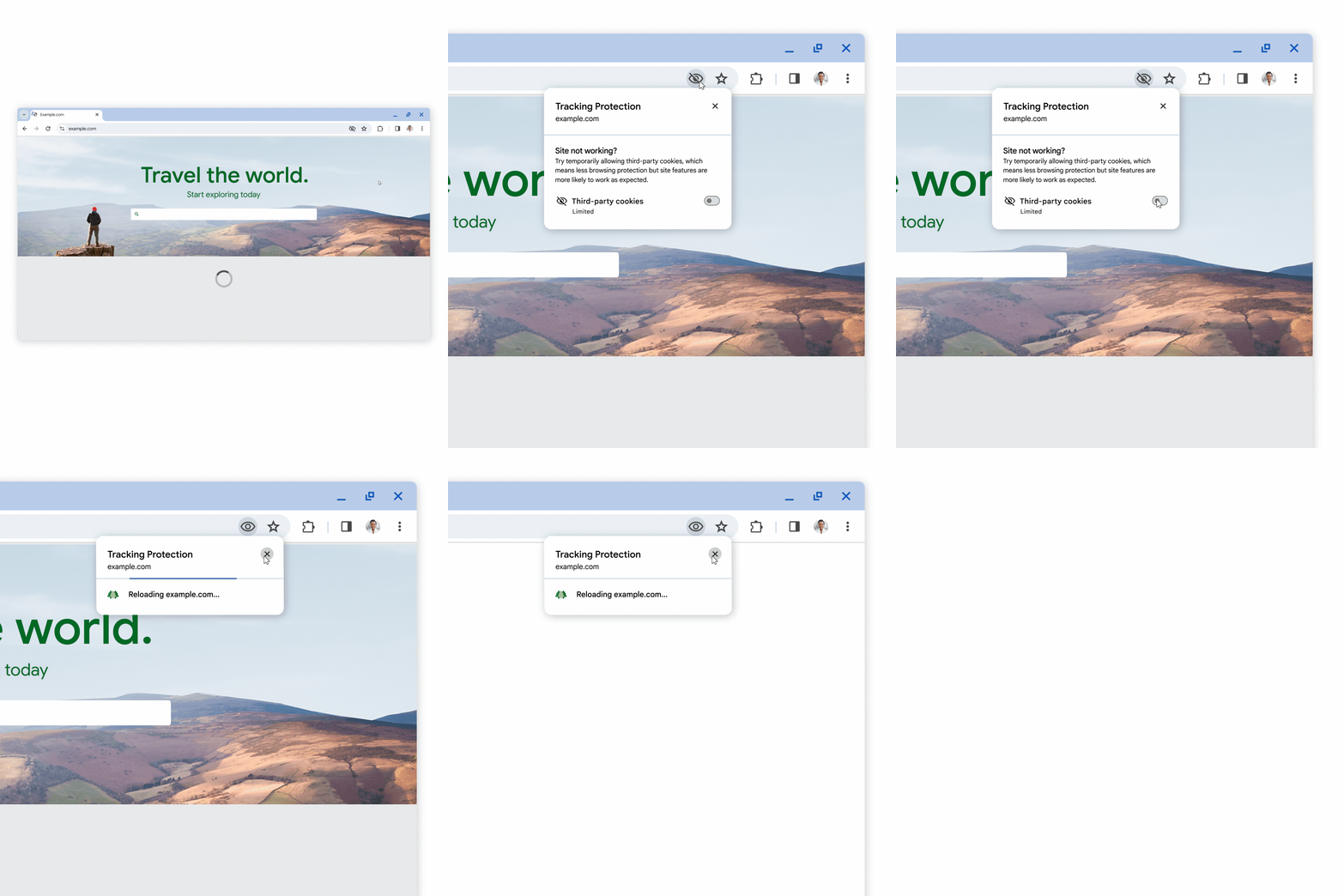
          <div class="html-content"><span><p><span>Beginning in January 2024, Google will begin </span><a href="https://blog.google/products/chrome/privacy-sandbox-tracking-protection/" rel="nofollow external" class="bo"><span>restricting all third-party cookies in Chrome </span></a><span>by default. </span><span>Technology tools used for instruction in Blackboard may use third-party cookies. </span><span>If third-party cookies are restricted, the ability to access or view content could be impacted.</span></p><p><span>Examples of technologies that may require users to enable third-party cookies include the following:</span></p><ul><li><span><span>Blackboard</span></span></li><li><span><span>CourseArc</span></span></li><li><span><span>Panopto</span></span></li><li><span><span>Poll Everywhere</span></span></li><li><span><span>Publisher materials (ALEKS, Cengage, McGraw-Hill, Macmillan, zyBooks, etc)</span></span></li><li><span><span>Qwickly Attendance</span></span></li><li><span><span>VoiceThread</span></span></li></ul><h5><span><strong>Take Action</strong></span></h5><p><span>Chrome users have several options to manage their Chrome settings to avoid losing access to instructional tools:</span></p><ul><li><span><span><strong>Opt-Out:</strong></span><span>The first users who receive this new Tracking Protection feature can opt-out by clicking the settings (gear) icon in a notification. </span></span></li><li><span><span><strong>Manage Permissions: </strong></span><span>For users who don't opt-out, an </span><a href="https://storage.googleapis.com/gweb-uniblog-publish-prod/original_images/PS_1_Popup_EN.gif" rel="nofollow external" class="bo"><span>eye icon will appear in the address bar</span></a><span> when Chrome blocks an integrated tool because it uses a cookie. Click on the eye icon and select the option to permit cookies temporarily. </span></span></li><li><span><span><strong>Allow Cookies: </strong></span><span>Users can update their browser settings to </span><a href="https://support.google.com/chrome/answer/95647?hl=en" rel="nofollow external" class="bo"><span>allow third-party cookies in Chrome</span></a><span>.</span></span></li></ul><h5><span><strong>Did You Know?</strong></span></h5><p><span>Chrome is not the only browser that restricts third-party cookies by default. To manage settings for another browser, please see </span><a href="https://umbc.atlassian.net/wiki/x/TjbVAQ" rel="nofollow external" class="bo"><span>How do I enable third-party cookies for Blackboard and related integrations?</span></a></p><h5><strong>Connect with Instructional Technology</strong></h5></span><div><div><span>As always, if you have any questions about teaching, learning, and technology at UMBC, please consider the following options:</span></div><ul><li><a href="http://www.umbc.edu/faq" rel="nofollow external" class="bo">Check our extensive FAQ collection</a><span> </span></li><ul><li><span><a href="https://wiki.umbc.edu/x/LohnB" rel="nofollow external" class="bo"><span>What's new in Ultra?</span></a> | <a href="https://wiki.umbc.edu/x/bwrSAQ" rel="nofollow external" class="bo"><span>Known Issues</span></a><span> </span></span></li></ul><li><span><a href="http://my.umbc.edu/go/request-help" rel="nofollow external" class="bo">Open a ticket via RT</a></span></li><li><span>Follow the </span><a href="http://my.umbc.edu/groups/instructional-technology" rel="nofollow external" class="bo">Instructional Technology</a> &amp; <a href="http://my.umbc.edu/groups/doit" rel="nofollow external" class="bo">DoIT</a><span> myUMBC groups</span></li><li><a href="http://doit.umbc.edu/itnm/staff/" rel="nofollow external" class="bo">Request a consult</a><span> with <a href="http://doit.umbc.edu/itnm/staff" rel="nofollow external" class="bo">instructional technology staff</a></span></li><li><span><a href="http://pivot.umbc.edu/" rel="nofollow external" class="bo">PIVOT</a> | <a href="https://doit.umbc.edu/itnm/academic-continuity/" rel="nofollow external" class="bo">Academic Continuity</a></span> | <span><a href="https://fdc.umbc.edu/teaching/keep-on-teaching/" rel="nofollow external" class="bo">Keep On Teaching</a></span> | <span><a href="https://doit.umbc.edu/students" rel="nofollow external" class="bo">Student Technology Resources</a></span></li></ul><div><em>Thumbnail: Gear icons</em></div></div></div>
      ]]>
    </Body>
    <Summary>Beginning in January 2024, Google will begin restricting all third-party cookies in Chrome by default. Technology tools used for instruction in Blackboard may use third-party cookies. If...</Summary>
    <Website>https://my3.my.umbc.edu/groups/instructional-technology/posts/138020</Website>
    <TrackingUrl>https://dev.my.umbc.edu/api/v0/pixel/news/138020/guest@my.umbc.edu/cb43ddb9fce1e52d0c47d3930affece3/api/pixel</TrackingUrl>
    <Tag>blackboard</Tag>
    <Tag>browser-settings</Tag>
    <Tag>chrome</Tag>
    <Tag>cookies</Tag>
    <Tag>third-party-tools</Tag>
    <Group token="instructional-technology">Instructional Technology</Group>
    <GroupUrl>https://dev.my.umbc.edu/groups/instructional-technology</GroupUrl>
    <AvatarUrl>https://assets2-dev.my.umbc.edu/system/shared/avatars/groups/000/001/164/dec3b026b81ee6d890a8f82f75c94a2e/xsmall.png?1446126703</AvatarUrl>
    <AvatarUrl size="original">https://assets1-dev.my.umbc.edu/system/shared/avatars/groups/000/001/164/dec3b026b81ee6d890a8f82f75c94a2e/original.png?1446126703</AvatarUrl>
    <AvatarUrl size="xxlarge">https://assets2-dev.my.umbc.edu/system/shared/avatars/groups/000/001/164/dec3b026b81ee6d890a8f82f75c94a2e/xxlarge.png?1446126703</AvatarUrl>
    <AvatarUrl size="xlarge">https://assets1-dev.my.umbc.edu/system/shared/avatars/groups/000/001/164/dec3b026b81ee6d890a8f82f75c94a2e/xlarge.png?1446126703</AvatarUrl>
    <AvatarUrl size="large">https://assets1-dev.my.umbc.edu/system/shared/avatars/groups/000/001/164/dec3b026b81ee6d890a8f82f75c94a2e/large.png?1446126703</AvatarUrl>
    <AvatarUrl size="medium">https://assets4-dev.my.umbc.edu/system/shared/avatars/groups/000/001/164/dec3b026b81ee6d890a8f82f75c94a2e/medium.png?1446126703</AvatarUrl>
    <AvatarUrl size="small">https://assets3-dev.my.umbc.edu/system/shared/avatars/groups/000/001/164/dec3b026b81ee6d890a8f82f75c94a2e/small.png?1446126703</AvatarUrl>
    <AvatarUrl size="xsmall">https://assets2-dev.my.umbc.edu/system/shared/avatars/groups/000/001/164/dec3b026b81ee6d890a8f82f75c94a2e/xsmall.png?1446126703</AvatarUrl>
    <AvatarUrl size="xxsmall">https://assets3-dev.my.umbc.edu/system/shared/avatars/groups/000/001/164/dec3b026b81ee6d890a8f82f75c94a2e/xxsmall.png?1446126703</AvatarUrl>
    <Sponsor>Instructional Technology</Sponsor>
    <ThumbnailUrl size="xxlarge">https://assets3-dev.my.umbc.edu/system/shared/thumbnails/news/000/138/020/dba8402e99e1e8a4d3f645133f0bb260/xxlarge.jpg?1704402620</ThumbnailUrl>
    <ThumbnailUrl size="xlarge">https://assets2-dev.my.umbc.edu/system/shared/thumbnails/news/000/138/020/dba8402e99e1e8a4d3f645133f0bb260/xlarge.jpg?1704402620</ThumbnailUrl>
    <ThumbnailUrl size="large">https://assets3-dev.my.umbc.edu/system/shared/thumbnails/news/000/138/020/dba8402e99e1e8a4d3f645133f0bb260/large.jpg?1704402620</ThumbnailUrl>
    <ThumbnailUrl size="medium">https://assets3-dev.my.umbc.edu/system/shared/thumbnails/news/000/138/020/dba8402e99e1e8a4d3f645133f0bb260/medium.jpg?1704402620</ThumbnailUrl>
    <ThumbnailUrl size="small">https://assets1-dev.my.umbc.edu/system/shared/thumbnails/news/000/138/020/dba8402e99e1e8a4d3f645133f0bb260/small.jpg?1704402620</ThumbnailUrl>
    <ThumbnailUrl size="xsmall">https://assets2-dev.my.umbc.edu/system/shared/thumbnails/news/000/138/020/dba8402e99e1e8a4d3f645133f0bb260/xsmall.jpg?1704402620</ThumbnailUrl>
    <ThumbnailUrl size="xxsmall">https://assets1-dev.my.umbc.edu/system/shared/thumbnails/news/000/138/020/dba8402e99e1e8a4d3f645133f0bb260/xxsmall.jpg?1704402620</ThumbnailUrl>
    <PawCount>6</PawCount>
    <CommentCount>0</CommentCount>
    <CommentsAllowed>false</CommentsAllowed>
    <PostedAt>Thu, 04 Jan 2024 16:15:21 -0500</PostedAt>
    <EditAt>Thu, 04 Jan 2024 16:16:31 -0500</EditAt>
  </NewsItem>
  <NewsItem contentIssues="true" id="137839" important="false" status="posted" url="https://dev.my.umbc.edu/groups/doit/posts/137839">
  <Title>More gradebook updates, test access logs coming in January</Title>
  <Tagline>Grade visibility, batch edit, authentic assessment prompts</Tagline>
  <Body>
    <![CDATA[
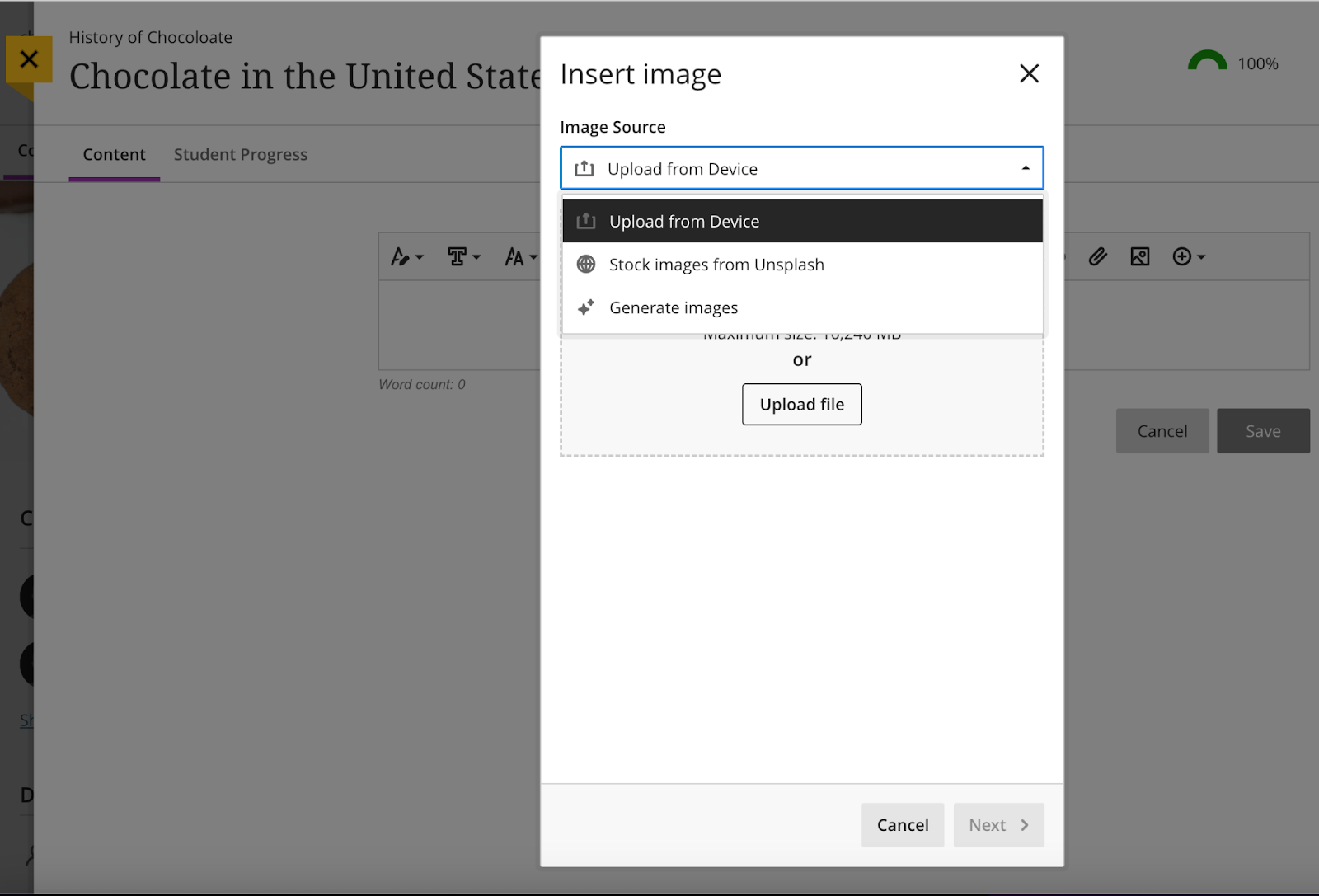
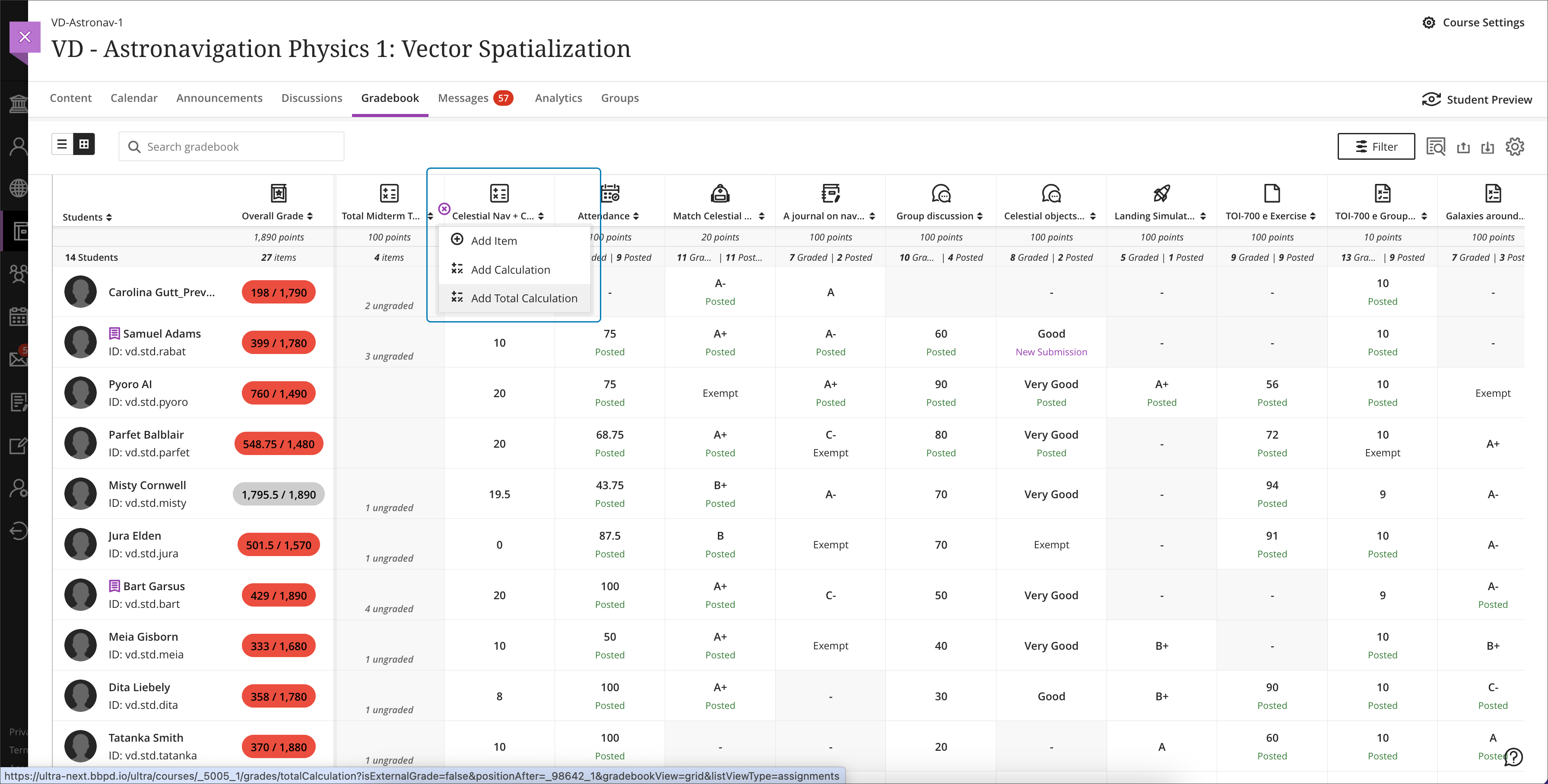
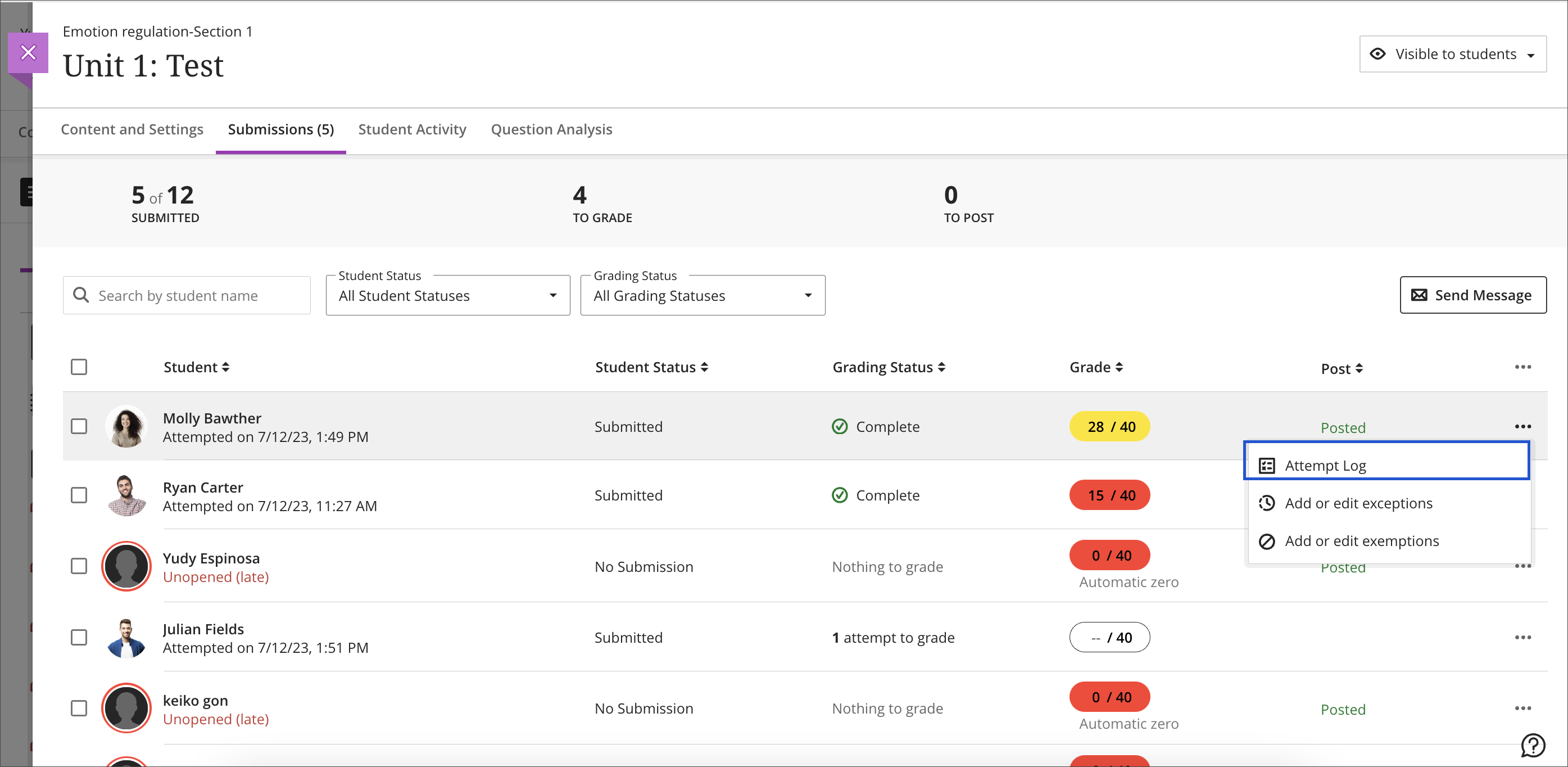
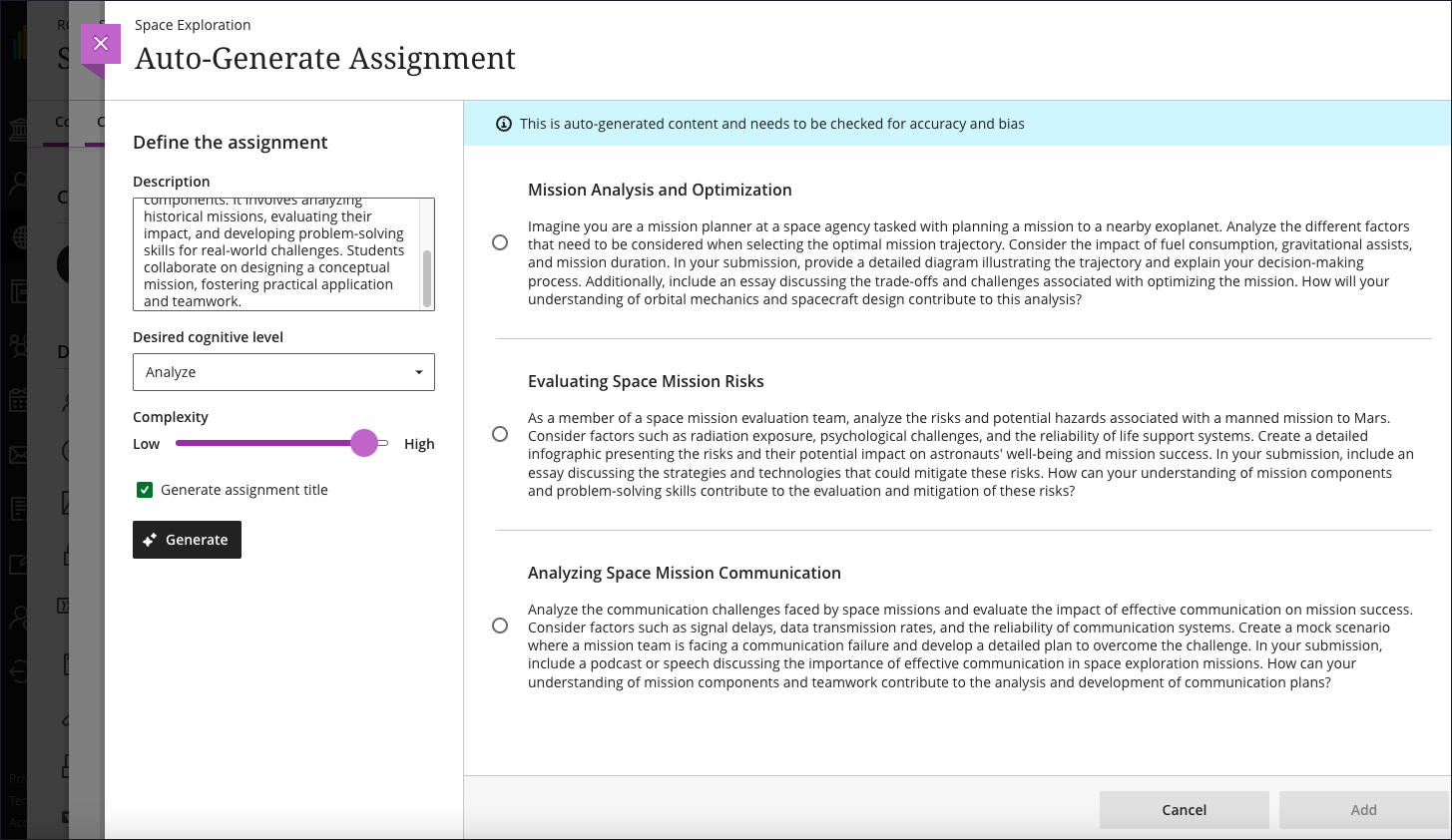
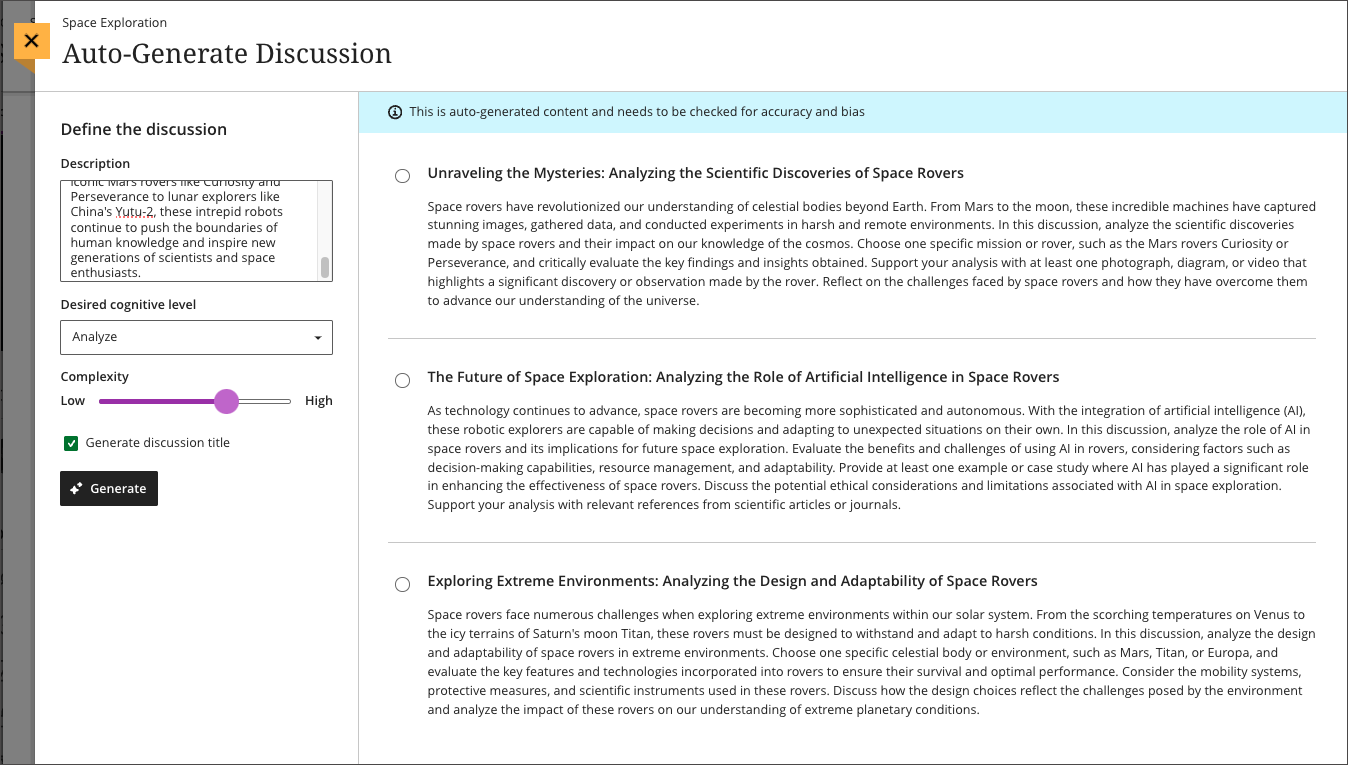
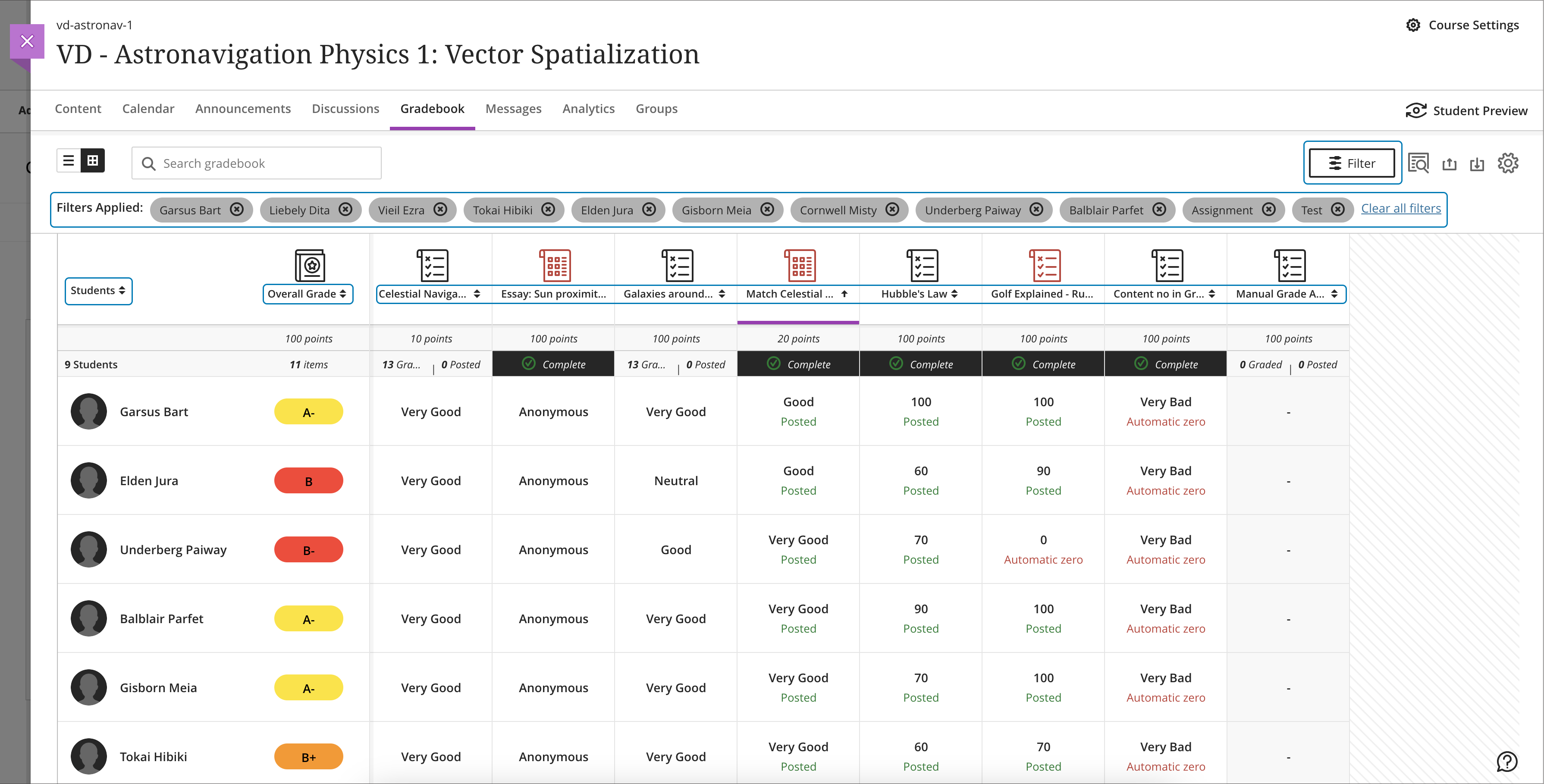
    <div class="html-content"><div><div><div><div><div><div><div>Expanding the functionality for the gradebook and assessments has been a central theme for the past year of Ultra development. When the winter term starts in 2024, Ultra courses will feature additional enhancements for the gradebook, grading interface, and test logs for learner attempts as developers continue to refine features based on institutional and instructor feedback.</div><div><br></div><div>The gradebook is a key tool for instructors in an Ultra course. With this update, instructors will be able to create total and weighted calculated columns that are point or percentage based with options to include or exclude categories and dropping scores. Moreover, these new total calculated columns can be used toward the overall grade calculation, allowing greater flexibility.</div></div><div><span><br></span></div><div><img src="https://help.blackboard.com/sites/default/files/images/2023-12/learn_ultra_instructor_Grading_TotalAndWeightedCalculatons_TotalCalculationColumn_AddingColumnFromGridView.png" width="500" alt="Image 1: Example of the improved gradebook with option to add a new Total Calculation" style="max-width: 100%; height: auto;"></div><div><div><em>Image 1: Example of the improved gradebook with option to add a new Total Calculation</em></div></div><div><div><br></div><div><strong>Grading &amp; Gradebook Improvements</strong></div><div><ul><li><span>The grid view of the Ultra gradebook features usability improvements that reduces spacing around icons and improves row visibility. </span></li><li><span>The gradebook will now provide the student ID next to each learner's name to improve identification. </span><span>When hovering over a truncated name in the gradebook, a tooltip will reveal the full name.</span></li><li><span>A sortable category column is added to the gradebook list view to provide clarity for those items to be graded.</span></li><li>Students will be able to see their grades for an assessment even if it is hidden. In a future update, feedback will be also visible.</li><li><span>Instructors can use delegated grading for anonymous assessments. Sorting controls are available for submission date.</span></li></ul><div>The test assessment log has been a frequent request for Ultra courses. Unlike Original courses, the Ultra version of this functionality provides information for tests and assignments. The test log will provide detailed information including date and time for starting the test, answers to each question, a preview of the question itself, and the estimated time spent on each question. The assignment log provides the start and submission date and time as well as the submission receipt number.</div></div><div><br></div><div><img src="https://help.blackboard.com/sites/default/files/images/2023-12/learn_ultra_instructor_AssessmentIntegrity_SubmissionListViewEntryPoint.png" width="500" alt="Image 2: Instructors can access the Assessment Submission Log from the individual assessment log" style="max-width: 100%; height: auto;"></div><div><span>Image 2: </span><em>Instructors can access the Assessment Submission Log from the individual assessment</em></div><div><br></div><div><strong>Content Creation &amp; Management</strong></div></div><div><div><br></div><div><div>The latest update to the AI Course Design Assistant Tools in Ultra courses allows instructors to generate assignment prompts aligned to a selected Bloom's cognitive process. As with all AI functionality, instructors are in complete control and can choose when and how to they want to use the tools.</div><div><br></div><div><img src="https://help.blackboard.com/sites/default/files/images/2023-12/Learn_Ultra_Instructors_AI%20Design%20Assistant%20Authentic%20Assignment%20Prompt%20Generation_Prompts%20with%20Content.png" width="500" alt="Image 3: Instructors can add additional context through a description, select the desired cognitive level and complexity, and then generate prompts" style="max-width: 100%; height: auto;"></div><div><span>Image 3: </span><em>Instructors can add additional context through a description, select the desired cognitive level and complexity, and then generate prompts</em></div><div><br></div><div>Additional updates to Content Management include:</div><div><ul><li><span>The Batch Edit tool now allows instructors to manage the date and/or time for selected items that have a pre-existing date/time -- for example, assessment due dates or visibility.</span></li><li><span>Instructors can use the unused files tool to find and remove course files that are not in use in a course. Instructors can download a file before deleting it.</span></li></ul></div></div></div></div></div></div></div><div><div><div><div><div><span><div><span>Faculty should see the latest updates in Ultra courses around January 4-5, 2024. </span><span>The next update to our Ultra test environment will take place on January 9, 2024; release notes are posted to the <a href="https://wiki.umbc.edu/x/LohnB" rel="nofollow external" class="bo">What's New in Ultra</a> that same week. Faculty who are interested in test driving new features before they are released to production should </span><a href="http://my.umbc.edu/go/request-help" rel="nofollow external" class="bo">open an RT ticket</a> to request early access. Please <a href="http://umbc.edu/go/ultra" rel="nofollow external" class="bo">watch the FAQs</a>, including <a href="https://wiki.umbc.edu/x/LohnB" rel="nofollow external" class="bo">the What's New with Ultra page</a>, <span>and myUMBC for additional information about Ultra. </span></div></span></div></div></div></div><div><span><br></span></div></div><div><span><strong>Connect with Instructional Technology</strong></span></div><div><span>As always, if you have any questions about teaching, learning, and technology at UMBC, please consider the following options:</span></div><ul><li><a href="http://www.umbc.edu/faq" rel="nofollow external" class="bo">Check our extensive FAQ collection</a><span> </span></li><ul><li><span><a href="https://wiki.umbc.edu/x/LohnB" rel="nofollow external" class="bo"><span>What's new in Ultra?</span></a><span> </span><span>|</span><span> </span><a href="https://wiki.umbc.edu/x/bwrSAQ" rel="nofollow external" class="bo"><span>Known Issues</span></a><span> </span></span></li></ul><li><span><a href="http://my.umbc.edu/go/request-help" rel="nofollow external" class="bo">Open a ticket via RT</a></span></li><li><span>Follow the </span><a href="http://my.umbc.edu/groups/instructional-technology" rel="nofollow external" class="bo">Instructional Technology</a><span> &amp; </span><a href="http://my.umbc.edu/groups/doit" rel="nofollow external" class="bo">DoIT</a><span> myUMBC groups</span></li><li><a href="http://doit.umbc.edu/itnm/staff/" rel="nofollow external" class="bo">Request a consult</a><span> with <a href="http://doit.umbc.edu/itnm/staff" rel="nofollow external" class="bo">instructional technology staff</a></span></li><li><span><a href="http://pivot.umbc.edu" rel="nofollow external" class="bo">PIVOT</a> | <a href="https://doit.umbc.edu/itnm/academic-continuity/" rel="nofollow external" class="bo">Academic Continuity</a></span><span> </span><span>|</span><span> </span><span><a href="https://fdc.umbc.edu/teaching/keep-on-teaching/" rel="nofollow external" class="bo">Keep On Teaching</a></span><span> </span><span>|</span><span> </span><span><a href="https://doit.umbc.edu/students" rel="nofollow external" class="bo">Student Technology Resources</a></span></li></ul></div><div><div></div></div></div>
]]>
  </Body>
  <Summary>Expanding the functionality for the gradebook and assessments has been a central theme for the past year of Ultra development. When the winter term starts in 2024, Ultra courses will feature...</Summary>
  <Website>https://my3.my.umbc.edu/groups/instructional-technology/posts/137839</Website>
  <TrackingUrl>https://dev.my.umbc.edu/api/v0/pixel/news/137839/guest@my.umbc.edu/325b5785e5d87ae1f21f6d288a9d1d92/api/pixel</TrackingUrl>
  <Tag>ai</Tag>
  <Tag>assessments</Tag>
  <Tag>blackboard</Tag>
  <Tag>gradebook</Tag>
  <Tag>grading</Tag>
  <Tag>ultra-experience</Tag>
  <Tag>ultra-update</Tag>
  <Group token="instructional-technology">Instructional Technology</Group>
  <GroupUrl>https://dev.my.umbc.edu/groups/instructional-technology</GroupUrl>
  <AvatarUrl>https://assets2-dev.my.umbc.edu/system/shared/avatars/groups/000/001/164/dec3b026b81ee6d890a8f82f75c94a2e/xsmall.png?1446126703</AvatarUrl>
  <AvatarUrl size="original">https://assets1-dev.my.umbc.edu/system/shared/avatars/groups/000/001/164/dec3b026b81ee6d890a8f82f75c94a2e/original.png?1446126703</AvatarUrl>
  <AvatarUrl size="xxlarge">https://assets2-dev.my.umbc.edu/system/shared/avatars/groups/000/001/164/dec3b026b81ee6d890a8f82f75c94a2e/xxlarge.png?1446126703</AvatarUrl>
  <AvatarUrl size="xlarge">https://assets1-dev.my.umbc.edu/system/shared/avatars/groups/000/001/164/dec3b026b81ee6d890a8f82f75c94a2e/xlarge.png?1446126703</AvatarUrl>
  <AvatarUrl size="large">https://assets1-dev.my.umbc.edu/system/shared/avatars/groups/000/001/164/dec3b026b81ee6d890a8f82f75c94a2e/large.png?1446126703</AvatarUrl>
  <AvatarUrl size="medium">https://assets4-dev.my.umbc.edu/system/shared/avatars/groups/000/001/164/dec3b026b81ee6d890a8f82f75c94a2e/medium.png?1446126703</AvatarUrl>
  <AvatarUrl size="small">https://assets3-dev.my.umbc.edu/system/shared/avatars/groups/000/001/164/dec3b026b81ee6d890a8f82f75c94a2e/small.png?1446126703</AvatarUrl>
  <AvatarUrl size="xsmall">https://assets2-dev.my.umbc.edu/system/shared/avatars/groups/000/001/164/dec3b026b81ee6d890a8f82f75c94a2e/xsmall.png?1446126703</AvatarUrl>
  <AvatarUrl size="xxsmall">https://assets3-dev.my.umbc.edu/system/shared/avatars/groups/000/001/164/dec3b026b81ee6d890a8f82f75c94a2e/xxsmall.png?1446126703</AvatarUrl>
  <Sponsor>Instructional Technology</Sponsor>
  <ThumbnailUrl size="xxlarge">https://assets4-dev.my.umbc.edu/system/shared/thumbnails/news/000/137/839/6fe5ac4ee868c2fabd33f0aebdee5885/xxlarge.jpg?1702915093</ThumbnailUrl>
  <ThumbnailUrl size="xlarge">https://assets1-dev.my.umbc.edu/system/shared/thumbnails/news/000/137/839/6fe5ac4ee868c2fabd33f0aebdee5885/xlarge.jpg?1702915093</ThumbnailUrl>
  <ThumbnailUrl size="large">https://assets1-dev.my.umbc.edu/system/shared/thumbnails/news/000/137/839/6fe5ac4ee868c2fabd33f0aebdee5885/large.jpg?1702915093</ThumbnailUrl>
  <ThumbnailUrl size="medium">https://assets4-dev.my.umbc.edu/system/shared/thumbnails/news/000/137/839/6fe5ac4ee868c2fabd33f0aebdee5885/medium.jpg?1702915093</ThumbnailUrl>
  <ThumbnailUrl size="small">https://assets2-dev.my.umbc.edu/system/shared/thumbnails/news/000/137/839/6fe5ac4ee868c2fabd33f0aebdee5885/small.jpg?1702915093</ThumbnailUrl>
  <ThumbnailUrl size="xsmall">https://assets4-dev.my.umbc.edu/system/shared/thumbnails/news/000/137/839/6fe5ac4ee868c2fabd33f0aebdee5885/xsmall.jpg?1702915093</ThumbnailUrl>
  <ThumbnailUrl size="xxsmall">https://assets4-dev.my.umbc.edu/system/shared/thumbnails/news/000/137/839/6fe5ac4ee868c2fabd33f0aebdee5885/xxsmall.jpg?1702915093</ThumbnailUrl>
  <PawCount>2</PawCount>
  <CommentCount>0</CommentCount>
  <CommentsAllowed>true</CommentsAllowed>
  <PostedAt>Thu, 21 Dec 2023 08:01:31 -0500</PostedAt>
</NewsItem>
  <NewsItem contentIssues="true" id="137337" important="false" status="posted" url="https://dev.my.umbc.edu/groups/doit/posts/137337">
    <Title>Dec adds unique group due dates, more sort controls in Ultra</Title>
    <Tagline>Features authentic discussion opportunities using AI tools</Tagline>
    <Body>
      <![CDATA[
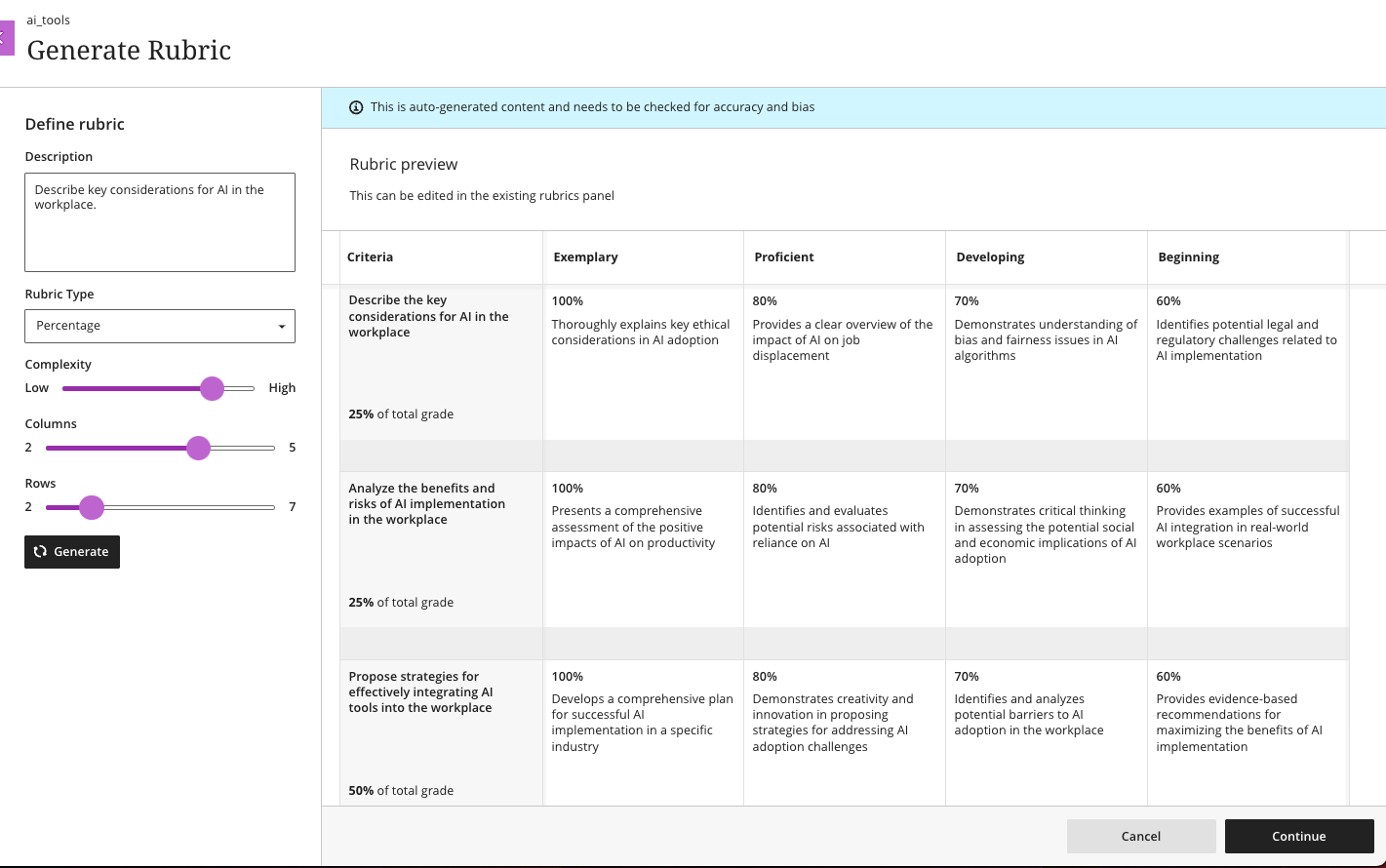
          <div class="html-content"><div><div><div><div><div><div>As 2023 comes to a close, the December Ultra update brings several features to enhance group functionality and gradebook management. With this update, instructors can <span>assign a unique due date to each group using the exceptions workflow.</span><span> If necessary, instructors can reset the group due date to the default.</span></div><div><span><br></span></div><div><span>Gradebook sorting controls provide easier ways to interact with grade information in an Ultra course. T</span><span>he <a href="https://my3.my.umbc.edu/groups/instructional-technology/posts/134272" rel="nofollow external" class="bo">new Flexible Grading interface</a> also features updated sorting controls for column types, allowing instructors and graders to sort data in ascending and descending order.</span></div><div><span><br></span></div><div><img src="https://help.blackboard.com/sites/default/files/images/2023-11/learn_ultra_instructor_SortingControlsInStudentsAndQuestionsTab_SortingOptionsInFlexibleGrading.png" width="500" alt="Image 1: Sorting assessments in Flexible Grading using the Students tab" style="max-width: 100%; height: auto;"></div><div><div><em>Image 1: Sorting assessments in Flexible Grading using the Students tab</em></div><div><em><br></em></div></div><div><span>Further updates to assessments and grading allow instructors to align goals to questions within a question bank and create expanded rubrics without any limit to the row or column sizes. Question-level goal alignment ensures that assessment items measure the desired learning outcomes. Moreover, larger rubrics allow for </span><span>greater criteria to support assessment and accreditation.</span></div><div><div><span><br></span></div><div><span>Additionally, <a href="https://my3.my.umbc.edu/groups/instructional-technology/posts/134605" rel="nofollow external" class="bo">Ultra's exclusive AI course design assistant tools</a> can generate discussion prompts to incorporate authentic assessment and increase learner engagement. </span>The generation process allows instructors to enter a discussion or journal description, select a desired cognitive process based on Bloom's Taxonomy, set the complexity, and generate a discussion or journal title. <span>The instructor can review the generated prompts and select one to add to the discussion or journal. After adding the prompt, the instructor can edit or further refine the prompt as appropriate. </span><span>The goal of this tool is to encourage students to engage in higher-order thinking, apply their knowledge, justify or challenge their beliefs and ideas, and emulate real-world situations.</span></div><div><br></div><div><img src="https://help.blackboard.com/sites/default/files/images/2023-11/learn_ultra_instructor_AuthenticDiscussionAndJournal%20prompts_InstructorOptions.png" width="500" alt="Image 2: Instructors can describe the discussion, select the desired cognitive process and complexity, and then generate prompts" style="max-width: 100%; height: auto;"></div><div><span>Image 2: </span><em>Instructors can describe the discussion, select the desired cognitive process and complexity, and then generate prompts</em></div><div><br></div></div></div></div></div></div><div><div><div><div><div><span><div><span>Faculty should see the latest updates in Ultra courses around December 7-8 2023. </span><span>The next update to our Ultra test environment will take place on December 12, 2023; release notes are posted to the <a href="https://wiki.umbc.edu/x/LohnB" rel="nofollow external" class="bo">What's New in Ultra</a> that same week. Faculty who are interested in test driving new features before they are released to production should </span><a href="http://my.umbc.edu/go/request-help" rel="nofollow external" class="bo">open an RT ticket</a> to request early access. Please <a href="http://umbc.edu/go/ultra" rel="nofollow external" class="bo">watch the FAQs</a>, including <a href="https://wiki.umbc.edu/x/LohnB" rel="nofollow external" class="bo">the What's New with Ultra page</a>, <span>and myUMBC for additional information about Ultra. </span></div></span></div></div></div></div><div><span><br></span></div></div><div><span><strong>Connect with Instructional Technology</strong></span></div><div><span>As always, if you have any questions about teaching, learning, and technology at UMBC, please consider the following options:</span></div><ul><li><a href="http://www.umbc.edu/faq" rel="nofollow external" class="bo">Check our extensive FAQ collection</a><span> </span></li><ul><li><span><a href="https://wiki.umbc.edu/x/LohnB" rel="nofollow external" class="bo"><span>What's new in Ultra?</span></a><span> </span><span>|</span><span> </span><a href="https://wiki.umbc.edu/x/bwrSAQ" rel="nofollow external" class="bo"><span>Known Issues</span></a><span> </span></span></li></ul><li><span><a href="http://my.umbc.edu/go/request-help" rel="nofollow external" class="bo">Open a ticket via RT</a></span></li><li><span>Follow the </span><a href="http://my.umbc.edu/groups/instructional-technology" rel="nofollow external" class="bo">Instructional Technology</a><span> &amp; </span><a href="http://my.umbc.edu/groups/doit" rel="nofollow external" class="bo">DoIT</a><span> myUMBC groups</span></li><li><a href="http://doit.umbc.edu/itnm/staff/" rel="nofollow external" class="bo">Request a consult</a><span> with <a href="http://doit.umbc.edu/itnm/staff" rel="nofollow external" class="bo">instructional technology staff</a></span></li><li><span><a href="http://pivot.umbc.edu" rel="nofollow external" class="bo">PIVOT</a> | <a href="https://doit.umbc.edu/itnm/academic-continuity/" rel="nofollow external" class="bo">Academic Continuity</a></span><span> </span><span>|</span><span> </span><span><a href="https://fdc.umbc.edu/teaching/keep-on-teaching/" rel="nofollow external" class="bo">Keep On Teaching</a></span><span> </span><span>|</span><span> </span><span><a href="https://doit.umbc.edu/students" rel="nofollow external" class="bo">Student Technology Resources</a></span></li></ul></div><div><div></div></div></div>
      ]]>
    </Body>
    <Summary>As 2023 comes to a close, the December Ultra update brings several features to enhance group functionality and gradebook management. With this update, instructors can assign a unique due date to...</Summary>
    <Website>https://my3.my.umbc.edu/groups/instructional-technology/posts/137337</Website>
    <TrackingUrl>https://dev.my.umbc.edu/api/v0/pixel/news/137337/guest@my.umbc.edu/399185d8da49d9564e0ff4f946e356e2/api/pixel</TrackingUrl>
    <Tag>ai</Tag>
    <Tag>blackboard</Tag>
    <Tag>gradebook</Tag>
    <Tag>grading</Tag>
    <Tag>ultra-experience</Tag>
    <Tag>ultra-update</Tag>
    <Tag>unsplash</Tag>
    <Group token="instructional-technology">Instructional Technology</Group>
    <GroupUrl>https://dev.my.umbc.edu/groups/instructional-technology</GroupUrl>
    <AvatarUrl>https://assets2-dev.my.umbc.edu/system/shared/avatars/groups/000/001/164/dec3b026b81ee6d890a8f82f75c94a2e/xsmall.png?1446126703</AvatarUrl>
    <AvatarUrl size="original">https://assets1-dev.my.umbc.edu/system/shared/avatars/groups/000/001/164/dec3b026b81ee6d890a8f82f75c94a2e/original.png?1446126703</AvatarUrl>
    <AvatarUrl size="xxlarge">https://assets2-dev.my.umbc.edu/system/shared/avatars/groups/000/001/164/dec3b026b81ee6d890a8f82f75c94a2e/xxlarge.png?1446126703</AvatarUrl>
    <AvatarUrl size="xlarge">https://assets1-dev.my.umbc.edu/system/shared/avatars/groups/000/001/164/dec3b026b81ee6d890a8f82f75c94a2e/xlarge.png?1446126703</AvatarUrl>
    <AvatarUrl size="large">https://assets1-dev.my.umbc.edu/system/shared/avatars/groups/000/001/164/dec3b026b81ee6d890a8f82f75c94a2e/large.png?1446126703</AvatarUrl>
    <AvatarUrl size="medium">https://assets4-dev.my.umbc.edu/system/shared/avatars/groups/000/001/164/dec3b026b81ee6d890a8f82f75c94a2e/medium.png?1446126703</AvatarUrl>
    <AvatarUrl size="small">https://assets3-dev.my.umbc.edu/system/shared/avatars/groups/000/001/164/dec3b026b81ee6d890a8f82f75c94a2e/small.png?1446126703</AvatarUrl>
    <AvatarUrl size="xsmall">https://assets2-dev.my.umbc.edu/system/shared/avatars/groups/000/001/164/dec3b026b81ee6d890a8f82f75c94a2e/xsmall.png?1446126703</AvatarUrl>
    <AvatarUrl size="xxsmall">https://assets3-dev.my.umbc.edu/system/shared/avatars/groups/000/001/164/dec3b026b81ee6d890a8f82f75c94a2e/xxsmall.png?1446126703</AvatarUrl>
    <Sponsor>Instructional Technology</Sponsor>
    <ThumbnailUrl size="xxlarge">https://assets3-dev.my.umbc.edu/system/shared/thumbnails/news/000/137/337/ac70c80d8dfe1625932cf54cba55766e/xxlarge.jpg?1701192788</ThumbnailUrl>
    <ThumbnailUrl size="xlarge">https://assets2-dev.my.umbc.edu/system/shared/thumbnails/news/000/137/337/ac70c80d8dfe1625932cf54cba55766e/xlarge.jpg?1701192788</ThumbnailUrl>
    <ThumbnailUrl size="large">https://assets2-dev.my.umbc.edu/system/shared/thumbnails/news/000/137/337/ac70c80d8dfe1625932cf54cba55766e/large.jpg?1701192788</ThumbnailUrl>
    <ThumbnailUrl size="medium">https://assets4-dev.my.umbc.edu/system/shared/thumbnails/news/000/137/337/ac70c80d8dfe1625932cf54cba55766e/medium.jpg?1701192788</ThumbnailUrl>
    <ThumbnailUrl size="small">https://assets1-dev.my.umbc.edu/system/shared/thumbnails/news/000/137/337/ac70c80d8dfe1625932cf54cba55766e/small.jpg?1701192788</ThumbnailUrl>
    <ThumbnailUrl size="xsmall">https://assets2-dev.my.umbc.edu/system/shared/thumbnails/news/000/137/337/ac70c80d8dfe1625932cf54cba55766e/xsmall.jpg?1701192788</ThumbnailUrl>
    <ThumbnailUrl size="xxsmall">https://assets4-dev.my.umbc.edu/system/shared/thumbnails/news/000/137/337/ac70c80d8dfe1625932cf54cba55766e/xxsmall.jpg?1701192788</ThumbnailUrl>
    <PawCount>2</PawCount>
    <CommentCount>0</CommentCount>
    <CommentsAllowed>true</CommentsAllowed>
    <PostedAt>Thu, 30 Nov 2023 14:58:57 -0500</PostedAt>
    <EditAt>Thu, 30 Nov 2023 15:00:04 -0500</EditAt>
  </NewsItem>
  <NewsItem contentIssues="true" id="137364" important="false" status="posted" url="https://dev.my.umbc.edu/groups/doit/posts/137364">
  <Title>WT/SP2024 Courses Created in Blackboard on November 29, 2023</Title>
  <Body>
    <![CDATA[
    <div class="html-content"><p>Blackboard course shells for WT2024 and SP2024 <a href="https://wiki.umbc.edu/x/eYHGAw" rel="nofollow external" class="bo">were created</a> on November 29, 2023.</p><p><span>The </span><a href="https://wiki.umbc.edu/x/VIdnB" rel="nofollow external" class="bo"><span>Ultra Course Preview</span></a><span> setting is enabled in WT/SP2024 courses, which allows faculty</span><span> to <a href="https://wiki.umbc.edu/x/VIdnB" rel="nofollow external" class="bo">preview</a> OR <a href="https://wiki.umbc.edu/x/3AKGBQ" rel="nofollow external" class="bo">convert</a> a new Original course to Ultra</span><span>. The recommendation, however, is to create a new course to optimize the design. </span></p><ul><li><span>Please review the </span><a href="https://wiki.umbc.edu/x/LohnB" rel="nofollow external" class="bo">release notes</a><span> for the latest updates as well as</span><span> <a href="https://docs.google.com/spreadsheets/d/1kkG0toIfhmykbbwCeSDd8NopHp19CH7D5rPd95mxji8/edit?usp=sharing" rel="nofollow external" class="bo">feature parity charts</a> --</span><span> <a href="https://doit.umbc.edu/news/?tag=ultra-experience" rel="nofollow external" class="bo">more than 200 new updates</a> were added over the last year!</span><span> </span></li><li><span>Discover <a href="https://my3.my.umbc.edu/groups/instructional-technology/events?mode=upcoming&amp;tag=whats-new" rel="nofollow external" class="bo">What's New in Ultra for </a></span><span><a href="https://my3.my.umbc.edu/groups/instructional-technology/events?mode=upcoming&amp;tag=whats-new" rel="nofollow external" class="bo">Teaching &amp; Learning</a> on December 11 or January 12.</span></li><li><span>Have a question about Ultra? Ask </span><a href="https://wiki.umbc.edu/x/kAU9BQ" rel="nofollow external" class="bo">an Ultra Ambassador</a><span>!</span></li></ul><p><span>Many departments have <a href="https://doit.umbc.edu/news/post/133604/" rel="nofollow external" class="bo">opted into Ultra</a> into Ultra to ensure a consistent approach for their students, which means <a href="https://wiki.umbc.edu/x/_AQ9BQ" rel="nofollow external" class="bo">those courses will start with Ultra</a> by default rather than Original -- please check with your department as this list has grown.</span></p><p><span><span><strong>Note: </strong></span></span></p><ul><li><span>For consistency of instructional technology support, WT/SP2024 c</span><span>ourses created in Blackboard on/after January 1, 2024 will be created in Ultra by default.</span></li><li><span><strong>The <a href="https://doit.umbc.edu/news/post/130227/" rel="nofollow external" class="bo">last day we will support Blackboard Original</a> is December 31, 2024.</strong> </span></li></ul><p><span><strong>Tool Updates</strong></span></p><p><span>Several third-party integrations have planned updates for the end of FA2023. Instructional Technology recommends holding off on adding these tools to your courses until after December 22, 2023. Improvements to the integrations often provide deeper synchronization and support for content, assessment, and grading. These tool updates include:</span></p><ul><li><span>December 21: </span><a href="https://doit.umbc.edu/news/post/137292/" rel="nofollow external" class="bo">Panopto</a><span>, Macmillan, McGraw-Hill, Vista Higher Learning</span></li><li><p><span>January 2: Aktiv, Lumen Learning, WileyPLUS</span></p></li></ul><p><span><strong>Accessibility &amp; AI</strong></span></p><p><span>Plan your accessibility and Universal Design for Learning strategy before students begin working with course materials. Ally, an </span><a href="https://doit.umbc.edu/news/?id=82487" rel="nofollow external" class="bo"><span>accessibility tool</span></a><span>, is enabled in all course shells. Ally automatically scans uploaded and created course content, then performs a series of steps to make that content more accessible. Please review the </span><a href="https://wiki.umbc.edu/x/2IGdB" rel="nofollow external" class="bo"><span>Ally FAQs</span></a><span> for more information about the </span><a href="https://wiki.umbc.edu/x/_YGdB" rel="nofollow external" class="bo"><span>accessibility indicators</span></a><span> on course content and </span><a href="https://wiki.umbc.edu/x/3IGdB" rel="nofollow external" class="bo"><span>alternative formats</span></a><span>, or attend a training session.</span></p><p><span>The </span><a href="https://my3.my.umbc.edu/groups/instructional-technology/posts/134605" rel="nofollow external" class="bo"><span>AI Course Design Assistant Tools</span></a><span> will be available in Ultra courses for WT/SP2024 as of December 13, 2023. These tools are limited to the instructor role in an Ultra course. All capabilities are opt-in and the instructor is always in control of the content generated. Learn more at </span><a href="https://my3.my.umbc.edu/groups/instructional-technology/events?mode=upcoming&amp;tag=ai-course-design-assistant" rel="nofollow external" class="bo"><span>an upcoming preview session, join the Ultra AI Tools workshop</span></a><span> or </span><a href="https://wiki.umbc.edu/x/SICFCw" rel="nofollow external" class="bo"><span>review the documentation</span></a><span>.</span></p><p><span><strong>Online Teaching &amp; Learning</strong></span></p><p><span>For faculty who will be teaching hybrid or online, the instructional technology team would like to share several resources to support online course development and instruction.</span></p><ol><li><span>Choose from our </span><a href="https://pivot.umbc.edu/pivot-solo/" rel="nofollow external" class="bo">PIVOT Solo</a><span> lessons to refresh or enhance your online teaching preparation. Five key topics cover course organization, active learning, community building, assessment, and supporting students. </span></li><li><span>Explore </span><a href="https://umbc.hosted.panopto.com/Panopto/Pages/Sessions/List.aspx#folderID=%2274ac9d58-1779-44c1-92b7-ab6900dfe6e9%22" rel="nofollow external" class="bo">our Panopto folder</a><span> for a wide variety of recorded webinars on various instructional technologies available at UMBC.</span></li><li><span>Learn about </span><a href="https://pivot.umbc.edu/course-design/quality-matters/quality-matters-impact/" rel="nofollow external" class="bo">the Quality Matters Impact program</a><span>, a new initiative to formally recognize courses that meet </span><a href="https://www.qualitymatters.org/" rel="nofollow external" class="bo">Quality Matters standards</a><span> and demonstrate exemplary online/hybrid course design.</span></li></ol><div><strong>About Course Creation</strong></div><div><span><br></span></div><div><span>Bb shells for WT/SP2024 are available for all courses (designated as lecture, lab, field or discussion) listed in the </span><a href="http://my.umbc.edu/go/schedule" rel="nofollow external" class="bo">UMBC Schedule of Classes (SOC)</a><span>, provided that there is an </span><a href="http://www.umbc.edu/blogs/oit-news/archives/2010/08/how_new_employe_1.html" rel="nofollow external" class="bo">instructor of record</a><span> listed. As new course sections and/or instructors are added to the SOC by </span><a href="https://docs.google.com/a/umbc.edu/document/d/1rwm_adJUvAP3cxL-QCrb56n9ql4xrR8FHd9_1Cw0vJI/edit?usp%3Dsharing" rel="nofollow external" class="bo">Department Scheduling Coordinators</a><span>, corresponding Bb shells are automatically generated overnight. </span></div><ul><li>If you are an instructor, and your name is not associated with the course you are teaching in the <a href="http://my.umbc.edu/go/schedule" rel="nofollow external" class="bo">SOC</a>, please see your <a href="https://docs.google.com/a/umbc.edu/document/d/1rwm_adJUvAP3cxL-QCrb56n9ql4xrR8FHd9_1Cw0vJI/edit?usp%3Dsharing" rel="nofollow external" class="bo">Departmental Scheduling Coordinator</a> to resolve the issue. Once you are listed in the <a href="https://my.umbc.edu/go/schedule" rel="nofollow external" class="bo">SOC</a>, your Bb course shell will be created automatically. </li><li>If you and your <a href="https://docs.google.com/a/umbc.edu/document/d/1rwm_adJUvAP3cxL-QCrb56n9ql4xrR8FHd9_1Cw0vJI/edit?usp%3Dsharing" rel="nofollow external" class="bo">Department Scheduling Coordinator</a> believe you are correctly assigned as the instructor of record in the SOC and you do not see your course shell in Blackboard, please submit a Request Tracker (RT) ticket via <a href="https://my.umbc.edu/help" rel="nofollow external" class="bo">my.umbc.edu/help</a>.</li><li>If you need a Bb shell for a research or independent study course, please submit a <a href="http://www.umbc.edu/doit/blackboard/requestbbshell.html" rel="nofollow external" class="bo">new course request</a>.</li></ul><p><strong>Split/Merge Requests:</strong> Instructors who teach multiple sections of the same course will find those enrollments merged into one Bb course shell. These sections may be split upon <a href="https://my.umbc.edu/go/request-help" rel="nofollow external" class="bo">request by an RT ticket</a>, which we recommend <a href="https://wiki.umbc.edu/x/d4HGAw" rel="nofollow external" class="bo">submitting at least one week</a> before the semester starts, if not as soon as courses are created in Blackboard.</p><p>Student enrollment in Bb mirrors the official registration in SA and updates hourly. However, courses are not accessible to students by default until the instructor of record <a href="https://wiki.umbc.edu/pages/viewpage.action?pageId%3D1867862" rel="nofollow external" class="bo">makes them available</a>.</p><p><strong>Connect with Instructional Technology</strong></p><div><span>As always, if you have any questions about teaching, learning, and technology at UMBC, please consider the following options:</span></div><div><ul><li><span><a href="http://pivot.umbc.edu" rel="nofollow external" class="bo">PIVOT</a> | <a href="https://doit.umbc.edu/itnm/academic-continuity/" rel="nofollow external" class="bo">Academic Continuity</a></span><span> </span><span>|</span><span> </span><span><a href="https://fdc.umbc.edu/teaching/keep-on-teaching/" rel="nofollow external" class="bo">Keep On Teaching</a></span><span> </span><span>|</span><span> </span><span><a href="https://doit.umbc.edu/students" rel="nofollow external" class="bo">Student Technology Resources</a></span></li><li><a href="http://www.umbc.edu/faq" rel="nofollow external" class="bo">Check our extensive FAQ collection</a><span> </span></li><ul><li><span><a href="https://wiki.umbc.edu/x/LohnB" rel="nofollow external" class="bo"><span>What's new in Ultra?</span></a><span> </span><span>|</span><span> </span><a href="https://wiki.umbc.edu/x/bwrSAQ" rel="nofollow external" class="bo"><span>Known Issues</span></a><span> </span></span></li></ul><li><span><a href="http://my.umbc.edu/go/request-help" rel="nofollow external" class="bo">Open a ticket via RT</a></span></li><li><span>Follow the </span><a href="http://my.umbc.edu/groups/instructional-technology" rel="nofollow external" class="bo">Instructional Technology</a><span> &amp; </span><a href="http://my.umbc.edu/groups/doit" rel="nofollow external" class="bo">DoIT</a><span> myUMBC groups</span></li><li><a href="http://doit.umbc.edu/itnm/staff/" rel="nofollow external" class="bo">Request a consult</a><span> with <a href="http://doit.umbc.edu/itnm/staff" rel="nofollow external" class="bo">instructional technology staff</a></span></li></ul></div></div>
]]>
  </Body>
  <Summary>Blackboard course shells for WT2024 and SP2024 were created on November 29, 2023.  The Ultra Course Preview setting is enabled in WT/SP2024 courses, which allows faculty to preview OR convert a...</Summary>
  <Website>https://my3.my.umbc.edu/groups/instructional-technology/posts/137364</Website>
  <TrackingUrl>https://dev.my.umbc.edu/api/v0/pixel/news/137364/guest@my.umbc.edu/04153a29b8601c7ad6d0012ecbbd7dec/api/pixel</TrackingUrl>
  <Tag>blackboard</Tag>
  <Tag>course-creation</Tag>
  <Tag>fa2023</Tag>
  <Tag>fall</Tag>
  <Tag>ultra-course-preview</Tag>
  <Group token="instructional-technology">Instructional Technology</Group>
  <GroupUrl>https://dev.my.umbc.edu/groups/instructional-technology</GroupUrl>
  <AvatarUrl>https://assets2-dev.my.umbc.edu/system/shared/avatars/groups/000/001/164/dec3b026b81ee6d890a8f82f75c94a2e/xsmall.png?1446126703</AvatarUrl>
  <AvatarUrl size="original">https://assets1-dev.my.umbc.edu/system/shared/avatars/groups/000/001/164/dec3b026b81ee6d890a8f82f75c94a2e/original.png?1446126703</AvatarUrl>
  <AvatarUrl size="xxlarge">https://assets2-dev.my.umbc.edu/system/shared/avatars/groups/000/001/164/dec3b026b81ee6d890a8f82f75c94a2e/xxlarge.png?1446126703</AvatarUrl>
  <AvatarUrl size="xlarge">https://assets1-dev.my.umbc.edu/system/shared/avatars/groups/000/001/164/dec3b026b81ee6d890a8f82f75c94a2e/xlarge.png?1446126703</AvatarUrl>
  <AvatarUrl size="large">https://assets1-dev.my.umbc.edu/system/shared/avatars/groups/000/001/164/dec3b026b81ee6d890a8f82f75c94a2e/large.png?1446126703</AvatarUrl>
  <AvatarUrl size="medium">https://assets4-dev.my.umbc.edu/system/shared/avatars/groups/000/001/164/dec3b026b81ee6d890a8f82f75c94a2e/medium.png?1446126703</AvatarUrl>
  <AvatarUrl size="small">https://assets3-dev.my.umbc.edu/system/shared/avatars/groups/000/001/164/dec3b026b81ee6d890a8f82f75c94a2e/small.png?1446126703</AvatarUrl>
  <AvatarUrl size="xsmall">https://assets2-dev.my.umbc.edu/system/shared/avatars/groups/000/001/164/dec3b026b81ee6d890a8f82f75c94a2e/xsmall.png?1446126703</AvatarUrl>
  <AvatarUrl size="xxsmall">https://assets3-dev.my.umbc.edu/system/shared/avatars/groups/000/001/164/dec3b026b81ee6d890a8f82f75c94a2e/xxsmall.png?1446126703</AvatarUrl>
  <Sponsor>Instructional Technology</Sponsor>
  <ThumbnailUrl size="xxlarge">https://assets1-dev.my.umbc.edu/system/shared/thumbnails/news/000/137/364/e1c2c517c50cbacc6f0520207ae9cbe8/xxlarge.jpg?1701280052</ThumbnailUrl>
  <ThumbnailUrl size="xlarge">https://assets4-dev.my.umbc.edu/system/shared/thumbnails/news/000/137/364/e1c2c517c50cbacc6f0520207ae9cbe8/xlarge.jpg?1701280052</ThumbnailUrl>
  <ThumbnailUrl size="large">https://assets3-dev.my.umbc.edu/system/shared/thumbnails/news/000/137/364/e1c2c517c50cbacc6f0520207ae9cbe8/large.jpg?1701280052</ThumbnailUrl>
  <ThumbnailUrl size="medium">https://assets1-dev.my.umbc.edu/system/shared/thumbnails/news/000/137/364/e1c2c517c50cbacc6f0520207ae9cbe8/medium.jpg?1701280052</ThumbnailUrl>
  <ThumbnailUrl size="small">https://assets3-dev.my.umbc.edu/system/shared/thumbnails/news/000/137/364/e1c2c517c50cbacc6f0520207ae9cbe8/small.jpg?1701280052</ThumbnailUrl>
  <ThumbnailUrl size="xsmall">https://assets4-dev.my.umbc.edu/system/shared/thumbnails/news/000/137/364/e1c2c517c50cbacc6f0520207ae9cbe8/xsmall.jpg?1701280052</ThumbnailUrl>
  <ThumbnailUrl size="xxsmall">https://assets4-dev.my.umbc.edu/system/shared/thumbnails/news/000/137/364/e1c2c517c50cbacc6f0520207ae9cbe8/xxsmall.jpg?1701280052</ThumbnailUrl>
  <PawCount>3</PawCount>
  <CommentCount>0</CommentCount>
  <CommentsAllowed>true</CommentsAllowed>
  <PostedAt>Thu, 30 Nov 2023 09:08:34 -0500</PostedAt>
</NewsItem>
  <NewsItem contentIssues="true" id="136980" important="false" status="posted" url="https://dev.my.umbc.edu/groups/doit/posts/136980">
  <Title>Unlock collaborative learning with cloud tools in Blackboard</Title>
  <Tagline>Discover Google Workspace and Microsoft OneDrive</Tagline>
  <Body>
    <![CDATA[
    <div class="html-content"><span><p><span>Cloud resources can transform a course design with streamlined document display and reduce storage footprint. Two new integrations from Google Workspace and Microsoft OneDrive offer cloud-based file management for Ultra courses. These tools allow faculty to select existing files, such as a syllabus or course schedule, and embed them seamlessly into a course for students to view. Customized privileges ensure only the document owner can modify the file within the framework of the course or the cloud drive while keeping the learner's access restricted to read-only.</span></p><p><span>Additionally, these tools support student collaboration, allowing for dynamic exchange of ideas, peer learning, co-authorship, and presentation planning. Creating a collaborative document in Google or Microsoft provides an exciting opportunity for faculty to support student teamwork in a shared environment directly embedded in the Ultra course space. Leverage these tools with students for real-time writing and editing, brainstorming, project planning, and other collaborative experiences.</span></p><p><span><strong>Learn more about using Google Workspace</strong> (Docs, Slides, Sheets)</span></p><ul><li><p><a href="https://help.blackboard.com/Learn/Instructor/Ultra/Course_Content/Create_Content/Cloud_Document/Google_Workspace#link_Google_document" rel="nofollow external" class="bo"><span>Embed a read-only Google document</span></a></p></li><li><p><a href="https://help.blackboard.com/Learn/Instructor/Ultra/Course_Content/Create_Content/Cloud_Document/Google_Workspace#create_Google_collaborative_document" rel="nofollow external" class="bo"><span>Create a Google collaborative document</span></a></p></li></ul><p><span><img src="https://help.blackboard.com/sites/default/files/images/2023-08/learn_ultra_instructor_GoogleWorkspace_EmbeddedCollabDoc.png" width="500" alt="Image 1: Example of an embedded Google collaborative document for students" style="max-width: 100%; height: auto;"></span></p><p><span><em>Image 1: Example of an embedded Google collaborative document for students</em></span></p><p><span><strong>Learn more about using Microsoft OneDrive</strong> (Word, PowerPoint, Excel)</span></p><ul><li><p><a href="https://help.blackboard.com/Learn/Instructor/Ultra/Course_Content/Create_Content/Create_Course_Materials/Open_Files_From_OneDrive#open_file" rel="nofollow external" class="bo"><span>Create embedded Microsoft cloud document</span></a></p></li><li><p><span><a href="https://help.blackboard.com/Learn/Instructor/Ultra/Course_Content/Create_Content/Create_Course_Materials/Open_Files_From_OneDrive#create_file" rel="nofollow external" class="bo">Create a Microsoft cloud collaboration</a></span></p></li></ul><p><span><img src="https://help.blackboard.com/sites/default/files/images/2022-02/learn_ultra_instructor_AddFile_OpenFromOneDrive_5.png" width="500" alt="Image 2: Example of an embedded Microsoft Word document for students to read only" style="max-width: 100%; height: auto;"></span></p><p><span><em>Image 2: Example of an embedded Microsoft Word document for students to read only</em></span></p><p><span>Both Google Workspace and Microsoft OneDrive are available now. Faculty can learn more about these tools at <a href="https://my3.my.umbc.edu/groups/instructional-technology/events/123991" rel="nofollow external" class="bo">an upcoming webinar on January 9, 2024</a>.</span></p><h5><strong>Connect with Instructional Technology</strong></h5><div>As always, if you have any questions about teaching, learning, and technology at UMBC, please consider the following options:</div><ul><li><a href="http://www.umbc.edu/faq" rel="nofollow external" class="bo">Check our extensive FAQ collection</a> </li><ul><li><a href="https://wiki.umbc.edu/x/LohnB" rel="nofollow external" class="bo">What's new in Ultra?</a> | <a href="https://wiki.umbc.edu/x/bwrSAQ" rel="nofollow external" class="bo">Known Issues</a> </li></ul><li><a href="http://umbc.edu/go/bbsupport" rel="nofollow external" class="bo">Open a ticket via RT</a></li><li>Follow the <a href="http://my.umbc.edu/groups/instructional-technology" rel="nofollow external" class="bo">Instructional Technology</a> &amp; <a href="http://my.umbc.edu/groups/doit" rel="nofollow external" class="bo">DoIT</a> myUMBC groups</li><li><a href="http://umbc.edu/go/bbsupport" rel="nofollow external" class="bo">Request a consult</a> with <a href="http://doit.umbc.edu/itnm/staff" rel="nofollow external" class="bo">instructional technology staff</a></li><li><a href="http://pivot.umbc.edu/" rel="nofollow external" class="bo">PIVOT</a> | <a href="https://doit.umbc.edu/itnm/academic-continuity/" rel="nofollow external" class="bo">Academic Continuity</a> | <a href="https://fdc.umbc.edu/teaching/keep-on-teaching/" rel="nofollow external" class="bo">Keep On Teaching</a> | <a href="https://doit.umbc.edu/students" rel="nofollow external" class="bo">Student Technology Resources</a></li></ul><p></p><p><span><em>UMBC is committed to providing a consistent learning experience for everyone. The last day we will support Blackboard Original is December 31, 2024. Please check out our training and support: <a href="https://umbc.edu/go/ultra" rel="nofollow external" class="bo">https://umbc.edu/go/ultra</a>.</em></span></p></span></div>
]]>
  </Body>
  <Summary>Cloud resources can transform a course design with streamlined document display and reduce storage footprint. Two new integrations from Google Workspace and Microsoft OneDrive offer cloud-based...</Summary>
  <Website>https://my3.my.umbc.edu/groups/instructional-technology/posts/136980</Website>
  <TrackingUrl>https://dev.my.umbc.edu/api/v0/pixel/news/136980/guest@my.umbc.edu/974acebe5a361d0883d8400183637bac/api/pixel</TrackingUrl>
  <Tag>blackboard</Tag>
  <Tag>cloud-collaboration</Tag>
  <Tag>cloud-storage</Tag>
  <Tag>engagement</Tag>
  <Tag>google</Tag>
  <Tag>groups</Tag>
  <Tag>microsoft</Tag>
  <Tag>one-drive</Tag>
  <Tag>online-learning</Tag>
  <Tag>ultra</Tag>
  <Group token="instructional-technology">Instructional Technology</Group>
  <GroupUrl>https://dev.my.umbc.edu/groups/instructional-technology</GroupUrl>
  <AvatarUrl>https://assets2-dev.my.umbc.edu/system/shared/avatars/groups/000/001/164/dec3b026b81ee6d890a8f82f75c94a2e/xsmall.png?1446126703</AvatarUrl>
  <AvatarUrl size="original">https://assets1-dev.my.umbc.edu/system/shared/avatars/groups/000/001/164/dec3b026b81ee6d890a8f82f75c94a2e/original.png?1446126703</AvatarUrl>
  <AvatarUrl size="xxlarge">https://assets2-dev.my.umbc.edu/system/shared/avatars/groups/000/001/164/dec3b026b81ee6d890a8f82f75c94a2e/xxlarge.png?1446126703</AvatarUrl>
  <AvatarUrl size="xlarge">https://assets1-dev.my.umbc.edu/system/shared/avatars/groups/000/001/164/dec3b026b81ee6d890a8f82f75c94a2e/xlarge.png?1446126703</AvatarUrl>
  <AvatarUrl size="large">https://assets1-dev.my.umbc.edu/system/shared/avatars/groups/000/001/164/dec3b026b81ee6d890a8f82f75c94a2e/large.png?1446126703</AvatarUrl>
  <AvatarUrl size="medium">https://assets4-dev.my.umbc.edu/system/shared/avatars/groups/000/001/164/dec3b026b81ee6d890a8f82f75c94a2e/medium.png?1446126703</AvatarUrl>
  <AvatarUrl size="small">https://assets3-dev.my.umbc.edu/system/shared/avatars/groups/000/001/164/dec3b026b81ee6d890a8f82f75c94a2e/small.png?1446126703</AvatarUrl>
  <AvatarUrl size="xsmall">https://assets2-dev.my.umbc.edu/system/shared/avatars/groups/000/001/164/dec3b026b81ee6d890a8f82f75c94a2e/xsmall.png?1446126703</AvatarUrl>
  <AvatarUrl size="xxsmall">https://assets3-dev.my.umbc.edu/system/shared/avatars/groups/000/001/164/dec3b026b81ee6d890a8f82f75c94a2e/xxsmall.png?1446126703</AvatarUrl>
  <Sponsor>Instructional Technology</Sponsor>
  <ThumbnailUrl size="xxlarge">https://assets2-dev.my.umbc.edu/system/shared/thumbnails/news/000/136/980/61c10de9e6bdc7965c908b02b14ada96/xxlarge.jpg?1699624920</ThumbnailUrl>
  <ThumbnailUrl size="xlarge">https://assets3-dev.my.umbc.edu/system/shared/thumbnails/news/000/136/980/61c10de9e6bdc7965c908b02b14ada96/xlarge.jpg?1699624920</ThumbnailUrl>
  <ThumbnailUrl size="large">https://assets2-dev.my.umbc.edu/system/shared/thumbnails/news/000/136/980/61c10de9e6bdc7965c908b02b14ada96/large.jpg?1699624920</ThumbnailUrl>
  <ThumbnailUrl size="medium">https://assets3-dev.my.umbc.edu/system/shared/thumbnails/news/000/136/980/61c10de9e6bdc7965c908b02b14ada96/medium.jpg?1699624920</ThumbnailUrl>
  <ThumbnailUrl size="small">https://assets1-dev.my.umbc.edu/system/shared/thumbnails/news/000/136/980/61c10de9e6bdc7965c908b02b14ada96/small.jpg?1699624920</ThumbnailUrl>
  <ThumbnailUrl size="xsmall">https://assets4-dev.my.umbc.edu/system/shared/thumbnails/news/000/136/980/61c10de9e6bdc7965c908b02b14ada96/xsmall.jpg?1699624920</ThumbnailUrl>
  <ThumbnailUrl size="xxsmall">https://assets2-dev.my.umbc.edu/system/shared/thumbnails/news/000/136/980/61c10de9e6bdc7965c908b02b14ada96/xxsmall.jpg?1699624920</ThumbnailUrl>
  <PawCount>6</PawCount>
  <CommentCount>0</CommentCount>
  <CommentsAllowed>true</CommentsAllowed>
  <PostedAt>Tue, 28 Nov 2023 12:10:44 -0500</PostedAt>
</NewsItem>
  <NewsItem contentIssues="true" id="136797" important="false" status="posted" url="https://dev.my.umbc.edu/groups/doit/posts/136797">
  <Title>Test Drive New Blackboard Faculty AI Course Design Tools</Title>
  <Tagline>Discover how AI can support your course design process</Tagline>
  <Body>
    <![CDATA[
    <div class="html-content"><p><span>The </span><span>U.S. Distance Learning Association (USDLA)'s</span><span> </span><a href="https://usdla.org/2023-ndlw/" rel="nofollow external" class="bo">National Distance Learning Week</a><span> focuses on how artificial intelligence (AI) impacts education and training. </span></p><p><span>Instructional Technology invites faculty to test drive the suite of new Blackboard AI Course Design Assistant tools, which are now available for instructors who would like early access to preview the tool. Informed by </span><a href="https://www.anthology.com/trust-center/trustworthy-ai-approach" rel="nofollow external" class="bo"><span>Anthology's Trustworthy AI Approach</span></a><span> and seamlessly embedded into Ultra's workflows, the AI Course Design Assistant tools are opt-in and the instructor is always in control of the content generated. Faculty can choose when, where, and how to leverage the tools in their Ultra courses. Anthology has not created any AI tools for students. </span></p><p><span>Faculty interested in early access to the tool may </span><a href="http://umbc.edu/go/bbsupport" rel="nofollow external" class="bo"><span>submit an RT ticket</span></a><span> to request access. </span></p><p><span>Developed to assist faculty in streamlining course preparation, the AI Course Design Assistant tools include the features detailed below. </span></p><h5><span><strong>Course-Builder Assistant</strong></span></h5><p><span>Create sample learning modules, titles, and descriptions. The generated modules include the module title, description, and images. Content within the module is not generated by the design tool.</span></p><p><span><span><span><img src="https://lh7-us.googleusercontent.com/7ARcZ0M69ouN0rC7l9pCP87opKWZReNUOEdEyMRF2F6Ey1o4cVSh6ok2a__4GI1VeonnHr047hMOTvZ-oSh735GuOVi9mGNO2OsSBI12vtx0zukhVZLKGw88Qbr8rIWbpU4PvZPNJfvMOz0oKk3JHrk" width="519.2362312243968" height="279" style="max-width: 100%; height: auto;"></span></span></span></p><p><span><em>Image 1: Option to auto-generate modules in an empty course.</em></span></p><p><span><span><img src="https://lh7-us.googleusercontent.com/28Qqdl8hhCNqxif5JnUEupmPVRznEbP2a9tMZJpIevU1ikhabphUaP0DlO2K-4CVP_isEPKVWQR0VH_reC8qMmxl5KdlRPRAgJnsz4O7b20etotcSj3lKn5Rd6KuSmh9n9HG3WYegqHZ8cY0TiuiyU0" width="506" height="356" style="max-width: 100%; height: auto;"></span></span></p><p><span><em>Image 2: Auto-generated modules with an option to select and add to the course.</em></span></p><p><span><em><br></em></span></p><h5><span><strong>Image Suggestion and Creation </strong></span></h5><p><span>The assistant can draw from the Unsplash stock image library and suggest thumbnails for illustration in learning modules or identify an image for the course banner. Functionality also includes AI-generated image creation based on course name and keywords. As of early November, the AI Design Assistant also includes the option to generate images and access Unsplash stock images in Ultra Documents, Discussions, Tests, Assignments, Journal prompts, and Course Messages.</span></p><p><span><span><img src="https://lh7-us.googleusercontent.com/vM69LdYmAxQB7p79VYZpVUZ-lPMMlCJrZc08BG6SEuy4M5wIpWu5_VaLP--wxJcQpCUNr0DFtUhRtFIbV6hBJztGMs3QF7stTGunR2SehsuWPWMnYye1xXE0I64m-K_sDkrZMuBvEbWBpHE_Lphi60c" width="651" height="442" style="max-width: 100%; height: auto;"></span></span></p><p><span><em>Image 3: Select "Generate images" or "Stock images from Unsplash" to add images to Ultra Documents, Discussions, Assessments, Journal prompts, and Course Messages.</em></span></p><p><span><em><br></em></span></p><h5><span><strong>Content-Based Test Generation </strong></span></h5><p><span>Using the content included in an Ultra Document, Assignment Description, or additional information provided directly in the AI tool panel, the Design Assistant can generate a diverse set of questions for a test or question bank. </span></p><p><span><span><img src="https://lh7-us.googleusercontent.com/w9W-Y9c0YPo5X86siTCNGRjWFNLGOukbgWHivQv6-W35lj9fTciE_f83FfBwVMrgzYUOmRzmDlLzuiPHbIpvaLjqiGGw_XZCnrBizTS4kDHJO9sDv3vS-ai8IPcCJt7F9Mt51_8oS7lw2pcRKoAT2I8" width="624" height="445" style="max-width: 100%; height: auto;"></span></span></p><p><span><em>Image 4: Select "auto-generate question" in a test or assignment to see AI-tool generated questions. Test questions can be generated from a test or assignment or at the bottom of an Ultra document.</em></span></p><p><span><br></span></p><h5><strong><span>Rubric Creation</span><span> </span></strong></h5><p><span>Drawing on content in an assessment or discussion prompt, the AI tool can analyze and streamline the rubric creation process according to specific learning objectives and assessment criteria.</span></p><p><span><span><img src="https://lh7-us.googleusercontent.com/zAcitbAZalsG-kleaLU6MxSISZjFgDgrJiG-200_zG1P1LW7_WypVue0luMiEAkLvb4Lp6JA3zSNOhLdNPvO7dMfiY07Ga-1LDYSmYIM7TZzlrPQPUlKuuczy7sAT62RHNf9L9y_6lmgPfFhFnWvoEw" width="624" height="391" style="max-width: 100%; height: auto;"></span></span></p><p><span><em>Image 5: Generated rubric, with options to customize rubric type, complexity, and number of rows and columns.</em></span></p><p><span><span>To discover more about the impact of AI on distance education and training, t</span><span>he </span><span>U.S. Distance Learning Association (USDLA) is hosting virtual webinars during the</span><span> sixteenth annual</span><span> </span><a href="https://usdla.org/2023-ndlw/" rel="nofollow external" class="bo">National Distance Learning Week</a><span> (Nov 6-10, 2023).</span><span> </span><span>All sessions are free to attend, but require </span><a href="https://members.usdla.org/members/evr/reg_event.php?orgcode=USDL&amp;evid=39575371" rel="nofollow external" class="bo">registration via USDLA</a><span>.</span></span></p><div><strong><br></strong></div><h5><strong>Connect with Instructional Technology</strong></h5><div>As always, if you have any questions about teaching, learning, and technology at UMBC, please consider the following options:</div><ul><li><a href="http://www.umbc.edu/faq" rel="nofollow external" class="bo">Check our extensive FAQ collection</a> </li><ul><li><a href="https://wiki.umbc.edu/x/LohnB" rel="nofollow external" class="bo">What's new in Ultra?</a> | <a href="https://wiki.umbc.edu/x/bwrSAQ" rel="nofollow external" class="bo">Known Issues</a> </li></ul><li><a href="http://umbc.edu/go/bbsupport" rel="nofollow external" class="bo">Open a ticket via RT</a></li><li>Follow the <a href="http://my.umbc.edu/groups/instructional-technology" rel="nofollow external" class="bo">Instructional Technology</a> &amp; <a href="http://my.umbc.edu/groups/doit" rel="nofollow external" class="bo">DoIT</a> myUMBC groups</li><li><a href="http://umbc.edu/go/bbsupport" rel="nofollow external" class="bo">Request a consult</a> with <a href="http://doit.umbc.edu/itnm/staff" rel="nofollow external" class="bo">instructional technology staff</a></li><li><a href="http://pivot.umbc.edu/" rel="nofollow external" class="bo">PIVOT</a> | <a href="https://doit.umbc.edu/itnm/academic-continuity/" rel="nofollow external" class="bo">Academic Continuity</a> | <a href="https://fdc.umbc.edu/teaching/keep-on-teaching/" rel="nofollow external" class="bo">Keep On Teaching</a> | <a href="https://doit.umbc.edu/students" rel="nofollow external" class="bo">Student Technology Resources</a></li></ul><p><em>UMBC is committed to providing a consistent learning experience for everyone. The last day we will support Blackboard Original is December 31, 2024. Please check out our training and support: <a href="https://umbc.edu/go/ultra" rel="nofollow external" class="bo">https://umbc.edu/go/ultra</a>.</em></p></div>
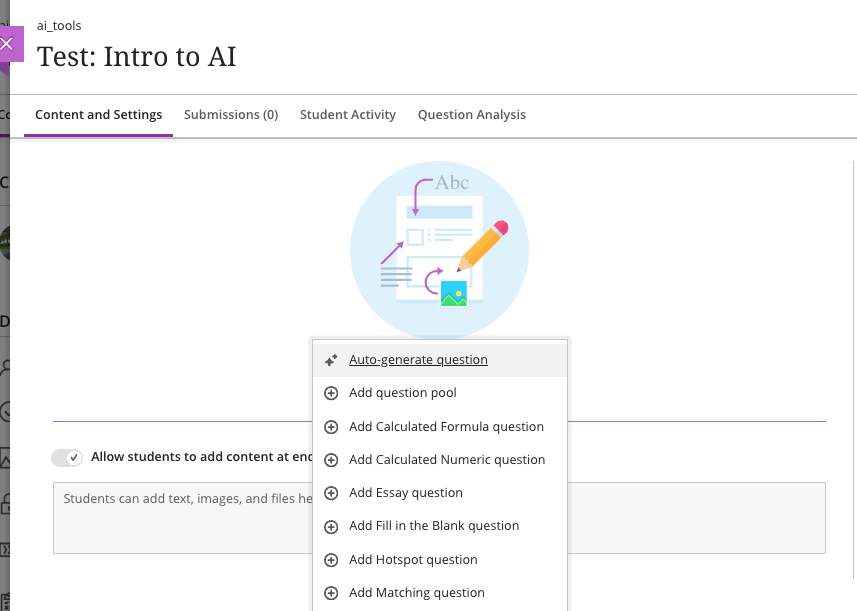
]]>
  </Body>
  <Summary>The U.S. Distance Learning Association (USDLA)'s National Distance Learning Week focuses on how artificial intelligence (AI) impacts education and training.   Instructional Technology invites...</Summary>
  <Website>https://my3.my.umbc.edu/groups/instructional-technology/posts/136797</Website>
  <TrackingUrl>https://dev.my.umbc.edu/api/v0/pixel/news/136797/guest@my.umbc.edu/cce9fa7d60e0f9d649e04b3e3cfb703f/api/pixel</TrackingUrl>
  <Tag>ai</Tag>
  <Tag>ai-course-design-assistant</Tag>
  <Tag>artificial-intelligence</Tag>
  <Tag>blackboard</Tag>
  <Tag>blackboard-ultra</Tag>
  <Tag>ndlw</Tag>
  <Tag>online-learning</Tag>
  <Tag>ultra</Tag>
  <Group token="instructional-technology">Instructional Technology</Group>
  <GroupUrl>https://dev.my.umbc.edu/groups/instructional-technology</GroupUrl>
  <AvatarUrl>https://assets2-dev.my.umbc.edu/system/shared/avatars/groups/000/001/164/dec3b026b81ee6d890a8f82f75c94a2e/xsmall.png?1446126703</AvatarUrl>
  <AvatarUrl size="original">https://assets1-dev.my.umbc.edu/system/shared/avatars/groups/000/001/164/dec3b026b81ee6d890a8f82f75c94a2e/original.png?1446126703</AvatarUrl>
  <AvatarUrl size="xxlarge">https://assets2-dev.my.umbc.edu/system/shared/avatars/groups/000/001/164/dec3b026b81ee6d890a8f82f75c94a2e/xxlarge.png?1446126703</AvatarUrl>
  <AvatarUrl size="xlarge">https://assets1-dev.my.umbc.edu/system/shared/avatars/groups/000/001/164/dec3b026b81ee6d890a8f82f75c94a2e/xlarge.png?1446126703</AvatarUrl>
  <AvatarUrl size="large">https://assets1-dev.my.umbc.edu/system/shared/avatars/groups/000/001/164/dec3b026b81ee6d890a8f82f75c94a2e/large.png?1446126703</AvatarUrl>
  <AvatarUrl size="medium">https://assets4-dev.my.umbc.edu/system/shared/avatars/groups/000/001/164/dec3b026b81ee6d890a8f82f75c94a2e/medium.png?1446126703</AvatarUrl>
  <AvatarUrl size="small">https://assets3-dev.my.umbc.edu/system/shared/avatars/groups/000/001/164/dec3b026b81ee6d890a8f82f75c94a2e/small.png?1446126703</AvatarUrl>
  <AvatarUrl size="xsmall">https://assets2-dev.my.umbc.edu/system/shared/avatars/groups/000/001/164/dec3b026b81ee6d890a8f82f75c94a2e/xsmall.png?1446126703</AvatarUrl>
  <AvatarUrl size="xxsmall">https://assets3-dev.my.umbc.edu/system/shared/avatars/groups/000/001/164/dec3b026b81ee6d890a8f82f75c94a2e/xxsmall.png?1446126703</AvatarUrl>
  <Sponsor>Instructional Technology</Sponsor>
  <ThumbnailUrl size="xxlarge">https://assets1-dev.my.umbc.edu/system/shared/thumbnails/news/000/136/797/bf1e6376eb09a574b84cb0b0050da68a/xxlarge.jpg?1699622583</ThumbnailUrl>
  <ThumbnailUrl size="xlarge">https://assets3-dev.my.umbc.edu/system/shared/thumbnails/news/000/136/797/bf1e6376eb09a574b84cb0b0050da68a/xlarge.jpg?1699622583</ThumbnailUrl>
  <ThumbnailUrl size="large">https://assets2-dev.my.umbc.edu/system/shared/thumbnails/news/000/136/797/bf1e6376eb09a574b84cb0b0050da68a/large.jpg?1699622583</ThumbnailUrl>
  <ThumbnailUrl size="medium">https://assets1-dev.my.umbc.edu/system/shared/thumbnails/news/000/136/797/bf1e6376eb09a574b84cb0b0050da68a/medium.jpg?1699622583</ThumbnailUrl>
  <ThumbnailUrl size="small">https://assets4-dev.my.umbc.edu/system/shared/thumbnails/news/000/136/797/bf1e6376eb09a574b84cb0b0050da68a/small.jpg?1699622583</ThumbnailUrl>
  <ThumbnailUrl size="xsmall">https://assets2-dev.my.umbc.edu/system/shared/thumbnails/news/000/136/797/bf1e6376eb09a574b84cb0b0050da68a/xsmall.jpg?1699622583</ThumbnailUrl>
  <ThumbnailUrl size="xxsmall">https://assets2-dev.my.umbc.edu/system/shared/thumbnails/news/000/136/797/bf1e6376eb09a574b84cb0b0050da68a/xxsmall.jpg?1699622583</ThumbnailUrl>
  <PawCount>3</PawCount>
  <CommentCount>0</CommentCount>
  <CommentsAllowed>true</CommentsAllowed>
  <PostedAt>Fri, 10 Nov 2023 08:24:58 -0500</PostedAt>
  <EditAt>Mon, 18 Dec 2023 13:51:25 -0500</EditAt>
</NewsItem>
  <NewsItem contentIssues="true" id="136475" important="false" status="posted" url="https://dev.my.umbc.edu/groups/doit/posts/136475">
  <Title>Sorting &amp; submission enhancements for Ultra gradebook in Nov</Title>
  <Tagline>Search &amp; use stock images in Ultra docs, discussions, etc.</Tagline>
  <Body>
    <![CDATA[
    <div class="html-content"><div><div><div><div><div><div>Continued enhancements to the Ultra gradebook provide greater flexibility and usability. In the November update to Ultra courses, additional sorting controls allow instructors to sort grade records in ascending or descending order including student name, overall grade, tests and assignment grade columns, and manually created grade columns. Future updates will provide sorting controls to other grading categories including discussions and journals.</div><div><br></div><div><img src="https://help.blackboard.com/sites/default/files/images/2023-10/learn_ultra_instruction_Gradebook_GridViewAssessmentSortingWithFilter.png" width="500" alt="Sorting assessments in gradebook grid view with filters applied" style="max-width: 100%; height: auto;"></div><div><em>Image 1: Sorting assessments in gradebook grid view with filters applied. A purple line in the header shows which column is sorted.</em></div><div><br></div><div>Instructors will also find it easier to navigate through student file attachments. A new tabbed interface displays when multiple files are uploaded. This updated display allows instructors to quickly navigate between file uploads when grading attachments.</div><div><br></div><div><img src="https://help.blackboard.com/sites/default/files/images/2023-10/learn_ultra_instructor_FlexibleGrading_GradingOptimizationFile-basedAssignmentSubmissions_TabsPerFile_DefaultView.png" width="500" alt="Example of a student submission open for grading with two files attached. The first file attachment is open in Bb Annotate. A new tab appears for the second file attachment." style="max-width: 100%; height: auto;"></div><div><em>Image 2: Example of a student </em><span><em>submission open for grading with two files attached. The first file attachment is open in Bb Annotate. A new tab appears for the second file attachment.</em></span></div><div><br></div><div>Additional updates to grading include:</div><div><ul><li>A new late indicator added to the submission receipt if a student submits after the due date.</li><li>Instructors can access the Edit/Regrade workflow when grading by question or by student.</li><li>Anonymous grading is now supported in <a href="https://my3.my.umbc.edu/groups/instructional-technology/posts/134272" rel="nofollow external" class="bo">the new flexible grading interface</a>.</li><li>Partial and negative credit is available for matching questions and auto-distributed across pairs. </li><li>Tabbed navigation for reading and grading journals was added to be consistent with discussions and assessments.</li></ul></div><div>Load times for the Ultra gradebook for large courses were also improved for the November update. For example, the gradebook for a course with 2000 students and 400 graded items will load in 8 seconds while a course, representing a 57% improvement.</div><div><br></div><div>Finally, the content editor will feature a new image button, making it easier and clearer when and how to upload an image to an Ultra course. When leveraging the <a href="https://my3.my.umbc.edu/groups/instructional-technology/posts/134605" rel="nofollow external" class="bo">AI Course Design Assistant tools</a>, the image function also allows instructors to search Unsplash collection to add<span> </span><span>images to Ultra Documents, discussions, course messages, and journal prompts. All users can use the image button to upload an image, but only faculty with access to the AI tools can search the royalty free image database.</span></div><div><br></div><div><img src="https://help.blackboard.com/sites/default/files/images/2023-10/learn_ultra_instructor_UltraDocs_ImageInsertion_ImageSourceOptions_0.png" width="500" alt="Example of instructor view to select an image upload or image search" style="max-width: 100%; height: auto;"></div><div><em>Image 3: Example of instructor view to select an image upload or image search</em></div><div><br></div></div></div></div></div><div><div><div><div><div><span><div><span>Faculty should see the latest updates in Ultra courses around November 2-3 2023. </span><span>The next update to our Ultra test environment will take place on November 7, 2023; release notes are posted to the <a href="https://wiki.umbc.edu/x/LohnB" rel="nofollow external" class="bo">What's New in Ultra</a> that same week. Faculty who are interested in test driving new features before they are released to production should </span><a href="http://my.umbc.edu/go/request-help" rel="nofollow external" class="bo">open an RT ticket</a> to request early access. Please <a href="http://umbc.edu/go/ultra" rel="nofollow external" class="bo">watch the FAQs</a>, including <a href="https://wiki.umbc.edu/x/LohnB" rel="nofollow external" class="bo">the What's New with Ultra page</a>, <span>and myUMBC for additional information about Ultra. </span></div></span></div></div></div></div><div><span><br></span></div></div><div><span><strong>Connect with Instructional Technology</strong></span></div><div><span>As always, if you have any questions about teaching, learning, and technology at UMBC, please consider the following options:</span></div><ul><li><a href="http://www.umbc.edu/faq" rel="nofollow external" class="bo">Check our extensive FAQ collection</a><span> </span></li><ul><li><span><a href="https://wiki.umbc.edu/x/LohnB" rel="nofollow external" class="bo"><span>What's new in Ultra?</span></a><span> </span><span>|</span><span> </span><a href="https://wiki.umbc.edu/x/bwrSAQ" rel="nofollow external" class="bo"><span>Known Issues</span></a><span> </span></span></li></ul><li><span><a href="http://my.umbc.edu/go/request-help" rel="nofollow external" class="bo">Open a ticket via RT</a></span></li><li><span>Follow the </span><a href="http://my.umbc.edu/groups/instructional-technology" rel="nofollow external" class="bo">Instructional Technology</a><span> &amp; </span><a href="http://my.umbc.edu/groups/doit" rel="nofollow external" class="bo">DoIT</a><span> myUMBC groups</span></li><li><a href="http://doit.umbc.edu/itnm/staff/" rel="nofollow external" class="bo">Request a consult</a><span> with <a href="http://doit.umbc.edu/itnm/staff" rel="nofollow external" class="bo">instructional technology staff</a></span></li><li><span><a href="http://pivot.umbc.edu" rel="nofollow external" class="bo">PIVOT</a> | <a href="https://doit.umbc.edu/itnm/academic-continuity/" rel="nofollow external" class="bo">Academic Continuity</a></span><span> </span><span>|</span><span> </span><span><a href="https://fdc.umbc.edu/teaching/keep-on-teaching/" rel="nofollow external" class="bo">Keep On Teaching</a></span><span> </span><span>|</span><span> </span><span><a href="https://doit.umbc.edu/students" rel="nofollow external" class="bo">Student Technology Resources</a></span></li></ul></div><div><div></div></div></div>
]]>
  </Body>
  <Summary>Continued enhancements to the Ultra gradebook provide greater flexibility and usability. In the November update to Ultra courses, additional sorting controls allow instructors to sort grade...</Summary>
  <Website>https://my3.my.umbc.edu/groups/instructional-technology/posts/136475</Website>
  <TrackingUrl>https://dev.my.umbc.edu/api/v0/pixel/news/136475/guest@my.umbc.edu/21ea7db3e03c2605d06bb7489049a8cf/api/pixel</TrackingUrl>
  <Tag>ai</Tag>
  <Tag>blackboard</Tag>
  <Tag>gradebook</Tag>
  <Tag>grading</Tag>
  <Tag>ultra-experience</Tag>
  <Tag>ultra-update</Tag>
  <Tag>unsplash</Tag>
  <Group token="instructional-technology">Instructional Technology</Group>
  <GroupUrl>https://dev.my.umbc.edu/groups/instructional-technology</GroupUrl>
  <AvatarUrl>https://assets2-dev.my.umbc.edu/system/shared/avatars/groups/000/001/164/dec3b026b81ee6d890a8f82f75c94a2e/xsmall.png?1446126703</AvatarUrl>
  <AvatarUrl size="original">https://assets1-dev.my.umbc.edu/system/shared/avatars/groups/000/001/164/dec3b026b81ee6d890a8f82f75c94a2e/original.png?1446126703</AvatarUrl>
  <AvatarUrl size="xxlarge">https://assets2-dev.my.umbc.edu/system/shared/avatars/groups/000/001/164/dec3b026b81ee6d890a8f82f75c94a2e/xxlarge.png?1446126703</AvatarUrl>
  <AvatarUrl size="xlarge">https://assets1-dev.my.umbc.edu/system/shared/avatars/groups/000/001/164/dec3b026b81ee6d890a8f82f75c94a2e/xlarge.png?1446126703</AvatarUrl>
  <AvatarUrl size="large">https://assets1-dev.my.umbc.edu/system/shared/avatars/groups/000/001/164/dec3b026b81ee6d890a8f82f75c94a2e/large.png?1446126703</AvatarUrl>
  <AvatarUrl size="medium">https://assets4-dev.my.umbc.edu/system/shared/avatars/groups/000/001/164/dec3b026b81ee6d890a8f82f75c94a2e/medium.png?1446126703</AvatarUrl>
  <AvatarUrl size="small">https://assets3-dev.my.umbc.edu/system/shared/avatars/groups/000/001/164/dec3b026b81ee6d890a8f82f75c94a2e/small.png?1446126703</AvatarUrl>
  <AvatarUrl size="xsmall">https://assets2-dev.my.umbc.edu/system/shared/avatars/groups/000/001/164/dec3b026b81ee6d890a8f82f75c94a2e/xsmall.png?1446126703</AvatarUrl>
  <AvatarUrl size="xxsmall">https://assets3-dev.my.umbc.edu/system/shared/avatars/groups/000/001/164/dec3b026b81ee6d890a8f82f75c94a2e/xxsmall.png?1446126703</AvatarUrl>
  <Sponsor>Instructional Technology</Sponsor>
  <ThumbnailUrl size="xxlarge">https://assets1-dev.my.umbc.edu/system/shared/thumbnails/news/000/136/475/7508f0861586250acfa2fae832e76a19/xxlarge.jpg?1698074839</ThumbnailUrl>
  <ThumbnailUrl size="xlarge">https://assets3-dev.my.umbc.edu/system/shared/thumbnails/news/000/136/475/7508f0861586250acfa2fae832e76a19/xlarge.jpg?1698074839</ThumbnailUrl>
  <ThumbnailUrl size="large">https://assets3-dev.my.umbc.edu/system/shared/thumbnails/news/000/136/475/7508f0861586250acfa2fae832e76a19/large.jpg?1698074839</ThumbnailUrl>
  <ThumbnailUrl size="medium">https://assets4-dev.my.umbc.edu/system/shared/thumbnails/news/000/136/475/7508f0861586250acfa2fae832e76a19/medium.jpg?1698074839</ThumbnailUrl>
  <ThumbnailUrl size="small">https://assets2-dev.my.umbc.edu/system/shared/thumbnails/news/000/136/475/7508f0861586250acfa2fae832e76a19/small.jpg?1698074839</ThumbnailUrl>
  <ThumbnailUrl size="xsmall">https://assets1-dev.my.umbc.edu/system/shared/thumbnails/news/000/136/475/7508f0861586250acfa2fae832e76a19/xsmall.jpg?1698074839</ThumbnailUrl>
  <ThumbnailUrl size="xxsmall">https://assets1-dev.my.umbc.edu/system/shared/thumbnails/news/000/136/475/7508f0861586250acfa2fae832e76a19/xxsmall.jpg?1698074839</ThumbnailUrl>
  <PawCount>3</PawCount>
  <CommentCount>0</CommentCount>
  <CommentsAllowed>true</CommentsAllowed>
  <PostedAt>Mon, 23 Oct 2023 12:56:13 -0400</PostedAt>
  <EditAt>Mon, 23 Oct 2023 13:01:37 -0400</EditAt>
</NewsItem>
</News>