<?xml version="1.0"?>
<News hasArchived="false" page="8" pageCount="50" pageSize="10" timestamp="Sun, 26 Apr 2026 11:10:51 -0400" url="https://dev.my.umbc.edu/groups/doit/posts.xml?page=8&amp;tag=blackboard">
  <NewsItem contentIssues="true" id="135953" important="false" status="posted" url="https://dev.my.umbc.edu/groups/doit/posts/135953">
    <Title>October brings delegated grading to Ultra courses</Title>
    <Tagline>Gradebook reminders, SafeAssign Direct Submit &amp; more</Tagline>
    <Body>
      <![CDATA[
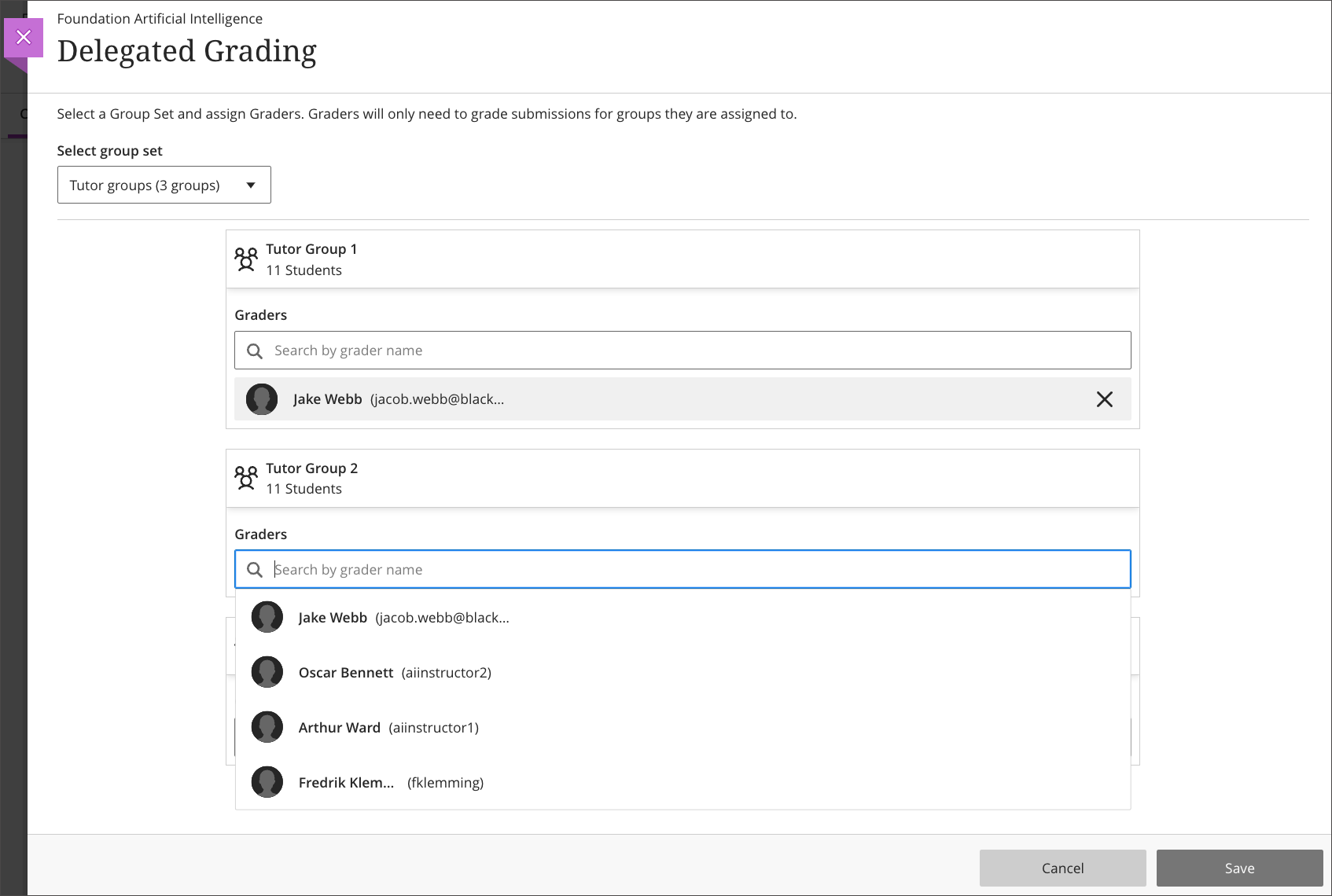
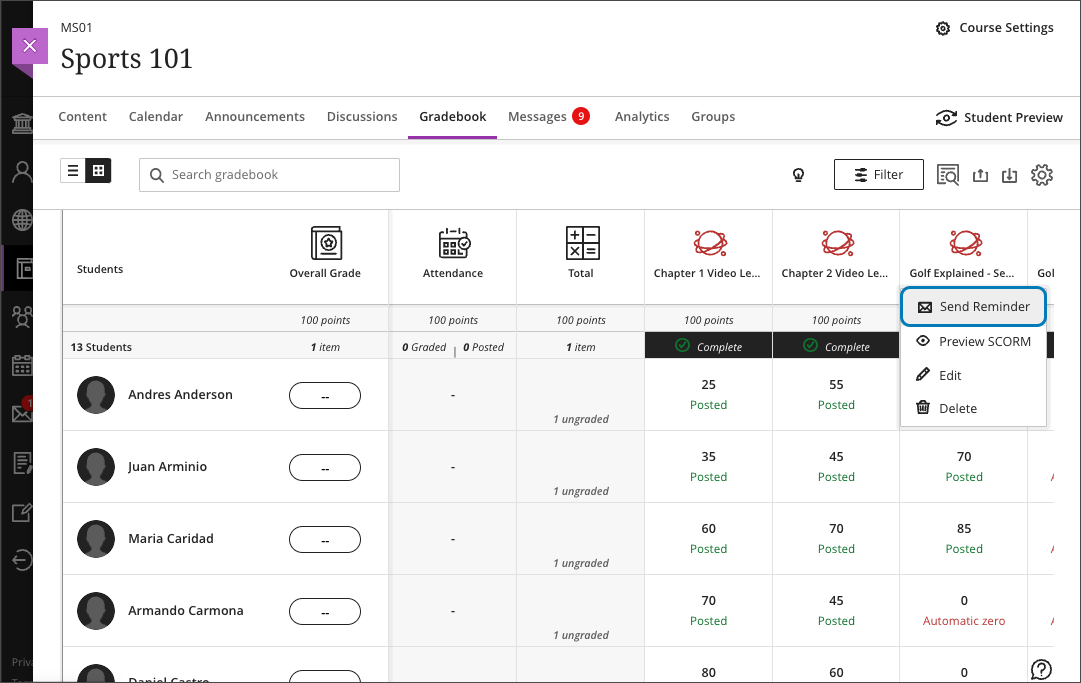
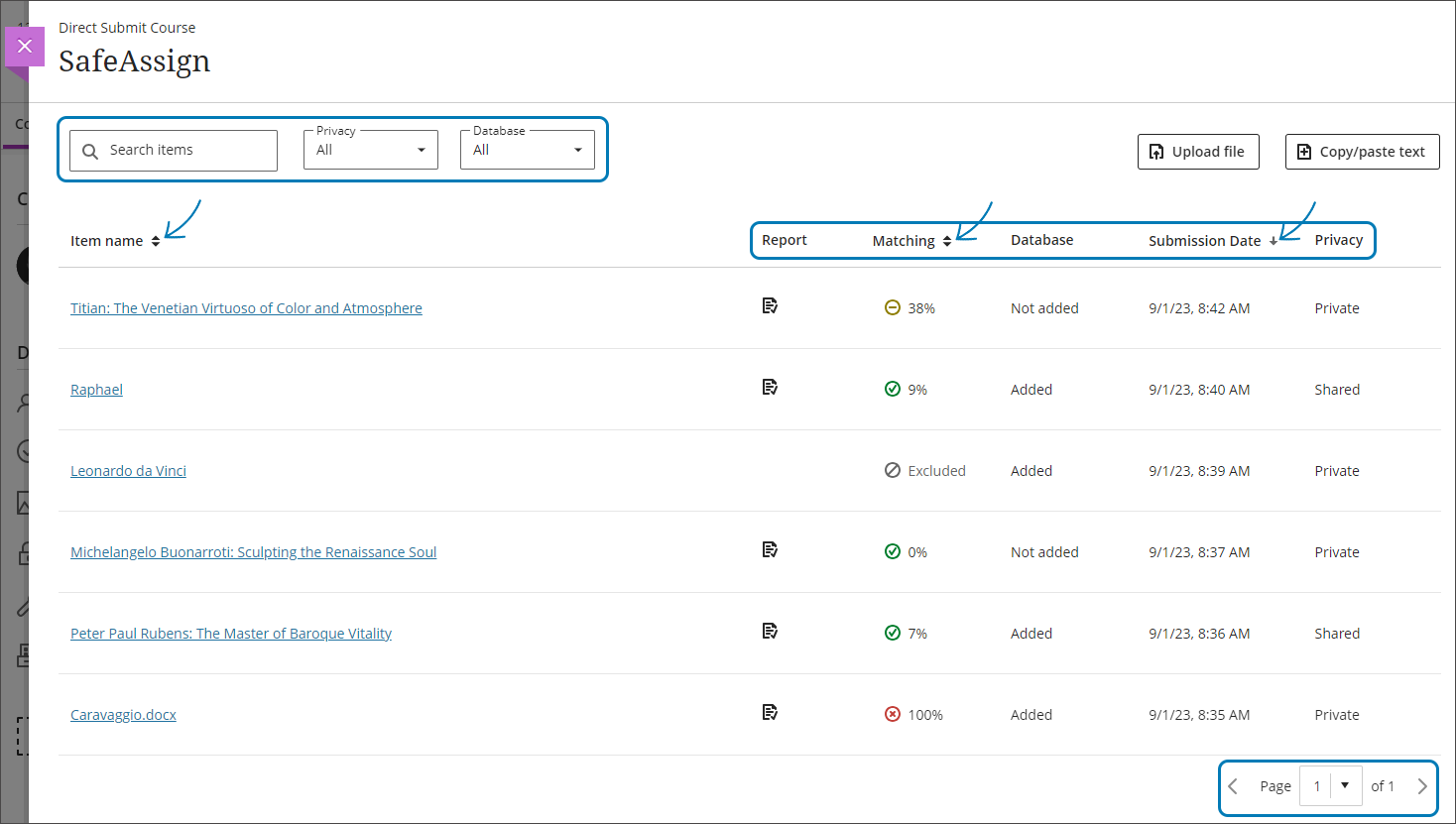
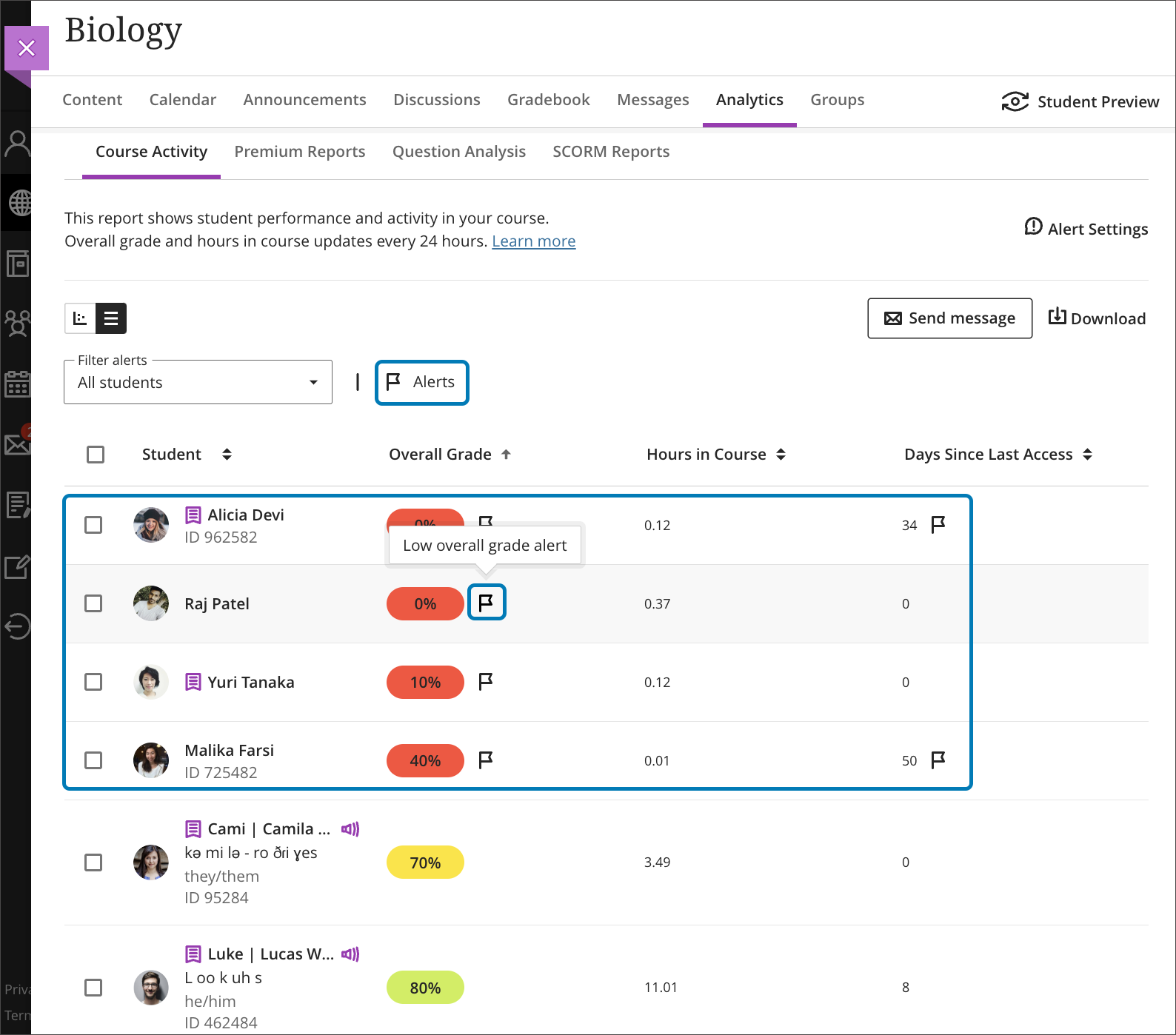
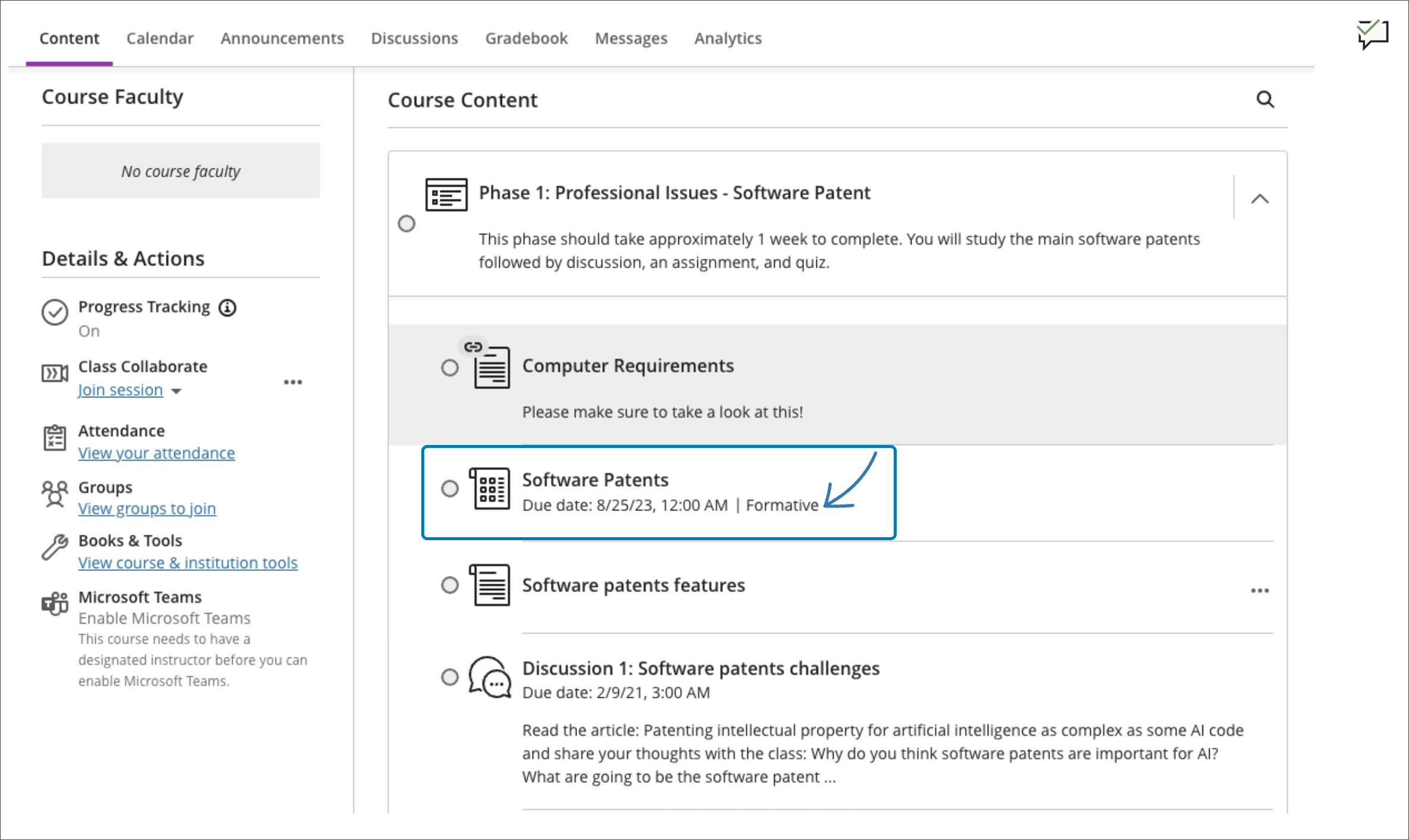
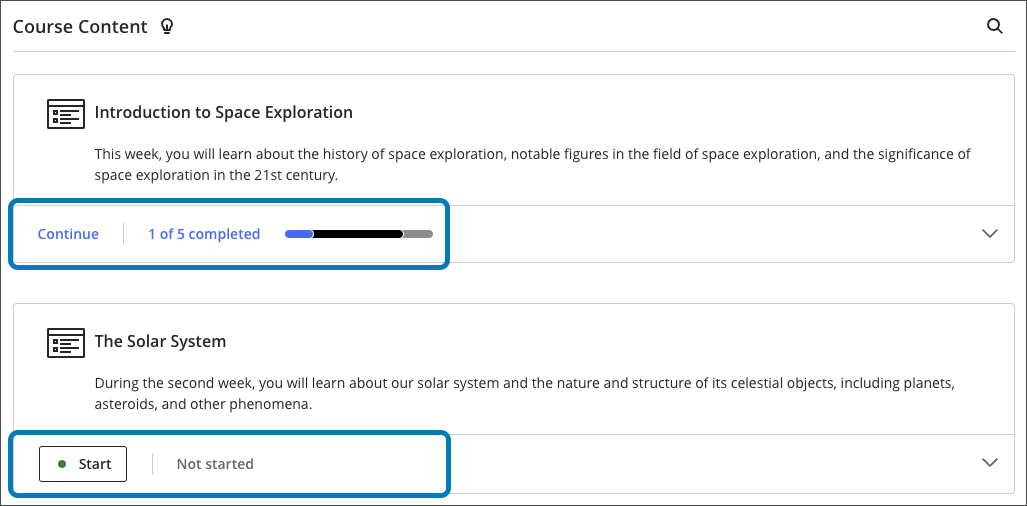
          <div class="html-content"><div><div><div><div><div><div>The October update to Ultra brings a new grading workflow to large Ultra courses, allowing instructors to distribute grading for an assessment to multiple graders. Instructors can assign graders to groups of students using delegated grading and the graders will only see those students they are assigned to grade including randomly generated groups. <span>The first phase of delegated grading supports individual assessments. In subsequent updates to this feature, delegated grading will support tests, group assessments, and anonymous submissions.</span><span> Note: </span><span>Delegated grading works with one grader per group of students whereas </span><a href="https://help.blackboard.com/Learn/Instructor/Ultra/Assignments/Grade_Assignments/ULTRA_Parallel_Grading" rel="nofollow external" class="bo">parallel grading</a><span> works with multiple graders and therefore requires a reconcilement of grades. </span></div><div><span><br></span></div><div><img src="https://help.blackboard.com/sites/default/files/images/2023-09/learn_ultra_instructor_DelegatedGradingDistributionByGroup_AlignGradersToDistributeGradingWork.png" width="500" alt="Image 1: Assigning groups of students to graders" style="max-width: 100%; height: auto;"></div><div><em>Image 1: Assigning groups of students to graders</em></div><div><br></div><div>Faculty can also send reminders to students about missed assessments directly from the Ultra gradebook. This feature includes all assessment types including Ultra created, third-party tools, and anonymous assignments. At this time, reminders can only be sent for assessments that are visible to students and when there are no release conditions. Reminders can be sent from the grid view or the list view in the gradebook.</div><div><br></div><div><img src="https://help.blackboard.com/sites/default/files/images/2023-09/learn_ultra_instructor_Gradebook_SendReminder_OptionFromGridView.png" width="500" alt="Image 2: Sending a reminder from the grid view in the gradebook" style="max-width: 100%; height: auto;"></div><div><em>Image 2: Sending a reminder from the grid view in the gradebook</em></div><div><br></div><div><span>The October update also allows faculty to submit student work to SafeAssign for originality review when not enabled as part of an Ultra assessment. <a href="https://help.blackboard.com/SafeAssign/Instructor/DirectSubmit" rel="nofollow external" class="bo">SafeAssign Direct Submit</a> appears as an instructor tool at the top of the Books &amp; Tools peek panel in every Ultra course, enabling faculty to upload Microsoft Office files, PDF, RTF, HTML, and ZIP files, or copy and paste content for review. Submissions are added to the institutional database unless otherwise specified by the instructor.</span></div><div><br></div><div><img src="https://help.blackboard.com/sites/default/files/images/2023-09/learn_ultra_instructor_SafeAssign_DirectSubmit_DirectSubmitPage.png" width="500" alt="Image 3: Example of SafeAssign Direct Submit page with submissions and originality reports" style="max-width: 100%; height: auto;"></div><div><em>Image 3: Example of SafeAssign Direct Submit page with submissions and originality reports</em></div><div><br></div><div>Please note: SafeAssign does not review for AI-generated content at this time. An integration of GPTZero for SafeAssign was postponed by the vendor <span>due to concerns related to ethics, accuracy, and bias in the evaluation of student submissions (see <a href="https://www.anthology.com/sites/default/files/2023-09/White%20Paper-AI%20Academic%20Integrity%20and%20Authentic%20Assessment-An%20Ethical%20Path%20Forward%20for%20Education-v2_09-23_0.pdf" rel="nofollow external" class="bo">Anthology white paper</a>, 2023). </span></div><div><br></div><div><strong>Assessment &amp; Grading</strong></div></div></div></div></div><div><ul><li><span>Instructors can now copy their custom grading schemas from Ultra and Original courses to other Ultra courses. These schemas are listed in a Grading Schemas folder on the Copy Items panel.</span></li><li><span>Ultra tests will auto-distribute partial credit across correct answer choices. If desired, instructors can edit the values if some correct answer options warrant more or less credit.</span></li><li>Graders can now post Bb Annotate comments without disclosing their names. Instructors have the option to mark inline comments as anonymous when creating them or even after comments are added.</li></ul></div><div><div><div><div><div><span><div>Other updates in October include </div><div><ul><li>While Messages are enabled in all Ultra courses and cannot be turned off, in October, faculty will have the option to customize how students can interact with those messages. For example, students can message anyone or they can only message the instructors.</li><li>Instructors can edit many settings for third-party tools on an assessment or tool link including Name/Title, Description, Release Conditions, and more.</li></ul></div><div><span>Faculty should see the latest updates in Ultra courses around October 5-6 2023. </span><span>The next update to our Ultra test environment will take place on October 10, 2023; release notes are posted to the <a href="https://wiki.umbc.edu/x/LohnB" rel="nofollow external" class="bo">What's New in Ultra</a> that same week. Faculty who are interested in test driving new features before they are released to production should </span><a href="http://my.umbc.edu/go/request-help" rel="nofollow external" class="bo">open an RT ticket</a> to request early access. Please <a href="http://umbc.edu/go/ultra" rel="nofollow external" class="bo">watch the FAQs</a>, including <a href="https://wiki.umbc.edu/x/LohnB" rel="nofollow external" class="bo">the What's New with Ultra page</a>, <span>and myUMBC for additional information about Ultra. </span></div></span></div></div></div></div><div><span><br></span></div></div><div><span><strong>Connect with Instructional Technology</strong></span></div><div><span>As always, if you have any questions about teaching, learning, and technology at UMBC, please consider the following options:</span></div><ul><li><a href="http://www.umbc.edu/faq" rel="nofollow external" class="bo">Check our extensive FAQ collection</a><span> </span></li><ul><li><span><a href="https://wiki.umbc.edu/x/LohnB" rel="nofollow external" class="bo"><span>What's new in Ultra?</span></a><span> </span><span>|</span><span> </span><a href="https://wiki.umbc.edu/x/bwrSAQ" rel="nofollow external" class="bo"><span>Known Issues</span></a><span> </span></span></li></ul><li><span><a href="http://my.umbc.edu/go/request-help" rel="nofollow external" class="bo">Open a ticket via RT</a></span></li><li><span>Follow the </span><a href="http://my.umbc.edu/groups/instructional-technology" rel="nofollow external" class="bo">Instructional Technology</a><span> &amp; </span><a href="http://my.umbc.edu/groups/doit" rel="nofollow external" class="bo">DoIT</a><span> myUMBC groups</span></li><li><a href="http://doit.umbc.edu/itnm/staff/" rel="nofollow external" class="bo">Request a consult</a><span> with <a href="http://doit.umbc.edu/itnm/staff" rel="nofollow external" class="bo">instructional technology staff</a></span></li><li><span><a href="http://pivot.umbc.edu" rel="nofollow external" class="bo">PIVOT</a> | <a href="https://doit.umbc.edu/itnm/academic-continuity/" rel="nofollow external" class="bo">Academic Continuity</a></span><span> </span><span>|</span><span> </span><span><a href="https://fdc.umbc.edu/teaching/keep-on-teaching/" rel="nofollow external" class="bo">Keep On Teaching</a></span><span> </span><span>|</span><span> </span><span><a href="https://doit.umbc.edu/students" rel="nofollow external" class="bo">Student Technology Resources</a></span></li></ul></div><div><div></div></div></div>
      ]]>
    </Body>
    <Summary>The October update to Ultra brings a new grading workflow to large Ultra courses, allowing instructors to distribute grading for an assessment to multiple graders. Instructors can assign graders...</Summary>
    <Website>https://my3.my.umbc.edu/groups/instructional-technology/posts/135953</Website>
    <TrackingUrl>https://dev.my.umbc.edu/api/v0/pixel/news/135953/guest@my.umbc.edu/e06697933e0a3de1cefd9b4ab4c62775/api/pixel</TrackingUrl>
    <Tag>blackboard</Tag>
    <Tag>delegated-grading</Tag>
    <Tag>grading</Tag>
    <Tag>safeassign</Tag>
    <Tag>ultra-experience</Tag>
    <Tag>ultra-update</Tag>
    <Group token="instructional-technology">Instructional Technology</Group>
    <GroupUrl>https://dev.my.umbc.edu/groups/instructional-technology</GroupUrl>
    <AvatarUrl>https://assets2-dev.my.umbc.edu/system/shared/avatars/groups/000/001/164/dec3b026b81ee6d890a8f82f75c94a2e/xsmall.png?1446126703</AvatarUrl>
    <AvatarUrl size="original">https://assets1-dev.my.umbc.edu/system/shared/avatars/groups/000/001/164/dec3b026b81ee6d890a8f82f75c94a2e/original.png?1446126703</AvatarUrl>
    <AvatarUrl size="xxlarge">https://assets2-dev.my.umbc.edu/system/shared/avatars/groups/000/001/164/dec3b026b81ee6d890a8f82f75c94a2e/xxlarge.png?1446126703</AvatarUrl>
    <AvatarUrl size="xlarge">https://assets1-dev.my.umbc.edu/system/shared/avatars/groups/000/001/164/dec3b026b81ee6d890a8f82f75c94a2e/xlarge.png?1446126703</AvatarUrl>
    <AvatarUrl size="large">https://assets1-dev.my.umbc.edu/system/shared/avatars/groups/000/001/164/dec3b026b81ee6d890a8f82f75c94a2e/large.png?1446126703</AvatarUrl>
    <AvatarUrl size="medium">https://assets4-dev.my.umbc.edu/system/shared/avatars/groups/000/001/164/dec3b026b81ee6d890a8f82f75c94a2e/medium.png?1446126703</AvatarUrl>
    <AvatarUrl size="small">https://assets3-dev.my.umbc.edu/system/shared/avatars/groups/000/001/164/dec3b026b81ee6d890a8f82f75c94a2e/small.png?1446126703</AvatarUrl>
    <AvatarUrl size="xsmall">https://assets2-dev.my.umbc.edu/system/shared/avatars/groups/000/001/164/dec3b026b81ee6d890a8f82f75c94a2e/xsmall.png?1446126703</AvatarUrl>
    <AvatarUrl size="xxsmall">https://assets3-dev.my.umbc.edu/system/shared/avatars/groups/000/001/164/dec3b026b81ee6d890a8f82f75c94a2e/xxsmall.png?1446126703</AvatarUrl>
    <Sponsor>Instructional Technology</Sponsor>
    <ThumbnailUrl size="xxlarge">https://assets4-dev.my.umbc.edu/system/shared/thumbnails/news/000/135/953/3b667fd8487794ef0e00ef79200ab322/xxlarge.jpg?1696336465</ThumbnailUrl>
    <ThumbnailUrl size="xlarge">https://assets3-dev.my.umbc.edu/system/shared/thumbnails/news/000/135/953/3b667fd8487794ef0e00ef79200ab322/xlarge.jpg?1696336465</ThumbnailUrl>
    <ThumbnailUrl size="large">https://assets2-dev.my.umbc.edu/system/shared/thumbnails/news/000/135/953/3b667fd8487794ef0e00ef79200ab322/large.jpg?1696336465</ThumbnailUrl>
    <ThumbnailUrl size="medium">https://assets3-dev.my.umbc.edu/system/shared/thumbnails/news/000/135/953/3b667fd8487794ef0e00ef79200ab322/medium.jpg?1696336465</ThumbnailUrl>
    <ThumbnailUrl size="small">https://assets4-dev.my.umbc.edu/system/shared/thumbnails/news/000/135/953/3b667fd8487794ef0e00ef79200ab322/small.jpg?1696336465</ThumbnailUrl>
    <ThumbnailUrl size="xsmall">https://assets1-dev.my.umbc.edu/system/shared/thumbnails/news/000/135/953/3b667fd8487794ef0e00ef79200ab322/xsmall.jpg?1696336465</ThumbnailUrl>
    <ThumbnailUrl size="xxsmall">https://assets3-dev.my.umbc.edu/system/shared/thumbnails/news/000/135/953/3b667fd8487794ef0e00ef79200ab322/xxsmall.jpg?1696336465</ThumbnailUrl>
    <PawCount>3</PawCount>
    <CommentCount>0</CommentCount>
    <CommentsAllowed>true</CommentsAllowed>
    <PostedAt>Tue, 03 Oct 2023 11:27:04 -0400</PostedAt>
  </NewsItem>
  <NewsItem contentIssues="true" id="135615" important="false" status="posted" url="https://dev.my.umbc.edu/groups/doit/posts/135615">
  <Title>62% of Fall 2023 Blackboard Courses Now Using Ultra</Title>
  <Tagline>9 of 10 UMBC students are enrolled in an Ultra course</Tagline>
  <Body>
    <![CDATA[
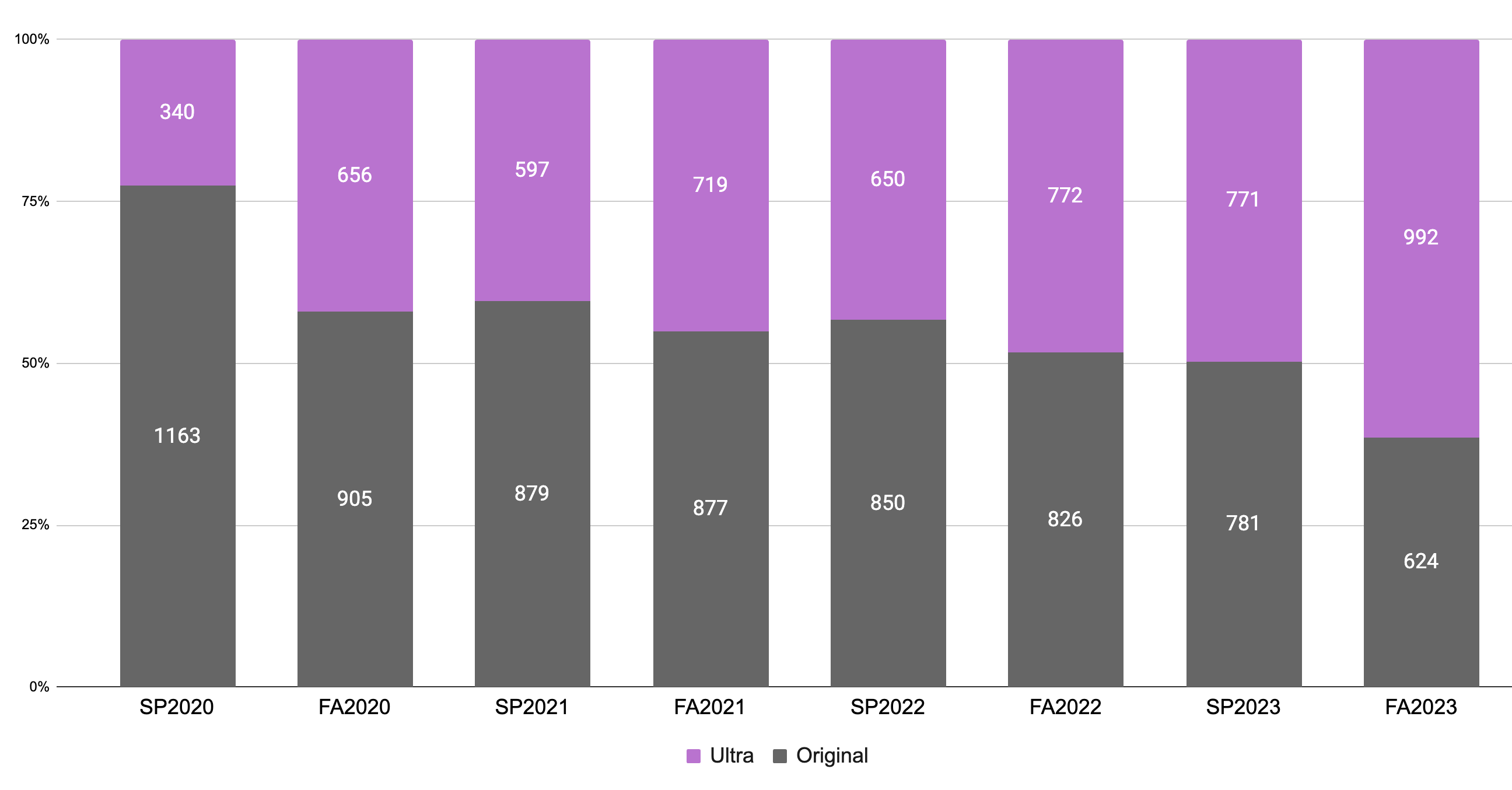
    <div class="html-content"><p><span>As UMBC </span><a href="https://doit.umbc.edu/news/post/130227/" rel="nofollow external" class="bo"><span>finalizes its migration to Ultra</span></a><span>, more faculty opted to use the new course experience during FA2023. Specifically, of 1588 total available Blackboard shells, faculty have enabled 991 using Ultra, or ~62%, -- a ten point jump from last year. Although a broad spectrum of disciplines including </span><a href="https://doit.umbc.edu/news/post/133604/" rel="nofollow external" class="bo"><span>seven departments and eight languages opted to use Ultra</span></a><span> by default, more than half of active Ultra courses were converted from Original to the new format by faculty this semester. </span></p><p><span><span>Since instructors must choose to </span><a href="https://wiki.umbc.edu/x/VoAc" rel="nofollow external" class="bo"><span>make a course available</span></a><span> to students every semester, FA2023 also represents a notable increase in faculty use of Ultra courses at a much higher rate than their use of Original courses -- 89% of Ultra courses are available to students compared to 51% of Original courses. Additionally, Ultra adoption rose in STEM disciplines during FA2023. The College of Natural and Mathematical Sciences saw a 139% increase in Ultra courses from last fall while the College of Engineering and Information Technology increased by 55%. </span></span></p><p><a href="https://my3.my.umbc.edu/system/shared/attachments/e7971b1f86a61e112a15b3122ea484ba/650b3efd/news/000/135/615/937ae010840679f1d5b1d822452389bd/ActiveUltraOriginalCourses.png?1695235107" rel="nofollow external" class="bo"><img src="https://my3.my.umbc.edu/groups/instructional-technology/posts/135615/attachments/48593" style="max-width: 100%; height: auto;"></a></p><p><em><span>Image 1: Comparison of active Original and Ultra courses over time (click to enlarge). For more information about Ultra adoption and course usage, please visit </span><a href="https://wiki.umbc.edu/x/_AQ9BQ" rel="nofollow external" class="bo"><span>our Ultra course tracker</span></a><span>.</span></em></p><p><span>With more than 200 enhancements and </span><a href="https://doit.umbc.edu/news/?tag=ultra-update" rel="nofollow external" class="bo"><span>new features in the last year</span></a><span>, Ultra courses offer more than 95% feature parity with Original including extensive updates to grading and assessment, content management, and course design functionality. Improvements to the gradebook, question banks, and groups management are key functional areas </span><a href="https://doit.umbc.edu/news/post/126948/" rel="nofollow external" class="bo"><span>raised by UMBC faculty and addressed by Anthology</span></a><span>. Ultra also provides exclusive </span><a href="https://doit.umbc.edu/news/post/131214/" rel="nofollow external" class="bo"><span>progress tracking reports</span></a><span> for learner engagement and new </span><a href="https://doit.umbc.edu/news/post/134605/" rel="nofollow external" class="bo"><span>AI Course Design Assistant tools</span></a><span>. </span></p><p><span><strong>Next Steps for Ultra at UMBC</strong></span></p><p><span>The growth in Ultra course creation and faculty adoption fulfills a longstanding promise to the UMBC community to provide a consistent learning experience for students and </span><a href="https://doit.umbc.edu/itnm/tools/bbux/" rel="nofollow external" class="bo"><span>support Blackboard innovation</span></a><span>, </span><a href="https://doit.umbc.edu/news/post/76491/" rel="nofollow external" class="bo"><span>beginning in SP2018 when four faculty piloted Ultra</span></a><span>. Since that initial exploration, Ultra adoption </span><a href="https://doit.umbc.edu/news/post/82277/" rel="nofollow external" class="bo"><span>grew slowly and steadily</span></a><span> as faculty opted in to the new version of Blackboard when they felt ready. The pandemic also provided many faculty </span><a href="https://doit.umbc.edu/news/post/96522/" rel="nofollow external" class="bo"><span>with an opportunity to try Ultra</span></a><span> and move their courses. </span></p><p><span>We are committed to </span><a href="https://doit.umbc.edu/news/post/132978/" rel="nofollow external" class="bo"><span>ensuring a smooth transition</span></a><span> for all departments and faculties. </span></p><ul><li><p><span>Following this semester, two full terms remain (SP2024 and FA2024) before we finalize the Ultra migration at UMBC. All courses for CAHSS will be automatically created in Ultra for FA2024 and the entire campus will be on Ultra by WT/SP2025.</span></p></li><li><p><span>For departments or disciplines that want to adopt Ultra by default, Blackboard course shells can be designated as Ultra </span><a href="https://wiki.umbc.edu/x/eYHGAw" rel="nofollow external" class="bo"><span>when courses are created</span></a><span>. Please </span><a href="https://doit.umbc.edu/request-tracker-rt/doit-myumbc-blackboard/" rel="nofollow external" class="bo"><span>open an RT ticket</span></a><span> to coordinate your request with Instructional Technology by November 1, 2023 for WT/SP2024 courses and by June 1, 2024 for SU/FA2024 courses.</span></p></li><li><p><span>In mid October, faculty who have not yet migrated to Ultra will automatically receive a development shell with a copy of their FA2023 course that is converted to Ultra. This copy will not have any student enrollments and will not impact the current term. Faculty are encouraged to review the copy and modify the course. If the course conversion is not </span><a href="https://wiki.umbc.edu/x/H4aEB" rel="nofollow external" class="bo"><span>the best path to Ultra</span></a><span>, there are </span><a href="https://wiki.umbc.edu/x/KAD-/" rel="nofollow external" class="bo"><span>ample Blackboard resources</span></a><span> at <a href="http://umbc.edu/go/ultra" rel="nofollow external" class="bo">umbc.edu/go/ultra</a> as well as Instructional Technology support over the next 15 months to build a new course.</span></p></li><li><p><span>Instructional Technology will also </span><a href="http://doit.umbc.edu/news/post/132978" rel="nofollow external" class="bo"><span>work with departments to customize Ultra workshops</span></a><span> and provide dedicated support sessions according to faculty schedules or specific use cases for teaching with Ultra. Please <a href="https://doit.umbc.edu/request-tracker-rt/doit-myumbc-blackboard/" rel="nofollow external" class="bo">open an RT ticket</a> to schedule a training session or request a consultation appointment.</span></p></li></ul><p><span>The campus community continues to play a vital role in championing change throughout our Ultra migration. </span><span>Faculty</span><span> and student feedback helps shape the ongoing development of Ultra and contributes to the dynamic platform students experience during their education at UMBC.</span></p><p><span><strong>Connect with Instructional Technology</strong></span></p><p><span>As always, if you have any questions about teaching, learning, and technology at UMBC, please consider the following options:</span></p><ul><li><a href="http://www.umbc.edu/faq" rel="nofollow external" class="bo"><span>Check our extensive FAQ collection</span></a><span> </span></li><ul><li><a href="https://wiki.umbc.edu/x/LohnB" rel="nofollow external" class="bo"><span>What's new in Ultra?</span></a><span> | </span><a href="https://wiki.umbc.edu/x/bwrSAQ" rel="nofollow external" class="bo"><span>Known Issues</span></a><span> </span></li></ul><li><a href="http://my.umbc.edu/go/request-help" rel="nofollow external" class="bo"><span>Open a ticket via RT</span></a></li><li><span>Follow the </span><a href="http://my.umbc.edu/groups/instructional-technology" rel="nofollow external" class="bo"><span>Instructional Technology</span></a><span> &amp; </span><a href="http://my.umbc.edu/groups/doit" rel="nofollow external" class="bo"><span>DoIT</span></a><span> myUMBC groups</span></li><li><a href="http://doit.umbc.edu/itnm/staff/" rel="nofollow external" class="bo"><span>Request a consult</span></a><span> with </span><a href="http://doit.umbc.edu/itnm/staff" rel="nofollow external" class="bo"><span>instructional technology staff</span></a></li><li><a href="http://pivot.umbc.edu/" rel="nofollow external" class="bo"><span>PIVOT</span></a><span> | </span><a href="https://doit.umbc.edu/itnm/academic-continuity/" rel="nofollow external" class="bo"><span>Academic Continuity</span></a><span> | </span><a href="https://fdc.umbc.edu/teaching/keep-on-teaching/" rel="nofollow external" class="bo"><span>Keep On Teaching</span></a><span> | </span><a href="https://doit.umbc.edu/students" rel="nofollow external" class="bo"><span>Student Technology Resources</span></a></li></ul><p><span>---</span></p><p><span>UMBC is committed to providing a consistent learning experience for everyone. The </span><a href="https://doit.umbc.edu/news/post/130227/" rel="nofollow external" class="bo"><span>last day we will support Blackboard Original</span></a><span> is December 31, 2024. Please check out our training and support: </span><span><a href="http://umbc.edu/go/ultra" rel="nofollow external" class="bo">umbc.edu/go/ultra</a></span></p></div>
]]>
  </Body>
  <Summary>As UMBC finalizes its migration to Ultra, more faculty opted to use the new course experience during FA2023. Specifically, of 1588 total available Blackboard shells, faculty have enabled 991 using...</Summary>
  <Website>https://my3.my.umbc.edu/groups/instructional-technology/posts/135615</Website>
  <AttachmentKind>Image</AttachmentKind>
  <AttachmentUrl>https://assets1-dev.my.umbc.edu/system/shared/attachments/67f5cfbed41cf532f82c91464f23c51a/69ee2afc/news/000/135/615/937ae010840679f1d5b1d822452389bd/ActiveUltraOriginalCourses.png?1695235107</AttachmentUrl>
  <Attachments>
    <Attachment kind="Image" url="https://dev.my.umbc.edu/groups/doit/posts/135615/attachments/48593"></Attachment>
  </Attachments>
  <TrackingUrl>https://dev.my.umbc.edu/api/v0/pixel/news/135615/guest@my.umbc.edu/e8ddd57cdd491268e220e8aa6ac0e6a5/api/pixel</TrackingUrl>
  <Tag>blackboard</Tag>
  <Tag>hawken</Tag>
  <Tag>training</Tag>
  <Tag>ultra-experience</Tag>
  <Tag>ultra-migration</Tag>
  <Tag>ultra-update</Tag>
  <Group token="instructional-technology">Instructional Technology</Group>
  <GroupUrl>https://dev.my.umbc.edu/groups/instructional-technology</GroupUrl>
  <AvatarUrl>https://assets2-dev.my.umbc.edu/system/shared/avatars/groups/000/001/164/dec3b026b81ee6d890a8f82f75c94a2e/xsmall.png?1446126703</AvatarUrl>
  <AvatarUrl size="original">https://assets1-dev.my.umbc.edu/system/shared/avatars/groups/000/001/164/dec3b026b81ee6d890a8f82f75c94a2e/original.png?1446126703</AvatarUrl>
  <AvatarUrl size="xxlarge">https://assets2-dev.my.umbc.edu/system/shared/avatars/groups/000/001/164/dec3b026b81ee6d890a8f82f75c94a2e/xxlarge.png?1446126703</AvatarUrl>
  <AvatarUrl size="xlarge">https://assets1-dev.my.umbc.edu/system/shared/avatars/groups/000/001/164/dec3b026b81ee6d890a8f82f75c94a2e/xlarge.png?1446126703</AvatarUrl>
  <AvatarUrl size="large">https://assets1-dev.my.umbc.edu/system/shared/avatars/groups/000/001/164/dec3b026b81ee6d890a8f82f75c94a2e/large.png?1446126703</AvatarUrl>
  <AvatarUrl size="medium">https://assets4-dev.my.umbc.edu/system/shared/avatars/groups/000/001/164/dec3b026b81ee6d890a8f82f75c94a2e/medium.png?1446126703</AvatarUrl>
  <AvatarUrl size="small">https://assets3-dev.my.umbc.edu/system/shared/avatars/groups/000/001/164/dec3b026b81ee6d890a8f82f75c94a2e/small.png?1446126703</AvatarUrl>
  <AvatarUrl size="xsmall">https://assets2-dev.my.umbc.edu/system/shared/avatars/groups/000/001/164/dec3b026b81ee6d890a8f82f75c94a2e/xsmall.png?1446126703</AvatarUrl>
  <AvatarUrl size="xxsmall">https://assets3-dev.my.umbc.edu/system/shared/avatars/groups/000/001/164/dec3b026b81ee6d890a8f82f75c94a2e/xxsmall.png?1446126703</AvatarUrl>
  <Sponsor>Instructional Technology</Sponsor>
  <ThumbnailUrl size="xxlarge">https://assets4-dev.my.umbc.edu/system/shared/thumbnails/news/000/135/615/9ee02f2a02b6a7aff178c032aca4542d/xxlarge.jpg?1695234988</ThumbnailUrl>
  <ThumbnailUrl size="xlarge">https://assets2-dev.my.umbc.edu/system/shared/thumbnails/news/000/135/615/9ee02f2a02b6a7aff178c032aca4542d/xlarge.jpg?1695234988</ThumbnailUrl>
  <ThumbnailUrl size="large">https://assets3-dev.my.umbc.edu/system/shared/thumbnails/news/000/135/615/9ee02f2a02b6a7aff178c032aca4542d/large.jpg?1695234988</ThumbnailUrl>
  <ThumbnailUrl size="medium">https://assets4-dev.my.umbc.edu/system/shared/thumbnails/news/000/135/615/9ee02f2a02b6a7aff178c032aca4542d/medium.jpg?1695234988</ThumbnailUrl>
  <ThumbnailUrl size="small">https://assets4-dev.my.umbc.edu/system/shared/thumbnails/news/000/135/615/9ee02f2a02b6a7aff178c032aca4542d/small.jpg?1695234988</ThumbnailUrl>
  <ThumbnailUrl size="xsmall">https://assets3-dev.my.umbc.edu/system/shared/thumbnails/news/000/135/615/9ee02f2a02b6a7aff178c032aca4542d/xsmall.jpg?1695234988</ThumbnailUrl>
  <ThumbnailUrl size="xxsmall">https://assets4-dev.my.umbc.edu/system/shared/thumbnails/news/000/135/615/9ee02f2a02b6a7aff178c032aca4542d/xxsmall.jpg?1695234988</ThumbnailUrl>
  <PawCount>5</PawCount>
  <CommentCount>0</CommentCount>
  <CommentsAllowed>true</CommentsAllowed>
  <PostedAt>Wed, 20 Sep 2023 14:55:45 -0400</PostedAt>
  <EditAt>Tue, 13 Feb 2024 08:17:47 -0500</EditAt>
</NewsItem>
  <NewsItem contentIssues="true" id="135248" important="false" status="posted" url="https://dev.my.umbc.edu/groups/doit/posts/135248">
  <Title>Call for Proposals: Blackboard's Digital Teaching Symposium</Title>
  <Tagline>Submissions due September 18, 2023</Tagline>
  <Body>
    <![CDATA[
    <div class="html-content">Do you have a digital teaching best practice or experience to share with other educators? What strategies help educators excel and thrive in a shifting higher education landscape? <span>Share your experiences with faculty, lecturers, academic technologists, and instructional designers at the </span><a href="https://my3.my.umbc.edu/groups/instructional-technology/events/120775" rel="nofollow external" class="bo">Fall 2023 Digital Teaching Symposium</a><span>, a fully-online, one-day conference, scheduled for Thursday, November 2, 2023. </span><div><div><div><span><br></span></div><div><span>Examples of topics include:</span></div><div><br></div><div><span><strong><span><span>Innovations in Teaching and Learning </span></span><span> </span></strong></span><br><ul><li><span>Low-cost (or free) apps/platforms to enhance teaching</span></li><li>New teaching tools</li><li>Safeguarding against plagiarism &amp; academic misconduct</li><li>Simple technology for late adopters of technology in the classroom</li></ul><br><span><strong><span><span>Digital Teaching Strategies</span></span><span> </span></strong></span><br><ul><li><span>Accessibility</span></li><li><span>Alternative assignments and assessments  </span></li><li><span>Competency-based education</span></li><li><span>Data &amp; analytics  </span></li><li><span>Discipline-specific strategies (science, math, psychology, business)  </span></li><li><span>Diversity, equity, inclusion &amp; belonging</span></li><li><span>Evaluation &amp; feedback  </span></li><li><span>Faculty training &amp; engagement</span></li><li><span>Hybrid/blended learning  </span></li><li><span>Pedagogy Online student engagement</span></li></ul><br><span><strong><span><span>Teaching in Ultra</span></span><span> </span></strong></span><br><ul><li><span>Assignments, alternative assessments, course design </span></li><li><span>Built-in tools such as journals, quizzes, discussions, etc. </span></li><li><span>How to organize information on Learn Ultra  </span></li><li><span>Transitioning to Learn Ultra </span></li><li><span>Using templates in Learn Ultra </span></li></ul></div><div><br></div><div>If you are interested in presenting a 30-minute topic in English or Spanish, please <a href="https://forms.office.com/r/0rSGxv5cAY" rel="nofollow external" class="bo">fill out the online form with Anthology/Blackboard</a> to submit your proposal. The deadline is Monday, September 18 at 5 p.m. ET.</div></div></div></div>
]]>
  </Body>
  <Summary>Do you have a digital teaching best practice or experience to share with other educators? What strategies help educators excel and thrive in a shifting higher education landscape? Share your...</Summary>
  <Website>https://my3.my.umbc.edu/groups/instructional-technology/posts/135248</Website>
  <TrackingUrl>https://dev.my.umbc.edu/api/v0/pixel/news/135248/guest@my.umbc.edu/5ccb03baa3979b07fd6ca47bb06e4d92/api/pixel</TrackingUrl>
  <Tag>blackboard</Tag>
  <Tag>digital-teaching</Tag>
  <Tag>online-learning</Tag>
  <Tag>online-teaching</Tag>
  <Tag>sp2023</Tag>
  <Tag>symposium</Tag>
  <Tag>webinar</Tag>
  <Group token="instructional-technology">Instructional Technology</Group>
  <GroupUrl>https://dev.my.umbc.edu/groups/instructional-technology</GroupUrl>
  <AvatarUrl>https://assets2-dev.my.umbc.edu/system/shared/avatars/groups/000/001/164/dec3b026b81ee6d890a8f82f75c94a2e/xsmall.png?1446126703</AvatarUrl>
  <AvatarUrl size="original">https://assets1-dev.my.umbc.edu/system/shared/avatars/groups/000/001/164/dec3b026b81ee6d890a8f82f75c94a2e/original.png?1446126703</AvatarUrl>
  <AvatarUrl size="xxlarge">https://assets2-dev.my.umbc.edu/system/shared/avatars/groups/000/001/164/dec3b026b81ee6d890a8f82f75c94a2e/xxlarge.png?1446126703</AvatarUrl>
  <AvatarUrl size="xlarge">https://assets1-dev.my.umbc.edu/system/shared/avatars/groups/000/001/164/dec3b026b81ee6d890a8f82f75c94a2e/xlarge.png?1446126703</AvatarUrl>
  <AvatarUrl size="large">https://assets1-dev.my.umbc.edu/system/shared/avatars/groups/000/001/164/dec3b026b81ee6d890a8f82f75c94a2e/large.png?1446126703</AvatarUrl>
  <AvatarUrl size="medium">https://assets4-dev.my.umbc.edu/system/shared/avatars/groups/000/001/164/dec3b026b81ee6d890a8f82f75c94a2e/medium.png?1446126703</AvatarUrl>
  <AvatarUrl size="small">https://assets3-dev.my.umbc.edu/system/shared/avatars/groups/000/001/164/dec3b026b81ee6d890a8f82f75c94a2e/small.png?1446126703</AvatarUrl>
  <AvatarUrl size="xsmall">https://assets2-dev.my.umbc.edu/system/shared/avatars/groups/000/001/164/dec3b026b81ee6d890a8f82f75c94a2e/xsmall.png?1446126703</AvatarUrl>
  <AvatarUrl size="xxsmall">https://assets3-dev.my.umbc.edu/system/shared/avatars/groups/000/001/164/dec3b026b81ee6d890a8f82f75c94a2e/xxsmall.png?1446126703</AvatarUrl>
  <Sponsor>Instructional Technology</Sponsor>
  <ThumbnailUrl size="xxlarge">https://assets4-dev.my.umbc.edu/system/shared/thumbnails/news/000/135/248/4d6d4f9dbcc3bc909863089b0b71ba2e/xxlarge.jpg?1694116465</ThumbnailUrl>
  <ThumbnailUrl size="xlarge">https://assets4-dev.my.umbc.edu/system/shared/thumbnails/news/000/135/248/4d6d4f9dbcc3bc909863089b0b71ba2e/xlarge.jpg?1694116465</ThumbnailUrl>
  <ThumbnailUrl size="large">https://assets1-dev.my.umbc.edu/system/shared/thumbnails/news/000/135/248/4d6d4f9dbcc3bc909863089b0b71ba2e/large.jpg?1694116465</ThumbnailUrl>
  <ThumbnailUrl size="medium">https://assets3-dev.my.umbc.edu/system/shared/thumbnails/news/000/135/248/4d6d4f9dbcc3bc909863089b0b71ba2e/medium.jpg?1694116465</ThumbnailUrl>
  <ThumbnailUrl size="small">https://assets3-dev.my.umbc.edu/system/shared/thumbnails/news/000/135/248/4d6d4f9dbcc3bc909863089b0b71ba2e/small.jpg?1694116465</ThumbnailUrl>
  <ThumbnailUrl size="xsmall">https://assets1-dev.my.umbc.edu/system/shared/thumbnails/news/000/135/248/4d6d4f9dbcc3bc909863089b0b71ba2e/xsmall.jpg?1694116465</ThumbnailUrl>
  <ThumbnailUrl size="xxsmall">https://assets3-dev.my.umbc.edu/system/shared/thumbnails/news/000/135/248/4d6d4f9dbcc3bc909863089b0b71ba2e/xxsmall.jpg?1694116465</ThumbnailUrl>
  <PawCount>1</PawCount>
  <CommentCount>0</CommentCount>
  <CommentsAllowed>true</CommentsAllowed>
  <PostedAt>Thu, 07 Sep 2023 16:02:44 -0400</PostedAt>
</NewsItem>
  <NewsItem contentIssues="true" id="135009" important="false" status="posted" url="https://dev.my.umbc.edu/groups/doit/posts/135009">
  <Title>Improved course management tools for Ultra in September</Title>
  <Tagline>Preview new AI course design assistant tools also coming</Tagline>
  <Body>
    <![CDATA[
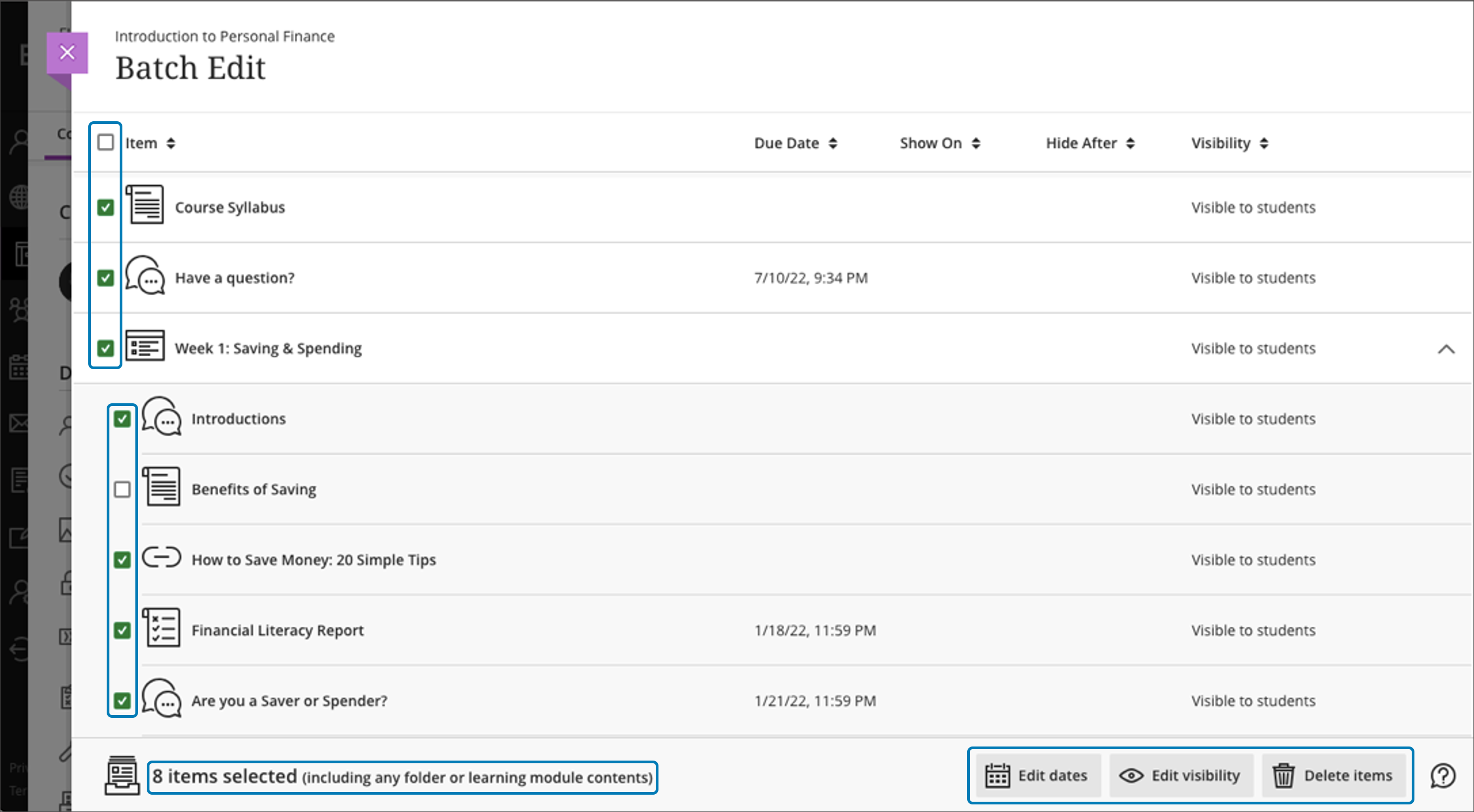
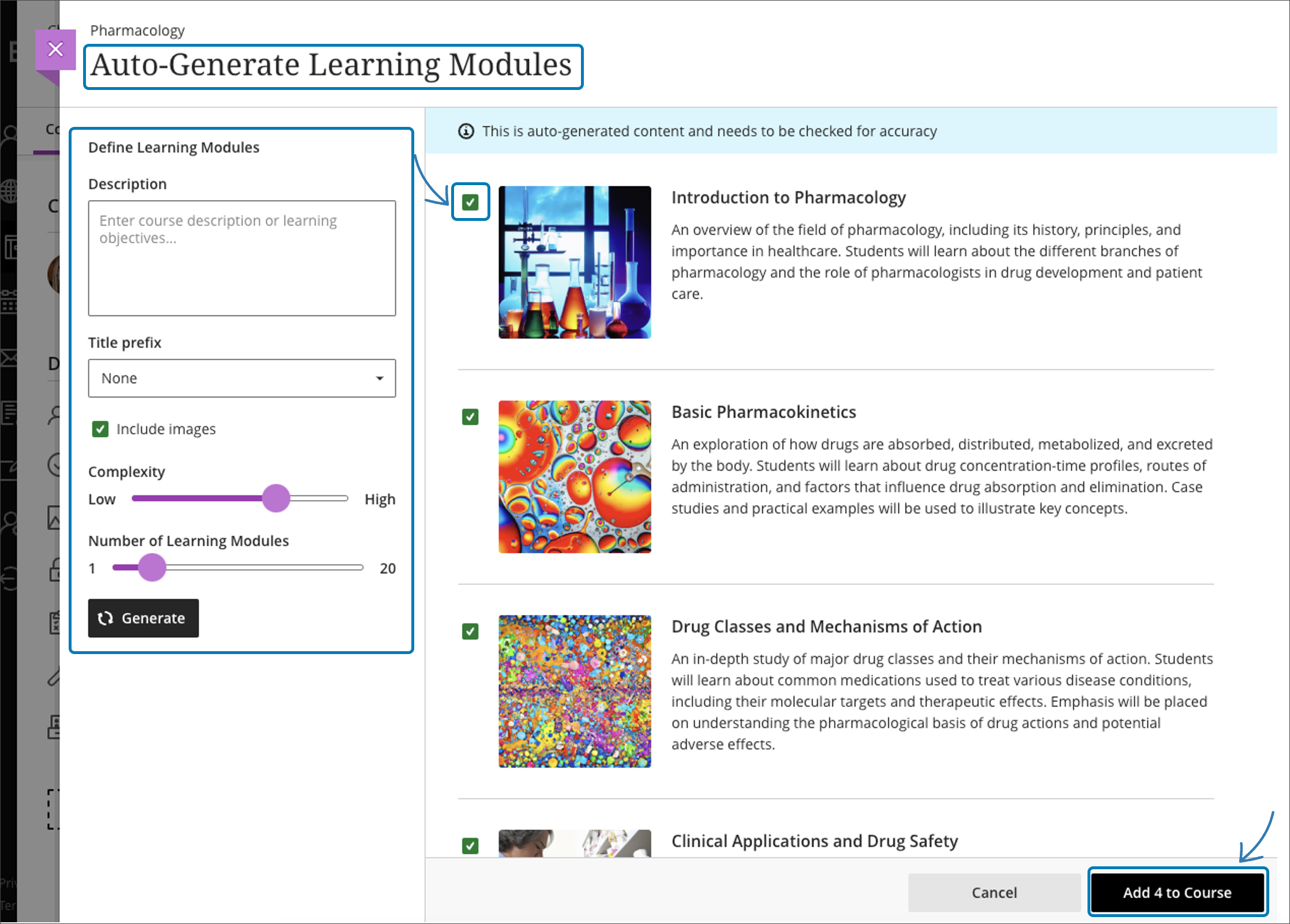
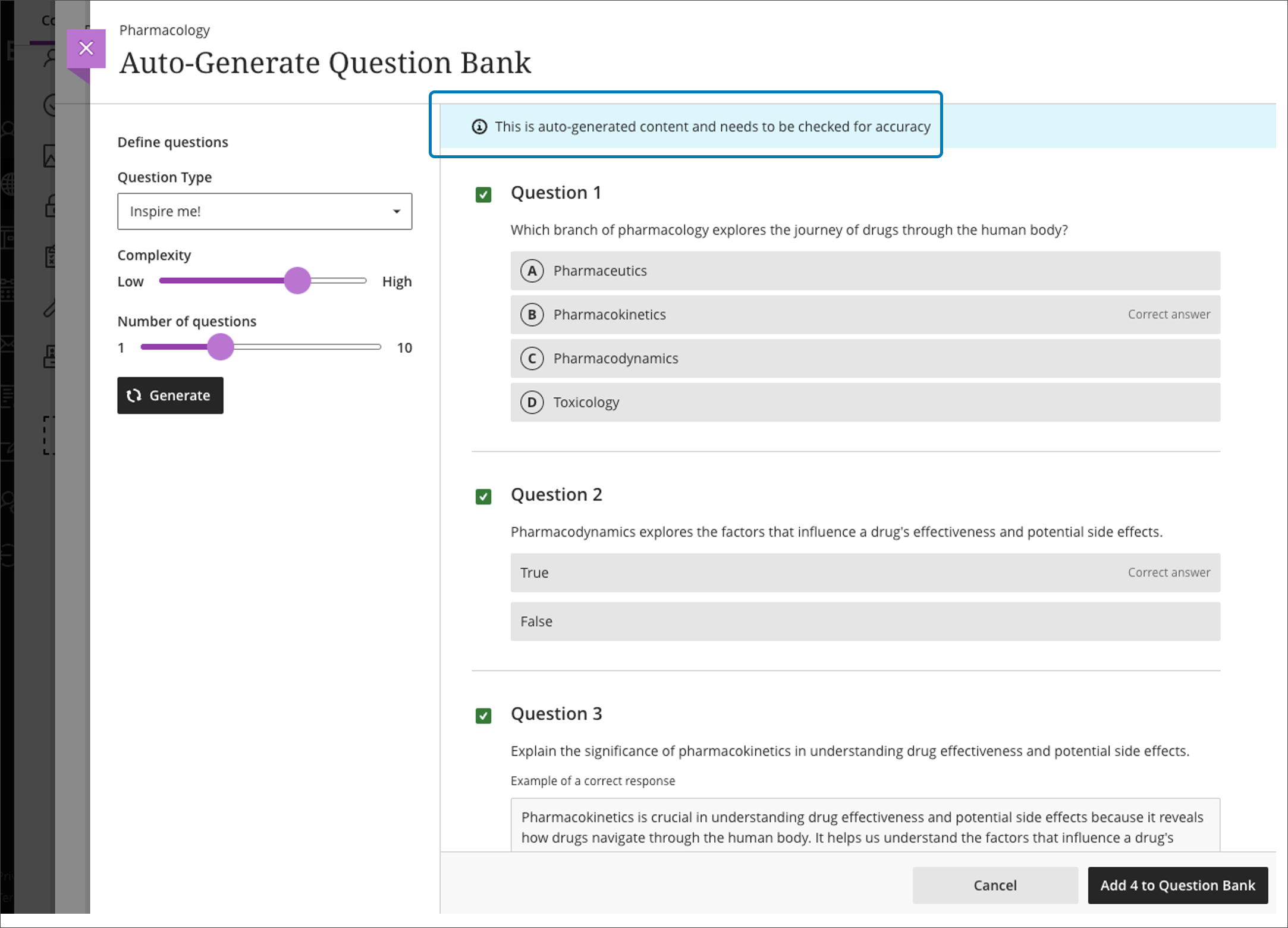
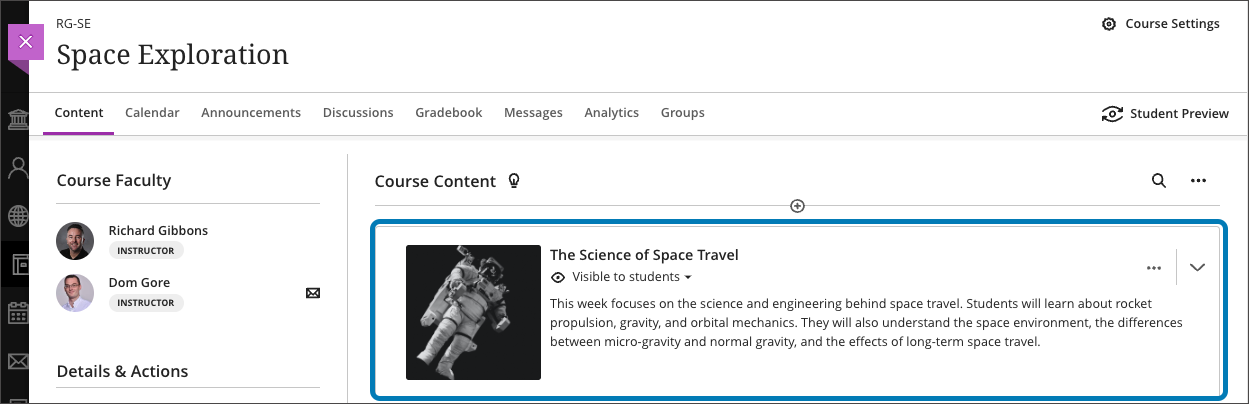
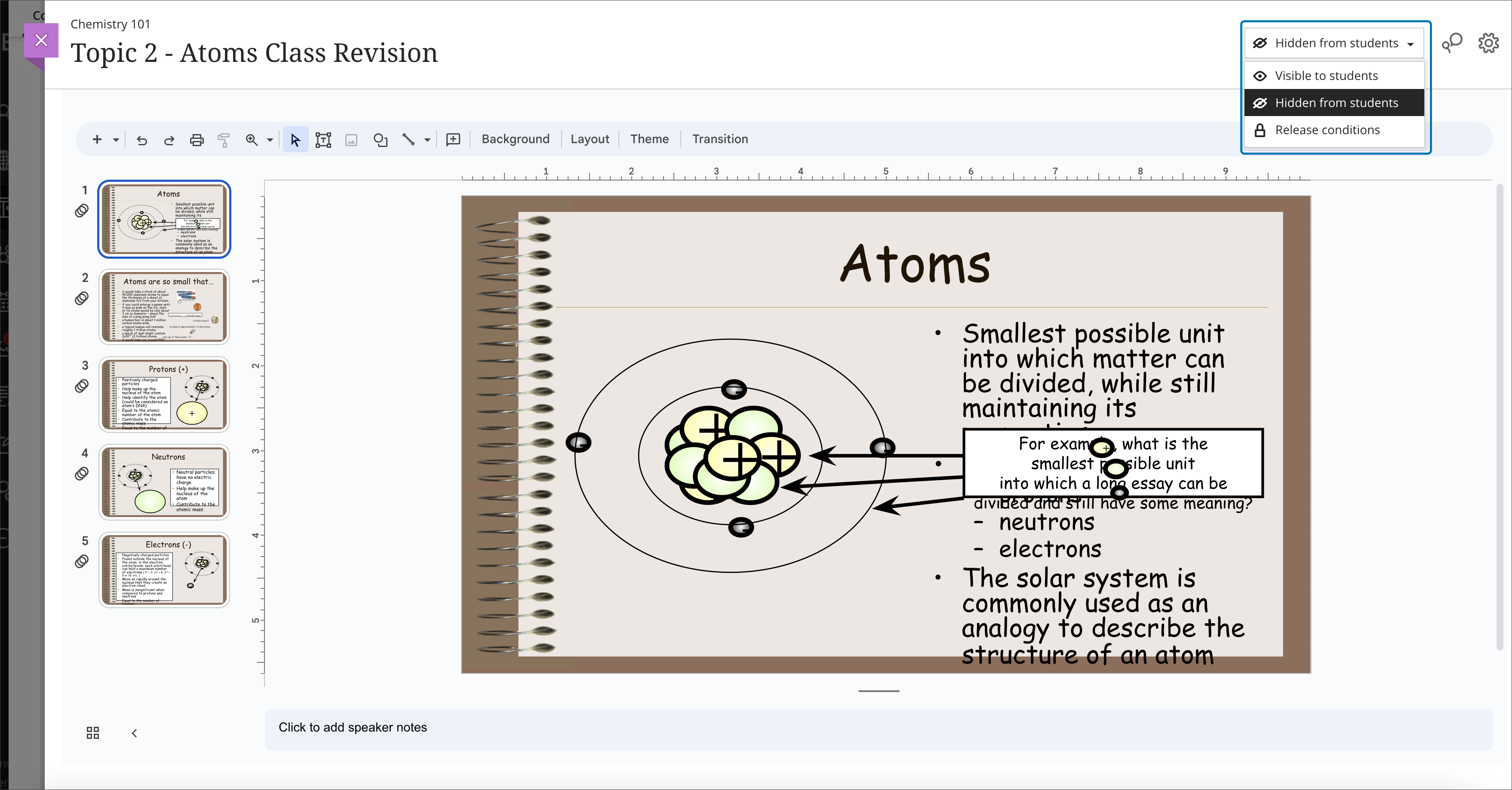
    <div class="html-content"><div><div><div><div><div><div><span>As the fall semester starts, the next update for Ultra courses brings improvements to the course management tools and a new stock image resource for course banners. Additionally, faculty will also have access to a new grading interface and w</span><span>e begin exploring an exciting suite of <a href="https://my3.my.umbc.edu/groups/instructional-technology/posts/134605" rel="nofollow external" class="bo">course design assistant tools powered by AI</a>.</span><span> </span></div><div><br></div><div><strong>Course Management</strong></div></div></div></div></div><div><ul><li><span>Search Unsplash, the largest stock image database for royalty-free images to <a href="https://help.blackboard.com/Learn/Instructor/Ultra/Courses/Course_Banner" rel="nofollow external" class="bo">use for your course banner.</a> </span></li><li><span><a href="https://help.blackboard.com/Learn/Instructor/Ultra/Course_Content/Ultra_Batch_Edit" rel="nofollow external" class="bo">Batch Edit</a> availability and due dates for content in your course by expanding folders and learning modules on a single page.</span></li></ul><div><img src="https://help.blackboard.com/sites/default/files/images/2023-08/learn_ultra_instructor_Batch%20EditSupportForRecursiveActions.png" width="450" alt="In the new Batch Edit, all items are now visible on a single page and you can expand and collapse Folders and Learning Modules" style="max-width: 100%; height: auto;"></div><div><em>Image 1: In the new Batch Edit, all items are now visible on a single page and you can expand and collapse Folders and Learning Modules.</em></div><ul><li><span>Copy one, some or all course announcements between Ultra courses, or from Original courses to Ultra.</span></li><li><span>Verify student engagement with third-party tools using Progress Tracking. When students complete content in a third-party tool, it will be marked complete.</span></li></ul></div><div><div><div><div><div><span><div><div><div><div><div><strong>AI Course Design Assistant Tools</strong></div></div></div></div></div><div><ul><li><strong>A course-builder assistant</strong>. Create sample learning modules, titles, and descriptions. </li></ul><div><img src="https://help.blackboard.com/sites/default/files/images/2023-08/learn_ultra_instructor_AIDesignAssitant_CourseContentSuggestions_AutoGenerateModules_SelectAndAdd.png" alt="Example of AI-suggested course structure" width="450" style="max-width: 100%; height: auto;"></div><div><em>Image 2: Example of AI-suggested course structure</em></div><ul><li><strong>Image suggestion and creation.</strong> The assistant can draw from the Unsplash stock image library and suggest thumbnails for illustration in learning modules or identify an image for the course banner. Functionality also includes AI-generated image creation based on course name and keywords.</li><li><strong>Content-based test generation</strong>. AI-powered algorithms analyze an Ultra document's content or inputted learning objectives and quickly generate a diverse set of questions for a test or question bank. </li></ul><div><img src="https://help.blackboard.com/sites/default/files/images/2023-08/learn_ultra_instructor_AIDesignAssitant_QuestionBankGeneration_AddAndRefineQuestionBank.png" alt="Example of AI-generated question bank" width="450" style="max-width: 100%; height: auto;"></div><div><em>Image 3: Example of AI-generated question bank</em></div><ul><li><strong>Rubric creation.</strong> Drawing on an assessment or discussion prompt's content, the AI can analyze and streamline the rubric creation process according to specific learning objectives and assessment criteria.</li></ul></div></span></div><div><span><div>Other updates in September include </div><div><ul><li><a href="https://help.blackboard.com/Learn/Instructor/Ultra/Assignments/FlexGradingAssignments" rel="nofollow external" class="bo">Flexible Grading</a>, which was activated just before the FA2023 semester started. <span>Flexible Grading features grade by student or question. Instructors can e</span><span>asily move between student attempts and keep track of their grading process. Flexible Grading is supported on desktop, laptop, and tablets. Faculty are invited to join a <a href="https://my3.my.umbc.edu/groups/instructional-technology/events/120029" rel="nofollow external" class="bo">Flexible Grading preview and training session</a> on September 18, 2023.</span></li><li><a href="https://help.blackboard.com/es-es/node/46381" rel="nofollow external" class="bo"><span>Auto-captioning of </span>audio and video content</a> used in assessment feedback and announcements. Auto-captioning also supports diverse language preferences, aligning with the user's chosen language in both Original and Ultra courses.</li></ul></div><div><span>Faculty should see the latest updates in Ultra courses around September 7-8 2023. </span><span>The next update to our Ultra test environment will take place on September 12, 2023; release notes are posted to the <a href="https://wiki.umbc.edu/x/LohnB" rel="nofollow external" class="bo">What's New in Ultra</a> that same week. Faculty who are interested in test driving new features before they are released to production should </span><a href="http://my.umbc.edu/go/request-help" rel="nofollow external" class="bo">open an RT ticket</a> to request early access. Please <a href="http://umbc.edu/go/ultra" rel="nofollow external" class="bo">watch the FAQs</a>, including <a href="https://wiki.umbc.edu/x/LohnB" rel="nofollow external" class="bo">the What's New with Ultra page</a>, <span>and myUMBC for additional information about Ultra. </span></div></span></div></div></div></div><div><span><br></span></div></div><div><span><strong>Connect with Instructional Technology</strong></span></div><div><span>As always, if you have any questions about teaching, learning, and technology at UMBC, please consider the following options:</span></div><ul><li><a href="http://www.umbc.edu/faq" rel="nofollow external" class="bo">Check our extensive FAQ collection</a><span> </span></li><ul><li><span><a href="https://wiki.umbc.edu/x/LohnB" rel="nofollow external" class="bo"><span>What's new in Ultra?</span></a><span> </span><span>|</span><span> </span><a href="https://wiki.umbc.edu/x/bwrSAQ" rel="nofollow external" class="bo"><span>Known Issues</span></a><span> </span></span></li></ul><li><span><a href="http://my.umbc.edu/go/request-help" rel="nofollow external" class="bo">Open a ticket via RT</a></span></li><li><span>Follow the </span><a href="http://my.umbc.edu/groups/instructional-technology" rel="nofollow external" class="bo">Instructional Technology</a><span> &amp; </span><a href="http://my.umbc.edu/groups/doit" rel="nofollow external" class="bo">DoIT</a><span> myUMBC groups</span></li><li><a href="http://doit.umbc.edu/itnm/staff/" rel="nofollow external" class="bo">Request a consult</a><span> with <a href="http://doit.umbc.edu/itnm/staff" rel="nofollow external" class="bo">instructional technology staff</a></span></li><li><span><a href="http://pivot.umbc.edu" rel="nofollow external" class="bo">PIVOT</a> | <a href="https://doit.umbc.edu/itnm/academic-continuity/" rel="nofollow external" class="bo">Academic Continuity</a></span><span> </span><span>|</span><span> </span><span><a href="https://fdc.umbc.edu/teaching/keep-on-teaching/" rel="nofollow external" class="bo">Keep On Teaching</a></span><span> </span><span>|</span><span> </span><span><a href="https://doit.umbc.edu/students" rel="nofollow external" class="bo">Student Technology Resources</a></span></li></ul></div><div><div></div></div></div>
]]>
  </Body>
  <Summary>As the fall semester starts, the next update for Ultra courses brings improvements to the course management tools and a new stock image resource for course banners. Additionally, faculty will also...</Summary>
  <Website>https://my3.my.umbc.edu/groups/instructional-technology/posts/135009</Website>
  <TrackingUrl>https://dev.my.umbc.edu/api/v0/pixel/news/135009/guest@my.umbc.edu/09a05b190ac396070b0eacadbe29216a/api/pixel</TrackingUrl>
  <Tag>ai</Tag>
  <Tag>blackboard</Tag>
  <Tag>flexible-grading</Tag>
  <Tag>ultra-experience</Tag>
  <Tag>ultra-update</Tag>
  <Group token="instructional-technology">Instructional Technology</Group>
  <GroupUrl>https://dev.my.umbc.edu/groups/instructional-technology</GroupUrl>
  <AvatarUrl>https://assets2-dev.my.umbc.edu/system/shared/avatars/groups/000/001/164/dec3b026b81ee6d890a8f82f75c94a2e/xsmall.png?1446126703</AvatarUrl>
  <AvatarUrl size="original">https://assets1-dev.my.umbc.edu/system/shared/avatars/groups/000/001/164/dec3b026b81ee6d890a8f82f75c94a2e/original.png?1446126703</AvatarUrl>
  <AvatarUrl size="xxlarge">https://assets2-dev.my.umbc.edu/system/shared/avatars/groups/000/001/164/dec3b026b81ee6d890a8f82f75c94a2e/xxlarge.png?1446126703</AvatarUrl>
  <AvatarUrl size="xlarge">https://assets1-dev.my.umbc.edu/system/shared/avatars/groups/000/001/164/dec3b026b81ee6d890a8f82f75c94a2e/xlarge.png?1446126703</AvatarUrl>
  <AvatarUrl size="large">https://assets1-dev.my.umbc.edu/system/shared/avatars/groups/000/001/164/dec3b026b81ee6d890a8f82f75c94a2e/large.png?1446126703</AvatarUrl>
  <AvatarUrl size="medium">https://assets4-dev.my.umbc.edu/system/shared/avatars/groups/000/001/164/dec3b026b81ee6d890a8f82f75c94a2e/medium.png?1446126703</AvatarUrl>
  <AvatarUrl size="small">https://assets3-dev.my.umbc.edu/system/shared/avatars/groups/000/001/164/dec3b026b81ee6d890a8f82f75c94a2e/small.png?1446126703</AvatarUrl>
  <AvatarUrl size="xsmall">https://assets2-dev.my.umbc.edu/system/shared/avatars/groups/000/001/164/dec3b026b81ee6d890a8f82f75c94a2e/xsmall.png?1446126703</AvatarUrl>
  <AvatarUrl size="xxsmall">https://assets3-dev.my.umbc.edu/system/shared/avatars/groups/000/001/164/dec3b026b81ee6d890a8f82f75c94a2e/xxsmall.png?1446126703</AvatarUrl>
  <Sponsor>Instructional Technology</Sponsor>
  <ThumbnailUrl size="xxlarge">https://assets2-dev.my.umbc.edu/system/shared/thumbnails/news/000/135/009/79ef85aca28b5da734f174b439536c44/xxlarge.jpg?1693498242</ThumbnailUrl>
  <ThumbnailUrl size="xlarge">https://assets1-dev.my.umbc.edu/system/shared/thumbnails/news/000/135/009/79ef85aca28b5da734f174b439536c44/xlarge.jpg?1693498242</ThumbnailUrl>
  <ThumbnailUrl size="large">https://assets2-dev.my.umbc.edu/system/shared/thumbnails/news/000/135/009/79ef85aca28b5da734f174b439536c44/large.jpg?1693498242</ThumbnailUrl>
  <ThumbnailUrl size="medium">https://assets2-dev.my.umbc.edu/system/shared/thumbnails/news/000/135/009/79ef85aca28b5da734f174b439536c44/medium.jpg?1693498242</ThumbnailUrl>
  <ThumbnailUrl size="small">https://assets2-dev.my.umbc.edu/system/shared/thumbnails/news/000/135/009/79ef85aca28b5da734f174b439536c44/small.jpg?1693498242</ThumbnailUrl>
  <ThumbnailUrl size="xsmall">https://assets3-dev.my.umbc.edu/system/shared/thumbnails/news/000/135/009/79ef85aca28b5da734f174b439536c44/xsmall.jpg?1693498242</ThumbnailUrl>
  <ThumbnailUrl size="xxsmall">https://assets2-dev.my.umbc.edu/system/shared/thumbnails/news/000/135/009/79ef85aca28b5da734f174b439536c44/xxsmall.jpg?1693498242</ThumbnailUrl>
  <PawCount>2</PawCount>
  <CommentCount>0</CommentCount>
  <CommentsAllowed>true</CommentsAllowed>
  <PostedAt>Thu, 31 Aug 2023 13:37:59 -0400</PostedAt>
</NewsItem>
  <NewsItem contentIssues="true" id="131214" important="false" status="posted" url="https://dev.my.umbc.edu/groups/doit/posts/131214">
    <Title>Support student success with Ultra&#8217;s progress tracking tools</Title>
    <Tagline>Discover how and when students engage with course content</Tagline>
    <Body>
      <![CDATA[
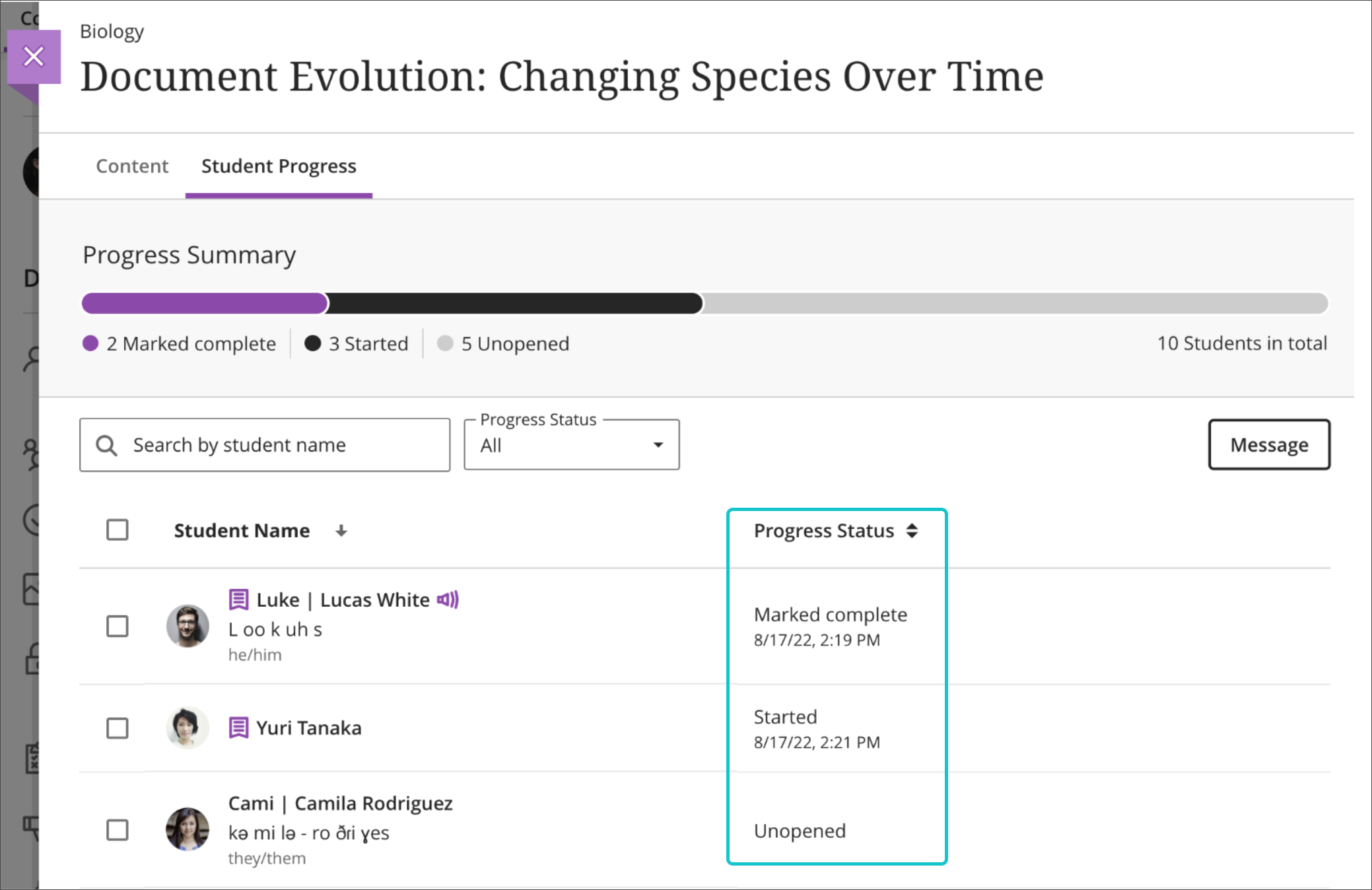
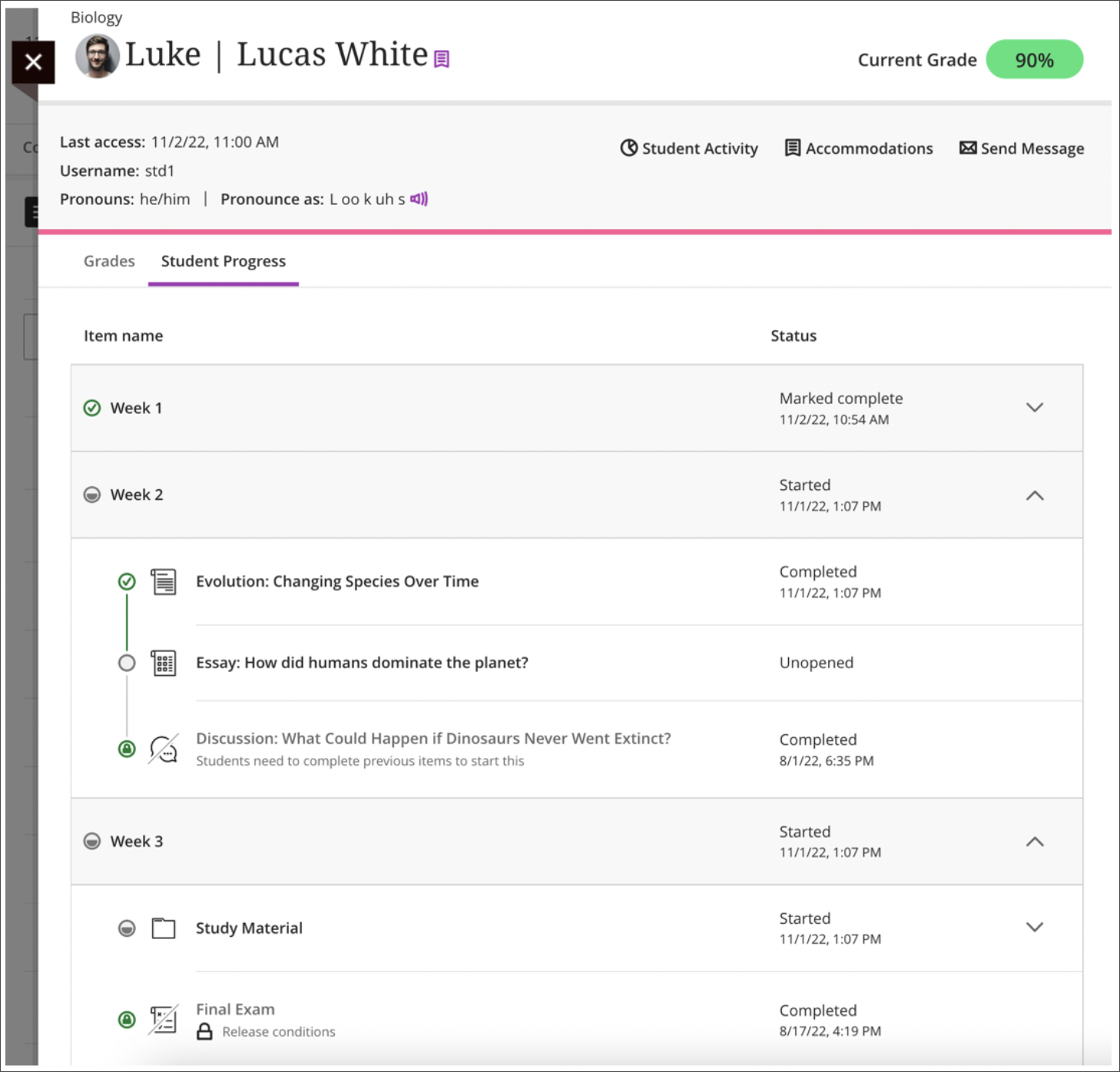
          <div class="html-content"><span><p><span>The success of students in a Blackboard course is often dependent on their level of engagement and their ability to stay on track with course content and assignments. As an instructor, it's crucial to <a href="https://wiki.umbc.edu/x/sQjnAQ" rel="nofollow external" class="bo">have the tools and resources</a> to monitor students' progress and ensure they are staying engaged and motivated throughout the course.</span></p><p><span>An Ultra course provides progress tracking tools to help instructors monitor how much time students are spending in the course, what content they are engaging with, and what their current grades are. This information is invaluable in helping instructors reach out to students who may be struggling or falling behind, and it also helps in retaining students who might otherwise drop out of the course. </span><span><strong>Progress Tracking is enabled by default in all Ultra courses as of SU2023.</strong></span></p><p><span>One of the key benefits of tracking students progress is the ability to identify potential issues early on. If a student is not engaging with course content as much as they should be, the instructor can reach out and provide support, resources, or motivation to help the student get back on track. This proactive approach can help students stay engaged and motivated, and it also helps them to understand the importance of their participation and progress in the course. </span></p><p><img src="https://help.blackboard.com/sites/default/files/images/2022-09/learn_ultra_instructor_StudentProgressReportForCourseContent_StatusAndDate.png" alt="Image 1: Example of Progress Summary report" width="500" style="max-width: 100%; height: auto;"></p></span><div><span><p><span><em>Image 1: Example of <a href="https://help.blackboard.com/Learn/Instructor/Ultra/Courses/Progress_Tracking" rel="nofollow external" class="bo">Progress Summary report</a>. The Ultra progress tracker allows faculty to view how students are engaging with content in a course. Within the context of each content report, the instructor can easily check boxes for students who are not engaged with course resources and send a message.</em></span></p><p><span>Another advantage of progress tracking is the ability to monitor students' time spent in the course and where students are spending that time. Since students have the flexibility to log in and work on course content at any time, some may procrastinate or get sidetracked, leading to a decrease in their engagement and delay in completing assigned tasks. By tracking how much time students are spending in the course and seeing how and where students spend that time, instructors can intervene and provide support to help students stay on track. </span></p></span></div><div><span><p><span><img src="https://help.blackboard.com/sites/default/files/images/2022-11/learn_ultra_instructor_StudentReports_SingleStudentReport.png" alt="Image 2: Example of Student Progress report" width="500" style="max-width: 100%; height: auto;"></span></p><p><em><span>I</span><span>mage 2: Example of Student Progress report, available from <a href="https://help.blackboard.com/Learn/Instructor/Ultra/Interact/StudentOverview" rel="nofollow external" class="bo">the Student Overview</a>. Viewing an individual student's progress in the course will show how s/he has accessed all content to date and the current grade. It's also easy to send that student a message.</span></em></p><p><span>Additionally, tracking students' grades helps instructors to monitor their overall performance and provide additional feedback as needed. With progress tracking, instructors can easily see which students are on track for success and which students may need additional support or intervention. From the student's progress report, click on the Student Activity report to view that individual student's time spent in class and its relationship to the overall grade. Instructors can quickly send messages from these various progress tracking tools as well as <a href="https://help.blackboard.com/node/45476" rel="nofollow external" class="bo">within the individual submission pages</a> for assessment activities.</span></p></span><img src="https://blackboard.umbc.edu/bbcswebdav/institution/doitnews/ultra-updates/Individual_Course_Activity.png" alt="Image 3: Example of Course Activity Report" width="500" style="max-width: 100%; height: auto;"></div><div><span><p><span><em>Image 3: Example of <a href="https://help.blackboard.com/Learn/Instructor/Ultra/Performance/Course_Reports/Course_Activity_Related_to_Grades/View_Individual_Student_Course_Activity_Data" rel="nofollow external" class="bo">Course Activity Report</a>. This student spent more time (purple) in his winter course compared to the rest of the class (black).</em></span></p><p><span>Here are a few practical tips for instructors to keep in mind when using these tools:</span></p><span><ol><li><span><strong>Leverage learning modules instead of folders.</strong> With progress tracking, <a href="https://wiki.umbc.edu/x/tQFyBw" rel="nofollow external" class="bo">students can see how much content</a> they've completed and how much content is left to consume or finish. This can be helpful when planning their schedules or motivating to know they have just one or two items left to wrap up.</span></li><li><span><strong>Stay proactive.</strong></span><span> Regularly check the <span><span>Student Progress report, available from <a href="https://help.blackboard.com/Learn/Instructor/Ultra/Interact/StudentOverview" rel="nofollow external" class="bo">the Student Overview</a>,</span></span> and reach out to those who may be struggling. Provide feedback, resources, and encouragement to help students stay on track.</span></li><li><span><strong>Use data to inform decisions.</strong></span><span> The data you collect from the <a href="https://help.blackboard.com/Learn/Instructor/Ultra/Courses/Progress_Tracking" rel="nofollow external" class="bo">Progress Summary report</a> can inform your teaching and help you to make data-driven decisions about how to support your students.</span></li><li><span><strong>Personalize your outreach.</strong></span><span> When reaching out to students, take the time to personalize your message <a href="https://help.blackboard.com/node/45476" rel="nofollow external" class="bo">from assessment submissions</a> based on their individual needs and progress. This shows that you care about their success and helps build a positive relationship with your students.</span></li><li><span><strong>Encourage self-reflection. </strong></span><span>Encourage students to reflect on their progress and engagement, and provide opportunities for them to share their thoughts and experiences with you and their peers.</span></li><li><span><strong>Celebrate successes.</strong></span><span> Celebrate and acknowledge students' successes and milestones along the way. This helps to keep students motivated and engaged in the course.</span></li></ol><div><p><span>Using Ultra's progress tracking tools can be an essential part of your teaching toolkit. By tracking students' engagement, time spent, and overall grades, instructors can intervene and provide support when needed, increase engagement and motivation, and help students succeed in their coursework. </span></p><p><span><em>~ <a href="https://doit.umbc.edu/itnm/staff/hawken/" rel="nofollow external" class="bo">Mariann Hawken</a></em></span></p></div></span></span></div></div>
      ]]>
    </Body>
    <Summary>The success of students in a Blackboard course is often dependent on their level of engagement and their ability to stay on track with course content and assignments. As an instructor, it's...</Summary>
    <Website>https://my3.my.umbc.edu/groups/instructional-technology/posts/131214</Website>
    <TrackingUrl>https://dev.my.umbc.edu/api/v0/pixel/news/131214/guest@my.umbc.edu/e97bce78c13c5a36b021aca6c2e8688b/api/pixel</TrackingUrl>
    <Tag>analytics</Tag>
    <Tag>blackboard</Tag>
    <Tag>hawken</Tag>
    <Tag>progress-tracker</Tag>
    <Tag>student-success</Tag>
    <Tag>ultra-experience</Tag>
    <Group token="instructional-technology">Instructional Technology</Group>
    <GroupUrl>https://dev.my.umbc.edu/groups/instructional-technology</GroupUrl>
    <AvatarUrl>https://assets2-dev.my.umbc.edu/system/shared/avatars/groups/000/001/164/dec3b026b81ee6d890a8f82f75c94a2e/xsmall.png?1446126703</AvatarUrl>
    <AvatarUrl size="original">https://assets1-dev.my.umbc.edu/system/shared/avatars/groups/000/001/164/dec3b026b81ee6d890a8f82f75c94a2e/original.png?1446126703</AvatarUrl>
    <AvatarUrl size="xxlarge">https://assets2-dev.my.umbc.edu/system/shared/avatars/groups/000/001/164/dec3b026b81ee6d890a8f82f75c94a2e/xxlarge.png?1446126703</AvatarUrl>
    <AvatarUrl size="xlarge">https://assets1-dev.my.umbc.edu/system/shared/avatars/groups/000/001/164/dec3b026b81ee6d890a8f82f75c94a2e/xlarge.png?1446126703</AvatarUrl>
    <AvatarUrl size="large">https://assets1-dev.my.umbc.edu/system/shared/avatars/groups/000/001/164/dec3b026b81ee6d890a8f82f75c94a2e/large.png?1446126703</AvatarUrl>
    <AvatarUrl size="medium">https://assets4-dev.my.umbc.edu/system/shared/avatars/groups/000/001/164/dec3b026b81ee6d890a8f82f75c94a2e/medium.png?1446126703</AvatarUrl>
    <AvatarUrl size="small">https://assets3-dev.my.umbc.edu/system/shared/avatars/groups/000/001/164/dec3b026b81ee6d890a8f82f75c94a2e/small.png?1446126703</AvatarUrl>
    <AvatarUrl size="xsmall">https://assets2-dev.my.umbc.edu/system/shared/avatars/groups/000/001/164/dec3b026b81ee6d890a8f82f75c94a2e/xsmall.png?1446126703</AvatarUrl>
    <AvatarUrl size="xxsmall">https://assets3-dev.my.umbc.edu/system/shared/avatars/groups/000/001/164/dec3b026b81ee6d890a8f82f75c94a2e/xxsmall.png?1446126703</AvatarUrl>
    <Sponsor>Instructional Technology</Sponsor>
    <ThumbnailUrl size="xxlarge">https://assets3-dev.my.umbc.edu/system/shared/thumbnails/news/000/131/214/1fb8977c963429185684d7ece931daa2/xxlarge.jpg?1677253014</ThumbnailUrl>
    <ThumbnailUrl size="xlarge">https://assets2-dev.my.umbc.edu/system/shared/thumbnails/news/000/131/214/1fb8977c963429185684d7ece931daa2/xlarge.jpg?1677253014</ThumbnailUrl>
    <ThumbnailUrl size="large">https://assets2-dev.my.umbc.edu/system/shared/thumbnails/news/000/131/214/1fb8977c963429185684d7ece931daa2/large.jpg?1677253014</ThumbnailUrl>
    <ThumbnailUrl size="medium">https://assets3-dev.my.umbc.edu/system/shared/thumbnails/news/000/131/214/1fb8977c963429185684d7ece931daa2/medium.jpg?1677253014</ThumbnailUrl>
    <ThumbnailUrl size="small">https://assets2-dev.my.umbc.edu/system/shared/thumbnails/news/000/131/214/1fb8977c963429185684d7ece931daa2/small.jpg?1677253014</ThumbnailUrl>
    <ThumbnailUrl size="xsmall">https://assets2-dev.my.umbc.edu/system/shared/thumbnails/news/000/131/214/1fb8977c963429185684d7ece931daa2/xsmall.jpg?1677253014</ThumbnailUrl>
    <ThumbnailUrl size="xxsmall">https://assets1-dev.my.umbc.edu/system/shared/thumbnails/news/000/131/214/1fb8977c963429185684d7ece931daa2/xxsmall.jpg?1677253014</ThumbnailUrl>
    <PawCount>6</PawCount>
    <CommentCount>0</CommentCount>
    <CommentsAllowed>true</CommentsAllowed>
    <PostedAt>Wed, 30 Aug 2023 09:11:02 -0400</PostedAt>
  </NewsItem>
  <NewsItem contentIssues="true" id="134605" important="false" status="posted" url="https://dev.my.umbc.edu/groups/doit/posts/134605">
  <Title>Ultra Courses to Offer New AI Course Design Assistant Tools</Title>
  <Tagline>Generate images, structure, test questions, and rubrics</Tagline>
  <Body>
    <![CDATA[
    <div class="html-content"><p>As the landscape of education continues to evolve, the integration of cutting-edge technology into the classroom has become more vital than ever. The advent of generative AI tools is poised to revolutionize the field of higher education, transforming the virtual classroom into a dynamic and responsive environment. The potential for positive impact on productivity and efficiency for faculty is significant, opening new doors for innovation in teaching and learning as well as course development. </p>
    <p>Instructional Technology invites faculty to preview the suite of new AI Course Design Assistant features <a href="https://my3.my.umbc.edu/groups/instructional-technology/events?mode=upcoming&amp;tag=ai-course-design-assistant" rel="nofollow external" class="bo">during two webinars on Wednesday, August 23</a>. Developed to assist faculty in streamlining course preparation, the AI Course Design Assistant tools include:</p>
    <ul>
    <li><strong>A course-builder assistant</strong>. Create sample learning modules, titles, and descriptions. </li>
    <li><strong>Image suggestion and creation.</strong> The assistant can draw from the Unsplash stock image library and suggest thumbnails for illustration in learning modules or identify an image for the course banner. Functionality also includes AI-generated image creation based on course name and keywords.</li>
    <li><strong>Content-based test generation</strong>. AI-powered algorithms analyze an Ultra document's content or inputted learning objectives and quickly generate a diverse set of questions for a test or question bank. </li>
    <li><strong>Rubric creation.</strong> Drawing on an assessment or discussion prompt’s content, the AI can analyze and streamline the rubric creation process according to specific learning objectives and assessment criteria.</li>
    </ul>
    <p>Informed by <a href="https://www.anthology.com/trust-center/trustworthy-ai-approach" rel="nofollow external" class="bo">Anthology’s Trustworthy AI Approach</a> and seamlessly embedded into Ultra’s workflows, the AI Course Design Assistant tools are opt-in and the instructor is always in control of the content generated. Faculty can choose when, where, and how to leverage the tools in their Ultra courses.</p>
    <p>Instructional Technology expects to launch the tools to the campus during <a href="https://usdla.org/2023-ndlw/" rel="nofollow external" class="bo">National Distance Learning Week</a> (Nov. 6-10) with a lunchtime series. Limited early access will be available to interested faculty upon request. Please <a href="https://my3.my.umbc.edu/groups/instructional-technology/events?mode=upcoming&amp;tag=ai-course-design-assistant" rel="nofollow external" class="bo">attend a preview session</a> for more information.</p>
    <div><strong>Connect with Instructional Technology</strong></div>
    <div>As always, if you have any questions about teaching, learning, and technology at UMBC, please consider the following options:</div>
    <ul>
    <li><a href="http://www.umbc.edu/faq" rel="nofollow external" class="bo">Check our extensive FAQ collection</a> </li>
    <ul>
    <li><a href="https://wiki.umbc.edu/x/LohnB" rel="nofollow external" class="bo">What's new in Ultra?</a> | <a href="https://wiki.umbc.edu/x/bwrSAQ" rel="nofollow external" class="bo">Known Issues</a> </li>
    </ul>
    <li><a href="http://my.umbc.edu/go/request-help" rel="nofollow external" class="bo">Open a ticket via RT</a></li>
    <li>Follow the <a href="http://my.umbc.edu/groups/instructional-technology" rel="nofollow external" class="bo">Instructional Technology</a> &amp; <a href="http://my.umbc.edu/groups/doit" rel="nofollow external" class="bo">DoIT</a> myUMBC groups</li>
    <li><a href="http://doit.umbc.edu/itnm/staff/" rel="nofollow external" class="bo">Request a consult</a> with <a href="http://doit.umbc.edu/itnm/staff" rel="nofollow external" class="bo">instructional technology staff</a></li>
    <li><a href="http://pivot.umbc.edu/" rel="nofollow external" class="bo">PIVOT</a> | <a href="https://doit.umbc.edu/itnm/academic-continuity/" rel="nofollow external" class="bo">Academic Continuity</a> | <a href="https://fdc.umbc.edu/teaching/keep-on-teaching/" rel="nofollow external" class="bo">Keep On Teaching</a> | <a href="https://doit.umbc.edu/students" rel="nofollow external" class="bo">Student Technology Resources</a></li>
    </ul>
    <p><em>UMBC is committed to providing a consistent learning experience for everyone. The last day we will support Blackboard Original is December 31, 2024. Please check out our training and support: <a href="https://umbc.edu/go/ultra" rel="nofollow external" class="bo">https://umbc.edu/go/ultra</a>.</em></p></div>
]]>
  </Body>
  <Summary>As the landscape of education continues to evolve, the integration of cutting-edge technology into the classroom has become more vital than ever. The advent of generative AI tools is poised to...</Summary>
  <Website>https://my3.my.umbc.edu/groups/instructional-technology/posts/134605</Website>
  <TrackingUrl>https://dev.my.umbc.edu/api/v0/pixel/news/134605/guest@my.umbc.edu/d5bafa793745ce800919e038c8e7d5de/api/pixel</TrackingUrl>
  <Tag>ai</Tag>
  <Tag>ai-course-design-assistant</Tag>
  <Tag>blackboard</Tag>
  <Tag>online-learning</Tag>
  <Tag>ultra</Tag>
  <Group token="instructional-technology">Instructional Technology</Group>
  <GroupUrl>https://dev.my.umbc.edu/groups/instructional-technology</GroupUrl>
  <AvatarUrl>https://assets2-dev.my.umbc.edu/system/shared/avatars/groups/000/001/164/dec3b026b81ee6d890a8f82f75c94a2e/xsmall.png?1446126703</AvatarUrl>
  <AvatarUrl size="original">https://assets1-dev.my.umbc.edu/system/shared/avatars/groups/000/001/164/dec3b026b81ee6d890a8f82f75c94a2e/original.png?1446126703</AvatarUrl>
  <AvatarUrl size="xxlarge">https://assets2-dev.my.umbc.edu/system/shared/avatars/groups/000/001/164/dec3b026b81ee6d890a8f82f75c94a2e/xxlarge.png?1446126703</AvatarUrl>
  <AvatarUrl size="xlarge">https://assets1-dev.my.umbc.edu/system/shared/avatars/groups/000/001/164/dec3b026b81ee6d890a8f82f75c94a2e/xlarge.png?1446126703</AvatarUrl>
  <AvatarUrl size="large">https://assets1-dev.my.umbc.edu/system/shared/avatars/groups/000/001/164/dec3b026b81ee6d890a8f82f75c94a2e/large.png?1446126703</AvatarUrl>
  <AvatarUrl size="medium">https://assets4-dev.my.umbc.edu/system/shared/avatars/groups/000/001/164/dec3b026b81ee6d890a8f82f75c94a2e/medium.png?1446126703</AvatarUrl>
  <AvatarUrl size="small">https://assets3-dev.my.umbc.edu/system/shared/avatars/groups/000/001/164/dec3b026b81ee6d890a8f82f75c94a2e/small.png?1446126703</AvatarUrl>
  <AvatarUrl size="xsmall">https://assets2-dev.my.umbc.edu/system/shared/avatars/groups/000/001/164/dec3b026b81ee6d890a8f82f75c94a2e/xsmall.png?1446126703</AvatarUrl>
  <AvatarUrl size="xxsmall">https://assets3-dev.my.umbc.edu/system/shared/avatars/groups/000/001/164/dec3b026b81ee6d890a8f82f75c94a2e/xxsmall.png?1446126703</AvatarUrl>
  <Sponsor>Instructional Technology</Sponsor>
  <ThumbnailUrl size="xxlarge">https://assets4-dev.my.umbc.edu/system/shared/thumbnails/news/000/134/605/45504cc5faf27fb98ed81919fdb263a8/xxlarge.jpg?1691674335</ThumbnailUrl>
  <ThumbnailUrl size="xlarge">https://assets1-dev.my.umbc.edu/system/shared/thumbnails/news/000/134/605/45504cc5faf27fb98ed81919fdb263a8/xlarge.jpg?1691674335</ThumbnailUrl>
  <ThumbnailUrl size="large">https://assets4-dev.my.umbc.edu/system/shared/thumbnails/news/000/134/605/45504cc5faf27fb98ed81919fdb263a8/large.jpg?1691674335</ThumbnailUrl>
  <ThumbnailUrl size="medium">https://assets2-dev.my.umbc.edu/system/shared/thumbnails/news/000/134/605/45504cc5faf27fb98ed81919fdb263a8/medium.jpg?1691674335</ThumbnailUrl>
  <ThumbnailUrl size="small">https://assets3-dev.my.umbc.edu/system/shared/thumbnails/news/000/134/605/45504cc5faf27fb98ed81919fdb263a8/small.jpg?1691674335</ThumbnailUrl>
  <ThumbnailUrl size="xsmall">https://assets4-dev.my.umbc.edu/system/shared/thumbnails/news/000/134/605/45504cc5faf27fb98ed81919fdb263a8/xsmall.jpg?1691674335</ThumbnailUrl>
  <ThumbnailUrl size="xxsmall">https://assets4-dev.my.umbc.edu/system/shared/thumbnails/news/000/134/605/45504cc5faf27fb98ed81919fdb263a8/xxsmall.jpg?1691674335</ThumbnailUrl>
  <PawCount>5</PawCount>
  <CommentCount>2</CommentCount>
  <CommentsAllowed>true</CommentsAllowed>
  <PostedAt>Thu, 10 Aug 2023 09:35:19 -0400</PostedAt>
</NewsItem>
  <NewsItem contentIssues="true" id="134412" important="false" status="posted" url="https://dev.my.umbc.edu/groups/doit/posts/134412">
  <Title>FA2023 Courses Created in Blackboard on July 25, 2023</Title>
  <Body>
    <![CDATA[
    <div class="html-content"><p>Blackboard course shells for FA2023 <a href="https://wiki.umbc.edu/x/eYHGAw" rel="nofollow external" class="bo">were created</a> on July 25, 2023. </p><p><span>The </span><a href="https://wiki.umbc.edu/x/VIdnB" rel="nofollow external" class="bo"><span>Ultra Course Preview</span></a><span> setting is enabled in FA2023 courses, which allows faculty</span><span> to <a href="https://wiki.umbc.edu/x/VIdnB" rel="nofollow external" class="bo">preview</a> OR <a href="https://wiki.umbc.edu/x/3AKGBQ" rel="nofollow external" class="bo">convert</a> a new Original course to Ultra</span><span>. The recommendation, however, is to create a new course to optimize the design. </span><span><strong>Note: </strong></span><span><strong>The <a href="https://doit.umbc.edu/news/post/130227/" rel="nofollow external" class="bo">last day we will support Blackboard Original</a> is December 31, 2024.</strong></span></p><ul><li><span>Please review the </span><a href="https://wiki.umbc.edu/x/LohnB" rel="nofollow external" class="bo">release notes</a><span> for the latest updates as well as</span><span> <a href="https://docs.google.com/spreadsheets/d/1kkG0toIfhmykbbwCeSDd8NopHp19CH7D5rPd95mxji8/edit?usp=sharing" rel="nofollow external" class="bo">feature parity charts</a> --</span><span> <a href="https://doit.umbc.edu/news/?tag=ultra-experience" rel="nofollow external" class="bo">more than 200 new updates</a> were added over the last year!</span><span> </span></li><li><span>Discover <a href="https://my3.my.umbc.edu/groups/instructional-technology/events?mode=upcoming&amp;tag=whats-new" rel="nofollow external" class="bo">What's New in Ultra for </a></span><span><a href="https://my3.my.umbc.edu/groups/instructional-technology/events?mode=upcoming&amp;tag=whats-new" rel="nofollow external" class="bo">Teaching &amp; Learning</a> on August 10 or 18.</span></li><li><span>Attend <a href="https://my3.my.umbc.edu/groups/instructional-technology/events?mode=upcoming&amp;tag=orientation" rel="nofollow external" class="bo">an Intro to Blackboard Ultra in 45 Minutes or Less training</a> on August 9 or 15. </span></li><li><span>Recent hires may be interested </span><span>in <a href="https://my3.my.umbc.edu/groups/instructional-technology/events?mode=upcoming&amp;tag=new-faculty" rel="nofollow external" class="bo">the New Faculty Evening Orientation</a> on August 9 or 17.</span></li><li><span>Review 5 best practices to <a href="https://my3.my.umbc.edu/groups/instructional-technology/events/118715" rel="nofollow external" class="bo">prepare your Ultra gradebook</a> on August 22.</span></li><li><span>Enroll in <a href="https://doit.umbc.edu/news/post/131063/" rel="nofollow external" class="bo">our self-paced workshop, Ultra for Instructors</a>, designed to provide a starting point to help you prepare your courses in Ultra.</span></li><li><span>Have a question about Ultra? Ask </span><a href="https://wiki.umbc.edu/x/kAU9BQ" rel="nofollow external" class="bo">an Ultra Ambassador</a><span>!</span></li></ul><p><span><a href="https://doit.umbc.edu/news/post/133604/" rel="nofollow external" class="bo">As previously announced</a>, seven departments, many foreign languages, English 100, IHU, FYE, and TRS courses have opted into Ultra to ensure a consistent approach for their students. This means courses will start with Ultra by default rather than Original. For consistency of instructional technology support, FA2023 c</span><span>ourses created in Blackboard on/after August 1, 2023 will be created in Ultra by default.</span></p><p><span>Plan your accessibility and Universal Design for Learning strategy before students begin working with course materials. Ally, an </span><a href="https://doit.umbc.edu/news/?id=82487" rel="nofollow external" class="bo"><span>accessibility tool</span></a><span>, is enabled in all course shells. Ally automatically scans uploaded and created course content, then performs a series of steps to make that content more accessible. Please review the </span><a href="https://wiki.umbc.edu/x/2IGdB" rel="nofollow external" class="bo"><span>Ally FAQs</span></a><span> for more information about the </span><a href="https://wiki.umbc.edu/x/_YGdB" rel="nofollow external" class="bo"><span>accessibility indicators</span></a><span> on course content and </span><span><a href="https://wiki.umbc.edu/x/3IGdB" rel="nofollow external" class="bo">alternative formats</a>, or attend a training session.</span></p><p><span>For faculty who will be teaching hybrid or online, the instructional technology team would like to share several resources to support online course development and instruction.</span></p><ol><li><span>Choose from our </span><a href="https://pivot.umbc.edu/pivot-solo/" rel="nofollow external" class="bo">PIVOT Solo</a><span> lessons to refresh or enhance your online teaching preparation. Five key topics cover course organization, active learning, community building, assessment, and supporting students. </span></li><li><span>Explore </span><a href="https://umbc.hosted.panopto.com/Panopto/Pages/Sessions/List.aspx#folderID=%2274ac9d58-1779-44c1-92b7-ab6900dfe6e9%22" rel="nofollow external" class="bo">our Panopto folder</a><span> for a wide variety of recorded webinars on various instructional technologies available at UMBC.</span></li><li><span>Learn about </span><a href="https://pivot.umbc.edu/course-design/quality-matters/quality-matters-impact/" rel="nofollow external" class="bo">the Quality Matters Impact program</a><span>, a new initiative to formally recognize courses that meet </span><a href="https://www.qualitymatters.org/" rel="nofollow external" class="bo">Quality Matters standards</a><span> and demonstrate exemplary online/hybrid course design.</span></li></ol><div><strong>About Course Creation</strong></div><div><span><br></span></div><div><span>Bb shells for FA2023 </span><span>are available for all courses (designated as lecture, lab, field or discussion) listed in the </span><a href="http://my.umbc.edu/go/schedule" rel="nofollow external" class="bo">UMBC Schedule of Classes (SOC)</a><span>, provided that there is an </span><a href="http://www.umbc.edu/blogs/oit-news/archives/2010/08/how_new_employe_1.html" rel="nofollow external" class="bo">instructor of record</a><span> listed. As new course sections and/or instructors are added to the SOC by </span><a href="https://registrar.umbc.edu/services/classroom-scheduling/" rel="nofollow external" class="bo">Department Scheduling Coordinators</a><span>, corresponding Bb shells are automatically generated overnight. </span></div><ul><li>If you are an instructor, and your name is not associated with the course you are teaching in the <a href="http://my.umbc.edu/go/schedule" rel="nofollow external" class="bo">SOC</a>, please see your <a href="https://swsupport.umbc.edu/scheduling-coordinators/" rel="nofollow external" class="bo">Departmental Scheduling Coordinator</a> to resolve the issue. Once you are listed in the <a href="https://my.umbc.edu/go/schedule" rel="nofollow external" class="bo">SOC</a>, your Bb course shell will be created automatically. </li><li>If you and your <a href="https://swsupport.umbc.edu/scheduling-coordinators/" rel="nofollow external" class="bo">Department Scheduling Coordinator</a> believe you are correctly assigned as the instructor of record in the SOC and you do not see your course shell in Blackboard, please submit a Request Tracker (RT) ticket via <a href="https://my.umbc.edu/help" rel="nofollow external" class="bo">my.umbc.edu/help</a>.</li><li>If you need a Bb shell for a research or independent study course, please submit a <a href="http://www.umbc.edu/doit/blackboard/requestbbshell.html" rel="nofollow external" class="bo">new course request</a>.</li></ul><p>Instructors who teach multiple sections of the same course will find those enrollments merged into one Bb course shell. These sections may be split upon <a href="https://my.umbc.edu/go/request-help" rel="nofollow external" class="bo">request by an RT ticket</a>, which we recommend <a href="https://wiki.umbc.edu/x/d4HGAw" rel="nofollow external" class="bo">submitting at least one week</a> before the semester starts, if not as soon as courses are created in Blackboard. <strong>NOTE:</strong> Courses should not be split after student grade data and engagement activity is recorded since it will be purged as part of the separation process.</p><p>Student enrollment in Bb mirrors the official registration in SA and updates hourly. However, courses are not accessible to students by default until the instructor of record <a href="https://wiki.umbc.edu/x/VoAc" rel="nofollow external" class="bo">makes them available</a>.</p><p><strong>Connect with Instructional Technology</strong></p><div><span>As always, if you have any questions about teaching, learning, and technology at UMBC, please consider the following options:</span></div><div><ul><li><a href="http://www.umbc.edu/faq" rel="nofollow external" class="bo">Check our extensive FAQ collection</a><span> </span></li><ul><li><span><a href="https://wiki.umbc.edu/x/LohnB" rel="nofollow external" class="bo"><span>What's new in Ultra?</span></a><span> </span><span>|</span><span> </span><a href="https://wiki.umbc.edu/x/bwrSAQ" rel="nofollow external" class="bo"><span>Known Issues</span></a><span> </span></span></li></ul><li><span><a href="http://my.umbc.edu/go/request-help" rel="nofollow external" class="bo">Open a ticket via RT</a></span></li><li><span>Follow the </span><a href="http://my.umbc.edu/groups/instructional-technology" rel="nofollow external" class="bo">Instructional Technology</a><span> &amp; </span><a href="http://my.umbc.edu/groups/doit" rel="nofollow external" class="bo">DoIT</a><span> myUMBC groups</span></li><li><a href="http://doit.umbc.edu/itnm/staff/" rel="nofollow external" class="bo">Request a consult</a><span> with <a href="http://doit.umbc.edu/itnm/staff" rel="nofollow external" class="bo">instructional technology staff</a></span></li><li><span><a href="http://pivot.umbc.edu" rel="nofollow external" class="bo">PIVOT</a> | <a href="https://doit.umbc.edu/itnm/academic-continuity/" rel="nofollow external" class="bo">Academic Continuity</a></span><span> </span><span>|</span><span> </span><span><a href="https://fdc.umbc.edu/teaching/keep-on-teaching/" rel="nofollow external" class="bo">Keep On Teaching</a></span><span> </span><span>|</span><span> </span><span><a href="https://doit.umbc.edu/students" rel="nofollow external" class="bo">Student Technology Resources</a></span></li></ul></div></div>
]]>
  </Body>
  <Summary>Blackboard course shells for FA2023 were created on July 25, 2023.   The Ultra Course Preview setting is enabled in FA2023 courses, which allows faculty to preview OR convert a new Original course...</Summary>
  <Website>https://my3.my.umbc.edu/groups/instructional-technology/posts/134412</Website>
  <TrackingUrl>https://dev.my.umbc.edu/api/v0/pixel/news/134412/guest@my.umbc.edu/4a0aab662277b891910ff9c832f337e5/api/pixel</TrackingUrl>
  <Tag>blackboard</Tag>
  <Tag>course-creation</Tag>
  <Tag>fa2023</Tag>
  <Tag>fall</Tag>
  <Tag>ultra-course-preview</Tag>
  <Group token="instructional-technology">Instructional Technology</Group>
  <GroupUrl>https://dev.my.umbc.edu/groups/instructional-technology</GroupUrl>
  <AvatarUrl>https://assets2-dev.my.umbc.edu/system/shared/avatars/groups/000/001/164/dec3b026b81ee6d890a8f82f75c94a2e/xsmall.png?1446126703</AvatarUrl>
  <AvatarUrl size="original">https://assets1-dev.my.umbc.edu/system/shared/avatars/groups/000/001/164/dec3b026b81ee6d890a8f82f75c94a2e/original.png?1446126703</AvatarUrl>
  <AvatarUrl size="xxlarge">https://assets2-dev.my.umbc.edu/system/shared/avatars/groups/000/001/164/dec3b026b81ee6d890a8f82f75c94a2e/xxlarge.png?1446126703</AvatarUrl>
  <AvatarUrl size="xlarge">https://assets1-dev.my.umbc.edu/system/shared/avatars/groups/000/001/164/dec3b026b81ee6d890a8f82f75c94a2e/xlarge.png?1446126703</AvatarUrl>
  <AvatarUrl size="large">https://assets1-dev.my.umbc.edu/system/shared/avatars/groups/000/001/164/dec3b026b81ee6d890a8f82f75c94a2e/large.png?1446126703</AvatarUrl>
  <AvatarUrl size="medium">https://assets4-dev.my.umbc.edu/system/shared/avatars/groups/000/001/164/dec3b026b81ee6d890a8f82f75c94a2e/medium.png?1446126703</AvatarUrl>
  <AvatarUrl size="small">https://assets3-dev.my.umbc.edu/system/shared/avatars/groups/000/001/164/dec3b026b81ee6d890a8f82f75c94a2e/small.png?1446126703</AvatarUrl>
  <AvatarUrl size="xsmall">https://assets2-dev.my.umbc.edu/system/shared/avatars/groups/000/001/164/dec3b026b81ee6d890a8f82f75c94a2e/xsmall.png?1446126703</AvatarUrl>
  <AvatarUrl size="xxsmall">https://assets3-dev.my.umbc.edu/system/shared/avatars/groups/000/001/164/dec3b026b81ee6d890a8f82f75c94a2e/xxsmall.png?1446126703</AvatarUrl>
  <Sponsor>Instructional Technology</Sponsor>
  <ThumbnailUrl size="xxlarge">https://assets2-dev.my.umbc.edu/system/shared/thumbnails/news/000/134/412/417be55c785897bbec9802a7eaba579c/xxlarge.jpg?1690375787</ThumbnailUrl>
  <ThumbnailUrl size="xlarge">https://assets2-dev.my.umbc.edu/system/shared/thumbnails/news/000/134/412/417be55c785897bbec9802a7eaba579c/xlarge.jpg?1690375787</ThumbnailUrl>
  <ThumbnailUrl size="large">https://assets4-dev.my.umbc.edu/system/shared/thumbnails/news/000/134/412/417be55c785897bbec9802a7eaba579c/large.jpg?1690375787</ThumbnailUrl>
  <ThumbnailUrl size="medium">https://assets2-dev.my.umbc.edu/system/shared/thumbnails/news/000/134/412/417be55c785897bbec9802a7eaba579c/medium.jpg?1690375787</ThumbnailUrl>
  <ThumbnailUrl size="small">https://assets4-dev.my.umbc.edu/system/shared/thumbnails/news/000/134/412/417be55c785897bbec9802a7eaba579c/small.jpg?1690375787</ThumbnailUrl>
  <ThumbnailUrl size="xsmall">https://assets2-dev.my.umbc.edu/system/shared/thumbnails/news/000/134/412/417be55c785897bbec9802a7eaba579c/xsmall.jpg?1690375787</ThumbnailUrl>
  <ThumbnailUrl size="xxsmall">https://assets4-dev.my.umbc.edu/system/shared/thumbnails/news/000/134/412/417be55c785897bbec9802a7eaba579c/xxsmall.jpg?1690375787</ThumbnailUrl>
  <PawCount>4</PawCount>
  <CommentCount>0</CommentCount>
  <CommentsAllowed>true</CommentsAllowed>
  <PostedAt>Wed, 26 Jul 2023 09:50:56 -0400</PostedAt>
  <EditAt>Thu, 31 Aug 2023 13:44:24 -0400</EditAt>
</NewsItem>
  <NewsItem contentIssues="true" id="134272" important="false" status="posted" url="https://dev.my.umbc.edu/groups/doit/posts/134272">
    <Title>Grade by student or question in Ultra courses for Aug update</Title>
    <Tagline>New Google integration, customize image for learning modules</Tagline>
    <Body>
      <![CDATA[
          <div class="html-content"><div><div><div><div><div><div>The August release reveals a new update for the Ultra grading system, enabling faculty to grade by question or student, or mix and match the approach. Additional updates to Ultra for August include enhancements to grading, content creation and content management, learner engagement, and reporting. </div><div><span><br></span></div><div><span>Flexible Grading features grade by student or question. Instructors can e</span><span>asily move between student attempts and keep track of their grading process. Grading options include simple scoring, rubrics and inline commenting. Instructors can collapse panels to increase visible space, view SafeAssign originality reports, and post all grades when ready. </span><span>Subsequent releases will include group submissions, anonymous grading, multiple grades per student, and peer review.</span></div><div><img src="https://my3.my.umbc.edu/groups/instructional-technology/posts/134272/attachments/47826" alt="Image 1: Example of flexible grading when grading by student" style="max-width: 100%; height: auto;"></div><div><em>Image 1: Example of flexible grading when grading by student</em></div><div><br></div><div><img src="https://my3.my.umbc.edu/groups/instructional-technology/posts/134272/attachments/47827" alt="Image 2: Example of flexible grading when grading by question" style="max-width: 100%; height: auto;"></div><div><em>Image 2: Example of flexible grading when grading by question</em></div><div><br></div><div>Although Flexible Grading will be available in early August, the functionality will not be enabled in Ultra courses until approximately one week before the FA2023 term starts. This is primarily to ensure SU2023 courses maintain continuity of their grading interface until the end of the term. </div><div><br></div><div><strong>Assessment &amp; Grading</strong></div></div></div></div></div><div><ul><li><span>Anonymous submissions can be downloaded in bulk from the gradebook column. </span></li><li><span>The default state of the gradebook cell is now a dash. "Grade Now" will only appear if there is something to actually grade.</span></li><li><span>Student submission receipts will include additional information including submission size for file uploads and auto-submit indicators for timed assessments.</span></li></ul></div><div><span><strong>Content Creation &amp; Delivery</strong></span></div><div><ul><li><span>Add a thumbnail image to a learning module to enhance the visual aesthetics of a course or aid in content identification.</span></li></ul><div><img src="https://help.blackboard.com/sites/default/files/images/2023-07/learn_ultra_instructor_LearningModules_LM%20Images_SelectedImageOnCourseContentPage.png" alt="Image 3: Example of thumbnail image for learning module" style="max-width: 100%; height: auto;"></div><div><em>Image 3: Example of thumbnail image for learning module</em></div><ul><li><span>A new Google file integration allows faculty to link to files in their Google Drive and edit those files once added to a course. Students have view-only access. <em>This update will be released later in the fall semester.</em></span></li></ul><div><img src="https://help.blackboard.com/sites/default/files/images/2023-07/learn_ultra_student_Integrations_Google_WorkspaceFiles_ReviewVisibilitySettings.png" alt="Image 4: Example of new Google file workflow" style="max-width: 100%; height: auto;"></div><div><em>Image 4: Example of new Google file workflow</em></div><ul><li><span>When an instructor replaces a file in an Ultra course, the system will no longer create a new version. This should help with managing course quotas.</span></li></ul><div><span><strong>Communication &amp; Engagement</strong></span></div><div><ul><li><span>The Groups tool link is relocated to the top course menu navigation to improve visibility. </span><span>Instructors can easily send messages to Groups or Group Sets.</span></li><li><span>A new dedicated Groups space is available for displaying all assessments assigned to each group. Future milestones will include project management tools for students.</span></li><li>The Message tab on the Base Navigation now displays courses with unread messages first. An unread message indicator also appears within the course. Newest messages appear first and unread messages are clearly marked.</li></ul></div></div><div><span><strong>Reporting &amp; Analytics</strong></span></div><div><ul><li><span>A flag will appear for students in the Course Activity Report based on the number of days a student is inactive in a course or when the overall grade falls below a specific percentage. These settings are determined by the instructor in the Alert Settings on the Course Activity Report. Alerts can be added, edited, or deleted at any time. Send messages based on flags.</span></li></ul></div><div><img src="https://help.blackboard.com/sites/default/files/images/2023-07/learn_ultra_instructor_CourseActivityReport_StudentsWithAlertsFlags_CourseActivityReport_StudentsWithAlertsFilter.png" alt="Image 5: Example of flag indicators in Course Activity Report" style="max-width: 100%; height: auto;"></div><div><em>Image 5: Example of flag indicators in Course Activity Report</em></div><div><span><br></span></div><div><div><div><div><div><span>Faculty should see the latest updates in Ultra courses around August 4-5, 2023. </span>Please sign up for our latest <a href="https://my3.my.umbc.edu/groups/instructional-technology/events?mode=upcoming&amp;tag=whats-new" rel="nofollow external" class="bo">What's New in Ultra for Teaching &amp; Learning webinar</a><span> on August 10 or August 18, 2023 to learn more about these and other exciting new features coming to Ultra.</span></div></div></div></div><div><span><br></span></div><div><span>The next update to our Ultra test environment will take place on August 15, 2023; release notes are posted to the <a href="https://wiki.umbc.edu/x/LohnB" rel="nofollow external" class="bo">What's New in Ultra</a> that same week. Faculty who are interested in test driving new features before they are released to production should </span><a href="http://my.umbc.edu/go/request-help" rel="nofollow external" class="bo">open an RT ticket</a> to request early access. Please <a href="http://umbc.edu/go/ultra" rel="nofollow external" class="bo">watch the FAQs</a>, including <a href="https://wiki.umbc.edu/x/LohnB" rel="nofollow external" class="bo">the What's New with Ultra page</a>, <span>and myUMBC for additional information about Ultra. </span></div><div><span><br></span></div></div><div><span><strong>Connect with Instructional Technology</strong></span></div><div><span>As always, if you have any questions about teaching, learning, and technology at UMBC, please consider the following options:</span></div><ul><li><a href="http://www.umbc.edu/faq" rel="nofollow external" class="bo">Check our extensive FAQ collection</a><span> </span></li><ul><li><span><a href="https://wiki.umbc.edu/x/LohnB" rel="nofollow external" class="bo"><span>What's new in Ultra?</span></a><span> </span><span>|</span><span> </span><a href="https://wiki.umbc.edu/x/bwrSAQ" rel="nofollow external" class="bo"><span>Known Issues</span></a><span> </span></span></li></ul><li><span><a href="http://my.umbc.edu/go/request-help" rel="nofollow external" class="bo">Open a ticket via RT</a></span></li><li><span>Follow the </span><a href="http://my.umbc.edu/groups/instructional-technology" rel="nofollow external" class="bo">Instructional Technology</a><span> &amp; </span><a href="http://my.umbc.edu/groups/doit" rel="nofollow external" class="bo">DoIT</a><span> myUMBC groups</span></li><li><a href="http://doit.umbc.edu/itnm/staff/" rel="nofollow external" class="bo">Request a consult</a><span> with <a href="http://doit.umbc.edu/itnm/staff" rel="nofollow external" class="bo">instructional technology staff</a></span></li><li><span><a href="http://pivot.umbc.edu" rel="nofollow external" class="bo">PIVOT</a> | <a href="https://doit.umbc.edu/itnm/academic-continuity/" rel="nofollow external" class="bo">Academic Continuity</a></span><span> </span><span>|</span><span> </span><span><a href="https://fdc.umbc.edu/teaching/keep-on-teaching/" rel="nofollow external" class="bo">Keep On Teaching</a></span><span> </span><span>|</span><span> </span><span><a href="https://doit.umbc.edu/students" rel="nofollow external" class="bo">Student Technology Resources</a></span></li></ul></div><div><div></div></div></div>
      ]]>
    </Body>
    <Summary>The August release reveals a new update for the Ultra grading system, enabling faculty to grade by question or student, or mix and match the approach. Additional updates to Ultra for August...</Summary>
    <Website>https://my3.my.umbc.edu/groups/instructional-technology/posts/134272</Website>
    <AttachmentKind>Image</AttachmentKind>
    <AttachmentUrl>https://assets1-dev.my.umbc.edu/system/shared/attachments/108ccb7a54f197768466c82de240f57b/69ee2afc/news/000/134/272/7cc363172b333199364a4e07bae60688/blackboard-learn-adoption---new-flexible-grading-4.png?1689167733</AttachmentUrl>
    <Attachments>
      <Attachment kind="Image" url="https://dev.my.umbc.edu/groups/doit/posts/134272/attachments/47826"></Attachment>
      <Attachment kind="Image" url="https://dev.my.umbc.edu/groups/doit/posts/134272/attachments/47827"></Attachment>
    </Attachments>
    <TrackingUrl>https://dev.my.umbc.edu/api/v0/pixel/news/134272/guest@my.umbc.edu/e6973324ae5bedf9665be02127452ec2/api/pixel</TrackingUrl>
    <Tag>blackboard</Tag>
    <Tag>flexible-grading</Tag>
    <Tag>ultra-experience</Tag>
    <Tag>ultra-update</Tag>
    <Group token="instructional-technology">Instructional Technology</Group>
    <GroupUrl>https://dev.my.umbc.edu/groups/instructional-technology</GroupUrl>
    <AvatarUrl>https://assets2-dev.my.umbc.edu/system/shared/avatars/groups/000/001/164/dec3b026b81ee6d890a8f82f75c94a2e/xsmall.png?1446126703</AvatarUrl>
    <AvatarUrl size="original">https://assets1-dev.my.umbc.edu/system/shared/avatars/groups/000/001/164/dec3b026b81ee6d890a8f82f75c94a2e/original.png?1446126703</AvatarUrl>
    <AvatarUrl size="xxlarge">https://assets2-dev.my.umbc.edu/system/shared/avatars/groups/000/001/164/dec3b026b81ee6d890a8f82f75c94a2e/xxlarge.png?1446126703</AvatarUrl>
    <AvatarUrl size="xlarge">https://assets1-dev.my.umbc.edu/system/shared/avatars/groups/000/001/164/dec3b026b81ee6d890a8f82f75c94a2e/xlarge.png?1446126703</AvatarUrl>
    <AvatarUrl size="large">https://assets1-dev.my.umbc.edu/system/shared/avatars/groups/000/001/164/dec3b026b81ee6d890a8f82f75c94a2e/large.png?1446126703</AvatarUrl>
    <AvatarUrl size="medium">https://assets4-dev.my.umbc.edu/system/shared/avatars/groups/000/001/164/dec3b026b81ee6d890a8f82f75c94a2e/medium.png?1446126703</AvatarUrl>
    <AvatarUrl size="small">https://assets3-dev.my.umbc.edu/system/shared/avatars/groups/000/001/164/dec3b026b81ee6d890a8f82f75c94a2e/small.png?1446126703</AvatarUrl>
    <AvatarUrl size="xsmall">https://assets2-dev.my.umbc.edu/system/shared/avatars/groups/000/001/164/dec3b026b81ee6d890a8f82f75c94a2e/xsmall.png?1446126703</AvatarUrl>
    <AvatarUrl size="xxsmall">https://assets3-dev.my.umbc.edu/system/shared/avatars/groups/000/001/164/dec3b026b81ee6d890a8f82f75c94a2e/xxsmall.png?1446126703</AvatarUrl>
    <Sponsor>Instructional Technology</Sponsor>
    <ThumbnailUrl size="xxlarge">https://assets1-dev.my.umbc.edu/system/shared/thumbnails/news/000/134/272/fa172243a7a9cbea44a5bd68e817c726/xxlarge.jpg?1689167479</ThumbnailUrl>
    <ThumbnailUrl size="xlarge">https://assets2-dev.my.umbc.edu/system/shared/thumbnails/news/000/134/272/fa172243a7a9cbea44a5bd68e817c726/xlarge.jpg?1689167479</ThumbnailUrl>
    <ThumbnailUrl size="large">https://assets4-dev.my.umbc.edu/system/shared/thumbnails/news/000/134/272/fa172243a7a9cbea44a5bd68e817c726/large.jpg?1689167479</ThumbnailUrl>
    <ThumbnailUrl size="medium">https://assets3-dev.my.umbc.edu/system/shared/thumbnails/news/000/134/272/fa172243a7a9cbea44a5bd68e817c726/medium.jpg?1689167479</ThumbnailUrl>
    <ThumbnailUrl size="small">https://assets3-dev.my.umbc.edu/system/shared/thumbnails/news/000/134/272/fa172243a7a9cbea44a5bd68e817c726/small.jpg?1689167479</ThumbnailUrl>
    <ThumbnailUrl size="xsmall">https://assets4-dev.my.umbc.edu/system/shared/thumbnails/news/000/134/272/fa172243a7a9cbea44a5bd68e817c726/xsmall.jpg?1689167479</ThumbnailUrl>
    <ThumbnailUrl size="xxsmall">https://assets2-dev.my.umbc.edu/system/shared/thumbnails/news/000/134/272/fa172243a7a9cbea44a5bd68e817c726/xxsmall.jpg?1689167479</ThumbnailUrl>
    <PawCount>4</PawCount>
    <CommentCount>0</CommentCount>
    <CommentsAllowed>true</CommentsAllowed>
    <PostedAt>Mon, 24 Jul 2023 12:47:56 -0400</PostedAt>
    <EditAt>Mon, 21 Aug 2023 10:06:42 -0400</EditAt>
  </NewsItem>
  <NewsItem contentIssues="true" id="134027" important="false" status="posted" url="https://dev.my.umbc.edu/groups/doit/posts/134027">
    <Title>Ultra update features tracking meter, resize images in July</Title>
    <Tagline>Improved file deletion, complete/incomplete schema, and more</Tagline>
    <Body>
      <![CDATA[
          <div class="html-content"><div><div><div><div><div>The July update for Ultra provides updates to assessment and grading, content delivery, and course management, offering new functionality and quality of life improvements for faculty and students. </div><div><br></div><div><strong>Assessment &amp; Grading</strong></div><div><ul><li><span>Instructors can select a new complete/incomplete schema when creating a test or assignment. An incomplete is displayed as a gray dash. When a grade is assigned, a checkmark is displayed to the student. </span></li><li><span><span>Instructors</span></span> can apply a "Formative" label to assessments and display this label to students on the course outline, within the assessment itself, and in the gradebook. Formative labels can be used for practice quizzes, spaced practice, and similar types of assessments, and the gradebook will filter the formative label.</li></ul></div><div><div><img src="https://help.blackboard.com/sites/default/files/images/2023-06/learn_student_FormativeAssessments_AssessmentLabeledAsFormativeOnCourseContentPage.png" alt="Student view of course outline with assessments showing the Formative label." style="max-width: 100%; height: auto;"></div><div><em>Image 1: Student view of course outline with assessments showing the Formative label.</em></div><div><ul><li><span><span>A new s</span><span>implified navigation for tests and assignments provides convenient access to different sections using tabs, similar to the redesigned discussions page. Designed for instructor efficiency, the navigation includes content and settings, submissions, student activity and question analysis.</span></span></li><li><span><span>For assessments with questions, i</span></span><span>nstructors can turn on partial and negative credit, or allow an overall negative score.</span></li><li><span>Anonymous assessments feature new Send Reminder options with a simplified nudge to students who haven't turned in the graded activity. Instructors can also add exceptions for anonymously graded assessments.</span></li><li>Grading schemas can now be deleted.</li><li>To increase clarity for students before they begin an assessment, the assessment start button displays different states based on the student's progress (<em>Start </em>to begin, <em>Continue</em> after saving, or <em>View</em> for submitted work). Additionally, students will have a clear drag &amp; drop zone to upload files.</li></ul></div><div><strong><br></strong></div><div><strong>Content Creation &amp; Delivery</strong></div><div><ul><li><span>A progress summary for Learning Modules will be displayed to students, showing the total number of items in the Learning Module. </span><span>Hovering over the progress bar informs the student of how much content they have completed, started or yet to start. A button shows students whether they need to start, continue, or if they have completed the module.</span></li></ul><div><div><img src="https://help.blackboard.com/sites/default/files/images/2023-06/learn_ultra_student_ProgressTracking_ProgressTrackingIndicator.png" alt="Image 2: Student view of progress tracking bar." style="max-width: 100%; height: auto;"></div><div><em>Image 2: Student view of progress tracking bar.</em></div></div><div><ul><li><span>All users can now resize images, video, and media by dragging a corner handle. Changing the alignment so text wraps around images is not yet </span>supported, but it is coming soon.</li><li>When a file is deleted from the course, it will now be deleted from the Content Collection when it is not used in other courses or another place in the same course. This will resolve many course quota issues experienced by faculty.</li></ul></div><div><strong><br></strong></div><div><strong>Course Management</strong></div><div><ul><li>Ultra courses and organizations can now support self-enrollment. Please <a href="https://doit.umbc.edu/request-tracker-rt/doit-myumbc-blackboard/" rel="nofollow external" class="bo">open a RT ticket</a> for self-enrollment as only a system admin can edit these settings.</li><li><span>If instructor use Canvas at another institution and wishes to reuse that content, they can import Canvas packages directly in Ultra courses. </span><span>Note: Course structure and tools differ between Canvas and Blackboard. Canvas content is imported as individual HTML pages which must be edited externally. Assignments and tests should be reviewed to validate questions and instructions. </span><span>Please </span><a href="https://doit.umbc.edu/request-tracker-rt/doit-myumbc-blackboard/" rel="nofollow external" class="bo">open a RT ticket</a><span> for support.</span></li></ul></div></div></div><div><span><span>Additionally, the favorite icon that </span><span>appears</span><span> in the browser when accessing Blackboard will change from the orange pencil icon to the Anthology logo, a colorful bar graph on a black background. Anthology is the parent company that <a href="https://www.anthology.com/news/anthology-completes-merger-with-blackboard-launches-next-chapter-in-edtech" rel="nofollow external" class="bo">acquired Blackboard in 2021.</a> </span></span></div><div><span><span><br></span></span></div><div><span><span>Faculty should see the latest updates in Ultra courses around July 6-7, 2023. </span></span><span>Please sign up for our latest </span><a href="https://my3.my.umbc.edu/groups/instructional-technology/events?mode=upcoming&amp;tag=whats-new" rel="nofollow external" class="bo">What's New in Ultra for Teaching &amp; Learning webinar</a><span> on August 10 or August 18, 2023 to learn more about these and other exciting new features coming to Ultra.</span></div></div></div></div><div><span><br></span></div><div><span>The next update to our Ultra test environment will take place on July 11, 2023; release notes are posted to the <a href="https://wiki.umbc.edu/x/LohnB" rel="nofollow external" class="bo">What's New in Ultra</a> that same week. Faculty who are interested in test driving new features before they are released to production should </span><a href="http://my.umbc.edu/go/request-help" rel="nofollow external" class="bo">open an RT ticket</a><span> to request early access. </span><span>Please </span><a href="http://umbc.edu/go/ultra" rel="nofollow external" class="bo">watch the FAQs</a><span>, including </span><a href="https://wiki.umbc.edu/x/LohnB" rel="nofollow external" class="bo">the What's New with Ultra page</a><span>, </span><span>and myUMBC for additional information about Ultra. </span></div><div><span><br></span></div><div><span><strong>Connect with Instructional Technology</strong></span></div><div><span>As always, if you have any questions about teaching, learning, and technology at UMBC, please consider the following options:</span></div><ul><li><a href="http://www.umbc.edu/faq" rel="nofollow external" class="bo">Check our extensive FAQ collection</a><span> </span></li><ul><li><span><a href="https://wiki.umbc.edu/x/LohnB" rel="nofollow external" class="bo"><span>What's new in Ultra?</span></a><span> </span><span>|</span><span> </span><a href="https://wiki.umbc.edu/x/bwrSAQ" rel="nofollow external" class="bo"><span>Known Issues</span></a><span> </span></span></li></ul><li><span><a href="http://my.umbc.edu/go/request-help" rel="nofollow external" class="bo">Open a ticket via RT</a></span></li><li><span>Follow the </span><a href="http://my.umbc.edu/groups/instructional-technology" rel="nofollow external" class="bo">Instructional Technology</a><span> &amp; </span><a href="http://my.umbc.edu/groups/doit" rel="nofollow external" class="bo">DoIT</a><span> myUMBC groups</span></li><li><a href="http://doit.umbc.edu/itnm/staff/" rel="nofollow external" class="bo">Request a consult</a><span> with <a href="http://doit.umbc.edu/itnm/staff" rel="nofollow external" class="bo">instructional technology staff</a></span></li><li><span><a href="http://pivot.umbc.edu" rel="nofollow external" class="bo">PIVOT</a> | <a href="https://doit.umbc.edu/itnm/academic-continuity/" rel="nofollow external" class="bo">Academic Continuity</a></span><span> </span><span>|</span><span> </span><span><a href="https://fdc.umbc.edu/teaching/keep-on-teaching/" rel="nofollow external" class="bo">Keep On Teaching</a></span><span> </span><span>|</span><span> </span><span><a href="https://doit.umbc.edu/students" rel="nofollow external" class="bo">Student Technology Resources</a></span></li></ul></div><div><div></div></div></div>
      ]]>
    </Body>
    <Summary>The July update for Ultra provides updates to assessment and grading, content delivery, and course management, offering new functionality and quality of life improvements for faculty and...</Summary>
    <Website>https://my3.my.umbc.edu/groups/instructional-technology/posts/134027</Website>
    <TrackingUrl>https://dev.my.umbc.edu/api/v0/pixel/news/134027/guest@my.umbc.edu/72e3d641f2e383beb1c5493443375a2c/api/pixel</TrackingUrl>
    <Tag>blackboard</Tag>
    <Tag>ultra-experience</Tag>
    <Tag>ultra-update</Tag>
    <Group token="instructional-technology">Instructional Technology</Group>
    <GroupUrl>https://dev.my.umbc.edu/groups/instructional-technology</GroupUrl>
    <AvatarUrl>https://assets2-dev.my.umbc.edu/system/shared/avatars/groups/000/001/164/dec3b026b81ee6d890a8f82f75c94a2e/xsmall.png?1446126703</AvatarUrl>
    <AvatarUrl size="original">https://assets1-dev.my.umbc.edu/system/shared/avatars/groups/000/001/164/dec3b026b81ee6d890a8f82f75c94a2e/original.png?1446126703</AvatarUrl>
    <AvatarUrl size="xxlarge">https://assets2-dev.my.umbc.edu/system/shared/avatars/groups/000/001/164/dec3b026b81ee6d890a8f82f75c94a2e/xxlarge.png?1446126703</AvatarUrl>
    <AvatarUrl size="xlarge">https://assets1-dev.my.umbc.edu/system/shared/avatars/groups/000/001/164/dec3b026b81ee6d890a8f82f75c94a2e/xlarge.png?1446126703</AvatarUrl>
    <AvatarUrl size="large">https://assets1-dev.my.umbc.edu/system/shared/avatars/groups/000/001/164/dec3b026b81ee6d890a8f82f75c94a2e/large.png?1446126703</AvatarUrl>
    <AvatarUrl size="medium">https://assets4-dev.my.umbc.edu/system/shared/avatars/groups/000/001/164/dec3b026b81ee6d890a8f82f75c94a2e/medium.png?1446126703</AvatarUrl>
    <AvatarUrl size="small">https://assets3-dev.my.umbc.edu/system/shared/avatars/groups/000/001/164/dec3b026b81ee6d890a8f82f75c94a2e/small.png?1446126703</AvatarUrl>
    <AvatarUrl size="xsmall">https://assets2-dev.my.umbc.edu/system/shared/avatars/groups/000/001/164/dec3b026b81ee6d890a8f82f75c94a2e/xsmall.png?1446126703</AvatarUrl>
    <AvatarUrl size="xxsmall">https://assets3-dev.my.umbc.edu/system/shared/avatars/groups/000/001/164/dec3b026b81ee6d890a8f82f75c94a2e/xxsmall.png?1446126703</AvatarUrl>
    <Sponsor>Instructional Technology</Sponsor>
    <ThumbnailUrl size="xxlarge">https://assets3-dev.my.umbc.edu/system/shared/thumbnails/news/000/134/027/b615c820ecfbdf9e330c10c08b392c49/xxlarge.jpg?1686852686</ThumbnailUrl>
    <ThumbnailUrl size="xlarge">https://assets4-dev.my.umbc.edu/system/shared/thumbnails/news/000/134/027/b615c820ecfbdf9e330c10c08b392c49/xlarge.jpg?1686852686</ThumbnailUrl>
    <ThumbnailUrl size="large">https://assets3-dev.my.umbc.edu/system/shared/thumbnails/news/000/134/027/b615c820ecfbdf9e330c10c08b392c49/large.jpg?1686852686</ThumbnailUrl>
    <ThumbnailUrl size="medium">https://assets2-dev.my.umbc.edu/system/shared/thumbnails/news/000/134/027/b615c820ecfbdf9e330c10c08b392c49/medium.jpg?1686852686</ThumbnailUrl>
    <ThumbnailUrl size="small">https://assets1-dev.my.umbc.edu/system/shared/thumbnails/news/000/134/027/b615c820ecfbdf9e330c10c08b392c49/small.jpg?1686852686</ThumbnailUrl>
    <ThumbnailUrl size="xsmall">https://assets1-dev.my.umbc.edu/system/shared/thumbnails/news/000/134/027/b615c820ecfbdf9e330c10c08b392c49/xsmall.jpg?1686852686</ThumbnailUrl>
    <ThumbnailUrl size="xxsmall">https://assets3-dev.my.umbc.edu/system/shared/thumbnails/news/000/134/027/b615c820ecfbdf9e330c10c08b392c49/xxsmall.jpg?1686852686</ThumbnailUrl>
    <PawCount>2</PawCount>
    <CommentCount>0</CommentCount>
    <CommentsAllowed>true</CommentsAllowed>
    <PostedAt>Wed, 28 Jun 2023 08:35:05 -0400</PostedAt>
    <EditAt>Wed, 28 Jun 2023 08:36:01 -0400</EditAt>
  </NewsItem>
  <NewsItem contentIssues="true" id="133987" important="false" status="posted" url="https://dev.my.umbc.edu/groups/doit/posts/133987">
  <Title>RESOLVED: AWS Outage Impacting 3rd-Party Tools in Blackboard</Title>
  <Body>
    <![CDATA[
    <div class="html-content"><p><span>At approximately 3:42pm, DoIT staff became aware of a potential outage with third-party tools on our instance Blackboard Learn. System admins confirmed reports that an</span><span> </span><a href="https://health.aws.amazon.com/health/status" rel="nofollow external" class="bo">AWS outage</a><span> in US-East is </span><a href="https://status.blackboard.com/incidents/k3c7lb82h7qk" rel="nofollow external" class="bo">impacting Blackboard</a><span> and many third-party tools in Blackboard including, but not limited to:</span></p><ul><li>Class Collaborate</li><li>VoiceThread</li><li>Cengage</li><li>Pearson</li><li>CourseArc</li><li>WileyPLUS</li></ul><p><span>The service disruption prevents users from authenticating into an application, whether through Blackboard or directly via the vendor's website. Active sessions may also be disrupted. <span>Inline grading and viewing student submissions is also affected by this outage.</span></span></p><p><span>AWS is responding to the incident and will provide further updates to vendors about the service disruption. Instructional Technology staff opened a ticket with Blackboard support and continue to monitoring the outage.</span></p><p></p><p><span><em>This post will be updated with additional information as we receive it.</em></span></p><p><span><strong>Update 5:15 PM</strong> - Many AWS cloud services have been restored. Amazon continues to work on the issue. Blackboard appears to be functioning normally, but Instructional Technology staff will continue to monitor server performance for the next 24 hours.</span></p></div>
]]>
  </Body>
  <Summary>At approximately 3:42pm, DoIT staff became aware of a potential outage with third-party tools on our instance Blackboard Learn. System admins confirmed reports that an AWS outage in US-East is...</Summary>
  <Website>https://my3.my.umbc.edu/groups/instructional-technology/posts/133987</Website>
  <TrackingUrl>https://dev.my.umbc.edu/api/v0/pixel/news/133987/guest@my.umbc.edu/fc7bcb5fc0a87741196c7b0454da22eb/api/pixel</TrackingUrl>
  <Tag>aws</Tag>
  <Tag>blackboard</Tag>
  <Tag>outage</Tag>
  <Tag>third-party-tools</Tag>
  <Group token="instructional-technology">Instructional Technology</Group>
  <GroupUrl>https://dev.my.umbc.edu/groups/instructional-technology</GroupUrl>
  <AvatarUrl>https://assets2-dev.my.umbc.edu/system/shared/avatars/groups/000/001/164/dec3b026b81ee6d890a8f82f75c94a2e/xsmall.png?1446126703</AvatarUrl>
  <AvatarUrl size="original">https://assets1-dev.my.umbc.edu/system/shared/avatars/groups/000/001/164/dec3b026b81ee6d890a8f82f75c94a2e/original.png?1446126703</AvatarUrl>
  <AvatarUrl size="xxlarge">https://assets2-dev.my.umbc.edu/system/shared/avatars/groups/000/001/164/dec3b026b81ee6d890a8f82f75c94a2e/xxlarge.png?1446126703</AvatarUrl>
  <AvatarUrl size="xlarge">https://assets1-dev.my.umbc.edu/system/shared/avatars/groups/000/001/164/dec3b026b81ee6d890a8f82f75c94a2e/xlarge.png?1446126703</AvatarUrl>
  <AvatarUrl size="large">https://assets1-dev.my.umbc.edu/system/shared/avatars/groups/000/001/164/dec3b026b81ee6d890a8f82f75c94a2e/large.png?1446126703</AvatarUrl>
  <AvatarUrl size="medium">https://assets4-dev.my.umbc.edu/system/shared/avatars/groups/000/001/164/dec3b026b81ee6d890a8f82f75c94a2e/medium.png?1446126703</AvatarUrl>
  <AvatarUrl size="small">https://assets3-dev.my.umbc.edu/system/shared/avatars/groups/000/001/164/dec3b026b81ee6d890a8f82f75c94a2e/small.png?1446126703</AvatarUrl>
  <AvatarUrl size="xsmall">https://assets2-dev.my.umbc.edu/system/shared/avatars/groups/000/001/164/dec3b026b81ee6d890a8f82f75c94a2e/xsmall.png?1446126703</AvatarUrl>
  <AvatarUrl size="xxsmall">https://assets3-dev.my.umbc.edu/system/shared/avatars/groups/000/001/164/dec3b026b81ee6d890a8f82f75c94a2e/xxsmall.png?1446126703</AvatarUrl>
  <Sponsor>Instructional Technology</Sponsor>
  <ThumbnailUrl size="xxlarge">https://assets2-dev.my.umbc.edu/system/shared/thumbnails/news/000/133/987/417ff9fb2829051aad4f66197f3f4b76/xxlarge.jpg?1686687966</ThumbnailUrl>
  <ThumbnailUrl size="xlarge">https://assets1-dev.my.umbc.edu/system/shared/thumbnails/news/000/133/987/417ff9fb2829051aad4f66197f3f4b76/xlarge.jpg?1686687966</ThumbnailUrl>
  <ThumbnailUrl size="large">https://assets3-dev.my.umbc.edu/system/shared/thumbnails/news/000/133/987/417ff9fb2829051aad4f66197f3f4b76/large.jpg?1686687966</ThumbnailUrl>
  <ThumbnailUrl size="medium">https://assets4-dev.my.umbc.edu/system/shared/thumbnails/news/000/133/987/417ff9fb2829051aad4f66197f3f4b76/medium.jpg?1686687966</ThumbnailUrl>
  <ThumbnailUrl size="small">https://assets3-dev.my.umbc.edu/system/shared/thumbnails/news/000/133/987/417ff9fb2829051aad4f66197f3f4b76/small.jpg?1686687966</ThumbnailUrl>
  <ThumbnailUrl size="xsmall">https://assets1-dev.my.umbc.edu/system/shared/thumbnails/news/000/133/987/417ff9fb2829051aad4f66197f3f4b76/xsmall.jpg?1686687966</ThumbnailUrl>
  <ThumbnailUrl size="xxsmall">https://assets2-dev.my.umbc.edu/system/shared/thumbnails/news/000/133/987/417ff9fb2829051aad4f66197f3f4b76/xxsmall.jpg?1686687966</ThumbnailUrl>
  <PawCount>1</PawCount>
  <CommentCount>0</CommentCount>
  <CommentsAllowed>false</CommentsAllowed>
  <PostedAt>Tue, 13 Jun 2023 16:26:28 -0400</PostedAt>
  <EditAt>Wed, 14 Jun 2023 09:20:18 -0400</EditAt>
</NewsItem>
</News>