<?xml version="1.0"?>
<News hasArchived="false" page="3" pageCount="73" pageSize="10" timestamp="Sat, 02 May 2026 04:19:57 -0400" url="https://dev.my.umbc.edu/groups/instructional-technology/posts.xml?mode=pawpularity&amp;page=3">
  <NewsItem contentIssues="false" id="155555" important="false" status="posted" url="https://dev.my.umbc.edu/groups/instructional-technology/posts/155555">
  <Title>Free Training for Respondus Lockdown Browser &amp; Monitor</Title>
  <Tagline>Join an upcoming webinar to see the latest features</Tagline>
  <Body>
    <![CDATA[
    <div class="html-content"><div><span>Join an upcoming training webinar from Respondus to see the latest features and integrations for LockDown Browser and Monitor. Learn how these applications are used with a range of online testing environments, virtual proctoring and Blackboard. Discover </span>enhancements that make Respondus Monitor even more effective and easy to use, including the new Screen Recording option to capture actions in the lockdown browser, available for Windows and Mac.</div><div><br></div><div>These sessions provide a detailed demonstration of both applications, including enhancements that make Respondus Monitor even more effective and easy to use.</div><div><br></div><div><div><strong>Instructor Training: LockDown Browser &amp; Respondus Monitor</strong></div><div>This comprehensive training is intended for instructors who plan to use LockDown Browser and/or Respondus Monitor to protect academic integrity and ensure student identity during online testing. <span>The training will cover:</span></div><div><div><ul><li>How to use LockDown Browser to prevent digital cheating in proctored testing environments </li><li>How to use Respondus Monitor in non-proctored environments, to protect exam integrity and confirm student identity </li><li>The student perspective using each application </li><li>Efficient review of the assessment data collected, including the Review Priority system, timeline, and milestone features</li><li>Best practices and tips for success with both applications</li></ul></div><div><span>Pick your date/time and register directly with Respondus:</span></div></div><div><ul><li><a href="https://register.gotowebinar.com/register/397206723412566871" rel="nofollow external" class="bo">Tuesday, January 13 at 2 pm ET</a></li><li><a href="https://register.gotowebinar.com/register/4533229718012904800" rel="nofollow external" class="bo">Tuesday, January 20 at 1 pm ET</a></li><li><a href="https://register.gotowebinar.com/#register/7166296183745767000" rel="nofollow external" class="bo">Thursday, January 22 at 3 pm ET</a></li><li><a href="https://register.gotowebinar.com/register/1036832219708492894" rel="nofollow external" class="bo">Tuesday, January 27 at 12 pm ET</a></li><li><a href="https://register.gotowebinar.com/register/8679108734844645977" rel="nofollow external" class="bo">Thursday, January 29 at 2 pm ET</a></li></ul></div><div></div><div></div><div>All attendees will receive a link to a recording after the session.</div></div><div><br></div><div><div>NOTE: Students should not register for any instructor training session but instead, contact use the Respondus support tools embedded in RLDB, or <a href="https://umbc.atlassian.net/wiki/x/viHVAQ" rel="nofollow external" class="bo">review this FAQ</a> for further help.</div></div><div><br></div><div><strong>About Respondus Lockdown Browser</strong></div><div><span><br></span></div><div><span>RLDB is a custom browser that locks down the testing environment within Blackboard. Students are unable to copy, print, access other applications, or visit other websites during an online exam. </span>For additional information, please review <a href="https://umbc.atlassian.net/wiki/x/dRrVAQ" rel="nofollow external" class="bo">our FAQ collection.</a></div></div>
]]>
  </Body>
  <Summary>Join an upcoming training webinar from Respondus to see the latest features and integrations for LockDown Browser and Monitor. Learn how these applications are used with a range of online testing...</Summary>
  <Website>https://my3.my.umbc.edu/groups/instructional-technology/posts/155555</Website>
  <TrackingUrl>https://dev.my.umbc.edu/api/v0/pixel/news/155555/guest@my.umbc.edu/bd8f5b19046c808597ca52aa539a5daa/api/pixel</TrackingUrl>
  <Tag>respondus-lockdown-browser</Tag>
  <Tag>respondus-monitor</Tag>
  <Tag>rldb</Tag>
  <Tag>training</Tag>
  <Tag>webinar</Tag>
  <Group token="instructional-technology">Instructional Technology</Group>
  <GroupUrl>https://dev.my.umbc.edu/groups/instructional-technology</GroupUrl>
  <AvatarUrl>https://assets2-dev.my.umbc.edu/system/shared/avatars/groups/000/001/164/dec3b026b81ee6d890a8f82f75c94a2e/xsmall.png?1446126703</AvatarUrl>
  <AvatarUrl size="original">https://assets1-dev.my.umbc.edu/system/shared/avatars/groups/000/001/164/dec3b026b81ee6d890a8f82f75c94a2e/original.png?1446126703</AvatarUrl>
  <AvatarUrl size="xxlarge">https://assets2-dev.my.umbc.edu/system/shared/avatars/groups/000/001/164/dec3b026b81ee6d890a8f82f75c94a2e/xxlarge.png?1446126703</AvatarUrl>
  <AvatarUrl size="xlarge">https://assets1-dev.my.umbc.edu/system/shared/avatars/groups/000/001/164/dec3b026b81ee6d890a8f82f75c94a2e/xlarge.png?1446126703</AvatarUrl>
  <AvatarUrl size="large">https://assets1-dev.my.umbc.edu/system/shared/avatars/groups/000/001/164/dec3b026b81ee6d890a8f82f75c94a2e/large.png?1446126703</AvatarUrl>
  <AvatarUrl size="medium">https://assets4-dev.my.umbc.edu/system/shared/avatars/groups/000/001/164/dec3b026b81ee6d890a8f82f75c94a2e/medium.png?1446126703</AvatarUrl>
  <AvatarUrl size="small">https://assets3-dev.my.umbc.edu/system/shared/avatars/groups/000/001/164/dec3b026b81ee6d890a8f82f75c94a2e/small.png?1446126703</AvatarUrl>
  <AvatarUrl size="xsmall">https://assets2-dev.my.umbc.edu/system/shared/avatars/groups/000/001/164/dec3b026b81ee6d890a8f82f75c94a2e/xsmall.png?1446126703</AvatarUrl>
  <AvatarUrl size="xxsmall">https://assets3-dev.my.umbc.edu/system/shared/avatars/groups/000/001/164/dec3b026b81ee6d890a8f82f75c94a2e/xxsmall.png?1446126703</AvatarUrl>
  <Sponsor>Instructional Technology</Sponsor>
  <ThumbnailUrl size="xxlarge">https://assets4-dev.my.umbc.edu/system/shared/thumbnails/news/000/155/555/103306b47cb90417d4cf2fab1ba2f398/xxlarge.jpg?1767792712</ThumbnailUrl>
  <ThumbnailUrl size="xlarge">https://assets1-dev.my.umbc.edu/system/shared/thumbnails/news/000/155/555/103306b47cb90417d4cf2fab1ba2f398/xlarge.jpg?1767792712</ThumbnailUrl>
  <ThumbnailUrl size="large">https://assets1-dev.my.umbc.edu/system/shared/thumbnails/news/000/155/555/103306b47cb90417d4cf2fab1ba2f398/large.jpg?1767792712</ThumbnailUrl>
  <ThumbnailUrl size="medium">https://assets1-dev.my.umbc.edu/system/shared/thumbnails/news/000/155/555/103306b47cb90417d4cf2fab1ba2f398/medium.jpg?1767792712</ThumbnailUrl>
  <ThumbnailUrl size="small">https://assets3-dev.my.umbc.edu/system/shared/thumbnails/news/000/155/555/103306b47cb90417d4cf2fab1ba2f398/small.jpg?1767792712</ThumbnailUrl>
  <ThumbnailUrl size="xsmall">https://assets2-dev.my.umbc.edu/system/shared/thumbnails/news/000/155/555/103306b47cb90417d4cf2fab1ba2f398/xsmall.jpg?1767792712</ThumbnailUrl>
  <ThumbnailUrl size="xxsmall">https://assets4-dev.my.umbc.edu/system/shared/thumbnails/news/000/155/555/103306b47cb90417d4cf2fab1ba2f398/xxsmall.jpg?1767792712</ThumbnailUrl>
  <ThumbnailAltText>A closed padlock with the text Lockdown Browser and Loading Please Wait</ThumbnailAltText>
  <PawCount>3</PawCount>
  <CommentCount>0</CommentCount>
  <CommentsAllowed>true</CommentsAllowed>
  <PostedAt>Wed, 07 Jan 2026 08:37:40 -0500</PostedAt>
</NewsItem>
  <NewsItem contentIssues="false" id="155530" important="false" status="posted" url="https://dev.my.umbc.edu/groups/instructional-technology/posts/155530">
    <Title>Simplified Course Navigation and Supercharged Test Setup with the January Ultra Release</Title>
    <Tagline>Redesigned course layout and time-saving test tools</Tagline>
    <Body>
      <![CDATA[
          <div class="html-content"><div><p>In January, UMBC faculty and students will experience <a href="https://my3.my.umbc.edu/groups/instructional-technology/posts/155201" rel="nofollow external" class="bo">a redesigned course navigation in Ultra</a> that makes key areas easier to access and understand. The updated layout brings a full-width header with clearer course branding and improved use of screen space on desktop and mobile. </p><p>The <strong>new course navigation</strong> provides an update header, modernized banner layout, and Home button that returns users to the Blackboard landing page (rather than the courses page). You'll still have access to your Courses by using the snazzy Course Switcher, which provides shortcuts to the four most recently accessed courses, or you can choose View All to return to the Courses page again. Learn more about these improvements <a href="https://my3.my.umbc.edu/groups/instructional-technology/posts/155201" rel="nofollow external" class="bo">in our overview article</a>. </p><img src="https://help.blackboard.com/sites/default/files/styles/rich_text_large/public/images/2025-12/blackboard_instructor_Course-full-screen.png.webp?itok=LZj568g7" alt="Image 1: The refreshed user interface in courses includes full-screen course pages and improvements to enhance the amount of screen space for users to engage with their course" style="max-width: 100%; height: auto;"></div><div><p><em>Image 1: The refreshed user interface in courses includes full-screen course pages and improvements to enhance the amount of screen space for users to engage with their course.</em></p></div><div><div>The <strong>Ultra Document layout editor</strong> now includes a streamlined block editing menu, reorganized by type of action: Change row, Change size, and Change position. When selecting the edit icon on a block, instructors are guided through structured options rather than hunting through scattered icons. This improved layout reduces visual clutter and makes it easier to design responsive content layouts that look great on all devices. Whether you’re building an infographic-style document or organizing media and text in columns, these updates make layout control more intuitive and less time-consuming.</div><div><img src="https://help.blackboard.com/sites/default/files/styles/rich_text_large/public/images/2025-12/block-styling-image2_0.png.webp?itok=79RW9tFk" alt="Image 2: The restructured document block styling options" style="max-width: 100%; height: auto;"></div><div><em>Image 2: The restructured document block styling options</em></div><div><br></div><div><strong>True/False questions</strong> now support expanded labeling options, allowing instructors to display answer choices as True/False, Yes/No, Right/Wrong, or Agree/Disagree. These customizable labels make it easier to align assessments with your course content and instructional tone, whether you’re gauging conceptual understanding, ethical judgments, or student opinions in a low-stakes setting.</div><p><img src="https://help.blackboard.com/sites/default/files/styles/rich_text_large/public/images/2025-12/ultra_instructor_binaryquestionoptions.png.webp?itok=d9Mx_PZW" alt="Image 3: True/false questions now include additional options." style="max-width: 100%; height: auto;"></p></div><div><p><em>Image 3: True/false questions now include additional options.</em></p><p>Additional updates for January include:</p><ul><li><span>The default number of multiple choice answer options is now four (instead of three), helping speed up question creation.</span></li><li><span>Instructors can now limit how many answer choices students can select for a multiple choice question, ideal for “select all that apply” formats.</span></li><li><span>Ultra has significantly improved test loading times. For example, a 200-question test now loads in about 5 seconds (down from ~25), making large-format assessments more manageable.</span></li><li><span>Instructors now have access to an automation activity log, which tracks when each automation was triggered, which student it applied to, and which content item was involved, providing transparency and accountability for automated course messaging.</span></li></ul><p><strong>When you can expect the update</strong></p><p>Faculty should see the latest updates in their Ultra courses around January 8-9, 2026. The next update to our Ultra test environment will take place on <span>January 13, 2026</span><span>. Faculty who are interested in test driving new features before they are released to production should </span><a href="https://my3.my.umbc.edu/groups/instructional-technology/posts/149574/15848/727292cce6c6665b1fcf69032b12e0d6/web/link?link=http%3A%2F%2Fmy.umbc.edu%2Fgo%2Frequest-help" rel="nofollow external" class="bo">open an RT ticket</a><span> to request early access. Please </span><a href="https://my3.my.umbc.edu/groups/instructional-technology/posts/149574/15848/1a55d761c534b5d9d77045fac42ec979/web/link?link=http%3A%2F%2Fumbc.edu%2Fgo%2Fultra" rel="nofollow external" class="bo">watch the FAQs</a><span>, including </span><a href="https://my3.my.umbc.edu/groups/instructional-technology/posts/149574/15848/782c435b983b9add1c5ec4e5d955e60f/web/link?link=https%3A%2F%2Fwiki.umbc.edu%2Fx%2FLohnB" rel="nofollow external" class="bo">the What's New with Ultra page</a><span>, and myUMBC for additional information about Ultra. <strong>Join our <a href="https://my3.my.umbc.edu/groups/instructional-technology/events/148168" rel="nofollow external" class="bo">What's New in Ultra for Teaching &amp; Learning</a> on January 13, 2026, to catch up on the latest updates.</strong></span></p><div><div><span><strong>Connect with Instructional Technology</strong></span></div><div><span>As always, if you have any questions about teaching, learning, and technology at UMBC, please consider the following options:</span></div><ul><li><a href="https://my3.my.umbc.edu/groups/instructional-technology/posts/149574/15848/f59d29e5c17e589f885b2536a667a41a/web/link?link=http%3A%2F%2Fwww.umbc.edu%2Ffaq" rel="nofollow external" class="bo">Check our extensive FAQ collection</a><span> </span></li><ul><li><span><a href="https://my3.my.umbc.edu/groups/instructional-technology/posts/149574/15848/782c435b983b9add1c5ec4e5d955e60f/web/link?link=https%3A%2F%2Fwiki.umbc.edu%2Fx%2FLohnB" rel="nofollow external" class="bo"><span>What's new in Ultra?</span></a><span> </span><span>|</span><span> </span><a href="https://my3.my.umbc.edu/groups/instructional-technology/posts/149574/15848/63a0e48a64b548180394031ac6f89272/web/link?link=https%3A%2F%2Fwiki.umbc.edu%2Fx%2FbwrSAQ" rel="nofollow external" class="bo"><span>Known Issues</span></a><span> </span></span></li></ul><li><span><a href="https://my3.my.umbc.edu/groups/instructional-technology/posts/149574/15848/727292cce6c6665b1fcf69032b12e0d6/web/link?link=http%3A%2F%2Fmy.umbc.edu%2Fgo%2Frequest-help" rel="nofollow external" class="bo">Open a ticket via RT</a></span></li><li><span>Follow the </span><a href="https://my3.my.umbc.edu/groups/instructional-technology/posts/149574/15848/208c31480fd10e3805fdafe318269623/web/link?link=http%3A%2F%2Fmy.umbc.edu%2Fgroups%2Finstructional-technology" rel="nofollow external" class="bo">Instructional Technology</a><span> &amp; </span><a href="https://my3.my.umbc.edu/groups/instructional-technology/posts/149574/15848/dccb8bbf9409460e32d26e4518464b78/web/link?link=http%3A%2F%2Fmy.umbc.edu%2Fgroups%2Fdoit" rel="nofollow external" class="bo">DoIT</a><span> myUMBC groups</span></li><li><a href="https://my3.my.umbc.edu/groups/instructional-technology/posts/149574/15848/7e9d8e8701228d0f57bcfcd17db50e50/web/link?link=http%3A%2F%2Fdoit.umbc.edu%2Fitnm%2Fstaff%2F" rel="nofollow external" class="bo">Request a consult</a><span> with <a href="https://my3.my.umbc.edu/groups/instructional-technology/posts/149574/15848/1935cd506ec09b50c61f334661d75174/web/link?link=http%3A%2F%2Fdoit.umbc.edu%2Fitnm%2Fstaff" rel="nofollow external" class="bo">instructional technology staff</a></span></li></ul><div><em>Thumbnail-image: New to Ultra [decorative]</em></div></div></div></div>
      ]]>
    </Body>
    <Summary>In January, UMBC faculty and students will experience a redesigned course navigation in Ultra that makes key areas easier to access and understand. The updated layout brings a full-width header...</Summary>
    <Website>https://my3.my.umbc.edu/groups/instructional-technology/posts/155530</Website>
    <TrackingUrl>https://dev.my.umbc.edu/api/v0/pixel/news/155530/guest@my.umbc.edu/1c67c3b88a99ae3c7591b7156481cb65/api/pixel</TrackingUrl>
    <Tag>assessments</Tag>
    <Tag>blackboard</Tag>
    <Tag>course-navigation</Tag>
    <Tag>ultra-docs</Tag>
    <Tag>ultra-experience</Tag>
    <Tag>ultra-update</Tag>
    <Group token="instructional-technology">Instructional Technology</Group>
    <GroupUrl>https://dev.my.umbc.edu/groups/instructional-technology</GroupUrl>
    <AvatarUrl>https://assets2-dev.my.umbc.edu/system/shared/avatars/groups/000/001/164/dec3b026b81ee6d890a8f82f75c94a2e/xsmall.png?1446126703</AvatarUrl>
    <AvatarUrl size="original">https://assets1-dev.my.umbc.edu/system/shared/avatars/groups/000/001/164/dec3b026b81ee6d890a8f82f75c94a2e/original.png?1446126703</AvatarUrl>
    <AvatarUrl size="xxlarge">https://assets2-dev.my.umbc.edu/system/shared/avatars/groups/000/001/164/dec3b026b81ee6d890a8f82f75c94a2e/xxlarge.png?1446126703</AvatarUrl>
    <AvatarUrl size="xlarge">https://assets1-dev.my.umbc.edu/system/shared/avatars/groups/000/001/164/dec3b026b81ee6d890a8f82f75c94a2e/xlarge.png?1446126703</AvatarUrl>
    <AvatarUrl size="large">https://assets1-dev.my.umbc.edu/system/shared/avatars/groups/000/001/164/dec3b026b81ee6d890a8f82f75c94a2e/large.png?1446126703</AvatarUrl>
    <AvatarUrl size="medium">https://assets4-dev.my.umbc.edu/system/shared/avatars/groups/000/001/164/dec3b026b81ee6d890a8f82f75c94a2e/medium.png?1446126703</AvatarUrl>
    <AvatarUrl size="small">https://assets3-dev.my.umbc.edu/system/shared/avatars/groups/000/001/164/dec3b026b81ee6d890a8f82f75c94a2e/small.png?1446126703</AvatarUrl>
    <AvatarUrl size="xsmall">https://assets2-dev.my.umbc.edu/system/shared/avatars/groups/000/001/164/dec3b026b81ee6d890a8f82f75c94a2e/xsmall.png?1446126703</AvatarUrl>
    <AvatarUrl size="xxsmall">https://assets3-dev.my.umbc.edu/system/shared/avatars/groups/000/001/164/dec3b026b81ee6d890a8f82f75c94a2e/xxsmall.png?1446126703</AvatarUrl>
    <Sponsor>Instructional Technology</Sponsor>
    <ThumbnailUrl size="xxlarge">https://assets3-dev.my.umbc.edu/system/shared/thumbnails/news/000/155/530/d32a89c107e100b1724107fab41850db/xxlarge.jpg?1767710020</ThumbnailUrl>
    <ThumbnailUrl size="xlarge">https://assets3-dev.my.umbc.edu/system/shared/thumbnails/news/000/155/530/d32a89c107e100b1724107fab41850db/xlarge.jpg?1767710020</ThumbnailUrl>
    <ThumbnailUrl size="large">https://assets2-dev.my.umbc.edu/system/shared/thumbnails/news/000/155/530/d32a89c107e100b1724107fab41850db/large.jpg?1767710020</ThumbnailUrl>
    <ThumbnailUrl size="medium">https://assets3-dev.my.umbc.edu/system/shared/thumbnails/news/000/155/530/d32a89c107e100b1724107fab41850db/medium.jpg?1767710020</ThumbnailUrl>
    <ThumbnailUrl size="small">https://assets2-dev.my.umbc.edu/system/shared/thumbnails/news/000/155/530/d32a89c107e100b1724107fab41850db/small.jpg?1767710020</ThumbnailUrl>
    <ThumbnailUrl size="xsmall">https://assets1-dev.my.umbc.edu/system/shared/thumbnails/news/000/155/530/d32a89c107e100b1724107fab41850db/xsmall.jpg?1767710020</ThumbnailUrl>
    <ThumbnailUrl size="xxsmall">https://assets3-dev.my.umbc.edu/system/shared/thumbnails/news/000/155/530/d32a89c107e100b1724107fab41850db/xxsmall.jpg?1767710020</ThumbnailUrl>
    <ThumbnailAltText>Black and white robot dog running with the words "New to Ultra" written on  light turquoise background</ThumbnailAltText>
    <PawCount>3</PawCount>
    <CommentCount>0</CommentCount>
    <CommentsAllowed>true</CommentsAllowed>
    <PostedAt>Tue, 06 Jan 2026 09:50:33 -0500</PostedAt>
  </NewsItem>
  <NewsItem contentIssues="false" id="155505" important="false" status="posted" url="https://dev.my.umbc.edu/groups/instructional-technology/posts/155505">
    <Title>All About Tables - USM January Accessibility Newsletter</Title>
    <Tagline>Sponsored by the USM Kirwan Center for Academic Innovation</Tagline>
    <Body>
      <![CDATA[
          <div class="html-content">The <a href="https://mailchi.mp/8fc11451f74a/igv1d7wuv9-17333441" rel="nofollow external" class="bo">January issue of the USM Digital Accessibility Newsletter</a> is now available. Here's what's inside:<div><ul><li><p><a href="https://mailchi.mp/8fc11451f74a/igv1d7wuv9-17333441#WhyMatter" rel="nofollow external" class="bo">Why Tables Matter</a></p></li><li><p><a href="https://mailchi.mp/8fc11451f74a/igv1d7wuv9-17333441#QuickFixGuide" rel="nofollow external" class="bo">Quick Fix Guide for Tables &amp; Data</a></p></li><li><p><a href="https://mailchi.mp/8fc11451f74a/igv1d7wuv9-17333441#Tools_Tactics" rel="nofollow external" class="bo">Tools &amp; Tactics: Tables Accessibility Decision Matrix</a></p></li><li><p><a href="https://mailchi.mp/8fc11451f74a/igv1d7wuv9-17333441#Before_After" rel="nofollow external" class="bo">Before &amp; After: A Screen Reader Demo Reading Tables</a></p></li><li><p><a href="https://mailchi.mp/8fc11451f74a/igv1d7wuv9-17333441#CampusInFocus" rel="nofollow external" class="bo">Campus in Focus: UMBC Faculty Member Leads STEM Accessibility Webinar</a></p></li><li><p><a href="https://mailchi.mp/8fc11451f74a/igv1d7wuv9-17333441#MonthlyMove" rel="nofollow external" class="bo">Your Monthly Move: Remediate Your Tables</a></p></li><li><p><a href="https://mailchi.mp/8fc11451f74a/igv1d7wuv9-17333441#ShareWins" rel="nofollow external" class="bo">Share Your Accessibility Wins</a></p></li><li><p><a href="https://mailchi.mp/8fc11451f74a/igv1d7wuv9-17333441#LearnMore" rel="nofollow external" class="bo">Learn More</a></p></li><li><p><a href="https://mailchi.mp/8fc11451f74a/igv1d7wuv9-17333441#RegisterSprints" rel="nofollow external" class="bo">Register for our Zoom Monthly Remediation Sprints</a></p></li></ul><div><span>Review </span><a href="https://us8.campaign-archive.com/home/?u=4ce992e3f6db63c7af9c28afd&amp;id=838aece2eb" rel="nofollow external" class="bo">past issues</a><span> of the newsletter.</span></div><div>To receive the newsletter each month, please <a href="http://eepurl.com/jkCDHk" rel="nofollow external" class="bo">subscribe with USM</a>.</div></div></div>
      ]]>
    </Body>
    <Summary>The January issue of the USM Digital Accessibility Newsletter is now available. Here's what's inside:    Why Tables Matter    Quick Fix Guide for Tables &amp; Data    Tools &amp; Tactics: Tables...</Summary>
    <Website>https://my3.my.umbc.edu/groups/digital-accessibility/posts/155505</Website>
    <TrackingUrl>https://dev.my.umbc.edu/api/v0/pixel/news/155505/guest@my.umbc.edu/03c76071411b8b66bb8a985f4ef7b3c9/api/pixel</TrackingUrl>
    <Tag>digital-accessibility</Tag>
    <Tag>newsletter</Tag>
    <Tag>tables</Tag>
    <Tag>usm</Tag>
    <Group token="digital-accessibility">Digital Accessibility</Group>
    <GroupUrl>https://dev.my.umbc.edu/groups/digital-accessibility</GroupUrl>
    <AvatarUrl>https://assets2-dev.my.umbc.edu/system/shared/avatars/groups/000/002/166/4e9c2f3f7487566a2153aa263adebb56/xsmall.png?1752093421</AvatarUrl>
    <AvatarUrl size="original">https://assets1-dev.my.umbc.edu/system/shared/avatars/groups/000/002/166/4e9c2f3f7487566a2153aa263adebb56/original.png?1752093421</AvatarUrl>
    <AvatarUrl size="xxlarge">https://assets2-dev.my.umbc.edu/system/shared/avatars/groups/000/002/166/4e9c2f3f7487566a2153aa263adebb56/xxlarge.png?1752093421</AvatarUrl>
    <AvatarUrl size="xlarge">https://assets3-dev.my.umbc.edu/system/shared/avatars/groups/000/002/166/4e9c2f3f7487566a2153aa263adebb56/xlarge.png?1752093421</AvatarUrl>
    <AvatarUrl size="large">https://assets4-dev.my.umbc.edu/system/shared/avatars/groups/000/002/166/4e9c2f3f7487566a2153aa263adebb56/large.png?1752093421</AvatarUrl>
    <AvatarUrl size="medium">https://assets1-dev.my.umbc.edu/system/shared/avatars/groups/000/002/166/4e9c2f3f7487566a2153aa263adebb56/medium.png?1752093421</AvatarUrl>
    <AvatarUrl size="small">https://assets1-dev.my.umbc.edu/system/shared/avatars/groups/000/002/166/4e9c2f3f7487566a2153aa263adebb56/small.png?1752093421</AvatarUrl>
    <AvatarUrl size="xsmall">https://assets2-dev.my.umbc.edu/system/shared/avatars/groups/000/002/166/4e9c2f3f7487566a2153aa263adebb56/xsmall.png?1752093421</AvatarUrl>
    <AvatarUrl size="xxsmall">https://assets1-dev.my.umbc.edu/system/shared/avatars/groups/000/002/166/4e9c2f3f7487566a2153aa263adebb56/xxsmall.png?1752093421</AvatarUrl>
    <Sponsor>Digital Accessibility</Sponsor>
    <ThumbnailUrl size="xxlarge">https://assets3-dev.my.umbc.edu/system/shared/thumbnails/news/000/155/505/b597386e8789d8e842e91b50025d20ac/xxlarge.jpg?1767378482</ThumbnailUrl>
    <ThumbnailUrl size="xlarge">https://assets1-dev.my.umbc.edu/system/shared/thumbnails/news/000/155/505/b597386e8789d8e842e91b50025d20ac/xlarge.jpg?1767378482</ThumbnailUrl>
    <ThumbnailUrl size="large">https://assets1-dev.my.umbc.edu/system/shared/thumbnails/news/000/155/505/b597386e8789d8e842e91b50025d20ac/large.jpg?1767378482</ThumbnailUrl>
    <ThumbnailUrl size="medium">https://assets1-dev.my.umbc.edu/system/shared/thumbnails/news/000/155/505/b597386e8789d8e842e91b50025d20ac/medium.jpg?1767378482</ThumbnailUrl>
    <ThumbnailUrl size="small">https://assets3-dev.my.umbc.edu/system/shared/thumbnails/news/000/155/505/b597386e8789d8e842e91b50025d20ac/small.jpg?1767378482</ThumbnailUrl>
    <ThumbnailUrl size="xsmall">https://assets1-dev.my.umbc.edu/system/shared/thumbnails/news/000/155/505/b597386e8789d8e842e91b50025d20ac/xsmall.jpg?1767378482</ThumbnailUrl>
    <ThumbnailUrl size="xxsmall">https://assets4-dev.my.umbc.edu/system/shared/thumbnails/news/000/155/505/b597386e8789d8e842e91b50025d20ac/xxsmall.jpg?1767378482</ThumbnailUrl>
    <ThumbnailAltText>red banner with gray, yellow, and black waves. Text, USM Accessibility in Action. Accessible by Design. Inclusive for All, on the red background</ThumbnailAltText>
    <PawCount>5</PawCount>
    <CommentCount>0</CommentCount>
    <CommentsAllowed>true</CommentsAllowed>
    <PostedAt>Fri, 02 Jan 2026 13:29:59 -0500</PostedAt>
  </NewsItem>
  <NewsItem contentIssues="false" id="155375" important="false" status="posted" url="https://dev.my.umbc.edu/groups/instructional-technology/posts/155375">
    <Title>All About Images &amp; Alt Text - USM December Accessibility Newsletter</Title>
    <Tagline>Sponsored by the USM Kirwan Center for Academic Innovation</Tagline>
    <Body>
      <![CDATA[
          <div class="html-content">The <a href="https://us8.campaign-archive.com/?u=4ce992e3f6db63c7af9c28afd&amp;id=0fedd08989" rel="nofollow external" class="bo">December issue of the USM Digital Accessibility Newsletter</a> is now available. Here's what's inside:<div><ul><li><p><a href="https://us8.campaign-archive.com/?u=4ce992e3f6db63c7af9c28afd&amp;id=0fedd08989#Why-Alt-Text-Matters" rel="nofollow external" class="bo">Why Alt Text Matters</a></p></li><li><p><a href="https://us8.campaign-archive.com/?u=4ce992e3f6db63c7af9c28afd&amp;id=0fedd08989#Quick-Fix-Guide" rel="nofollow external" class="bo">Quick Fix Guide: Images &amp; Alt Text</a></p></li><li><p><a href="https://us8.campaign-archive.com/?u=4ce992e3f6db63c7af9c28afd&amp;id=0fedd08989#Writing-Good-Alt-Text" rel="nofollow external" class="bo">Tools &amp; Tactics: Alt Text Decision Tree</a></p></li><li><p><a href="https://us8.campaign-archive.com/?u=4ce992e3f6db63c7af9c28afd&amp;id=0fedd08989#Before-and-After" rel="nofollow external" class="bo">Before &amp; After: Alternative Text</a></p></li><li><p><a href="https://us8.campaign-archive.com/?u=4ce992e3f6db63c7af9c28afd&amp;id=0fedd08989#Campuses-in-Focus" rel="nofollow external" class="bo">Campuses in Focus: Digital Accessibility Transformational Seminar</a></p></li><li><p><a href="https://us8.campaign-archive.com/?u=4ce992e3f6db63c7af9c28afd&amp;id=0fedd08989#Monthly-Move" rel="nofollow external" class="bo">Your Monthly Move: Remediate Your Images with Alt Text</a></p></li><li><p><a href="https://us8.campaign-archive.com/?u=4ce992e3f6db63c7af9c28afd&amp;id=0fedd08989#Learn-More" rel="nofollow external" class="bo">Learn More</a></p></li><li><p><a href="https://us8.campaign-archive.com/?u=4ce992e3f6db63c7af9c28afd&amp;id=0fedd08989#Register" rel="nofollow external" class="bo">Register for our Zoom Monthly Remediation Sprints</a></p></li></ul><div><span>Review </span><a href="https://us8.campaign-archive.com/home/?u=4ce992e3f6db63c7af9c28afd&amp;id=838aece2eb" rel="nofollow external" class="bo">past issues</a><span> of the newsletter.</span></div><div>To receive the newsletter each month, please <a href="http://eepurl.com/jkCDHk" rel="nofollow external" class="bo">subscribe with USM</a>.</div></div></div>
      ]]>
    </Body>
    <Summary>The December issue of the USM Digital Accessibility Newsletter is now available. Here's what's inside:    Why Alt Text Matters    Quick Fix Guide: Images &amp; Alt Text    Tools &amp; Tactics: Alt...</Summary>
    <Website>https://my3.my.umbc.edu/groups/digital-accessibility/posts/155375</Website>
    <TrackingUrl>https://dev.my.umbc.edu/api/v0/pixel/news/155375/guest@my.umbc.edu/c45fc2c85905a7fa5760bfcd419586e8/api/pixel</TrackingUrl>
    <Tag>alt-text</Tag>
    <Tag>digital-accessibility</Tag>
    <Tag>images</Tag>
    <Tag>newsletter</Tag>
    <Tag>usm</Tag>
    <Group token="digital-accessibility">Digital Accessibility</Group>
    <GroupUrl>https://dev.my.umbc.edu/groups/digital-accessibility</GroupUrl>
    <AvatarUrl>https://assets2-dev.my.umbc.edu/system/shared/avatars/groups/000/002/166/4e9c2f3f7487566a2153aa263adebb56/xsmall.png?1752093421</AvatarUrl>
    <AvatarUrl size="original">https://assets1-dev.my.umbc.edu/system/shared/avatars/groups/000/002/166/4e9c2f3f7487566a2153aa263adebb56/original.png?1752093421</AvatarUrl>
    <AvatarUrl size="xxlarge">https://assets2-dev.my.umbc.edu/system/shared/avatars/groups/000/002/166/4e9c2f3f7487566a2153aa263adebb56/xxlarge.png?1752093421</AvatarUrl>
    <AvatarUrl size="xlarge">https://assets3-dev.my.umbc.edu/system/shared/avatars/groups/000/002/166/4e9c2f3f7487566a2153aa263adebb56/xlarge.png?1752093421</AvatarUrl>
    <AvatarUrl size="large">https://assets4-dev.my.umbc.edu/system/shared/avatars/groups/000/002/166/4e9c2f3f7487566a2153aa263adebb56/large.png?1752093421</AvatarUrl>
    <AvatarUrl size="medium">https://assets1-dev.my.umbc.edu/system/shared/avatars/groups/000/002/166/4e9c2f3f7487566a2153aa263adebb56/medium.png?1752093421</AvatarUrl>
    <AvatarUrl size="small">https://assets1-dev.my.umbc.edu/system/shared/avatars/groups/000/002/166/4e9c2f3f7487566a2153aa263adebb56/small.png?1752093421</AvatarUrl>
    <AvatarUrl size="xsmall">https://assets2-dev.my.umbc.edu/system/shared/avatars/groups/000/002/166/4e9c2f3f7487566a2153aa263adebb56/xsmall.png?1752093421</AvatarUrl>
    <AvatarUrl size="xxsmall">https://assets1-dev.my.umbc.edu/system/shared/avatars/groups/000/002/166/4e9c2f3f7487566a2153aa263adebb56/xxsmall.png?1752093421</AvatarUrl>
    <Sponsor>Digital Accessibility</Sponsor>
    <ThumbnailUrl size="xxlarge">https://assets1-dev.my.umbc.edu/system/shared/thumbnails/news/000/155/375/e2ffea924a7bfd64a7743490cf58c7a8/xxlarge.jpg?1765992994</ThumbnailUrl>
    <ThumbnailUrl size="xlarge">https://assets4-dev.my.umbc.edu/system/shared/thumbnails/news/000/155/375/e2ffea924a7bfd64a7743490cf58c7a8/xlarge.jpg?1765992994</ThumbnailUrl>
    <ThumbnailUrl size="large">https://assets2-dev.my.umbc.edu/system/shared/thumbnails/news/000/155/375/e2ffea924a7bfd64a7743490cf58c7a8/large.jpg?1765992994</ThumbnailUrl>
    <ThumbnailUrl size="medium">https://assets3-dev.my.umbc.edu/system/shared/thumbnails/news/000/155/375/e2ffea924a7bfd64a7743490cf58c7a8/medium.jpg?1765992994</ThumbnailUrl>
    <ThumbnailUrl size="small">https://assets3-dev.my.umbc.edu/system/shared/thumbnails/news/000/155/375/e2ffea924a7bfd64a7743490cf58c7a8/small.jpg?1765992994</ThumbnailUrl>
    <ThumbnailUrl size="xsmall">https://assets4-dev.my.umbc.edu/system/shared/thumbnails/news/000/155/375/e2ffea924a7bfd64a7743490cf58c7a8/xsmall.jpg?1765992994</ThumbnailUrl>
    <ThumbnailUrl size="xxsmall">https://assets2-dev.my.umbc.edu/system/shared/thumbnails/news/000/155/375/e2ffea924a7bfd64a7743490cf58c7a8/xxsmall.jpg?1765992994</ThumbnailUrl>
    <ThumbnailAltText>red banner with gray, yellow, and black waves. Text, USM Accessibility in Action. Accessible by Design. Inclusive for All, on the red background</ThumbnailAltText>
    <PawCount>3</PawCount>
    <CommentCount>0</CommentCount>
    <CommentsAllowed>true</CommentsAllowed>
    <PostedAt>Wed, 17 Dec 2025 12:37:50 -0500</PostedAt>
    <EditAt>Wed, 17 Dec 2025 12:38:14 -0500</EditAt>
  </NewsItem>
  <NewsItem contentIssues="false" id="155201" important="false" status="posted" url="https://dev.my.umbc.edu/groups/instructional-technology/posts/155201">
    <Title>Blackboard Revamps Course Navigation to Streamline Workflows</Title>
    <Tagline>A cleaner, faster course experience arrives around Jan 8-9</Tagline>
    <Body>
      <![CDATA[
          <div class="html-content"><div><p>Blackboard will roll out a refreshed interface in early January, introducing a cleaner, more intuitive design that aims to make everyday teaching tasks faster and more efficient. One change is significant enough that faculty should be aware of it now: the navigation and course layout will look noticeably different in January for winter and spring courses in four ways.</p><p><img src="https://help.blackboard.com/sites/default/files/styles/rich_text_large/public/images/2025-12/blackboard_instructor_Course-full-screen.png.webp?itok=LZj568g7" alt="Image 1: The refreshed user interface in courses includes full-screen course pages to enhance the amount of screen space for users to engage with their course." style="max-width: 100%; height: auto;"></p><p><em>Image 1: The refreshed user interface in courses includes full-screen course pages to enhance the amount of screen space for users to engage with their course.</em></p><p><strong>What's Different About the Course Design</strong></p><p>1. Faculty will see several improvements within the course view itself. The header now displays both the <strong>courseID and course title</strong>, offering immediate orientation, which may be especially helpful when juggling multiple sections or cross-listed courses. In a future update, we will also see a breadcrumb navigation to further streamline movement through nested content areas. </p><p>2. If you use a course banner, it will now stretch across the full width of the screen and sit behind the course ID and title on a darker background. This change modernizes the appearance, increases readability for all users, and improves overall accessibility. Since the course name will now display in close proximity to the banner, we recommend using an image that does not include text.</p><p>3. To support more consistent wayfinding, Blackboard replaced the small "X" used to exit a course in the upper left. In its place, a new <strong>Home button</strong> appears in the course header. The Home button will return users to the Blackboard Institution page, not the course home page or the Courses page. To return to the course home page, click the Content tab. The familiar "X" will still appear for closing lower-level panels such as learning modules, but the main path out of a course is now clearer and less prone to mis-clicks.</p><p>4. A new <strong>Course Switcher</strong> in the header allows instructors to jump quickly to their four most recently accessed courses. This addition supports a smoother teaching workflow, particularly during busy periods when faculty frequently toggle between multiple sections. Selecting "View All" will allow users to access Blackboard courses not in the Recent Courses list. We anticipate that the February release will include additional options in the Course Switcher menu. </p><p><img src="https://help.blackboard.com/sites/default/files/styles/rich_text_large/public/images/2025-12/blackboard_instructor_course-switcher_crop-with-button_annotations.png.webp?itok=hSKxmyo_" alt="Image 2: The new course switcher lets users move between the four most recent courses." style="max-width: 100%; height: auto;"></p><p><em>Image 2: The new course switcher lets users move between the four most recent courses. </em></p><p>Although the core functionality within courses remains unchanged, the interface updates will alter how the environment looks and how instructors navigate through it. Most users should find the transition straightforward, but the shift away from the "X" exit button and the new placement of key course information may take a brief moment of adjustment. Blackboard focused on reducing clutter and helping users move through their materials with fewer clicks and navigation errors based on feedback from instructors, students, and system administrators across the global community. Performance improvements, such as faster load times and smoother transitions, are also part of this redesign.  </p><p><strong>These changes are expected in the winter release, which will be installed on our Blackboard site around January 8-9, 2025</strong>. This date was selected by Blackboard to minimize impact on the traditional start of term (spring or fall) when more students are using the learning management system.</p></div><div><div><div><span><strong>Connect with Instructional Technology</strong></span></div><div><span>As always, if you have any questions about teaching, learning, and technology at UMBC, please consider the following options:</span></div><ul><li><a href="https://my3.my.umbc.edu/groups/instructional-technology/posts/149574/15848/f59d29e5c17e589f885b2536a667a41a/web/link?link=http%3A%2F%2Fwww.umbc.edu%2Ffaq" rel="nofollow external" class="bo">Check our extensive FAQ collection</a><span> </span></li><ul><li><span><a href="https://my3.my.umbc.edu/groups/instructional-technology/posts/149574/15848/782c435b983b9add1c5ec4e5d955e60f/web/link?link=https%3A%2F%2Fwiki.umbc.edu%2Fx%2FLohnB" rel="nofollow external" class="bo"><span>What's new in Ultra?</span></a><span> </span><span>|</span><span> </span><a href="https://my3.my.umbc.edu/groups/instructional-technology/posts/149574/15848/63a0e48a64b548180394031ac6f89272/web/link?link=https%3A%2F%2Fwiki.umbc.edu%2Fx%2FbwrSAQ" rel="nofollow external" class="bo"><span>Known Issues</span></a><span> </span></span></li></ul><li><span><a href="https://my3.my.umbc.edu/groups/instructional-technology/posts/149574/15848/727292cce6c6665b1fcf69032b12e0d6/web/link?link=http%3A%2F%2Fmy.umbc.edu%2Fgo%2Frequest-help" rel="nofollow external" class="bo">Open a ticket via RT</a></span></li><li><span>Follow the </span><a href="https://my3.my.umbc.edu/groups/instructional-technology/posts/149574/15848/208c31480fd10e3805fdafe318269623/web/link?link=http%3A%2F%2Fmy.umbc.edu%2Fgroups%2Finstructional-technology" rel="nofollow external" class="bo">Instructional Technology</a><span> &amp; </span><a href="https://my3.my.umbc.edu/groups/instructional-technology/posts/149574/15848/dccb8bbf9409460e32d26e4518464b78/web/link?link=http%3A%2F%2Fmy.umbc.edu%2Fgroups%2Fdoit" rel="nofollow external" class="bo">DoIT</a><span> myUMBC groups</span></li><li><a href="https://my3.my.umbc.edu/groups/instructional-technology/posts/149574/15848/7e9d8e8701228d0f57bcfcd17db50e50/web/link?link=http%3A%2F%2Fdoit.umbc.edu%2Fitnm%2Fstaff%2F" rel="nofollow external" class="bo">Request a consult</a><span> with <a href="https://my3.my.umbc.edu/groups/instructional-technology/posts/149574/15848/1935cd506ec09b50c61f334661d75174/web/link?link=http%3A%2F%2Fdoit.umbc.edu%2Fitnm%2Fstaff" rel="nofollow external" class="bo">instructional technology staff</a></span></li></ul><div><em>Thumbnail-image: New to Ultra [decorative]</em></div></div></div></div>
      ]]>
    </Body>
    <Summary>Blackboard will roll out a refreshed interface in early January, introducing a cleaner, more intuitive design that aims to make everyday teaching tasks faster and more efficient. One change is...</Summary>
    <Website>https://my3.my.umbc.edu/groups/instructional-technology/posts/155201</Website>
    <TrackingUrl>https://dev.my.umbc.edu/api/v0/pixel/news/155201/guest@my.umbc.edu/731e9f4cdc292d80ea9d398dda4a0ffa/api/pixel</TrackingUrl>
    <Tag>blackboard</Tag>
    <Tag>course-navigation</Tag>
    <Tag>system-update</Tag>
    <Tag>ultra-experience</Tag>
    <Tag>ultra-update</Tag>
    <Group token="instructional-technology">Instructional Technology</Group>
    <GroupUrl>https://dev.my.umbc.edu/groups/instructional-technology</GroupUrl>
    <AvatarUrl>https://assets2-dev.my.umbc.edu/system/shared/avatars/groups/000/001/164/dec3b026b81ee6d890a8f82f75c94a2e/xsmall.png?1446126703</AvatarUrl>
    <AvatarUrl size="original">https://assets1-dev.my.umbc.edu/system/shared/avatars/groups/000/001/164/dec3b026b81ee6d890a8f82f75c94a2e/original.png?1446126703</AvatarUrl>
    <AvatarUrl size="xxlarge">https://assets2-dev.my.umbc.edu/system/shared/avatars/groups/000/001/164/dec3b026b81ee6d890a8f82f75c94a2e/xxlarge.png?1446126703</AvatarUrl>
    <AvatarUrl size="xlarge">https://assets1-dev.my.umbc.edu/system/shared/avatars/groups/000/001/164/dec3b026b81ee6d890a8f82f75c94a2e/xlarge.png?1446126703</AvatarUrl>
    <AvatarUrl size="large">https://assets1-dev.my.umbc.edu/system/shared/avatars/groups/000/001/164/dec3b026b81ee6d890a8f82f75c94a2e/large.png?1446126703</AvatarUrl>
    <AvatarUrl size="medium">https://assets4-dev.my.umbc.edu/system/shared/avatars/groups/000/001/164/dec3b026b81ee6d890a8f82f75c94a2e/medium.png?1446126703</AvatarUrl>
    <AvatarUrl size="small">https://assets3-dev.my.umbc.edu/system/shared/avatars/groups/000/001/164/dec3b026b81ee6d890a8f82f75c94a2e/small.png?1446126703</AvatarUrl>
    <AvatarUrl size="xsmall">https://assets2-dev.my.umbc.edu/system/shared/avatars/groups/000/001/164/dec3b026b81ee6d890a8f82f75c94a2e/xsmall.png?1446126703</AvatarUrl>
    <AvatarUrl size="xxsmall">https://assets3-dev.my.umbc.edu/system/shared/avatars/groups/000/001/164/dec3b026b81ee6d890a8f82f75c94a2e/xxsmall.png?1446126703</AvatarUrl>
    <Sponsor>Instructional Technology</Sponsor>
    <ThumbnailUrl size="xxlarge">https://assets1-dev.my.umbc.edu/system/shared/thumbnails/news/000/155/201/73e8ed001c4a8ed9e9a8b58484a6f695/xxlarge.jpg?1765373637</ThumbnailUrl>
    <ThumbnailUrl size="xlarge">https://assets4-dev.my.umbc.edu/system/shared/thumbnails/news/000/155/201/73e8ed001c4a8ed9e9a8b58484a6f695/xlarge.jpg?1765373637</ThumbnailUrl>
    <ThumbnailUrl size="large">https://assets1-dev.my.umbc.edu/system/shared/thumbnails/news/000/155/201/73e8ed001c4a8ed9e9a8b58484a6f695/large.jpg?1765373637</ThumbnailUrl>
    <ThumbnailUrl size="medium">https://assets1-dev.my.umbc.edu/system/shared/thumbnails/news/000/155/201/73e8ed001c4a8ed9e9a8b58484a6f695/medium.jpg?1765373637</ThumbnailUrl>
    <ThumbnailUrl size="small">https://assets1-dev.my.umbc.edu/system/shared/thumbnails/news/000/155/201/73e8ed001c4a8ed9e9a8b58484a6f695/small.jpg?1765373637</ThumbnailUrl>
    <ThumbnailUrl size="xsmall">https://assets1-dev.my.umbc.edu/system/shared/thumbnails/news/000/155/201/73e8ed001c4a8ed9e9a8b58484a6f695/xsmall.jpg?1765373637</ThumbnailUrl>
    <ThumbnailUrl size="xxsmall">https://assets3-dev.my.umbc.edu/system/shared/thumbnails/news/000/155/201/73e8ed001c4a8ed9e9a8b58484a6f695/xxsmall.jpg?1765373637</ThumbnailUrl>
    <ThumbnailAltText>Black and white robot dog running with the words "New to Ultra" written on  light turquoise background</ThumbnailAltText>
    <PawCount>2</PawCount>
    <CommentCount>0</CommentCount>
    <CommentsAllowed>true</CommentsAllowed>
    <PostedAt>Wed, 10 Dec 2025 14:47:15 -0500</PostedAt>
  </NewsItem>
  <NewsItem contentIssues="false" id="155183" important="false" status="posted" url="https://dev.my.umbc.edu/groups/instructional-technology/posts/155183">
  <Title>Yuja Migration Delayed to Mid-January</Title>
  <Tagline>Blackboard Panopto access remains through Spring Break</Tagline>
  <Body>
    <![CDATA[
    <div class="html-content"><p>As we prepare for Winter 2026, we need to update the campus on our <a href="https://my3.my.umbc.edu/groups/instructional-technology/posts/153989" rel="nofollow external" class="bo">transition from Panopto to YuJa</a> as UMBC's new video capture and hosting platform. While you can begin using YuJa for recording and hosting video content now (via Blackboard or your myUMBC login at <a href="http://umbc.edu/go/yuja" rel="nofollow external" class="bo">umbc.edu/go/yuja)</a>, the bulk migration of all UMBC content from Panopto to Yuja will likely not be ready for the start of Winter 2026 classes. We expect it to be completed in mid-January. </p><p>First and foremost, I want to apologize to faculty for the angst this may cause in preparing for Winter or Spring 26 courses. We know the timing of this transition – and now this delay – is challenging. However, I want to keep you informed of a change we're making as a result: </p><h3>Access to Panopto Inside Blackboard</h3><ul><li><span>The Panopto tool/link inside Blackboard will remain enabled until our license ends on March 23, 2026. Originally, DoIT announced it would be disabled on December 22nd, in part so as to not confuse faculty about which tool to use afterward (Panopto vs. Yuja).</span></li><li><strong>However, DoIT strongly recommends that faculty only use this tool for linking to existing Panopto videos and only creating new videos or editing existing ones in Yuja.</strong></li><li><p>Also, if you grade embedded quizzes with Panopto, the grade may disappear when our license ends after Spring Break. We are investigating this, but recommend that faculty download their Spring 26 Panopto grades to date beforehand. </p></li><li><p>Faculty and staff with small video collections (especially those without complex edits or quizzes) can <a href="https://umbc.atlassian.net/wiki/spaces/faq/pages/1469579277/How+do+I+move+my+Panopto+videos+into+Yuja" rel="nofollow external" class="bo">self-migrate their own content </a>at any time. It is not required or difficult, but it may be helpful to ensure your content is available for winter classes.</p></li></ul><h3>Campus Migration of All Panopto Content</h3><p>Panopto is allowing for a free, one-time bulk migration of all existing video content to YuJa.</p><ul><li><p>Migration Timeline: The process began in late November, and we estimate it will conclude around mid January, allowing for the holiday break and technical delays. </p></li><ul><li><p>Phase 1 (Panopto Export): Compiling a list of videos to migrate including associated metadata (titles, captions, edits, quizzes). </p></li><li><p>Phase 2 (YuJa Import): Importing and processing video content. Once YuJa has the list of videos from Panopto, we will notify the campus that import has started. </p></li></ul><li><p>Access During Migration: You do NOT need to wait for the entire migration to finish. If you <a href="https://umbc.atlassian.net/wiki/spaces/faq/pages/1469579277/How+do+I+move+my+Panopto+videos+into+Yuja" rel="nofollow external" class="bo">self-migrate</a> before the bulk migration (Phase 1) begins, your imported Panopto content will simply be duplicated in your YuJa Media Management page. </p></li></ul><p><strong>IMPORTANT: If you choose to create new videos in Panopto during or after the bulk migration, you will need to move your media to YuJa once the media is restored, and before our Panopto license expires, as there will not be a second bulk migration.</strong></p><h3>When Will Panopto Access End?</h3><ul><li><p>Blackboard and myUMBC Access will end March 23, 2026 to download and move any remaining video content.</p></li><li><p>Final Decommission: UMBC's contract with Panopto ends on March 25, 2026.</p></li></ul><h3>Training and Support</h3><p>Instructional Technology is <a href="https://my3.my.umbc.edu/groups/instructional-technology/events?mode=upcoming&amp;tag=yuja" rel="nofollow external" class="bo">offering workshops and labs</a> to help you get started with YuJa. Please review our upcoming <a href="https://my3.my.umbc.edu/groups/instructional-technology/events?mode=upcoming&amp;tag=yuja" rel="nofollow external" class="bo">schedule on myUMBC</a> to register for an event.</p><ul><li><p><strong>Log into YuJa:</strong><a href="https://www.google.com/search?q=https://umbc.edu/go/yuja" rel="nofollow external" class="bo"> umbc.edu/go/yuja</a></p></li><li><p><strong>Review Documentation/FAQs:</strong><a href="http://umbc.edu/go/yujafaqs" rel="nofollow external" class="bo">umbc.edu/go/yujafaqs</a></p></li><li><p><strong>Submit a Request Tracker (RT) support ticket</strong>: <a href="http://help.umbc.edu" rel="nofollow external" class="bo">help.umbc.edu</a></p></li></ul><p>Again, I want to acknowledge the challenge this transition has caused, but also thank you for patience as we work to complete it. If you have any questions or concerns not addressed above, please let me know.</p><p>Sincerely,</p><p><a href="http://doit.umbc.edu/johnfritz" rel="nofollow external" class="bo">John Fritz</a>, Ph.D.<br>Assoc. Vice President, <a href="http://doit.umbc.edu/itnm" rel="nofollow external" class="bo">Instructional Technology</a><br>Division of Information Technology (DoIT)</p></div>
]]>
  </Body>
  <Summary>As we prepare for Winter 2026, we need to update the campus on our transition from Panopto to YuJa as UMBC's new video capture and hosting platform. While you can begin using YuJa for recording...</Summary>
  <TrackingUrl>https://dev.my.umbc.edu/api/v0/pixel/news/155183/guest@my.umbc.edu/59944e4b1b9b25eaf72d39e7ee3ba2b3/api/pixel</TrackingUrl>
  <Tag>fritz</Tag>
  <Tag>lecture-capture</Tag>
  <Tag>multimedia</Tag>
  <Tag>panopto</Tag>
  <Tag>video-capture</Tag>
  <Tag>yuja</Tag>
  <Tag>yuja-migration</Tag>
  <Group token="instructional-technology">Instructional Technology</Group>
  <GroupUrl>https://dev.my.umbc.edu/groups/instructional-technology</GroupUrl>
  <AvatarUrl>https://assets2-dev.my.umbc.edu/system/shared/avatars/groups/000/001/164/dec3b026b81ee6d890a8f82f75c94a2e/xsmall.png?1446126703</AvatarUrl>
  <AvatarUrl size="original">https://assets1-dev.my.umbc.edu/system/shared/avatars/groups/000/001/164/dec3b026b81ee6d890a8f82f75c94a2e/original.png?1446126703</AvatarUrl>
  <AvatarUrl size="xxlarge">https://assets2-dev.my.umbc.edu/system/shared/avatars/groups/000/001/164/dec3b026b81ee6d890a8f82f75c94a2e/xxlarge.png?1446126703</AvatarUrl>
  <AvatarUrl size="xlarge">https://assets1-dev.my.umbc.edu/system/shared/avatars/groups/000/001/164/dec3b026b81ee6d890a8f82f75c94a2e/xlarge.png?1446126703</AvatarUrl>
  <AvatarUrl size="large">https://assets1-dev.my.umbc.edu/system/shared/avatars/groups/000/001/164/dec3b026b81ee6d890a8f82f75c94a2e/large.png?1446126703</AvatarUrl>
  <AvatarUrl size="medium">https://assets4-dev.my.umbc.edu/system/shared/avatars/groups/000/001/164/dec3b026b81ee6d890a8f82f75c94a2e/medium.png?1446126703</AvatarUrl>
  <AvatarUrl size="small">https://assets3-dev.my.umbc.edu/system/shared/avatars/groups/000/001/164/dec3b026b81ee6d890a8f82f75c94a2e/small.png?1446126703</AvatarUrl>
  <AvatarUrl size="xsmall">https://assets2-dev.my.umbc.edu/system/shared/avatars/groups/000/001/164/dec3b026b81ee6d890a8f82f75c94a2e/xsmall.png?1446126703</AvatarUrl>
  <AvatarUrl size="xxsmall">https://assets3-dev.my.umbc.edu/system/shared/avatars/groups/000/001/164/dec3b026b81ee6d890a8f82f75c94a2e/xxsmall.png?1446126703</AvatarUrl>
  <Sponsor>Instructional Technology</Sponsor>
  <ThumbnailUrl size="xxlarge">https://assets4-dev.my.umbc.edu/system/shared/thumbnails/news/000/155/183/679df2ff70b899cc12f0e4ddecad9032/xxlarge.jpg?1765317773</ThumbnailUrl>
  <ThumbnailUrl size="xlarge">https://assets4-dev.my.umbc.edu/system/shared/thumbnails/news/000/155/183/679df2ff70b899cc12f0e4ddecad9032/xlarge.jpg?1765317773</ThumbnailUrl>
  <ThumbnailUrl size="large">https://assets1-dev.my.umbc.edu/system/shared/thumbnails/news/000/155/183/679df2ff70b899cc12f0e4ddecad9032/large.jpg?1765317773</ThumbnailUrl>
  <ThumbnailUrl size="medium">https://assets1-dev.my.umbc.edu/system/shared/thumbnails/news/000/155/183/679df2ff70b899cc12f0e4ddecad9032/medium.jpg?1765317773</ThumbnailUrl>
  <ThumbnailUrl size="small">https://assets1-dev.my.umbc.edu/system/shared/thumbnails/news/000/155/183/679df2ff70b899cc12f0e4ddecad9032/small.jpg?1765317773</ThumbnailUrl>
  <ThumbnailUrl size="xsmall">https://assets2-dev.my.umbc.edu/system/shared/thumbnails/news/000/155/183/679df2ff70b899cc12f0e4ddecad9032/xsmall.jpg?1765317773</ThumbnailUrl>
  <ThumbnailUrl size="xxsmall">https://assets4-dev.my.umbc.edu/system/shared/thumbnails/news/000/155/183/679df2ff70b899cc12f0e4ddecad9032/xxsmall.jpg?1765317773</ThumbnailUrl>
  <ThumbnailAltText>Yuja video hosting logo</ThumbnailAltText>
  <PawCount>1</PawCount>
  <CommentCount>0</CommentCount>
  <CommentsAllowed>true</CommentsAllowed>
  <PostedAt>Tue, 09 Dec 2025 17:07:15 -0500</PostedAt>
  <EditAt>Wed, 10 Dec 2025 14:30:45 -0500</EditAt>
</NewsItem>
  <NewsItem contentIssues="false" id="155151" important="false" status="posted" url="https://dev.my.umbc.edu/groups/instructional-technology/posts/155151">
  <Title>Blackboard to Launch New FAQs in mid-December</Title>
  <Tagline>DoIT to review UMBC-related Bb FAQs as a result</Tagline>
  <Body>
    <![CDATA[
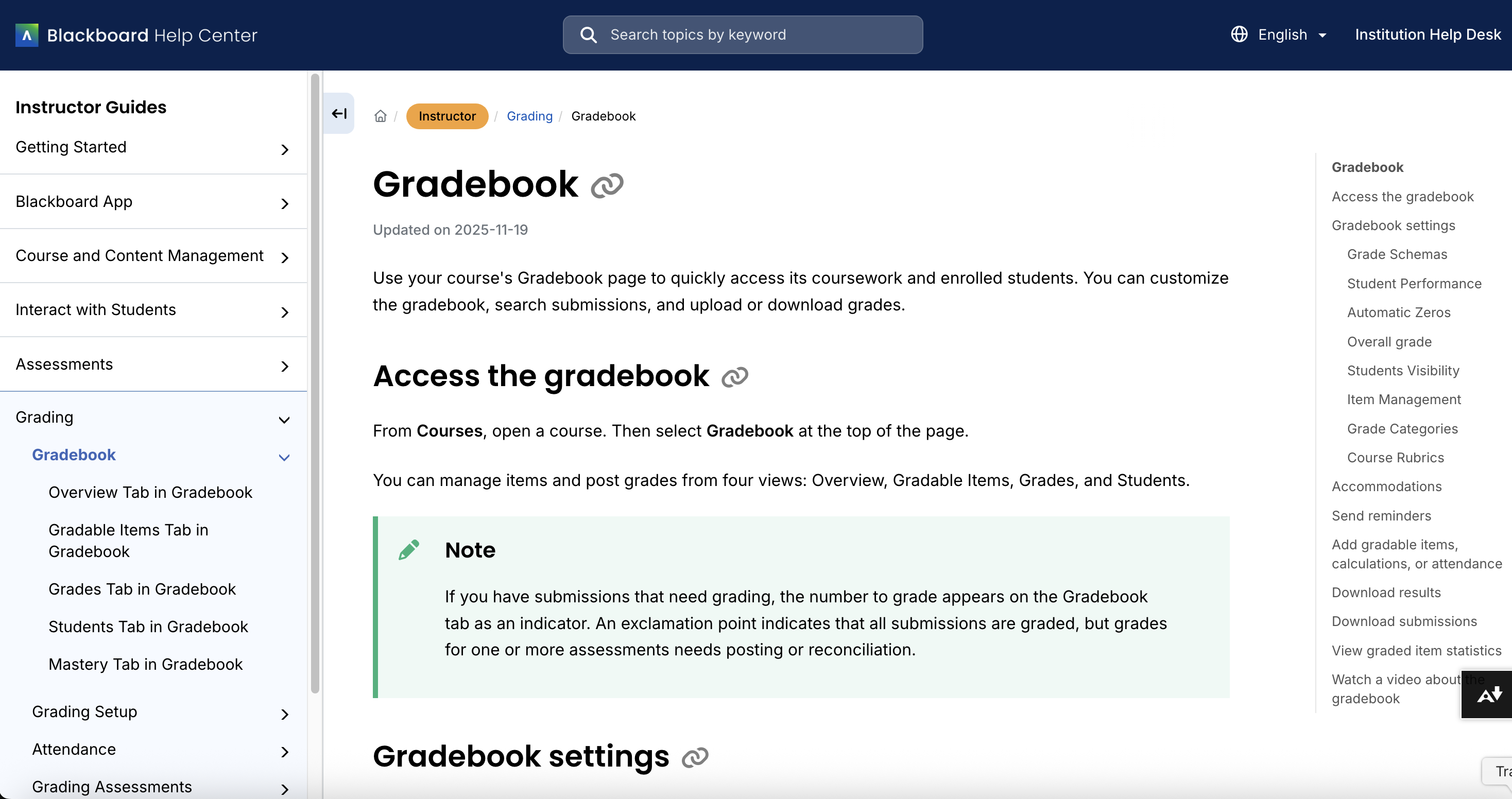
    <div class="html-content"><span><p>Blackboard is rolling out a significant upgrade to its documentation experience this month, and UMBC users will begin seeing the first changes on December 10. Blackboard's new help site features a more modern interface, clearer navigation, and role-based pathways designed to make it easier for instructors, students, and system administrators to find the information they need. </p><p>According to Blackboard, all existing help links will automatically redirect to equivalent content on the new site, reducing the likelihood of broken links or missing pages.</p><p><img src="https://my3.my.umbc.edu/groups/instructional-technology/posts/155151/attachments/60751" alt="Image: Example of new help documentation for Blackboard gradebook using the Instructor role." style="max-width: 100%; height: auto;"></p><p><em>Image: Example of new help documentation for Blackboard gradebook using the Instructor role.</em></p><p>Throughout December, Blackboard will continue refining its documentation based on preview feedback from institutions across the globe. Because this transition represents a substantial shift in the structure and organization of Blackboard's support resources, UMBC's Instructional Technology team will begin reviewing and updating our Blackboard FAQs in January. This effort will ensure that all references to vendor documentation are accurate and that our campus-specific Blackboard documentation aligns with Blackboard's own new help environment.</p><br></span><div><div><span><strong>Connect with Instructional Technology</strong></span></div><div><span>As always, if you have any questions about teaching, learning, and technology at UMBC, please consider the following options:</span></div><ul><li><a href="https://my3.my.umbc.edu/groups/instructional-technology/posts/151344/15848/ff79e4f050851175beed45127581a791/web/link?link=https%3A%2F%2Fmy3.my.umbc.edu%2Fgroups%2Finstructional-technology%2Fposts%2F149574%2F15848%2Ff59d29e5c17e589f885b2536a667a41a%2Fweb%2Flink%3Flink%3Dhttp%253A%252F%252Fwww.umbc.edu%252Ffaq" rel="nofollow external" class="bo">Check our extensive FAQ collection</a><span> </span></li><ul><li><span><a href="https://my3.my.umbc.edu/groups/instructional-technology/posts/151344/15848/68af078772154bde6d05795a2f0e09e0/web/link?link=https%3A%2F%2Fmy3.my.umbc.edu%2Fgroups%2Finstructional-technology%2Fposts%2F149574%2F15848%2F782c435b983b9add1c5ec4e5d955e60f%2Fweb%2Flink%3Flink%3Dhttps%253A%252F%252Fwiki.umbc.edu%252Fx%252FLohnB" rel="nofollow external" class="bo"><span>What's new in Ultra?</span></a> | <a href="https://my3.my.umbc.edu/groups/instructional-technology/posts/151344/15848/aebb558d635bacb947354b4167f7dd1b/web/link?link=https%3A%2F%2Fmy3.my.umbc.edu%2Fgroups%2Finstructional-technology%2Fposts%2F149574%2F15848%2F63a0e48a64b548180394031ac6f89272%2Fweb%2Flink%3Flink%3Dhttps%253A%252F%252Fwiki.umbc.edu%252Fx%252FbwrSAQ" rel="nofollow external" class="bo"><span>Known Issues</span></a><span> </span></span></li></ul><li><span><a href="https://my3.my.umbc.edu/groups/instructional-technology/posts/151344/15848/4e002b87fe47650c320845a523b399b0/web/link?link=https%3A%2F%2Fmy3.my.umbc.edu%2Fgroups%2Finstructional-technology%2Fposts%2F149574%2F15848%2F727292cce6c6665b1fcf69032b12e0d6%2Fweb%2Flink%3Flink%3Dhttp%253A%252F%252Fmy.umbc.edu%252Fgo%252Frequest-help" rel="nofollow external" class="bo">Open a ticket via RT</a></span></li><li><span>Follow the </span><a href="https://my3.my.umbc.edu/groups/instructional-technology/posts/151344/15848/3a8fde8834b85eedcecdbadfca29de6b/web/link?link=https%3A%2F%2Fmy3.my.umbc.edu%2Fgroups%2Finstructional-technology%2Fposts%2F149574%2F15848%2F208c31480fd10e3805fdafe318269623%2Fweb%2Flink%3Flink%3Dhttp%253A%252F%252Fmy.umbc.edu%252Fgroups%252Finstructional-technology" rel="nofollow external" class="bo">Instructional Technology</a> &amp; <a href="https://my3.my.umbc.edu/groups/instructional-technology/posts/151344/15848/7ed1d6a00ec3b7621fabbec538c0f817/web/link?link=https%3A%2F%2Fmy3.my.umbc.edu%2Fgroups%2Finstructional-technology%2Fposts%2F149574%2F15848%2Fdccb8bbf9409460e32d26e4518464b78%2Fweb%2Flink%3Flink%3Dhttp%253A%252F%252Fmy.umbc.edu%252Fgroups%252Fdoit" rel="nofollow external" class="bo">DoIT</a><span> myUMBC groups</span></li><li><a href="https://my3.my.umbc.edu/groups/instructional-technology/posts/151344/15848/f0618da070c69c899b97e5277f00c6e0/web/link?link=https%3A%2F%2Fmy3.my.umbc.edu%2Fgroups%2Finstructional-technology%2Fposts%2F149574%2F15848%2F7e9d8e8701228d0f57bcfcd17db50e50%2Fweb%2Flink%3Flink%3Dhttp%253A%252F%252Fdoit.umbc.edu%252Fitnm%252Fstaff%252F" rel="nofollow external" class="bo">Request a consult</a><span> with <a href="https://my3.my.umbc.edu/groups/instructional-technology/posts/151344/15848/1b0819ec6ea6c4050f352a762108c4ab/web/link?link=https%3A%2F%2Fmy3.my.umbc.edu%2Fgroups%2Finstructional-technology%2Fposts%2F149574%2F15848%2F1935cd506ec09b50c61f334661d75174%2Fweb%2Flink%3Flink%3Dhttp%253A%252F%252Fdoit.umbc.edu%252Fitnm%252Fstaff" rel="nofollow external" class="bo">instructional technology staff</a></span></li></ul></div></div>
]]>
  </Body>
  <Summary>Blackboard is rolling out a significant upgrade to its documentation experience this month, and UMBC users will begin seeing the first changes on December 10. Blackboard's new help site features a...</Summary>
  <Website>https://my3.my.umbc.edu/groups/instructional-technology/posts/155151</Website>
  <AttachmentKind>Image</AttachmentKind>
  <AttachmentUrl>https://assets4-dev.my.umbc.edu/system/shared/attachments/e3a5700c162f5ce98e464e55ea7f8ced/69f5b3ae/news/000/155/151/c7159a557369b66632c4b54bf746b69e/NewHelp_Gradebook_Instructor.png?1765289385</AttachmentUrl>
  <Attachments>
    <Attachment kind="Image" url="https://dev.my.umbc.edu/groups/instructional-technology/posts/155151/attachments/60751"></Attachment>
  </Attachments>
  <TrackingUrl>https://dev.my.umbc.edu/api/v0/pixel/news/155151/guest@my.umbc.edu/9b87902b5e1eba380b35ee2aa080a7b5/api/pixel</TrackingUrl>
  <Tag>blackboard</Tag>
  <Tag>documentation</Tag>
  <Tag>faqs</Tag>
  <Tag>help</Tag>
  <Group token="instructional-technology">Instructional Technology</Group>
  <GroupUrl>https://dev.my.umbc.edu/groups/instructional-technology</GroupUrl>
  <AvatarUrl>https://assets2-dev.my.umbc.edu/system/shared/avatars/groups/000/001/164/dec3b026b81ee6d890a8f82f75c94a2e/xsmall.png?1446126703</AvatarUrl>
  <AvatarUrl size="original">https://assets1-dev.my.umbc.edu/system/shared/avatars/groups/000/001/164/dec3b026b81ee6d890a8f82f75c94a2e/original.png?1446126703</AvatarUrl>
  <AvatarUrl size="xxlarge">https://assets2-dev.my.umbc.edu/system/shared/avatars/groups/000/001/164/dec3b026b81ee6d890a8f82f75c94a2e/xxlarge.png?1446126703</AvatarUrl>
  <AvatarUrl size="xlarge">https://assets1-dev.my.umbc.edu/system/shared/avatars/groups/000/001/164/dec3b026b81ee6d890a8f82f75c94a2e/xlarge.png?1446126703</AvatarUrl>
  <AvatarUrl size="large">https://assets1-dev.my.umbc.edu/system/shared/avatars/groups/000/001/164/dec3b026b81ee6d890a8f82f75c94a2e/large.png?1446126703</AvatarUrl>
  <AvatarUrl size="medium">https://assets4-dev.my.umbc.edu/system/shared/avatars/groups/000/001/164/dec3b026b81ee6d890a8f82f75c94a2e/medium.png?1446126703</AvatarUrl>
  <AvatarUrl size="small">https://assets3-dev.my.umbc.edu/system/shared/avatars/groups/000/001/164/dec3b026b81ee6d890a8f82f75c94a2e/small.png?1446126703</AvatarUrl>
  <AvatarUrl size="xsmall">https://assets2-dev.my.umbc.edu/system/shared/avatars/groups/000/001/164/dec3b026b81ee6d890a8f82f75c94a2e/xsmall.png?1446126703</AvatarUrl>
  <AvatarUrl size="xxsmall">https://assets3-dev.my.umbc.edu/system/shared/avatars/groups/000/001/164/dec3b026b81ee6d890a8f82f75c94a2e/xxsmall.png?1446126703</AvatarUrl>
  <Sponsor>Instructional Technology</Sponsor>
  <ThumbnailUrl size="xxlarge">https://assets2-dev.my.umbc.edu/system/shared/thumbnails/news/000/155/151/db8606cb659aae793b001ee371602ced/xxlarge.jpg?1765288922</ThumbnailUrl>
  <ThumbnailUrl size="xlarge">https://assets2-dev.my.umbc.edu/system/shared/thumbnails/news/000/155/151/db8606cb659aae793b001ee371602ced/xlarge.jpg?1765288922</ThumbnailUrl>
  <ThumbnailUrl size="large">https://assets1-dev.my.umbc.edu/system/shared/thumbnails/news/000/155/151/db8606cb659aae793b001ee371602ced/large.jpg?1765288922</ThumbnailUrl>
  <ThumbnailUrl size="medium">https://assets3-dev.my.umbc.edu/system/shared/thumbnails/news/000/155/151/db8606cb659aae793b001ee371602ced/medium.jpg?1765288922</ThumbnailUrl>
  <ThumbnailUrl size="small">https://assets3-dev.my.umbc.edu/system/shared/thumbnails/news/000/155/151/db8606cb659aae793b001ee371602ced/small.jpg?1765288922</ThumbnailUrl>
  <ThumbnailUrl size="xsmall">https://assets4-dev.my.umbc.edu/system/shared/thumbnails/news/000/155/151/db8606cb659aae793b001ee371602ced/xsmall.jpg?1765288922</ThumbnailUrl>
  <ThumbnailUrl size="xxsmall">https://assets3-dev.my.umbc.edu/system/shared/thumbnails/news/000/155/151/db8606cb659aae793b001ee371602ced/xxsmall.jpg?1765288922</ThumbnailUrl>
  <ThumbnailAltText>Blackboard logo</ThumbnailAltText>
  <PawCount>2</PawCount>
  <CommentCount>0</CommentCount>
  <CommentsAllowed>true</CommentsAllowed>
  <PostedAt>Tue, 09 Dec 2025 13:55:00 -0500</PostedAt>
</NewsItem>
  <NewsItem contentIssues="false" id="155149" important="false" status="posted" url="https://dev.my.umbc.edu/groups/instructional-technology/posts/155149">
  <Title>5 Ways to Create &#8220;Born Accessible&#8221; Course Materials</Title>
  <Tagline>If you can click it, you can fix it.</Tagline>
  <Body>
    <![CDATA[
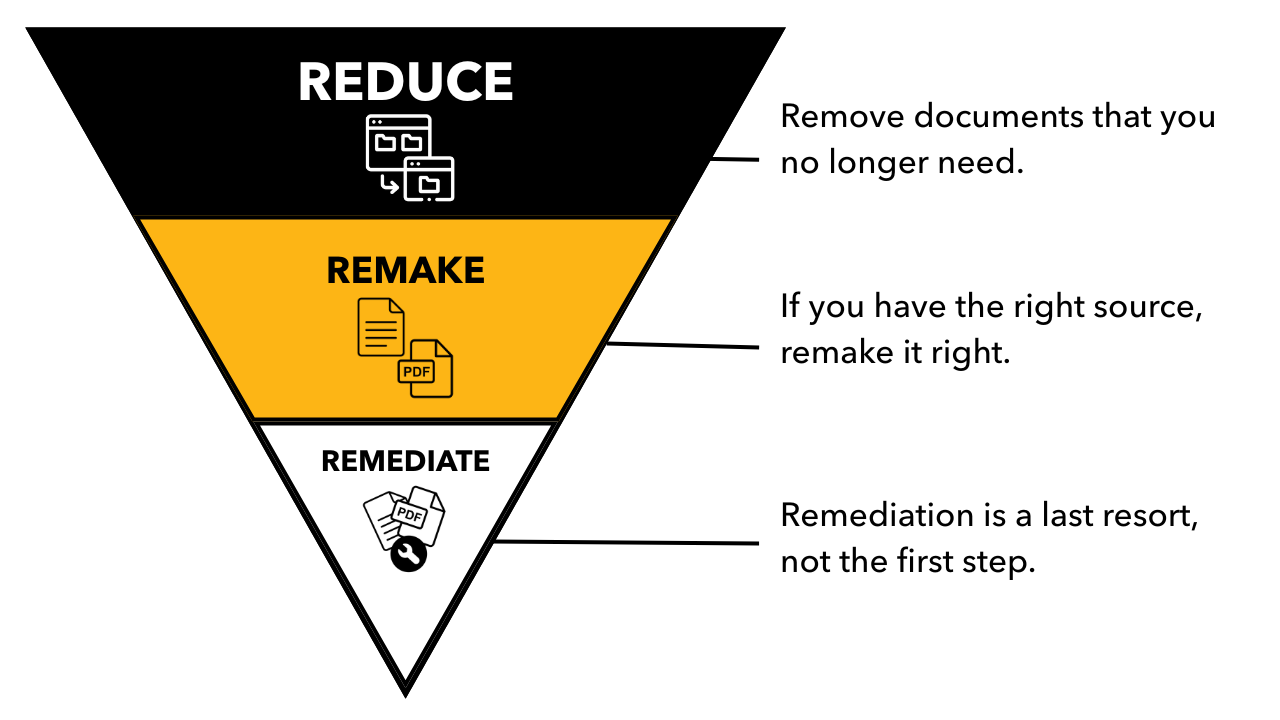
    <div class="html-content"><p>As UMBC <a href="https://my3.my.umbc.edu/groups/announcements/posts/154649" rel="nofollow external" class="bo">continues strengthening digital accessibility</a> across teaching and learning, many faculty have already <a href="https://my3.my.umbc.edu/groups/instructional-technology/posts/155065" rel="nofollow external" class="bo">taken steps to reduce, remake, and remediate</a> existing documents, videos, and course resources. However, the most sustainable opportunity to support digital accessibility is to design new materials that are <em>born accessible</em> from the start, or "created in a way that allows people with disabilities to read content from the get-go, without retrofitting or reengineering (<a href="https://benetech.org/wp-content/uploads/2017/08/Born-Accessible-Initiative_2-6-17.pdf" rel="nofollow external" class="bo">Benetech, 2017</a>). </p><p>Here are five practical strategies to help you create accessible course materials from day one.</p><p><strong>1. Start with Structure, Not Style</strong></p><p>Clear structure is the backbone of accessibility. Using built-in features in available platforms, such as headings, lists, paragraph styles, and slide layouts, allows screen readers and assistive technologies to interpret content correctly, in the exact order you intended it to be presented. These tools include Office 365, Google Workspace, Blackboard, and Sites.</p><p><strong>Try this:</strong></p><ul><li>Apply Heading styles in hierarchical order instead of manually adjusting font size to create sections.</li><li>Use real bullet or numbered lists rather than typed dashes or tabbed text to organize content.</li><li>When creating presentations, choose provided slide layouts instead of drawing your own text boxes.</li></ul><p>Good structure ensures your documents and slides remain accessible no matter how they are exported or shared.</p><p><strong>2. Use Meaningful Text Alternatives for Images</strong></p><p>Images, charts, infographics, and icons must communicate their purpose to students who cannot perceive visual information. <a href="https://my3.my.umbc.edu/groups/announcements/posts/154649" rel="nofollow external" class="bo">Alt text should describe meaning</a>, not appearance.</p><p><strong>Ask yourself:</strong><em>Why is this image here? What should students learn from it?</em></p><ul><li>For simple images, include 1-2 concise sentences of functional alt text. </li><li>For complex charts or diagrams, offer a short summary in the text and provide a longer description nearby (such as a caption) or as an optional linked resource. </li><li>If an image is decorative, mark it as decorative so assistive technologies skip it. Just don't use the decorative tag to avoid describing an image because that's not fair to students who need the information.</li></ul><p>Intentional text alternatives reduce barriers and improve clarity for all learners. It not only ensures we meet ADA requirements, but it's just good communication.</p><p><strong>3. Choose Accessible File Formats and Templates</strong></p><p>The formats you choose can open doors -- or accidentally close them.</p><ul><li><strong>Create content directly in Blackboard Ultra</strong>. Leverage the formatting tools in Ultra Documents and the rich text editor in Announcements, Tests, Assignments, and Discussions. Ultra is <a href="https://www.anthology.com/our-commitment-to-accessibility" rel="nofollow external" class="bo">accessible by design</a> so it's really hard to create inaccessible content!</li><li>Create with <strong>Microsoft Word</strong>, <strong>PowerPoint</strong>, <strong>HTML</strong>, or <strong>Google Docs</strong> as native content when possible; these formats support accessibility features more reliably than PDFs. It's also far easier to fix the original file than retrofit a PDF.</li><li>If you must create a PDF, generate it from a structured, accessible source file rather than scanning or exporting flattened text.</li><li>Consider using UMBC-approved accessible templates for syllabi, slides, and course documents.</li></ul><p>Starting with the right format reduces the need for time-consuming repairs later when evaluating your documents <a href="https://doit.umbc.edu/news/post/155065/" rel="nofollow external" class="bo">using the 3-R framework</a>.</p><p><strong>4. Ensure Your Multimedia Works for Every Learner</strong></p><p><a href="https://doit.umbc.edu/news/post/155041/" rel="nofollow external" class="bo">Accessible multimedia goes beyond</a> checking the "captions" box.</p><ul><li>Use <strong>captions</strong> for all videos. Automated captions are improving, but always review for accuracy and make corrections to avoid egregious errors in spelling and content.</li><li>Provide <strong>transcripts</strong> when appropriate, especially for audio-only materials or longer lectures.</li><li>Consider brief <strong>audio descriptions</strong> if essential visual information is not spoken aloud.</li></ul><p>Tools like <a href="https://umbc.atlassian.net/wiki/spaces/faq/pages/1468760065/YuJa" rel="nofollow external" class="bo">YuJa</a> and Blackboard's updated video recorder for announcements and grading feedback make captioning easier than ever, and UMBC's accessibility resources can guide you through quality checks.</p><p><strong>5. Build Courses with Flexibility and Clarity in Mind</strong></p><p>Born-accessible materials align naturally with <a href="https://udlguidelines.cast.org/" rel="nofollow external" class="bo">Universal Design for Learning (UDL)</a>.</p><ul><li><strong>Offer multiple ways</strong> for students to access information (text, visuals, short video explanations).</li><li><strong>Use descriptive link text</strong> such as "Download the syllabus (PDF)" rather than "Click here."</li><li><strong>Keep navigation predictable</strong> with consistent module structures and clearly labeled activities.</li></ul><p>These practices help all students -- whether they use assistive technologies, learn in non-traditional environments, or simply benefit from clearer design. <span>Doing so not only supports </span><a href="https://my3.my.umbc.edu/groups/announcements/posts/154649" rel="nofollow external" class="bo">UMBC's commitment to equitable learning</a> under updated federal accessibility requirements<span>, but also saves time, reduces future remediation, and improves the learning experience for every student.</span></p><p><strong>Ready to take the first step?</strong> Visit <a href="https://my3.my.umbc.edu/groups/instructional-technology/posts/155065/15848/bea0bab3d0624bd99063a9f1ebc096b7/web/link?link=https%3A%2F%2Fmy3.my.umbc.edu%2Fgroups%2Finstructional-technology%2Fposts%2F154160%2F15848%2Fd12dbd439725c1fdbb2d354621c4da73%2Fweb%2Flink%3Flink%3Dhttps%253A%252F%252Fmy3.my.umbc.edu%252Fgroups%252Finstructional-technology%252Fposts%252F153520%252F15848%252F69b05e6eb46390994297d24257cf20e2%252Fweb%252Flink%253Flink%253Dhttps%25253A%25252F%25252Fmy3.my.umbc.edu%25252Fgroups%25252Finstructional-technology%25252Fposts%25252F151599%25252F15848%25252F6bfad67db4d5345e00ae70d34e496f90%25252Fweb%25252Flink%25253Flink%25253Dhttps%2525253A%2525252F%2525252Faccessibility.umbc.edu%2525252Fdigital-accessibility%2525252F" rel="nofollow external" class="bo">UMBC's Digital Accessibility site</a> or <a href="https://my3.my.umbc.edu/groups/instructional-technology/posts/155065/15848/4333ed5b509b6fd327cad315e54cda1f/web/link?link=https%3A%2F%2Fmy3.my.umbc.edu%2Fgroups%2Finstructional-technology%2Fposts%2F154160%2F15848%2F4390aab0ad131030e1a7d7e46f088d4a%2Fweb%2Flink%3Flink%3Dhttps%253A%252F%252Fmy3.my.umbc.edu%252Fgroups%252Finstructional-technology%252Fposts%252F153520%252F15848%252F5c2619887650538c098729d722043229%252Fweb%252Flink%253Flink%253Dhttps%25253A%25252F%25252Fmy3.my.umbc.edu%25252Fgroups%25252Finstructional-technology%25252Fposts%25252F151599%25252F15848%25252Fb8f0b5511267e520d5fd4a98813dc002%25252Fweb%25252Flink%25253Flink%25253Dhttps%2525253A%2525252F%2525252Fhelp.blackboard.com%2525252FAlly%2525252FAlly_for_LMS%2525252FInstructor%2525252FCourse_Accessibility_Report" rel="nofollow external" class="bo">run an Ally course report</a> today. Support is also available from Student Disability Services and Instructional Technology.</p></div>
]]>
  </Body>
  <Summary>As UMBC continues strengthening digital accessibility across teaching and learning, many faculty have already taken steps to reduce, remake, and remediate existing documents, videos, and course...</Summary>
  <Website>https://my3.my.umbc.edu/groups/instructional-technology/posts/155149</Website>
  <TrackingUrl>https://dev.my.umbc.edu/api/v0/pixel/news/155149/guest@my.umbc.edu/c899e870b25ab67930db5a2c0353624c/api/pixel</TrackingUrl>
  <Tag>born-accessible</Tag>
  <Tag>course-materials</Tag>
  <Tag>digital-accessibility</Tag>
  <Tag>hawken</Tag>
  <Group token="instructional-technology">Instructional Technology</Group>
  <GroupUrl>https://dev.my.umbc.edu/groups/instructional-technology</GroupUrl>
  <AvatarUrl>https://assets2-dev.my.umbc.edu/system/shared/avatars/groups/000/001/164/dec3b026b81ee6d890a8f82f75c94a2e/xsmall.png?1446126703</AvatarUrl>
  <AvatarUrl size="original">https://assets1-dev.my.umbc.edu/system/shared/avatars/groups/000/001/164/dec3b026b81ee6d890a8f82f75c94a2e/original.png?1446126703</AvatarUrl>
  <AvatarUrl size="xxlarge">https://assets2-dev.my.umbc.edu/system/shared/avatars/groups/000/001/164/dec3b026b81ee6d890a8f82f75c94a2e/xxlarge.png?1446126703</AvatarUrl>
  <AvatarUrl size="xlarge">https://assets1-dev.my.umbc.edu/system/shared/avatars/groups/000/001/164/dec3b026b81ee6d890a8f82f75c94a2e/xlarge.png?1446126703</AvatarUrl>
  <AvatarUrl size="large">https://assets1-dev.my.umbc.edu/system/shared/avatars/groups/000/001/164/dec3b026b81ee6d890a8f82f75c94a2e/large.png?1446126703</AvatarUrl>
  <AvatarUrl size="medium">https://assets4-dev.my.umbc.edu/system/shared/avatars/groups/000/001/164/dec3b026b81ee6d890a8f82f75c94a2e/medium.png?1446126703</AvatarUrl>
  <AvatarUrl size="small">https://assets3-dev.my.umbc.edu/system/shared/avatars/groups/000/001/164/dec3b026b81ee6d890a8f82f75c94a2e/small.png?1446126703</AvatarUrl>
  <AvatarUrl size="xsmall">https://assets2-dev.my.umbc.edu/system/shared/avatars/groups/000/001/164/dec3b026b81ee6d890a8f82f75c94a2e/xsmall.png?1446126703</AvatarUrl>
  <AvatarUrl size="xxsmall">https://assets3-dev.my.umbc.edu/system/shared/avatars/groups/000/001/164/dec3b026b81ee6d890a8f82f75c94a2e/xxsmall.png?1446126703</AvatarUrl>
  <Sponsor>Instructional Technology</Sponsor>
  <ThumbnailUrl size="xxlarge">https://assets2-dev.my.umbc.edu/system/shared/thumbnails/news/000/155/149/68b88ca9382e859a3270cc9eb85b74b2/xxlarge.jpg?1765288300</ThumbnailUrl>
  <ThumbnailUrl size="xlarge">https://assets3-dev.my.umbc.edu/system/shared/thumbnails/news/000/155/149/68b88ca9382e859a3270cc9eb85b74b2/xlarge.jpg?1765288300</ThumbnailUrl>
  <ThumbnailUrl size="large">https://assets4-dev.my.umbc.edu/system/shared/thumbnails/news/000/155/149/68b88ca9382e859a3270cc9eb85b74b2/large.jpg?1765288300</ThumbnailUrl>
  <ThumbnailUrl size="medium">https://assets2-dev.my.umbc.edu/system/shared/thumbnails/news/000/155/149/68b88ca9382e859a3270cc9eb85b74b2/medium.jpg?1765288300</ThumbnailUrl>
  <ThumbnailUrl size="small">https://assets2-dev.my.umbc.edu/system/shared/thumbnails/news/000/155/149/68b88ca9382e859a3270cc9eb85b74b2/small.jpg?1765288300</ThumbnailUrl>
  <ThumbnailUrl size="xsmall">https://assets3-dev.my.umbc.edu/system/shared/thumbnails/news/000/155/149/68b88ca9382e859a3270cc9eb85b74b2/xsmall.jpg?1765288300</ThumbnailUrl>
  <ThumbnailUrl size="xxsmall">https://assets2-dev.my.umbc.edu/system/shared/thumbnails/news/000/155/149/68b88ca9382e859a3270cc9eb85b74b2/xxsmall.jpg?1765288300</ThumbnailUrl>
  <ThumbnailAltText>A human figure with outstretched arms inside a circle of two curved arrows, suggesting movement. Below the figure are two words: digital accessibility.</ThumbnailAltText>
  <PawCount>4</PawCount>
  <CommentCount>0</CommentCount>
  <CommentsAllowed>true</CommentsAllowed>
  <PostedAt>Tue, 09 Dec 2025 08:59:34 -0500</PostedAt>
</NewsItem>
  <NewsItem contentIssues="false" id="155041" important="false" status="posted" url="https://dev.my.umbc.edu/groups/instructional-technology/posts/155041">
  <Title>Make Your Course Media Accessible: Video Captions and Audio Descriptions Support Every Learner</Title>
  <Tagline>Captioning &amp; Audio Description Tips for Every Instructor</Tagline>
  <Body>
    <![CDATA[
    <div class="html-content"><p>Video can be one of the most effective teaching tools you use, especially when every student can access the content. Captions and audio descriptions boost clarity, reinforce key ideas, and creative flexible learning pathways that benefit all learners. Compliance with <a href="https://www.ada.gov/resources/2024-03-08-web-rule/" rel="nofollow external" class="bo">the revised technical standards</a> for the Americans with Disabilities Act is an added advantage, but the primary payoff is student success. And because these practices can fit naturally into your existing video recording workflows, even small improvements can make a meaningful difference in how students engage with your course.</p><p>Here are <strong>three practical ways you can make your videos more accessible</strong> using tools and workflows you already have.</p><p><strong>1. Start with captions because everyone benefits!</strong></p><p>Captions help students who are deaf or hard of hearing -- and they also help the students riding the bus, in the library, at work, or while a toddler naps across the room. Research shows:</p><ul><li>80% of adults are more likely to finish a video with captions (<a href="https://www.3playmedia.com/blog/verizon-media-and-publicis-media-find-viewers-want-captions/" rel="nofollow external" class="bo">Publicis Media, 2019</a>)</li><li>Most Gen Z students watch video in public -- 70% use captions when they are available (<a href="https://preply.com/en/blog/americas-subtitles-use/" rel="nofollow external" class="bo">Mykhalevych, 2024</a>)</li><li>75% of students use captioned videos as study aids (<a href="https://ecampus.oregonstate.edu/research/wp-content/uploads/3PM-Student-Survey-report-2018.pdf" rel="nofollow external" class="bo">Linder, 2016</a>)</li></ul><p>Captions are universal design in action. Therefore, always make sure your videos minimally have captions available in the language that is spoken.</p><p><strong>2. Always review and edit auto-captions</strong></p><p>Sometimes accessibility is the difference between dinner and disaster. Here's <a href="https://www.w3.org/WAI/media/av/captions/#automatic-captions-are-not-sufficient" rel="nofollow external" class="bo">an example from the Web Accessibility Initiative</a> that shows how auto-captions can fail students. In one clip, the presenter said, "Broil on high for four to five minutes." But the auto-caption read, "Broil on high for 45 minutes."</p><p>One quick edit can completely change meaning. Auto-captions will eventually improve and advancements in AI and audio technology will help strengthen the quality and reliability. For now, it's important to review those auto-captions!</p><p><strong>3. Add audio descriptions when visuals carry meaning</strong></p><p>Captions make sound visible. Audio descriptions make visuals audible. If students need to <em>see</em> something to understand your content, such as a graph, a diagram, or a demonstration, that information must be spoken aloud with a description. Without audio description, when you say "As you can see here…" it does not provide clear enough information for someone who cannot see the graph. With audio description, one could say, "The line graph shows three trends over 20 years. The blue line increases from 10 to 45." </p><p>In other words: if you closed your eyes and listened to your video, would you still learn something without seeing the content? If not, add the audio description. Accessible teaching is <em>explicit teaching.</em></p><p><strong>Accessible video matters.</strong> It takes about 15 minutes to fix captions for a 10-minute video and 30-45 minutes to add audio descriptions. Our new video platform, <a href="https://umbc.atlassian.net/wiki/spaces/faq/pages/1468760065/YuJa" rel="nofollow external" class="bo">YuJa</a>, allows you to <a href="https://support.yuja.com/hc/en-us/articles/360043421473-Adding-Auto-Captions-to-Media" rel="nofollow external" class="bo">generate auto-captions</a> and edit them, and you can <a href="https://support.yuja.com/hc/en-us/articles/360051865753-Adding-an-Audio-Description" rel="nofollow external" class="bo">upload an audio description</a> to publish a fully accessible video for your students. However, <strong>if you feel overwhelmed, start small</strong>. One video. One hour. That's it. The impact it has will not only meet legal requirements, but will also benefit 100 percent of all learners. </p><p><strong>Ready to take the first step?</strong> Visit <a href="https://my3.my.umbc.edu/groups/instructional-technology/posts/153520/15848/69b05e6eb46390994297d24257cf20e2/web/link?link=https%3A%2F%2Fmy3.my.umbc.edu%2Fgroups%2Finstructional-technology%2Fposts%2F151599%2F15848%2F6bfad67db4d5345e00ae70d34e496f90%2Fweb%2Flink%3Flink%3Dhttps%253A%252F%252Faccessibility.umbc.edu%252Fdigital-accessibility%252F" rel="nofollow external" class="bo">UMBC's Digital Accessibility site</a> or <a href="https://my3.my.umbc.edu/groups/instructional-technology/posts/153520/15848/5c2619887650538c098729d722043229/web/link?link=https%3A%2F%2Fmy3.my.umbc.edu%2Fgroups%2Finstructional-technology%2Fposts%2F151599%2F15848%2Fb8f0b5511267e520d5fd4a98813dc002%2Fweb%2Flink%3Flink%3Dhttps%253A%252F%252Fhelp.blackboard.com%252FAlly%252FAlly_for_LMS%252FInstructor%252FCourse_Accessibility_Report" rel="nofollow external" class="bo">run an Ally course report</a> today. Support is also available from Student Disability Services and Instructional Technology.</p></div>
]]>
  </Body>
  <Summary>Video can be one of the most effective teaching tools you use, especially when every student can access the content. Captions and audio descriptions boost clarity, reinforce key ideas, and...</Summary>
  <Website>https://my3.my.umbc.edu/groups/instructional-technology/posts/155041</Website>
  <TrackingUrl>https://dev.my.umbc.edu/api/v0/pixel/news/155041/guest@my.umbc.edu/b36e87f69b7a8918bfb4dd8be0917d94/api/pixel</TrackingUrl>
  <Tag>audio-descriptions</Tag>
  <Tag>captions</Tag>
  <Tag>digital-accessibility</Tag>
  <Tag>hawken</Tag>
  <Tag>video</Tag>
  <Group token="instructional-technology">Instructional Technology</Group>
  <GroupUrl>https://dev.my.umbc.edu/groups/instructional-technology</GroupUrl>
  <AvatarUrl>https://assets2-dev.my.umbc.edu/system/shared/avatars/groups/000/001/164/dec3b026b81ee6d890a8f82f75c94a2e/xsmall.png?1446126703</AvatarUrl>
  <AvatarUrl size="original">https://assets1-dev.my.umbc.edu/system/shared/avatars/groups/000/001/164/dec3b026b81ee6d890a8f82f75c94a2e/original.png?1446126703</AvatarUrl>
  <AvatarUrl size="xxlarge">https://assets2-dev.my.umbc.edu/system/shared/avatars/groups/000/001/164/dec3b026b81ee6d890a8f82f75c94a2e/xxlarge.png?1446126703</AvatarUrl>
  <AvatarUrl size="xlarge">https://assets1-dev.my.umbc.edu/system/shared/avatars/groups/000/001/164/dec3b026b81ee6d890a8f82f75c94a2e/xlarge.png?1446126703</AvatarUrl>
  <AvatarUrl size="large">https://assets1-dev.my.umbc.edu/system/shared/avatars/groups/000/001/164/dec3b026b81ee6d890a8f82f75c94a2e/large.png?1446126703</AvatarUrl>
  <AvatarUrl size="medium">https://assets4-dev.my.umbc.edu/system/shared/avatars/groups/000/001/164/dec3b026b81ee6d890a8f82f75c94a2e/medium.png?1446126703</AvatarUrl>
  <AvatarUrl size="small">https://assets3-dev.my.umbc.edu/system/shared/avatars/groups/000/001/164/dec3b026b81ee6d890a8f82f75c94a2e/small.png?1446126703</AvatarUrl>
  <AvatarUrl size="xsmall">https://assets2-dev.my.umbc.edu/system/shared/avatars/groups/000/001/164/dec3b026b81ee6d890a8f82f75c94a2e/xsmall.png?1446126703</AvatarUrl>
  <AvatarUrl size="xxsmall">https://assets3-dev.my.umbc.edu/system/shared/avatars/groups/000/001/164/dec3b026b81ee6d890a8f82f75c94a2e/xxsmall.png?1446126703</AvatarUrl>
  <Sponsor>Instructional Technology</Sponsor>
  <ThumbnailUrl size="xxlarge">https://assets1-dev.my.umbc.edu/system/shared/thumbnails/news/000/155/041/cb83cab25bcd2af4ba4a4b6b687ea6b0/xxlarge.jpg?1764859167</ThumbnailUrl>
  <ThumbnailUrl size="xlarge">https://assets4-dev.my.umbc.edu/system/shared/thumbnails/news/000/155/041/cb83cab25bcd2af4ba4a4b6b687ea6b0/xlarge.jpg?1764859167</ThumbnailUrl>
  <ThumbnailUrl size="large">https://assets2-dev.my.umbc.edu/system/shared/thumbnails/news/000/155/041/cb83cab25bcd2af4ba4a4b6b687ea6b0/large.jpg?1764859167</ThumbnailUrl>
  <ThumbnailUrl size="medium">https://assets4-dev.my.umbc.edu/system/shared/thumbnails/news/000/155/041/cb83cab25bcd2af4ba4a4b6b687ea6b0/medium.jpg?1764859167</ThumbnailUrl>
  <ThumbnailUrl size="small">https://assets1-dev.my.umbc.edu/system/shared/thumbnails/news/000/155/041/cb83cab25bcd2af4ba4a4b6b687ea6b0/small.jpg?1764859167</ThumbnailUrl>
  <ThumbnailUrl size="xsmall">https://assets4-dev.my.umbc.edu/system/shared/thumbnails/news/000/155/041/cb83cab25bcd2af4ba4a4b6b687ea6b0/xsmall.jpg?1764859167</ThumbnailUrl>
  <ThumbnailUrl size="xxsmall">https://assets4-dev.my.umbc.edu/system/shared/thumbnails/news/000/155/041/cb83cab25bcd2af4ba4a4b6b687ea6b0/xxsmall.jpg?1764859167</ThumbnailUrl>
  <ThumbnailAltText>A human figure with outstretched arms inside a circle of two curved arrows, suggesting movement. Below the figure are two words: digital accessibility.</ThumbnailAltText>
  <PawCount>6</PawCount>
  <CommentCount>0</CommentCount>
  <CommentsAllowed>true</CommentsAllowed>
  <PostedAt>Mon, 08 Dec 2025 12:56:19 -0500</PostedAt>
</NewsItem>
  <NewsItem contentIssues="false" id="155065" important="false" status="posted" url="https://dev.my.umbc.edu/groups/instructional-technology/posts/155065">
    <Title>The Three-Step Framework for Accessible Documents: Reduce, Remake, Remediate</Title>
    <Tagline>If you can click it, you can fix it.</Tagline>
    <Body>
      <![CDATA[
          <div class="html-content"><p>When it comes to improving digital accessibility, documents and PDFs are often the biggest barrier -- and the biggest opportunity. Whether you're uploading files to Blackboard, sharing materials with students, or distributing resources across campus, the accessibility of your documents directly affects usability, searchability, and equity.</p><p>That's where the <strong>Reduce → Remake → Remediate</strong> framework comes in. Think of it as a decision tree that helps you choose the <em>right</em> action for each file. Before you jump into fixing a stubborn PDF, start with the step that saves the most time and delivers the greatest impact.</p><p><img src="https://my3.my.umbc.edu/groups/instructional-technology/posts/155065/attachments/60710" alt="Inverted triangle with three levels: Reduce - remove unneeded files, Remake - rebuild from source, Remediate - last resort. Prioritize accessibility fixes from top to bottom." style="max-width: 100%; height: auto;"></p><p><em>Image 1: <span>This infographic shows an inverted triangle divided into three levels to guide accessibility document fixes. </span><span>The graphic visually emphasizes prioritizing reduction (top) and rebuilding (middle) over remediation (bottom) when addressing digital accessibility issues.</span></em></p><p>Here's how to use this approach in your everyday work.</p><p><strong>1. Reduce: Remove What No Longer Serves Your Students</strong></p><p>Before investing time in editing or remaking an inaccessible file, ask the simplest question: <strong>Do I still need this document?</strong></p><ul><li>Has the content been replaced elsewhere in your course?</li><li>Is it redundant with materials already in Blackboard?</li><li>Is it outdated, duplicated, or no longer aligned to your learning goals?</li></ul><p>If the answer is "no, I don't need it," the most accessible document is the one that no longer exists. <strong>Reducing cuts clutter, improves course navigation, and lowers your remediation workload immediately.</strong></p><p><strong>2. Remake: Start Fresh When You Have the Original Source</strong></p><p>If the content is still important, your next question should be: <strong>Do I have the source file? </strong>If you do -- great! Remaking the document is usually the fastest and cleanest path to accessibility.</p><ul><li>Replace scanned PDFs with a properly structured Word or Google doc.</li><li>Rebuild documents that contain inaccessible tables, images without alt text, or outdated formatting.</li><li>Use your original PowerPoint instead of trying to fix a PDF export.</li></ul><p><strong>Why this matters:</strong> Rebuilt documents contain real headings, lists, reading order, alt text, and searchable text -- making them inherently more accessible (and easier to maintain in the future). Tools like <a href="https://umbc.atlassian.net/wiki/spaces/faq/pages/30753544/How+do+I+view+my+course+s+Ally+accessibility+report" rel="nofollow external" class="bo">Ally</a>, Acrobat, or Microsoft Word and PowerPoint can validate your work, but starting with a clean source file does most of the heavy lifting.</p><p><strong>3. Remediate: Fix Only When You Must</strong></p><p>If you <em>don't</em> have the source file, or it cannot be recreated, then remediation is your last resort. Remediation involves correcting accessibility issues <em>inside</em> an existing document or PDF, which can be time-consuming and technically challenging. This may include:</p><ul><li>Adding tags or reading order to untagged PDFs</li><li>Repairing scanned images of text</li><li>Rebuilding inaccessible tables</li><li>Fixing complex layouts or poorly embedded images</li></ul><p>This step is sometimes unavoidable, especially for archived materials or documents that cannot be altered due to copyright ownership, accreditation, or historical requirements. But it should never be your first step.</p><p>This decision path ensures your time is spent where it creates the most value for students and reduces the long-term burden of maintaining inaccessible materials.</p><p><strong>Ready to take the first step?</strong> Visit <a href="https://my3.my.umbc.edu/groups/instructional-technology/posts/154160/15848/d12dbd439725c1fdbb2d354621c4da73/web/link?link=https%3A%2F%2Fmy3.my.umbc.edu%2Fgroups%2Finstructional-technology%2Fposts%2F153520%2F15848%2F69b05e6eb46390994297d24257cf20e2%2Fweb%2Flink%3Flink%3Dhttps%253A%252F%252Fmy3.my.umbc.edu%252Fgroups%252Finstructional-technology%252Fposts%252F151599%252F15848%252F6bfad67db4d5345e00ae70d34e496f90%252Fweb%252Flink%253Flink%253Dhttps%25253A%25252F%25252Faccessibility.umbc.edu%25252Fdigital-accessibility%25252F" rel="nofollow external" class="bo">UMBC's Digital Accessibility site</a> or <a href="https://my3.my.umbc.edu/groups/instructional-technology/posts/154160/15848/4390aab0ad131030e1a7d7e46f088d4a/web/link?link=https%3A%2F%2Fmy3.my.umbc.edu%2Fgroups%2Finstructional-technology%2Fposts%2F153520%2F15848%2F5c2619887650538c098729d722043229%2Fweb%2Flink%3Flink%3Dhttps%253A%252F%252Fmy3.my.umbc.edu%252Fgroups%252Finstructional-technology%252Fposts%252F151599%252F15848%252Fb8f0b5511267e520d5fd4a98813dc002%252Fweb%252Flink%253Flink%253Dhttps%25253A%25252F%25252Fhelp.blackboard.com%25252FAlly%25252FAlly_for_LMS%25252FInstructor%25252FCourse_Accessibility_Report" rel="nofollow external" class="bo">run an Ally course report</a> today. Support is also available from Student Disability Services and Instructional Technology.</p><p><br></p><p><span>--</span></p><p><em>The 3-R Framework was <a href="https://digitalaccessibility.illinois.edu/getting-started/manage-your-documents" rel="nofollow external" class="bo">adapted from the University of Illinois Urbana-Champaign</a>. </em></p></div>
      ]]>
    </Body>
    <Summary>When it comes to improving digital accessibility, documents and PDFs are often the biggest barrier -- and the biggest opportunity. Whether you're uploading files to Blackboard, sharing materials...</Summary>
    <Website>https://my3.my.umbc.edu/groups/instructional-technology/posts/155065</Website>
    <AttachmentKind>Image</AttachmentKind>
    <AttachmentUrl>https://assets2-dev.my.umbc.edu/system/shared/attachments/1996d8dd4b4b78f6694fb209de7ec496/69f5b3ae/news/000/155/065/8520b295ef7672eadffdf9d88d8b9a18/DA R Framework.png?1764880425</AttachmentUrl>
    <Attachments>
      <Attachment kind="Image" url="https://dev.my.umbc.edu/groups/instructional-technology/posts/155065/attachments/60710"></Attachment>
    </Attachments>
    <TrackingUrl>https://dev.my.umbc.edu/api/v0/pixel/news/155065/guest@my.umbc.edu/bb61971f88aa44bd40ec1fea6933b4a0/api/pixel</TrackingUrl>
    <Tag>3-r</Tag>
    <Tag>digital-accessibility</Tag>
    <Tag>framework</Tag>
    <Tag>hawken</Tag>
    <Group token="instructional-technology">Instructional Technology</Group>
    <GroupUrl>https://dev.my.umbc.edu/groups/instructional-technology</GroupUrl>
    <AvatarUrl>https://assets2-dev.my.umbc.edu/system/shared/avatars/groups/000/001/164/dec3b026b81ee6d890a8f82f75c94a2e/xsmall.png?1446126703</AvatarUrl>
    <AvatarUrl size="original">https://assets1-dev.my.umbc.edu/system/shared/avatars/groups/000/001/164/dec3b026b81ee6d890a8f82f75c94a2e/original.png?1446126703</AvatarUrl>
    <AvatarUrl size="xxlarge">https://assets2-dev.my.umbc.edu/system/shared/avatars/groups/000/001/164/dec3b026b81ee6d890a8f82f75c94a2e/xxlarge.png?1446126703</AvatarUrl>
    <AvatarUrl size="xlarge">https://assets1-dev.my.umbc.edu/system/shared/avatars/groups/000/001/164/dec3b026b81ee6d890a8f82f75c94a2e/xlarge.png?1446126703</AvatarUrl>
    <AvatarUrl size="large">https://assets1-dev.my.umbc.edu/system/shared/avatars/groups/000/001/164/dec3b026b81ee6d890a8f82f75c94a2e/large.png?1446126703</AvatarUrl>
    <AvatarUrl size="medium">https://assets4-dev.my.umbc.edu/system/shared/avatars/groups/000/001/164/dec3b026b81ee6d890a8f82f75c94a2e/medium.png?1446126703</AvatarUrl>
    <AvatarUrl size="small">https://assets3-dev.my.umbc.edu/system/shared/avatars/groups/000/001/164/dec3b026b81ee6d890a8f82f75c94a2e/small.png?1446126703</AvatarUrl>
    <AvatarUrl size="xsmall">https://assets2-dev.my.umbc.edu/system/shared/avatars/groups/000/001/164/dec3b026b81ee6d890a8f82f75c94a2e/xsmall.png?1446126703</AvatarUrl>
    <AvatarUrl size="xxsmall">https://assets3-dev.my.umbc.edu/system/shared/avatars/groups/000/001/164/dec3b026b81ee6d890a8f82f75c94a2e/xxsmall.png?1446126703</AvatarUrl>
    <Sponsor>Instructional Technology</Sponsor>
    <ThumbnailUrl size="xxlarge">https://assets2-dev.my.umbc.edu/system/shared/thumbnails/news/000/155/065/d626ac9a4e02d883db66fa280759c139/xxlarge.jpg?1764880304</ThumbnailUrl>
    <ThumbnailUrl size="xlarge">https://assets1-dev.my.umbc.edu/system/shared/thumbnails/news/000/155/065/d626ac9a4e02d883db66fa280759c139/xlarge.jpg?1764880304</ThumbnailUrl>
    <ThumbnailUrl size="large">https://assets1-dev.my.umbc.edu/system/shared/thumbnails/news/000/155/065/d626ac9a4e02d883db66fa280759c139/large.jpg?1764880304</ThumbnailUrl>
    <ThumbnailUrl size="medium">https://assets1-dev.my.umbc.edu/system/shared/thumbnails/news/000/155/065/d626ac9a4e02d883db66fa280759c139/medium.jpg?1764880304</ThumbnailUrl>
    <ThumbnailUrl size="small">https://assets2-dev.my.umbc.edu/system/shared/thumbnails/news/000/155/065/d626ac9a4e02d883db66fa280759c139/small.jpg?1764880304</ThumbnailUrl>
    <ThumbnailUrl size="xsmall">https://assets2-dev.my.umbc.edu/system/shared/thumbnails/news/000/155/065/d626ac9a4e02d883db66fa280759c139/xsmall.jpg?1764880304</ThumbnailUrl>
    <ThumbnailUrl size="xxsmall">https://assets3-dev.my.umbc.edu/system/shared/thumbnails/news/000/155/065/d626ac9a4e02d883db66fa280759c139/xxsmall.jpg?1764880304</ThumbnailUrl>
    <ThumbnailAltText>A human figure with outstretched arms inside a circle of two curved arrows, suggesting movement. Below the figure are two words: digital accessibility.</ThumbnailAltText>
    <PawCount>7</PawCount>
    <CommentCount>0</CommentCount>
    <CommentsAllowed>true</CommentsAllowed>
    <PostedAt>Thu, 04 Dec 2025 15:42:09 -0500</PostedAt>
  </NewsItem>
</News>