<?xml version="1.0"?>
<News hasArchived="false" page="8" pageCount="73" pageSize="10" timestamp="Sun, 03 May 2026 05:38:03 -0400" url="https://dev.my.umbc.edu/groups/instructional-technology/posts.xml?mode=pawpularity&amp;page=8">
  <NewsItem contentIssues="false" id="150153" important="false" status="posted" url="https://dev.my.umbc.edu/groups/instructional-technology/posts/150153">
  <Title>Using Google Doc "Versions" to Detect Student Originality vs. AI Abuse</Title>
  <Body>
    <![CDATA[
    <div class="html-content"><span><p><span><strong>Note: The following tip was shared as part of a 2/18/25 Faculty Development Center <a href="https://umbc.webex.com/umbc/ldr.php?RCID=f46c44c0a078bd749fcb6e0e11497bbd" rel="nofollow external" class="bo">workshop</a>, "Encouraging Academic Integrity in the Era of AI." Please feel free to adapt and make it your own.</strong>
    <br></span></p><p><span>Given faculty concerns about AI-assisted or even wholly-authored student papers, faculty could use a simple feature in any Google document, spreadsheet or presentation slide: its </span><a href="https://support.google.com/docs/answer/190843?hl=en&amp;co=GENIE.Platform%3DDesktop&amp;sjid=13768971247884065589-NA" rel="nofollow external" class="bo"><span>version history</span></a><span>, which includes a summary or detailed date &amp; time stamp of every addition or edit. As such, the goal is not to detect the presence of AI in student writing, which is currently very difficult due to “</span><a href="https://www.chronicle.com/article/ai-detection-is-a-business-but-should-it-be-faculty-business" rel="nofollow external" class="bo"><span>false positives</span></a><span>,” but more so to detect the absence of originality.</span></p><p><span><strong>Why &amp; How This Might Work</strong></span></p><p><span>Unlike the iterative, word-by-word or sentence-by-sentence approach of most original writing, students who use AI or plagiarized material are likely copying &amp; pasting entirely ‘in-tact” content as “whole cloth” blocks, perhaps with minimal or even no changes before submitting as a final draft. If so, requiring students to submit a Google Doc for their paper will contain a version history that faculty can inspect. If version 1 – or any version – contains large blocks of text in a short period of time, one can reasonably assume the work is not original. More importantly, if students know that faculty know there’s a version history that can be inspected – and questioned about – maybe they will think twice.</span></p><p><span><strong>Issues &amp; Opportunities</strong></span></p><ul><li><p><span>A student could just try to emulate iterative authorship, copying one word or sentence at a time -- but likely not in a hurry before a deadline, which is the use case most common to plagiarism. Still, the attempt would result in an ironic, self-inflicted penalty, by forcing the student to take time to cheat to appear not to have done so.</span><span><br></span></p></li><li><p><span>Some students may complain that being required to use a Google Doc inhibits their creative writing process or doesn’t show “offline” musings written by hand or in other editors, including notes made on their mobile devices. However, faculty could say the Google Doc version history allows them to extend the conditions for how students are assessed over time on any assignment vs at the same time (e.g., answering an essay question on an exam). Also, all Google Docs have mobile apps.</span><span><br></span></p></li><li><p><span>For faculty who are ok with students using AI – as an aid to counter writer’s bloc or if clearly cited in the final version – a version history could be a “teachable moment” for how, where and when to do so. Students could be asked to “name” their versions as AI or “mine” or add a comment to explain where and why they changed any AI output.</span></p></li></ul><p><span><strong>Suggested Approach</strong></span></p><ul><li><p><span>Create a Google Doc template you ask students to copy and use for their written assignment. You could even make this a </span><a href="https://umbc.atlassian.net/wiki/x/g0jVAQ" rel="nofollow external" class="bo"><span>Google Assignment</span></a><span> for submission in a Learning Management System (LMS) like Blackboard.</span><span><br></span></p></li><li><p><span>Tell students you’ll only accept their assignment if you are a named editor/collaborator (you need editing privileges to view a Google Doc’s version history).</span><span><br></span></p></li><li><p><span>Tell students you reserve the right to randomly inspect the version history of any Google Doc they submit as their own work. You can also require an oral interview to have students explain any version. </span><span><br></span></p></li><li><p><span>FYI: A sample </span><span>syllabus statement</span><span> on use of AI by students is below (source: <a href="http://doit.umbc.edu/johnfritz" rel="nofollow external" class="bo">John Fritz</a>, DoIT):</span></p></li></ul><span><u><strong>Use of Generative AI</strong></u></span></span><div><span>I am exploring how best to use AI to support my teaching, so I am open to students doing so to support their learning – as long as I can distinguish authenticity. Towards this end, all written work (e.g., reflections, final essay, etc.) must be submitted using Google Docs with your UMBC account. Why? This is the only way I can </span><a href="https://support.google.com/docs/answer/190843?hl=en&amp;co=GENIE.Platform%3DDesktop&amp;sjid=13768971247884065589-NA" rel="nofollow external" class="bo"><span>view an original version history</span></a><span>. I’m not trying to catch anyone cheating, per se, but if you’d like to use AI to jump start an assignment, I just want to see 1) the prompt you used, 2) any sources you linked or attached to your prompt, and especially 3) how you revised (or cited) the AI output in your final submission, which is the most important step. As such, when you submit a final version in Blackboard, I’d like this as a .PDF document with an accompanying link to your UMBC Google Doc where it was </span><a href="https://support.google.com/docs/answer/49114" rel="nofollow external" class="bo"><span>generated</span></a><span>. Note: You can also use Google Docs on your mobile devices if you prefer to start your writing process there.</span></div><div><span><br></span></div><div><span>Related Work (courtesy of Dr. </span><a href="https://chemistry.umbc.edu/sarah-bass/" rel="nofollow external" class="bo"><span>Sarah Bass</span></a><span>, Associate Teaching Professor, Chemistry, UMBC)</span></div><div><span><ul><li><p><a href="https://www.eastcentral.edu/free/ai-faculty-resources/using-google-docs-to-detect-ai/" rel="nofollow external" class="bo"><span>Using Google Docs to Detect Students’ AI Usage</span></a><span> from East Central College</span></p></li><li><p><a href="https://www.popsci.com/diy/track-changes-in-word-google-doc-pages/" rel="nofollow external" class="bo"><span>Prove your writing is not AI-generated by tracking changes in your docs: Showing your work is not just for math problems anymore</span></a><span> in Popular Science</span></p></li><li><p><a href="https://www.reddit.com/r/utdallas/comments/13bb0wr/with_increasing_ai_plagiarism_write_your_essays/?share_id=BvJYoN_D15XFfnxLjcpCN&amp;utm_content=1&amp;utm_medium=ios_app&amp;utm_name=ioscss&amp;utm_source=share&amp;utm_term=10" rel="nofollow external" class="bo"><span>With increasing AI plagiarism, write your essays on Google Docs!</span></a><span> from Reddit discussion amongst students</span></p></li><li><p><a href="http://stevendkrause.com/2024/07/10/why-i-use-google-docs-to-teach-writing-especially-in-the-age-of-ai/" rel="nofollow external" class="bo"><span>Why I Use Google Docs to Teach Writing, Especially in the Age of AI</span></a><span> blogpost by Steven D. Krause</span></p></li><li><p><a href="https://www.digitalinformationworld.com/2024/06/spot-ai-generated-writing-through-google-docs-history-feature.html" rel="nofollow external" class="bo"><span>How To Use Google Docs Secret Feature to Detect AI Content Writing</span></a><span> by Digital Information World</span></p></li></ul><br></span></div></div>
]]>
  </Body>
  <Summary>Note: The following tip was shared as part of a 2/18/25 Faculty Development Center workshop, "Encouraging Academic Integrity in the Era of AI." Please feel free to adapt and make it your own....</Summary>
  <TrackingUrl>https://dev.my.umbc.edu/api/v0/pixel/news/150153/guest@my.umbc.edu/c47219357d02cae8d5e9742dabc57b81/api/pixel</TrackingUrl>
  <Tag>ai</Tag>
  <Group token="instructional-technology">Instructional Technology</Group>
  <GroupUrl>https://dev.my.umbc.edu/groups/instructional-technology</GroupUrl>
  <AvatarUrl>https://assets2-dev.my.umbc.edu/system/shared/avatars/groups/000/001/164/dec3b026b81ee6d890a8f82f75c94a2e/xsmall.png?1446126703</AvatarUrl>
  <AvatarUrl size="original">https://assets1-dev.my.umbc.edu/system/shared/avatars/groups/000/001/164/dec3b026b81ee6d890a8f82f75c94a2e/original.png?1446126703</AvatarUrl>
  <AvatarUrl size="xxlarge">https://assets2-dev.my.umbc.edu/system/shared/avatars/groups/000/001/164/dec3b026b81ee6d890a8f82f75c94a2e/xxlarge.png?1446126703</AvatarUrl>
  <AvatarUrl size="xlarge">https://assets1-dev.my.umbc.edu/system/shared/avatars/groups/000/001/164/dec3b026b81ee6d890a8f82f75c94a2e/xlarge.png?1446126703</AvatarUrl>
  <AvatarUrl size="large">https://assets1-dev.my.umbc.edu/system/shared/avatars/groups/000/001/164/dec3b026b81ee6d890a8f82f75c94a2e/large.png?1446126703</AvatarUrl>
  <AvatarUrl size="medium">https://assets4-dev.my.umbc.edu/system/shared/avatars/groups/000/001/164/dec3b026b81ee6d890a8f82f75c94a2e/medium.png?1446126703</AvatarUrl>
  <AvatarUrl size="small">https://assets3-dev.my.umbc.edu/system/shared/avatars/groups/000/001/164/dec3b026b81ee6d890a8f82f75c94a2e/small.png?1446126703</AvatarUrl>
  <AvatarUrl size="xsmall">https://assets2-dev.my.umbc.edu/system/shared/avatars/groups/000/001/164/dec3b026b81ee6d890a8f82f75c94a2e/xsmall.png?1446126703</AvatarUrl>
  <AvatarUrl size="xxsmall">https://assets3-dev.my.umbc.edu/system/shared/avatars/groups/000/001/164/dec3b026b81ee6d890a8f82f75c94a2e/xxsmall.png?1446126703</AvatarUrl>
  <Sponsor>Instructional Technology</Sponsor>
  <ThumbnailUrl size="xxlarge">https://assets4-dev.my.umbc.edu/system/shared/thumbnails/news/000/150/153/f367f43f69c8debbf909eecf8cf3b728/xxlarge.jpg?1747246915</ThumbnailUrl>
  <ThumbnailUrl size="xlarge">https://assets1-dev.my.umbc.edu/system/shared/thumbnails/news/000/150/153/f367f43f69c8debbf909eecf8cf3b728/xlarge.jpg?1747246915</ThumbnailUrl>
  <ThumbnailUrl size="large">https://assets2-dev.my.umbc.edu/system/shared/thumbnails/news/000/150/153/f367f43f69c8debbf909eecf8cf3b728/large.jpg?1747246915</ThumbnailUrl>
  <ThumbnailUrl size="medium">https://assets4-dev.my.umbc.edu/system/shared/thumbnails/news/000/150/153/f367f43f69c8debbf909eecf8cf3b728/medium.jpg?1747246915</ThumbnailUrl>
  <ThumbnailUrl size="small">https://assets3-dev.my.umbc.edu/system/shared/thumbnails/news/000/150/153/f367f43f69c8debbf909eecf8cf3b728/small.jpg?1747246915</ThumbnailUrl>
  <ThumbnailUrl size="xsmall">https://assets3-dev.my.umbc.edu/system/shared/thumbnails/news/000/150/153/f367f43f69c8debbf909eecf8cf3b728/xsmall.jpg?1747246915</ThumbnailUrl>
  <ThumbnailUrl size="xxsmall">https://assets2-dev.my.umbc.edu/system/shared/thumbnails/news/000/150/153/f367f43f69c8debbf909eecf8cf3b728/xxsmall.jpg?1747246915</ThumbnailUrl>
  <ThumbnailAltText>A screenshot of a Google Doc version history to help determine student originality vs. AI detection.</ThumbnailAltText>
  <PawCount>1</PawCount>
  <CommentCount>0</CommentCount>
  <CommentsAllowed>true</CommentsAllowed>
  <PostedAt>Wed, 14 May 2025 14:25:01 -0400</PostedAt>
  <EditAt>Tue, 10 Feb 2026 16:57:14 -0500</EditAt>
</NewsItem>
  <NewsItem contentIssues="false" id="150150" important="false" status="posted" url="https://dev.my.umbc.edu/groups/instructional-technology/posts/150150">
  <Title>Why &amp; How to Explore Analytics@UMBC</Title>
  <Tagline>A brief (8 min) orientation and refresher</Tagline>
  <Body>
    <![CDATA[
    <div class="html-content"><span><p><span>As part of </span><span><a href="https://doit.umbc.edu/news/post/98720/" rel="nofollow external" class="bo">UMBC’s data warehouse migration to HelioCampus</a></span><span>, the Data Management Committee’s “Training &amp; Outreach” working group has published a brief (8 min) </span><a href="https://umbc.hosted.panopto.com/Panopto/Pages/Embed.aspx?id=a7515019-ed04-4b07-a37c-b2dc0163f3ee&amp;autoplay=false&amp;offerviewer=true&amp;showtitle=true&amp;showbrand=true&amp;captions=false&amp;interactivity=all" rel="nofollow external" class="bo"><span>video orientation</span></a><span> on why and how to explore analytics @ UMBC. </span></p><p><span>Developed, in part, as a response to the 2006 Middle States Self Study, </span><a href="http://rex.umbc.edu" rel="nofollow external" class="bo"><span>UMBC’s Report Exchange</span></a><span> (REX) data warehouse was designed to help collect, integrate, report on, analyze and (importantly) act on data from a variety of campus systems such as Blackboard, PeopleSoft, and <em>my</em>UMBC. Not surprisingly, the current 2025-26 <a href="https://selfstudy.umbc.edu/" rel="nofollow external" class="bo">Middle States Self Study</a> and <a href="https://planning.umbc.edu/" rel="nofollow external" class="bo">UMBC 3.0 Strategic Planning</a> initiative will also focus on continuous improvement through curated, campus-wide data to inform decision making.</span></p><p><span>In addition to the migration to HelioCampus, which constitutes REX 2.0, the orientation video also describes:</span><span><br></span></p><ul><li><p><span>New and (likely) soon-to-be-required </span><a href="https://umbc.atlassian.net/wiki/x/AgAgLQ" rel="nofollow external" class="bo"><span>training</span></a><span> on the Family Educational Rights and Privacy Act (FERPA) to access campus systems like PeopleSoft and REX itself.</span></p></li><li><p><span>How to find and use </span><a href="https://umbc.atlassian.net/wiki/x/DYCnQQ" rel="nofollow external" class="bo"><span>free training videos</span></a><span> about Tableau’s “viewer” role, which will be used to access predefined (“canned”) reports largely migrated from REX 1.0 that used Microsoft Reporting Services (RS) reports.</span></p></li><li><p><span>A new </span><a href="https://umbc.atlassian.net/wiki/x/AoAqQ" rel="nofollow external" class="bo"><span>“Analytics @ UMBC” Blackboard community</span></a><span> where anyone can learn more about REX, “actionable intelligence,” and (eventually) even do some hands-on, self-paced data analysis with dummy data and AI.</span></p></li><li><p><span>How to get involved with UMBC’s </span><a href="https://doit.umbc.edu/analytics/community/" rel="nofollow external" class="bo"><span>analytics community of practice</span></a><span>, including the REX developers’ and users’ groups.</span></p></li></ul><div><span>If it's been a while since you've checked out REX, or wonder why and how you should start, please check out the orientation and refresher <a href="https://umbc.hosted.panopto.com/Panopto/Pages/Embed.aspx?id=a7515019-ed04-4b07-a37c-b2dc0163f3ee&amp;autoplay=false&amp;offerviewer=true&amp;showtitle=true&amp;showbrand=true&amp;captions=false&amp;interactivity=all" rel="nofollow external" class="bo">video</a> or resources above.</span></div></span></div>
]]>
  </Body>
  <Summary>As part of UMBC’s data warehouse migration to HelioCampus, the Data Management Committee’s “Training &amp; Outreach” working group has published a brief (8 min) video orientation on why and how to...</Summary>
  <TrackingUrl>https://dev.my.umbc.edu/api/v0/pixel/news/150150/guest@my.umbc.edu/6e2a2296627fd88fa66d8b49ef669309/api/pixel</TrackingUrl>
  <Tag>analytics</Tag>
  <Group token="instructional-technology">Instructional Technology</Group>
  <GroupUrl>https://dev.my.umbc.edu/groups/instructional-technology</GroupUrl>
  <AvatarUrl>https://assets2-dev.my.umbc.edu/system/shared/avatars/groups/000/001/164/dec3b026b81ee6d890a8f82f75c94a2e/xsmall.png?1446126703</AvatarUrl>
  <AvatarUrl size="original">https://assets1-dev.my.umbc.edu/system/shared/avatars/groups/000/001/164/dec3b026b81ee6d890a8f82f75c94a2e/original.png?1446126703</AvatarUrl>
  <AvatarUrl size="xxlarge">https://assets2-dev.my.umbc.edu/system/shared/avatars/groups/000/001/164/dec3b026b81ee6d890a8f82f75c94a2e/xxlarge.png?1446126703</AvatarUrl>
  <AvatarUrl size="xlarge">https://assets1-dev.my.umbc.edu/system/shared/avatars/groups/000/001/164/dec3b026b81ee6d890a8f82f75c94a2e/xlarge.png?1446126703</AvatarUrl>
  <AvatarUrl size="large">https://assets1-dev.my.umbc.edu/system/shared/avatars/groups/000/001/164/dec3b026b81ee6d890a8f82f75c94a2e/large.png?1446126703</AvatarUrl>
  <AvatarUrl size="medium">https://assets4-dev.my.umbc.edu/system/shared/avatars/groups/000/001/164/dec3b026b81ee6d890a8f82f75c94a2e/medium.png?1446126703</AvatarUrl>
  <AvatarUrl size="small">https://assets3-dev.my.umbc.edu/system/shared/avatars/groups/000/001/164/dec3b026b81ee6d890a8f82f75c94a2e/small.png?1446126703</AvatarUrl>
  <AvatarUrl size="xsmall">https://assets2-dev.my.umbc.edu/system/shared/avatars/groups/000/001/164/dec3b026b81ee6d890a8f82f75c94a2e/xsmall.png?1446126703</AvatarUrl>
  <AvatarUrl size="xxsmall">https://assets3-dev.my.umbc.edu/system/shared/avatars/groups/000/001/164/dec3b026b81ee6d890a8f82f75c94a2e/xxsmall.png?1446126703</AvatarUrl>
  <Sponsor>Instructional Technology</Sponsor>
  <ThumbnailUrl size="xxlarge">https://assets4-dev.my.umbc.edu/system/shared/thumbnails/news/000/150/150/f320491ca6151bd16433aefee42d4771/xxlarge.jpg?1747244520</ThumbnailUrl>
  <ThumbnailUrl size="xlarge">https://assets2-dev.my.umbc.edu/system/shared/thumbnails/news/000/150/150/f320491ca6151bd16433aefee42d4771/xlarge.jpg?1747244520</ThumbnailUrl>
  <ThumbnailUrl size="large">https://assets3-dev.my.umbc.edu/system/shared/thumbnails/news/000/150/150/f320491ca6151bd16433aefee42d4771/large.jpg?1747244520</ThumbnailUrl>
  <ThumbnailUrl size="medium">https://assets3-dev.my.umbc.edu/system/shared/thumbnails/news/000/150/150/f320491ca6151bd16433aefee42d4771/medium.jpg?1747244520</ThumbnailUrl>
  <ThumbnailUrl size="small">https://assets2-dev.my.umbc.edu/system/shared/thumbnails/news/000/150/150/f320491ca6151bd16433aefee42d4771/small.jpg?1747244520</ThumbnailUrl>
  <ThumbnailUrl size="xsmall">https://assets4-dev.my.umbc.edu/system/shared/thumbnails/news/000/150/150/f320491ca6151bd16433aefee42d4771/xsmall.jpg?1747244520</ThumbnailUrl>
  <ThumbnailUrl size="xxsmall">https://assets4-dev.my.umbc.edu/system/shared/thumbnails/news/000/150/150/f320491ca6151bd16433aefee42d4771/xxsmall.jpg?1747244520</ThumbnailUrl>
  <ThumbnailAltText>A thumbnail image of Purdue's analytics model. Used with permission.</ThumbnailAltText>
  <PawCount>4</PawCount>
  <CommentCount>0</CommentCount>
  <CommentsAllowed>true</CommentsAllowed>
  <PostedAt>Wed, 14 May 2025 13:44:48 -0400</PostedAt>
  <EditAt>Tue, 10 Feb 2026 04:32:31 -0500</EditAt>
</NewsItem>
  <NewsItem contentIssues="false" id="150135" important="false" status="posted" url="https://dev.my.umbc.edu/groups/instructional-technology/posts/150135">
  <Title>2025-26 Learning Analytics Mini Grant Proposals Due 6/6/25</Title>
  <Tagline>All faculty and staff are eligible</Tagline>
  <Body>
    <![CDATA[
    <div class="html-content">The Division of Information Technology (DoIT), in partnership with the Office of the Provost, invites UMBC faculty members to submit proposals for the 2025 <a href="https://doit.umbc.edu/itnm/learning/" rel="nofollow external" class="bo">Learning Analytics</a> (LA) Mini Grants. These grants aim to support projects that enhance student success and retention through innovative, data-informed instructional practices.<br><div><br></div><div><strong>Grant Overview</strong></div><div><strong><br></strong></div><strong>Award</strong>: $2,000 professional development award, renewable annually, transferred to your department’s PeopleSoft chart string.<br><br><strong>Focus Areas</strong><ul><li><strong>Student Success and Retention</strong>: Projects exploring relationships between activities or learning in one course and outcomes in other courses, particularly critical progression points, low-success courses, or foundational skills.</li><li><strong>Faculty Development and Support</strong>: Proposals that leverage institutional data (via <a href="rex.umbc.edu" rel="nofollow external" class="bo">REX</a> and Tableau) to inform instructional practices, contributing insights to the LA Community of Practice.</li></ul><strong>Eligibility</strong><div><ul><li>All UMBC faculty and staff members (including adjunct faculty, lecturers, and tenure-track faculty) interested in improving student outcomes using learning analytics are eligible.</li></ul></div><strong>Expectations for Grant Recipients</strong><ul><li>Engage actively with the UMBC Learning Analytics Community of Practice (LA CoP).</li><li>Produce and <a href="https://doit.umbc.edu/analytics/community/events/past/" rel="nofollow external" class="bo">present</a> a final report or scholarly product (conference presentation, external grant proposal, or publication).</li><li>Consider leveraging results to apply for the prestigious Hrabowski Innovation Fund award.</li></ul><div><strong>Application Components</strong>:</div><div><br></div>Proposals must include:<br><ul><li><strong>Brief Abstract</strong>: Suitable for publication on UMBC’s website (maximum 200 words).</li><li><strong>Research Project Proposal</strong>: Clearly outlining objectives, methodology, expected outcomes, and relevance (maximum 3 pages).</li><li><strong>Signed acknowledgement of support</strong>: Department Chair (through DocuSign)</li></ul><strong>Timeline</strong><br><ul><li>Proposal Deadline: Friday, June 6, 2025</li><li>Notification of Awards: Early July 2025</li><li>Grant Period: July 2025 – June 2026</li></ul><strong>Support and Resources</strong><br><ul><li><strong>REX Data Warehouse</strong> (available to all faculty)</li><li><strong>Tableau</strong> training and support provided by DoIT’s Analytics &amp; Instructional Technology group</li><li>Access to <a href="https://doit.umbc.edu/analytics/community/events/past/" rel="nofollow external" class="bo">prior workshops</a> and resources to inform proposal development.</li></ul><strong>Please submit proposals <a href="http://umbc.edu/go/1376" rel="nofollow external" class="bo">here</a>.</strong> For proposal guidance, questions, or further information, please contact:<br><div><br></div><div><a href="https://doit.umbc.edu/about/directory/person/yz94769/" rel="nofollow external" class="bo"><strong>Robert Carpenter</strong></a></div>Associate Provost for Analytics &amp; Deputy CIO<br><a href="mailto:bobc@umbc.edu" rel="nofollow external" class="bo">bobc@umbc.edu</a><br><br><a href="https://doit.umbc.edu/johnfritz" rel="nofollow external" class="bo"><strong>John Fritz</strong></a><br>Associate Vice President, Instructional Technology<br><a href="mailto:fritz@umbc.edu" rel="nofollow external" class="bo">fritz@umbc.edu</a><br><br><a href="https://doit.umbc.edu/itnm/staff/penniston/" rel="nofollow external" class="bo"><strong>Tom Penniston</strong></a><br>Coordinator of Learning Analytics<br><a href="mailto:penniston@umbc.edu" rel="nofollow external" class="bo">penniston@umbc.edu</a><br><br></div>
]]>
  </Body>
  <Summary>The Division of Information Technology (DoIT), in partnership with the Office of the Provost, invites UMBC faculty members to submit proposals for the 2025 Learning Analytics (LA) Mini Grants....</Summary>
  <Website>https://doit.umbc.edu/post/150135/</Website>
  <TrackingUrl>https://dev.my.umbc.edu/api/v0/pixel/news/150135/guest@my.umbc.edu/75de4647153fe8ef3b023cf58f58b7b8/api/pixel</TrackingUrl>
  <Tag>analytics</Tag>
  <Tag>cop</Tag>
  <Tag>la</Tag>
  <Tag>learning</Tag>
  <Tag>picketing</Tag>
  <Group token="instructional-technology">Instructional Technology</Group>
  <GroupUrl>https://dev.my.umbc.edu/groups/instructional-technology</GroupUrl>
  <AvatarUrl>https://assets2-dev.my.umbc.edu/system/shared/avatars/groups/000/001/164/dec3b026b81ee6d890a8f82f75c94a2e/xsmall.png?1446126703</AvatarUrl>
  <AvatarUrl size="original">https://assets1-dev.my.umbc.edu/system/shared/avatars/groups/000/001/164/dec3b026b81ee6d890a8f82f75c94a2e/original.png?1446126703</AvatarUrl>
  <AvatarUrl size="xxlarge">https://assets2-dev.my.umbc.edu/system/shared/avatars/groups/000/001/164/dec3b026b81ee6d890a8f82f75c94a2e/xxlarge.png?1446126703</AvatarUrl>
  <AvatarUrl size="xlarge">https://assets1-dev.my.umbc.edu/system/shared/avatars/groups/000/001/164/dec3b026b81ee6d890a8f82f75c94a2e/xlarge.png?1446126703</AvatarUrl>
  <AvatarUrl size="large">https://assets1-dev.my.umbc.edu/system/shared/avatars/groups/000/001/164/dec3b026b81ee6d890a8f82f75c94a2e/large.png?1446126703</AvatarUrl>
  <AvatarUrl size="medium">https://assets4-dev.my.umbc.edu/system/shared/avatars/groups/000/001/164/dec3b026b81ee6d890a8f82f75c94a2e/medium.png?1446126703</AvatarUrl>
  <AvatarUrl size="small">https://assets3-dev.my.umbc.edu/system/shared/avatars/groups/000/001/164/dec3b026b81ee6d890a8f82f75c94a2e/small.png?1446126703</AvatarUrl>
  <AvatarUrl size="xsmall">https://assets2-dev.my.umbc.edu/system/shared/avatars/groups/000/001/164/dec3b026b81ee6d890a8f82f75c94a2e/xsmall.png?1446126703</AvatarUrl>
  <AvatarUrl size="xxsmall">https://assets3-dev.my.umbc.edu/system/shared/avatars/groups/000/001/164/dec3b026b81ee6d890a8f82f75c94a2e/xxsmall.png?1446126703</AvatarUrl>
  <Sponsor>Instructional Technology</Sponsor>
  <ThumbnailUrl size="xxlarge">https://assets1-dev.my.umbc.edu/system/shared/thumbnails/news/000/150/135/a31d08e164641e21ba9b892ffa6a3d57/xxlarge.jpg?1747237339</ThumbnailUrl>
  <ThumbnailUrl size="xlarge">https://assets4-dev.my.umbc.edu/system/shared/thumbnails/news/000/150/135/a31d08e164641e21ba9b892ffa6a3d57/xlarge.jpg?1747237339</ThumbnailUrl>
  <ThumbnailUrl size="large">https://assets1-dev.my.umbc.edu/system/shared/thumbnails/news/000/150/135/a31d08e164641e21ba9b892ffa6a3d57/large.jpg?1747237339</ThumbnailUrl>
  <ThumbnailUrl size="medium">https://assets3-dev.my.umbc.edu/system/shared/thumbnails/news/000/150/135/a31d08e164641e21ba9b892ffa6a3d57/medium.jpg?1747237339</ThumbnailUrl>
  <ThumbnailUrl size="small">https://assets2-dev.my.umbc.edu/system/shared/thumbnails/news/000/150/135/a31d08e164641e21ba9b892ffa6a3d57/small.jpg?1747237339</ThumbnailUrl>
  <ThumbnailUrl size="xsmall">https://assets1-dev.my.umbc.edu/system/shared/thumbnails/news/000/150/135/a31d08e164641e21ba9b892ffa6a3d57/xsmall.jpg?1747237339</ThumbnailUrl>
  <ThumbnailUrl size="xxsmall">https://assets2-dev.my.umbc.edu/system/shared/thumbnails/news/000/150/135/a31d08e164641e21ba9b892ffa6a3d57/xxsmall.jpg?1747237339</ThumbnailUrl>
  <ThumbnailAltText>A flat-style digital illustration shows four diverse individuals sitting around a table with laptops, engaged in discussion. A cartoon Chesapeake Bay Retriever playfully sits behind a central laptop displaying a bar graph. Surrounding them are various icons representing data, including pie charts, line graphs, and data points, symbolizing collaboration and analytics.</ThumbnailAltText>
  <PawCount>8</PawCount>
  <CommentCount>0</CommentCount>
  <CommentsAllowed>true</CommentsAllowed>
  <PostedAt>Wed, 14 May 2025 11:56:50 -0400</PostedAt>
  <EditAt>Tue, 24 Jun 2025 11:38:33 -0400</EditAt>
</NewsItem>
  <NewsItem contentIssues="false" id="149574" important="false" status="posted" url="https://dev.my.umbc.edu/groups/instructional-technology/posts/149574">
    <Title>New grading features include no points rubric &amp; text-based column for Ultra courses in May update</Title>
    <Tagline>Updated assessment setting &amp; discussion enhancements</Tagline>
    <Body>
      <![CDATA[
          <div class="html-content"><p>The May 2025 Ultra release delivers several meaningful updates that improve how faculty assess student work, support engagement, and manage course tools. From expanded rubric options to accessible grading workflows, these changes are designed to align with effective teaching practices and support a more inclusive, student-centered experience.</p><p><strong>Qualitative, No-Points Rubrics</strong></p><p>Instructors can now create and use no-points rubrics in Ultra, a powerful option for qualitative evaluation. These rubrics allow instructors to provide rich, criterion-based feedback without assigning numerical values -- perfect for assignments focused on reflection, creativity, process, or formative assessment. In addition, faculty can leverage the AI assistant to generate descriptive evaluation criteria for no-points rubrics.</p><p><img src="https://help.blackboard.com/sites/default/files/styles/rich_text_large/public/images/2025-04/ultra_instructor_nopointsrubric.png.webp?itok=qInIvXkm" alt="Image 1: Example of no-points rubric creation screen" style="max-width: 100%; height: auto;"></p><p><em>Image 1: Example of no-points rubric creation screen</em></p><p><strong>Text-Based Columns in the Gradebook</strong></p><p>A new Gradebook feature allows instructors to create text-based columns (up to 32 characters). These flexible columns are not restricted to text-only input and can include a description for context. Instructors can control student visibility, sort values in Grid view, and download the data. This update is especially useful for organizing students, tracking informal feedback, or adding flexibility to the Gradebook without tying everything to a numeric score.</p><p><img src="https://help.blackboard.com/sites/default/files/styles/rich_text_large/public/images/2025-04/ultra_instructor_gradebooktextcolumn.png.webp?itok=JBjQJ659" alt="Image 2: Inserting a text-based column in the gradable items tab" style="max-width: 100%; height: auto;"></p><p><em>Image 2: Inserting a text-based column in the gradable items tab</em></p><p><strong>Test Submission Review – View Once</strong></p><p>A new test setting, “View submission one time,” allows students to review their test responses and feedback just once after submission. Instructors must first enable the “Allow students to view their submission” setting, after which this option becomes available. This strikes a balance between transparency and academic integrity, offering students a chance to learn from their errors while reducing the risk of content sharing.</p><p><img src="https://help.blackboard.com/sites/default/files/styles/rich_text_large/public/images/2025-04/ultra_instructor_viewsubmissiononetime.png.webp?itok=4TViMnU-" width="400" alt="Image 3: Selecting the one-time view submission assessment setting" style="max-width: 100%; height: auto;"></p><p><em>Image 3: Selecting the one-time view submission assessment setting</em></p><p><strong>Enhanced AI Conversation Tool</strong></p><p>The AI Conversation tool has been upgraded to optionally generate three key elements: a conversation title, a persona, and a reflection question. Instructors can further refine the suggestions by adjusting complexity, providing additional context, or pulling from course materials. This makes it easier to create rich dialogue prompts that encourage critical thinking and metacognition.</p><p><strong>Gradebook Accessibility Enhancements</strong></p><p>The Gradable Items view in the Gradebook has been redesigned to improve accessibility and navigation for users relying on screen readers or keyboard-only navigation. The new table-based layout provides more intuitive movement across cells using arrow keys and includes proper header and row announcements. These enhancements help ensure all instructors and teaching assistants, regardless of ability, can manage course grading with greater ease.</p><p><strong>Discussion Board Improvements</strong></p><p>Several updates make Ultra Discussions more intuitive and user-friendly. Terminology has been streamlined, replacing “responses” with “posts” for clarity, and the input field now prompts users to “Post a response to the discussion.” Instructor posts are clearly labeled, reply boxes are directly below the topic for better flow, and unnecessary interface elements, such as avatars and large banners, have been removed or simplified. These changes reduce cognitive load, improve mobile usability, and create a smoother, more accessible discussion experience for both students and faculty.</p><p><strong>When you can expect the update</strong></p><p>Faculty should see the latest updates in their Ultra courses around May 1-2 2025. The next update to our Ultra test environment will take place on <span>May 6, 2025</span>; release notes are posted to the <a href="https://wiki.umbc.edu/x/LohnB" rel="nofollow external" class="bo">What's New in Ultra</a><span> that same week. Faculty who are interested in test driving new features before they are released to production should </span><a href="http://my.umbc.edu/go/request-help" rel="nofollow external" class="bo">open an RT ticket</a><span> to request early access. Please </span><a href="http://umbc.edu/go/ultra" rel="nofollow external" class="bo">watch the FAQs</a><span>, including </span><a href="https://wiki.umbc.edu/x/LohnB" rel="nofollow external" class="bo">the What's New with Ultra page</a><span>, and myUMBC for additional information about Ultra.</span></p><p><span>Curious about the all latest features in Ultra? Join our </span><a href="https://my3.my.umbc.edu/groups/instructional-technology/events/141687" rel="nofollow external" class="bo">What's New in Ultra Courses for Teaching &amp; Learning SU2025</a><span> webinar on May 12, 2025.</span></p><div><div><span><strong>Connect with Instructional Technology</strong></span></div><div><span>As always, if you have any questions about teaching, learning, and technology at UMBC, please consider the following options:</span></div><ul><li><a href="http://www.umbc.edu/faq" rel="nofollow external" class="bo">Check our extensive FAQ collection</a><span> </span></li><ul><li><span><a href="https://wiki.umbc.edu/x/LohnB" rel="nofollow external" class="bo"><span>What's new in Ultra?</span></a><span> </span><span>|</span><span> </span><a href="https://wiki.umbc.edu/x/bwrSAQ" rel="nofollow external" class="bo"><span>Known Issues</span></a><span> </span></span></li></ul><li><span><a href="http://my.umbc.edu/go/request-help" rel="nofollow external" class="bo">Open a ticket via RT</a></span></li><li><span>Follow the </span><a href="http://my.umbc.edu/groups/instructional-technology" rel="nofollow external" class="bo">Instructional Technology</a><span> &amp; </span><a href="http://my.umbc.edu/groups/doit" rel="nofollow external" class="bo">DoIT</a><span> myUMBC groups</span></li><li><a href="http://doit.umbc.edu/itnm/staff/" rel="nofollow external" class="bo">Request a consult</a><span> with <a href="http://doit.umbc.edu/itnm/staff" rel="nofollow external" class="bo">instructional technology staff</a></span></li></ul><div><em>Thumbnail-image: New to Ultra [decorative]</em></div><div><div></div></div></div></div>
      ]]>
    </Body>
    <Summary>The May 2025 Ultra release delivers several meaningful updates that improve how faculty assess student work, support engagement, and manage course tools. From expanded rubric options to accessible...</Summary>
    <Website>https://my3.my.umbc.edu/groups/instructional-technology/posts/149574</Website>
    <TrackingUrl>https://dev.my.umbc.edu/api/v0/pixel/news/149574/guest@my.umbc.edu/30f337fd201edf6ac6af17a5ecdb5df1/api/pixel</TrackingUrl>
    <Tag>ai-conversations</Tag>
    <Tag>blackboard</Tag>
    <Tag>gradebook</Tag>
    <Tag>grading</Tag>
    <Tag>rubrics</Tag>
    <Tag>ultra-experience</Tag>
    <Tag>ultra-update</Tag>
    <Group token="instructional-technology">Instructional Technology</Group>
    <GroupUrl>https://dev.my.umbc.edu/groups/instructional-technology</GroupUrl>
    <AvatarUrl>https://assets2-dev.my.umbc.edu/system/shared/avatars/groups/000/001/164/dec3b026b81ee6d890a8f82f75c94a2e/xsmall.png?1446126703</AvatarUrl>
    <AvatarUrl size="original">https://assets1-dev.my.umbc.edu/system/shared/avatars/groups/000/001/164/dec3b026b81ee6d890a8f82f75c94a2e/original.png?1446126703</AvatarUrl>
    <AvatarUrl size="xxlarge">https://assets2-dev.my.umbc.edu/system/shared/avatars/groups/000/001/164/dec3b026b81ee6d890a8f82f75c94a2e/xxlarge.png?1446126703</AvatarUrl>
    <AvatarUrl size="xlarge">https://assets1-dev.my.umbc.edu/system/shared/avatars/groups/000/001/164/dec3b026b81ee6d890a8f82f75c94a2e/xlarge.png?1446126703</AvatarUrl>
    <AvatarUrl size="large">https://assets1-dev.my.umbc.edu/system/shared/avatars/groups/000/001/164/dec3b026b81ee6d890a8f82f75c94a2e/large.png?1446126703</AvatarUrl>
    <AvatarUrl size="medium">https://assets4-dev.my.umbc.edu/system/shared/avatars/groups/000/001/164/dec3b026b81ee6d890a8f82f75c94a2e/medium.png?1446126703</AvatarUrl>
    <AvatarUrl size="small">https://assets3-dev.my.umbc.edu/system/shared/avatars/groups/000/001/164/dec3b026b81ee6d890a8f82f75c94a2e/small.png?1446126703</AvatarUrl>
    <AvatarUrl size="xsmall">https://assets2-dev.my.umbc.edu/system/shared/avatars/groups/000/001/164/dec3b026b81ee6d890a8f82f75c94a2e/xsmall.png?1446126703</AvatarUrl>
    <AvatarUrl size="xxsmall">https://assets3-dev.my.umbc.edu/system/shared/avatars/groups/000/001/164/dec3b026b81ee6d890a8f82f75c94a2e/xxsmall.png?1446126703</AvatarUrl>
    <Sponsor>Instructional Technology</Sponsor>
    <ThumbnailUrl size="xxlarge">https://assets3-dev.my.umbc.edu/system/shared/thumbnails/news/000/149/574/62a5ed14ccc0dc07a93d275cc71ae511/xxlarge.jpg?1745928158</ThumbnailUrl>
    <ThumbnailUrl size="xlarge">https://assets3-dev.my.umbc.edu/system/shared/thumbnails/news/000/149/574/62a5ed14ccc0dc07a93d275cc71ae511/xlarge.jpg?1745928158</ThumbnailUrl>
    <ThumbnailUrl size="large">https://assets2-dev.my.umbc.edu/system/shared/thumbnails/news/000/149/574/62a5ed14ccc0dc07a93d275cc71ae511/large.jpg?1745928158</ThumbnailUrl>
    <ThumbnailUrl size="medium">https://assets2-dev.my.umbc.edu/system/shared/thumbnails/news/000/149/574/62a5ed14ccc0dc07a93d275cc71ae511/medium.jpg?1745928158</ThumbnailUrl>
    <ThumbnailUrl size="small">https://assets3-dev.my.umbc.edu/system/shared/thumbnails/news/000/149/574/62a5ed14ccc0dc07a93d275cc71ae511/small.jpg?1745928158</ThumbnailUrl>
    <ThumbnailUrl size="xsmall">https://assets1-dev.my.umbc.edu/system/shared/thumbnails/news/000/149/574/62a5ed14ccc0dc07a93d275cc71ae511/xsmall.jpg?1745928158</ThumbnailUrl>
    <ThumbnailUrl size="xxsmall">https://assets3-dev.my.umbc.edu/system/shared/thumbnails/news/000/149/574/62a5ed14ccc0dc07a93d275cc71ae511/xxsmall.jpg?1745928158</ThumbnailUrl>
    <ThumbnailAltText>Black and white robot dog running with the words "New to Ultra" written on  light turquoise background</ThumbnailAltText>
    <PawCount>2</PawCount>
    <CommentCount>0</CommentCount>
    <CommentsAllowed>true</CommentsAllowed>
    <PostedAt>Tue, 29 Apr 2025 08:44:48 -0400</PostedAt>
    <EditAt>Fri, 23 May 2025 12:10:53 -0400</EditAt>
  </NewsItem>
  <NewsItem contentIssues="false" id="149437" important="false" status="posted" url="https://dev.my.umbc.edu/groups/instructional-technology/posts/149437">
  <Title>SU2025 Courses Created in Blackboard on April 24, 2025</Title>
  <Tagline>New Process To Request Merged Course Shells</Tagline>
  <Body>
    <![CDATA[
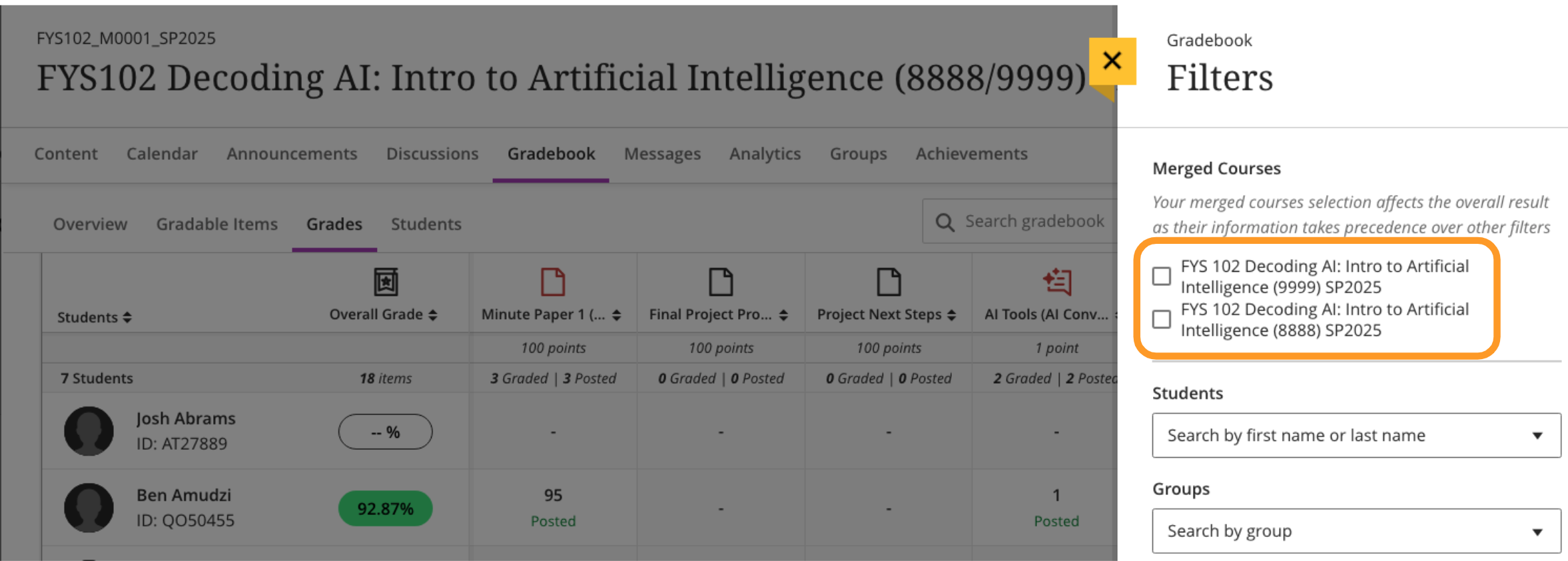
    <div class="html-content"><span><p><span>Blackboard course shells for Summer 2025 were created on April 24, 2025.</span></p></span><span><p><span>All Summer 2025 courses listed in the UMBC Schedule of Classes (SOC), regardless of designation as lecture, lab, etc, or instructor assignment, now have a Blackboard presence. RT requests are no longer needed for research, independent study, or practicum courses. As new course sections are added to the SOC by Department Scheduling Coordinators, corresponding Bb shells are automatically generated overnight. </span></p><ul><li><span><span>If you are an instructor and your name is not associated with the course you are teaching in the SOC, please see your Departmental Scheduling Coordinator to resolve the issue. Once you are listed in the SOC, your access to the Bb course shell will be updated automatically.</span></span></li><li><span><span>If you and your Department Scheduling Coordinator believe you are correctly assigned as the instructor of record in the SOC and you do not see your course shell in Blackboard, please submit a Request Tracker (RT) ticket via my.umbc.edu/help.</span></span></li></ul><h5><span>New Course Merge Request Process</span></h5><p><a href="https://my3.my.umbc.edu/groups/instructional-technology/posts/148553" rel="nofollow external" class="bo"><span>As announced by DoIT in early April</span></a><span>, instructors who teach multiple sections of the same course will see a separate Blackboard course shell for each section or course component. Courses will not be merged by default. Instructors planning to use separate shells will no longer need to submit an RT request.</span></p><p><span>Course shells may be merged upon </span><a href="http://doit.umbc.edu/request-tracker-rt/doit-myumbc-blackboard/" rel="nofollow external" class="bo"><span>request via RT ticket</span></a><span>, which we recommend submitting at least one week before the semester starts, if not as soon as courses are created in Blackboard. NOTE: Courses should not be merged or split after student grade data and engagement activity is recorded, since it will be purged as part of the separation process.</span></p><p><span>For more information about these improvements, please see the following:</span></p><ul><li><p><a href="https://docs.google.com/document/d/1Dh_bJ2IzpbxCxZoc2InBf_WeUW1maKI30DV6qbjPHZM/edit?tab=t.0#bookmark=id.h4r6ycusmhh9" rel="nofollow external" class="bo"><span>Presentation</span></a><span> to Faculty Senate Computer Policy Committee (CPC) on March 4, 2025. </span></p></li><li><p><a href="https://umbc.atlassian.net/wiki/label/faq/course-creation" rel="nofollow external" class="bo"><span>Updated FAQs</span></a><span> &amp; </span><a href="https://umbc.hosted.panopto.com/Panopto/Pages/Viewer.aspx?id=c05da845-f335-4249-a817-b2ac00dc5148&amp;start=2.647717377249107" rel="nofollow external" class="bo"><span>demo video</span></a><span>: How to request a merged course</span></p></li><li><p><span>Common questions about the revised Blackboard course creation &amp; user enrollment process (</span><a href="https://docs.google.com/document/d/1xivB1wGe53r7F5VY79TVxMplN_DXMg4QqobewifnNfY/edit?usp=sharing" rel="nofollow external" class="bo"><span>Google Doc version</span></a><span>)</span></p></li></ul><p><span>In addition, faculty are invited to </span><a href="https://my3.my.umbc.edu/groups/instructional-technology/events/141840" rel="nofollow external" class="bo"><span>attend an information session on May 1, 2025</span></a><span> about the new course creation process and why it matters. It will be a hybrid meeting in ENGR 102 and recorded. </span></p><h5><span>Create an Inclusive &amp; Accessible Course Environment</span></h5><p><span>Plan your accessibility and Universal Design for Learning strategy before students begin working with course materials. Ally, an </span><a href="https://my3.my.umbc.edu/groups/instructional-technology/posts/142005/15848/25c0274c105b860668a5b741c199e75c/web/link?link=https%3A%2F%2Fdoit.umbc.edu%2Fnews%2F%3Fid%3D82487" rel="nofollow external" class="bo"><span>accessibility tool</span></a><span>, is enabled in all course shells. Ally automatically scans uploaded and created course content, then performs a series of steps to make that content more accessible. Please review the </span><a href="https://my3.my.umbc.edu/groups/instructional-technology/posts/142005/15848/7c0cc5852f0d3c6dba209c1e8bd02849/web/link?link=https%3A%2F%2Fwiki.umbc.edu%2Fx%2F2IGdB" rel="nofollow external" class="bo"><span>Ally FAQs</span></a><span> for more information about the </span><a href="https://my3.my.umbc.edu/groups/instructional-technology/posts/142005/15848/736619ff9b31c3d78b54afbd5a6b1046/web/link?link=https%3A%2F%2Fwiki.umbc.edu%2Fx%2F_YGdB" rel="nofollow external" class="bo"><span>accessibility indicators</span></a><span> on course content and </span><a href="https://my3.my.umbc.edu/groups/instructional-technology/posts/142005/15848/07b86fc3a84557c5c91c556ee350b2cb/web/link?link=https%3A%2F%2Fwiki.umbc.edu%2Fx%2F3IGdB" rel="nofollow external" class="bo"><span>alternative formats</span></a><span>, or attend a training session.</span></p><h5><span>Connect with Instructional Technology</span></h5><p></p>As always, if you have any questions about teaching, learning, and technology at UMBC, please consider the following options:<br><ul><li><span><a href="https://my3.my.umbc.edu/groups/instructional-technology/posts/148527/15848/6df12cc6d1a4ea32339a4878cfacdf18/web/link?link=http%3A%2F%2Fwww.umbc.edu%2Ffaq" rel="nofollow external" class="bo"><span>Check our extensive FAQ collection</span></a></span></li><ul><li><a href="https://my3.my.umbc.edu/groups/instructional-technology/posts/148527/15848/5847ea3ec2583dcc793b5b800f6deae2/web/link?link=https%3A%2F%2Fwiki.umbc.edu%2Fx%2FLohnB" rel="nofollow external" class="bo"><span>What's new in Ultra?</span></a> <span>| </span><a href="https://my3.my.umbc.edu/groups/instructional-technology/posts/148527/15848/7c1f605fe8486e4126f7242ff19d66c2/web/link?link=https%3A%2F%2Fwiki.umbc.edu%2Fx%2FbwrSAQ" rel="nofollow external" class="bo"><span>Known Issues</span></a></li></ul><li><span><a href="https://my3.my.umbc.edu/groups/instructional-technology/posts/148527/15848/ac44f1edd9b8bf80b87d265384253852/web/link?link=http%3A%2F%2Fmy.umbc.edu%2Fgo%2Frequest-help" rel="nofollow external" class="bo"><span>Open a ticket via RT</span></a></span></li><li><span><span>Follow the </span><a href="https://my3.my.umbc.edu/groups/instructional-technology/posts/148527/15848/803da7db2cac268f4a1398025779fcf2/web/link?link=http%3A%2F%2Fmy.umbc.edu%2Fgroups%2Finstructional-technology" rel="nofollow external" class="bo"><span>Instructional Technology</span></a><span> &amp; </span><a href="https://my3.my.umbc.edu/groups/instructional-technology/posts/148527/15848/c17a6e240f4a54e2d1f3034bccc66304/web/link?link=http%3A%2F%2Fmy.umbc.edu%2Fgroups%2Fdoit" rel="nofollow external" class="bo"><span>DoIT</span></a><span> myUMBC groups</span></span></li><li><span><a href="https://my3.my.umbc.edu/groups/instructional-technology/posts/148527/15848/05e90bdf5ca92b883b37984dd2777034/web/link?link=http%3A%2F%2Fdoit.umbc.edu%2Fitnm%2Fstaff%2F" rel="nofollow external" class="bo"><span>Request a consult</span></a><span> with </span><a href="https://my3.my.umbc.edu/groups/instructional-technology/posts/148527/15848/d404e5c3862eec03d7a7baeca2c1840d/web/link?link=http%3A%2F%2Fdoit.umbc.edu%2Fitnm%2Fstaff" rel="nofollow external" class="bo"><span>instructional technology staff</span></a></span></li></ul></span></div>
]]>
  </Body>
  <Summary>Blackboard course shells for Summer 2025 were created on April 24, 2025.  All Summer 2025 courses listed in the UMBC Schedule of Classes (SOC), regardless of designation as lecture, lab, etc, or...</Summary>
  <Website>https://my3.my.umbc.edu/groups/instructional-technology/posts/149437</Website>
  <TrackingUrl>https://dev.my.umbc.edu/api/v0/pixel/news/149437/guest@my.umbc.edu/aebac0d56515c5f80e0408aecf2925b9/api/pixel</TrackingUrl>
  <Tag>blackboard</Tag>
  <Tag>course-creation</Tag>
  <Tag>su2025</Tag>
  <Tag>summer</Tag>
  <Group token="instructional-technology">Instructional Technology</Group>
  <GroupUrl>https://dev.my.umbc.edu/groups/instructional-technology</GroupUrl>
  <AvatarUrl>https://assets2-dev.my.umbc.edu/system/shared/avatars/groups/000/001/164/dec3b026b81ee6d890a8f82f75c94a2e/xsmall.png?1446126703</AvatarUrl>
  <AvatarUrl size="original">https://assets1-dev.my.umbc.edu/system/shared/avatars/groups/000/001/164/dec3b026b81ee6d890a8f82f75c94a2e/original.png?1446126703</AvatarUrl>
  <AvatarUrl size="xxlarge">https://assets2-dev.my.umbc.edu/system/shared/avatars/groups/000/001/164/dec3b026b81ee6d890a8f82f75c94a2e/xxlarge.png?1446126703</AvatarUrl>
  <AvatarUrl size="xlarge">https://assets1-dev.my.umbc.edu/system/shared/avatars/groups/000/001/164/dec3b026b81ee6d890a8f82f75c94a2e/xlarge.png?1446126703</AvatarUrl>
  <AvatarUrl size="large">https://assets1-dev.my.umbc.edu/system/shared/avatars/groups/000/001/164/dec3b026b81ee6d890a8f82f75c94a2e/large.png?1446126703</AvatarUrl>
  <AvatarUrl size="medium">https://assets4-dev.my.umbc.edu/system/shared/avatars/groups/000/001/164/dec3b026b81ee6d890a8f82f75c94a2e/medium.png?1446126703</AvatarUrl>
  <AvatarUrl size="small">https://assets3-dev.my.umbc.edu/system/shared/avatars/groups/000/001/164/dec3b026b81ee6d890a8f82f75c94a2e/small.png?1446126703</AvatarUrl>
  <AvatarUrl size="xsmall">https://assets2-dev.my.umbc.edu/system/shared/avatars/groups/000/001/164/dec3b026b81ee6d890a8f82f75c94a2e/xsmall.png?1446126703</AvatarUrl>
  <AvatarUrl size="xxsmall">https://assets3-dev.my.umbc.edu/system/shared/avatars/groups/000/001/164/dec3b026b81ee6d890a8f82f75c94a2e/xxsmall.png?1446126703</AvatarUrl>
  <Sponsor>Instructional Technology</Sponsor>
  <ThumbnailUrl size="xxlarge">https://assets4-dev.my.umbc.edu/system/shared/thumbnails/news/000/149/437/f0ac7bfbd398770a71003c2aced6a951/xxlarge.jpg?1745517086</ThumbnailUrl>
  <ThumbnailUrl size="xlarge">https://assets1-dev.my.umbc.edu/system/shared/thumbnails/news/000/149/437/f0ac7bfbd398770a71003c2aced6a951/xlarge.jpg?1745517086</ThumbnailUrl>
  <ThumbnailUrl size="large">https://assets1-dev.my.umbc.edu/system/shared/thumbnails/news/000/149/437/f0ac7bfbd398770a71003c2aced6a951/large.jpg?1745517086</ThumbnailUrl>
  <ThumbnailUrl size="medium">https://assets2-dev.my.umbc.edu/system/shared/thumbnails/news/000/149/437/f0ac7bfbd398770a71003c2aced6a951/medium.jpg?1745517086</ThumbnailUrl>
  <ThumbnailUrl size="small">https://assets3-dev.my.umbc.edu/system/shared/thumbnails/news/000/149/437/f0ac7bfbd398770a71003c2aced6a951/small.jpg?1745517086</ThumbnailUrl>
  <ThumbnailUrl size="xsmall">https://assets2-dev.my.umbc.edu/system/shared/thumbnails/news/000/149/437/f0ac7bfbd398770a71003c2aced6a951/xsmall.jpg?1745517086</ThumbnailUrl>
  <ThumbnailUrl size="xxsmall">https://assets1-dev.my.umbc.edu/system/shared/thumbnails/news/000/149/437/f0ac7bfbd398770a71003c2aced6a951/xxsmall.jpg?1745517086</ThumbnailUrl>
  <ThumbnailAltText>Sun with "Bb" initials for Blackboard</ThumbnailAltText>
  <PawCount>4</PawCount>
  <CommentCount>0</CommentCount>
  <CommentsAllowed>true</CommentsAllowed>
  <PostedAt>Fri, 25 Apr 2025 09:30:41 -0400</PostedAt>
</NewsItem>
  <NewsItem contentIssues="true" id="149052" important="false" status="posted" url="https://dev.my.umbc.edu/groups/instructional-technology/posts/149052">
    <Title>Maryland Open Source Textbook (MOST) grants due April 18th</Title>
    <Tagline>Advance educational excellence and affordability</Tagline>
    <Body>
      <![CDATA[
          <div class="html-content"><h1>The 2025 M.O.S.T. Grant Cycle</h1><p>We hope that you would consider submitting a proposal either for an individual faculty or institutional grant supported by the Maryland Open Source Textbook (M.O.S.T.) Initiative. The due date for proposals is <strong>April 18<sup>th</sup> at 11:59PM Eastern</strong>.<br> <br>The Faculty Grant Program offers support in the way of Adopt/Adapt OER ($1,000 grant + Participation in the Lumen Circles Community of Practice) and Create/Revise and Publish OER ($2,000 grant + Participation in the Rebus Textbook Success Program).<br> <br>Institutional grants will include $20,000 to support significant advances in OER adoption, scaling, and sustainability in support of student success. In addition, grantees will receive strategic planning and implementation support for their projects from M.O.S.T. in the form of consultations and regular monthly check-ins.<br> <br>For more details and to review the call for proposals for each grant, please visit <a href="https://oer-maryland.us8.list-manage.com/track/click?u=4ce992e3f6db63c7af9c28afd&amp;id=02151d1e4a&amp;e=b54e6989f4" rel="nofollow external" class="bo">our website</a> or email us at <a href="mailto:most@usmd.edu" rel="nofollow external" class="bo">most@usmd.edu</a>.<br> <br>Sincerely,<br>The M.O.S.T. Team</p></div>
      ]]>
    </Body>
    <Summary>The 2025 M.O.S.T. Grant Cycle  We hope that you would consider submitting a proposal either for an individual faculty or institutional grant supported by the Maryland Open Source Textbook...</Summary>
    <TrackingUrl>https://dev.my.umbc.edu/api/v0/pixel/news/149052/guest@my.umbc.edu/470557b6044033ededc22dc58340ae12/api/pixel</TrackingUrl>
    <Tag>educational</Tag>
    <Tag>oer</Tag>
    <Tag>open</Tag>
    <Tag>resources</Tag>
    <Group token="oer">Open Educational Resources at UMBC</Group>
    <GroupUrl>https://dev.my.umbc.edu/groups/oer</GroupUrl>
    <AvatarUrl>https://assets1-dev.my.umbc.edu/system/shared/avatars/groups/000/001/664/0e7fb0a3d658c358b4e5e9561f35099e/xsmall.png?1562590436</AvatarUrl>
    <AvatarUrl size="original">https://assets2-dev.my.umbc.edu/system/shared/avatars/groups/000/001/664/0e7fb0a3d658c358b4e5e9561f35099e/original.png?1562590436</AvatarUrl>
    <AvatarUrl size="xxlarge">https://assets1-dev.my.umbc.edu/system/shared/avatars/groups/000/001/664/0e7fb0a3d658c358b4e5e9561f35099e/xxlarge.png?1562590436</AvatarUrl>
    <AvatarUrl size="xlarge">https://assets1-dev.my.umbc.edu/system/shared/avatars/groups/000/001/664/0e7fb0a3d658c358b4e5e9561f35099e/xlarge.png?1562590436</AvatarUrl>
    <AvatarUrl size="large">https://assets4-dev.my.umbc.edu/system/shared/avatars/groups/000/001/664/0e7fb0a3d658c358b4e5e9561f35099e/large.png?1562590436</AvatarUrl>
    <AvatarUrl size="medium">https://assets1-dev.my.umbc.edu/system/shared/avatars/groups/000/001/664/0e7fb0a3d658c358b4e5e9561f35099e/medium.png?1562590436</AvatarUrl>
    <AvatarUrl size="small">https://assets2-dev.my.umbc.edu/system/shared/avatars/groups/000/001/664/0e7fb0a3d658c358b4e5e9561f35099e/small.png?1562590436</AvatarUrl>
    <AvatarUrl size="xsmall">https://assets1-dev.my.umbc.edu/system/shared/avatars/groups/000/001/664/0e7fb0a3d658c358b4e5e9561f35099e/xsmall.png?1562590436</AvatarUrl>
    <AvatarUrl size="xxsmall">https://assets1-dev.my.umbc.edu/system/shared/avatars/groups/000/001/664/0e7fb0a3d658c358b4e5e9561f35099e/xxsmall.png?1562590436</AvatarUrl>
    <Sponsor>Open Educational Resources at UMBC</Sponsor>
    <ThumbnailUrl size="xxlarge">https://assets1-dev.my.umbc.edu/system/shared/thumbnails/news/000/149/052/51deeb78c2364ab04ca196b78fa16084/xxlarge.jpg?1744650684</ThumbnailUrl>
    <ThumbnailUrl size="xlarge">https://assets4-dev.my.umbc.edu/system/shared/thumbnails/news/000/149/052/51deeb78c2364ab04ca196b78fa16084/xlarge.jpg?1744650684</ThumbnailUrl>
    <ThumbnailUrl size="large">https://assets4-dev.my.umbc.edu/system/shared/thumbnails/news/000/149/052/51deeb78c2364ab04ca196b78fa16084/large.jpg?1744650684</ThumbnailUrl>
    <ThumbnailUrl size="medium">https://assets2-dev.my.umbc.edu/system/shared/thumbnails/news/000/149/052/51deeb78c2364ab04ca196b78fa16084/medium.jpg?1744650684</ThumbnailUrl>
    <ThumbnailUrl size="small">https://assets4-dev.my.umbc.edu/system/shared/thumbnails/news/000/149/052/51deeb78c2364ab04ca196b78fa16084/small.jpg?1744650684</ThumbnailUrl>
    <ThumbnailUrl size="xsmall">https://assets2-dev.my.umbc.edu/system/shared/thumbnails/news/000/149/052/51deeb78c2364ab04ca196b78fa16084/xsmall.jpg?1744650684</ThumbnailUrl>
    <ThumbnailUrl size="xxsmall">https://assets4-dev.my.umbc.edu/system/shared/thumbnails/news/000/149/052/51deeb78c2364ab04ca196b78fa16084/xxsmall.jpg?1744650684</ThumbnailUrl>
    <PawCount>0</PawCount>
    <CommentCount>0</CommentCount>
    <CommentsAllowed>true</CommentsAllowed>
    <PostedAt>Mon, 14 Apr 2025 13:11:40 -0400</PostedAt>
  </NewsItem>
  <NewsItem contentIssues="false" id="148994" important="false" status="posted" url="https://dev.my.umbc.edu/groups/instructional-technology/posts/148994">
    <Title>Issue Affecting Panopto/Blackboard Grades</Title>
    <Tagline>Panopto assignments not passing to Blackboard gradebook</Tagline>
    <Body>
      <![CDATA[
          <div class="html-content"><div>Panopto has reported an issue affecting the accurate passing of grades from Panopto assignments to Blackboard's gradebook. <span>Some grades for </span><span>both quizzes and video progress are not being reported correctly to the Blackboard gradebook.</span><span>  Please see this</span><a href="https://community.panopto.com/discussion/2661/notification-of-an-issue-affecting-panopto-blackboard-assignment-grading-system" rel="nofollow external" class="bo"> article </a><span>for more information. </span></div><div><span><br></span></div><div><span>There is currently no available mitigation for this issue. As part of the investigation, the Panopto support team will confirm if it is possible to resubmit the scores to the gradebook once this issue is resolved. </span><span>Please </span><a href="https://my3.my.umbc.edu/groups/instructional-technology/posts/148994/null" rel="nofollow external" class="bo">open a ticket via RT</a><span> should you need any assistance.</span></div><div><br></div><div><p><span><strong>Connect with Instructional Technology</strong></span></p><p><span>As always, if you have questions about teaching, learning, and technology at UMBC consider the following options:</span></p><ul><li><a href="http://www.umbc.edu/faq" rel="nofollow external" class="bo"></a><a href="http://www.umbc.edu/faq" rel="nofollow external" class="bo"><span>Check our extensive FAQ collection</span></a><span> </span></li><li><span><span><a href="https://wiki.umbc.edu/x/LohnB" rel="nofollow external" class="bo"><span>What's new in Ultra?</span></a><span> </span></span></span></li><li><span><span><span><a href="null" rel="nofollow external" class="bo">Open a ticket via RT</a></span></span></span></li><li><span><span><span>Follow the </span><a href="http://my.umbc.edu/groups/instructional-technology" rel="nofollow external" class="bo"><span>Instructional Technology</span></a><span> &amp; </span><a href="http://my.umbc.edu/groups/doit" rel="nofollow external" class="bo"><span>DoIT</span></a><span> myUMBC groups</span></span></span></li><li><span><span><a href="http://doit.umbc.edu/itnm/staff/" rel="nofollow external" class="bo"><span>Request a consult</span></a><span> with </span><a href="http://doit.umbc.edu/itnm/staff" rel="nofollow external" class="bo"><span>instructional technology staff</span></a><span> </span></span></span></li></ul><div><em>(Image: Decorative)</em></div><br><a href="https://doit.umbc.edu/itnm/staff/" rel="nofollow external" class="bo">Instructional Technology Team</a></div></div>
      ]]>
    </Body>
    <Summary>Panopto has reported an issue affecting the accurate passing of grades from Panopto assignments to Blackboard's gradebook. Some grades for both quizzes and video progress are not being reported...</Summary>
    <Website>https://my3.my.umbc.edu/groups/instructional-technology/posts/148994</Website>
    <TrackingUrl>https://dev.my.umbc.edu/api/v0/pixel/news/148994/guest@my.umbc.edu/8c2c115873845354054dbdccef854b8a/api/pixel</TrackingUrl>
    <Tag>gradebook</Tag>
    <Tag>issue</Tag>
    <Tag>panopto</Tag>
    <Tag>sp2025</Tag>
    <Group token="instructional-technology">Instructional Technology</Group>
    <GroupUrl>https://dev.my.umbc.edu/groups/instructional-technology</GroupUrl>
    <AvatarUrl>https://assets2-dev.my.umbc.edu/system/shared/avatars/groups/000/001/164/dec3b026b81ee6d890a8f82f75c94a2e/xsmall.png?1446126703</AvatarUrl>
    <AvatarUrl size="original">https://assets1-dev.my.umbc.edu/system/shared/avatars/groups/000/001/164/dec3b026b81ee6d890a8f82f75c94a2e/original.png?1446126703</AvatarUrl>
    <AvatarUrl size="xxlarge">https://assets2-dev.my.umbc.edu/system/shared/avatars/groups/000/001/164/dec3b026b81ee6d890a8f82f75c94a2e/xxlarge.png?1446126703</AvatarUrl>
    <AvatarUrl size="xlarge">https://assets1-dev.my.umbc.edu/system/shared/avatars/groups/000/001/164/dec3b026b81ee6d890a8f82f75c94a2e/xlarge.png?1446126703</AvatarUrl>
    <AvatarUrl size="large">https://assets1-dev.my.umbc.edu/system/shared/avatars/groups/000/001/164/dec3b026b81ee6d890a8f82f75c94a2e/large.png?1446126703</AvatarUrl>
    <AvatarUrl size="medium">https://assets4-dev.my.umbc.edu/system/shared/avatars/groups/000/001/164/dec3b026b81ee6d890a8f82f75c94a2e/medium.png?1446126703</AvatarUrl>
    <AvatarUrl size="small">https://assets3-dev.my.umbc.edu/system/shared/avatars/groups/000/001/164/dec3b026b81ee6d890a8f82f75c94a2e/small.png?1446126703</AvatarUrl>
    <AvatarUrl size="xsmall">https://assets2-dev.my.umbc.edu/system/shared/avatars/groups/000/001/164/dec3b026b81ee6d890a8f82f75c94a2e/xsmall.png?1446126703</AvatarUrl>
    <AvatarUrl size="xxsmall">https://assets3-dev.my.umbc.edu/system/shared/avatars/groups/000/001/164/dec3b026b81ee6d890a8f82f75c94a2e/xxsmall.png?1446126703</AvatarUrl>
    <Sponsor>Instructional Technology</Sponsor>
    <ThumbnailUrl size="xxlarge">https://assets4-dev.my.umbc.edu/system/shared/thumbnails/news/000/148/994/ea040644b3dc22835dbe22917ca7bbc8/xxlarge.jpg?1744396583</ThumbnailUrl>
    <ThumbnailUrl size="xlarge">https://assets1-dev.my.umbc.edu/system/shared/thumbnails/news/000/148/994/ea040644b3dc22835dbe22917ca7bbc8/xlarge.jpg?1744396583</ThumbnailUrl>
    <ThumbnailUrl size="large">https://assets1-dev.my.umbc.edu/system/shared/thumbnails/news/000/148/994/ea040644b3dc22835dbe22917ca7bbc8/large.jpg?1744396583</ThumbnailUrl>
    <ThumbnailUrl size="medium">https://assets2-dev.my.umbc.edu/system/shared/thumbnails/news/000/148/994/ea040644b3dc22835dbe22917ca7bbc8/medium.jpg?1744396583</ThumbnailUrl>
    <ThumbnailUrl size="small">https://assets2-dev.my.umbc.edu/system/shared/thumbnails/news/000/148/994/ea040644b3dc22835dbe22917ca7bbc8/small.jpg?1744396583</ThumbnailUrl>
    <ThumbnailUrl size="xsmall">https://assets3-dev.my.umbc.edu/system/shared/thumbnails/news/000/148/994/ea040644b3dc22835dbe22917ca7bbc8/xsmall.jpg?1744396583</ThumbnailUrl>
    <ThumbnailUrl size="xxsmall">https://assets1-dev.my.umbc.edu/system/shared/thumbnails/news/000/148/994/ea040644b3dc22835dbe22917ca7bbc8/xxsmall.jpg?1744396583</ThumbnailUrl>
    <ThumbnailAltText>Panopto logo</ThumbnailAltText>
    <PawCount>1</PawCount>
    <CommentCount>0</CommentCount>
    <CommentsAllowed>true</CommentsAllowed>
    <PostedAt>Fri, 11 Apr 2025 14:46:22 -0400</PostedAt>
    <EditAt>Tue, 29 Apr 2025 08:01:36 -0400</EditAt>
  </NewsItem>
  <NewsItem contentIssues="true" id="148771" important="false" status="posted" url="https://dev.my.umbc.edu/groups/instructional-technology/posts/148771">
  <Title>Blackboard Reminder: Update Browsers to Latest Version</Title>
  <Tagline>Older browser versions may not be supported in Blackboard</Tagline>
  <Body>
    <![CDATA[
    <div class="html-content"><p><span>Following the April 2025 Blackboard release, some Blackboard users reported issues (e.g., blank screen, spinning wheel) with Blackboard access. Unsupported browser versions were identified <a href="https://status.blackboard.com/incidents/25wklsy1841w" rel="nofollow external" class="bo">as the cause of the access issue</a>. As a reminder, please ensure that your browser is up to date.</span></p><p><span><strong>Update April 14:</strong></span><span> The code updates addressing rendering issues for Safari version 16.3 and earlier have been successfully deployed to production and validated. All functionality is now working as expected. While this fix addresses the recent compatibility issues, Blackboard strongly recommends keeping browsers up to date to ensure access to the latest security patches and performance enhancements.</span></p><p><strong>Supported Browsers for Blackboard</strong></p><p><span>As of April 4, 2025, Blackboard supports the following browsers:</span></p><ul><li><span>Safari MacOS and iOS: The two most recent major versions (versions 17 and 18)</span></li><li><span>Chrome: The most recent stable version and two preceding versions (versions 133, 134, and 135)</span></li><li><span>Firefox: The most stable version and the two preceding versions</span></li><li><span>Edge: The most recent stable version and the two preceding versions</span></li></ul><div><span><div><strong>Why Update Your Browser</strong></div><div>If you're using older versions of these browsers, you may encounter difficulties accessing Blackboard or features within the application. Updating your browser ensures compatibility with the latest features on Blackboard, enhances security, and provides a smoother user experience. If your browser does not update automatically, please take time to check your browser for available updates.</div><div><br></div><div><strong>How to Check Your Browser Version</strong></div><div>Wondering if you're using the right version? Use Blackboard’s <span><span><a href="https://help.blackboard.com/Learn/Student/Ultra/Getting_Started/Browser_Support/Browser_Checker" rel="nofollow external" class="bo">Browser Checker</a></span><span> </span></span>to check your browser and browser settings. </div></span></div><br><div><p><span><strong>Important Browser Settings
    </strong>In addition to using the most current browser version, your browser settings should be updated to allow pop-ups and third-party cookies from Blackboard.</span></p></div><blockquote><div><em><strong>Allow Pop-Ups</strong></em></div><div><span>Pop-Up blockers should not be enabled in your browser when running Blackboard. For an optimal experience on Blackboard, make sure to disable any pop-up blocker software on your browser or allow your browser to open pop-ups from Blackboard.</span></div><div><span><em><br></em></span></div><div><span><em><strong>Allow Third-Party Cookies</strong></em></span></div><div><p><span>Blackboard relies on some third-party cookies. Please allow </span><span>third-party cookies for Blackboard and related technologies. </span><span>See our </span><a href="https://umbc.atlassian.net/wiki/spaces/faq/pages/30750286/How+do+I+enable+third-party+cookies+for+Blackboard+and+related+integrations" rel="nofollow external" class="bo"><span>FAQ about third-party cookies</span></a><span> for additional </span><span>information.</span></p></div></blockquote><div><div><strong>Connect with Instructional Technology</strong></div><div>As always, if you have any questions about teaching, learning, and technology at UMBC, please consider the following options:</div><ul><li><a href="https://my3.my.umbc.edu/groups/instructional-technology/posts/148527/15848/6df12cc6d1a4ea32339a4878cfacdf18/web/link?link=http%3A%2F%2Fwww.umbc.edu%2Ffaq" rel="nofollow external" class="bo">Check our extensive FAQ collection</a></li><ul><li><a href="https://my3.my.umbc.edu/groups/instructional-technology/posts/148527/15848/5847ea3ec2583dcc793b5b800f6deae2/web/link?link=https%3A%2F%2Fwiki.umbc.edu%2Fx%2FLohnB" rel="nofollow external" class="bo">What's new in Ultra?</a>|<a href="https://my3.my.umbc.edu/groups/instructional-technology/posts/148527/15848/7c1f605fe8486e4126f7242ff19d66c2/web/link?link=https%3A%2F%2Fwiki.umbc.edu%2Fx%2FbwrSAQ" rel="nofollow external" class="bo">Known Issues</a></li></ul><li><a href="https://my3.my.umbc.edu/groups/instructional-technology/posts/148527/15848/ac44f1edd9b8bf80b87d265384253852/web/link?link=http%3A%2F%2Fmy.umbc.edu%2Fgo%2Frequest-help" rel="nofollow external" class="bo">Open a ticket via RT</a></li><li>Follow the <a href="https://my3.my.umbc.edu/groups/instructional-technology/posts/148527/15848/803da7db2cac268f4a1398025779fcf2/web/link?link=http%3A%2F%2Fmy.umbc.edu%2Fgroups%2Finstructional-technology" rel="nofollow external" class="bo">Instructional Technology</a> &amp; <a href="https://my3.my.umbc.edu/groups/instructional-technology/posts/148527/15848/c17a6e240f4a54e2d1f3034bccc66304/web/link?link=http%3A%2F%2Fmy.umbc.edu%2Fgroups%2Fdoit" rel="nofollow external" class="bo">DoIT</a> myUMBC groups</li><li><a href="https://my3.my.umbc.edu/groups/instructional-technology/posts/148527/15848/05e90bdf5ca92b883b37984dd2777034/web/link?link=http%3A%2F%2Fdoit.umbc.edu%2Fitnm%2Fstaff%2F" rel="nofollow external" class="bo">Request a consult</a> with <a href="https://my3.my.umbc.edu/groups/instructional-technology/posts/148527/15848/d404e5c3862eec03d7a7baeca2c1840d/web/link?link=http%3A%2F%2Fdoit.umbc.edu%2Fitnm%2Fstaff" rel="nofollow external" class="bo">instructional technology staff</a></li></ul><div><br></div><div>thumbnail: Blackboard logo</div></div></div>
]]>
  </Body>
  <Summary>Following the April 2025 Blackboard release, some Blackboard users reported issues (e.g., blank screen, spinning wheel) with Blackboard access. Unsupported browser versions were identified as the...</Summary>
  <Website>https://my3.my.umbc.edu/groups/instructional-technology/posts/148771</Website>
  <TrackingUrl>https://dev.my.umbc.edu/api/v0/pixel/news/148771/guest@my.umbc.edu/5941e961936aebde1175e5fb68ef3f7d/api/pixel</TrackingUrl>
  <Tag>blackboard</Tag>
  <Tag>browser</Tag>
  <Tag>known-issue</Tag>
  <Group token="instructional-technology">Instructional Technology</Group>
  <GroupUrl>https://dev.my.umbc.edu/groups/instructional-technology</GroupUrl>
  <AvatarUrl>https://assets2-dev.my.umbc.edu/system/shared/avatars/groups/000/001/164/dec3b026b81ee6d890a8f82f75c94a2e/xsmall.png?1446126703</AvatarUrl>
  <AvatarUrl size="original">https://assets1-dev.my.umbc.edu/system/shared/avatars/groups/000/001/164/dec3b026b81ee6d890a8f82f75c94a2e/original.png?1446126703</AvatarUrl>
  <AvatarUrl size="xxlarge">https://assets2-dev.my.umbc.edu/system/shared/avatars/groups/000/001/164/dec3b026b81ee6d890a8f82f75c94a2e/xxlarge.png?1446126703</AvatarUrl>
  <AvatarUrl size="xlarge">https://assets1-dev.my.umbc.edu/system/shared/avatars/groups/000/001/164/dec3b026b81ee6d890a8f82f75c94a2e/xlarge.png?1446126703</AvatarUrl>
  <AvatarUrl size="large">https://assets1-dev.my.umbc.edu/system/shared/avatars/groups/000/001/164/dec3b026b81ee6d890a8f82f75c94a2e/large.png?1446126703</AvatarUrl>
  <AvatarUrl size="medium">https://assets4-dev.my.umbc.edu/system/shared/avatars/groups/000/001/164/dec3b026b81ee6d890a8f82f75c94a2e/medium.png?1446126703</AvatarUrl>
  <AvatarUrl size="small">https://assets3-dev.my.umbc.edu/system/shared/avatars/groups/000/001/164/dec3b026b81ee6d890a8f82f75c94a2e/small.png?1446126703</AvatarUrl>
  <AvatarUrl size="xsmall">https://assets2-dev.my.umbc.edu/system/shared/avatars/groups/000/001/164/dec3b026b81ee6d890a8f82f75c94a2e/xsmall.png?1446126703</AvatarUrl>
  <AvatarUrl size="xxsmall">https://assets3-dev.my.umbc.edu/system/shared/avatars/groups/000/001/164/dec3b026b81ee6d890a8f82f75c94a2e/xxsmall.png?1446126703</AvatarUrl>
  <Sponsor>Instructional Technology</Sponsor>
  <ThumbnailUrl size="xxlarge">https://assets3-dev.my.umbc.edu/system/shared/thumbnails/news/000/148/771/2e2a57a0bf5f77c2332a4270ec222b56/xxlarge.jpg?1744048268</ThumbnailUrl>
  <ThumbnailUrl size="xlarge">https://assets4-dev.my.umbc.edu/system/shared/thumbnails/news/000/148/771/2e2a57a0bf5f77c2332a4270ec222b56/xlarge.jpg?1744048268</ThumbnailUrl>
  <ThumbnailUrl size="large">https://assets4-dev.my.umbc.edu/system/shared/thumbnails/news/000/148/771/2e2a57a0bf5f77c2332a4270ec222b56/large.jpg?1744048268</ThumbnailUrl>
  <ThumbnailUrl size="medium">https://assets4-dev.my.umbc.edu/system/shared/thumbnails/news/000/148/771/2e2a57a0bf5f77c2332a4270ec222b56/medium.jpg?1744048268</ThumbnailUrl>
  <ThumbnailUrl size="small">https://assets4-dev.my.umbc.edu/system/shared/thumbnails/news/000/148/771/2e2a57a0bf5f77c2332a4270ec222b56/small.jpg?1744048268</ThumbnailUrl>
  <ThumbnailUrl size="xsmall">https://assets4-dev.my.umbc.edu/system/shared/thumbnails/news/000/148/771/2e2a57a0bf5f77c2332a4270ec222b56/xsmall.jpg?1744048268</ThumbnailUrl>
  <ThumbnailUrl size="xxsmall">https://assets4-dev.my.umbc.edu/system/shared/thumbnails/news/000/148/771/2e2a57a0bf5f77c2332a4270ec222b56/xxsmall.jpg?1744048268</ThumbnailUrl>
  <PawCount>3</PawCount>
  <CommentCount>0</CommentCount>
  <CommentsAllowed>true</CommentsAllowed>
  <PostedAt>Mon, 07 Apr 2025 14:01:38 -0400</PostedAt>
  <EditAt>Mon, 14 Apr 2025 12:34:51 -0400</EditAt>
</NewsItem>
  <NewsItem contentIssues="false" id="148553" important="true" status="posted" url="https://dev.my.umbc.edu/groups/instructional-technology/posts/148553">
  <Title>DoIT to Change Blackboard Auto Course Creation &amp; User Enrollment</Title>
  <Tagline>New Process To Be Piloted SU25</Tagline>
  <Body>
    <![CDATA[
    <div class="html-content"><p>To address current and future Blackboard (Bb) system administration issues and opportunities, DoIT will be changing how all Bb courses are automatically created and enrolled. Specifically, the new process – auto-creating exact one-to-one (1:1) matches of all PeopleSoft (PS) section enrollments and Bb course shells – will be piloted in Summer 25 and (pending results) implemented in Fall 25.</p><p>When completed, the new process will improve Bb course roster accuracy, lay a foundation for faculty bulk final grade submission, and free up DoIT staff to help all users make the most of the tool at the hectic start of semesters. Short-term, multi-section Bb course shells will be merged "upon request" vs "by default" as they are now, but long-term, faculty will be able to merge or split any sections they teach within Bb itself.</p><p>"We recognize instructors of large courses will need to request merges of their multiple sections, rather than having them combined by default," says <strong>John Fritz</strong>, Associate Vice President of Instructional Technology. "However, mapping Bb and PS sections as part of the course creation process is an important part of our ongoing effort to streamline and enhance course management in Blackboard. It is an <a href="https://docs.google.com/spreadsheets/d/1wGg4hfGnxlID6OlxQGsfA4Mo6XrHB3kfquOVh0LOatA/edit?usp=sharing" rel="nofollow external" class="bo">effective practice</a> used at other Bb schools, even regardless of LMS including <a href="https://itsupport.umd.edu/itsupport?id=kb_article_view&amp;sysparm_article=KB0010481" rel="nofollow external" class="bo">College Park</a>, and will free up DoIT staff who have been <a href="https://docs.google.com/spreadsheets/d/1kEsL4N4q3sfT6WDV7tlrll_UnvxizbSelKtfDM2HBnU/edit?gid=547801168#gid=547801168" rel="nofollow external" class="bo">averaging nearly 100 hours</a> at the start of semester processing faculty requests to split sections we have merged by default. Long-term, re-engineering Bb’s integration with PS will benefit students and faculty, and DoIT staff who support them."</p><p>Summer courses will be created at the end of April.</p><p>For more information about these improvements, please see the following:</p><ol><li><a href="https://docs.google.com/document/d/1Dh_bJ2IzpbxCxZoc2InBf_WeUW1maKI30DV6qbjPHZM/edit?tab=t.0#bookmark=id.h4r6ycusmhh9" rel="nofollow external" class="bo">Presentation</a> to Faculty Senate Computer Policy Committee (CPC) on March 4, 2025. </li><li><a href="https://umbc.atlassian.net/wiki/label/faq/course-creation" rel="nofollow external" class="bo">Updated FAQs</a> &amp; <a href="https://umbc.hosted.panopto.com/Panopto/Pages/Viewer.aspx?id=c05da845-f335-4249-a817-b2ac00dc5148&amp;start=2.647717377249107" rel="nofollow external" class="bo">demo video</a>: How to request a merged course</li><li><a href="https://my3.my.umbc.edu/groups/instructional-technology/posts/148553#questions" rel="nofollow external" class="bo">C</a>ommon question about the process (below, or <a href="https://docs.google.com/document/d/1xivB1wGe53r7F5VY79TVxMplN_DXMg4QqobewifnNfY/edit?usp=sharing" rel="nofollow external" class="bo">use this Google Doc</a>)</li></ol><p>In addition, faculty are invited to <a href="https://my3.my.umbc.edu/groups/instructional-technology/events/141840" rel="nofollow external" class="bo">attend an information session on May 1, 2025</a> about the new course creation process and why it matters. It will be a hybrid meeting ENGR 102 and recorded. </p><div><strong>Connect with Instructional Technology</strong></div><div>As always, if you have any questions about teaching, learning, and technology at UMBC, please consider the following options:</div><ul><li><a href="https://my3.my.umbc.edu/groups/instructional-technology/posts/148527/15848/6df12cc6d1a4ea32339a4878cfacdf18/web/link?link=http%3A%2F%2Fwww.umbc.edu%2Ffaq" rel="nofollow external" class="bo">Check our extensive FAQ collection</a></li><ul><li><a href="https://my3.my.umbc.edu/groups/instructional-technology/posts/148527/15848/5847ea3ec2583dcc793b5b800f6deae2/web/link?link=https%3A%2F%2Fwiki.umbc.edu%2Fx%2FLohnB" rel="nofollow external" class="bo">What's new in Ultra?</a>|<a href="https://my3.my.umbc.edu/groups/instructional-technology/posts/148527/15848/7c1f605fe8486e4126f7242ff19d66c2/web/link?link=https%3A%2F%2Fwiki.umbc.edu%2Fx%2FbwrSAQ" rel="nofollow external" class="bo">Known Issues</a></li></ul><li><a href="https://my3.my.umbc.edu/groups/instructional-technology/posts/148527/15848/ac44f1edd9b8bf80b87d265384253852/web/link?link=http%3A%2F%2Fmy.umbc.edu%2Fgo%2Frequest-help" rel="nofollow external" class="bo">Open a ticket via RT</a></li><li>Follow the <a href="https://my3.my.umbc.edu/groups/instructional-technology/posts/148527/15848/803da7db2cac268f4a1398025779fcf2/web/link?link=http%3A%2F%2Fmy.umbc.edu%2Fgroups%2Finstructional-technology" rel="nofollow external" class="bo">Instructional Technology</a> &amp; <a href="https://my3.my.umbc.edu/groups/instructional-technology/posts/148527/15848/c17a6e240f4a54e2d1f3034bccc66304/web/link?link=http%3A%2F%2Fmy.umbc.edu%2Fgroups%2Fdoit" rel="nofollow external" class="bo">DoIT</a> myUMBC groups</li><li><a href="https://my3.my.umbc.edu/groups/instructional-technology/posts/148527/15848/05e90bdf5ca92b883b37984dd2777034/web/link?link=http%3A%2F%2Fdoit.umbc.edu%2Fitnm%2Fstaff%2F" rel="nofollow external" class="bo">Request a consult</a> with <a href="https://my3.my.umbc.edu/groups/instructional-technology/posts/148527/15848/d404e5c3862eec03d7a7baeca2c1840d/web/link?link=http%3A%2F%2Fdoit.umbc.edu%2Fitnm%2Fstaff" rel="nofollow external" class="bo">instructional technology staff</a></li></ul><h5><strong>Common Questions About the Revised Blackboard Course Creation &amp; User Enrollment Process </strong></h5><div><strong><br></strong></div><p><strong>Why is the course creation process changing?</strong></p><p>The course creation process is changing to ensure more accurate rosters in Blackboard that match what is in PeopleSoft. More importantly, the revised course creation and enrollment process lays a foundation for additional development by DoIT staff to support workflows for final grade extraction between Blackboard and Peoplesoft. </p><p><strong>How does the new course creation process work?</strong></p><p>The course creation process will include all course types including Research, Independent Study, and Practicum. Additionally, courses without an instructor assigned in the Schedule of Classes will also be created in Blackboard, allowing departments more flexibility to request access when waiting for new hire paperwork to be processed.</p><p><strong>What is the benefit of the new course creation process for faculty and students?</strong></p><p>The improvements benefit faculty and students alike by ensuring that course rosters are accurate. Since rosters will be processed one at a time per section in Blackboard, students are connected more precisely to the official course record, including adds and drops. </p><p>Since courses start in a separated state, students will not lose access to the course. Merging a course also ensures students will retain access without delay. All data is retained in a course if students drop, albeit in a disabled state that only system admins can see. The course information seen by students when they log into Blackboard will be more accurate, matching the registration information in PeopleSoft.</p><p>Faculty will also have new gradebook filters that easily identify which course section they are viewing. If they prefer to download the gradebook, a new column provides the course section information for easier sorting.</p><p><img src="https://my3.my.umbc.edu/groups/instructional-technology/posts/148553/attachments/56380" width="500" alt="Image 1: Example of the new gradebook filter in an Ultra course." style="max-width: 100%; height: auto;"></p><p><em>Image 1: Example of the new gradebook filter in an Ultra course.</em></p><p><strong>How will my Blackboard course differ with the new process?</strong></p><p>Your Blackboard course will function the same way except you will have separate course shells for each class you teach. If you prefer to combine your courses, please open a ticket to request a merge.</p><p>Merged courses will function exactly as before -- one course shell with all of your students enrolled. You’ll have those new gradebook filters available as an added perk. You can continue to use Copy Items, release conditions, and groups to manage your content and students.</p><p><strong>How do I request a merged course shell in Blackboard?</strong></p><p>Instructors who teach multiple sections of the same course will see a separate Blackboard course shell for each section or course component. Courses will no longer be merged by default. Instructors planning to use split shells will no longer need to submit an RT request.</p><p>Course shells may be <a href="https://doit.umbc.edu/request-tracker-rt/doit-myumbc-blackboard/" rel="nofollow external" class="bo">merged upon request via RT ticket</a>, which we recommend submitting at least one week before the semester starts, if not as soon as courses are created in Blackboard. NOTE: Courses should not be merged or split after student grade data and engagement activity is recorded since it will be purged as part of the separation process.</p><p><strong>How do students access my course?</strong></p><p>Student enrollment in Bb mirrors the official registration in SA and updates hourly. However, courses are not accessible to students by default until the instructor of record makes them available.</p><p><strong>How do I add a non-enrolled student to my individual or merged course?</strong></p><p>Only officially enrolled students can access your course. Faculty can add TAs, graders, course builders, and other support roles (e.g., SI-PASS, interpreter, etc.) to their courses. </p><p><img src="https://my3.my.umbc.edu/groups/instructional-technology/posts/148553/attachments/56381" width="500" alt="Image 2: Example of the enrollment screen in a Blackboard course." style="max-width: 100%; height: auto;"></p><p><em>Image 2: Example of the enrollment screen in a Blackboard course.</em></p><p><strong>How do I add a student to my course to fulfill an incomplete?</strong></p><p>Please <a href="https://doit.umbc.edu/request-tracker-rt/doit-myumbc-blackboard/" rel="nofollow external" class="bo">open a ticket</a> and <a href="https://umbc.atlassian.net/wiki/spaces/faq/pages/30749486/How+do+I+allow+a+student+access+to+a+completed+course+Course+availability+override" rel="nofollow external" class="bo">request a Course Availiability Override</a>. This will extend that student’s access to the Blackboard course shell matching their official enrollment.</p></div>
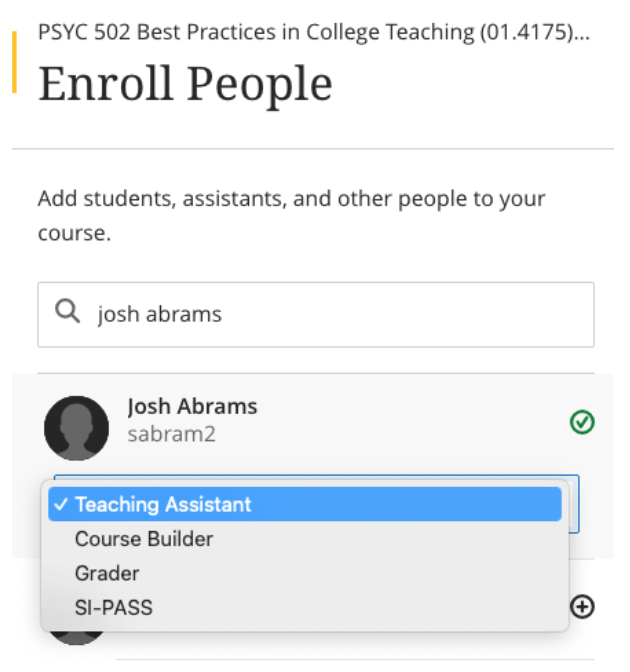
]]>
  </Body>
  <Summary>To address current and future Blackboard (Bb) system administration issues and opportunities, DoIT will be changing how all Bb courses are automatically created and enrolled. Specifically, the new...</Summary>
  <Website>https://my3.my.umbc.edu/groups/instructional-technology/posts/148553</Website>
  <AttachmentKind>Image</AttachmentKind>
  <AttachmentUrl>https://assets2-dev.my.umbc.edu/system/shared/attachments/4981f400e212e391858879b88c010a8d/69f7177b/news/000/148/553/9d2b7131e7cbc7fa10b2a9775b19b3c1/NewCourseCreation_GradebookFilter.png?1743606408</AttachmentUrl>
  <Attachments>
    <Attachment kind="Image" url="https://dev.my.umbc.edu/groups/instructional-technology/posts/148553/attachments/56380"></Attachment>
    <Attachment kind="Image" url="https://dev.my.umbc.edu/groups/instructional-technology/posts/148553/attachments/56381"></Attachment>
  </Attachments>
  <TrackingUrl>https://dev.my.umbc.edu/api/v0/pixel/news/148553/guest@my.umbc.edu/837523f3b8d0a56f6bc486963f02f77a/api/pixel</TrackingUrl>
  <Tag>blackboard</Tag>
  <Tag>course-creation</Tag>
  <Tag>system-improvements</Tag>
  <Group token="instructional-technology">Instructional Technology</Group>
  <GroupUrl>https://dev.my.umbc.edu/groups/instructional-technology</GroupUrl>
  <AvatarUrl>https://assets2-dev.my.umbc.edu/system/shared/avatars/groups/000/001/164/dec3b026b81ee6d890a8f82f75c94a2e/xsmall.png?1446126703</AvatarUrl>
  <AvatarUrl size="original">https://assets1-dev.my.umbc.edu/system/shared/avatars/groups/000/001/164/dec3b026b81ee6d890a8f82f75c94a2e/original.png?1446126703</AvatarUrl>
  <AvatarUrl size="xxlarge">https://assets2-dev.my.umbc.edu/system/shared/avatars/groups/000/001/164/dec3b026b81ee6d890a8f82f75c94a2e/xxlarge.png?1446126703</AvatarUrl>
  <AvatarUrl size="xlarge">https://assets1-dev.my.umbc.edu/system/shared/avatars/groups/000/001/164/dec3b026b81ee6d890a8f82f75c94a2e/xlarge.png?1446126703</AvatarUrl>
  <AvatarUrl size="large">https://assets1-dev.my.umbc.edu/system/shared/avatars/groups/000/001/164/dec3b026b81ee6d890a8f82f75c94a2e/large.png?1446126703</AvatarUrl>
  <AvatarUrl size="medium">https://assets4-dev.my.umbc.edu/system/shared/avatars/groups/000/001/164/dec3b026b81ee6d890a8f82f75c94a2e/medium.png?1446126703</AvatarUrl>
  <AvatarUrl size="small">https://assets3-dev.my.umbc.edu/system/shared/avatars/groups/000/001/164/dec3b026b81ee6d890a8f82f75c94a2e/small.png?1446126703</AvatarUrl>
  <AvatarUrl size="xsmall">https://assets2-dev.my.umbc.edu/system/shared/avatars/groups/000/001/164/dec3b026b81ee6d890a8f82f75c94a2e/xsmall.png?1446126703</AvatarUrl>
  <AvatarUrl size="xxsmall">https://assets3-dev.my.umbc.edu/system/shared/avatars/groups/000/001/164/dec3b026b81ee6d890a8f82f75c94a2e/xxsmall.png?1446126703</AvatarUrl>
  <Sponsor>Instructional Technology</Sponsor>
  <ThumbnailUrl size="xxlarge">https://assets2-dev.my.umbc.edu/system/shared/thumbnails/news/000/148/553/3ee28386b05d2be5bf99a707a4df172c/xxlarge.jpg?1743538562</ThumbnailUrl>
  <ThumbnailUrl size="xlarge">https://assets1-dev.my.umbc.edu/system/shared/thumbnails/news/000/148/553/3ee28386b05d2be5bf99a707a4df172c/xlarge.jpg?1743538562</ThumbnailUrl>
  <ThumbnailUrl size="large">https://assets4-dev.my.umbc.edu/system/shared/thumbnails/news/000/148/553/3ee28386b05d2be5bf99a707a4df172c/large.jpg?1743538562</ThumbnailUrl>
  <ThumbnailUrl size="medium">https://assets4-dev.my.umbc.edu/system/shared/thumbnails/news/000/148/553/3ee28386b05d2be5bf99a707a4df172c/medium.jpg?1743538562</ThumbnailUrl>
  <ThumbnailUrl size="small">https://assets1-dev.my.umbc.edu/system/shared/thumbnails/news/000/148/553/3ee28386b05d2be5bf99a707a4df172c/small.jpg?1743538562</ThumbnailUrl>
  <ThumbnailUrl size="xsmall">https://assets3-dev.my.umbc.edu/system/shared/thumbnails/news/000/148/553/3ee28386b05d2be5bf99a707a4df172c/xsmall.jpg?1743538562</ThumbnailUrl>
  <ThumbnailUrl size="xxsmall">https://assets2-dev.my.umbc.edu/system/shared/thumbnails/news/000/148/553/3ee28386b05d2be5bf99a707a4df172c/xxsmall.jpg?1743538562</ThumbnailUrl>
  <ThumbnailAltText>Blackboard logo, decorative element</ThumbnailAltText>
  <PawCount>7</PawCount>
  <CommentCount>0</CommentCount>
  <CommentsAllowed>true</CommentsAllowed>
  <PostedAt>Thu, 03 Apr 2025 13:34:40 -0400</PostedAt>
  <EditAt>Fri, 18 Jul 2025 09:59:04 -0400</EditAt>
</NewsItem>
  <NewsItem contentIssues="false" id="148527" important="false" status="posted" url="https://dev.my.umbc.edu/groups/instructional-technology/posts/148527">
  <Title>April update to Ultra features flexible grading in groups, printing support for Ultra documents &amp; accessibility support for Office Math</Title>
  <Tagline>New learning object repository designed for flexible content</Tagline>
  <Body>
    <![CDATA[
    <div class="html-content"><p>The April release introduce several new features aimed at improving content management, grading flexibility, and student feedback tracking. </p><p>Instructors and students can now <a href="https://help.blackboard.com/node/49881" rel="nofollow external" class="bo">print Ultra Documents</a> or save them as PDFs. This feature facilitates offline content review, sharing with peers, or creating physical copies. Note that if knowledge checks are included and already completed, they will display selected answers and instructor feedback when printed.</p><p><img src="https://help.blackboard.com/sites/default/files/styles/rich_text_large/public/images/2025-03/Documents_PrintStudent.png.webp?itok=TbW20Q9-" width="500" alt="Example of new print Ultra Document feature" style="max-width: 100%; height: auto;"></p><p><em>Image 1: Example of new print Ultra Document feature</em></p><p>A major addition this month is <a href="https://help.blackboard.com/node/49871" rel="nofollow external" class="bo">the Learning Object Repository (LOR)</a>, designed to centralize resources across courses and organizations. Instructors can copy objects from the LOR while maintaining control over settings such as availability. Updates made to objects in the LOR are automatically reflected across associated courses, making it easier to manage institutional content like policy documents.</p><p><strong>Content Creation &amp; Management</strong></p><ul><li>When performing a whole course copy, achievements are now automatically included, allowing instructors to maintain consistent recognition across course iterations. However, achievements are not included in granular content copies.</li><li>Instructors can now <a href="https://help.blackboard.com/node/49896" rel="nofollow external" class="bo">access Achievements through the Student Preview</a>.</li></ul><div><strong>Accessibility</strong></div><div><ul><li>Ally's document conversion process is upgraded to include <a href="https://help.blackboard.com/node/49976" rel="nofollow external" class="bo">the first version of support for Office Math</a> found in Microsoft Word documents. Students downloading the HTML and BeeLine Reader Alternative Formats will now see the math equations rendered as MathML via MathJax in their browser.</li></ul></div><div><strong>Communication &amp; Engagement</strong></div><div><ul><li>To improve communication within large courses, the Course Activity Report now <a href="https://help.blackboard.com/node/49901" rel="nofollow external" class="bo">includes clear labels when sending messages</a>: <span>All students, s</span><span>elected students, s</span><span>elected students with alerts, or s</span><span>elected students without alerts. </span><span>This improvement helps instructors better manage communication, especially when addressing students with specific needs.</span></li><li>The <a href="https://help.blackboard.com/node/49906" rel="nofollow external" class="bo">color of the activity indicator</a> for discussions, journals, and conversations is changed from blue to purple to better unify the color scheme in Ultra.</li></ul></div><p><strong>Assessments &amp; Grading</strong></p><ul><li>Flexible Grading is introduced for group assignments and tests. Though some features (like per-question feedback on group tests) are not yet available, this update is part of ongoing improvements to group grading.</li><li>A new feedback indicator on the student Overview page now shows <a href="https://help.blackboard.com/fi-fi/node/49911" rel="nofollow external" class="bo">whether students have reviewed their feedback</a>. The indicator updates from “Not reviewed” to “Reviewed” with a timestamp, giving instructors greater insight into student engagement with their feedback.</li><li>A <a href="https://help.blackboard.com/node/49916" rel="nofollow external" class="bo">new “Results” column</a> in the Gradebook replaces the “Feedback” column, making it more intuitive for students to view their grades and feedback.</li></ul><p>Faculty should see the latest updates in their Ultra courses around April 4-5 2025. The next update to our Ultra test environment will take place on <span>April 8, 2025</span>; release notes are posted to the <a href="https://wiki.umbc.edu/x/LohnB" rel="nofollow external" class="bo">What's New in Ultra</a><span> that same week. Faculty who are interested in test driving new features before they are released to production should </span><a href="http://my.umbc.edu/go/request-help" rel="nofollow external" class="bo">open an RT ticket</a><span> to request early access. Please </span><a href="http://umbc.edu/go/ultra" rel="nofollow external" class="bo">watch the FAQs</a><span>, including </span><a href="https://wiki.umbc.edu/x/LohnB" rel="nofollow external" class="bo">the What's New with Ultra page</a><span>, and myUMBC for additional information about Ultra.</span></p><p><span>Curious about the all latest features in Ultra? Join our </span><a href="https://my3.my.umbc.edu/groups/instructional-technology/events/141687" rel="nofollow external" class="bo">What's New in Ultra Courses for Teaching &amp; Learning SU2025</a><span> webinar on May 12, 2025.</span></p><div><div><span><strong>Connect with Instructional Technology</strong></span></div><div><span>As always, if you have any questions about teaching, learning, and technology at UMBC, please consider the following options:</span></div><ul><li><a href="http://www.umbc.edu/faq" rel="nofollow external" class="bo">Check our extensive FAQ collection</a><span> </span></li><ul><li><span><a href="https://wiki.umbc.edu/x/LohnB" rel="nofollow external" class="bo"><span>What's new in Ultra?</span></a><span> </span><span>|</span><span> </span><a href="https://wiki.umbc.edu/x/bwrSAQ" rel="nofollow external" class="bo"><span>Known Issues</span></a><span> </span></span></li></ul><li><span><a href="http://my.umbc.edu/go/request-help" rel="nofollow external" class="bo">Open a ticket via RT</a></span></li><li><span>Follow the </span><a href="http://my.umbc.edu/groups/instructional-technology" rel="nofollow external" class="bo">Instructional Technology</a><span> &amp; </span><a href="http://my.umbc.edu/groups/doit" rel="nofollow external" class="bo">DoIT</a><span> myUMBC groups</span></li><li><a href="http://doit.umbc.edu/itnm/staff/" rel="nofollow external" class="bo">Request a consult</a><span> with <a href="http://doit.umbc.edu/itnm/staff" rel="nofollow external" class="bo">instructional technology staff</a></span></li></ul><div><em>Thumbnail-image: New to Ultra [decorative]</em></div><div><div></div></div></div></div>
]]>
  </Body>
  <Summary>The April release introduce several new features aimed at improving content management, grading flexibility, and student feedback tracking.   Instructors and students can now print Ultra Documents...</Summary>
  <Website>https://my3.my.umbc.edu/groups/instructional-technology/posts/148527</Website>
  <TrackingUrl>https://dev.my.umbc.edu/api/v0/pixel/news/148527/guest@my.umbc.edu/98441a11c3906d0a32a59050674887a5/api/pixel</TrackingUrl>
  <Tag>blackboard</Tag>
  <Tag>gradebook</Tag>
  <Tag>grading</Tag>
  <Tag>groups</Tag>
  <Tag>learning-object-repository</Tag>
  <Tag>rubrics</Tag>
  <Tag>ultra-experience</Tag>
  <Tag>ultra-update</Tag>
  <Group token="instructional-technology">Instructional Technology</Group>
  <GroupUrl>https://dev.my.umbc.edu/groups/instructional-technology</GroupUrl>
  <AvatarUrl>https://assets2-dev.my.umbc.edu/system/shared/avatars/groups/000/001/164/dec3b026b81ee6d890a8f82f75c94a2e/xsmall.png?1446126703</AvatarUrl>
  <AvatarUrl size="original">https://assets1-dev.my.umbc.edu/system/shared/avatars/groups/000/001/164/dec3b026b81ee6d890a8f82f75c94a2e/original.png?1446126703</AvatarUrl>
  <AvatarUrl size="xxlarge">https://assets2-dev.my.umbc.edu/system/shared/avatars/groups/000/001/164/dec3b026b81ee6d890a8f82f75c94a2e/xxlarge.png?1446126703</AvatarUrl>
  <AvatarUrl size="xlarge">https://assets1-dev.my.umbc.edu/system/shared/avatars/groups/000/001/164/dec3b026b81ee6d890a8f82f75c94a2e/xlarge.png?1446126703</AvatarUrl>
  <AvatarUrl size="large">https://assets1-dev.my.umbc.edu/system/shared/avatars/groups/000/001/164/dec3b026b81ee6d890a8f82f75c94a2e/large.png?1446126703</AvatarUrl>
  <AvatarUrl size="medium">https://assets4-dev.my.umbc.edu/system/shared/avatars/groups/000/001/164/dec3b026b81ee6d890a8f82f75c94a2e/medium.png?1446126703</AvatarUrl>
  <AvatarUrl size="small">https://assets3-dev.my.umbc.edu/system/shared/avatars/groups/000/001/164/dec3b026b81ee6d890a8f82f75c94a2e/small.png?1446126703</AvatarUrl>
  <AvatarUrl size="xsmall">https://assets2-dev.my.umbc.edu/system/shared/avatars/groups/000/001/164/dec3b026b81ee6d890a8f82f75c94a2e/xsmall.png?1446126703</AvatarUrl>
  <AvatarUrl size="xxsmall">https://assets3-dev.my.umbc.edu/system/shared/avatars/groups/000/001/164/dec3b026b81ee6d890a8f82f75c94a2e/xxsmall.png?1446126703</AvatarUrl>
  <Sponsor>Instructional Technology</Sponsor>
  <ThumbnailUrl size="xxlarge">https://assets4-dev.my.umbc.edu/system/shared/thumbnails/news/000/148/527/2bcf512b1e78e7541b0a4d36471ecf1b/xxlarge.jpg?1743523823</ThumbnailUrl>
  <ThumbnailUrl size="xlarge">https://assets3-dev.my.umbc.edu/system/shared/thumbnails/news/000/148/527/2bcf512b1e78e7541b0a4d36471ecf1b/xlarge.jpg?1743523823</ThumbnailUrl>
  <ThumbnailUrl size="large">https://assets4-dev.my.umbc.edu/system/shared/thumbnails/news/000/148/527/2bcf512b1e78e7541b0a4d36471ecf1b/large.jpg?1743523823</ThumbnailUrl>
  <ThumbnailUrl size="medium">https://assets4-dev.my.umbc.edu/system/shared/thumbnails/news/000/148/527/2bcf512b1e78e7541b0a4d36471ecf1b/medium.jpg?1743523823</ThumbnailUrl>
  <ThumbnailUrl size="small">https://assets1-dev.my.umbc.edu/system/shared/thumbnails/news/000/148/527/2bcf512b1e78e7541b0a4d36471ecf1b/small.jpg?1743523823</ThumbnailUrl>
  <ThumbnailUrl size="xsmall">https://assets4-dev.my.umbc.edu/system/shared/thumbnails/news/000/148/527/2bcf512b1e78e7541b0a4d36471ecf1b/xsmall.jpg?1743523823</ThumbnailUrl>
  <ThumbnailUrl size="xxsmall">https://assets2-dev.my.umbc.edu/system/shared/thumbnails/news/000/148/527/2bcf512b1e78e7541b0a4d36471ecf1b/xxsmall.jpg?1743523823</ThumbnailUrl>
  <ThumbnailAltText>White and blue robot dog running against a light turquoise background with the "New to Ultra"</ThumbnailAltText>
  <PawCount>2</PawCount>
  <CommentCount>0</CommentCount>
  <CommentsAllowed>true</CommentsAllowed>
  <PostedAt>Tue, 01 Apr 2025 12:46:50 -0400</PostedAt>
  <EditAt>Tue, 29 Apr 2025 08:02:34 -0400</EditAt>
</NewsItem>
</News>