5 Ways to Create “Born Accessible” Course Materials
If you can click it, you can fix it.
As UMBC continues strengthening digital accessibility across teaching and learning, many faculty have already taken steps to reduce, remake, and remediate existing documents, videos, and course resources. However, the most sustainable opportunity to support digital accessibility is to design new materials that are born accessible from the start, or "created in a way that allows people with disabilities to read content from the get-go, without retrofitting or reengineering (Benetech, 2017).
Here are five practical strategies to help you create accessible course materials from day one.
1. Start with Structure, Not Style
Clear structure is the backbone of accessibility. Using built-in features in available platforms, such as headings, lists, paragraph styles, and slide layouts, allows screen readers and assistive technologies to interpret content correctly, in the exact order you intended it to be presented. These tools include Office 365, Google Workspace, Blackboard, and Sites.
Try this:
- Apply Heading styles in hierarchical order instead of manually adjusting font size to create sections.
- Use real bullet or numbered lists rather than typed dashes or tabbed text to organize content.
- When creating presentations, choose provided slide layouts instead of drawing your own text boxes.
Good structure ensures your documents and slides remain accessible no matter how they are exported or shared.
2. Use Meaningful Text Alternatives for Images
Images, charts, infographics, and icons must communicate their purpose to students who cannot perceive visual information. Alt text should describe meaning, not appearance.
Ask yourself:Why is this image here? What should students learn from it?
- For simple images, include 1-2 concise sentences of functional alt text.
- For complex charts or diagrams, offer a short summary in the text and provide a longer description nearby (such as a caption) or as an optional linked resource.
- If an image is decorative, mark it as decorative so assistive technologies skip it. Just don't use the decorative tag to avoid describing an image because that's not fair to students who need the information.
Intentional text alternatives reduce barriers and improve clarity for all learners. It not only ensures we meet ADA requirements, but it's just good communication.
3. Choose Accessible File Formats and Templates
The formats you choose can open doors -- or accidentally close them.
- Create content directly in Blackboard Ultra. Leverage the formatting tools in Ultra Documents and the rich text editor in Announcements, Tests, Assignments, and Discussions. Ultra is accessible by design so it's really hard to create inaccessible content!
- Create with Microsoft Word, PowerPoint, HTML, or Google Docs as native content when possible; these formats support accessibility features more reliably than PDFs. It's also far easier to fix the original file than retrofit a PDF.
- If you must create a PDF, generate it from a structured, accessible source file rather than scanning or exporting flattened text.
- Consider using UMBC-approved accessible templates for syllabi, slides, and course documents.
Starting with the right format reduces the need for time-consuming repairs later when evaluating your documents using the 3-R framework.
4. Ensure Your Multimedia Works for Every Learner
Accessible multimedia goes beyond checking the "captions" box.
- Use captions for all videos. Automated captions are improving, but always review for accuracy and make corrections to avoid egregious errors in spelling and content.
- Provide transcripts when appropriate, especially for audio-only materials or longer lectures.
- Consider brief audio descriptions if essential visual information is not spoken aloud.
Tools like YuJa and Blackboard's updated video recorder for announcements and grading feedback make captioning easier than ever, and UMBC's accessibility resources can guide you through quality checks.
5. Build Courses with Flexibility and Clarity in Mind
Born-accessible materials align naturally with Universal Design for Learning (UDL).
- Offer multiple ways for students to access information (text, visuals, short video explanations).
- Use descriptive link text such as "Download the syllabus (PDF)" rather than "Click here."
- Keep navigation predictable with consistent module structures and clearly labeled activities.
These practices help all students -- whether they use assistive technologies, learn in non-traditional environments, or simply benefit from clearer design. Doing so not only supports UMBC's commitment to equitable learning under updated federal accessibility requirements, but also saves time, reduces future remediation, and improves the learning experience for every student.
Ready to take the first step? Visit UMBC's Digital Accessibility site or run an Ally course report today. Support is also available from Student Disability Services and Instructional Technology.
]]>
As UMBC continues strengthening digital accessibility across teaching and learning, many faculty have already taken steps to reduce, remake, and remediate existing documents, videos, and course...
https://my3.my.umbc.edu/groups/instructional-technology/posts/155149
https://dev.my.umbc.edu/api/v0/pixel/news/155149/guest@my.umbc.edu/c899e870b25ab67930db5a2c0353624c/api/pixel
born-accessible
course-materials
digital-accessibility
hawken
Instructional Technology
https://dev.my.umbc.edu/groups/instructional-technology
https://assets2-dev.my.umbc.edu/system/shared/avatars/groups/000/001/164/dec3b026b81ee6d890a8f82f75c94a2e/xsmall.png?1446126703
https://assets1-dev.my.umbc.edu/system/shared/avatars/groups/000/001/164/dec3b026b81ee6d890a8f82f75c94a2e/original.png?1446126703
https://assets2-dev.my.umbc.edu/system/shared/avatars/groups/000/001/164/dec3b026b81ee6d890a8f82f75c94a2e/xxlarge.png?1446126703
https://assets1-dev.my.umbc.edu/system/shared/avatars/groups/000/001/164/dec3b026b81ee6d890a8f82f75c94a2e/xlarge.png?1446126703
https://assets1-dev.my.umbc.edu/system/shared/avatars/groups/000/001/164/dec3b026b81ee6d890a8f82f75c94a2e/large.png?1446126703
https://assets4-dev.my.umbc.edu/system/shared/avatars/groups/000/001/164/dec3b026b81ee6d890a8f82f75c94a2e/medium.png?1446126703
https://assets3-dev.my.umbc.edu/system/shared/avatars/groups/000/001/164/dec3b026b81ee6d890a8f82f75c94a2e/small.png?1446126703
https://assets2-dev.my.umbc.edu/system/shared/avatars/groups/000/001/164/dec3b026b81ee6d890a8f82f75c94a2e/xsmall.png?1446126703
https://assets3-dev.my.umbc.edu/system/shared/avatars/groups/000/001/164/dec3b026b81ee6d890a8f82f75c94a2e/xxsmall.png?1446126703
Instructional Technology
https://assets2-dev.my.umbc.edu/system/shared/thumbnails/news/000/155/149/68b88ca9382e859a3270cc9eb85b74b2/xxlarge.jpg?1765288300
https://assets3-dev.my.umbc.edu/system/shared/thumbnails/news/000/155/149/68b88ca9382e859a3270cc9eb85b74b2/xlarge.jpg?1765288300
https://assets4-dev.my.umbc.edu/system/shared/thumbnails/news/000/155/149/68b88ca9382e859a3270cc9eb85b74b2/large.jpg?1765288300
https://assets2-dev.my.umbc.edu/system/shared/thumbnails/news/000/155/149/68b88ca9382e859a3270cc9eb85b74b2/medium.jpg?1765288300
https://assets2-dev.my.umbc.edu/system/shared/thumbnails/news/000/155/149/68b88ca9382e859a3270cc9eb85b74b2/small.jpg?1765288300
https://assets3-dev.my.umbc.edu/system/shared/thumbnails/news/000/155/149/68b88ca9382e859a3270cc9eb85b74b2/xsmall.jpg?1765288300
https://assets2-dev.my.umbc.edu/system/shared/thumbnails/news/000/155/149/68b88ca9382e859a3270cc9eb85b74b2/xxsmall.jpg?1765288300
A human figure with outstretched arms inside a circle of two curved arrows, suggesting movement. Below the figure are two words: digital accessibility.
4
0
true
Tue, 09 Dec 2025 08:59:34 -0500
Make Your Course Media Accessible: Video Captions and Audio Descriptions Support Every Learner
Captioning & Audio Description Tips for Every Instructor
Video can be one of the most effective teaching tools you use, especially when every student can access the content. Captions and audio descriptions boost clarity, reinforce key ideas, and creative flexible learning pathways that benefit all learners. Compliance with the revised technical standards for the Americans with Disabilities Act is an added advantage, but the primary payoff is student success. And because these practices can fit naturally into your existing video recording workflows, even small improvements can make a meaningful difference in how students engage with your course.
Here are three practical ways you can make your videos more accessible using tools and workflows you already have.
1. Start with captions because everyone benefits!
Captions help students who are deaf or hard of hearing -- and they also help the students riding the bus, in the library, at work, or while a toddler naps across the room. Research shows:
- 80% of adults are more likely to finish a video with captions (Publicis Media, 2019)
- Most Gen Z students watch video in public -- 70% use captions when they are available (Mykhalevych, 2024)
- 75% of students use captioned videos as study aids (Linder, 2016)
Captions are universal design in action. Therefore, always make sure your videos minimally have captions available in the language that is spoken.
2. Always review and edit auto-captions
Sometimes accessibility is the difference between dinner and disaster. Here's an example from the Web Accessibility Initiative that shows how auto-captions can fail students. In one clip, the presenter said, "Broil on high for four to five minutes." But the auto-caption read, "Broil on high for 45 minutes."
One quick edit can completely change meaning. Auto-captions will eventually improve and advancements in AI and audio technology will help strengthen the quality and reliability. For now, it's important to review those auto-captions!
3. Add audio descriptions when visuals carry meaning
Captions make sound visible. Audio descriptions make visuals audible. If students need to see something to understand your content, such as a graph, a diagram, or a demonstration, that information must be spoken aloud with a description. Without audio description, when you say "As you can see here…" it does not provide clear enough information for someone who cannot see the graph. With audio description, one could say, "The line graph shows three trends over 20 years. The blue line increases from 10 to 45."
In other words: if you closed your eyes and listened to your video, would you still learn something without seeing the content? If not, add the audio description. Accessible teaching is explicit teaching.
Accessible video matters. It takes about 15 minutes to fix captions for a 10-minute video and 30-45 minutes to add audio descriptions. Our new video platform, YuJa, allows you to generate auto-captions and edit them, and you can upload an audio description to publish a fully accessible video for your students. However, if you feel overwhelmed, start small. One video. One hour. That's it. The impact it has will not only meet legal requirements, but will also benefit 100 percent of all learners.
Ready to take the first step? Visit UMBC's Digital Accessibility site or run an Ally course report today. Support is also available from Student Disability Services and Instructional Technology.
]]>
Video can be one of the most effective teaching tools you use, especially when every student can access the content. Captions and audio descriptions boost clarity, reinforce key ideas, and...
https://my3.my.umbc.edu/groups/instructional-technology/posts/155041
https://dev.my.umbc.edu/api/v0/pixel/news/155041/guest@my.umbc.edu/b36e87f69b7a8918bfb4dd8be0917d94/api/pixel
audio-descriptions
captions
digital-accessibility
hawken
video
Instructional Technology
https://dev.my.umbc.edu/groups/instructional-technology
https://assets2-dev.my.umbc.edu/system/shared/avatars/groups/000/001/164/dec3b026b81ee6d890a8f82f75c94a2e/xsmall.png?1446126703
https://assets1-dev.my.umbc.edu/system/shared/avatars/groups/000/001/164/dec3b026b81ee6d890a8f82f75c94a2e/original.png?1446126703
https://assets2-dev.my.umbc.edu/system/shared/avatars/groups/000/001/164/dec3b026b81ee6d890a8f82f75c94a2e/xxlarge.png?1446126703
https://assets1-dev.my.umbc.edu/system/shared/avatars/groups/000/001/164/dec3b026b81ee6d890a8f82f75c94a2e/xlarge.png?1446126703
https://assets1-dev.my.umbc.edu/system/shared/avatars/groups/000/001/164/dec3b026b81ee6d890a8f82f75c94a2e/large.png?1446126703
https://assets4-dev.my.umbc.edu/system/shared/avatars/groups/000/001/164/dec3b026b81ee6d890a8f82f75c94a2e/medium.png?1446126703
https://assets3-dev.my.umbc.edu/system/shared/avatars/groups/000/001/164/dec3b026b81ee6d890a8f82f75c94a2e/small.png?1446126703
https://assets2-dev.my.umbc.edu/system/shared/avatars/groups/000/001/164/dec3b026b81ee6d890a8f82f75c94a2e/xsmall.png?1446126703
https://assets3-dev.my.umbc.edu/system/shared/avatars/groups/000/001/164/dec3b026b81ee6d890a8f82f75c94a2e/xxsmall.png?1446126703
Instructional Technology
https://assets1-dev.my.umbc.edu/system/shared/thumbnails/news/000/155/041/cb83cab25bcd2af4ba4a4b6b687ea6b0/xxlarge.jpg?1764859167
https://assets4-dev.my.umbc.edu/system/shared/thumbnails/news/000/155/041/cb83cab25bcd2af4ba4a4b6b687ea6b0/xlarge.jpg?1764859167
https://assets2-dev.my.umbc.edu/system/shared/thumbnails/news/000/155/041/cb83cab25bcd2af4ba4a4b6b687ea6b0/large.jpg?1764859167
https://assets4-dev.my.umbc.edu/system/shared/thumbnails/news/000/155/041/cb83cab25bcd2af4ba4a4b6b687ea6b0/medium.jpg?1764859167
https://assets1-dev.my.umbc.edu/system/shared/thumbnails/news/000/155/041/cb83cab25bcd2af4ba4a4b6b687ea6b0/small.jpg?1764859167
https://assets4-dev.my.umbc.edu/system/shared/thumbnails/news/000/155/041/cb83cab25bcd2af4ba4a4b6b687ea6b0/xsmall.jpg?1764859167
https://assets4-dev.my.umbc.edu/system/shared/thumbnails/news/000/155/041/cb83cab25bcd2af4ba4a4b6b687ea6b0/xxsmall.jpg?1764859167
A human figure with outstretched arms inside a circle of two curved arrows, suggesting movement. Below the figure are two words: digital accessibility.
6
0
true
Mon, 08 Dec 2025 12:56:19 -0500
The Three-Step Framework for Accessible Documents: Reduce, Remake, Remediate
If you can click it, you can fix it.
When it comes to improving digital accessibility, documents and PDFs are often the biggest barrier -- and the biggest opportunity. Whether you're uploading files to Blackboard, sharing materials with students, or distributing resources across campus, the accessibility of your documents directly affects usability, searchability, and equity.
That's where the Reduce → Remake → Remediate framework comes in. Think of it as a decision tree that helps you choose the right action for each file. Before you jump into fixing a stubborn PDF, start with the step that saves the most time and delivers the greatest impact.
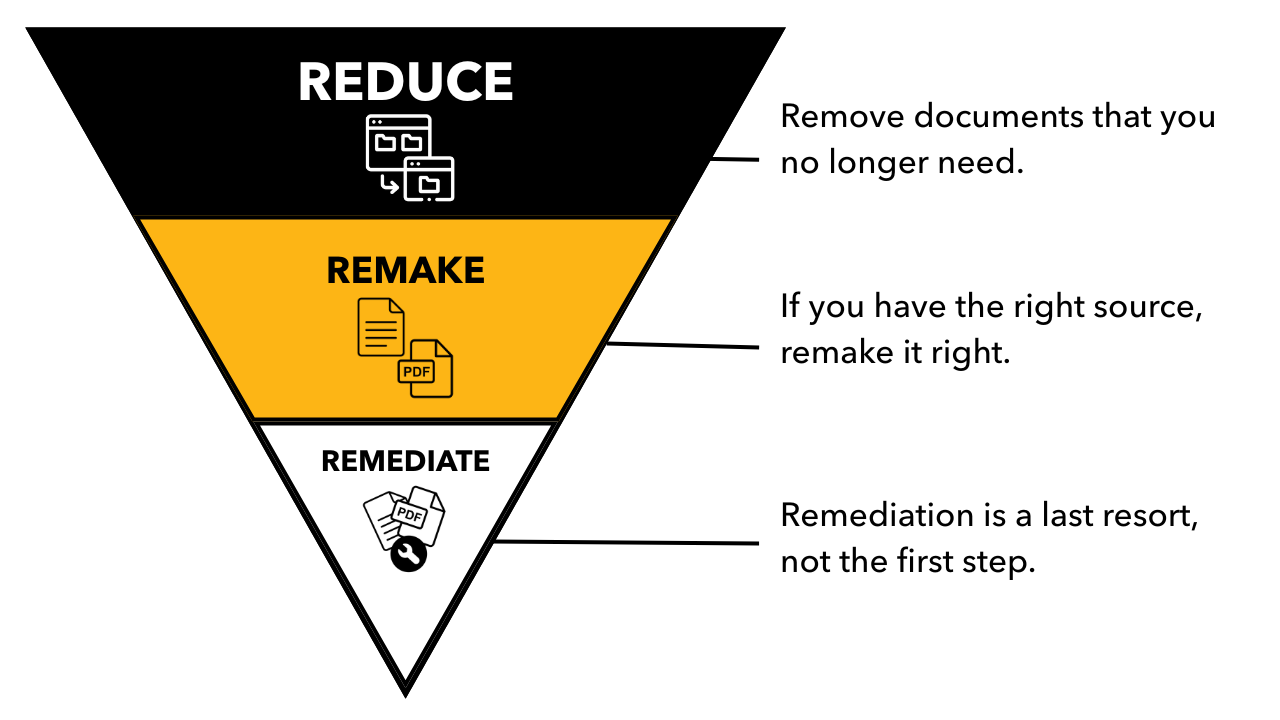
Image 1: This infographic shows an inverted triangle divided into three levels to guide accessibility document fixes. The graphic visually emphasizes prioritizing reduction (top) and rebuilding (middle) over remediation (bottom) when addressing digital accessibility issues.
Here's how to use this approach in your everyday work.
1. Reduce: Remove What No Longer Serves Your Students
Before investing time in editing or remaking an inaccessible file, ask the simplest question: Do I still need this document?
- Has the content been replaced elsewhere in your course?
- Is it redundant with materials already in Blackboard?
- Is it outdated, duplicated, or no longer aligned to your learning goals?
If the answer is "no, I don't need it," the most accessible document is the one that no longer exists. Reducing cuts clutter, improves course navigation, and lowers your remediation workload immediately.
2. Remake: Start Fresh When You Have the Original Source
If the content is still important, your next question should be: Do I have the source file? If you do -- great! Remaking the document is usually the fastest and cleanest path to accessibility.
- Replace scanned PDFs with a properly structured Word or Google doc.
- Rebuild documents that contain inaccessible tables, images without alt text, or outdated formatting.
- Use your original PowerPoint instead of trying to fix a PDF export.
Why this matters: Rebuilt documents contain real headings, lists, reading order, alt text, and searchable text -- making them inherently more accessible (and easier to maintain in the future). Tools like Ally, Acrobat, or Microsoft Word and PowerPoint can validate your work, but starting with a clean source file does most of the heavy lifting.
3. Remediate: Fix Only When You Must
If you don't have the source file, or it cannot be recreated, then remediation is your last resort. Remediation involves correcting accessibility issues inside an existing document or PDF, which can be time-consuming and technically challenging. This may include:
- Adding tags or reading order to untagged PDFs
- Repairing scanned images of text
- Rebuilding inaccessible tables
- Fixing complex layouts or poorly embedded images
This step is sometimes unavoidable, especially for archived materials or documents that cannot be altered due to copyright ownership, accreditation, or historical requirements. But it should never be your first step.
This decision path ensures your time is spent where it creates the most value for students and reduces the long-term burden of maintaining inaccessible materials.
Ready to take the first step? Visit UMBC's Digital Accessibility site or run an Ally course report today. Support is also available from Student Disability Services and Instructional Technology.
--
The 3-R Framework was adapted from the University of Illinois Urbana-Champaign.
]]>
When it comes to improving digital accessibility, documents and PDFs are often the biggest barrier -- and the biggest opportunity. Whether you're uploading files to Blackboard, sharing materials...
https://my3.my.umbc.edu/groups/instructional-technology/posts/155065
Image
https://assets3-dev.my.umbc.edu/system/shared/attachments/504f83cfecfbb42a7fcb0f6b92e6c8c7/69ee1bad/news/000/155/065/8520b295ef7672eadffdf9d88d8b9a18/DA R Framework.png?1764880425
https://dev.my.umbc.edu/api/v0/pixel/news/155065/guest@my.umbc.edu/bb61971f88aa44bd40ec1fea6933b4a0/api/pixel
3-r
digital-accessibility
framework
hawken
Instructional Technology
https://dev.my.umbc.edu/groups/instructional-technology
https://assets2-dev.my.umbc.edu/system/shared/avatars/groups/000/001/164/dec3b026b81ee6d890a8f82f75c94a2e/xsmall.png?1446126703
https://assets1-dev.my.umbc.edu/system/shared/avatars/groups/000/001/164/dec3b026b81ee6d890a8f82f75c94a2e/original.png?1446126703
https://assets2-dev.my.umbc.edu/system/shared/avatars/groups/000/001/164/dec3b026b81ee6d890a8f82f75c94a2e/xxlarge.png?1446126703
https://assets1-dev.my.umbc.edu/system/shared/avatars/groups/000/001/164/dec3b026b81ee6d890a8f82f75c94a2e/xlarge.png?1446126703
https://assets1-dev.my.umbc.edu/system/shared/avatars/groups/000/001/164/dec3b026b81ee6d890a8f82f75c94a2e/large.png?1446126703
https://assets4-dev.my.umbc.edu/system/shared/avatars/groups/000/001/164/dec3b026b81ee6d890a8f82f75c94a2e/medium.png?1446126703
https://assets3-dev.my.umbc.edu/system/shared/avatars/groups/000/001/164/dec3b026b81ee6d890a8f82f75c94a2e/small.png?1446126703
https://assets2-dev.my.umbc.edu/system/shared/avatars/groups/000/001/164/dec3b026b81ee6d890a8f82f75c94a2e/xsmall.png?1446126703
https://assets3-dev.my.umbc.edu/system/shared/avatars/groups/000/001/164/dec3b026b81ee6d890a8f82f75c94a2e/xxsmall.png?1446126703
Instructional Technology
https://assets2-dev.my.umbc.edu/system/shared/thumbnails/news/000/155/065/d626ac9a4e02d883db66fa280759c139/xxlarge.jpg?1764880304
https://assets1-dev.my.umbc.edu/system/shared/thumbnails/news/000/155/065/d626ac9a4e02d883db66fa280759c139/xlarge.jpg?1764880304
https://assets1-dev.my.umbc.edu/system/shared/thumbnails/news/000/155/065/d626ac9a4e02d883db66fa280759c139/large.jpg?1764880304
https://assets1-dev.my.umbc.edu/system/shared/thumbnails/news/000/155/065/d626ac9a4e02d883db66fa280759c139/medium.jpg?1764880304
https://assets2-dev.my.umbc.edu/system/shared/thumbnails/news/000/155/065/d626ac9a4e02d883db66fa280759c139/small.jpg?1764880304
https://assets2-dev.my.umbc.edu/system/shared/thumbnails/news/000/155/065/d626ac9a4e02d883db66fa280759c139/xsmall.jpg?1764880304
https://assets3-dev.my.umbc.edu/system/shared/thumbnails/news/000/155/065/d626ac9a4e02d883db66fa280759c139/xxsmall.jpg?1764880304
A human figure with outstretched arms inside a circle of two curved arrows, suggesting movement. Below the figure are two words: digital accessibility.
7
0
true
Thu, 04 Dec 2025 15:42:09 -0500
Accessible PDFs: Remediation and Creation Tools with Techniques and Tips
Make every PDF readable, usable, and accessible
Digital accessibility is more than a compliance requirement—it's a commitment to ensuring that every member of our community can fully engage with digital content. Accessible PDFs support screen reader navigation, reduce cognitive load, and ensure that information is clear and usable for everyone.
Poorly formatted documents—such as those with missing tags, low color contrast, or scanned images without text recognition—can create barriers. Well-structured PDFs, on the other hand, use headings, lists, tables, and descriptive links to make content easier to navigate and understand. By adopting universal design practices, we not only meet legal standards but create a more inclusive learning and working environment.
Whether you're preparing a syllabus, sharing research, or distributing forms, small changes can make a big difference. This practice enhances the learning experience for all learners and supports UMBC's mission of inclusive excellence (UMBC's mission of inclusive excellence).
Here are some key takeaways for remediating or creating accessible PDFs, organized into practical steps you can apply right away.
PDF Tools and Techniques
The following strategies are useful for identifying and fixing accessibility issues:
Tips for Everyday Use
Test your PDF: If you can select text, it's searchable; if not, use OCR.
Start with accessible files: Use built-in templates in Word, PowerPoint, or Excel to create your document before exporting it to PDF. (Note: select the accessibility-friendly PDF preset when exporting the file)
Write meaningful alt text: Keep it concise and focused on the purpose of the image.
Simplify tables: Avoid merged or blank cells and fill in empty spaces with placeholders like 'N/A,' and keep the overall structure easy to follow.
Building a Culture of Access
Digital Accessibility is a shared responsibility. By making small, intentional choices— using descriptive links instead of "Click here" or ensuring high-contrast text—we can create digital content that works for everyone. These practices not only help individuals with disabilities but also improve usability for all readers, including those accessing content on mobile devices or in low-bandwidth environments.
Next Steps
UMBC offers ongoing training and resources to support digital accessibility. Upcoming sessions will cover accessible feedback, videos, images, and more. Faculty, staff, and students are encouraged to explore these opportunities and integrate accessibility into their daily workflows.
Ready to take the first step? Visit UMBC's Digital Accessibility site or run an Ally course report today. Support is also available from Student Disability Services and Instructional Technology.
Resources:
]]>
Digital accessibility is more than a compliance requirement—it's a commitment to ensuring that every member of our community can fully engage with digital content. Accessible PDFs support screen...
https://my3.my.umbc.edu/groups/instructional-technology/posts/154659
https://dev.my.umbc.edu/api/v0/pixel/news/154659/guest@my.umbc.edu/98ddef3f646a5d33e1d7a0254f939d0d/api/pixel
crutchfield
digital-accessibility
pdf
Instructional Technology
https://dev.my.umbc.edu/groups/instructional-technology
https://assets2-dev.my.umbc.edu/system/shared/avatars/groups/000/001/164/dec3b026b81ee6d890a8f82f75c94a2e/xsmall.png?1446126703
https://assets1-dev.my.umbc.edu/system/shared/avatars/groups/000/001/164/dec3b026b81ee6d890a8f82f75c94a2e/original.png?1446126703
https://assets2-dev.my.umbc.edu/system/shared/avatars/groups/000/001/164/dec3b026b81ee6d890a8f82f75c94a2e/xxlarge.png?1446126703
https://assets1-dev.my.umbc.edu/system/shared/avatars/groups/000/001/164/dec3b026b81ee6d890a8f82f75c94a2e/xlarge.png?1446126703
https://assets1-dev.my.umbc.edu/system/shared/avatars/groups/000/001/164/dec3b026b81ee6d890a8f82f75c94a2e/large.png?1446126703
https://assets4-dev.my.umbc.edu/system/shared/avatars/groups/000/001/164/dec3b026b81ee6d890a8f82f75c94a2e/medium.png?1446126703
https://assets3-dev.my.umbc.edu/system/shared/avatars/groups/000/001/164/dec3b026b81ee6d890a8f82f75c94a2e/small.png?1446126703
https://assets2-dev.my.umbc.edu/system/shared/avatars/groups/000/001/164/dec3b026b81ee6d890a8f82f75c94a2e/xsmall.png?1446126703
https://assets3-dev.my.umbc.edu/system/shared/avatars/groups/000/001/164/dec3b026b81ee6d890a8f82f75c94a2e/xxsmall.png?1446126703
Instructional Technology
https://assets3-dev.my.umbc.edu/system/shared/thumbnails/news/000/154/659/4438ad704d7a99fe666dc466e766102b/xxlarge.jpg?1763491662
https://assets1-dev.my.umbc.edu/system/shared/thumbnails/news/000/154/659/4438ad704d7a99fe666dc466e766102b/xlarge.jpg?1763491662
https://assets4-dev.my.umbc.edu/system/shared/thumbnails/news/000/154/659/4438ad704d7a99fe666dc466e766102b/large.jpg?1763491662
https://assets3-dev.my.umbc.edu/system/shared/thumbnails/news/000/154/659/4438ad704d7a99fe666dc466e766102b/medium.jpg?1763491662
https://assets4-dev.my.umbc.edu/system/shared/thumbnails/news/000/154/659/4438ad704d7a99fe666dc466e766102b/small.jpg?1763491662
https://assets3-dev.my.umbc.edu/system/shared/thumbnails/news/000/154/659/4438ad704d7a99fe666dc466e766102b/xsmall.jpg?1763491662
https://assets2-dev.my.umbc.edu/system/shared/thumbnails/news/000/154/659/4438ad704d7a99fe666dc466e766102b/xxsmall.jpg?1763491662
A human figure with outstretched arms inside a circle of two curved arrows, suggesting movement. Below the figure are two words: digital accessibility.
6
0
true
Tue, 18 Nov 2025 13:56:26 -0500
All About Color & Contrast - USM November Accessibility Newsletter
Sponsored by the USM Kirwan Center for Academic Innovation
The November issue of the USM Digital Accessibility Newsletter is now available. Here's what's inside:
]]>
The November issue of the USM Digital Accessibility Newsletter is now available. Here's what's inside: Why Color & Contrast Matter Color & Contrast Quick Fix Guide Tools &...
https://my3.my.umbc.edu/groups/digital-accessibility/posts/154255
https://dev.my.umbc.edu/api/v0/pixel/news/154255/guest@my.umbc.edu/0aed371651a063fd73e2fb8d2fca7569/api/pixel
color
contrast
digital-accessibility
newsletter
usm
Digital Accessibility
https://dev.my.umbc.edu/groups/digital-accessibility
https://assets2-dev.my.umbc.edu/system/shared/avatars/groups/000/002/166/4e9c2f3f7487566a2153aa263adebb56/xsmall.png?1752093421
https://assets1-dev.my.umbc.edu/system/shared/avatars/groups/000/002/166/4e9c2f3f7487566a2153aa263adebb56/original.png?1752093421
https://assets2-dev.my.umbc.edu/system/shared/avatars/groups/000/002/166/4e9c2f3f7487566a2153aa263adebb56/xxlarge.png?1752093421
https://assets3-dev.my.umbc.edu/system/shared/avatars/groups/000/002/166/4e9c2f3f7487566a2153aa263adebb56/xlarge.png?1752093421
https://assets4-dev.my.umbc.edu/system/shared/avatars/groups/000/002/166/4e9c2f3f7487566a2153aa263adebb56/large.png?1752093421
https://assets1-dev.my.umbc.edu/system/shared/avatars/groups/000/002/166/4e9c2f3f7487566a2153aa263adebb56/medium.png?1752093421
https://assets1-dev.my.umbc.edu/system/shared/avatars/groups/000/002/166/4e9c2f3f7487566a2153aa263adebb56/small.png?1752093421
https://assets2-dev.my.umbc.edu/system/shared/avatars/groups/000/002/166/4e9c2f3f7487566a2153aa263adebb56/xsmall.png?1752093421
https://assets1-dev.my.umbc.edu/system/shared/avatars/groups/000/002/166/4e9c2f3f7487566a2153aa263adebb56/xxsmall.png?1752093421
Digital Accessibility
https://assets3-dev.my.umbc.edu/system/shared/thumbnails/news/000/154/255/8a9fc4313266622b7a2b17f29cd3068f/xxlarge.jpg?1762365357
https://assets4-dev.my.umbc.edu/system/shared/thumbnails/news/000/154/255/8a9fc4313266622b7a2b17f29cd3068f/xlarge.jpg?1762365357
https://assets3-dev.my.umbc.edu/system/shared/thumbnails/news/000/154/255/8a9fc4313266622b7a2b17f29cd3068f/large.jpg?1762365357
https://assets1-dev.my.umbc.edu/system/shared/thumbnails/news/000/154/255/8a9fc4313266622b7a2b17f29cd3068f/medium.jpg?1762365357
https://assets4-dev.my.umbc.edu/system/shared/thumbnails/news/000/154/255/8a9fc4313266622b7a2b17f29cd3068f/small.jpg?1762365357
https://assets4-dev.my.umbc.edu/system/shared/thumbnails/news/000/154/255/8a9fc4313266622b7a2b17f29cd3068f/xsmall.jpg?1762365357
https://assets1-dev.my.umbc.edu/system/shared/thumbnails/news/000/154/255/8a9fc4313266622b7a2b17f29cd3068f/xxsmall.jpg?1762365357
red banner with gray, yellow, and black waves. Text, USM Accessibility in Action. Accessible by Design. Inclusive for All, on the red background
2
0
true
Wed, 05 Nov 2025 12:57:30 -0500
Free Digital Accessibility Workshops from Blackboard
Self-paced solutions for faculty & staff flexibility
Instructional Technology is pleased to offer four workshops on digital accessibility and Ally, available at no cost to UMBC faculty and staff, through July 31, 2026 using a special registration link and code. Created by Blackboard, the available workshops are designed to give you practical skills and a deep understanding of creating accessible and inclusive course content.
Workshop #1: Accessibility Fundamentals
This foundational training is designed to provide participants with a broad understanding of accessibility issues in educational environments. Participants will learn how disabilities can limit access to electronic instructional materials and what they can do to make their course content as accessible as possible to the greatest number of learners.
Workshop #2: Writing Effective Alt Text
Alternative text is a key component of digital accessibility, ensuring that all learners can engage with visual content. Participants will begin with the fundamentals of alternative text, exploring its definition, significance, and how context shapes what makes it meaningful and effective. In addition to learning how to write high-quality alt text, participants will receive practical instruction on how to add alt text in commonly used tools such as Microsoft Word, PowerPoint, and Adobe Acrobat.
Workshop #3: Introducing Ally to Learners
Creating an inclusive and accessible learning environment goes beyond just providing accessible content -- it requires clear, intentional communication with students. Introducing Ally to Learners is designed to help instructors effectively engage with students about accessibility and empower them in their use of Ally's Alternative Formats.
Workshop #4: Empowering Learners with Ally's Alternative Formats
This training introduces the alternative formats available through Ally and explores how they support a more inclusive and flexible learning experience for all students. Participants will gain an understanding of each format -- including audio, electronic Braille, BeeLine Reader, HTML, ePub, etc. -- along with practical use cases that highlight when and how learners might benefit from each option.
How to Get Started
There is a special process for UMBC faculty and staff to access this subscription for free, and to enroll in these workshops. Please open an RT ticket to receive the special instructions, registration code, and workshop links.
We encourage UMBC faculty and staff to take advantage of this valuable resource to further your digital accessibility training and professional development! Faculty who complete all four workshops and submit certificates to Instructional Technology can earn the new Accessibility A11y meta microcredential. Certificates must be submitted using this Google Form by the end of SP2026.
Ready to take the first step? Visit UMBC's Digital Accessibility site or run an Ally course report today. Support is also available from Student Disability Services and Instructional Technology.
Don't forget: Tuesday, November 18 is Fix Your Course Content Day! This one-day push is a chance for faculty, staff, and instructional designers to review Ally accessibility reports, make fixes, and strengthen our commitment to inclusive teaching.
Connect with Instructional Technology
As always, if you have any questions about teaching, learning, and technology, please consider the following options:
Monday, November 3, 2025 (12 pm - 12:50 pm)Digital Accessibility 101: Principles and Practices
What is digital accessibility, and why does it matter in your course? If a student couldn't access your materials, would you know what to do -- or how to fix it? Join this session to learn the foundational principles of digital accessibility, legal context, and core practices. We'll share tips for creating accessible images and Blackboard content, and where to find training support.
Session Objectives
Explain the importance of digital accessibility in higher education.
Describe basic steps faculty can take to improve course accessibility.
Define alternative text and best practices for writing descriptive alt text
Review accessibility settings available in Blackboard courses and organizations
Whether you're building a new course or updating old materials, this virtual session will give you practical steps to get started.
Tuesday, November 4, 2025 (12 pm - 12:50 pm)
Design Accessible Courses: Leverage UDL and Quality Matters Standard 8 for Content Remediation and Inclusive Learning Experiences
Creating accessible and inclusive courses requires thoughtful consideration of diverse learning styles and strategies that foster engaging learning experiences. The foundational concepts of Universal Design for Learning (UDL)—providing multiple means of Representation, Action and Expression, and Engagement—are strongly supported by the Quality Matters (QM) Higher Education Rubric, specifically General Standard 8: Accessibility and Usability.
Session Objectives
Explain alignment between QM Standard 8 and the three core principles of UDL.
Apply remediation techniques for text and images (QM 8.3, 8.4) after identifying course barriers with a course accessibility report from Anthology Ally.
Develop a "plus-one" action plan to implement UDL by modifying one course component to offer flexible learning options.
By proactively reviewing QM Standard 8 and using UDL's core principles, you can move beyond accessibility compliance to intentionally building an inclusive learning environment for all students.
Thursday, November 6, 2025 (12 pm - 12:50 pm)
Create your Digital Accessibility Action Plan
Whether you are beginning or continuing your journey to create or remediate accessible content, this session will help you define your personalized action plan to improve digital accessibility in your course. Participants will leave with clear next steps to implement digital accessibility best practices.
Session Objectives
Identify technology tools like Anthology Ally for creating or remediating digital content
Describe 3 easy fixes for common PDF accessibility issues identified by Ally
Recall strategies for creating or remediating PDF files to improve accessibility
Create an action plan to support accessibility goals in your course, including appropriate technologies
In this session, participants will have the chance to create an action plan that reflects on the changes they have already made and identifies next steps or resources to keep building an inclusive digital learning environment.
Register for Free NDLW Events
This year's NDLW events take place November 3-7, 2025. All sessions are free to attend, but require registration via USDLA.
Connect with Instructional Technology
As always, if you have any questions about teaching, learning, and technology, please consider the following options:
]]>
As part of the 19th annual National Distance Learning Week (NDLW), Instructional Technology will offer a series of sessions that underscore the importance and context of digital accessibility, how...
https://my3.my.umbc.edu/groups/instructional-technology/posts/153858/edit
https://dev.my.umbc.edu/api/v0/pixel/news/153858/guest@my.umbc.edu/9dbccf896b1040bd5698cf52c32e25ba/api/pixel
accessibility
action-plan
biro
da
digital-accessibility
fa25
inclusive
ndlw
qm
udl
Instructional Technology
https://dev.my.umbc.edu/groups/instructional-technology
https://assets2-dev.my.umbc.edu/system/shared/avatars/groups/000/001/164/dec3b026b81ee6d890a8f82f75c94a2e/xsmall.png?1446126703
https://assets1-dev.my.umbc.edu/system/shared/avatars/groups/000/001/164/dec3b026b81ee6d890a8f82f75c94a2e/original.png?1446126703
https://assets2-dev.my.umbc.edu/system/shared/avatars/groups/000/001/164/dec3b026b81ee6d890a8f82f75c94a2e/xxlarge.png?1446126703
https://assets1-dev.my.umbc.edu/system/shared/avatars/groups/000/001/164/dec3b026b81ee6d890a8f82f75c94a2e/xlarge.png?1446126703
https://assets1-dev.my.umbc.edu/system/shared/avatars/groups/000/001/164/dec3b026b81ee6d890a8f82f75c94a2e/large.png?1446126703
https://assets4-dev.my.umbc.edu/system/shared/avatars/groups/000/001/164/dec3b026b81ee6d890a8f82f75c94a2e/medium.png?1446126703
https://assets3-dev.my.umbc.edu/system/shared/avatars/groups/000/001/164/dec3b026b81ee6d890a8f82f75c94a2e/small.png?1446126703
https://assets2-dev.my.umbc.edu/system/shared/avatars/groups/000/001/164/dec3b026b81ee6d890a8f82f75c94a2e/xsmall.png?1446126703
https://assets3-dev.my.umbc.edu/system/shared/avatars/groups/000/001/164/dec3b026b81ee6d890a8f82f75c94a2e/xxsmall.png?1446126703
Instructional Technology
https://assets2-dev.my.umbc.edu/system/shared/thumbnails/news/000/153/858/5dec09eccc059c206d6c2612e32bce13/xxlarge.jpg?1761245564
https://assets4-dev.my.umbc.edu/system/shared/thumbnails/news/000/153/858/5dec09eccc059c206d6c2612e32bce13/xlarge.jpg?1761245564
https://assets2-dev.my.umbc.edu/system/shared/thumbnails/news/000/153/858/5dec09eccc059c206d6c2612e32bce13/large.jpg?1761245564
https://assets3-dev.my.umbc.edu/system/shared/thumbnails/news/000/153/858/5dec09eccc059c206d6c2612e32bce13/medium.jpg?1761245564
https://assets3-dev.my.umbc.edu/system/shared/thumbnails/news/000/153/858/5dec09eccc059c206d6c2612e32bce13/small.jpg?1761245564
https://assets4-dev.my.umbc.edu/system/shared/thumbnails/news/000/153/858/5dec09eccc059c206d6c2612e32bce13/xsmall.jpg?1761245564
https://assets2-dev.my.umbc.edu/system/shared/thumbnails/news/000/153/858/5dec09eccc059c206d6c2612e32bce13/xxsmall.jpg?1761245564
A human figure with outstretched arms inside a circle of two curved arrows, suggesting movement. Below the figure are two words: digital accessibility.
3
0
true
Thu, 23 Oct 2025 17:36:32 -0400
Wed, 29 Oct 2025 13:51:31 -0400
Fix Your Content Day: Let’s Make Course Materials More Accessible
One day of small steps to improve course accessibility
On Tuesday, November 18, UMBC will host its own Fix Your Course Content Day, dedicated to improving the accessibility of digital course materials in Blackboard. This one-day push is a chance for faculty, staff, and instructional designers to review Ally accessibility reports, make fixes, and strengthen our commitment to inclusive teaching.
Why Fix Content?
- Every fix, big or small, helps. Whether it's adding alt text to an image, adding meaningful link text, correcting heading structure, or improving document formatting, each step makes content more usable for a student using a screen reader, assistive device, or alternate format.
- You already have insights. The Ally tool in Blackboard surfaces course-level accessibility reports and flags problematic files (scanned documents, missing image description, contrast issues, etc.). Use this as your guide.
- It's about more than one day. Fix Your Content Day is not just a one-off event. It's a focused moment for action -- and a reminder that digital accessibility is an ongoing responsibility in course design.
What to Do on November 18
Here's a simple roadmap you can follow:
1. Review your Ally report.
Log into your course and go to Books & Tools from the right navigation menu to access your Ally accessibility report. Note your starting score. Prioritize files you use most (syllabus, major readings, assignment sheets, etc.) or where you have inaccessible images that impact meaningful content.
2. Make at least 3 targeted fixes.
Use the Ally "repair" workflow (built into Blackboard) to take action:
3. Strive for 85.
As you make your fixes, aim for an Ally score of 85 percent or higher in your courses. This benchmark represents solid progress toward accessible, student-ready materials. Each improvement -- adding alt text, correcting headings, or replacing scanned PDFs -- moves your score closer to 85, or exceeds it, and helps ensure your course is usable for every learner.
4. Document or share progress.
Record which courses and files you've improved. If you'd like to be recognized with a microcredential for your portfolio or LinkedIn profile, submit your results using this Google Form. Instructional Technology will also share the top five departmental improvements.
5. Reflect and plan next steps.
Think about recurring patterns in your courses (e.g. many scanned articles, many images lacking alt text). Use that insight to inform future course redesign or content creation. Consider sharing your top three fixes with your departmental to help normalize accessible practices across campus.
A Few Tips to Make It Easier
- Start small. Pick a single course or module to focus on first, or focus on a single type of issue like image descriptions. You also don't need to "fix everything" in one day.
- Schedule your time. Block a 30-60 minute slot on November 18 in your calendar just for accessibility fixes -- or drop by our open lab in ENGR 102 from 1 to 3 PM to work alongside colleagues, share progress, and get help from the Instructional technology team in a relaxed, social space to celebrate the day’s improvements.
- Work together. Team up with a colleague -- it can be in your department or another for cross-disciplinary support. Two sets of eyes often catch more than one.
- Drop in for virtual support. Instructional Technology is standing by with quick guides or quick consultations.
On November 18, join us in making a measurable impact on our course content. Whether you fix three items or thirty, your work matters. Let's make UMBC's digital learning environment more inclusive together.
Ready to take the first step? Visit UMBC’s Digital Accessibility site or run an Ally course report today. Support is also available from Student Disability Services and Instructional Technology.
In a world of digital-content, images are often a key part of how we communicate. For students who use screen readers, a picture isn't worth a thousand words -- unless it has effective alt text. Alt text for images isn't just about checking an accessibility box; it's about making sure everyone, including people with disabilities, can access and understand your content. By writing alt text that focuses on an image's purpose, you remove unseen barriers and make your course materials more inclusive for all.
Whether you're teaching, designing, or sharing visuals online, here are five ways to level up your image accessibility.
1. Write for Purpose, Not Perfection
What's the point of the image? Start there. Are you introducing a concept, reinforcing a message, or providing a visual example? Don't describe every pixel -- alt text is most effective when it's tied to the image's purpose, not just its appearance. An instructor's headshot just needs to be "Professor Henry Jones, smiling" not "A photo of a smiling middle-aged man with brown hair wearing a tweed suit, standing in a room with floor-to-ceiling books."
2. Say What You See
Screen readers already announce it's an image. Instead of starting with "Photo of a student," get to the point: "Student smiles while presenting a final project to classmates." Only mention format if it matters -- for example, "A bar chart showing enrollment growth from 2018–2024."
3. Context Is Key: Platform, People, Purpose
Your description should reflect the audience and platform. While alternative text for an image on social media might be conversational and brief; the same image in a course module might need more detail. Think about what your audience already knows, and what they need you to describe.
- Social Media: An image on Instagram or myUMBC showing students protesting on campus may say, "A crowd of U-M-B-C students fills the Quad in March 1981, holding handmade protest signs to show support for keeping the university open."
- Course Module: The same image in a history course's syllabus could be "Black-and-white photo originally printed in The Baltimore Sun showing a crowd of U-M-B-C students gathered in protest on campus in March 1981. The students' serious expressions and visible determination reflect their opposition to a proposed plan to shut down the campus."
4. Not All Images Need Alt Text
If an image is purely decorative -- like a border, divider, or flourish -- mark it as decorative so screen readers skip it. In many content editors, including Blackboard and Sites@UMBC, you can select an option to mark an image as decorative, which tells screen readers to skip it. However, if the image adds meaning or helps a student understand the content, it deserves a description.
5. Try Ally or AI for a Head Start
Use your Ally course report or individual Ally meters in Blackboard to find images missing alt text. You can also try Ally's AI Alt Text Assistant or Google Gemini to generate a description -- but always review and revise for accuracy, tone, and clarity. AI is a great starting point as a first draft for descriptions. It gets you 80% of the way there, but as the subject matter expert, you're the one who will make it perfect.
Ready to take the first step?
Additional Resources
--
Content adapted from the images workshop at the June 2025 Digital Accessibility Summer Camp (Theresa Mabe).
]]>
In a world of digital-content, images are often a key part of how we communicate. For students who use screen readers, a picture isn't worth a thousand words -- unless it has effective alt text....
https://my3.my.umbc.edu/groups/instructional-technology/posts/152254
https://dev.my.umbc.edu/api/v0/pixel/news/153366/guest@my.umbc.edu/4b930e81accf5d274f85e418f211cc47/api/pixel
accessible-images
ally
alt-text
digital-accessibility
Instructional Technology
https://dev.my.umbc.edu/groups/instructional-technology
https://assets2-dev.my.umbc.edu/system/shared/avatars/groups/000/001/164/dec3b026b81ee6d890a8f82f75c94a2e/xsmall.png?1446126703
https://assets1-dev.my.umbc.edu/system/shared/avatars/groups/000/001/164/dec3b026b81ee6d890a8f82f75c94a2e/original.png?1446126703
https://assets2-dev.my.umbc.edu/system/shared/avatars/groups/000/001/164/dec3b026b81ee6d890a8f82f75c94a2e/xxlarge.png?1446126703
https://assets1-dev.my.umbc.edu/system/shared/avatars/groups/000/001/164/dec3b026b81ee6d890a8f82f75c94a2e/xlarge.png?1446126703
https://assets1-dev.my.umbc.edu/system/shared/avatars/groups/000/001/164/dec3b026b81ee6d890a8f82f75c94a2e/large.png?1446126703
https://assets4-dev.my.umbc.edu/system/shared/avatars/groups/000/001/164/dec3b026b81ee6d890a8f82f75c94a2e/medium.png?1446126703
https://assets3-dev.my.umbc.edu/system/shared/avatars/groups/000/001/164/dec3b026b81ee6d890a8f82f75c94a2e/small.png?1446126703
https://assets2-dev.my.umbc.edu/system/shared/avatars/groups/000/001/164/dec3b026b81ee6d890a8f82f75c94a2e/xsmall.png?1446126703
https://assets3-dev.my.umbc.edu/system/shared/avatars/groups/000/001/164/dec3b026b81ee6d890a8f82f75c94a2e/xxsmall.png?1446126703
Instructional Technology
https://assets4-dev.my.umbc.edu/system/shared/thumbnails/news/000/153/366/325fbf06fb683ed397a21285629d37f1/xxlarge.jpg?1759881435
https://assets2-dev.my.umbc.edu/system/shared/thumbnails/news/000/153/366/325fbf06fb683ed397a21285629d37f1/xlarge.jpg?1759881435
https://assets2-dev.my.umbc.edu/system/shared/thumbnails/news/000/153/366/325fbf06fb683ed397a21285629d37f1/large.jpg?1759881435
https://assets2-dev.my.umbc.edu/system/shared/thumbnails/news/000/153/366/325fbf06fb683ed397a21285629d37f1/medium.jpg?1759881435
https://assets1-dev.my.umbc.edu/system/shared/thumbnails/news/000/153/366/325fbf06fb683ed397a21285629d37f1/small.jpg?1759881435
https://assets3-dev.my.umbc.edu/system/shared/thumbnails/news/000/153/366/325fbf06fb683ed397a21285629d37f1/xsmall.jpg?1759881435
https://assets4-dev.my.umbc.edu/system/shared/thumbnails/news/000/153/366/325fbf06fb683ed397a21285629d37f1/xxsmall.jpg?1759881435
A human figure with outstretched arms inside a circle of two curved arrows, suggesting movement. Below the figure are two words: digital accessibility.
3
0
true
Thu, 09 Oct 2025 09:36:00 -0400
All About Links - USM October Accessibility Newsletter
Sponsored by the USM Kirwan Center for Academic Innovation
The October issue of the USM Digital Accessibility Newsletter is now available. Here's what's inside:
]]>
The October issue of the USM Digital Accessibility Newsletter is now available. Here's what's inside: Why Links and Navigation Matter Accessible Links in 5 Minutes: Your Quick Fix Guide Tools...
https://my3.my.umbc.edu/groups/digital-accessibility/posts/153243
https://dev.my.umbc.edu/api/v0/pixel/news/153243/guest@my.umbc.edu/835f504c293e45c5ce9de833d770fc89/api/pixel
digital-accessibility
headings
newsletter
usm
Digital Accessibility
https://dev.my.umbc.edu/groups/digital-accessibility
https://assets2-dev.my.umbc.edu/system/shared/avatars/groups/000/002/166/4e9c2f3f7487566a2153aa263adebb56/xsmall.png?1752093421
https://assets1-dev.my.umbc.edu/system/shared/avatars/groups/000/002/166/4e9c2f3f7487566a2153aa263adebb56/original.png?1752093421
https://assets2-dev.my.umbc.edu/system/shared/avatars/groups/000/002/166/4e9c2f3f7487566a2153aa263adebb56/xxlarge.png?1752093421
https://assets3-dev.my.umbc.edu/system/shared/avatars/groups/000/002/166/4e9c2f3f7487566a2153aa263adebb56/xlarge.png?1752093421
https://assets4-dev.my.umbc.edu/system/shared/avatars/groups/000/002/166/4e9c2f3f7487566a2153aa263adebb56/large.png?1752093421
https://assets1-dev.my.umbc.edu/system/shared/avatars/groups/000/002/166/4e9c2f3f7487566a2153aa263adebb56/medium.png?1752093421
https://assets1-dev.my.umbc.edu/system/shared/avatars/groups/000/002/166/4e9c2f3f7487566a2153aa263adebb56/small.png?1752093421
https://assets2-dev.my.umbc.edu/system/shared/avatars/groups/000/002/166/4e9c2f3f7487566a2153aa263adebb56/xsmall.png?1752093421
https://assets1-dev.my.umbc.edu/system/shared/avatars/groups/000/002/166/4e9c2f3f7487566a2153aa263adebb56/xxsmall.png?1752093421
Digital Accessibility
https://assets3-dev.my.umbc.edu/system/shared/thumbnails/news/000/153/243/7afd5483981af034b70de9cafee6dd26/xxlarge.jpg?1759593061
https://assets2-dev.my.umbc.edu/system/shared/thumbnails/news/000/153/243/7afd5483981af034b70de9cafee6dd26/xlarge.jpg?1759593061
https://assets2-dev.my.umbc.edu/system/shared/thumbnails/news/000/153/243/7afd5483981af034b70de9cafee6dd26/large.jpg?1759593061
https://assets1-dev.my.umbc.edu/system/shared/thumbnails/news/000/153/243/7afd5483981af034b70de9cafee6dd26/medium.jpg?1759593061
https://assets2-dev.my.umbc.edu/system/shared/thumbnails/news/000/153/243/7afd5483981af034b70de9cafee6dd26/small.jpg?1759593061
https://assets1-dev.my.umbc.edu/system/shared/thumbnails/news/000/153/243/7afd5483981af034b70de9cafee6dd26/xsmall.jpg?1759593061
https://assets3-dev.my.umbc.edu/system/shared/thumbnails/news/000/153/243/7afd5483981af034b70de9cafee6dd26/xxsmall.jpg?1759593061
red banner with gray, yellow, and black waves. Text, USM Accessibility in Action. Accessible by Design. Inclusive for All, on the red background
1
0
true
Wed, 08 Oct 2025 10:56:33 -0400