UMBC Faculty receive course accessibility mini-grants from Kirwan Center
Congratulations Dr. Laura Rose, PSYC, & Dr. Ming Xie, EDHS
Two UMBC faculty were selected by the William E. Kirwan Center for Academic Innovation to participate in the Boosting Course Accessibility mini grant program. This initiative aims to enhance the digital accessibility of courses across USM institutions and help ensure that all students have equitable access to course materials.
Dr. Laura Rose, Associate Teaching Professor and Psychology Program Director at UMBC Shady Grove, and Dr. Ming Xie, Assistant Professor, Department of Emergency and Disaster Health Systems, will receive funding and support to redesign their courses with accessibility in mind, including implementing universal design principles that benefit all learners.
The project will identify and address barriers in course materials, learning activities, and assessments, building long-term capacity for inclusive design across their departments. The mini grant program aligns with USM's commitment to creating inclusive learning environments where all students can succeed regardless of disability status.
Citing a strong personal interest in accessibility and a commitment to inclusive teaching practices, Dr. Rose hopes to "gain strategies for designing accessible course materials and assignments and using technology in ways that support diverse learning needs" from participating in the program. Prioritizing accessibility is "both timely and essential," she continued, particularly with upcoming requirements for all digital content to be accessible by early 2026.

Image: Dr. Laura Rose (left) and Dr. Ming Xie (right)
"I am honored to receive this mini grant," said Dr. Xie. "The funding will allow me to advance digital accessibility initiatives that enhance student learning and foster an inclusive educational environment."
EDHS Department Chair Dr. Lauren Clay described professor Xie as "student-centered and motivated to champion accessibility at UMBC" and looks forward to learning from her participation in the mini grant as the department prioritizes accessibility across newly revised undergraduate and graduate programs.
Working closely with Kirwan Center staff, Drs. Rose and Xie join fifteen other faculty in USM, representing diverse disciplines across science, technology, engineering, and mathematics; social sciences; humanities; business; education; and health professions.
Ready to take the first step toward course accessibility? Visit UMBC's Digital Accessibility site or run an Ally course report today. Support is also available from Student Disability Services and Instructional Technology.
]]>
Two UMBC faculty were selected by the William E. Kirwan Center for Academic Innovation to participate in the Boosting Course Accessibility mini grant program. This initiative aims to enhance the...
https://my3.my.umbc.edu/groups/instructional-technology/posts/153011
Image
https://assets2-dev.my.umbc.edu/system/shared/attachments/5efff68bdefc3af44055bb26291e8595/69ee2afe/news/000/153/011/671246705fbaebc1afba1e1c91fe51bf/rose_xie.png?1759237098
https://dev.my.umbc.edu/api/v0/pixel/news/153011/guest@my.umbc.edu/9229e0ec7274a24f9bc56b9fbac39f22/api/pixel
ally
biro
digital-accessibility
hawken
mini-grant
usm
Instructional Technology
https://dev.my.umbc.edu/groups/instructional-technology
https://assets2-dev.my.umbc.edu/system/shared/avatars/groups/000/001/164/dec3b026b81ee6d890a8f82f75c94a2e/xsmall.png?1446126703
https://assets1-dev.my.umbc.edu/system/shared/avatars/groups/000/001/164/dec3b026b81ee6d890a8f82f75c94a2e/original.png?1446126703
https://assets2-dev.my.umbc.edu/system/shared/avatars/groups/000/001/164/dec3b026b81ee6d890a8f82f75c94a2e/xxlarge.png?1446126703
https://assets1-dev.my.umbc.edu/system/shared/avatars/groups/000/001/164/dec3b026b81ee6d890a8f82f75c94a2e/xlarge.png?1446126703
https://assets1-dev.my.umbc.edu/system/shared/avatars/groups/000/001/164/dec3b026b81ee6d890a8f82f75c94a2e/large.png?1446126703
https://assets4-dev.my.umbc.edu/system/shared/avatars/groups/000/001/164/dec3b026b81ee6d890a8f82f75c94a2e/medium.png?1446126703
https://assets3-dev.my.umbc.edu/system/shared/avatars/groups/000/001/164/dec3b026b81ee6d890a8f82f75c94a2e/small.png?1446126703
https://assets2-dev.my.umbc.edu/system/shared/avatars/groups/000/001/164/dec3b026b81ee6d890a8f82f75c94a2e/xsmall.png?1446126703
https://assets3-dev.my.umbc.edu/system/shared/avatars/groups/000/001/164/dec3b026b81ee6d890a8f82f75c94a2e/xxsmall.png?1446126703
Instructional Technology
https://assets1-dev.my.umbc.edu/system/shared/thumbnails/news/000/153/011/b858d91eafc2df28efbe47843c686b75/xxlarge.jpg?1759236823
https://assets3-dev.my.umbc.edu/system/shared/thumbnails/news/000/153/011/b858d91eafc2df28efbe47843c686b75/xlarge.jpg?1759236823
https://assets4-dev.my.umbc.edu/system/shared/thumbnails/news/000/153/011/b858d91eafc2df28efbe47843c686b75/large.jpg?1759236823
https://assets2-dev.my.umbc.edu/system/shared/thumbnails/news/000/153/011/b858d91eafc2df28efbe47843c686b75/medium.jpg?1759236823
https://assets2-dev.my.umbc.edu/system/shared/thumbnails/news/000/153/011/b858d91eafc2df28efbe47843c686b75/small.jpg?1759236823
https://assets2-dev.my.umbc.edu/system/shared/thumbnails/news/000/153/011/b858d91eafc2df28efbe47843c686b75/xsmall.jpg?1759236823
https://assets2-dev.my.umbc.edu/system/shared/thumbnails/news/000/153/011/b858d91eafc2df28efbe47843c686b75/xxsmall.jpg?1759236823
A human figure with outstretched arms inside a circle of two curved arrows, suggesting movement. Below the figure are two words: digital accessibility.
3
0
true
Tue, 30 Sep 2025 10:04:53 -0400
Five Universal Design for Learning Tips to Create Accessible Google & MS Office Content
Improve clarity, engagement, and usability for all audiences
Creating digital content that works for everyone isn't just a best practice—it's a responsibility. Whether building a syllabus in Google Docs or Microsoft Word, a presentation in PowerPoint, or a budget in Excel, following Universal Design for Learning (UDL) guidelines ensures your work is clear and accessible to all users, including those with disabilities. This practice enhances the learning experience for all learners (UMBC's mission of inclusive excellence).
Apply these five guidelines consistently not only to meet accessibility standards, but to improve content clarity and perception for all users.
1. Leverage Built-In Templates, Style Guides
Templates and style tools are designed with accessibility in mind, ensuring consistent structure, proper reading order, and compliant color contrast.
- In Google Docs/Slides and MS Word/PowerPoint, use built‑in heading styles (Heading 1, Heading 2, etc.) instead of manually formatting text.
- Choose official templates that already meet accessibility standards (e.g., WCAG, Section 508).
- In Excel or Google Sheets, use "Format as Table" to define headers and structure data.
Pro tip: Do not skip heading levels—this ensures that screen readers navigate content logically.
2. Simplify and Clarify Language
Plain, well‑organized language reduces cognitive load and improves comprehension.
- Organize ideas in a logical order: introduce, explain, summarize.
- Use active voice and avoid jargon or unexplained acronyms.
- In slides, focus on one idea per slide and use bullet points instead of dense paragraphs.
- Provide clear, direct instructions when assigning tasks or giving direction.
Pro tip: White space is your friend! Don't overcrowd slides or documents.
3. Explain Visuals with Meaningful Alt Text
Alt text allows people using screen readers to understand the purpose of images, charts, and graphics.
- Describe the essential information the image conveys, not just what it looks like.
- Keep it concise—1 or 2 sentences is ideal.
- Avoid phrases such as "image of" or "graphic of" as screen readers already announce the presence and type of the image.
- Mark only images which are decorative so they will be skipped by assistive technology.
Pro tip: Focus on the purpose of the image. What would someone need to understand if they cannot see it?
4. Enhance Perception with Accessible Fonts & Colors
Readability depends on font choice, text size, and color contrast—especially for users with low vision or color blindness.
- Use sans serif fonts for clarity (e.g., Arial, Calibri, Open Sans).
- Avoid all caps, italics, and unneeded underlining (except for links).
- Ensure high color contrast (e.g., dark colors on a light background).
- Do not rely on color alone to convey meaning; use labels or patterns.
Pro tip: Use WebAIM Contrast Checker to verify your color choices.
5. Structure Information in Accessible Tables
Screen readers rely on table headers and logical structure to interpret data.
- Use simple tables—no merged, split, or nested cells.
- Always include a header row and designate it as such.
- Avoid blank cells-- these can confuse navigation for screen readers.
- Confirm that tables are responsive and readable on smaller screens.
Pro tip: In Excel or Google Sheets, name your worksheets clearly so users know what each tab contains.
Bonus: Use Built‑In Accessibility Checkers
Microsoft Office tools have accessibility checkers that flag issues such as missing alt text, poor contrast, or incorrect heading order. Make it a habit to run these before sharing your content.
Ready to take the first step? Visit UMBC's Digital Accessibility site or run an Ally course report today. Support is also available from Student Disability Services and Instructional Technology.
Resources:
]]>
Creating digital content that works for everyone isn't just a best practice—it's a responsibility. Whether building a syllabus in Google Docs or Microsoft Word, a presentation in PowerPoint, or a...
https://my3.my.umbc.edu/groups/instructional-technology/posts/152503
https://dev.my.umbc.edu/api/v0/pixel/news/152503/guest@my.umbc.edu/438646d68f6bdff8e39f0233c79d565f/api/pixel
ally
crutchfield
digital-accessibility
Instructional Technology
https://dev.my.umbc.edu/groups/instructional-technology
https://assets2-dev.my.umbc.edu/system/shared/avatars/groups/000/001/164/dec3b026b81ee6d890a8f82f75c94a2e/xsmall.png?1446126703
https://assets1-dev.my.umbc.edu/system/shared/avatars/groups/000/001/164/dec3b026b81ee6d890a8f82f75c94a2e/original.png?1446126703
https://assets2-dev.my.umbc.edu/system/shared/avatars/groups/000/001/164/dec3b026b81ee6d890a8f82f75c94a2e/xxlarge.png?1446126703
https://assets1-dev.my.umbc.edu/system/shared/avatars/groups/000/001/164/dec3b026b81ee6d890a8f82f75c94a2e/xlarge.png?1446126703
https://assets1-dev.my.umbc.edu/system/shared/avatars/groups/000/001/164/dec3b026b81ee6d890a8f82f75c94a2e/large.png?1446126703
https://assets4-dev.my.umbc.edu/system/shared/avatars/groups/000/001/164/dec3b026b81ee6d890a8f82f75c94a2e/medium.png?1446126703
https://assets3-dev.my.umbc.edu/system/shared/avatars/groups/000/001/164/dec3b026b81ee6d890a8f82f75c94a2e/small.png?1446126703
https://assets2-dev.my.umbc.edu/system/shared/avatars/groups/000/001/164/dec3b026b81ee6d890a8f82f75c94a2e/xsmall.png?1446126703
https://assets3-dev.my.umbc.edu/system/shared/avatars/groups/000/001/164/dec3b026b81ee6d890a8f82f75c94a2e/xxsmall.png?1446126703
Instructional Technology
https://assets4-dev.my.umbc.edu/system/shared/thumbnails/news/000/152/503/6d3f098a9541e3997204cb3de4b034cb/xxlarge.jpg?1757962800
https://assets4-dev.my.umbc.edu/system/shared/thumbnails/news/000/152/503/6d3f098a9541e3997204cb3de4b034cb/xlarge.jpg?1757962800
https://assets3-dev.my.umbc.edu/system/shared/thumbnails/news/000/152/503/6d3f098a9541e3997204cb3de4b034cb/large.jpg?1757962800
https://assets3-dev.my.umbc.edu/system/shared/thumbnails/news/000/152/503/6d3f098a9541e3997204cb3de4b034cb/medium.jpg?1757962800
https://assets2-dev.my.umbc.edu/system/shared/thumbnails/news/000/152/503/6d3f098a9541e3997204cb3de4b034cb/small.jpg?1757962800
https://assets2-dev.my.umbc.edu/system/shared/thumbnails/news/000/152/503/6d3f098a9541e3997204cb3de4b034cb/xsmall.jpg?1757962800
https://assets3-dev.my.umbc.edu/system/shared/thumbnails/news/000/152/503/6d3f098a9541e3997204cb3de4b034cb/xxsmall.jpg?1757962800
A human figure with outstretched arms inside a circle of two curved arrows, suggesting movement. Below the figure are two words: digital accessibility.
7
0
true
Thu, 25 Sep 2025 09:55:18 -0400
Thu, 25 Sep 2025 09:57:22 -0400
Ally’s New PDF “Quick Fixes” Empower Faculty in Minutes
Fix titles, language, OCR issues, right inside Blackboard
Imagine encountering a PDF flagged in Ally for having no embedded title, missing language metadata, or being a scanned-only image. Ally’s latest update brings a trio of PDF "quick fixes" that turn what used to require Adobe Acrobat into a streamlined, in‑context workflow, making remediation smoother and more efficient than ever before.
Now, without leaving Blackboard -- or opening a separate PDF editor -- faculty can:
- Add or revise the document title via a built-in input field and click “Apply fix”
- Specify the document’s language (English, Spanish, etc.) through a dropdown menu and apply the fix right away
- Convert a scanned PDF to readable text with OCR: preview the result, optionally download the original scan, then apply the fix and let Ally overwrite the file seamlessly
These tools appear automatically in the Instructor Feedback panel.
Why It Matters to Faculty and Students
For too long, accessibility fixes meant downloading content, editing it in specialized tools, and reuploading. However, Ally’s quick fixes will help keep the workflow as tight as possible since files are overwritten in place to avoid duplication and storage bloat.
These changes don’t just boost Ally scores -- they enhance access, comprehension, and usability for all students, particularly those using assistive technologies.
Learn more about Ally
For more information about Ally, please join our upcoming session, Ally Reporting to Improve Course Accessibility, on September 30.
Ready to take the first step? Visit UMBC’s Digital Accessibility site or run an Ally course report today. Support is also available from Student Disability Services and Instructional Technology.
]]>
Imagine encountering a PDF flagged in Ally for having no embedded title, missing language metadata, or being a scanned-only image. Ally’s latest update brings a trio of PDF "quick fixes" that turn...
https://my3.my.umbc.edu/groups/instructional-technology/posts/152254
https://dev.my.umbc.edu/api/v0/pixel/news/152254/guest@my.umbc.edu/ecf69be28236d81395599ae6a39bf144/api/pixel
ally
digital-accessibility
Instructional Technology
https://dev.my.umbc.edu/groups/instructional-technology
https://assets2-dev.my.umbc.edu/system/shared/avatars/groups/000/001/164/dec3b026b81ee6d890a8f82f75c94a2e/xsmall.png?1446126703
https://assets1-dev.my.umbc.edu/system/shared/avatars/groups/000/001/164/dec3b026b81ee6d890a8f82f75c94a2e/original.png?1446126703
https://assets2-dev.my.umbc.edu/system/shared/avatars/groups/000/001/164/dec3b026b81ee6d890a8f82f75c94a2e/xxlarge.png?1446126703
https://assets1-dev.my.umbc.edu/system/shared/avatars/groups/000/001/164/dec3b026b81ee6d890a8f82f75c94a2e/xlarge.png?1446126703
https://assets1-dev.my.umbc.edu/system/shared/avatars/groups/000/001/164/dec3b026b81ee6d890a8f82f75c94a2e/large.png?1446126703
https://assets4-dev.my.umbc.edu/system/shared/avatars/groups/000/001/164/dec3b026b81ee6d890a8f82f75c94a2e/medium.png?1446126703
https://assets3-dev.my.umbc.edu/system/shared/avatars/groups/000/001/164/dec3b026b81ee6d890a8f82f75c94a2e/small.png?1446126703
https://assets2-dev.my.umbc.edu/system/shared/avatars/groups/000/001/164/dec3b026b81ee6d890a8f82f75c94a2e/xsmall.png?1446126703
https://assets3-dev.my.umbc.edu/system/shared/avatars/groups/000/001/164/dec3b026b81ee6d890a8f82f75c94a2e/xxsmall.png?1446126703
Instructional Technology
https://assets1-dev.my.umbc.edu/system/shared/thumbnails/news/000/152/254/21902a7f2eeebe59f4a9840f342d32cd/xxlarge.jpg?1757445936
https://assets3-dev.my.umbc.edu/system/shared/thumbnails/news/000/152/254/21902a7f2eeebe59f4a9840f342d32cd/xlarge.jpg?1757445936
https://assets4-dev.my.umbc.edu/system/shared/thumbnails/news/000/152/254/21902a7f2eeebe59f4a9840f342d32cd/large.jpg?1757445936
https://assets1-dev.my.umbc.edu/system/shared/thumbnails/news/000/152/254/21902a7f2eeebe59f4a9840f342d32cd/medium.jpg?1757445936
https://assets3-dev.my.umbc.edu/system/shared/thumbnails/news/000/152/254/21902a7f2eeebe59f4a9840f342d32cd/small.jpg?1757445936
https://assets2-dev.my.umbc.edu/system/shared/thumbnails/news/000/152/254/21902a7f2eeebe59f4a9840f342d32cd/xsmall.jpg?1757445936
https://assets2-dev.my.umbc.edu/system/shared/thumbnails/news/000/152/254/21902a7f2eeebe59f4a9840f342d32cd/xxsmall.jpg?1757445936
A human figure with outstretched arms inside a circle of two curved arrows, suggesting movement. Below the figure are two words: digital accessibility.
5
0
true
Tue, 09 Sep 2025 15:28:58 -0400
Fix This Fast! How to Use Ally to Instantly Improve Your Course
Use Ally to find and fix course issues in minutes
Need to boost your course accessibility but short on time? Blackboard’s Ally tool is built right into your course and gives you instant feedback on how to improve content for all students — including those with disabilities. Ally helps create a better learning experience for all students, not just those with disabilities.
Here’s how to get started:
1. Look for the Colored Meters
Every file you upload in Blackboard, as well as the content you create in Blackboard, gets a small gauge icon next to it. These meters are only visible to you, the instructor, and to the Blackboard system admins.
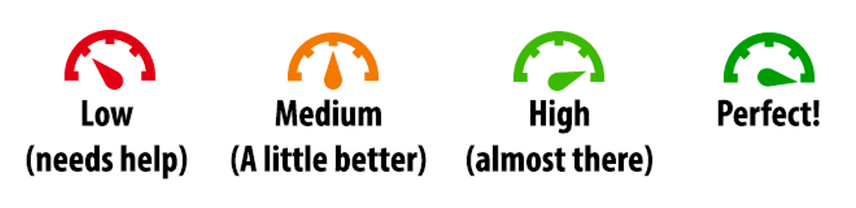
Image 1: Ally meters inform you about the accessibility of your content. Low (0-33%): Needs help! There are severe accessibility issues. Medium (34-66%): A little better. The file is somewhat accessible and needs improvement. High (67-99%): Almost there. The file is accessible but more improvements are possible. Perfect (100%): Perfect! Ally didn't identify any accessibility issues but further improvements may still be possible.
Click the meter next to a content item to see what’s wrong and how to fix it.
2. Use the Ally Course Report
In the right menu of your Ultra course, go to Books & Tools > Ally Course Accessibility Report.
You’ll see:
- An overall course accessibility score
- A breakdown by content type
- A list of issues by severity
Start with “Easy issues to fix” or “Low scoring content” to make quick progress. Many times, these may be the same issues, or the easy issues are images that need descriptions so it can be a fast way to improve your course accessibility.
3. Tackle the Top Three Issues
UMBC’s most common accessibility problems are:
- Images with no alt text. Fixing these issues ensures that screen reader users can understand the purpose of your visuals.
- Scanned PDFs that screen readers can’t interpret. Converting these to accessible documents allows all students to read and interact with your lecture notes and readings.
- Documents with no tags, no headings or poor contrast. Tags, headings and good contrast make it easier for students to navigate and read your materials, especially those with low vision or cognitive disabilities.
Fixing just these can significantly raise your accessibility score.
4. Use Ally’s Built-In Fix Guides
Clicking on an issue opens a feedback panel with:
- A preview of the content
- A plain-language explanation of the problem
- Step-by-step instructions to fix it
You don’t need to be a tech expert -- Ally walks you through it.
5. Tell Students About Alternative File Formats
Ally doesn’t just help instructors -- it gives students access to alternative formats like audio, tagged PDFs, and BeeLine Reader to reduce cognitive overload. These formats are auto-generated from your original files and are available through a dropdown icon next to each document. Encourage your students to explore these options based on their learning preferences, device or accessibility needs. It’s an easy win to support more flexible, inclusive learning.
Open your course today, check the meters, and fix one thing. Just one small change can make a big difference.
Ready to take the first step? Visit UMBC’s Digital Accessibility site or run an Ally course report today. Support is also available from Student Disability Services and Instructional Technology.
myUMBC Poll: Which Ally strategy will you try first?
]]>
Need to boost your course accessibility but short on time? Blackboard’s Ally tool is built right into your course and gives you instant feedback on how to improve content for all students —...
https://my3.my.umbc.edu/groups/instructional-technology/posts/152004
Image
https://assets1-dev.my.umbc.edu/system/shared/attachments/64be82f266d3922a04ee9617da962fc7/69ee2afe/news/000/152/004/d07f3d227bb2eaeaa9575eef6ea74931/Ally_Meters.png?1756917214
https://dev.my.umbc.edu/api/v0/pixel/news/152004/guest@my.umbc.edu/0ca34857854dc2289e5fffe047c17cd5/api/pixel
ally
digital-accessibility
Instructional Technology
https://dev.my.umbc.edu/groups/instructional-technology
https://assets2-dev.my.umbc.edu/system/shared/avatars/groups/000/001/164/dec3b026b81ee6d890a8f82f75c94a2e/xsmall.png?1446126703
https://assets1-dev.my.umbc.edu/system/shared/avatars/groups/000/001/164/dec3b026b81ee6d890a8f82f75c94a2e/original.png?1446126703
https://assets2-dev.my.umbc.edu/system/shared/avatars/groups/000/001/164/dec3b026b81ee6d890a8f82f75c94a2e/xxlarge.png?1446126703
https://assets1-dev.my.umbc.edu/system/shared/avatars/groups/000/001/164/dec3b026b81ee6d890a8f82f75c94a2e/xlarge.png?1446126703
https://assets1-dev.my.umbc.edu/system/shared/avatars/groups/000/001/164/dec3b026b81ee6d890a8f82f75c94a2e/large.png?1446126703
https://assets4-dev.my.umbc.edu/system/shared/avatars/groups/000/001/164/dec3b026b81ee6d890a8f82f75c94a2e/medium.png?1446126703
https://assets3-dev.my.umbc.edu/system/shared/avatars/groups/000/001/164/dec3b026b81ee6d890a8f82f75c94a2e/small.png?1446126703
https://assets2-dev.my.umbc.edu/system/shared/avatars/groups/000/001/164/dec3b026b81ee6d890a8f82f75c94a2e/xsmall.png?1446126703
https://assets3-dev.my.umbc.edu/system/shared/avatars/groups/000/001/164/dec3b026b81ee6d890a8f82f75c94a2e/xxsmall.png?1446126703
Instructional Technology
https://assets1-dev.my.umbc.edu/system/shared/thumbnails/news/000/152/004/cd7afcce013ef818ac2c169b54603fbe/xxlarge.jpg?1756916873
https://assets3-dev.my.umbc.edu/system/shared/thumbnails/news/000/152/004/cd7afcce013ef818ac2c169b54603fbe/xlarge.jpg?1756916873
https://assets1-dev.my.umbc.edu/system/shared/thumbnails/news/000/152/004/cd7afcce013ef818ac2c169b54603fbe/large.jpg?1756916873
https://assets3-dev.my.umbc.edu/system/shared/thumbnails/news/000/152/004/cd7afcce013ef818ac2c169b54603fbe/medium.jpg?1756916873
https://assets4-dev.my.umbc.edu/system/shared/thumbnails/news/000/152/004/cd7afcce013ef818ac2c169b54603fbe/small.jpg?1756916873
https://assets2-dev.my.umbc.edu/system/shared/thumbnails/news/000/152/004/cd7afcce013ef818ac2c169b54603fbe/xsmall.jpg?1756916873
https://assets2-dev.my.umbc.edu/system/shared/thumbnails/news/000/152/004/cd7afcce013ef818ac2c169b54603fbe/xxsmall.jpg?1756916873
A human figure with outstretched arms inside a circle of two curved arrows, suggesting movement. Below the figure are two words: digital accessibility.
17
0
true
Thu, 04 Sep 2025 08:05:17 -0400
Thu, 04 Sep 2025 08:05:59 -0400
All About Headings - USM September Accessibility Newsletter
Sponsored by the USM Kirwan Center for Academic Innovation
The September issue of the USM Digital Accessibility Newsletter is now available. Here's what's inside:
]]>
The September issue of the USM Digital Accessibility Newsletter is now available. Here's what's inside: Why Heading Structure Matters Quick Fix Guide: Heading Hierarchy 101 Tools &...
https://my3.my.umbc.edu/groups/digital-accessibility/posts/151924
https://dev.my.umbc.edu/api/v0/pixel/news/151924/guest@my.umbc.edu/8856deb5caf47e03ffad1376df569e15/api/pixel
digital-accessibility
headings
newsletter
usm
Digital Accessibility
https://dev.my.umbc.edu/groups/digital-accessibility
https://assets2-dev.my.umbc.edu/system/shared/avatars/groups/000/002/166/4e9c2f3f7487566a2153aa263adebb56/xsmall.png?1752093421
https://assets1-dev.my.umbc.edu/system/shared/avatars/groups/000/002/166/4e9c2f3f7487566a2153aa263adebb56/original.png?1752093421
https://assets2-dev.my.umbc.edu/system/shared/avatars/groups/000/002/166/4e9c2f3f7487566a2153aa263adebb56/xxlarge.png?1752093421
https://assets3-dev.my.umbc.edu/system/shared/avatars/groups/000/002/166/4e9c2f3f7487566a2153aa263adebb56/xlarge.png?1752093421
https://assets4-dev.my.umbc.edu/system/shared/avatars/groups/000/002/166/4e9c2f3f7487566a2153aa263adebb56/large.png?1752093421
https://assets1-dev.my.umbc.edu/system/shared/avatars/groups/000/002/166/4e9c2f3f7487566a2153aa263adebb56/medium.png?1752093421
https://assets1-dev.my.umbc.edu/system/shared/avatars/groups/000/002/166/4e9c2f3f7487566a2153aa263adebb56/small.png?1752093421
https://assets2-dev.my.umbc.edu/system/shared/avatars/groups/000/002/166/4e9c2f3f7487566a2153aa263adebb56/xsmall.png?1752093421
https://assets1-dev.my.umbc.edu/system/shared/avatars/groups/000/002/166/4e9c2f3f7487566a2153aa263adebb56/xxsmall.png?1752093421
Digital Accessibility
https://assets4-dev.my.umbc.edu/system/shared/thumbnails/news/000/151/924/f2af441ca20325bf636d97197dff3478/xxlarge.jpg?1756817951
https://assets2-dev.my.umbc.edu/system/shared/thumbnails/news/000/151/924/f2af441ca20325bf636d97197dff3478/xlarge.jpg?1756817951
https://assets1-dev.my.umbc.edu/system/shared/thumbnails/news/000/151/924/f2af441ca20325bf636d97197dff3478/large.jpg?1756817951
https://assets2-dev.my.umbc.edu/system/shared/thumbnails/news/000/151/924/f2af441ca20325bf636d97197dff3478/medium.jpg?1756817951
https://assets1-dev.my.umbc.edu/system/shared/thumbnails/news/000/151/924/f2af441ca20325bf636d97197dff3478/small.jpg?1756817951
https://assets3-dev.my.umbc.edu/system/shared/thumbnails/news/000/151/924/f2af441ca20325bf636d97197dff3478/xsmall.jpg?1756817951
https://assets2-dev.my.umbc.edu/system/shared/thumbnails/news/000/151/924/f2af441ca20325bf636d97197dff3478/xxsmall.jpg?1756817951
red banner with gray, yellow, and black waves. Text, USM Accessibility in Action. Accessible by Design. Inclusive for All, on the red background
3
1
true
Tue, 02 Sep 2025 09:06:55 -0400
USM Announces Monthly Digital Accessibility Remediation Sprints
Join a virtual session each month to remediate content
The USM Kirwan Center for Academic Innovation will host monthly remediation sprints to tackle one essential step of digital accessibility each month. These sprints, hosted on Zoom, will include a short overview of one step from the Digital Accessibility 6 Essential Steps, created by the University of Maryland, College Park, and then active work time to remediate your own documents.
Headings Sprint
Monday, September 8 (2-3 pm)
Register for the Sprint
Links and Navigation Sprint
Monday, October 6 (2-3 pm)
Register for the Sprint
Color and Contrast Sprint
Monday, November 10 (2-3 pm)
Register for the Sprint
Images Sprint
Monday, December 8 (2-3 pm)
Register for the Sprint
Tables and Data Sprint
Monday, January 12 (2-3 pm)
Register for the Sprint
Multimedia Sprint
Monday, February 9 (2-3 pm)
Register for the Sprint
Sprint to Finish
Monday, March 9 (2-3 pm)
Register for the Sprint
Campus representatives from the USM Digital Accessibility Work Group may offer additional sessions throughout the month.
NOTE: Since these sprints are meant for faculty and staff at institutions of higher education in the state of Maryland, please register with your UMBC email address.
]]>
The USM Kirwan Center for Academic Innovation will host monthly remediation sprints to tackle one essential step of digital accessibility each month. These sprints, hosted on Zoom, will include a...
https://my3.my.umbc.edu/groups/digital-accessibility/posts/151540
https://dev.my.umbc.edu/api/v0/pixel/news/151540/guest@my.umbc.edu/bf2f618d6ef45db9e4f6071f32420a4c/api/pixel
digital-accessibility
sprints
usm
Digital Accessibility
https://dev.my.umbc.edu/groups/digital-accessibility
https://assets2-dev.my.umbc.edu/system/shared/avatars/groups/000/002/166/4e9c2f3f7487566a2153aa263adebb56/xsmall.png?1752093421
https://assets1-dev.my.umbc.edu/system/shared/avatars/groups/000/002/166/4e9c2f3f7487566a2153aa263adebb56/original.png?1752093421
https://assets2-dev.my.umbc.edu/system/shared/avatars/groups/000/002/166/4e9c2f3f7487566a2153aa263adebb56/xxlarge.png?1752093421
https://assets3-dev.my.umbc.edu/system/shared/avatars/groups/000/002/166/4e9c2f3f7487566a2153aa263adebb56/xlarge.png?1752093421
https://assets4-dev.my.umbc.edu/system/shared/avatars/groups/000/002/166/4e9c2f3f7487566a2153aa263adebb56/large.png?1752093421
https://assets1-dev.my.umbc.edu/system/shared/avatars/groups/000/002/166/4e9c2f3f7487566a2153aa263adebb56/medium.png?1752093421
https://assets1-dev.my.umbc.edu/system/shared/avatars/groups/000/002/166/4e9c2f3f7487566a2153aa263adebb56/small.png?1752093421
https://assets2-dev.my.umbc.edu/system/shared/avatars/groups/000/002/166/4e9c2f3f7487566a2153aa263adebb56/xsmall.png?1752093421
https://assets1-dev.my.umbc.edu/system/shared/avatars/groups/000/002/166/4e9c2f3f7487566a2153aa263adebb56/xxsmall.png?1752093421
Digital Accessibility
https://assets2-dev.my.umbc.edu/system/shared/thumbnails/news/000/151/540/1267a221cae11cce77266f9384371740/xxlarge.jpg?1755445666
https://assets4-dev.my.umbc.edu/system/shared/thumbnails/news/000/151/540/1267a221cae11cce77266f9384371740/xlarge.jpg?1755445666
https://assets4-dev.my.umbc.edu/system/shared/thumbnails/news/000/151/540/1267a221cae11cce77266f9384371740/large.jpg?1755445666
https://assets1-dev.my.umbc.edu/system/shared/thumbnails/news/000/151/540/1267a221cae11cce77266f9384371740/medium.jpg?1755445666
https://assets3-dev.my.umbc.edu/system/shared/thumbnails/news/000/151/540/1267a221cae11cce77266f9384371740/small.jpg?1755445666
https://assets2-dev.my.umbc.edu/system/shared/thumbnails/news/000/151/540/1267a221cae11cce77266f9384371740/xsmall.jpg?1755445666
https://assets3-dev.my.umbc.edu/system/shared/thumbnails/news/000/151/540/1267a221cae11cce77266f9384371740/xxsmall.jpg?1755445666
A human figure with outstretched arms inside a circle of two curved arrows, suggesting movement. Below the figure are two words: digital accessibility.
2
0
true
Thu, 28 Aug 2025 08:33:04 -0400
Five Things Every Instructor Should Know About Digital Accessibility
Quick tips to make your course more accessible today
As educators, we strive to create a learning environment where every student can succeed. But what if the very materials we use, such as digital resources, tools, or technologies, unintentionally create barriers for some?
That’s where digital accessibility comes in. It’s more than a new compliance mandate -- it’s a fundamental part of building a welcoming classroom that works for everyone. By making our digital course content accessible, we don’t just help students with disabilities. We enhance the learning experience for all students, a practice that aligns with UMBC’s mission of inclusive excellence.
Here are five practical things you should know about digital accessibility to make a difference in your courses:
1. Accessibility Benefits Everyone
Last year’s DOJ ruling establishes the requirement that all public-facing and password-protected content including course materials, must meet WCAG 2.1 A/AA accessibility standards by April 2026. This includes Blackboard courses, documents, videos, tools, and department websites. By designing with accessibility in mind, we remove obstacles before they appear and improve the learning experience for all students. For example:
- Captioned videos help students who are not native English speakers, those in a loud environment, or those who simply prefer reading along.
- Well-structured documents with headings and proper contrast benefit students with cognitive disabilities, but they also make it easier for any student to skim and find information quickly.
2. Think POUR, Not Poor
Accessibility is based on four key principles (POUR):
- Perceivable: Provide alt text, captions, and clear structure.
- Operable: Ensure keyboard navigation and avoid flashing content.
- Understandable: Use plain language, consistent layouts, and clear instructions.
- Robust: Create content that works with screen readers, smart phones, tablets, etc.
3. Use Ally in Blackboard
Anthology Ally scans your course and flags accessibility issues, providing personalized guidance on how to fix issues. In addition to finding an overall accessibility score for your course, look for individual colored meters next to files to indicate the accessibility of those content types. Ally also offers step-by-step guides to help you fix content and AI assistance for image descriptions.
4. Quick Wins: Fix the Most Common Issues First
You don’t need to fix everything overnight. Start small and work on one area at a time:
- Fix images first -- lack of descriptions are the most common issue
- Use descriptive links to provide context instead of “click here”
- Add headings to documents and PDFs
- Choose accessible colors to avoid contrast issues in files and online content
- Ensure captions are accurate in video content
5. It’s About Making Progress, Not Perfection
Start with what matters most: your current course materials. Focus on content students use often, such as readings, presentations, and videos. Archived materials do not need to be remediated unless reused for an active program, service, or activity.
Improving course accessibility is a continuous improvement, not a one-time project -- but your investment makes a difference. Every small change you make today contributes to a more effective learning environment for all of your students.
Ready to take the first step? Visit UMBC’s Digital Accessibility site or run an Ally course report today. Support is also available from Student Disability Services and Instructional Technology.
]]>
As educators, we strive to create a learning environment where every student can succeed. But what if the very materials we use, such as digital resources, tools, or technologies, unintentionally...
https://my3.my.umbc.edu/groups/instructional-technology/posts/151599
Document
https://assets4-dev.my.umbc.edu/system/shared/attachments/95110968384a4c27285beeccc067c37c/69ee2aff/news/000/151/599/cba2a92deaa283a8fb6b5f3424d32d30/POUR Checklist.pdf?1756227840
https://dev.my.umbc.edu/api/v0/pixel/news/151599/guest@my.umbc.edu/1ed375ebf3b0347c3ae96583d139311f/api/pixel
digital-accessibility
getting-started
Instructional Technology
https://dev.my.umbc.edu/groups/instructional-technology
https://assets2-dev.my.umbc.edu/system/shared/avatars/groups/000/001/164/dec3b026b81ee6d890a8f82f75c94a2e/xsmall.png?1446126703
https://assets1-dev.my.umbc.edu/system/shared/avatars/groups/000/001/164/dec3b026b81ee6d890a8f82f75c94a2e/original.png?1446126703
https://assets2-dev.my.umbc.edu/system/shared/avatars/groups/000/001/164/dec3b026b81ee6d890a8f82f75c94a2e/xxlarge.png?1446126703
https://assets1-dev.my.umbc.edu/system/shared/avatars/groups/000/001/164/dec3b026b81ee6d890a8f82f75c94a2e/xlarge.png?1446126703
https://assets1-dev.my.umbc.edu/system/shared/avatars/groups/000/001/164/dec3b026b81ee6d890a8f82f75c94a2e/large.png?1446126703
https://assets4-dev.my.umbc.edu/system/shared/avatars/groups/000/001/164/dec3b026b81ee6d890a8f82f75c94a2e/medium.png?1446126703
https://assets3-dev.my.umbc.edu/system/shared/avatars/groups/000/001/164/dec3b026b81ee6d890a8f82f75c94a2e/small.png?1446126703
https://assets2-dev.my.umbc.edu/system/shared/avatars/groups/000/001/164/dec3b026b81ee6d890a8f82f75c94a2e/xsmall.png?1446126703
https://assets3-dev.my.umbc.edu/system/shared/avatars/groups/000/001/164/dec3b026b81ee6d890a8f82f75c94a2e/xxsmall.png?1446126703
Instructional Technology
https://assets3-dev.my.umbc.edu/system/shared/thumbnails/news/000/151/599/16c411c0210e4e11a41c3cc7118f378c/xxlarge.jpg?1755622074
https://assets1-dev.my.umbc.edu/system/shared/thumbnails/news/000/151/599/16c411c0210e4e11a41c3cc7118f378c/xlarge.jpg?1755622074
https://assets3-dev.my.umbc.edu/system/shared/thumbnails/news/000/151/599/16c411c0210e4e11a41c3cc7118f378c/large.jpg?1755622074
https://assets3-dev.my.umbc.edu/system/shared/thumbnails/news/000/151/599/16c411c0210e4e11a41c3cc7118f378c/medium.jpg?1755622074
https://assets1-dev.my.umbc.edu/system/shared/thumbnails/news/000/151/599/16c411c0210e4e11a41c3cc7118f378c/small.jpg?1755622074
https://assets1-dev.my.umbc.edu/system/shared/thumbnails/news/000/151/599/16c411c0210e4e11a41c3cc7118f378c/xsmall.jpg?1755622074
https://assets3-dev.my.umbc.edu/system/shared/thumbnails/news/000/151/599/16c411c0210e4e11a41c3cc7118f378c/xxsmall.jpg?1755622074
A human figure with outstretched arms inside a circle of two curved arrows, suggesting movement. Below the figure are two words: digital accessibility.
6
0
true
Wed, 27 Aug 2025 07:58:17 -0400
Call for Applications: USM Faculty Mini-Grant to Boost Course Accessibility
Deadline: September 12, 2025
The USM Kirwan Center for Academic Innovation is pleased to announce a call for applications for the Boosting Course Accessibility mini-grant program. This initiative will support 12 USM faculty members in engaging in digital accessibility-related course redesign to better meet the accessibility needs of all students. Each selected faculty member will receive a $1,500 stipend and participate in a collaborative professional development program designed and co-taught by our nonprofit partner, Teach Access.
Program Overview
Faculty grantees will engage in a hybrid program running from October 1 through November 21, 2025. The program includes:
- Completion of five asynchronous online modules (topics include: Defining Disability, Accessible Design, Universal Design, and two elective modules such as Content Development, Game and Interactive Media Design, Instructional Technology, Organizational Communication, and more).
- Participation in five 90-minute synchronous Zoom sessions held on Wednesdays from 12:00 - 1:30 p.m. (October 8, October 15, October 22, October 29, and November 5).
- Presentation and discussion of course revisions at a culminating in-person event on Friday, November 21, 2025, at the National Federation of the Blind Headquarters in Baltimore, MD.
- Serving as a faculty ambassador for digital accessibility in Spring 2026, creating one outreach opportunity engaging faculty in conjunction with your representative from the USM Digital Accessibility Work Group.
Program Goals
This program aims to:
- Promote inclusive teaching practices by equipping faculty with tools, strategies, and frameworks grounded in accessibility and Universal Design for Learning (UDL).
- Support the redesign of existing courses to reduce digital barriers for students with disabilities and increase access for all learners.
- Build a faculty-led culture of access and accountability across the USM through shared learning, peer exchange, and cross-campus collaboration.
- Establish models of accessible course design that can be shared, celebrated, and potentially scaled across departments, disciplines, and institutions.
Eligibility
Applicants must meet the following criteria:
- Full-time faculty member at a USM institution
- Teaching is your primary professional role
- Available to participate fully in all synchronous and asynchronous program components, including the in-person event on November 21.
NOTE: All institutional and faculty grants awarded to UMBC must be routed to the Office of Sponsored Programs prior to submission. Contact your unit's business manager or proposal development staff to discuss your application. CAHSS faculty can request assistance from CARAT (Creative Achievement and Research Administration Team).
Grant Award
Each selected participant will receive a $1,500 stipend. Breakfast, lunch, and parking will be provided at the in-person event.
Application Instructions
Applications will be submitted using this submission form by Friday, September 12. The form requires the following information:
- Faculty member’s contact information
- Course Title(s) for Proposed Accessibility (Re)Design, Course Modality, and Approximate Enrollment per Term
- Response Questions:
- Describe the course you intend to focus on in this program. The course should be one that you will be teaching in Spring 2026, although grantees are welcome to incorporate techniques starting in the Fall. Include details about the student audience (undergraduate general education, undergraduate in the major, graduate) and any known challenges or opportunities related to accessibility in the course. (350-500 words)
- Why are you interested in participating in the Boosting Accessibility mini-grant program? What do you hope to learn, change, or contribute? (350-500 words)
- What experience (if any) do you have with accessibility, inclusive teaching, or Universal Design? (Prior experience is not required.) (200-300 words)
- How do you anticipate sharing what you learn with your department, colleagues, or institution? Consider ways your participation might have broader impact. (200-300 words)
- Confirmation of availability to attend all required sessions
- Letter of support from department chair or dean uploaded
Please note: The submission form is a Google form and requires you to sign in with your UMBC Gmail account to allow for your uploaded letter of support. Selection Criteria
Grantees will be selected based on:
- Demonstrated interest in designing inclusive and accessible learning experiences
- Potential for impact within a specific course and broader department or discipline
- Clear articulation of goals and alignment with program objectives
- Campus representation across the USM
Timeline
- August 11 – Call for applications opens
- September 12 – Application deadline
- September 22 – Notification of selected grantees
- October 1–November 5 – Program participation
- November 21 – In-person event at NFB Headquarters, Baltimore, MD
In 2019-20, approximately 21 percent of undergraduate students and 11 percent of post baccalaureate students reported having a disability (National Center for Education Statistics, Fast Facts, 2023). Disability Awareness Month offers an opportunity to increase awareness about the variety of disabilities students may experience and help break down misconceptions.
Inclusive Experiences for All
Disability awareness includes addressing physical environments and improving accessibility in buildings, classrooms, and public spaces to ensure all individuals can navigate and participate fully. This might involve installing ramps, widening doorways, adding signage, or improving lighting. The Office of Accessibility & Disability raises awareness about the lived experiences of people with disabilities and highlights services for faculty, staff, and students at UMBC.
Instructors play an important role in recognizing the diverse needs of students with disabilities while striving to promote equity and access for all. This includes creating inclusive learning experiences for students with disabilities and might involve providing assistive technologies, flexible teaching methods, or individualized support plans.
Creating more accessible courses also requires consideration of diverse learning styles and approaches that result in engaging learning for all students. Strategies grounded in Universal Design for Learning principles can leverage technology in ways that help all students succeed. Key practices that support accessible course design include the following.
Universal Design for Learning
One of the most impactful ways instructors can support students is by using Universal Design for Learning (UDL) guidelines, a framework that aims to provide multiple means of engagement, representation, and expression for learners. UDL benefits all students, not just those with disabilities, because it offers flexible ways learners can access content and demonstrate knowledge.
UDL is a key practice that supports accessible course design. Instructors can get started in any of the following ways:
- Review UDL guidelines that support offering multiple means of representation to learners by employing various formats such as text, audio, and visual materials to accommodate diverse learning preferences.
- Foster engagement by incorporating interactive elements, discussions, or hands-on activities that cater to visual, auditory, and kinesthetic learners.
- Ask key questions about learner engagement, representation, action and expression when designing a module or unit in your course.
- Implement UDL incrementally and intentionally. Refer to scholarly works like Behling & Tobin (2018) for guidance. They encourage faculty to think of UDL as “plus-one thinking about the interactions in your course” (p. 134). Is there just one more way you can help students stay on task, give them information, or demonstrate skills?
QM’s Accessibility and Usability Resource Site
- Register for free access to Quality Matters’ Accessibility and Usability Resource Site (AURS), the go-to resource for educators to address key accessibility and usability concerns in course design. Log into MyQM, or create your QM account. After successfully logging in, use the side navigation menu to select “Workshop-Register” and self-enroll into AURS (last item on the workshop list).
- Explore AURS resources, videos, and best practices on topics like UDL, alternative text, captions, hyperlinks, accessible MS Office products, readability, accessible PDFs, accessible course design, and inclusive teaching practices.
Anthology Ally for Remediation, Alt Text
- Explore accessibility tools and built-in features that allow you to cater to students with different abilities and meet recently updated federal requirements for digital accessibility compliance. For example, Ally is a tool available in Blackboard Ultra that improves the accessibility of courses by scanning course content, generating an Accessibility Report, and providing tools to fix accessibility issues.
- Use Ally's Instructor Feedback Panel to preview content and prioritize remediation.
- Consider Ally's powerful alternative format options and let students know they can download content in multiple formats that give them choices in how they watch, read, or listen.
Attending disability awareness workshops or collaborating with the Office of Student Disability Services (SDS) can provide instructors with the tools to accommodate the needs of students with disabilities in the classroom.
Save the dates!
Join Instructional Technology for upcoming digital accessibility events:
References
- Behling, K. & Tobin, T. J. (2018). Reach everyone, teach everyone: Universal Design for Learning in higher education. Morgantown: West Virginia University Press. https://wvupressonline.com/node/757.
- CAST (2018). Universal Design for Learning Guidelines version 2.2. Retrieved from http://udlguidelines.cast.org
- National Center for Education Statistics. (2023, TBA). Table 311.10. Number and percentage distribution of students enrolled in postsecondary institutions, by level, disability status, and selected student characteristics: Academic year 2019–20 [Data table]. In Digest of education statistics. U.S. Department of Education, Institute of Education Sciences. Retrieved December 5, 2023, from https://nces.ed.gov/programs/digest/d22/tables/dt22_311.10.asp.
(Image designed by vectorjuice on Freepik)
]]>
In 2019-20, approximately 21 percent of undergraduate students and 11 percent of post baccalaureate students reported having a disability (National Center for Education Statistics, Fast Facts,...
https://my3.my.umbc.edu/groups/instructional-technology/posts/144396
https://dev.my.umbc.edu/api/v0/pixel/news/144396/guest@my.umbc.edu/15133f302e7411f0c689267dede1867d/api/pixel
access
accessibility
biro
da
digital-accessibility
disability-awareness-month
equity
fa24
Instructional Technology
https://dev.my.umbc.edu/groups/instructional-technology
https://assets2-dev.my.umbc.edu/system/shared/avatars/groups/000/001/164/dec3b026b81ee6d890a8f82f75c94a2e/xsmall.png?1446126703
https://assets1-dev.my.umbc.edu/system/shared/avatars/groups/000/001/164/dec3b026b81ee6d890a8f82f75c94a2e/original.png?1446126703
https://assets2-dev.my.umbc.edu/system/shared/avatars/groups/000/001/164/dec3b026b81ee6d890a8f82f75c94a2e/xxlarge.png?1446126703
https://assets1-dev.my.umbc.edu/system/shared/avatars/groups/000/001/164/dec3b026b81ee6d890a8f82f75c94a2e/xlarge.png?1446126703
https://assets1-dev.my.umbc.edu/system/shared/avatars/groups/000/001/164/dec3b026b81ee6d890a8f82f75c94a2e/large.png?1446126703
https://assets4-dev.my.umbc.edu/system/shared/avatars/groups/000/001/164/dec3b026b81ee6d890a8f82f75c94a2e/medium.png?1446126703
https://assets3-dev.my.umbc.edu/system/shared/avatars/groups/000/001/164/dec3b026b81ee6d890a8f82f75c94a2e/small.png?1446126703
https://assets2-dev.my.umbc.edu/system/shared/avatars/groups/000/001/164/dec3b026b81ee6d890a8f82f75c94a2e/xsmall.png?1446126703
https://assets3-dev.my.umbc.edu/system/shared/avatars/groups/000/001/164/dec3b026b81ee6d890a8f82f75c94a2e/xxsmall.png?1446126703
Instructional Technology
https://assets4-dev.my.umbc.edu/system/shared/thumbnails/news/000/144/396/efda742ca564aeb03f2e829e7e9f8d91/xxlarge.jpg?1727875037
https://assets1-dev.my.umbc.edu/system/shared/thumbnails/news/000/144/396/efda742ca564aeb03f2e829e7e9f8d91/xlarge.jpg?1727875037
https://assets1-dev.my.umbc.edu/system/shared/thumbnails/news/000/144/396/efda742ca564aeb03f2e829e7e9f8d91/large.jpg?1727875037
https://assets4-dev.my.umbc.edu/system/shared/thumbnails/news/000/144/396/efda742ca564aeb03f2e829e7e9f8d91/medium.jpg?1727875037
https://assets1-dev.my.umbc.edu/system/shared/thumbnails/news/000/144/396/efda742ca564aeb03f2e829e7e9f8d91/small.jpg?1727875037
https://assets3-dev.my.umbc.edu/system/shared/thumbnails/news/000/144/396/efda742ca564aeb03f2e829e7e9f8d91/xsmall.jpg?1727875037
https://assets3-dev.my.umbc.edu/system/shared/thumbnails/news/000/144/396/efda742ca564aeb03f2e829e7e9f8d91/xxsmall.jpg?1727875037
5
2
true
Wed, 02 Oct 2024 09:47:19 -0400