<?xml version="1.0"?>
<News hasArchived="false" page="1" pageCount="1" pageSize="10" timestamp="Sun, 19 Apr 2026 21:38:08 -0400" url="https://dev.my.umbc.edu/groups/instructional-technology/posts.xml?tag=content-management">
  <NewsItem contentIssues="false" id="147015" important="false" status="posted" url="https://dev.my.umbc.edu/groups/instructional-technology/posts/147015">
  <Title>February's Ultra release enhances content creation, assessment management, and instructor grading</Title>
  <Tagline>Updates for AI Tools, file rendering, assessment security</Tagline>
  <Body>
    <![CDATA[
    <div class="html-content"><p>The February update for Ultra features enhancements to support content creation, improved file rendering, assessment security, and grading workflows. Additionally, updates to the AI Course Design Assistant provides increases flexibility for test question and learning module generation. Let's explore this month's update!</p><p><strong>Content Creation &amp; Management</strong></p><ul><li><span>With a simple click, instructors can now change a top level folder to a learning module, and quickly enjoy all the benefits of <a href="https://help.blackboard.com/Learn/Instructor/Ultra/Course_Content/Create_Content/Create_Containers_for_Content/Create_Learning_Modules#ultra_modules" rel="nofollow external" class="bo">using learning modules</a>. This includes thumbnail images, navigation, sequencing, and progress bars -- a very popular feature reported by UMBC students!</span></li><li>Instructors can use the new image block <a href="https://help.blackboard.com/Learn/Instructor/Ultra/Course_Content/Create_Content/Create_Course_Materials/Create_Content_Items_or_Documents" rel="nofollow external" class="bo">in Ultra Documents</a> to upload their own images, use the AI Design Assistant to generate images, or select images from Unsplash.</li><li><span>Files uploaded by instructors to Blackboard now retain their original formatting and characteristics wherever instructors can upload files. </span>Student files will also display with the exact same formatting as when they were submitted. </li></ul><p><img src="https://help.blackboard.com/sites/default/files/styles/rich_text_large/public/images/2025-01/ultra_Containers_foldertolearningmodule.png.webp" alt="Example of the new option to change a folder to a learning module in the dropdown menu." width="500" style="max-width: 100%; height: auto;"></p><p><em>Image 1: Example of the new option to change a folder to a learning module in the dropdown menu.</em></p><p><strong>AI Course Design Assistant</strong></p><ul><li>Instructors can now set the number of questions <a href="https://help.blackboard.com/Learn/Instructor/Ultra/Course_Content/Create_Content/AI_Design_Assistant#testquestion" rel="nofollow external" class="bo">generated for tests and question banks</a> to a maximum of 20, which reduces the chance that similar questions will be generated. </li><li>Instructors can exclude descriptions <a href="https://help.blackboard.com/Learn/Instructor/Ultra/Course_Content/Create_Content/AI_Design_Assistant#coursestructure" rel="nofollow external" class="bo">from learning modules</a> when generating these elements.</li></ul><div><strong>Communication &amp; Engagement</strong></div><div><ul><li>Groups can only be <a href="https://help.blackboard.com/Learn/Instructor/Ultra/Interact/Course_Groups/Create_Groups" rel="nofollow external" class="bo">created at the Groups tab</a> -- however, groups can still be assigned to activities and assessments once created.</li><li>Instructors will also receive warnings if groups are empty to help make informed decisions and avoid disruptions in group management. </li></ul></div><p><strong>Reporting</strong></p><ul><li>IP addresses are now in <a href="https://help.blackboard.com/Learn/Instructor/Ultra/Performance/Student_Activity_Log" rel="nofollow external" class="bo">the student activity log</a> for assessment submissions and drafts.</li></ul><p><img src="https://help.blackboard.com/sites/default/files/styles/rich_text_large/public/images/2025-01/ultra_instructor_ActivityLog_IPAddressRN.png.webp" alt="Image 2: Example of the new IP address column that’s included in the student activity log." width="500" style="max-width: 100%; height: auto;"></p><p><em>Image 2: Example of the new IP address column that’s included in the student activity log.</em></p><p><strong>Assessments</strong></p><ul><li>Assignments will be converted <a href="https://help.blackboard.com/Learn/Instructor/Ultra/Assignments/Create_and_Edit_Assignments#NewAssignmentPage" rel="nofollow external" class="bo">to the new interface</a>, which was launched in August 2024. An assignment is an assessment without individual questions (e.g., multiple choice, essay, etc.). Tests will NOT be converted.</li><li><span>The Tests Settings panel was updated to remove assignment specific options (e.g., collect submissions offline, peer review, grading rubric). </span></li><li>Instructors must add at least one question to a test to make it visible to students or to add release conditions.</li><li>When an instructor or exam proctor enters <a href="https://help.blackboard.com/Learn/Instructor/Ultra/Tests_Pools_Surveys/Test_and_Survey_Options#AccessCodes" rel="nofollow external" class="bo">an access code for an assessment</a> on a student's computer, the code is masked (*******) to ensure enhanced security. </li><li><span>Students can now be confident that their files are successfully attached, received, and stored for assessments. They will be notified immediately if there are any issues with their file submissions including timed assessments.</span></li></ul><p><strong>Grading &amp; the Gradebook</strong></p><ul><li><span>The Grading interface is updated to provide more space to instructors.</span></li><li>Instructors can enter discussion and journal grades directly in the Grid view or Grades &amp; Participation page with improved accuracy and consistency.</li><li>Grades and feedback for assignments, journals, and discussions are mapped to the corresponding attempt or submission whenever possible.</li><li>Instructors can choose to exclude attempts that they do not intend to grade. Excluded attempts are removed from the Needs Grading workflow and any gradebook calculations.</li></ul><p><img src="https://help.blackboard.com/sites/default/files/styles/rich_text_large/public/images/2025-01/ultra_instructor_gradinginterfaceAFTER_0.png.webp" alt="Image 3: Example of the newly designed grading interface" width="500" style="max-width: 100%; height: auto;"></p><p><em>Image 3: Example of the newly designed grading interface</em></p><p>Faculty should see the latest updates in their Ultra courses around February 6-7, 2025. The next update to our Ultra test environment will take place on <span>February 11, 2025</span>; release notes are posted to the <a href="https://wiki.umbc.edu/x/LohnB" rel="nofollow external" class="bo">What's New in Ultra</a><span> that same week. Faculty who are interested in test driving new features before they are released to production should </span><a href="http://my.umbc.edu/go/request-help" rel="nofollow external" class="bo">open an RT ticket</a><span> to request early access. Please </span><a href="http://umbc.edu/go/ultra" rel="nofollow external" class="bo">watch the FAQs</a><span>, including </span><a href="https://wiki.umbc.edu/x/LohnB" rel="nofollow external" class="bo">the What's New with Ultra page</a><span>, and myUMBC for additional information about Ultra.</span></p><div><div><span><strong>Connect with Instructional Technology</strong></span></div><div><span>As always, if you have any questions about teaching, learning, and technology at UMBC, please consider the following options:</span></div><ul><li><a href="http://www.umbc.edu/faq" rel="nofollow external" class="bo">Check our extensive FAQ collection</a><span> </span></li><ul><li><span><a href="https://wiki.umbc.edu/x/LohnB" rel="nofollow external" class="bo"><span>What's new in Ultra?</span></a><span> </span><span>|</span><span> </span><a href="https://wiki.umbc.edu/x/bwrSAQ" rel="nofollow external" class="bo"><span>Known Issues</span></a><span> </span></span></li></ul><li><span><a href="http://my.umbc.edu/go/request-help" rel="nofollow external" class="bo">Open a ticket via RT</a></span></li><li><span>Follow the </span><a href="http://my.umbc.edu/groups/instructional-technology" rel="nofollow external" class="bo">Instructional Technology</a><span> &amp; </span><a href="http://my.umbc.edu/groups/doit" rel="nofollow external" class="bo">DoIT</a><span> myUMBC groups</span></li><li><a href="http://doit.umbc.edu/itnm/staff/" rel="nofollow external" class="bo">Request a consult</a><span> with <a href="http://doit.umbc.edu/itnm/staff" rel="nofollow external" class="bo">instructional technology staff</a></span></li><li><span><a href="http://pivot.umbc.edu" rel="nofollow external" class="bo">PIVOT</a> | <a href="https://doit.umbc.edu/itnm/academic-continuity/" rel="nofollow external" class="bo">Academic Continuity</a></span><span> </span><span>|</span><span> </span><span><a href="https://fdc.umbc.edu/teaching/keep-on-teaching/" rel="nofollow external" class="bo">Keep On Teaching</a></span><span> </span><span>|</span><span> </span><span><a href="https://doit.umbc.edu/students" rel="nofollow external" class="bo">Student Technology Resources</a></span></li></ul><div><em>Thumbnail-image: New to Ultra [decorative]</em></div><div><div></div></div></div></div>
]]>
  </Body>
  <Summary>The February update for Ultra features enhancements to support content creation, improved file rendering, assessment security, and grading workflows. Additionally, updates to the AI Course Design...</Summary>
  <Website>https://my3.my.umbc.edu/groups/instructional-technology/posts/147015</Website>
  <TrackingUrl>https://dev.my.umbc.edu/api/v0/pixel/news/147015/guest@my.umbc.edu/779e1153654283834c9e55a2f6959c3a/api/pixel</TrackingUrl>
  <Tag>ai-design-assistant</Tag>
  <Tag>blackboard</Tag>
  <Tag>content-management</Tag>
  <Tag>course-management</Tag>
  <Tag>gradebook</Tag>
  <Tag>grading</Tag>
  <Tag>ultra-experience</Tag>
  <Tag>ultra-update</Tag>
  <Group token="instructional-technology">Instructional Technology</Group>
  <GroupUrl>https://dev.my.umbc.edu/groups/instructional-technology</GroupUrl>
  <AvatarUrl>https://assets2-dev.my.umbc.edu/system/shared/avatars/groups/000/001/164/dec3b026b81ee6d890a8f82f75c94a2e/xsmall.png?1446126703</AvatarUrl>
  <AvatarUrl size="original">https://assets1-dev.my.umbc.edu/system/shared/avatars/groups/000/001/164/dec3b026b81ee6d890a8f82f75c94a2e/original.png?1446126703</AvatarUrl>
  <AvatarUrl size="xxlarge">https://assets2-dev.my.umbc.edu/system/shared/avatars/groups/000/001/164/dec3b026b81ee6d890a8f82f75c94a2e/xxlarge.png?1446126703</AvatarUrl>
  <AvatarUrl size="xlarge">https://assets1-dev.my.umbc.edu/system/shared/avatars/groups/000/001/164/dec3b026b81ee6d890a8f82f75c94a2e/xlarge.png?1446126703</AvatarUrl>
  <AvatarUrl size="large">https://assets1-dev.my.umbc.edu/system/shared/avatars/groups/000/001/164/dec3b026b81ee6d890a8f82f75c94a2e/large.png?1446126703</AvatarUrl>
  <AvatarUrl size="medium">https://assets4-dev.my.umbc.edu/system/shared/avatars/groups/000/001/164/dec3b026b81ee6d890a8f82f75c94a2e/medium.png?1446126703</AvatarUrl>
  <AvatarUrl size="small">https://assets3-dev.my.umbc.edu/system/shared/avatars/groups/000/001/164/dec3b026b81ee6d890a8f82f75c94a2e/small.png?1446126703</AvatarUrl>
  <AvatarUrl size="xsmall">https://assets2-dev.my.umbc.edu/system/shared/avatars/groups/000/001/164/dec3b026b81ee6d890a8f82f75c94a2e/xsmall.png?1446126703</AvatarUrl>
  <AvatarUrl size="xxsmall">https://assets3-dev.my.umbc.edu/system/shared/avatars/groups/000/001/164/dec3b026b81ee6d890a8f82f75c94a2e/xxsmall.png?1446126703</AvatarUrl>
  <Sponsor>Instructional Technology</Sponsor>
  <ThumbnailUrl size="xxlarge">https://assets2-dev.my.umbc.edu/system/shared/thumbnails/news/000/147/015/4d74ce3b53234369b21c1d9addca073c/xxlarge.jpg?1738678850</ThumbnailUrl>
  <ThumbnailUrl size="xlarge">https://assets2-dev.my.umbc.edu/system/shared/thumbnails/news/000/147/015/4d74ce3b53234369b21c1d9addca073c/xlarge.jpg?1738678850</ThumbnailUrl>
  <ThumbnailUrl size="large">https://assets3-dev.my.umbc.edu/system/shared/thumbnails/news/000/147/015/4d74ce3b53234369b21c1d9addca073c/large.jpg?1738678850</ThumbnailUrl>
  <ThumbnailUrl size="medium">https://assets2-dev.my.umbc.edu/system/shared/thumbnails/news/000/147/015/4d74ce3b53234369b21c1d9addca073c/medium.jpg?1738678850</ThumbnailUrl>
  <ThumbnailUrl size="small">https://assets2-dev.my.umbc.edu/system/shared/thumbnails/news/000/147/015/4d74ce3b53234369b21c1d9addca073c/small.jpg?1738678850</ThumbnailUrl>
  <ThumbnailUrl size="xsmall">https://assets3-dev.my.umbc.edu/system/shared/thumbnails/news/000/147/015/4d74ce3b53234369b21c1d9addca073c/xsmall.jpg?1738678850</ThumbnailUrl>
  <ThumbnailUrl size="xxsmall">https://assets1-dev.my.umbc.edu/system/shared/thumbnails/news/000/147/015/4d74ce3b53234369b21c1d9addca073c/xxsmall.jpg?1738678850</ThumbnailUrl>
  <ThumbnailAltText>Black and white robot dog running with the words "New to Ultra" written on  light turquoise background</ThumbnailAltText>
  <PawCount>1</PawCount>
  <CommentCount>0</CommentCount>
  <CommentsAllowed>true</CommentsAllowed>
  <PostedAt>Thu, 06 Feb 2025 10:11:18 -0500</PostedAt>
  <EditAt>Tue, 29 Apr 2025 11:50:08 -0400</EditAt>
</NewsItem>
  <NewsItem contentIssues="false" id="146450" important="false" status="posted" url="https://dev.my.umbc.edu/groups/instructional-technology/posts/146450">
  <Title>Ultra releases content based on new submission attempt, improves gradebook data entry, and updates course availability settings in January</Title>
  <Tagline>Improvements to AI, access to Mastery Gradebook available</Tagline>
  <Body>
    <![CDATA[
    <div class="html-content"><p>In early January, the Ultra updates features improvements to course settings, content management, grading, and the AI Course Design Assistant, providing increased flexibility for faculty in managing their courses.</p><p>Course availability moves away from the Details and Actions side menu <a href="https://help.blackboard.com/node/49376" rel="nofollow external" class="bo">to the Course Settings</a>, in the top right corner. Available course statuses include </p><ul><li><span><strong>Open</strong>: Content is available to students.</span></li><li><span><strong>Closed</strong>: Content is not available. Students can see the course listed, but they cannot access it. (previously called Private)</span></li><li><span><strong>Complete</strong>: Read-only content. No changes can be made by students OR instructors. Use with caution.</span></li></ul><p>At the top of a course, there is now an indicator that displays whether a course is Open, Closed, or Complete. Instructors can access Course Settings from the Courses page. </p><p><img src="https://help.blackboard.com/sites/default/files/styles/rich_text_large/public/images/2024-12/learn_instructor_course-access-indicator.png.webp?itok=DTSZfy0-" alt="Example of course availability indicator at the top right of an Ultra course" style="max-width: 100%; height: auto;"></p><p><em>Image 1: Example of course availability indicator at the top right of an Ultra course.</em></p><p>Learning pathways are structured, personalized sequences of activities or content that guide students through a course based on their progress, performance, or choices. For example, an instructor might release resources only after a student completes specific assignments, or offer different content tracks based on quiz results to address varying levels of mastery. Ultra can now <a href="https://help.blackboard.com/node/49346" rel="nofollow external" class="bo">support releasing content based on submission attempt</a> in addition to date/time, grade, and user/group membership.</p><p><img src="https://help.blackboard.com/sites/default/files/styles/rich_text_large/public/images/2024-12/ultra_instructor_ReleaseConditions_AttemptSubmitted_0.png.webp?itok=HhMaOmuS" alt="The new Attempt submitted option is in the dropdown menu for a gradable item in the Release condition panel" style="max-width: 100%; height: auto;"></p><p><em>Image 2: The new Attempt submitted option is in the dropdown menu for a gradable item in the Release condition panel.</em></p><div><p>Three updates to the Ultra gradebook enhance instructor efficiency when entering and managing grades.</p></div><ul><li><strong>Direct Grade Entry</strong><span>: When grades are <a href="https://help.blackboard.com/node/49371" rel="nofollow external" class="bo">entered directly</a> from the Grid view or Submissions page, Ultra will no longer display "Needs Grading" to instructors when grades were already completed.</span></li><li><strong>Show/Hide Gradebook Columns</strong><span>: Instructors now have the ability to show or hide columns in the gradebook. While hidden columns offer a more organized workspace, these do not apply to the student view since that visibility is controlled by the assessment settings.</span></li><li><strong>Automatic Zero Defaults</strong><span>: The default setting for automatic zeros is now set to off, giving instructors the flexibility to decide whether or not to enable this feature based on their grading policies. (This applies to newly created courses in the system after Jan 10.)</span></li></ul><p>Additional improvements in January include:</p><ul><li>The AI Course Design Assistant will work faster and generate more complex outputs for assignments, discussions, test questions, learning modules, and AI Conversation avatars.</li><li><span>Instructors can <a href="https://help.blackboard.com/node/49326" rel="nofollow external" class="bo">generate more realistic images</a> faster with the AI Course Design Assistant and the resulting image files require less storage space.</span> </li><li>The output languages available for AI workflows now include Greek, Catalan, Croatian, Irish, and Slovenian. For a list of all languages available for AI outputs, refer to <a href="https://help.blackboard.com/Learn/Instructor/Ultra/Course_Content/Create_Content/AI_Design_Assistant#languages" rel="nofollow external" class="bo">AI Design Assistant for Instructors</a>. </li><li>The Achievements tab is now hidden from students until the instructor creates and posts Achievements for students to earn. </li><li>With the new Mastery Gradebook, instructors can align goals to assessments and view how learners are performing in the course. Moreover, they can also control whether they want students to see their own performance.</li></ul><p>Faculty should see the latest updates in their Ultra courses around January 9-10, 2025. The next update to our Ultra test environment will take place on January 14, 2025; release notes are posted to the <a href="https://wiki.umbc.edu/x/LohnB" rel="nofollow external" class="bo">What's New in Ultra</a><span> that same week. Faculty who are interested in test driving new features before they are released to production should </span><a href="http://my.umbc.edu/go/request-help" rel="nofollow external" class="bo">open an RT ticket</a><span> to request early access. Please </span><a href="http://umbc.edu/go/ultra" rel="nofollow external" class="bo">watch the FAQs</a><span>, including </span><a href="https://wiki.umbc.edu/x/LohnB" rel="nofollow external" class="bo">the What's New with Ultra page</a><span>, and myUMBC for additional information about Ultra.</span></p><p><span>Curious about the all latest features in Ultra? Join our </span><a href="https://my3.my.umbc.edu/groups/instructional-technology/events/135772" rel="nofollow external" class="bo">What's New in Ultra Courses for Teaching &amp; Learning SP2025</a> webinar on January 17, 2025.</p><div><div><span><strong>Connect with Instructional Technology</strong></span></div><div><span>As always, if you have any questions about teaching, learning, and technology at UMBC, please consider the following options:</span></div><ul><li><a href="http://www.umbc.edu/faq" rel="nofollow external" class="bo">Check our extensive FAQ collection</a><span> </span></li><ul><li><span><a href="https://wiki.umbc.edu/x/LohnB" rel="nofollow external" class="bo"><span>What's new in Ultra?</span></a><span> </span><span>|</span><span> </span><a href="https://wiki.umbc.edu/x/bwrSAQ" rel="nofollow external" class="bo"><span>Known Issues</span></a><span> </span></span></li></ul><li><span><a href="http://my.umbc.edu/go/request-help" rel="nofollow external" class="bo">Open a ticket via RT</a></span></li><li><span>Follow the </span><a href="http://my.umbc.edu/groups/instructional-technology" rel="nofollow external" class="bo">Instructional Technology</a><span> &amp; </span><a href="http://my.umbc.edu/groups/doit" rel="nofollow external" class="bo">DoIT</a><span> myUMBC groups</span></li><li><a href="http://doit.umbc.edu/itnm/staff/" rel="nofollow external" class="bo">Request a consult</a><span> with <a href="http://doit.umbc.edu/itnm/staff" rel="nofollow external" class="bo">instructional technology staff</a></span></li><li><span><a href="http://pivot.umbc.edu" rel="nofollow external" class="bo">PIVOT</a> | <a href="https://doit.umbc.edu/itnm/academic-continuity/" rel="nofollow external" class="bo">Academic Continuity</a></span><span> </span><span>|</span><span> </span><span><a href="https://fdc.umbc.edu/teaching/keep-on-teaching/" rel="nofollow external" class="bo">Keep On Teaching</a></span><span> </span><span>|</span><span> </span><span><a href="https://doit.umbc.edu/students" rel="nofollow external" class="bo">Student Technology Resources</a></span></li></ul><div><em>Thumbnail-image: New to Ultra [decorative]</em></div><div><div></div></div></div></div>
]]>
  </Body>
  <Summary>In early January, the Ultra updates features improvements to course settings, content management, grading, and the AI Course Design Assistant, providing increased flexibility for faculty in...</Summary>
  <Website>https://my3.my.umbc.edu/groups/instructional-technology/posts/146450</Website>
  <TrackingUrl>https://dev.my.umbc.edu/api/v0/pixel/news/146450/guest@my.umbc.edu/d5af1db9efb50dde1cdcfa86441cdc75/api/pixel</TrackingUrl>
  <Tag>ai-design-assistant</Tag>
  <Tag>blackboard</Tag>
  <Tag>content-management</Tag>
  <Tag>course-management</Tag>
  <Tag>gradebook</Tag>
  <Tag>grading</Tag>
  <Tag>learning-pathways</Tag>
  <Tag>ultra-experience</Tag>
  <Tag>ultra-update</Tag>
  <Group token="instructional-technology">Instructional Technology</Group>
  <GroupUrl>https://dev.my.umbc.edu/groups/instructional-technology</GroupUrl>
  <AvatarUrl>https://assets2-dev.my.umbc.edu/system/shared/avatars/groups/000/001/164/dec3b026b81ee6d890a8f82f75c94a2e/xsmall.png?1446126703</AvatarUrl>
  <AvatarUrl size="original">https://assets1-dev.my.umbc.edu/system/shared/avatars/groups/000/001/164/dec3b026b81ee6d890a8f82f75c94a2e/original.png?1446126703</AvatarUrl>
  <AvatarUrl size="xxlarge">https://assets2-dev.my.umbc.edu/system/shared/avatars/groups/000/001/164/dec3b026b81ee6d890a8f82f75c94a2e/xxlarge.png?1446126703</AvatarUrl>
  <AvatarUrl size="xlarge">https://assets1-dev.my.umbc.edu/system/shared/avatars/groups/000/001/164/dec3b026b81ee6d890a8f82f75c94a2e/xlarge.png?1446126703</AvatarUrl>
  <AvatarUrl size="large">https://assets1-dev.my.umbc.edu/system/shared/avatars/groups/000/001/164/dec3b026b81ee6d890a8f82f75c94a2e/large.png?1446126703</AvatarUrl>
  <AvatarUrl size="medium">https://assets4-dev.my.umbc.edu/system/shared/avatars/groups/000/001/164/dec3b026b81ee6d890a8f82f75c94a2e/medium.png?1446126703</AvatarUrl>
  <AvatarUrl size="small">https://assets3-dev.my.umbc.edu/system/shared/avatars/groups/000/001/164/dec3b026b81ee6d890a8f82f75c94a2e/small.png?1446126703</AvatarUrl>
  <AvatarUrl size="xsmall">https://assets2-dev.my.umbc.edu/system/shared/avatars/groups/000/001/164/dec3b026b81ee6d890a8f82f75c94a2e/xsmall.png?1446126703</AvatarUrl>
  <AvatarUrl size="xxsmall">https://assets3-dev.my.umbc.edu/system/shared/avatars/groups/000/001/164/dec3b026b81ee6d890a8f82f75c94a2e/xxsmall.png?1446126703</AvatarUrl>
  <Sponsor>Instructional Technology</Sponsor>
  <ThumbnailUrl size="xxlarge">https://assets3-dev.my.umbc.edu/system/shared/thumbnails/news/000/146/450/0d7dc1e945de6eefd270f4f9834c83f1/xxlarge.jpg?1736181263</ThumbnailUrl>
  <ThumbnailUrl size="xlarge">https://assets3-dev.my.umbc.edu/system/shared/thumbnails/news/000/146/450/0d7dc1e945de6eefd270f4f9834c83f1/xlarge.jpg?1736181263</ThumbnailUrl>
  <ThumbnailUrl size="large">https://assets3-dev.my.umbc.edu/system/shared/thumbnails/news/000/146/450/0d7dc1e945de6eefd270f4f9834c83f1/large.jpg?1736181263</ThumbnailUrl>
  <ThumbnailUrl size="medium">https://assets1-dev.my.umbc.edu/system/shared/thumbnails/news/000/146/450/0d7dc1e945de6eefd270f4f9834c83f1/medium.jpg?1736181263</ThumbnailUrl>
  <ThumbnailUrl size="small">https://assets2-dev.my.umbc.edu/system/shared/thumbnails/news/000/146/450/0d7dc1e945de6eefd270f4f9834c83f1/small.jpg?1736181263</ThumbnailUrl>
  <ThumbnailUrl size="xsmall">https://assets1-dev.my.umbc.edu/system/shared/thumbnails/news/000/146/450/0d7dc1e945de6eefd270f4f9834c83f1/xsmall.jpg?1736181263</ThumbnailUrl>
  <ThumbnailUrl size="xxsmall">https://assets4-dev.my.umbc.edu/system/shared/thumbnails/news/000/146/450/0d7dc1e945de6eefd270f4f9834c83f1/xxsmall.jpg?1736181263</ThumbnailUrl>
  <ThumbnailAltText>Black and white robot dog running with the words "New to Ultra" written on  light turquoise background</ThumbnailAltText>
  <PawCount>1</PawCount>
  <CommentCount>0</CommentCount>
  <CommentsAllowed>true</CommentsAllowed>
  <PostedAt>Mon, 06 Jan 2025 13:12:48 -0500</PostedAt>
  <EditAt>Tue, 29 Apr 2025 11:49:47 -0400</EditAt>
</NewsItem>
  <NewsItem contentIssues="true" id="139606" important="false" status="posted" url="https://dev.my.umbc.edu/groups/instructional-technology/posts/139606">
  <Title>Ultra Courses to Support Additional Level of Nested Folders</Title>
  <Tagline>Availability to begin after spring break</Tagline>
  <Body>
    <![CDATA[
    <div class="html-content"><p>Designed for mobility, Ultra supports a condensed hierarchy for content nesting on the main course content page. Student preference and support were the primary purpose for Blackboard to reduce the number of folders that can be nested from unlimited in Original to two in Ultra. Many faculty adopted the streamlined approach to redesign and organize their courses for efficient access. </p>
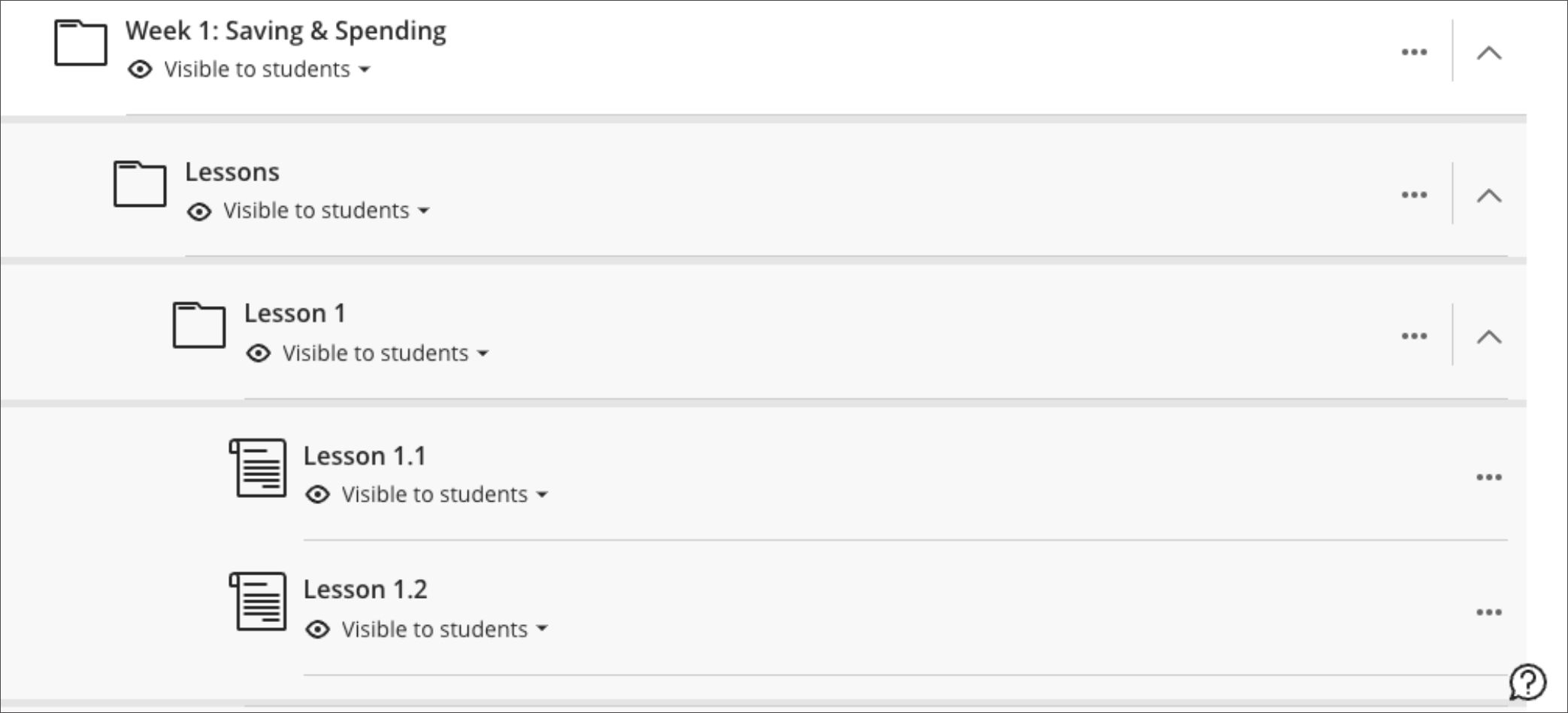
    <p>Two levels of folders, however, could be somewhat limiting for certain types of courses and organizations. <strong>Beginning in mid-March, Ultra will support an additional level of nested folders to faculty as they develop and teach their Ultra courses.</strong> The top level applies to either learning modules or folders, and within this top level, two additional levels are then supported. This change aims to provide faculty with greater flexibility in organizing course materials, especially for complex topics that require a more hierarchical content structure.</p><div><img src="https://my3.my.umbc.edu/groups/instructional-technology/posts/139606/attachments/51012" alt="Image 1: Example of nested folders featuring addition level, starting with a Learning Module at the top" width="500" style="max-width: 100%; height: auto;"></div><div><span><span><em>Image 1: Example of nested folders featuring addition level, starting with a Learning Module at the top to allow for visual identity and creativity in the course outline.</em></span></span></div><div><div><br></div><div><img src="https://help.blackboard.com/sites/default/files/images/2023-05/learn_ultra_student_CourseContent_ContentNesting_After.png" alt="Image 2: Example of nested folders featuring additional level, starting only with folders" width="500" style="max-width: 100%; height: auto;"></div><div><span><span><em>Image 2: Example of nested folders featuring additional level, starting only with folders. </em></span></span></div><div><br></div><div>The new folder settings will be available in Ultra courses after spring break.</div><div><br></div><div><p><strong>Preparing For Course Migration to Ultra</strong></p><p>While it is possible to <a href="https://umbc.atlassian.net/wiki/spaces/faq/pages/30748680" rel="nofollow external" class="bo">convert courses from Original to Ultra</a>, DoIT's Instructional Technology team recommends starting fresh. This approach allows for <a href="https://umbc.atlassian.net/wiki/spaces/faq/pages/30743585/How+do+I+copy+my+Blackboard+course" rel="nofollow external" class="bo">copying content</a> from Original or rebuilding courses from the ground up to ensure an optimal experience for both faculty and students. Starting fresh in Ultra enables you to take full advantage of the platform's new features and design capabilities.</p><ul><li>A wide range of Ultra training is posted through <a href="https://my3.my.umbc.edu/groups/instructional-technology/events" rel="nofollow external" class="bo">the Instructional Technology myUMBC events page</a>.</li><li>For departments or disciplines that want to adopt Ultra by default, Blackboard course shells can be designated as Ultra <a href="https://wiki.umbc.edu/x/eYHGAw" rel="nofollow external" class="bo">when courses are created</a>. </li><li>Instructional Technology will also <a href="http://doit.umbc.edu/news/post/132978" rel="nofollow external" class="bo">work with departments to customize Ultra workshops</a> and provide dedicated support sessions according to faculty schedules or specific use cases for teaching with Ultra.</li></ul></div></div><div><span><strong>Connect with Instructional Technology</strong></span></div><div><span>As always, if you have any questions about teaching, learning, and technology at UMBC, please consider the following options:</span></div><ul><li><a href="http://www.umbc.edu/faq" rel="nofollow external" class="bo">Check our extensive FAQ collection</a><span> </span></li><ul><li><span><a href="https://wiki.umbc.edu/x/LohnB" rel="nofollow external" class="bo"><span>What's new in Ultra?</span></a><span> </span><span>|</span><span> </span><a href="https://wiki.umbc.edu/x/bwrSAQ" rel="nofollow external" class="bo"><span>Known Issues</span></a><span> </span></span></li></ul><li><span><a href="http://my.umbc.edu/go/request-help" rel="nofollow external" class="bo">Open a ticket via RT</a></span></li><li><span>Follow the </span><a href="http://my.umbc.edu/groups/instructional-technology" rel="nofollow external" class="bo">Instructional Technology</a><span> &amp; </span><a href="http://my.umbc.edu/groups/doit" rel="nofollow external" class="bo">DoIT</a><span> myUMBC groups</span></li><li><a href="http://doit.umbc.edu/itnm/staff/" rel="nofollow external" class="bo">Request a consult</a><span> with <a href="http://doit.umbc.edu/itnm/staff" rel="nofollow external" class="bo">instructional technology staff</a></span></li><li><span><a href="http://pivot.umbc.edu" rel="nofollow external" class="bo">PIVOT</a> | <a href="https://doit.umbc.edu/itnm/academic-continuity/" rel="nofollow external" class="bo">Academic Continuity</a></span><span> </span><span>|</span><span> </span><span><a href="https://fdc.umbc.edu/teaching/keep-on-teaching/" rel="nofollow external" class="bo">Keep On Teaching</a></span><span> </span><span>|</span><span> </span><span><a href="https://doit.umbc.edu/students" rel="nofollow external" class="bo">Student Technology Resources</a></span></li></ul><div><em>Thumbnail-image: New to Ultra</em></div><div><div></div></div></div>
]]>
  </Body>
  <Summary>Designed for mobility, Ultra supports a condensed hierarchy for content nesting on the main course content page. Student preference and support were the primary purpose for Blackboard to reduce...</Summary>
  <Website>https://my3.my.umbc.edu/groups/instructional-technology/posts/139606</Website>
  <AttachmentKind>Image</AttachmentKind>
  <AttachmentUrl>https://assets2-dev.my.umbc.edu/system/shared/attachments/aa703d38e32c5e3d1a0668df857cf2c3/69e58380/news/000/139/606/41b669082f2407d3fc0592eaf88864b7/3rd_layer_learning_module.png?1709656295</AttachmentUrl>
  <Attachments>
    <Attachment kind="Image" url="https://dev.my.umbc.edu/groups/instructional-technology/posts/139606/attachments/51012"></Attachment>
  </Attachments>
  <TrackingUrl>https://dev.my.umbc.edu/api/v0/pixel/news/139606/guest@my.umbc.edu/06a62be7465cdfc1588250f790ad453e/api/pixel</TrackingUrl>
  <Tag>blackboard</Tag>
  <Tag>content-creation</Tag>
  <Tag>content-management</Tag>
  <Tag>ultra-experience</Tag>
  <Tag>ultra-update</Tag>
  <Group token="instructional-technology">Instructional Technology</Group>
  <GroupUrl>https://dev.my.umbc.edu/groups/instructional-technology</GroupUrl>
  <AvatarUrl>https://assets2-dev.my.umbc.edu/system/shared/avatars/groups/000/001/164/dec3b026b81ee6d890a8f82f75c94a2e/xsmall.png?1446126703</AvatarUrl>
  <AvatarUrl size="original">https://assets1-dev.my.umbc.edu/system/shared/avatars/groups/000/001/164/dec3b026b81ee6d890a8f82f75c94a2e/original.png?1446126703</AvatarUrl>
  <AvatarUrl size="xxlarge">https://assets2-dev.my.umbc.edu/system/shared/avatars/groups/000/001/164/dec3b026b81ee6d890a8f82f75c94a2e/xxlarge.png?1446126703</AvatarUrl>
  <AvatarUrl size="xlarge">https://assets1-dev.my.umbc.edu/system/shared/avatars/groups/000/001/164/dec3b026b81ee6d890a8f82f75c94a2e/xlarge.png?1446126703</AvatarUrl>
  <AvatarUrl size="large">https://assets1-dev.my.umbc.edu/system/shared/avatars/groups/000/001/164/dec3b026b81ee6d890a8f82f75c94a2e/large.png?1446126703</AvatarUrl>
  <AvatarUrl size="medium">https://assets4-dev.my.umbc.edu/system/shared/avatars/groups/000/001/164/dec3b026b81ee6d890a8f82f75c94a2e/medium.png?1446126703</AvatarUrl>
  <AvatarUrl size="small">https://assets3-dev.my.umbc.edu/system/shared/avatars/groups/000/001/164/dec3b026b81ee6d890a8f82f75c94a2e/small.png?1446126703</AvatarUrl>
  <AvatarUrl size="xsmall">https://assets2-dev.my.umbc.edu/system/shared/avatars/groups/000/001/164/dec3b026b81ee6d890a8f82f75c94a2e/xsmall.png?1446126703</AvatarUrl>
  <AvatarUrl size="xxsmall">https://assets3-dev.my.umbc.edu/system/shared/avatars/groups/000/001/164/dec3b026b81ee6d890a8f82f75c94a2e/xxsmall.png?1446126703</AvatarUrl>
  <Sponsor>Instructional Technology</Sponsor>
  <ThumbnailUrl size="xxlarge">https://assets3-dev.my.umbc.edu/system/shared/thumbnails/news/000/139/606/66a883c15ed2728a3b1ce29b0ff89d17/xxlarge.jpg?1709655810</ThumbnailUrl>
  <ThumbnailUrl size="xlarge">https://assets2-dev.my.umbc.edu/system/shared/thumbnails/news/000/139/606/66a883c15ed2728a3b1ce29b0ff89d17/xlarge.jpg?1709655810</ThumbnailUrl>
  <ThumbnailUrl size="large">https://assets4-dev.my.umbc.edu/system/shared/thumbnails/news/000/139/606/66a883c15ed2728a3b1ce29b0ff89d17/large.jpg?1709655810</ThumbnailUrl>
  <ThumbnailUrl size="medium">https://assets3-dev.my.umbc.edu/system/shared/thumbnails/news/000/139/606/66a883c15ed2728a3b1ce29b0ff89d17/medium.jpg?1709655810</ThumbnailUrl>
  <ThumbnailUrl size="small">https://assets3-dev.my.umbc.edu/system/shared/thumbnails/news/000/139/606/66a883c15ed2728a3b1ce29b0ff89d17/small.jpg?1709655810</ThumbnailUrl>
  <ThumbnailUrl size="xsmall">https://assets2-dev.my.umbc.edu/system/shared/thumbnails/news/000/139/606/66a883c15ed2728a3b1ce29b0ff89d17/xsmall.jpg?1709655810</ThumbnailUrl>
  <ThumbnailUrl size="xxsmall">https://assets3-dev.my.umbc.edu/system/shared/thumbnails/news/000/139/606/66a883c15ed2728a3b1ce29b0ff89d17/xxsmall.jpg?1709655810</ThumbnailUrl>
  <PawCount>8</PawCount>
  <CommentCount>0</CommentCount>
  <CommentsAllowed>true</CommentsAllowed>
  <PostedAt>Thu, 07 Mar 2024 09:19:34 -0500</PostedAt>
</NewsItem>
</News>