<?xml version="1.0"?>
<News hasArchived="false" page="1" pageCount="1" pageSize="10" timestamp="Sun, 26 Apr 2026 22:19:42 -0400" url="https://dev.my.umbc.edu/groups/instructional-technology/posts.xml?tag=student-success">
  <NewsItem contentIssues="true" id="131214" important="false" status="posted" url="https://dev.my.umbc.edu/groups/instructional-technology/posts/131214">
    <Title>Support student success with Ultra&#8217;s progress tracking tools</Title>
    <Tagline>Discover how and when students engage with course content</Tagline>
    <Body>
      <![CDATA[
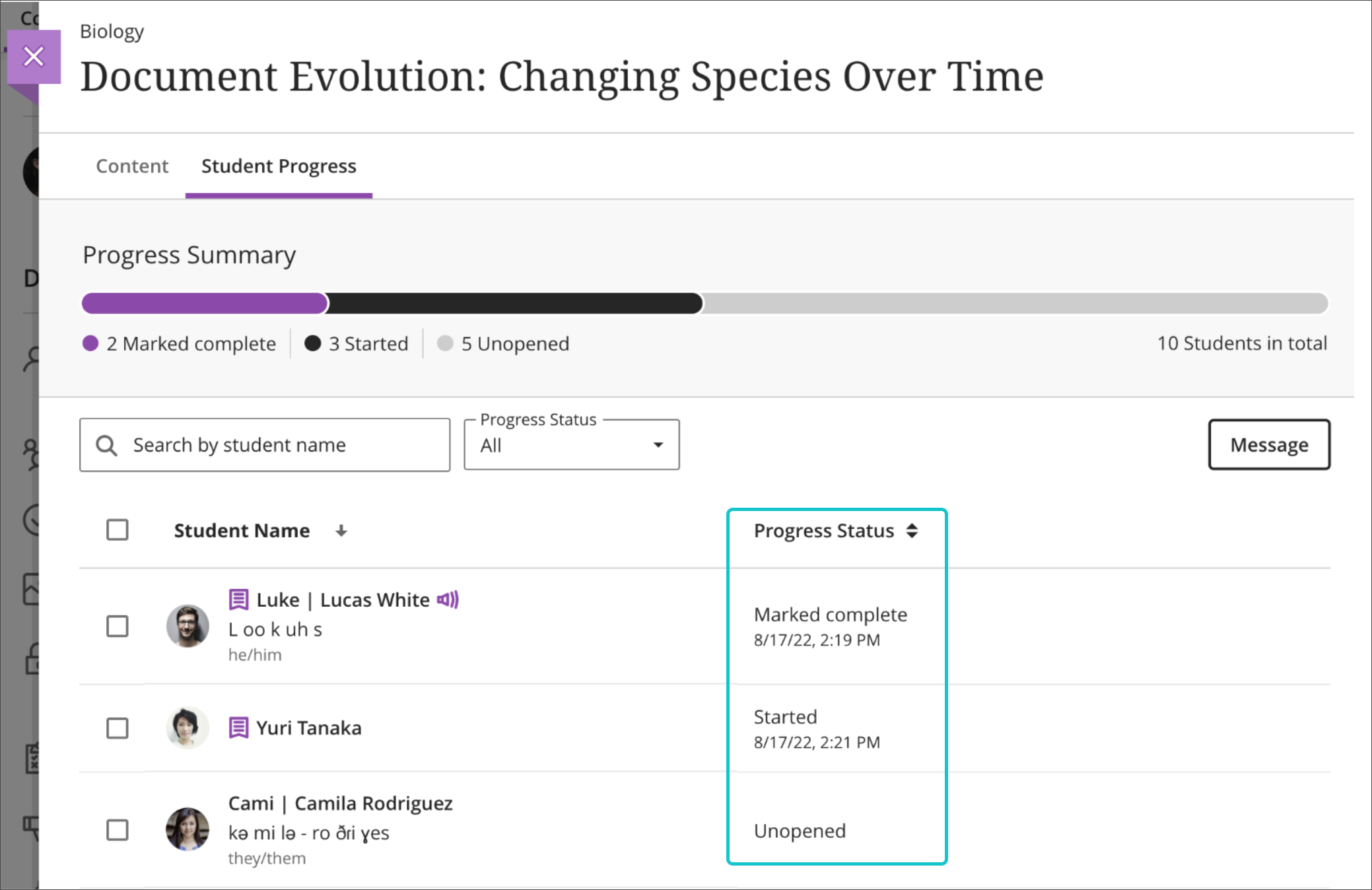
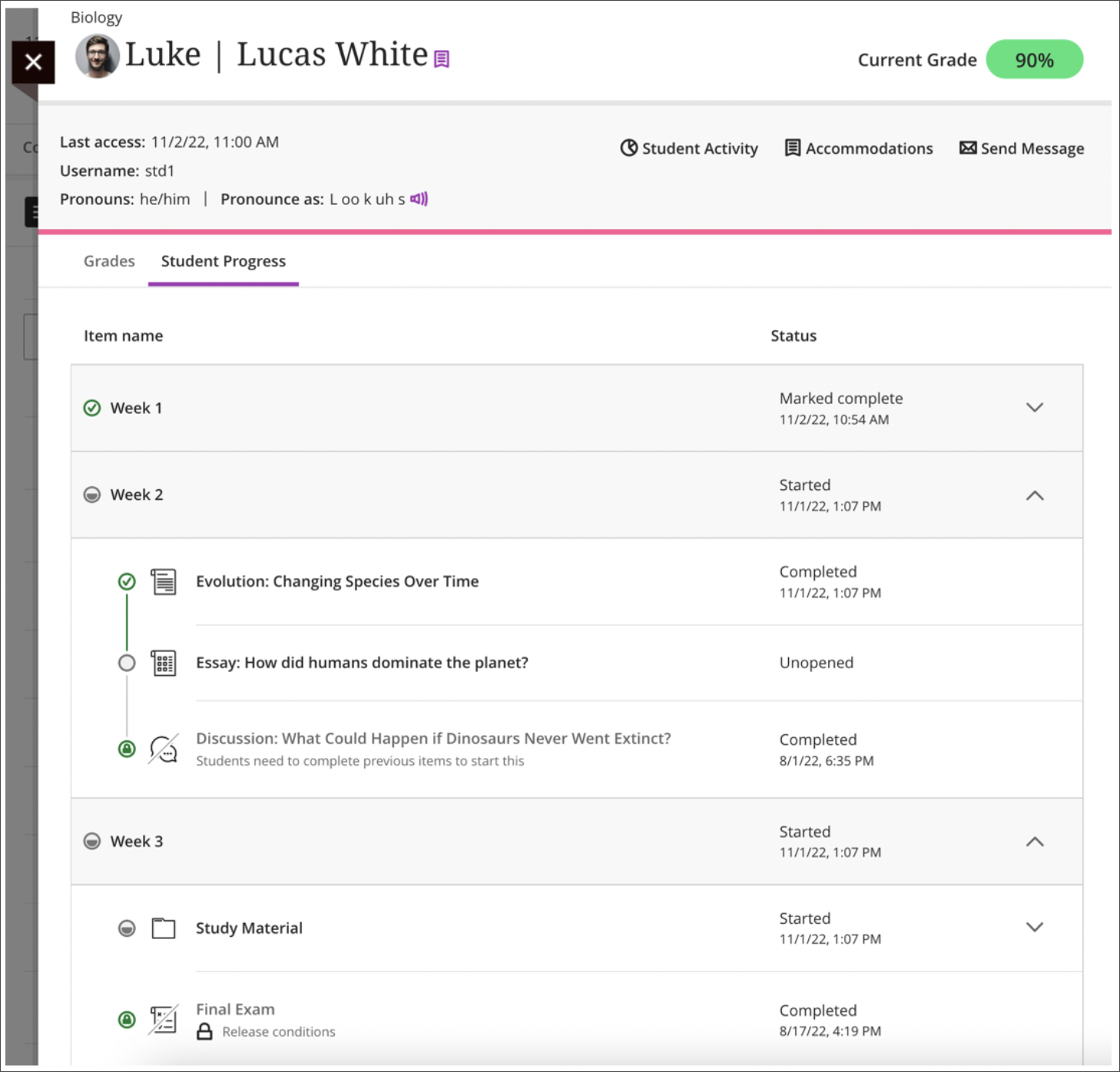
          <div class="html-content"><span><p><span>The success of students in a Blackboard course is often dependent on their level of engagement and their ability to stay on track with course content and assignments. As an instructor, it's crucial to <a href="https://wiki.umbc.edu/x/sQjnAQ" rel="nofollow external" class="bo">have the tools and resources</a> to monitor students' progress and ensure they are staying engaged and motivated throughout the course.</span></p><p><span>An Ultra course provides progress tracking tools to help instructors monitor how much time students are spending in the course, what content they are engaging with, and what their current grades are. This information is invaluable in helping instructors reach out to students who may be struggling or falling behind, and it also helps in retaining students who might otherwise drop out of the course. </span><span><strong>Progress Tracking is enabled by default in all Ultra courses as of SU2023.</strong></span></p><p><span>One of the key benefits of tracking students progress is the ability to identify potential issues early on. If a student is not engaging with course content as much as they should be, the instructor can reach out and provide support, resources, or motivation to help the student get back on track. This proactive approach can help students stay engaged and motivated, and it also helps them to understand the importance of their participation and progress in the course. </span></p><p><img src="https://help.blackboard.com/sites/default/files/images/2022-09/learn_ultra_instructor_StudentProgressReportForCourseContent_StatusAndDate.png" alt="Image 1: Example of Progress Summary report" width="500" style="max-width: 100%; height: auto;"></p></span><div><span><p><span><em>Image 1: Example of <a href="https://help.blackboard.com/Learn/Instructor/Ultra/Courses/Progress_Tracking" rel="nofollow external" class="bo">Progress Summary report</a>. The Ultra progress tracker allows faculty to view how students are engaging with content in a course. Within the context of each content report, the instructor can easily check boxes for students who are not engaged with course resources and send a message.</em></span></p><p><span>Another advantage of progress tracking is the ability to monitor students' time spent in the course and where students are spending that time. Since students have the flexibility to log in and work on course content at any time, some may procrastinate or get sidetracked, leading to a decrease in their engagement and delay in completing assigned tasks. By tracking how much time students are spending in the course and seeing how and where students spend that time, instructors can intervene and provide support to help students stay on track. </span></p></span></div><div><span><p><span><img src="https://help.blackboard.com/sites/default/files/images/2022-11/learn_ultra_instructor_StudentReports_SingleStudentReport.png" alt="Image 2: Example of Student Progress report" width="500" style="max-width: 100%; height: auto;"></span></p><p><em><span>I</span><span>mage 2: Example of Student Progress report, available from <a href="https://help.blackboard.com/Learn/Instructor/Ultra/Interact/StudentOverview" rel="nofollow external" class="bo">the Student Overview</a>. Viewing an individual student's progress in the course will show how s/he has accessed all content to date and the current grade. It's also easy to send that student a message.</span></em></p><p><span>Additionally, tracking students' grades helps instructors to monitor their overall performance and provide additional feedback as needed. With progress tracking, instructors can easily see which students are on track for success and which students may need additional support or intervention. From the student's progress report, click on the Student Activity report to view that individual student's time spent in class and its relationship to the overall grade. Instructors can quickly send messages from these various progress tracking tools as well as <a href="https://help.blackboard.com/node/45476" rel="nofollow external" class="bo">within the individual submission pages</a> for assessment activities.</span></p></span><img src="https://blackboard.umbc.edu/bbcswebdav/institution/doitnews/ultra-updates/Individual_Course_Activity.png" alt="Image 3: Example of Course Activity Report" width="500" style="max-width: 100%; height: auto;"></div><div><span><p><span><em>Image 3: Example of <a href="https://help.blackboard.com/Learn/Instructor/Ultra/Performance/Course_Reports/Course_Activity_Related_to_Grades/View_Individual_Student_Course_Activity_Data" rel="nofollow external" class="bo">Course Activity Report</a>. This student spent more time (purple) in his winter course compared to the rest of the class (black).</em></span></p><p><span>Here are a few practical tips for instructors to keep in mind when using these tools:</span></p><span><ol><li><span><strong>Leverage learning modules instead of folders.</strong> With progress tracking, <a href="https://wiki.umbc.edu/x/tQFyBw" rel="nofollow external" class="bo">students can see how much content</a> they've completed and how much content is left to consume or finish. This can be helpful when planning their schedules or motivating to know they have just one or two items left to wrap up.</span></li><li><span><strong>Stay proactive.</strong></span><span> Regularly check the <span><span>Student Progress report, available from <a href="https://help.blackboard.com/Learn/Instructor/Ultra/Interact/StudentOverview" rel="nofollow external" class="bo">the Student Overview</a>,</span></span> and reach out to those who may be struggling. Provide feedback, resources, and encouragement to help students stay on track.</span></li><li><span><strong>Use data to inform decisions.</strong></span><span> The data you collect from the <a href="https://help.blackboard.com/Learn/Instructor/Ultra/Courses/Progress_Tracking" rel="nofollow external" class="bo">Progress Summary report</a> can inform your teaching and help you to make data-driven decisions about how to support your students.</span></li><li><span><strong>Personalize your outreach.</strong></span><span> When reaching out to students, take the time to personalize your message <a href="https://help.blackboard.com/node/45476" rel="nofollow external" class="bo">from assessment submissions</a> based on their individual needs and progress. This shows that you care about their success and helps build a positive relationship with your students.</span></li><li><span><strong>Encourage self-reflection. </strong></span><span>Encourage students to reflect on their progress and engagement, and provide opportunities for them to share their thoughts and experiences with you and their peers.</span></li><li><span><strong>Celebrate successes.</strong></span><span> Celebrate and acknowledge students' successes and milestones along the way. This helps to keep students motivated and engaged in the course.</span></li></ol><div><p><span>Using Ultra's progress tracking tools can be an essential part of your teaching toolkit. By tracking students' engagement, time spent, and overall grades, instructors can intervene and provide support when needed, increase engagement and motivation, and help students succeed in their coursework. </span></p><p><span><em>~ <a href="https://doit.umbc.edu/itnm/staff/hawken/" rel="nofollow external" class="bo">Mariann Hawken</a></em></span></p></div></span></span></div></div>
      ]]>
    </Body>
    <Summary>The success of students in a Blackboard course is often dependent on their level of engagement and their ability to stay on track with course content and assignments. As an instructor, it's...</Summary>
    <Website>https://my3.my.umbc.edu/groups/instructional-technology/posts/131214</Website>
    <TrackingUrl>https://dev.my.umbc.edu/api/v0/pixel/news/131214/guest@my.umbc.edu/e97bce78c13c5a36b021aca6c2e8688b/api/pixel</TrackingUrl>
    <Tag>analytics</Tag>
    <Tag>blackboard</Tag>
    <Tag>hawken</Tag>
    <Tag>progress-tracker</Tag>
    <Tag>student-success</Tag>
    <Tag>ultra-experience</Tag>
    <Group token="instructional-technology">Instructional Technology</Group>
    <GroupUrl>https://dev.my.umbc.edu/groups/instructional-technology</GroupUrl>
    <AvatarUrl>https://assets2-dev.my.umbc.edu/system/shared/avatars/groups/000/001/164/dec3b026b81ee6d890a8f82f75c94a2e/xsmall.png?1446126703</AvatarUrl>
    <AvatarUrl size="original">https://assets1-dev.my.umbc.edu/system/shared/avatars/groups/000/001/164/dec3b026b81ee6d890a8f82f75c94a2e/original.png?1446126703</AvatarUrl>
    <AvatarUrl size="xxlarge">https://assets2-dev.my.umbc.edu/system/shared/avatars/groups/000/001/164/dec3b026b81ee6d890a8f82f75c94a2e/xxlarge.png?1446126703</AvatarUrl>
    <AvatarUrl size="xlarge">https://assets1-dev.my.umbc.edu/system/shared/avatars/groups/000/001/164/dec3b026b81ee6d890a8f82f75c94a2e/xlarge.png?1446126703</AvatarUrl>
    <AvatarUrl size="large">https://assets1-dev.my.umbc.edu/system/shared/avatars/groups/000/001/164/dec3b026b81ee6d890a8f82f75c94a2e/large.png?1446126703</AvatarUrl>
    <AvatarUrl size="medium">https://assets4-dev.my.umbc.edu/system/shared/avatars/groups/000/001/164/dec3b026b81ee6d890a8f82f75c94a2e/medium.png?1446126703</AvatarUrl>
    <AvatarUrl size="small">https://assets3-dev.my.umbc.edu/system/shared/avatars/groups/000/001/164/dec3b026b81ee6d890a8f82f75c94a2e/small.png?1446126703</AvatarUrl>
    <AvatarUrl size="xsmall">https://assets2-dev.my.umbc.edu/system/shared/avatars/groups/000/001/164/dec3b026b81ee6d890a8f82f75c94a2e/xsmall.png?1446126703</AvatarUrl>
    <AvatarUrl size="xxsmall">https://assets3-dev.my.umbc.edu/system/shared/avatars/groups/000/001/164/dec3b026b81ee6d890a8f82f75c94a2e/xxsmall.png?1446126703</AvatarUrl>
    <Sponsor>Instructional Technology</Sponsor>
    <ThumbnailUrl size="xxlarge">https://assets3-dev.my.umbc.edu/system/shared/thumbnails/news/000/131/214/1fb8977c963429185684d7ece931daa2/xxlarge.jpg?1677253014</ThumbnailUrl>
    <ThumbnailUrl size="xlarge">https://assets2-dev.my.umbc.edu/system/shared/thumbnails/news/000/131/214/1fb8977c963429185684d7ece931daa2/xlarge.jpg?1677253014</ThumbnailUrl>
    <ThumbnailUrl size="large">https://assets2-dev.my.umbc.edu/system/shared/thumbnails/news/000/131/214/1fb8977c963429185684d7ece931daa2/large.jpg?1677253014</ThumbnailUrl>
    <ThumbnailUrl size="medium">https://assets3-dev.my.umbc.edu/system/shared/thumbnails/news/000/131/214/1fb8977c963429185684d7ece931daa2/medium.jpg?1677253014</ThumbnailUrl>
    <ThumbnailUrl size="small">https://assets2-dev.my.umbc.edu/system/shared/thumbnails/news/000/131/214/1fb8977c963429185684d7ece931daa2/small.jpg?1677253014</ThumbnailUrl>
    <ThumbnailUrl size="xsmall">https://assets2-dev.my.umbc.edu/system/shared/thumbnails/news/000/131/214/1fb8977c963429185684d7ece931daa2/xsmall.jpg?1677253014</ThumbnailUrl>
    <ThumbnailUrl size="xxsmall">https://assets1-dev.my.umbc.edu/system/shared/thumbnails/news/000/131/214/1fb8977c963429185684d7ece931daa2/xxsmall.jpg?1677253014</ThumbnailUrl>
    <PawCount>6</PawCount>
    <CommentCount>0</CommentCount>
    <CommentsAllowed>true</CommentsAllowed>
    <PostedAt>Wed, 30 Aug 2023 09:11:02 -0400</PostedAt>
  </NewsItem>
  <NewsItem contentIssues="true" id="116185" important="false" status="posted" url="https://dev.my.umbc.edu/groups/instructional-technology/posts/116185">
  <Title>5 reasons you should open your Blackboard course early</Title>
  <Tagline>Benefits help students and instructors</Tagline>
  <Body>
    <![CDATA[
    <div class="html-content"><span><p><span>At UMBC, <a href="https://wiki.umbc.edu/x/eYHGAw" rel="nofollow external" class="bo">courses are created in Blackboard</a> about four weeks before a new semester begins, providing time for faculty to transition instructional materials and assessments into a new site for students. All </span><a href="https://wiki.umbc.edu/x/VoAc" rel="nofollow external" class="bo"><span>course shells are unavailable</span></a><span>, however, requiring faculty to make sure students can see their courses and access content by the time classes start. Some instructors choose to open a course earlier, by days or weeks, to give students access to materials for preparation for a busy term.</span></p><p><span>While the semester might start on a specific date, here are five reasons why to consider opening your Blackboard course early.</span></p><p><span><strong>1. Introduce Students to Class</strong></span></p><p><span>Opening the class earlier gives you and your students time to start getting to know the course requirements, required course materials, and common questions or other logistics via a course FAQ. Orientations also allow you to find and fix unexpected issues with course content, including hidden files or broken links. </span></p><ul><li><span>Clarify expectations for how your course will be facilitated, especially if it’s fully online or hybrid, and what learners will achieve on their journey (<a href="https://pivot.umbc.edu/course-design/quality-matters/" rel="nofollow external" class="bo">Quality Matters</a>, 2018). </span></li><li><span>Provide a course tour so students can explore the structure of the course and find their way around the content and organization without the pressure of due dates. </span></li></ul><p><span><strong>2. Refresh Prior Knowledge </strong></span><span> </span></p><p><span>If your course has prerequisites or is part of a multi-part course, course materials and resources might include references to materials from prior courses or review materials. Opening your course early helps students to assess and refresh their knowledge before new content is introduced. </span></p><ul><li><span>Consider <a href="https://wiki.umbc.edu/display/faq/Panopto" rel="nofollow external" class="bo">Panopto videos</a>, reading material, interactive exercises, or self-check quizzes to refresh knowledge.</span></li><li><span>Support potential remediation with early access to materials and activities.</span></li><li><span>Include review materials for test preparation, especially for cumulative or certification exams.</span></li></ul><p><span><strong>3. Complete Early Course Content</strong></span></p><p><span>Some courses require that students complete practice problems, homework exercises, and other prerequisite activities to meet comprehensive curricular needs and learning objectives. As with refreshing prior knowledge, early content requirements may include non-assessment resources such as videos and reading materials, which can be valuable to student success (Weiss, 2019).</span></p><ul><li><span>Inform students about prerequisite requirements well ahead of due dates.</span></li><li><span>Allow ample time for students to complete any scaffolded assignments and come to classes prepared to learn new material. </span></li></ul><p><span><strong>4. Encourage Student &amp; Instructor Engagement </strong></span></p><p><span>Opening your course early welcomes students into your virtual classroom and fosters greater interaction between you and your class. Early course access allows students to review the syllabus and complete introductory assignments, like a syllabus quiz or Quiz 0. Students can engage with course messages and announcements.  </span></p><ul><li><span>Connect students with each other through an introductory discussion, FAQ discussion, or </span><a href="https://umbc.edu/go/voicethread-faq" rel="nofollow external" class="bo"><span>VoiceThread</span></a><span>. </span></li><li><span>Add your own welcome video for a personalized touch and post your instructor introduction to help build trust and community with your students (Bain, 2004)</span><span>.</span></li><li><span>Send regular messages and update course announcements to establish essential instructor presence (Garrison, Anderson, and Archer, 2000).</span><span> </span></li></ul><p><span><strong>5. Support Student Success</strong></span></p><p><span>Getting started early helps students start the semester on the right track with access to course materials, digital resources and textbooks. Early access to a course helps with student awareness of the course schedule and their own performance. Knowing when due dates occur and how they're doing, thanks to frequent and timely feedback, can help students become more successful in your courses.</span></p><ul><li><span>Create opportunities for students to practice with course tools, such as a low-stakes, zero-points quiz with </span><a href="https://wiki.umbc.edu/x/0AI9BQ" rel="nofollow external" class="bo"><span>Respondus Lockdown Browser</span></a><span>. This can reduce stress ahead of required exams.</span></li><li><span>Ensure students know they can leverage </span><a href="https://wiki.umbc.edu/x/7xQSC" rel="nofollow external" class="bo"><span>Ally’s alternative file format</span></a><span> to support their learning preferences. This step aligns with the guiding principles of Universal Design for Learning and empowers their learning process (CAST, 2018).</span></li></ul><p><span><span>By default, the starting date for all Blackboard courses are set to 2 weeks before the semester begins, allowing you to open the course any time during that period. If you’d like to open a course earlier than 2 weeks before the semester starts, you can change the date for an Original course </span><a href="https://wiki.umbc.edu/x/AwNpAQ" rel="nofollow external" class="bo"><span>using this FAQ</span></a><span>, but Ultra courses will <a href="https://doit.umbc.edu/request-tracker-rt/doit-myumbc-blackboard/" rel="nofollow external" class="bo">require a ticket</a> for support.</span></span></p><p><span>As always, if you have any questions about teaching, learning, and technology at UMBC, please consider the following options:</span></p><ul><li><a href="http://pivot.umbc.edu/" rel="nofollow external" class="bo"><span>PIVOT</span></a><span> |</span><a href="https://doit.umbc.edu/itnm/academic-continuity/" rel="nofollow external" class="bo"><span> Academic Continuity</span></a><span> |</span><a href="https://fdc.umbc.edu/teaching/keep-on-teaching/" rel="nofollow external" class="bo"><span> Keep On Teaching</span></a><span> |</span><span><a href="https://doit.umbc.edu/students" rel="nofollow external" class="bo"> Student Technology Resources</a></span></li><li><a href="http://www.umbc.edu/faq" rel="nofollow external" class="bo"><span>Check our extensive FAQ collection</span></a><span> </span></li><ul><li><a href="https://wiki.umbc.edu/x/LohnB" rel="nofollow external" class="bo"><span>What’s new in Ultra?</span></a><span> |</span><a href="https://wiki.umbc.edu/x/bwrSAQ" rel="nofollow external" class="bo"><span> Known Issues</span></a><span> </span></li></ul><li><a href="http://my.umbc.edu/go/request-help" rel="nofollow external" class="bo">Open a ticket via RT</a></li><li><span>Follow the</span><a href="http://my.umbc.edu/groups/instructional-technology" rel="nofollow external" class="bo"><span> Instructional Technology</span></a><span> &amp;</span><a href="http://my.umbc.edu/groups/doit" rel="nofollow external" class="bo"><span> DoIT</span></a><span> myUMBC groups</span></li><li><a href="http://doit.umbc.edu/itnm/staff/" rel="nofollow external" class="bo"><span>Request a consult</span></a><span> with instructional technology staff</span></li></ul><p><strong><br><br></strong></p><p><span>~ by </span><a href="http://doit.umbc.edu/itnm/staff/hawken/" rel="nofollow external" class="bo"><span>Mariann Hawken</span></a><span>, </span><a href="https://doit.umbc.edu/itnm/staff/abrams/" rel="nofollow external" class="bo"><span>Josh Abrams</span></a><span>, &amp; </span><a href="https://doit.umbc.edu/itnm/staff/wyatt/" rel="nofollow external" class="bo"><span>Laura Wyatt</span></a></p><p><strong><br><br></strong></p><p><span><em>References</em></span></p><p><span>Bain, K. (2004). </span><a href="http://proxy-bc.researchport.umd.edu/login?url=https://search.ebscohost.com/login.aspx?direct=true&amp;AuthType=ip,url,uid&amp;db=nlebk&amp;AN=395228&amp;site=eds-live&amp;scope=site&amp;ebv=EB&amp;ppid=pp_135" rel="nofollow external" class="bo"><span>Chapter 6: How do they treat their students?</span></a><span> From </span><span><em>What the best college teachers do</em></span><span>. Boston: Harvard Press.</span></p><p><span>CAST (2018). Universal Design for Learning Guidelines version 2.2. Retrieved from </span><span><a href="http://udlguidelines.cast.org/" rel="nofollow external" class="bo">http://udlguidelines.cast.org</a></span></p><p><span>Garrison, D. R., Anderson, T., &amp; Archer, W. (2000). Critical inquiry in a text-based environment: Computer conferencing in higher education. </span><span><em>The Internet and Higher Education, 2</em></span><span>(2/3), 87-105.</span></p><p><span>Quality Matters Rubric, Sixth Edition (2018).</span></p><p><span>Weiss, H. L. (2019). Work in progress: Using videos for improvement in knowledge of prerequisite material. 126th Annual Conference &amp; Exposition. American Society for Engineering Education.</span></p></span></div>
]]>
  </Body>
  <Summary>At UMBC, courses are created in Blackboard about four weeks before a new semester begins, providing time for faculty to transition instructional materials and assessments into a new site for...</Summary>
  <Website>https://my3.my.umbc.edu/groups/instructional-technology/posts/116185</Website>
  <TrackingUrl>https://dev.my.umbc.edu/api/v0/pixel/news/116185/guest@my.umbc.edu/fb00359e7eee5c7bae884465c49f3305/api/pixel</TrackingUrl>
  <Tag>abrams</Tag>
  <Tag>blackboard</Tag>
  <Tag>course-management</Tag>
  <Tag>effective-practices</Tag>
  <Tag>hawken</Tag>
  <Tag>online-learning</Tag>
  <Tag>student-success</Tag>
  <Tag>wyatt</Tag>
  <Group token="instructional-technology">Instructional Technology</Group>
  <GroupUrl>https://dev.my.umbc.edu/groups/instructional-technology</GroupUrl>
  <AvatarUrl>https://assets2-dev.my.umbc.edu/system/shared/avatars/groups/000/001/164/dec3b026b81ee6d890a8f82f75c94a2e/xsmall.png?1446126703</AvatarUrl>
  <AvatarUrl size="original">https://assets1-dev.my.umbc.edu/system/shared/avatars/groups/000/001/164/dec3b026b81ee6d890a8f82f75c94a2e/original.png?1446126703</AvatarUrl>
  <AvatarUrl size="xxlarge">https://assets2-dev.my.umbc.edu/system/shared/avatars/groups/000/001/164/dec3b026b81ee6d890a8f82f75c94a2e/xxlarge.png?1446126703</AvatarUrl>
  <AvatarUrl size="xlarge">https://assets1-dev.my.umbc.edu/system/shared/avatars/groups/000/001/164/dec3b026b81ee6d890a8f82f75c94a2e/xlarge.png?1446126703</AvatarUrl>
  <AvatarUrl size="large">https://assets1-dev.my.umbc.edu/system/shared/avatars/groups/000/001/164/dec3b026b81ee6d890a8f82f75c94a2e/large.png?1446126703</AvatarUrl>
  <AvatarUrl size="medium">https://assets4-dev.my.umbc.edu/system/shared/avatars/groups/000/001/164/dec3b026b81ee6d890a8f82f75c94a2e/medium.png?1446126703</AvatarUrl>
  <AvatarUrl size="small">https://assets3-dev.my.umbc.edu/system/shared/avatars/groups/000/001/164/dec3b026b81ee6d890a8f82f75c94a2e/small.png?1446126703</AvatarUrl>
  <AvatarUrl size="xsmall">https://assets2-dev.my.umbc.edu/system/shared/avatars/groups/000/001/164/dec3b026b81ee6d890a8f82f75c94a2e/xsmall.png?1446126703</AvatarUrl>
  <AvatarUrl size="xxsmall">https://assets3-dev.my.umbc.edu/system/shared/avatars/groups/000/001/164/dec3b026b81ee6d890a8f82f75c94a2e/xxsmall.png?1446126703</AvatarUrl>
  <Sponsor>Instructional Technology</Sponsor>
  <ThumbnailUrl size="xxlarge">https://assets1-dev.my.umbc.edu/system/shared/thumbnails/news/000/116/185/eb385134af58b673bed3008a2ddadf18/xxlarge.jpg?1642692538</ThumbnailUrl>
  <ThumbnailUrl size="xlarge">https://assets3-dev.my.umbc.edu/system/shared/thumbnails/news/000/116/185/eb385134af58b673bed3008a2ddadf18/xlarge.jpg?1642692538</ThumbnailUrl>
  <ThumbnailUrl size="large">https://assets1-dev.my.umbc.edu/system/shared/thumbnails/news/000/116/185/eb385134af58b673bed3008a2ddadf18/large.jpg?1642692538</ThumbnailUrl>
  <ThumbnailUrl size="medium">https://assets1-dev.my.umbc.edu/system/shared/thumbnails/news/000/116/185/eb385134af58b673bed3008a2ddadf18/medium.jpg?1642692538</ThumbnailUrl>
  <ThumbnailUrl size="small">https://assets2-dev.my.umbc.edu/system/shared/thumbnails/news/000/116/185/eb385134af58b673bed3008a2ddadf18/small.jpg?1642692538</ThumbnailUrl>
  <ThumbnailUrl size="xsmall">https://assets3-dev.my.umbc.edu/system/shared/thumbnails/news/000/116/185/eb385134af58b673bed3008a2ddadf18/xsmall.jpg?1642692538</ThumbnailUrl>
  <ThumbnailUrl size="xxsmall">https://assets3-dev.my.umbc.edu/system/shared/thumbnails/news/000/116/185/eb385134af58b673bed3008a2ddadf18/xxsmall.jpg?1642692538</ThumbnailUrl>
  <PawCount>18</PawCount>
  <CommentCount>2</CommentCount>
  <CommentsAllowed>true</CommentsAllowed>
  <PostedAt>Thu, 20 Jan 2022 11:01:38 -0500</PostedAt>
  <EditAt>Fri, 04 Nov 2022 15:53:39 -0400</EditAt>
</NewsItem>
</News>
