COVID-19 Phishing Attacks
A review of different attacks exploiting COVID-19 fears
Tripwire has released an article warning of these COVID19-related phishing scams. This article can be found at this link: https://www.tripwire.com/state-of-security/security-awareness/covid-19-scam-roundup-may-11-2020/
(Fake) Work From Home Offers
PhishLabs discovered a phishing email attack aiming to entice people laid off due to COVID-19 with a work from home opportunity. The one email they found offered $5000 a month for a fake position. If the reader replies, they are asked for personal and financial information and will be given a more detailed job description involving transfering money through the readers accounts. The malicious actors might not only steal money from the readers account, but also could use the reader as a money mule meaning that they could be held liable for the stolen money that passes through their account.
(Fake) IRS Page
Researchers at SecureWorks discovered malicious actors targeting readers with a phishing page designed to look like a tax form given by the IRS. The attack is believed to be distributed through email attacks, and the goal of this attack is stealing the readers tax information. Once the malicious actor has the information, they can then impersonate the reader on the official IRS tax form meaning that they will collect not only their tax return but their stimulus checks as well.
Impersonating Institute of CPAs
The Microsoft Security Intelligence team discovered that some digital attackers were using COVID-19 themed attack campaigns to distribute malware. One example they found showed a malicious actor impersonating the Institute of CPAs. In their emails they were claiming to be delivering COVID-19 related updates to its members as well as containing a ZIP file. The file is instead an executable that will allow the malicious actor to take control of the affected machine.
]]>
Tripwire has released an article warning of these COVID19-related phishing scams. This article can be found at this link:...
https://dev.my.umbc.edu/api/v0/pixel/news/93246/guest@my.umbc.edu/fd27aef2c212c3511943930f04cf4c82/api/pixel
covid19
notice
IT Security - DoIT Cybersecurity Assurance and Digital Trust
https://dev.my.umbc.edu/groups/itsecurity
https://assets3-dev.my.umbc.edu/system/shared/avatars/groups/000/001/660/859c6838736bc30c98279ed45d7fd70a/xsmall.png?1761588639
https://assets3-dev.my.umbc.edu/system/shared/avatars/groups/000/001/660/859c6838736bc30c98279ed45d7fd70a/original.png?1761588639
https://assets3-dev.my.umbc.edu/system/shared/avatars/groups/000/001/660/859c6838736bc30c98279ed45d7fd70a/xxlarge.png?1761588639
https://assets3-dev.my.umbc.edu/system/shared/avatars/groups/000/001/660/859c6838736bc30c98279ed45d7fd70a/xlarge.png?1761588639
https://assets4-dev.my.umbc.edu/system/shared/avatars/groups/000/001/660/859c6838736bc30c98279ed45d7fd70a/large.png?1761588639
https://assets1-dev.my.umbc.edu/system/shared/avatars/groups/000/001/660/859c6838736bc30c98279ed45d7fd70a/medium.png?1761588639
https://assets1-dev.my.umbc.edu/system/shared/avatars/groups/000/001/660/859c6838736bc30c98279ed45d7fd70a/small.png?1761588639
https://assets3-dev.my.umbc.edu/system/shared/avatars/groups/000/001/660/859c6838736bc30c98279ed45d7fd70a/xsmall.png?1761588639
https://assets3-dev.my.umbc.edu/system/shared/avatars/groups/000/001/660/859c6838736bc30c98279ed45d7fd70a/xxsmall.png?1761588639
IT Security - DoIT
0
0
true
Mon, 18 May 2020 18:17:39 -0400
Email Attacks
A Review Of Recent Email Trying To Infect Your Computer
Email Attacks
Tripwire has released an article warning of these COVID-19 related email scams. The article can be found at this link: https://www.tripwire.com/state-of-security/security-awareness/covid-19-scam-roundup-may-4-2020/
(FAKE) Failed Delivery Notice
They report on a finding from Kaspersky Labs, where they warn of a spam email campaign informing recipients that a delivery attempt had failed because their shipment details were incorrect and the reader needs to update their details. An image of a receipt is included in the message. The receipt is too small to read easily, so the recipient will probably click on it for a better look. Clicking on the attachment will load spyware onto the user's device.
(FAKE) Donation to WHO
A malicious actor sent out emails urging recipients to consider donating to the World Health Organization. The email has a from address of “support@covid-19[.]world” and includes a link at the bottom saying “Help Us Fight”. Clicking the link will take the reader to a malicious domain help-who[.]com. For readers to donate they must click on the embedded link which allows the malicious actors to steal the reader’s payment information.
(FAKE) Update to Family and Medical Leave Act
Finally the article reports that IBM X-Force discovered a phishing email campaign that seemed to be from the US Department of Labor. The email states they have made changes to the “Family and Medical Leave of Act” as a result of COVID-19. This email then asks readers to review the attached word document. The attachment will install malware which puts the reader’s computer under the control of a botnet.
]]>
Email Attacks Tripwire has released an article warning of these COVID-19 related email scams. The article can be found at this link:...
https://dev.my.umbc.edu/api/v0/pixel/news/92998/guest@my.umbc.edu/912d4576f63daa6d0f96033f10a9d408/api/pixel
covid19
notice
IT Security - DoIT Cybersecurity Assurance and Digital Trust
https://dev.my.umbc.edu/groups/itsecurity
https://assets3-dev.my.umbc.edu/system/shared/avatars/groups/000/001/660/859c6838736bc30c98279ed45d7fd70a/xsmall.png?1761588639
https://assets3-dev.my.umbc.edu/system/shared/avatars/groups/000/001/660/859c6838736bc30c98279ed45d7fd70a/original.png?1761588639
https://assets3-dev.my.umbc.edu/system/shared/avatars/groups/000/001/660/859c6838736bc30c98279ed45d7fd70a/xxlarge.png?1761588639
https://assets3-dev.my.umbc.edu/system/shared/avatars/groups/000/001/660/859c6838736bc30c98279ed45d7fd70a/xlarge.png?1761588639
https://assets4-dev.my.umbc.edu/system/shared/avatars/groups/000/001/660/859c6838736bc30c98279ed45d7fd70a/large.png?1761588639
https://assets1-dev.my.umbc.edu/system/shared/avatars/groups/000/001/660/859c6838736bc30c98279ed45d7fd70a/medium.png?1761588639
https://assets1-dev.my.umbc.edu/system/shared/avatars/groups/000/001/660/859c6838736bc30c98279ed45d7fd70a/small.png?1761588639
https://assets3-dev.my.umbc.edu/system/shared/avatars/groups/000/001/660/859c6838736bc30c98279ed45d7fd70a/xsmall.png?1761588639
https://assets3-dev.my.umbc.edu/system/shared/avatars/groups/000/001/660/859c6838736bc30c98279ed45d7fd70a/xxsmall.png?1761588639
IT Security - DoIT
0
0
true
Fri, 08 May 2020 12:31:45 -0400
Fri, 08 May 2020 12:32:40 -0400
COVID-19 Job Scam in Email
New Scam Subject: UMBC COVID-19 INFORMATION
The UMBC Division of Information Technology received notification of a new job scam variant on 08may2020. The subject is: UMBC COVID-19 INFORMATION
From: Koyepes Michael <michaelkoyepes199@gmail.com>
Date: Fri, May 8, 2020 at 9:54 AM
Subject: UMBC COVID-19 INFORMATION
Dear students,
University of Maryland, Baltimore County health professionals have been closely monitoring the spread of COVID-19 over the past two months.Therefore the university is organizing an online part time job to sustain the students living.I'm happy to inform you that our reputable company CORESTAFF SERVICES Inc®,is currently running a student empowerment program.
KINDLY EMAIL BACK WITH YOUR PERSONAL EMAIL ADDRESS IF INTERESTED IN THIS JOB POSITION.
Kind Regards
Koyepes Michael
HR Manager/Consultant
CORESTAFF SERVICES Inc®
This is a scam! DO NOT REPLY TO IT!
A reply confirms that your UMBC email address is active. That is an invitation to get more spam. You are also asked to provide your personal address. That’s two addresses for spamming. You may then be asked to fill out a form with personal information which can then be added to your email address. That means, at least, that the spam can be targeted to you. If you provide information such as your birthdate, address, or social security number, the information can also be used for identity theft.
Even if you are tempted to send the scammer a hostile, insulting message,
DO NOT REPLY!
You will not hurt the scammer’s feelings. You will simply provide information about yourself directly or indirectly.
E-mail fraud is in the rise. The Division of Information Technology is tracking it. If you get suspicious email, please forward it to security@umbc.edu. If you are not sure whether it is suspicious, forward it anyway. We will investigate it and get back to you.
]]>
The UMBC Division of Information Technology received notification of a new job scam variant on 08may2020. The subject is: UMBC COVID-19 INFORMATION From: Koyepes Michael...
https://dev.my.umbc.edu/api/v0/pixel/news/92997/guest@my.umbc.edu/f645a745d90822bcdf375dcead134bfa/api/pixel
covid19
notice
IT Security - DoIT Cybersecurity Assurance and Digital Trust
https://dev.my.umbc.edu/groups/itsecurity
https://assets3-dev.my.umbc.edu/system/shared/avatars/groups/000/001/660/859c6838736bc30c98279ed45d7fd70a/xsmall.png?1761588639
https://assets3-dev.my.umbc.edu/system/shared/avatars/groups/000/001/660/859c6838736bc30c98279ed45d7fd70a/original.png?1761588639
https://assets3-dev.my.umbc.edu/system/shared/avatars/groups/000/001/660/859c6838736bc30c98279ed45d7fd70a/xxlarge.png?1761588639
https://assets3-dev.my.umbc.edu/system/shared/avatars/groups/000/001/660/859c6838736bc30c98279ed45d7fd70a/xlarge.png?1761588639
https://assets4-dev.my.umbc.edu/system/shared/avatars/groups/000/001/660/859c6838736bc30c98279ed45d7fd70a/large.png?1761588639
https://assets1-dev.my.umbc.edu/system/shared/avatars/groups/000/001/660/859c6838736bc30c98279ed45d7fd70a/medium.png?1761588639
https://assets1-dev.my.umbc.edu/system/shared/avatars/groups/000/001/660/859c6838736bc30c98279ed45d7fd70a/small.png?1761588639
https://assets3-dev.my.umbc.edu/system/shared/avatars/groups/000/001/660/859c6838736bc30c98279ed45d7fd70a/xsmall.png?1761588639
https://assets3-dev.my.umbc.edu/system/shared/avatars/groups/000/001/660/859c6838736bc30c98279ed45d7fd70a/xxsmall.png?1761588639
IT Security - DoIT
0
0
true
Fri, 08 May 2020 12:12:25 -0400
Fri, 08 May 2020 12:15:55 -0400
Guide for Recognizing COVID-19 Scams and Risks
The Center for Internet Security (CIS) posted a guide, on April 13, 2020, about online scams exploiting people’s concerns about the COVID-19. The guide is available at: https://www.cisecurity.org/newsletter
In brief, the guide gives some examples of commonly reported scams such as:
- Fake tests and cures for you to buy,
- Fake health organizations and websites that try to collect personal information about you and/or infect your computer, and
- Fake charities requesting donations.
The guide also makes some suggestions. Briefly:
- Don’t click on strange web links in expected or unusual messages.
- Get your information from known, trusted sources, preferably ending in ‘.gov’. For example:
- Don’t give out personal information (including your SSN and bank information) over the phone or over email.
- Verify a charity before donating anything to it. You can get more guidance about this at https://www.consumer.ftc.gov/articles/0074-giving-charity (Federal Trade Commission or FTC)
]]>
The Center for Internet Security (CIS) posted a guide, on April 13, 2020, about online scams exploiting people’s concerns about the COVID-19. The guide is available at:...
https://dev.my.umbc.edu/api/v0/pixel/news/92402/guest@my.umbc.edu/dafab692cac5f0da4e8c9e2145d4e27a/api/pixel
covid19
IT Security - DoIT Cybersecurity Assurance and Digital Trust
https://dev.my.umbc.edu/groups/itsecurity
https://assets3-dev.my.umbc.edu/system/shared/avatars/groups/000/001/660/859c6838736bc30c98279ed45d7fd70a/xsmall.png?1761588639
https://assets3-dev.my.umbc.edu/system/shared/avatars/groups/000/001/660/859c6838736bc30c98279ed45d7fd70a/original.png?1761588639
https://assets3-dev.my.umbc.edu/system/shared/avatars/groups/000/001/660/859c6838736bc30c98279ed45d7fd70a/xxlarge.png?1761588639
https://assets3-dev.my.umbc.edu/system/shared/avatars/groups/000/001/660/859c6838736bc30c98279ed45d7fd70a/xlarge.png?1761588639
https://assets4-dev.my.umbc.edu/system/shared/avatars/groups/000/001/660/859c6838736bc30c98279ed45d7fd70a/large.png?1761588639
https://assets1-dev.my.umbc.edu/system/shared/avatars/groups/000/001/660/859c6838736bc30c98279ed45d7fd70a/medium.png?1761588639
https://assets1-dev.my.umbc.edu/system/shared/avatars/groups/000/001/660/859c6838736bc30c98279ed45d7fd70a/small.png?1761588639
https://assets3-dev.my.umbc.edu/system/shared/avatars/groups/000/001/660/859c6838736bc30c98279ed45d7fd70a/xsmall.png?1761588639
https://assets3-dev.my.umbc.edu/system/shared/avatars/groups/000/001/660/859c6838736bc30c98279ed45d7fd70a/xxsmall.png?1761588639
IT Security - DoIT
0
0
true
Tue, 21 Apr 2020 10:13:04 -0400
Scammers Want Your Information and Money
Scammers are finding new ways to get your info and money.
Any good scam, electronic or otherwise, works best when the victim is outside of their normal patterns of life. A phishing scam has been circulating that claims that you have been exposed to Covid-19 through “a colleague/friend/family member”. You are asked to print a form attached to the message, which appears to be pre-populated with all your relevant information, and take the printed form to the nearest emergency clinic.
If the thought that you have been exposed to COVID-19 doesn’t upset you, the idea that your personal information has been magically entered in the form probably should. Either way, when you open the attachment, an Excel spreadsheet, you are asked to ‘Enable Content’. Doing so downloads malware which will do its best to collect all the information possible from your computer, potentially including passwords for online accounts, and send the information back to its controller.
In general, if you receive email that immediately appeals to fear, anger, or any other powerful emotion, be wary. Contact the organization claiming to send the message to you and check out the claims. Any legitimate message like this should include contact information other than an email return address. You can also find contact information from the official websites of any organization that is contacting you.
If you get email with an attachment that you are not expecting, be cautious. Don't click on an attachment before you know it is legitimate. Find a way to check the validity of the email before opening the attachment.
If you receive any email that asks for money or a donation, spend time to check out the sender before sending any money. Sometimes this may come in the form of people collecting money to help doctors and nurses on the front lines. Sometimes, scammers may claim to be a hospital caring for a sick relative of yours and asking for you to help cover their hospital expenses.
Scammers are everywhere, and they are working hard to trick you and get your information and money. Following your intuition, checking out messages, and being cautious may prevent a big headache.
Links for more information:
If you want Covid-19 information, try these:
]]>
Any good scam, electronic or otherwise, works best when the victim is outside of their normal patterns of life. A phishing scam has been circulating that claims that you have been exposed to...
https://dev.my.umbc.edu/api/v0/pixel/news/91940/guest@my.umbc.edu/c4f9e1605c98197ef1b3d52aa81d8a77/api/pixel
covid19
IT Security - DoIT Cybersecurity Assurance and Digital Trust
https://dev.my.umbc.edu/groups/itsecurity
https://assets3-dev.my.umbc.edu/system/shared/avatars/groups/000/001/660/859c6838736bc30c98279ed45d7fd70a/xsmall.png?1761588639
https://assets3-dev.my.umbc.edu/system/shared/avatars/groups/000/001/660/859c6838736bc30c98279ed45d7fd70a/original.png?1761588639
https://assets3-dev.my.umbc.edu/system/shared/avatars/groups/000/001/660/859c6838736bc30c98279ed45d7fd70a/xxlarge.png?1761588639
https://assets3-dev.my.umbc.edu/system/shared/avatars/groups/000/001/660/859c6838736bc30c98279ed45d7fd70a/xlarge.png?1761588639
https://assets4-dev.my.umbc.edu/system/shared/avatars/groups/000/001/660/859c6838736bc30c98279ed45d7fd70a/large.png?1761588639
https://assets1-dev.my.umbc.edu/system/shared/avatars/groups/000/001/660/859c6838736bc30c98279ed45d7fd70a/medium.png?1761588639
https://assets1-dev.my.umbc.edu/system/shared/avatars/groups/000/001/660/859c6838736bc30c98279ed45d7fd70a/small.png?1761588639
https://assets3-dev.my.umbc.edu/system/shared/avatars/groups/000/001/660/859c6838736bc30c98279ed45d7fd70a/xsmall.png?1761588639
https://assets3-dev.my.umbc.edu/system/shared/avatars/groups/000/001/660/859c6838736bc30c98279ed45d7fd70a/xxsmall.png?1761588639
IT Security - DoIT
0
0
true
Tue, 07 Apr 2020 17:05:44 -0400
Fake Advertisements and CDC References
Just because it's on the web or offered doesn't make it real
The Digital Citizens Alliance (DCA) has issued a report on the presence of advertisements for medical supplies, including a vaccine for Covid-19 (as of 4/7/2020 there is no such vaccine). These advertisements frequently appear on YouTube and try to add authenticity to their design by including a link to the website of the Center for Disease Control (CDC). Advertising a non-existent product is a pretty clear tip-off that something is wrong, but some vendors may offer things that actually exist, such as surgical masks. It is also important to note that even if a vendor offers a real product on their website, it doesn’t mean they have any in stock to ship to you.
After contacting some of the vendors, the DCA noted other peculiarities. One vendor, for instance, refused payment by credit cards but offered to accept other payment methods such as PayPal, gift cards, and BitCoin. Generally, purchasing with credit cards is safer than using many other payment methods. Most credit cards provide purchase protection against many forms of fraud and allow you to dispute charges when you don't receive an item or the wrong amount is charged.
The CDC link under the videos was valid and took the viewer to the latest information from the CDC. The concern is that people may take this link as some sort of certification by the CDC. Please note that anyone can insert a link to anything on their website, and the presence of a link on a a web page does not indicate a relationship, certification, or endorsement. Links to trusted institutions are useless for authentication.
For more information, please check out:
]]>
The Digital Citizens Alliance (DCA) has issued a report on the presence of advertisements for medical supplies, including a vaccine for Covid-19 (as of 4/7/2020 there is no such vaccine). These...
https://dev.my.umbc.edu/api/v0/pixel/news/91934/guest@my.umbc.edu/63968b8e7d3a7780c81cc9ff76aa62a0/api/pixel
covid19
IT Security - DoIT Cybersecurity Assurance and Digital Trust
https://dev.my.umbc.edu/groups/itsecurity
https://assets3-dev.my.umbc.edu/system/shared/avatars/groups/000/001/660/859c6838736bc30c98279ed45d7fd70a/xsmall.png?1761588639
https://assets3-dev.my.umbc.edu/system/shared/avatars/groups/000/001/660/859c6838736bc30c98279ed45d7fd70a/original.png?1761588639
https://assets3-dev.my.umbc.edu/system/shared/avatars/groups/000/001/660/859c6838736bc30c98279ed45d7fd70a/xxlarge.png?1761588639
https://assets3-dev.my.umbc.edu/system/shared/avatars/groups/000/001/660/859c6838736bc30c98279ed45d7fd70a/xlarge.png?1761588639
https://assets4-dev.my.umbc.edu/system/shared/avatars/groups/000/001/660/859c6838736bc30c98279ed45d7fd70a/large.png?1761588639
https://assets1-dev.my.umbc.edu/system/shared/avatars/groups/000/001/660/859c6838736bc30c98279ed45d7fd70a/medium.png?1761588639
https://assets1-dev.my.umbc.edu/system/shared/avatars/groups/000/001/660/859c6838736bc30c98279ed45d7fd70a/small.png?1761588639
https://assets3-dev.my.umbc.edu/system/shared/avatars/groups/000/001/660/859c6838736bc30c98279ed45d7fd70a/xsmall.png?1761588639
https://assets3-dev.my.umbc.edu/system/shared/avatars/groups/000/001/660/859c6838736bc30c98279ed45d7fd70a/xxsmall.png?1761588639
IT Security - DoIT
0
0
true
Tue, 07 Apr 2020 14:36:26 -0400
Tue, 07 Apr 2020 14:44:49 -0400
Fake DocuSign Phishing Message
Look out for fake DocuSign Messages
Yesterday morning, between 8:45am and 10:00am, several UMBC users received DocuSign messages offering access to a document called “News Update.pdf” with a button labeled “View Document Now”.
The From address of the email “dse_docusign2@docusign.umbc.edu” was forged. This message did not originate from the UMBC’s DocuSign system. It is, however, an unusually good design for a phishing attack.
In the current work climate, it is easy to overlook unusual features of messages we get in our UMBC email inboxes. We are also using tools, like Docusign, more than ever. There are people who will try to take advantage of that. While the source of this message is currently under investigation, DoIT wanted to share some of the key features of this message that raise suspicions about its origin.
Example of Malicious DocuSign Forgery:
In the example above there are some tell-tale signs that should raise suspicions.
The message begins with the salutation “DocuSign,” and is from “The DocuSign Team”. They seem to be addressing themselves.
There is no “DocuSign Team”. DocuSign notifications are from UMBC staff.
The From: header in the upper left says “dse_docusign2@docusign.umbc.edu”. In an actual docusign message, that header would be something like “Andy Johnston via DocuSign <dse_na2@docusign.net>”
DocuSign message subjects normally start with the words “Please DocuSign”. This one does not.
The point of DocuSign is to be able to verify, by signing, that you have received a document. There is no reason to do that for a news update. UMBC News is sent out in regular email messages.
Did You Click on the Button?
If you are one of the people who got this message and clicked on the button, you should have gotten this message:
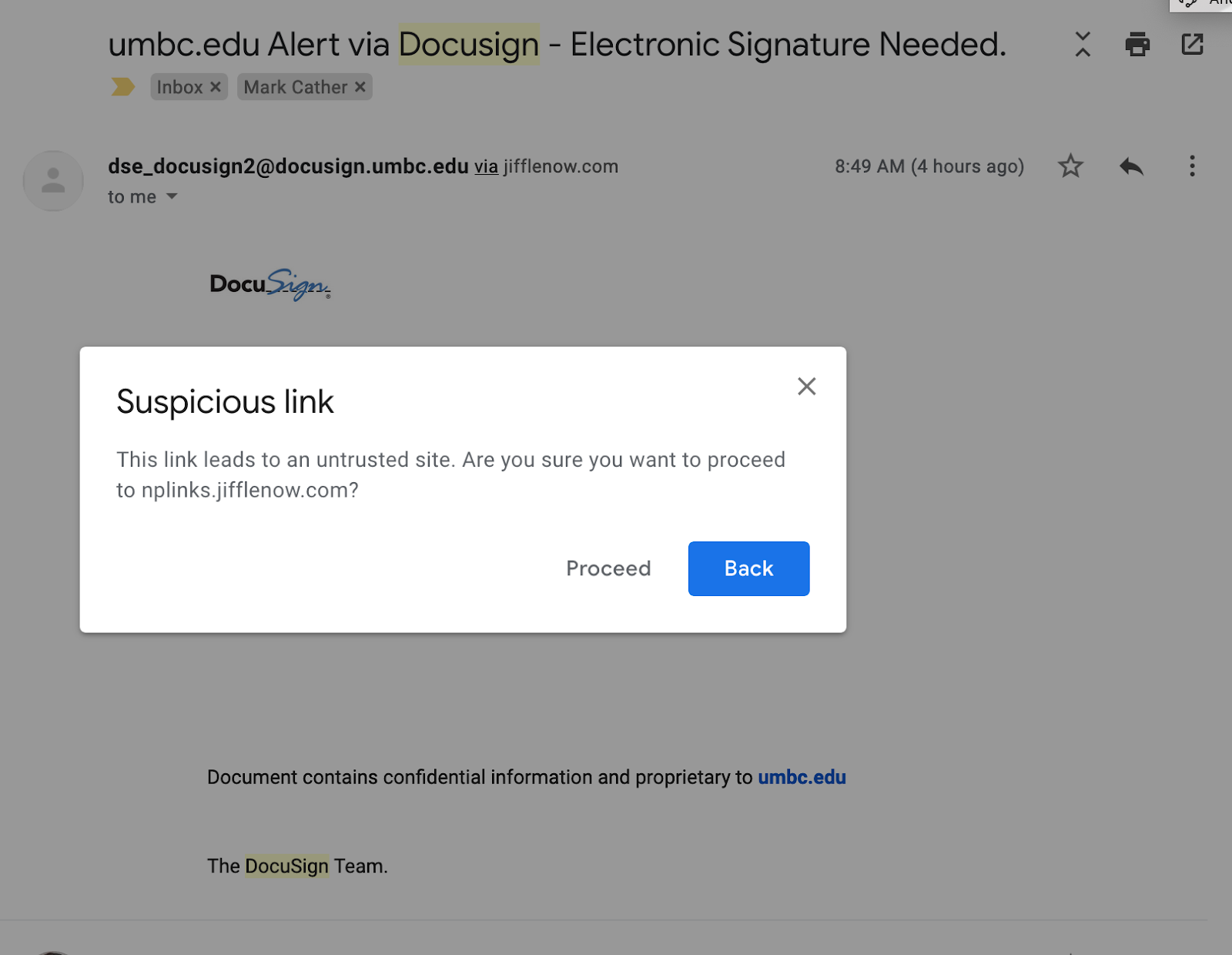
If you selected ‘Proceed’, you would probably have gotten a message that the page was unreachable or the link was invalid. If you got anything else, please submit a ticket to security@umbc.edu so that we can contact you.
]]>
Yesterday morning, between 8:45am and 10:00am, several UMBC users received DocuSign messages offering access to a document called “News Update.pdf” with a button labeled “View Document Now”. ...
https://dev.my.umbc.edu/api/v0/pixel/news/91736/guest@my.umbc.edu/815dcbac850730795560e529bbcf3828/api/pixel
covid19
notice
IT Security - DoIT Cybersecurity Assurance and Digital Trust
https://dev.my.umbc.edu/groups/itsecurity
https://assets3-dev.my.umbc.edu/system/shared/avatars/groups/000/001/660/859c6838736bc30c98279ed45d7fd70a/xsmall.png?1761588639
https://assets3-dev.my.umbc.edu/system/shared/avatars/groups/000/001/660/859c6838736bc30c98279ed45d7fd70a/original.png?1761588639
https://assets3-dev.my.umbc.edu/system/shared/avatars/groups/000/001/660/859c6838736bc30c98279ed45d7fd70a/xxlarge.png?1761588639
https://assets3-dev.my.umbc.edu/system/shared/avatars/groups/000/001/660/859c6838736bc30c98279ed45d7fd70a/xlarge.png?1761588639
https://assets4-dev.my.umbc.edu/system/shared/avatars/groups/000/001/660/859c6838736bc30c98279ed45d7fd70a/large.png?1761588639
https://assets1-dev.my.umbc.edu/system/shared/avatars/groups/000/001/660/859c6838736bc30c98279ed45d7fd70a/medium.png?1761588639
https://assets1-dev.my.umbc.edu/system/shared/avatars/groups/000/001/660/859c6838736bc30c98279ed45d7fd70a/small.png?1761588639
https://assets3-dev.my.umbc.edu/system/shared/avatars/groups/000/001/660/859c6838736bc30c98279ed45d7fd70a/xsmall.png?1761588639
https://assets3-dev.my.umbc.edu/system/shared/avatars/groups/000/001/660/859c6838736bc30c98279ed45d7fd70a/xxsmall.png?1761588639
IT Security - DoIT
0
0
true
Tue, 31 Mar 2020 16:35:38 -0400
Tue, 31 Mar 2020 16:36:06 -0400
Home Network Security
As we all work and study at home, we need to stay secure.
If you are part of the UMBC community and are reading this in the spring of 2020, then you are very likely working and/or teaching and/or learning from home over the Internet. In most cases, you have an Internet provider such as Comcast or Verizon and you have a router in your home to connect to them. The router is your gateway to the Internet. It is also the Internet’s gateway to you. (See links below for information about recently discovered vulnerabilities in home routers.)
The Basics
For most people, the home router does two things.
- It creates a small network that your devices can access either through WiFi or through a cable physically connected to the router.
- It also connects that little network to your provider and, through them, to the Internet.
Your router comes out of the box pretty much ready to go to work for you, but it’s not usually as secure as it could or should be. There are a number of settings, especially in older routers, that should be verified or changed to make sure that:
- No one joins your small home network without your knowledge and permission.
- No one out on the Internet can tell the router to behave in ways you don’t want it to.
How you view and change these settings will vary with the make and model of your router. There are some links at the end which may help you, but your best bet is to get the make and model of your router (usually printed on the back or the bottom) and search for them on Google, Bing, or some other search service. Include terms like “setup”, “manual” and “secure”. Try to use a site belonging to the router’s manufacturer. (You will probably be accessing your router through a web browser on your home network.)
Here is an initial to-do list:
- Secure your wireless connection
- This is the connection between your wireless devices (laptop, tablet, etc.) and your router on the “small network” in your house. Make sure encryption is enabled and set to WPA2 or WPA3. If there is an option for WPS encryption, disable it if possible. If not possible, consider getting a new router.
- Change the router’s administrative password
- There are two different passwords associated with your router. There’s your WiFi password that is entered in every device on your home WiFi network, and there’s that administrative password that you use to go into your router to view and change its settings. Modern routers often come with pre-set WiFi passwords.
- Update your router’s firmware
- If you’re a Windows user, you have dealt with software updates since you first booted the machine. This is much the same. Precisely how you update your router depends on its make and model. If your router has an auto-update feature, you should probably use it.
- MAC filtering
- This is not about Apple computers. Each wifi device, that connects with your router, no matter what kind of device it is, has a unique MAC address that you normally don’t see but can discover. This allows you to refuse access to all devices other than those whose MAC addresses you explicitly ‘whitelist’ (allow) in your router. If you’re comfortable doing this, consider implementing it.. WARNING: There’s a security vs. convenience trade-off here. You will have to whitelist every new device that you want to appear on your home network.
- If your router has a ‘remote management’ setting, turn it off.
Links for more information:
Links for more information about recently discovered vulnerabilities in home routers:
]]>
If you are part of the UMBC community and are reading this in the spring of 2020, then you are very likely working and/or teaching and/or learning from home over the Internet. In most cases, you...
https://dev.my.umbc.edu/api/v0/pixel/news/91732/guest@my.umbc.edu/5359b0cf8623ce3a26a5ae8ef53ac62d/api/pixel
covid19
notice
IT Security - DoIT Cybersecurity Assurance and Digital Trust
https://dev.my.umbc.edu/groups/itsecurity
https://assets3-dev.my.umbc.edu/system/shared/avatars/groups/000/001/660/859c6838736bc30c98279ed45d7fd70a/xsmall.png?1761588639
https://assets3-dev.my.umbc.edu/system/shared/avatars/groups/000/001/660/859c6838736bc30c98279ed45d7fd70a/original.png?1761588639
https://assets3-dev.my.umbc.edu/system/shared/avatars/groups/000/001/660/859c6838736bc30c98279ed45d7fd70a/xxlarge.png?1761588639
https://assets3-dev.my.umbc.edu/system/shared/avatars/groups/000/001/660/859c6838736bc30c98279ed45d7fd70a/xlarge.png?1761588639
https://assets4-dev.my.umbc.edu/system/shared/avatars/groups/000/001/660/859c6838736bc30c98279ed45d7fd70a/large.png?1761588639
https://assets1-dev.my.umbc.edu/system/shared/avatars/groups/000/001/660/859c6838736bc30c98279ed45d7fd70a/medium.png?1761588639
https://assets1-dev.my.umbc.edu/system/shared/avatars/groups/000/001/660/859c6838736bc30c98279ed45d7fd70a/small.png?1761588639
https://assets3-dev.my.umbc.edu/system/shared/avatars/groups/000/001/660/859c6838736bc30c98279ed45d7fd70a/xsmall.png?1761588639
https://assets3-dev.my.umbc.edu/system/shared/avatars/groups/000/001/660/859c6838736bc30c98279ed45d7fd70a/xxsmall.png?1761588639
IT Security - DoIT
0
0
true
Tue, 31 Mar 2020 16:16:36 -0400
Telework Security Resources
Here are some good resources for securing your telework...
More people throughout the United States are teleworking now, including many who have never done so before. The UMBC community is no exception as many of us work, learn and teach from our keyboards. All this remote work is opening up new avenues of exploitation for unscrupulous scammers. DoIT will be posting resources and suggestions to help you maintain security as more of your life moves on-line.
The SANS Institute is offering the SANS Security Awareness Work-from-Home Deployment Kit.
As part of the kit, SANS has posted a five-step guide to teleworking security. You can find it (in several languages) here:
LinkedIn is offering registered users several LinkedIn Learning courses that focus on being productive while working from home, including tips on using virtual meeting tools to build relationships in a new working environment.
NIST has posted a well-designed graphic to help organizations secure conference calls.
INFOSEC has published an article that discusses remote working security, including a brief description of VPN technology.
The National Cyber Security Alliance (NCSA) has posted the “COVID-19 Security Resource Library” of security links for teleworkers.
]]>
More people throughout the United States are teleworking now, including many who have never done so before. The UMBC community is no exception as many of us work, learn and teach from our...
https://dev.my.umbc.edu/api/v0/pixel/news/91731/guest@my.umbc.edu/5953a0b0826f029855bc77da1d65b6e8/api/pixel
covid19
notice
IT Security - DoIT Cybersecurity Assurance and Digital Trust
https://dev.my.umbc.edu/groups/itsecurity
https://assets3-dev.my.umbc.edu/system/shared/avatars/groups/000/001/660/859c6838736bc30c98279ed45d7fd70a/xsmall.png?1761588639
https://assets3-dev.my.umbc.edu/system/shared/avatars/groups/000/001/660/859c6838736bc30c98279ed45d7fd70a/original.png?1761588639
https://assets3-dev.my.umbc.edu/system/shared/avatars/groups/000/001/660/859c6838736bc30c98279ed45d7fd70a/xxlarge.png?1761588639
https://assets3-dev.my.umbc.edu/system/shared/avatars/groups/000/001/660/859c6838736bc30c98279ed45d7fd70a/xlarge.png?1761588639
https://assets4-dev.my.umbc.edu/system/shared/avatars/groups/000/001/660/859c6838736bc30c98279ed45d7fd70a/large.png?1761588639
https://assets1-dev.my.umbc.edu/system/shared/avatars/groups/000/001/660/859c6838736bc30c98279ed45d7fd70a/medium.png?1761588639
https://assets1-dev.my.umbc.edu/system/shared/avatars/groups/000/001/660/859c6838736bc30c98279ed45d7fd70a/small.png?1761588639
https://assets3-dev.my.umbc.edu/system/shared/avatars/groups/000/001/660/859c6838736bc30c98279ed45d7fd70a/xsmall.png?1761588639
https://assets3-dev.my.umbc.edu/system/shared/avatars/groups/000/001/660/859c6838736bc30c98279ed45d7fd70a/xxsmall.png?1761588639
IT Security - DoIT
0
0
true
Tue, 31 Mar 2020 15:47:52 -0400
Tue, 31 Mar 2020 15:48:15 -0400
Unexpected Calendar Invites and Meeting/Class Messages
Beware of Unexpected Calendar Invites and Meeting Messages
As we have all begun to work and attend classes remotely, we are receiving more and more meeting messages and calendar invites. Almost all of these messages and calendar entries include links to Webex, Google Hangouts, or Blackboard Collaborate sessions.
Email messages can be easily faked and anyone can send a calendar invitation that could pop up on your google calendar. Neither email nor Google Calendar validate the identity of the sender of a message or invite. It is essential that we be on the lookout for hackers potentially sending fake messages for meetings/classes and calendar invites with links that could include malware.
Some signs to look out for include:
- A meeting/class or calendar entry that you did not expect.
- An invitation or meeting/class message from outside of UMBC.
- A meeting/class on a service other than Webex, Google, or Blackboard Collaborate.
- A meeting/class at a strange time.
- An unusual list of guests for meetings/classes you typically attend.
Also, please be wary of messages with poor grammar, punctuation, spelling, or other telltale signs of phishing. See our FAQ Collection for more details on spotting spam and phishing.
Phishing & Spam
As always, if a message or calendar invite looks suspicious, please contact the meeting host or professor directly to validate the meeting before clicking on the meeting link.
If you see a suspicious meeting/class related message or calendar entry, please notify
security@umbc.edu immediately.
