<?xml version="1.0"?>
<News hasArchived="false" page="1" pageCount="2" pageSize="10" timestamp="Sun, 19 Apr 2026 09:15:20 -0400" url="https://dev.my.umbc.edu/groups/oer/posts.xml?tag=ai">
  <NewsItem contentIssues="false" id="151713" important="false" status="posted" url="https://dev.my.umbc.edu/groups/oer/posts/151713">
  <Title>"AI, Unscripted" Podcast Series Spotlights Maryland Faculty Tackling AI in Teaching</Title>
  <Tagline>Co-sponsored by USM Kirwan Center, CUSF, MarylandOnline</Tagline>
  <Body>
    <![CDATA[
    <div class="html-content">The "AI, Unscripted" podcast limited series guides faculty from curiosity to confidence in using artificial intelligence for teaching and learning. This seven-episode limited series from the University of Maryland, Baltimore's <a href="https://www.umaryland.edu/fctl/programs/needle/" rel="nofollow external" class="bo">Moving the Needle podcast</a> features conversations with Maryland educators who started exactly where you might be now -- interested but uncertain about AI's place in higher education.<div><span><br></span></div><div><span>Each 30-minute episode features conversations with innovative educators who share:</span><ul><li>Their personal journey from AI-curious to AI-confident</li><li>Detailed explanations of their classroom implementations</li><li>One thing you can try tomorrow in your own teaching</li></ul><p>Whether you’re just beginning to explore generative AI or already building confidence, each episode meets you where you are. We’re all navigating how to learn and teach with this evolving technology, and our guests share practical, real-world examples to help you along the way. We hope these conversations inspire you to take your next step, however small, in exploring AI's potential in your own teaching practice.</p><p><strong>Episode Lineup</strong></p><p>The carefully curated lineup features faculty from diverse disciplines and institutions who understand the caution many faculty (and students) feel about AI</p><ul><li><span>AI &amp; Information Literacy: Teaching Students to Think Critically with </span><u><a href="https://www.linkedin.com/in/benjamin-shaw-261a4a126/" rel="nofollow external" class="bo">Ben Shaw</a></u><span> (Teaching and Learning Librarian, University of Maryland, College Park)</span></li><li>Ask the AI: Business Assignments That Boost Engagement with <u><a href="https://www.linkedin.com/in/bill-carter-4147a23/" rel="nofollow external" class="bo">Bill Carter</a></u> (Associate Professor, University of Baltimore Merrick School of Business)</li><li>Therapy Bots &amp; Ethical Practice: AI in Mental Health Education with <u><a href="https://www.linkedin.com/in/amanda-draheim-ph-d-l-p-9084742a/" rel="nofollow external" class="bo">Amanda Draheim</a></u> (Assistant Professor of Psychology, Goucher College)</li><li>Truth, Data, and AI: Journalism's Role in Uncertain Times with <u><a href="https://www.linkedin.com/in/derek-willis/" rel="nofollow external" class="bo">Derek Willis</a></u> (Lecturer in Journalism, University of Maryland, College Park)</li><li>Writing with Machines: AI in the English Classroom with <u><a href="https://www.linkedin.com/in/eleanor-welsh-66812932/" rel="nofollow external" class="bo">Eleanor Welsh</a></u> (Professor of English, Chesapeake College)</li><li>Clinical Judgment Meets AI: Teaching for Nursing Practice with <u><a href="https://www.linkedin.com/in/denyce-watties-daniels-dnp-rn-9a424816/" rel="nofollow external" class="bo">Denyce Watties-Daniels</a></u> (Associate Professor in Nursing, Coppin State University)</li><li>AI as a Critical Friend: Supporting Reflection in Graduate Learning with <u><a href="https://www.linkedin.com/in/liyan-song-a96525b1/" rel="nofollow external" class="bo">Liyan Song</a></u> (Professor, Learning Technologies, Design &amp; School Library Media, Towson University)</li></ul><p>The series is hosted by:</p><ul><li><u><a href="https://www.linkedin.com/in/mary-crowley-farrell-9a755729/" rel="nofollow external" class="bo">Mary Crowley-Farrell</a></u>, Collegiate Associate Professor in Communication, Journalism, &amp; Speech at UMGC and longtime CUSF member</li><li><u><a href="https://www.linkedin.com/in/drmichaelmills/" rel="nofollow external" class="bo">Michael Mills</a></u>, Associate Senior Vice President of Equitable Access and Student Success at Montgomery College and Chair of the Board of MarylandOnline</li><li><u><a href="https://www.linkedin.com/in/drjenpotter/" rel="nofollow external" class="bo">Jennifer Potter</a></u>, Associate Director, Kirwan Center for Academic Innovation at the University System of Maryland</li><li>Moving the Needle host, <u><a href="https://www.linkedin.com/in/scottriley2nd/" rel="nofollow external" class="bo">Scott Riley</a></u></li></ul><p><strong>How to Listen</strong></p><p>The first episode is available now, Monday, August 25 on <u><a href="https://podcasts.apple.com/us/podcast/moving-the-needle/id1542674669" rel="nofollow external" class="bo">Apple Podcasts</a></u> and <u><a href="https://open.spotify.com/show/7sb9aKr5Q2uclZRGxA2Ov9" rel="nofollow external" class="bo">Spotify</a></u>. You can also listen directly on the <a href="https://www.usmd.edu/cai/ai-unscripted-podcast-limited-series" rel="nofollow external" class="bo">AI, Unscripted Podcast Limited Series page</a>. New episodes will be released bi-weekly through December 15th.</p><p><strong>Share Your Journey</strong></p><p>We invite you to share your own questions, hesitations, or early experiments with AI in teaching. Connect with us on LinkedIn using #AIUnscripted or email your thoughts to <u><a href="mailto:aiunscripted@usmd.edu" rel="nofollow external" class="bo">aiunscripted@usmd.edu</a></u>. Your perspective matters, especially if you're just beginning to explore these tools. Your questions and experiences could help shape future resources for faculty across Maryland.</p><p><em>Co-sponsored by the USM Kirwan Center for Academic Innovation, the USM Council of University System Faculty, and MarylandOnline.</em></p></div></div>
]]>
  </Body>
  <Summary>The "AI, Unscripted" podcast limited series guides faculty from curiosity to confidence in using artificial intelligence for teaching and learning. This seven-episode limited series from the...</Summary>
  <Website>https://my3.my.umbc.edu/groups/instructional-technology/posts/151713</Website>
  <TrackingUrl>https://dev.my.umbc.edu/api/v0/pixel/news/151713/guest@my.umbc.edu/1e1fe73cba2f3446d8c954a5285ba19c/api/pixel</TrackingUrl>
  <Tag>ai</Tag>
  <Tag>ai-unscripted</Tag>
  <Tag>genai</Tag>
  <Tag>podcast</Tag>
  <Tag>usm</Tag>
  <Group token="instructional-technology">Instructional Technology</Group>
  <GroupUrl>https://dev.my.umbc.edu/groups/instructional-technology</GroupUrl>
  <AvatarUrl>https://assets2-dev.my.umbc.edu/system/shared/avatars/groups/000/001/164/dec3b026b81ee6d890a8f82f75c94a2e/xsmall.png?1446126703</AvatarUrl>
  <AvatarUrl size="original">https://assets1-dev.my.umbc.edu/system/shared/avatars/groups/000/001/164/dec3b026b81ee6d890a8f82f75c94a2e/original.png?1446126703</AvatarUrl>
  <AvatarUrl size="xxlarge">https://assets2-dev.my.umbc.edu/system/shared/avatars/groups/000/001/164/dec3b026b81ee6d890a8f82f75c94a2e/xxlarge.png?1446126703</AvatarUrl>
  <AvatarUrl size="xlarge">https://assets1-dev.my.umbc.edu/system/shared/avatars/groups/000/001/164/dec3b026b81ee6d890a8f82f75c94a2e/xlarge.png?1446126703</AvatarUrl>
  <AvatarUrl size="large">https://assets1-dev.my.umbc.edu/system/shared/avatars/groups/000/001/164/dec3b026b81ee6d890a8f82f75c94a2e/large.png?1446126703</AvatarUrl>
  <AvatarUrl size="medium">https://assets4-dev.my.umbc.edu/system/shared/avatars/groups/000/001/164/dec3b026b81ee6d890a8f82f75c94a2e/medium.png?1446126703</AvatarUrl>
  <AvatarUrl size="small">https://assets3-dev.my.umbc.edu/system/shared/avatars/groups/000/001/164/dec3b026b81ee6d890a8f82f75c94a2e/small.png?1446126703</AvatarUrl>
  <AvatarUrl size="xsmall">https://assets2-dev.my.umbc.edu/system/shared/avatars/groups/000/001/164/dec3b026b81ee6d890a8f82f75c94a2e/xsmall.png?1446126703</AvatarUrl>
  <AvatarUrl size="xxsmall">https://assets3-dev.my.umbc.edu/system/shared/avatars/groups/000/001/164/dec3b026b81ee6d890a8f82f75c94a2e/xxsmall.png?1446126703</AvatarUrl>
  <Sponsor>Instructional Technology</Sponsor>
  <ThumbnailUrl size="xxlarge">https://assets2-dev.my.umbc.edu/system/shared/thumbnails/news/000/151/713/8dc0974de6ab429b4c9d77d62276797e/xxlarge.jpg?1756141297</ThumbnailUrl>
  <ThumbnailUrl size="xlarge">https://assets3-dev.my.umbc.edu/system/shared/thumbnails/news/000/151/713/8dc0974de6ab429b4c9d77d62276797e/xlarge.jpg?1756141297</ThumbnailUrl>
  <ThumbnailUrl size="large">https://assets2-dev.my.umbc.edu/system/shared/thumbnails/news/000/151/713/8dc0974de6ab429b4c9d77d62276797e/large.jpg?1756141297</ThumbnailUrl>
  <ThumbnailUrl size="medium">https://assets3-dev.my.umbc.edu/system/shared/thumbnails/news/000/151/713/8dc0974de6ab429b4c9d77d62276797e/medium.jpg?1756141297</ThumbnailUrl>
  <ThumbnailUrl size="small">https://assets4-dev.my.umbc.edu/system/shared/thumbnails/news/000/151/713/8dc0974de6ab429b4c9d77d62276797e/small.jpg?1756141297</ThumbnailUrl>
  <ThumbnailUrl size="xsmall">https://assets4-dev.my.umbc.edu/system/shared/thumbnails/news/000/151/713/8dc0974de6ab429b4c9d77d62276797e/xsmall.jpg?1756141297</ThumbnailUrl>
  <ThumbnailUrl size="xxsmall">https://assets1-dev.my.umbc.edu/system/shared/thumbnails/news/000/151/713/8dc0974de6ab429b4c9d77d62276797e/xxsmall.jpg?1756141297</ThumbnailUrl>
  <ThumbnailAltText>speedometer with red needle pointing high, labeled &#8220;MOVING the NEEDLE&#8221; and &#8220;AI, UNSCRIPTED SPECIAL EDITION&#8221; at the top</ThumbnailAltText>
  <PawCount>1</PawCount>
  <CommentCount>0</CommentCount>
  <CommentsAllowed>true</CommentsAllowed>
  <PostedAt>Mon, 25 Aug 2025 13:05:37 -0400</PostedAt>
  <EditAt>Mon, 25 Aug 2025 13:05:54 -0400</EditAt>
</NewsItem>
  <NewsItem contentIssues="false" id="151438" important="false" status="posted" url="https://dev.my.umbc.edu/groups/oer/posts/151438">
    <Title>Meet AVA: Blackboard&#8217;s AI-Powered Virtual Assistant for Faculty</Title>
    <Tagline>AVA supports feedback and frequently asked student questions</Tagline>
    <Body>
      <![CDATA[
          <div class="html-content"><p>This fall, UMBC faculty will have the opportunity to test <strong>Blackboard’s new AI Virtual Assistant (AVA)</strong>, a suite of tools designed to support common teaching tasks. </p>
          <p><span><strong>AVA Feedback Assistant</strong></span><span> will launch in early fall. This tool offers two functions to help instructors save time while maintaining high-quality, student-centered communication:</span></p>
          <ul>
          <li><span><strong>Summarize Feedback</strong></span><span> generates a clear summary of rubric-based grading. </span><span>AVA does not read student submissions and cannot evaluate student work. </span></li>
          <li><span><strong>Rewrite Feedback</strong></span><span> transforms short grading notes into polished, constructive responses.</span></li>
          </ul>
          <p><span>Instructors must choose to activate AVA each time they want to use the functions.</span></p>
          <p>Coming later this year, <strong>AVA Responses</strong> will help address frequently asked student questions send via Messages by generating real-time answers based on your course content. Whether it’s a question about deadlines or grading criteria, responses are linked to the original source in the course and shared with the instructor, who can review, confirm or correct as needed.</p>
          <p><span>AVA will be available for faculty use through June 30, 2026, and ongoing feedback about these tools will be essential in evaluating the effectiveness of AVA and its long-term potential at UMBC. </span></p>
          <p><span>An information session will be scheduled in September when AVA is available. As with all of Blackboard’s AI tools, instructors must choose to activate AVA each time they want to use the functions.</span></p>
          <p><strong>About Blackboard’s AI Tools</strong></p>
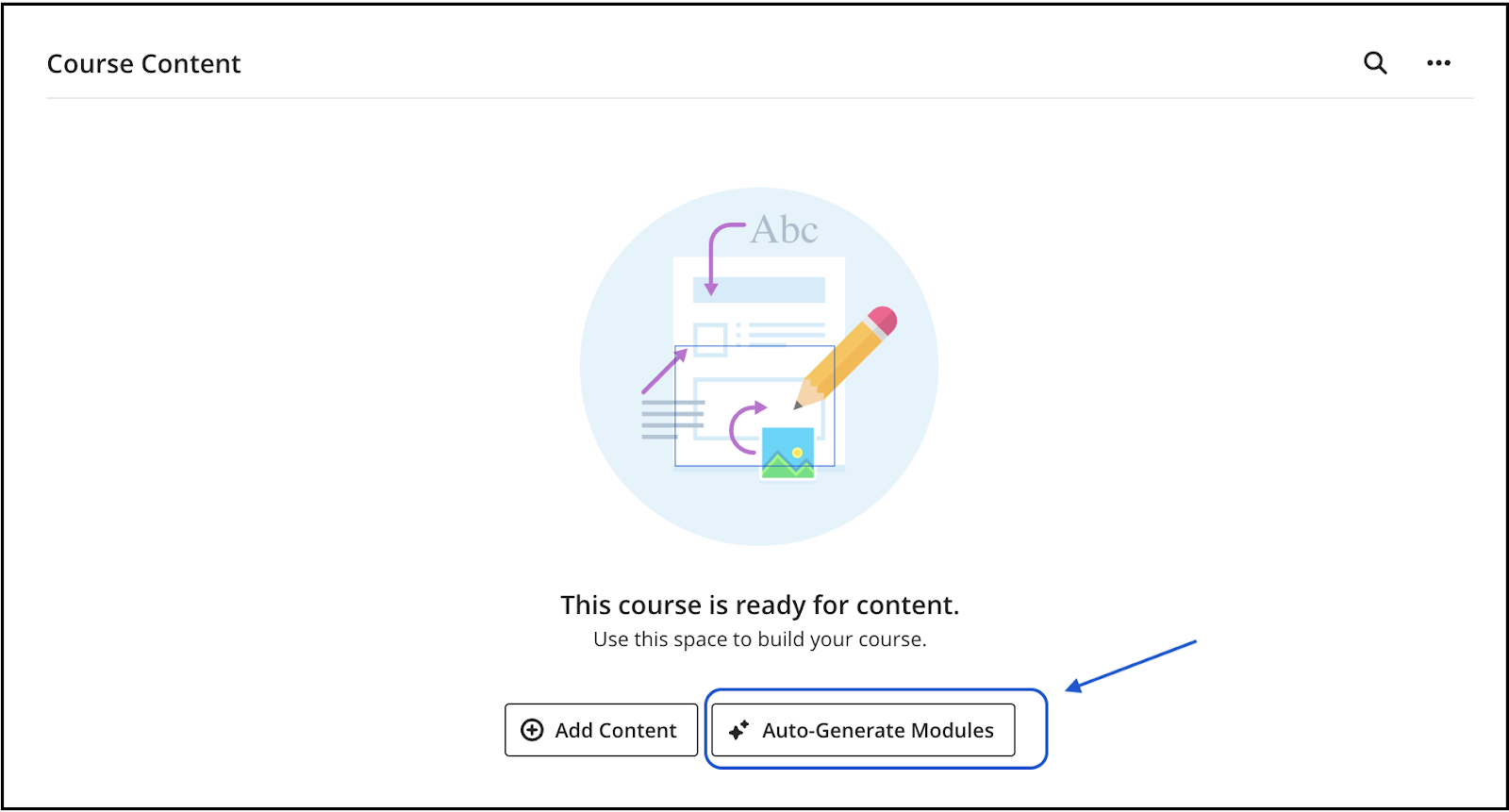
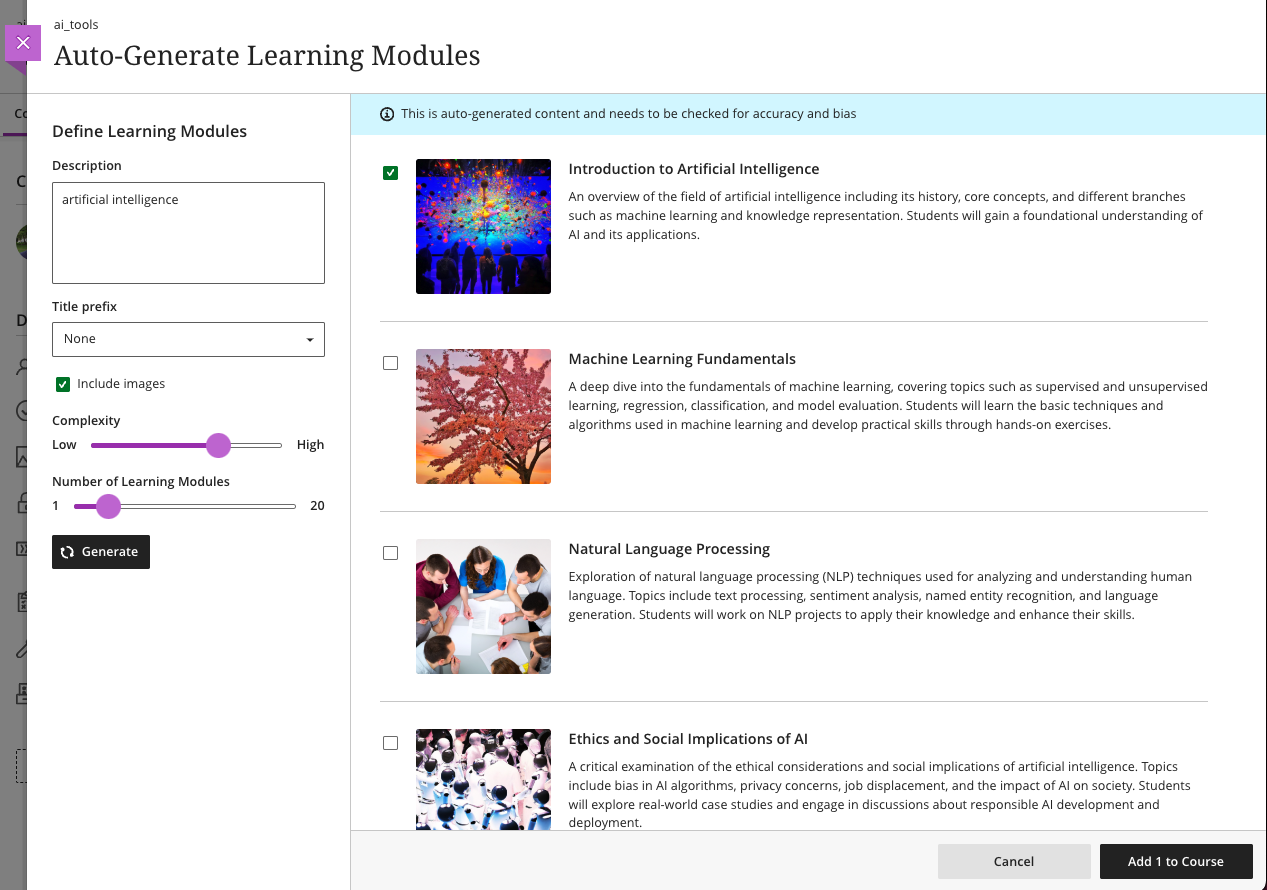
          <p><span>UMBC currently uses </span><a href="https://help.blackboard.com/Learn/Instructor/Ultra/Course_Content/Create_Content/AI_Design_Assistant" rel="nofollow external" class="bo"><span>Blackboard’s Course Design Assistant tools</span></a><span>, which include AI support to:</span></p>
          <ul>
          <li>
          <p><span>Define a course structure including learning modules, titles, descriptions.</span></p>
          </li>
          <li>
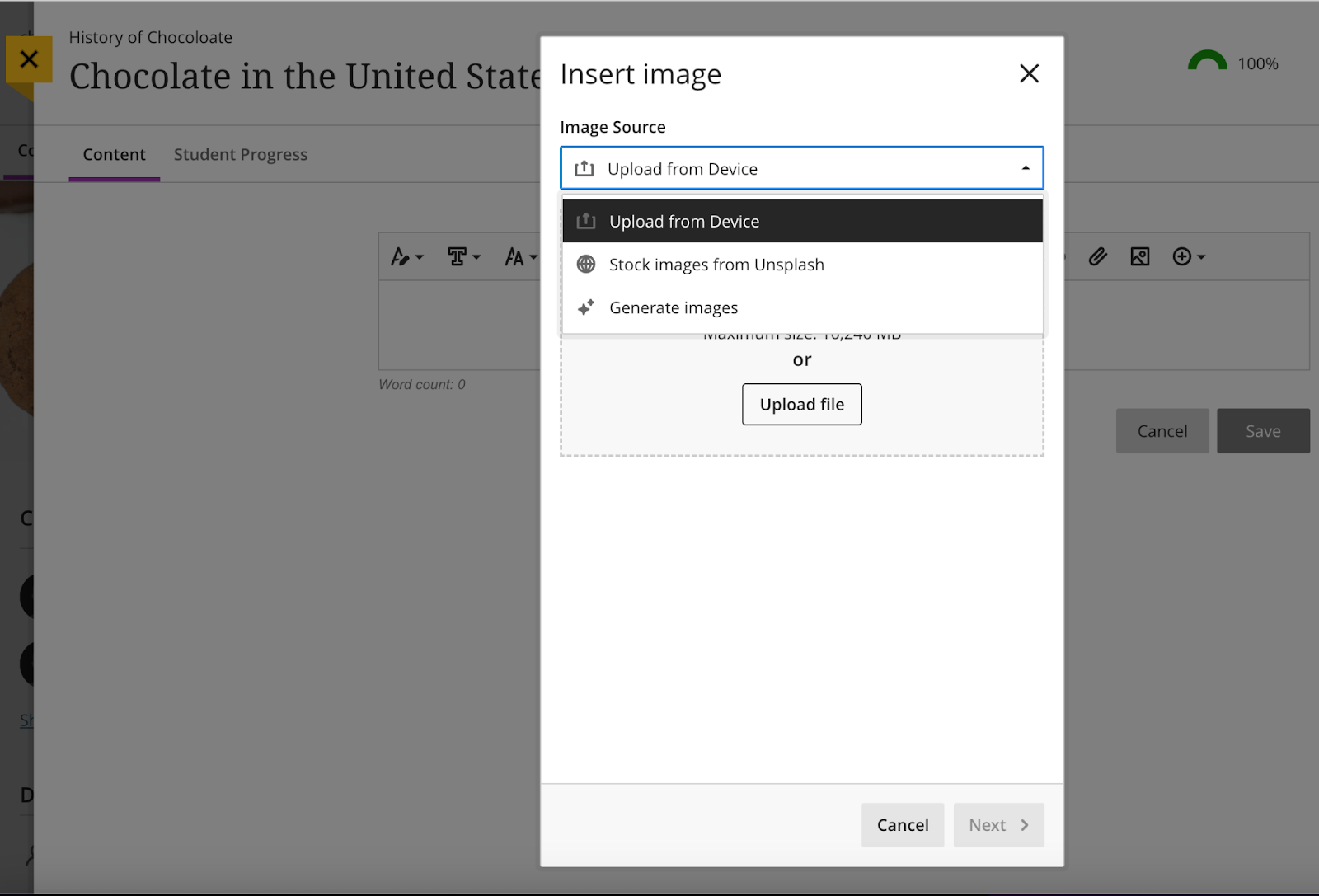
          <p><span>Generate images based on keywords for learning module thumbnails or course content, or search the Unsplash stock image gallery.</span></p>
          </li>
          <li>
          <p><span>Generate test questions and question banks, authentic assessments, journal and discussion prompts based on selected content in the course or other inputted keywords.</span></p>
          </li>
          <li>
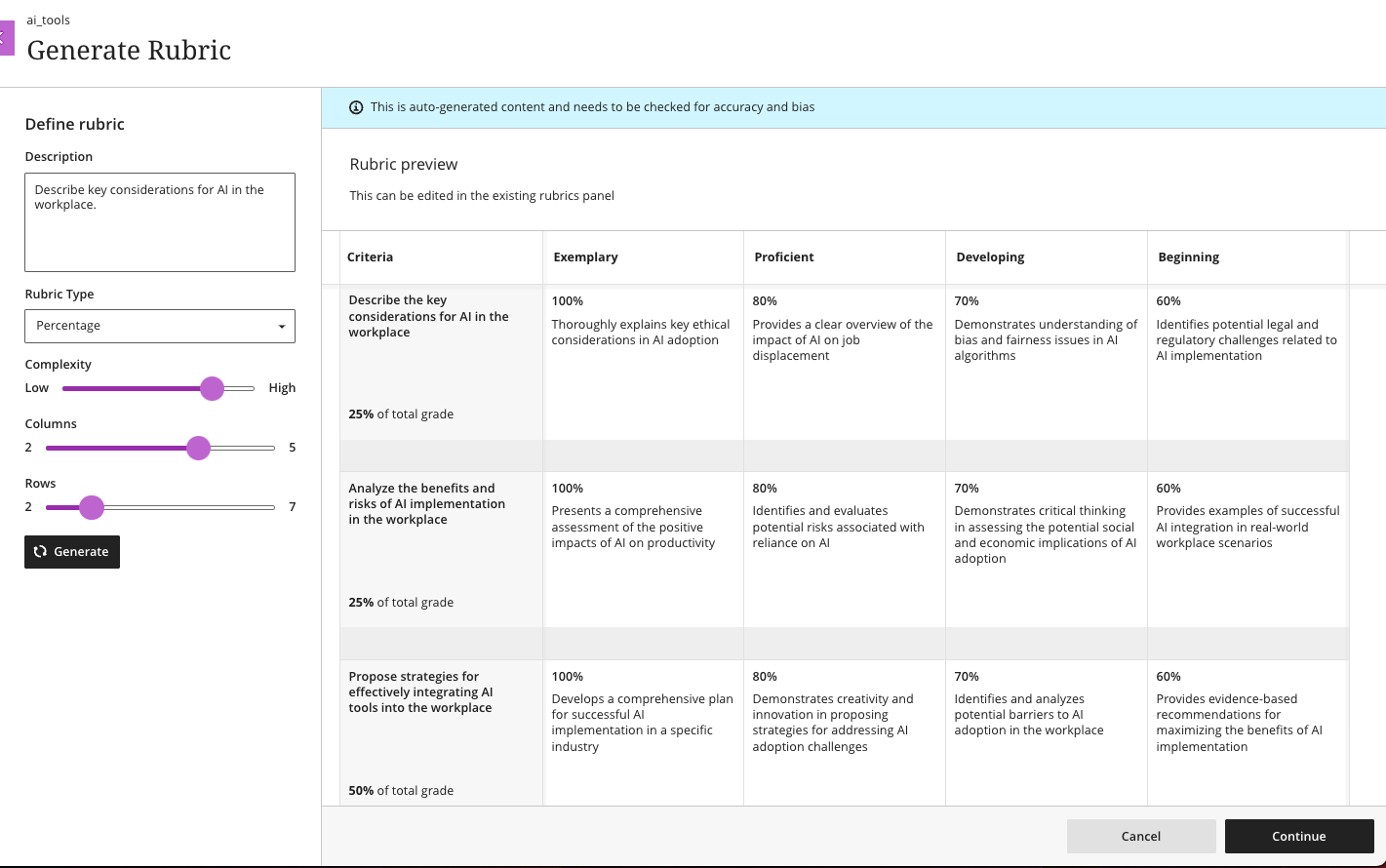
          <p><span>Create rubrics drawing on an assessment, discussion, learning objectives, or selected course content.</span></p>
          </li>
          <li>
          <p><span>Create Socratic or roleplaying AI conversations around a topic or scenario to engage your students.</span></p>
          </li>
          <li>
          <p><span>Design attractive layouts for Ultra Documents that include images, knowledge checks, and helpful headings.</span></p>
          </li>
          </ul>
          <p><span>All AI tools and features are optional and available under </span><a href="https://www.anthology.com/trust-center/trustworthy-ai-approach" rel="nofollow external" class="bo"><span>Anthology’s AI Trustworthy Framework</span></a><span>, giving instructor full control over how and when they use them. </span></p>
          <p><span>For more information about Blackboard’s AI tools, please contact Instructional Technology <a href="https://doit.umbc.edu/request-tracker-rt/doit-myumbc-blackboard/" rel="nofollow external" class="bo">via RT ticket</a>.</span></p></div>
      ]]>
    </Body>
    <Summary>This fall, UMBC faculty will have the opportunity to test Blackboard’s new AI Virtual Assistant (AVA), a suite of tools designed to support common teaching tasks.    AVA Feedback Assistant will...</Summary>
    <Website>https://my3.my.umbc.edu/groups/instructional-technology/posts/151438</Website>
    <TrackingUrl>https://dev.my.umbc.edu/api/v0/pixel/news/151438/guest@my.umbc.edu/0bc54e32f3f299c2338d99c96b0ab744/api/pixel</TrackingUrl>
    <Tag>ai</Tag>
    <Tag>anthology</Tag>
    <Tag>ava</Tag>
    <Tag>ava-feedback-assistant</Tag>
    <Tag>ava-responses</Tag>
    <Tag>blackboard</Tag>
    <Tag>virtual-assistant</Tag>
    <Group token="instructional-technology">Instructional Technology</Group>
    <GroupUrl>https://dev.my.umbc.edu/groups/instructional-technology</GroupUrl>
    <AvatarUrl>https://assets2-dev.my.umbc.edu/system/shared/avatars/groups/000/001/164/dec3b026b81ee6d890a8f82f75c94a2e/xsmall.png?1446126703</AvatarUrl>
    <AvatarUrl size="original">https://assets1-dev.my.umbc.edu/system/shared/avatars/groups/000/001/164/dec3b026b81ee6d890a8f82f75c94a2e/original.png?1446126703</AvatarUrl>
    <AvatarUrl size="xxlarge">https://assets2-dev.my.umbc.edu/system/shared/avatars/groups/000/001/164/dec3b026b81ee6d890a8f82f75c94a2e/xxlarge.png?1446126703</AvatarUrl>
    <AvatarUrl size="xlarge">https://assets1-dev.my.umbc.edu/system/shared/avatars/groups/000/001/164/dec3b026b81ee6d890a8f82f75c94a2e/xlarge.png?1446126703</AvatarUrl>
    <AvatarUrl size="large">https://assets1-dev.my.umbc.edu/system/shared/avatars/groups/000/001/164/dec3b026b81ee6d890a8f82f75c94a2e/large.png?1446126703</AvatarUrl>
    <AvatarUrl size="medium">https://assets4-dev.my.umbc.edu/system/shared/avatars/groups/000/001/164/dec3b026b81ee6d890a8f82f75c94a2e/medium.png?1446126703</AvatarUrl>
    <AvatarUrl size="small">https://assets3-dev.my.umbc.edu/system/shared/avatars/groups/000/001/164/dec3b026b81ee6d890a8f82f75c94a2e/small.png?1446126703</AvatarUrl>
    <AvatarUrl size="xsmall">https://assets2-dev.my.umbc.edu/system/shared/avatars/groups/000/001/164/dec3b026b81ee6d890a8f82f75c94a2e/xsmall.png?1446126703</AvatarUrl>
    <AvatarUrl size="xxsmall">https://assets3-dev.my.umbc.edu/system/shared/avatars/groups/000/001/164/dec3b026b81ee6d890a8f82f75c94a2e/xxsmall.png?1446126703</AvatarUrl>
    <Sponsor>Instructional Technology</Sponsor>
    <ThumbnailUrl size="xxlarge">https://assets1-dev.my.umbc.edu/system/shared/thumbnails/news/000/151/438/4202174d5e3b34e2b7b4ffb230604938/xxlarge.jpg?1754949643</ThumbnailUrl>
    <ThumbnailUrl size="xlarge">https://assets2-dev.my.umbc.edu/system/shared/thumbnails/news/000/151/438/4202174d5e3b34e2b7b4ffb230604938/xlarge.jpg?1754949643</ThumbnailUrl>
    <ThumbnailUrl size="large">https://assets4-dev.my.umbc.edu/system/shared/thumbnails/news/000/151/438/4202174d5e3b34e2b7b4ffb230604938/large.jpg?1754949643</ThumbnailUrl>
    <ThumbnailUrl size="medium">https://assets1-dev.my.umbc.edu/system/shared/thumbnails/news/000/151/438/4202174d5e3b34e2b7b4ffb230604938/medium.jpg?1754949643</ThumbnailUrl>
    <ThumbnailUrl size="small">https://assets3-dev.my.umbc.edu/system/shared/thumbnails/news/000/151/438/4202174d5e3b34e2b7b4ffb230604938/small.jpg?1754949643</ThumbnailUrl>
    <ThumbnailUrl size="xsmall">https://assets2-dev.my.umbc.edu/system/shared/thumbnails/news/000/151/438/4202174d5e3b34e2b7b4ffb230604938/xsmall.jpg?1754949643</ThumbnailUrl>
    <ThumbnailUrl size="xxsmall">https://assets3-dev.my.umbc.edu/system/shared/thumbnails/news/000/151/438/4202174d5e3b34e2b7b4ffb230604938/xxsmall.jpg?1754949643</ThumbnailUrl>
    <ThumbnailAltText>Blackboard logo with stylized A icon above.</ThumbnailAltText>
    <PawCount>3</PawCount>
    <CommentCount>0</CommentCount>
    <CommentsAllowed>true</CommentsAllowed>
    <PostedAt>Tue, 12 Aug 2025 12:29:11 -0400</PostedAt>
  </NewsItem>
  <NewsItem contentIssues="false" id="150153" important="false" status="posted" url="https://dev.my.umbc.edu/groups/oer/posts/150153">
  <Title>Using Google Doc "Versions" to Detect Student Originality vs. AI Abuse</Title>
  <Body>
    <![CDATA[
    <div class="html-content"><span><p><span><strong>Note: The following tip was shared as part of a 2/18/25 Faculty Development Center <a href="https://umbc.webex.com/umbc/ldr.php?RCID=f46c44c0a078bd749fcb6e0e11497bbd" rel="nofollow external" class="bo">workshop</a>, "Encouraging Academic Integrity in the Era of AI." Please feel free to adapt and make it your own.</strong>
    <br></span></p><p><span>Given faculty concerns about AI-assisted or even wholly-authored student papers, faculty could use a simple feature in any Google document, spreadsheet or presentation slide: its </span><a href="https://support.google.com/docs/answer/190843?hl=en&amp;co=GENIE.Platform%3DDesktop&amp;sjid=13768971247884065589-NA" rel="nofollow external" class="bo"><span>version history</span></a><span>, which includes a summary or detailed date &amp; time stamp of every addition or edit. As such, the goal is not to detect the presence of AI in student writing, which is currently very difficult due to “</span><a href="https://www.chronicle.com/article/ai-detection-is-a-business-but-should-it-be-faculty-business" rel="nofollow external" class="bo"><span>false positives</span></a><span>,” but more so to detect the absence of originality.</span></p><p><span><strong>Why &amp; How This Might Work</strong></span></p><p><span>Unlike the iterative, word-by-word or sentence-by-sentence approach of most original writing, students who use AI or plagiarized material are likely copying &amp; pasting entirely ‘in-tact” content as “whole cloth” blocks, perhaps with minimal or even no changes before submitting as a final draft. If so, requiring students to submit a Google Doc for their paper will contain a version history that faculty can inspect. If version 1 – or any version – contains large blocks of text in a short period of time, one can reasonably assume the work is not original. More importantly, if students know that faculty know there’s a version history that can be inspected – and questioned about – maybe they will think twice.</span></p><p><span><strong>Issues &amp; Opportunities</strong></span></p><ul><li><p><span>A student could just try to emulate iterative authorship, copying one word or sentence at a time -- but likely not in a hurry before a deadline, which is the use case most common to plagiarism. Still, the attempt would result in an ironic, self-inflicted penalty, by forcing the student to take time to cheat to appear not to have done so.</span><span><br></span></p></li><li><p><span>Some students may complain that being required to use a Google Doc inhibits their creative writing process or doesn’t show “offline” musings written by hand or in other editors, including notes made on their mobile devices. However, faculty could say the Google Doc version history allows them to extend the conditions for how students are assessed over time on any assignment vs at the same time (e.g., answering an essay question on an exam). Also, all Google Docs have mobile apps.</span><span><br></span></p></li><li><p><span>For faculty who are ok with students using AI – as an aid to counter writer’s bloc or if clearly cited in the final version – a version history could be a “teachable moment” for how, where and when to do so. Students could be asked to “name” their versions as AI or “mine” or add a comment to explain where and why they changed any AI output.</span></p></li></ul><p><span><strong>Suggested Approach</strong></span></p><ul><li><p><span>Create a Google Doc template you ask students to copy and use for their written assignment. You could even make this a </span><a href="https://umbc.atlassian.net/wiki/x/g0jVAQ" rel="nofollow external" class="bo"><span>Google Assignment</span></a><span> for submission in a Learning Management System (LMS) like Blackboard.</span><span><br></span></p></li><li><p><span>Tell students you’ll only accept their assignment if you are a named editor/collaborator (you need editing privileges to view a Google Doc’s version history).</span><span><br></span></p></li><li><p><span>Tell students you reserve the right to randomly inspect the version history of any Google Doc they submit as their own work. You can also require an oral interview to have students explain any version. </span><span><br></span></p></li><li><p><span>FYI: A sample </span><span>syllabus statement</span><span> on use of AI by students is below (source: <a href="http://doit.umbc.edu/johnfritz" rel="nofollow external" class="bo">John Fritz</a>, DoIT):</span></p></li></ul><span><u><strong>Use of Generative AI</strong></u></span></span><div><span>I am exploring how best to use AI to support my teaching, so I am open to students doing so to support their learning – as long as I can distinguish authenticity. Towards this end, all written work (e.g., reflections, final essay, etc.) must be submitted using Google Docs with your UMBC account. Why? This is the only way I can </span><a href="https://support.google.com/docs/answer/190843?hl=en&amp;co=GENIE.Platform%3DDesktop&amp;sjid=13768971247884065589-NA" rel="nofollow external" class="bo"><span>view an original version history</span></a><span>. I’m not trying to catch anyone cheating, per se, but if you’d like to use AI to jump start an assignment, I just want to see 1) the prompt you used, 2) any sources you linked or attached to your prompt, and especially 3) how you revised (or cited) the AI output in your final submission, which is the most important step. As such, when you submit a final version in Blackboard, I’d like this as a .PDF document with an accompanying link to your UMBC Google Doc where it was </span><a href="https://support.google.com/docs/answer/49114" rel="nofollow external" class="bo"><span>generated</span></a><span>. Note: You can also use Google Docs on your mobile devices if you prefer to start your writing process there.</span></div><div><span><br></span></div><div><span>Related Work (courtesy of Dr. </span><a href="https://chemistry.umbc.edu/sarah-bass/" rel="nofollow external" class="bo"><span>Sarah Bass</span></a><span>, Associate Teaching Professor, Chemistry, UMBC)</span></div><div><span><ul><li><p><a href="https://www.eastcentral.edu/free/ai-faculty-resources/using-google-docs-to-detect-ai/" rel="nofollow external" class="bo"><span>Using Google Docs to Detect Students’ AI Usage</span></a><span> from East Central College</span></p></li><li><p><a href="https://www.popsci.com/diy/track-changes-in-word-google-doc-pages/" rel="nofollow external" class="bo"><span>Prove your writing is not AI-generated by tracking changes in your docs: Showing your work is not just for math problems anymore</span></a><span> in Popular Science</span></p></li><li><p><a href="https://www.reddit.com/r/utdallas/comments/13bb0wr/with_increasing_ai_plagiarism_write_your_essays/?share_id=BvJYoN_D15XFfnxLjcpCN&amp;utm_content=1&amp;utm_medium=ios_app&amp;utm_name=ioscss&amp;utm_source=share&amp;utm_term=10" rel="nofollow external" class="bo"><span>With increasing AI plagiarism, write your essays on Google Docs!</span></a><span> from Reddit discussion amongst students</span></p></li><li><p><a href="http://stevendkrause.com/2024/07/10/why-i-use-google-docs-to-teach-writing-especially-in-the-age-of-ai/" rel="nofollow external" class="bo"><span>Why I Use Google Docs to Teach Writing, Especially in the Age of AI</span></a><span> blogpost by Steven D. Krause</span></p></li><li><p><a href="https://www.digitalinformationworld.com/2024/06/spot-ai-generated-writing-through-google-docs-history-feature.html" rel="nofollow external" class="bo"><span>How To Use Google Docs Secret Feature to Detect AI Content Writing</span></a><span> by Digital Information World</span></p></li></ul><br></span></div></div>
]]>
  </Body>
  <Summary>Note: The following tip was shared as part of a 2/18/25 Faculty Development Center workshop, "Encouraging Academic Integrity in the Era of AI." Please feel free to adapt and make it your own....</Summary>
  <TrackingUrl>https://dev.my.umbc.edu/api/v0/pixel/news/150153/guest@my.umbc.edu/c47219357d02cae8d5e9742dabc57b81/api/pixel</TrackingUrl>
  <Tag>ai</Tag>
  <Group token="instructional-technology">Instructional Technology</Group>
  <GroupUrl>https://dev.my.umbc.edu/groups/instructional-technology</GroupUrl>
  <AvatarUrl>https://assets2-dev.my.umbc.edu/system/shared/avatars/groups/000/001/164/dec3b026b81ee6d890a8f82f75c94a2e/xsmall.png?1446126703</AvatarUrl>
  <AvatarUrl size="original">https://assets1-dev.my.umbc.edu/system/shared/avatars/groups/000/001/164/dec3b026b81ee6d890a8f82f75c94a2e/original.png?1446126703</AvatarUrl>
  <AvatarUrl size="xxlarge">https://assets2-dev.my.umbc.edu/system/shared/avatars/groups/000/001/164/dec3b026b81ee6d890a8f82f75c94a2e/xxlarge.png?1446126703</AvatarUrl>
  <AvatarUrl size="xlarge">https://assets1-dev.my.umbc.edu/system/shared/avatars/groups/000/001/164/dec3b026b81ee6d890a8f82f75c94a2e/xlarge.png?1446126703</AvatarUrl>
  <AvatarUrl size="large">https://assets1-dev.my.umbc.edu/system/shared/avatars/groups/000/001/164/dec3b026b81ee6d890a8f82f75c94a2e/large.png?1446126703</AvatarUrl>
  <AvatarUrl size="medium">https://assets4-dev.my.umbc.edu/system/shared/avatars/groups/000/001/164/dec3b026b81ee6d890a8f82f75c94a2e/medium.png?1446126703</AvatarUrl>
  <AvatarUrl size="small">https://assets3-dev.my.umbc.edu/system/shared/avatars/groups/000/001/164/dec3b026b81ee6d890a8f82f75c94a2e/small.png?1446126703</AvatarUrl>
  <AvatarUrl size="xsmall">https://assets2-dev.my.umbc.edu/system/shared/avatars/groups/000/001/164/dec3b026b81ee6d890a8f82f75c94a2e/xsmall.png?1446126703</AvatarUrl>
  <AvatarUrl size="xxsmall">https://assets3-dev.my.umbc.edu/system/shared/avatars/groups/000/001/164/dec3b026b81ee6d890a8f82f75c94a2e/xxsmall.png?1446126703</AvatarUrl>
  <Sponsor>Instructional Technology</Sponsor>
  <ThumbnailUrl size="xxlarge">https://assets4-dev.my.umbc.edu/system/shared/thumbnails/news/000/150/153/f367f43f69c8debbf909eecf8cf3b728/xxlarge.jpg?1747246915</ThumbnailUrl>
  <ThumbnailUrl size="xlarge">https://assets1-dev.my.umbc.edu/system/shared/thumbnails/news/000/150/153/f367f43f69c8debbf909eecf8cf3b728/xlarge.jpg?1747246915</ThumbnailUrl>
  <ThumbnailUrl size="large">https://assets2-dev.my.umbc.edu/system/shared/thumbnails/news/000/150/153/f367f43f69c8debbf909eecf8cf3b728/large.jpg?1747246915</ThumbnailUrl>
  <ThumbnailUrl size="medium">https://assets4-dev.my.umbc.edu/system/shared/thumbnails/news/000/150/153/f367f43f69c8debbf909eecf8cf3b728/medium.jpg?1747246915</ThumbnailUrl>
  <ThumbnailUrl size="small">https://assets3-dev.my.umbc.edu/system/shared/thumbnails/news/000/150/153/f367f43f69c8debbf909eecf8cf3b728/small.jpg?1747246915</ThumbnailUrl>
  <ThumbnailUrl size="xsmall">https://assets3-dev.my.umbc.edu/system/shared/thumbnails/news/000/150/153/f367f43f69c8debbf909eecf8cf3b728/xsmall.jpg?1747246915</ThumbnailUrl>
  <ThumbnailUrl size="xxsmall">https://assets2-dev.my.umbc.edu/system/shared/thumbnails/news/000/150/153/f367f43f69c8debbf909eecf8cf3b728/xxsmall.jpg?1747246915</ThumbnailUrl>
  <ThumbnailAltText>A screenshot of a Google Doc version history to help determine student originality vs. AI detection.</ThumbnailAltText>
  <PawCount>1</PawCount>
  <CommentCount>0</CommentCount>
  <CommentsAllowed>true</CommentsAllowed>
  <PostedAt>Wed, 14 May 2025 14:25:01 -0400</PostedAt>
  <EditAt>Tue, 10 Feb 2026 16:57:14 -0500</EditAt>
</NewsItem>
  <NewsItem contentIssues="true" id="143089" important="false" status="posted" url="https://dev.my.umbc.edu/groups/oer/posts/143089">
  <Title>Ally Now Supports AI-Generated Descriptions for Images</Title>
  <Tagline>Leverage AI to provide inclusive resources for students</Tagline>
  <Body>
    <![CDATA[
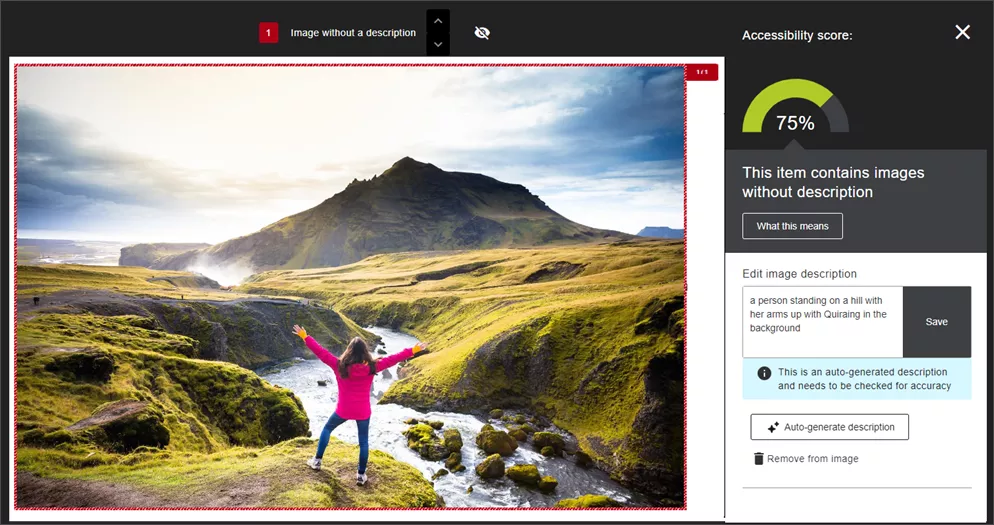
    <div class="html-content"><span><p><span>Recent updates to </span><a href="https://www.ada.gov/resources/2024-03-08-web-rule/#:~:text=Title%20II%20of%20the%20ADA,adoption%20services%20to%20zoning%20regulation." rel="nofollow external" class="bo"><span>federal guidelines for digital accessibility</span></a><span> underscore the critical need for educators to ensure that all course materials are accessible to every student. </span></p><p><span>One of the most prevalent accessibility issues in digital course materials is the lack of proper descriptions for images. </span><a href="https://community.anthology.com/blogs/167/1453" rel="nofollow external" class="bo"><span>According to Anthology</span></a><span>, nearly one-third of all images flagged by Ally are simply marked as decorative without any descriptive text, which creates a barrier for students who rely on descriptions for their studies.</span></p><p><span>Properly tagging images not only meets federal guidelines, but also plays a crucial role in creating an inclusive learning environment. Alternative descriptions serve as vital information for students who use screen readers, providing them with textual explanations for images that otherwise visually conveyed. This practice not only supports students with visual impairments, but also benefits those with cognitive disabilities who might struggle to understand the context of images with additional context. </span></p><p><span>Ally will </span><a href="https://help.blackboard.com/Ally/Ally_for_LMS/Instructor/Improve_Accessibility/Add_Image_Descriptions" rel="nofollow external" class="bo"><span>flag images that lack a description</span></a><span> in a Blackboard course. Instructors can enter a description themselves, mark the image as decorative, or leverage AI tools, powered by Microsoft Azure AI Vision, to scan the image and generate a suggested description. Instructors retain full control over the image and can edit the content to make corrections or clarify the information before saving it.</span></p><p><span><span><span><span><img src="https://lh7-rt.googleusercontent.com/docsz/AD_4nXc2d7E654Or-UrlpB-5Zk-KVMfF8QlilHoOwT5guRbGpX_I_PRPLRzhDgM-mEjkRbMjLsBdAAJ-qTW4mw8NsfdBnzL-j8rFH3M2pm0KqH6M6hi_gFuWnBRXCo1Nll5zMWzLFf7LWNpa4M3uUS8yA0H_Tg2n?key=mLUgjMdWFHAnJhaqvezuSw" width="720" height="380" alt="Image 1: Example of Ally's AI generated image description." style="max-width: 100%; height: auto;"></span></span></span></span></p><p><span><em>Image 1: Example of Ally's AI generated image description. </em></span></p><p><span><strong>Note</strong></span><span>: Alternative descriptions are not applied automatically. Each suggestion requires the instructor’s review and approval to ensure that the final output aligns with the instructor’s original purpose for that image.</span></p><p><span>If the alt text does not meet the instructor’s needs, such as a complex image or diagram, ChatGPT and Microsoft Copilot provide excellent tools to create detailed alternative text and long descriptions. </span></p><p><span>For example, this prompt was shared by the International Ally Users Group. It can be customized for the uploaded image according to context, function and prospective audience (e.g., students). </span></p></span><blockquote><span>“You are a university-level instructor working to ensure images in your online course materials conform to Web Content Accessibility Guidelines at Level Double A. You need to accommodate for disabilities and impairments such as blindness, low vision and color vision deficiency to ensure equitable access to module content for all students. </span></blockquote><blockquote><span><br></span><span>"You will be provided with an image. Please return a succinct title, alternative text (alt text), and a long description. You will also separately list verbatim all words that appear in the image.</span></blockquote><blockquote><span><br></span><span>"The alt text should be no more than two sentences and should briefly describe the meaning conveyed by the image.</span></blockquote><blockquote><span><br></span></blockquote><blockquote><span>"The detailed description may be one or more paragraphs and must describe the image in great detail so that anyone who does not see it can gain a full understanding of everything in the image. Please format the detailed description such that it will be easily scannable. Use headings, paragraph breaks, and lists as appropriate. Use active voice.”</span></blockquote><blockquote><span><br></span></blockquote><blockquote><a href="https://www.purdue.edu/innovativelearning/tools-resources/accessibility/ai-prompt-example/" rel="nofollow external" class="bo"><span>Prompt created by Purdue University</span></a><span> and adapted by Matthew Deeprose (Southampton University)</span></blockquote><span><p><span><br></span></p><p><span>When we integrate comprehensive and accurate alt text for all images, we adhere to accessibility standards and legal requirements. We also foster an inclusive and supporting learning environment where every student has the opportunity to succeed.</span></p><p><span><br></span></p></span></div>
]]>
  </Body>
  <Summary>Recent updates to federal guidelines for digital accessibility underscore the critical need for educators to ensure that all course materials are accessible to every student.   One of the most...</Summary>
  <Website>https://my3.my.umbc.edu/groups/instructional-technology/posts/143089</Website>
  <TrackingUrl>https://dev.my.umbc.edu/api/v0/pixel/news/143089/guest@my.umbc.edu/be605c4b901cd19b9c708dfa4d75c784/api/pixel</TrackingUrl>
  <Tag>accessibility</Tag>
  <Tag>ai</Tag>
  <Tag>ally</Tag>
  <Tag>biro</Tag>
  <Tag>blackboard</Tag>
  <Group token="instructional-technology">Instructional Technology</Group>
  <GroupUrl>https://dev.my.umbc.edu/groups/instructional-technology</GroupUrl>
  <AvatarUrl>https://assets2-dev.my.umbc.edu/system/shared/avatars/groups/000/001/164/dec3b026b81ee6d890a8f82f75c94a2e/xsmall.png?1446126703</AvatarUrl>
  <AvatarUrl size="original">https://assets1-dev.my.umbc.edu/system/shared/avatars/groups/000/001/164/dec3b026b81ee6d890a8f82f75c94a2e/original.png?1446126703</AvatarUrl>
  <AvatarUrl size="xxlarge">https://assets2-dev.my.umbc.edu/system/shared/avatars/groups/000/001/164/dec3b026b81ee6d890a8f82f75c94a2e/xxlarge.png?1446126703</AvatarUrl>
  <AvatarUrl size="xlarge">https://assets1-dev.my.umbc.edu/system/shared/avatars/groups/000/001/164/dec3b026b81ee6d890a8f82f75c94a2e/xlarge.png?1446126703</AvatarUrl>
  <AvatarUrl size="large">https://assets1-dev.my.umbc.edu/system/shared/avatars/groups/000/001/164/dec3b026b81ee6d890a8f82f75c94a2e/large.png?1446126703</AvatarUrl>
  <AvatarUrl size="medium">https://assets4-dev.my.umbc.edu/system/shared/avatars/groups/000/001/164/dec3b026b81ee6d890a8f82f75c94a2e/medium.png?1446126703</AvatarUrl>
  <AvatarUrl size="small">https://assets3-dev.my.umbc.edu/system/shared/avatars/groups/000/001/164/dec3b026b81ee6d890a8f82f75c94a2e/small.png?1446126703</AvatarUrl>
  <AvatarUrl size="xsmall">https://assets2-dev.my.umbc.edu/system/shared/avatars/groups/000/001/164/dec3b026b81ee6d890a8f82f75c94a2e/xsmall.png?1446126703</AvatarUrl>
  <AvatarUrl size="xxsmall">https://assets3-dev.my.umbc.edu/system/shared/avatars/groups/000/001/164/dec3b026b81ee6d890a8f82f75c94a2e/xxsmall.png?1446126703</AvatarUrl>
  <Sponsor>Instructional Technology</Sponsor>
  <ThumbnailUrl size="xxlarge">https://assets2-dev.my.umbc.edu/system/shared/thumbnails/news/000/143/089/b229f46db2d2982555055c67d21eb954/xxlarge.jpg?1723053847</ThumbnailUrl>
  <ThumbnailUrl size="xlarge">https://assets3-dev.my.umbc.edu/system/shared/thumbnails/news/000/143/089/b229f46db2d2982555055c67d21eb954/xlarge.jpg?1723053847</ThumbnailUrl>
  <ThumbnailUrl size="large">https://assets3-dev.my.umbc.edu/system/shared/thumbnails/news/000/143/089/b229f46db2d2982555055c67d21eb954/large.jpg?1723053847</ThumbnailUrl>
  <ThumbnailUrl size="medium">https://assets3-dev.my.umbc.edu/system/shared/thumbnails/news/000/143/089/b229f46db2d2982555055c67d21eb954/medium.jpg?1723053847</ThumbnailUrl>
  <ThumbnailUrl size="small">https://assets4-dev.my.umbc.edu/system/shared/thumbnails/news/000/143/089/b229f46db2d2982555055c67d21eb954/small.jpg?1723053847</ThumbnailUrl>
  <ThumbnailUrl size="xsmall">https://assets2-dev.my.umbc.edu/system/shared/thumbnails/news/000/143/089/b229f46db2d2982555055c67d21eb954/xsmall.jpg?1723053847</ThumbnailUrl>
  <ThumbnailUrl size="xxsmall">https://assets1-dev.my.umbc.edu/system/shared/thumbnails/news/000/143/089/b229f46db2d2982555055c67d21eb954/xxsmall.jpg?1723053847</ThumbnailUrl>
  <PawCount>6</PawCount>
  <CommentCount>0</CommentCount>
  <CommentsAllowed>true</CommentsAllowed>
  <PostedAt>Tue, 13 Aug 2024 09:26:13 -0400</PostedAt>
  <EditAt>Tue, 13 Aug 2024 09:34:12 -0400</EditAt>
</NewsItem>
  <NewsItem contentIssues="true" id="142248" important="false" status="posted" url="https://dev.my.umbc.edu/groups/oer/posts/142248">
  <Title>June features printer-friendly tests &amp; new Courses page</Title>
  <Tagline>Language support for AI course tools, grading enhancements</Tagline>
  <Body>
    <![CDATA[
    <div class="html-content">This June, Ultra users can look forward to updates that enhance user experience and functionality including a new language selector when generating content with the AI Course Design Assistant, printing capabilities for assessments, and an updated Courses landing page. Let's explore these updates and more.<div><br></div><div>Instructors can now select desired languages for generating course content using the new language selector in the AI Design Assistant. This new setting is available across all AI tools, allowing faculty who teach languages to generate test questions and rubrics (and more) in French, Spanish, Korean, Japanese, Chinese, German, Arabic, and a wide range of other languages. All AI tools are optional and the instructor is in full control of the settings with editing available to modify the output.</div><div><br><div><img src="https://blackboard.umbc.edu/bbcswebdav/institution/doitnews/ultra-updates/learn_ultra_AI_language.png" alt="Image 1: Example of learning modules generated with Spanish set as the language" style="max-width: 100%; height: auto;"></div><div><em>Image 1: Example of learning modules generated with Spanish set as the language</em><br><div><div><br></div><div>The Courses landing page is updated to remove the "carousel" approach for presenting courses by individual term. Instead, all users will find a term selector to use on its own or with other filters. Add text searches to further refine how the courses display on the page, but upcoming courses will only appear if you actually have courses scheduled in the future. You can even select "All terms" to see everything. Selections and filters are remembered automatically even after logging out or switching devices.</div><div><br></div><div><img src="https://help.blackboard.com/sites/default/files/styles/rich_text_large/public/images/2024-05/learn_ultra_BaseNav_CoursePageImprovements.png.webp" alt="Image 2: Example of updated Courses landing page with new filter and search tools." style="max-width: 100%; height: auto;"></div><div><em>Image 2: Example of updated Courses landing page with new filter and search tools.</em></div><div><span><br></span></div><div><span>An exciting update to assessments allows instructors to print, supporting a variety of use cases including providing a paper test for accommodations or in-class testing if wifi fails. At this time, printing does not yet support question banks, answer keys, or mobile devices, but this is in development.</span></div><div><img src="https://blackboard.umbc.edu/bbcswebdav/institution/doitnews/ultra-updates/print_tests.png" alt="Image 3: Example of test in printer ready format." style="max-width: 100%; height: auto;"></div><div><div><em>Image 3: Example of test in printer ready format.</em></div><div><br></div><strong>Assessment &amp; Grading Enhancements</strong><br><ul><li>Instructors can add private grading notes after scores are entered. Grader notes are not visible to students, and will be archived with the course.</li><li>A new filter helps instructors focus on ungraded submissions by default, streamlining the grading process.</li><li>When editing a question, instructors can now access and edit the point value field with just two clicks. </li></ul><div><strong>Student Assessment &amp; Grading Improvements</strong></div><ul><li>A clear visual indicator for new grades helps students quickly see updates, while an adjustment in color for late submissions reduces anxiety.</li><li>Students can now return a true/false question to an unanswered state after choosing an answer. Students clear their choice by selecting the same option again. </li></ul><div><strong>Announcements &amp; Groups Improvements</strong></div></div><div><div><span><ul><li><p>Instructors can now post announcements as part of the drafting and editing processes. This one-click improvement makes the process of creating and posting announcements faster. </p></li><li><p>Currently, at the end of the self-enrollment period, unassigned students are always distributed into groups. Instructors can now opt out of this behavior and manually add students to groups.</p></li><li><p>The list of students in groups is moved to a tab on the groups page rather than a peek panel. This tab includes tools for searching and sorting alphabetically. </p></li></ul></span></div><div><span>Faculty should see the latest updates in Ultra courses around June 6-7, 2024. </span><span>The next update to our Ultra test environment will take place on June 11, 2024; release notes are posted to the <a href="https://wiki.umbc.edu/x/LohnB" rel="nofollow external" class="bo">What's New in Ultra</a> that same week. Faculty who are interested in test driving new features before they are released to production should </span><a href="http://my.umbc.edu/go/request-help" rel="nofollow external" class="bo">open an RT ticket</a><span> to request early access. Please </span><a href="http://umbc.edu/go/ultra" rel="nofollow external" class="bo">watch the FAQs</a><span>, including </span><a href="https://wiki.umbc.edu/x/LohnB" rel="nofollow external" class="bo">the What's New with Ultra page</a><span>, </span><span>and myUMBC for additional information about Ultra. </span></div><div><div><span><br></span></div></div><div><span><strong>Connect with Instructional Technology</strong></span></div><div><span>As always, if you have any questions about teaching, learning, and technology at UMBC, please consider the following options:</span></div><ul><li><a href="http://www.umbc.edu/faq" rel="nofollow external" class="bo">Check our extensive FAQ collection</a><span> </span></li><ul><li><span><a href="https://wiki.umbc.edu/x/LohnB" rel="nofollow external" class="bo"><span>What's new in Ultra?</span></a><span> </span><span>|</span><span> </span><a href="https://wiki.umbc.edu/x/bwrSAQ" rel="nofollow external" class="bo"><span>Known Issues</span></a><span> </span></span></li></ul><li><span><a href="http://my.umbc.edu/go/request-help" rel="nofollow external" class="bo">Open a ticket via RT</a></span></li><li><span>Follow the </span><a href="http://my.umbc.edu/groups/instructional-technology" rel="nofollow external" class="bo">Instructional Technology</a><span> &amp; </span><a href="http://my.umbc.edu/groups/doit" rel="nofollow external" class="bo">DoIT</a><span> myUMBC groups</span></li><li><a href="http://doit.umbc.edu/itnm/staff/" rel="nofollow external" class="bo">Request a consult</a><span> with <a href="http://doit.umbc.edu/itnm/staff" rel="nofollow external" class="bo">instructional technology staff</a></span></li><li><span><a href="http://pivot.umbc.edu" rel="nofollow external" class="bo">PIVOT</a> | <a href="https://doit.umbc.edu/itnm/academic-continuity/" rel="nofollow external" class="bo">Academic Continuity</a></span><span> </span><span>|</span><span> </span><span><a href="https://fdc.umbc.edu/teaching/keep-on-teaching/" rel="nofollow external" class="bo">Keep On Teaching</a></span><span> </span><span>|</span><span> </span><span><a href="https://doit.umbc.edu/students" rel="nofollow external" class="bo">Student Technology Resources</a></span></li></ul><div><em>Thumbnail-image: New to Ultra [decorative]</em></div><div><div></div></div></div></div></div></div></div>
]]>
  </Body>
  <Summary>This June, Ultra users can look forward to updates that enhance user experience and functionality including a new language selector when generating content with the AI Course Design Assistant,...</Summary>
  <Website>https://my3.my.umbc.edu/groups/instructional-technology/posts/142248</Website>
  <TrackingUrl>https://dev.my.umbc.edu/api/v0/pixel/news/142248/guest@my.umbc.edu/427e5490e15b1765891f31bfd75011fd/api/pixel</TrackingUrl>
  <Tag>ai</Tag>
  <Tag>blackboard</Tag>
  <Tag>course-management</Tag>
  <Tag>gradebook</Tag>
  <Tag>printer-friendly-assessments</Tag>
  <Tag>release-conditions</Tag>
  <Tag>ultra-experience</Tag>
  <Tag>ultra-update</Tag>
  <Group token="instructional-technology">Instructional Technology</Group>
  <GroupUrl>https://dev.my.umbc.edu/groups/instructional-technology</GroupUrl>
  <AvatarUrl>https://assets2-dev.my.umbc.edu/system/shared/avatars/groups/000/001/164/dec3b026b81ee6d890a8f82f75c94a2e/xsmall.png?1446126703</AvatarUrl>
  <AvatarUrl size="original">https://assets1-dev.my.umbc.edu/system/shared/avatars/groups/000/001/164/dec3b026b81ee6d890a8f82f75c94a2e/original.png?1446126703</AvatarUrl>
  <AvatarUrl size="xxlarge">https://assets2-dev.my.umbc.edu/system/shared/avatars/groups/000/001/164/dec3b026b81ee6d890a8f82f75c94a2e/xxlarge.png?1446126703</AvatarUrl>
  <AvatarUrl size="xlarge">https://assets1-dev.my.umbc.edu/system/shared/avatars/groups/000/001/164/dec3b026b81ee6d890a8f82f75c94a2e/xlarge.png?1446126703</AvatarUrl>
  <AvatarUrl size="large">https://assets1-dev.my.umbc.edu/system/shared/avatars/groups/000/001/164/dec3b026b81ee6d890a8f82f75c94a2e/large.png?1446126703</AvatarUrl>
  <AvatarUrl size="medium">https://assets4-dev.my.umbc.edu/system/shared/avatars/groups/000/001/164/dec3b026b81ee6d890a8f82f75c94a2e/medium.png?1446126703</AvatarUrl>
  <AvatarUrl size="small">https://assets3-dev.my.umbc.edu/system/shared/avatars/groups/000/001/164/dec3b026b81ee6d890a8f82f75c94a2e/small.png?1446126703</AvatarUrl>
  <AvatarUrl size="xsmall">https://assets2-dev.my.umbc.edu/system/shared/avatars/groups/000/001/164/dec3b026b81ee6d890a8f82f75c94a2e/xsmall.png?1446126703</AvatarUrl>
  <AvatarUrl size="xxsmall">https://assets3-dev.my.umbc.edu/system/shared/avatars/groups/000/001/164/dec3b026b81ee6d890a8f82f75c94a2e/xxsmall.png?1446126703</AvatarUrl>
  <Sponsor>Instructional Technology</Sponsor>
  <ThumbnailUrl size="xxlarge">https://assets2-dev.my.umbc.edu/system/shared/thumbnails/news/000/142/248/5b98265cee8d7f3716740f11e89c2195/xxlarge.jpg?1717077799</ThumbnailUrl>
  <ThumbnailUrl size="xlarge">https://assets2-dev.my.umbc.edu/system/shared/thumbnails/news/000/142/248/5b98265cee8d7f3716740f11e89c2195/xlarge.jpg?1717077799</ThumbnailUrl>
  <ThumbnailUrl size="large">https://assets1-dev.my.umbc.edu/system/shared/thumbnails/news/000/142/248/5b98265cee8d7f3716740f11e89c2195/large.jpg?1717077799</ThumbnailUrl>
  <ThumbnailUrl size="medium">https://assets3-dev.my.umbc.edu/system/shared/thumbnails/news/000/142/248/5b98265cee8d7f3716740f11e89c2195/medium.jpg?1717077799</ThumbnailUrl>
  <ThumbnailUrl size="small">https://assets3-dev.my.umbc.edu/system/shared/thumbnails/news/000/142/248/5b98265cee8d7f3716740f11e89c2195/small.jpg?1717077799</ThumbnailUrl>
  <ThumbnailUrl size="xsmall">https://assets1-dev.my.umbc.edu/system/shared/thumbnails/news/000/142/248/5b98265cee8d7f3716740f11e89c2195/xsmall.jpg?1717077799</ThumbnailUrl>
  <ThumbnailUrl size="xxsmall">https://assets3-dev.my.umbc.edu/system/shared/thumbnails/news/000/142/248/5b98265cee8d7f3716740f11e89c2195/xxsmall.jpg?1717077799</ThumbnailUrl>
  <PawCount>5</PawCount>
  <CommentCount>0</CommentCount>
  <CommentsAllowed>true</CommentsAllowed>
  <PostedAt>Thu, 30 May 2024 14:26:38 -0400</PostedAt>
  <EditAt>Thu, 30 May 2024 14:27:02 -0400</EditAt>
</NewsItem>
  <NewsItem contentIssues="true" id="137839" important="false" status="posted" url="https://dev.my.umbc.edu/groups/oer/posts/137839">
  <Title>More gradebook updates, test access logs coming in January</Title>
  <Tagline>Grade visibility, batch edit, authentic assessment prompts</Tagline>
  <Body>
    <![CDATA[
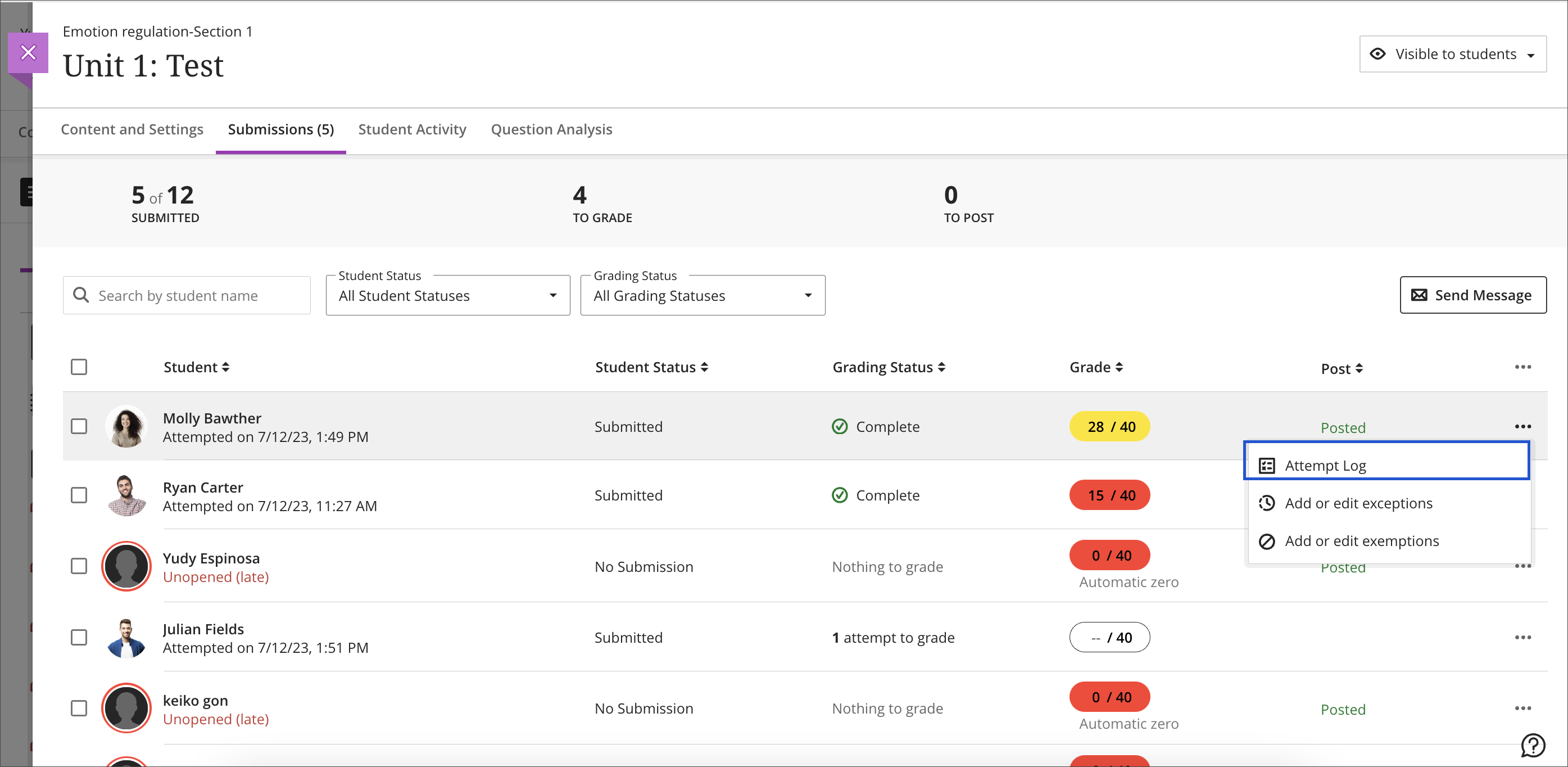
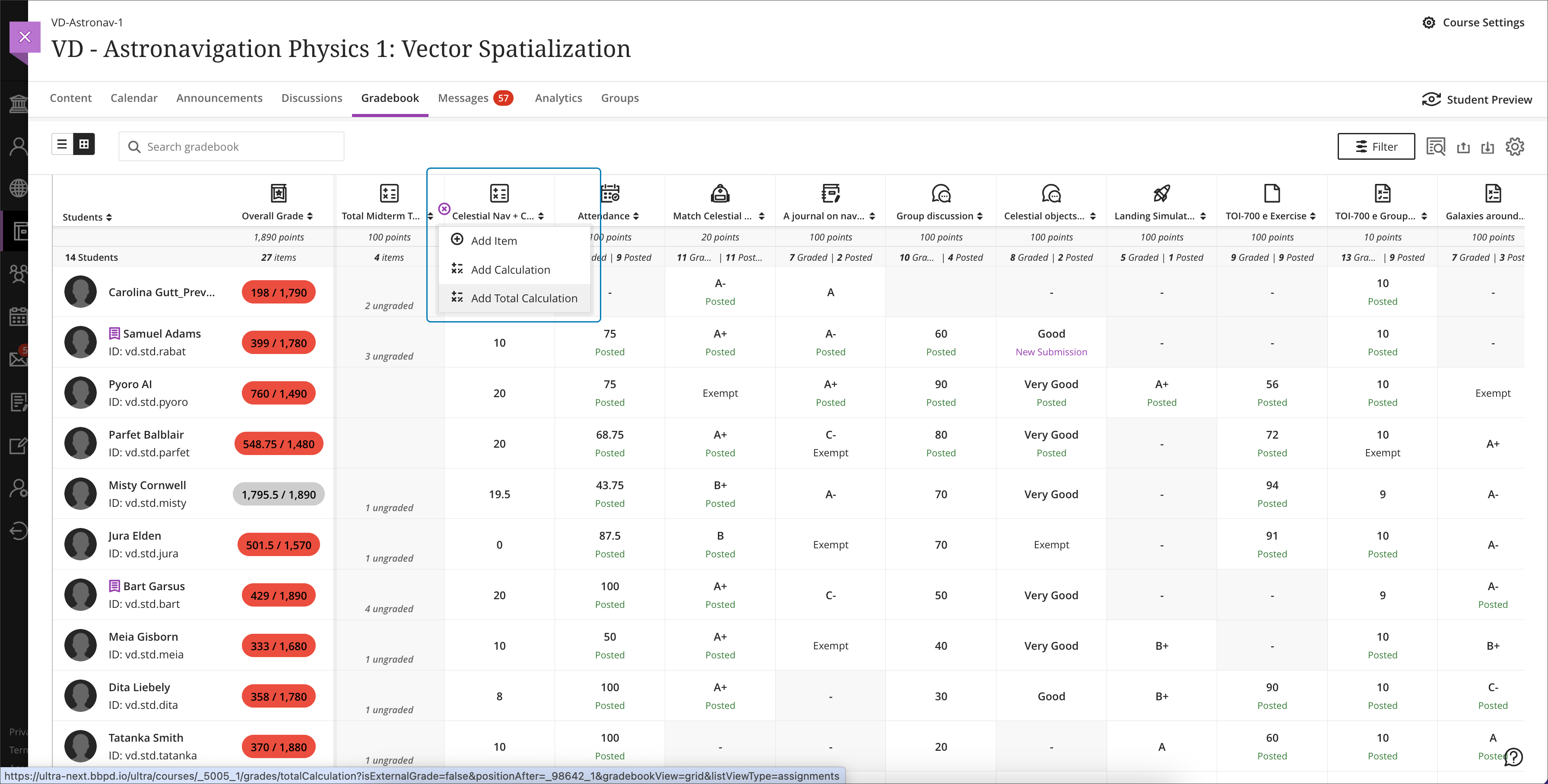
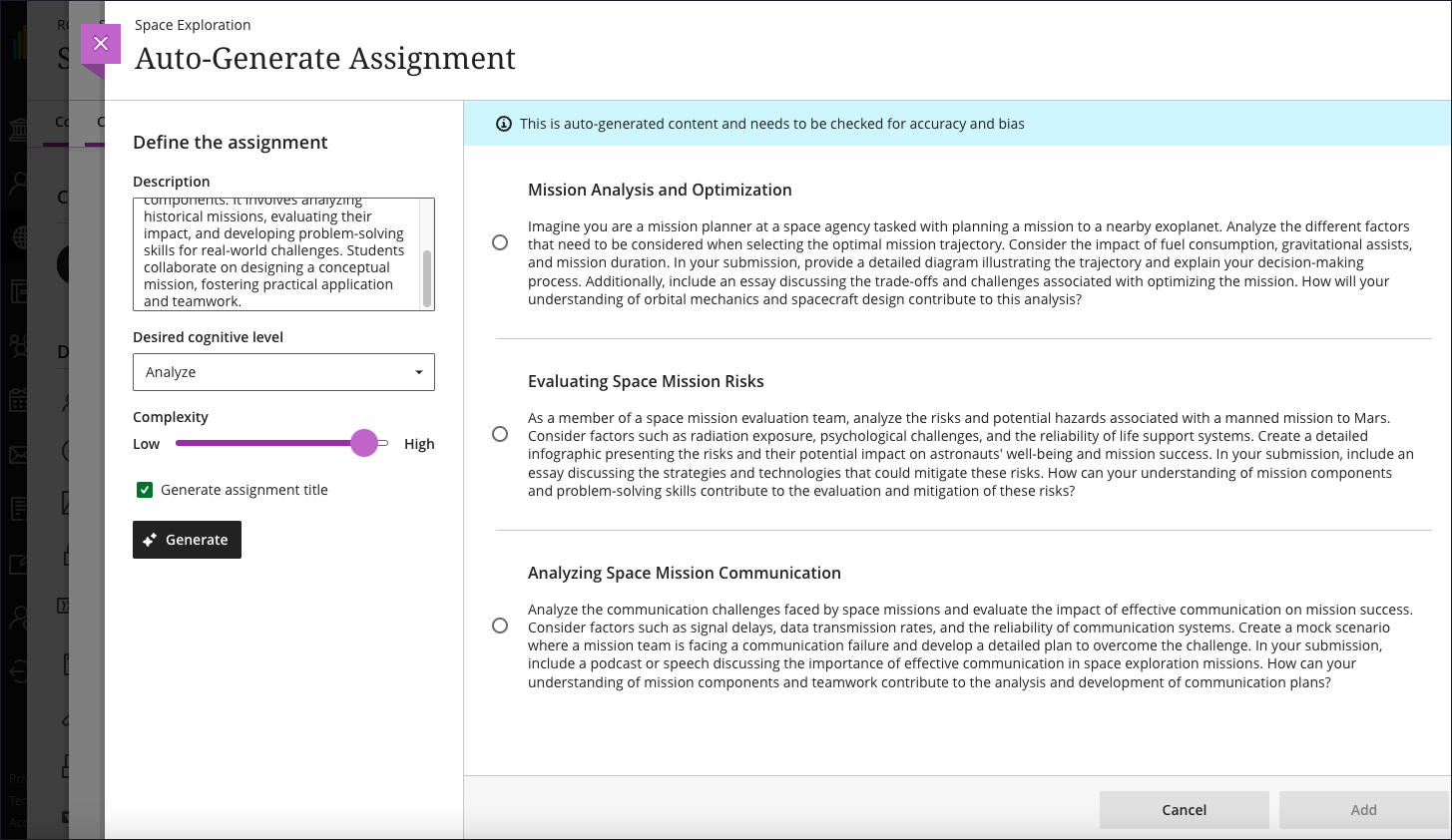
    <div class="html-content"><div><div><div><div><div><div><div>Expanding the functionality for the gradebook and assessments has been a central theme for the past year of Ultra development. When the winter term starts in 2024, Ultra courses will feature additional enhancements for the gradebook, grading interface, and test logs for learner attempts as developers continue to refine features based on institutional and instructor feedback.</div><div><br></div><div>The gradebook is a key tool for instructors in an Ultra course. With this update, instructors will be able to create total and weighted calculated columns that are point or percentage based with options to include or exclude categories and dropping scores. Moreover, these new total calculated columns can be used toward the overall grade calculation, allowing greater flexibility.</div></div><div><span><br></span></div><div><img src="https://help.blackboard.com/sites/default/files/images/2023-12/learn_ultra_instructor_Grading_TotalAndWeightedCalculatons_TotalCalculationColumn_AddingColumnFromGridView.png" width="500" alt="Image 1: Example of the improved gradebook with option to add a new Total Calculation" style="max-width: 100%; height: auto;"></div><div><div><em>Image 1: Example of the improved gradebook with option to add a new Total Calculation</em></div></div><div><div><br></div><div><strong>Grading &amp; Gradebook Improvements</strong></div><div><ul><li><span>The grid view of the Ultra gradebook features usability improvements that reduces spacing around icons and improves row visibility. </span></li><li><span>The gradebook will now provide the student ID next to each learner's name to improve identification. </span><span>When hovering over a truncated name in the gradebook, a tooltip will reveal the full name.</span></li><li><span>A sortable category column is added to the gradebook list view to provide clarity for those items to be graded.</span></li><li>Students will be able to see their grades for an assessment even if it is hidden. In a future update, feedback will be also visible.</li><li><span>Instructors can use delegated grading for anonymous assessments. Sorting controls are available for submission date.</span></li></ul><div>The test assessment log has been a frequent request for Ultra courses. Unlike Original courses, the Ultra version of this functionality provides information for tests and assignments. The test log will provide detailed information including date and time for starting the test, answers to each question, a preview of the question itself, and the estimated time spent on each question. The assignment log provides the start and submission date and time as well as the submission receipt number.</div></div><div><br></div><div><img src="https://help.blackboard.com/sites/default/files/images/2023-12/learn_ultra_instructor_AssessmentIntegrity_SubmissionListViewEntryPoint.png" width="500" alt="Image 2: Instructors can access the Assessment Submission Log from the individual assessment log" style="max-width: 100%; height: auto;"></div><div><span>Image 2: </span><em>Instructors can access the Assessment Submission Log from the individual assessment</em></div><div><br></div><div><strong>Content Creation &amp; Management</strong></div></div><div><div><br></div><div><div>The latest update to the AI Course Design Assistant Tools in Ultra courses allows instructors to generate assignment prompts aligned to a selected Bloom's cognitive process. As with all AI functionality, instructors are in complete control and can choose when and how to they want to use the tools.</div><div><br></div><div><img src="https://help.blackboard.com/sites/default/files/images/2023-12/Learn_Ultra_Instructors_AI%20Design%20Assistant%20Authentic%20Assignment%20Prompt%20Generation_Prompts%20with%20Content.png" width="500" alt="Image 3: Instructors can add additional context through a description, select the desired cognitive level and complexity, and then generate prompts" style="max-width: 100%; height: auto;"></div><div><span>Image 3: </span><em>Instructors can add additional context through a description, select the desired cognitive level and complexity, and then generate prompts</em></div><div><br></div><div>Additional updates to Content Management include:</div><div><ul><li><span>The Batch Edit tool now allows instructors to manage the date and/or time for selected items that have a pre-existing date/time -- for example, assessment due dates or visibility.</span></li><li><span>Instructors can use the unused files tool to find and remove course files that are not in use in a course. Instructors can download a file before deleting it.</span></li></ul></div></div></div></div></div></div></div><div><div><div><div><div><span><div><span>Faculty should see the latest updates in Ultra courses around January 4-5, 2024. </span><span>The next update to our Ultra test environment will take place on January 9, 2024; release notes are posted to the <a href="https://wiki.umbc.edu/x/LohnB" rel="nofollow external" class="bo">What's New in Ultra</a> that same week. Faculty who are interested in test driving new features before they are released to production should </span><a href="http://my.umbc.edu/go/request-help" rel="nofollow external" class="bo">open an RT ticket</a> to request early access. Please <a href="http://umbc.edu/go/ultra" rel="nofollow external" class="bo">watch the FAQs</a>, including <a href="https://wiki.umbc.edu/x/LohnB" rel="nofollow external" class="bo">the What's New with Ultra page</a>, <span>and myUMBC for additional information about Ultra. </span></div></span></div></div></div></div><div><span><br></span></div></div><div><span><strong>Connect with Instructional Technology</strong></span></div><div><span>As always, if you have any questions about teaching, learning, and technology at UMBC, please consider the following options:</span></div><ul><li><a href="http://www.umbc.edu/faq" rel="nofollow external" class="bo">Check our extensive FAQ collection</a><span> </span></li><ul><li><span><a href="https://wiki.umbc.edu/x/LohnB" rel="nofollow external" class="bo"><span>What's new in Ultra?</span></a><span> </span><span>|</span><span> </span><a href="https://wiki.umbc.edu/x/bwrSAQ" rel="nofollow external" class="bo"><span>Known Issues</span></a><span> </span></span></li></ul><li><span><a href="http://my.umbc.edu/go/request-help" rel="nofollow external" class="bo">Open a ticket via RT</a></span></li><li><span>Follow the </span><a href="http://my.umbc.edu/groups/instructional-technology" rel="nofollow external" class="bo">Instructional Technology</a><span> &amp; </span><a href="http://my.umbc.edu/groups/doit" rel="nofollow external" class="bo">DoIT</a><span> myUMBC groups</span></li><li><a href="http://doit.umbc.edu/itnm/staff/" rel="nofollow external" class="bo">Request a consult</a><span> with <a href="http://doit.umbc.edu/itnm/staff" rel="nofollow external" class="bo">instructional technology staff</a></span></li><li><span><a href="http://pivot.umbc.edu" rel="nofollow external" class="bo">PIVOT</a> | <a href="https://doit.umbc.edu/itnm/academic-continuity/" rel="nofollow external" class="bo">Academic Continuity</a></span><span> </span><span>|</span><span> </span><span><a href="https://fdc.umbc.edu/teaching/keep-on-teaching/" rel="nofollow external" class="bo">Keep On Teaching</a></span><span> </span><span>|</span><span> </span><span><a href="https://doit.umbc.edu/students" rel="nofollow external" class="bo">Student Technology Resources</a></span></li></ul></div><div><div></div></div></div>
]]>
  </Body>
  <Summary>Expanding the functionality for the gradebook and assessments has been a central theme for the past year of Ultra development. When the winter term starts in 2024, Ultra courses will feature...</Summary>
  <Website>https://my3.my.umbc.edu/groups/instructional-technology/posts/137839</Website>
  <TrackingUrl>https://dev.my.umbc.edu/api/v0/pixel/news/137839/guest@my.umbc.edu/325b5785e5d87ae1f21f6d288a9d1d92/api/pixel</TrackingUrl>
  <Tag>ai</Tag>
  <Tag>assessments</Tag>
  <Tag>blackboard</Tag>
  <Tag>gradebook</Tag>
  <Tag>grading</Tag>
  <Tag>ultra-experience</Tag>
  <Tag>ultra-update</Tag>
  <Group token="instructional-technology">Instructional Technology</Group>
  <GroupUrl>https://dev.my.umbc.edu/groups/instructional-technology</GroupUrl>
  <AvatarUrl>https://assets2-dev.my.umbc.edu/system/shared/avatars/groups/000/001/164/dec3b026b81ee6d890a8f82f75c94a2e/xsmall.png?1446126703</AvatarUrl>
  <AvatarUrl size="original">https://assets1-dev.my.umbc.edu/system/shared/avatars/groups/000/001/164/dec3b026b81ee6d890a8f82f75c94a2e/original.png?1446126703</AvatarUrl>
  <AvatarUrl size="xxlarge">https://assets2-dev.my.umbc.edu/system/shared/avatars/groups/000/001/164/dec3b026b81ee6d890a8f82f75c94a2e/xxlarge.png?1446126703</AvatarUrl>
  <AvatarUrl size="xlarge">https://assets1-dev.my.umbc.edu/system/shared/avatars/groups/000/001/164/dec3b026b81ee6d890a8f82f75c94a2e/xlarge.png?1446126703</AvatarUrl>
  <AvatarUrl size="large">https://assets1-dev.my.umbc.edu/system/shared/avatars/groups/000/001/164/dec3b026b81ee6d890a8f82f75c94a2e/large.png?1446126703</AvatarUrl>
  <AvatarUrl size="medium">https://assets4-dev.my.umbc.edu/system/shared/avatars/groups/000/001/164/dec3b026b81ee6d890a8f82f75c94a2e/medium.png?1446126703</AvatarUrl>
  <AvatarUrl size="small">https://assets3-dev.my.umbc.edu/system/shared/avatars/groups/000/001/164/dec3b026b81ee6d890a8f82f75c94a2e/small.png?1446126703</AvatarUrl>
  <AvatarUrl size="xsmall">https://assets2-dev.my.umbc.edu/system/shared/avatars/groups/000/001/164/dec3b026b81ee6d890a8f82f75c94a2e/xsmall.png?1446126703</AvatarUrl>
  <AvatarUrl size="xxsmall">https://assets3-dev.my.umbc.edu/system/shared/avatars/groups/000/001/164/dec3b026b81ee6d890a8f82f75c94a2e/xxsmall.png?1446126703</AvatarUrl>
  <Sponsor>Instructional Technology</Sponsor>
  <ThumbnailUrl size="xxlarge">https://assets4-dev.my.umbc.edu/system/shared/thumbnails/news/000/137/839/6fe5ac4ee868c2fabd33f0aebdee5885/xxlarge.jpg?1702915093</ThumbnailUrl>
  <ThumbnailUrl size="xlarge">https://assets1-dev.my.umbc.edu/system/shared/thumbnails/news/000/137/839/6fe5ac4ee868c2fabd33f0aebdee5885/xlarge.jpg?1702915093</ThumbnailUrl>
  <ThumbnailUrl size="large">https://assets1-dev.my.umbc.edu/system/shared/thumbnails/news/000/137/839/6fe5ac4ee868c2fabd33f0aebdee5885/large.jpg?1702915093</ThumbnailUrl>
  <ThumbnailUrl size="medium">https://assets4-dev.my.umbc.edu/system/shared/thumbnails/news/000/137/839/6fe5ac4ee868c2fabd33f0aebdee5885/medium.jpg?1702915093</ThumbnailUrl>
  <ThumbnailUrl size="small">https://assets2-dev.my.umbc.edu/system/shared/thumbnails/news/000/137/839/6fe5ac4ee868c2fabd33f0aebdee5885/small.jpg?1702915093</ThumbnailUrl>
  <ThumbnailUrl size="xsmall">https://assets4-dev.my.umbc.edu/system/shared/thumbnails/news/000/137/839/6fe5ac4ee868c2fabd33f0aebdee5885/xsmall.jpg?1702915093</ThumbnailUrl>
  <ThumbnailUrl size="xxsmall">https://assets4-dev.my.umbc.edu/system/shared/thumbnails/news/000/137/839/6fe5ac4ee868c2fabd33f0aebdee5885/xxsmall.jpg?1702915093</ThumbnailUrl>
  <PawCount>2</PawCount>
  <CommentCount>0</CommentCount>
  <CommentsAllowed>true</CommentsAllowed>
  <PostedAt>Thu, 21 Dec 2023 08:01:31 -0500</PostedAt>
</NewsItem>
  <NewsItem contentIssues="true" id="137728" important="false" status="posted" url="https://dev.my.umbc.edu/groups/oer/posts/137728">
  <Title>CFP - Incorporating Generative AI into Learning Experiences</Title>
  <Tagline>Share your assessment experience with USM peers</Tagline>
  <Body>
    <![CDATA[
    <div class="html-content"><div><span>Faculty, staff, and faculty/staff/student teams who have engaged in the use of Generative AI as part of assignments and learning activities are invited to propose sessions for the <strong><a href="https://www.usmd.edu/cai/incorporating-generative-ai-learning-experiences-virtual-showcase" rel="nofollow external" class="bo">Incorporating Generative AI into Learning Experiences Virtual Showcase</a></strong>, taking place via Zoom on Friday, April 26, 2024, from 10:00 am to 1:00 pm ET. </span></div><div><br></div><div>We welcome proposals for brief showcase presentations from faculty, staff, and faculty/staff/student teams from accredited Maryland institutions of higher education related to their development and use of assignments and learning activities that incorporate Generative AI. Learning experiences may reside inside or outside of the classroom and across different modalities.</div><div><br></div><div>Presenters will have 10-15 minutes of presentation time followed by moderated Q&amp;A, for a total of 20 minutes. We ask you to limit the number of presenters to no more than 3 people, though additional collaborators are welcome to be in the session and be available for the Q&amp;A portion of the presentation. </div><div><br></div><div>Showcase presentation topics can include: </div><div><ul><li><span>the use of Generative AI in the development of assignments and learning activities, </span></li><li><span>engaging students in the use of Generative AI as part of the assignment/learning activity, </span></li><li><span>student learning outcomes related to Generative AI and assignments/learning activities,</span></li><li><span>assignments and learning activities that invite students to critically examine the use of Generative AI in society, in education, and in their own learning, </span></li><li><span>the ways in which faculty, staff, and students are navigating appropriate and responsible use of Generative AI, </span></li><li><span>approaches to the use of Generative AI aimed at increasing relevance in learning, mitigating bias in learning materials/generated output, and other dimensions of diversity, equity, and inclusion,</span></li><li><span>the use of Generative AI to enhance course materials, including open educational resources.</span></li></ul></div><div><span>Works in progress should be sufficiently far along to be able to address the proposal session outline. </span></div><div><br></div><div>Final selection of proposals for the showcase will be based on ensuring a diversity of presentations from different institution types across Maryland (2-year, 4-year, public, independent) and from a variety of disciplines. </div><div><br></div><div>Please carefully review <a href="https://www.usmd.edu/cai/sites/default/files/Call%20for%20Proposals%20-%20Generative%20AI%20into%20Learning%20Experiences.pdf" rel="nofollow external" class="bo">the Call for Proposals (pdf)</a> before submitting a proposal. </div><div><br></div><div><a href="https://docs.google.com/forms/d/1nm8uIh4rzz6vn8sX8B_BqRjopaW4vBZa5PMbwkZCs1I/viewform?edit_requested=true" rel="nofollow external" class="bo">Submit Your Proposal</a> by February 12, 2024, 11:59 p.m. ET.</div><div><br></div><div>This event is sponsored by MarylandOnline, Montgomery College, the University System of Maryland William E. Kirwan Center for Academic Innovation, and the USM Council of University System Faculty. Please pardon any cross-posting by the event sponsors. </div><div><br></div><div>Please contact <a href="mailto:cai@usmd.edu">cai@usmd.edu</a> if you have any questions.</div></div>
]]>
  </Body>
  <Summary>Faculty, staff, and faculty/staff/student teams who have engaged in the use of Generative AI as part of assignments and learning activities are invited to propose sessions for the Incorporating...</Summary>
  <Website>https://my3.my.umbc.edu/groups/oer/posts/125789</Website>
  <TrackingUrl>https://dev.my.umbc.edu/api/v0/pixel/news/137728/guest@my.umbc.edu/d1b42387339dafdac7ad5b712ac244c1/api/pixel</TrackingUrl>
  <Tag>ai</Tag>
  <Tag>artificial-intelligence</Tag>
  <Tag>assessment</Tag>
  <Tag>classroom-experiences</Tag>
  <Tag>educational</Tag>
  <Tag>genai</Tag>
  <Tag>most</Tag>
  <Tag>open-educational-resources</Tag>
  <Tag>virtual-showcase</Tag>
  <Group token="oer">Open Educational Resources at UMBC</Group>
  <GroupUrl>https://dev.my.umbc.edu/groups/oer</GroupUrl>
  <AvatarUrl>https://assets1-dev.my.umbc.edu/system/shared/avatars/groups/000/001/664/0e7fb0a3d658c358b4e5e9561f35099e/xsmall.png?1562590436</AvatarUrl>
  <AvatarUrl size="original">https://assets2-dev.my.umbc.edu/system/shared/avatars/groups/000/001/664/0e7fb0a3d658c358b4e5e9561f35099e/original.png?1562590436</AvatarUrl>
  <AvatarUrl size="xxlarge">https://assets1-dev.my.umbc.edu/system/shared/avatars/groups/000/001/664/0e7fb0a3d658c358b4e5e9561f35099e/xxlarge.png?1562590436</AvatarUrl>
  <AvatarUrl size="xlarge">https://assets1-dev.my.umbc.edu/system/shared/avatars/groups/000/001/664/0e7fb0a3d658c358b4e5e9561f35099e/xlarge.png?1562590436</AvatarUrl>
  <AvatarUrl size="large">https://assets4-dev.my.umbc.edu/system/shared/avatars/groups/000/001/664/0e7fb0a3d658c358b4e5e9561f35099e/large.png?1562590436</AvatarUrl>
  <AvatarUrl size="medium">https://assets1-dev.my.umbc.edu/system/shared/avatars/groups/000/001/664/0e7fb0a3d658c358b4e5e9561f35099e/medium.png?1562590436</AvatarUrl>
  <AvatarUrl size="small">https://assets2-dev.my.umbc.edu/system/shared/avatars/groups/000/001/664/0e7fb0a3d658c358b4e5e9561f35099e/small.png?1562590436</AvatarUrl>
  <AvatarUrl size="xsmall">https://assets1-dev.my.umbc.edu/system/shared/avatars/groups/000/001/664/0e7fb0a3d658c358b4e5e9561f35099e/xsmall.png?1562590436</AvatarUrl>
  <AvatarUrl size="xxsmall">https://assets1-dev.my.umbc.edu/system/shared/avatars/groups/000/001/664/0e7fb0a3d658c358b4e5e9561f35099e/xxsmall.png?1562590436</AvatarUrl>
  <Sponsor>Open Educational Resources at UMBC</Sponsor>
  <ThumbnailUrl size="xxlarge">https://assets4-dev.my.umbc.edu/system/shared/thumbnails/news/000/137/728/5350b8033be069df01073f7452e2e09b/xxlarge.jpg?1702409872</ThumbnailUrl>
  <ThumbnailUrl size="xlarge">https://assets2-dev.my.umbc.edu/system/shared/thumbnails/news/000/137/728/5350b8033be069df01073f7452e2e09b/xlarge.jpg?1702409872</ThumbnailUrl>
  <ThumbnailUrl size="large">https://assets3-dev.my.umbc.edu/system/shared/thumbnails/news/000/137/728/5350b8033be069df01073f7452e2e09b/large.jpg?1702409872</ThumbnailUrl>
  <ThumbnailUrl size="medium">https://assets4-dev.my.umbc.edu/system/shared/thumbnails/news/000/137/728/5350b8033be069df01073f7452e2e09b/medium.jpg?1702409872</ThumbnailUrl>
  <ThumbnailUrl size="small">https://assets1-dev.my.umbc.edu/system/shared/thumbnails/news/000/137/728/5350b8033be069df01073f7452e2e09b/small.jpg?1702409872</ThumbnailUrl>
  <ThumbnailUrl size="xsmall">https://assets2-dev.my.umbc.edu/system/shared/thumbnails/news/000/137/728/5350b8033be069df01073f7452e2e09b/xsmall.jpg?1702409872</ThumbnailUrl>
  <ThumbnailUrl size="xxsmall">https://assets3-dev.my.umbc.edu/system/shared/thumbnails/news/000/137/728/5350b8033be069df01073f7452e2e09b/xxsmall.jpg?1702409872</ThumbnailUrl>
  <PawCount>1</PawCount>
  <CommentCount>0</CommentCount>
  <CommentsAllowed>true</CommentsAllowed>
  <PostedAt>Tue, 12 Dec 2023 14:39:37 -0500</PostedAt>
</NewsItem>
  <NewsItem contentIssues="true" id="137337" important="false" status="posted" url="https://dev.my.umbc.edu/groups/oer/posts/137337">
    <Title>Dec adds unique group due dates, more sort controls in Ultra</Title>
    <Tagline>Features authentic discussion opportunities using AI tools</Tagline>
    <Body>
      <![CDATA[
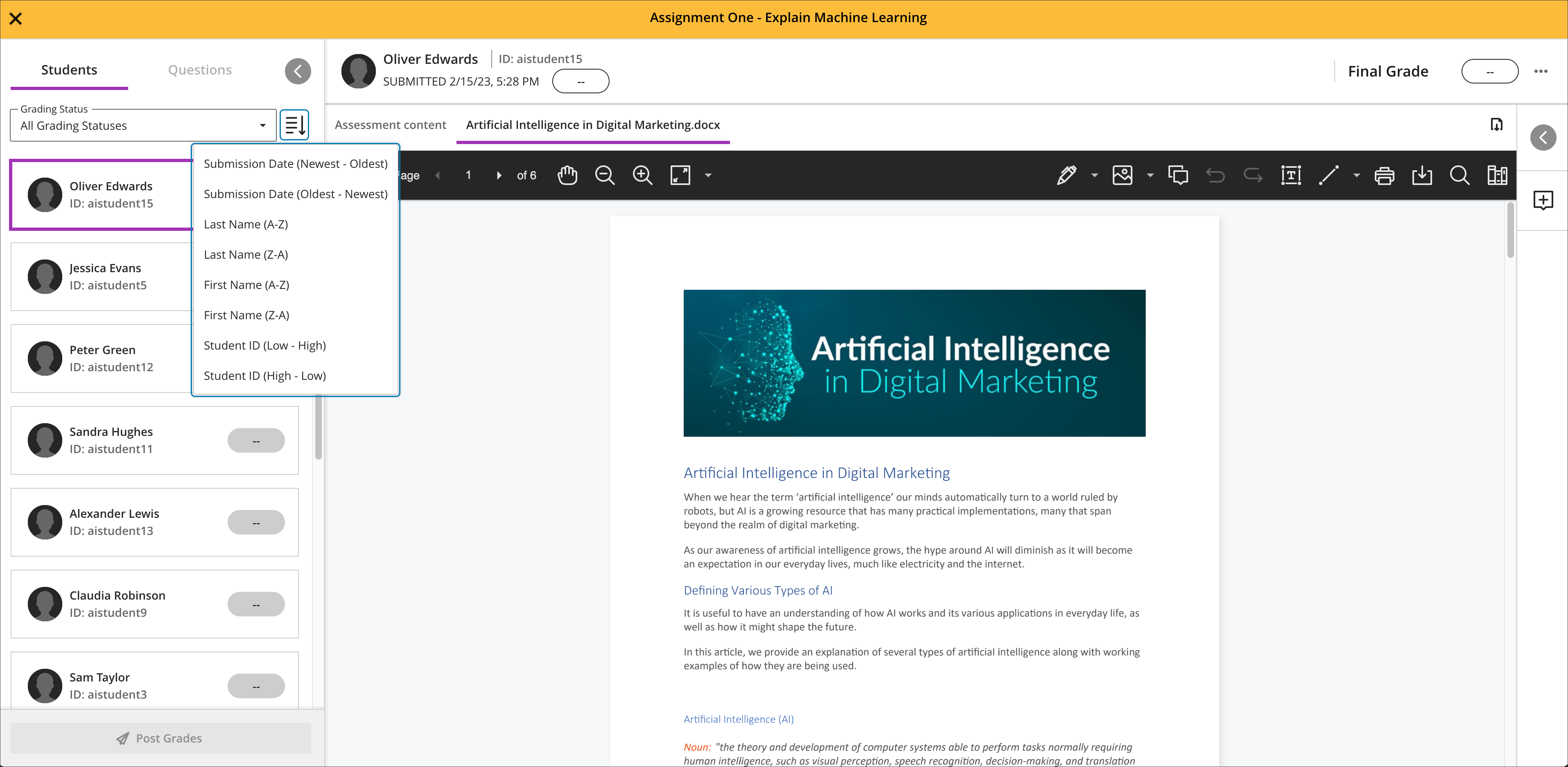
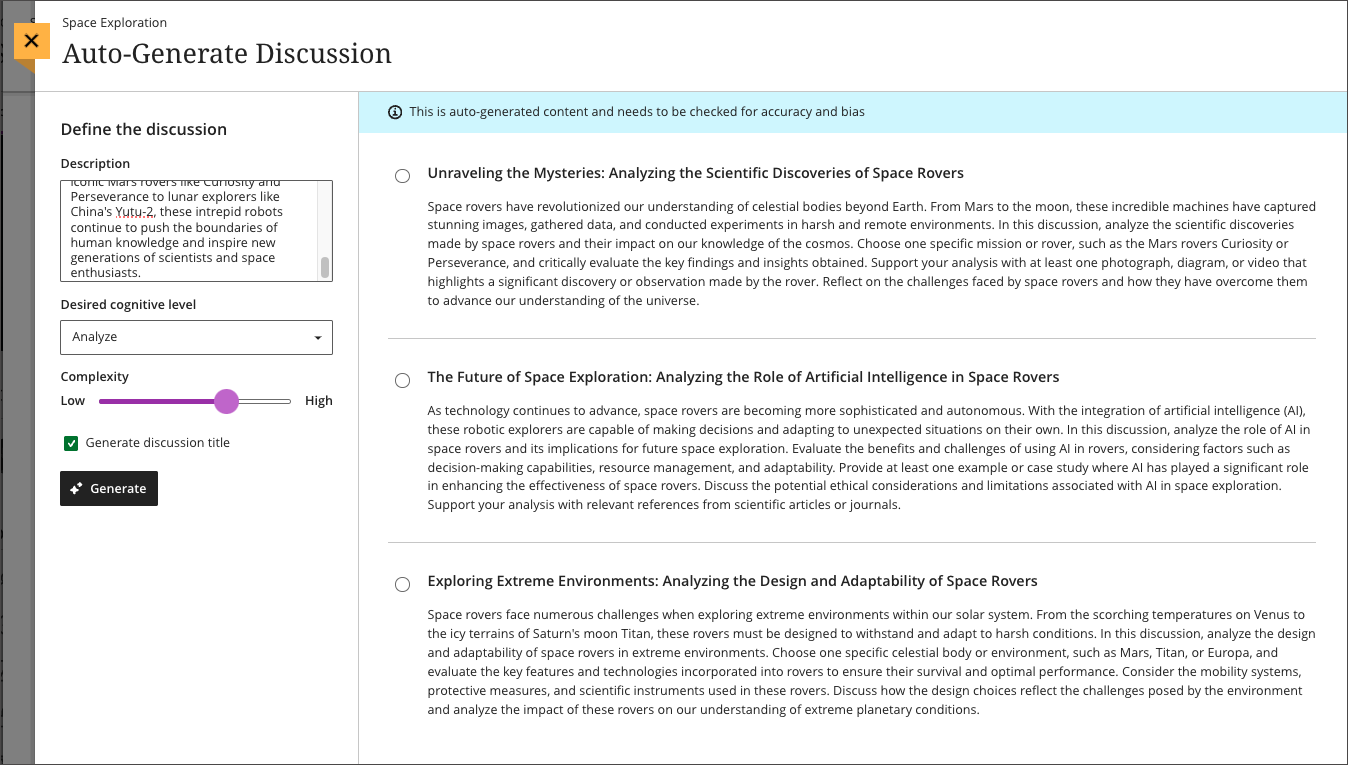
          <div class="html-content"><div><div><div><div><div><div>As 2023 comes to a close, the December Ultra update brings several features to enhance group functionality and gradebook management. With this update, instructors can <span>assign a unique due date to each group using the exceptions workflow.</span><span> If necessary, instructors can reset the group due date to the default.</span></div><div><span><br></span></div><div><span>Gradebook sorting controls provide easier ways to interact with grade information in an Ultra course. T</span><span>he <a href="https://my3.my.umbc.edu/groups/instructional-technology/posts/134272" rel="nofollow external" class="bo">new Flexible Grading interface</a> also features updated sorting controls for column types, allowing instructors and graders to sort data in ascending and descending order.</span></div><div><span><br></span></div><div><img src="https://help.blackboard.com/sites/default/files/images/2023-11/learn_ultra_instructor_SortingControlsInStudentsAndQuestionsTab_SortingOptionsInFlexibleGrading.png" width="500" alt="Image 1: Sorting assessments in Flexible Grading using the Students tab" style="max-width: 100%; height: auto;"></div><div><div><em>Image 1: Sorting assessments in Flexible Grading using the Students tab</em></div><div><em><br></em></div></div><div><span>Further updates to assessments and grading allow instructors to align goals to questions within a question bank and create expanded rubrics without any limit to the row or column sizes. Question-level goal alignment ensures that assessment items measure the desired learning outcomes. Moreover, larger rubrics allow for </span><span>greater criteria to support assessment and accreditation.</span></div><div><div><span><br></span></div><div><span>Additionally, <a href="https://my3.my.umbc.edu/groups/instructional-technology/posts/134605" rel="nofollow external" class="bo">Ultra's exclusive AI course design assistant tools</a> can generate discussion prompts to incorporate authentic assessment and increase learner engagement. </span>The generation process allows instructors to enter a discussion or journal description, select a desired cognitive process based on Bloom's Taxonomy, set the complexity, and generate a discussion or journal title. <span>The instructor can review the generated prompts and select one to add to the discussion or journal. After adding the prompt, the instructor can edit or further refine the prompt as appropriate. </span><span>The goal of this tool is to encourage students to engage in higher-order thinking, apply their knowledge, justify or challenge their beliefs and ideas, and emulate real-world situations.</span></div><div><br></div><div><img src="https://help.blackboard.com/sites/default/files/images/2023-11/learn_ultra_instructor_AuthenticDiscussionAndJournal%20prompts_InstructorOptions.png" width="500" alt="Image 2: Instructors can describe the discussion, select the desired cognitive process and complexity, and then generate prompts" style="max-width: 100%; height: auto;"></div><div><span>Image 2: </span><em>Instructors can describe the discussion, select the desired cognitive process and complexity, and then generate prompts</em></div><div><br></div></div></div></div></div></div><div><div><div><div><div><span><div><span>Faculty should see the latest updates in Ultra courses around December 7-8 2023. </span><span>The next update to our Ultra test environment will take place on December 12, 2023; release notes are posted to the <a href="https://wiki.umbc.edu/x/LohnB" rel="nofollow external" class="bo">What's New in Ultra</a> that same week. Faculty who are interested in test driving new features before they are released to production should </span><a href="http://my.umbc.edu/go/request-help" rel="nofollow external" class="bo">open an RT ticket</a> to request early access. Please <a href="http://umbc.edu/go/ultra" rel="nofollow external" class="bo">watch the FAQs</a>, including <a href="https://wiki.umbc.edu/x/LohnB" rel="nofollow external" class="bo">the What's New with Ultra page</a>, <span>and myUMBC for additional information about Ultra. </span></div></span></div></div></div></div><div><span><br></span></div></div><div><span><strong>Connect with Instructional Technology</strong></span></div><div><span>As always, if you have any questions about teaching, learning, and technology at UMBC, please consider the following options:</span></div><ul><li><a href="http://www.umbc.edu/faq" rel="nofollow external" class="bo">Check our extensive FAQ collection</a><span> </span></li><ul><li><span><a href="https://wiki.umbc.edu/x/LohnB" rel="nofollow external" class="bo"><span>What's new in Ultra?</span></a><span> </span><span>|</span><span> </span><a href="https://wiki.umbc.edu/x/bwrSAQ" rel="nofollow external" class="bo"><span>Known Issues</span></a><span> </span></span></li></ul><li><span><a href="http://my.umbc.edu/go/request-help" rel="nofollow external" class="bo">Open a ticket via RT</a></span></li><li><span>Follow the </span><a href="http://my.umbc.edu/groups/instructional-technology" rel="nofollow external" class="bo">Instructional Technology</a><span> &amp; </span><a href="http://my.umbc.edu/groups/doit" rel="nofollow external" class="bo">DoIT</a><span> myUMBC groups</span></li><li><a href="http://doit.umbc.edu/itnm/staff/" rel="nofollow external" class="bo">Request a consult</a><span> with <a href="http://doit.umbc.edu/itnm/staff" rel="nofollow external" class="bo">instructional technology staff</a></span></li><li><span><a href="http://pivot.umbc.edu" rel="nofollow external" class="bo">PIVOT</a> | <a href="https://doit.umbc.edu/itnm/academic-continuity/" rel="nofollow external" class="bo">Academic Continuity</a></span><span> </span><span>|</span><span> </span><span><a href="https://fdc.umbc.edu/teaching/keep-on-teaching/" rel="nofollow external" class="bo">Keep On Teaching</a></span><span> </span><span>|</span><span> </span><span><a href="https://doit.umbc.edu/students" rel="nofollow external" class="bo">Student Technology Resources</a></span></li></ul></div><div><div></div></div></div>
      ]]>
    </Body>
    <Summary>As 2023 comes to a close, the December Ultra update brings several features to enhance group functionality and gradebook management. With this update, instructors can assign a unique due date to...</Summary>
    <Website>https://my3.my.umbc.edu/groups/instructional-technology/posts/137337</Website>
    <TrackingUrl>https://dev.my.umbc.edu/api/v0/pixel/news/137337/guest@my.umbc.edu/399185d8da49d9564e0ff4f946e356e2/api/pixel</TrackingUrl>
    <Tag>ai</Tag>
    <Tag>blackboard</Tag>
    <Tag>gradebook</Tag>
    <Tag>grading</Tag>
    <Tag>ultra-experience</Tag>
    <Tag>ultra-update</Tag>
    <Tag>unsplash</Tag>
    <Group token="instructional-technology">Instructional Technology</Group>
    <GroupUrl>https://dev.my.umbc.edu/groups/instructional-technology</GroupUrl>
    <AvatarUrl>https://assets2-dev.my.umbc.edu/system/shared/avatars/groups/000/001/164/dec3b026b81ee6d890a8f82f75c94a2e/xsmall.png?1446126703</AvatarUrl>
    <AvatarUrl size="original">https://assets1-dev.my.umbc.edu/system/shared/avatars/groups/000/001/164/dec3b026b81ee6d890a8f82f75c94a2e/original.png?1446126703</AvatarUrl>
    <AvatarUrl size="xxlarge">https://assets2-dev.my.umbc.edu/system/shared/avatars/groups/000/001/164/dec3b026b81ee6d890a8f82f75c94a2e/xxlarge.png?1446126703</AvatarUrl>
    <AvatarUrl size="xlarge">https://assets1-dev.my.umbc.edu/system/shared/avatars/groups/000/001/164/dec3b026b81ee6d890a8f82f75c94a2e/xlarge.png?1446126703</AvatarUrl>
    <AvatarUrl size="large">https://assets1-dev.my.umbc.edu/system/shared/avatars/groups/000/001/164/dec3b026b81ee6d890a8f82f75c94a2e/large.png?1446126703</AvatarUrl>
    <AvatarUrl size="medium">https://assets4-dev.my.umbc.edu/system/shared/avatars/groups/000/001/164/dec3b026b81ee6d890a8f82f75c94a2e/medium.png?1446126703</AvatarUrl>
    <AvatarUrl size="small">https://assets3-dev.my.umbc.edu/system/shared/avatars/groups/000/001/164/dec3b026b81ee6d890a8f82f75c94a2e/small.png?1446126703</AvatarUrl>
    <AvatarUrl size="xsmall">https://assets2-dev.my.umbc.edu/system/shared/avatars/groups/000/001/164/dec3b026b81ee6d890a8f82f75c94a2e/xsmall.png?1446126703</AvatarUrl>
    <AvatarUrl size="xxsmall">https://assets3-dev.my.umbc.edu/system/shared/avatars/groups/000/001/164/dec3b026b81ee6d890a8f82f75c94a2e/xxsmall.png?1446126703</AvatarUrl>
    <Sponsor>Instructional Technology</Sponsor>
    <ThumbnailUrl size="xxlarge">https://assets3-dev.my.umbc.edu/system/shared/thumbnails/news/000/137/337/ac70c80d8dfe1625932cf54cba55766e/xxlarge.jpg?1701192788</ThumbnailUrl>
    <ThumbnailUrl size="xlarge">https://assets2-dev.my.umbc.edu/system/shared/thumbnails/news/000/137/337/ac70c80d8dfe1625932cf54cba55766e/xlarge.jpg?1701192788</ThumbnailUrl>
    <ThumbnailUrl size="large">https://assets2-dev.my.umbc.edu/system/shared/thumbnails/news/000/137/337/ac70c80d8dfe1625932cf54cba55766e/large.jpg?1701192788</ThumbnailUrl>
    <ThumbnailUrl size="medium">https://assets4-dev.my.umbc.edu/system/shared/thumbnails/news/000/137/337/ac70c80d8dfe1625932cf54cba55766e/medium.jpg?1701192788</ThumbnailUrl>
    <ThumbnailUrl size="small">https://assets1-dev.my.umbc.edu/system/shared/thumbnails/news/000/137/337/ac70c80d8dfe1625932cf54cba55766e/small.jpg?1701192788</ThumbnailUrl>
    <ThumbnailUrl size="xsmall">https://assets2-dev.my.umbc.edu/system/shared/thumbnails/news/000/137/337/ac70c80d8dfe1625932cf54cba55766e/xsmall.jpg?1701192788</ThumbnailUrl>
    <ThumbnailUrl size="xxsmall">https://assets4-dev.my.umbc.edu/system/shared/thumbnails/news/000/137/337/ac70c80d8dfe1625932cf54cba55766e/xxsmall.jpg?1701192788</ThumbnailUrl>
    <PawCount>2</PawCount>
    <CommentCount>0</CommentCount>
    <CommentsAllowed>true</CommentsAllowed>
    <PostedAt>Thu, 30 Nov 2023 14:58:57 -0500</PostedAt>
    <EditAt>Thu, 30 Nov 2023 15:00:04 -0500</EditAt>
  </NewsItem>
  <NewsItem contentIssues="true" id="136797" important="false" status="posted" url="https://dev.my.umbc.edu/groups/oer/posts/136797">
  <Title>Test Drive New Blackboard Faculty AI Course Design Tools</Title>
  <Tagline>Discover how AI can support your course design process</Tagline>
  <Body>
    <![CDATA[
    <div class="html-content"><p><span>The </span><span>U.S. Distance Learning Association (USDLA)'s</span><span> </span><a href="https://usdla.org/2023-ndlw/" rel="nofollow external" class="bo">National Distance Learning Week</a><span> focuses on how artificial intelligence (AI) impacts education and training. </span></p><p><span>Instructional Technology invites faculty to test drive the suite of new Blackboard AI Course Design Assistant tools, which are now available for instructors who would like early access to preview the tool. Informed by </span><a href="https://www.anthology.com/trust-center/trustworthy-ai-approach" rel="nofollow external" class="bo"><span>Anthology's Trustworthy AI Approach</span></a><span> and seamlessly embedded into Ultra's workflows, the AI Course Design Assistant tools are opt-in and the instructor is always in control of the content generated. Faculty can choose when, where, and how to leverage the tools in their Ultra courses. Anthology has not created any AI tools for students. </span></p><p><span>Faculty interested in early access to the tool may </span><a href="http://umbc.edu/go/bbsupport" rel="nofollow external" class="bo"><span>submit an RT ticket</span></a><span> to request access. </span></p><p><span>Developed to assist faculty in streamlining course preparation, the AI Course Design Assistant tools include the features detailed below. </span></p><h5><span><strong>Course-Builder Assistant</strong></span></h5><p><span>Create sample learning modules, titles, and descriptions. The generated modules include the module title, description, and images. Content within the module is not generated by the design tool.</span></p><p><span><span><span><img src="https://lh7-us.googleusercontent.com/7ARcZ0M69ouN0rC7l9pCP87opKWZReNUOEdEyMRF2F6Ey1o4cVSh6ok2a__4GI1VeonnHr047hMOTvZ-oSh735GuOVi9mGNO2OsSBI12vtx0zukhVZLKGw88Qbr8rIWbpU4PvZPNJfvMOz0oKk3JHrk" width="519.2362312243968" height="279" style="max-width: 100%; height: auto;"></span></span></span></p><p><span><em>Image 1: Option to auto-generate modules in an empty course.</em></span></p><p><span><span><img src="https://lh7-us.googleusercontent.com/28Qqdl8hhCNqxif5JnUEupmPVRznEbP2a9tMZJpIevU1ikhabphUaP0DlO2K-4CVP_isEPKVWQR0VH_reC8qMmxl5KdlRPRAgJnsz4O7b20etotcSj3lKn5Rd6KuSmh9n9HG3WYegqHZ8cY0TiuiyU0" width="506" height="356" style="max-width: 100%; height: auto;"></span></span></p><p><span><em>Image 2: Auto-generated modules with an option to select and add to the course.</em></span></p><p><span><em><br></em></span></p><h5><span><strong>Image Suggestion and Creation </strong></span></h5><p><span>The assistant can draw from the Unsplash stock image library and suggest thumbnails for illustration in learning modules or identify an image for the course banner. Functionality also includes AI-generated image creation based on course name and keywords. As of early November, the AI Design Assistant also includes the option to generate images and access Unsplash stock images in Ultra Documents, Discussions, Tests, Assignments, Journal prompts, and Course Messages.</span></p><p><span><span><img src="https://lh7-us.googleusercontent.com/vM69LdYmAxQB7p79VYZpVUZ-lPMMlCJrZc08BG6SEuy4M5wIpWu5_VaLP--wxJcQpCUNr0DFtUhRtFIbV6hBJztGMs3QF7stTGunR2SehsuWPWMnYye1xXE0I64m-K_sDkrZMuBvEbWBpHE_Lphi60c" width="651" height="442" style="max-width: 100%; height: auto;"></span></span></p><p><span><em>Image 3: Select "Generate images" or "Stock images from Unsplash" to add images to Ultra Documents, Discussions, Assessments, Journal prompts, and Course Messages.</em></span></p><p><span><em><br></em></span></p><h5><span><strong>Content-Based Test Generation </strong></span></h5><p><span>Using the content included in an Ultra Document, Assignment Description, or additional information provided directly in the AI tool panel, the Design Assistant can generate a diverse set of questions for a test or question bank. </span></p><p><span><span><img src="https://lh7-us.googleusercontent.com/w9W-Y9c0YPo5X86siTCNGRjWFNLGOukbgWHivQv6-W35lj9fTciE_f83FfBwVMrgzYUOmRzmDlLzuiPHbIpvaLjqiGGw_XZCnrBizTS4kDHJO9sDv3vS-ai8IPcCJt7F9Mt51_8oS7lw2pcRKoAT2I8" width="624" height="445" style="max-width: 100%; height: auto;"></span></span></p><p><span><em>Image 4: Select "auto-generate question" in a test or assignment to see AI-tool generated questions. Test questions can be generated from a test or assignment or at the bottom of an Ultra document.</em></span></p><p><span><br></span></p><h5><strong><span>Rubric Creation</span><span> </span></strong></h5><p><span>Drawing on content in an assessment or discussion prompt, the AI tool can analyze and streamline the rubric creation process according to specific learning objectives and assessment criteria.</span></p><p><span><span><img src="https://lh7-us.googleusercontent.com/zAcitbAZalsG-kleaLU6MxSISZjFgDgrJiG-200_zG1P1LW7_WypVue0luMiEAkLvb4Lp6JA3zSNOhLdNPvO7dMfiY07Ga-1LDYSmYIM7TZzlrPQPUlKuuczy7sAT62RHNf9L9y_6lmgPfFhFnWvoEw" width="624" height="391" style="max-width: 100%; height: auto;"></span></span></p><p><span><em>Image 5: Generated rubric, with options to customize rubric type, complexity, and number of rows and columns.</em></span></p><p><span><span>To discover more about the impact of AI on distance education and training, t</span><span>he </span><span>U.S. Distance Learning Association (USDLA) is hosting virtual webinars during the</span><span> sixteenth annual</span><span> </span><a href="https://usdla.org/2023-ndlw/" rel="nofollow external" class="bo">National Distance Learning Week</a><span> (Nov 6-10, 2023).</span><span> </span><span>All sessions are free to attend, but require </span><a href="https://members.usdla.org/members/evr/reg_event.php?orgcode=USDL&amp;evid=39575371" rel="nofollow external" class="bo">registration via USDLA</a><span>.</span></span></p><div><strong><br></strong></div><h5><strong>Connect with Instructional Technology</strong></h5><div>As always, if you have any questions about teaching, learning, and technology at UMBC, please consider the following options:</div><ul><li><a href="http://www.umbc.edu/faq" rel="nofollow external" class="bo">Check our extensive FAQ collection</a> </li><ul><li><a href="https://wiki.umbc.edu/x/LohnB" rel="nofollow external" class="bo">What's new in Ultra?</a> | <a href="https://wiki.umbc.edu/x/bwrSAQ" rel="nofollow external" class="bo">Known Issues</a> </li></ul><li><a href="http://umbc.edu/go/bbsupport" rel="nofollow external" class="bo">Open a ticket via RT</a></li><li>Follow the <a href="http://my.umbc.edu/groups/instructional-technology" rel="nofollow external" class="bo">Instructional Technology</a> &amp; <a href="http://my.umbc.edu/groups/doit" rel="nofollow external" class="bo">DoIT</a> myUMBC groups</li><li><a href="http://umbc.edu/go/bbsupport" rel="nofollow external" class="bo">Request a consult</a> with <a href="http://doit.umbc.edu/itnm/staff" rel="nofollow external" class="bo">instructional technology staff</a></li><li><a href="http://pivot.umbc.edu/" rel="nofollow external" class="bo">PIVOT</a> | <a href="https://doit.umbc.edu/itnm/academic-continuity/" rel="nofollow external" class="bo">Academic Continuity</a> | <a href="https://fdc.umbc.edu/teaching/keep-on-teaching/" rel="nofollow external" class="bo">Keep On Teaching</a> | <a href="https://doit.umbc.edu/students" rel="nofollow external" class="bo">Student Technology Resources</a></li></ul><p><em>UMBC is committed to providing a consistent learning experience for everyone. The last day we will support Blackboard Original is December 31, 2024. Please check out our training and support: <a href="https://umbc.edu/go/ultra" rel="nofollow external" class="bo">https://umbc.edu/go/ultra</a>.</em></p></div>
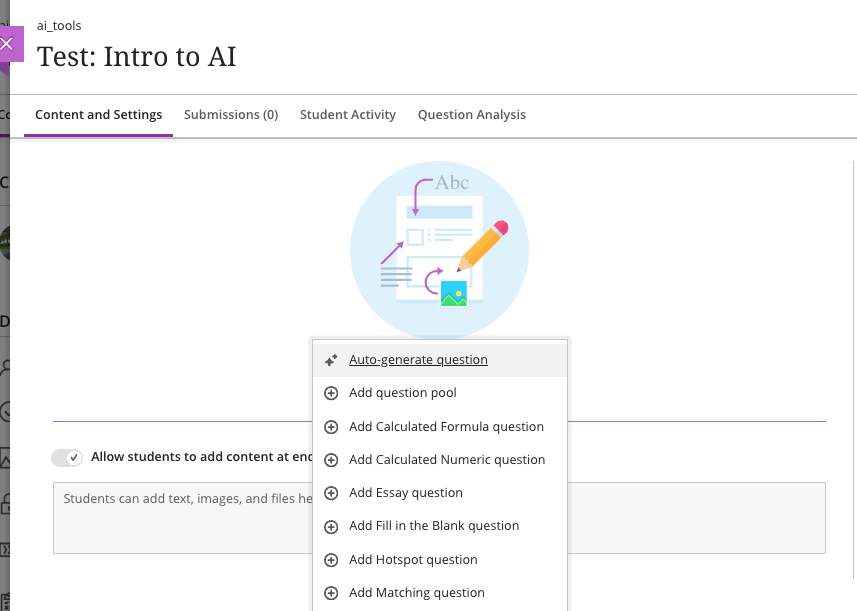
]]>
  </Body>
  <Summary>The U.S. Distance Learning Association (USDLA)'s National Distance Learning Week focuses on how artificial intelligence (AI) impacts education and training.   Instructional Technology invites...</Summary>
  <Website>https://my3.my.umbc.edu/groups/instructional-technology/posts/136797</Website>
  <TrackingUrl>https://dev.my.umbc.edu/api/v0/pixel/news/136797/guest@my.umbc.edu/cce9fa7d60e0f9d649e04b3e3cfb703f/api/pixel</TrackingUrl>
  <Tag>ai</Tag>
  <Tag>ai-course-design-assistant</Tag>
  <Tag>artificial-intelligence</Tag>
  <Tag>blackboard</Tag>
  <Tag>blackboard-ultra</Tag>
  <Tag>ndlw</Tag>
  <Tag>online-learning</Tag>
  <Tag>ultra</Tag>
  <Group token="instructional-technology">Instructional Technology</Group>
  <GroupUrl>https://dev.my.umbc.edu/groups/instructional-technology</GroupUrl>
  <AvatarUrl>https://assets2-dev.my.umbc.edu/system/shared/avatars/groups/000/001/164/dec3b026b81ee6d890a8f82f75c94a2e/xsmall.png?1446126703</AvatarUrl>
  <AvatarUrl size="original">https://assets1-dev.my.umbc.edu/system/shared/avatars/groups/000/001/164/dec3b026b81ee6d890a8f82f75c94a2e/original.png?1446126703</AvatarUrl>
  <AvatarUrl size="xxlarge">https://assets2-dev.my.umbc.edu/system/shared/avatars/groups/000/001/164/dec3b026b81ee6d890a8f82f75c94a2e/xxlarge.png?1446126703</AvatarUrl>
  <AvatarUrl size="xlarge">https://assets1-dev.my.umbc.edu/system/shared/avatars/groups/000/001/164/dec3b026b81ee6d890a8f82f75c94a2e/xlarge.png?1446126703</AvatarUrl>
  <AvatarUrl size="large">https://assets1-dev.my.umbc.edu/system/shared/avatars/groups/000/001/164/dec3b026b81ee6d890a8f82f75c94a2e/large.png?1446126703</AvatarUrl>
  <AvatarUrl size="medium">https://assets4-dev.my.umbc.edu/system/shared/avatars/groups/000/001/164/dec3b026b81ee6d890a8f82f75c94a2e/medium.png?1446126703</AvatarUrl>
  <AvatarUrl size="small">https://assets3-dev.my.umbc.edu/system/shared/avatars/groups/000/001/164/dec3b026b81ee6d890a8f82f75c94a2e/small.png?1446126703</AvatarUrl>
  <AvatarUrl size="xsmall">https://assets2-dev.my.umbc.edu/system/shared/avatars/groups/000/001/164/dec3b026b81ee6d890a8f82f75c94a2e/xsmall.png?1446126703</AvatarUrl>
  <AvatarUrl size="xxsmall">https://assets3-dev.my.umbc.edu/system/shared/avatars/groups/000/001/164/dec3b026b81ee6d890a8f82f75c94a2e/xxsmall.png?1446126703</AvatarUrl>
  <Sponsor>Instructional Technology</Sponsor>
  <ThumbnailUrl size="xxlarge">https://assets1-dev.my.umbc.edu/system/shared/thumbnails/news/000/136/797/bf1e6376eb09a574b84cb0b0050da68a/xxlarge.jpg?1699622583</ThumbnailUrl>
  <ThumbnailUrl size="xlarge">https://assets3-dev.my.umbc.edu/system/shared/thumbnails/news/000/136/797/bf1e6376eb09a574b84cb0b0050da68a/xlarge.jpg?1699622583</ThumbnailUrl>
  <ThumbnailUrl size="large">https://assets2-dev.my.umbc.edu/system/shared/thumbnails/news/000/136/797/bf1e6376eb09a574b84cb0b0050da68a/large.jpg?1699622583</ThumbnailUrl>
  <ThumbnailUrl size="medium">https://assets1-dev.my.umbc.edu/system/shared/thumbnails/news/000/136/797/bf1e6376eb09a574b84cb0b0050da68a/medium.jpg?1699622583</ThumbnailUrl>
  <ThumbnailUrl size="small">https://assets4-dev.my.umbc.edu/system/shared/thumbnails/news/000/136/797/bf1e6376eb09a574b84cb0b0050da68a/small.jpg?1699622583</ThumbnailUrl>
  <ThumbnailUrl size="xsmall">https://assets2-dev.my.umbc.edu/system/shared/thumbnails/news/000/136/797/bf1e6376eb09a574b84cb0b0050da68a/xsmall.jpg?1699622583</ThumbnailUrl>
  <ThumbnailUrl size="xxsmall">https://assets2-dev.my.umbc.edu/system/shared/thumbnails/news/000/136/797/bf1e6376eb09a574b84cb0b0050da68a/xxsmall.jpg?1699622583</ThumbnailUrl>
  <PawCount>3</PawCount>
  <CommentCount>0</CommentCount>
  <CommentsAllowed>true</CommentsAllowed>
  <PostedAt>Fri, 10 Nov 2023 08:24:58 -0500</PostedAt>
  <EditAt>Mon, 18 Dec 2023 13:51:25 -0500</EditAt>
</NewsItem>
  <NewsItem contentIssues="true" id="136790" important="false" status="posted" url="https://dev.my.umbc.edu/groups/oer/posts/136790">
  <Title>AI and Accessible Images for Inclusive Courses</Title>
  <Tagline>National Distance Learning Week 2023</Tagline>
  <Body>
    <![CDATA[
    <div class="html-content"><span><p><span>Providing accessible images is a crucial step to ensure inclusivity and equal access to learning. When images are properly described, students using screen readers are able to access an equitable educational environment. We use the alternative text field when placing images in documents, presentations, and in our Blackboard courses.</span></p><p><span>There are several tools available to help faculty with accessible images. </span></p><ol><li><span><strong>Ally Course Accessibility Report </strong></span><a href="https://help.blackboard.com/Ally/Ally_for_LMS/Instructor/Course_Accessibility_Report" rel="nofollow external" class="bo"><span>provides a big picture overview</span></a><span> of your course's accessibility score, growing content by type and identifying issues in your course that is easiest to fix. Clicking the Start button will open a panel that helps you find the images and enter alternative text for those images in your course.</span></li><li><span>When using images in </span><span><strong>Google Slides or Documents</strong></span><span>, you can click on the image to </span><a href="https://support.google.com/docs/answer/6199477?hl=en" rel="nofollow external" class="bo"><span>activate a new menu</span></a><span>, Format Options. Select Alt Text to enter a description. Repeat this process for every image.</span></li><li><span>When embedding images into </span><span><strong>Microsoft Word/PowerPoint</strong></span><span> files, you can </span><a href="https://support.microsoft.com/en-us/office/add-alternative-text-to-a-shape-picture-chart-smartart-graphic-or-other-object-44989b2a-903c-4d9a-b742-6a75b451c669#PickTab=Windows" rel="nofollow external" class="bo"><span>improve accessibility</span></a><span> with a simple right-click on the image. This action will activate a menu where you can find Edit Alt Text. If the image does not contain information, such as a stylistic border, you can mark it as decorative.</span></li></ol><p><span>What if your course uses complex images, bursting with intricate details? How can you ensure that every student, regardless of visual ability, fully grasps their significance? </span></p><p><span>ChatGPT 4* offers </span><a href="https://help.openai.com/en/articles/8400551-image-inputs-for-chatgpt-faq" rel="nofollow external" class="bo"><span>powerful image input functionality</span></a><span>, allowing you to upload an image and generate complex descriptions. With its advanced language capabilities, ChatGPT can analyze an image, identify key elements, and produce informative alternative text that conveys the essence of the image. For example, we uploaded three complex images to generate extended descriptions of 100 words or less.</span></p></span><div><br></div><div><img src="https://my3.my.umbc.edu/groups/instructional-technology/posts/136790/attachments/49515" style="max-width: 100%; height: auto;"></div><br><div><div>Alt-text-left: An image of Italy with no landmarks indicated. The AI identified specific geographical features based on the prompt and follow-up refinement.</div><div><br></div><div><span>Alt-text-c</span>enter: An image of a desolate road in a dense autumn forest. The AI was not provided with specific instructions, yet produced a richly detailed description of the image.</div><div><br></div><div><span>Alt-text-r</span>ight: An infographic about online learning modes. The AI identified three sections supporting online, hybrid, and in-person learning and the various delivery models within each scope.</div></div><div><br></div><div><span><p><span>It's important to note that ChatGPT might not always perfectly interpret every image, especially if it's highly abstract or intricate, and it might take a more cautious approach to its interpretation if it doesn't have sufficient context or guidance from the prompt provided with the image upload. As such, it's always a good practice to review the generated description to ensure its accuracy and appropriateness for your students. Follow-up questions can refine the output produced by ChatGPT, or instructors can revise the description.</span></p><p><span>For more information about accessibility or using AI tools, please contact Instructional Technology. To discover more about the impact of AI on distance education and training, t</span><span>he </span><span>U.S. Distance Learning Association (USDLA) is hosting virtual webinars during the</span><span> sixteenth annual</span><span> </span><a href="https://usdla.org/2023-ndlw/" rel="nofollow external" class="bo">National Distance Learning Week</a> (Nov 6-10, 2023).<span> </span><span>All sessions are free to attend, but require </span><a href="https://members.usdla.org/members/evr/reg_event.php?orgcode=USDL&amp;evid=39575371" rel="nofollow external" class="bo">registration via USDLA</a><span>.</span></p><p><span><br></span></p><p><span>~ <a href="https://doit.umbc.edu/itnm/staff/hawken/" rel="nofollow external" class="bo">Mariann Hawken</a> </span></p><p><span><br></span></p><p><span><strong>Connect with Instructional Technology</strong></span></p><p><span>As always, if you have any questions about teaching, learning, and technology, please consider the following options:</span></p><ul><li><a href="http://www.umbc.edu/faq" rel="nofollow external" class="bo"><span>Check our extensive FAQ collection</span></a><span> &amp; Supported Technologies</span></li><ul><li><p><a href="https://wiki.umbc.edu/x/LohnB" rel="nofollow external" class="bo"><span>What's new in Ultra?</span></a><span> | </span><a href="https://umbc.edu/go/blackboardfaqs" rel="nofollow external" class="bo"><span>Blackboard</span></a><span> | </span><a href="https://wiki.umbc.edu/x/bwrSAQ" rel="nofollow external" class="bo"><span>Known Issues</span></a><span> </span></p></li></ul><li><p><a href="http://my.umbc.edu/go/request-help" rel="nofollow external" class="bo"><span>Open a ticket via RT</span></a></p></li><li><p><span>Follow the </span><a href="http://my.umbc.edu/groups/instructional-technology" rel="nofollow external" class="bo"><span>Instructional Technology</span></a><span> &amp; </span><a href="http://my.umbc.edu/groups/doit" rel="nofollow external" class="bo"><span>DoIT</span></a><span> myUMBC groups</span></p></li><li><p><a href="http://doit.umbc.edu/itnm/staff/" rel="nofollow external" class="bo"><span>Request a consult</span></a><span> with </span><a href="http://doit.umbc.edu/itnm/staff" rel="nofollow external" class="bo"><span>instructional technology staff</span></a></p></li><li><p><a href="https://pivot.umbc.edu/" rel="nofollow external" class="bo"><span>PIVOT</span></a><span> | </span><a href="https://doit.umbc.edu/itnm/academic-continuity/" rel="nofollow external" class="bo"><span>Academic Continuity</span></a><span> | </span><a href="https://fdc.umbc.edu/resources/keep-on-teaching/" rel="nofollow external" class="bo"><span>Keep On Teaching</span></a><span> | </span><a href="https://doit.umbc.edu/students" rel="nofollow external" class="bo"><span>Student Technology Resources</span></a><span> </span></p></li></ul><br><p><span>UMBC is committed to providing a consistent learning experience for everyone. The last day we will support Blackboard Original is December 31, 2024. </span><span>Keep up with Ultra: </span><a href="https://my.umbc.edu/go/ultra" rel="nofollow external" class="bo"><span>umbc.edu/go/ultra</span></a><span> </span></p><br><br><br><br><br><p><span><em>* ChatGPT 4 requires a subscription to use the image input functionality.</em></span></p></span></div></div>
]]>
  </Body>
  <Summary>Providing accessible images is a crucial step to ensure inclusivity and equal access to learning. When images are properly described, students using screen readers are able to access an equitable...</Summary>
  <AttachmentKind>Image</AttachmentKind>
  <AttachmentUrl>https://assets4-dev.my.umbc.edu/system/shared/attachments/60d2060a1dffb277ee0089e01d92a8c2/69e4d568/news/000/136/790/a461b2d6e2dcd85ebbce05ccf6e8b4ff/three-examples.png?1699032656</AttachmentUrl>
  <Attachments>
    <Attachment kind="Image" url="https://dev.my.umbc.edu/groups/oer/posts/136790/attachments/49515"></Attachment>
  </Attachments>
  <TrackingUrl>https://dev.my.umbc.edu/api/v0/pixel/news/136790/guest@my.umbc.edu/a460ca92032ccf2a8c8550d16988af4a/api/pixel</TrackingUrl>
  <Tag>accessibility</Tag>
  <Tag>ai</Tag>
  <Tag>artificial-intelligence</Tag>
  <Tag>chatgpt</Tag>
  <Tag>hawken</Tag>
  <Tag>ndlw</Tag>
  <Group token="instructional-technology">Instructional Technology</Group>
  <GroupUrl>https://dev.my.umbc.edu/groups/instructional-technology</GroupUrl>
  <AvatarUrl>https://assets2-dev.my.umbc.edu/system/shared/avatars/groups/000/001/164/dec3b026b81ee6d890a8f82f75c94a2e/xsmall.png?1446126703</AvatarUrl>
  <AvatarUrl size="original">https://assets1-dev.my.umbc.edu/system/shared/avatars/groups/000/001/164/dec3b026b81ee6d890a8f82f75c94a2e/original.png?1446126703</AvatarUrl>
  <AvatarUrl size="xxlarge">https://assets2-dev.my.umbc.edu/system/shared/avatars/groups/000/001/164/dec3b026b81ee6d890a8f82f75c94a2e/xxlarge.png?1446126703</AvatarUrl>
  <AvatarUrl size="xlarge">https://assets1-dev.my.umbc.edu/system/shared/avatars/groups/000/001/164/dec3b026b81ee6d890a8f82f75c94a2e/xlarge.png?1446126703</AvatarUrl>
  <AvatarUrl size="large">https://assets1-dev.my.umbc.edu/system/shared/avatars/groups/000/001/164/dec3b026b81ee6d890a8f82f75c94a2e/large.png?1446126703</AvatarUrl>
  <AvatarUrl size="medium">https://assets4-dev.my.umbc.edu/system/shared/avatars/groups/000/001/164/dec3b026b81ee6d890a8f82f75c94a2e/medium.png?1446126703</AvatarUrl>
  <AvatarUrl size="small">https://assets3-dev.my.umbc.edu/system/shared/avatars/groups/000/001/164/dec3b026b81ee6d890a8f82f75c94a2e/small.png?1446126703</AvatarUrl>
  <AvatarUrl size="xsmall">https://assets2-dev.my.umbc.edu/system/shared/avatars/groups/000/001/164/dec3b026b81ee6d890a8f82f75c94a2e/xsmall.png?1446126703</AvatarUrl>
  <AvatarUrl size="xxsmall">https://assets3-dev.my.umbc.edu/system/shared/avatars/groups/000/001/164/dec3b026b81ee6d890a8f82f75c94a2e/xxsmall.png?1446126703</AvatarUrl>
  <Sponsor>Instructional Technology</Sponsor>
  <ThumbnailUrl size="xxlarge">https://assets1-dev.my.umbc.edu/system/shared/thumbnails/news/000/136/790/b2c854f53961a9269a2e8ec29a3e50ea/xxlarge.jpg?1699443622</ThumbnailUrl>
  <ThumbnailUrl size="xlarge">https://assets1-dev.my.umbc.edu/system/shared/thumbnails/news/000/136/790/b2c854f53961a9269a2e8ec29a3e50ea/xlarge.jpg?1699443622</ThumbnailUrl>
  <ThumbnailUrl size="large">https://assets1-dev.my.umbc.edu/system/shared/thumbnails/news/000/136/790/b2c854f53961a9269a2e8ec29a3e50ea/large.jpg?1699443622</ThumbnailUrl>
  <ThumbnailUrl size="medium">https://assets4-dev.my.umbc.edu/system/shared/thumbnails/news/000/136/790/b2c854f53961a9269a2e8ec29a3e50ea/medium.jpg?1699443622</ThumbnailUrl>
  <ThumbnailUrl size="small">https://assets2-dev.my.umbc.edu/system/shared/thumbnails/news/000/136/790/b2c854f53961a9269a2e8ec29a3e50ea/small.jpg?1699443622</ThumbnailUrl>
  <ThumbnailUrl size="xsmall">https://assets4-dev.my.umbc.edu/system/shared/thumbnails/news/000/136/790/b2c854f53961a9269a2e8ec29a3e50ea/xsmall.jpg?1699443622</ThumbnailUrl>
  <ThumbnailUrl size="xxsmall">https://assets3-dev.my.umbc.edu/system/shared/thumbnails/news/000/136/790/b2c854f53961a9269a2e8ec29a3e50ea/xxsmall.jpg?1699443622</ThumbnailUrl>
  <PawCount>11</PawCount>
  <CommentCount>2</CommentCount>
  <CommentsAllowed>true</CommentsAllowed>
  <PostedAt>Wed, 08 Nov 2023 06:46:15 -0500</PostedAt>
  <EditAt>Wed, 08 Nov 2023 10:41:45 -0500</EditAt>
</NewsItem>
</News>